Pedagogy Embedded in Educational Software Design
Report of a Case Study
J. Enrique Hinostroza1, Harvey Mellar2
Abstract: Most educational software is designed to foster students' learning outcomes but with little consideration of the teaching framework in which it will be used. This paper presents a significantly
different model of educational software that was derived from a case study of two teachers participating in
a software design process. It shows the relationship between particular elements of the teachers' pedagogy
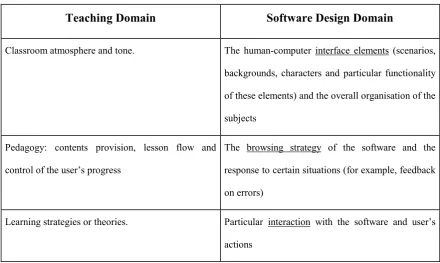
and the characteristics of the software design. In this model the 'classroom atmosphere' is embedded in the
human-computer interface scenarios and elements, the 'teaching strategy' in the design of the browsing
strategies of the software, and the 'learning strategy' in the particular forms of interaction with the
software. The model demonstrates significant links between the study of Pedagogy and the study of
Information Technology in Education and has implications for the relationship between these two areas of
research and consequently for teacher training. The model proposes a perspective on educational software
design that takes into consideration not only learning theories, but also teaching theories and practice.
Keywords: architectures for educational technology systems, human-computer interface, interactive learning environments, navigation, pedagogical issues.
1Instituto de Informática Educativa, Universidad de La Frontera, P.O. Box 380, Temuco, Chile [e-mail:
[email protected]Ph/Fx:[email protected]Ph/Fx: +56 45 325252]
Pedagogy Embedded in Educational Software Design
Report of a Case Study
J. Enrique Hinostroza3, Harvey Mellar4
INTRODUCTION
The design, use and evaluation of educational software is still an arena for debate and controversy, and as yet there are no clear design prescriptions that could ensure its actual being used nor its effectiveness (see Cuban, 1997; Johnson, Cox, & Watson, 1994; Lowther & Sullivan, 1994). We suggest that much of the reason for this continuing controversy is that little attention has so far been paid to a consideration of teachers' actual classroom practices. The design of educational software has been primarily focused on learning and has paid little attention to the teaching dimension, and as a result teachers have difficulty incorporating it into their practice. Software evaluation has paid little attention to this area, and has only recently moved to giving serious consideration to the teaching dimension (Wishart & Blease, 1999). Whilst it is true that teachers have sometimes been involved in the software development process, they have generally been asked to contribute to the learning and curriculum design issues, and the issues of actual classroom practice have been neglected.
To enhance our understanding of the classroom use of educational software, a study was carried out to investigate teachers‟ concepts and beliefs about educational software (Hinostroza, 1999). This study consisted of a case study of teachers involved in a
3Instituto de Informática Educativa, Universidad de La Frontera, P.O. Box 380, Temuco, Chile [e-mail:
[email protected]Ph/Fx: +56 45 325252]
4 Science and Technology, Institute of Education, University of London, 20 Bedford Way, London,
software design process. The focus of the study was not on the software itself, but on what the teachers said about it, that is the software design process was used as a means of knowledge elicitation. This paper describes the results of that study, and in particular it describes the teachers‟ model of educational software. This model does not necessarily correspond either to their „actions with‟ nor their „use of‟ existing educational software, and this key difference compared with other reports (Olson, 1988; Sandholtz, Ringstaff, & Dwyer, 1997; Schofield, 1995) make this study a useful source for comparison, and, in particular it enables us to contrast what is offered to teachers as „educational software‟ with what they believe it should be.
RESEARCH METHOD
Method
The research was conceived of as an instrumental case study (Stake, 1994) and the design processes were developed according to Yin (1994)‟s recommendations. The case was a process of educational software development in which two teachers (teacher M and teacher E), a software engineer, a psychologist and a graphic designer, were committed to developing a piece of educational software over a seven month period. The school these teachers worked in was an average city school in the south of Chile with many children from poor economic backgrounds. The school was equipped with a small number of computers via the Enlaces project (Hepp, 1998). The teachers participating in the study were both women; and at the time the study took place they had had some three years of experience in the use of computers in schools.
scenario that would ask them to rehearse either at higher level of difficulty or a different type of basic skill at similar level of difficulty (see Box 1 for an example).
Data Collection
During the development process, the team met 19 times to define and design the characteristics of the software. Each of these sessions was observed and recorded using a video camera and a sound recorder. The camera was installed in a fixed position during each meeting and the focus of the image was always on the teachers. This data was transcribed and then coded using systemic networks (Bliss & Ogborn, 1979) with aid of the software QSR NUD*IST.
Unit of Analysis
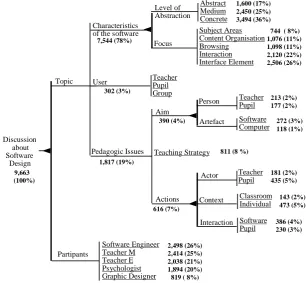
The unit of analysis was defined as a sequence of utterances made by members of the team in which they refer to one particular aspect of the software. Where they referred to two (or more) aspects simultaneously, these have been considered as two (or more) separate units. The unit was called „Discussion about Software Design‟ and was described through the systemic network shown in Figure 1. The two main attributes that characterised the unit of analysis are: the „Topic‟ discussed and the „Participants‟ in the discussion. The „Topic‟ of discussion was divided into three main subjects related to the software design. The first one was related to the dimensions of software engineering („Subject Areas‟, „Content Organisation‟, „Browsing‟, „Interaction‟ or „Interface Element‟); the second one was about the characteristics of the user („Teacher‟, „Pupil‟ or „Group‟); and the third one dealt with „Pedagogic Issues‟ that were related to software and/or computers („Aim‟, „Teaching Strategy‟ or „Actions‟).
Analysis
(i) Participation analysis, aimed at establishing individual participation profiles during the development process. This was based on the calculation of the frequency of units spoken by each member of the development team (obtained using the software QSR NUD*IST).
(ii) Sequence analysis, aimed at establishing the inter-relations among the different components of the software based on the analysis of the patterns of sequences of units in the data for the group and for each team member.
(iii) Contents analysis, aimed at looking for the meanings expressed by the teachers about the different dimensions of the piece of educational software.
These analyses were used in a complementary way, enabling the researcher to focus on relevant issues and to enable some triangulation of the implications drawn. The present paper concentrates on an analysis of what the teachers' said about the characteristics of the software designed.
RESULTS
Participation Analysis
The number and frequency distribution of units spoken and classified in the systemic network is presented in Figure 1.
INSERT FIGURE 1 ABOUT HERE
members of the group other than the graphic designer showed similar frequencies of participation, suggesting that no one perspective dominated the process. The apparent lower frequency of participitation of the graphic designer is because she was only present during the later sessions of the process. Analysis of the individual participation profiles suggested that the members of the team did make some use of specialist knowledge derived from their respective professional backgrounds. These differences were most marked in those sections of their discussion classified in the categories: „Browsing‟, „Interaction‟, „Aim‟ and „Actions‟ (and, in particular, the pupil‟s actions).
Sequence Analysis
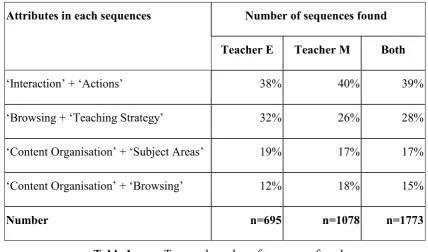
The sequence analysis found a large number of two unit sequences, and a smaller number of three unit sequences. Some of the most important two unit sequences for the teachers are presented in Table 1.
INSERT TABLE 1 ABOUT HERE
Table 1 shows that, for example, 38% of the two unit sequences spoken by Teacher E related to the design of the „Interaction‟ characteristics of the software right after or before speaking about the „Actions‟ that the teacher or pupil should perform (sequence „Interaction‟ + „Actions‟). The figure for Teacher M for the same sequence was 40%. The 'Sequence Analysis' gives us an insight into the topics that these teachers discussed in close proximity to each other during the development process and this enables us to define new categories that can be further explored through the content analysis.
Content Analysis
analysis provided a range of useful categories to describe the ideas developed by the teachers during the design process. However, rather than present them at this point, we have integrated the discussion of these categories, together with illustrative examples of the teachers' talk, in the next section where we try to show how the results of the three forms of analysis were brought together.
RELATING THE ANALYSES TO THE SOFTWARE DESIGN
We now turn to examining the characteristics of the software that the team designed, and relating these to the three forms of analysis described above. The focus of the analysis here is on what the teachers believed about educational software that lead them to design the software in the way that they did and thereby to come to understand what they saw as the important dimensions of educational software.
The results of the participation analysis provides a framework for understanding and relating the categories. The sequence analysis enables us to isolate the groupings of the categories that commonly occurred in the team's discussions, that is to identify the sets of issues that the teachers saw as related, and hence to give us a deeper understanding of the teachers' views of educational software. The content analysis enables us to deepen our understanding of the meaning of these categories. Three issues emerge:
• The pedagogy in the software. The teachers were concerned with how the sequencing of the lesson was controlled, that is, the way in which the software enabled the pupil to browse through the contents. This concern is seen in the two sequences „Browsing‟ + „Teaching Strategy‟ and „Content Organisation‟ + 'Browsing'. The participation analysis found that the teachers' profile for the category „Browsing‟ differed from that of the other participants in the design team, suggesting that they were making specific use of their professional knowledge in these interactions.
• The learning dimension in the software. The teachers were concerned about the way in which pupils would learn while using the software. This concern was seen in the content of the sequence 'Interactions' + 'Actions'. The participation analysis showed that Teacher E was very active in the category 'Interaction' and that both teachers did contribute more that the rest of the participants in the category 'Actions' (in particular in relation to the pupils‟ actions), again suggesting that that they were making specific use of professional knowledge in these interactions.
These three issues of the classroom atmosphere of the software, the pedagogy in the software, and learning dimension in the software show the links that these teachers constructed between their teaching strategies and the characteristics of the software designed. In the following sections we give additional support for our interpretations by relating our findings on these issues to the literature on pedagogy which demonstrates the relationship between the pedagogical concerns expressed by the case study teachers and those that have been found for teachers more generally.
The classroom atmosphere in the software
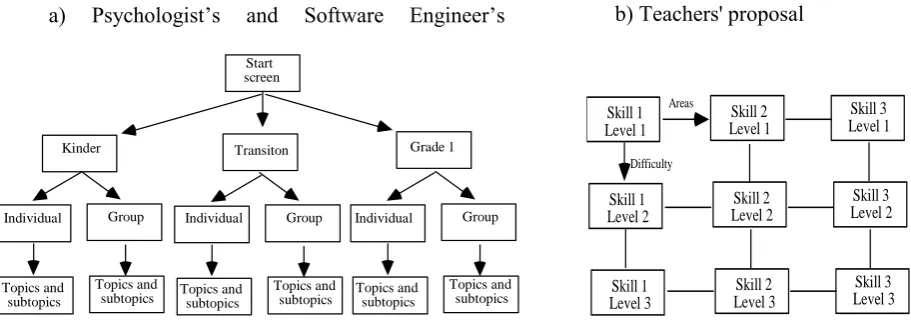
through the story following the instructions given by a character in the software. They divided the content into levels of difficulty based on the skills being supported. The resulting design was represented as a matrix in which the rows organised the progression of different levels of difficulty and the columns organised the different types of contents - see the right hand side of Figure 2. In this matrix, users could browse through the cells accordingly to their achievement and each possible path would constitute a coherent story for the pupil.
The scenario of the story
The use of a story to underpin the content of a lesson is a common teaching strategy, described in the literature as a way to „bring home‟ to the child the content of the curriculum (Woods & Jeffrey, 1996) and establish „common knowledge‟ (Edwards & Mercer, 1987). The following excerpt from their discussion shows how this strategy was first proposed:
TM: Hey, and what if we invent a story and the child develops basic skills through the narrative
of the story?
TM: For example, little Red Riding Hood, and there she goes [to visit her grandmother],
because almost all children know little Red Riding Hood, then he [the user] has to put
apples into the basket [of little Red Riding Hood], and she goes walking to her grand
mother’s house, and she goes into the house.
respect the only difference with the teachers‟ traditional practice is that the story would be told by the computer, and not by the teacher.
Box 1 shows some examples of the type of scenarios and interactions that the teachers designed. The teachers chose to create a „world‟ in which the user is immersed as a participant of the story, rather than to provide a model of the world that the user can manipulate as an external „controller‟ as would be the case in a simulation. In the former case users get cognitively involved in the story because of its motivation (as described by Lepper & Malone, 1987), whereas in the latter they are outside observers and have access to the world, and they manipulate the model but are not „inside‟ it.
The story was designed to take place in an environment familiar to the pupils (i.e. the south of Chile). During the design process the teachers laid stress on the idea that the scenarios should resemble the real social and geographical environment of the children, they rejected the idea of showing animals or landscapes from other countries (from Africa for example). We suggest that this emphasis on using known images and realistic situations reflects teachers‟ perceived need to place instruction within an „authentic‟ context that mirrored real-life problem-solving situations. The idea that the teacher should try to give pupils direct and concrete experiences that resemble real world situations is a common one (for example Edwards & Mercer, 1987 cite it as one of the characteristics of the 'progressive' teacher). The teachers here might even be described as trying to build a model of a situated cognition approach (Brown, Collins, & Duguid, 1989) into the software.
The narrative of the story
their performance, and yet each of these paths would constitute a coherent story. This organisation of the contents was discussed at length during the design process and the teachers emphasised that the contents should be organised as a story with multiple paths, as opposed to more curriculum oriented organisations that were proposed by the psychologist and the software engineer. Figure 2 shows both organisations.
In Figure 2 (a) the content is in the leaves of the tree (Topics and subtopics) and the user follows the path to get to it, and in Figure 2 (b) the content is in each cell of the matrix and the user browses through the matrix‟s cells.
INSERT FIGURE 2 ABOUT HERE
The possibility that technology gives to individualise instruction is widely commented upon, what is interesting here is that the teachers wished to organise the software in such a way that each pupil would be able to finish with a coherent story, and in doing this, these teachers were motivated by concerns about the time available for the lesson and the pupils‟ sense of achievement (similar to the concerns of primary school teachers described by Woods & Jeffrey, 1996).
The narrative of the software was delegated to a special character (the story teller) and it was decided that this character should enter into dialogue with the pupils, and thus create a sense of involvement of the user in the situation (similar teaching strategies adopted by primary teachers are described by Woods & Jeffrey, 1996). This character was also designed to provoke sympathy in the user, looking for an affective relation (this is also a strategy that teachers use to relate to their pupils, see Cooper & McIntyre, 1995). In this section Teacher E describes the need to have a narrator:
TE: But, I thought that we must have a narrator in the software. A fixed narrator in charge of
One way to interpret this design decision is that the teachers wished to replicate the „classroom atmosphere‟ in the software, transferring their role of „story tellers‟ to the narrator character in the software. They delegated the behaviours and actions necessary for a learning-teaching exchange to take place, thus delegating to the software what Leinhardt, Weidman, & Hammond (1986) call the 'support routines'.
The pedagogy in the software
As described earlier, the sequence analysis showed that while designing the software these teachers consistently related their teaching strategies to the design of the browsing characteristics of the software. Further, the participation analysis suggested that the teachers were using their professional background during discussions classified as „Browsing‟. Together these analyses would seem to indicate that the browsing characteristics of the software took on a special importance for these teachers as teachers.
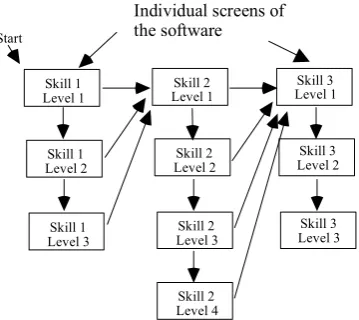
In the contents analysis it was found that during the design of the browsing strategy (navigation) the teachers had a serious disagreement with the other members of the development team. After several discussions, the teachers‟ model of browsing was accepted, and the final browsing strategy is shown in figure 3.
INSERT FIGURE 3 ABOUT HERE
In designing the browsing structure of the software the teachers saw themselves as designing the sequence of contents that each user would see. They were planning a teaching sequence, and determining the circumstances under which certain contents should be taught, as Teacher M explains:
It was not simply a matter of organising the contents and enabling the users to be able review all of it. Rather, they designed the browsing strategy taking into account that the user was learning, for the teachers the browsing strategy was closely associated with their teaching strategies.
The resulting design can be understood in terms of reports about the way in which teachers normally organise their teaching. For example, Hammersley (1990) writes:
The lesson as presented by the teacher is pitched at a certain level of 'difficulty' according to the co-ordinate position of the class in relation to age and ability.
(Hammersley, 1990; p. 47) The software was designed so as to have the possibility to be „pitched‟ at several levels of difficulty (at each cell of the matrix) and these levels of difficulty would be accessed by the users according to their performance. The purpose of a teacher pitching a lesson at a certain level is decribed by Hammersley (1990) in this way:
This pre-setting is designed not only to ensure that pupils are taught something „new‟, that they „keep moving‟, but also that they have the resources to understand what the teacher is to teach.
(Hammersley, 1990; p. 47) We argue that these teachers had similar objectives in designing the browsing strategy in the software. However they still had to ensure that the pupils would actually be able to move through the browsing structure. Therefore they had to design the way in which the software should „guide‟ the pupils through it. In Hammersley‟s words:
(Hammersley, 1990; p. 47) Two issues (both classified under 'Teaching Strategy') were discussed by the teachers relating to this need to provide guidance to the pupils in browsing this structure:
• One issue was how the software would check on the pupil's understanding and the nature of any feedback. The teachers were particularly concerned about the software‟s response to a user's wrong answer, and they discussed at length whether the computer should teach the users the right answer or give them clues and ask again.
• Another issue was the control of the development of the „lesson‟, that is the conditions for the user‟s progress through the software, and in particular the move to higher levels of difficulty.
These additional teaching strategies complement the design of the browsing strategy of the software.
It would seem that the teachers used the browsing strategy in order to implement what Leinhardt et al. (1986) call the 'exchange routines', that is, the way teachers enter into dialogue with the pupils, the way teachers pose questions to the students and give feedback to them.
Cooper & McIntyre (1995) in discussing the integration of teachers' knowledge of their pupils with their other knowledge (for example knowledge of the subject) define a continuum of teaching strategies with interactive teaching at one end of the spectrum
and reactive teaching at the other. In interactive teaching the teacher puts most emphasis
design here is at the interactive teaching end of the spectrum, and the pupils have little or no control over the content of the learning.
The interesting finding here is not that these teachers designed the software in order to implement these dimensions of their teaching, but the fact that these dimensions of teaching were considered by them to be part of the browsing characteristics of the software. That is, they embedded these particular teaching dimensions into the way in which the software guides the user through the contents.
The learning dimension in the software
In the sequence analysis the categories „Interaction‟ and „Actions‟ seemed to be related, as units classified in these categories frequently occurred consecutively in the data. In these units the actions that were being designed were mostly those of the pupils interacting with the computer. For one of the teachers and the software engineer the two categories of 'Interaction' and 'Action' were also closely associated with the category „Subject Areas‟ which would suggest the design of the interactions and of the actions of the pupils was seen as closely related to a consideration of the contents to be learned. So, it would seem that in these units the teachers were designing the way in which the contents should be presented to the user.
The teachers argued that learning by doing was very important for them, as Teacher M said:
TM: It is the contrary, we think that now that learning by doing is very important, and that the
child is constructor of his own learning and we are guides in this.
They argued that the children would engage in a playful interaction, without realising that they were learning. In fact, Teacher M argued that:
TM: Clear, it [the software] is for rehearsal and that he practices them [basic skills], I think that
the goal is that he plays with these things that at the end they have no idea for what they
are [doing this], because, for the children these are games only,
as we have done throughout this paper the characteristics of progressive teaching used If we accept the characterisation of the progressive teacher given by Edwards & Mercer, (1987), then we can see that these teachers were attempting to implemented in the software many of the features that would be associated with a progressive rather than a traditional approach to teaching.
The teachers tried to model the software on their perceptions of their own practice. The fact that they tried to apply these principles to the design of the software (with greater or lesser success) implies first that they believed that the software should teach following these principles, and second, that in fact learning could take place during this interaction.
IMPLICATIONS
INSERT TABLE 2 ABOUT HERE
This model of educational software is grounded in two sources of evidence, first, the data collected in this research and second the evidence reported in studies of teachers' practices in the classroom, (i.e. their strategies, routines, roles and beliefs). This latter source of evidence expands the theoretical framework of the study, addressing not only the area of information technology in education, but also the area of pedagogy. This model of educational software constitutes an interesting starting point for further research looking at the design, development and evaluation of educational software. Clearly all that this case study enables us to do is to propose this model tentatively as a model requiring much wider verification. However were this model to be found to have a wider range of validity then it would have implications in a number of areas.
The first implication is that these three dimensions need to be taken into consideration while designing and implementing educational software. These findings open up new areas of research that could help to identify further dimensions of pedagogy that should be considered, and provide a starting point for thinking about how to incorporate such dimensions into educational software. As a case study, it provides enough evidence to justify and promote further research in this area that could help identify other links between teachers' roles and actions in the classroom and the design of educational software.
The combination of the two areas of educational software and pedagogy gives rise to a third set of implications about the need for cross-referencing between these two areas and in particular about the need for relating these within teacher training programs. McDougall & Squires (1997) propose that the use of their Perspectives Interaction Paradigm (Squires & McDougall, 1994) “can offer assistance in the structuring of evaluative thinking about content of IT related teacher professional development programmes” (p. 115). In a similar way we would suggest that the model presented here could serve as a new perspective of analysis that could usefully be taught and discussed during teacher training programs. This perspective would consider the relation of computers and educational software to the practice of teaching from theoretical and empirical perspectives.
Whilst accepting the impossibility of generalising from a small case study of this kind, we do believe that the present work has given rise to a significant number of research k[questions which we have outlined above, and which merit further attention.
ACKNOWLEDGEMENTS
This work has been carried out thanks to the support of Fondecyt, project number 1960854, the British Council, through the H. E. L. Project 'Acottel', the Alfa project „The Educational Potential of Advanced Technologies with Mathematics, Engineering and Science‟ and of the Chilean Ministry of Education through the MECE programme's Enlaces Project.
REFERENCES
Bliss, J., & Ogborn, J. (1979). The analysis of qualitative data. European Journal of
Brown, J. S., Collins, A., & Duguid, P. (1989). Situated cognition and the culture of learning. Educational Researcher, (January-February), 32-42.
Cooper, P., & McIntyre, D. (1995). The crafts of the classroom: Teachers' and students' accounts of the knowledge underpinning effective teaching and learning in classrooms.
Research Papers in Education, 10(2), 181-216.
Cuban, L. (1997). Foreword. In H. J. Sandholtz, C. Ringstaff, & D. C. Dwyer (Eds.),
Teaching with technology: Creating student centered classrooms. New York: Teachers
College Press.
Edwards, D., & Mercer, N. (1987). Common knowledge: Development of
understanding in the classroom. London: Routledge.
Gall, M. D., & Artero-Boname, M. T. (1995). Questioning. In L. W. Anderson (Ed.),
International encyclopedia of teaching and teacher education . Oxford: Pergamon.
Hammersley, M. (1990). Classroom ethnography: empirical and methodological
essays. Philadelphia: Open University Press - Milton Keynes.
Hepp, P. (1998). Chilean experiences in computer education systems. In C. de Moura Castro (Ed.), Education in the Information Age (pp. 116-130). New York: Inter-American Development Bank.
Hinostroza, J. E. (1999). Teachers' concepts and beliefs about educational software: A
case study of teachers within a software development process. Unpublished PhD,
University of London, London.
Johnson, D. C., Cox, M. J., & Watson, D. M. (1994). Evaluating the impact of IT on pupils' achievements. Journal of Computer Assisted Learning, (10), 138-156.
Lepper, M. R., & Malone, T. W. (1987). Intrinsic motivation and instructional effectiveness in computer-based education. In R. E. Snow & M. J. Farr (Eds.),
Aptitude, learning and instruction. Volume 3: Conative and affective process analyses
(Vol. 3, pp. 255-296). Hillsdale: Erlbaum.
Lowther, D., & Sullivan, H. J. (1994). Teacher and technologist believes about educational technology. Educational Technology Research and Development, 42(4), 73-87.
McDougall, A., & Squires, D. (1997). A framework for reviewing teachers professional development programmes in information technology. Journal of
Information Technology for Teacher Education, 6(2), 115-126.
Olson, J. (1988). Schoolworlds/microworlds: Computers and the culture of the
classroom. Oxford: Pergamon Press.
Sandholtz, H. J., Ringstaff, C., & Dwyer, D. C. (1997). Teaching with technology:
Creating student centered classrooms. New York: Teachers College Press.
Schofield, J. W. (1995). Computers and classroom culture. New York: Cambridge University Press.
Squires, D., & McDougall, A. (1994). Choosing and using educational software: A
teachers' guide. London: The Falmer Press.
Stake, R. (1994). Case studies. In N. Denzin & Y. Lincoln (Eds.), Handbook of
qualitative research (pp. 236-247). London: Sage.
Wishart, J., & Blease, D. (1999). Theories underlying perceived changes in teaching and learning after installing a computer network in a secondary school. British Journal
Woods, P., & Jeffrey, B. (1996). Teachable moments: the art of teaching in primary
classroom. Buckingham: Open University Press.
Box 1 Example scenarios from the software
Focus Level of Abstraction Abstract Medium Concrete Characteristics
of the software
User TeacherPupil
Group Subject Areas Content Organisation Browsing Interaction Interface Element Teacher Pupil Actor Context Classroom Individual Actions Teaching Strategy Aim Person Teacher Pupil Artefact Software Computer Discussion about Software Design Pedagogic Issues Interaction Software Pupil Partipants Topic Software Engineer Teacher M Teacher E Psychologist Graphic Designer 7,544 (78%)
744 ( 8%) 1,076 (11%) 1,098 (11%) 2,120 (22%) 2,506 (26%) 1,600 (17%) 2,450 (25%) 3,494 (36%) 302 (3%) 213 (2%) 177 (2%) 272 (3%) 118 (1%) 390 (4%)
811 (8 %)
181 (2%) 435 (5%) 143 (2%) 473 (5%) 386 (4%) 230 (3%) 616 (7%) 1,817 (19%) 9,663 (100%) 2,498 (26%) 2,414 (25%) 2,038 (21%) 1,894 (20%) 819 ( 8%)
Kinder Transiton Grade 1 Individual Group Topics and subtopics Start screen Topics and subtopics Group Topics and subtopics Topics and subtopics Group Topics and subtopics Topics and subtopics Individual Individual Skill 1 Level 1 Skill 3 Level 1 Skill 2 Level 1 Skill 1 Level 2 Skill 3 Level 2 Skill 2 Level 2 Skill 1 Level 3 Skill 3 Level 3 Skill 2 Level 3 Areas Difficulty
Figure 2. Two proposals for the organisation of the content
a) Psychologist‟s and Software Engineer‟s
proposal
Skill 1 Level 1
Skill 3 Level 1 Skill 2
Level 1
Skill 1 Level 2
Skill 3 Level 2 Skill 2
Level 2
Skill 1 Level 3
Skill 3 Level 3 Skill 2
Level 3
Individual screens of the software
Start
Skill 2 Level 4
Attributes in each sequences Number of sequences found
Teacher E Teacher M Both
„Interaction‟ + „Actions‟ 38% 40% 39%
„Browsing + „Teaching Strategy‟ 32% 26% 28%
„Content Organisation‟ + „Subject Areas‟ 19% 17% 17%
„Content Organisation‟ + „Browsing‟ 12% 18% 15%
Number n=695 n=1078 n=1773
Teaching Domain Software Design Domain
Classroom atmosphere and tone. The human-computer interface elements (scenarios,
backgrounds, characters and particular functionality
of these elements) and the overall organisation of the
subjects
Pedagogy: contents provision, lesson flow and
control of the user‟s progress
The browsing strategy of the software and the
response to certain situations (for example, feedback
on errors)
Learning strategies or theories. Particular interaction with the software and user‟s
actions