Principles in Patterns (PiP): Evaluation
WP7:37 Evaluation of systems pilot
Phase 1: Heuristic Evaluation of Course and Class
Approval Online Pilot (C-CAP)
Creator: George Macgregor
Contents
Figures ... 3
Tables ... 4
1. Introduction ... 5
2. Methodology ... 6
2.1 Heuristics ... 6
2.2 Severity ratings... 7
2.3 Evaluative approach ... 7
3. Findings ... 9
3.1 Violation 6: Guidance notes require further clarification and error prevention ... 9
3.2 Violation 7: Rich text editing box ... 10
3.3 Violation 8: Class evaluation efficiency possibility ... 11
3.4 Violation 9: Broken back button ... 12
3.5 Violation 10: Help implementation... 13
3.6 Violation 14: Unable to perform action at 2.2 and no insert at 5.3 ... 13
3.7 Violation 16: Timetable ambiguity and recall ... 14
3.8 Violation 18: Administration page displayed after log-in ... 15
3.9 Violation 20: Drop down menu population at Class Code Request ... 17
3.10 Violation 24: Feedback error ... 18
3.11 Violation 25: Recall and flexibility in feedback creation ... 19
4. Conclusion ... 21
5. Appendix A: Heuristic violations table ... 22
6. Appendix B: Minor heuristic violation screen grabs ... 25
6.1 Violation 2: Guidance note about navigation required ... 25
6.2 Violation 3: Class creation terminology ... 26
6.3 Violation 4: Difficulties distinguishing between guidance notes and inserted text ... 27
6.4 Violation 5: “Activity duration” only permits integers ... 28
6.5 Violations 11 & 12: Resource look-up / bibliographic data elements ... 29
6.6 Violation 15: Sub-class or super-class drop down menu. ... 30
Creator: George Macgregor
Figures
Figure 1: Severity estimate table, as proposed by Nielsen [1]. ... 7
Figure 2: Opportunities for error prevention within Section 4.3 constructive alignment. ... 10
Figure 3: Opportunities for error prevention within Section 4.3 assessment weightings and calendar. ... 10
Figure 4: Rich text box obscuring guidance text. ... 11
Figure 5: Greater use of system specific default values to improve C-CAP adherence to heuristic #7. ... 11
Figure 6: C-CAP navigation provides good overview of system status but breaks the back button. ... 12
Figure 7: User cannot perform action at 2.2 in C-CAP. ... 14
Figure 8: User cannot insert text at 5.3 in C-CAP. ... 14
Figure 9: The Timetable section of the C-CAP system demands high levels of recall. ... 14
Figure 10: Wireframe of suggested adjustments to Timetable section of C-CAP system. ... 15
Figure 11: Administration presented to user after log-in. ... 16
Figure 12: Core information page as alternative homepage. ... 17
Figure 13: "Role" drop down menu does not populate; no way of indicating staff responsibility. ... 17
Figure 14: "Good error message" and resolution to multiple box submission required. ... 18
Figure 15: C-CAP system enables specific feedback to be delivered. ... 19
Figure 16: C-CAP system should embed feedback delivery process. ... 20
Figure 17: Guidance note on how to navigate and complete module form required. ... 25
Figure 18: Terminology on class creation form could be more accessible. ... 26
Figure 19: Guidance notes and inserted text can merge making reading/scanning challenging. ... 27
Figure 20: Activity duration in section 4.1 only permits integers. ... 28
Figure 21: “Recommended reading and resources” section of the C-CAP system could include separate boxes to capture bibliographic data, thus aiding the user in interpreting the information requirements. Options also exist to embed a look-up search using a variety of digital library services. ... 29
Creator: George Macgregor
Tables
Table 1: Nielsen's heuristic evaluation severity rating scale. ... 7
Table 2: Details of heuristic violation 6. ... 9
Table 3: Details of heuristic violation 7. ... 10
Table 4: Details of heuristic violation 8. ... 11
Table 5: Details of heuristic violation 9. ... 12
Table 6: Details of heuristic violation 10. ... 13
Table 7: Details of heuristic violation 14. ... 13
Table 8: Details of heuristic violation 16. ... 14
Table 9: Details of heuristic violation 18. ... 15
Table 10: Details of heuristic violation 20. ... 17
Table 11: Details of heuristic violation 24. ... 18
Table 12: Details of heuristic violation 25. ... 19
Table 13: Details of heuristic violation 2. ... 25
Table 14: Details of heuristic violation 3. ... 26
Table 15: Details of heuristic violation 4. ... 27
Table 16: Details of heuristic violation 5. ... 28
Table 17: Details of heuristic violations 11 and 12. ... 29
Creator: George Macgregor
1. Introduction
The PiP Evaluation Plan [1] documents four distinct evaluative strands, the first of which entails an evaluation of the PiP system pilot (WP7:37). Phase 1 of this evaluative strand focuses on the heuristic evaluation of the PiP Course and Class Approval Online Pilot system (C-CAP).
Heuristic evaluation is an established usability inspection and testing technique and is most commonly deployed in Human-Computer Interaction (HCI) research, e.g. to test user interface designs, technology systems testing, etc. [2]. Heuristic evaluation techniques enable a suitably trained evaluator(s) to examine the object of study (e.g. interface or system) and assess its compliance with recognised heuristic evaluation principles, thereby testing its usability. Results of the heuristic evaluation are then used to inform system modifications. The approach is favoured in incremental design methodologies as an informal and relatively rapid means of engaging in usability engineering. By evaluating such heuristics early in the development or testing cycle those heuristics that are violated can be more easily addressed, thus reducing usability error detection at a later date [3].
The success of heuristic evaluation in detecting ‘major’ and ‘minor’ usability problems is well documented (e.g. [4–9]; [10]), but its principal limitation is its inability to capture data on all possible usability problems [4]. For this reason heuristic evaluation is often used as a precursor to user testing, e.g. so that user testing focuses on deeper system issues rather than on those that can easily be debugged. Heuristic evaluation nevertheless remains an important usability inspection technique and research continues to demonstrate its success in detecting usability problems which would otherwise evade detection in user testing sessions [11], [12]. For this reason experts maintain that heuristic evaluation should be used to complement user testing [4], [12]. This is reflected in the PiP Evaluation Plan, which proposes protocol analysis, stimulated recall and pre- and post-test questionnaire instruments to comprise user testing (see WP7:37 phases 2, 3 and 4 of PiP Evaluation Plan).
Creator: George Macgregor
2. Methodology
2.1 Heuristics
The aim of this phase of the evaluation is to identify significant usability problems prior to user testing (via protocol analysis, stimulated recall and questionnaire instruments) and to measure the extent to which the pilot system promotes established heuristic factors. Neilsen and Molich [8] developed nine heuristics which have formed the basis of most subsequent heuristic evaluation approaches. These nine heuristics were later revised and extended [2], [4], [13–17] and demonstrate overlap with Schneiderman et al.’s [18] Eight Golden Rules.
Nielsen’s [14] ten usability heuristics remain among the most widely used in usability engineering and these were used for the present evaluation. The ten heuristics are as follows:
1. Visibility of system status: This heuristic notes the importance of keeping users informed of the system status. This involves providing the user with feedback about their interaction with the system and how the system is interpreting user input. Such feedback may also be positive [2].
2. Match between system and the real world: In essence, this heuristic states that the system should “speak the users’ language”. Terminology, language and communication approaches used in system interfaces should not be systems-orientated but rather user-orientated. User-orientated communication would include vocabulary and concepts familiar to the target user group, as well as making use of real-world concepts, mappings or metaphors. 3. User control and freedom: Providing users with a degree of control and freedom is an
important usability characteristic and is crucial to winning user acceptance. Users often select system functions by accident and therefore need “clearly marked exists” so that they can leave an unwanted state without needing to engage in an extended systems dialogue. Functions such as “undo” and “redo” are cited as the most common example of adhering to this heuristic.
4. Consistency and standards: This heuristic states that users will feel more confident using a system if it behaves in a similar way to systems they have previously encountered. Proficiency with the system is largely dependent on users’ ability to generalise about its behaviour thus stimulating exploratory learning strategies in users, e.g. to explore or understand unfamiliar parts of the system [19].
5. Error prevention: Although system errors may occur and “good error feedback” might be
delivered (see heuristic 9), the ultimate goal of any system design is the prevention of errors in the first place. Error prone conditions require careful design to avoid exposing the user to system errors. This may entail confirmation menus before the user initiates critical system processes, or the use of dropdown menus with predetermined data values to avoid erroneous data entry by the user [2].
6. Recognition rather than recall: System design should minimise users’ memory load. This
heuristic therefore dictates that users should not have to remember information from one part of the system to another. To do so can increase cognitive load and makes the system more difficult to use. Similarly, objects, actions and options should be easily locatable on the system interface [14].
7. Flexibility and efficiency of use: It should be possible for a novice user to use a usable system / interface with minimal knowledge or training, at least at a basic level. However, it should also be possible for experienced users to utilise “accelerators”, i.e. system functionality that allows the expert user shortcuts, to automate frequent actions or to achieve other efficiencies [2].
Creator: George Macgregor
information that is rarely used or irrelevant. To do so merely diminishes the visibility of information or functionality that is important and transfers further cognitive load to the user. 9. Help users recognise, diagnose and recover from errors: Total error prevention (heuristic
5) is rarely possible. It is therefore imperative that where errors occur users are provided with “good error messages”. According to Nielsen [2], errors are critical for usability because, a) they present a situation in which the user may be unable to progress with the system, and b) they present opportunities for helping the user learn more about the system and its behaviour. Error messages should therefore be in plain language, assist the user in diagnosing and then resolving the problem.
10. Help and documentation: Help and documentation often has to be made available so that users can learn about more advanced aspects of the system and seek assistance when problems arise. This heuristic dictates that such help or documentation is easy to locate and be focussed on specific tasks [14].
[image:7.595.144.453.490.603.2]2.2 Severity ratings
Table 1: Nielsen's heuristic evaluation severity rating scale.
Severity rating Severity label Description
0 No problem This is not a usability problem at all
1 Cosmetic problem only Problem need not be fixed unless extra time is available on the project 2 Minor usability problem Fixing this problem should be given a low priority
3 Major usability problem A problem which is important to fix, and so should be given a high priority 4 Usability catastrophe A usability problem which is imperative to fix before system can be released
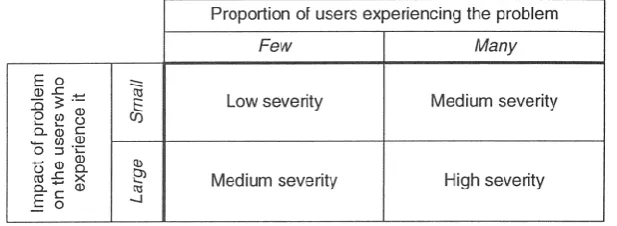
Severity ratings have been developed to improve the specificity of heuristic evaluations [16]. These are clearly subjective measurements but they enable subsequent usability improvements to be prioritised and, where there are multiple evaluators, for mean measurements to be used to objectivise results. The severity ratings used in this heuristic evaluation are presented in Table 1. Ratings are applied by considering the various “dimensions” of usability (Figure 1) and estimating the proportion of users that can be expected to experience the usability problem and the extent to which these particular users are affected by it.
Figure 1: Severity estimate table, as proposed by Nielsen [2].
2.3 Evaluative approach
The heuristics described in 3.1 were used to evaluate the usability of the PiP C-CAP system. To better reflect actual use of the system, the evaluator tested each heuristic by replicating a typical class design process. Heuristic violations were recorded in an appropriately structured table (Appendix A) and severity ratings assigned. Where appropriate screen grabs were taken to aid the interpretation of any findings.
Creator: George Macgregor
usability problems are identified. It also makes the consideration of severity ratings far more objective. Since only one evaluator was available for the present evaluation, the evaluator replicated the typical class design and approval process on three separate occasions (three passes). Separate severity ratings were assigned on each pass for each heuristic violation, thus enabling a mean severity rating to be derived. Not all the same heuristic violations were found during every pass, although this happened infrequently. In these circumstances the mean severity ratings were simply calculated using ratings from the other passes.
Creator: George Macgregor
3. Findings
The C-CAP system performed generally well under heuristic evaluation. The system demonstrated good use of short cuts and accelerators. User control and freedom was generally very good, partly owing to the provision of familiar rich-text editors enabling incorrect actions to be “undone”, and a minimalist and uncluttered interface design also ensured essential page elements were clearly visible. The use of rich-text editors also provides a degree of consistency and demonstrates adherence to the de facto standard of the word processing dashboard.
A total of 27 heuristic violations were nevertheless found during the evaluation of the C-CAP system. Full details of these violations and their severity can be found in Appendix A. Of the violations found, 67% (n = 18) were classified at a mean severity rating of ≤ 2.67, and of these 11% (n = 3) were classified at severity rating 1 (Cosmetic problem only). Only 33% (n = 9) were classified at a mean severity rating ≥ 3.
The most problematic heuristic violations are described in more detail in the following sections, along with screen grabs and proposed solutions. These violations appear in order of their discovery (i.e. chronological). The remaining violations will be discussed and prioritised in consultation with the PiP technical team. Illustrative screen grabs for the remaining violations are provided in Appendix B.
Note that there are some violations that were classified at severity rating 4 and - despite their severity status - were not considered “problematic” because they could be easily addressed or resolved. Such violations are therefore listed in Appendix A and are not discussed in the following sections.
[image:9.595.73.527.426.552.2]3.1 Violation 6: Guidance notes require further clarification and error prevention
Table 2: Details of heuristic violation 6.
# Heuristics
violated Issue description (brief)
Severity - pass 1
Severity - pass 2
Severity
- pass 3 M SD
6 #2, #5
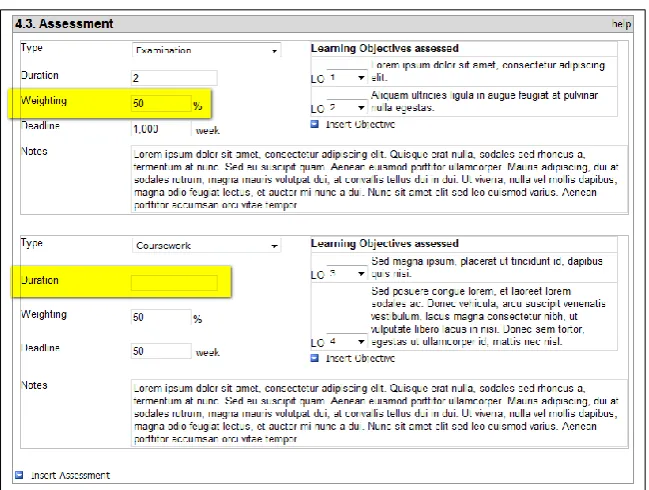
Guidance notes require further clarification and in some boxes would benefit from some guidance notes, i.e. 4.3 Assessment - constructive alignment? This is partly attributable to current lack of active help links.
Error prevention possible here. Form should not proceed until weighting adds to 100% / constructive alignment has been met.
Is "duration" applicable for a piece of coursework?
2 3 3 2.67 0.58
There are several points during C-CAP system interaction where the user would benefit from further guidance on what is expected of them. Several form boxes request information using system specific or pedagogical orientated language. These information requests are not accompanied by further guidance or description and therefore perform poorly on heuristic #2. An example of this pertains to section 4.3 (Assessment). Theoretically, detailed help should be available to assist curriculum designers; but even so a brief guidance statement at the top of the form box would assist most pedagogically minded users in interpreting the system requirements without needing to refer to help or further documentation.
Creator: George Macgregor
[image:10.595.122.473.107.245.2]managers and academic committees for revision. Figure 3 also illustrates some of the heuristic #2 issues, e.g. can a coursework have a specified duration? If so, what is it?
Figure 2: Opportunities for error prevention within Section 4.3 constructive alignment.
Proposed solution: Insert suitable guidance statements at top of form boxes is assist users in interpreting system requirements.
Proposed solution: Prevent wrong or invalid inputs, and/or prevent invalid actions.
[image:10.595.136.461.352.597.2](Note: To ensure curriculum designers provide sufficient detail about the nature of their assessment tasks, it is proposed that the label of the “Notes” box be changed to “Assessment description”.)
Figure 3: Opportunities for error prevention within Section 4.3 assessment weightings and calendar.
3.2 Violation 7: Rich text editing box
Table 3: Details of heuristic violation 7.
# Heuristics
violated Issue description (brief)
Severity - pass 1
Severity - pass 2
Severity
- pass 3 M SD
7 6 Rich text editing box can obscure form guidance notes. 3 3 3 3.00 0.00
[image:10.595.68.528.673.716.2]Creator: George Macgregor
[image:11.595.129.462.161.303.2]formatting functionality and the ability to “undo” unwanted actions. Such an adherence to heuristics #3 and #4 is positive; however, it is not uncommon for the rich-text editing box to obscure important form guidance notes, thus demanding the user to recall the guidance throughout text entry (Figure 4), or click away periodically, thus violating heuristic #6. This was found to be a major usability problem in each of the three passes since – as per Nielsen’s [2] severity estimate table - although it only appears to constitute a minor usability issue it is likely to affect many users.
Figure 4: Rich text box obscuring guidance text.
Proposed solution: Increase space between guidance notes and top edge of form box, or reposition guidance text to avoid obscuration.
[image:11.595.73.525.406.464.2]3.3 Violation 8: Class evaluation efficiency possibility
Table 4: Details of heuristic violation 8.
# Heuristics
violated Issue description (brief)
Severity - pass 1
Severity - pass 2
Severity
- pass 3 M SD
8 7
Drop down menu / check box possibility to aid efficient use. Finite forms of class evaluation possible; "other and details" option for evaluation methods considered to be non-standard.
- 2 3 2.50 0.71
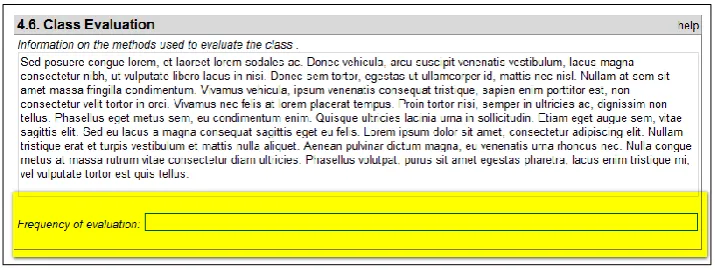
Most classes (modules) will tend to be evaluated using a limited number of evaluation tools. For example, Butcher et al. [21] suggest that evaluation is likely to be either formative and/or summative and that the list of principal evaluation methods is likely to include self-evaluation (i.e. reflective practice resulting in improvements to future delivery), student feedback gathered via simple questionnaire instruments, and peer feedback (e.g. examination boards, examiners’ report, accreditation panels, cohort results, etc.). Similarly, the frequency of evaluation is likely to occur at specific points during module delivery (Figure 5).
Greater use of system specific default values should therefore be used in Section 4.6 of the C-CAP system to promote efficiency in use (heuristic #7), with “other” available for those who intend to deploy non-standard techniques.
[image:11.595.119.477.628.763.2]Creator: George Macgregor
Proposed solution: Default values should be used in Section 4.6 of the C-CAP system to promote efficiency in use (e.g. drop down or check box) with ability to indicate the frequency with each evaluation technique(s) will be administered.
[image:12.595.69.529.178.254.2]3.4 Violation 9: Broken back button
Table 5: Details of heuristic violation 9.
# Heuristics
violated Issue description (brief)
Severity - pass 1
Severity - pass 2
Severity
- pass 3 M SD
9 3, 4
Broken back button. User information required to warn user. Include back buttons at top as well as bottom of interface (e.g. feedback timetable page).
This is an InfoPath specific issue; solution should therefore seek to mitigate lack of back button.
3 4 4 3.67 0.58
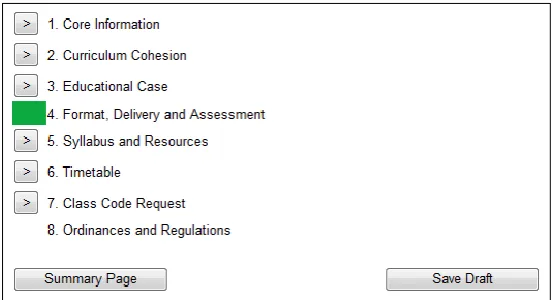
The “back button” is a standard browser feature that allows users to revisit recently viewed pages sequentially, usually in the reverse order of page visits. Nielsen and Loranger [17] note the importance of the back button in user browsing behaviour and users’ expectation that the back button can undo or alter their actions (i.e. that users have access to “clearly marked exits”). Such is the importance of the back button in user browsing behaviour that research has often explored ways of improving its functionality (e.g. [22], [23]).
Owing to the technical platform of the C-CAP system (InfoPath), the back button is broken making backwards navigation of the system counterintuitive at times. Alternative back buttons are occasionally made available in the interface but these are often not visible, either because they feature at the bottom of a page or at the top. The primarily means of form-to-form navigation entails the use of the form navigation buttons situated at the bottom of the form (Figure 6). These provide a useful overview of the system status but are again often not visible owing to their location at the bottom of the interface.
Figure 6: C-CAP navigation provides good overview of system status but breaks the back button.
[image:12.595.159.437.458.608.2]Creator: George Macgregor
[image:13.595.69.527.120.208.2]3.5 Violation 10: Help implementation
Table 6: Details of heuristic violation 10.
# Heuristics
violated Issue description (brief)
Severity - pass 1
Severity - pass 2
Severity
- pass 3 M SD
10 10
Few of the “help” links are functional. This is a known issue; but needs to be available to aid user understanding. Links to documentation also needed to aid user understanding information requirements. Particular issue in assessment, understanding what particular teaching modes/labels are, "principles of assessment feedback", etc.
3 2 2 2.33 0.58
This violation reveals overlap with violation 5. Most help links were disabled during the C-CAP heuristic evaluation and were therefore a known issue. The PiP team has been awaiting help page information from Centre for Academic Practice & Learning Enhancement (CAPLE) on matters pertaining to pedagogy but this has not been forthcoming. Alternative help sources are currently being devised as a substitute.
It has been noted that it should be possible for a user to use the majority of the most important system features without referring to further help or documentation [2]. This is not always possible for more complicated systems. It is clear that guidance is required for those users who are uninformed about general curriculum design and pedagogical issues, as per violation 5 (Section 4.1), and there exists an opportunity to create brief screencast tutorial videos which could also be made available. However, the absence of help is clearly an issue at specific points in the C-CAP system, particularly those parts that demand pedagogical information from the user. Section 4 of C-CAP (Format, Delivery and Assessment) demands detail on how University of Strathclyde’s recognised principles of assessment and feedback will be adhered to. Further assistance is also required for those users unfamiliar with the need for constructive alignment in curriculum design and the need to promote learning activities that promote student learning [27].
It is important for lecturers to consider their assessment strategy during the curriculum design process as it represents a key “teachable moment” and will define students’ curriculum and, ergo, their learning [28]. The importance of this phase in the design process suggests that the C-CAP system has to ensure user focused assistance is available.
Proposed solution: Ensure all help links are active prior to user testing and ensure user focused pedagogical assistance is available for Section 4 of C-CAP.
3.6 Violation 14: Unable to perform action at 2.2 and no insert at 5.3
Table 7: Details of heuristic violation 14.
# Heuristics
violated Issue description (brief)
Severity - pass 1
Severity - pass 2
Severity
- pass 3 M SD
14 5
Placements, case studies, field work box (section 5.3) cannot insert text.
New Class (section 2.2) cannot accept text either.
4 4 4 4.00 0.00
C-CAP system errors were found in sections 2.2 and 5.3 of the forms whereby the user is unable to insert text or perform the required actions. This occurred during each pass and did not appear to constitute an intermittent technical issue.
[image:13.595.72.528.619.678.2]Creator: George Macgregor
Figure 7: User cannot perform action at 2.2 in C-CAP.
Figure 8: User cannot insert text at 5.3 in C-CAP.
Proposed solution: Resolution of technical faults. Despite generating a mean severity rating of 4, both issues are minor technical issues that can be easily resolved prior to wider using testing.
3.7 Violation 16: Timetable ambiguity and recall
Table 8: Details of heuristic violation 16.
# Heuristics
violated Issue description (brief)
Severity - pass 1
Severity - pass 2
Severity
- pass 3 M SD
16 6, 7, 8, 10
Timetable page requires recall of assessments created earlier in the form (summary at top of the page?); further guidance required.
Not all proposal submissions will need to complete both semesters - show and hide?
[image:14.595.80.528.375.671.2]2 3 3 2.67 0.58
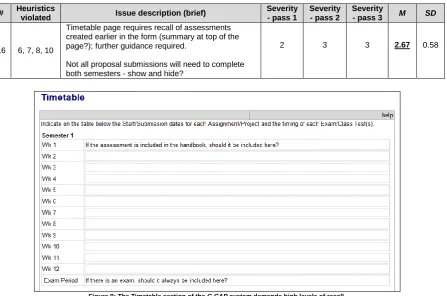
Figure 9: The Timetable section of the C-CAP system demands high levels of recall.
Creator: George Macgregor
from greater use of recognition tools to minimise cognitive load and/or user effort (e.g. menu driven, information modification, etc.) and in so doing address heuristic #7 by promoting efficiency in use.
[image:15.595.111.480.212.435.2]Under the current interface design the system’s expectations of the user are unclear and ambiguous. Unnecessary semester information is displayed to the user (heuristic #8) and adjustments could make this context sensitive. For example, if a class is only to be delivered in semester one then a semester one timetable need only be displayed to the user in this section of the C-CAP system. Further user guidance (heuristic #10) is also required to address common questions likely to arise from Timetable completion, e.g. “If I include the assessment in the handbook, does this mean the assessment start date is week 1?”.
Figure 10: Wireframe of suggested adjustments to Timetable section of C-CAP system.
Proposed solution: Adjustments to the Timetable section should be made so that it attempts to model the basic tenets of the wireframe presented in Figure 10. This approach would address concerns over heuristics #6 and #7 in the following ways:
Assessment data entered by the curriculum designer in Section 4 of the C-CAP system could be pulled up and displayed to the user as a list, complete with a component description. Owing to the importance of assessment scheduling [21] it is important that the curriculum designer gives due consideration to the assessment activities when deciding on start/submission dates.
Enumerating start and submission dates could also allow course/programme managers to propose adjustments to dates depending on students’ assessment load on other modules.
3.8 Violation 18: Administration page displayed after log-in
Table 9: Details of heuristic violation 18.
# Heuristics
violated Issue description (brief)
Severity - pass 1
Severity - pass 2
Severity
- pass 3 M SD
18 3, 4
Returning to complete form at a later time pulls up administration functions; unclear to users what should "happen", e.g. "How do I get back to complete module proposal?"
Possible permissions issue?
Creator: George Macgregor
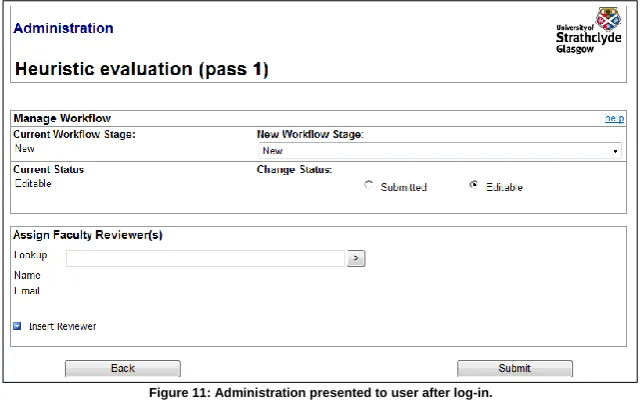
[image:16.595.137.459.202.402.2]Curriculum design is increasingly a collaborative process in which numerous academics (normally from within the same degree programme team) are involved [29], something which is reflected at the University of Strathclyde. It is also true that the design process can be arduous, lengthy and complex. For these reasons the C-CAP system allows users to save progress and return at a later time to continue their design progress, or to allow an alternative team member to contribute. Upon logging in after a period of absence, the user is presented with the Administration page which is used for managing workflows and assigning reviewers (Figure 11). This was found to violate heuristic #4 by introducing an unfamiliar interface to the user when they are most likely to be expecting consistency, i.e. an interface with which they were already familiar.
Figure 11: Administration presented to user after log-in.
Creator: George Macgregor
Figure 12: Core information page as alternative homepage.
Proposed solution: It would be preferable for users to be presented with the Core Information page (Figure 12), which should preferably include guidance on the steps that the user can take to re-initiate the curriculum design process, or progress the workflow of the form (e.g. via a Manage Workflow or Administration button).
[image:17.595.71.529.489.533.2]3.9 Violation 20: Drop down menu population at Class Code Request
Table 10: Details of heuristic violation 20.
# Heuristics
violated Issue description (brief)
Severity - pass 1
Severity - pass 2
Severity
- pass 3 M SD
20 5 Drop down menu for Staff responsibilities on Class Code Request page needs populating. 4 3 3 3.33 0.58
The “role” drop down menu in the Staff Responsibilities section of the Class Code Request page (Figure 13) is not populated and violates heuristic #5. This was initially scored at severity 4 during the first pass, but was then scored 3 in both subsequent passes since the form was found to save without valid role selections. A similar issue was noted for the “Effective from session” menu on the same page, although this appears to have been deliberate as valid session dates have yet to be created.
Figure 13: "Role" drop down menu does not populate; no way of indicating staff responsibility.
[image:17.595.95.496.633.706.2]Creator: George Macgregor
Proposed solution: Explore resolving “Effective from session” menu in preparation for user evaluations.
[image:18.595.72.527.165.243.2]3.10
Violation 24: Feedback error
Table 11: Details of heuristic violation 24.
# Heuristics
violated Issue description (brief)
Severity - pass 1
Severity - pass 2
Severity
- pass 3 M SD
24 5, 9
System error.
Feedback provided for proposal review error not "good error feedback".
Problem with more than one box?
- 4 4 4.00 0.00
Delivery of feedback to the authors of curriculum proposals is an important feature of the C-CAP system, enabling staff at various stages of the workflow (e.g. faculty managers, academic committees, etc.) to deliver constructive feedback about specific aspects of the proposal. An error was found in the Feedback section of the C-CAP system. This occurs when the user intends to create and submit feedback for more than one section of the curriculum proposal. Form submission creates an error (heuristic #5) and the user is then unable to continue with their task (Figure 14). Testing via the heuristic evaluation suggests that the error only occurs when feedback is created for more than one section of the curriculum proposal; single section feedback submits successfully. This appears to be a minor technical error and should easily resolvable.
However, the resulting dialogue box error message is in itself inconsistent with heuristic #9 since it does little to assist the user in diagnosing and solving the system error or problem. In reality, this is a system error and there is little the user can do to resolve it; nevertheless error alerts should attempt to provides “good error messages” [2], [14], even if this simply directs the user to an expert that can help
[image:18.595.125.469.390.688.2]Creator: George Macgregor
resolve their problem. This may also be a standard InfoPath form error message which cannot be altered.
Proposed solution: Address heuristic #5 by resolving the technical issue preventing form submission of multiple feedback sections.
Proposed solution: Create error dialogue boxes that can provide “good error messages”. Guidance from Nielsen [2] should be observed, e.g. context sensitive error assistance, direct user to alternative assistance, ensure correct language, etc.
[image:19.595.71.526.251.376.2]3.11
Violation 25: Recall and flexibility in feedback creation
Table 12: Details of heuristic violation 25.
# Heuristics
violated Issue description (brief)
Severity - pass 1
Severity - pass 2
Severity
- pass 3 M SD
25 6, 7
Delivery of feedback requires reviewers to recall specific issues (or make notes) before being able to comment on feedback. Difficult to comment unless you have the entire copy in front of you, although printing RO version is an option.
Also limited efficiency. Can feedback links be included?
Feedback is still good and drop down menu is a useful tool.
2 3 3 2.67 0.58
Module proposals can be detailed and the curriculum design process is subject to review thus ensuring various disciplinary, pedagogical, and quality standards are maintained. The C-CAP system enables reviewers (e.g. faculty managers, academic committees, etc.) to deliver feedback about specific sections of the module proposal (Figure 15). The reviewer has the ability to deliver feedback on multiple sections of the proposal by inserting extra boxes and using the drop down menu to denote which section of the proposal the feedback applies to, as illustrated in Figure 15.
Figure 15: C-CAP system enables specific feedback to be delivered.
[image:19.595.104.491.474.671.2]Creator: George Macgregor
reviewer (probably as handwritten notes) and unless the reviewer can refer to a copy of the proposal (which would probably require printing).
[image:20.595.135.460.260.704.2]Proposed solution: The mechanisms for feedback delivery should be embedded within the module proposal form thus encouraging detailed feedback and efficient reviewer comment. This could be implemented via “Insert feedback” boxes (or similar) at the bottom of sections within the proposal (Figure 16) and would allow reviewers to provide feedback as they scrutinise proposals, thus addressing heuristic #7. Perhaps more importantly, such an approach addresses heuristic #6 by ensuring that reviewers can critique proposals without needing to remember specific details, or needing to click back to refresh. It is also preferable because it enables reviewers to review holistically. For example, it is difficult to provide feedback on learning outcomes in isolation as any discussion of learning outcomes necessitates consideration of the associated assessment strategy. This feedback approach allows reviewers to peruse all related sections of a module proposal while delivering critical feedback.
Creator: George Macgregor
4. Conclusion
Heuristic evaluation of the C-CAP system yielded a total of 27 heuristic violations. Of the violations found, only 33% were classified at a mean severity rating ≥ 3. In fact, 67% of total violations were classified at a mean severity rating of ≤ 2.67, and of these 11% were classified at severity rating 1. The C-CAP system therefore performed well under heuristic evaluation, demonstrating good use of short cuts and accelerators, high levels of user control owing to the use of familiar rich-text editors enabling incorrect actions to be “undone”, and minimalist and uncluttered design. The rich-text editors also demonstrated adherence to the de facto standard of the word processing dashboard.
The heuristic evaluation nevertheless identified several problematic heuristic violations which will require resolution; however, it should be noted that despite creating “catastrophic” usability problems on some occasions, many of the issues rated at > 2.67 were minor technical problems that were preventing critical user actions. The complexity of the curriculum design process is such at violations pertaining to heuristics #6 and #7 are probably the most critical to long-term user acceptance, particularly violations 16 and 25. Neither of these issues presents a technical usability problem; but they nevertheless demand unnecessarily high levels of recall from the user and ergo will expose the user to high cognitive load, thus contributing to what is already an intellectually onerous process for the user.
Creator: George Macgregor
5. Appendix A: Heuristic violations table
# Heuristics
violated Issue description (brief)
Further details
Severity - pass 1
Severity - pass 2
Severity
- pass 3 M SD
1 1
Greater status information required for home screen of proposal review section to assist users. Current lack of system status perhaps because workflow has yet to be
implemented?
N/A 2 - - 2 N/A
2 2
Guidance note on how to navigate and complete module form required, e.g. "complete each section of the form by clicking on the corresponding buttons below".
A small problem which could potentially affect many users.
6.1 2 2 2 2.00 0.00
3 2
Link for class creation form "terminology" improvement possible; unclear that this link will initiate a new module proposal / descriptor.
6.2 - 2 2 2.00 0.00
4 7
Can be difficult to distinguish between guidance notes and inserted text at times. Different font? Increase contrast of box? Larger gaps between guidance notes and text box?
6.3 - 2 1 1.50 0.71
5 4, 9
"Activity duration" only permits integers. Split hour teaching can be common; but if unavailable at Strathclyde then "good help" provision? May also have implications for non-standard delivery types, e.g. field trip.
6.4 - 2 3 2.50 0.71
6 2, 5
Guidance notes require further clarification and in some boxes would benefit from some guidance notes, i.e. 4.3 Assessment - constructive alignment? This is partly attributable to current lack of active help links.
Error prevention possible here. Form should not proceed until weighting adds to 100% / constructive alignment has been met. Is "duration" applicable for a piece of coursework?
4.1 2 3 3 2.67 0.58
7 6 Rich text editing box can obscure form guidance notes. 4.2 3 3 3 3.00 0.00
8 7
Drop down menu / check box possibility to aid efficient use; finite forms of class evaluation possible; "other and details" option for evaluation methods considered to be non-standard.
4.3 - 2 3 2.50 0.71
9 3, 4
Broken back button. User information required to warn user. Include back buttons at top as well as bottom of interface (e.g. feedback timetable page).
This is an InfoPath specific issue; solution should therefore seek to mitigate lack of back button.
4.4 3 4 4 3.67 0.58
10 10
Few of the “help” links are functional. This is a known issue; but needs to be available to aid user understanding. Links to
documentation also needed to aid user understanding information requirements.
Particular issue in assessment, understanding what particular teaching modes/labels are, "principles of assessment feedback", etc.
4.5 3 2 2 2.33 0.58
11 6, 7
Recommended reading and resources look up table - e.g. OpenSearch plugin?(Typo in availability drop down menu)
6.5 2 1 1 1.33 0.58
12 7
Include separate boxes for bibliographic elements.
Aid user in data entry; data of more use to stakeholders.
6.5 - - 2 2.00 N/A
Creator: George Macgregor
# Heuristics
violated Issue description (brief)
Further details
Severity - pass 1
Severity - pass 2
Severity
- pass 3 M SD
13 6, 7
Class details on Class code request page includes information on pre-, co- and overlap classes, replicating previous form action and requiring user to recall input from previous form / adds to form completion workload.
N/A 2 2 2.00 0.00
14 5
Placements, case studies, field work box (section 5.3) cannot insert text.
New Class (section 2.2) cannot accept text either.
4.6 4 4 4 4.00 0.00
15 6, 7 Sub class (or superclass) - course code drop down menu.
6.6 - - 1 1.00 N/A
16 6, 7, 8, 10
Timetable page requires recall of assessments created earlier in the form (summary at top of the page?); further guidance required.
Not all proposal submissions will need to complete both semesters - show and hide?
4.7 2 3 3 2.67 0.58
17 2 Form submission dialogue box; language improvement could be made. N/A 2 2 2 2.00 0.00
18 3, 4
Returning to complete form at a later time pulls up administration functions; unclear to users what should "happen", e.g. "How do I get back to complete module proposal?"
Possible permissions issue?
4.8 3 3 3 3.00 0.00
19 10
Class code request form. "Why do I need to complete this?"
The purpose of this form will be unclear to many curriculum designers as it fulfils the demands of administrative stakeholders. At the very least some statement as to why designers must complete the request.
N/A 3 2 2 2.33 0.58
20 5 Drop down menu for Staff responsibilities on Class Code Request page needs populating. 4.9 4 3 3 3.33 0.58
21 5 Effective from session drop down menu on Class Code Request page experiences error
N/A 4 3 3 3.33 0.58
22 2
Terminology on Class Code Pages unclear or ambiguous. Further guidance notes required.
"Principle topic?" Is this the module title, or the general subject area of the module?
"Superclass?" What is a “superclass” and should there be a drop down menu populated with module codes?
N/A 3 3 3 3.00 0.00
23 3, 10
A clearly marked exist would be beneficial; also submission of form occurs without warning when check box is clicked.
N/A 3 4 4 3.67 0.58
24 5, 9
System error.
Feedback provided for proposal review error not "good error feedback".
Problem with more than one box?
4.10 - 4 4 4.00 0.00
25 6, 7
Delivery of feedback requires reviewers to recall specific issues (or make notes) before being able to comment on feedback.
Difficult to comment unless you have the entire copy in front of you, although printing RO version is an option.
Also limited efficiency. Can feedback links be included?
Feedback is still good and drop down menu is a useful tool.
Creator: George Macgregor
# Heuristics
violated Issue description (brief)
Further details
Severity - pass 1
Severity - pass 2
Severity
- pass 3 M SD
26 2
No "clearly marked exists" when things "go wrong". Possible to have save work to date and return to home screen?
Not
required - 2 2 2.00 0.00
27 1
Advice to users on saving work as they progress required. Guidance note to this effect on home screen?
Not
Creator: George Macgregor
6. Appendix B: Minor heuristic violation screen grabs
Note here about the fact that not all violations are listed… [image:25.595.85.522.166.505.2]6.1 Violation 2: Guidance note about navigation required
Table 13: Details of heuristic violation 2.
# Heuristics
violated Issue description (brief)
Severity - pass 1
Severity - pass 2
Severity
- pass 3 M SD
2 2
Guidance note on how to navigate and complete module form required, e.g. "complete each section of the form by clicking on the corresponding buttons below". A small problem which could potentially affect many users.
2 2 2 2.00 0.00
Creator: George Macgregor
6.2 Violation 3: Class creation terminology
Table 14: Details of heuristic violation 3.
# Heuristics
violated Issue description (brief)
Severity - pass 1
Severity - pass 2
Severity
- pass 3 M SD
3 2
Link for class creation form "terminology" improvement possible; unclear that this link will initiate a new module proposal / descriptor.
[image:26.595.74.524.121.326.2]- 2 2 2.00 0.00
Creator: George Macgregor
6.3 Violation 4: Difficulties distinguishing between guidance notes and inserted text
Table 15: Details of heuristic violation 4.
# Heuristics
violated Issue description (brief)
Severity - pass 1
Severity - pass 2
Severity
- pass 3 M SD
4 7
Can be difficult to distinguish between guidance notes and inserted text at times. Different font? Increase contrast of box? Larger gaps between guidance notes and text box?
[image:27.595.83.527.114.496.2]- 2 1 1.50 0.71
Creator: George Macgregor
6.4 Violation 5: “Activity duration” only permits integers
Table 16: Details of heuristic violation 5.
# Heuristics
violated Issue description (brief)
Severity - pass 1
Severity - pass 2
Severity
- pass 3 M SD
5 4, 9
"Activity duration" only permits integers. Split hour teaching can be common; but if unavailable at Strathclyde then "good help" provision? May also have implications for non-standard delivery types, e.g. field trip.
[image:28.595.84.528.120.366.2]- 2 3 2.50 0.71
Creator: George Macgregor
6.5 Violations 11 & 12: Resource look-up / bibliographic data elements
Table 17: Details of heuristic violations 11 and 12.
# Heuristics
violated Issue description (brief)
Severity - pass 1
Severity - pass 2
Severity -
pass 3 M SD
11 6, 7
[image:29.595.68.527.117.331.2]Recommended reading and resources look up table - e.g. OpenSearch plugin?
Typos in “Availability” drop down menu.
2 1 1 1.33 0.58
12 7
Include separate boxes for bibliographic elements to aid user in data entry; data of more use to stakeholders, e.g. library.
- - 2 2.00 N/A
Figure 21: “Recommended reading and resources” section of the C-CAP system could include separate boxes to capture bibliographic data, thus aiding the user in interpreting the information requirements. Options also exist to embed a look-up search using a variety of digital library
Creator: George Macgregor
6.6 Violation 15: Sub-class or super-class drop down menu.
Table 18: Details of heuristic violation 15.
# Heuristics
violated Issue description (brief)
Severity - pass 1
Severity - pass 2
Severity
- pass 3 M SD
[image:30.595.87.527.117.326.2]15 6, 7 Sub class (or superclass) - course code drop down menu. - - 1 1.00 N/A
Creator: George Macgregor
7. References
[1] G. Macgregor, “PiP Evaluation Plan,” University of Strathclyde, Glasgow, Nov. 2011. Available: http://www.principlesinpatterns.ac.uk/Portals/70/PiPEvaluationPlan.pdf. [Accessed: 31-Jul-2011].
[2] J. Nielsen, Usability engineering, [Updated ed.]. San Francisco Calif.: Morgan Kaufmann Publishers, 1994.
[3] J. Choi and S. Bakken, “Web-based education for low-literate parents in Neonatal Intensive Care Unit: Development of a website and heuristic evaluation and usability testing,” International Journal of Medical Informatics, vol. 79, pp. 565–575, Aug. 2010.
[4] J. Nielsen, “Usability Problems Found by Heuristic Evaluation,” useit.com, 2005. [Online]. Available: http://www.useit.com/papers/heuristic/usability_problems.html. [Accessed: 09-Nov-2011].
[5] C. Flavian, R. Gurrea, and C. Orus, “A heuristic evaluation of websites design for achieving the web success,” International Journal of Services and Standards, vol. 5, p. 17, 2009.
[6] R. Agarwal and V. Venkatesh, “Assessing a Firm’s Web Presence: A Heuristic Evaluation Procedure for the Measurement of Usability,” Information Systems Research, vol. 13, pp. 168– 186, Jun. 2002.
[7] J. A. Kientz, E. K. Choe, B. Birch, R. Maharaj, A. Fonville, C. Glasson, and J. Mundt, “Heuristic evaluation of persuasive health technologies,” 2010, p. 555.
[8] J. Nielsen and R. Molich, “Heuristic evaluation of user interfaces,” 1990, pp. 249–256.
[9] A. Sutcliffe, “Heuristic evaluation of virtual reality applications,” Interacting with Computers, vol. 16, pp. 831–849, Aug. 2004.
[10] M. Yushiana and W. A. Rani, “Heuristic evaluation of interface usability for a web-based OPAC,” Library Hi Tech, vol. 25, pp. 538–549, 2007.
[11] L. Fu, G. Salvendy, and L. Turley, “Effectiveness of user testing and heuristic evaluation as a function of performance classification,” Behaviour & Information Technology, vol. 21, pp. 137– 143, Jan. 2002.
[12] W. Tan, D. Liu, and R. Bishu, “Web evaluation: Heuristic evaluation vs. user testing,” International Journal of Industrial Ergonomics, vol. 39, pp. 621–627, Jul. 2009. [13] J. Nielsen, Usability inspection methods. New York: Wiley, 1994.
[14] J. Nielsen, “10 Heuristics for User Interface Design,” 2005. [Online]. Available: http://www.useit.com/papers/heuristic/heuristic_list.html. [Accessed: 18-Oct-2011]. [15] J. Nielsen, “Finding usability problems through heuristic evaluation,” 1992, pp. 373–380. [16] J. Nielsen, “Enhancing the explanatory power of usability heuristics,” 1994, pp. 152–158. [17] J. Nielsen, Prioritizing web usability. Berkeley Calif.: New Riders, 2006.
[18] B. Shneiderman, C. Plaisant, M. Cohen, and S. Jacobs, Designing the User Interface: Strategies for Effective Human-Computer Interaction, 5th ed. Addison Wesley, 2009.
[19] C. Lewis, D. C. Hair, and V. Schoenberg, “Generalization, consistency, and control,” 1989, pp. 1–5.
[20] J. B. B. (John Biggs, Teaching for quality learning at university., 3rd ed. / by John Biggs and Catherine Tang. Maidenhead: Open University Press, 2007.
[21] C. Butcher, C. Davies, and M. Highton, Designing learning : from module outline to effective teaching. London ; New York: Routledge, 2006.
[22] A. Cockburn, B. Mckenzie, and M. Jasonsmith, “Pushing back: evaluating a new behaviour for the back and forward buttons in web browsers,” International Journal of Human-Computer Studies, vol. 57, pp. 397–414, Nov. 2002.
[23] N. Milic-Frayling, R. Jones, K. Rodden, G. Smyth, A. Blackwell, and R. Sommerer, “Smartback: supporting users in back navigation,” 2004, p. 63.
[24] S. Shrestha, K. Lenz, B. Chaparro, and J. Owens, “‘F’ Pattern Scanning of Text and Images in Web Pages,” Proceedings of the Human Factors and Ergonomics Society Annual Meeting, vol. 51, no. 18, pp. 1200 –1204, Oct. 2007.
[25] S. Djamasbi, M. Siegel, and T. Tullis, “Visual Hierarchy and Viewing Behavior: An Eye Tracking Study,” in Human-Computer Interaction. Design and Development Approaches, vol. 6761, J. A. Jacko, Ed. Berlin, Heidelberg: Springer Berlin Heidelberg, 2011, pp. 331–340.
[26] J. Nielsen, “F-Shaped Pattern For Reading Web Content,” 2006. [Online]. Available: http://www.useit.com/alertbox/reading_pattern.html. [Accessed: 22-Nov-2011].
Creator: George Macgregor
http://www.enhancementthemes.ac.uk/docs/publications/the-foundation-for-graduate-attributes-developing-self-regulation-through-self-and-peer-assessment.pdf. [Accessed: 23-Nov-2011]. [28] P. Ramsden, Learning to Teach in Higher Education, 2nd ed. Routledge, 2003.