University of Southern Queensland
Faculty of Health, Engineering & Sciences
Automated Shark Detection using Computer Vision
A dissertation submitted by
K. Byles
in fulfilment of the requirements of
ENG4112 Research Project
towards the degree of
Abstract
With the technological advancements of UAVs, researchers are finding more ways to
har-ness their capabilities to reduce expenses in everyday society. Machine vision is at the
forefront of this research and in particular image recognition. Training a machine to
iden-tify objects and di↵erentiate them from others plays an integral role in the advancement
of artificial intelligence. This project aims to design an algorithm capable of automatically
detecting sharks from a UAV. Testing is performed by post-processing aerial footage of
sharks taken from helicopters and drones, and analysing the reliability of the algorithm.
Initially this research project involved analysing aerial photography of sharks, dissecting
the images into the individual colour channels that made up the RGB and HSV colour
spaces and identifying methods to detect the shark blobs. Once an adaptive threshold
of the brightness channel was designed, filters were curated specific to the environments
presented in the obtained aerial footage to reject false positives. These methods were
considerably successful in both rejecting false positives and consistently detecting the
sharks in the video feed.
The methods produced in this dissertation leave room for future work in the shark
detec-tion field. By acquiring more reliable data, improvements such as using a kalman filter to
detect and track moving blobs could be implemented to produce a robust shark detection
University of Southern Queensland Faculty of Health, Engineering & Sciences
ENG4111/2 Research Project
Limitations of Use
The Council of the University of Southern Queensland, its Faculty of Health, Engineering
& Sciences, and the sta↵ of the University of Southern Queensland, do not accept any
responsibility for the truth, accuracy or completeness of material contained within or
associated with this dissertation.
Persons using all or any part of this material do so at their own risk, and not at the risk of
the Council of the University of Southern Queensland, its Faculty of Health, Engineering
& Sciences or the sta↵of the University of Southern Queensland.
This dissertation reports an educational exercise and has no purpose or validity beyond
this exercise. The sole purpose of the course pair entitled “Research Project” is to
con-tribute to the overall education within the student’s chosen degree program. This
doc-ument, the associated hardware, software, drawings, and other material set out in the
associated appendices should not be used for any other purpose: if they are so used, it is
entirely at the risk of the user.
Dean
Certification of Dissertation
I certify that the ideas, designs and experimental work, results, analyses and conclusions
set out in this dissertation are entirely my own e↵ort, except where otherwise indicated
and acknowledged.
I further certify that the work is original and has not been previously submitted for
assessment in any other course or institution, except where specifically stated.
K. Byles
Acknowledgments
I would like to thank my friends and family for providing positive criticism on my work
throughout the duration of this project. Dr Tobias Low was always able to o↵er
construc-tive feedback, and didn’t leave me feeling abandoned or lost in any way.
Most of all I’d like to acknowledge my loving girlfriend Katherine, for I would not be
where I am today without her undoubted support.
Contents
Abstract i
Acknowledgments iv
List of Figures ix
List of Tables xv
List of Algorithms xvii
Chapter 1 Introduction 1
1.1 Background . . . 1
1.2 Computer Vision . . . 4
1.3 Colour Spaces . . . 5
1.4 Image Processing . . . 8
1.5 Edge Detection . . . 8
1.6 Image segmentation . . . 12
1.7 Object Tracking . . . 13
1.7.1 Object Detection . . . 14
CONTENTS vi
1.7.3 Object Tracking . . . 15
1.8 Project Aim . . . 17
1.9 Research Objectives . . . 17
Chapter 2 Literature Review 18 2.1 Segmentation methods of marine wildlife from UAV’s . . . 18
2.1.1 Dugongs and Machine Learning . . . 19
2.2 Underwater Fish Detection . . . 20
2.3 Marine object detection . . . 21
2.3.1 LiDAR Detection and Classification of Subsurface Objects . . . 22
2.4 Blob Analysis . . . 23
2.5 Project Area of Research . . . 24
Chapter 3 Methodology 26 3.1 Project Methodology . . . 26
3.2 Task Analysis . . . 27
3.2.1 Determine the tools required such as software packages and electronics 27 3.2.2 Obtain useful videos of sharks in coastal waters . . . 27
3.2.3 Determine trends in pixel variations and colour spaces . . . 28
3.2.4 Develop an adaptive thresholding method for identifying regions of interest . . . 28
3.2.5 Morphological Operations . . . 28
3.2.6 Filtering of false positives . . . 29
CONTENTS vii
3.2.8 Determine feasibility and highlight why the algorithm is successful
or not . . . 30
3.3 Resource Analysis . . . 30
3.4 Project Consequential E↵ects . . . 31
3.4.1 Sustainability . . . 31
3.4.2 Ethics . . . 31
3.5 Risk Assessment . . . 32
3.5.1 Risks Identified . . . 32
Chapter 4 Pixel Trends, Colour Spaces and Thresholds 33 4.1 Initial test and data display . . . 33
4.2 Identifying strong trends . . . 36
4.3 Colour Space Thresholding . . . 41
4.4 Adaptive Thresholding . . . 44
Chapter 5 Blob Analysis 46 5.1 Morphology . . . 46
5.2 Region of Interest Filtering . . . 49
5.2.1 Removing Bright Detections . . . 49
5.2.2 Removing Dark Patches of Water . . . 51
5.3 Elliptic Ratio . . . 52
5.4 Noise Filtering . . . 53
CONTENTS viii
6.1.1 Detecting the shark . . . 56
6.2 Analysis of performance on Testing Video 2 . . . 62
6.2.1 Detecting the shark . . . 63
6.3 Analysis of performance on Testing Video 3 . . . 66
6.3.1 Detecting the shark . . . 67
Chapter 7 Conclusions and Future Work 74 7.1 Achievement of Project Objectives . . . 74
7.2 Future Work . . . 76
References 77 Appendices 84 Chapter A Matlab Source Files 1 A.1 Display Pixel Densities . . . 1
A.2 Compare Test Images Pixel Densities . . . 5
A.3 Show Blob Outline on Original Image . . . 11
A.4 Shark Detection Algorithm . . . 14
List of Figures
1.1 Diagram of shark net. . . 2
1.2 Diagram of shark drumline. . . 2
1.3 Shark seen o↵Boudlers beach near Ballina from a helicopter. . . 3
1.4 A great white shark tagged with both acoustic (front) and pop-up satellite (rear) tags. The acoustic tag is detected when the shark swims within 250m of a listening station, while the pop-up satellite tag records information about location, temperature and depth - and relays it to the laboratory when the tag releases itself from the shark. . . 3
1.5 Example of di↵erent colour channels compiled together. . . 5
1.6 An example of the RGB colour space. . . 6
1.7 An example of the HSV colour space. . . 7
1.8 An example of the LAB colour space. . . 7
1.9 An example of image processing being used to enhance the beauty of a model. . . 8
1.10 Illustration of finding the local maxima for an edge . . . 10
LIST OF FIGURES x
1.12 Illustration of detected edge points within the predetermined thresholds.
As shown, edges remain consistent within the low to high boundary if they
are connected to edge points that eventually go above the high threshold
level. The line below the low threshold represents noise in the data. . . . 11
1.13 Image of figurine imported into Matlab and converted to grayscale. . . 11
1.14 Canny edge detection applied to the figurine and edges dilated. . . 11
1.15 Original image of cell. . . 12
1.16 Edge detection applied to image. . . 12
1.17 Edges dilated with ’imdilate’ function in Matlab. . . 12
1.18 Images filled with ’imfill’ function. . . 12
1.19 Images connected to border are removed. . . 13
1.20 Blobs not connected to the main blob are ’eroded’. . . 13
1.21 The perimeter of the segmented image is overlayed on the original image. 13 2.1 Results of dugong detection study illustrating 7 out of 13 dugongs detected, no false positives. . . 19
2.2 Layers of CNN used to detect dugongs. . . 19
2.3 Blob analysis using a CNN filtering out blobs based on confidence scores. 20 2.4 Blobs detected after edge detection, coral blackening and blob filling. . . . 20
2.5 Success rate of vision system. . . 21
2.6 Frame divided into di↵erent areas and histogram bin thresholding applied. 21 2.7 E↵ects of GMM and background subtraction. . . 22
2.8 Frame showing snake detection. . . 22
2.9 Frame showing jellyfish detection. . . 22
LIST OF FIGURES xi
2.11 Sample frame of traffic. . . 24
2.12 Background subtraction and blob analysis performed to identify white cars. 24 3.1 Screenshot from drone footage of shark in coastal waters . . . 27
3.2 Screenshot from drone footage of shark in coastal waters . . . 27
3.3 Risk Assessment Matrix. . . 32
4.1 Test image. . . 34
4.2 RGB representation of current test image. The red, green and blue data arrays are saved to individual variables and displayed as a surface model. This will help identify methods for pixel thresholding. . . 35
4.3 HSV representation of current test image. The hue, saturation and value data arrays are saved to individual variables and displayed as a surface model. This will help identify methods for pixel thresholding. . . 36
4.4 Frames used to test the relationship of lower pixel values for identified sharks in the Red, Green and Value arrays. . . 37
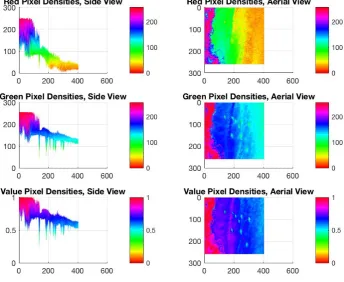
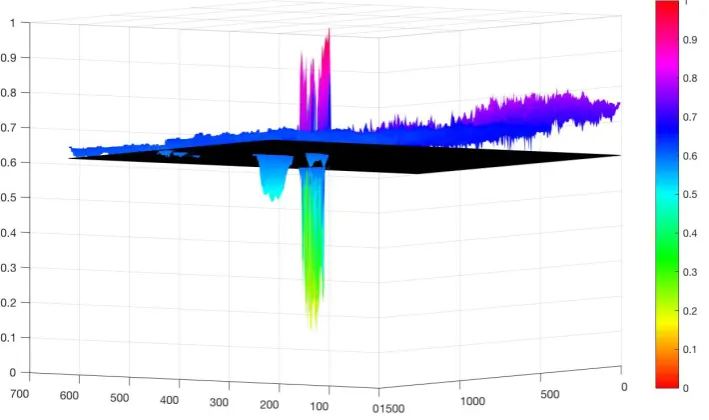
4.5 3D surface model for Red, Green and Value arrays for test image 1 at side and aerial views. . . 38
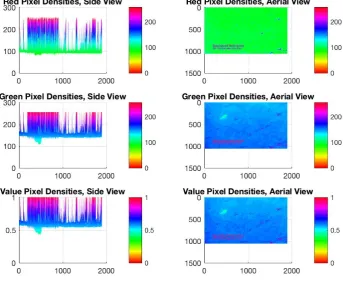
4.6 3D surface model for Red, Green and Value arrays for test image 2 at side and aerial views. . . 39
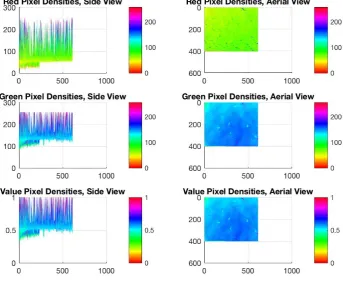
4.7 3D surface model for Red, Green and Value arrays for test image 3 at side and aerial views. . . 40
4.8 3D surface model for Red, Green and Value arrays for test image 4 at side and aerial views. . . 41
LIST OF FIGURES xii
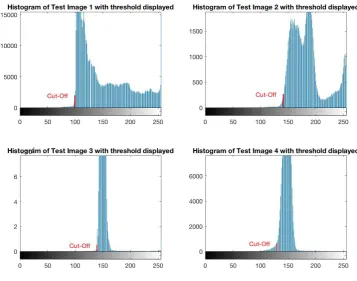
4.10 Histograms of Test Images displaying cut-o↵ threshold. Most populated
bins represent pixels related to the water. Everything to the right of the
cut-o↵is ignored. . . 45
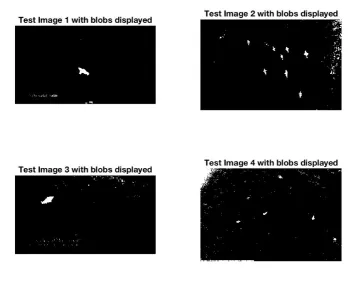
5.1 Binary maps of test images after thresholding. No morphology performed yet. . . 47
5.2 How a computer ’sees’ a shark. . . 47
5.3 Binary map of shark. . . 47
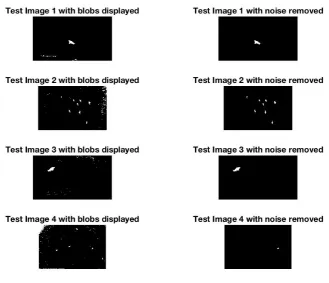
5.4 Binary maps of test images before and after morphology to remove noise. 48 5.5 Morphology applied to frame with a surfer in the field of view. . . 49
5.6 Morphology applied to frame with a surfer in the field of view. . . 50
5.7 3D surface model depicting dark patches of water being falsely detected. . 51
5.8 Original Image and stages in filtering out unwanted regions of interest. . . 52
5.9 Histogram of Elliptic Ratios of Blob Database. . . 53
6.1 Frame 33: Shark detected in frame. . . 57
6.2 3D surface model of frame 33. . . 57
6.3 Frame 84: False negative. . . 57
6.4 3D surface model of frame 84. . . 57
6.5 Frame 369: Two sharks detected in frame. . . 58
6.6 3D surface model of frame 369. . . 58
6.7 Frame 498: Missed detection of two sharks. . . 59
6.8 3D surface model of frame 498. . . 59
6.9 Frame 595: One true positive, One false negative and One true negative. . 60
LIST OF FIGURES xiii
6.11 Frame 711: False negative. . . 61
6.12 3D surface model of frame 711. . . 61
6.13 Frame 883 False negative. . . 61
6.14 3D surface model of frame 883. . . 61
6.15 Frame 1545: Shark successfully detected. . . 62
6.16 3D surface model of frame 1545. . . 62
6.17 Frame 4: Shark detected in frame. . . 63
6.18 3D surface model of frame 4. . . 63
6.19 Frame 297: False negative. . . 64
6.20 3D surface model of frame 297. . . 64
6.21 Frame 360: False negative. . . 64
6.22 3D surface model of frame 360. . . 64
6.23 Frame 472: False negative. . . 65
6.24 3D surface model of frame 472. . . 65
6.25 Frame 529: False negative. . . 65
6.26 3D surface model of frame 529. . . 65
6.27 Frame 800: False negative. . . 66
6.28 3D surface model of frame 800. . . 66
6.29 Frame 65: False negative. . . 67
6.30 3D surface model of frame 65. . . 67
6.31 Frame 71: Shark detected in frame. . . 68
6.32 3D surface model of frame 71. . . 68
LIST OF FIGURES xiv
6.34 3D surface model of frame 184. . . 68
6.35 Frame 402: Shark detected in frame. . . 69
6.36 3D surface model of frame 402. . . 69
6.37 Frame 433: Whitewash rejects shark detection. . . 69
6.38 3D surface model of frame 433. . . 69
6.39 Frame 453: Shark detected in frame. . . 70
6.40 3D surface model of frame 453. . . 70
6.41 Frame 885: Area of shark too small for detection. . . 71
6.42 3D surface model of frame 885. . . 71
6.43 Frame 1103: Shark detected in frame. . . 71
6.44 3D surface model of frame 1103. . . 71
6.45 Frame 3663: False positive. . . 72
6.46 3D surface model of frame 3663. . . 72
6.47 Frame 5000: Brightness ratio rejects shark. . . 73
List of Tables
3.1 Project Resource Requirements . . . 30
6.1 Frame 33: Values of blob elements . . . 57
6.2 Frame 84: Values of blob elements . . . 58
6.3 Frame 369: Values of blob elements . . . 58
6.4 Frame 498: Values of blob elements . . . 59
6.5 Frame 595: Values of blob elements . . . 60
6.6 Frame 711: Values of blob elements . . . 61
6.7 Frame 883: Values of blob elements . . . 61
6.8 Frame 1545: Values of blob elements . . . 62
6.9 Frame 0004: Values of blob elements . . . 63
6.10 Frame 360: Values of blob elements . . . 64
6.11 Frame 529: Values of blob elements . . . 65
6.12 Frame 800: Values of blob elements . . . 66
6.13 Frame 65: Values of blob elements . . . 67
6.14 Frame 71: Values of blob elements . . . 68
LIST OF TABLES xvi
6.16 Frame 402: Values of blob elements . . . 69
6.17 Frame 453: Values of blob elements . . . 70
6.18 Frame 885: Values of blob elements . . . 71
6.19 Frame 1103: Values of blob elements . . . 71
6.20 Frame 3663: Values of blob elements . . . 72
List of Algorithms
1 Display Surf Models of Pixel Densities . . . 34
2 Display Blob Outlines on Original Image . . . 42
3 Calculate Threshold for Regions of Interest . . . 44
4 Region of Interest Filtering . . . 50
5 Remove Dark Patches of Water . . . 52
Chapter 1
Introduction
1.1
Background
Shark attacks have haunted every swimmer at some point in their life. The ominous
shadows of the deep lurking below them, the object that brushed past their feet or the
cool chill of something not being right has often reminded people of the horror of being a
big fish’s lunch. In the last 100 years in Australia alone there have been 543 unprovoked
shark attacks, with 135 of those people losing their lives (Taronga 2016). Although for a
statistician those aren’t overwhelming odds, the long-term trend indicates an increasing
number of shark attacks which is most likely due to an increasing number of people
swimming at the beach. To try and reduce the frequency of shark attacks there have
been a few control methods put in place such as:
• Shark nets
– These are used to entangle sharks and prevent them from reaching swimmers
and surfers. The nets are typically placed 500 metres o↵shore and are 150m
wide and 6m tall (Sealifetrust 2015) and submerged in water of depths around
10m. Shark nets have been known to kill marine life such as dolphins and
1.1 Background 2
Figure 1.1: Diagram of shark net.
• Drumline
– Consists of baited hooks that are set in waters 6m to 12m deep and
approx-imately 600m o↵shore (Sumpton et al. 2011). The hooks are checked and
re-baited every 15-20 days by contracted fisherman, who thoroughly record
each catch.
Figure 1.2: Diagram of shark drumline.
• Aerial Patrol
– These have been used to monitor the beaches from small planes and helicopters.
A recent study in 2014 recorded the success rate of identifying artificial shark
analogues placed at an average 2.5m below the surface of the ocean was 12.5%
for fixed-wing and 17.1% for helicopters (Robbins, Peddemors, Kennelly &
Ives 2014). A typical aerial patrol can involve a sweep of nearly 300km of
coastline, where the plane or helicopter is only o↵ering a couple minutes of
1.1 Background 3
Figure 1.3: Shark seen o↵Boudlers beach near Ballina from a helicopter.
• Tagging
– Sharks are tagged and monitored over a certain time period, where the data
obtained is typically used to determine migration patterns. Other useful data
can be the depth at what the shark dives to for a given time period and
the temperature of the water (Holmes, Pepperell, Griffiths, Jaine, Tibbetts &
Bennett 2014). Tagged sharks can o↵er real-time tracking (News.com.au 2015)
but it is not feasible to track down every shark and install a tag on them.
Figure 1.4: A great white shark tagged with both acoustic (front) and pop-up satellite (rear) tags. The acoustic tag is detected when the shark swims within 250m of a listening station, while the popup satellite tag records information about location, temperature and depth -and relays it to the laboratory when the tag releases itself from the shark.
• Spotters
– Professional spotters that scan the water from a high point such as a cli↵ or
1.2 Computer Vision 4
In light of these expensive control methods in place, shark attacks are still occurring. To
combat this the author is proposing a shark detection system based on aerial photography,
which could greatly reduce funding needed for shark control methods and o↵er real-time
surveillance and alerts of sharks in dangerous or threatening positions.
1.2
Computer Vision
Computer vision is a broad topic that involves many areas and is apart of everyday life.
Medical professionals use computer vision for x-rays and MRI’s to better diagnose their
patients. Architects and engineers use computer vision for 3D modelling. Toll points
and parking lots use computer vision to recognise license plates on vehicles. Production
plants use computer vision for automatic inspection of goods on assembly lines to check
for imperfections, and the list goes on. As science and engineering progress, computer
vision is establishing a greater impact on society.
Computer vision can be a very complex area, and in the words of Richard Szeliski, ”despite
all advances in computer vision, the dream of having a computer interpret an image at the
same level as a two-year old (for example, counting all the animals in a picture) remains
elusive”. This is because vision is an inverse problem (Szeliski 2010), in which we seek
to recover some unknowns given insufficient information to fully specify the problem. We
must therefore resort to physics-based models and probabilistic models to disambiguate
between potential solutions.
Computers interpret images as arrays of numbers and cannot be taught to identify objects
by what shape they are. Instead di↵erent mathematical techniques are used to determine
how the relative pixel of varying densities are arranged to each other. An edge might be
detected by a sharp sudden change in pixel density, whilst a shape may be detected by
an arrangement of such edges in a circular, mathematical fashion.
Dr Adrian Rosebrock, author of Practical Python and OpenCV, defines a pixel as ”a
colour or the intensity of light that appears in a given place in an image”. Digital cameras
are quite often ranked for their resolution, or by how many pixels are in the photos that
the camera produces. The resolution is the product of the rows of pixels multiplied by the
columns, because images are digitally stored as arrays of pixel intensities that represent
1.3 Colour Spaces 5
ranked from 0 to 255 with 0 being no colour at all (black) and 255 being the maximum
(white). In RGB (colour) images there are three layers of arrays, each relating to the 3
di↵erent colour channels red, green and blue. Every pixel in the arrays are given a value
of intensity (or how much of that colour the pixel is trying to represent) out of 0 to 255.
For example, a bluish almost purple might have pixel values of 200 for blue, 100 for red
and 50 for green.
Figure 1.5: Example of di↵erent colour channels compiled together.
1.3
Colour Spaces
A colour space or model is a way to mathematically represent the formulation of colours
from the combination of primary colours. Additive colour models are primarily designed
for electronic systems such as televisions, computers and digital photography. There are
3 dominant models that are typically used in computer vision.
1.3 Colour Spaces 6
of 3 primary colours, red, green and blue. In order to create a colour with RGB, three
light coloured beams (red, green and blue) must be superimposed (Insights 2016). With
no intensity, each of the 3 colours is perceived as black, while full intensity is perceived
as white. Varying the intensities varies the output colour.
Figure 1.6: An example of the RGB colour space.
HSV (hue, saturation and value) colour space depicts 3D colour. HSV seeks to describe
relationships between colours, and improve on the RGB colour model. HSV can be
illustrated as a wheel where the centre axis goes from white at the top to black at the
bottom, with other neutral colours in between. The angle from the axis represents the
hue, the distance from the axis depicts the saturation, and the distance along the axis
1.3 Colour Spaces 7
Figure 1.7: An example of the HSV colour space.
LAB colourspace is designed to approximate human vision. Unlike RGB, LAB is not
device-dependant. In this 3D model, the ’L’ stands for the lightness of the colour, with 0
producing black and 100 producing a di↵used white. The ’A’ is the redness vs. greenness
and the ’B; is the yellowness vs. blueness (Insights 2016).
1.4 Image Processing 8
1.4
Image Processing
Image processing involves editing and manipulating digital images to enhance its visual
e↵ects or to make it more user-friendly for complex computer vision applications. A
common use of image processing is in advertising or media, where models can be digitally
enhanced to improve their attractiveness or for products to seem more appealing. Image
processing is typically the first step in a computer vision algorithm, where features can be
transformed, enhanced, blurred and more to make the image more user-friendly for the
algorithm to process. For example, a colour recognition algorithm might begin with an
image being blurred so that insufficient details are removed, making the probability of a
blob of a certain predetermined colour being detected higher. Filters used for smartphone
applications such as ’Snapchat’ and ’Instagram’ are good examples of image processing
as they enhance or warp images when applied.
Figure 1.9: An example of image processing being used to enhance the beauty of a model.
1.5
Edge Detection
Edge detection is a process which involves the computer automatically highlighting all
the edges in the image through a series of operations. These operations typically involve
filtering, di↵erentiation and detection. One of the most successful and commonly used
edge detectors is the Canny edge detector, developed by John F. Canny in 1986. Canny
had specified performance criteria for the detector to meet (Shah 1997) such as:
1. Good Detection. The optimal detector must minimise the probability of false
posi-tives as well as false negaposi-tives.
1.5 Edge Detection 9
edges
3. Single Response Constraint. The detector must return one point only for each edge
point.
The reason for this criteria was to help minimise unwanted noise that was apparent in
other detectors such as the Marr-Hildreth detector where the Laplacian of the Gaussian
was used to locate zero crossings which indicated an edge. The steps in the Canny edge
detector are:
1. Smooth image with Gaussian filter g(x, y)
g(x, y) = p1
2⇡ e
x2+y2
2 2 (1.1)
S=I⇤g(x, y) (1.2)
2. Compute derivative of filtered image
rS =r(g⇤I) = gx gy
⇤I (1.3)
3. Find magnitude and orientation of gradient
(Sx, Sy) Gradient Vector
magnitude =q(S2
x+Sy2)
direction = ✓= tan 1 Sy
Sx
4. Apply ”non-maximum suppression”
The pixels that are perpendicular to the identified edge must be suppressed so that
thick edges are minimised. This is done by locating a point (x, y) and determining
1.5 Edge Detection 10
Figure 1.10: Illustration of finding the local maxima for an edge
M(x, y) = 8 > > > > > < > > > > > :
|rS|(x, y) if |rS|(x, y)>|rS|(x0, y0)
& |rS|(x, y)>|rS|(x00, y00)
0 otherwise
(1.4)
5. Apply ”hysteresis threshold”
If the gradient at a pixel is
-above ’high’, declare it as an edge pixel
-below ’low’, declare it as a non-edge pixel
-between ’low’ and ’high’, consider its neighbours iteratively then declare it an edge
pixel if it is connected to an edge pixel directly or via pixels between ’low’ and
’high’.
1.5 Edge Detection 11
Scan the image from left to right, top to bottom. If the gradient magnitude at the
pixel is above the high threshold, declare that as an edge point. Then recursively
look at its neighbours. If the gradient magnitude is above the low threshold, declare
that as an edge point.
Figure 1.12: Illustration of detected edge points within the predetermined thresholds. As shown, edges remain consistent within the low to high boundary if they are connected to edge points that eventually go above the high threshold level. The line below the low threshold represents noise in the data.
Edge detection is quite often used as the first step in blob detection, where the
outlines of objects are detected. Further image processing techniques involving
dilation, fill and erosion help to isolate the object. An example of edge detection
can be seen in Figure 1.14 where canny edge detection has been applied to a photo of
a figurine holding a computer. The edges were then dilated for illustration purposes.
Figure 1.13: Image of figurine imported into Matlab and converted to grayscale.
1.6 Image segmentation 12
1.6
Image segmentation
Image segmentation has been widely applied in image analysis for various areas such
as biomedical imaging, intelligent transportation systems and satellite imaging (Choong,
Kow, Chin, Angeline, Tze & Teo 2012). The main goal of image segmentation is to cluster
pixels into salient image regions, i.e. regions corresponding to individual surfaces, objects
or natural parts of objects (Bodhe 2013). After regions are successfully segmented into
individual regions they can then be identified automatically as seen in pest detection
systems for horticulture (Bodhe 2013).
Mathworks have o↵ered several examples that explain the basics of image segmentation.
Detecting a shark in the water, which in theory should be a controlled environment
depending on the amount of light available, could be formulated using edge detection and
basic morphology. The example as published by Mathworks (Mathworks 2016h) for cell
detection could prove to be a good starting point in developing a algorithm for identifying
sharks. The example works in six steps:
Figure 1.15: Original image of cell. Figure 1.16: Edge detection applied to im-age.
Figure 1.17: Edges dilated with ’imdilate’ function in Matlab.
1.7 Object Tracking 13
Figure 1.19: Images connected to border are removed.
Figure 1.20: Blobs not connected to the main blob are ’eroded’.
Figure 1.21: The perimeter of the seg-mented image is overlayed on the original image.
This is a very good example of how the blob of the shark might be obtained. Further
analysis could determine whether the blob is of a ’shark’ size by identifying how many
pixels make up the blob. Although the depth of image is unknown, if an assumed operating
height of the drone is known then relative blob sizes can be calculated.
1.7
Object Tracking
Object tracking involves the detection of objects and tracking their movement over
mul-tiple frames. It is typically used in surveillance type systems and can be broken down
into 3 main steps:
• Object detection
1.7 Object Tracking 14
• Object tracking
1.7.1 Object Detection
Object detection is the process of finding instances of real-world objects such as faces,
bicycles and buildings in images or videos (Mathworks 2016i). Object detection is still
very limited in everyday use in society as it is extremely difficult for a computer to
automatically detect objects, as explained earlier, a computer can only define an object
by the arrangement and intensities of the pixels in the image. However, face detection
and people tracking systems are becoming more popular and plenty of research is being
undertaken to develop more complex surveillance systems.
To locate a moving object in consecutive video frames the following 3 methods can be
applied:
• Frame Di↵erencing
– Frame di↵erencing works by checking the di↵erence between 2 consecutive
frames. It employs the input as 2 image frames of video and produces the
output as the di↵erence of the pixel values. This is obtained by subtracting
pixel values of the second frame from the first frame (Kothiya 2015). As a
result, moving objects can be easily detected in videos with static backgrounds.
• Optical Flow
– Optical flow is a technique that presents an apparent change in the moving
object’s location between consecutive frames of the video (Kothiya 2015). It
employs the motion field that represents the direction and velocity of each
point in every frame. It is a computationally expensive method that is more
suitable for multiple moving object detection.
• Background Subtraction
– The background subtraction method involves removing the background so that
only the foreground moving objects are left. Consecutive images are compared
to find the di↵erence in pixel values so that moving objects can be identified.
This method is ideal for static backgrounds and can deal with multiple moving
1.7 Object Tracking 15
1.7.2 Object Classification
Once a moving object has been detected it must be classified to identify what the object
is. The following methods are typically used for object classification:
• Shape based classification
– The shape information of a moving object can be retrieved from the
repre-sentation of the blob. It can then be compared through matching techniques
using complex SIFT or SURF features, or by testing for a certain size or shape.
Matching techniques generally require a large database with thousands of test
images, both positive and negative to compare against.
• Motion based classification
– This involves analysing the velocity of the pixels related to an object and
classifying them with respect to their known speed. Such applications could
involve traffic cameras detecting cars travelling faster than the speed limit.
• Colour based classification
– Objects can easily be identified that are of a known consistent colour. This
method works best when the object of interest is a considerably di↵erent colour
to the background.
• Texture based classification
– Texture can be used as a feature by identifying the variation in pixel intensities
for a given region of interest. Texture classification involves learning and
recog-nition. Learning consists of identifying the texture features for a given object
and recognition attempts to match the texture features with the subsequent
frames.
1.7.3 Object Tracking
The typical methods of object tracking are:
1.7 Object Tracking 16
– Point based tracking is a complex problem as it can result in false detections
and the occlusion of objects in frames (Kothiya 2015). The various methods
of point based tracking are:
∗ Kalman filter
· The Kalman filter is based on the probability density function. It is a relatively complex method that is designed to return the optimal
solution.
∗ Particle filter
· Particle filtering generates all models for one state variable before it moves to the next state variable. The trajectory of the tracked object
can be determined by taking the particle with the highest weight of
the particle set at each time step (Hess 2009).
∗ Multiple hypothesis tracking
· This process is also known as an iterative algorithm that begins with a set of existing track hypothesis (Kothiya 2015). The object’s position
in every frame is made for each hypothesis. Cham and Rehg’s (Cham
& Rehg 1999) study of tracking people dancing demonstrates that this
method is capable of handling occlusion and can track multiple objects.
• Kernel based tracking
– Kernel based tracking relates to the appearance of an objects shape. The
kernel can be elliptical or rectangular and is able to track objects in translation
and rotation. Simple template matching, mean shift method, support vector
matching and layered based matching are all examples of kernel based tracking
(Kothiya 2015).
• Silhouette based tracking
– Silhouette based tracking involves using the information encoded inside an
object region for tracking. This is ideal for objects that have complex shapes
such as shoulders, fingers and hands that cannot be described adequately by
simple geometric shapes. Silhouette tracking is typically achieved by contour
1.8 Project Aim 17
1.8
Project Aim
This dissertation aims to research object classification by means of computer vision and
determine whether an automated shark detection system can be established. The
ap-proach taken to design the shark detection algorithm will be from an aerial perspective,
with the end goal being an Unmanned Aerial Vehicle (UAV) patrolling the coastal waters
and alerting a control station or lifeguards if a shark is detected.
On the 29th of February 2016, the NSW premier Mike Baird unveiled a$250,000 military
grade shark-spotting drone called the ”Little Ripper” (Chang 2016) which states that it
uses real-time sensor and pattern recognition algorithms. Although it is still in the testing
phase, the drone is said to be able to identify sharks better than the naked eye.
The proposal of drones policing the coastal waters for sharks o↵ers an inexpensive early
shark detection method in comparison to having helicopter and fixed-wing surveillance.
If the shark detection algorithm can be taught to identify sharks with minimal error, such
as false positives or missing targets, it may pave the way for a foolproof shark surveillance
system that eradicates the need for expensive piloted aerial patrols.
1.9
Research Objectives
For the system to be feasible, it needs to show that it can identify sharks and have minimal
false positives. To reach this state, the following research objectives must be met:
• Carry out a literature review that is relevant to image segmentation, object recog-nition, object classification and object tracking.
• Obtain aerial videos of sharks in coastal waters to begin designing the algorithm with.
• Write a basic computer vision program that can detect the ’blob’.
• Expand on the basic blob detection algorithm by trying to filter out all of the blobs that aren’t relative to a shark.
Chapter 2
Literature Review
The areas that have been researched for this project are computer vision and techniques
relevant to object classification, object recognition and tracking.
2.1
Segmentation methods of marine wildlife from UAV’s
Recent studies have proved limited success in detecting wildlife from UAV’s. In 2013
a study was conducted by students from QUT (Queensland University of Technology)
titled ’Detection of Dugongs from Unmanned Aerial Vehicles’ (Maire, Mejias, Hodgson &
Duclos 2013). The dugongs were segmented by identifying them by colour thresholding
and determining the red-ratio of pixels. To limit false positives ’whitecaps’ were identified
and ’inpainted’ to reduce the confusion of similar shaped bright pixels. The whitecaps
were detected by identifying a relationship between the mean of the colour channel ’c’ in
the image and determining whether the a pixel was greater than that scaled mean.
To further classify the dugongs and limit false positives, a binary map was made of the
detected blob and overlayed on a template to determine the similarity. It was discovered
that a blob was more likely to relate to a dugong if its shape was elliptical, so by extracting
information such as the ’MajorAxisLength’ and ’MinorAxisLength’ of the detected blob
and calculating its elliptical area, it could be compared to the area of the blob template.
The closer to 1 this relationship was the higher the probability of the detected blob being
a dugong.
2.1 Segmentation methods of marine wildlife from UAV’s 19
conditions as ever-changing waves and reflections would result in a lot of false positives.
Figure 2.1: Results of dugong detection study illustrating 7 out of 13 dugongs detected, no false positives.
2.1.1 Dugongs and Machine Learning
Machine learning has been another method researchers have investigated to perform
au-tomatic analysis of aerial video footage. CNNs (Convolutional Neural Networks) have
been the key component in pattern recognition systems, and are predominantly used in
face detection and OCR (Optical Character Recognition) systems. Research from the
University of Queensland investigated whether a CNN could be used to apply automatic
detection to dugongs (Maire, Mejias & Hodgson 2014). By compiling two LeNet
convo-lutional layers, a hidden layer and then a logistic regression layer, (Maire et al. 2014) was
able to predict whether there were any dugongs in a given frame.
Figure 2.2: Layers of CNN used to detect dugongs.
The success rate of the CNN was found to be feasible, but was limited to lower resolution
images as the classifier had been trained on 28 x 28 input windows due to a small training
set. It was concluded that it was difficult to compare to methods previously used because
the bounding boxes of dugongs were typically 100 x 100 (Maire et al. 2013). A larger
2.2 Underwater Fish Detection 20
window.
Figure 2.3: Blob analysis using a CNN filtering out blobs based on confidence scores.
2.2
Underwater Fish Detection
The estimation of fish population and species classification has been an interesting
ap-plication of blob analysis (Fabic, Turla, Capacillo, David & Naval 2013). The study,
conducted by the University of the Philippines, utilised an underwater camera to capture
local schools of fish inhabiting coral. The basis of this study was to determine a method
using computer vision to count and determine the species of fish. Such information would
be helpful to marine biologists to track and monitor fish species and their habitats.
Figure 2.4: Blobs detected after edge detection, coral blackening and blob filling.
The algorithm first used histogram comparison to identify coral and ’blacken’ it out. Once
the coral had been removed, edge detection was applied to the frame to identify contours
related to fish. These contours were then filled to represent ’blobs’, and then filtered and
categorised by size. This allowed the vision system to di↵erentiate between the two fish
species within the frame, the parrot fish and the sturgeon fish. The system proved to be
2.3 Marine object detection 21
Figure 2.5: Success rate of vision system.
2.3
Marine object detection
Other algorithms, such as jellyfish and sea snake detection, use what is known as a hybrid
detection method to correctly identify objects of interest (Zhou, Llewellyn, Wei, Creighton
& Nahavandi 2015). This hybrid method is composed of statistical learning techniques,
such as Gaussian mixture modelling, and feature based approaches.
One of the main problems with dealing with marine object detection is being able to
remove all the pixels related to the water, and just leave the objects of interest. To achieve
this in the jellyfish and snake detection, a Gaussian mixture model which could be trained
automatically to recognise background pixels (water) (Zhou et al. 2015). Automatic
collection of training pixels was segregated into di↵erent areas of the training frame, due
to the lighting distribution. Histogram models were made of each area of the frame, and
bin thresholding was applied to determine which pixels were related to the background.
Figure 2.6: Frame divided into di↵erent areas and histogram bin thresholding applied.
2.3 Marine object detection 22
K clusters using the Orchard-Bouman algorithm (Orchard & Bouman 1991). Image
seg-mentation is then applied to di↵erentiate between the foreground and background groups,
based on the Otsu algorithm (Yu, Dian-ren, Yang & Lei 2010). Standard morphology
op-erations such as fill holes, eroding and dilating help remove any noise and leave the blobs
of the sea life defined.
Figure 2.7: E↵ects of GMM and background subtraction.
Blob analysis was then performed to classify the snakes and jellyfish. Blob selection
cri-teria such as blob height to width ratio, area to bounding box ratio and circularity (using
Heywood’s circularity factor) allowed the snakes and jellyfish to be correctly classified.
The disclosed results determined a detection rate of over 90% over a sample size of 243
images (frames with snakes or jellyfish in them) collected over two years.
Figure 2.8: Frame showing snake detection.
Figure 2.9: Frame showing jellyfish detection.
2.3.1 LiDAR Detection and Classification of Subsurface Objects
LiDAR detection systems have also been investigated for marine object detection (Cianciotto
1997), due to their resilience to weather conditions as opposed to traditional computer
vision techniques. Airborne LiDAR systems have been used for research in:
• Detection of submerged objects
• Oil spill detection and identification
2.4 Blob Analysis 23
• Atmospheric pollution surveillance
• Stratospheric dust measurements
• Subsurface ocean temperature measurements
The advantages of these LiDAR systems is that LiDAR is typically able to see objects
3-5 times deeper than conventional computer vision systems, which would be ideal for
locating sharks that are too submerged for a camera to identify. LiDAR systems are
however quite expensive, leaving this possible avenue unavailable for the author.
2.4
Blob Analysis
Blob analysis has also been widely used in vehicle counting, pedestrian tracking and traffic
sign recognition. By identifying what makes an image unique, pixel thresholding can be
performed to remove pixels that are unrelated to the region of interest. This can involve
manipulating colour spaces such as RGB, HSV and LAB. Research from the University
of Ostrava demonstrated pixel thresholding in the HSV colour space when attempting to
detect and classify traffic signs (Zavadil & Tuma 2012). By ’ANDing’ pixel conditions
for all three channels (hue, saturation and value), he was successful in identifying the
pixels most likely related to the traffic signs. From there, analysis of the blob properties
was performed to determine the geometry of the blob, and the Mahalanobis distance
was computed to determine the similarity score against a reference set of images. The
testing was performed on a robot race track, and images were captured within 2m of the
upcoming traffic symbol. Of the 321 positive frames, only 15 false negatives were obtained
and 0 false positives. The following graph illustrates the results:
2.5 Project Area of Research 24
Vehicle counting is another good demonstration of blob analysis, where background
sub-traction is utilised to remove all stationary pixels. Therefore stationary cameras can be
set up at busy intersections, and be programmed to count each car (blob) that is moving.
This is a much more e↵ective way to record traffic flow information than to have people
continually noting down the cars driving past. Research from the GMR Institute of
Tech-nology, India, illustrated how background subtraction can be utilised, and blob analysis
can be performed to allow the vision system to identify light coloured cars driving past
(Telagarapu 2012).
Figure 2.11: Sample frame of traf-fic.
Figure 2.12: Background subtrac-tion and blob analysis performed to identify white cars.
Background subtraction has also been widely used in people detection and counting
systems. Research from the Pozna University of Technology demonstrated that
peo-ple entering a building could be identified, counted and tracked, by removing the
back-ground and applying blob analysis to the detected moving pixels (Tchn, Kfnqhsglr, Mc,
Shnmr, Marciniak, D¸abrowski, Chmielewska, Nowakowski, Wkh, Ri, Lq, Uhvhdufk &
Uhvxowlqj 2012) . Although background subtraction can be a useful tool in elementary
object detection solutions, it is certainly not feasible for a shark detection system where
the waves are constantly moving and changing.
2.5
Project Area of Research
Based on the findings of the literature review this project will be focused on determining
an appropriate pixel thresholding method to identify the shark blobs within the frame
2.5 Project Area of Research 25
These methods will involve converting the image to alternate colour spaces for analysis
(Zavadil & Tuma 2012), applying pixel thresholding techniques and determining blob
at-tributes such as elliptic ratio (Maire et al. 2013), and investigating other unique properties
of the shark blobs to enable the shark detection algorithm to filter out false positives with
Chapter 3
Methodology
This chapter discusses the approach that will be taken to design, develop and evaluate
the shark detection algorithm on its feasibility.
3.1
Project Methodology
Computer vision can be an elusive task that is prone to error, and unfortunately the
solution to one object detection problem can not simply be applied to another. That is
why the methodology for this project will involve many alterations. The development
stage of the algorithm will involve countless changes and tweaking to first, attempt to
isolate the shark from the image and then optimise the isolation and tracking process.
To further discuss the methodology of the project, the project has been segregated into
tasks:
1. Determine the tools required such as software packages and electronics
2. Obtain useful videos of sharks in coastal waters
3. Determine trends in pixel variations and colour spaces
4. Develop an adaptive thresholding method for identifying regions of interest
5. Morphological operations
3.2 Task Analysis 27
7. Develop tracking methods
8. Determine feasibility and highlight why the algorithm is successful or not
3.2
Task Analysis
The following sections highlight the key components of the designated tasks.
3.2.1 Determine the tools required such as software packages and elec-tronics
The programming environment for the development of the shark detection algorithm
has been chosen to be MATLAB. This software o↵ers some very useful computer vision
and image processing functions and its matrix representation makes it incredibly easy to
analyse images. The MATLAB suite combined with the computer vision toolbox is $155.
All other necessary equipment such as a laptop with Microsoft office are already owned
by the author.
3.2.2 Obtain useful videos of sharks in coastal waters
The author has already reached out to sharkspotting groups on facebook and marine
biologists but has been unable to acquire any aerial videos of sharks. However, there are
some videos on youtube that may be suitable for image processing. The following images
are snapshots from two of the videos:
Figure 3.1: Screenshot from drone footage of shark in coastal waters
3.2 Task Analysis 28
Videos where the drone is ’sweeping’ the coast may prove difficult to work with, so only
necessary snippets of the videos where the drone is hovering above a shark will be used.
3.2.3 Determine trends in pixel variations and colour spaces
The first step of the algorithm will be blob analysis. Colour thresholding can be performed
to remove unwanted objects in an image such as removing dark objects such as roads and
converting the resulting image to a binary map (Telagarapu & Suresh 2012). To identify
what colour thresholds to implement to localise the sharks, RGB and HSV colour channels
will analysed to determine reliable trends in the pixel representation of the sharks. If a
reliable trend can be identified, a threshold will be applied that sets all pixels outside the
desired range of the pixel to zero. The result of this will be transformed into a binary
map which shows the blobs of interest.
3.2.4 Develop an adaptive thresholding method for identifying regions of interest
The problem with computer vision in an uncontrolled environment is how sensitive the
system can become due to changes in illumination. To actively set a threshold to locate
the regions of interest, a relationship will have to be determined between lighting variation
from the sun’s exposure. The colour of the ocean can quite often change, so setting a
fixed threshold for pixel values will be inadequate. Instead, an adaptive threshold will be
put in place that determines the threshold value due to average pixel values in the frame.
It can be assumed that the vast majority of the frame will be the ocean colour.
3.2.5 Morphological Operations
Morphology is basically the manipulation of blobs. These methods include:
1. Smoothing of blobs
2. Removing any blobs under a determined pixel area
3. Filling holes in blobs
3.2 Task Analysis 29
5. Dilating the blobs
6. Retrieving data such as area, perimeter, major and minor axis lengths and
orienta-tion of the blobs
Using the above tools the identified blobs can be operated on to further filter out any
unwanted objects. This is necessary when dealing with a dynamic environment such as
the ocean where the constant change of waves and shadows could easily fool a computer
vision system.
3.2.6 Filtering of false positives
False positives are undoubtedly going to make their way through the system. To help
prevent the false classification of sharks, filters will be put in place that test the attributes
of each detected blob to determine whether it is actually a shark. These filters will involve
methods such as:
1. Calculating the brightness ratio of pixels to the area of the bounding box. Blobs
associated with too many bright pixels will be rejected. This is to eliminate false
detections such as surfers, who typically where black wetsuits and ride bright
surf-boards.
2. Calculating the variance of the brightness values in the bounding box. A minimum
threshold will be determined to prevent dark patches of water from being classified
as a shark.
3. Calculating the elliptic ratio. Shark blobs tend to have an elliptic shape. A
maxi-mum threshold will be determined to prevent false positives.
3.2.7 Develop tracking methods
Tracking of the identified blobs will help filter out false positives that have made it past
all the previous steps. Assuming a constant operating height of a UAV, when a blob is
detected the UAV can hover and track the movement of the blob using its centroid. If
the detected blob remains stationary (such as driftwood floating with the current), or the
3.3 Resource Analysis 30
This will be difficult to e↵ectively implement for the footage obtained, as the shark footage
has been sourced from the internet and rarely has moments where the UAV is hovering
above the shark. For the purpose of this project, a dynamic array will be created that will
record the binary maps of the last five frames. Using this dynamic array the detected blob
will be compared to the last five frames to determine if it has been consistently detected
and allowing it to pass a ’reliability threshold’. This should further filter out any sudden
changes in the wave formations that may trick the system. If time permits the movement
of the centroids can be calculated relative to the UAV movement.
3.2.8 Determine feasibility and highlight why the algorithm is successful or not
This task involves critically reviewing the work accomplished in the previous tasks and
determining feasibility of a shark detection algorithm. Areas such as why the algorithm
performed the way it did should be reviewed in depth to gain understanding what could
have made it better or what kind of data would produce optimum results. If the algorithm
has failed to detect sharks on all accounts, the author should attempt to explain why it
may have failed and what needs to change for it to produce better results next time.
3.3
Resource Analysis
To understand the financial requirements of the project all the required resources
men-tioned in the methodology section must be tabulated and calculated so that necessary
funds are available.
Table 3.1: Project Resource Requirements
Resource Quantity Cost Source
Laptop 1 Owned N/A
LaTeX Package 1 Free Online
MATLAB with Computer Vision Toolbox 1 $155 Mathworks Website
Total $155
3.4 Project Consequential E↵ects 31
considered reasonably a↵ordable and some of the resources will have other uses outside
of the project such as MATLAB.
The critical items of the project that would threaten the viability of the whole project
are the Laptop and the MATLAB package. For these reasons all project documents and
MATLAB scripts are backed up to a personal cloud which then syncs with Google Drive.
If the laptop was to breakdown or be stolen all the project work to date would still be
accessible from another computer and MATLAB could be re-downloaded through the
Mathworks account page.
3.4
Project Consequential E↵ects
For the project to be undertaken in conjunction with the standards set by Engineers
Australia, the sustainability, safety issues, ethics and risks involved must be highlighted
and discussed.
3.4.1 Sustainability
If the project is to be successful and the shark detection system a↵ordably rolled out
across popular beaches in Australia, it holds the potential to rethink current shark control
methods. Shark nets could potentially be discontinued, which would sharply reduce the
unnecessary deaths of marine life such as dolphins and turtles.
3.4.2 Ethics
For the project to maintain its integrity the Code of Ethics (Australia 2010) published
by Engineers Australia must be closely adhered to. The key aspect highlighted is all the
work published by the author must be truthful and not fabricated to proclaim success.
At all times the author must clearly define how the code is preforming its analysis of the
shark video and why it was either successful or unsuccessful. The author shall not alter
3.5 Risk Assessment 32
3.5
Risk Assessment
As with any project, the risks involved must be identified so that they may be minimised
or eliminated all together. The following risk matrix ranks the likelihood of an incident
occurring against the possible consequences involved.
Figure 3.3: Risk Assessment Matrix.
3.5.1 Risks Identified
Due to the nature of the project there are very limited risks involved. This project consists
of post processing data obtained from the internet, so the only risks associated are the
preservation of work and equipment. The following risks were identified and scored on
the matrix:
1. Failing to back up data: Risk Sore - 9
• If the computer had a breakdown and the progress made on the algorithm had not been saved to an external hard drive or cloud storage, a considerable
amount of time would be lost. Therefore the directory containing all the Matlab
source files will be synced to a cloud storage to avoid this possible catastrophe.
1. Incorrect Seating: Risk Sore - 6
• Hours are going to be spent sitting at a desk attempting to write the shark de-tection algorithm. To avoid back problems the author will sit in an ergonomic
chair that promotes good back posture. Back problems are a common
Chapter 4
Pixel Trends, Colour Spaces and
Thresholds
4.1
Initial test and data display
To determine how to segment the image the pixel values related to sharks need to be
identified. To begin with, a test image was used that portrayed only the shark surrounded
by water. The red, green and blue arrays were individually extracted from the RGB image,
and then the image was converted to HSV and the hue, saturation and value arrays were
saved to separate variables. This is essentially the control for the experiment as there are
4.1 Initial test and data display 34
Figure 4.1: Test image.
The image was imported into MATLAB using the ’imread’ function and the pixel
inten-sities were displayed as a 3D surface model to better illustrate the pixel deninten-sities. The
plots were viewed from an angle of 0 degrees and 90 degrees. The following pseudo-code
represents how the pixel densities are extracted and plotted:
Algorithm 1 Display Surf Models of Pixel Densities
1: procedure Imread(f rame)
2: Red (:,:,1) frame
3: Green (:,:,2) frame
4: Blue (:,:,3) frame
5: framehsv rgb2hsv frame
6: Hue (:,:,1)framehsv
7: Saturation (:,:,2) framehsv
8: Value (:,:,3)framehsv
9: Display Surface Models Side View and Aerial View
4.1 Initial test and data display 35
Figure 4.2: RGB representation of current test image. The red, green and blue data arrays are saved to individual variables and displayed as a surface model. This will help identify methods for pixel thresholding.
As illustrated above, the shark can be located by its red and green pixel values. There
is a considerable peak which clearly represents the shark when looking at the colourmap
from an aerial view. It is easier to determine from the green pixel density with the human
4.2 Identifying strong trends 36
Figure 4.3: HSV representation of current test image. The hue, saturation and value data arrays are saved to individual variables and displayed as a surface model. This will help identify methods for pixel thresholding.
As illustrated above, the shark can only be determined from the ’value’ pixel density which
represents the brightness of the pixel. If it can be assumed that the shark will always be
darker than the water around it, theoretically because of the shadow it would cast under
the water, this may be a suitable way to analyse the data and apply a threshold. The
value pixel density distribution is very similar to the green pixel density distribution.
4.2
Identifying strong trends
It can be determined that the pixel values representing the shark in the test image are
of a lower value in the Red, Green and Value arrays. More complex frames were tested
to determine if this relationship was consistent across di↵erent water colour conditions to
decide on which colour space to apply thresholding to. The following four images were
4.2 Identifying strong trends 37
Figure 4.4: Frames used to test the relationship of lower pixel values for identified sharks in the Red, Green and Value arrays.
The first comparison was for ’Test Image 1’ which illustrated the 3D surface model for
the Red, Green and Value arrays. It can be seen in this image that the frame is from a
camera with a wide angle lens. The shark can be seen clearly in the middle of the frame
and is the darkest object in the frame. The upper sides of the image contain some glare
and there is reflection on the water due to the angle the camera is making with the water
and the sky above. The water is a much darker green than the original test image and
4.2 Identifying strong trends 38
Figure 4.5: 3D surface model for Red, Green and Value arrays for test image 1 at side and aerial views.
As illustrated above the Red model does not display the peak where the shark is located
in the image. However the Green and Value display similar results and illustrate where
the peak for the shark is. There are also narrower peaks in the Green and Value plots
that represent the shadows in the waves.
’Test Image 2’ contains nine sharks swimming in a light blue coloured ocean. There is
some whitewash to the left of the frame and the water has a darker shade of blue towards
4.2 Identifying strong trends 39
Figure 4.6: 3D surface model for Red, Green and Value arrays for test image 2 at side and aerial views.
Once again the Red model has failed to display the peaks where the sharks are, whereas
the Green and Value models depict the sharks location by the lighter shades of blue in
the colour map. The Value model appears to depict the sharks more clearly than the
Green model.
’Test Image 3’ contains one shark in the top left corner. The water is a greeney-blue
colour and there is some reflection from the sun on the tops of the waves. There is also
4.2 Identifying strong trends 40
Figure 4.7: 3D surface model for Red, Green and Value arrays for test image 3 at side and aerial views.
The Red model once again proves to be not of any use. The Green and Value models
both clearly depict the shark.
’Test Image 4’ contains seven sharks scattered throughout the frame. The water is a dark
4.3 Colour Space Thresholding 41
Figure 4.8: 3D surface model for Red, Green and Value arrays for test image 4 at side and aerial views.
The Red model is clearly inadequate for using as a thresholding condition to detect the
shark blobs. The Green and Value channels appear to be the most reliable channels
suitable for pixel thresholding.
4.3
Colour Space Thresholding
From the tests performed in the previous section it can be assumed that Value pixel
density thresholding can be implemented to segment the shark blobs. Although this
might allow for some unwanted blobs, further blob analysis techniques can be utilised
to reject the false detections. To test the colour space thresholding for the test images,
threshold values were chosen after analysing the 3D surface models. The thresholds di↵er
for each image because of the di↵erent environments and colouring of the water. The
threshold values used were:
4.3 Colour Space Thresholding 42
2. Test Image 2 = 0.551
3. Test Image 3 = 0.543
4. Test Image 4 = 0.504
The following pseudo code shows how anything over the cut-o↵pixel value in the Value
array is set to 0. It then converts the image to a binary map, performs some basic
morphology operations and then overlays the outline of the detected blobs over the original
image:
Algorithm 2 Display Blob Outlines on Original Image
procedure Imread(f rame)
2: framehsv rgb2hsv frame
Value (:,:,3)framehsv
4: fori = 1:size(Value,1)do
for j = 1:size(Value,2)do
6: if Value(i,j)>threshold then Value(i,j) = 0
BW imbinarize(Value)
8: BW imdilate(BW)
BW imfill(BW)
10: BW bwperim(BW)
BW imdilate(BW)
12: frame(BW) 255
Display Test Images with detected blob outlines
4.3 Colour Space Thresholding 43
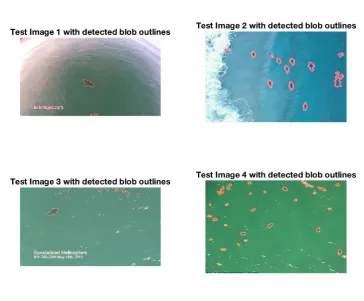
Figure 4.9: Detected blob outlines overlaid on original image using Value pixel thresholding.
By determining an appropriate threshold for the Value pixel value, the majority of the
image can be ignored and only dark coloured blobs are left. The Value pixel is a number
between zero and one, where the closer to the zero the value is the darker the pixel is.
So everything above the threshold is therefore set to zero, and when the resulting image
is ’binarized’, all pixels with a value greater than zero are set to one. This is very basic
blob analysis and can be e↵ectively used in a controlled environment where the object of
interest is a unique colour to that environment.
However, there are plenty of blobs that have been detected that fell below the desired
threshold that are not sharks. This can be because of shadows in the waves or rocks in
the water. To help filter out all the unwanted blobs, further morphological operations can
be put in place to discard the false positives. Functions such as determining the minimum
blob area size and maximum area size are particularly useful for clearing up noisy data.
The above demonstrations illustrate that by applying a threshold to the Value array from
the HSV colour model of the frame, sharks can be detected and their blobs parsed to the
4.4 Adaptive Thresholding 44
project will concentrate on first detecting all the blobs under a given threshold for each
frame.
4.4
Adaptive Thresholding
The problem with applying a constant threshold to the data is that with each frame of
the video the environment can change. An adaptive threshold method was determined
and applied to automatically calculate the appropriate threshold for each frame. This was
achieved by representing the data from the Value array as a histogram and calculating
when the derivative was greater than a certain value starting from 0 and determining the
forward di↵erence. Because this method was tested with di↵erent pictures and videos
with di↵erent resolutions, an adaptive derivative formula was determined to calculate the
derivative threshold for each frame:
DerivativeT hreshold= f ramewidth⇤f rameheight
1500 (4.1)
The pseudo code for this loop can be represented as follows:
Algorithm 3 Calculate Threshold for Regions of Interest
procedure H = imhist(V alue)
D zeroslength(H,1)
3: fori = 1:length(H) do
D(i) H(i)-H(i+1)
if i == 255 then
6: break
if D(i)<(size(Value,1)*size(Value,2))/-1500 then
Threshold i/256
This method was used because it isolates the darker objects in the image. From the
data obtained, it was noticed that sharks were consistently a darker colour than the
surrounding water. This threshold calculation works well when the frame is made up of
bright scenes such as water, whitewash and sand. Due to the lack of data this method was
unable to be tested when there were cli↵s or rocks in the scene. The calculated threshold