Abstract: This paper explores emojis as graphical password alternative for user authentication. The assumption of emojis is easier to remember and more secure has motivated the researchers to enhance existing graphical password authentication scheme. Most of the graphical authentication schemes provides longer authentication times and therefore emojis were chosen to be the alternative to reduce login times and exhibit picture superiority effect. The usability and security evaluation have been conducted to explore the differences among efficiency, effectiveness, memorability, user satisfaction, and password space and entropy of the prototype. The findings showed an acceptable level of efficiency, effectiveness and user satisfaction of the proposed system while further research should focus on the tolerance field of the images. Based on findings, this study provides recommendations for designing more usable and secure authentication schemes.
Keywords: emojis; authentication; graphical password; usability;
I. INTRODUCTION
The motivation lies in graphical password authentication based on the assumption that images are easier to remember and secure than textual password. It is generally easier for people to recognize the displayed item than to use their memory to recall the same information without any help [1]. A classical cognitive science experiment has shown that people have a strong image memory capability [2]. Recognition-based techniques are therefore a preferable graphical password, where a number of user-selected images are identified amongst others. This method was suggested as a helpful solution to textual passwords, as it contains many valuable features such as ease of memorize, convenience and a reasonable degree of security. For a solid authentication scheme, the password space is essential. Most recognition schemes commonly have small space for passwords, while many systems offer a significantly larger space for passwords. The proposed scheme therefore utilizes both techniques to achieve the best. In this study, the researchers try to examine how emojis can mitigate and achieve this objective.
Revised Manuscript Received on May 22, 2019.
Nur Syabila Zabidi, Faculty of Computer Science and Information Technology, Universiti Putra Malaysia, Serdang, Malaysia
Noris Mohd Norowi, Faculty of Computer Science and Information Technology, Universiti Putra Malaysia, Serdang, Malaysia
Rahmita Wirza O.K. Rahmat, Faculty of Computer Science and Information Technology, Universiti Putra Malaysia, Serdang, Malaysia
Emojis are now part of the Unicode standard, they are used in texts in messaging apps and on the Internet. It is therefore natural that emojis have become mechanisms for authentication.
II. RELATED WORKS Picture Superiority Effect
Several cognitive psychology studies predicted picture superiority effect increases memorability. Early in 1965, Nickerson stated that images may be recognized on the basis of its over-all theme, or by one or two unusual or striking features [3]. According to Standing et al., results from their studies indicate that the vast memory or pictures possessed by human beings [2]. In 1973, Standing further explained main findings of his study, which stating that presented pictorial material follows human’s memory capacity where it is almost limitless; the superiority of pictures is maintained when the recognition task is harder, further supporting the statement of images are easier to remember [4]. This Picture Superiority Effect (PSE) can further be explained with dual-coding theory. As proposed by Paivio in 1971, two memory schemes are available, which are encoding verbal data and images [5]. For instance, verbal information can be retrieved by words, while imagery can be retrieved by information on size, shapes, and features.
Graphical passwords involving the recognition of selected images by the user were considered as an option to alphanumeric password encryption technique. Many researchers think this form of user authentication can overcome an amount of alphanumeric password related security issues [6][7]. De Angeli et al. compared two user studies which involved graphical approach with PINs. The findings showed that bad graphical password layout can eliminate the impact of picture superiority effect in memory; Thus guidelines were provided for developers [6].
Regarding images to be used in graphical password authentication, it can be revealed that images have attractive features by presenting saliency and proximity filters [8]. S.Wiedenbeck et al. stated that by using guidance from psychology along with intuition, a person might be able to choose images that most relate to him or her and bypass images that cannot intrude with memorability [8]. Images have been used effectively in preventing offline password attacks as demonstrated by J. Thorpe and P. C. van Oorschot
On the Use of Image and Emojis in Graphical
Password Application
study, collection of information from a tiny amount of human users enables quite efficient offline assaults on click-based graphical passwords [9].
Thus, the complexity of image plays a vital role in affecting password strength and memorability in graphical password authentication [10][11]. A study from S. Chiasson et al. found out that participants prefer images that have clickable points that could easily be identified; features such as lines, repeating items, and patterns could be easily identified [10]. P. Dunphy and J. Yan in addition said that support for a background picture helped participants to build complex passwords and enhance the password’s memorability [11].
Emojis in Authentication
Emojis are “picture words” which direct translated from Japanese [12]. Emojis are widely used in messenger applications and social media networks to express emotions. At present there are approximately 2789 different emojis in the Unicode standard [29]. Researchers have attempted to integrate emojis into authentication systems due to their growing acceptance and benefits [13][14][15]. In 2016, L.Kraus et al. discovered that emojis have been used to authenticate application. This strategy promotes more research on the subject of Emoji-based portable identification [13]. EmojiAuth (with 12 emojis) has been created by M. Golla et al. to provide login times comparable to PIN and sensible in memorability [14]. Emojis are further be enhanced into authentication scheme with study from T. Seitz et al, which they discovered that the respondents attempted to connect their emojis to the remainder or to the sense of the context, or to themselves that immediately improved memory [15].
Graphical Password Authentication
The most frequently used authentication system is knowledge-based, in which the user keeps a common secret, like a password. Previous research found that no familiar scheme to be better in the final analysis; it proposed that when selecting an option to text passwords and selecting the most useable scheme, the researchers have to balance benefits and offsets [17].
Graphical password is used to reduce loading and validation of mental data [18]. In line with the behavioral task necessary to remember graphical password, it may be categorized into: recognition, recall and cued-recall. Recognition is the least cognitive burden where the user has to make up his mind if the information that has already been presented matches. Recall, the user has to remember the data memorized without any clues. Cued-recall offers some hints to activate the memory of the user [19]. Various graphical password schemes were suggested [17]. Users can create a grid password with Draw-A-Secret (DAS) [11]. PassPoints requires the user to select 5 different click-points on an image [8]. PassPoints’s user studies have shown that various users tend to select the same clicking points and thus generate hotspots and reduce the number of passwords. On the contrary, the system user must be differentiated from six face distractor by with a 3-face
passwords [20]. To compare different memory recovery types, PassTiles was designed [21]. In the majority of graphical authentication schemes, authentication times are longer. Recently, Emojis have been regarded as a potential option to decrease login times and take advantage of the picture superiority effect.
Usability and Security
There are two different research domains that will be investigated in this study. By recognizing their own purpose and abilities, this section primarily explains on security and usability.
Bevan reports that usability requirements can be separated into product use, the user interface and interaction, the development method, and a user-centered design capability for the organization [22]. Usability can be defined as to the degree that certain users can use the concept of usability to achieve certain objectives with efficiency, effectiveness and achievement in a particular sense of use (ISO 9241-11) [22]. Further definition of usability can be described by Kainda et al. where they have concluded usability in one solid sentence, usability consists of effectiveness, efficiency, satisfaction, learnability, and memorability [23].
Another domain that will be briefly described is security. The security issue is how security information is processed in the user interface and how secure authentication processes should be used easily [24]. Kainda et al. stated that definitions of security are depends on the types of attackers [23]. In the authentication phase, usability and security are both crucial. This study will implement a measurable metrics consists of usability and security metrics in order to provide basic specification and analysis of the proposed system.
III. USER STUDY Participants
There are a total number of 30 individuals who participated in this study (21 females, 9 males), in the range of age from 21 to 30 (m = 1.6; sd =13.4). Participants had interaction experience with smartphones. The participation from users were voluntary and all users consented their interactions with the prototype to be documented.
Experimental Layout
two video cameras were used: (a) all activities (filmed in side view with digital video camera; and (b) close-up smartphone activities (captured by a video camera installed on the ceiling to get a clear perspective of the smartphone display).
[image:3.612.330.551.50.433.2]Throughout the experiment, the smartphone’s screen display resolution is 1080 x 1920 pixels with size of 5.5 inch. The experimental setup was as shown in Figure 1.
Fig. 1 Experimental Setup for User Study Application (High Fidelity Prototype)
[image:3.612.108.230.138.244.2]SecureImageEmoji, a two-factor authentication mechanism was developed. This application has the ability to authenticate the legitimation of a user by combining the chosen image and emojis of graphical password combination. The illustration of the developed SecureImageEmoji has been shown in Figure 2. In specific, the image pool consists of 6 images (arranged in 2 x 3 grids) with same theme (scenery images) such as hot air balloons, garden, and historic places. All used images have the same pixel of 1920 x 1200. Users must generate a graphical password when selecting an image from the six images given in the first authentication round. The process followed by choosing and dragging four selected emojis to the image selected before.
Fig. 2 Two-Factor Authentication Scheme
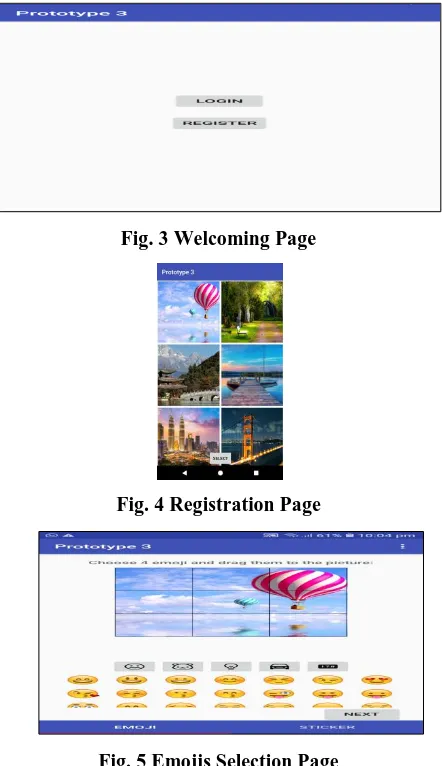
This application includes welcome page, registration page and login page. First, two menus will be provided for the user on welcoming page, login and register buttons distinctively (Figure 3). Next, the registration page presents 2x3 grid of images selection, the participants need to choose one image only (Figure 4). The registration process continues with the presentation of 3x3 grid-based images which shows the previously chosen image as background; participants need to drag four emojis onto desired grid (Figure 5). After confirming all the necessary emojis as password, participants will log into the application by designing all the registered passwords (Figure 6).
Fig. 3 Welcoming Page
Fig. 4 Registration Page
[image:3.612.102.243.435.548.2]
Fig. 5 Emojis Selection Page
Fig. 6 Login Page Tasks Procedure
[image:3.612.348.546.455.568.2]Then they would have to respond to a pre-test questionnaire and login with their credential. For the final session (1 week later), they need to login using their credential and answer a post-test questionnaire.
Participants were required to create a new account for the registration task by selecting one password image and dragging four emojis in the correct layout. The participants must remember the sequence and location of their password emojis in this authentication method. The participants must complete a pre-test questionnaire before proceeding with the login task. The aim of doing this activity is to offer them a divided moment between the registration and the login task. While logging in, the application will display a 2x3 grid images portfolio that they will need to choose one image only. Then the application will show 7x3 grid of emojis choices and they are required to drag and drop four desired emojis onto the previously chosen image.
IV. RESULTS Efficiency
Participants were timed in their use of graphical password application from the start of password registration to completion of the login process. In “SecureImageEmoji” application, this process comprised of clicking the ‘Register’ button, selecting one image, clicking ‘Select’ button, choosing and dragging four desired emojis onto the image, clicking ‘Next’ button, memorizing the location of emojis, clicking ‘Confirm’ button and finally, finishing the registering process by clicking on ‘Yes’ button.
Details of time to register password in application were captured in this study as presented in Table 1. The average registration time, as shown in Table 1, is 72 seconds. The minimum time in registering a password is 24 seconds, while the maximum time is 182 seconds (3 minutes 03 seconds).
Table. 1 Registration Entry Time Details (in seconds)
Effectiveness
The measuring information used to calculate the effectiveness of the suggested system are shown in Table 2. The study analyzes the percentage of all successful login attempts in all trials to calculate the total success level of the suggested system.
Table. 2 Effectiveness Evaluation Elements
All respondents evaluated a total of 90 login efforts. The success and failure rates of all three sessions were detailed in Table 3. The findings were comparatively large, with 92% efficient. In the final session (Trial 3) some associations of application credentials appear to be in the memory of 30 participants, since the number of incorrect inputs was at 0%. All participants succeeded in authenticating the application in two trials.
Table. 3 Login Success and Failure Rates
In addition, the login success rate between trials appears to be decreasing in from Trial 1 to Trial 3. The study showed interestingly that neither user can completely login in the number of attempts they have made. Moreover, given that many systems restrict the amount of erroneous user efforts consecutively, the largest amount of recurring errors was identified by this measure. The findings have demonstrated that in three consecutive incorrect login attempts no user was unable to login and 2 others were unable to log in twice.
Memorability
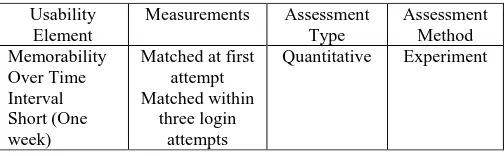
[image:4.612.319.571.454.532.2]The information for calculating memorability of the system are shown in Table 4. The memorability experiment was conducted in short time interval within one week duration.
Table. 4 Memorability Evaluation Elements
Table 5 shows the number of failures in each sequence of login attempts. From the table, it can be concluded that 83% of the participants in Trial 1 were successful in their first attempt. There seemed to be many unsuccessful attempts over a week. One week later, when participants attempted to re-enter their passwords in Trial 2, 57% of the participants were unable to log in correctly at the first attempt. The findings indicated that all users could effectively log into accounts on the first day, but 9 of the participants unsuccessful to login after one week with three trials.
Trials Total
Attempts
Successful Failed
Trial 1 30 25 83% 5 17%
Trial 2 30 28 93% 2 7%
Trial 3 30 30 100% 0 0%
Total 90 83 92% 7 8%
Total Attempts
Total Time
Average StDev Min Max Registration 38 2174 72 0.00040654 24 182
Usability Element
Measurements Assessment Type
Assessmen t Method Login
Succes s Rate
SR =
Number_of_successful_login s
Number_of_total_logins
Quantitativ e
Experimen t
Usability Element
Measurements Assessment
Type
Assessment Method Memorability
Over Time Interval Short (One week)
Matched at first attempt Matched within
three login attempts
Table. 5 Details concerning the number of unsuccessful efforts
User Satisfaction
At the end of their final study session, post-test questionnaire was used to measure user satisfaction. The aim was to investigate the user acceptance of proposed scheme with regard to the perceived usability and security aspects. There are five main sections: (1) Practice/Instruction: Inquire about the efficiency of the presentation of the study; (2) Aspects of Usability: Analysis of different usability aspects of user experience; (3) Aspects of Security: Review the security of the system from the point of view of respondents; (4) Design Aspects: Analyze the experience of respondents in the design of the system; (5) Overall Opinions: Analysis of the total acceptability of the authentication mechanism proposed by the system.
The average usability values obtained from the usability surveys were 4.0 (on a 5-point scale, out of 5.0 for the total score) for the training/instruction, 3.66/5.0 for usability aspects, 3.66/5.00 for security aspects, 3.64/5.00 for design aspects, and 3.84/5.00 for the overall opinions.
Password Space and Entropy
Each portion of the password space of the SecureImageEmoji scheme is discussed in this section.
i) Image Choice
The password entropy of the image choice is based on the equation below [25]:
For SecureImageEmoji application, r = 1, n = 6, k = 1; This implies that one verification round and 1 image from the 6-image size panel must be chosen. The password entropy for image choice is:
ii) Emoji Choice
The password entropy of the emoji choice is based on the equation below [25]:
For SecureImageEmoji application, r = 1, n = 828, k = 4,
which means there is one round of verification and 4 emojis need to be selected from an emojis panel of size 828.
The password entropy for emoji choice is:
iii) Grid Size
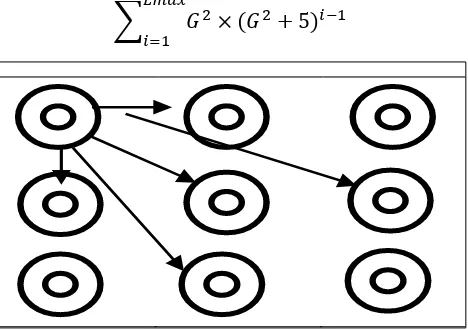
Considering the grid size of the SecureImageEmoji (3 x 3) system, the lower bound of the full password space will be (the minimum neighbour node is 5, as illustrated in Figure 3):
Fig. 3 Lower bound: minimum number of node’s neighbours
When using a lower bound equal for SecureImageEmoji and calculating the grid’s password space, the grid size is given 3 x 3 (G=3) in case of Lmax = 5 (number of linked nodes): Compute the general progression formula.
The definition of geometric progression is a geometric
sequence that has a constant ratio and is defined by an
Check whether the ratio is constant.
Compute the ratios of all adjacent terms.
The ratio of all the adjacent terms is the same and equal to
.
Calculate the first element of the sequence.
Trial 1 (First day)
Trial 2 (After one week) Attempts
Sequence
1st 2nd 3rd 1st 2nd 3rd
Failure Frequency
5 2 0 17 12
10
[image:5.612.324.558.187.352.2]Therefore, the th term is computed by,
Precede with geometric sequence sum formula.
=
Password space:
=
Password entropy:
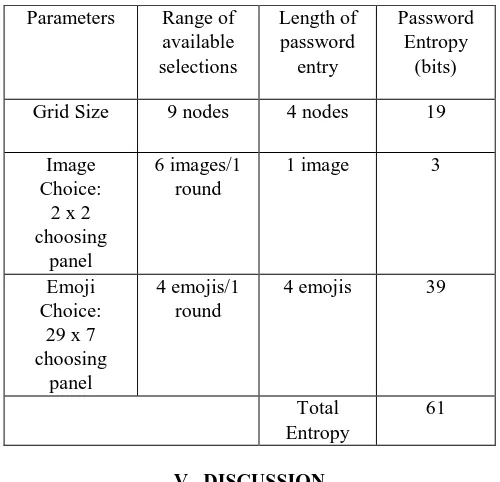
Table 6 shows the size and the detailed settings of
SecureImageEmoji’s password entropy authentication
[image:6.612.48.298.249.490.2]mechanism. SecureImageEmoji scheme has about 61 bits of entropy of a password.
Table. 6 Secure Image Emoji Password Entropy Parameters Range of
available selections
Length of password
entry
Password Entropy
(bits)
Grid Size 9 nodes 4 nodes 19
Image Choice:
2 x 2 choosing
panel
6 images/1 round
1 image 3
Emoji Choice:
29 x 7 choosing
panel
4 emojis/1 round
4 emojis 39
Total Entropy
61
V. DISCUSSION
In comparison with other similar techniques of graphical password, there are both benefits and disadvantages in SecureImageEmoji. At first glance, many participants believed it was too complicated; nonetheless, the system's learning and practice created the opposite feeling, as it was easy to use and acceptable to most participants. The system is disadvantaged with long- term creation, but it is also important to mention that SecureImageEmoji is an automation multi-tiered approach using a number of graphical password techniques to create a single study mechanism. This could justify the lengthy time required for registering password.
In terms of effectiveness and memorability, no user was unable to login in three trials and two others were unable to log in two times. Renaud stated that an important memorability factor is the frequency of use, which means how often users are going to access the system [27]. It is possible to categorize the usage either high (daily), moderate (once a week) or low (once a month). SecureImageEmoji used moderate usage of frequency in measuring usability.
Surprisingly, on the first day, all respondents could effectively enter their accounts, but nine of the participants were unsuccessful to login after one week with three trials. This further justifies that SecureImageEmoji was effective and memorable.
Regarding the security evaluation of SecureImageEmoji, this study only evaluates on the theoretical part of the security which involves on calculating password space and entropy. SecureImageEmoji scheme is a secure and stable system with about 61 bits of password entropy. This study will not further investigate on empirical evaluation of security. Empirical security evaluation involves testing on guessing attack, shoulder-surfing attack and intersection attack. As defined by Wu et al., there are two types of shoulder-surfing attacks, which are weak shoulder-surfing and strong shoulder-surfing [28]. An observer only looks at the login of the user without any video equipment, this method is considered as weak shoulder-surfing where it has been implemented in this study. The focus of this study is primarily evaluating on the usability part with the additional of certain theoretical security evaluation.
VI. CONCLUSION
This paper offered a helpful system for authenticating graphical password application by pairing images with emojis. The primary input is the introduction of recognition based graphical methods that use emojis in order to resist several common threats to security without sacrificing the usability of graphical password. The findings of the results show that the system is efficient, effective and reach the user satisfaction. Further research should be focused on tolerance area of the images. The use of big images or tolerance reduction is a simple way to extend password space. In future work, a comprehensive guideline for the development and verification of images and emojis, including a long-term assessment of these practices, should be included. The security of SecureImageEmoji must also be examined closely and how attackers can take advantage of the emergence of hotspots.
REFERENCES
1. J.Nielsen, “Usability Metrics: Tracking Interface Improvements,” IEEE Softw., vol. 13, no. 6, pp. 12–13, 199L. Standing, J. Conezio, and R. N. Haber, “Perception and memory for pictures: Single-trial learning of 2500 visual stimuli,” Psychon. Sci., vol. 19, no. 2, pp. 73–74, Aug. 1970. 2. R. S. Nickerson, “Short-Term Memory For Complex Meaningful Visual
Configurations: A Demonstration Of Capacity,” Can. J. Psychol., vol. 19, no. 2, pp. 155–160, 1965.
3. L. Standing, “Learning 10,000 Pictures,” Q. J. Exp. Psychol. (I 973), vol. 25, no. I 973, pp. 207–222, 1973.
[image:6.612.49.297.250.487.2]6. R. Dhamija and A. Perrig, “Deja vu: A User Study Using Images for Authentication,” Proc. 9th USENIX Secur. Symp. Denver, CO Usenix, 2000., no. 102590, pp. 45–58, 2000.
7. S. Wiedenbeck, J. Waters, J.-C. Birget, A. Brodskiy, and N. Memon, “Authentication using graphical passwords,” in Proceedings of the 2005 symposium on Usable privacy and security - SOUPS ’05, 2005, no. January 2005, pp. 1–12.
8. J. Thorpe and P. C. van Oorschot, “Human-seeded attacks and exploiting hot-spots in graphical passwords,” Proc. 16th USENIX Secur. Symp. USENIX Secur. Symp., p. 8, 2007.
9. S. Chiasson, R. Biddle, and P. C. van Oorschot, “A second look at the usability of click-based graphical passwords,” in Proceedings of the 3rd symposium on Usable privacy and security - SOUPS ’07, 2007, p. 1. 10. P. Dunphy and J. Yan, “Do background images improve ‘draw a secret’
graphical passwords?,” in Proceedings of the 14th ACM conference on Computer and communications security - CCS ’07, 2007, p. 36.
11. C. Taggart, New Words for Old: Recycling Our Language for the Modern World. Michael O’Mara Books, Limited, 2016.
12. L. Kraus, R. Schmidt, M. Walch, F. Schaub, C. Krügelstein, and S. Möller, “Implications of the Use of Emojis in Mobile Authentication,” Twelfth Symp. Usable Priv. Secur. ({SOUPS} 2016, pp. 10–11, 2016. 13. M. Golla, D. Detering, and M. DŸrmut, “EmojiAuth: Quantifying the
Security of Emoji-based Authentication,” in Proceedings 2017 Workshop on Usable Security, 2017, pp. 1–13.
14. T. Seitz, F. Mathis, and H. Hussmann, “The bird is the word,” in Proceedings of the 29th Australian Conference on Computer-Human Interaction - OZCHI ’17, 2017, pp. 10–20.
15. H. Assal, A. Imran, and S. Chiasson, “An exploration of graphical password authentication for children,” Int. J. Child-Computer Interact., 2018.
16. R. Biddle, S. Chiasson, and P. C. Van Oorschot, “Graphical Passwords : Learning from the First Twelve Years,” ACM Comput. Surv., vol. 44, no. 4, pp. 1–43, 2012.
17. S. Chiasson, P. Van Oorschot, and R. Biddle, “Graphical password authentication using cued click points,” Comput. Secur. …, vol. 4734, no. September, pp. 359–374, 2007.
18. L. Y. Por, C. S. Ku, A. Islam, and T. F. Ang, “Graphical password: prevent shoulder-surfing attack using digraph substitution rules,” Front. Comput. Sci., vol. 11, no. 6, pp. 1098–1108, Dec. 2017.
19. S. Brostoff and M. A. Sasse, “Are Passfaces More Usable than Passwords? A Field Trial Investigation,” People Comput., pp. 1–20, 2000. 20. E. Stobert, S. Chiasson, and R. Biddle, “User-choice patterns in passtiles
graphical passwords,” Annu. Comput. Secur. …, pp. 4–5, 2011.
21. N. Bevan, “International standards for HCI and usability,” Int. J. Hum. Comput. Stud., vol. 55, no. 4, pp. 533–552, 2001.
22. R. Kainda, I. Flechais, and A. W. Roscoe, “Security and usability: Analysis and evaluation,” ARES 2010 - 5th Int. Conf. Availability, Reliab. Secur., pp. 275–282, 2010.
23. C. Braz and J.-M. Robert, “Security and usability,” Proc. 18th Int. Conf. Assoc. Francoph. d’Interaction Homme-Machine - IHM ’06, no. January, pp. 199–203, 2006.
24. P. C. van Oorschot and T. Wan, “TwoStep: An Authentication Method Combining Text and Graphical Passwords,” in E-Technologies: Innovation in an Open World, 2009, pp. 233–239.
25. H. Tao and C. Adams, “Pass-Go: A proposal to improve the usability of graphical passwords,” Int. J. Netw. Secur., vol. 7, no. 2, pp. 273–292, 2008.
26. K. Renaud, “Quantifying the Quality of Web Authentication Mechanisms: A Usability Perspective,” J. Web Eng., vol. 3, no. 2, pp. 95–123, Oct. 2004.
27. T. S. Wu, M. L. Lee, H. Y. Lin, and C. Y. Wang, “Shoulder-surfing-proof graphical password authentication scheme,” Int. J. Inf. Secur., vol. 13, no. 3, pp. 245–254, 2014.