TE
AM
FL
Y
Official Guide to
Cryptography
Steve Burnett and Stephen Paine
Osborne/McGraw-Hill
New York Chicago San Francisco Lisbon London Madrid Mexico City
Copyright © 2001 by The McGraw--Hill Companies. All rights reserved. Manufactured in the United States of America. Except as per-mitted under the United States Copyright Act of 1976, no part of this publication may be reproduced or distributed in any form or by any means, or stored in a database or retrieval system, without the prior written permission of the publisher.
0-07-219225-9
The material in this eBook also appears in the print version of this title:0-07-213139-X.
All trademarks are trademarks of their respective owners. Rather than put a trademark symbol after every occurrence of a trade-marked name, we use names in an editorial fashion only, and to the benefit of the trademark owner, with no intention of infringe-ment of the trademark. Where such designations appear in this book, they have been printed with initial caps.
McGraw-Hill eBooks are available at special quantity discounts to use as premiums and sales promotions, or for use in corporate training programs. For more information, please contact George Hoare, Special Sales, at [email protected] or (212) 904-4069.
TERMS OF USE
This is a copyrighted work and The McGraw-Hill Companies, Inc. (“McGraw-Hill”) and its licensors reserve all rights in and to the work. Use of this work is subject to these terms. Except as permitted under the Copyright Act of 1976 and the right to store and retrieve one copy of the work, you may not decompile, disassemble, reverse engineer, reproduce, modify, create derivative works based upon, transmit, distribute, disseminate, sell, publish or sublicense the work or any part of it without McGraw-Hill’s prior con-sent. You may use the work for your own noncommercial and personal use; any other use of the work is strictly prohibited. Your right to use the work may be terminated if you fail to comply with these terms.
THE WORK IS PROVIDED “AS IS”. McGRAW-HILL AND ITS LICENSORS MAKE NO GUARANTEES OR WARRANTIES AS TO THE ACCURACY, ADEQUACY OR COMPLETENESS OF OR RESULTS TO BE OBTAINED FROM USING THE WORK, INCLUDING ANY INFORMATION THAT CAN BE ACCESSED THROUGH THE WORK VIA HYPERLINK OR OTHERWISE, AND EXPRESSLY DISCLAIM ANY WARRANTY, EXPRESS OR IMPLIED, INCLUDING BUT NOT LIMITED TO IMPLIED WARRANTIES OF MERCHANTABILITY OR FITNESS FOR A PARTICULAR PURPOSE. McGraw-Hill and its licensors do not warrant or guarantee that the functions contained in the work will meet your requirements or that its operation will be uninterrupted or error free. Neither McGraw-Hill nor its licensors shall be liable to you or anyone else for any inaccuracy, error or omission, regardless of cause, in the work or for any damages resulting therefrom. McGraw-Hill has no responsibility for the con-tent of any information accessed through the work. Under no circumstances shall McGraw-Hill and/or its licensors be liable for any indirect, incidental, special, punitive, consequential or similar damages that result from the use of or inability to use the work, even if any of them has been advised of the possibility of such damages. This limitation of liability shall apply to any claim or cause what-soever whether such claim or cause arises in contract, tort or otherwise.
DOI: 10.1036/0072192259
To Danielle, thanks for understanding while I worked on
this book
To Alexis and Elizabeth, a father could not ask for better
children
Acknowledgments xvii
Preface xix
About the Authors xxii
Chapter 1 Why Cryptography?1
Security Provided by Computer Operating Systems 2
How Operating Systems Work 2
Default OS Security: Permissions 3
Attacks on Passwords 4
Attacks That Bypass Operating Systems 6
Data Recovery Attack 6
Memory Reconstruction Attack 9
Added Protection Through Cryptography 11
The Role of Cryptography in Data Security 12
Chapter 2 Symmetric-Key Cryptography 15
Some Crypto Jargon 18
What Is a Key?20 Why Is a Key Necessary?22
Generating a Key 22
A Random Number Generator 27
A Pseudo-Random Number Generator 28
Attacks on Encrypted Data 30
Attacking the Key 30
Breaking the Algorithm 36
Measuring the Time It Takes to Break Your Message 37
Symmetric Algorithms: The Key Table 37
Symmetric Algorithms: Block Versus Stream Ciphers 38
Block Ciphers 38
Stream Ciphers 41
Block Versus Stream: Which Is Better?45
Digital Encryption Standard 46
Triple DES 47
Commercial DES Replacements 49
Advanced Encryption Standard 50
Summary 51
Real-World Example: Oracle Databases 51
Chapter 3 Symmetric-Key Management 53
Password-Based Encryption 54
Programming Convenience 59
Breaking PBE 63
Slowing Down an Attack on a Password 64
Good Passwords 65
Password Generators 67
Hardware-Based Key Storage 69
Tokens 69
Crypto Accelerators 73
Hardware Devices and Random Numbers 75
Biometrics 75
Summary 76
Real-World Examples 76
Keon Desktop 77
Other Products 79
Chapter 4 The Key Distribution Problem and Public-Key Cryptography 81
Sharing Keys in Advance 83
Problems With This Scheme 84
Using a Trusted Third Party 85
Problems With This Scheme 86
Public-Key Cryptography and the Digital Envelope 88
Security Issues 91
Breaking a Public-Key Algorithm 92
Some History of Public-Key Cryptography 93
How Public-Key Cryptography Works 94
The RSA Algorithm 98
The DH Algorithm 105
The ECDH Algorithm 111
Comparing the Algorithms 117
Security 117
Key Sizes 119
Performance 120
Transmission Size 122
Interoperability 122
Key Recovery via a Trusted Third Party 124
Key Recovery via a Group of Trustees 126
Key Recovery via Threshold Schemes 127
How a Threshold Scheme Works 130
Summary 132
Real-World Example 133
Chapter 5 The Digital Signature 137
The Uniqueness of a Digital Signature 138
Message Digests 141
Collisions 145
The Three Important Digest Algorithms 148
A Representative of Larger Data 149
Data Integrity 153
Back to Digital Signatures 154
Trying to Cheat 156
Implementing Authentication, Data Integrity, and Nonrepudiation 159
Understanding the Algorithms 159
RSA 160
DSA 161
ECDSA 163
Comparing the Algorithms 163
Security 163
Performance 164
Transmission Size 165
Interoperability 165
Protecting Private Keys 166
Introduction to Certificates 166
Key Recovery 169
Summary 169
Real-World Example 170
Chapter 6 Public-Key Infrastructures and the X.509 Standard 171
Public-Key Certificates 172
Unique Identifiers 174
Standard Version 3 Certificate Extensions 175
ASN.1 Notation and Encoding 179
The Components of a PKI 179
Certification Authority 180
Registration Authority 180
Certificate Directory 181
Key Recovery Server 182
Management Protocols 182
Operational Protocols 184
Registering and Issuing Certificates 184
Revoking a Certificate 185
Certificate Revocation Lists 186
Suspending a Certificate 190
Authority Revocation Lists 190
Trust Models 191
Certificate Hierarchies 192
Cross-Certification 193
X.509 Certificate Chain 194
The Push Model Versus the Pull Model 195
Managing Key Pairs 196
Generating Key Pairs 197
Protecting Private Keys 197
Managing Multiple Key Pairs 198
Updating Key Pairs 199
Keeping a History of Key Pairs 200
Deploying a PKI 201
The Future of PKI 201
Roaming Certificates 201
Attribute Certificates 203
Certificate Policies and Certification Practice Statements 204
Summary 206
Real-World Examples 206
Keon Certificate Server 207
Keon Web PassPort 207
Chapter 7 Network and Transport Security Protocols 209
Internet Protocol Security 209
IP Security Architecture 210
IPSec Services 211
The Authentication Header Protocol 211
Integrity Check Value Calculation 212
Encryption Algorithms 216
ESP in Transport and Tunnel Modes 217
Security Associations 218
Combining Security Associations 219
Security Databases 220
Security Policy Database 222
Security Association Database 222
Key Management 223
Internet Key Exchange 224
Secure Sockets Layer 227
The History of SSL 227
Session and Connection States 228
The Record Layer Protocol 230
The Change Cipher Spec Protocol 231
The Alert Protocol 232
The Handshake Protocol 233
The Client Hello Message 234
The Server Hello Message 235
The Server Certificate Message 236
The Server Key Exchange Message 236
The Certificate Request Message 237
The Server Hello Done Message 237
The Client Certificate Message 237
The Client Key Exchange Message 238
The Certificate Verify Message 238
The Finished Message 239
Ending a Session and Connection 239
Resuming Sessions 240
Cryptographic Computations 240
Encryption and Authentication Algorithms 240
Summary 241
Real-World Examples 242
Chapter 8 Application-Layer Security Protocols 243
S/MIME 243
Overview 244
S/MIME Functionality 245
S/MIME Messages 247
Enhanced Security Services 252
Interoperability 253
Secure Electronic Transaction (SET) 253
Business Requirements 254
SET Features 255
SET Participants 256
Dual Signatures 257
SET Certificates 258
Payment Processing 260
Summary 264
Real-World Examples 265
Chapter 9 Hardware Solutions: Overcoming Software Limitations 267
Cryptographic Accelerators 267
Authentication Tokens 269
Token Form Factors 270
Noncontact Tokens 270
Contact Tokens 275
Smart Cards 275
Smart Card Standards 276
Types of Smart Cards 276
Readers and Terminals 278
JavaCards 279
History and Standards 279
JavaCard Operations 280
Other Java Tokens 281
Biometrics 282
Biometric Systems Overview 282
Recognition Methods 285
Biometric Accuracy 288
Combining Authentication Methods 289
Summary 291
Vendors 291
Chapter 10 Digital Signatures: Beyond Security 293
Legislative Approaches 295
Legal Guidelines from the American Bar Association 295
Legal Concepts Related to Digital Signatures 296
Contents
X
TE
AM
FL
Y
Written Versus Digital Signatures 299
Requirements for the Use of Digital Signatures 299
Public Key Infrastructures 300
Control of Key Revocation 300
Time-Stamping 300
Current and Pending Legislation 302
The E-SIGN Act 303
Dealing with Legal Uncertainties 306
Summary 307
Real-World Examples 307
Chapter 11 Doing It Wrong: The Break-Ins 309
Measuring Losses 309
Types of Security Threats 310
Unauthorized Disclosure of Data 311
Unauthorized Modification of Data 311
Unauthorized Access 312
Disclosure of Network Traffic 313
Spoofing of Network Traffic 314
Identifying Intruders 314
Insiders 315
Hackers 315
Terrorists 315
Foreign Intelligence Services 316
Hactivists 316
Intruder Knowledge 317
Case Studies 317
Data in Transit 317
Data at Rest 318
Authentication 319
Implementation 320
Information Security: Law Enforcement 321
Summary 322
Chapter 12 Doing It Right: Following Standards 323
Security Services and Mechanisms 324
Confidentiality 326
Integrity 326
Nonrepudiation 327
Standards, Guidelines, and Regulations 327
The Internet Engineering Task Force 327
ANSI X9 328
National Institute of Standards and Technology 328
Common Criteria 330
The Health Insurance Portability Act 330
Developer Assistance 331
Insurance 332
Security Research 332
Case Studies 333
Implementation 333
Authentication 334
Data at Rest 335
Data in Transit 336
Summary 336
Appendix A Bits, Bytes, Hex, and ASCII 339
Appendix B A Layman’s Guide to a Subset of ASN.1, BER, and DER 347
Appendix C Further Technical Details 387
Index 407
Corporation. All other product and service names mentioned may be trademarks of their respective owners.
The ALX 300 is courtesy of Compaq Computer Corporation.
The ikey 2000 and the CryptoSwift accelerator is courtesy of Rainbow Technologies, Inc.
Data Key is courtesy of Datakey Inc.
The Java Ring is courtesy of Dallas Semiconductor Corp.
The box blue accelerator and card reader is courtesy of nCipher Inc. The Luna CA3—Photos courtesy of Chrysalis-ITS®, Inc.
The Smarty Smart Card Reader is courtesy of SmartDisk Corporation. The RSA SecurID Card and token are courtesy of RSA Security Inc. The BioMouse Plus is courtesy of American Biometric Company. The XyLoc proximity card is courtesy of Ensure Technologies. The Trusted Time products are courtesy of Datum.
As the Internet becomes a more pervasive part of daily life, the need for e-security becomes even more critical. Any organization engaged in online activity must assess and manage the e-security risks associated with this activity. Effective use of cryptographic techniques is at the core of many of these risk-management strategies. This book provides a prac-tical guide for the use of cryptographic e-security technologies to provide for privacy, security, and integrity of an organization’s most precious asset: data.
It is an exciting time for cryptography, with important technical, busi-ness, and legal events occurring in quick succession. This book can help the reader better understand the technology behind these events.
In January 2000, the United States Government announced a signifi-cant relaxation in restrictions on the export of strong cryptography. This decision has permitted U.S. companies to now compete for cryptographic business on a worldwide basis. Previously, many of the algorithms dis-cussed in this book were treated as munitions and were subject to severe restrictions on their export from the U.S.
In September 2000, the patent on the RSA algorithm, arguably the most important patent in cryptography, expired. Now any firm or indi-vidual can create implementations of this algorithm, further increasing the pervasiveness of one of the most widespread technologies in the his-tory of computing.
In October 2000, the United States National Institute of Standards and Technology announced its selection of the winner of the Advanced Encryp-tion Standard(AES) selection process, an algorithm called Rijndael devel-oped by two Belgian researchers. The AES algorithm is intended to replace the venerable, and increasingly vulnerable Data Encryption Stan-dard(DES) algorithm. AES is expected to become the most widely used algorithm of its type in a short time.
The security technology industry has undergone explosive growth in a short period of time, with many new options emerging for the deployment of e-security techniques based on cryptography. Ranging from new devel-opments in cryptographic hardware to the use of personal smart cards in public key infrastructures, the industry continues to increase the range of choices available to address e-security risks. This book provides the
reader with a solid foundation in the core cryptographic techniques of e-security—including RSA, AES, and DES mentioned previously, and many others—and then builds on this foundation to discuss the use of these techniques in practical applications and cutting-edge technologies. While this book does discuss the underlying mathematics of cryptog-raphy, its primary focus is on the use of these technologies in familiar, real-world settings. It takes a systems approach to the problems of using cryptographic techniques for e-security, reflecting the fact that the degree of protection provided by an e-security deployment is only as strong as the weakest link in the chain of protection.
We hope that you will enjoy this book and the other titles from RSA Press. We welcome your comments as well as your suggestions for future RSA Press books. For more information on RSA Security, please visit our web site at www.rsasecurity.com; more information on RSA Press can be found at www.rsapress.com.
Burt Kaliski Director and Chief Scientist RSA Laboratories
nized the structure to make the book better. He planned; I just wrote. Betsy Hardinger and LeeAnn Pickrell at Osborne/McGraw Hill are the two editors who made many suggestions (most of which we accepted) to improve the language, readability, and flow of the content. Stephen Paine and I have our names on the book, but I think they deserve plenty of credit for their contributions.
Blake Dournaee of RSA did a great job of reviewing. If it hadn’t been for Blake, I would be suffering from great embarrassment for a couple of mistakes he caught. Of course, any errors still residing in this book belong entirely to Stephen and me.
We received help from many people for the examples. Mark Tessin of Reynolds Data Recovery and Dennis Vanatta of 4Sites Internet Services gave me the information and screen shot for the data recovery discussion in Chapter 1. Mary Ann Davidson and Kristy Browder of Oracle helped me put together the example in Chapter 2. For the Keon example, Peter Rostin and Nino Marino of RSA were my sources.
The people at Osborne/McGraw Hill said we had complete control over the acknowledgments, so I’d like to thank some people who didn’t con-tribute to the book so much as concon-tributed to my career. If it hadn’t been for Dave Neff at Intergraph, I don’t think I would have been much of a programmer and hence never could have been successful enough at RSA to be chosen to write this book. It was Victor Chang, then the VP of engi-neering at RSA, who hired me, let me do all kinds of wonderful things in the field and industry of cryptography, and made RSA engineering a great place to work. The geniuses of RSA Labs, especially Burt Kaliski and Matt Robshaw, taught me most of the crypto I know today, and the engineers at RSA, especially Dung Huynh and Pao-Chi Hwang, taught me all about the crypto code.
—Steve Burnett
The first person I’d like to thank is Steve Burnett. I am positive that if he had not agreed to co-author this book with me, I might have given up before I began.
RSA Press definitely must be thanked for giving Steve Burnett and me a chance to write this book. Also, I’d like to thank Steve Elliot, Alex Corona, Betsy Hardinger, LeeAnn Pickrell, and all of the other employees of Osborne/McGraw Hill who worked to make this book possible.
Both Jessica Nelson and Blake Dournaee did an excellent job provid-ing technical review—thank you. I’d like to offer a special thanks to Mohan Atreya and Scott Maxwell of RSA Security; both were a source of excellent ideas and technical input.
Thanks to my friends at RSA Security for being patient and under-standing while I worked long hours on the book.
I especially want to thank Jerry Mansfield, a great friend who taught me to take life as it comes. Finally, I would like to thank my family for their support.
—Stephen Paine
money to include features that did not help sales. Today, customers demand security for many applications. The Federal Bureau of Investi-gation published the following Congressional Statement on February 16, 2000:
“There were over 100 million Internet users in the United States in 1999. That number is projected to reach 177 million in United States and 502 mil-lion worldwide by the end of 2003. Electronic commerce has emerged as a new sector of the American economy, accounting for over $100 billion in sales during 1999; by 2003 electronic commerce is projected to exceed $1 trillion.”
At the same time, the Computer Security Institute(CSI) reported an increase in cybercrime, “55% of the respondents to our survey reported malicious activity by insiders.” Knowing this, you can be sure growing cor-porations need security products.
The most important security tool is cryptography. Developers and engi-neers need to understand crypto in order to effectively build it into their products. Sales and marketing people need to understand crypto in order to prove the products they are selling are secure. The customers buying those products, whether end users or corporate purchasing agents, need to understand crypto in order to make well-informed choices and then to use those products correctly. IT professionals need to understand crypto in order to deploy it properly in their systems. Even lawyers need to understand crypto because governments at the local, state, and national level are enacting new laws defining the responsibilities of entities hold-ing the public’s private information.
This book is an introduction to crypto. It is not about the history of crypto (although you will find some historical stories). It is not a guide to writing code, nor a math book listing all the theorems and proofs of the underpinnings of crypto. It does not describe everything there is to know about crypto; rather, it describes the basic concepts of the most widely used crypto in the world today. After reading this book, you will know
what computer cryptography does and how it’s used today. For example, you will
■ Understand the difference between a block cipher and a stream cipher and know when to use each (if someone tries to sell you an application that reuses a stream cipher’s key, you will know why you shouldn’t buy it).
■ Know why you should not implement key recovery on a signing-only key.
■ Understand what SSL does and why it is not the security magic bullet solving all problems, which some e-commerce sites seem to imply.
■ Learn how some companies have effectively implemented crypto in their products.
■ Learn how some companies have used crypto poorly (smart people learn from their own mistakes; brilliant people learn from other people’s mistakes).
There are, of course, many more things you will learn in this book. Chapter 1 delves into why cryptography is needed today; Chapters 2 through 5 describe the basic building blocks of crypto, such as symmetric keys and public keys, password-based encryption, and digital signatures. In Chapters 6 through 8, you will see how these building blocks are used to create an infrastructure through certificates and protocols. In Chapter 9, you will learn how specialized hardware devices can enhance your secu-rity. Chapter 10 explores the legal issues around digital signatures. Finally, Chapters 11 and 12 show you some real-world examples of com-panies doing it wrong and doing it right.
Throughout this book we use some standard computer hexadecimal notation. For instance, we might show a cryptographic key such as the fol-lowing:
0x14C608B9 62AF9086
Many of you probably know what that means, but if you don’t, read Appendix A. It’s all about how the computer industry displays bits and bytes in hexadecimal. It also describes ASCII, the standard way letters, numerals, and symbols are expressed in computers.
Preface
XX
TE
AM
FL
Y
Appendix B.
In Appendix C, you will find further detailed information about many of the topics discussed in the book. These details are not crucial to under-standing the concepts presented in the main body of the book; but for those who wish to learn more about the way crypto is used today, this appendix will offer interesting reading.
About the Authors
Steve Burnett With degrees in math from Grinnell College in Iowa and The Claremont Graduate School in California, Steve Burnett has spent most of his career converting math into computer programs, first at Intergraph Corporation and now with RSA Security. He is currently the lead crypto engineer for RSA’s BSAFE Crypto-C and Crypto-J prod-ucts, which are general purpose crypto software development kits in C and Java. Burnett is also a frequent speaker at industry events and col-lege campuses.
Stephen Paine Stephen Paine has worked in the security field throughout most of his career—formerly for the United States Marine Corps and SUN Microsystems. He is currently a systems engineer for RSA Security, where he explains security concepts to corporations and developers worldwide and provides training to customers and RSA employees.
About the Reviewers
Blake Dournaee Blake Dournaee joined RSA Security’s developer sup-port team in 1999, specializing in supsup-port and training for the BSAFE cryptography toolkits. Prior to joining RSA Security, he worked at NASA-Ames Research Center in their security development group. He has a B.S. in Computer Science from California Polytechnic State University in San Luis Obispo and is currently a graduate student at the University of Massachusetts.
Jessica Nelson Jessica Nelson comes from a strong background in com-puter security. As an officer in the United States Air Force, she spear-headed the 12 Air Force/Southern Command Defensive Information Warfare division. She built programs that integrated computer and com-munications security into the DoD’s Information Warfare. She graduated from UCSD with a degree in physics and has worked with such astro-physicists as Dr. Kim Griest and Dr. Sally Ride. She currently acts as tech-nical sales lead in the western division of a European security company.
Why Cryptography?
“According to the affidavit in support of the criminal complaint, the Secret Service began investigating this matter when it learned that there had been unauthorized access to [online brokerage] accounts of several [anony-mous company] employees. One [anony[anony-mous company] employee told authorities that approximately $285,000 had been drained from his [online brokerage] account when an unknown person was able to access his account by calling the online broker and providing a name and social secu-rity number. It was later determined that at least eight [anonymous com-pany] employees had been victimized this past spring, and that these eight had lost a total of $700,000 from their stock accounts . . . [anonymous com-pany] officials revealed that while working in the financial department, [the accomplice] had access to confidential employee information such as social security numbers and home addresses.”*
If someone tells you, “I don’t need security. I have no secrets, nothing to hide,” respond by saying, “OK, let me see your medical files. How about your paycheck, bank statements, investment portfolio, and credit card bills? Will you let me write down your Social Security number,
*Source: U.S. Department of Justice, July 20, 2000
credit card numbers, and bank account numbers? What’s the PIN for your ATM, credit card, or phone card? What’s your password to log on to the network at work? Where do you keep your spare house key?”
The point is that we all have information we want kept private. Some-times the reason is simply our natural desire for privacy; we would feel uncomfortable if the whole world knew our medical history or financial details. Another good reason is self-protection—thieves could use some kinds of information to rob us. In other words, the motives for keeping a secret are not automatically nefarious.
Corporations also have secrets—strategy reports, sales forecasts, tech-nical product details, research results, personnel files, and so on. Although dishonest companies might try to hide villainous activities from the public, most firms simply want to hide valuable information from dis-honest people. These people may be working for competitors, they might be larcenous employees, or they could be hackersand crackers: people who break into computer networks to steal information, commit vandalism, disrupt service, or simply to show what they can do.
Security Provided by Computer
Operating Systems
In the past, security was simply a matter of locking the door or storing files in a locked filing cabinet or safe. Today, paper is no longer the only medium of choice for housing information. Files are stored in computer databases as well as file cabinets. Hard drives and floppy disks hold many of our secrets. How do you lock a hard drive?
How Operating Systems Work
Before we talk about how computer data is protected, let’s take a brief look at how computers get and store information. The usual way to access data on a computer or network is to go through the operating system(OS), such as DOS, Windows, Windows 95, Windows NT, MacOS, UNIX, Linux, Solaris, or HP/UX. The OS works like an application, taking input, per-forming operations based on the input, and returning output. Whereas, for
columns, an OS takes your commands in the form of mouse clicks, joy-sticks, touch screens, or keyboard input-commands such as “show a listing of the files in this directory”—and performs the request, such as printing to the screen a list of files. You can also ask the OS to launch a particular application—say, a text editor. You then tell the text editor to open a file. Behind the scenes, the editor actually asks the OS to find the file and make its contents available to the editor.
Virtually all computers built today include some form of protection courtesy of the OS. Let’s take a look at how such protection works.
Default OS Security: Permissions
Virtually all operating systems have some built-in permissions, which allow only certain people access to the computer (its hard drive, memory, disk space, and network connection). Such access is implemented via a
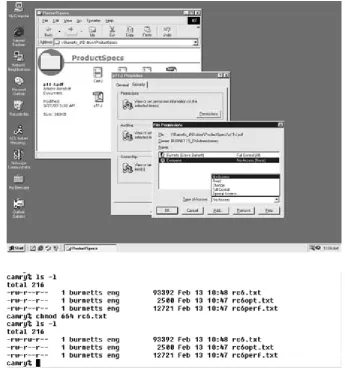
loginprocedure. If the user does not present the appropriate credentials (perhaps a user name and password), the OS will not allow that individ-ual to use the computer. But even after a user is logged in, certain files may still be off-limits. If someone asks to see a file, the OS checks to see whether that requester is on the list of approved users; if not, the OS does not disclose the contents (see Figure 1-1).
Access to most business computers and networks is controlled by some-one known as a superuseror system administrator(often shortened tosys admin). This system administrator is the person charged with creating and closing user accounts and maintaining the systems and network. A typical task of this superuser account is to override protections. Someone forgot a password? A file is read-protected (meaning that it cannot be opened and read)? The superuser has permission to circumvent the OS permissions to respond to these problems. (This is where the name “super-user” comes from; this individual can do anything.)
Attacks on Passwords
Many computers or operating systems come with a preset superuser account and password. In many cases, several passwords are used for var-ious superuser functions. The superuser may have a password to create accounts, a different password to control network functionality, another to conduct or access nightly backups, and so on.
[image:27.531.134.480.77.455.2]Chapter 1
4
Figure 1-1
operating system’s preprogrammed passwords, the network is vulnerable to attack. Most crackers know these passwords, and their first attempt to break into a network is simply to try them.
If an attacker cannot log on as the superuser, the next best thing might be to figure out the user name and password of a regular user. It used to be standard practice in most colleges and universities, and in some com-mercial companies, to assign every student or employee an account with a user name and an initial password—the password being the user name. Everyone was instructed to log on and change the password, but often, hackers and crackers logged on before legitimate users had a chance. In other cases, some people never actually used their accounts. Either way, intruders were able to gain access. This “user name as password” system is still used on many campuses and corporate settings to this day.
If the password of a particular user name is not the user name itself, crackers may try to guess the correct password. Guessing a password might be easy for an insider (such as a fellow employee), who probably knows everyone’s user name. It’s common for people to use a spouse’s name or a birthday as a password. Others write down their passwords, and a quick search of a desk might yield the valuable information. Some systems have guest accounts, with a user name of “guest” and a password of “guest.”
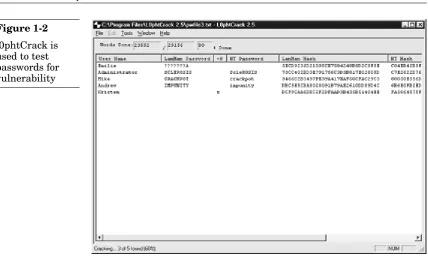
But even if the intruder is not very good at guessing passwords, appli-cations are available that automate exhaustive password searches. These applications, called password crackingsoftware, are made by a variety of people for various reasons—some legitimate and others not so legitimate. To use one of these tools, the intruder needs access to your computer (net-work access may be sufficient). Once connected, the hacker simply runs the password cracking application. If the password is weak, within min-utes the hacker will have privileged access.
Attacks That Bypass Operating Systems
An operating system tags certain files and prevents unapproved people from seeing the contents. Although a cracker or thief might be able to gain access to such files by posing as the superuser or a regular user, another possibility is to ignore the OS altogether and get the contents in some other way.
Data Recovery Attack
One function of a computer’s operating system is to help users find and use the specific data or application they want. In this way, an OS works like the index of a book. Just as an index directs you to the specific page where you’ll find the piece of information you want out of all the pages in a book, the OS organizes data under a directory file structure and uses file extensions to direct you to the data you want on the hard disk. But as far as the computer is concerned, the data is simply so many electronic bits.
[image:29.531.49.478.59.320.2]Chapter 1
6
Figure 1-2
this way, but software and hardware devices are available that can scan storage media and read the bits. These tools bypass the OS and grab the raw bits of data, which can then be reconstructed into the original files.
In fact, an entire industry has been built on the concept of reading bits as bits, a process called data recovery.When you have a system crash or some kind of physical damage to a hard drive, you can take your computer to a data recovery expert, who often can reconstruct the files on the disk. These companies provide a valuable service, helping to prevent total losses in the event of a natural disaster or computer failure.
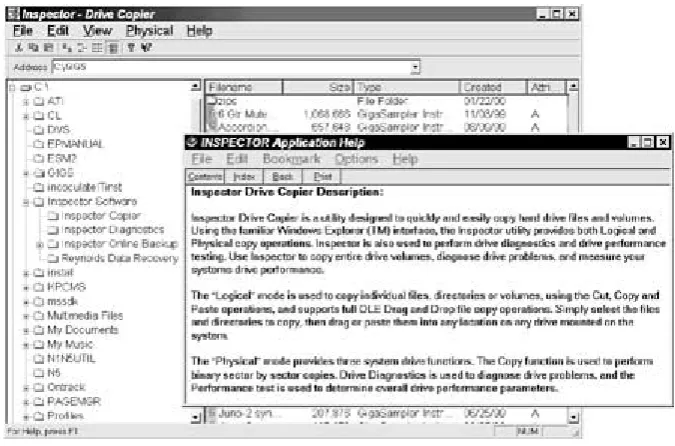
[image:30.531.148.486.329.552.2]Reynolds Data Recovery of Longmont, Colorado, performs data recov-ery and also sells software that allows you to perform your own recovrecov-ery (see Figure 1-3). According to the company’s advertising, one of its prod-ucts, Inspector Copier, “does not reference the OS installed on the devices, [and] this allows copies of different systems such as NT, Novell, UNIX, Linux or Windows 2000!”
Figure 1-3
Inspector Copier from Reynolds Data Recovery (courtesy of Mark Tessin of
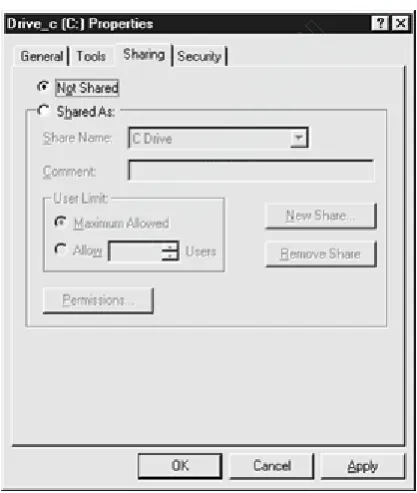
But the techniques of data recovery can also be used by attackers to cir-cumvent OS protections. To extend Inspector Copier, Reynolds sells a net-work backup service that remotely backs up data on hard drives. It uses Inspector Copier to extract the bits so that even if a hard drive is dam-aged, a clean backup can be made. Although this service can be valuable to many companies, it also means that the data recovery program can be run remotely. Mark Tessin of Reynolds points out that the service can even circumvent Windows NT security. Suppose your PC is connected to a network but you don’t want the outside world to see your C: drive. You can set the permissions on your drive so that only you have read or write per-mission to it (see Figure 1-4). The Reynolds network backup service can circumvent that permission and read the files anyway. This is not to imply that Reynolds Data Recovery will steal your data, only to illustrate that it is possible.
[image:31.531.140.349.279.526.2]Chapter 1
8
Figure 1-4
Setting network permissions on a local drive using Windows NT
TE
AM
FL
Y
attacker is not trying to steal your data from a damaged drive. Data recov-ery software is so sophisticated and effective that it’s all anyone needs to extract bits from a healthy storage medium.
To ensure the security of your data, you must assume that even though some protections may be sufficient against some opponents, there will likely be someone out there with the resources to mount a successful attack. Only if such an individual never comes after your data are you safe.
Memory Reconstruction Attack
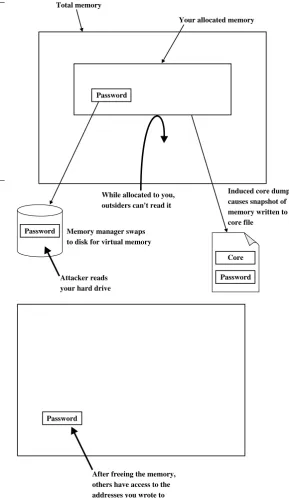
Often, sensitive material is not stored on hard drives but does appear in a computer’s memory. For example, when the program you’re running allocates some of the computer’s memory, the OS tags that area of mem-ory as unavailable, and no one else can use it or see it. When you’re fin-ished with that area of memory, though, many operating systems and programs simply “free” it—marking it as available—without overwriting it. This means that anything you put into that memory area, even if you later “deleted” it, is still there. A memory reconstruction attack involves trying to examine all possible areas of memory. The attacker simply allo-cates the memory you just freed and sees what’s left there.
A similar problem is related to what is called “virtual memory.” The memory managers in many operating systems use the hard drive as vir-tual memory, temporarily copying to the hard drive any data from mem-ory that has been allocated but is momentarily not being used. When that information is needed again, the memory manager swapsthe current vir-tual memory for the real memory. In August 1997,The New York Times
published a report about an individual using simple tools to scan his hard drive. In the swap space, he found the password he used for a popular security application.
Figure 1-5 illustrates how memory reconstruction attacks work.
Chapter 1
10
Total memory
Your allocated memory
Password
Password
Password Core
Attacker reads your hard drive
Memory manager swaps to disk for virtual memory
Induced core dump causes snapshot of memory written to core file
[image:33.531.124.414.108.607.2]While allocated to you, outsiders can't read it Figure 1-5
Your sensitive material, such a password, is not stored on a hard drive but does appear in memory. An attacker may read the data in memory in the swap space, in a core file, or simply after you free it
For your secrets to be secure, it may be necessary to add protections not provided by your computer system’s OS. The built-in protections may be adequate in some cases. If no one ever tries to break into or steal data from a particular computer, its data will be safe. Or if the intruder has not learned how to get around the simple default mechanisms, they’re suffi-cient. But many attackers do have the skills and resources to break vari-ous security systems. If you decide to do nothing and hope that no skilled cracker targets your information, you may get lucky, and nothing bad will happen. But most people aren’t willing to take that risk.
As you’ll learn in the chapters to come, one of the most important tools for protecting data is cryptography,any of various methods that are used to turn readable files into gibberish. For example, suppose your sensitive material looks like this:
do not believe that the competition can match the new feature set, yet their support, services, and consulting offerings pose a serious threat to our salability. We must invest more money in our
Here is what the data looks like when it’s encrypted:
ú?SdÏ:1/4lYïõ´]Y çmúcA‡[< _b:vH˜_ô UGØ›e´œ_%` ‚‹_lo¡`üùØ_"G ri§õêÌqY_Ë•ùK_æ7ÁFT1⬵Ó_ . . . ÀªR8’» ÿÄh . . .
o-2ñ?Í•ÇÕ(tm)ÇvéR]’Î_¬’(r)‹Ñ_UéR`q3/4¥Ü_ÇÁuÉ·¶ _>FômÈÕ6_cêàB1/28#ùh&(G [gh_!›¶⬵Oædtn*´bô1/4jWM1/4B-Â_⬵_¬1/4<"-ÏEÿåb{=.AÛH__
Even if an attacker obtains the contents of the file, it is gibberish. It does not matter whether or not the OS protections worked. The secret is still secret.
The Role of Cryptography in Data Security
In the physical world, security is a fairly simple concept. If the locks on your house’s doors and windows are so strong that a thief cannot break in to steal your belongings, the house is secure. For further protection against intruders breaking through the locks, you might have security alarms. Similarly, if someone tries to fraudulently withdraw money from your bank account but the teller asks for identification and does not trust the thief ’s story, your money is secure. When you sign a contract with another person, the signatures are the legal driving force that impels both parties to honor their word.
In the digital world, security works in a similar way. One concept is pri-vacy,meaning that no one can break into files to read your sensitive data (such as medical records) or steal money (by, for example, obtaining credit card numbers or online brokerage account information). Privacy is the lock on the door. Another concept,data integrity,refers to a mechanism that tells us when something has been altered. That’s the alarm. By applying the practice of authentication,we can verify identities. That’s comparable to the ID required to withdraw money from a bank account (or conduct a transaction with an online broker). And finally, nonrepudia-tionis a legal driving force that impels people to honor their word.
Chapter 1
12
Figure 1-6
Symmetric-Key
Cryptography
Cryptography converts readable data into gibberish, with the ability to recover the original data from that gibberish. The first flavor of crypto is called symmetric-key. In this approach, an algorithm uses a key to convert information into what looks like random bits. Then the same algorithm uses the same key to recover the original data.
Pao-Chi is a sales rep for a company that makes printing machinery. He sells to newspapers, magazines, independent printing houses large and small, and even universities. His product line includes presses, tools, replacement parts, repair services, and training. The end of the quarter is coming up in a couple of weeks, and he’s just received a memo from Gwen, the vice president of sales. The company is having difficulty “making its numbers,” the memo says. Then it outlines a new, complex pricing policy.
This new policy lists the asking prices for all their products and also indicates the lowest prices sales reps are allowed to negotiate. In the past, they’ve based the amount of the discounts they give on the size of the order, expectations of future sales with a given client, and other factors. But now, the memo states, sales reps have the authority to give even big-ger discounts.
Pao-Chi wants to closely limit who has access to this information. If potential customers knew how far he was willing to go in discounting, they would have the edge in negotiations. Existing customers might demand rebates, and competitors would gain knowledge that could aid
them in winning contracts. In addition, stock analysts or business reporters could report the company’s slow sales this quarter, affecting its reputation.
How can Pao-Chi and Gwen keep this memo secret? They could choose not to let it leave the office, or maybe Pao-Chi could simply memorize it. But it’s more than 20 pages long and too complex to memorize, and he’ll need to consult it while trying to make a sale.
So Pao-Chi keeps an electronic copy of the memo on his laptop, and takes steps to protect the file. In Chapter 1, we saw that typical protection techniques are not sufficient. Pao-Chi can lose his laptop, or someone might steal it or simply look through the files while he’s at lunch. To pro-tect the file, he decides to encrypt it.
Let’s say Pao-Chi buys a computer program to encrypt sensitive files. When running the program, he simply flips the switch to “Encrypt” and feeds the file to the program (see Figure 2-1). When the file comes out of the program, it looks like gibberish. If intruders get their hands on it, they will have no idea what it means.
[image:39.531.51.452.339.587.2]Chapter 2
16
Figure 2-1
original form. The program has just such a feature: he flips the switch to “Decrypt,” feeds in the gibberish, and out comes the file in its former con-dition.
But there’s one problem with this scenario. If intruders are able to obtain the encrypted file, surely they can obtain the program that con-verts it back. Even if they can’t, where can Pao-Chi safely store the pro-gram? If he can keep the program out of the hands of attackers, why not store his file there as well?
No, he doesn’t have a place where he can keep the encrypting and decrypting program safe. And if Pao-Chi has access to it, he must assume that attackers can gain access. That’s why he uses encryption in the first place. By itself, an encryption machine cannot protect secrets. Pao-Chi needs additional protection.
That additional protection is a secret number. If he feeds the file anda secret number to the program, the program will encrypt the file. Until the program has a secret number, it will not run. To decrypt the file, Pao-Chi must present the gibberish and the same secret number (see Figure 2-2).
Figure 2-2
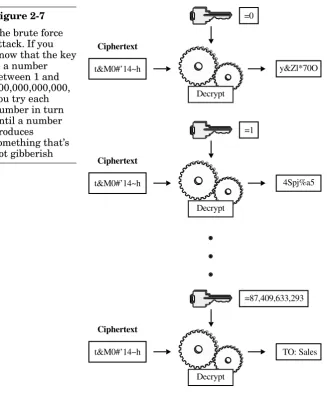
If an attacker somehow obtains a copy of the gibberish and feeds it to the program for recovery, it won’t work. The program asks for the number, which the attacker does not know. It’s possible to try numbers at random (or to try all possible numbers systematically), but every time a wrong number is inserted, the application simply spits out different gibberish (see Figure 2-3).
Chapter 2
18
Figure 2-3
If attackers try numbers other than the secret value, they get only more gibberish
Even though someone can use the same program Pao-Chi used, it never re-creates the original file without the secret number. Even if the attacker guesses a number close to the original number, even if it is off by only 1, the program will not produce anything close to the correct encrypted file.
Some Crypto Jargon
The system we’ve just described is known as symmetric-key cryptography. Some people call itsecret-key cryptography. Here are some official terms.
TE
AM
FL
Y
To do this, you use an algorithm. The word “algorithm” is a scientific term for a recipe or step-by-step procedure. It is a list of instructions or things to do in a particular order. An algorithm might have a rigid list of commands to follow, or it might contain a series of questions and depend-ing on the answers, describe the appropriate steps to follow. A mathemat-ical algorithm might list the operations to perform in a particular order to “find x.” For example, an automobile diagnostic algorithm may ask ques-tions about oil pressure, torque, fluid levels, temperature, and so on, to determine what’s wrong. A computer program can also implement an algorithm, meaning the program converts the algorithm’s list of com-mands, questions, and operations into the computer’s language, enabling it to perform the steps in the appropriate order. In computer cryptography, algorithms are sometimes complex mathematical operations or simply bit manipulations. Many encryption algorithms exist, and each one has its own particular list of commands or steps. Just as you can have a program that plays Solitaire or one that computes the trajectory of satellites, you can have a program that implements an encryption algorithm that takes your data and converts it to gibberish.
The data that you want to keep secret is called plaintext(some call it
cleartext). Your plaintext could be a human-readable text file, such as the memo. Or it could be a binary file, which looks like nonsense to human eyes but makes perfect sense to a computer program. For example, if you open a PowerPoint file using Windows’ Edit text editor, the file looks like gibberish because the program can’t convert the PowerPoint formatting information; but if you open the same file in PowerPoint, it appears as intended. Whether or not your information is readable by a human or a given program, it’s called plaintext.
After the data is encrypted, it’s known as ciphertext.
The algorithm encrypts your plaintext into ciphertext, but it needs one more thing—a key. In our sales rep example, the secret number used to encrypt the pricing memo was its key. In computer crypto, the key is always a number or a set of numbers.
The study of breaking cryptographic systems is known as of cryptanaly-sis. Similar to the attacker, the cryptanalystlooks for weaknesses in algo-rithms. All algorithms can be “broken;” the good ones are simply the algorithms strong enough to withstand an attack for so long the break comes “too late.” So a cryptanalyst’s job is to find weaknesses that may help someone break the algorithm faster. Attackers may use cryptanalytic tech-niques to do damage, but they may also use other tools.
The cryptographerdevelops crypto systems; the cryptanalyst looks for weaknesses. It’s important for the crypto community to know about the weaknesses because attackers are looking for them as well. Attackers are almost certainly not going to announce their discoveries to the world, so cryptanalysts perform a service, letting us all know what attackers probably know but won’t tell us.
What Is a Key?
The term “key” comes from the fact that the secret number you choose works in the same way that a conventional key works. To protect the con-tents of your house, you install a lock on the door. To operate the lock, you insert the key and turn it. The lock’s tumblers and mechanisms work with the key in a prescribed way to activate a barrier that prevents the door from being opened. To unlock the door, you insert the key and turn it in the opposite direction. The tumblers and mechanisms work with the key to reverse the process and allow the door to be opened.
In cryptography, to protect the contents of your files, you install a lock (an encryption algorithm) on your door (the computer). To operate the lock (encrypt the data), you insert the key (the secret number) and execute it (instead of turning this key, you operate the program by double-clicking, clicking OK, or pressing ENTER). The algorithm performs its steps using the
key to alter the plaintext and convert it to ciphertext. To unlock the encrypted file, you insert the same key and execute. The algorithm reverses the steps and converts the ciphertext back to the original plaintext.
Just as only the correct house key can open your front door, only the correct encryption key can decrypt data. In symmetric-key cryptography, the key that is used to encrypt data is the same key that is used to decrypt it. “Symmetric” essentially means “the same on two sides,” and that’s what we have here: the same key on two sides of the encryption process. Fig-ure 2-4, a pictFig-ure you’ll see quite a bit in this book, is the image we use to visualize cryptography.
In this book we talk about some of the many different encryption algo-rithms you have to choose from, but remember that keys are not inter-changeable among algorithms. For example, suppose that you encrypt data using the Triple Digital Encryption Standard(DES) algorithm (dis-cussed later in the section titled “Triple DES”). If you try to decrypt the data using the Advanced Encryption Standard (AES) cipher (discussed later in the section titled “Advanced Encryption Standard”), even if you use the same key, you will not get the correct result.
Why Is a Key Necessary?
All computer crypto operates with keys. Why is a key necessary? Why not create an algorithm that doesn’t need a key?
As you saw in the memo example, if attackers can understand the algo-rithm, they can recover secret data simply by executing the algorithm. That’s like installing a deadbolt on your front door with the lock on the outside. It’s true that when the deadbolt is in place, the door cannot be opened. But anyone can open the door simply by turning the lock.
It might seem that the solution is to keep the algorithm secret, but that approach has several problems. First, attackers always crack the algo-rithm (see “Historical Note: They Always Figure Out The Algoalgo-rithm,” later in this chapter). What’s more, suppose you do manage to keep the algo-rithm secret. Unless you are a cryptography expert and develop your own algorithms, you also must trust the company that wrote your algorithm never to reveal it deliberately or accidentally. Does anyone have that much trust in a corporate entity?
Here’s the real question: Which would you trust more to keep secrets— an algorithm that must be kept secret, or an algorithm that can do its job even if everyone in the world knows exactly how it works? That’s where keys come in.
Keys relieve you of the need to worry about the algorithm used in your encryption scheme. If you protect your data with a key, you need protect only the key, something that’s easier to do than protecting an algorithm. In this book you’ll learn a lot about key protection. Also, if you use keys to protect your secrets, you can use different keys to protect different secrets. This means that if someone breaks one of your keys, your other secrets are still safe. If you’re depending on a secret algorithm, an attacker who breaks that one secret gets access to all your secrets.
Generating a Key
In a symmetric-key cryptographic system, the key is only a number. It can be any number as long as it’s the right size, so you simply pick a number at random. Then, the next time you need a key, you pick another number at random. The question is, how do you pick a number at random?
Historical Note: They Always Figure
Out the Algorithm
Cryptographers are often asked a key question: “Can’t I just encrypt my data and simply not tell the attackers what algorithm I used and how big the key is? How can they break my message then?” There are three answers.
Answer 1: They Always Figure It Out Anyway
Attackers can deduce your algorithm without any help from you. Eventually, they always figure it out. Always. Without exception. Never in the history of cryptography has someone been able to keep an algorithm secret.
In war, spies have always found ways of discovering the algo-rithm, whether it originates in a mathematical operation or a machine. They steal it or get someone to reveal it, maybe through blackmail, extortion, or the time-tested cryptanalytic technique known as “the rubber-hose attack.” Agents have always uncovered the algorithm or gotten a copy of the machine. For example, in World War II, Polish soldiers captured the German Enigma machine early in the war. Enigma was the crypto machine the German military used. The allies (namely the British) were able to crack the code more easily because they had the machine in their possession.
Alternatively, the cryptanalysts simply figure out the algorithm. In World War II, U.S. codebreakers were able to determine the inner workings of the Japanese code machines without having one of the machines in their possession.
In modern times, a company called Gemstar Development created a code that converted date, time, and channel indicators into a sin-gle code number. These code numbers were published in TV listings as “VCR⫹.” People who bought a GemStar control box could program their VCRs simply by punching in the numbers, simplifying the process and thus benefiting people who owned the product. Only the Gemstar box knew how to decrypt the code numbers. But Ken Shirriff, Curt Welch, and Andrew Kinsman broke the Gemstar algo-rithm, and they published it in the July 1992 issue of Cryptologia,a trade journal. Now, anyone who wants to decode those numbers
Chapter 2
24
(such as VCR manufacturers) can do it without buying a Gemstar control box.
Another example is RC4, an algorithm invented in 1987 but never published. Cryptanalysts and other experts studied it and deter-mined that RC4 was a good way to keep data secret. But the com-pany that created it, RSA Data Security, never made the inner workings of the RC4 algorithm public. This secrecy was for monetary and not security reasons; the company hoped that by keeping it secret no one else would implement and sell it. In 1994, anonymous hackers posted the algorithm on the Internet. How did they figure it out? It was probably by stepping through a copy of the object code with an assembly language debugger. Incidentally, RC4 is now used as part of Secure Socket Layer(SSL), the World Wide Web’s secure communication protocol (see Chapter 7). RC4 is arguably the most commonly used symmetric cipher, even more so than DES, discussed later in this chapter in the section “Digital Encryption Standard.”
If a cryptographic system is hardware-based, engineers open it and look at the internals. In 1998, David Wagner and Ian Goldberg, at the time graduate students at the University of California at Berkeley, opened a supposedly secure digital cell phone and cracked its code.
Sometimes it is possible to keep an algorithm secret long enough to be effective, but eventually the enemy figures it out. For example, in World War II, the U.S. Army used Navajo soldiers to communicate. They simply spoke in Navajo. The Japanese military did not have anyone in its employ who spoke Navajo, nor did it have dictionaries or other reference material. The encryption worked because the algorithm (the Navajo language itself) was kept secret.
Now, of course, any large military has linguists on staff who either know or can easily learn any language used to encrypt secrets.
Answer 2: You Can’t Make Money Developing
Secret Algorithms
Gemstar did make money for a while using a secret algorithm, but only until someone cracked it. The ultimate problem, though, goes deeper. Think about it this way: How can you sell something without letting buyers see what they’re buying?
tem to an e-mail vendor, enabling it to encrypt messages. How could you prevent this client, or anyone else, from looking at your code? There are plenty of ways to reverse-engineer software, as shown in the RC4 story.
“Fine,” you may counter, “I won’t sell my algorithm to just anyone. I’ll make sure that only people I trust can use it.” Is it possible to trust enough people to make money that way? And how are your trusted clients going to use your algorithm? About the only thing they could do so is store their data and talk to each other. But people want to communicate with others who do not purchase their algo-rithm from the same vendor. As a result, the algoalgo-rithms must be standardized, and that means they must be public.
The other problem with trying to sell algorithms arises on the buyer’s side of the arrangement. If you want to use cryptography, you must employ a hardware device or a software program. The problem is this: Just as you have access to the product, so do attack-ers. Where did you get your hardware or software—a retail software store, a business-to-business vendor? Attackers can go to the same source and get their own copies.
In short, if you use your own algorithm and want to keep it secret, you can’t sell it. As a result, you can’t make any money.
Answer 3: Publicly Known Algorithms
Are More Secure
Let’s say you’re the purchasing agent for your company and it’s up to you to decide which cryptographic algorithm to buy. Your company will use this algorithm to store data and communicate securely. Two sales reps offer their products. One warns, “This algorithm is secure as long as the attacker does not know its inner workings.” The other proclaims, “You can tell attackers what the algorithm is and how long the key is, but they can never retrieve your sensitive data without the key.”
Which one would you buy?
If it is possible to build a cryptographic system in which the algo-rithm is completely known, and if attackers still can’t break it with-out the key, isn’t that system more secure than one that can be broken if the algorithm is uncovered? Well, it is possible to build such cryptographic systems.
To answer that question, let’s consider what the word “random” means. You probably have an intuitive idea of randomness, and most likely it’s correct. To be more formal than intuition, we could put it this way: “If someone knows what the currentnumbers are, is it possible to predict the
nextnumbers?” To put it the way cryptographers prefer, random values are simply sets of numbers that pass statistical tests of randomness and are unrepeatable.
Suppose that you choose a few thousand numbers and ask a mathe-matician, “Are these numbers random?” To simplify things and to conform to computer conventions, you make the numbers binary, meaning that they are sequences of 1’s and 0’s. The mathlete will draw on a set of tests
Chapter 2
26
When algorithms are made public, cryptanalysts and computer engineers get a chance to examine them for weaknesses. If an algo-rithm is vulnerable, you can choose not to use it. Otherwise, you can be confident that your data is safe. If an algorithm is kept secret, on the other hand, analysts will not be able to find any weaknesses it may have. Does that mean it has no weaknesses? Not necessarily; it simply means that you don’t know whether or not it is vulnerable. Maybe a cracker, lurking somewhere in a basement, has obtained a copy of the algorithm (remember, they always do) and has already found a successful attack. But this cracker has decided not to share the information. If you use the secret algorithm, all your data is com-promised but you don’t know it.
When an algorithm is made public, however, that’s no guarantee that it is secure. Maybe analysts have not yet found the weakness, and the basement-dwelling cracker has found it. But great minds thrive on finding flaws in public cryptographic systems. There’s prestige (and sometimes a little money) in finding chinks in the armor. If the cryptographic community cannot find something wrong with an algorithm, there’s a good chance that no one else will.
that examine the numbers. Among these tests (see Figure 2-5) are ques-tions such as these: Are there roughly the same count of 1’s and 0’s? Do some patterns of 1’s and 0’s appear “too often”? Do some patterns of 1’s and 0’s appear “not often enough”? If the numbers pass the tests, we say that the numbers are probably random. “Probably” random? Can’t we say “definitely” random? No, we can’t, and in a few paragraphs you’ll see why.
A Random Number Generator
If you have a few thousand numbers, you can test them for randomness. But where do you get those few thousand numbers in the first place? One source is a random number generator (RNG). These devices work by gath-ering numbers from various kinds of unpredictable inputs, such as by measuring radioactive decay, examining atmospheric conditions in the vicinity, or calculating minute variances in electrical current. These num-bers pass the tests of randomness.
If you ask the machine for a second group of numbers, you will virtually never receive the same sequence again. That’s because the output is based on input that’s always changing. The numbers are unrepeatable.
So to return to our original definition, we can ask, “Can anyone predict what the next numbers will be?” To do that, someone would have to predict the minor variations in the radioactive decay, atmospheric conditions, or electricity of the current. These are things we assume that no one can do.
Intel produces an RNG that uses system thermal noise as its variable and unpredictable input. Currently, this device does not ship automatically Testing numbers
with every Pentium-based PC, although maybe in the future it will. Other companies (such as nCipher, Chrysalis, and Rainbow) sell devices known as cryptographic accelerators (discussed in Chapters 3 and 9). These devices come with RNGs.
A Pseudo-Random Number Generator
Where can you get random numbers if you don’t have an RNG? It turns out there are algorithms called pseudo-random number generators
(PRNGs). Just as there are algorithms that convert plaintext into cipher-text, there are algorithms that produce what are called “pseudo-random” numbers.
If you use one of these algorithms to generate a few thousand numbers and apply the statistical tests, the numbers pass. What makes these num-bers pseudo-random and not random is that they are repeatable. If you install the same PRNG on another computer, you get the same results. If you run the program two weeks later, you get the same results.
This is one reason we say that numbers that pass statistical tests of randomness are “probably” random. Even if they pass, do we know whether they are repeatable? The math tests give us only part of the answer.
If the numbers are repeatable, what good is a PRNG? The answer is that you can change the output by using what is known as a seed. Just as RNGs take input (radioactive decay, atmospheric conditions, electrical variances), a PRNG takes input (the seed). If you change the input, you change the output. With RNGs, the input is constantly changing on its own, unpredictably. With a PRNG, it’s up to you to make sure the input changes each time you want to generate new numbers.
What is this seed? In the real world, a seed can be lots of things: the time of day down to the millisecond, various constantly changing com-puter state measurements, user input, and other values. Maybe you’ve seen a user-input seed collector. An application may ask you to move the mouse around. At selected intervals, the program looks at where, on the screen, the arrow is located. This value is a pair of numbers: how many pixels up from the bottom of the screen and how many pixels over from the left. Any one input is not sufficient, but if you put them all together you have unpredictability (see Figure 2-6).
You may be thinking, “Why use a PRNG to generate the numbers? Why not just use the seed?” There are two main reasons. The first reason is the need for speed. Seed collection is often time-consuming. Suppose you need
Chapter 2
28
TE
AM
FL
Y
only a few thousand bits of random data. A seed collector may take several minutes to gather the necessary numbers. When was the last time you waited several minutes for a program to do something without getting frustrated? To save time, you can gather 160 or so bits of seed (which may take little time), feed it to the PRNG, and get the required thousands of bits in a few milliseconds.
The second reason to use a PRNG is entropy, a term that describes chaos. The greater the entropy, the greater the chaos. To put it another way, the more entropy, the more random the output. Suppose you want 128 bits of entropy. A seed may have that, but it is spread over 2,400 bits. For example, the time of day down to the millisecond is represented in 64 bits. But the year, the month, the date, and maybe even the hour and minute might be easy to guess. The millisecond—two or three bits of the time of day—is where the entropy is. This means that out of 64 bits of seed, you have 2 bits of entropy. Similarly, your other seed data may suf-fer the same condition. A PRNG will take that 2,400 bits of seed and com-press it to 128 bits.
Well, then, why not take the seed and throw away the low-entropy bits? In a sense, that’s what a PRNG does. You can do it, or you can have a PRNG do it, and the latter means less work for you.
A random