AggrGator: A Platform for Collaborative
Discoverability and Annotation of Media
The Harvard community has made this
article openly available.
Please share
how
this access benefits you. Your story matters
Citable link
http://nrs.harvard.edu/urn-3:HUL.InstRepos:37736776
Terms of Use
This article was downloaded from Harvard University’s DASH
repository, and is made available under the terms and conditions
applicable to Other Posted Material, as set forth at http://
AggrGator: A Platform for Collaborative Discoverability and Annotation of Media
David Andrew Killeffer
A Thesis in the Field of Information Technology
for the Degree of Master of Liberal Arts in Extension Studies
Harvard University
Abstract
There are very few good tools available that allow people to digitally categorize
recorded videos. This is a problem because with the rise of digitization of
record-ings previously created on magnetic and other non-digital media as well as the
proliferation of smartphones, there is an ever-growing volume of videos being made
available to people, but a severe lack of ways to categorize and search those videos.
This lack of good tools often means that many people amass large collections of
self-recorded videos which are largely inaccessible, making it extremely difficult
to locate past recordings due to the absence of meaningful metadata. The rise of
abundant, cheap online storage resources from a wide variety of service providers
simply compounds this problem. With more recorded media being produced than
ever before and more and more ways to store that media but few and inadequate
tools to catalog and organize it, there is a risk that many videos will go unwatched
and uncared for, the importance of their content forgotten. Even if an individual
video recordings were somehow properly "tagged" with perfectly accurate metadata
describing all the pertinent aspects of the video, without a rich, well-designed and
easy to use search interface, the effort expended on such annotations would be
wasted and the future utility of those recordings would be inhibited by their inability
to be found. AggrGator attempts to address these problems via a simple, easy-to-use
web interface that enables the power of crowds to aid in adding metadata and
meaningful annotations to online video for the benefit of other viewers. By utilizing
a well-known navigational paradigm called "faceted search", AggrGator enables
locating and sharing the recordings of precious memories easy and enjoyable, and
Author’s Biographical Sketch
David Killeffer is a Senior Applications Developer at Harvard Law School. His
background is primarily in web development, and he has worked at a number of
different companies and organizations, from small software startups to Fortune 500
companies. In his current role at HLS he regularly works with other departments and
groups to help define project requirements, conducts business analysis, as well as
leading Scrum teams and writing code for all phases of projects, both front-end and
back-end. David enjoys creating visual designs including wireframes and logos, as
well as exploring new technologies, and has over a decade and a half of experience
as a software engineer.
Dedication
To Sarah and the kids; thank you for being patient with me, putting up with my
moods as I struggled through this process, and for all the coffee.
To all my family and friends, thank you immensely for all the support and
encour-agement over the years as I labored on this journey.
Acknowledgments
I would like to acknowledge the excellent help, guidance, and wisdom of both Susan
Buck and Dr. Jeff Parker. They provided much needed tips and feedback over the
course of the development of this thesis which helped make it successful.
AggrGator has been built with many open source tools, languages, and utilities,
as much modern software today is. AggrGator also makes use of some graciously
shared creative works, which are licensed under various open format licenses:
• crocodile logo icon made byFreepikfromFlaticon
• main page background photograph byChris LawtonfromUnsplash
• footer background photograph byPablo Garcia SaldañafromUnsplash
• web fontPaytone OnebyVernon AdamsforAdobe Typekit
Table of Contents
Page
List of Tables x
List of Figures xi
1 Introduction 1
2 Motivation and Problem Statement 2
2.1 Motivation. . . 2
2.2 Personal Story. . . 4
2.3 Problem Statement . . . 6
3 Prior Work 8 3.1 Media-rich Video Annotation Tool (MVAT) . . . 8
3.2 Amazon X-Ray . . . 11
3.3 Conclusion . . . 13
4 Requirements 15 4.1 Overview . . . 15
4.2 Details . . . 15
5 System Overview 19 5.1 Application Components . . . 20
5.1.1 AggrGator Dependencies . . . 20
5.1.2 Configuring AggrGator . . . 21
5.1.3 Building AggrGator. . . 24
5.1.4 User Interface . . . 30
5.1.5 User Authentication . . . 32
5.1.6 Domain Model . . . 34
5.2 Controllers . . . 38
5.2.1 Code Documentation . . . 43
5.2.2 Automated Tests . . . 43
5.2.3 Running AggrGator . . . 45
6 Design and Technology Choices 47 6.1 Design Overview . . . 47
6.2 Technologies Used . . . 48
6.2.1 Elasticsearch Datastore. . . 49
6.2.2 Video.js Player . . . 53
6.2.3 OpenVideoAnnotation and rangeslider . . . 54
7 Implementation Details and Challenges 57 7.1 Implementation Details. . . 57
7.1.1 NPM Packages Used . . . 57
7.1.2 Other Libraries Used . . . 59
7.1.3 Project Build Tools Used . . . 60
7.2 Challenges During Implementation . . . 60
8 User Guide 62 8.1 User Account Creation . . . 63
8.2 Logging In . . . 65
8.3 User Profile . . . 67
8.4 Uploading Media . . . 69
8.5 Annotating Media. . . 72
8.5.1 Playing Videos and Updating Titles . . . 72
8.5.2 Creating Annotations . . . 75
8.6 Searching for Media . . . 79
9.1 Summary . . . 83
9.2 Future Work . . . 84
9.3 Conclusions . . . 88
10 Acronyms 89
11 Glossary 91
List of Tables
5.1 ("imagemin")build process command sequence . . . 28
5.2 AggrGator sitemap and route definitions . . . 32
5.3 AggrGator media upload backend processing sequence. . . 38
8.1 AggrGator "Annotate Media" page command buttons, usage, and icons . . 75
List of Figures
3.1 (MVAT)video annotation edit view . . . 9
3.2 (MVAT)adding video metadata view . . . 9
3.3 (MVAT)video management view . . . 10
3.4 (Amazon X-Ray)pausing a video displays relevant annotations and links
toIMDB . . . 11
3.5 (Amazon X-Ray)displaying an annotation of all main actors in a film,
linking to individual actor profiles onIMDB . . . 12
5.1 (Kibana)user interface displaying JSON queries to execute in left hand
pane, and the JSON results of most recently executed query in right
hand pane . . . 21
5.2 (AggrGator Configuration - elasticsearch.yaml)YAML configuration file
for Elasticsearch properties . . . 22
5.3 (AggrGator Configuration - prototype.yaml)primary YAML configuration
file for AggrGator application . . . 23
5.4 (AggrGator Building - subsection of package.json)image related build
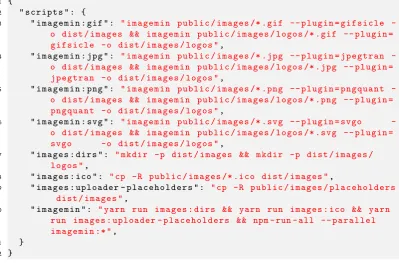
script targets from package.json . . . 25
5.5 (AggrGator login bar):all pages on the site are available for users to log
in on . . . 32
5.6 (AggrGator user authentication failure):invalid user login attempts will
see this view. . . 33
5.7 (AggrGator successful login): successful login attempt for user
"dkill-effer"; note that now there is a site-wide search bar exposed at the
top, the user’s name is shown (and site navigation menu visible when
clicked on), and the "Upload Media" link button in the upper right hand
corner . . . 33
5.8 (AggrGator logout):displayed upon successful user account logout . . 34
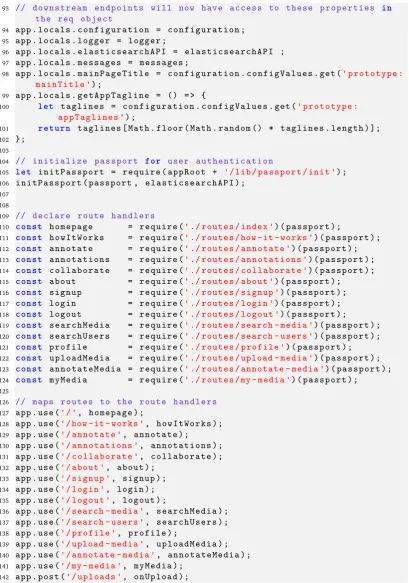
5.9 (app.js, lines 93-142) -passport user authentication declaration, route
declarations . . . 40
5.10 (AggrGator JSHint code documentation): automatically created
Elastic-searchAPI.js code documentation page . . . 44
5.11 (Running AggrGator - subsection of package.json) build script targets
from package.json . . . 45
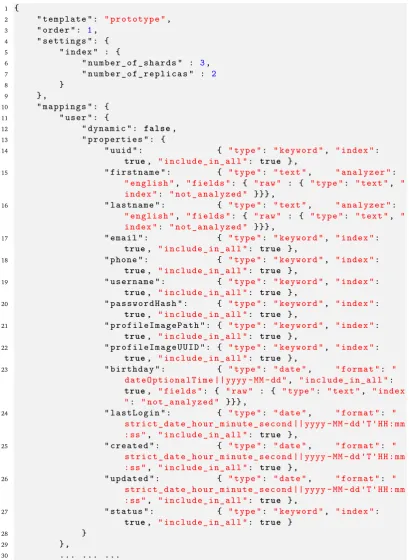
6.1 (Elasticsearch mappings - /resources/elasticsearch/prototype-index.es5.1.2.json)
defines the index and mappings for documents to be stored . . . 50
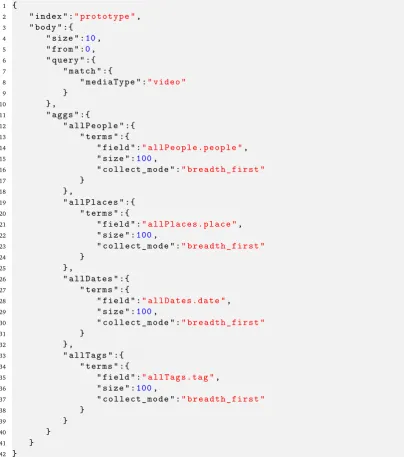
6.2 (sample Elasticsearch query with aggregations run on"Search Media"
page) - the JSON query will find all documents of type video and also
include aggregation values and frequency counts for each term . . . 52
6.3 (sample AggrGator video player window using Video.js). . . 53
6.4 (HTML code to display a Video.js player) - includes alternate text to display
if the user’s browser doesn’t support JavaScript . . . 54
6.5 (OpenVideoAnnotation showing annotation overlay atop video player
window)- when users mouse over one of the yellow annotation bars a
small popup displays the text and type icon of the annotation . . . 55
6.6 (OpenVideoAnnotation showing statistical display atop video player
win-dow)- the statistical view shows a frequency graph of how many
an-notations and at what point in the video the anan-notations were created
for . . . 56
8.1 (AggrGator)view of the homepage . . . 62
8.3 (AggrGator)main login bar displayed when the user is not logged in;
users enter their username and password here and click "Enter" to login
to the website . . . 65
8.4 (AggrGator)a failure alert notification is displayed when users enter
invalid credentials to login . . . 66
8.5 (AggrGator)successful login upper navigational bar display, including
welcome message, search bar, upload media button . . . 66
8.6 (AggrGator)logged in users will see a website navigational menu when
clicking on their logged in username . . . 66
8.7 (AggrGator)successful logout alert notification informs the user that
they have successfully logged out and ended their session . . . 67
8.8 (AggrGator)upper section of user profile page view . . . 68
8.9 (AggrGator)userprofile page: media coverflow display, with video file
metadata information and annotations . . . 69
8.10 (AggrGator)"Upload Media" page, where users can upload video files
to AggrGator . . . 70
8.11 (AggrGator) "Upload Media" page showing a file selector where the
user’s browser selects a file from their computer to upload . . . 71
8.12 (AggrGator)"Upload Media" page showing a file being dragged into the
purple drop zone area for immediate upload . . . 71
8.13 (AggrGator)"Upload Media" page showing a file upload in progress at
95% completion. . . 72
8.14 (AggrGator)"Annotate Media" page showing a video ready to be played
or annotated . . . 73
8.15 (AggrGator)"Annotate Media" page showing a user entering a new title
for the video. . . 74
8.16 (AggrGator)"Annotate Media" page after the user has clicked the
"Up-date Title" button for the video . . . 74
8.17 (AggrGator)"Annotate Media" page showing the new title and indicating
8.18 (AggrGator)annotation window popup displays over the video when
the user clicks on the "New Annotation" button . . . 76
8.19 (AggrGator) "Annotate Media" clicked on "New Annotation" button
brings up the annotation popup where the user can enter a new
anno-tation and select the portion of the video that the annoanno-tation applies
to. . . 76
8.20 (AggrGator)"Annotate Media" example of extending the time range to
which the annotation will apply by dragging the yellow range slider
controls; note that the annotation popup with automatically be hidden
when adjusting the time range to which the annotation should apply . 77
8.21 (AggrGator)"Annotate Media" creating a new annotation on a longer
section of the video . . . 77
8.22 (AggrGator)the text of all current annotations is displayed below each
video, and all annotations are linked to the "Search Media" page . . . . 78
8.23 (AggrGator)the translucent yellow bars represent the actual annotations
that have been added to the video; when the user moves their mouse
over each one a popup displays the actual text of the annotation . . . . 79
8.24 (AggrGator)example of the "Show Statistics" view for a video which has
two annotations which overlap in time on the video, but no annotations
apply to the entire running time of the video . . . 80
8.25 (AggrGator) example of what clicking on aPeople facet for the term
"Jonathan" looks like; the view of the other facets is altered to include
only those facets which also have the "People" facet "Jonathan" entered 81
8.26 (AggrGator) "Search Media" page showingPeople, Places, Dates, and
Tagsfacets and their frequency counts on the left and search results in
1
Introduction
AggrGator is an application that was created out of a very personal need - to preserve
and categorize digital video memories for posterity and to share those with a
community. The nameAggrGatorwas chosen as a portmanteau of "aggregation" (the term thatElasticsearchuses internally to refer to facets) and "alligator".Elasticsearch
is used as the backend datastore for video metadata, and one of its primary features
is allowing for the "aggregation" of common data amongst disparate data items.
Alligators are a fun sounding alliterative complement to "aggregation", and thus the
genesis of the nameAggrGator.
2
Motivation and Problem
Statement
„
A problem well-stated is a problem half solved. —Charles Kettering(American inventor, engineer, businessman,
holder of 186 patents)
2.1
Motivation
Today people are recording more videos than at any other time in history. Most
people have well equipped video recording devices that they carry in their pockets
(smartphones) which have capabilities that dwarf even the most advanced hand-held
camcorders of just a few years ago. In 2015 YouTube reported that they received
over 300 hours of recorded video submissionsper minute[You15;Tub14;DMR16].
In addition to the stratospheric proliferation of newly recorded digital video, in
recent years an entirely new industry of video preservation companies has sprung up
which offer a variety of services to help both professional and consumer customers
to digitize their recordings made on film, magnetic, or optical formats; these services
will accept all manner of defunct formats and digitize the recordings captured on
them in as high resolution as possible and create digital copies of the originals. With
the future viability of nearly all physical media formats in doubt at best and all but
assuredly over at worst, it seems the writing is on the wall for the future primacy
of digital video as the format of the future. However, with the massive increase in
the amount of recorded video content created, how should content be organized for
sharing and annotated for posterity?
One popular method people have used in the past for creating "playlists" to share
media in the past was to create so-called "mix-tapes" of favorite music and videos.
This method involved utilizing two "decks" to create compilations; one would be
used to play back the song or video they wanted to record, an the other deck would
be used to create the new recording. Today this practice is an all-but forgotten media
artifact of the 1980s and 1990s (rarely ever seen since the early 2000s). At the same
time as people are no longer creating and sharing "mix-tapes" of either songs or
videos for friends and family, the world is seeing the largest exponential growth of
recorded media in its history; clearly the manual labor and time investment required
in the now lost art of creating "mix-tapes" does not scale, and better solutions are
needed for organizing, categorizing, and sharing important digital video works.
Without the benefit of carefully crafted and curated metadata to catalog the output
of this new explosion of recordings, the future usefulness and viability of new
recordings is in serious question. As video recording has shifted away from being
created on physical media formats to digital formats, new digital recordings do not
have the advantage of their physical media forebears which could be easily and
simply labeled with a pen or marker to describe their contents.
At the same time as society has seen explosive growth in the proliferation of
record-ings due to technological advances, we have also seen the rise of the "social" web.
People are sharing all aspects of their lives with friends, family, even perfect strangers
online. Participants in the "social web" allow others to add metadata, comments,
and add to their own digitally shared pictures, music, videos, etc. The social web has
proven to be a very effective way to apply meaningful metadata to digital artifacts,
and adds to the future longevity and viability of such digital artifacts.
2.2
Personal Story
Several years ago my siblings and I lost our two remaining grandparents; my
maternal grandmother, and my paternal grandfather, both within a couple years
of each other. These were difficult losses to take, and I was left thinking of them
often and the times we had together. At the same time, I was recently married and
had started a family of my own, and enjoying all the highs, lows, and excitement
of being a part of a young family with children. With sentimentality creeping into
my mind more and more, we would often videotape our young sons and making
memories with our children and saving them to video for posterity. Several years
later I found myself with a very large collection of both VHS and Mini-DV tapes
(well over a hundred tapes), and I realized that my wife, kids, and I had not viewed
most of these recordings since they were originally created. At an extended family
dinner I inquired about all the old VHS tapes my parents had recorded of us kids
growing up, including several important family milestones and a few select events
that my grandparents would have been a part of; I was told that I was free to take
any videotapes I could find. I did the same thing with my in-laws and gathered up
all their old videotapes as well; soon I found myself in the possession of a virtual
mountain of videotapes, some up to 25 years old. I knew that over time videotapes
degrade and are subject to a process of "vinegarization" [LR95;Eme16], and I knew
that if I wanted to preserve all the precious memories that were captured on those
tapes that I would need to digitize this collection.
Thus began a process of over a year’s worth of work whereby I slowly digitized
nearly 200 analogue tapes of various formats; VHS, Mini-DV, VHS-C, etc. Initially I
was tempted to edit and cleanup the recordings as I imported them, but soon I found
out just how much time and effort is involved in doing high-quality video editing
and cleanup, and I realized I would never finish digitizing the tape collection if I
stopped digitizing to edit each tape. Eventually I was able to successfully digitize
about 99% of the videotape collection, and I was left with an enormous set of video
files (one per tape). Some statistics of the collection:
• over 3000 different video files of various formats
• over 3 TB of disk space used
• over 250 total hours worth of recordings
While I certainly loved being able to go back and re-live many funny and memorable
childhood moments that were now immortalized on an external hard drive, I quickly
came to realize several things about my new massive video file collection:
1. I did not knowwhowas in several of the videos, but I knew that my mom/dad/father-in-law/uncle/etc. would know
2. I did not knowwhenmany of the recordings took place 3. I did not knowwheresome of the recordings were made
4. It was unclearwhy some recordings were made, and not easy todecipher the purposewithout viewing the video in its entirety (something I did not have the time to do when digitizing the entire old tape collection)
5. It wasextremely difficult and time-consuming to be able to properlyshare
old historical family moments from the video collection with the family because
the videos were only labeled by type (VHS, Mini-DV, etc.) and tape number
The last point is perhaps the most poignant. In my eagerness and excitement to
share my newfound digital video treasure trove with my family, I fumbled at family
dinners and gatherings when I was requested to play the"funny barbecue video from
1987 where Nate accidentally hit cousin Al in the head", and several other classic
family gems. I simply couldn’t find videos that I was looking for without playing each
video and creating notes by hand, as well as marking down which notes correspond
to which recording. After many attempts to locate particular memorable recorded
moments by re-watching some of the now vast library of recordings that I had,
fast-forwarding through videos to fine "that one moment", I realized that the method
I was using to categorize the collection simply wouldn’t scale well, and was also
subject to my own interpretation of events that I track in my notes. That meant
that despite having invested over a year’s worth of time and effort into preserving
all these old family videos, it wasn’t worth much to everybody else (or myself) in
their current formbecause nobody could find what they actually wanted to see without watching the entire collection. And this revelation was the genesis of my thesis idea; to create a platform where I could leverage the knowledge and memories
of my family to help me build up a set of rich metadata to annotate the family
video collection, and then to reward them for their help in annotating the videos by
building a rich, faceted search interface to the video collection so that they could
likewise find those recorded moments that they would like to watch again.
2.3
Problem Statement
The problems that my thesis project attempts to address are:
• allowusers to share video recordingswith each other
• how toeffectively annotateand add valuable metadata to ashared collection of video recordingsvia a loosely affiliated group of friends and family
• how to bestorganize and present valuable user-added metadatafrom video recordings ina faceted search interfacethat provides an easy way for people to find and play back videos they might otherwise not even know exist
• enabling users toexplore libraries of richly annotated videosandfind videos they remember existed but could not easily locate based on the metadata that the videos have been tagged with
My thesis project (AggrGator) will attempt to answer these questions via a web
application prototype where users can add videos, annotate who is in those videos,
what the content of those videos is, where they take place, when they take place, and
more. This metadata will be aggregated and used to power a faceted search, allowing
users to explore and re-engage with the video collection in new and compelling
ways.
3
Prior Work
„
If I have seen further it is only by standing on the shoulders of giants.—Sir Isaac Newton
The idea of annotating videos is not entirely new or novel, but such tools have not
become commonplace in the same way that high quality image editing software and
facial recognition algorithms have brought new dimensions to digital photography.
YouTube has empowered people to share their recordings with the world in new ways
and given rise to entirely new forms of entertainment. In the realm of education
with the rise in online education and increasing pressure to make class lectures
available to students both on-campus and remote, many classes are now recorded
and distributed online, and there has been some scholarly research work done to
enable students to annotate and share notes on classes. In addition to work on video
annotations in academia, there has also been some work in industry as well, although
these tools have largely not been in the hand of consumers and end-users.
Some prior works in the area of video annotation includeMedia-rich Video
Annota-tion Tool (MVAT)andAmazon X-Ray, which are discussed below:
3.1
Media-rich Video Annotation Tool (MVAT)
by Philip Desenne: desenne@ fas. harvard. edu , May 2012[Des12]
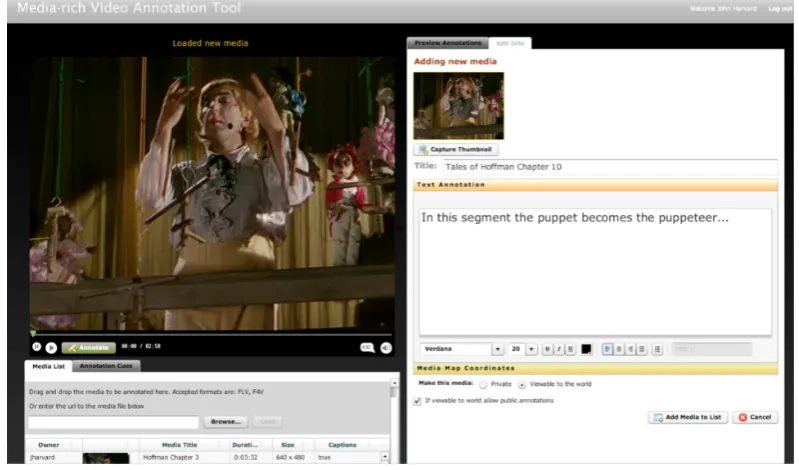
Fig. 3.1: (MVAT)video annotation edit view
Fig. 3.2: (MVAT)adding video metadata view
The Media-rich Video Annotation Tool (MVAT) is a prototype tool developed by
Philip Desenne as part of an A.L.M. in Information Technology thesis project at
Harvard Extension School. Motivation for the development of the MVAT stemmed
from Desenne’s work as an Academic Technologies Product Manager to support
learning and simplify the process of creating and sharing video annotations amongst
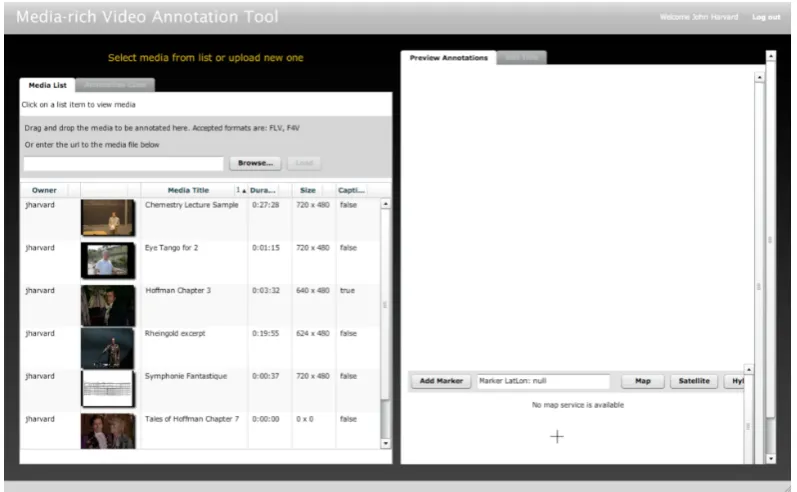
[image:24.595.117.517.345.580.2]Fig. 3.3: (MVAT)video management view
students in a pedagogical context. MVAT allows for a wide variety of media rich
annotations, including adding text, HTML, pictures, actual vector drawings that
users add, geographical notations, etc., all of which are very useful and support the
educational aims of lecture videos.
The prototype focused on allowing users to create "media-rich" annotations so
users could add much more than just plain text or image annotations, as well as
link to outside supporting resources, and have a very simple, easy-to-use interface.
MVAT was developed as an Adobe Air standalone application, and requires a data
synchronization mechanism to upload annotations to an online SQL database from
the embedded SQL-Lite database. Desenne acknowledged that while his selection
of Adobe Air / Flex as a development platform enabled him to rapidly prototype
the MVAT due to his experience with Adobe Air / Flex, it is a rather limiting choice
long-term since Flex "was unleashed from Adobe" and Flash video usage has been on
the decline in favor of open standards for video such as HTML5 video. Additionally,
the MVAT prototype was limited to a single computer, and so other students were
not able to benefit from, search for, or share the annotations made by one user with
other classmates. MVAT was primarily developed as a pedagogical tool for academic
usage, and so the need for a rich search interface to find potentially unknown videos
was not a requirement since classroom recordings were generally going to be viewed
on a regular basis by the students in those classes.
3.2
Amazon X-Ray
[image:26.595.122.515.279.500.2]by Amazon.com, Inc.
Fig. 3.4: (Amazon X-Ray)pausing a video displays relevant annotations and links toIMDB
Amazon has developed a new technology called X-Ray that is now being used in
several of their video players, from HTML5 enabled web browsers, to portable
devices such as the Kindle Fire, and to the Amazon Fire TV sticks. X-Ray presents
a video overlay on top of a video as it is playing (or on some devices, when a
video is paused) and shows relevant metadata such as the actors that are currently
appearing onscreen (and links to their IMDB webpages), the director(s), links to
artists whose music is currently playing, etc. One of the motivating factors for
the development of X-Ray for Amazon was to allow viewers to answer questions
Fig. 3.5: (Amazon X-Ray)displaying an annotation of all main actors in a film, linking to individual actor profiles onIMDB
such as"Who’s that guy?", "What’s she been in?", or "What is that song?"(seehttp:
//www.businesswire.com/multimedia/home/20150413005383/en/).
The metadata that is used to power these real-time annotations comes from the
Internet Movie Database, which is an Amazon owned property. Unfortunately there is not much in the way of technical details on the underlying technology
or architecture of Amazon X-Ray, so it is difficult to find out how Amazon has
created and implemented this technology, and how the metadata that powers the
annotations is created (viewing an Amazon Prime hosted video in a web browser,
for example, show you these annotations when you mouse over the player window,
and the annotations change as characters move in and out of screen, when a new
song begins and ends, etc.). While the user-facing interface to Amazon X-Ray is
fairly polished and intuitive for viewers, there is no mechanism to add or edit
video annotations for the public or viewers; the canonical nature of the original
source recordings (being that they generally come from scripted performances, and
recordings which have the benefit of having machine-parseable closed-captioning)
obviates the need for such user-submitted annotations. Generally the source material
that Amazon X-Ray provides annotations for are scripted dramatic recordings only,
and so it is possible that the technology could utilize scripts or camera timecodes to
determine when particular cast members are visible on-screen.
For more information on Amazon X-Ray, see:
• http://www.imdb.com/x-ray/
• http://www.businesswire.com/multimedia/home/20150413005383/en/
• http://phx.corporate-ir.net/phoenix.zhtml?c=176060&p=irol-newsArticle&
ID=2034369
•
http://www.engadget.com/2012/09/06/amazon-announces-x-ray-for-movies-a-kindle-feature-that-uses-im/
•
http://venturebeat.com/2015/04/13/amazons-x-ray-arrives-for-fire-tv-and-fire-tv-stick-bringing-context-to-instant-video-on-the-big-screen/
• http://www.wired.com/2015/04/amazon-xray-fire-tv/
•
http://gizmodo.com/5941067/amazons-x-ray-for-movies-knows-what-youre-watchingand-whos-in-it
[Wir15a;Dat16;Ama15;Eng12;Bea15;Wir15b;Giz12]
3.3
Conclusion
There has been some very interesting and promising work done in the area of video
annotations, but this thesis project has several unique aspects that it attempts to
add and extend off of such prior work to make this project novel. Prior work does
not appear to have focused much on the search aspects of video annotations or the
discoverability of videos that users might not have otherwise ever seen or known
about were the annotations not present. AggrGator will allow for users to create
different types of annotations, not simply people (like Amazon X-Ray), and will
also provide a search interface which will allow for both faceted searching (across
the four different types of annotations it will support: people, places, dates, tags)
and free-text searching as well. A large part of the impetus for AggrGator is the
acknowledgment that the user in possession of a recording may themselves not
know enough to properly annotate the video, but knows others (in this particular
case, family members, but the same logic could easily apply to friends, colleagues,
classmates, etc.) that would be able to add correct annotations.
4
Requirements
„
Comprehensiveness is the enemy of comprehensibility.—Martin Fowler
4.1
Overview
AggrGator will allow for the creation and administration of user accounts, allow
for registered and logged in users to upload videos, and create rich annotations on
their videos (and those owned by others) which include timestamped information
on the annotations they create. It will also provide a rich, faceted and free-text
search interface to find and locate videos of interest, as well as being able to see
which facets are the most popular by displaying the number of videos marked with
each facet. Video annotations can be of aPerson,Place,Date, orTag, and can be
entered for the entire running time of the video that is being annotated, or any
portion thereof. A primary motivating factor for this project is that the individual that
uploads a video may not know all of the possible metadata that should be associated
with that video, and so relies on the recollection and annotations of others to enrich the
media collection.
4.2
Details
Detailed requirements for the prototype are as follows:
• User Account Creation, Updating, and Authentication
New users may request to create an account, specify contact information and
some specific user info (email, desired username, phone number, etc.), as well
as provide a profile photo. They also specify a user password, which will be
encrypted using a JavaScript implementation of bcrypt.
• Video Upload
Registered users will be able to upload their own videos to the website which they
can then add annotations to, or invite other users to annotate. Common video
formats such as .MP4, .MOV, .AVI will be supported, and other additional formats
may be added as well if time permits.
• User-Specific Media Listing
Users will have a page listing their own media, which they can view as individual
items in a "coverflow"-style layout or in a table-layout. This area will also allow
the user to execute free-text based searches across their own media to narrow
down the current set of visible items.
• Media Annotations
This is one of the core features of the project; users will be able to add annotations
on a whole video basis (e.g., tagging a video as a particular family’s recordings, for
example), or more commonly, on segments of a video. Amazon X-Rayfunctions
similarly, but does not allow viewers to add or edit such annotations (and the
original source for such annotations could potentially be machine generated from
a timecoded script or algorithmic analysis of the video and not from
human-generated annotations). The Media-rich Video Annotation Tool (MVAT) does
support adding annotations that have a beginning and ending within a video
(and also offers other types of useful annotation types for pedagogical purposes),
but this prototype will focus purely on textual annotations which are used for
categorization and tagging. The user interface will focus on giving users the ability
to add fairly simple annotations of the following types, which will form the basis
for faceted search capability:
– People: annotate a video as having discrete people present in the entire video, or in time-based segments of the video (e.g., "Bob is in the video from 3
minutes, 24 seconds until 7 minutes, 3 seconds")
– Places: annotate an entire video as taking place in a particular location (e.g.,
"Paris, France"), or mark a segments of the video as being in a particular
place (similarly to how they can markpeopleas being in a segment of the
video)
– Dates: annotate a video as taking place in a particular year, month, or day, as well as marking segments as taking place on particular dates
– Tags: a more free-form type of annotation, tagswill allow users to mark entire videos or segments with user-defined characteristics such asfunny,
sad,scary,barbecue, and so forth. Some experimentation may be required to
see if a more limited set of potential tags is more desirable than allowing for
free-form user entry oftags; this will be determined during user testing of
the prototype.
• Faceted and Free-Text Search
The heart of the project will be the faceted search feature; this will enable users to
quickly and easily find all the videos that a particular person is in, all the videos
recorded at a particular place, in a particular year/month, etc. User supplied
annotations will form the basis for the facets. Depending upon the breadth/depth
of user-generated annotations, some curation of the facets may be necessary.
• Video Playlists
If time permits, the system should allow for users to create video "playlists" of
their favorite moments/segments of videos; the interface for adding videos should
be very simple (perhaps a drag and drop interface) to build up a playlist from a
search result. Users can mark a playlist as private (only viewable to themselves),
or public, which could be shared with others, enhancing the utility of the website
and encouraging further user participation. A stretch goal would be to allow for
not just discrete video playlists (e.g., arbitrarily adding entire videos or segments
of videos to a playlist), but creating a playlist from search terms or facets (e.g.,
construct a playlist called "funny" combined with "vacation", which would have
all of the video segments tagged with the keywords "funny" and "vacation").
This would bring new levels of engagement to the site by incentivizing user
participation because they would be able to quickly see how their annotation
activities influenced already established public video playlists.
5
System Overview
„
One of the things I’ve been trying to do is look for simpler or rules underpinning good or baddesign. I think one of the most valuable rules is
avoid duplication. "Once and only once" is the
Extreme Programming phrase.
—Martin Fowler
(The Art of Agile Development, 2007)
AggrGator is a Node.js web application that can be run on any server capable of
running JavaScript. It leverages the Node Package Manger (NPM) for package
management and makes use of several popular modules for various functions,
including the Express.js web framework. The application functions as a web server
which users can connect to in order to create accounts, log in and authenticate
against, and upload media and create annotations, and also search for video based
on what annotations have been entered for each video. The application uses Yarn as
a build manager and as an agent to interface with the NPM repository and download
all the required modules. Elasticsearch is used for the backend data storage of media
annotations, as well as user account information. The next sections will go into
greater detail on the various aspects of the AggrGator application; its component
parts, the application architecture, and how the various parts of the system work
together.
5.1
Application Components
AggrGator consists of a web application front-end, an Elasticsearch data repository
back-end, and a middle layer of dynamic templates and routing code. The majority
of the application code is written in JavaScript and uses EcmaScript 2016 (e.g. ES6)
language features such as template literals, block-scoping, arrow functions, classes,
Promises, modules, and more [Eng17].
5.1.1
AggrGator Dependencies
AggrGator requires Elasticsearch as the backend data store to hold information on
the actual annotations that user accounts enter, details about the video files that are
uploaded, and user account information. Elasticsearch is a document repository that
is based upon the Lucene project and shares many similarities with the Apache Solr
project. Interactions with the Elasticsearch repository are conducted through JSON
queries for document creation, retrieval, updating, and deletion. Although not a
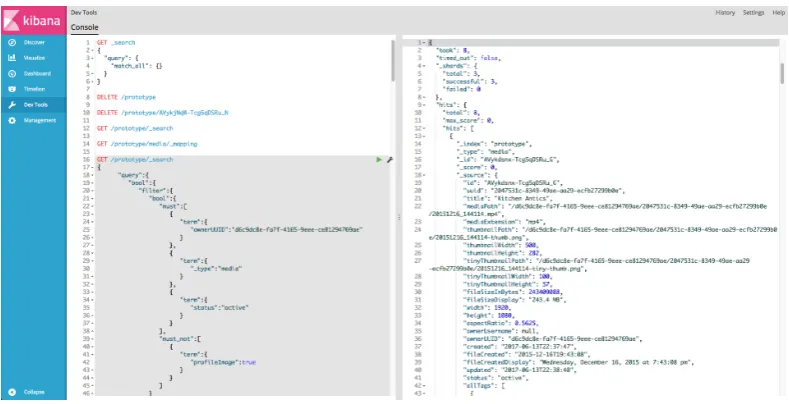
strict dependency or requirement for AggrGator, the Kibana application works with
Elasticsearch as a web based front-end to help simplify writing queries and was used
extensively during the development of AggrGator, since it allows users to construct
queries in a web browser and see the results of selectively executing those queries,
as well as caching all queries written for later execution.
There are also several package dependencies which are specified in theREADME.md
andpackage.jsonfiles, includingnode.js(primary application runtime),yarn(build tool and package management handler), ffmpeg (used for various video related functions, including extracting video metadata and still frames from videos).
Fig. 5.1: (Kibana)user interface displaying JSON queries to execute in left hand pane, and the JSON results of most recently executed query in right hand pane
5.1.2
Configuring AggrGator
There are two main aspects of the application that are configurable: Elasticsearch
and the main application itself. Configuration management is handled through YAML
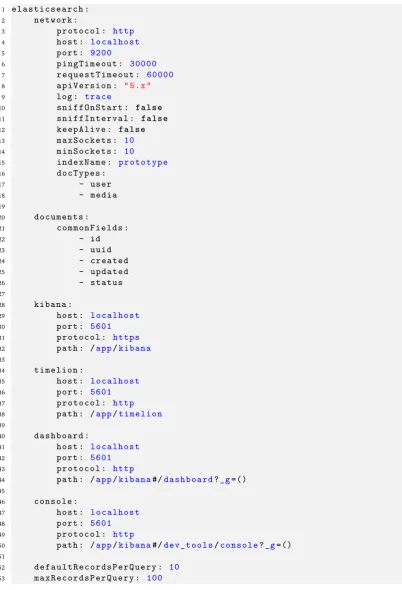
files for simplicity. Theelasticsearch.yamlfile is used to configure how to connect to the Elasticsearch instance backing the application, and the version and various
configuration options for the AggrGator application to connect to and interact with
the Elasticsearch REST API.
Theprototype.yamlfile is used to configure many aspects of the AggrGator appli-cation, including configuration parameters for session management (persistence,
time-to-live) to media filesize limits, folder locations for media uploads, randomized
taglines that display on the website homepage when a user is not logged in, and
more. These properties are loaded into memory at runtime when the application is
started and used to configure several parts of the system.
Both the elasticsearch.yaml and prototype.yaml configuration files are read in when the application is run, and the values are used to configure those specific
1 elasticsearch : 2 network :
3 protocol : http 4 host : localhost 5 port : 9200
6 pingTimeout : 30000 7 requestTimeout : 60000 8 apiVersion : " 5.x " 9 log : trace
10 sniffOnStart : f a l s e
11 sniffInterval : f a l s e
12 keepAlive : f a l s e
13 maxSockets : 10 14 minSockets : 10
15 indexName : prototype 16 docTypes :
17 - user
18 - media
19
20 documents :
21 commonFields :
22 - id
23 - uuid
24 - created
25 - updated
26 - status
27
28 kibana :
29 host : localhost 30 port : 5601 31 protocol : https 32 path : /app/kibana 33
34 timelion :
35 host : localhost 36 port : 5601 37 protocol : http 38 path : /app/timelion 39
40 dashboard :
41 host : localhost 42 port : 5601 43 protocol : http
44 path : /app/kibana#/dashboard?_g=() 45
46 console :
47 host : localhost 48 port : 5601 49 protocol : http
50 path : /app/kibana#/dev_tools/console?_g=() 51
[image:37.595.70.473.81.672.2]52 defaultRecordsPerQuery : 10 53 maxRecordsPerQuery : 100
Fig. 5.2: (AggrGator Configuration - elasticsearch.yaml)YAML configuration file for Elastic-search properties
1 prototype :
2 appName : AggrGator 3
4 # the main page title for the site
5 mainTitle : AggrGator: Social Video Annotation Prototype 6
7 # these taglines appear randomly on the homepage when a user is not logged into the site
8 appTaglines :
9 - Annotate Videos , Relive Memories 10 - Remember The Glory Days
11 - Annotate The Past for The Future 12 - Preserve The Past
13 session :
14 cookieName : protoCookie
15 secret : thisIsTheCookieSecretHandleR
16 # max age in milliseconds for the cookie - default to 15 minutes ; see https :// github.com / expressjs / session # options
17 maxAge : 900000 18 port : 3000
19 hostname : localhost 20 scheme : http
21 logDirectory : /var/log/prototype/ 22 loglevel : silly
23 logToConsole : t r u e
24
25 # largest allowed size of file uploads (in megabytes ) 26 maxMediaFilesizeMB : 4000
27
28 # maximum width in pixels of allowable media file thumbnail for use on the search - media page
29 maxMediaSearchThumbnailWidth : 100 30
31 # maximum height in pixels of allowable media file thumbnail for use on the search - media page
32 maxMediaSearchThumbnailHeight : 100 33
34 # directory to store all image and video uploads under 35 mediaUploadsDir : /public/media
36
37 # directory where all Image and Video files to use for automated testing are stored
38 testMediaUploadsDir : /public/media/personal 39
40 # maximum width size for thumbnail images ( extractions from videos and resized images )
41 maxThumbnailWidth : 500 42
43 # maximum height size for thumbnail images ( extractions from videos and resized images )
44 maxThumbnailHeight : 500 45
46 # maximum width size for profile photo thumbnail images 47 maxProfilePhotoThumbnailWidth : 125
48
49 # maximum height size for profile photo thumbnail images 50 maxProfilePhotoThumbnailHeight : 125
51
52 requestSizeLimit : 100mb
Fig. 5.3: (AggrGator Configuration - prototype.yaml)primary YAML configuration file for AggrGator application
aspects of the system. Some elements of the Elasticsearch configuration are in the
package.json file, which is the main configuration file for the overall application. In general nothing in this file needs to be touched to run the application, but the
package.jsonpresumes that the Elasticsearch and Kibana binaries are installed in a subdirectory called "bin" at the same level as AggrGator itself. Thepackage.json
needs to know where the Elasticsearch and Kibana binaries are because when the
application is started it also starts Elasticsearch and Kibana if they are not already
running.
5.1.3
Building AggrGator
Building the application is largely handled via the defined "script" targets listed in the
package.jsonfile, which details various aspects of the application; thepackage.json
file has the following primary sections:
1. Application Settings: various application values such as the name, version,
description, etc.
2. Scripts: defines various tasks to build all parts of the AggrGator application, as well as to start Elasticsearch/Kibana, move CSS/images from the "public" to
"dist" folder, and run the application itself
3. Dependencies: contains package declarations and which versions of those pack-ages are required for both development ("devDependencies") and production
("dependencies")
4. Other Settings: "pre-commit" defines which script target steps must be run successfully prior to being able to check in code to the GitHub repository;
"engines" specifies the Node.js version the application must use; "author"
defines properties of the application author
The various "script" targets have several layers of dependencies built into them. For
example, images used by AggrGator are stored under the top-level "public" folder,
but are copied to the "dist" folder prior to running the application because the images
are served from the "dist" folder when running the application. Prior to moving
the images over to their respective locations in the "dist" folder, the proper folder
structure under "dist" is created (script targetimages:dirs), and subsequently each
type of image is minified to reduce filesize (script targetsimagemin:gif,imagemin:jpg,
imagemin:png,imagemin:svg,imagemin:ico,imagemin:uploader-placeholders). There
is a single main script target (imagemin) which orchestrates the order in which
all image related scripts run. The following is a selection of thepackage.jsonfile showing all of the build script targets for image handling (includes all dependent
script targets):
1 {
2 " scripts ": {
3 " imagemin : gif ": " imagemin public / images /* .gif plugin = gifsicle
-o dist / images && imagemin public / images / l-og-os /* .gif -- plugin = gifsicle -o dist / images / logos ",
4 " imagemin : jpg ": " imagemin public / images /* .jpg plugin = jpegtran
-o dist / images && imagemin public / images / l-og-os /* .jpg -- plugin = jpegtran -o dist / images / logos ",
5 " imagemin : png ": " imagemin public / images /* .png plugin = pngquant
-o dist / images && imagemin public / images / l-og-os /* .png -- plugin = pngquant -o dist / images / logos ",
6 " imagemin : svg ": " imagemin public / images /* .svg -- plugin = svgo
-o dist / images && imagemin public / images / l-og-os /* .svg -- plugin = svgo -o dist / images / logos ",
7 " images : dirs ": " mkdir -p dist / images && mkdir -p dist / images /
logos ",
8 " images : ico ": "cp -R public / images /* .ico dist / images ",
9 " images : uploader - placeholders ": "cp -R public / images / placeholders
dist / images ",
10 " imagemin ": " yarn run images : dirs && yarn run images : ico && yarn
run images : uploader - placeholders && npm -run - all -- parallel imagemin :*",
[image:40.595.113.513.312.575.2]11 } 12 }
Fig. 5.4: (AggrGator Building - subsection of package.json)image related build script targets from package.json
Within apackage.jsonfile’s "script" targets, multiple commands can be run either sequentially (by separating the ordered scripts with "&&"), and commands that are
to be run in parellel are done by calling the "npm-run-all" utility with the "–parallel"
flag and a command name pattern, which will simultaneously run all script targets
that have a name matching the supplied pattern. Thus the "imagemin" script target
will do the following, in order:
Order Task Name Sub-task Name Description
1 yarn run images:dirs - runs the"images:dirs"build script target
2 images:dirs mkdir -p dist/images creates a relative directory (if it doesn’t exist already)
atdist/images
3 images:dirs mkdir -p dist/images/logos creates a relative directory (if it doesn’t exist already)
atdist/images/logos
4 yarn run images:ico - runs the"images:ico"build target
5 images:ico cp -R public/images/*.ico
dist/images
copies all images with ".ico"
file extensions from pub-lic/images/to the dist/im-ages/directory
6 yarn run
images:uploader-placeholders
- runs the "images:uploader-placeholders" build script target
7 images:uploader-placeholders
cp -R
public/images/place-holders dist/images
copies all images from
public/images/place-holders to the dist/im-agesdirectory
8 npm-run-all –parallel
im-agemin:*
- calls the npm-run-all util-ity and tells it to execute all
script targets matching the
name patternimagemin:*
in parallel
9a yarn run imagemin:gif - runs "imagemin:gif"build script target
9b yarn run imagemin:jpg - runs"imagemin:jpg"build script target
9c yarn run imagemin:png - runs"imagemin:png"build script target
continued on next page
Tab. 5.1"imagemin" build command sequence – continued from previous page Order Task Name Sub-task Name Description
9d yarn run imagemin:svg - runs"imagemin:svg"build script target
10a imagemin:gif imagemin
public/im-ages/*.gif –plugin=gifsicle
-o dist/images
minimizes all gif images
under public/images and then copies those
mini-mized images to dist/im-ages
10b imagemin:jpg imagemin
pub-lic/images/*.jpg –
plugin=jpegtran -o
dist/images
minimizes all jpeg images
under public/images and then copies those
mini-mized images to dist/im-ages
10c imagemin:png imagemin
pub-lic/images/*.png –
plugin=pngquant -o
dist/images
minimizes all png images
under public/images and then copies those
mini-mized images to dist/im-ages
10d imagemin:svg imagemin
public/im-ages/*.svg –plugin=svgo -o
dist/images
minimizes all svg images
under public/images and then copies those
mini-mized images to dist/im-ages
11a imagemin:gif imagemin
public/images/l-ogos/*.gif –plugin=gifsicle
-o dist/images
minimizes all gif images
under public/images and then copies those
mini-mized images to dist/im-ages/logos
11b imagemin:jpg imagemin
public/im-ages/logos/*.jpg –
plugin=jpegtran -o
dist/images
minimizes all jpeg images
under public/images and then copies those
mini-mized images to dist/im-ages/logos
continued on next page
Tab. 5.1"imagemin" build command sequence – continued from previous page Order Task Name Sub-task Name Description
11c imagemin:png imagemin
public/im-ages/logos/*.png –
plugin=pngquant -o
dist/images
minimizes all png images
under public/images and then copies those
mini-mized images to dist/im-ages/logos
11d imagemin:svg imagemin
public/images/l-ogos/*.svg –plugin=svgo -o
dist/images
minimizes all svg images
under public/images and then copies those
mini-mized images to dist/im-ages/logos
Tab. 5.1: ("imagemin")build process command sequence
Aside from minimizing images and moving them from their project space (under
/public/images/) to the location where they are served up by the Node webserver
when running (from/dist/images), the otherScriptsbuild targets also handle the following aspects:
1. Code Quality: the"lint"build script target uses the jshint binary for static code analysis and helps avoid code quality issues; the"test"build script target runs all of the automated test scripts to help ensure things are working properly
2. Code Documentation: the "jsdoc" build script target automatically creates a set of HTML code documentation pages for all JavaScript files under the
/lib/directory (the models and controllers of the application) according to the JSdoc JavaScript code documentation standards
3. Datastore Startup: the"datastore:*"build script targets automatically start Elasticsearch and Kibana
4. Stylesheet Handling: the "scss"build script target handles creating all the necessary stylesheet directories for public serving under/dist/cssand copying the static (e.g., uncompiled) stylesheets over, as well as using node-sassto
compile the *.scss stylesheets using SASS and also create source maps for the
compiled CSS files
5. Script "Uglification": handles the creation of/dist/jsdirectory where JavaScript files the UI requires are served from, and also callsuglifyjsto combine and minify JavaScript source files into a single, combined JavaScript source for
public web serving so as to minimize the number of HTTP requests that are
required and serve as small files as possible to the user
6. Build, Watch, Start: several script targets handle building and "watching" the directories for changes to the underlying files (in which case the application
reloads them rather than serving up cached stale versions - useful during
development), as well as a main"build"script target which calls out to all the
"build:*"script targets in parallel and then runsnodemonwhich will run the application and monitor certain files for changes and reload them dynamically
when changes are detected
During development, the"pre-commit"parameter inpackage.jsonwas invaluable since prior to being able to commit code to the version control repository (GitHub),
all code checkins required that the "lint", "test", and"jsdoc" build script targets were run first and completed without error; if jshint reported an error or any of
the automated tests failed, then the code checkin would be rejected. Having this
stopgap measure to check for code quality, running all automated tests, and also
generating code documentation all prior to a successful checkin proved invaluable
during the project development process to find errors that might have otherwise
slipped through.
The final major sections of thepackage.json file include the NPM package depen-dencies. There is a section called"devDependencies"which details those packages that are only required for development or building the project (such as the image
minimizing packages, testing harnesses, other build-related package requirements,
etc.). The"dependencies"section outlines all those packages that are required for the application to work properly.
5.1.4
User Interface
AggrGator’s user interface was designed with simplicity in mind. To simplify the user
interface development,Bootstrapwas used to rapidly develop workingHyperText
Markup Language (HTML)mock-ups which were then later used to developHogan.js
templates. Bootstrapis a collection ofCSSfiles,JavaScriptfiles, font icons, images,
and a set of general practices that web developers can use to greatly simplify the
layout and "look and feel" of web pages ([Tea17]). One of its most compelling
benefits is its grid system which lets developers easily create responsive layouts
which maintain a consistent look across different browsers and devices. In an
effort to use visual aides for navigation and easy identification to users of different
functional parts of the site to capture users attention, visual iconography is utilized
in the form of font icons. Font icons are often used in web development to aid visual
"flair" to a design, but have functional benefits as well as opposed to using regular
images because they can be styled withCascading Style Sheets (CSS)and can render
faster than purely image-based counterparts.
Since the primary goal of AggrGator is to facilitate users creating annotations on
video and then searching for those videos based on the annotations they (and others)
have entered, the current site map and route handlers of the website are relatively
simple, as seen in the table below (the primary web pages that users interact with
are marked inblueand route handlers are ingreen):
Name Type URL Login Required Description
Home webpage /, /index N application
home-page
Login route handler /login Y authenticates user
credentials and
logs users into
AggrGator, begins
session
continued on next page
Tab. 5.2AggrGator sitemap and route definitions – continued from previous page Name Type URL Login Required Description
Logout route handler /logout Y logs users out of
AggrGator, ends
session
Annotations route handler /annotations Y route handler
re-trieves JSON
ob-jects from
Elastic-search API for
me-dia annotations
Upload Media webpage /upload-media Y authenticated
users can edit
their user profile
My Media webpage /my-media Y displays all media
owned by the
cur-rent user
Annotate Media webpage /annotate-media Y page to create
an-notations for
spe-cific media item
Search Media webpage /search-media Y primary media
search page,
supports faceted
search
My Profile webpage /profile Y authenticated
users can edit
their user profile
Signup webpage /signup N create a new
Aggr-Gator user account
About webpage /about N describes what
AggrGator is all
about
Annotate webpage /annotate N describes how
cre-ating annotations
works
continued on next page
Tab. 5.2AggrGator sitemap and route definitions – continued from previous page Name Type URL Login Required Description
How It Works webpage /how-it-works N describes how
Ag-grGator works
Collaborate webpage /collaborate N details how the
collaborative
as-pects of AggrGator
work
Tab. 5.2: AggrGator sitemap and route definitions
5.1.5
User Authentication
Authenticating users to ensure a user is who they say they are is a critically important
part of any web application. AggrGator allows new users to create accounts and
specify a desired username and password upon creating a new account, and uses
Passport.jsfor user authentication when users log into the website. A custom local
strategy was written for AggrGator’s user authentication mechanism. All web pages
listed in Table 2 above that have "Login Required" marked as "Y" are protected and
required users to login to AggrGator before they can visit those webpages; users can
log into the application (or conversely sign out) from any page. Logged in users
have access to a drop-down menu that appears when they click on their name in the
upper right hand corner of the page.
Fig. 5.5: (AggrGator login bar):all pages on the site are available for users to log in on
Once a user successfully logs in, there are three new items that they can then interact
with on the site:
Fig. 5.6: (AggrGator user authentication failure): invalid user login attempts will see this view
Fig. 5.7: (AggrGator successful login):successful login attempt for user "dkilleffer"; note that now there is a site-wide search bar exposed at the top, the user’s name is shown (and site navigation menu visible when clicked on), and the "Upload Media" link button in the upper right hand corner
• a search bar at the top of the page which lets users conduct free-text searches
across all media
• custom link menu and user name (when the user clicks on their name a
drop-down navigation menu appears)
• an "Upload Media" button in the upper right hand corner of the page
The custom local strategyPassport.jsimplementation usesElasticsearchfor storing
user information and password hashes. When a new user account is created, the
User class uses aJavaScript bcrypt.jslibrary to create a password hash, and that
Fig. 5.8: (AggrGator logout):displayed upon successful user account logout
hash is stored alongside the user account metadata inElasticsearch. Once a user
logs in and they have been authenticated against the password hash that is stored
in Elasticsearch, a new cookie based session is created for the user and stored
on their filesystem as a cookie. SubsequentHyperText Transfer Protocol (HTTP)
requests after the initial login update the default timeout value (15 minutes - set in
prototype.yamlasprototype:session:maxAge) update the last checked time, so as long as logged-in users are continually loading pages, they remain authenticated
and logged in (as soon as a logged in user has over 15 minutes of inactivity they will
be logged out on the next page request they make).
5.1.6
Domain Model
AggrGator follows a common design pattern (Model View Controller) to implement
the user interface, and the domain model contains the part of the codebase which
contains much of the business logic. By splitting the codebase up and separating the
files which comprise the "views" (e.g., the user interface), the "controllers", and the
"models", it is easier to make changes to the models without potentially introducing
problems in the views or controllers and make incremental changes. The models
located under the/lib/models/directory are:
• Annotation.js:models what an annotation object stored in Elasticsearch looks like
• Image.js: models an image stored in Elasticsearch; extracts metadata from image objects and so that data can be stored in Elasticsearch; child class of
Media
• Media.jssuperclass of Image and Video; contains the top-level properties for all media objects; has methods for extracting metadata of Images and Videos
• User.jsmodels an AggrGator user account; contains user password authentica-tion methods
• Video.jschild class of Media, contains properties specific to Videos; has meth-ods to extract thumbnail images from Videos
Due to the prototypal nature ofJavaScriptobjects, the massive benefit of separating
the models from the other parts of the application is that once an object is created, it
can easily be stored inElasticsearchby simply passing the objects to the controller
class,lib/controllers/ElasticsearchAPI.js.
The Media class is a parent class of both Image and Video, and provides some functions common to both. When a user uploads an image or video file, several
sequential operations need to take place, that are slightly different depending on
which type of item is being uploaded. The table below lists what actions are taken
on the server side by the domain model code when a user uploads a media item
(whether an image or a video):