promoting access to White Rose research papers
White Rose Research Online
[email protected]
Universities of Leeds, Sheffield and York
http://eprints.whiterose.ac.uk/
This is the published version of an article in the
Journal of Information Literacy,
6 (1)
White Rose Research Online URL for this paper:
http://eprints.whiterose.ac.uk/id/eprint/77870
Published article:
Thornes, SL (2012)
Creating an online tutorial to develop academic and research
skills.
Journal of Information Literacy, 6 (1). 82 - 95. ISSN 1750-5968
Journal of Information Literacy
ISSN 1750-5968
Volume 6 Issue 1 June 2012
Article
Thornes, S. L. 2012. Creating an online tutorial to support information literacy and academic skills development. Journal of information literacy, 6(1), pp. 82-95.
http://ojs.lboro.ac.uk/ojs/index.php/JIL/article/view/LLC-V6-I1-2012-3
Copyright for the article content resides with the authors, and copyright for the publication layout resides with the Chartered Institute of Library and Information Professionals, Information Literacy Group. These Copyright holders have agreed that this article should be available on Open Access.
“By 'open access' to this literature, we mean its free availability on the public internet, permitting any users to read, download, copy, distribute, print, search, or link to the full texts of these articles, crawl them for indexing, pass them as data to software, or use them for any other lawful purpose, without financial, legal, or technical barriers other than those inseparable from gaining access to the internet itself. The only constraint on reproduction and distribution, and the only role for copyright in this domain, should be to give authors control over the integrity of their work and the right to be properly acknowledged and cited.”
Thornes. 2012. Journal of Information Literacy. 6(1).
http://ojs.lboro.ac.uk/ojs/index.php/JIL/article/view/LLC-V6-I1-2012-3
82
Creating an online tutorial to support information
literacy and academic skills development
Sara L. Thornes, Faculty Team Librarian, Leeds University Library Email: [email protected]
Abstract
This paper explores an approach to creating an online tutorial to support postgraduate distance learners in the School of Geography at the University of Leeds. The process used by the author, the faculty team librarian for geography, is described through the planning and design stages, to development and application, and finally evaluation and future uses of the tutorial.
The aim of the tutorial was to provide a resource students could use to improve and develop their information literacy (IL) and academic skills, addressing the process of producing a written assignment, from planning, to selecting search tools and techniques, to reading and critical thinking, through to writing up and referencing. In planning and designing the tutorial, the content covered in the face-to-face workshop for postgraduate students on finding, managing and evaluating information was reviewed, and information on library support for distance learners added. To accommodate differing learning styles, and encourage learning by doing, activities such as drag-and-drop exercises, quizzes and videos were used. A learning technologist was consulted for advice on look and feel, navigation and techniques to improve interactivity.
The tutorial was made available via the virtual learning environment (VLE) and students were encouraged by their tutor to look at the tutorial and fill in a short feedback survey. Obtaining qualitative feedback from students in an online environment proved challenging, and ultimately was a major limitation in providing a thorough evaluation of the tutorial. There were also difficulties in obtaining quantitative data on use of the tutorial. With little evidence of whether the tutorial had been helpful to students, or had enabled them to improve their IL skills, decisions as to its continuation had to be made based on feedback from academic staff and the perceived benefits, identified by library staff, of reusing the tutorial as a resource to support face-to-face workshops.
While not every IL practitioner will have access to the software used (Articulate), or have the assistance of a learning technologist, the principles of developing online tutorial learning materials, the advice from the learning technologist, and the explanation of limitations and lessons learned will be of interest to any library professional or IL practitioner wishing to create online learning resources.
Keywords
Thornes. 2012. Journal of Information Literacy. 6(1).
http://ojs.lboro.ac.uk/ojs/index.php/JIL/article/view/LLC-V6-I1-2012-3
83
1. Introduction
The online tutorial, entitled “Above and Beyond: improving and developing your academic and research skills”, was developed to support distance learners on postgraduate courses within the school of geography at the University of Leeds. Its development was prompted by an increase in enquiries from distance learners, and the subsequent recognition that there was no existing information literacy (IL) provision for these students. Queries from distance learning students tended to be about access to and availability of resources, where to find materials and what services were available from the library – issues covered during induction and in face-to-face workshops with campus based students.
At Leeds University Library, faculty team librarians work with academic skills development officers from the skills team, to deliver IL and academic skills teaching in support of the library’s academic skills strategy (Howard 2012). The skills team includes two learning technologists who produce a wide range of online learning resources, and support other library staff in the creation of their own materials. All resources produced to support IL and academic skills development (covering topics such as: time management; reading; writing; finding and evaluating information; critical thinking; referencing; and plagiarism) carry the branding Skills@Library.
At the time the Above and Beyond tutorial was being planned, there were several Skills@Library online tutorials already in existence, focusing on individual topics such as referencing, web searching and writing skills. Not all of these materials were accessible from a single place - resources to support academic skills were located on the skills website, while those created by faculty team librarians were usually available from the main library website – a division based on library structures, rather than student needs. This meant that students had to refer to different websites depending on who had produced the resources on a particular topic. For example, advice on writing skills (including incorporating other people’s work into your writing) and referencing help were located on different websites. It was therefore important that the tutorial brought together existing resources, offering students a clearer path through the guidance available.
2. Literature review
Professional staff in university libraries are now using a variety of methods to deliver IL teaching to meet the demands of limited time and resources, changes in the way teaching across the campus is delivered, increased numbers of distance and part time learners, and to meet the varied needs and learning preferences of student groups (Lo and McCraw Dale 2009; Silver and Nickel 2007). For many years it has been recognised that online resources (such as tutorials, documents, activities) have a valuable role to play, and that these have the potential to not only support distance learners, but to supplement face-to-face teaching and support independent learning of all students (Befus and Byrne 2011; Su and Kuo 2010; Lindsay et al. 2006; Dewald 1999).
There is evidence from both the education and IL literature, that students have a positive attitude towards online learning, as it offers greater flexibility in how and when to learn (Holley and Oliver 2010; Hutchings et al. 2007; Race 2007; Silver and Nickel 2007; Sharpe et al. 2006). This flexibility can be used to combat the problem described by Webb and Powis (2004, p.18) as a “general and diverse target group” (student groups from a range of backgrounds, with varying degrees of IL skills), as well as the difficulties in timetabling a workshop outside of a module, a course with many part-time learners or a distance learning course.
Thornes. 2012. Journal of Information Literacy. 6(1).
http://ojs.lboro.ac.uk/ojs/index.php/JIL/article/view/LLC-V6-I1-2012-3
84 Online learning is not without its limitations. Issues encountered by students include: access to a computer; availability of equipment to listen to audio; technical problems in using the tutorial or activity; and a lack of confidence in using online learning materials (Holley and Oliver 2010; Greener 2008; Silver and Nickel 2007). Difficulties for the creators of online learning resources include: the time required to create high-quality online learning materials (Race 2007; Webb and Powis 2004); the need for frequent updating (Su and Kuo 2010; Silver and Nickel 2007); and how to ensure students are aware of and motivated to use the resources which are available (Kraemer, Lombardo and Lepkowski 2007).
While students may be favourable to the idea of online learning, this does not mean that they will necessarily want to complete an online library tutorial. As with other aspects of learning, the students’ motivation depends upon their level of interest or enthusiasm for the subject matter being presented (Greener 2008; Shroff, Vogel and Coombes 2008; Ramsden 2003). The factors influencing a student’s decision as to whether to engage with an online resource are likely to be similar to those for face-to-face library workshops, including: preconceptions about what will be covered; the assumption that it is not relevant to them; or a belief that they are already fully competent in what will be covered (Webb and Powis 2004).
Some highly-motivated students may work through online resources in their entirety, for others it may be at a specific point during their study (for example when beginning a dissertation), that they identify a gap in their understanding which changes their motivations, leading them to return to the library for help (Su and Kuo 2010; Lindsay et al. 2006; Webb and Powis 2004). As students are able to decide for themselves what they want to learn, when they want or need to learn this, and work at their own pace (repeating anything as necessary), an online tutorial can support students whenever their point of need may be.
In terms of design and development, there are a number of areas to be wary of when developing online learning resources. A common problem, as described by Salmon (2003), is that resources are largely reading and writing based. For an online tutorial to succeed in developing student skills, it must incorporate a combination of activities and information to encourage learning by doing - promoting student interaction and engagement (Hutchings et al. 2007; Race and Pickford 2007; Roberts and Levy 2005; Biggs 2003). Incorporating audio, video, animation, and interactive exercises along with text-based instruction can be used to better meet the needs of students with a range of different learning styles - especially those who are more visual thinkers (Cornelius and Gordon 2009; Lo and McCraw Dale 2009; Greener 2008; Silver and Nickel 2007; Peacock 2005). However, it is important to ensure that the reasons for developing an online resource are to meet the needs of the learners, not just using the technology for the sake of it (Holley and Oliver 2010; Greener 2008; Laurillard 2002).
Whilst the content of an online tutorial requires careful planning in order to provide structured and useful information, visual appeal, ease of navigation and the overall look and feel are also important (Hutchings et al. 2007; Wyss 2005; Laurillard 2002). E-learning is a very different experience for a student, compared to a face-to-face library workshop. Visual communication is very important when there is no other guide through the information. The content on the screen is no longer just a visual aid (as the slides in a PowerPoint presentation would be), it is the place the student is getting all their meaning from. Students can also benefit from having relevant subject content which they can identify with, in order to help them interpret the material being presented and how it is relevant to their field (Nelson 2008; Roberts and Levy 2005).
Thornes. 2012. Journal of Information Literacy. 6(1).
http://ojs.lboro.ac.uk/ojs/index.php/JIL/article/view/LLC-V6-I1-2012-3
85 Once made available to users, evaluation and feedback are essential to accurately judge whether an online resource is meeting the needs of the students (Hutchings et al. 2007; Laurillard 2002; Dearing 1997). Possible evaluation methods for online resources could include: usage statistics (though these do not show if students really spent any time using the tutorial); student surveys; or monitoring use with Google Analytics (Befus and Byrne 2011; Kraemer, Lombardo and Lepkowski 2007). However, whether a tutorial has been successful can be difficult to quantify. Lindsay et al. (2006 p.431) ask “is it more important to measure student learning or to study how well the tool can be navigated and utilised?”, while Befus and Byrne (2011), state that despite students obtaining lower than anticipated scores in the associated test, “the tutorial was successful as it was able to reach more students with greater flexibility”.
3. Planning the tutorial
Before beginning work on the tutorial, the academic responsible for overseeing the distance learning courses in the school of geography was consulted, as without their cooperation and support it would be impossible to connect with this group of students. The academic supported the idea, and felt it would be of benefit to distance-learning students. She also agreed that the online tutorial could be trialled with the distance-learning students, and that they would be encouraged by their tutor to view and give feedback on it.
Planning began with the learning objectives for the course provided by the tutor, and a review of the QAA (Quality Assurance Agency) subject benchmark statements for geography which highlight expected learning outcomes and capabilities of students studying in this field (Quality Assurance Agency 2007). As the objectives in relation to IL and academic skills covered the same areas as for campus-based students, identifying content for the tutorial began with the PowerPoint presentation and materials used in the face-to-face workshops with geography postgraduate students.
On reviewing the content of the face-to-face workshop in the context of a stand-alone tutorial, it was felt that additional content was needed, as the information provided on the standard slides did not incorporate the ad-hoc help or discussions which can occur within the classroom. The workshop focuses on Finding, managing and evaluating information. However in a face-to-face class, students have the opportunity to raise issues of particular concern that may be related to what is being covered, but not a planned part of the workshop (such as how to approach reading articles found during the literature search, and writing the assignment itself). It was therefore decided that the tutorial should offer students a clear structure to the process behind producing a piece of work, including the information covered in a normal IL session, but also addressing the steps in between that were usually covered by separate academic skills resources and (campus-based) workshops.
Thornes. 2012. Journal of Information Literacy. 6(1).
http://ojs.lboro.ac.uk/ojs/index.php/JIL/article/view/LLC-V6-I1-2012-3
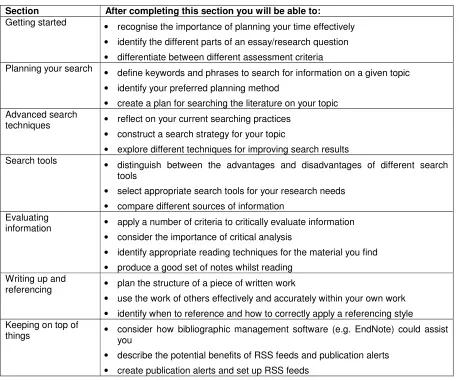
[image:7.612.79.538.72.453.2]86 Table 1: Summary of learning outcomes for each section of the tutorial
Section After completing this section you will be able to:
Getting started
• recognise the importance of planning your time effectively
• identify the different parts of an essay/research question
• differentiate between different assessment criteria Planning your search
• define keywords and phrases to search for information on a given topic
• identify your preferred planning method
• create a plan for searching the literature on your topic Advanced search
techniques • reflect on your current searching practices • construct a search strategy for your topic
• explore different techniques for improving search results Search tools
• distinguish between the advantages and disadvantages of different search tools
• select appropriate search tools for your research needs
• compare different sources of information Evaluating
information • apply a number of criteria to critically evaluate information • consider the importance of critical analysis
• identify appropriate reading techniques for the material you find
• produce a good set of notes whilst reading Writing up and
referencing • plan the structure of a piece of written work
• use the work of others effectively and accurately within your own work
• identify when to reference and how to correctly apply a referencing style Keeping on top of
things • consider how bibliographic management software (e.g. EndNote) could assist you
• describe the potential benefits of RSS feeds and publication alerts
• create publication alerts and set up RSS feeds
4. Creation of the tutorial
An early decision was that the Articulate software package, which most of the Skills@Library online tutorials were created with, would be used for the tutorial. Articulateis a commercial product made up of four different elements that aid in the creation of interactive and engaging tutorials. Articulate Presenter uses PowerPoint as the basis for building a complete tutorial. Articulate Engage, Quizmaker and Videomaker each provide options for creating individual activities which can be used alone or added to the larger tutorial via Articulate Presenter.
The Articulate software was readily available; there was support available from learning technologists in the skills team; and other members of staff who had created tutorials using it had found it straightforward to use. There was also evidence gathered by the skills team (from student focus groups and feedback forms) in relation to existing Articulate tutorials that students liked the clear structure and flexible navigation this software could offer.
Thornes. 2012. Journal of Information Literacy. 6(1).
http://ojs.lboro.ac.uk/ojs/index.php/JIL/article/view/LLC-V6-I1-2012-3
87 help, advice and contact information (such as the webpage for geography) would be provided in the VLE alongside to the tutorial itself.
4.1 Structure
As the distance-learning students come from a variety of backgrounds, it is assumed that they will also have a range of prior experiences and abilities in relation to IL skills. When the postgraduate geography students arrive at a face-to-face workshop in the library, there has usually been no previous contact with them, and so methods such as informal discussion and asking questions about prior experience help to gauge the general level of understanding of the group. It is not so straightforward to do this in an online learning environment. To help address this issue, varied routes through the tutorial were offered, allowing students to use it in a linear or pick-and-mix style. This meant that students with limited prior experience of the topics covered could benefit from working through the whole tutorial, while others could use it to focus on known gaps in their knowledge, or recap on areas for improvement (Greener 2008; Nelson 2008).
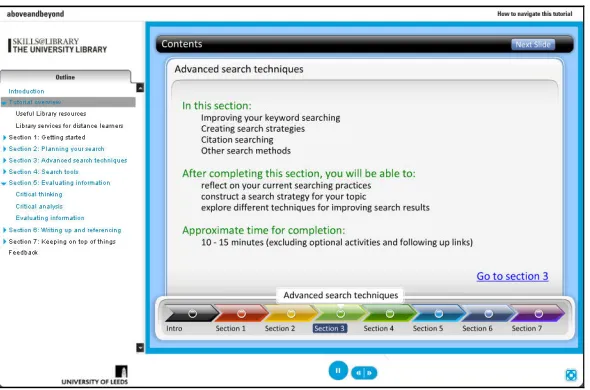
The structure within Articulate Presenter supports this flexible navigation. A side panel in the tutorial lists the main segments and subtopics, allowing students to see what is coming up, identify what is still to come and move to the section where they need help (see Figure 1, below). Including a contents guide, setting out what is covered in each section, and the associated learning objectives, gives students the option to focus on what is relevant, and more advanced students do not have to repeat areas they are already familiar with.
Figure 1: Screen shot of the contents page within the tutorial, including the permanent navigation which appears on the left
At the start of the tutorial, introductory information was added, which included: an overview of the tutorial (Figure 1); contact details; links to the relevant subject page on the Library website; and links to services available to distance learners.
4.2 Learning activities and student interaction
[image:8.612.160.455.365.560.2]Thornes. 2012. Journal of Information Literacy. 6(1).
http://ojs.lboro.ac.uk/ojs/index.php/JIL/article/view/LLC-V6-I1-2012-3
88
• Drag-and-drop exercises (breaking down a title or topic into keywords)
• Short videos (an introduction to RSS feeds)
• Animations (application of boolean operators)
• Interactive quiz (end of section test on search tools)
• True or false quizzes (identifying plagiarism)
• Screen captures (introduction to the Web of Science database)
• Evaluating essay extracts (identifying a good set of notes)
It seemed logical to reuse content and activities from existing Skills@Library materials (both from online tutorials and workshops) wherever possible, rather than create new resources. As the Skills@Library materials being used were all based around an example relevant to geography (The floods of 2007 were primarily a result of ineffective government policy. Discuss.), it was possible to maintain a clear subject connection that the students could relate to through the different sections of the tutorial.
Incorporating resources developed by the skills advisors ensured that students were provided with a high level of supporting information in these areas. By extracting individual activities from larger resources, it was also possible to provide students with the opportunity to self-assess their skills and knowledge in a particular area. If they found that it was an area in which they lacked confidence or ability, the option to complete a full tutorial on the subject was available. Additionally, being able to reuse activities in this way offered several benefits: a reduced workload in terms of material to be created, less content to update (as the original authors update their own materials) and so as long as the links are checked, there is no need for any further maintenance.
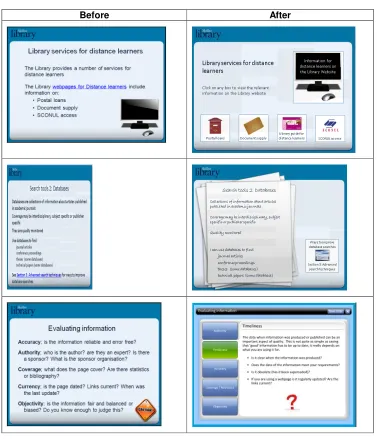
As fewer online resources had been created for IL at this time, it was necessary to develop some interactive elements and activities from scratch. The Articulate Presenter software made it possible to include animated slides to show the progression of ideas (e.g. using a mind map to develop keywords). Articulate Engage proved particularly useful for presenting long or complex pieces of information in more manageable chunks (called Engage interactions). In addition to text-based explanation, these can include audio and animation (or other visual representation). Engage interactions were used to present criteria for evaluating sources (shown in Figure 2), to show the stages to consider in planning a literature search (students can select the areas they want to know more about) and to explain Boolean operators. Articulate Quizmaker was used to develop an interactive quiz with a range of different questions including multiple choice, short answer, drag and drop and hotspots (which ask the user to select an area within an image).
At the end of each section, a self-test element was included, followed by sources of further help and information. The tests allowed students to consider what they had learned, and identify areas they may need to recap on, or get more help with. Tests took various formats, including: a standard Multiple Choice Quiz (MCQ); a drag-and-drop exercise to create a search strategy; a quiz on selecting search tools; and a task to identify where references should have been included in an essay extract. Feedback was provided through a variety of methods: this included the correct answer being demonstrated (for drag-and-drop exercises); an explanation of the correct answer with details of why the other options were incorrect; and suggestions for how to improve or where to get more help.
Thornes. 2012. Journal of Information Literacy. 6(1).
http://ojs.lboro.ac.uk/ojs/index.php/JIL/article/view/LLC-V6-I1-2012-3
89
4.3 Working with a learning technologist
For those who use PowerPoint to deliver presentations, the natural inclination when developing content for an Articulate tutorial is to create slides as usual, with large font sizes, providing just the key points. This was the case in the development of this tutorial, and the first version created had the feel of a PowerPoint presentation, but with a few extra links and pictures added in. To improve on this, the tutorial was reviewed with the help of one of the library’s learning technologists.
Figure 2: Screen shots of slides before and after taking advice from the learning technologist
Before After
The guidance received from the learning technologist was invaluable, the key points being:
• Text on slides should be smaller than in a presentation - around 14pt or 16pt depending on
[image:10.612.118.495.177.616.2]Thornes. 2012. Journal of Information Literacy. 6(1).
http://ojs.lboro.ac.uk/ojs/index.php/JIL/article/view/LLC-V6-I1-2012-3
90
• Each screen should focus on just one key concept/idea, usually with no more than 50-70
words per slide. This helps to focus the attention of the user, and to maintain a clear structure within the tutorial.
• Breaking up larger sections over several screens allows the user to interact with the content
and maintains their engagement.
• Use good-quality and appropriate images. These can be used both to maintain visual
interest, and to aid the text in constructing meaning.
• Hyperlink relevant words or phrases, rather than giving a URL on the page. This allows the
user to easily access the signposted content, without cluttering the screen with long URLs.
As a result of these meetings, font styles and sizes were changed in the online tutorial, and additional images and animations were added to make the tutorial more engaging. URLs were removed and relevant text hyperlinked to give the pages a cleaner look and feel. To improve the accessibility of the tutorial for all users, audio was included (with accompanying transcript for any content not on the slides), and alt text (a written description of the image that can be read by screen readers) inserted for all images.
4.4 Production time
In total, the online tutorial (which is around 70 minutes long) took approximately 100 hours to create - comparable to the estimate by Race (1999, cited in Webb and Powis 2004, p.118) of 100 hours to create 60 minutes of e-learning.
Sourcing materials (reviewing existing Skills@Library material to look for suitable activities and follow-up material, and finding appropriate images) and making improvements to look and feel, took far longer than anticipated. While no detailed records were kept, a rough estimate indicates that these tasks took almost half of the total development time.
Determining initial content based on the existing PowerPoint presentations; gaining familiarity with the Articulate Presenter software; and creating new activities and content were also time-consuming. Following meetings with the learning technologist, there was a greater understanding of the requirements for online learning, but again amendments based on the advice given took several hours. The initial lack of familiarity with Articulate software is likely to have been a factor affecting the speed of progress, as amendments and updates made later on took much less time.
A final part of the production which took longer than anticipated was recording the audio and adding alt tags to images. In addition, owing to technical problems, the first audio recordings were lost, and had to be re-recorded for around 60 slides.
5. Using the tutorial
In April 2010, the first release of the tutorial was made available to distance-learning students in geography, via the VLE, within a section containing a range of training materials and preparatory information. Students were able to see a link to the tutorial, along with some explanatory text about what the tutorial covered. The tutorial itself opened in a new browser window, rather than being physically embedded within the VLE as the full screen view made it easier to use and navigate. The course leader then emailed their students, encouraging them to view the tutorial and fill in the short feedback form. Essentially this was the pilot for the tutorial, with students being given six weeks to view the resource, after which feedback would be reviewed and any required changes made.
Thornes. 2012. Journal of Information Literacy. 6(1).
http://ojs.lboro.ac.uk/ojs/index.php/JIL/article/view/LLC-V6-I1-2012-3
91 responses and access data was reviewed. The response was disappointing. Only one student completed the feedback form in full, and though others had partially completed it, until formally submitted, responses could not be viewed. In terms of the tracking statistics, on logging in to the VLE to extract the data, it was discovered that statistics were only held for one month. Results from the first two weeks, when students were more likely to have looked at the tutorial were lost. The remaining data showed that, of 45 registered students, 11 had viewed the tutorial in the previous month.
5.1 Applying the tutorial beyond the distance learning course
During the development of the tutorial, consideration was given to how it could be used to support a wider range of students, and its potential value as a blended learning tool (using the online tutorial alongside face-to-face teaching, rather than employing only one or the other method in teaching) was identified.
The intention was to make use of the tutorial in the following academic year (2010/11) with taught postgraduate students across the faculty - directing them to complete specific sections as a pre-workshop activity. The sections to be used were: Planning your search; Advanced search techniques; and Search tools. These would introduce students to the concepts of planning keywords, considering the type of information required for their particular assignment and the most appropriate sources to use to locate this information, and ensure all students were aware of the techniques which could be used to improve their searches.
The objective of doing this was to bring all members of the group to approximately the same level of awareness and understanding in advance of the face-to-face workshop. This would then allow the face-to-face session to focus on how the students could apply the techniques covered in the tutorial to their own work, and discuss anything which wasn’t clear, rather than having to pitch the session at the level of those students who had received little or no previous IL teaching.
In practice, it was not possible to set up the tutorial as a pre-workshop activity in advance of the workshops. While endorsed by the programme leaders, many of the masters workshops are not embedded in a module. This means that workshops are not timetabled alongside other activities for the course, but have to be fitted around timetabled lectures at the start of the term, often being arranged at short notice. The tutorial was still used, but as a follow-up resource. In the face-to-face workshop, for each theme covered (such as identifying appropriate search tools), the corresponding sections of the tutorial were identified. This gave students who wanted more information, practice, or just to go over something in their own time a source for this additional help and support.
Not having access to the appropriate parts of the VLE for all taught postgraduates meant that the link to the tutorial had to be given to course leaders and relevant support staff. The provision of this to students was therefore dependant on others adding the link to the VLE, and there was no way to access the statistics on use, as asking other these staff to provide them every month would not be appropriate.
5.2 Further use of the tutorial
Thornes. 2012. Journal of Information Literacy. 6(1).
http://ojs.lboro.ac.uk/ojs/index.php/JIL/article/view/LLC-V6-I1-2012-3
92 well in the multiple-choice questions, they could easily be referred to the full online tutorials, or a workshop to improve their skills in these areas.
In addition, the tutorial was adapted for use by the faculty team librarian for food science. For this module, usage statistics were successfully collated, showing that students continued to consult the tutorial throughout the module and into the following semester.
In summer 2011, the tutorial was updated. Links were checked, an activity changed (where the original item linked to had been amended), and alterations made where services or information had changed. As each slide had audio, amendments to the content of the slides also involved re-recording the audio. Someimages were replaced, including the photograph on the welcome page which was switched for a video introduction.
6. Limitations
6.1 Obtaining student feedback
Despite requests from their tutor, only one of the distance-learning students completed the feedback form. This student described using a specific section to address feedback received in a recent assignment, indicating that the content was of relevance and that the student understood there was no need to work through the whole tutorial, they could just go directly to the relevant area. While this student used the tutorial successfully, it cannot be assumed that it would be the same for all.
The lack of student feedback was a big problem, so to increase the opportunities to give feedback the learning technologist added a feedback form (as used in other Skills@Library learning resources) to the end of the online tutorial. As yet, there has been no feedback submitted via the form. There could be several reasons for this – students are not using the tutorial, the students are just dipping into the tutorial for snippets of information, or that the feedback form is overlooked (though as it appears in the main navigation this is unlikely). Lo and McCraw Dale (2009, p.156) describing student feedback on IL tutorials stated that “while most students expected and reported the tutorials to be at least moderately helpful, very few were motivated to complete them.” In this case, it could also be a lack of motivation on the students’ part to complete a feedback form when they already have what they need from the tutorial.
6.2 Recording usage statistics
A key lesson learned was not to make to assumptions about the data stored by the VLE.It was not realised that the tracking statistics were only stored for one month (academic staff involved in delivering the module were not aware of this either), therefore an overall picture of use could not be identified.
Thornes. 2012. Journal of Information Literacy. 6(1).
http://ojs.lboro.ac.uk/ojs/index.php/JIL/article/view/LLC-V6-I1-2012-3
93
7. Conclusion
The tutorial met the objectives of bringing together existing resources and providing academic skills and IL support where none had existed previously, and so in this sense could be considered successful. Feedback from library colleagues and academic staff was positive in that it did appear to address the main needs of the students and there have been a reduction in the number of enquiries from distance learning students. The data from the students in food sciences would suggest it proved useful, and there is anecdotal evidence of its usefulness (for example students referring to it in face-to-face meetings). However, until further usage data and student feedback is gathered, it is difficult to conclusively say whether it is meeting the needs of the students.
The quizzes and activities worked well, but there could still be more opportunities for reflection built into the tutorial. A knowledge audit at the start of the tutorial to test students’ prior knowledge and direct them to specific parts of the tutorial could be a useful feature to explore. Questions from the audit could then be reused to create an MCQ at the end of each section so students could assess whether they had progressed in this area, and receiving relevant feedback signposting to further resources or parts of the section that could be recapped.
While the tutorial was created with the need to update and maintain content in mind, there were some issues which could not have been predicted. In 2011 the library implemented a new visual identity, requiring all material be updated to meet this, and the development of a new library website meant that once this was live many of the links in the online tutorial would need updating.
The experience of producing this tutorial was a valuable one, and highlighted a number of factors to consider in developing a resource of this kind:
• Is this the most appropriate method of delivery to meet the needs of the students?
• How will elements for interaction and reflection be incorporated?
• How will the design allow for a balance between content and look and feel?
• How much time is required for the development?
• Who is the most appropriate person to create the resource, in terms of skill set, time and
money?
• How will feedback be obtained, especially when there is no impetus for students to provide
this?
• What are the options for collecting statistical data on usage?
• Can it realistically maintained over a longer period of time?
Some of these were clear from the outset and given full consideration, but some only came to light through mistakes made during the process for example assumptions about student willingness to provide feedback, and the way in which the VLE stored data. For future work and developments, much more time would be spent on these elements as without this data it is hard to demonstrate the degree to which the tutorial adds value or benefits the students.
Thornes. 2012. Journal of Information Literacy. 6(1).
http://ojs.lboro.ac.uk/ojs/index.php/JIL/article/view/LLC-V6-I1-2012-3
94
Resources
The Above and Beyond tutorial is available to view online:
http://library.leeds.ac.uk/downloads/tutorials/aboveandbeyond/index.html
Articulate software: www.articulate.com
References
Befus, R. and K. Byrne. 2011. Redesigned with them in mind: Evaluating an online library information literacy tutorial. Urban Library Journal [Online]. 17(1). Available from:
http://ojs.cunylibraries.org/index.php/ulj/article/download/54/pdf_1. [Accessed 9 April 2012].
Biggs, J. B. 2003. Teaching for quality learning at university: what the student does. 2nd ed. Buckingham: Society for Research into Higher Education & Open University Press.
Bradwell, P. 2009. The edgeless university. London: Demos.
Cornelius, S. and C. Gordon. 2009. Adult learners' use of flexible online resources in a blended programme. Educational Media International [Online]. 46(3), pp.239-253. Available from:
http://www.tandfonline.com/doi/abs/10.1080/09523980903135392. [Accessed 9 April 2012].
Dearing, R. 1997. Higher education in the learning society. London: NCIHE.
Dewald, N. H. 1999. Transporting good library instruction practices into the web environment: an analysis of online tutorials. The Journal of Academic Librarianship [Online]. 25(1),
pp.26-31. Available from: http://www.sciencedirect.com/science/article/pii/S0099133399801724. [Accessed 9 April 2012],
Greener, S. L. 2008. Self-aware and self-directed: Student conceptions of blended learning. Journal of Online Learning and Teaching [Online]. 4(2), pp243-253. Available from:
http://jolt.merlot.org/Vol4_No2.htm. [Accessed 9 April 2012],
Holley, D. and M. Oliver. 2010. Student engagement and blended learning: portraits of risk. Computers & Education [Online]. 54(3), pp.693-700. Available from:
http://www.sciencedirect.com/science/article/pii/S0360131509002711. [Accessed 9 April 2012],
Howard, H. 2012. Looking to the future: Developing an academic skills strategy to ensure
information literacy survives in a changing higher education world. [Online] Journal of Information Literacy 6(1), pp72-81. Available from: http://ojs.lboro.ac.uk/ojs/index.php/JIL/article/view/LLC-V6-I1-2012-2.
Hutchings, M., M. Hadfield, G. Howarth and S. Lewarne. 2007. Meeting the challenges of active learning in web-based case studies for sustainable development. Innovations in Education and Teaching International [Online]. 44, pp.331-343. Available from:
www.tandfonline.com/doi/abs/10.1080/14703290701486779. [Accessed 9 April 2012].
Kraemer, E. W., S. V. Lombardo and F. J. Lepkowski. 2007. The librarian, the machine, or a little of both: A comparative study of three information literacy pedagogies at Oakland University. College & Research Libraries [Online]. 68(4), pp.330-342. Available from:
http://crl.acrl.org/content/68/4/330.full.pdf. [Accessed 9 April 2012].
Laurillard, D. 2002. Rethinking university teaching: a conversational framework for the effective use of learning technologies. 2nd ed. London ; New York: RoutledgeFalmer.
Lindsay, E. B., L. Cummings, C. M. Johnson and B. J. Scales. 2006. If you build it, will they learn? Assessing online information literacy tutorials. College & Research Libraries [Online]. 67(5), [Accessed 9 April 2012], pp.429-445. Available from: http://crl.acrl.org/content/67/5/429.full.pdf. Lo, L. S. and J. Mccraw Dale. 2009. Information literacy “learning” via online tutorials. Journal of Library & Information Services in Distance Learning, 3(3), pp.148 - 158.
Nelson, A. 2008. Online personalization: the key to engaging the learner. Development and Learning in Organizations, 22 (1), pp.11-13.
Thornes. 2012. Journal of Information Literacy. 6(1).
http://ojs.lboro.ac.uk/ojs/index.php/JIL/article/view/LLC-V6-I1-2012-3
95 Peacock, J. 2005. Information literacy education in practice. In: P. Levy and S. Roberts, eds. Developing the new learning environment. London: Facet, pp.153-180.
Quality Assurance Agency. 2007. Subject benchmark statements: Geography [Online].. Available from:
http://www.qaa.ac.uk/Publications/InformationAndGuidance/Pages/Subject-benchmark-statement-Geography.aspx. [Accessed 31 May 2012].
Race, P. 2007. The lecturer's toolkit: a practical guide to assessment, learning and teaching. 3rd ed. London: Routledge.
Race, P. and R. Pickford. 2007. Making teaching work: 'teaching smarter' in post-compulsory education. Thousand Oaks, Calif. ; London SAGE Publications.
Ramsden, P. 2003. Learning to teach in higher education. 2nd ed. London: RoutledgeFalmer. Roberts, S. and P. Levy. 2005. (E)merging professional identities and practices. In: P. Levy and S. Roberts, eds. Developing the new learning environment. London: Facet, pp.221-229.
Salmon, G. 2003. E-moderating: the key to teaching and learning online. 2nd ed. London: RoutledgeFalmer.
Sharpe, R., G. Benfield, G. Roberts and R. Francis. 2006. The undergraduate experience of blended e-learning: a review of UK literature and practice [Online]. Available from:
http://www.heacademy.ac.uk/assets/York/documents/ourwork/research/literature_reviews/blended
_elearning_exec_summary_1.pdf. [Accessed 9 April 2012].
Shroff, R. H., D. R. Vogel and J. Coombes. 2008. Assessing individual-level factors supporting student intrinsic motivation in online discussions: a qualitative study. Journal of Information Systems Education [Online]. 19(1), p16. Available from:
http://search.proquest.com/docview/200115872. [Accessed 9 April 2012].
Silver, S. L. and L. T. Nickel. 2007. Are online tutorials effective? a comparison of online and classroom library instruction methods. Research Strategies, 20(4), pp.389-396.
Su, S. F. and J. Kuo. 2010. Design and development of web-based information literacy tutorials. The Journal of Academic Librarianship [Online]. 36(4), pp.320-328. Available from:
http://www.sciencedirect.com/science/article/pii/S0099133310001011. [Accessed 9 April 2012].
Tempelman-Kluit, N. 2006. Multimedia learning theories and online instruction. College & Research Libraries [Online]. 67(4), pp.364-369. Available from:
http://crl.acrl.org/content/67/4/364.full.pdf. [Accessed 9 April 2012].