˜
VU University Amsterdam
De Boelelaan 1081a, 1081 HV AmsterdamThe Netherlands
University of Amsterdam
Kruislaan 419, 1098 VA AmsterdamThe Netherlands
Reference Manual
Updated for version 7.4-2, April 2017Jan Wielemaker
http://www.swi-prolog.org
SWI-Prolog is a comprehensive and portable implementation of the Prolog programming language. SWI-Prolog aims to be a robust and scalable implementation supporting a wide range of applications. In particular, it ships with a wide range of interface libraries, providing interfaces to other languages, databases, graphics and networking. It provides extensive support for managing HTML/SGML/XML and RDF documents. The system is particularly suited for server applications due to robust support for multithreading and HTTP server libraries.
SWI-Prolog is designed in the ‘Edinburgh tradition’. In addition to the ISO Prolog stan-dard it is largely compatible to Quintus, SICStus and YAP Prolog. SWI-Prolog provides a compatibility framework developed in cooperation with YAP and instantiated for YAP, SICStus and IF/Prolog.
SWI-Prolog aims at providing a good development environment, including extensive ed-itor support, graphical source-level debugger, autoloading and ‘make’ facility and much more. SWI-Prolog editor and the PDT plugin for Eclipse provide alternative environ-ments.
Contents
1 Introduction 11
1.1 Positioning SWI-Prolog. . . 11
1.2 Status and releases . . . 12
1.3 Should I be using SWI-Prolog? . . . 12
1.4 Support the SWI-Prolog project . . . 13
1.5 Implementation history . . . 14
1.6 Acknowledgements . . . 14
2 Overview 16 2.1 Getting started quickly . . . 16
2.1.1 Starting SWI-Prolog . . . 16
2.1.2 Executing a query . . . 17
2.2 The user’s initialisation file . . . 17
2.3 Initialisation files and goals . . . 18
2.4 Command line options . . . 18
2.4.1 Informational command line options . . . 19
2.4.2 Command line options for running Prolog . . . 19
2.4.3 Controlling the stack sizes . . . 21
2.4.4 Running goals from the command line . . . 22
2.4.5 Compilation options . . . 22
2.4.6 Maintenance options . . . 22
2.5 GNU Emacs Interface. . . 23
2.6 Online Help . . . 23
2.7 Command line history. . . 24
2.8 Reuse of top-level bindings . . . 24
2.9 Overview of the Debugger . . . 25
2.10 Compilation . . . 29
2.10.1 During program development . . . 29
2.10.2 For running the result. . . 29
2.11 Environment Control (Prolog flags) . . . 32
2.12 An overview of hook predicates . . . 46
2.13 Automatic loading of libraries . . . 47
2.14 Garbage Collection . . . 49
2.15 The SWI-Prolog syntax . . . 49
2.15.1 ISO Syntax Support . . . 49
2.16 Rational trees (cyclic terms) . . . 55
2.17 Just-in-time clause indexing . . . 56
2.17.1 Future directions . . . 57
2.17.2 Indexing and portability . . . 57
2.18.1 Wide character encodings on streams . . . 57
2.19 System limits . . . 59
2.19.1 Limits on memory areas . . . 59
2.19.2 Other Limits . . . 61
2.19.3 Reserved Names . . . 61
2.20 SWI-Prolog and 64-bit machines . . . 62
2.20.1 Supported platforms . . . 62
2.20.2 Comparing 32- and 64-bits Prolog . . . 62
2.20.3 Choosing between 32- and 64-bit Prolog. . . 62
3 Initialising and Managing a Prolog Project 64 3.1 The project source files . . . 64
3.1.1 File Names and Locations . . . 64
3.1.2 Project Special Files . . . 65
3.1.3 International source files . . . 66
3.2 Using modules . . . 66
3.3 The test-edit-reload cycle . . . 67
3.3.1 Locating things to edit . . . 67
3.3.2 Editing and incremental compilation . . . 68
3.4 Using the PceEmacs built-in editor . . . 68
3.4.1 Activating PceEmacs . . . 68
3.4.2 Bluffing through PceEmacs . . . 69
3.4.3 Prolog Mode . . . 71
3.5 The Graphical Debugger . . . 73
3.5.1 Invoking the window-based debugger . . . 73
3.6 The Prolog Navigator . . . 74
3.7 Cross-referencer. . . 74
3.8 Accessing the IDE from your program . . . 76
3.9 Summary of the IDE . . . 77
4 Built-in Predicates 78 4.1 Notation of Predicate Descriptions . . . 78
4.2 Character representation . . . 79
4.3 Loading Prolog source files . . . 80
4.3.1 Conditional compilation and program transformation . . . 90
4.3.2 Reloading files, active code and threads . . . 94
4.3.3 Quick load files . . . 97
4.4 Editor Interface . . . 98
4.4.1 Customizing the editor interface . . . 98
4.5 List the program, predicates or clauses . . . 99
4.6 Verify Type of a Term. . . 100
4.7 Comparison and Unification of Terms . . . 102
4.7.1 Standard Order of Terms . . . 102
4.7.2 Special unification and comparison predicates . . . 103
4.8 Control Predicates. . . 105
4.9 Meta-Call Predicates . . . 107
Contents 3
4.11 Exception handling . . . 112
4.11.1 Debugging and exceptions . . . 113
4.11.2 The exception term . . . 113
4.11.3 Printing messages . . . 113
4.12 Handling signals . . . 118
4.12.1 Notes on signal handling . . . 119
4.13 DCG Grammar rules . . . 119
4.14 Database. . . 122
4.14.1 Managing (dynamic) predicates . . . 123
4.14.2 The recorded database . . . 125
4.14.3 Flags . . . 125
4.14.4 Tries . . . 126
4.14.5 Update view . . . 127
4.14.6 Indexing databases . . . 128
4.15 Declaring predicate properties . . . 129
4.16 Examining the program . . . 130
4.17 Input and output. . . 135
4.17.1 Predefined stream aliases . . . 135
4.17.2 ISO Input and Output Streams . . . 136
4.17.3 Edinburgh-style I/O. . . 144
4.17.4 Switching between Edinburgh and ISO I/O . . . 146
4.17.5 Write onto atoms, code-lists, etc.. . . 146
4.17.6 Fast binary term I/O . . . 147
4.18 Status of streams . . . 148
4.19 Primitive character I/O . . . 149
4.20 Term reading and writing . . . 153
4.21 Analysing and Constructing Terms . . . 161
4.21.1 Non-logical operations on terms . . . 163
4.22 Analysing and Constructing Atoms. . . 165
4.23 Localization (locale) support . . . 168
4.24 Character properties. . . 169
4.24.1 Case conversion . . . 171
4.24.2 White space normalization . . . 172
4.24.3 Language-specific comparison . . . 172
4.25 Operators . . . 172
4.26 Character Conversion . . . 173
4.27 Arithmetic . . . 175
4.27.1 Special purpose integer arithmetic . . . 175
4.27.2 General purpose arithmetic . . . 176
4.28 Misc arithmetic support predicates . . . 185
4.29 Built-in list operations . . . 186
4.30 Finding all Solutions to a Goal . . . 189
4.31 Forall . . . 190
4.32 Formatted Write. . . 191
4.32.1 Writef . . . 191
4.32.2 Format . . . 193
4.33 Global variables . . . 196
4.33.1 Compatibility of SWI-Prolog Global Variables . . . 198
4.34 Terminal Control . . . 198
4.35 Operating System Interaction . . . 199
4.35.1 Windows-specific Operating System Interaction. . . 201
4.35.2 Dealing with time and date . . . 202
4.35.3 Controlling theswipl-win.execonsole window . . . 208
4.36 File System Interaction . . . 209
4.37 User Top-level Manipulation . . . 214
4.38 Creating a Protocol of the User Interaction . . . 215
4.39 Debugging and Tracing Programs . . . 215
4.40 Obtaining Runtime Statistics . . . 219
4.41 Execution profiling . . . 219
4.41.1 Profiling predicates . . . 219
4.41.2 Visualizing profiling data. . . 222
4.41.3 Information gathering . . . 223
4.42 Memory Management. . . 224
4.43 Windows DDE interface . . . 225
4.43.1 DDE client interface . . . 226
4.43.2 DDE server mode. . . 226
4.44 Miscellaneous . . . 228
5 SWI-Prolog extensions 229 5.1 Lists are special . . . 229
5.1.1 Motivating ’[|]’ and[]for lists . . . 230
5.2 The string type and its double quoted syntax . . . 230
5.2.1 Predicates that operate on strings. . . 231
5.2.2 Representing text: strings, atoms and code lists . . . 234
5.2.3 Adapting code for double quoted strings . . . 235
5.2.4 Why has the representation of double quoted text changed?. . . 236
5.3 Syntax changes . . . 238
5.3.1 Operators and quoted atoms . . . 238
5.3.2 Compound terms with zero arguments . . . 238
5.3.3 Block operators . . . 239
5.4 Dicts: structures with named arguments . . . 240
5.4.1 Functions on dicts . . . 241
5.4.2 Predicates for managing dicts . . . 243
5.4.3 When to use dicts? . . . 246
5.4.4 A motivation for dicts as primary citizens . . . 248
5.4.5 Implementation notes about dicts . . . 248
5.5 Integration of strings and dicts in the libraries . . . 248
5.5.1 Dicts and option processing . . . 249
5.5.2 Dicts in core data structures . . . 249
5.5.3 Dicts, strings and XML. . . 249
5.5.4 Dicts, strings and JSON . . . 249
5.5.5 Dicts, strings and HTTP . . . 249
Contents 5
6 Modules 251
6.1 Why Use Modules? . . . 251
6.2 Defining a Module . . . 251
6.3 Importing Predicates into a Module . . . 252
6.4 Defining a meta-predicate. . . 254
6.5 Overruling Module Boundaries . . . 256
6.5.1 Explicit manipulation of the calling context . . . 256
6.6 Interacting with modules from the top level . . . 257
6.7 Composing modules from other modules. . . 257
6.8 Operators and modules . . . 258
6.9 Dynamic importing using import modules . . . 258
6.10 Reserved Modules and using the ‘user’ module . . . 259
6.11 An alternative import/export interface . . . 259
6.12 Dynamic Modules. . . 260
6.13 Transparent predicates: definition and context module . . . 260
6.14 Module properties . . . 262
6.15 Compatibility of the Module System . . . 263
7 Constraint Logic Programming 265 7.1 Attributed variables . . . 266
7.1.1 Attribute manipulation predicates . . . 268
7.1.2 Attributed variable hooks. . . 268
7.1.3 Operations on terms with attributed variables . . . 269
7.1.4 Special purpose predicates for attributes . . . 270
7.2 Coroutining . . . 270
8 CHR: Constraint Handling Rules 273 8.1 Introduction . . . 273
8.2 Syntax and Semantics. . . 274
8.2.1 Syntax of CHR rules . . . 274
8.2.2 Semantics . . . 275
8.3 CHR in SWI-Prolog Programs . . . 276
8.3.1 Embedding in Prolog Programs . . . 276
8.3.2 Constraint declaration . . . 277
8.3.3 Compilation . . . 280
8.4 Debugging. . . 280
8.4.1 Ports . . . 281
8.4.2 Tracing . . . 281
8.4.3 CHR Debugging Predicates . . . 282
8.5 Examples . . . 283
8.6 Backwards Compatibility . . . 284
8.6.1 The Old SICStus CHR implemenation . . . 284
8.6.2 The Old ECLiPSe CHR implemenation . . . 285
8.7 Programming Tips and Tricks . . . 285
8.8 Compiler Errors and Warnings . . . 286
9 Multithreaded applications 288
9.1 Creating and destroying Prolog threads. . . 288
9.2 Monitoring threads . . . 292
9.3 Thread communication . . . 293
9.3.1 Message queues . . . 293
9.3.2 Signalling threads . . . 297
9.3.3 Threads and dynamic predicates . . . 298
9.4 Thread synchronisation . . . 298
9.5 Thread support library(threadutil) . . . 300
9.5.1 Debugging threads . . . 301
9.5.2 Profiling threads . . . 302
9.6 Multithreaded mixed C and Prolog applications . . . 302
9.6.1 A Prolog thread for each native thread (one-to-one) . . . 302
9.6.2 Pooling Prolog engines (many-to-many) . . . 303
9.7 Multithreading and the XPCE graphics system. . . 304
10 Coroutining using Prolog engines 306 10.1 Examples using engines. . . 306
10.1.1 Aggregation using engines . . . 306
10.1.2 State accumulation using engines . . . 308
10.1.3 Scalable many-agent applications . . . 310
10.2 Engine resource usage . . . 310
10.3 Engine predicate reference . . . 310
11 Foreign Language Interface 313 11.1 Overview of the Interface . . . 313
11.2 Linking Foreign Modules . . . 313
11.2.1 What linking is provided? . . . 314
11.2.2 What kind of loading should I be using? . . . 314
11.2.3 library(shlib): Utility library for loading foreign objects (DLLs, shared objects)314 11.2.4 Low-level operations on shared libraries . . . 316
11.2.5 Static Linking. . . 317
11.3 Interface Data Types . . . 318
11.3.1 Typeterm t: a reference to a Prolog term . . . 318
11.3.2 Other foreign interface types . . . 320
11.4 The Foreign Include File . . . 321
11.4.1 Argument Passing and Control . . . 321
11.4.2 Atoms and functors . . . 324
11.4.3 Analysing Terms via the Foreign Interface. . . 325
11.4.4 Constructing Terms. . . 334
11.4.5 Unifying data . . . 336
11.4.6 Convenient functions to generate Prolog exceptions . . . 342
11.4.7 BLOBS: Using atoms to store arbitrary binary data . . . 344
11.4.8 Exchanging GMP numbers. . . 346
11.4.9 Calling Prolog from C . . . 348
11.4.10 Discarding Data . . . 350
Contents 7
11.4.12 Prolog exceptions in foreign code . . . 352
11.4.13 Catching Signals (Software Interrupts). . . 354
11.4.14 Miscellaneous . . . 355
11.4.15 Errors and warnings . . . 358
11.4.16 Environment Control from Foreign Code . . . 359
11.4.17 Querying Prolog . . . 359
11.4.18 Registering Foreign Predicates . . . 360
11.4.19 Foreign Code Hooks . . . 362
11.4.20 Storing foreign data. . . 364
11.4.21 Embedding SWI-Prolog in other applications . . . 367
11.5 Linking embedded applications using swipl-ld . . . 371
11.5.1 A simple example . . . 373
11.6 The Prolog ‘home’ directory . . . 375
11.7 Example of Using the Foreign Interface . . . 375
11.8 Notes on Using Foreign Code. . . 378
11.8.1 Foreign debugging functions . . . 378
11.8.2 Memory Allocation. . . 379
11.8.3 Compatibility between Prolog versions . . . 380
11.8.4 Debugging and profiling foreign code (valgrind) . . . 380
11.8.5 Name Conflicts in C modules . . . 381
11.8.6 Compatibility of the Foreign Interface . . . 381
12 Generating Runtime Applications 382 12.1 Limitations of qsave program. . . 384
12.2 Runtimes and Foreign Code . . . 384
12.3 Using program resources . . . 385
12.3.1 Resource manipulation predicates . . . 386
12.3.2 Theswipl-rcprogram. . . 387
12.4 Finding Application files . . . 387
12.4.1 Specifying a file search path from the command line . . . 388
A The SWI-Prolog library 389 A.1 library(aggregate): Aggregation operators on backtrackable predicates . . . 389
A.2 library(apply): Apply predicates on a list . . . 392
A.3 library(assoc): Association lists. . . 393
A.3.1 Introduction. . . 393
A.3.2 Creating association lists . . . 394
A.3.3 Querying association lists . . . 394
A.3.4 Modifying association lists . . . 395
A.3.5 Conversion predicates . . . 395
A.3.6 Reasoning about association lists and their elements . . . 395
A.4 library(broadcast): Broadcast and receive event notifications . . . 396
A.5 library(charsio): I/O on Lists of Character Codes . . . 398
A.6 library(check): Consistency checking . . . 399
A.7 library(clpb): CLP(B): Constraint Logic Programming over Boolean Variables. . . . 401
A.7.1 Introduction. . . 401
A.7.3 Interface predicates . . . 402
A.7.4 Examples . . . 402
A.7.5 Obtaining BDDs . . . 403
A.7.6 Enabling monotonic CLP(B) . . . 404
A.7.7 Example: Pigeons . . . 404
A.7.8 Example: Boolean circuit . . . 405
A.7.9 Acknowledgments . . . 406
A.7.10 CLP(B) predicate index . . . 406
A.8 library(clpfd): CLP(FD): Constraint Logic Programming over Finite Domains . . . . 407
A.8.1 Introduction. . . 407
A.8.2 Arithmetic constraints . . . 408
A.8.3 Declarative integer arithmetic . . . 409
A.8.4 Example: Factorial relation. . . 411
A.8.5 Combinatorial constraints . . . 412
A.8.6 Domains . . . 412
A.8.7 Example: Sudoku. . . 412
A.8.8 Residual goals . . . 413
A.8.9 Core relations and search . . . 414
A.8.10 Example: Eight queens puzzle . . . 415
A.8.11 Optimisation . . . 417
A.8.12 Reification . . . 417
A.8.13 Enabling monotonic CLP(FD) . . . 417
A.8.14 Custom constraints . . . 418
A.8.15 Applications . . . 419
A.8.16 Acknowledgments . . . 419
A.8.17 CLP(FD) predicate index . . . 419
A.8.18 Closing and opening words about CLP(FD) . . . 430
A.9 library(clpqr): Constraint Logic Programming over Rationals and Reals . . . 431
A.9.1 Solver predicates . . . 431
A.9.2 Syntax of the predicate arguments . . . 432
A.9.3 Use of unification . . . 432
A.9.4 Non-linear constraints . . . 434
A.9.5 Status and known problems . . . 434
A.10 library(csv): Process CSV (Comma-Separated Values) data . . . 435
A.11 library(debug): Print debug messages and test assertions . . . 436
A.12 library(error): Error generating support. . . 438
A.13 library(gensym): Generate unique identifiers . . . 440
A.14 library(iostream): Utilities to deal with streams . . . 441
A.15 library(lists): List Manipulation . . . 442
A.16 library(nb set): Non-backtrackable set . . . 447
A.17 library(www browser): Activating your Web-browser . . . 448
A.18 library(option): Option list processing . . . 448
A.19 library(optparse): command line parsing . . . 450
A.19.1 Notes and tips. . . 455
A.20 library(ordsets): Ordered set manipulation . . . 457
A.21 library(pairs): Operations on key-value lists . . . 459
Contents 9
A.23 library(pio): Pure I/O . . . 463
A.23.1 library(pure input): Pure Input from files and streams. . . 463
A.24 library(predicate options): Declare option-processing of predicates . . . 465
A.24.1 The strength and weakness of predicate options . . . 465
A.24.2 Options as arguments or environment?. . . 466
A.24.3 Improving on the current situation . . . 466
A.25 library(prolog pack): A package manager for Prolog . . . 469
A.26 library(prolog xref): Cross-reference data collection library . . . 472
A.26.1 Extending the library . . . 473
A.27 library(quasi quotations): Define Quasi Quotation syntax . . . 473
A.28 library(random): Random numbers . . . 475
A.29 library(readutil): Reading lines, streams and files . . . 477
A.30 library(record): Access named fields in a term . . . 478
A.31 library(registry): Manipulating the Windows registry . . . 479
A.32 library(simplex): Solve linear programming problems . . . 481
A.32.1 Introduction. . . 481
A.32.2 Delayed column generation . . . 482
A.32.3 Solving LPs with special structure . . . 482
A.32.4 Examples . . . 483
A.33 library(solution sequences): Modify solution sequences . . . 485
A.34 library(tabling): Tabled execution (SLG) . . . 487
A.34.1 Tabling predicate reference. . . 490
A.35 library(thread pool): Resource bounded thread management . . . 491
A.36 library(ugraphs): Unweighted Graphs . . . 493
A.37 library(url): Analysing and constructing URL . . . 496
A.38 library(varnumbers): Utilities for numbered terms . . . 499
A.39 library(yall): Lambda expressions . . . 500
B Hackers corner 503 B.1 Examining the Environment Stack . . . 503
B.2 Ancestral cuts . . . 505
B.3 Intercepting the Tracer . . . 505
B.4 Breakpoint and watchpoint handling . . . 507
B.5 Adding context to errors: prolog exception hook . . . 509
B.6 Hooks using the exception predicate . . . 509
B.7 Hooks for integrating libraries . . . 510
B.8 Hooks for loading files . . . 511
C Compatibility with other Prolog dialects 512 C.1 Some considerations for writing portable code . . . 513
D Glossary of Terms 516 E SWI-Prolog License Conditions and Tools 522 E.1 Contributing to the SWI-Prolog project . . . 523
E.2 Software support to keep track of license conditions . . . 523
E.3.1 Cryptographic routines . . . 524
F Summary 525 F.1 Predicates . . . 525
F.2 Library predicates . . . 541
F.2.1 library(aggregate). . . 541
F.2.2 library(apply) . . . 541
F.2.3 library(assoc) . . . 541
F.2.4 library(broadcast) . . . 542
F.2.5 library(charsio) . . . 542
F.2.6 library(check). . . 542
F.2.7 library(clpb) . . . 543
F.2.8 library(clpfd) . . . 543
F.2.9 library(clpqr) . . . 544
F.2.10 library(csv) . . . 544
F.2.11 library(debug) . . . 544
F.2.12 library(error) . . . 544
F.2.13 library(iostream) . . . 545
F.2.14 library(summaries.d/iostream/tex) . . . 545
F.2.15 library(lists). . . 545
F.2.16 library(option) . . . 546
F.2.17 library(optparse) . . . 546
F.2.18 library(ordsets) . . . 546
F.2.19 library(persistency) . . . 547
F.2.20 library(predicate options) . . . 547
F.2.21 library(prologpack) . . . 547
F.2.22 library(prologxref) . . . 547
F.2.23 library(pairs) . . . 548
F.2.24 library(pio) . . . 548
F.2.25 library(random) . . . 548
F.2.26 library(readutil) . . . 548
F.2.27 library(record) . . . 549
F.2.28 library(registry) . . . 549
F.2.29 library(simplex). . . 549
F.2.30 library(ugraphs). . . 549
F.2.31 library(url) . . . 550
F.2.32 library(www browser) . . . 550
F.2.33 library(solution sequences). . . 550
F.2.34 library(thread pool). . . 550
F.2.35 library(varnumbers) . . . 551
F.2.36 library(yall) . . . 551
F.3 Arithmetic Functions . . . 552
Introduction
1
This document is a reference manual. That means that it documents the system, but it does not explain the basics of the Prolog language and it leaves many details of the syntax, semantics and built-in primitives undefbuilt-ined where SWI-Prolog follows the standards. This manual is built-intended for people that are familiar with Prolog. For those not familiar with Prolog, we recommend to start with a Prolog textbook such as [Bratko, 1986], [Sterling & Shapiro, 1986] or [Clocksin & Melish, 1987]. For more advanced Prolog usage we recommend [O’Keefe, 1990].
1.1
Positioning SWI-Prolog
Most implementations of the Prolog language are designed to serve a limited set of use cases. SWI-Prolog is no exception to this rule. SWI-SWI-Prolog positions itself primarily as a SWI-Prolog environment for ‘programming in the large’ and use cases where it plays a central role in an application, i.e., where it acts as ‘glue’ between components. At the same time, SWI-Prolog aims at providing a productive rapid prototyping environment. Its orientation towards programming in the large is backed up by scal-ability, compiler speed, program structuring (modules), support for multithreading to accommodate servers, Unicode and interfaces to a large number of document formats, protocols and programming languages. Prototyping is facilitated by good development tools, both for command line usage as for usage with graphical development tools. Demand loading of predicates from the library and a ‘make’ facility avoids therequirementfor using declarations and reduces typing.
SWI-Prolog is traditionally strong in education because it is free and portable, but also because of its compatibility with textbooks and its easy-to-use environment.
Note that these positions do not imply that the system cannot be used with other scenarios. SWI-Prolog is used as an embedded language where it serves as a small rule subsystem in a large applica-tion. It is also used as a deductive database. In some cases this is the right choice because SWI-Prolog has features that are required in the application, such as threading or Unicode support. In general though, for example, GNU-Prolog is more suited for embedding because it is small and can com-pile to native code, XSB is better for deductive databases because it provides advanced resolution techniques (tabling), and ECLiPSe is better at constraint handling.
The syntax and set of built-in predicates is based on the ISO standard [Hodgson, 1998]. Most extensions follow the ‘Edinburgh tradition’ (DEC10 Prolog and C-Prolog) and Quintus Prolog [Qui, 1997]. The infrastructure for constraint programming is based on hProlog [Demoen, 2002]. Some libraries are copied from the YAP1 system. Together with YAP we developed a portability framework (see sectionC). This framework has been filled for SICStus Prolog, YAP, IF/Prolog and Ciao. SWI-Prolog version 7 introduces various extensions to the Prolog language (see section5). The stringdata type and its supporting set of built-in predicates is compatibility with ECLiPSe.
1
1.2
Status and releases
This manual describes version 7.4 of SWI-Prolog. SWI-Prolog is widely considered to be a robust and scalable implementation of the Prolog language. It is widely used in education and research. In addition, it is in use for 24×7 mission critical commercial server processes. The sitehttp: //www.swi-prolog.orgis hosted using the SWI-Prolog HTTP server infrastructure. It receives approximately 2.3 million hits and serves approximately 300 Gbytes on manual data and downloads each month. SWI-Prolog applications range from student assignments to commercial applications that count more than one million lines of Prolog code.
SWI-Prolog has two development tracks. Stable releases have an even minor version number (e.g., 6.2.1) and are released as a branch from the development version when the development version is considered stable and there is sufficient new functionality to justify a stable release. Stable releases often get a few patch updates to deal with installation issues or major flaws. A newDevelopment version is typically released every couple of weeks as a snapshot of the public git repository. ‘Extra editions’ of the development version may be released after problems that severely hindered the user in their progress have been fixed.
Known bugs that are not likely to be fixed soon are described as footnotes in this manual.
1.3
Should I be using SWI-Prolog?
There are a number of reasons why it might be better to choose a commercial, or another free, Prolog system:
• SWI-Prolog comes with no warranties
Although the developers or the community often provide a work-around or a fix for a bug, there is no place you can go to for guaranteed support. However, the full source archive is available and can be used to compile and debug SWI-Prolog using free tools on all major platforms. Users requiring more support should ensure access to knowledgeable developers.
• Performance is your first concern
Various free and commercial systems have better performance. But, ‘standard’ Prolog bench-marks disregard many factors that are often critical to the performance of large applications. SWI-Prolog is not good at fast calling of simple predicates and if-then-else selection based on simple built-in tests, but it is fast with dynamic code, meta-calling and predicates that contain large numbers of clauses. Many of SWI-Prolog’s built-in predicates are written in C and have excellent performance.
• You need features not offered by SWI-Prolog
Although SWI-Prolog has many features, it also lacks some important features. The most well known is probablytabling[Freireet al., 1997]. If you require additional features and you have resources, be it financial or expertise, please contact the developers.
On the other hand, SWI-Prolog offers some facilities that are widely appreciated by users:
• Nice environment
1.4. SUPPORT THE SWI-PROLOG PROJECT 13
be instructed to open an arbitrary editor on the right file and line based on its source database. It ships with various graphical tools and can be combined with the SWI-Prolog editor, PDT (Eclipse plugin for Prolog) or GNU-Emacs.
• Fast compiler
Even very large applications can be loaded in seconds on most machines. If this is not enough, there is the Quick Load Format. Seeqcompile/1andqsave program/2.
• Transparent compiled code
SWI-Prolog compiled code can be treated just as interpreted code: you can list it, trace it, etc. This implies you do not have to decide beforehand whether a module should be loaded for debugging or not, and the performance of debugged code is close to that of normal operation.
• Source level debugger
The source level debugger provides a good overview of your current location in the search tree, variable bindings, your source code and open choice points. Choice point inspection provides meaningful insight to both novices and experienced users. Avoiding unintended choice points often provides a huge increase in performance and a huge saving in memory usage.
• Profiling
SWI-Prolog offers an execution profiler with either textual output or graphical output. Finding and improving hotspots in a Prolog program may result in huge speedups.
• Flexibility
SWI-Prolog can easily be integrated with C, supporting non-determinism in Prolog calling C as well as C calling Prolog (see section11). It can also beembeddedin external programs (see section 11.5). System predicates can be redefined locally to provide compatibility with other Prolog systems.
• Threads
Robust support for multiple threads may improve performance and is a key enabling factor for deploying Prolog in server applications.
• Interfaces
SWI-Prolog ships with many extension packages that provide robust interfaces to processes, encryption, TCP/IP, TIPC, ODBC, SGML/XML/HTML, RDF, HTTP, graphics and much more.
1.4
Support the SWI-Prolog project
You can support the SWI-Prolog project in several ways. Academics are invited to cite one of the publications2on SWI-Prolog. Users can help by identifying and/or fixing problems with the code or its documentation.3. Users can contribute new features or, more lightweight, contribute packs4. Com-mercial users may consider contacting the developers5to sponsor the development of new features or seek for opportunities to cooperate with the developers or other commercial users.
2http://www.swi-prolog.org/Publications.html 3
http://www.swi-prolog.org/howto/SubmitPatch.html
1.5
Implementation history
SWI-Prolog started back in 1986 with the requirement for a Prolog that could handle recursive inter-action with the C-language: Prolog calling C and C calling Prolog recursively. In those days Prolog systems were not very aware of their environment and we needed such a system to support interactive applications. Since then, SWI-Prolog’s development has been guided by requests from the user com-munity, especially focussing on (in arbitrary order) interaction with the environment, scalability, (I/O) performance, standard compliance, teaching and the program development environment.
SWI-Prolog is based on a simple Prolog virtual machine called ZIP [Bowenet al., 1983,
Neumerkel, 1993] which defines only 7 instructions. Prolog can easily be compiled into this lan-guage, and the abstract machine code is easily decompiled back into Prolog. As it is also possible to wire a standard 4-port debugger in the virtual machine, there is no need for a distinction between compiled and interpreted code. Besides simplifying the design of the Prolog system itself, this ap-proach has advantages for program development: the compiler is simple and fast, the user does not have to decide in advance whether debugging is required, and the system only runs slightly slower in debug mode compared to normal execution. The price we have to pay is some performance degra-dation (taking out the debugger from the VM interpreter improves performance by about 20%) and somewhat additional memory usage to help the decompiler and debugger.
SWI-Prolog extends the minimal set of instructions described in [Bowenet al., 1983] to improve performance. While extending this set, care has been taken to maintain the advantages of decompi-lation and tracing of compiled code. The extensions include specialised instructions for unification, predicate invocation, some frequently used built-in predicates, arithmetic, and control (;/2, |/2), if-then (->/2) and negation-by-failure (\+/1).
1.6
Acknowledgements
Some small parts of the Prolog code of SWI-Prolog are modified versions of the corresponding Edin-burgh C-Prolog code: grammar rule compilation andwritef/2. Also some of the C-code originates from C-Prolog: finding the path of the currently running executable and some of the code underlying absolute file name/2. Ideas on programming style and techniques originate from C-Prolog and Richard O’Keefe’s thiefeditor. An important source of inspiration are the programming tech-niques introduced by Anjo Anjewierden in PCE version 1 and 2.
Our special thanks go to those who had the fate of using the early versions of this system, sug-gested extensions or reported bugs. Among them are Anjo Anjewierden, Huub Knops, Bob Wielinga, Wouter Jansweijer, Luc Peerdeman, Eric Nombden, Frank van Harmelen, Bert Rengel.
Martin Jansche ([email protected]) has been so kind to reor-ganise the sources for version 2.1.3 of this manual. Horst von Brand has been so kind to fix many typos in the 2.7.14 manual. Thanks! Randy Sharp fixed many issues in the 6.0.x version of the manual. Bart Demoen and Tom Schrijvers have helped me adding coroutining, constraints, global variables and support for cyclic terms to the kernel. Tom Schrijvers has provided a first clp(fd) constraint solver, the CHR compiler and some of the coroutining predicates. Markus Triska contributed the current clp(fd) implementation.
Paul Singleton has integrated Fred Dushin’s Java-calls-Prolog side with his Prolog-calls-Java side into the current bidirectional JPL interface package.
1.6. ACKNOWLEDGEMENTS 15
Scientific Software and Systems Limited,www.sss.co.nzhas sponsored the development of the SSL library, unbounded integer and rational number arithmetic and many enhancements to the memory management of the system.
Leslie de Koninck has made clp(QR) available to SWI-Prolog.
Overview
2
2.1
Getting started quickly
2.1.1 Starting SWI-Prolog
Starting SWI-Prolog on Unix
By default, SWI-Prolog is installed as ‘swipl’. The command line arguments of SWI-Prolog itself and its utility programs are documented using standard Unixman pages. SWI-Prolog is normally operated as an interactive application simply by starting the program:
machine% swipl
Welcome to SWI-Prolog ... ...
1
?-After starting Prolog, one normally loads a program into it usingconsult/1, which may be abbre-viated by putting the name of the program file between square brackets. The following goal loads the filelikes.plcontaining clauses for the predicateslikes/2:
?- [likes].
% likes compiled, 0.00 sec, 17 clauses true.
?-After this point, Unix and Windows users unite, so if you are using Unix please continue at sec-tion2.1.2.
Starting SWI-Prolog on Windows
After SWI-Prolog has been installed on a Windows system, the following important new things are available to the user:
• A folder (called directory in the remainder of this document) called swipl containing the executables, libraries, etc., of the system. No files are installed outside this directory.
2.2. THE USER’S INITIALISATION FILE 17
• The file extension .pl is associated with the program swipl-win.exe. Opening a .pl file will causeswipl-win.exeto start, change directory to the directory in which the file to open resides, and load this file.
The normal way to start the likes.pl file mentioned in section 2.1.1 is by simply double-clicking this file in the Windows explorer.
2.1.2 Executing a query
After loading a program, one can ask Prolog queries about the program. The query below asks Prolog what food ‘sam’ likes. The system responds withX = hvalueiif it can prove the goal for a certain X. The user can type the semi-colon (;) or spacebar1if (s)he wants another solution. Use theRETURN
key if you do not want to see the more answers. Prolog completes the output with a full stop (.) if the user uses the RETURN key or Prolog knowsthere are no more answers. If Prolog cannot find (more) answers, it writesfalse. Finally, Prolog answers using an error message to indicate the query or program contains an error.
?- likes(sam, X). X = dahl ;
X = tandoori ; ...
X = chips.
?-Note that the answer written by Prolog is a valid Prolog program that, when executed, produces the same set of answers as the original program.2
2.2
The user’s initialisation file
After the system initialisation, the system consults (seeconsult/1) the user’s startup file. The base-name of this file follows conventions of the operating system. On MS-Windows, it is the fileswipl. ini and on Unix systems .swiplrc. The file is searched using the file search path/2 clauses for user profile.3 The table below shows the default value for this search path. The phrasehappdatairefers to the Windows CSIDL name for the folder. The actual name depends on the Windows language. English versions typically useApplicationData. See alsowin folder/2
Unix Windows
home ˜ happdatai/SWI-Prolog
After the first startup file is found it is loaded and Prolog stops looking for further startup files. The name of the startup file can be changed with the ‘-f file’ option. IfFiledenotes an absolute path,
1
On most installations, single-character commands are executed without waiting for theRETURNkey.
2
The SWI-Prolog top level differs in several ways from traditional Prolog top level. The current top level was designed in cooperation with Ulrich Neumerkel.
3
this file is loaded, otherwise the file is searched for using the same conventions as for the default startup file. Finally, iffileisnone, no file is loaded.
The installation provides a filecustomize/dotswiplrcwith (commented) commands that are often used to customize the behaviour of Prolog, such as interfacing to the editor, color selection or history parameters. Many of the development tools provide menu entries for editing the startup file and starting a fresh startup file from the system skeleton.
See also the-s(script) and-F(system-wide initialisation) in section2.4and section2.3.
2.3
Initialisation files and goals
Using command line arguments (see section2.4), SWI-Prolog can be forced to load files and execute queries for initialisation purposes or non-interactive operation. The most commonly used options are-f fileor-s fileto make Prolog load a file,-g goal to define initialisation goals and -t goalto define thetop-level goal. The following is a typical example for starting an application directly from the command line.
machine% swipl -s load.pl -g go -t halt
It tells SWI-Prolog to loadload.pl, start the application using theentry pointgo/0and —instead of entering the interactive top level— exit after completinggo/0.
The command line may have multiple-g goaloccurrences. The goals are executed in order. Possible choice points of individual goals are pruned. If agoalfails execution stops with exit status 1. If agoalraises an exception, the exception is printed and the process stops with exit code2.
The-qmay be used to suppress all informational messages as well as the error message that is normally printed if an initialisation goalfails.
In MS-Windows, the same can be achieved using a short-cut with appropriately defined command line arguments. A typically seen alternative is to write a filerun.plwith content as illustrated below. Double-clickingrun.plwill start the application.
:- [load]. % load program
:- go. % run it
:- halt. % and exit
Section2.10.2discusses further scripting options, and chapter12discusses the generation of runtime executables. Runtime executables are a means to deliver executables that do not require the Prolog system.
2.4
Command line options
SWI-Prolog can be executed in one of the following modes:
swipl --help swipl --version swipl --arch
swipl --dump-runtime-variables
2.4. COMMAND LINE OPTIONS 19
swipl[option...]script-file[arg...]
These arguments are passed on Unix systems if file that starts with #!/path/to/executable[option...] is executed. Arguments after the script file are made available in the Prolog flagargv.
swipl[option...]prolog-file... [[--]arg...]
This is the normal way to start Prolog. The options are described in section2.4.2, section2.4.3 and section2.4.4. The Prolog flagargvprovides access toarg... If theoptionsare followed by one or more Prolog file names (i.e., names with extension.pl,.prologor (on Windows) the user preferred extension registered during installation), these files are loaded. The first file is registered in the Prolog flag associated file. In addition,pl-win[.exe]switches to the directory in which this primary source file is located usingworking directory/2. swipl-ooutput-cprolog-file...
The-coption is used to compile a set of Prolog files into an executable. See section2.4.5. swipl-ooutput-bbootfile prolog-file...
Bootstrap compilation. See section2.4.6.
2.4.1 Informational command line options
--arch
When given as the only option, it prints the architecture identifier (see Prolog flagarch) and exits. See also-dump-runtime-variables. Also available as-arch.
--dump-runtime-variables[=format]
When given as the only option, it prints a sequence of variable settings that can be used in shell scripts to deal with Prolog parameters. This feature is also used by swipl-ld (see section11.5). Below is a typical example of using this feature.
eval ‘swipl --dump-runtime-variables‘
cc -I$PLBASE/include -L$PLBASE/lib/$PLARCH ...
The option can be followed by=shto dump in POSIX shell format (default) or=cmdto dump in MS-Windowscmd.execompatible format.
--help
When given as the only option, it summarises the most important options. Also available as-h and-help.
--version
When given as the only option, it summarises the version and the architecture identifier. Also available as-v.
2.4.2 Command line options for running Prolog
--home=DIR
--quiet
Set the Prolog flag verboseto silent, suppressing informational and banner messages. Also available as-q.
--nodebug
Disable debugging. See thecurrent prolog flag/2flaggenerate debug infofor details.
--nosignals
Inhibit any signal handling by Prolog, a property that is sometimes desirable for embedded applications. This option sets the flagsignalstofalse. See section11.4.21for details. --pldoc[=port]
Start the PlDoc documentation system on a free network port and launch the user’s browser on http://localhost:port. Ifportis specified, the server is started at the given port and the browser isnotlaunched.
-tty
Unix only. Switches controlling the terminal for allowing single-character commands to the tracer and get single char/1. By default, manipulating the terminal is enabled unless the system detects it is not connected to a terminal or it is running as a GNU-Emacs inferior process. See alsotty control.
--win app
This option is available only in swipl-win.exe and is used for the start-menu item. If causes plwin to start in the folder ...\My Documents\Prolog or local equivalent thereof (seewin folder/2). ThePrologsubdirectory is created if it does not exist. -O
Optimised compilation. Seecurrent prolog flag/2flagoptimisefor details. -sfile
Use file as a script file. The script file is loaded after the initialisation file specified with the -f fileoption. Unlike-f file, using-sdoes not stop Prolog from loading the personal initialisation file.
-ffile
Use file as initialisation file instead of the default .swiplrc(Unix) orswipl.ini (Win-dows). ‘-f none’ stops SWI-Prolog from searching for a startup file. This option can be used as an alternative to -s filethat stops Prolog from loading the personal initialisation file. See also section2.2.
-Fscript
Select a startup script from the SWI-Prolog home directory. The script file is named hscripti.rc. The default script name is deduced from the executable, taking the leading alphanumerical characters (letters, digits and underscore) from the program name. -F none
2.4. COMMAND LINE OPTIONS 21
-xbootfile
Boot from bootfile instead of the system’s default boot file. A boot file is a file re-sulting from a Prolog compilation using the -b or -c option or a program saved using qsave program/[1,2].
-palias=path1[:path2 . . . ]
Define a path alias for file search path. alias is the name of the alias, and argpath1 ... is a list of values for the alias. On Windows the list separator is ;. On other systems it is:. A value is either a term of the form alias(value) or pathname. The computed aliases are added to file search path/2usingasserta/1, so they precede predefined values for the alias. Seefile search path/2for details on using this file location mechanism.
--traditional
This flag disables the most important extensions of SWI-Prolog version 7 (see section 5) that introduce incompatibilities with earlier versions. In particular, lists are represented in the traditional way, double quoted text is represented by a list of character codes and the functional notation on dicts is not supported. Dicts as a syntactic entity, and the predicates that act on them, are still supported if this flag is present.
--Stops scanning for more arguments, so you can pass arguments for your application after this one. See current prolog flag/2using the flagargv for obtaining the command line arguments.
2.4.3 Controlling the stack sizes
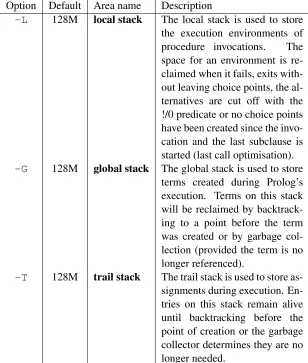
The default limit for the Prolog stacks is 128 MB on 32-bit and 256 MB on 64-bit hardware. The 128 MB limit on 32-bit systems is the highest possible value and the command line options can thus only be used to lower the limit. On 64-bit systems, the limit can both be reduced and enlarged. See section 2.19. Below are two examples, the first reducing the local stack limit to catch unbounded recursion quickly and the second using a big (32 GB) global limit, which is only possible on 64-bit hardware. Note that setting the limit using the command line only sets asoftlimit. Stack parameters can be changed (both reduced and enlarged) at any time using the predicateset prolog stack/2.
$ swipl -L8m $ swipl -G32g
-Gsize[kmg]
Limit for the global stack (sometimes also calledterm stackorheap). This is where compound terms and large numbers live.
-Lsize[kmg]
Limit for the local stack (sometimes also calledenvironment stack). This is where environments and choice points live.
-Tsize[kmg]
-Msize[kmg]
Limit for the table space. This is where tries holding memoized4 answers for tabling are stored. The default is 1Gb on 64-bit machines and 512Mb on 32-bit machines. See the Prolog flagtable space
2.4.4 Running goals from the command line
-ggoal
Goalis executed just before entering the top level. This option may appear multiple times. See section2.3for details. If no initialization goal is present the system callsversion/0to print the welcome message. The welcome message can be suppressed with--quiet, but also with -g true. goalcan be a complex term. In this case quotes are normally needed to protect it from being expanded by the shell. A safe way to run a goal non-interactively is below. If go/0/succeeds-g haltcauses the process to stop with exit code 0. If it fails, the exit code is 1 and it it raises an exception the exit code is 2.
% swipl <options> -g go -g halt
-tgoal
Use goalas interactive top level instead of the default goal prolog/0. Thegoal can be a complex term. If the top-level goal succeeds SWI-Prolog exits with status 0. If it fails the exit status is 1. If the top level raises an exception, this is printed as an uncaught error and the top level isrestarted. This flag also determines the goal started bybreak/0andabort/0. If you want to prevent the user from entering interactive mode, start the application with ‘-g goal-t halt’.
2.4.5 Compilation options
-cfile . . .
Compile files into an ‘intermediate code file’. See section2.10.
-ooutput
Used in combination with-cor-bto determine output file for compilation. 2.4.6 Maintenance options
The following options are for system maintenance. They are given for reference only.
-binitfile . . .-cfile . . .
Boot compilation. initfile . . . are compiled by the C-written bootstrap compiler,file . . . by the normal Prolog compiler. System maintenance only.
-dtoken1,token2,...
2.5. GNU EMACS INTERFACE 23
2.5
GNU Emacs Interface
Unfortunately the default Prolog mode of GNU Emacs is not very good. There are several alternatives though:
• https://bruda.ca/emacs/prolog_mode_for_emacs
Prolog mode for Emacs and XEmacs maintained by Stefan Bruda.
• https://www.metalevel.at/pceprolog/
Recommended configuration options for editing Prolog code with Emacs.
• https://www.metalevel.at/ediprolog/
Interact with SWI-Prolog directly in Emacs buffers.
• https://www.metalevel.at/etrace/
Trace Prolog code with Emacs.
2.6
Online Help
SWI-Prolog provides an online help system that covers this manual. If the XPCE graphics system is available, online help opens a graphical window. Otherwise the documentation is shown in the Prolog console. The help system is controlled by the predicates below. Note that this help system only covers the core SWI-Prolog manual. The website5provides an integrated manual that covers the core system as well as all standard extension packages. It is possible to install the SWI-Prolog website locally by cloning the website repository git://www.swi-prolog.org/home/pl/git/plweb.git
and following the instructions in theREADMEfile. help
Equivalent tohelp(help/1). help(+What)
Show specified part of the manual.Whatis one of:
hNamei/hArityi Give help on specified predicate
hNamei Give help on named predicate with any arity or C interface function with that name
hSectioni Display specified section. Section numbers are dash-separated numbers: 2-3refers to section 2.3 of the man-ual. Section numbers are obtained usingapropos/1. Examples:
?- help(assert). Give help on predicate assert ?- help(3-4). Display section 3.4 of the manual
?- help(’PL retry’). Give help on interface functionPL retry()
See alsoapropos/1and the SWI-Prolog home page athttp://www.swi-prolog.org, which provides a FAQ, an HTML version of the manual for online browsing, and HTML and PDF versions for downloading.
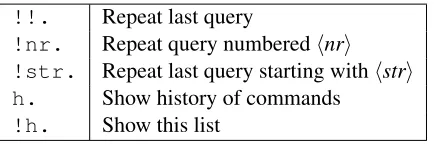
!!. Repeat last query
!nr. Repeat query numberedhnri !str. Repeat last query starting withhstri h. Show history of commands
[image:26.612.195.412.109.181.2]!h. Show this list
Table 2.1: History commands
apropos(+Pattern)
Display all predicates, functions and sections that have Pattern in their name or summary description. Lowercase letters inPatternalso match a corresponding uppercase letter. Example:
?- apropos(file). Display predicates, functions and sections that have ‘file’ (or ‘File’, etc.) in their sum-mary description.
explain(+ToExplain)
Give an explanation on the given ‘object’. The argument may be any Prolog data object. If the argument is an atom, a term of the formName/Arityor a term of the formModule:Name/Arity, explain/1describes the predicate as well as possible references to it. See alsogxref/0. explain(+ToExplain, -Explanation)
UnifyExplanationwith an explanation forToExplain. Backtracking yields further explanations.
2.7
Command line history
SWI-Prolog offers a query substitution mechanism similar to what is seen in Unix shells. The avail-ability of this feature is controlled byset prolog flag/2, using thehistoryProlog flag. By default, history is available if no interactive command line editor is available. To enable history, remembering the last 50 commands, put the following into your startup file (see section2.2):
:- set_prolog_flag(history, 50).
The history system allows the user to compose new queries from those typed before and remembered by the system. The available history commands are shown in table2.1. History expansion is not done if these sequences appear in quoted atoms or strings.
2.8
Reuse of top-level bindings
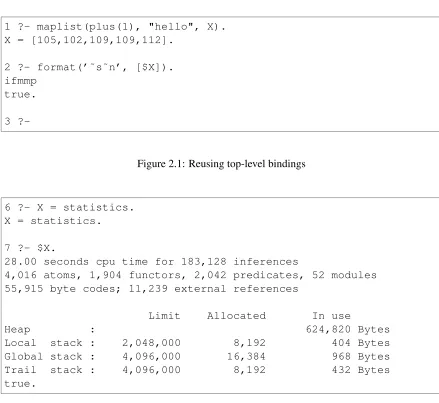
Bindings resulting from the successful execution of a top-level goal are asserted in a databaseif they are not too large. These values may be reused in further top-level queries as $Var. If the same variable name is used in a subsequent query the system associates the variable with the latest binding. Example:
2.9. OVERVIEW OF THE DEBUGGER 25
1 ?- maplist(plus(1), "hello", X). X = [105,102,109,109,112].
2 ?- format(’˜s˜n’, [$X]). ifmmp
true. 3
?-Figure 2.1: Reusing top-level bindings
6 ?- X = statistics. X = statistics. 7 ?- $X.
28.00 seconds cpu time for 183,128 inferences
4,016 atoms, 1,904 functors, 2,042 predicates, 52 modules 55,915 byte codes; 11,239 external references
Limit Allocated In use
Heap : 624,820 Bytes
Local stack : 2,048,000 8,192 404 Bytes
Global stack : 4,096,000 16,384 968 Bytes
Trail stack : 4,096,000 8,192 432 Bytes
true.
2.9
Overview of the Debugger
SWI-Prolog has a 6-port tracer, extending the standard 4-port tracer [Byrd, 1980,
Clocksin & Melish, 1987] with two additional ports. The optional unify port allows the user to inspect the result after unification of the head. The exception port shows exceptions raised by throw/1or one of the built-in predicates. See section4.11.
The standard ports are calledcall,exit,redo,failandunify. The tracer is started by the trace/0command, when a spy point is reached and the system is in debugging mode (seespy/1 anddebug/0), or when an exception is raised that is not caught.
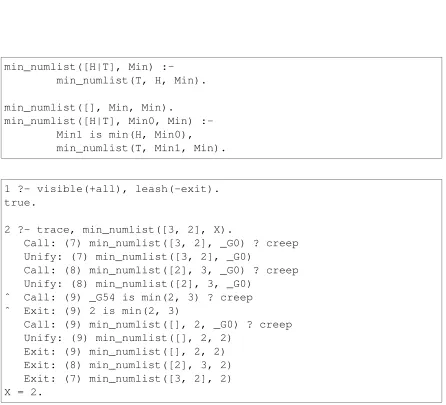
The interactive top-level goal trace/0 means “trace the next query”. The tracer shows the port, displaying the port name, the current depth of the recursion and the goal. The goal is printed using the Prolog predicate write term/2. The style is defined by the Prolog flag debugger write options and can be modified using this flag or using the w, p and d com-mands of the tracer.
[image:27.612.80.519.94.497.2]min_numlist([H|T], Min) :-min_numlist(T, H, Min). min_numlist([], Min, Min).
min_numlist([H|T], Min0, Min) :-Min1 is min(H, Min0), min_numlist(T, Min1, Min).
1 ?- visible(+all), leash(-exit). true.
2 ?- trace, min_numlist([3, 2], X).
Call: (7) min_numlist([3, 2], _G0) ? creep Unify: (7) min_numlist([3, 2], _G0)
Call: (8) min_numlist([2], 3, _G0) ? creep Unify: (8) min_numlist([2], 3, _G0)
ˆ Call: (9) _G54 is min(2, 3) ? creep ˆ Exit: (9) 2 is min(2, 3)
Call: (9) min_numlist([], 2, _G0) ? creep Unify: (9) min_numlist([], 2, 2)
[image:28.612.80.526.174.579.2]Exit: (9) min_numlist([], 2, 2) Exit: (8) min_numlist([2], 3, 2) Exit: (7) min_numlist([3, 2], 2) X = 2.
2.9. OVERVIEW OF THE DEBUGGER 27
+(Spy)
Set a spy point (seespy/1) on the current predicate. -(No spy)
Remove the spy point (seenospy/1) from the current predicate. /(Find)
Search for a port. After the ‘/’, the user can enter a line to specify the port to search for. This line consists of a set of letters indicating the port type, followed by an optional term, that should unify with the goal run by the port. If no term is specified it is taken as a variable, searching for any port of the specified type. If an atom is given, any goal whose functor has a name equal to that atom matches. Examples:
/f Search for any fail port
/fe solve Search for a fail or exit port of any goal with name solve
/c solve(a, ) Search for a call to solve/2 whose first argument is a variable or the atoma
/a member( , ) Search for any port onmember/2. This is equiv-alent to setting a spy point onmember/2. .(Repeat find)
Repeat the last find command (see ‘/’).
A(Alternatives)
Show all goals that have alternatives.
C(Context)
Toggle ‘Show Context’. If on, the context module of the goal is displayed between square brackets (see section6). Default isoff.
L(Listing)
List the current predicate withlisting/1. a(Abort)
Abort Prolog execution (seeabort/0). b(Break)
Enter a Prolog break environment (seebreak/0). c(Creep)
Continue execution, stop at next port. (AlsoRETURN,SPACE). d(Display)
Set the max depth(Depth) option of debugger write options, limiting the depth to which terms are printed. See also thewandpoptions.
e(Exit)
f(Fail)
Force failure of the current goal.
g(Goals)
Show the list of parent goals (the execution stack). Note that due to tail recursion optimization a number of parent goals might not exist any more.
h(Help)
Show available options (also ‘?’).
i(Ignore)
Ignore the current goal, pretending it succeeded.
l(Leap)
Continue execution, stop at next spy point.
n(No debug)
Continue execution in ‘no debug’ mode.
p(Print)
Set the Prolog flag debugger write options to [quoted(true), portray(true), max depth(10), priority(699)]. This is the default.
r(Retry)
Undo all actions (except for database and I/O actions) back to the call port of the current goal and resume execution at the call port.
s(Skip)
Continue execution, stop at the next port ofthisgoal (thus skipping all calls to children of this goal).
u(Up)
Continue execution, stop at the next port of the parent goal (thus skipping this goal and all calls to children of this goal). This option is useful to stop tracing a failure driven loop.
w(Write)
Set the Prolog flag debugger write options to [quoted(true), attributes(write), priority(699)], bypassingportray/1, etc.
The ideal 4-port model [Byrd, 1980] as described in many Prolog books [Clocksin & Melish, 1987] is not visible in many Prolog implementations because code opti-misation removes part of the choice and exit points. Backtrack points are not shown if either the goal succeeded deterministically or its alternatives were removed using the cut. When running in debug mode (debug/0) choice points are only destroyed when removed by the cut. In debug mode, last call optimisation is switched off.6
Reference information to all predicates available for manipulating the debugger is in section4.39.
2.10. COMPILATION 29
2.10
Compilation
2.10.1 During program development
During program development, programs are normally loaded using the list abbreviation ( ?-[load].). It is common practice to organise a project as a collection of source files and a load file, a Prolog file containing onlyuse module/[1,2]orensure loaded/1 directives, possi-bly with a definition of theentry pointof the program, the predicate that is normally used to start the program. This file is often calledload.pl. If the entry point is calledgo, a typical session starts as:
% swipl <banner> 1 ?- [load].
<compilation messages> true.
2 ?- go.
<program interaction>
When using Windows, the user may openload.plfrom the Windows explorer, which will cause swipl-win.exeto be started in the directory holdingload.pl. Prolog loadsload.plbefore entering the top level. If Prolog is started from an interactive shell, one may choose the typeswipl -s load.pl.
2.10.2 For running the result
There are various options if you want to make your program ready for real usage. The best choice depends on whether the program is to be used only on machines holding the SWI-Prolog development system, the size of the program, and the operating system (Unix vs. Windows).
Using PrologScript
A Prolog source file can be used directly as a Unix program using the Unix#!magic start. The same mechanism is useful for specifying additional parameters for running a Prolog file on Windows. The Unix#!magic is allowed because if the first letter of a Prolog file is#, the first line is treated as a comment.7 To create a Prolog script, use one of the two alternatives below as first line. The first can be used to bind a script to a specific Prolog installation, while the latter uses the default prolog installed in$PATH.
!/path/to/swipl !/usr/bin/env swipl
The interpretation of arguments to the executable in theHashBangline differs between Unix-derived systems. For portability, the#!must be followed immediately with an absolute path to the executable
7
and should have none or one argument. Neither the executable path, nor the argument shall use quotes or spaces. When started this way, the Prolog flagargvcontains the command line arguments that follow the script invocation. Below is a simple script doing expression evaluation:
#!/usr/bin/env swipl :- initialization main. eval
:-current_prolog_flag(argv, Argv), concat_atom(Argv, ’ ’, SingleArg), term_to_atom(Term, SingleArg), Val is Term,
format(’˜w˜n’, [Val]). main
:-catch(eval, E, (print_message(error, E), fail)), halt.
main
:-halt(1).
And here are two example runs:
% ./eval 1+2 3
% ./eval foo
ERROR: is/2: Arithmetic: ‘foo/0’ is not a function %
The Windows version simply ignores the#!line.8 Creating a shell script
With the introduction of PrologScript (see section 2.10.2), using shell scripts as explained in this section has become redundant for most applications.
Especially on Unix systems and not-too-large applications, writing a shell script that simply loads your application and calls the entry point is often a good choice. A skeleton for the script is given below, followed by the Prolog code to obtain the program arguments.
#!/bin/sh
base=<absolute-path-to-source> PL=swipl
8
2.10. COMPILATION 31
exec $PL -q -f "$base/load"
--:- initialization go. go
:-current_prolog_flag(argv, Arguments), go(Arguments).
go(Args) :-...
On Windows systems, similar behaviour can be achieved by creating a shortcut to Prolog, passing the proper options or writing a.batfile.
Creating a saved state
For larger programs, as well as for programs that are required to run on systems that do not have the SWI-Prolog development system installed, creating a saved state is the best solution. A saved state is created using qsave program/[1,2] or the -c command line option. A saved state is a file containing machine-independent9 intermediate code in a format dedicated for fast loading. Optionally, the emulator may be integrated in the saved state, creating a single file, but machine-dependent, executable. This process is described in chapter12.
Compilation using the -c command line option
This mechanism loads a series of Prolog source files and then creates a saved state as qsave program/2does. The command syntax is:
% swipl [option ...] [-o output] -c file.pl ...
Theoptionsargument are options toqsave program/2 written in the format below. The option names and their values are described withqsave program/2.
--option-name=option-value
For example, to create a stand-alone executable that starts by executingmain/0and for which the source is loaded throughload.pl, use the command
% swipl --goal=main --stand_alone=true -o myprog -c load.pl
This performs exactly the same as executing
9
% swipl <banner> ?- [load].
?- qsave_program(myprog,
[ goal(main),
stand_alone(true) ]).
?- halt.
2.11
Environment Control (Prolog flags)
The predicatescurrent prolog flag/2andset prolog flag/2allow the user to examine and modify the execution environment. It provides access to whether optional features are available on this version, operating system, foreign code environment, command line arguments, version, as well as runtime flags to control the runtime behaviour of certain predicates to achieve compatibility with other Prolog environments.
current prolog flag(?Key, -Value) [ISO]
The predicate current prolog flag/2 defines an interface to installation features: op-tions compiled in, version, home, etc. With both arguments unbound, it will generate all defined Prolog flags. WithKeyinstantiated, it unifiesValuewith the value of the Prolog flag or fails if theKeyis not a Prolog flag.
Flags marked rw can be modified by the user using set prolog flag/2. Flag values are typed. Flags marked as bool can have the values true or false. The predicate create prolog flag/3may be used to create flags that describe or control behaviour of li-braries and applications. The librarysettingsprovides an alternative interface for managing notably application parameters.
Some Prolog flags are not defined in all versions, which is normally indicated in the documen-tation below as“if present and true”. A boolean Prolog flag is true iff the Prolog flag is present andtheValueis the atomtrue. Tests for such flags should be written as below:
( current_prolog_flag(windows, true)
-> <Do MS-Windows things> ; <Do normal things> )
Some Prolog flags are scoped to a source file. This implies that if they are set using a direc-tive inside a file, the flag value encountered when loading of the file started is restored when loading of the file is completed. Currently, the following flags are scoped to the source file: generate debug infoandoptimise.
2.11. ENVIRONMENT CONTROL (PROLOG FLAGS) 33
access level(atom, changeable)
This flag defines a normal ‘user’ view (user, default) or a ‘system’ view. In system view all system code is fully accessible as if it was normal user code. In user view, certain operations are not permitted and some details are kept invisible. We leave the exact consequences undefined, but, for example, system code can be traced using system access and system predicates can be redefined.
address bits(integer)
Address size of the hosting machine. Typically 32 or 64. Except for the maximum stack limit, this has few implications to the user. See also the Prolog flagarch.
agc margin(integer, changeable)
If this amount of atoms possible garbage atoms exist perform atom garbage collection at the first opportunity. Initial value is 10,000. May be changed. A value of 0 (zero) disables atom garbage collection. See alsoPL register atom().11
apple(bool)
If present and true, the operating system is MacOSX. Defined if the C compiler used to compile this version of SWI-Prolog defines__APPLE__. Note that theunixis also defined for MacOSX.
allow dot in atom(bool, changeable)
If true (default false), dots may be embedded into atoms that are not quoted and start with a letter. The embedded dot must be followed by an identifier continuation character (i.e., letter, digit or underscore). The dot is allowed in identifiers in many languages, which can make this a useful flag for defining DSLs. Note that this conflicts with cascading functional notation. For example, Post.meta.author is read as .(Post, ’meta.author’if this flag is set totrue.
allow variable name as functor(bool, changeable)
If true (default is false), Functor(arg) is read as if it were written ’Functor’(arg). Some applications use the Prolog read/1 predicate for reading an application-defined script language. In these cases, it is often difficult to explain to non-Prolog users of the application that constants and functions can only start with a lowercase letter. Variables can be turned into atoms starting with an uppercase atom by calling read term/2 using the option variable names and binding the variables to their name. Using this feature, F(x) can be turned into valid syntax for such script languages. Suggested by Robert van Engelen. SWI-Prolog specific.
argv(list, changeable)
List is a list of atoms representing the application command line arguments. Application command line arguments are those that have not been processed by Prolog during its initialization. Note that Prolog’s argument processing stops at--or the first non-option argument. See alsoos argv.12
arch(atom)
Identifier for the hardware and operating system SWI-Prolog is running on. Used to select foreign files for the right architecture. See also section 11.2.3 and file search path/2.
11
Given that SWI-Prolog has no limit on the length of atoms, 10,000 atoms may still occupy a lot of memory. Applications using extremely large atoms may wish to callgarbage collect atoms/0explicitly or lower the margin.
12
associated file(atom)
Set if Prolog was started with a prolog file as argument. Used by e.g.,edit/0to edit the initial file.
autoload(bool, changeable)
Iftrue(default) autoloading of library functions is enabled. back quotes(codes,chars,string,symbol char, changeable)
Defines the term-representation for back-quoted material. The default is codes. If --traditional is given, the default is symbol char, which allows using ‘ in operators composed of symbols.13. See also section5.2.
backtrace(bool, changeable)
Iftrue(default), print a backtrace on an uncaught exception. backtrace depth(integer, changeable)
If backtraces on errors are enabled, this flag defines the maximum number of frames that is printed (default 20).
backtrace goal depth(integer, changeable)
The frame of a backtrace is printed after making a shallow copy of the goal. This flag determines the depth to which the goal term is copied. Default is ‘3’.
backtrace show lines(bool, changeable)
Iftrue(default), try to reconstruct the line number at which the exception happened. bounded(bool)
ISO Prolog flag. If true, integer representation is bound by min integer and max integer. Iffalseintegers can be arbitrarily large and themin integerand max integerare not present. See section4.27.2.
break level(integer)
Current break-level. The initial top level (started with -t) has value 0. Seebreak/0. This flag is absent from threads that are not running a top-level loop.
c cc(atom, changeable)
Name of the C compiler used to compile SWI-Prolog. Normally either gcc or cc. See section11.5.
c cflags(atom, changeable)
CFLAGS used to compile SWI-Prolog. See section11.5.
c ldflags(atom, changeable)
LDFLAGS used to link SWI-Prolog. See section11.5.
c libs(atom, changeable)
Libraries needed to link executables that embed SWI-Prolog. Typically-lswiplif the SWI-Prolog kernel is a shared (DLL). If the SWI-Prolog kernel is in a static library, this flag also contains the dependencies.
c libplso(atom, changeable)
Libraries needed to link extensions (shared object, DLL) to SWI-Prolog. Typically empty on ELF systems and-lswiplon COFF-based systems. See section11.5.