University of Southern Queensland
Faculty of Engineering and Surveying
Production Operation System – Key Performance
Indicator
A dissertation submitted by
Chua Poh Lian
in fulfillment of the requirements of
Courses ENG4111 and ENG4112 Research Project
towards the degree of
Bachelor of Engineering (Electrical and Electronics)
ABSTRACT
This project seeks to increase customers’ satisfaction and improve production operation system through customizing analysis tools to monitor various factor e.g. delivery time, production lead time, order lead time, order, sales and inventory.
For the last several years, businesses across the globe have been striving to adjust their processes towards a lean business model. Many companies are set to become a “Lean Enterprise”. Lean operations are well-known for leading to all the results which modern enterprises are trying to obtain in today’s highly competitive world – shorter lead times, improved quality, reduced cost, increased profit, improved productivity and better customer service.
The methodology used will be to evaluate current sales and operation systems and consider alternate methods to measure production operation system and customers’ satisfaction. Discussions and brain-storming will be going on extensively to define and decide the requirements of the systems.
Performance metrics play an important role in guiding and shaping the company by reflecting business factors that are critical to meeting the needs of the market place they serve. In this project, simple measuring systems will be created to measure customers’ satisfaction and production operations.
DISCLAIMER PAGE
Limitations of Use
The Council of the University of Southern Queensland, its Faculty of Engineering and Surveying, and the staffs of the University of Southern Queensland, do not accept any responsibility for the truth, accuracy or completeness of material contained within or associated with this dissertation.
Persons using all or any part of this material do so at their own risk, and not at the risk of the Council of the University of Southern Queensland, its Faculty of Engineering and Surveying or the staff of the University of Southern Queensland.
This dissertation reports an educational exercise and has no purpose or validity beyond this exercise. The sole purpose of the course pair entitled “Research Project” is to contribute to the overall education within the student’s chosen degree program. This document, the associated hardware, software, drawings, and other material set out in the associated appendices should not be used for any other purpose: if they are so used, it is entirely at the risk of the user.
Prof R Smith
Dean
CANDIDATE’S CERTIFICATION
I certify that the ideas, designs and experimental work, results, analyses and conclusions set out in this dissertation are entirely my own effort, except where otherwise indicated and acknowledged.
I further certify that the work is original and has not been previously submitted for assessment in any other course or institution, except where specifically stated.
Chua Poh Lian
Student Number: D1231790X
Signature
ACKNOWLEDGEMENTS
I am most pleased to acknowledge the assistance given to me by a number of people. Mr. Bob Fulcher, my supervisor, has given me his advice and suggestions at the various stages of doing this research project. Ms. Tan Siew Hoon, my superior, has given me great support and guidance in participating in this company’s innovation project. Panasonic Electronic Devices, my company, who has provided me with this opportunity to do this research project.
I would also like to thank my family members, especially my husband, Amos, who has been a great help at times when I feel so discouraged juggling between work and studies.
CHUA POH LIAN
TABLE OF CONTENTS
ABSTRACT 2
DISCLAIMER PAGE 3
CERTIFICATION PAGE 4
ACKNOWLEDGEMENTS 5
CHAPTER 1 – INTRODUCTION
1.1 Outline of the Project 9
1.2 Introduction 9
1.2.1 Lean Enterprise Using Information Technology 9
1.2.2 Performance Measurement System 11
1.3 Towards a Lean Enterprise 12
1.3.1 Key Performance Indicators 13
1.4 Project Objectives 14
1.5 Conclusions: Chapter 1 15
CHAPTER 2 – LITERATURE REVIEW
2.1. Introduction 16
2.2. Importance of lean Operation 16
2.2.1. What is Lean? Why Lean? 16
2.2.2. Elimination of Waste 17
2.2.3. The System Innovation Technology 19
2.2.4. Present versus Future 20
2.3. Evaluation of Current System 22
2.3.1. Order Request and Order Reply 22
2.3.2. Order Confirm 23
2.4.3. Lack of Material for Production 25 2.4.4. No linking of Inventory, Sales and Production Data 25
2.4.5. No Key Performance Indicator 25
2.5. Consideration of System Improvement 27
2.5.1. Expansion of Data Server 27
2.5.2. Inventory, Sales and Production Data 28
2.5.3. Material Order System 29
2.5.4. Key Performance Indicator System 29
2.6. Key Performance Indicator 30
2.6.1. Delivery-On-Time 30
2.6.2. Production Lead-Time 30
2.6.3. Order Lead-Time 31
2.6.4. Plan versus Actual Production 31
2.6.5. Sales versus Capacity 32
2.6.6. Work-In-Process and Inventory 33
2.7. Conclusions: Chapter 2 33
CHAPTER 3 – RESEARCH DESIGN AND METHODOLOGY
3.1. Introduction 34
3.2. Delivery-on-Time 35
3.2.1. Data Structure 35
3.2.2. User Interface 37
3.2.3. Result Generation 44
3.3. Production Lead-Time 46
3.3.1. Data Structure 47
3.3.2. User Interface 48
3.3.3. Result Generation 54
3.4. Order Lead-Time 61
3.4.1. Data Structure 61
3.4.3. Result Generation 68
3.5. Sales versus Capacity 69
3.5.1. Data Structure 69
3.5.2. User Interface 73
3.5.3. Result Generation 77
3.6. Plan versus Actual Production 82
3.6.1. Data Structure 82
3.6.2. Result Generation 84
3.7. Work-In-Process & Inventory 84
3.7.1. Data Structure 88
3.7.2. Result Generation 89
3.8. Conclusions: Chapter 3 91
CHAPTER 4 – CONCLUSIONS
4.1. Introduction 92
4.2. Discussions 92
4.3. Results 95
4.4. Future Work & New Ideas 99
4.5. Summary of Chapter 4 100
REFERENCES 101
APPENDICES
A. Project Specification 102
B. Innovation Cycle 103
C. Road Map 104
CHAPTER 1
INTRODUCTION
1.1 Outline of the project
For the last several years, businesses across the globe have been striving to adjust their processes towards a lean business model. Many companies are set to become a “Lean Enterprise”. Lean operations are well-known for leading to all the results which modern enterprises are trying to obtain in today’s highly competitive world – shorter lead times, improved quality, reduced cost, increased profit, improved productivity and better customer service. The purpose and scope of this research is detailed in 1.4 Research Objectives.
1.2 Introduction
The lean model originally evolves from the Toyota Production System1 (TPS). It is based on the elimination of any non value-added processes or practices in the product or company. This popular performance improvement method helps companies to redefine entire process stream, link processes more effectively, and drives out waste, resulting in cost savings and more effective processes.
1.2.1 Lean Enterprise Using Information Technology
An ERP application is a management tool to support the management and operation of a manufacturing plant. The ability of ERP systems is to able to handle large amounts of data and complex calculations and to electronically transfer or share with everyone in different and remote locations. It is convenient and transparent.
Before implementing the ERP system, the principles of lean manufacturing must be established for it to be overlaid.
A few examples of lean manufacturing concepts:
• Kanban control: A rule to determine how much to produce and when to stop
and change over
• Just-in-time (JIT): A system for producing and delivering the right items at
the right time in the right amounts.
• Production smoothing: The creation of the ‘level schedule” by sequencing
orders in a repetitive pattern and smoothing the day-to-day variations in total orders to correspond to longer-term demand.
Any manufacturer who needs to increase productivity, reduce operating costs, improve quality and shorten lead times will consider these lean software applications. That is why there is a surge of ERP vendors.
1.2.2 Performance Measurement System
Performance measurement is one of the ERP systems to measure the performance of the company. Performance metrics play an important role in guiding and shaping the company by reflecting business factors that are critical to meeting the needs of the marketplace they serve. There are a few elements that the selection and maintenance of the metrics depends on: First, the matching of measurements with business strategy. Second, the balancing of product, process and financial measurements. Third, creating metrics that relate and correspond to every level of the organization.
After defining these performance metrics, measurements are prominently displayed in the work areas in the form of boards, charts or graphs. Common display formats are: Inventory levels, Production rate and Customer service.
At different levels of the work place in the company, these measurements are viewed in different formats. Typical formats are shown in the table below:
Top level; Management Middle level; Operation/Functional Ground level; Production/Workshop
Frequency Monthly Weekly Daily
Detail Summary Detailed Focused
Visibility Distribution Published Posted
Table 1.1
Respective in-charges will be responsible for the generation, validity and accuracy of the performance measurements.
requirements, business strategy and, innovation and learning factors, at all levels. Metrics address the questions, “where are we going?”, “how will we change to meet our business need?”, “what are our critical success factors?”, “what is our target performance?”, and “where is performance improvement required?”
If there are no measurements, there will be no improvements; if the measurements are inaccurate, the result or behaviour will be incorrect.
1.3
Towards a Lean Enterprise
Panasonic Electronic Devices Pte Ltd manufactures electronic components, e.g. resistors, capacitors, etc, since 1977. It responds to the expectation from global customers, with the flexible supply capacity of high quality components with competitive cost. Over the past 29 years, there has been an evolution of competing philosophies about how to run manufacturing operations. Like many other companies, Panasonic Electronic Devices constantly keeps a look out and employs effective and useful philosophies in improving management and operation. With this, it formulates an innovation cycle2that promotes continuous improvement through enterprise system using information technology (IT).
In-house workshop and training began company-wide understanding of lean principles, generating an awareness of lean concepts and provide employees with the tools they need. Some lean concepts3 are:
• 5S & 7 Wastes
• Time Study & Motion Mind • Line Balancing Analysis • Just In Time (JIT)
Quick Model Changeover
• Streamline & Process Analysis • Toyota Production System
• Material & Information Flowcharts • Inventory Reduction
Since September 2004, a structure is designed to support the change, to identify and prioritize opportunities for improvement. Value Stream Mapping is used to analyze existing processes and identify improvement. Thus, a roadmap4 is created for the company’s lean journey.
1.3.1 Key Performance Indicators
In the ‘Production Monitoring System’ as shown in the roadmap, key performance indicators are performance metrics measured and displayed in graphical formats. They are:
a) Delivery-on-Time (DOT) b) Production Lead Time c) Order Lead Time
d) Planned vs. Actual Production e) Sales vs. Capacity
f) Work-in-process (WIP) & Inventory
More details on the indicators will be covered in the next chapter.
1.4 Research Objectives
This research comprised of the following:
a) Background information relating to production operation performance and customers’ satisfaction
b) Evaluation of current systems in use for measuring the performance of production operation and customers’ satisfaction.
c) Identification of significant problems with current system and consideration of alternate methods to measure production operation systems and customers’ satisfaction.
d) Design of new tools for performance indicators to analyze production systems.
e) Proposal for improvements to an existing system
f) Cost benefit analysis of the suggested improvements and new indicators
g) Data collection for new implementations
The aim of the research is to increase customers’ satisfaction and improve production operation system through customizing analysis tools to monitor various performance metrics e.g. delivery time, production lead time, order lead time, order, sales and inventory.
1.5 Conclusions: Chapter 1
This dissertation aims to introduce the modern production operation performance metrics and the methods or formulations to measure the metrics.
The research is expected to result in improved or new data analysis tools to manipulate the abundant of data so as to generate useful charts and graphs for easy data analysis. A review of the literature for this research will provide the background information of the model production operation system and customer’s satisfaction.
Research design and methodology will identify the purpose of the metrics and the different types of data required for the measurement. Appropriate tools may be devised for data manipulation purpose.
CHAPTER 2
LITERATURE REVIEW
2.1 Introduction
Referring to the research objectives stated in section 1.4, this literature review will provide a comprehensive information of why it is important for today’s organization to be lean and how Panasonic Electronic Devices works towards lean operations and manufacturing. An evaluation of performance measurement systems used in Panasonic Electronic Devices will be conducted and significant problems will be identified. New and alternative methods will be proposed and discussed.
2.2 Importance of Lean Operation
For the past several years, businesses across the globe have been striving to adjust their processes towards a lean business model. Lean operations really equate to all the results which modern enterprises are trying to obtain in today’s highly competitive world – shorter lead times, improved quality, reduced cost, increased profit, improved productivity and better customer service. But becoming lean is not a short or easy journey. The following four points will give a good explanation of the importance of Lean Operation.
2.2.1 What is Lean? Why Lean?
Lean is about eliminating waste. It may sound simple but is never easy to achieve.
an electronic signal is passed to the kitchen and production begins. There you find the flexible cell design where all materials are stored at the point of use in an appropriate sequence. Trained workers assemble each item using standardized work procedures and production flows according to a standard rhythm. Production probably ends when the burger is ready to be served to the customer but customer satisfaction will depend on how fast the server hands the finished goods to the customer. So this is an example of a lean manufacturing.
2.2.2 Elimination of Waste
What is waste? It is defined, as anything customers would not be willing to pay for. So, we need to identify them and get rid of them so as to ensure our customers that they are not paying for waste. During the development of the Toyota Production System, Taiichi Ohno and Dr. Shigeo Shingo identified seven distinct forms of waste:
a) Inventory. Traditional accountants define inventory as an asset, Lean accountants consider it a liability. Excess inventory ties up cash and creates waste in many forms including storage facilities, tracking, transactions, movement, damage, and physical counting and adjustment records.
b) Delay. It is understood as the unnecessary wait time that occurs throughout the production process. Unnecessary wait time may be caused by improper scheduling, causing people, tools and materials not to appear in the right place at the right time. Any kinds of delays will affect the delivery of goods.
machine motion, which causes additional maintenance, energy cost, and machine wear and tear, leading to quality problems.
d) Transportation. Unnecessary movement of materials, supplies and resources is waste. Whenever practical, materials should be received in the appropriate quantities at the point of use.
e) Overproduction. This waste is produced when production makes more or faster than the customer demands. This is usually caused by improper demand planning, long setup times, large lot sizes or quality rejects. Overproduction leads to consumption of extra resources, people, machines, inventory, storage space, energy and cash tied up in these assets. Producing earlier than necessary creates excess inventory and consumes material and capacity that may be required by higher-priority work.
f) Over-processing. It is caused by performing unnecessary work due to wrong or poorly maintained tools, improper work instructions and inadequate training. Improperly designed information systems can cause over-processing in the form of unnecessary transactions. When a process is simplified, it requires less data to monitor and control. Effort to capture production data that does not add value is wasted processing and motion. When this information is recorded by hand and entered into a computer, the waste is doubled. The time spent storing, managing, printing, distributing and analyzing unnecessary information only adds to this waste.
These seven forms of waste serve as a set of guidelines to determine the performance metrics and analyze the performance of the production operation system in this research.
2.2.3 The System Innovation Technology
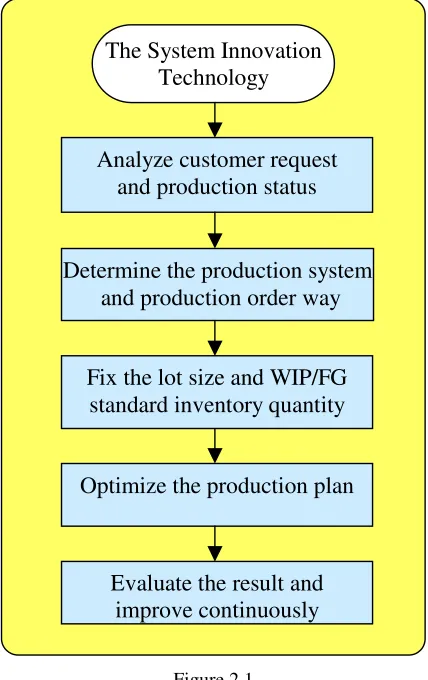
Since 2002, Panasonic Electronic Devices, triggered by a 10% decrease in profit, had adopted an innovation plan towards a lean manufacturing and operation. With the aim of increasing profit and sales, a thorough study with understanding of customer request and production constraints was being carried out. Production system was being evaluated and improved to ensure it achieved the best productivity and throughput.
The procedures in achieving the action plan:
a) By using order analysis tool, produce and understand the characteristic of order.
b) By comparing to production status, understand the gap between demand and production.
c) Determine the inventory stock point and production orders that satisfy the customer demand and cost performance.
d) Consider the order quantity, order lead-time and machine changeability, utilize standard lot calculation tool to fix the lot size and standard inventory quantity by part number.
f) Fix the evaluated parameter and evaluate the result; if it is not sufficient then improve again.
[image:20.595.245.459.206.546.2]The action plan was presented in Figure 2.1.
Figure 2.1
2.2.4 Present vs. Future
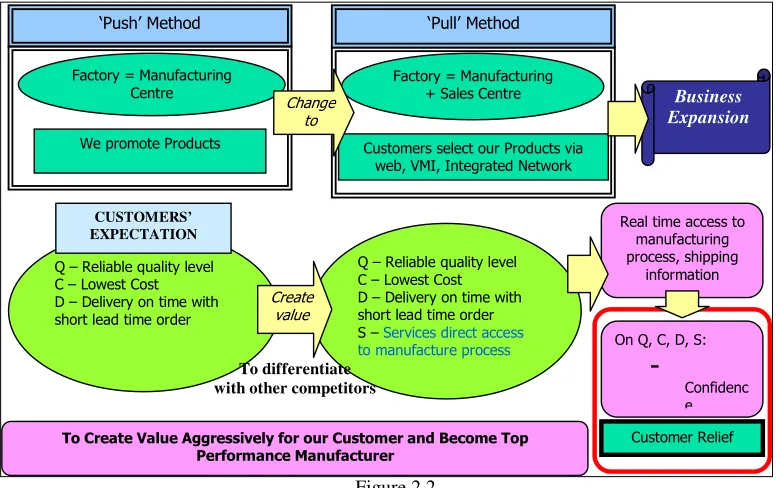
As business expands, business strategy has evolved from the ‘push’ method to the ‘pull’ method, suggested in Figure 2.2, such that a factory should becomes a manufacturing-cum-sales centre instead of just a manufacturing centre. This
The System Innovation Technology
Analyze customer request and production status
Determine the production system and production order way
Fix the lot size and WIP/FG standard inventory quantity
Optimize the production plan
It used to be factory promoting the product to the customers and attending to them whenever they have enquiries. However, today’s customers want to select the product themselves and look for the answer to their enquiries via the web, integrated network or vendor-managed inventory.
Figure 2.2
There is also a change in customer’s expectation, which does not remain only at reliable quality, lowest product cost and delivery-on-time with short lead-time. In order to be different from other companies and stay competitive in the market, it is important to provide customers with a kind of relief and satisfaction. Direct and real-time access to the manufacturing process and information allows customers to understand where their orders have been processed and give them a sense of security and satisfaction.
An example of good customer service is DHL’s online tracking system. Customer can track the location of their parcels or shipments through the web by using some assigned reference number.
Real time access to manufacturing process, shipping
information
On Q, C, D, S:
-
Confidenc e
Customer Relief Q – Reliable quality level
C – Lowest Cost D – Delivery on time with short lead time order
CUSTOMERS’ EXPECTATION
Q – Reliable quality level C – Lowest Cost D – Delivery on time with short lead time order S – Services direct access to manufacture process
Create value
To Create Value Aggressively for our Customer and Become Top Performance Manufacturer
‘Push’ Method
Factory = Manufacturing Centre
We promote Products
Business Expansion
Factory = Manufacturing + Sales Centre
Customers select our Products via web, VMI, Integrated Network
‘Pull’ Method
Change to
2.3 Evaluation of Current System
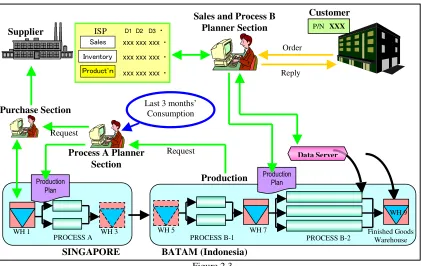
[image:22.595.124.545.150.416.2]In this section, we will study the then Sales and Operation system, Figure 2.3.
Figure 2.3
In this system, it consists of the Sales section, Planner section, Purchasing section, Supplier and the Production section. Due to the twin operations, Process A and Process B, in Singapore and Batam respectively, there will be two planners and two production in-charges.
Taking for example when a customer called to enquire an order:
2.3.1 Order Request and Order Reply
The Sales Representative will check the data server to see if there is stock in Warehouse 9. If there is stock in the warehouse, he will reply to the customer that the order can be delivered as per request. If there is no available stock in the PROCESS B-2 Finished Goods Warehouse PROCESS B-1
PROCESS A
Customer
Order
Sales and Process B
Planner Section P/N XXX
Data Server
Supplier
Reply
SINGAPORE BATAM (Indonesia) Process A Planner
Section Purchase Section
Product’n Inventory Sales
D1 D2 D3・
xxx xxx xxx ・
xxx xxx xxx ・
xxx xxx xxx ・
ISP
Product’n Inventory Sales
D1 D2 D3・
xxx xxx xxx ・
xxx xxx xxx ・
xxx xxx xxx ・
ISP
Production Plan
Last 3 months’ Consumption Request Production Request Production Plan
WH 1 WH 3 WH 5 WH 7
negotiations will go on if the customer cannot wait for a later delivery date. Because customer is always right, we will always accept urgent orders by disrupting the existing production.
2.3.2 Order Confirm
Once the order is confirmed, the Sales Representative will issue a production plan to the production in-charge in Batam (Indonesia). The Process B production in-charge will prepare for the production. If there is a lack of material for production at Warehouse 5, he will request material from the Process A planner to send to Batam. Process A planner will either arrange for shipment of material to send to Batam or plan for Process A production. If there is not enough material for Process A production, he will request material from the Purchaser who will get it from the Supplier. On normal days, he will purchase the type and quantity of material base on the past three months’ consumption.
2.3.3 Order Ready
2.4 Identification of Significant Problems
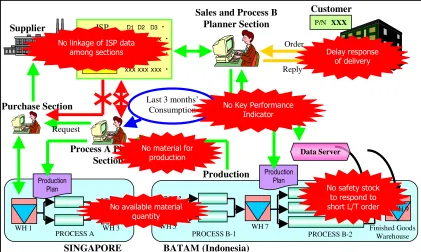
After evaluating the current system, some problems are being identified. These problems are mainly root causes for late delivery and poor customers’ satisfaction.
2.4.1 Delay Response of Delivery
Customers are annoyed to be kept waiting for delivery date enquiry. The Sales Representative is not able to give an immediate reply to the customers because he has to ask a few more persons in order to know the answer. Sometimes, he also has to wait for their replies.
This problem lies with the ‘data server’ that does not contain the whole production’s datum. The current data server only contains data for the last process and Warehouse 9. The Sales Representative is only able to check if there is extra stock in the warehouse and depends on other sections’ members to help check in-process stock, hence the delay in replying to the customer on the delivery date.
2.4.2 No Safety Stock Inventory
2.4.3 Lack of Material for Production
In this current system, there are cases whereby there is not enough material to run production at both production locations. There is always a breakdown in communications between the production and planning section. Or perhaps nobody dares to bear the responsibility if materials were bought but no order coming in to use them. Very often, materials are purchased or prepared upon requests from respective sections. This tends to delay the whole process of making the product, which is called the production lead-time.
The problem lies in no sharing of Inventory, Sales and Production data.
2.4.4 No Linking of Inventory, Sales and Production data
Individual section is operating according to its function and procedures. There is no common understanding among them. The purchaser only purchases the material when there is request from the planner. The planner only plans when there is an order request from the Sales Representative. The production will run production when the planner issues the planning sheet. Every section acts upon a request which is time consuming and unproductive. Unnecessary waiting time is a kind of waste that must be eliminated.
2.4.5 No Key Performance Indicator
After evaluating the then Sales and Operation System and identifying the embedded problems, Figure 2.4, we formed a project team and planned a schedule to rectify the problems and improve the Sales and Operation System. The improvements will be detailed in the next section.
Figure 2.4
PROCESS B-2 Finished Goods Warehouse PROCESS B-1
PROCESS A
Customer
Order
Sales and Process B
Planner Section P/N XXX
Data Server
Supplier
Reply
SINGAPORE BATAM (Indonesia) Process A Planner
Section Purchase Section
Product’n Inventory
Sales
D1 D2 D3・
xxx xxx xxx ・
xxx xxx xxx ・
xxx xxx xxx ・
ISP
Product’n Inventory
Sales
D1 D2 D3・
xxx xxx xxx ・
xxx xxx xxx ・
xxx xxx xxx ・
ISP
Production Plan
Last 3 months’ Consumption Request Production Request Production Plan
WH 1 WH 3 WH 5 WH 7
WH 9
Delay response of delivery
No available material quantity
No Key Performance Indicator
No material for production No linkage of ISP data
among sections
2.5 Considerations of System Improvement
First thing first, in order to response to customers quickly, we need to expand our data server to all the processes so that we can access to all warehouses located at both locations.
2.5.1 Expansion of Data Server
In order to improve on the system that is the software side, some improvements have to be done on the hardware side first.
The hardware side basically consists of:
a) The machines that are used for the production b) The machine number structure
c) The process number structure d) The material part number structure e) The product part number structure
f) The customer database and number structure g) The warehouses
h) The computers required for bar-code scanning
i) The transfer sheet printing tool (for issuing of planning sheets)
After getting ready the physical hardware side, team members from the Information Security Department (ISD) will help to set up two data server, Data Server A and Data Server B, in our company’s intranet for data sharing purpose. With assigned IP address, authorized members will be able to log into the database to look for information. ISD member will create a window interface for users to input information to the server or search for data entry.
called ‘stock-out’. The materials are then send to the first process. At every process, operators must scan the information before starting the production. Information details include the material number, the quantity, the machine used, the end-product part number and the customer number.
At every warehouse where materials or products are being kept, information must also be keyed into the system, which is called ‘stock-in’. When the end product is being stock-out to be delivered to customer, the system will be able to remove the available quantity from the system. The system will also have many records of how long, starting from the first process, it takes to complete the production or at every process.
The data servers are ready for use after much testing and improvements, which took about a year. One of the most important factors is the security and accuracy of the data.
2.5.2 Inventory, Sales and Production (ISP) Data Sharing
After setting up the data servers, the next thing to do is to share the Inventory, Sales and Production data among the Purchasing section, Planner section and Production section. With the sharing of this data, respective team players will have a better understanding on the actual condition of the market situation and be able to make advance necessary planning to countermeasure and get ready for future situation.
2.5.3 Material Order System
Old system employs the ‘Push’ method in purchasing the material because they use the past records or consumptions quantity as guidelines. Towards a lean enterprise, we need to adopt the ‘Pull’ method that is to purchase only when needed, but, and will not result time waste. Taking future ISP data and making necessary analysis can do this.
The material order system will be able to calculate the quantity and type of material needed for the next one month. The purchaser will use this material order system.
2.5.4 Key Performance Indicator System
After implementing the necessary improvements, we need to evaluate the new implementations to achieve better results and promote continuous improvements. Measuring system is required to capture the result for evaluation and tells when it must take corrective action. As mentioned earlier, every measurement system is unique. The design of the systems must be decided by the Sales and Operation team members as no one will know best what sort of measurement systems are needed.
2.6 Key Performance Indicators
After some discussions with the team members, some measuring indicators have been decided upon. Some are existing indicators that need to be improved whereas some are new measuring indicators that have to be devised. These measuring indicators are required mainly for monthly reports, market understanding and problem catching purposes.
2.6.1 Delivery-on-Time
Delivery-On-Time measures the percentage of orders that are delivered to the customers on time and is categorized under two groups, i.e. DOT by request or DOT by reply. The former calculates based on the date the customer expects to receive the goods and the latter calculates based on the date the company commits to deliver the goods to the customer.
This is an important metric because it is a gauge for customers’ satisfaction. The higher the DOT, the greater the customers’ satisfaction. In a competive world like today, prompt delivery is very important for a smooth function. Any delay may result in heavy penalties, e.g. monetary compensation and bad reputation. The three main causes for late deliveries are usually due to production, logistic and order lead time.
2.6.2 Production Lead-Time
Long production time may be due to:
Old and faulty machines which require frequent repair job during production Long changeover time when changing model or changing lot
Slow handling time by operators, shortage of manpower or lack of material Poor production planning
Production, due to any of the above, may take as long as 30 days to complete and thus affects the DOT metric.
2.6.3 Order Lead-Time
Order lead time counts the days starting from the day the order is being confirmed to the day the order is being sent to the customer.
For example, there is an order for Product A (five days production lead time) which is confirmed today and the request date to deliver the goods is tomorrow, in the case whereby there is no safety stock in the warehouse, it will be considered a delay due to order lead time. This is because by the time Product A is being produced and delivered, it would be five days after the order is being confirmed which is four days late based on the request date to deliver. Order lead time may be presented in terms of the number of orders or number of product quantity. Short order lead time is a cause for poor DOT.
2.6.4 Plan versus Actual Production
This metric shows how much daily production has been achieved and those productions which are unable to be carried out as plan.
may be on sick leave, unexpected incidents may happen, hence actual production differs from the planned production.
If there is a frequent dis-match between the planned and actual, then more in-depth studies must be made to understand why it happens.
2.6.5 Sales versus Capacity
‘Sales’ means orders from the customers and ‘capacity’ means machine’s ability to run production.
One of the reasons to compare these two factors is to give an accurate delivery reply to the customers. Machine capacities for different processes in a production line are different. Hence, in order to determine the delivery time of the order, the guideline is to base on the process that has the lowest capacity, i.e. the process that takes the longest time to complete.
2.6.6 Work-In-Process & Inventory
WIP metric shows the quantity of products that is still in the production line waiting to be processed whereas inventory metric shows the stock available in the warehouse. These two metrics are important in today’s production guideline because they are related to producing a lean function. Inventory should be kept at a safety level so that if there is a big order or short lead-time, delivery is still possible. This safety level is such that it tallies with the actual demand. Conventional systems used to make their machine capacity as one of the performance indicator, the higher the better. Hence producing too many unwanted goods that nobody knows if anyone wants, thus incurring a big amount of frozen asset.
2.7 Conclusions: Chapter 2
CHAPTER 3
RESEARCH DESIGN AND METHODOLOGY
3.1 Introduction
The methodology employed is to review and destroy the current job flow and to make a logically job flow and eliminate waste from the job. In order to develop the measuring systems successfully, the following areas are covered:
a) Study and analyse the business needs in measureable goals b) Review of the current system
c) Conceptual design of the operation of the new system d) Equipment requirements
e) Financial analysis of the costs and benefits including budget
f) Forms a project team including programmers, users, and support personnels
In all systems developement, data modelling is required to structure or oragnise the large quantities of raw data. This process helps to categorise the data, group them and show the relationship between them.
3.2 Delivery-on-Time (DOT)
As explained in section 2.6.1, DOT is a measurement of customers’ satisfaction by determining orders that are being delivered to the customer on time. For those that are not being able to deliver on time, they are caused by 3 possible reasons, mainly:
a) Production Delay b) Short Order Lead-Time c) Logistic Delay
For example, out of 100 orders, 65 orders reached the customers on time (based on the date requested by customers). DOT = 65%.
Out of the 35 orders that did not reach the customers on time based on request date,
20 orders could not be delivered on time even based on reply date;
10 orders were (less than 5 days lead-time) requested by customers urgently;
5 orders were delivered on time based on reply date.
This means that 20% was due to Production Delay, 10% was due to Short lead-time and 5% was due to Logistic Delay.
With the concept given, the next step is to select the data field required for the function followed by creating the data structure for the tool to work on.
3.2.1 Data Structure
For Delivery-On-time (DOT) measurement, the following data fields are required:
a) Item Group b) Item Type c) Part Number d) Customer Code e) Quantity
g) Order Invoice Number h) Request Date
i) Acceptance Date j) Warehouse In Date k) Reply Date
As DOT is calculated based on Request Date and Reply Date, two data tables are required. With some selections using Tool A Interface1, these data tables can be downloaded from the Data Server A in text-file format saved as the file name ‘XNPSS771SIREQ010806_310806’ and ‘XNPSS771SIRLY010806_310806’, Figure 3.1. With a common understanding, the filename always indicates whether it is by request date or by reply date, and the period of data included. For example, in Figure 3.1, the filename (‘REQ’) suggests it is by request date and (‘010806_310806’) suggests it is for the period of August 2006.
Figure 3.1
Figure 3.2
This text-file data will then be transferred to the tables in the Microsoft Access Database using the functions created. Always download the text-file DOT data from the server before using the Microsoft Access Database.
3.2.2 User Interface
First, there is a main menu as shown in Figure 3.3:
Figure 3.3
When the ‘Load DOT Data’ button is pushed, input the year and month of the data which is required as shown in Figure 3.4:
Figure 3.4
Figure 3.5
A window will be opened to allow user to select the required period’s text file data, Figure 3.6. Click ‘Open’ to start transferring.
Data from the text file will be copied and inputted cell-by-cell into the table. After transferring the data by request, repeat the steps for transferring of the data by reply date, Figure 3.7 and Figure 3.8.
Figure 3.7
Figure 3.8
Figure 3.9
From the ‘Objects’ under the ‘Tables’, check for the two tables have been created as shown in Figure 3.10.
Figure 3.10
The names of the new tables are created based on ‘REQ’ or ‘RLY’ and the inputted ‘YYYYMM’ as confirmed during the previous process.
Figure 3.11
Likewise, input the year and date of the data to be calculated e.g. ‘200608’. Based on the input year and date, the program will use the particular table saved in the database for calculation.
Click ‘DOT Summary’ and ‘Yes’ to confirm data calculation, Figure 3.12.
The results will be generated in table format as shown in Figure 3.13.
3.2.3 Result Generation
3 tables are generated.
a) Overall DOT summary table, Figure 3.14.
Figure 3.14
‘TTL’ means total number of records.
‘OK’ means number of records that are delivered before or on the day of request date i.e. ‘Acceptance Date’ < OR = ‘Request Date’.
‘S L/T’ means short lead-time i.e. the order lead-time (‘Order L/T’) is less than 5 days.
‘Others’ may be due to causes other than the above, which is very seldom.
Figure 3.15 and Figure 3.16 shows the data of the above explanation.
Figure 3.15
Figure 3.16
b) DOT ‘Not Good’ condition by request date, Figure 3.17 c) DOT ‘Not Good’ condition by reply date, Figure 3.18
Figure 3.17
Figure 3.18
3.3 Production Lead-Time
It counts from the day the order is confirmed to the day when the product reaches the warehouse.
date. At the end of every process, the operator has to bar-code scanned the item of which the process number, machine number, quantity, operation shift, etc is registered into the system.
Hence the system is always active and real-time.
For this particular product group, the overall production lead-time is 5 working days. This estimation aids in the replying of customer regarding delivery date.
3.3.1 Data Structure
For production lead-time calculation, the following data fields are required: a) Lot Number
b) Part Number c) Item Group d) Machine Number e) Process Number f) Production Start Date g) Process End Date h) Issue Quantity i) Good Quantity j) Operation Shift k) Item Type
Figure 3.19
Figure 3.20
These text-file data will then be transferred to the tables in the Microsoft Access Database using the functions created.
3.3.2 User Interface
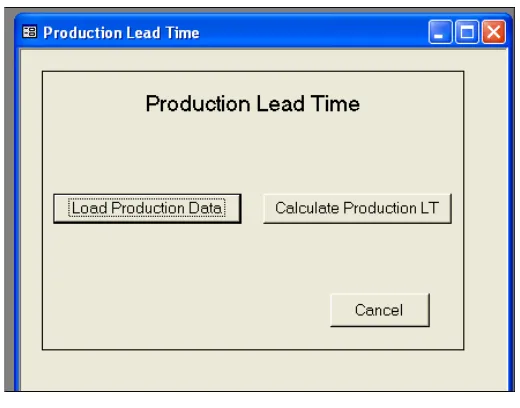
Figure 3.21
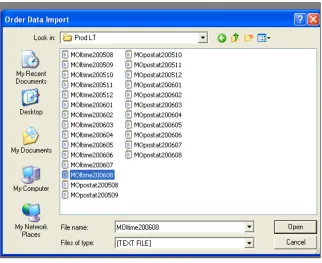
[image:49.595.222.482.101.305.2]Click ‘Load Production Data’ to select the data (Production OR Warehouse) to be downloaded from the Data Server as shown in Figure 3.22.
Figure 3.22
Figure 3.23
For example, key in ‘200608’ to get data for August 2006.
Click ‘Get TPCS Data’ again and confirm execution by clicking ‘Yes’, Figure 3.24.
Figure 3.24
Figure 3.25
After downloading the production data, check ‘W/H IN DATA’ selection and repeat the steps for downloading of warehouse data, Figure 3.26.
Figure 3.26
Figure 3.27
Figure 3.28
When completed, click ‘OK’ and repeat the steps to transfer warehouse data to the ‘Warehouse Master’ in the database, Figure 3.29.
Figure 3.29
Click ‘Cancel’ to return to the Main Menu.
Click ‘Calculate Production LT’ to go to the calculation menu, Figure 3.30.
In order to calculate the production lead-time, some selections need to be completed:
a) Product Group
b) Term Selection, i.e. data for a one day, one month or for a specified period. c) Holidays included or excluded, i.e. to consider working or non-working
days only.
When the selections have completed, click ‘Cal. Proc. LT’ button to generate the calculation. When the calculation has been completed, click ‘View Graph’ to display the result.
To view the products that has lead-time more than 10 days, click ‘Make Table’ and ‘View LT>10 PN’.
More details on the results will be presented in 3.3.3 Result Generation.
3.3.3 Result Generation
Every record is a transaction on the completion of one process.
Hence, for every product lot, the production lead-time will be from the date of withdrawing the material to the date of last process.
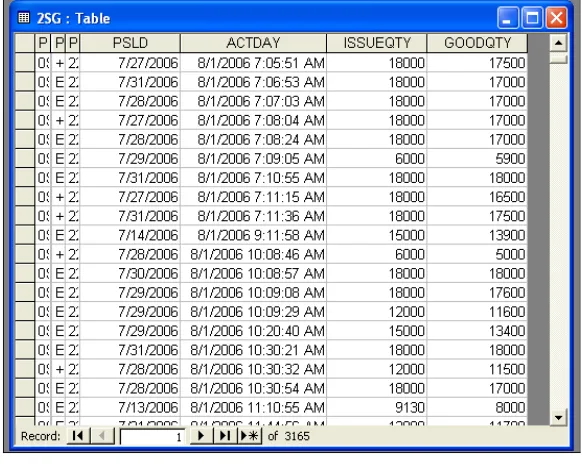
Based on the selection made at the calculation menu, the required data will be filtered out from the ‘Production Master’ Table.
[image:55.595.206.497.307.539.2]For example, if the term selection is August 2006, all the data at the last process with end date, i.e. ‘ACTDAY’, of 1st August 2006 to 31st August 2006 will be filtered out as shown in Figure 3.32.
Figure 3.32
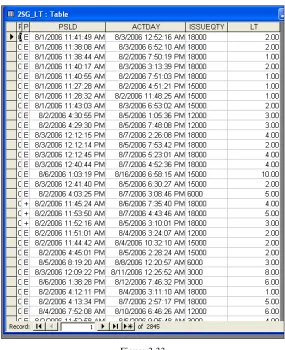
Figure 3.33
Figure 3.34
An additional function to have a better analysis of the data is to exclude non-working days for lead-time calculation. There is a table named ‘Holiday’ where all the non-working dates are stored, Figure 3.36. During the calculations, the total number of holidays within the term selection will be subtracted from the total number of production day. Figure 3.37 shows a comparison of the result with Figure 3.35 by not including the non-working days.
From the graphical results, some observation points are highlighted:
The x-axis is the count of orders whereas the y-axis is the number of days for production.
The total number of orders completed in the month of August 2006 is equal to the sum of all the values that appear on top of every bar graph.
In Figure 3.35, a number of 260 orders completed less than one day, 603 orders completed less than two days, and so on and so forth.
Comparing both graphs in Figure 3.35 and Figure 3.37, the lead-time is longer if holidays are included whereas it is shorter when holidays are excluded.
In Figure 3.37, a number of 58 orders complete in ‘-1’ day’s lead-time, this is probably due to over-time operations on a non-working day.
Figure 3.38
Figure 3.39
3.4 Order Lead-Time
In this competitive market, we have to constantly minimized waste to keep the cost of production low and at the same time provide good customers’ satisfaction. One of the ways to minimize waste is to keep a low inventory level where only ‘sellable’ goods are stored in the warehouse. However, it is not easy to keep low inventory and yet fulfill urgent request by customers. Understanding and study of the market demand and production condition is very important.
Order lead-time starts from the day the order is being accepted by the Sales Representative to the day the order is ready for delivery to the customer, which usually is the day when the order reaches the warehouse. As mentioned earlier that the overall production time is 5 working days, the order will be considered short order lead-time if order lead-lead-time is less than 5 days. As order cannot be rejected (due to customers’ satisfaction indicator), the only way to countermeasure this issue is to keep safety stock in the warehouse.
In this measuring indicator, the purpose is to identify products that are often requested by customers urgently. At the same time, identify customers who often request for urgent products. If necessary, counteract by communicating often with the customers to understand their conditions as well.
3.4.1 Data Structure
To study the order trend, we need past order records whereby the following data fields are required:
a) Product Group b) Item Group c) Item Type d) Customer Code
e) Appointed Delivery Date (request by customer)
g) Shipping Designated Date (Date to deliver goods)
h) Delivery Answer Date (Reply date by Sales Representative) i) Order Quantity
j) Order Number
This data table in text format is set by ISD member to automatically generate in the server every month based on the ‘Shipping Designated Date’. The filename always starts with ‘order’ and followed by the year and month of the data, e.g. ‘order200608.txt’ as shown in Figure 3.40.
Figure 3.40
3.4.2 User Interface
First, there is a Main Menu as shown in Figure 3.41.
Figure 3.41
Click ‘Load Order Data’ to transfer data into the database, Figure 3.42.
Figure 3.42
Figure 3.43
[image:64.595.220.484.102.308.2]The file location will be registered as shown in Figure 3.44.
Figure 3.44
Figure 3.45
When it has been completed, click ‘OK’ and ‘Cancel’ to exit to Main Menu, Figure 3.46.
Check the Order Master Table at the ‘Shipping Designated Date’ column for the additional of order data, Figure 3.47.
Figure 3.47
To calculate the order lead-time trend, click ‘Calculate Order LT’ button and input the desired year and month as shown in Figure 3.48. For example, ‘2006’ and ‘8’ for August 2006 data. Click ‘OK’ to start calculation.
When the calculation is completed, a tabulated result will be shown as in Figure 3.49. Click ‘Disp Graph’ to view the result in graph format, Figure 3.50.
Figure 3.49
3.4.3 Result Generation
As seen from Figure 3.49, the table shows the number of lead-time days against the corresponding number of counts of order.
Basically, when adding the data from text file format to the database, there is a calculation of order lead-time for every order. An additional column, named ‘OrderLT’, is created in the ‘Order Master’ Table, named ‘MasterTable_OLT’, again as shown in Figure 3.51.
Figure 3.51
This involves a mathematics calculation of subtracting ‘Order Acceptance Date’ from ‘Shipping Designated Date’.
3.5 Sales vs. Capacity
This measuring indicator presents the condition of market demand against our own production capacity and also acts as a guide to reply customers of delivery dates. Hence the data to be used consists of orders that have not been issued for production. On top of that, the required data also consist of orders up to 3 months ahead because we want to get prepared for the sales condition up to 3 months’ time. If less than 3 months, we might not have time to get ready; but if more than 3 months, it may be too far ahead which might not be accurate. Another reason is also because our safety stock inventory has been calculated based on the past 3 months’ records, so it is enough to standby for any urgent order one month down the road.
3.5.1 Data Structure
For this purpose, two groups of data are needed. One is the order data and the other is the production data – machine capacity.
The data field require for the order data is as follows: a) Identification Number
b) Product Group c) Item Group d) Item Type e) Part Number f) Customer Number
g) Whout_date (Warehouse stock-out date)
h) Accept_date (Confirm order date by Sales Representative) i) Whin_date (Warehouse stock-in date)
j) Expected_date (Request date by customer) k) Reply_date (By Sales Representative) l) Order Quantity
o) Order_class (‘0’ – Confirmed orders only, ‘1’ – Indicative orders included, ‘2’ – Forecast orders included)
These order data in the Data Server A is real-time and can be obtained any time using the authorized IP address and password, Figure 3.52. The data in text file format is named ‘RplyData390.txt’. The data will be downloaded and transferred to the table in the Microsoft Access Database. Details will be shown in the section 3.5.2.
Figure 3.52
Figure 3.53
The data fields required for the production data are as follows: a) Process Number
b) Item Group
c) Machine Group Code d) Machine Capacity e) Number of Machines
machine. ‘Time’ is the number of working minutes per day. ‘Tact’ is the number of product produced per minute.
Figure 3.54
3.5.2 User Interface
First, there is the Main Menu as shown in Figure 3.55.
Figure 3.55
Click ‘Set Data’ to download the order data from the Data Server A using the File Transfer Protocol and save it in the same directory as the Database.
[image:73.595.227.479.510.714.2]Figure 3.56 shows the source code when ‘Set Data’ button is clicked:
Figure 3.57 shows the source code for ‘GetFTPfile’ which calls the FTP command and Make_Ftp_Command_File’ which prints the FTP commands to get the data.
Figure 3.58 shows the source code for ‘make_link()’ that links the ‘RplyData390.txt’ in the same directory as the Database to the table in the Database.
Figure 3.58
Figure 3.59 shows the linking table ‘RplyData390txt’: Check for the latest data to confirm.
After making the linking table, referring to source code in Figure 3.56,
‘get_noalloc_order’ will transfer the data from the linking table to the ‘tbNoallocorder’ table as shown in Figure 3.60. Check that the data is updated.
Figure 3.60
After transferring the data, click ‘Sales vs. Capacity’ button to enter the calculation menu, Figure 3.61.
There are a few selections to be made: a) Item Group
b) Term Selection – the starting date will the day of usage and the end date can be selected.
c) By Request Date or by Reply Date
d) Confirmed Order only, Indication Included or Forecast Included e) Different Process Type
Once completed, click the individual process button to view the result. An example of the graphical result is shown in Figure 3.62.
Figure 3.62
3.5.3 Result Generation
Figure 3.63 shows the data flow of the Sales versus Capacity data calculation.
Figure 3.63 Selected Order
data
Machine Capacity
Result data Order data
‘tbNoallocorder’
From the many data in ‘tbNoallocorder’ table, based on the term selection (time duration) made at the calculation menu, the desired data will be filtered out. If the selection is based on ‘Request’, then the data will be filtered out based on Warehouse-In Date, which is ‘whin_date’. Otherwise, if it is based on ‘Reply’, then the data will be filtered out based on Expected Date, which is
‘expected_date’.
[image:78.595.222.482.305.506.2]For example in Figure 3.64, the ‘SelOrdDataRV’ table suggests the data is for ‘RV’ process. From the 10th columns of the table, ‘RVCut’ is the different machine groups in the ‘RV’ process.
Figure 3.64
Figure 3.65
Figure 3.66
Lastly, the result table, as shown in Figure 3.67, is generated by: a) Selecting the start date and end date based on the term selection b) Accumulating the orders in ‘CumOrder’ column
c) Accumulating the capacities in ‘CumCapa’ column
[image:80.595.228.474.103.339.2]The source code for the above operation is as shown in Figure 3.68.
3.6 Plan vs. Actual Production
This indicator shows how much the production plan is fulfilled every day. It is a gauge of how well the production performs and also a monitoring tool to arrest problems if any arise. It is more for the use of production in-charge who takes care of the daily production.
The tool for this item is currently at discussion and confirmation stage. However, some details on the data structure and results generation will be documented.
3.6.1 Data Structure
[image:82.595.186.520.369.730.2]From the figure, it shows a daily tabulation of Product A at different processes, i.e. ‘130’, ‘140’, ‘150’, etc, recorded with the different item type production quantity, accumulated production quantity and work-in-progress quantity.
For this measuring indicator, five data tables are required. They are as follow: a) Process Summary
b) Process Summary By Machine c) Process Summary By Work Shift d) By Work-In-Process Summary
e) Work-In-Process By Part Number Summary
The following data table information will be given to the ISD member to create automatic generation in the Data Server with the assigned filename.
Process Summary, Table 3.1 (Filename: ‘MOProc_sum_YYYYMM’)
Date Product Group Item Group Item Type Process Total Qty
Table 3.1
Process Summary By Machine, Table 3.2 (Filename: ‘MOProc_mc_YYYYMM’)
Date Product Group
Item Group
Item
Type Process
Machine No.
Total Qty
Table 3.2
Process Summary By Work Shift, Table 3.3 (Filename: ‘MOProc_shf_YYYYMM’)
Date Product Group
Item Group
Item
Type Process Shift Total Qty
By Work-In-Process Summary, Table 3.4 (Filename: ‘MOWIP_sum_YYYYMM’)
Date Product Group
Item Group
Item
Type Process
Total WIP Qty
Table 3.4
Work-In-Process By Part Number Summary, Table 3.5 (Filename: ‘MOWIP_pn_YYYYMM’)
Date Product Group
Item Group
Item
Type Process
PN (by
forming type) Total Qty
Table 3.5
When the data tables are ready, test the downloading of the data and check the accuracy of the data by comparing with the physical quantity at the production site.
3.6.2 Result Generation Proposal
The data transfer sequence is illustrated as follows: MOProc_sum_200506 MOProc_mc_200506 MOProc_shf_200506 MOWIP_sum_200506 MOWIP_pn_200506
Excel Data Table Date Grand
Item
Item Type
ERG / ERX
Process Total Qty
Excel Data Display Format
Date Transfer Method 1) Excel Function Use OR
2) Excel Function Use - Pivot Table 3) Macro Use
Data Server
FTP Server (8am transfer)
Macro
1) Push Button OR 2) Auto uploads
A graphical result, Figure 3.71, will be created using the ‘Graph’ function in Excel.
ERG(X)- PROCESS 1
ERG(X)- PROCESS 1
ERG(X)- PROCESS 1
ERG(X)- PROCESS 1
0 1,000 2,000 3,000 4,000 Q U A N T IT Y
ACCUM PROD 2,300 4,262 4,616 7,961 10,358 12,910 15,444 18,143 21,730 21,751 23,867 26,766 29,524 31,774 34,693 37,424 38,238 40,197 42,652 42,652 44,929 46,666 47,829 47,829 ACCUM TARGET 2,766 5,533 5,533 5,533 8,299 11,065 13,831 16,598 19,364 19,364 22,130 24,896 27,663 30,429 33,195 35,961 35,961 38,728 41,494 41,494 44,260 47,026 47,026 47,026 ERX 1,529 1,178 231 2,343 1,596 1,742 1,7992,230 2,771 21 1,5282,281 2,250 1,526 2,172 1,903 471 1,095 1,536 0 1,358 923 657 0 WIP 1,867 2,330 0 2,450 1,484 1,266 1,652 1,809 2,976 0 2,397 2,893 2,613 1,799 2,807 3,229 3,772 3,078 2,588 0 2,416 1,981 0 0 DAILY TARGRT 2,766 2,766 2,766 2,766 2,766 2,766 2,766 2,766 2,766 2,766 2,766 2,766 2,766 2,766 2,766 2,766 2,766 2,766 2,766 2,766 2,766 2,766 2,766 2,766
29-Jul-05 30-Jul-05 31-Jul-05 1-Aug-05 2-Aug-05 3-Aug-05 4-Aug-05 5-Aug-05 6-Aug-05 7-Aug-05 8-Aug-05 9-Aug-05 10- Aug-05 11-Aug-05 12- Aug-05 13- Aug-05 14- Aug-05 15- Aug-05 16- Aug-05 17- Aug-05 18- Aug-05 19- Aug-05 20- Aug-05 21- Aug-05 Production Target Line
Figure 3.71
3.7 Work-In-Progress & Inventory
This indicator shows how much stock there is in the production line and warehouse. It is an important indicator to monitor because excess inventory may tie up cash and create waste in many forms as explained in 2.2.2.
The tool for this item is currently at discussion and confirmation stage. However, some details on the data structure and results generation will be documented.
3.7.1 Data Structure
The data fields required for WIP data are as follow: a) Transaction Date
b) Product Group c) Item Group d) Item Type e) Process Number f) Part Number g) Quantity
h) Number of Lots
Figure 3.72
The Inventory data will be the sum of quantity from the five warehouses as shown in Figure 2.3. The data table must be able to get data from the warehouses and sum the quantity up based on the same product.
3.7.2 Data Generation Proposal
Figure 3.73 shows the data flow for WIP and Inventory calculation.
Figure 3.73
Result Data
Display Graph Inventory Data
Figure 3.74 shows the tabulated result of the indicator by manual calculation and recording. It shows the total quantity for different item group.
Figure 3.74
The method of data transfer will be very similar to the Plan versus Actual Production indicator using Excel function, Pivot Table or Macro through the use of a command button.
I nvent ory+WI P 0 10 20 30 40 50 60 70
200503 200504 200505 200506 200507 200508 200509 200510 200511 200512 200601 200602 200603 200604 200605 200606 200607
0 10, 000 20, 000 30, 000 40, 000 50, 000
I nvent ory 2S, 2F, 2V I nvent ory 2D I nvent ory 2L I nvent ory 1N WI P 2S WI P 1AN
1AB Target
Figure 3.75
Another possible graphical result is shown in Figure 3.76 where only WIP data is shown. The different colours of bar graphs represent the different process or station in the production area.
WI P 0 10,000 20,000 30,000 40,000 50,000 60,000
200503 200504 200505 200506 200507 200508 200509 200510 200511 200512 200601 200602 200603 200604 200605 200606 200607
[ kpcs]
A .META LIZING A .CA P A .SORT A .SPIRA L A .WELD A .FINISH A .A PP CA BINET QTY BA L CONVERT
Figure 3.76
3.8 Conclusions: Chapter 3
CHAPTER 4
CONCLUSIONS
4.1 Introduction
This chapter will discuss the achievements of this research project and whether they have met the objectives set in the Project Specification1. The latest results achieved from the tools will be presented. Those objectives which have not been accomplished or do not fulfill the criteria will be discussed in 4.4 Future Work.
4.2 Discussions
Finally, after having done so many activities, it is necessary to compare how much has been done so far. By referring to the objectives set in the Project Specification:
a) This research project has intensively covered the background information on Production and Operation in Key Performance Indicator System relating to production operation performance and customers’ satisfaction. Chapter 1 provides an introduction of how ‘lean’ evolves and why lean enterprises use information technology to manipulate the data. It also presents some lean manufacturing concepts and the importance of performance measurement systems in guiding and shaping the company by reflecting business factors. Chapter 2 also provides a literature review on how lean operations shorten lead-time, improve quality, reduce production cost, increase profit, boost productivity and better customer service.
c) After evaluating the Sales and Production Systems, significant problems are identified in Figure 2.4 and improvements on the hardware i.e. the Data Server and implementations of additional operation systems i.e. the Material Order System, Key Performance Indicator, etc are carried out.
d) New tools for measuring key performance indicators like Delivery-On-Time, Production Lead-Time, Order Lead-Time and Sales versus Capacity are designed, tested and implemented for data collection and analysis. However, there are two measuring indicators i.e. Plan versus Actual production and Work-In-Process & Inventory that are still under discussion and confirmation stage due to the implementation of the previous four measuring indicators. With these two measuring indicators implemented, the KPI system will be more complete.
e) Delivery-On-Time and Order Lead-Time tools are modified from ‘exist