
This is a repository copy of Support for Taverna workflows in the VPH-Share cloud platform.
White Rose Research Online URL for this paper: http://eprints.whiterose.ac.uk/117803/
Version: Accepted Version
Article:
Kasztelnik, M., Coto, E., Bubak, M. et al. (6 more authors) (2017) Support for Taverna workflows in the VPH-Share cloud platform. Computer Methods and Programs in Biomedicine, 146. pp. 37-46. ISSN 0169-2607
https://doi.org/10.1016/j.cmpb.2017.05.006
Article available under the terms of the CC-BY-NC-ND licence (https://creativecommons.org/licenses/by-nc-nd/4.0/).
Reuse
This article is distributed under the terms of the Creative Commons Attribution-NonCommercial-NoDerivs (CC BY-NC-ND) licence. This licence only allows you to download this work and share it with others as long as you credit the authors, but you can’t change the article in any way or use it commercially. More
information and the full terms of the licence here: https://creativecommons.org/licenses/
Takedown
If you consider content in White Rose Research Online to be in breach of UK law, please notify us by
Support for Taverna Workflows in the VPH-Share Cloud Platform
Marek Kasztelnika,∗, Ernesto Cotob, Marian Bubakc,a, Maciej Malawskic,a, Piotr
Nowakowskia, Juan Arenasb, Alfredo Saglimbenid, Debora Testid, Alejandro F. Frangib
a
ACC Cyfronet AGH, Krakow, Poland
b
Centre for Computational Imaging & Simulation Technologies in Biomedicine (CISTIB), Electronic and Electrical Engineering Department, The University of Sheffield, Sheffield, UK
c
Department of Computer Science, AGH University of Science and Technology, Krakow, Poland
d
CINECA SuperComputing Centre, Casalecchio di Reno, Italy
Abstract
Background and objective: To address the increasing need for collaborative endeavours within the Virtual Physiological Human (VPH) community, the VPH-Share collaborative cloud platform allows researchers to expose and share sequences of complex biomedical pro-cessing tasks in the form of computational workflows. The Taverna Workflow System is a very popular tool for orchestrating complex biomedical & bioinformatics processing tasks in the VPH community. This paper describes the VPH-Share components that support the building and execution of Taverna workflows, and explains how they interact with other VPH-Share components to improve the capabilities of the VPH-Share platform.
Methods: Taverna workflow support is delivered by the Atmosphere cloud management platform and the VPH-Share Taverna plugin. These components are explained in detail, along with the two main procedures that were developed to enable this seamless integration: workflow composition and execution.
Results: 1) Seamless integration of VPH-Share with other components and systems. 2) Extended range of different tools for workflows. 3) Successful integration of scientific work-flows from other VPH projects. 4) Execution speed improvement for medical applications.
Conclusion: The presented workflow integration provides VPH-Share users with a wide range of different possibilities to compose and execute workflows, such as desktop or online composition, online batch execution, multithreading, remote execution, etc. The specific advantages of each supported tool are presented, as are the roles of Atmosphere and the VPH-Share plugin within the VPH-Share project. The combination of the VPH-Share plu-gin and Atmosphere engenders the VPH-Share infrastructure with far more flexible, powerful and usable capabilities for the VPH-Share community. As both components can continue to evolve and improve independently, we acknowledge that further improvements are still to be developed and will be described.
Keywords: Taverna Workflow, VPH-Share, Atmosphere cloud, RESTful API.
∗Corresponding author
1. Introduction
As the Virtual Physiological Human (VPH) [1, 2] discipline matures, so do its researchers’ needs to collaborate on tools, models, data and best practices. This evolution goes in hand with the increasing role of cloud computing infrastructures which free researchers from having to procure and maintain their own hardware resources.
The VPH-Share [3] project provides a web-based collaborative environment for VPH researchers to expose and share biomedical knowledge, data and workflows using cloud & HPC (High Performance Computing) services. The biomedical workflows correspond to orchestrated sequences of complex processing tasks with a specific scientific purpose. The processing tasks are biomedical algorithms developed by the VPH community and are pro-vided by VPH-Share Atomic Services, which correspond to virtual machines within the VPH-Share infrastructure (also called infostructure). The core of the VPH-Share infos-tructure is comprised by the Atmosphere cloud management platform [4] which provides a convenient RESTful API to access the Atomic Services and the algorithms within them, while efficiently managing the required underlying resources dedicated to each Atomic Ser-vice. However, accessing the Atmosphere API directly would be far too complex for most VPH-Share users to build and execute biomedical workflows. Therefore, a plugin for the very popular Taverna Workflow System [5, 6] was created to improve the usability of the pro-cess. This VPH-Share Taverna plugin provides improved access to the biomedical processing services (provided by Atomic Services) exposed by the VPH-Share infostructure, to allow VPH-Share users to construct workflows interactively and execute them in a transparent manner, without the need to manually orchestrate all the underlying services.
The VPH-Share cloud platform has two important roles: to provide access to data stor-age and to computing services. The former has been already addressed by earlier VPH-Share publications focused mainly on data sharing aspects [7, 8]. In this paper we focus on the latter computing aspects by describing our approach to execution of scientific workflows in VPH-Share. We will also highlight @neurIST [9], one flagship Taverna-enabled workflow [10] within the VPH-Share project, and recent sample workflows from the VPH-DARE@IT [11] project that have also been recently deployed as Taverna workflows in VPH-Share. Further-more, the VPH-Share components that support the construction and execution of Taverna workflows are also described. This includes the description of communication between the VPH-Share Taverna plugin and Atmosphere, how computing resources are allocated and released, and all the workflow management features available to the VPH-Share end user.
2. Background
Scientific workflow management systems are commonly used by scientists to automate the execution of multi-step and multi-task applications on distributed computing infrastructures.
(Ernesto Coto),[email protected](Marian Bubak),[email protected](Maciej Malawski),
[email protected](Piotr Nowakowski),[email protected](Juan Arenas),
[email protected](Alfredo Saglimbeni),[email protected] (Debora Testi),
There are numerous implementations of workflow systems, differing in terms of target users and workflow types. For instance, the web-based system proposed in [12] targets members of the VPH community [2] concerned with cancer modeling, while the work presented in [13] is mostly focused on clinical trial workflows. Other examples include Pegasus [14], a project which focuses on large-scale workflows consisting of hundreds of thousands of tasks, requiring the programmatic generation of workflow descriptions in the DAX format. Pegasus has been used to run workflows on clouds such as EC2 or FutureGrid. The Kepler [15] system provides a graphical user interface for designing and running workflows, and can be configured to run on the EC2 cloud with the use of dedicated “actors”. One last example is the WS-PGRADE framework [16] which allows building science gateways and integrating workflows with distributed computing infrastructures, including EGI cloud services. A useful summary of the techniques used and reference implementations of workflow technologies in example VPH projects are presented in [17]. The rationale behind selecting Taverna as the workflow system for our VPH-Share platform were, a) its popularity with the biomedical and VPH research community, b) its visual style of designing workflows, c) support of plugin-based feature extensions, and d) its maturity as a software package that is now adopted by the Apache Software Foundation.
The Human Brain Project [18] is also looking to provide the scientific community with platforms to enable large-scale collaboration and data sharing, as well as scientific computing resources for the processing of large amounts of human brain data. Similar to the work presented here, the Human Brain project platforms enable the definition of workflows which consist of data/image processing algorithms and can be executed in remote locations, in a parallel manner (to improve performance). Their approach differs from ours with regard to workflow composition, in that the Human Brain Project assumes a workflow to be in the form of a program in a scripting language, executed using UNICORE [19], instead of a data-flow graph such as the ones created with Taverna, or the systems proposed in [12, 13]. We believe our approach is less flexible than writing a program, but more user-friendly and accessible to users without computer programming knowledge. In addition, in [18] a workflow task is specified as a job submitted to an HPC cluster. In contrast, our approach is cloud-based: we provide the user with the possibility to spawn a machine that can submit jobs to the N8 cluster [20] via the GIMIAS [21] plugin for the RealityGrid’s Application Hosting Environment (AHE) [22]. The GIMIAS AHE plugin will submit the job and monitor its execution until it is finished. As such, the VPH-Share platform allows users to submit workflows for orchestration natively on cloud infrastructures and to HPC infrastructures via the GIMIAS AHE plugin.
harder for users with limited knowledge of Python scripting. Further, resource sharing and user access management services are not provided in EC3 as it is provided natively in the VPH-Share platform. To address some of these issues, EC3 has recently integrated the Galaxy [24] workflow system to provide a more user-friendly interface to compose workflows and launch jobs [25]. VPH-Share is a workflow-agnostic platform and as such the platform also has plans to support Galaxy [24] workflows as it provides additional bioinformatics tools and datasets useful to the VPH community.
CloudFlow [26] is another exemplar platform focused on Computer Aided Design and Manufacturing (CAD/CAM), Computer Aided Engineering (CAE) and Computational Fluid Dynamics (CFD). The CloudFlow platform does not use open-source technology components for workflow composition and execution and as such carries a vendor lock-in risk. Similar to EC3 [23], CloudFlow [26] also does not provide resource sharing and user access management services like the VPH-Share platform.
3. Description of method
The two main components of the VPH-Share infostructure involved in supporting Tav-erna workflows are: the Atmosphere platform [4] and the VPH-Share TavTav-erna plugin [27]. The VPH-Share Master Interface web portal [28] is also involved for authentication, resource sharing & user management services and as a web GUI that provides the user with visual feedback during the workflow execution process.
3.1. Atmosphere
Atmosphere is a cloud management platform developed within the VPH-Share project (see Figure 1). It manages computing resources known as Atomic Services, which are vir-tual machines that can be dynamically instantiated or terminated as needed. Atmosphere provides an abstraction for describing Atomic Services deployed in the cloud. Each Atomic Service can be created from a Virtual Machine Template (VMT) that consists of a vir-tual machine image, user supplied configuration and a set of associated metadata. At-mosphere also integrates and manages compute sites (deployment platforms) operated by various providers, including OpenStack, Amazon Web Services EC2, Rackspace, Azure and Google Cloud platform [29], creating a cloud facade by concealing differences in how virtual machines are instantiated, billed, managed and optimised on these sites. The list of sup-ported compute sites can be extended and cloud installations delivered e.g. by European initiatives such as EGI1 can be used from Atmosphere. The platform also delivers additional
tools (Redirus and IpWrangler, described in section 3.5.2) which provide NAT (Network Ad-dress Translation) redirection services to help manage TCP/UDP protocol redirections into virtual machines started in private networks. Currently the Atmosphere platform is used in PLGrid (also a member of EGI) as the primary cloud gateway for the PLGrid infrastruc-ture [30]. All examples and performance tests presented in this paper were executed using
1
Figure 1: Atmosphere conceals differences between different compute sites and delivers unified REST in-terfaces used by the Taverna plugin and VPH-Share portal. When a REST request arrives, it is decoded and analysed by the Optimiser component whose main role is to prepare an optimised virtual machine de-ployment plan for every required Atomic Service. Subsequently, the plan is implemented by the provisioner (which starts/stops/reconfigures virtual machines). Once the required virtual machines are running, access is configured by two components: Redirus, which manages HTTP/HTTPS redirections, and IPWrangler, responsible for TCP redirection management.
public clouds and private OpenStack installations located in Krakow and Vienna. Atmo-sphere also provides a JSON-based RESTful API so that authorised users can use the API to manage Atomic Services.
Atomic Service instance) is started, it can be accessed using standard tools (e.g. most of the VPH-Share services expose Web Services which can be invoked using SOAP web service clients).
3.2. VPH-Share Taverna plugin
The Taverna Workflow System [5, 6] provides several workflow management tools. These include a desktop application for workflow composition and execution, known as Taverna Workbench, and a dedicated server for workflow execution, known as Taverna Server. As part of the VPH-Share project, we created a plugin for the Taverna Workflow System of products to allow Taverna to interface with the VPH-Share infostructure. When the plugin is installed in the Taverna Workbench, it provides GUI support, and the user can import web service endpoints of one or more Atomic Services into Taverna Workbench, and start building workflows interactively. Once a workflow is composed, it can be run either within Taverna Workbench or via the Taverna Server. As the latter does not support user interaction, GUI support is not activated in the plugin. In this case, the workflow has to be submitted to the Taverna Server (pre-configured with the plugin) via a RESTful API provided by the server, following which the user can configure the workflow and initiate its execution. Workflow results can also be accessed via the same RESTful API.
The VPH-Share plugin integrated into the Taverna Workflow System handles user au-thentication with the VPH-Share infostructure and implements all the necessary commu-nication with Atmosphere to instantiate the necessary Atomic Services used within the workflow, execute the corresponding web services when each Atomic Service is ready to be used, and finally request termination of the Atomic Services when no longer needed. The plugin can additionally support interactive services (previously tagged as ’interactive’ by its author) by starting a remote desktop connection (Web/RDP port must be open) into the remote Atomic Service to allow user interactions to be performed. This is especially use-ful in cases when the user needs to perform complex non-scriptable operations with mouse clicks. For instance, [31] presents a workflow developed for maxillofacial surgery, in which the components of the workflow invoke different tools for visualising results, among them a tool for interactive virtual bone cutting and dragging. Another example is the system presented in [32], which allows the user to dynamically interact with a workflow involving images from a microscope, enabling tasks such as magnifying a particular area of an image while the workflow is running. By starting a remote desktop connection, the VPH-Share plugin allows the interactions mentioned before, as well as any others that the user would normally be able to carry out on a local machine. The interactive step must enable the user to indicate that the interaction has finished, so that workflow execution can continue with the next step.
3.3. Security
portal using their identity provider (such as BiomedTown, Google, Facebook, Twitter, etc.). The ticket includes a validity interval and a list of user attributes as part of the ticket payload. These attributes are, in turn, used to determine whether the user is authorise to perform a specific action. We validate such rules using an Attribute-Based-Access-Control (ABAC) engine implemented using XACML2 language.
3.4. Significance
To compose VPH workflows, users should be able to easily access the services provided by the VPH-Share infostructure and arrange them into a meaningful scientific process. Users should also be able to easily execute the services in the workflow without having to worry about underlying technical considerations such as data movement between workflow steps and on-demand allocation/disposal of resources. The integration between the VPH-Share Taverna plugin and Atmosphere delivers both goals. Further capabilities offered by Atmo-sphere including the option to choose the deployment site of an Atomic Service (e.g. Amazon or OpenStack) and the service flavour (i.e. hardware configuration), can also be exposed to the end user via the VPH-Share plugin. Such features relieve the user from having to deal with unnecessary complexities when using the VPH-Share infostructure.
3.5. Interaction between Taverna and Atmosphere
This section describes how Taverna workflows are supported within the VPH-Share infos-tructure. This will be presented as two separate processes: workflow composition preamble and workflow execution.
3.5.1. Workflow composition preamble
Taverna Workbench does not require constant communication with Atmosphere to allow the user to compose a workflow, but it does need some initial metadata regarding the VPH-Share web services from Atmosphere. This metadata is retrieved automatically by the VPH-Share plugin before the user actually starts composing workflows. The following steps detail the preamble to the workflow composition:
1. From the VPH-Share web portal, the user retrieves the web service endpoint URL of an Atomic Service and imports it into Taverna Workbench. The VPH-Share Taverna plugin initiates an authentication process prompting the user of their access credentials to obtain an authentication ticket (see 3.3). The plugin uses the obtained ticket for all subsequent interactions with Atmosphere’s RESTful API.
2. The VPH-Share plugin retrieves the WSDL document from Atmosphere which details the services provided by the Atomic Service, including the name of each service as well as its inputs/output ports and input/output data types.
3. The VPH-Share plugin retrieves the available cloud sites (deployment platforms) for the Atomic Service from Atmosphere.
2
4. The process is repeated from Step 1 for each new Atomic Service used within the workflow.
The metadata obtained by the plugin from Atmosphere is sufficient for Taverna Work-bench to display the list of services provided by Atomic Services and allow the user to build the workflow interactively, using the drag-and-drop features built into Taverna Workbench and linking input/output ports with the mouse. Additionally, the VPH-Share Taverna plugin also allows the user to select an appropriate cloud site where the service could be deployed and whether the service should be invoked in a blocking or non-blocking mode. The non-blocking mode should be used for services with long execution times in order to avoid network timeouts during the execution of a workflow. However, this non-blocking mode needs to be specifically supported by the Atomic Service. Services which comply with this requirement include all Atomic Services equipped with the GIMIAS [21] platform – a medical image processing software framework that can expose web services and at the same time perform image processing and visualisation.
It is important to note that during this preamble step no new Atomic Services (virtual machines) have yet been deployed or started in the cloud sites and therefore the user does not incur any resource usage charges.
3.5.2. Workflow execution
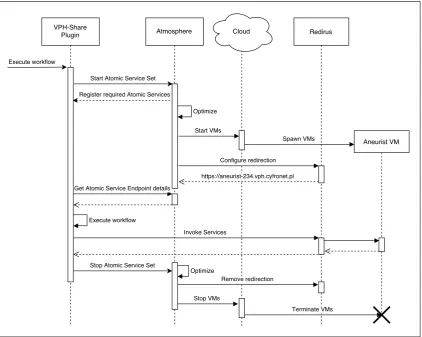
The following steps are carried out as part of the workflow execution process (see Fig-ure 2). The prerequisite for this step is that Taverna Workbench must contact the VPH-Share web portal and obtain an authentication ticket.
1. Workflow execution begins once the user has supplied the input values for the workflow and started the execution. The execution itself is orchestrated by the VPH-Share plugin by requesting Atmosphere to create an Appliance Set, a logical entity within Atmosphere to group Atomic Services.
2. Atmosphere creates and returns an Appliance Set ID; this is used later on to associate the set with each Atomic Service instance that is started.
3. For each web service in the workflow the VPH-Share Taverna plugin requests Atmo-sphere to create an instance of the Atomic Service associated with the service. If the user has selected a specific cloud site (deployment platform) for the Atomic Service, this is indicated in the request. For each request, Atmosphere performs an optimisa-tion procedure which takes into account many operaoptimisa-tional factors such as cloud load, number of services required by the workflow, service type (some services can be hori-zontally scaled or shared by many users), cost and additional requirements (e.g. access to data which is only available on a specific cloud site). Consequently, Atmosphere determines where the Atomic Service should be started and what resources (CPU, RAM, disk storage) should be allocated for use by the service. As a result, many virtual machines can be started for one single workflow.
Figure 2: Taverna - Atmosphere interactions in the workflow execution phase. Workflow execution involves optimisation, spawning VM(s) with the required services installed, setting up redirections, execution of the workflow and - finally - freeing up resources used by the workflow.
the plugin detects that the web service requires user interaction, it provides the user with a remote desktop connection to the Atomic Service so that the interaction can be carried out.
5. Once a web service execution completes, the VPH-Share plugin obtains the results and proceeds with the execution of the subsequent web service, going back to Step 3 as needed until completion. If there are no more web services to execute in the workflow, the VPH-Share plugin notifies Atmosphere and the optimisation procedure is repeated, destroying the Appliance Set and shutting down unnecessary instances. This optimises the cost of running workflows since service instances do not consume resources when a workflow is not being run. The outputs of each service as well as the final output of the Taverna workflow, are stored in the VPH-Share infostructure and are available to the user.
in the OpenStack site at Cyfronet (which is the main private cloud site for VPH-Share) and Vienna. This problem is solved by delivering a dedicated NAT tool called Redirus [33] which dynamically manages HTTP/HTTPS redirections to virtual machines. Additionally if a given service can be horizontally scaled, Redirus reconfigures the redirection to use round-robin load balancing.
4. Status report
4.1. Seamless integration of workflow tools with the cloud infrastructure
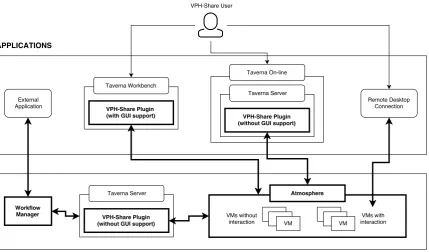
A highly desirable consequence of the relationship between the VPH-Share Taverna plu-gin and Atmosphere is its seamless integration with other external components. The VPH-Share Taverna plugin is integrated directly into the popular Taverna Workflow System and as such external components that are also interfaced with the Taverna Workflow System may also be able to use the VPH-Share Taverna plugin to orchestrate workflows in VPH-Share. Examples of integration with other tools are shown in Figure 3, and include Taverna Online, a custom Workflow Manager, as well as external applications.
The first example is the online scientific workflow editor provided by OnlineHPC [34]3,
called Taverna Online (TO). This is a web application that can be used to compose and execute workflows, similarly to the one presented in [12]. It uses a Taverna Server behind the scenes, to which workflows can be submitted and executed. VPH-Share users can log into the OnlineHPC web site using their VPH-Share user credentials and compose new workflows using VPH-Share services or import workflows from the VPH-Share web portal. Users can then edit the workflows and/or execute them.
Another successful integration has been carried out with the Workflow Manager (WM) component of VPH-Share. This is a component that is integrated with the VPH-Share web portal to allow users to execute their workflows directly in the VPH-Share infostructure, without the need to install any other software locally. The WM interacts with Atmosphere to start an Atomic Service to start a Taverna Server that is already integrated with the VPH-Share plugin; it waits for the server to become active and then submits the workflow chosen by the user. The WM automatically configures workflow execution via the RESTful API of the Taverna Server, without any user intervention. Once the workflow is configured, the WM instructs the Taverna Server to initiate and execute the workflow. During execution, should the user decide to run another workflow, the WM will optimise for reusing the Taverna Server so as such it will submit the new workflow to the same server to save computational resources. Once the server indicates that the workflow has completed, the WM will delete the workflow from the server and thereby releasing all of its resources. If the server is not running any other workflow, the WM will request Atmosphere to also shut down the Taverna Server, again saving computational resource usage costs.
Further integration remains possible through the RESTful API of the Workflow Manager. The purpose of this API is for external applications to be able to use the WM to run VPH-Share workflows. The API is currently in use to check the status of the WM from a Nagios
3
Figure 3: Integration options between the VPH-Share Taverna Plugin and Atmosphere. The plugin enables integration of Atmosphere with Taverna Workbench, Taverna Online, a custom Workflow Manager, and other external applications.
Core server [35]. This allows us to monitor and report any unexpected interruption in the workflow execution services to the VPH-Share users via the VPH-Share web portal.
4.2. Extended range of tools for workflows
Thanks to the seamless integration provided by the VPH-Share Taverna plugin and Atmosphere a VPH-Share user can compose and execute workflows using several different tools. For workflow composition the user can either use an online tool, via OnlineHPC [34], or an offline tool, using Taverna Workbench on a local PC. In both cases, workflows can be stored in the VPH-Share infostructure and shared with other users. For workflow execution, the user can employ the Taverna Workbench, Taverna Online, a Taverna Server, VPH-Shares Workflow Manager web interface and, finally, the RESTful API of the Workflow Manager. In all cases the output of the executed workflow is securely stored in the VPH-Share infostructure and shared with other users.
4.3. Integration of VPH scientific workflows
4.3.1. @neurIST workflow
The @neurIST [9] workflow consists of specialised algorithms to process cerebral aneurysm data and extract morphological descriptors. @neurIST requires a GIMIAS [21] workstation but instead of having to set up the software on a local machine a VPH-Share user could execute this workflow in VPH-Share since Atmosphere provides Atomic Services already equipped with GIMIAS. Atmosphere can start these Atomic Services at any time, run the workflow and then stop them, releasing the resources for another user. Taverna also allows running workflows with multiple inputs and provides automatic parallelism. Should the @neurIST workflow be run with multiple inputs, Atmosphere can start all the necessary Atomic Services with optimised resources and even share them between parallel executions of the workflow if necessary.
4.3.2. VPH-DARE@IT workflow
The ongoing DARE@IT project [11] on Dementia research, is also powered by VPH-Share. Over eight different VPH-DARE@IT workflows pipelines have been deployed in the VPH-Share infostructure to process eleven patient cohorts totalling six thousand patients. These workflows require the processing of vast amounts of biomedical data through a large number of tools in parallel. This is perfectly possible with the help of the VPH-Share Taverna plugin and Atmosphere, since both components support parallelism and scalability. So far, the VPH-DARE@IT project has been able to run up to 130 simultaneous Taverna workflows executions in the VPH-Share infostructure for a single clinical study, proving the mighty of the platform and the components presented in this paper. Additional workflow pipelines to process more patients are currently being integrated into the VPH-Share infostructure.
4.4. Performance evaluation
The cloud environment delivered by Atmosphere allows users to configure the size and number of the resources for a concrete workflow execution. This can be used to speed up a running workflow that may include multiple iterations (each iteration operates over a separate input value). The @neurIST [9] workflow which extracts morphological descriptors from the surface of a cerebral aneurysm, using GIMIAS [21] services deployed on Virtual Machines, showcases exactly this capability. The workflow was adapted to be multithreaded and to accept lists of inputs values. As part of our experiments, the workflow was executed with a varying number of threads and iterations, where each thread of execution corresponds to a Virtual Machine created by Atmosphere.
Two workflows with 100 and 300 iterations were started using 1, 2, 5, 10, 20 and 30 Virtual Machines, each with 2 virtual CPU, 4098 MB of RAM at a cost of $0.12 per hour. The results of these runs are illustrated in Figures 4a (for 100 iterations) and 4b (for 300 iterations). Both figures reveal correlations between workflow execution time, average time for a single iteration and the cost of running the workflow.
0 500 1000 1500 2000 2500 3000 3500
1 2 5 10 20 30
0 20 40 60 80 100
Average execution time, s Average iteration time, s
Number of VMs
Cost
0.12$ 0.24$
0.60$ 1.20$
2.40$
3.60$ Execution time Average iteration time
(a) 100 iterations
0 500 1000 1500 2000 2500 3000 3500
1 2 5 10 20 30
0 20 40 60 80 100
Average execution time, s Average iteration time, s
Number of VMs
Cost
0.12$ 0.24$0.60$
1.20$
2.40$
3.60$ Execution time Average iteration time
[image:14.595.139.449.149.644.2](b) 300 iterations
start. Even with using 30 Virtual Machines, only ca. 3.3 iterations are actually executed on each Virtual Machine. When running the workflow with 300 iterations, the speedup is more apparent when using 30 Virtual Machines where the VPH-Share Taverna plugin is able to allocate 10 iterations per Virtual Machine.
The experiment shows that increasing the number of Virtual Machines, as expected, can produce a 6x speedup and that this effect increases with the problem size (number of iterations). However, for a larger number of machines the execution cost outweighs the performance gain if the number of individual processing iterations is low. Plots such as those in Figure 4 help users choose the optimal number of machines depending on workflow size and cost-performance trade-offs.
5. Discussion
The integration between the Share Taverna plugin and Atmosphere provides VPH-Share users a wide range of workflow composition options for different scenarios. Each component carries its own particular set of advantages, depending on the purpose for which they are used.
For workflow composition, the user can choose between Taverna Workbench and Taverna Online. Before starting workflow composition using Taverna Workbench, the user needs to download and install the Taverna Workbench and then download and install the plugin from one of Shares public repositories. Subsequently, the user must search the VPH-Share portal for Atomic Services which provide the required services. This process, whilst relatively straightforward, is not required if the user decides to use Taverna Online. Once the user logs into Taverna Online, all accessible services are displayed in the form of a listbox from which the user can choose which service to use. This is ideal for users who want to start composing workflows right away. However, Taverna Onlines web-based workflow editor does not implement all the possible configuration options that Taverna Workbench provides, such as configuring the deployment platform of the service, the number of threads to be used when running it, whether the service will run in blocking or non-blocking mode, the number of retries in case of invocation failure, looping conditions, etc. Accordingly, users who wish to take advantage of these advanced features should use the Taverna Workbench instead.
For workflow execution, users can use a range of options:
• Taverna or Taverna Online user interfaces,
• The Workflow Manager built into the VPH-Share portal,
• The Workflow Managers RESTful API.
user interaction, a browser window will automatically open on the users desktop so the user can perform the required interaction. The browser will initiate a web-based remote desktop session via a NoMachine client [36]. If a web service being executed in Taverna Online requires user interaction, the user will receive notification by e-mail, including a link to the NoMachine session. An alternative execution mode is offered by the Workflow Manager, although it can only be used for workflows that have been previously uploaded to the VPH-Share infostructure. The Workflow Manager is recommended for batch-execution workflows, i.e. workflows with lists of input values (implying repeated iterations of the workflow), without the need for user interaction. Workflows with long execution times are also ideal for the Workflow Manager. The user simply starts execution via the VPH-Share portal and the Workflow Manager handles the process without any user intervention. When the workflow finishes the user receives notification by e-mail and can access the results via the VPH-Share web portal.
The final execution alternative involves the Workflow Manager’s RESTful API. This can be used in case the user wishes to exert fine-grained control over the conditions in which the workflow is started, monitored and processed. In such a case, the aforementioned tools may prove insufficient as they only provide a generic approach to execution. By using the RESTful API, an experienced user can develop a script or program that implements the desired customised behaviour.
The main advantage of using Atmosphere in all the scenarios is that the interaction with the cloud infrastructure is hidden from the Taverna system. It is thus possible to switch the underlying cloud provider (e.g. from local OpenStack to Amazon EC2) simply by exchanging Atomic Service configurations in Atmosphere, without the need to change anything in the user’s workflows. Nevertheless, if the Atomic Service is available from more than one provider, the user remains able to choose the suitable version for execution in the Taverna Workbench.
Atmosphere also supports the creation of multiple Atomic Service instances, which means that a user can run either multiple workflows involving the same Atomic Service, or launch a multithreaded workflow which creates as many instances as there are threads. In all cases, Atmosphere performs optimisations of cloud resource usage, e.g. by selecting the most cost-efficient VM instance type (flavour) satisfying user requirements (such as CPU count or RAM), as well as reusing existing services whenever possible. Furthermore, Atmosphere may spawn multiple instances of an Atomic Service if it detects that an instance is overloaded with requests. This happens automatically without user intervention and the user would still perceive a single instance even though multiple instances actually exist in the cloud. All of these features are available in VPH-Share thanks to the integration of Atmosphere, allowing users to take advantage of the cloud infrastructure without introducing additional complexity.
6. Conclusions and future work
the VPH-Share infostructure to be more flexible, powerful and usable for its users. The remaining improvements to both components of the VPH-Share infostructure are detailed below.
The workflow support mechanism developed within Atmosphere for dynamic cloud ser-vices is universal and generic in nature. Although developed for the specific needs of the VPH-Share Taverna plugin, it can be used by other workflow management systems that rely on services to carry out individual ephemeral tasks as part of the workflow. Work is underway to re-factor and rationalise the Atmosphere component to support other workflow management systems. In addition to the VPH-Share Taverna plugin, the Atmosphere API is also being used by a set of web portlets providing service management features to the VPH-Share web portal. Moreover, a scripting client developed for the API can be used to deploy, configure and coordinate Appliance Sets.
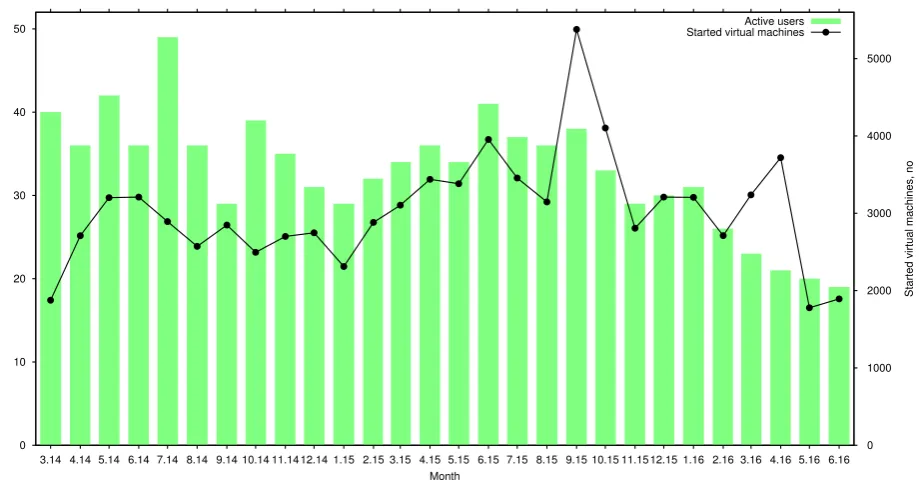
[image:17.595.72.532.395.637.2]The VPH-Share project concluded in July 2016, however the VPH-Share infostructure still remains active as part of the VPH-DARE@IT [11] and EurValve [37] projects, and as such both the VPH-Share Taverna plugin and Atmosphere retain many active users (by active we understand users who are registered and use Atmosphere to start new Atomic Services). During the VPH-Share project more than 80k virtual machines were started on all registered compute sites. More comprehensive platform statistics are presented in Figure 5.
0 10 20 30 40 50
3.14 4.14 5.14 6.14 7.14 8.14 9.14 10.14 11.14 12.14 1.15 2.15 3.15 4.15 5.15 6.15 7.15 8.15 9.15 10.15 11.15 12.15 1.16 2.16 3.16 4.16 5.16 6.16 0 1000 2000 3000 4000 5000
Active users, no
Started virtual machines, no
Month
Active users Started virtual machines
Figure 5: Monthly Atmosphere usage statistics. The chart shows the number of active Atmosphere users and the number of virtual machines started during each month.
container technologies (e.g. Docker) as an alternative for virtual machine spawning.
Future work for the VPH-Share Taverna includes the possibility of supporting other cloud infrastructures besides Atmosphere. The plugin could be extended to support the DeltaCloud RESTful API [40], which could automatically add support for a dozen other cloud providers. In addition, support for WADL endpoints is also being considered.
For the moment, VPH-Share will continue supporting other projects and the execution of their biomedical workflows. As part of this drive and due to the need for ubiquitous nature of workflow-like applications in scientific research it is most likely that support for Taverna workflows and other features associated with it will continue to evolve as we receive more requests from our users.
Acknowledgement
This research is partially funded by the EC (269978 - Share, 601055 - VPH-DARE@IT and 689617 - EurValve). The authors are indebted to Professor Rod Hose, Steven Wood and Susheel Varma for their valuable suggestions. Access to Amazon EC2 cloud was supported by an AWS in Education Research Grant award. The authors are also grateful to the anonymous reviewers and the editor for their remarks.
References
[1] VPH Institute, http://www.vph-institute.org/, accessed: 2015-08-03 (October 2010).
[2] VPH-FET Roadmap - advanced technologies for the future of the virtual physiological human,http:// www.vph-institute.org/upload/vph-fet-final-roadmap-1_519244713c477.pdf, accessed: 2015-08-03 (September 2011).
[3] The vph-share project,http://www.vph-share.eu, accessed: 2015-08-03.
[4] P. Nowakowski, T. Bartynski, T. Gubala, D. Harezlak, M. Kasztelnik, M. Malawski, M. J., M. Bubak, Cloud platform for vph applications, in: 8th International Conference on eScience, Chicago, USA, 2012. [5] K. Wolstencroft, R. Haines, D. Fellows, A. Williams, D. Withers, S. Owen, S. Soiland-Reyes, I. Dunlop, A. Nenadic, P. Fisher, J. Bhagat, K. Belhajjame, F. Bacall, A. Hardisty, A. Nieva de la Hidalga, M. P. Balcazar Vargas, S. Sufi, C. Goble, The Taverna workflow suite: designing and executing workflows of Web Services on the desktop, web or in the cloud, Nucleic Acids Research 41 (Web Server issue) (2013) gkt328–W561. doi:10.1093/nar/gkt328.
URLhttp://dx.doi.org/10.1093/nar/gkt328
[6] Taverna web site,http://www.taverna.org.uk, accessed: 2015-08-03.
[7] S. Benkner, Y. Kaniovskyi, C. Borckholder, M. Bubak, P. Nowakowski, D. R. Lopez, S. Wood, A Secure and Flexible Data Infrastructure for the VPH-Share Community, 2013 International Conference on Parallel and Distributed Computing, Applications and Technologies (2013) 226–232doi:10.1109/ PDCAT.2013.42.
[8] S. Benkner, C. Borckholder, Y. K. A. Saglimbeni, T. P. Lobo, P. Nowakowski, S. Wood, Cloud-Based Semantic Data Management for the VPH-Share Medical Research Community, in: 2014 International Conference on Intelligent Networking and Collaborative Systems, IEEE, 2014, pp. 610–615. doi: 10.1109/INCoS.2014.94.
URLhttp://ieeexplore.ieee.org/lpdocs/epic03/wrapper.htm?arnumber=7057158
[9] Integrated biomedical informatics for the management of cerebral aneurysms (@neurist),http://www. aneurist.org, accessed: 2015-08-03.
[11] Virtual Physiological Human: Dementia Research Enabled by IT (VPH-Dare@IT),http://vph-dare. eu, accessed: 2015-08-03.
[12] V. Sakkalis, S. Sfakianakis, E. Tzamali, K. Marias, G. Stamatakos, F. Misichroni, E. Ouzounoglou, E. Kolokotroni, D. Dionysiou, D. Johnson, S. McKeever, N. Graf, Web-based workflow planning platform supporting the design and execution of complex multiscale cancer models, IEEE Journal of Biomedical and Health Informatics 18 (3) (2014) 824–831. doi:10.1109/JBHI.2013.2297167. [13] H. Kondylakis, B. Claerhout, M. Keyur, L. Koumakis, J. van Leeuwen, K. Marias, D. Perez-Rey, K. D.
Schepper, M. Tsiknakis, A. Bucur, The INTEGRATE project: Delivering solutions for efficient multi-centric clinical research and trials, Journal of Biomedical Informatics 62 (2016) 32 – 47. doi:http: //dx.doi.org/10.1016/j.jbi.2016.05.006.
URLhttp://www.sciencedirect.com/science/article/pii/S1532046416300363
[14] E. Deelman, K. Vahi, G. Juve, M. Rynge, S. Callaghan, P. J. Maechling, R. Mayani, W. Chen, R. F. da Silva, M. Livny, et al., Pegasus, a workflow management system for science automation, Future Generation Computer Systems.
[15] J. Wang, I. Altintas, Early cloud experiences with the kepler scientific workflow system, Procedia Computer Science 9 (2012) 1630–1634.
[16] A. Balasko, Z. Farkas, P. Kacsuk, Building science gateways by utilizing the generic WS-PGRADE/gUSE workflow system, Computer Science Journal 14 (2) (2013) 307–325.
[17] D. Silva, S. Varma, S. Wood, R. Hose, Computational Biomedicine, Oxford University Press, 2014, Ch. Chapter 8 - Workflows: Principles, Tools and Clinical Applications.
[18] Human brain project,https://www.humanbrainproject.eu, accessed: 2016-03-21.
[19] B. Schuller, J. Rybicki, K. Benedyczak, High-performance computing on the web: Extending unicore with restful interfaces, in: The Sixth International Conference on Advances in Future Internet, Lisbon, Portugal, 2014, pp. 35–38.
[20] N8 high performance computing,http://n8hpc.org.uk/, accessed: 2016-03-21. [21] Gimias,http://www.gimias.org, accessed: 2015-08-03.
[22] D. C. Chang, S. J. Zasada, P. V. Coveney, The Application Hosting Environment 3.0: Simplifying biomedical simulations using RESTful web services, in: 2012 25th IEEE International Symposium on Computer-Based Medical Systems (CBMS), IEEE, 2012, pp. 1–4. doi:10.1109/CBMS.2012.6266405. URLhttp://ieeexplore.ieee.org/lpdocs/epic03/wrapper.htm?arnumber=6266405
[23] Elastic cloud computing cluster (ec3),http://servproject.i3m.upv.es/ec3/, accessed: 2016-04-04. [24] J. Goecks, A. Nekrutenko, J. Taylor, Galaxy: a comprehensive approach for supporting accessible, reproducible, and transparent computational research in the life sciences, Genome Biology 11 (8) (2010) R86+. doi:10.1186/gb-2010-11-8-r86.
URLhttp://dx.doi.org/10.1186/gb-2010-11-8-r86
[25] I. Blanquer, Custom elastic clusters to manage Galaxy environments, Inspired (22) (2016) 2, accessed: 2016-04-04.
URLhttps://www.egi.eu/wp-content/uploads/2016/08/Inspired-issue-22.pdf
[26] Cloudflow,http://www.eu-cloudflow.eu/, accessed: 2016-04-04.
[27] E. Coto, J. Arenas, S. A., et al., The vph-share plugin for workflow composition and execution, in: The Virtual Physiological Human Conference, Trondheim, Norway, 2014.
[28] The vph-share web portal,https://portal.vph-share.eu, accessed: 2015-08-03.
[29] M. Bubak, M. Kasztelnik, M. Malawski, J. Meizner, P. Nowakowski, S. Varma, Evaluation of cloud providers for vph applications, in: Cluster, Cloud and Grid Computing (CCGrid), 2013 13th IEEE/ACM International Symposium on, 2013, pp. 200–201. doi:10.1109/CCGrid.2013.54.
[30] J. Kitowski, M. Tura la, K. Wiatr, L. Dutka, Building a National Distributed e-Infrastructure–PL-Grid: Scientific and Technical Achievements, Springer Berlin Heidelberg, Berlin, Heidelberg, 2012, Ch. PL-Grid: Foundations and Perspectives of National Computing Infrastructure, pp. 1–14.
URLhttp://dx.doi.org/10.1007/978-3-540-24679-4_14
[32] H. Nguyen, D. Abramson, Workways: Interactive workflow-based science gateways, in: E-Science (e-Science), 2012 IEEE 8th International Conference on, 2012, pp. 1–8. doi:10.1109/eScience.2012. 6404428.
[33] Redirus,https://github.com/dice-cyfronet/redirus, accessed: 2015-08-03. [34] High performance computing online,http://onlinehpc.com, accessed: 2015-08-03. [35] Nagios core,https://www.nagios.com/products/nagioscore, accessed: 2015-08-03. [36] Nomachine,https://www.nomachine.com, accessed: 2015-08-03.
[37] EurValve: Personalised Decision Support for Heart Valve Disease,http://www.eurvalve.eu, accessed: 2017-04-20.
[38] The kepler project,https://kepler-project.org, accessed: 2015-08-03.
[39] B. Balis, HyperFlow: A model of computation, programming approach and enactment engine for complex distributed workflows, Future Generation Computer Systems 55 (2016) 147–162. doi:10. 1016/j.future.2015.08.015.
URLhttp://www.sciencedirect.com/science/article/pii/S0167739X15002770


![Bis[(2 pyridyl)(2 pyridylamino)methanolato]manganese(III) nitrate](data:image/gif;base64,R0lGODlhAQABAIAAAP///wAAACH5BAEAAAAALAAAAAABAAEAAAICRAEAOw==)