
Foreword
I've been waiting for "The Year of the Directory" for 15 years, basically since "The Year of the LAN," which, if I recall correctly, occurred in 1983, 1984, 1985, and briefly again in 1988. But as I write this in 2003, there are very few enterprise networks that are not running a directory of one sort or another. While I was patiently waiting at the front door, the directory slipped in the back. I must have been napping on the couch.
The Year of the Directory never came, nor will it ever. Just as with TV, fax, LANs, cell phones, and the Internet, we've experienced another sea change in communications and information technology. But no one can point to the time when the change "happened." Ocean tides have a well-defined schedule, but watershed technology changes are more like global warming. "Look, Honey! The waves come right up to the front porch!" The IT industry has simply evolved over time to assimilate yet another new technology, making our ability to communicate and compute more seamless, more pervasive, and more affordable.
And that's sort of the point of directories: to make it possible for us to build larger, more sophisticated networks that don't collapse under the weight of their own complexity. The first commercial NOS with an integrated directory, Banyan's VINES, was a startling success in this regard. At a time when most enterprise IT executives were just dimly aware that workgroup LANs had utterly subverted their minicomputer and mainframe-based strategies, a relatively few prescient CIOs had seen the future, building centrally managed, global PC networks based on Banyan's distributed and replicated directory, StreetTalk.
I loved VINES and StreetTalk because they made it possible to operate distributed enterprise networks with extremely low administrative costs. The VINES NOS provided competent file, print, and communications on industry-standard server hardware. The StreetTalk directory service added secure, distributed naming and authentication across the entire network. VINES also came bundled with a directory-integrated email system that was a model of simplicity and scalability. VINES administrators enjoyed all this with a low level of administrative overhead that we can only appreciate in retrospect. Bringing up a new VINES server running both the directory and email service amounted to loading the OS (27 floppies worth!), configuring the NIC, and giving the server a name. Troubleshooting tools were mostly nonexistent because there were mostly no troubles to shoot. And when there was a problem that we couldn't sort out using the primitive tools we had, waving a dead chicken over the suspect server usually took care of it. StreetTalk made VINES as close to a "set it and forget it" network as the industry has ever seen, which is just what directories are supposed to do.
The NOS directory market is now left to Novell's eDirectory and Microsoft's Active Directory. eDirectory does well in many situations, but for building enterprise-scale, Windows-based networks, Active Directory's dominance seems inevitable.
Now I'll admit to being a big fan of Microsoft's Active Directory. Active Directory is a wonderfully sophisticated piece of software that performs well, scales up and scales out, and does an outstanding job of integrating computers running earlier Windows operating systems such as Windows NT 4.0 and Windows 98. I doubt that Microsoft has ever produced a piece of software as reliable as Active Directory, particularly in its 1.0 version. I'd be really surprised if there's an enterprise that can't implement Active Directory successfully.
But all that sophistication and performance requires a substantial amount of care and feeding. Running a VINES network was like driving a 60s vintage VW Beetle: push, pull, left, right, and the Bug did pretty much what you expected. Managing an Active Directory enterprise is more like piloting a Lear jet. If you don't know how to use all those knobs and dials properly, you've got a good chance of leaving a smoking crater in the ground.
A competent Active Directory administrator must have at least a passing understanding of a handful of different technologies, including DNS, WINS, Kerberos, LDAP, and the Windows operating system itself. And he must be able to perform more than a hundred different tasks using more than 30 different utilities. Even if you've read the books and taken the classes, becoming a skilled Active Directory administrator requires detailed knowledge of the ins and outs of Active Directory. Although Active Directory simplifies the management of a large network substantially, much of the administrative overhead has simply shifted to Active Directory itself.
That's where the Active Directory Cookbook comes in. Robbie Allen has produced an
outstanding reference that spells out how to perform the hundred-plus tasks that an administrator is likely to perform during the Active Directory lifecycle. The Active Directory Cookbook is essentially a book of checklists for the professional Active Directory pilot. Each administrative task includes background information, step-by-step instructions, and references to more detailed information on Microsoft's web site. If you need to do something with Active Directory, Robbie shows you how to do it with a minimum of fuss and bother.
I've known Robbie for several years, both as a first-string speaker for NetPro's Directory Experts Conference and as a frequent contributor to Tony Murray's activedir.org mailing list. Robbie brings a rare combination of skills and knowledge to the table. He has the rare ability to blend an in-depth knowledge of how Active Directory actually works, hands-on understanding of what an administrator needs to do (and not do!) to successfully deploy and run a large Active Directory installation, and a Unix administrator's inbred desire to automate everything with scripts. So not only does Robbie deliver a "how-to" for every Active Directory administrative task you're likely to perform, he shows you how to automate it using a combination of VB Script, Perl, batch files, and command-line utilities.
programmatic solution for most of these tasks, Robbie has laid the groundwork for automating most of your day-to-day Active Directory management tasks. And that brings you a step closer to what you ultimately want: a network with the performance and sophistication of Windows and Active Directory, and the simplicity of administration we haven't had since VINES and
StreetTalk. That would be a mighty powerful combination. —Gil Kirkpatrick CTO, NetPro[1]
[1]
Gil Kirkpatrick is the Chief Technology Officer at NetPro and the founder of the Directory Experts Conference. With a strategic combination of software solutions, conferences, and web resources, NetPro is revolutionizing the way companies manage their directories and driving the availability and performance of the world's networks. NetPro delivers the only comprehensive suite of solutions designed to manage network directory services for 24 x 7 availability throughout the directory lifecycle (http://www.netpro.com).
Preface
In 1998 when I first became involved with the Microsoft Windows 2000 Joint Development Program (JDP), there was very little data available on Active Directory. In the following months and even after the initial release of Windows 2000, there were very few books or white papers to help early adopters of Active Directory get started. And some of the information that had been published was often inaccurate or misleading. Many early deployers had to learn by trial and error. As time passed, more and more informative books were published, which helped fill the information gap.
By the end of the second year of its release, there was an explosion of information on Active Directory. Not only were there over 50 books published, but Microsoft also cleaned up their documentation on MSDN (http://msdn.microsoft.com) and their AD web site
(http://www.microsoft.com/ad/). Now those sites have numerous white papers, many of which could serve as mini booklets. Other web sites have popped up as well that contain a great deal of information on Active Directory. With Windows Server 2003, Microsoft has taken their level of documentation a step higher. Extensive information on Active Directory is available directly from any Windows Server 2003 computer in the form of the Help and Support Center (available from the Start Menu). So with all this data available on Active Directory in the form of published books, white papers, web sites, and even from within the operating system, why would you want to purchase this one?
In the summer of 2002, I was thumbing through the Perl Cookbook from O'Reilly, looking for help with an automation script I was writing for Active Directory. It just so happened that there was a recipe that addressed the specific task I was trying to perform. In Cookbook parlance, a recipe provides instructions on how to solve a particular problem. I thought that since Active Directory is such a task-oriented environment, the Cookbook approach might be a very good format. After a little research, I found there were books (often multiple) on nearly every facet of Active Directory, including introductory books, design guides, books that focused on migration, programming books, and reference books. The one type of book I didn't see was a task-oriented "how-to" book, which is exactly what the Cookbook format provides.
"How do I do X" questions one could pose about Active Directory. And just as in the Perl community where the Perl Cookbook was a great addition that sells well even today, I believe the Active Directory Cookbook will also be a great addition to any Active Directory library.
Who Should Read This Book?
As with many of the books in the Cookbook series, the Active Directory Cookbook can be useful to anyone who has to deploy, administer, or automate Active Directory. This book can serve as a great reference for those who have to work with Active Directory on a day-to-day basis. And because of all the programming samples, this book can be really beneficial to programmers who want to get a jumpstart on performing certain tasks in an application. For those without much programming background, the VBScript and Perl solutions are straightforward and should be pretty easy to follow and expand on.
The companion to this book, Active Directory, Second Edition from O'Reilly, is a great choice for those wanting a thorough description of the core concepts behind Active Directory, how to design an Active Directory infrastructure, and how to automate that infrastructure using Active Directory Service Interfaces (ADSI) and Windows Management Instrumentation (WMI). Active Directory, Second Edition does not describe how to accomplish every possible task within Active Directory; that is the purpose of this book. These two books, along with the supplemental information described in Recipe 1.5, should be sufficient to answer most questions you have about Active Directory.
What's in This Book?
This book consists of 18 chapters. Here is a brief overview of each chapter:
• Chapter 1, sets the stage for the book by covering where you can find the tools used in the book, VBScript and Perl issues to consider, and where to find additional information. • Chapter 2, covers how to create and remove forests and domains, update the domain
mode or functional levels, create different types of trusts, and other administrative trust tasks.
• Chapter 3, covers promoting and demoting domain controllers, finding domain
controllers, enabling the global catalog, and finding and managing Flexible Single Master Operations (FSMO) roles.
• Chapter 4, covers the basics of searching Active Directory; creating, modifying, and deleting objects; using LDAP controls; and importing and exporting data using LDAP Data Interchange Format (LDIF) and comma-separated variable (CSV) files.
• Chapter 5, covers creating, moving, and deleting Organizational Units, and managing the objects contained within them.
• Chapter 6, covers all aspects of managing user objects, including creating, renaming, moving, resetting passwords, unlocking, modifying the profile attributes, and locating users that have certain criteria (e.g., password is about to expire).
• Chapter 8, covers creating computers, joining computers to a domain, resetting computers, and locating computers that match certain criteria (e.g., have been inactive for a number of weeks).
• Chapter 9, covers how to create, modify, link, copy, import, back up, restore, and delete GPOs using the Group Policy Management Console and scripting interface.
• Chapter 10, covers basic schema administration tasks, such as generating object
identifiers (OIDs) and schemaIDGUIDs, how to use LDIF to extend the schema, and how to locate attributes or classes that match certain criteria (e.g., all attributes that are
indexed).
• Chapter 11, covers how to manage sites, subnets, site links, and connection objects. • Chapter 12, covers how to trigger and disable the Knowledge Consistency Checker
(KCC), how to query metadata, force replication, and determine what changes have yet to replicate between domain controllers.
• Chapter 13, covers creating zones and resource records, modifying DNS server
configuration, querying DNS, and customizing the resource records a domain controller dynamically registers.
• Chapter 14, covers how to delegate control, view and modify permissions, view effective permissions, and manage Kerberos tickets.
• Chapter 15, covers how to enable auditing, diagnostics, DNS, NetLogon, Kerberos and GPO logging, obtain LDAP query statistics, and manage quotas.
• Chapter 16, covers how to back up Active Directory, perform authoritative and nonauthoritative restores, check DIT file integrity, perform online and offline defrags, and search for deleted objects.
• Chapter 17, covers creating and managing application partitions.
• Chapter 18, covers how to integrate Active Directory with various applications, services, and programming languages.
Conventions Used in This Book
The following typographical conventions are used in this book: Constant width
Indicates command-line elements, computer output, and code examples. Constant width italic
Indicates placeholders (for which you substitute an actual name) in examples and in registry keys
Constant width bold
Indicates user input
Introduces new terms and example URLs, commands, file extensions, filenames, directory or folder names, and UNC pathnames
Indicates a tip, suggestion, or general note. For example, I'll tell you if you need to use a particular version or if an operation requires certain
privileges.
Indicates a warning or caution. For example, I'll tell you if Active Directory does not behave as you'd expect or if a particular operation has a negative impact on performance.
We'd Like Your Feedback!
We at O'Reilly have tested and verified the information in this book to the best of our ability, but mistakes and oversights do occur. Please let us know about errors you may find, as well as your suggestions for future editions, by writing to:
O'Reilly & Associates, Inc. 1005 Gravenstein Highway North Sebastopol, CA 95472
(800) 998-9938 (in the U.S. or Canada) (707) 829-0515 (international or local) (707) 829-0104 (fax)
We have a web page for the book, where we list errata, examples, or any additional information. You can access this page at:
http://www.oreilly.com/catalog/activedckbk
Examples can also be found at the author's web site:
http://www.rallenhome.com/books/adcookbook/code.html
To comment or ask technical questions about this book, send email to: [email protected]
For more information about our books, conferences, software, Resource Centers, and the O'Reilly Network, see our web site at:
Acknowledgments
The people at O'Reilly were a joy to work with. I would like to thank Robert Denn for helping me get this book off the ground. I am especially grateful for Andy Oram's insightful and thought-provoking feedback.
I was very fortunate to have an all-star group of technical reviewers. If there was ever a need to assemble a panel of the top Active Directory experts, you would be hard pressed to find a more knowledgeable group of guys. Here they are in alphabetical order:
Rick Kingslan ([email protected]) is a Senior Systems Engineer and Microsoft Windows Server MVP. If you've ever posted a question to an Active Directory newsgroup or discussion forum, odds are Rick participated in the thread. His uncanny ability to provide useful feedback on just about any Active Directory problem helped ensure I covered all the angles with each recipe. Gil Kirkpatrick ([email protected]) is the Executive Vice President & CTO of NetPro (http://www.netpro.com/). Gil is also the author of Active Directory Programming from MacMillan. His extensive knowledge of the underpinnings of Active Directory helped clarify several issues I did not address adequately the first time through.
Tony Murray ([email protected]) is the maintainer of the www.ActiveDir.org web site and mailing list, which is one of the premier Active Directory discussion forums. The myriad of questions posed to the list served as inspiration for this book. Tony's comments and suggestions throughout the book helped tremendously.
Todd Myrick ([email protected]) has a unique perspective on Active Directory from his experience inside the government. Todd contributed several "outside the box" ideas to the book that only a creative person, such as he, could have done.
Joe Richards ([email protected]) is the creator of the http://www.joeware.net/ web site, which contains many must-have Active Directory tools, such as adfind, unlock, and much more. Joe
is one of the most experienced Active Directory administrators and programmers I've met. He's had to do most of the tasks in this book at one point or another, so his contributions were significant.
Kevin Sullivan ([email protected]) is the Project Manager for Enterprise Directory Management at Aelita. Kevin has as much experience with Active Directory as anyone you'll find. He is a frequent contributor to Active Directory discussion forums, and he provided numerous suggestions and clarifications throughout the book.
Chapter 1. Getting Started
Approach to the Book
Recipe 1.1. Where to Find the Tools
Recipe 1.2. Getting Familiar with LDIF
Recipe 1.3. Programming Notes
Recipe 1.4. Replaceable Text
Recipe 1.5. Where to Find More Information
Approach to the Book
If you are familiar with the O'Reilly Cookbook format that can be seen in other popular books, such as the Perl Cookbook, Java Cookbook, and DNS and BIND Cookbook, then the layout of this book will not be anything new to you. The book is composed of 18 chapters, each containing 10-30 recipes for performing a specific Active Directory task. Within each recipe are four
sections: problem, solution, discussion, and see also. The problem section briefly describes the task the recipe focuses on. The solution section contains step-by-step instructions on how to accomplish the task. The discussion section contains detailed information about the problem or solution. The see also section contains references to additional sources of information that can be useful if you still need more information after reading the discussion. The see also section may reference other recipes, MS Knowledge Base (MS KB) (http://support.microsoft.com/) articles, or documentation from the Microsoft Developers Network (MSDN) (http://msdn.microsoft.com).
At Least Three Ways to Do It!
When I first began developing the content for the book, I struggled with how to capture the fact that you can do things multiple ways with Active Directory. You may be familiar with the
famous Perl motto: There Is More Than One Way To Do It; well with Active Directory, there are often At Least Three Ways To Do It. You can perform a task with a graphical user interface (GUI), such as ADSI Edit, LDP, or the Active Directory Users and Computers snap-in; you can use a command-line interface (CLI), such as the ds utilities (i.e., dsadd, dsmod, dsrm, dsquery, dsget), nltest, netdom, or ldifde; and, finally, you can perform the same task using a scripting language, such as VBScript or Perl.
In the GUI and CLI solutions, I use standard tools that are readily accessible. There are other tools that I could have used, which would have made some of the tasks easier to accomplish, but I wanted to make this book as useful as possible without requiring you to hunt down the tools I use.
I also took this approach with the programmatic solutions; I use VBScript for the programming language, primarily because it is widely used among Windows administrators and is the most straightforward from a code perspective when using Active Directory Service Interface (ADSI) and Windows Script Host (WSH). For those familiar with other languages, such as Visual Basic, Perl and JScript, it is very easy to convert code from VBScript.
The downside to using VBScript is that it does not have all of the facilities necessary to accomplish some complicated tasks. It is for this reason that I use Perl in a few recipes that required a complicated programmatic solution. For those of you who wish that all of the
solutions were written with Perl instead of VBScript, you are in luck. On the book's web site, I've posted companion Perl solutions for every recipe that had a VBScript solution. Go to
http://www.rallenhome.com/books/adcookbook/code.html to download the code.
Windows 2000 Versus Windows Server 2003
Another challenge with writing this book is there are now two versions of Active Directory. The initial version was released with Windows 2000 and recently, Microsoft released Windows Server 2003, which provides a lot of updates and new features. Since Windows Server 2003 Active Directory is the latest and greatest version, and includes a lot of new tools that aren't present in Windows 2000, I've decided to go with the approach of making everything work under Windows Server 2003 Active Directory first, and Windows 2000 second. In fact, the majority of the solutions will work with Windows 2000 unchanged. For the recipes or solutions that are specific to a particular version, I include a note mentioning the version it is targeted for. Most GUI and programmatic solutions will work with either version unchanged, but Microsoft introduced several new CLIs with Windows Server 2003, most of which cannot be run on the Windows 2000 operating system. Typically, you can still use these newer tools on a Windows XP or Windows Server 2003 computer to manage Windows 2000 Active Directory.
Recipe 1.1 Where to Find the Tools
\support\toolsdirectory. The Appendix A contains a complete list of the tools used within this book, where they can be found, and what recipes they are used in.
Once you have the tools at your disposal, there are a couple other issues to be aware of while trying to apply the solutions in your environment, which I'll now describe.
1.1.1 Running Tools with Alternate Credentials
A best practice for managing Active Directory is to create separate administrator accounts that you grant elevated privileges, instead of letting administrators use their normal user account that they use to access other Network Operating System (NOS) resources. This is beneficial because an administrator who wants to use elevated privileges has to log on with his administrative account explicitly instead of having the rights implicitly, which could lead to accidental changes in Active Directory. Assuming you employ this method, then you must provide alternate
credentials when using tools to administer Active Directory unless you log on to a machine, such as a domain controller, with the administrative credentials.
There are several options for specifying alternate credentials. Many GUI and CLI tools have an option to specify a user and password to authenticate with. If the tool you want to use does not have that option, you can use the runas command instead. The following command would run
the enumprop command from the Resource Kit under the credentials of the administrator account
in the rallencorp.com domain:
> runas /user:[email protected][RETURN]
/netonly "enumprop \"LDAP://dc1/dc=rallencorp,dc=com\""
To run a Microsoft Management Console (MMC) console with alternate credentials, simply use
mmc as the command to run from runas:
> runas /user:[email protected] /netonly "mmc"
This will create an empty MMC console from which you can add consoles for any snap-ins that have been installed on the local computer.
The /netonly switch is necessary if the user you are authenticating with
does not have local logon rights on the machine you are running the command from.
There is another option for running MMC snap-ins with alternate credentials. Click on the Start menu and browse to the tool you want to open, hold down the Shift key, and then right-click on the tool. If you select Run As, you will be prompted to enter credentials to run the tool under.
1.1.2 Targeting Specific Domain Controllers
specific domain controller. When you don't specify a domain controller, you are using a serverless bind and there is no guarantee what server you will be hitting. Depending on your environment and the task you need to do, you may want to target a specific domain controller so that you know where the query or change will be taking place. Also, serverless binding can work only if the DNS for the Active Directory forest is configured properly and your client can query it. If you have a standalone Active Directory environment that has no ties to your corporate DNS, you may need to target a specific domain controller for the tools to work.
Recipe 1.2 Getting Familiar with LDIF
Even with the new utilities available with Windows Server 2003, support for modifying data within Active Directory using a command-line tool is relatively weak. The dsmod tool can
modify attributes on a limited set of object classes, but it does not allow you to modify any object type.
One reason for the lack of command-line tools to do this is the command line is not well suited for manipulating objects, for example, that have multivalued attributes. If you want to specify more than just one or two values, a single command could get quite long. It would be easier to use a GUI editor, such as ADSI Edit, to do the task instead.
The LDAP Data Interchange Format was designed to address this issue. Defined in RFC 2849, LDIF allows you to represent directory additions, modifications, and deletions in a text-based file, which you can import into a directory using an LDIF-capable tool.
The ldifde utility has been available since Windows 2000 and it allows you to import and
export Active Directory content in LDIF format. LDIF files are composed of blocks of entries. An entry can add, modify, or delete an object. The first line of an entry is the distinguished name. The second line contains a changetype, which can be add, modify, or delete. If it is an object
addition, the rest of the entry contains the attributes that should be initially set on the object (one per line). For object deletions, you do not need to specify any other attributes. And for object modifications, you need to specify at least three more lines. The first should contain the type of modification you want to perform on the object. This can be add (to set a previously unset
attribute or to add a new value to a multivalued attribute), replace (to replace an existing value),
or delete (to remove a value). The modification type should be followed by a colon and the
attribute you want to perform the modification on. The next line should contain the name of the attribute followed by a colon, and the value for the attribute. For example, to replace the last name attribute with the value Smith, you'd use the following LDIF:
dn: cn=jsmith,cn=users,dc=rallencorp,dc=com changetype: modify
replace: sn sn: Smith -
a complete LDIF example that adds a jsmith user object and then modifies the givenName and sn attributes for that object:
dn: cn=jsmith,cn=users,dc=rallencorp,dc=com changetype: add
objectClass: user samaccountname: jsmith sn: JSmith
useraccountcontrol: 512
dn: cn=jsmith,cn=users,dc=rallencorp,dc=com changetype: modify
add: givenName givenName: Jim -
replace: sn sn: Smith -
See Recipe 4.24 and Recipe 4.25 for more details on how to use the ldifde utility to import and
export LDIF files.
Recipe 1.3 Programming Notes
In the VBScript solutions, my intention was to provide the answer in as few lines of code as necessary. Since this book is not a pure programming book, I did not want to provide a detailed explanation of how to use ADSI or WMI. If you are looking for that, I recommend Part 3 of Active Directory, Second Edition. The intent of the VBScript code is to provide you the basics for how a task can be automated and let you run with it. Most examples only take some minor tweaking to make them do something useful for you.
Just as with the GUI and CLI solutions, there are some important issues to be aware of when looking at the VBScript solutions.
1.3.1 Serverless Binds
I mentioned earlier that in the GUI and CLI examples I did not provide instructions for targeting a specific domain controller to perform a task. Instead, I rely on serverless binds in most cases. The same applies to the API solutions. A serverless bind for the RootDSE looks like the following in VBScript:
set objRootDSE = GetObject("LDAP://RootDSE")
That code will query the RootDSE for a domain controller in the domain of the currently logged on user. You can target a specific domain instead by simply specifying the domain name in the ADsPath:
And similarly, you can target a specific domain controller by including the server name in the ADsPath:
set objRootDSE = GetObject("LDAP://dc1/RootDSE")
So depending on how your environment is set up and what forest you want to query, you may or may not need to specify a domain or server name in the code.
1.3.2 Running Scripts Using Alternate Credentials
Just as you might need to run the GUI and CLI tools with alternate credentials, you may also need to run your scripts and programs with alternate credentials. One way is to use the runas
method described earlier when invoking the script. A better option would be to use the
Scheduled Tasks service to run the script under credentials you specify when creating the task. And yet another option is to hardcode the credentials in the script. Obviously, this is not very appealing in some scenarios because you do not want the username and password contained in the script to be easily viewable by others. Nevertheless, it is a necessary evil, especially when developing against multiple forests, and I'll describe how it can be done with ADSI and ADO. With ADSI, you can use the IADsOpenDSObject::OpenDSObject method to specify alternate
credentials. You can quickly turn any ADSI-based example in this book into one that
authenticates as a particular user. For example, a solution to print out the description of a domain might look like the following:
set objDomain = GetObject("LDAP://dc=apac,dc=rallencorp,dc=com") WScript.Echo "Description: " & objDomain.Get("description")
Using OpenDSObject, it takes only one additional statement to make the same code authenticate
as the administrator in the domain:
set objLDAP = GetObject("LDAP:")
set objDomain = objLDAP.OpenDSObject( _ "LDAP://dc=apac,dc=rallencorp,dc=com", _ "[email protected]", _ "MyPassword", _
0)
WScript.Echo "Description: " & objDomain.Get("description")
It is just as easy to authenticate in ADO code as well. Take the following example, which queries all computer objects in the apac.rallencorp.com domain:
strBase = "<LDAP://dc=apac,dc=rallencorp,dc=com>;"
strFilter = "(&(objectclass=computer)(objectcategory=computer));" strAttrs = "cn;"
strScope = "subtree"
set objConn = CreateObject("ADODB.Connection") objConn.Provider = "ADsDSOObject"
set objRS = objConn.Execute(strBase & strFilter & strAttrs & strScope) objRS.MoveFirst
while Not objRS.EOF
Wscript.Echo objRS.Fields(0).Value objRS.MoveNext
wend
Now, by adding two lines (shown in bold), we can authenticate with the administrator account:
strBaseDN = "<LDAP://dc=apac,dc=rallencorp,dc=com>;"
strFilter = "(&(objectclass=computer)(objectcategory=computer));" strAttrs = "cn;"
strScope = "subtree"
set objConn = CreateObject("ADODB.Connection") objConn.Provider = "ADsDSOObject"
objConn.Properties("User ID") = "[email protected]" objConn.Properties("Password") = "MyPassword"
objConn.Open "Active Directory Provider"
set objRS = objConn.Execute(strBaseDN & strFilter & strAttrs & strScope) objRS.MoveFirst
while Not objRS.EOF
Wscript.Echo objRS.Fields(0).Value objRS.MoveNext
wend
To authenticate with ADO, you need to set the User ID and Password properties of the ADO
connection object. I used the UPN of the administrator for the user ID. With ADSI and ADO, you can use a UPN, NT 4.0 style account name (e.g., APAC\Administrator), or distinguished name for the user ID.
1.3.3 Defining Variables and Error Checking
An important part of any script is error checking. Error checking allows your programs to
gracefully identify any issues that arise during execution and take the appropriate action. Another best practice is to define variables before you use them and clean them up after you are done with them. In this book, most of the programmatic solutions do not include any error checking, predefined variables, or variable clean up. While admittedly this is not setting a good example, if I included extensive error checking and variable management, it would have made this book considerably longer with little value to the reader. Again, the goal is to provide you with a code snippet that shows you how to accomplish a task, not provide robust scripts that include all the trimmings.
Error checking with VBScript is pretty straightforward. At the beginning of the script include the following declaration:
On Error Resume Next
use the Err object to check for errors after any step where a fatal error could occur. The
following example shows how to use the Err object. On Error Resume Next
set objDomain = GetObject("LDAP://dc=rallencorp,dc=com") if Err.Number <> 0 then
Wscript.Echo "An error occured getting the domain object: " & Err.Description
Wscript.Quit end if
Two important properties of the Err object are Number, which if non-zero signifies an error, and Description which will contain the error message.
As far as variable management goes, it is always a good practice to include the following at the beginning of every script:
Option Explicit
When this is used, every variable in the script must be declared or an exception will be generated when you attempt to run the script. Variables are declared in VBScript using the Dim keyword.
After you are done with a variable, it is a good practice to set it to Nothing so you release any
resources bound to the variable, and don't accidentally re-use the variable with its previous value. The following code shows a complete example for printing the display name for a domain with error checking and variable management included:
Option Explicit On Error Resume Next
Dim objDomain
set objDomain = GetObject("LDAP://cn=users,dc=rallencorp,dc=com") if Err.Number <> 0 then
Wscript.Echo "An error occured getting the domain object: " & Err.Description
Wscript.Quit end if
Dim strDescr
strDescr = objDomain.Get("description") if Err.Number <> 0 then
Wscript.Echo "An error occured getting the description: " & Err.Description
Wscript.Quit end if
WScript.Echo "Description: " & strDescr
Recipe 1.4 Replaceable Text
This book is filled with examples. Every recipe consists of one or more examples that show how to accomplish a task. Most CLI- and VBScript-based solutions use parameters that are based on the domain, forest, OU, user, etc., that is being added, modified, queried, and so on. Instead of using fictitious names, in most cases, I use replaceable text. This text should be easily
recognizable because it is in italics and surrounded by angle brackets (<>). Instead of describing what each replaceable element represents every time I use it, I've included a list of some of the commonly used ones here:
<DomainDN>
Distinguished name of domain (e.g., dc=amer,dc=rallencorp,dc=com) <ForestRootDN>
Distinguished name of the forest root domain (e.g., dc=rallencorp,dc=com) <DomainDNSName>
Fully qualified DNS name of domain (e.g., amer.rallencorp.com) <ForestDNSName>
Fully qualified DNS name of forest root domain (e.g., rallencorp.com) <DomainControllerName>
Single label or fully qualified DNS hostname of domain controller (e.g., dc01.rallencorp.com)
<UserDN>
Distinguished name of user (e.g., cn=administrator,cn=users,dc=rallencorp,dc=com) <GroupDN>
Distinguished name of group (e.g., cn=DomainAdmins,cn=users,dc=rallencorp,dc=com) <ComputerName>
Single label DNS hostname of computer (e.g., rallen-xp)
Recipe 1.5 Where to Find More Information
every possible task has been covered. In fact, there is easily another three to four chapters I could have included in this book, but due to space and time considerations, it was not possible for this edition. Working on this book has made me realize just how must stuff Active Directory
administrators need to know.
Now that Active Directory has been around for a few years, a significant user base has been built, which has led to other great resources of information. This section contains some of the useful sources of information that I use on a regular basis.
1.5.1 Command-Line Tools
If you have any questions about the complete syntax or usage information for any of the
command-line tools I use, you should first take a look at the help information for the tools. The vast majority of CLI tools provide syntax information by simply passing /? as a parameter. For
example:
> dsquery /?
1.5.2 Microsoft Knowledge Base
The Microsoft Support web site is a great source of information and is home of the Microsoft Knowledge Base (MS KB) articles. Throughout the book, I include references to pertinent MS KB articles where you can find more information on the topic. You can find the complete text for a KB article by searching on the KB number at the following web site:
http://support.microsoft.com/default.aspx. You can also append the KB article number to the end of this URL to go directly to the article: http://support.microsoft.com/?kbid=.
1.5.3 Microsoft Developers Network
MSDN contains a ton of information on Active Directory and the programmatic interfaces to Active Directory, such as ADSI and LDAP. I sometimes reference MSDN pages in recipes. Unfortunately, there is no easy way to reference the exact page I'm talking about unless I provided the URL or navigation to the page, which would more than likely change by the time the book was printed. Instead I provide the name of the title of the page, which you can use to search on via the following site: http://msdn.microsoft.com/library/.
1.5.4 Web Sites
Microsoft Active Directory Home Page (http://www.microsoft.com/ad/)
This site is the starting point for Active Directory information provided by Microsoft. It contains links to white papers, case studies, and tools.
Microsoft Webcasts (http://support.microsoft.com/default.aspx?scid=fh;EN-US;pwebcst)
topics as disaster recovery, upgrading to Windows Server 2003 Active Directory, and Active Directory tools.
Google Search Engine (http://www.google.com/)
Google is my primary starting point for locating information on Active Directory. It is a powerful search engine and is often quicker and easier to use to search the Microsoft web sites than using the search engines provided on Microsoft's sites.
LabMice Active Directory (http://www.labmice.net/ActiveDirectory/default.htm)
The LabMice web site contains a large collection of links to information on Active Directory. It has links to MS KB articles, white papers, and other web sites.
Robbie Allen's Home Page (http://www.rallenhome.com/)
This is my personal web site, which has information about the Active Directory books I've written and links to download the code contained in each (including this book).
1.5.5 Newsgroups
microsoft.public.win2000.active_directory
This is a very active newsgroup where several top-notch Active Directory experts answer questions posed by users.
microsoft.public.win2000.dns
This is another good resource if you have a DNS question you've been unable to find an answer for; odds are someone on this newsgroup will have an answer.
microsoft.public.adsi.general
If you have questions about ADSI, this is another very active newsgroup where you can find answers.
If you have a question about a particular topic, a good starting point is to search the newsgroups using Google's Groups search engine (http://groups.google.com/). Just like its web search engine, the group search engine is very fast and is an invaluable resource when trying to locate
information.
1.5.6 Mailing Lists
ActiveDir (http://www.activedir.org/)
and it is rare for a question to go unanswered. Some of Microsoft's Active Directory Program Managers also participate on the list and are very helpful with the toughest questions. Keeping track of this list is a must-have for any serious Active Directory administrator.
15 Seconds (http://15seconds.com/focus/ADSI.htm)
Just as the ActiveDir list is crucial for AD administrators, the 15 seconds list is extremely valuable for AD developers. It is also very active and the participants are good about responding to questions quickly.
1.5.7 Books
In addition to the Resource Kit books, the following books are good sources of information:
Active Directory, Second Edition, by Robbie Allen and Alistair Lowe-Norris (O'Reilly) This is a good all-purpose book on Active Directory. A few of the topics the second edition cover include new Windows Server 2003 features, designing Active Directory, upgrading from Windows 2000, and Active Directory automation.
Managing Enterprise Active Directory Services, by Robbie Allen and Richard Puckett (Addison-Wesley)
This is a great resource for anyone who has to support a large-scale Active Directory environment. The book preaches the benefits of automation in large environments and includes over 300 sample scripts written in Perl and VBScript.
Active Directory Programming, by Gil Kirkpatrick (MacMillan)
This is a great book for those interested in learning the details of ADSI and LDAP programming. The author, Gil Kirkpatrick, is a noted expert in the field.
1.5.8 Magazines
Windows & .NET Magazine (http://www.winnetmag.com/)
This is a general-purpose monthly magazine for system administrators that support Microsoft products. The magazine isn't devoted to Active Directory, but generally there are related topics covered every month.
Windows Scripting Solutions (http://www.winscriptingsolutions.com/)
Chapter 2. Forests, Domains, and Trusts
Introduction
Recipe 2.1. Creating a Forest
Recipe 2.2. Removing a Forest
Recipe 2.3. Creating a Domain
Recipe 2.4. Removing a Domain
Recipe 2.5. Removing an Orphaned Domain
Recipe 2.6. Finding the Domains in a Forest
Recipe 2.7. Finding the NetBIOS Name of a Domain
Recipe 2.8. Renaming a Domain
Recipe 2.9. Changing the Mode of a Domain
Recipe 2.10. Using ADPrep to Prepare a Domain or Forest for Windows Server 2003
Recipe 2.11. Determining if ADPrep Has Completed
Recipe 2.12. Checking Whether a Windows 2000 Domain Controller Can Be Upgraded to Windows Server 2003
Recipe 2.13. Raising the Functional Level of a Windows Server 2003 Domain
Recipe 2.14. Raising the Functional Level of a Windows Server 2003 Forest
Recipe 2.15. Creating a Trust Between a Windows NT Domain and an AD Domain
Recipe 2.16. Creating a Transitive Trust Between Two AD Forests
Recipe 2.17. Creating a Shortcut Trust Between Two AD Domains
Recipe 2.18. Creating a Trust to a Kerberos Realm
Recipe 2.19. Viewing the Trusts for a Domain
Recipe 2.21. Resetting a Trust
Recipe 2.22. Removing a Trust
Recipe 2.23. Enabling SID Filtering for a Trust
Recipe 2.24. Finding Duplicate SIDs in a Domain
Introduction
To the layperson, the title of this chapter may seem like a hodgepodge of unrelated terms. For the seasoned Active Directory administrator, however, these terms represent the most fundamental and, perhaps, most important concepts within Active Directory. In simple terms, a forest is a collection of data partitions and domains; a domain is a hierarchy of objects that is replicated between one or more domain controllers; a trust is an agreement between two domains to allow security principals (i.e., users, groups, and computers) to access resources in either domain. Active Directory domains are named using the Domain Name Service (DNS) namespace. The domains that are part of a common DNS namespace are considered to be in the same domain tree. For example, the amer.rallencorp.com, emea.rallencorp.com, and rallencorp.com domains are part of the rallencorp.com domain tree. A single domain tree is sufficient for most
implementations, but one example when multiple domain trees are necessary is with large conglomerate corporations. Conglomerates are made up of multiple individual companies. Each company typically wants to maintain its own identity and, therefore, its own namespace.
Describing the conglomerate scenario is a good way to show the relationships between forests, domains, domain trees, and trusts.
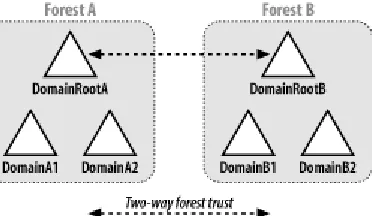
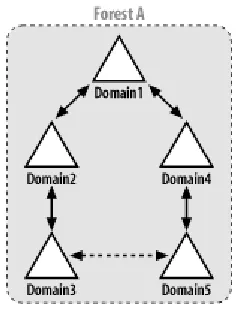
Assuming each company within the conglomerate wants its Active Directory domain name to be based on its company name, you have two choices for setting up this type of environment. You could either make each company's domain(s) a domain tree within a single forest or you could implement multiple forests. One of the biggest differences between the two options is that all the domains within the forest trust each other, whereas separate forests by default do not trust each other. Without the trust relationships, users from one forest cannot access resources in the domains of the other forest. If you want users to be able to access resources within each company's domains, using separate domain trees is an easier approach than separate forests. Transitive trusts are established between the root domains of each domain tree within a forest. As a result, every domain within a forest, regardless of which domain tree they are in, is trusted. Figure 2-1 illustrates an example with three domain trees in a forest called rallencorp.com.
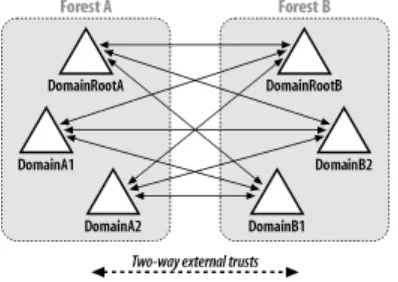
If you implement the alternative approach and create multiple Windows 2000 Active Directory forests, to create the fully trusted model you would have to create individual trusts between the domains in every forest. This can get out of hand pretty quickly if there are numerous domains. Fortunately, with Windows Server 2003 Active Directory, you can use the new trust type called forest trust to create a single transitive trust between two forest root domains. This single trust causes all of the domains in both forests to trust each other.
There are many more issues to consider when deciding how many forests, domains and domain trees to implement. For a thorough explanation of Active Directory design considerations, I recommend reading Part II of Active Directory, Second Edition (O'Reilly).
In this chapter, I cover the most common tasks that you would need to do with forests, domains, and trusts. First, I'm going to review how each is represented in Active Directory.
The Anatomy of a Domain
Domains are represented in Active Directory by domainDNS objects. The distinguished name
(DN) of a domainDNS object directly corresponds to the fully qualified DNS name of the domain. For example, the amer.rallencorp.com domain would have a DN of
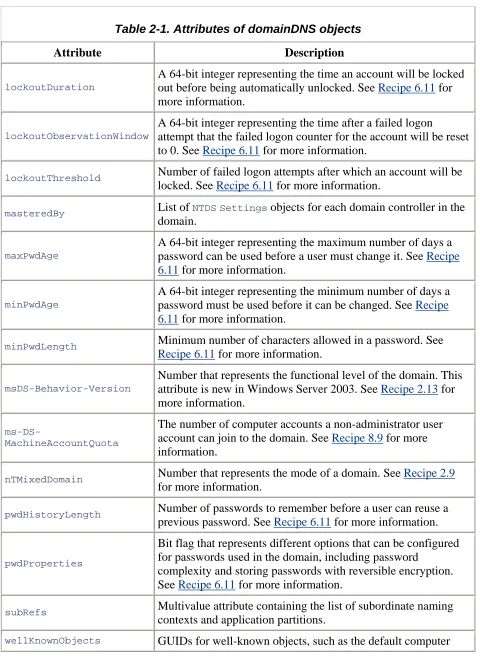
dc=amer,dc=rallencorp,dc=com. Table 2-1 contains a list of some of the interesting attributes that are available on domainDNS objects.
Table 2-1. Attributes of domainDNS objects
Attribute Description
dc Relative distinguished name of the domain (e.g., amer). fSMORoleOwner
The NTDS Settings object DN of the domain controller that is
the PDC Emulator FSMO role owner for the domain. See Recipe 3.25 for more information.
gPLink List of GPOs that have been applied to the domain. By default it
Table 2-1. Attributes of domainDNS objects
Attribute Description
lockoutDuration
A 64-bit integer representing the time an account will be locked out before being automatically unlocked. See Recipe 6.11 for more information.
lockoutObservationWindow
A 64-bit integer representing the time after a failed logon
attempt that the failed logon counter for the account will be reset to 0. See Recipe 6.11 for more information.
lockoutThreshold Number of failed logon attempts after which an account will be
locked. See Recipe 6.11 for more information.
masteredBy List of NTDSSettings objects for each domain controller in the
domain.
maxPwdAge
A 64-bit integer representing the maximum number of days a password can be used before a user must change it. See Recipe 6.11 for more information.
minPwdAge
A 64-bit integer representing the minimum number of days a password must be used before it can be changed. See Recipe 6.11 for more information.
minPwdLength Minimum number of characters allowed in a password. See
Recipe 6.11 for more information.
msDS-Behavior-Version
Number that represents the functional level of the domain. This attribute is new in Windows Server 2003. See Recipe 2.13 for more information.
ms-DS-MachineAccountQuota
The number of computer accounts a non-administrator user account can join to the domain. See Recipe 8.9 for more information.
nTMixedDomain Number that represents the mode of a domain. See Recipe 2.9
for more information.
pwdHistoryLength Number of passwords to remember before a user can reuse a
previous password. See Recipe 6.11 for more information.
pwdProperties
Bit flag that represents different options that can be configured for passwords used in the domain, including password
complexity and storing passwords with reversible encryption. See Recipe 6.11 for more information.
subRefs Multivalue attribute containing the list of subordinate naming
contexts and application partitions.
Table 2-1. Attributes of domainDNS objects
Attribute Description
container. See Recipe 8.11 for more information.
In Active Directory, domains are naming contexts (NCs) and are also represented under the
Partitions container in the Configuration NC as crossRef objects. In this case, the relative
distinguished name (RDN) of the crossRef object is the NetBIOS name of the domain as
defined by the netBIOSName attribute of the domain object. In our previous example of
amer.rallencorp.com, the corresponding crossRef object for the domain (assuming the forest
name was rallencorp.com) would be located at
cn=AMER,cn=Partitions,cn=Configuration,dc=rallencorp,dc=com. Table 2-2 contains some interesting attributes of crossRef objects.
All naming contexts and application partitions have crossRef objects in
[image:25.612.70.544.291.540.2]the Partitions container, not just domains.
Table 2-2. Attributes of crossRef objects
Attribute Description
cn Relative distinguished name of the object. For domains, this will be the NetBIOS
name of the domain.
dnsRoot Fully qualified DNS name of the domain.
nCName Distinguished name of the corresponding domainDNS object.
netBIOSName NetBIOS name of the domain. See Recipe 2.7 for more information.
trustParent Distinguished name of the crossRef object representing the parent domain (if applicable).
The Anatomy of a Trust
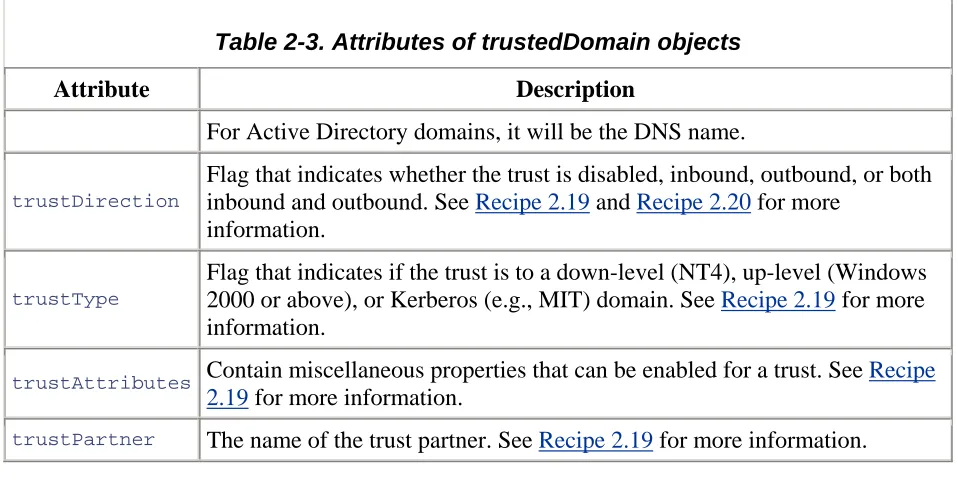
Trusts are stored as trustedDomain objects within the System container of a domain. Table 2-3 lists some of the important attributes of trustedDomain objects.
Table 2-3. Attributes of trustedDomain objects
Attribute Description
cn Relative distinguished name of the trust. This is the name of the target
Table 2-3. Attributes of trustedDomain objects
Attribute Description
For Active Directory domains, it will be the DNS name.
trustDirection
Flag that indicates whether the trust is disabled, inbound, outbound, or both inbound and outbound. See Recipe 2.19 and Recipe 2.20 for more
information.
trustType
Flag that indicates if the trust is to a down-level (NT4), up-level (Windows 2000 or above), or Kerberos (e.g., MIT) domain. See Recipe 2.19 for more information.
trustAttributes Contain miscellaneous properties that can be enabled for a trust. See Recipe
2.19 for more information.
trustPartner The name of the trust partner. See Recipe 2.19 for more information.
A trust also has a corresponding user object in the Users container of a domain. This is where the trust password is stored. The RDN of this user object is the same as the cn attribute for the
corresponding trustedDomain object with a $ appended.
The Anatomy of a Forest
A forest is a logical structure that is a collection of domains, plus the configuration and schema naming contexts, and application partitions. Forests are considered the primary security
boundary in Active Directory. By that I mean, if you need to definitively restrict access to a domain such that administrators from other domains do not have access, you need to implement a separate forest (and subsequently a domain in that forest), instead of using a domain within the current forest. This is due to the transitive trust relationship between all domains in a forest and the extensive permissions that members of the Domain Admins group have. Unlike domains and
trusts, a forest is not represented by a container or any other type of object in Active Directory. At a minimum, a forest consists of three naming contexts: the forest root domain, the
Configuration NC, and the Schema NC. The Partitions container in the Configuration NC contains the complete list of partitions that are associated with a forest. Here is a description of the type of partitions that can be part of a forest:
Configuration NC
Contains data that is applicable across all of the domains and, thus, is replicated to all domain controllers in the forest. Some of this data includes the site topology, list of partitions, published services, display specifiers, and extended rights.
Contains the objects that describe how data can be structured and stored in Active Directory. The classSchema objects in the Schema NC represent class definitions for objects. The attributeSchema objects describe what data can be stored with classes.
The Schema NC is replicated to all domain controllers in a forest.
Domain NC
As described earlier, a domain is a naming context that holds domain-specific data including user, group, and computer objects.
Application partitions
Configurable partitions that can be rooted anywhere in the forest and can be replicated to any domain controller in the forest. These are not available with Windows 2000.
Recipe 2.1 Creating a Forest
2.1.1 Problem
You want to create a new forest by creating a new forest root domain.
2.1.2 Solution
2.1.2.1 Using a graphical user interface
Run dcpromo from a command line or Start Run.
On a Windows 2000 domain controller:
1. Select Domain controller for a new domain and click Next. 2. Select Create a new domain tree and click Next.
3. Select Create a new forest of domain trees and click Next.
4. Follow the rest of the configuration steps to complete the wizard. On a Windows Server 2003 domain controller:
1. Select Domain controller for a new domain and click Next. 2. Select Domain in a new forest and click Next.
3. Follow the rest of the configuration steps to complete the wizard. 2.1.2.2 Using a command-line interface
2.1.3 Discussion
The act of creating a forest consists of creating a forest root domain. To do this, you need to use the dcpromo executable to promote a Windows 2000 or Windows Server 2003 server to be a
domain controller for a new domain. The dcpromo program has a wizard interface that requires
you to answer several questions about the forest and domain you want to promote the server into. After dcpromo finishes, you will be asked to reboot the computer to complete the promotion
process.
2.1.4 See Also
Recipe 2.3 for creating a domain, Recipe 3.1 for promoting a domain controller, Recipe 3.4 for automating the promotion of a domain controller, and MS KB 238369 (HOW TO: Promote and Demote Domain Controllers in Windows 2000)
Recipe 2.2 Removing a Forest
2.2.1 Problem
You want to tear down a forest and decommission any domains contained within it because you no longer need it.
2.2.2 Solution
To remove a forest, you need to demote, using dcpromo, all the domain controllers in the forest. When you run dcpromo on an existing domain controller, you will be given the option to demote
the machine to a member server. After that is completed and depending on how your
environment is configured, you may need to remove WINS and DNS entries that were associated with the domain controllers and domains unless they were automatically removed via WINS deregistration and dynamic DNS (DDNS) during demotion. The following commands can help determine if all entries have been removed:
> netsh wins server \\<WINSServerName> show name <ForestDNSName> 1c > nslookup <DomainControllerDNSName>
> nslookup -type=SRV _ldap._tcp.gc._msdcs.<ForestDNSName> > nslookup <ForestDNSName>
You will also want to remove any trusts that have been established for the forest (see Recipe 2.22 for more details). For more information on how to demote a domain controller, see Recipe 3.3.
2.2.3 Discussion
The method described in the solution is the graceful way to tear down a forest. You can also use a brute force method to remove a forest by simply reinstalling the operating system on all domain controllers in the forest. This method is not recommended except in lab or test
are unaware the forest is being removed and may generate errors until they are rebuilt. You'll also need to make sure any DNS resource records for the domain controllers are removed from your DNS servers since the domain controllers will not dynamically remove them like they do during the demotion process.
2.2.4 See Also
Recipe 2.19 for viewing the trusts for a domain, Recipe 2.22 for removing a trust, and Recipe 3.3 for demoting a domain controller
Recipe 2.3 Creating a Domain
2.3.1 Problem
You want to create a new domain that may be part of an existing domain tree or the root of a new domain tree.
2.3.2 Solution
2.3.2.1 Using a graphical user interface
Run dcpromo from a command line or Start Run.
On a Windows 2000 domain controller, select "Domain controller for a new domain" and then you can select one of the following:
• Create a new domain tree Place this new domain tree in an existing forest • Create a new child domain in an existing domain tree
On a Windows Server 2003 domain controller, select "Domain controller for a new domain" and then you can select one of the following:
• Domain in a new forest
• Child domain in an existing domain tree • Domain tree in an existing forest
2.3.2.2 Using a command-line interface
dcpromo can also be run in unattended mode. See Recipe 3.4 for more details.
2.3.3 Discussion
The two options dcpromo offers to create a new domain are adding the domain to an existing
domain in an existing domain tree. If you are creating the first domain in a forest or a domain outside the namespace of the forest root, you are creating a domain in a new domain tree. Each domain increases the support costs of Active Directory due to the need for maintaining additional domain controllers and time spent configuring and maintaining the domain. When designing an Active Directory forest, your goal should be to keep the number of domains that are necessary to a minimum.
2.3.4 See Also
Recipe 3.1 for promoting a domain controller, Recipe 3.4 for automating the promotion of a domain controller, MS KB 238369 (HOW TO: Promote and Demote Domain Controllers in Windows 2000), and MS KB 255248 (HOW TO: Create a Child Domain in Active Directory and Delegate the DNS Namespace to the Child Domain)
Recipe 2.4 Removing a Domain
2.4.1 Problem
You want to remove a domain from a forest. You may need to remove a domain during test scenarios or if you are collapsing or reducing the number of domains in a forest.
2.4.2 Solution
Removing a domain consists of demoting each domain controller in the domain, which is accomplished by running dcpromo on the domain controllers and following the steps to remove
them. For the last domain controller in the domain, be sure to select "This server is the last domain controller in the domain" in the dcpromo wizard so that the objects associated with the
domain get removed. If you do not select that option for the last domain controller in the domain, take a look at Recipe 2.5 for how to remove an orphaned domain.
If the domain you want to remove has subdomains, you have to remove the subdomains before proceeding.
After all domain controllers have been demoted and depending on how your environment is configured, you may need to remove WINS and DNS entries that were associated with the domain controllers and domain unless they were automatically removed via WINS deregistration and DDNS during the demotion process. The following commands can help determine if all entries have been removed:
> netsh wins server \\<WINSServerName> show name <DomainDNSName> 1c > nslookup <DomainControllerName>
You will also want to remove any trusts that have been established for the domain (see Recipe 2.22 for more details). For more information on how to demote a domain controller, see Recipe 3.3.
2.4.3 Discussion
The "brute force" method for removing a forest as described in the Discussion for Recipe 2.2 is not a good method for removing a domain. Doing so will leave all of the domain controller and server objects, along with the domain object and associated domain naming context hanging around in the forest. If you used that approach, you would eventually see a bunch of replication and file replication service (FRS) errors in the event log from failed replication events.
2.4.4 See Also
Recipe 2.19 for viewing the trusts for a domain, Recipe 2.22 for removing a trust, Recipe 3.3 for demoting a domain controller, MS KB 238369 (HOW TO: Promote and Demote Domain
Controllers in Windows 2000), and MS KB 255229 (Dcpromo Demotion of Last Domain Controller in Child Domain Does Not Succeed)
Recipe 2.5 Removing an Orphaned Domain
2.5.1 Problem
You want to completely remove a domain that was orphaned because "This server is the last domain controller in the domain" was not selected when demoting the last domain controller, the domain was forcibly removed, or the last domain controller in the domain was decommissioned improperly.
2.5.2 Solution
2.5.2.1 Using a command-line interface
The following ntdsutil commands (in bold) would forcibly remove the emea.rallencorp.com
domain from the rallencorp.com forest. Replace <DomainControllerName> with the hostname of the Domain Naming Flexible Single Master Operation (FSMO) for the forest:
> ntdsutil "meta clean" "s o t" conn "con to server <DomainControllerName >" q q
metadata cleanup: "s o t" "list domains"
Found 4 domain(s)
0 - DC=rallencorp,DC=com
1 - DC=amer,DC=rallencorp,DC=com 2 - DC=emea,DC=rallencorp,DC=com 3 - DC=apac,DC=rallencorp,DC=com select operation target: sel domain 2
No current site
No current Naming Context select operation target: q
metadata cleanup: remove sel domain
You will receive a message indicating whether the removal was successful.
2.5.3 Discussion
Removing an orphaned domain consists of removing the domain object for the domain (e.g., dc=emea,dc=rallencorp,dc=com), all of its child objects, and the associated crossRef object in
the Partitions container. You need to target the Domain Naming FSMO when using the ntdsutil command because that server is responsible for creation and removal of domains.
In the solution, shortcut parameters were used to reduce the amount of typing necessary. If each parameter were typed out fully, the commands would look as follows:
> ntdsutil "metadata cleanup" "select operation target" connections "connect to
server <DomainControllerName >" quit quit
metadata cleanup: "select operation target" "list domains"
Found 4 domain(s)
0 - DC=rallencorp,DC=com
1 - DC=amer,DC=rallencorp,DC=com 2 - DC=emea,DC=rallencorp,DC=com 3 - DC=apac,DC=rallencorp,DC=com
select operation target: select domain 2
No current site
Domain - DC=emea,DC=rallencorp,DC=com No current server
No current Naming Context select operation target: quit
metadata cleanup: remove selected domain
2.5.4 See Also
Recipe 3.6 for removing an unsuccessfully demoted domain controller, MS KB 230306 (HOW TO: Remove Orphaned Domains from Active Directory), MS KB 251307 (HOW TO: Remove Orphaned Domains from Active Directory Without Demoting the Domain Controllers), and MS KB 255229 (Dcpromo Demotion of Last Domain Controller in Child Domain Does Not Succeed)
Recipe 2.6 Finding the Domains in a Forest
2.6.1 Problem
2.6.2 Solution
2.6.2.1 Using a graphical user interface
Open the Active Directory Domains and Trusts snap-in. The list of the domains in the default forest can be browsed in the left pane.
2.6.2.2 Using a command-line interface
> ntdsutil "d m" "sel op tar" c "co t s <DomainControllerName>" q "l d" q q q[RETURN]
2.6.2.3 Using VBScript
' This code gets the list of the domains contained in the ' forest that the user running the script is logged into.
set objRootDSE = GetObject("LDAP://RootDSE")
strADsPath = "<GC://" & objRootDSE.Get("rootDomainNamingContext") & ">;" strFilter = "(objectcategory=domainDNS);"
strAttrs = "name;" strScope = "SubTree"
set objConn = CreateObject("ADODB.Connection") objConn.Provider = "ADsDSOObject"
objConn.Open "Active Directory Provider"
set objRS = objConn.Execute(strADsPath & strFilter & strAttrs & strScope) objRS.MoveFirst
while Not objRS.EOF
Wscript.Echo objRS.Fields(0).Value objRS.MoveNext
wend
2.6.3 Discussion
2.6.3.1 Using a graphical user interface
If you want to view the domains for an alternate forest than the one you are logged into, right-click on "Active Directory Domains and Trusts" in the left pane, and select "Connect to Domain Controller." Enter the forest name you want to browse in the Domain field. In the left pane, expand the forest root domain to see any subdomains.
2.6.3.2 Using a command-line interface
In the ntdsutil example, shortcut parameters were used to reduce the amount of typing needed.
If each parameter were typed out fully, the command line would look like:
> ntdsutil "domain management" "select operation target" connections "connect[RETURN]
to server <DomainControllerName>" quit "List domains" quit quit quit



![arxiv: v1 [astro-ph.im] 6 Dec 2012](data:image/gif;base64,R0lGODlhAQABAIAAAP///wAAACH5BAEAAAAALAAAAAABAAEAAAICRAEAOw==)