AdaM: Adapting Multi-User Interfaces for Collaborative
Environments in Real-Time
Seonwook Park
1, Christoph Gebhardt
1†, Roman R¨adle
2†, Anna Feit
3, Hana Vrzakova
4, Niraj Dayama
3,
Hui-Shyong Yeo
5, Clemens Klokmose
2, Aaron Quigley
5, Antti Oulasvirta
3, Otmar Hilliges
11ETH Zurich 2Aarhus University 3Aalto University 4University of Eastern Finland 5University of St Andrews
[image:1.612.55.564.184.265.2]Optimization & Real-time Adaptation
Figure 1. Given a graphical user interface (left), AdaM automatically decides which UI elements should be displayed on each device in real-time. Our optimization is designed for multi-user scenarios and considers user roles and preferences, device access restrictions and device characteristics.
ABSTRACT
Developing cross-device multi-user interfaces (UIs) is a chal-lenging problem. There are numerous ways in which content and interactivity can be distributed. However, good solutions must consider multiple users, their roles, their preferences and access rights, as well as device capabilities. Manual and rule-based solutions are tedious to create and do not scale to larger problems nor do they adapt to dynamic changes, such as users leaving or joining an activity. In this paper, we cast the problem of UI distribution as an assignment problem and pro-pose to solve it using combinatorial optimization. We present a mixed integer programming formulation which allows real-time applications in dynamically changing collaborative set-tings. It optimizes the allocation of UI elements based on device capabilities, user roles, preferences, and access rights. We present a proof-of-concept designer-in-the-loop tool, al-lowing for quick solution exploration. Finally, we compare our approach to traditional paper prototyping in a lab study.
ACM Classification Keywords
H.5.m. Information Interfaces and Presentation (e.g. HCI): Miscellaneous
Author Keywords
Distributed User Interface; Cross-Device Interaction; UI Adaptation; Optimization;
†These authors contributed equally to this work.
Permission to make digital or hard copies of all or part of this work for personal or classroom use is granted without fee provided that copies are not made or distributed for profit or commercial advantage and that copies bear this notice and the full citation on the first page. Copyrights for components of this work owned by others than ACM must be honored. Abstracting with credit is permitted. To copy otherwise, or republish, to post on servers or to redistribute to lists, requires prior specific permission and/or a fee. Request permissions from [email protected].
CHI 2018, April 21–26, 2018, Montreal, QC, Canada.
© 2018 Copyright is held by the owner/author(s). Publication rights licensed to ACM. ACM 978-1-4503-5620-6/18/04...$15.00.
https://doi.org/10.1145/3173574.3173758
INTRODUCTION
Many users now carry not one, but several computing devices, such as laptops, smartphones or wearable devices. In addition, our environments are often populated with public and semi-public displays. In collaborative settings, such as at work or in education, many application scenarios could benefit from UIs that are distributed across available devices and potentially also across multiple users participating in a joint activity. How-ever, traditional interfaces are designed for a single device and are neither aware nor do they benefit from having multiple input and output channels available. This may be ascribed, in part, to the significant complexity of designing and imple-menting such cross device interfaces and the combinatorial complexity of the question of which UI element should be placed onto which of the users’ devices.
Our goal is to provide computational support for the task of distributing elements in a rapid and controllable way among devices in a collaborative setting. Consider a concert, exhibi-tion, birthday party, or a work meeting: depending on their device capabilities, co-present users would have parts of an interface displayed on their devices. Instead of device own-ers manually decidingassignment(who gets what), elements are automatically distributed such that the most important ele-ments are always available while taking into account personal preferences and constraints including privacy. Such collabo-rative settings are inherently dynamic with users and devices appearing and disappearing at various points in time. This requires a real-time approach to accommodate dynamic device configurations, user preferences and user roles.
does not provide methods to solve the assignment problem. Prior to this paper, no automatic solutions existed for element distribution in collaborative settings which considers critical constraints such as access rights, privacy, and roles and their dynamic evolution over time.
We propose an optimization-based approach that automatically distributes elements to available devices by solving a many-to-many assignment problem, constraining the optimization by available screen real-estate. Given a list of UI elements and available devices, user and device descriptions, it distributes the UI elements based on an objective that maximizes the usefulness of an element on a device while simultaneously maximizing completeness of the UI from a user’s perspec-tive (i.e., ensuring that important elements are present for each user). More precisely our method (1) takes role require-ments and (2) user preferences into account when distributing elements, (3) adapts to changing user roles or preferences de-pending on a given task, and (4) adapts the DUI in real-time based on presence of users and devices in collaborative sce-narios. Our formulation can be solved quickly, easily scaling up to thousands of users and devices. The benefit to users and designers is the new type of control provided: instead of instructinghowelements should be distributed (a heuristic or rule-based approach), or completing it manually, developers and designers can express qualities of “good” distributions. As shown in Figure 1 this control offers substantial promise for the creation of applications that effectively take advantage of the wide range of capabilities in cross-device ecosystems for collaborative multi-user interfaces.
We demonstrate the utility of our approach with a step-by-step walkthrough of how the system adapts to various roles and preferences in a company meeting setting, and demonstrate real-time adaptiveness in a fully implemented co-located me-dia sharing application. Furthermore, we suggest how the algorithm could scale to address previously impossible prob-lem scales. In addition, we evaluate our approach in a user study and compare it to traditional paper prototyping.
RELATED WORK
Cross-device or “Distributed User Interfaces” (DUIs) offer appealing features including, more pixels [48], new forms of engagement at varying scales [49], reduction in system com-plexity by splitting and sharing functionality [3] and targeting interactions across and between devices (e.g., [34]). This vi-sion has given rise to sustained research interest within the HCI community from research on taxonomies [49, 31], inter-action techniques, and middleware [21]. We briefly discuss related work across several related areas from DUIs to UI optimization.
Cross Device User Interfaces
People now use multiple devices with displays (e.g., laptops, phones, tablets), often at the same time. Commercial software solutions exist for mirroring (e.g., AirPlay), I/O targeting (e.g., Microsoft Continuum), coordinating (e.g., Apple Continuity) or stitching multiple displays (e.g., Equalizer [4]) into a single canvas. However, design and development for such settings is
entirely manual and requires the developer to consider the myr-iad set of inputs, outputs and device configurations to achieve even rudimentary cross-device experiences. When designing for multiple users this problem is further exacerbated due to access rights, privacy and user preference concerns.
Existing cross-device research has highlighted challenges in adapting DUIs for collaborative environments in real-time, including problems in testing multi-device experiences [3], user interface widget adoption [11], functional UI coordination [46], component role allocation [50], spatial awareness [42] and changes in related parallel use [19]. Addressing these challenges has given rise to the approach taken here.
Our work is concerned with computational support for the design of distributed or cross-device UIs [6, 31] in the sense of acrossmedia servicewhere the functionality of a single appli-cation is decomposed and shared across devices and users. We propose an algorithmic approach to functionality assignment according to device strengths and user preferences, extending prior rule-based approaches [18, 32]. Functionality distribu-tion to different devices is a crucial element of DUI design since a balanced assignment of interactive components can reduce the complexity of the original system [3].
Rule-based approaches [18, 32] provide insights into cross-device interaction patterns in the real-world but do not scale to many devices or multi-user scenarios. We believe that our bottom-up approach of modeling DUI usability in multi-user scenarios opens up unexplored application areas.
Toolkits and Middleware
Existing toolkits have explored cross device interaction with combinations of mobile devices [13, 37, 41, 47, 48], mo-bile/desktop devices [15, 28, 32, 34], mobile/display wall de-vices [1, 21] and wearables [2, 10, 17]. Alternative approaches have focused on the development of conceptual frameworks [23, 39]. Within this work, common applications which sup-port multiple people, with cross device interactions, include authoring [21], web browsing [9, 14, 26] and collaborative visualizations [1].
Prior work has often focused on providing support for keeping application and UI states synced across devices using conven-tional software development practices [21]. Our work builds on these capabilities to go beyond the state-of-the art in the automatic distribution of UI elements to users and devices.
Mobile Co-located Interaction and Collaboration
mobile co-located interactions. Additionally, we address the dynamicity of mobile interactions in terms of available users and devices by providing a real-time formulation.
Computational UI Generation and Retargeting
Modern optimization methods have been proposed to automate UI generation and retargeting. SUPPLE [8] uses decision-theoretic optimization to automatically generate UIs adapted to a person’s abilities and computational solutions have been shown for example in PUC [35], automatically creating con-trol interfaces for complex appliances. Smart Templates [36] uses parameterized templates to specify when to automatically apply standard design conventions. One important observa-tion that we build on in this work is that many GUI design problems such as layout of menus, web pages, and keyboards can be formulated as an assignment problem [20, 38].
Model-based approaches for UI retargeting have proposed formal abstractions of user interfaces (UIDLs) to describe the interface and its properties, operation logic, and relationships to other parts of the system [5] which can then be used to compile interfaces in different languages and to port them across platforms. Data-driven approaches have been explored by Kulkarni and Klemmer [22] to automatically transform desktop-optimized pages to other devices. GUMMY [29] retargets UIs from one platform to another by adapting and combining features of the original UI.
To the best of our knowledge, no prior work addresses the computational assignment of UI elements to devices in multi-user settings that would consider critical constraints such as access rights, privacy, and roles and their dynamic evolution over time. AdaM provides a real-time capable optimization formulation and implementation using mixed integer linear programming.
CONCEPTS
The type of scenarios we consider in this work are co-located multi-user events – such as a meeting, party, or lecture. Any number of people with various devices and roles can be in-volved. An interactive application is assumed to consist of elements of different types, and the participants show varying interest toward them, but not all devices can show all elements. We further assume that this setup and the need for interactivity can change dynamically as time progresses. In order to cast such scenarios for combinatorial optimization, we need to in-troduce and define a few central concepts. These concepts are the basis for the objectives and constraints of the assignment problem formulation we develop in the next section.
Element Importance
Depending on the preferences of users present, the display of some elements should be prioritized. For example, in the lecture scenario the slides need to be presented on a public display, whereas a chat channel for the audience may only be displayed if auxiliary, personal devices (e.g., phones) are avail-able. This importance value may be defined by the application developer or user. Element importance is one of the aspects an optimization scheme needs to consider and trade-off with other, potentially contradictory, preferences.
Device Access
In collaborative settings we assume that personal devices as well as shared devices must be considered. An example of a shared device is a large screen in a conference room, whereas a private device can range from smart wearables to laptop computers. In order to apply a user’s preferences through the importance metric, we must know which devices are available to a user. Thus, we can describe the user’s access to a device by its availability to the user, defined either in terms of ownership or physical proximity.
Element Permission
We integrate user roles into our optimization scheme by con-sidering that some elements should not be made available to specific users. For example, while a disc jockey may require access to the audio mixer UI, the light technician should focus on stage lighting and the stage crew should not have access to either. To effectively represent such user roles in the final DUI, one would have to make sure that users are authenticated properly. We assume that mechanisms for this exist.
Device Characteristics
An element which requires frequent and quick text input should be assigned to a device with either a physical or soft keyboard (e.g., laptop, phone) rather than to a display only (e.g., TV). Similarly, visually rich elements such as presen-tation slides or a video should not be placed on small-screen devices (e.g., smartwatch). Similar to Panelrama [51], we consider visual quality, pointing and text input mechanisms as device characteristics.
Element Requirements
Complementary to device requirements we also define element requirements. Not all elements can be shown on every terminal. An element such as a drawing canvas may require precise pointing input as well as high visual fidelity, where assignment to a touchscreen tablet would be preferred over a small phone.
OPTIMIZATION FORMULATION
With above concepts in place we develop a formalization as a mixed integer program that can be solved with state-of-the-art ILP solvers such as Gurobi [12]. These solvers can automatically search for solutions that maximize the objective and satisfy the defined constraints while assigning integer solutions to decision variables and give formal bounds on the solution quality with respect to the objective function. In the following, we define the overall objective. The subsections define each of its terms in detail.
Main Objective and Decisions
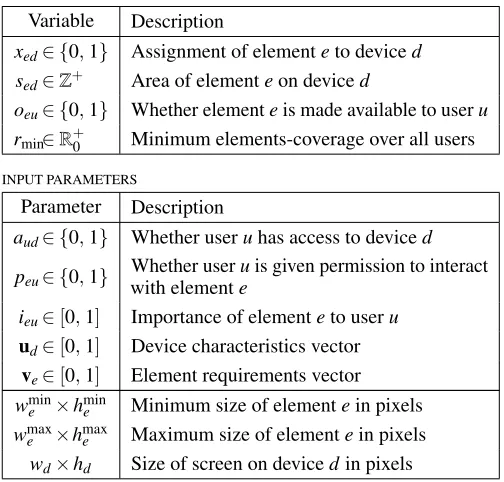
DECISION VARIABLES
Variable Description
xed∈ {0,1} Assignment of elementeto deviced sed∈Z+ Area of elementeon deviced
oeu∈ {0,1} Whether elementeis made available to useru rmin∈R+0 Minimum elements-coverage over all users
INPUT PARAMETERS
Parameter Description
aud∈ {0,1} Whether useruhas access to deviced peu∈ {0,1} with elementWhether userueis given permission to interact
ieu∈[0,1] Importance of elementeto useru
ud∈[0,1] Device characteristics vector
ve∈[0,1] Element requirements vector wmine ×hmine Minimum size of elementein pixels wmax
[image:4.612.53.305.68.309.2]e ×hmaxe Maximum size of elementein pixels wd×hd Size of screen on devicedin pixels
Table 1. Description and ranges of variables and input parameters.
weighted sum of the normalized terms (∈[0,1]): max
e,d wq ˆ
Q+wcCˆ, (1)
wherewq+wc=1. We empirically setwq=0.8. Elements e∈E, devicesd∈D, and usersu∈Uare considered. In this study, we only consider the assignment of elements to devices. The problem of layout of elements on a device is assumed to be performed by responsive design practices common in web design. In our Demo Application section we demonstrate how a thin layer of UI code is sufficient to create fully functional user facing applications.
At the core of our method lies the decision on how to assign elementeto deviced, defined as,
xed=
1 ifeassigned tod
0 otherwise (2)
All other decision variables pertaining to secondary optimiza-tion criteria such as element size and element count (per user) and input parameters are defined in Table 1.
Quality Term (Q)
The quality of the final assignment relies on the suitability of assigning an elementeto devicedin terms of device character-isticsudand element requirementsve.udandveare 4-element vectors with values in range[0,1]. The values represent vi-sual quality and availability of text input, touch pointing, and mouse pointing. This is similar to the approach in [51].
In addition, we take users’ preferences throughieuinto account and consider the area that an element would occupy on a device. As an element cannot take up more space than is available on the display of a device, this consideration proves
to be crucial for ensuring that not all elements are assigned to every device. For each device, a mean importanceied is calculated over all users who have access to this device. By taking the mean, we aim to balance the preferences of multiple users. We also aim to maximize the size of more important and compatible elements. That is, elements which are capable of being larger and benefit from additional screen real-estate (e.g., HD video) should be allowed to do so. Hence, we assume that a larger version of an element exhibits better visual quality than a smaller version.
The final quality term is then defined as:
Q=
∑
e
∑
dcediedsed (3)
where,
ced=ud·ve and ied=
∑
uieuaud/
∑
uaud
are combined input parameters describing device and element characteristics (ced) and importance of element to user (ied).
Completeness Term (C)
When assigning elements across devices, we must furthermore consider and ensure the usefulness of the resulting UI from each user’s perspective. With the element permission param-eterpeu, we define a subset of elements which a user should be able to interact with. To ensure that the DUI is complete in the sense that all necessary functionality can be accessed by a given user in a collaborative multi-user scenario, we explicitly model the completeness of the UI per user.
Intuitively the completeness of the DUI for a user can be defined by:
ru= ∑eoeu
∑epeu
∀e,u (4)
where,
oeu=
1 if∑daudxed>0
0 otherwise ∀e,u (5)
The completeness variablerudescribes the proportion of UI elements that a user has access to. A user withru=1 would have access to all elements which she requires for her role, that is, all elements withpeu=1.
The decision variable oeu represents whether an elemente has been made available by assignment to a useru, taking into account the devices for which the user has access to (i.e., whereaud=1). This variable is determined by maximizing our objective (1) and applying the following constraints:
oeu≤1 and oeu≤
∑
daudxed. (6)
In addition, we consider the least privileged user, that is, the user with lowestru. This variable is denotedrmin and it is determined by applying the following additional constraints:
rmin≥0 and rmin≤ ∑eoeu
∑epeu
We now formulate the completeness term in the objective as,
C=
∑
u
∑
eoeu+rmin (8)
where we maximize the mean UI completeness of users, and in particular try to improve the result for users withrmincoverage.
Assignment Constraints
The previous terms alone cannot sufficiently constrain the optimization. In particular, we cannot support private elements or limit the assignment of elements in a meaningful way. In this section, we describe state and describe the constraints which allow for an effective optimization formulation.
Element Area Constraint
The element size variablesed must be determined based on whether an elementeis assigned to a devicedat all. We thus define the following for alle,d:
xed=0 =⇒ sed=0
xed=1 =⇒ smine ≤sed≤min(smaxe ,sd),
(9)
ensuring that the area of an element be zero if it is not assigned and that it lies between user-specified bounds otherwise.
Device Capacity Constraint
In Eq. (3), we aim to maximize the size of all elements. We constrain this maximization by saying that the assignment of element sizes should not exceed the device’s display area. An assumption is made to say that a sum of the area of rectangular elementseassigned on devicedrepresents the total area used by the elements. While this assumption would not always hold, it works in practice as shown in our evaluations. The device capacity constraint is formulated as follows:
sed≤mxed ∀e,d
∑
e
sed≤wdhd ∀d. (10)
wheremis a sufficiently large number.
Due to our simplifying assumption, we must explicitly ensure that the minimal width and height of an element allows it to be assigned to a device. This is expressed with the following constraints:
wmine xed≤wd ∀e,d
hmine xed≤hd ∀e,d. (11) Element Permission Constraint
When assigning an element, we must consider the element permissions variablepeu, which must be evaluated for every assignmentxed. We do this by considering a devicedfor which some users have access (aud=1). If any of these users do not have permission to interact with an elemente(i.e.,peu=0), then the element should not be assigned to the device. This is expressed as:
∑
u1(aud>peu)>0 =⇒ xed=0 ∀e,d. (12)
Device Accessibility Constraints
Furthermore, a device which is accessible by none of the users should not have any elements assigned,
xed≤
∑
uaud ∀e,d. (13)
Zero Constraints
Finally, we check if the compatibility or importance of an assignmentxed is zero with:
ced=0 =⇒ xed=0 ∀e,d ied=0 =⇒ xed=0 ∀e,d
(14)
We apply these constraints to make a distinction between very low importance or compatibility and zero-value input parameters. This allows for users to express a definite decision against an element assignment.
User-defined Element Assignment
Though not shown, our work may simply be extended to give users explicit control on element-device assignment. For in-stance, to ensure that element ˜eis assigned on device ˜d, the constraintxe˜d˜=1 could be added. Similarly, xe˜d˜=0 can ensure that ˜eis not assigned to ˜d. Note that the user-facing application should account for cases where the additional con-straint cannot be fulfilled such as when minimum element size exceeds device capacity.
ADAM DESIGN TOOL
The AdaM Design Tool is a proof-of-concept designer-in-the-loop tool that allows for rapid solution space exploration. It consists of the AdaM Application Prototype and the AdaM Simulator. The Application Prototype allows the designer to specify input parameters required by the optimizer to allocate elements to devices and automatically applies the optimizer re-sult. The simulator allows for quick tuning of input parameters by applying changes in device configurations immediately.
We build our tool on top of Codestrates [43] and Webstrates [21], which transparently synchronize the state of the Docu-ment Object Model (DOM) of webpages. Codestrates further enables collaborative prototyping and rapid iterations of AdaM applications. Communication with the optimizer back-end happens over a websocket connection.
AdaM Application Prototype
The AdaM Application Prototype includes an integrated de-velopment environment (IDE) for editing application content and behavior, as well as a configuration panel UI that allows for changing the parameters of optimizable elements. The platform is web-based and each AdaM application is a single web-page that contains optimizable elements, that it can hide or show based on the optimized solution.
Figure 2. AdaM application in edit mode with the HTML of an applica-tion (left) and its CSS and JavaScript (right).
Figure 3. Workflow to open configuration panel UI to specify element parameters. Media sharing application (A) with highlighted optimizable controls element (B) and open configuration panel (C).
The designer has to annotate HTML elements with the attribute
optimizable="true"to consider them for optimization. Ini-tially, the optimizer uses default parameters for elements but they can be specified by the designer. Pressing the control key on the keyboard and clicking on an optimizable element opens the configuration panel UI (Figure 3). This panel allows the designer to enter parameters related to default element-user importance, element requirements, and user permissions.
Each AdaM application communicates with the optimizer back-end by sending changes of its state (e.g., when the ap-plication has loaded, or parameters for elements that have changed), and receives updates from the optimizer including updates caused by other clients. A change includes updated user-specified parameters and user/device configuration. De-vice information are automatically read out from the deDe-vice (e.g., window width and height) or can be set as URL parame-ters. This is useful for testing with different devices.
AdaM Simulator
Testing multi-device user interfaces is inherently difficult, as it requires managing the input and output of multiple (often heterogeneous) devices at the same time. To overcome this challenge, we developed a simulator that allows us to instanti-ate a wide range of simulinstanti-ated devices in a web browser and control the device characteristics used by the optimizer. A device is simulated in an iframe pointing to a given AdaM application, parameterized to e.g., act like a user’s personal tablet or a shared interactive whiteboard.
The simulator has a pre-defined set of a device types from which the designer can choose (i.e., TV, laptop, tablet, smart-phone, and smartwatch) (Figure 1). The simulated device characteristics can be changed at any time. For example, user access, device display dimensions, or device affordances. A device in the simulator can be disabled to simulate a device leaving or enabled to simulate a device joining.
SYSTEM WALKTHROUGH
To illustrate the utility of our approach, we start by discussing simple scenarios first, building up to more challenging sce-narios and a functional end-to-end application. The initial illustrative examples build on a meeting room scenario. There are four users present in this scenario: the manager (‘boss’), her assistant, an employee, and a colleague who is presenting work results. We adjust specific parameters of our formulation per scenario and illustrate the effects.
A. User Roles
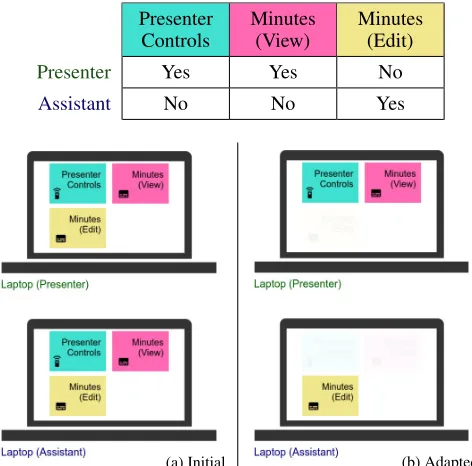
By considering user roles in our constraints, we can ensure that a particular user does not receive elements irrelevant to their role and task. A first simple use case involves the presenter and assistant. We set binary permission values between elements and user, defining the UI elements each role has access to (but not the assignment of elements to devices). For the purposes of our demonstration we only consider three UI elements:
Presenter Controls
Minutes (View)
Minutes (Edit)
Presenter Yes Yes No
Assistant No No Yes
(a) Initial (b) Adapted
Figure 4. Adapting to user roles. Giving permissions only for a subset of available elements allows for an interface which satisfies the require-ments of users’ roles.
Figure 4 shows that setting permission values only, already yields meaningful results. While the initial layout has no awareness of user roles (a), our algorithm correctly removes UI elements for unauthorized users (b).
B. User Preference
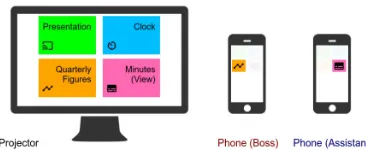
[image:6.612.325.561.268.501.2]Figure 5. Adapting to user preferences. Initially, all elements appear on the projector. Increasing the per user importance of individual elements, triggers appearance on personal devices.
Note that in this example, the size, input and output require-ments of elerequire-ments and the device characteristics are kept equal. Examples in our demo application in the next section show more sophisticated changes in user preference.
C. Device Compatibility
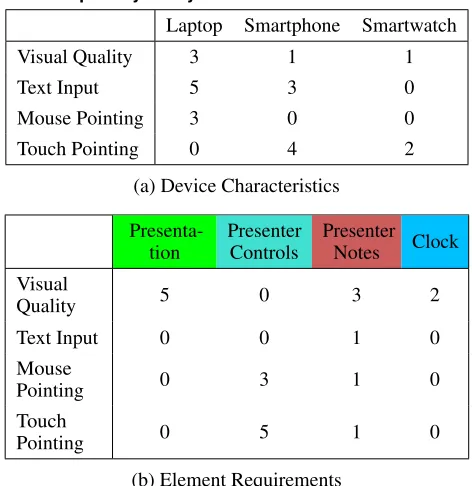
We attempt to assign each UI element to the most suitable devices by considering element-device compatibility. We show an example of a single presenter with 3 devices, shown in Figure 6. We compare (a) a case where all parameters are set to 1 against (b) a case with sensible parameters. Exact parameters are listed in the Appendix (Tab. 2). Note that other input parameters are kept fixed and that all elements including the presentation slides fit onto the smartwatch’s display.
Clearly a naive distribution of elements onto devices does not make sense since there is no guidance in terms of device affordances. The “Presenter Notes” element is placed on a small smartphone while the “Presentation” element is placed on the even smaller smartwatch. While “Presenter Controls” may be used on a laptop, arguably this element would be better placed on the available touchscreen device. In contrast, by setting sensible device characteristics and element requirement parameters, we can attain a useful assignment. While a human designer may not have duplicated the “Presenter Controls” over the smartphone and smartwatch and may have moved the “Clock” to the watch, we note that this is simply an initial assignment and can be refined quickly by tuning further input parameters such as setting the correct element size bounds and adjusting importance values. Since optimization takes only seconds this can be done interactively.
D. Individual UI Completeness
An important contribution of our work is a formulation that considers completeness of the final DUI. When elements are assigned to devices without the completeness term or con-sideration of element utility from each user’s perspective, a particular user may receive an incomplete and hence non-functional UI. We address this by encouraging the optimizer to maximize the number of elements that a user can utilize.
Figure 7 shows the effect of the completeness term. The orig-inal UI shown in (a) is incomplete, and switching the laptop off only exaggerates this issue, where the assistant is left with a single UI element. When adding the completeness term, the initial UI includes all available elements (b). After switching the laptop off, the three elements previously assigned to the laptop move to the tablet and the UI remains functional.
(a) Without device characteristics or element requirements
[image:7.612.83.266.64.139.2](b) With sensible device characteristics and element requirements parameters
Figure 6. Element assignments become more suitable when taking in to consideration device characteristics and element requirements.
=⇒
(a) Without Completeness Term
=⇒
(b) With Completeness Term
Figure 7. The completeness term ensures that the final DUI remains use-ful. (a) shows the low utility of the DUI generated by the optimizer with-out the completeness term while, (b) shows how all elements are available for the user when using the completeness term.
By introducing the DUI completeness term which improves the functionality of each user’s DUI, we ensure that utility is part of the optimizer’s objective. Our consideration results in usable DUIs and is a meaningful step towards optimizing for individual users in a multi-user setting.
DEMO APPLICATION: CO-LOCATED MEDIA SHARING After analyzing the individual components of our approach we now discuss a more end-to-end application that we implement using the proposed optimization approach. In our application, we explore the task of co-located media sharing, being partic-ularly well suited to demonstrate the capabilities to adapt to dynamic changes. This is one of the main contributions of our work and have previously not been modeled. Our approach makes it possible to adapt to arbitrary changes in a scenario in real-time and allows a designer or even the end-users to ex-press and apply their preferences to continuously improve the user experience. In this application, we design our elements using responsive web design practices. The result is a visually appealing and functional application.
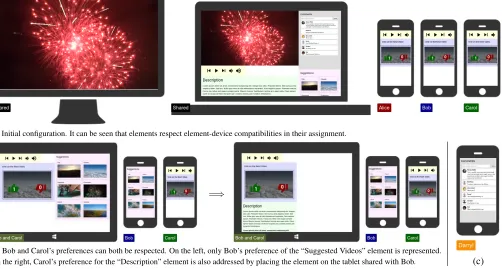
[image:7.612.323.563.257.394.2](a) Initial configuration. It can be seen that elements respect element-device compatibilities in their assignment.
=⇒
(b) Bob and Carol’s preferences can both be respected. On the left, only Bob’s preference of the “Suggested Videos” element is represented.
[image:8.612.63.565.71.340.2]On the right, Carol’s preference for the “Description” element is also addressed by placing the element on the tablet shared with Bob. (c)
Figure 8. A demonstration of our full system with optimization backend and distributed frontend. In this example, we can see4users and7devices in play with three user preferences represented. Our system quickly adapts to the changing setting with ease. (a) and (b) are explained in their own captions and (c) reflects Darryl’s preference for reading comments.
description, comments, and suggested videos. We also add a collaborative component by implementing a voting module. When a user clicks on one of the suggested videos, the video is shown on the voting element. When all users have voted, the vote concludes and the suggested video may be played.
In our scenario we begin with 1 TV, 1 shared laptop, and 3 smartphones. We do not illustrate all devices in the paper and refer the reader to our supplementary video for a visual demonstration of how our system handles dynamic user, device and user preference changes.
Initial Condition
Without any user preferences expressed, our algorithm can still produce sensible element assignments taking element size ranges, device characteristics, element requirements, and device sizes into consideration. Figure 8a shows the optimized assignment in the AdaM simulator UI. It can be seen that the most visually important video element is placed on the shared large displays, while the voting controls which require touch interaction are placed on the mobile phone displays. The comments element requires text input, and is appropriately placed on the laptop.
Bob and Carol’s preferences and shared tablet
During the video sharing session, Bob and Carol bring out their tablet. When Bob increases his importance value for the “Suggestions” element to be higher (5) than the default for everyone else (4), the element appears on the tablet. With an
even higher importance value of 8, the suggestions appear on the phone as well, replacing the voting element (see Figure 8b).
When Carol decides that she would like to read the description of the video, she sets an importance value that is higher than Bob’s importance for the suggestions element. She has to set a sufficiently higher value of 14 however, to counter-act the lower compatibility between the description element and tablet. The result of this is shown in Figure 8b as well. Our completeness measure ensures that both Carol and Bob can still access the important voting controls.
Darryl joins with his own preference
Later in the evening, Darryl joins the gathering. He prefers to read other users’ opinions, and therefore he places a high im-portance on the comments element. When he sets his personal importance value for the comments element to 10, it is placed on his personal smartphone. He can then read and comment as he pleases. This result is shown in Figure 8c.
SCALABILITY
As a test for worst-case scenarios, we randomly generate a large number of elements, devices, and users, and record con-vergence time of the solver over 10 randomized runs. For users, random per-element importance values are generated and devices are generated with width/height values between 200px and 1200px. We allow all users to access all devices. Elements are generated with minimum width/height of 100px and maximum width/height of 1600px with 10px increments between randomized values.
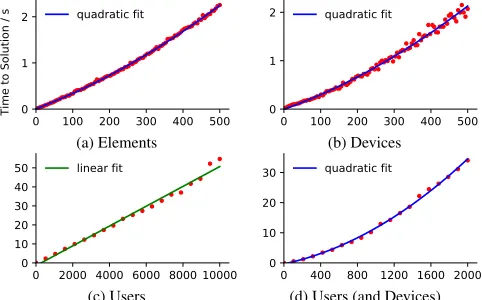
Figure 9 summarizes the results. In (a), the input data con-sists of 20 devices and 10 users with an increasing number of elements. In (b), we input 20 elements and 10 users with an increasing number of devices. In (c), there are 50 devices, 20 elements, and up to 104users to show an extreme scenario. All users have randomized personal preferences. To consider a more realistic case, we fix the number of elements to 20 and vary both users and devices in (d). There are 2 personal devices per user and 1 publicly shared device per 5 users.
Our algorithm can solve a scenario with 100 users and 220 devices in≈1 second, allowing for the design of large-scale real-time adaptive systems. This speed allows for a real-time exploration of DUI configurations where a designer can deter-mine parameters suitable to a task based on instant feedback.
0 100 200 300 400 500 Number of Elements 0
1 2
Time to Solution / s
quadratic fit
(a) Elements
0 100 200 300 400 500 Number of Devices 0
1
2 quadratic fit
(b) Devices
0 2000 4000 6000 8000 10000 Number of Users 0
10 20 30 40
50 linear fit
(c) Users
0 400 800 1200 1600 2000 Number of Users 0
10 20
30 quadratic fit
[image:9.612.55.296.344.494.2](d) Users (and Devices)
Figure 9. Optimization time in seconds for varying problem sizes. In (a-c) we vary the number of elements, devices, and users independently. In (d) we vary both users and devices.
USER STUDY
We assessed the approach by asking experimental participants to design a DUI using either pen and paper or AdaM. Our goal was to understand whether our approach is easy to understand, and to see if we can observe improvements in the design process in terms of performance and experience.
Method
Participants: Six participants (3 female, 3 male) were re-cruited from our institution (students and staff). The average age was 26 (SD = 1.6, aged 24 to 27). Two participants were researchers in the area of web engineering with one of them in particular researching DUIs. Three other participants stated to have web development experience.
Tasks: The study comprised of two tasks centered around a meeting scenario: 1) Participants were asked to assign UI-elements to devices to reflect the role and preference of users as specified in the scenario (T1). 2) In the second task, some devices were switched on/off and content preferences were changed. Participants were asked to adapt the previous assign-ment accordingly (T2).
Experimental design: We tested two conditions. In the first condition (pen&paper), participants crossed out elements which did not match the given scenario on a large sheet of pa-per showing all devices of all roles (see Figure 10, left). In the second condition (AdaM), participants used sliders to specify element importance according to scenario descriptions. An additional UI displayed an overview of devices and assigned elements (see figure 10, right). We used a within-subjects design and counterbalanced the order of presentation.
Figure 10. Conditions of study (left:pen&paper, right:AdaM).
Procedure:In the beginning, participants were introduced into pen&paper andAdaM and were provided time to practice using the tool. After that participants solved T1 and T2 in the respective conditions. Tasks were completed when par-ticipants reported to be satisfied with the element to device assignment. For each task and condition, participants com-pleted the NASA-TLX and a questionnaire on satisfaction with results. At the end an exit interview was conducted. A session took on average 60 mins.
Results
In terms of perceived scenario, results satisfaction, number of scenario violations and perceived task load, the mean of responses of both conditions were within standard deviation. However, task execution time (TET) was lower forpen&paper compared to AdaM*, which indicates that the design task may not have been sufficiently difficult. This highlights the challenge of performing a fair comparison between automatic and manual designs from the designers’ perspective, where the task cannot be so difficult to be deemed unfair.
Analyzing the answers of the interviews, three participants valuedAdaM’s capability to adapt in real-time to changing device configurations. In fact, one participant even exclaimed “perfect!” after switching on a mobile phone and realizing that the automatically assigned UI elements satisfy the scenario without any further adjustment. This advantage is also evident when looking at the differences of quantitative results between the assignment task T1 and the adaption task T2. In between
tasks, the average TET improved by 103 sec withAdaM com-pared to only 14 sec inpen&paperand task load improved by 14.6 withAdaMcompared to 6.2 inpen&paper.
Another property ofAdaMthat was perceived as a “powerful” advantage over the manual approach (5 out of 6 participants) was the possibility to specify “global rules” (so named by a participant). They liked the fact that instead of assigning elements on a device level, they could specify the preference of a person and let the optimizer distributes elements over her devices. Participants commented on this capability saying “not white and black listing per device, but you specify importance per role” or “when I specify the importance I do not need to think about devices”.
Nevertheless, the same participants mentioned that the main drawback ofAdaM was less control in terms of specifying distinct element to device assignments. They struggled with finding a balance between different slider values such that the optimizer’s element-to-device-assignment matches their intention. One participant summarized that problem with: “I was able to satisfy the scenario, [but] it was difficult with the optimizer to go beyond”. A solution for this problem is to al-low the specification of element-to-device assignments as hard constraints (see paragraphUser-defined Element Assignment).
Another difficulty participants had was to understand the ex-pected outcome of a slider change (“what does it translate to when I set a slider to 15?”). Due to the non-linear nature of our formulation the outcome of the optimizer is hard to predict and thus how sliders need to be adjusted.
LIMITATIONS AND FUTURE WORK
In this paper, we laid the foundations for future work but it is not without limitations. User study participants in particu-lar had difficulty predicting the optimizer’s output (i.e., when the size bounds of the video element changes, how does the output change?), while the large number of input parameters and the difficulty of determining the best parameters caused some difficulty in implementing the demo application. These issues could be addressed by: (a) producing a rigorous DUI test framework based on empirical observations (to allow for an improved objective function formulation), (b) reducing the number of input parameters (e.g., by defining a mapping from real-world device characteristics toudor using user in-teraction logs for determiningieu), and (c) improving the DUI design-space exploration experience for designers (e.g., facili-tating easy specification of scenarios and automated mockup of heterogeneous set of devices associated with users).
A further limitation is in our evaluations. While our user study serves its purpose of confirming the general idea of our approach, low participant numbers and the simulated design task cause us to hesitate in forming generalized conclusions. Nevertheless, we have confidence in our approach as it was designed to be general and user-centred, with basic principles in mind. Thus, we believe that AdaM can be effective in real world settings and aim to conduct an in-depth analysis in the future to verify our thoughts.
Further extensions to improve user experience in AdaM-based DUIs could include: (1) consideration of user proximity and
at-tention foraud, (2) automatic determination of element-device compatibility parametersudandvebased on the affordances of devices and composition of elements, and (3) continuous adaptation to users’ changing preferences through analysis of interaction logs and visual attention tracking.
CONCLUSION
In this paper we have demonstrated a scalable approach to the automatic assignment of UI elements to users and devices in cross-device user interfaces, during multi-user events. By posing this problem as an assignment problem, we were able to create an algorithm which adapts to dynamic changes due to altering configurations of users, their roles, their preferences and access rights, as well as advertised device capabilities.
Underpinning AdaM, is a MILP solver which given an objec-tive function decides the assignment of elements to multiple devices and users. Measures for both quality, completeness along with constraints, help to guide the optimization toward satisfactory solutions, which are represented by suitable as-signments of UI elements. Following this, the layout problem is performed by responsive design practices common in web design, as shown in our application scenarios.
The AdaM application platform itself is web-based and en-ables collaborative prototyping and rapid iterations of AdaM applications. In addition, our simulator environment allows us to instantiate a wide range of simulated devices. We report on scenarios with up to 1000 users and 2200 devices along with a user study involving six participants, who are asked to assign and adapt UI-element configurations. Our qualitative results indicate that AdaM can reduce both designer and user effort in attaining ideal DUI configurations. The results are promising and suggest further exploration is warranted into the automatic UI element assignment approach introduced here.
The mathematical formulation introduced here may be ex-tended to incorporate other issues present in collaborative multi-user interfaces including, extended device parameteriza-tion, social acceptability factors, user attenparameteriza-tion, proxemic di-mensions, display switching, display contiguity, field of view, spatio-temporal interaction flow, inter-device consistency, se-quential and parallel device use along with synchronous and asynchronous device arrangements.
ACKNOWLEDGMENTS
We thank the ACM SIGCHI Summer School on Computa-tional Interaction 2017 for bringing the authors together along with our study participants and the reviewers of this work.
REFERENCES
1. Sriram Karthik Badam and Niklas Elmqvist. 2014. PolyChrome: A Cross-Device Framework for
Collaborative Web Visualization. InProceedings of the Ninth ACM International Conference on Interactive Tabletops and Surfaces (ITS ’14). ACM, New York, NY, USA, 109–118.DOI:
http://dx.doi.org/10.1145/2669485.2669518
2. Pei-Yu (Peggy) Chi and Yang Li. 2015. Weave: Scripting Cross-Device Wearable Interaction. InProceedings of the 33rd Annual ACM Conference on Human Factors in Computing Systems (CHI ’15). ACM, New York, NY, USA, 3923–3932.DOI:
http://dx.doi.org/10.1145/2702123.2702451
3. Tao Dong, Elizabeth F. Churchill, and Jeffrey Nichols. 2016. Understanding the Challenges of Designing and Developing Multi-Device Experiences. InProceedings of the 2016 ACM Conference on Designing Interactive Systems (DIS ’16). ACM, New York, NY, USA, 62–72.
DOI:http://dx.doi.org/10.1145/2901790.2901851
4. S. Eilemann, M. Makhinya, and R. Pajarola. 2009. Equalizer: A Scalable Parallel Rendering Framework. IEEE Transactions on Visualization and Computer Graphics15, 3 (May 2009), 436–452.DOI:
http://dx.doi.org/10.1109/TVCG.2008.104
5. Jacob Eisenstein, Jean Vanderdonckt, and Angel Puerta. 2001. Applying Model-based Techniques to the Development of UIs for Mobile Computers. In Proceedings of the 6th International Conference on Intelligent User Interfaces (IUI ’01). ACM, New York, NY, USA, 69–76.DOI:
http://dx.doi.org/10.1145/359784.360122
6. Niklas Elmqvist. 2011.Distributed User Interfaces: State of the Art. Springer London, London, 1–12.DOI:
http://dx.doi.org/10.1007/978-1-4471-2271-5_1
7. Luca Frosini and Fabio Patern`o. 2014. User Interface Distribution in Multi-device and Multi-user
Environments with Dynamically Migrating Engines. In Proceedings of the 2014 ACM SIGCHI Symposium on Engineering Interactive Computing Systems (EICS ’14). ACM, New York, NY, USA, 55–64.DOI:
http://dx.doi.org/10.1145/2607023.2607032
8. Krzysztof Gajos and Daniel S. Weld. 2004. SUPPLE: Automatically Generating User Interfaces. InProceedings of the 9th International Conference on Intelligent User Interfaces (IUI ’04). ACM, New York, NY, USA, 93–100.
DOI:http://dx.doi.org/10.1145/964442.964461
9. Giuseppe Ghiani, Fabio Patern`o, and Carmen Santoro. 2010. On-demand Cross-device Interface Components Migration. InProceedings of the 12th International Conference on Human Computer Interaction with Mobile Devices and Services (MobileHCI ’10). ACM, New York, NY, USA, 299–308.DOI:
http://dx.doi.org/10.1145/1851600.1851653
10. Jens Grubert, Matthias Heinisch, Aaron Quigley, and Dieter Schmalstieg. 2015. MultiFi: Multi Fidelity Interaction with Displays On and Around the Body. In Proceedings of the 33rd Annual ACM Conference on Human Factors in Computing Systems (CHI ’15). ACM, New York, NY, USA, 3933–3942.DOI:
http://dx.doi.org/10.1145/2702123.2702331
11. Jens Grubert, Matthias Kranz, and Aaron Quigley. 2016. Challenges in mobile multi-device ecosystems.mUX: The Journal of Mobile User Experience5, 1 (26 Aug 2016), 5.
DOI:http://dx.doi.org/10.1186/s13678-016-0007-y
12. Inc. Gurobi Optimization. 2016. Gurobi Optimizer Reference Manual. (2016).http://www.gurobi.com
13. Peter Hamilton and Daniel J. Wigdor. 2014. Conductor: Enabling and Understanding Cross-device Interaction. In Proceedings of the SIGCHI Conference on Human Factors in Computing Systems (CHI ’14). ACM, New York, NY, USA, 2773–2782.DOI:
http://dx.doi.org/10.1145/2556288.2557170
14. Richard Han, Veronique Perret, and Mahmoud Naghshineh. 2000. WebSplitter: A Unified XML Framework for Multi-device Collaborative Web Browsing. InProceedings of the 2000 ACM Conference on Computer Supported Cooperative Work (CSCW ’00). ACM, New York, NY, USA, 221–230.DOI:
http://dx.doi.org/10.1145/358916.358993
15. Tommi Heikkinen, Jorge Goncalves, Vassilis Kostakos, Ivan Elhart, and Timo Ojala. 2014. Tandem Browsing Toolkit: Distributed Multi-Display Interfaces with Web Technologies. InProceedings of The International Symposium on Pervasive Displays (PerDis ’14). ACM, New York, NY, USA, Article 142, 6 pages.DOI:
http://dx.doi.org/10.1145/2611009.2611026
16. Otmar Hilliges, Lucia Terrenghi, Sebastian Boring, David Kim, Hendrik Richter, and Andreas Butz. 2007.
Designing for Collaborative Creative Problem Solving. In Proceedings of the 6th ACM SIGCHI Conference on Creativity &Amp; Cognition (C&C ’07). ACM, New York, NY, USA, 137–146.DOI:
http://dx.doi.org/10.1145/1254960.1254980
17. Steven Houben and Nicolai Marquardt. 2015. WatchConnect: A Toolkit for Prototyping
Smartwatch-Centric Cross-Device Applications. In Proceedings of the 33rd Annual ACM Conference on Human Factors in Computing Systems (CHI ’15). ACM, New York, NY, USA, 1247–1256.DOI:
http://dx.doi.org/10.1145/2702123.2702215
19. Tero Jokela, Jarno Ojala, and Thomas Olsson. 2015. A Diary Study on Combining Multiple Information Devices in Everyday Activities and Tasks. InProceedings of the 33rd Annual ACM Conference on Human Factors in Computing Systems (CHI ’15). ACM, New York, NY, USA, 3903–3912.DOI:
http://dx.doi.org/10.1145/2702123.2702211
20. Andreas Karrenbauer and Antti Oulasvirta. 2014. Improvements to Keyboard Optimization with Integer Programming. InProceedings of the 27th Annual ACM Symposium on User Interface Software and Technology (UIST ’14). ACM, New York, NY, USA, 621–626.DOI:
http://dx.doi.org/10.1145/2642918.2647382
21. Clemens N. Klokmose, James R. Eagan, Siemen Baader, Wendy Mackay, and Michel Beaudouin-Lafon. 2015. Webstrates: Shareable Dynamic Media. InProceedings of the 28th Annual ACM Symposium on User Interface Software & Technology (UIST ’15). ACM, New York, NY, USA, 280–290.DOI:
http://dx.doi.org/10.1145/2807442.2807446
22. Chinmay Eishan Kulkarni and Scott R. Klemmer. 2011. Automatically Adapting Web Pages to Heterogeneous Devices. InCHI ’11 Extended Abstracts on Human Factors in Computing Systems (CHI EA ’11). ACM, New York, NY, USA, 1573–1578.DOI:
http://dx.doi.org/10.1145/1979742.1979810
23. R. Langner, T. Horak, and R. Dachselt. 2017. VISTILES: Coordinating and Combining Co-located Mobile Devices for Visual Data Exploration.IEEE Transactions on Visualization and Computer GraphicsPP, 99 (2017), 1–1.
DOI:http://dx.doi.org/10.1109/TVCG.2017.2744019
24. Andr´es Lucero, Jussi Holopainen, and Tero Jokela. 2011. Pass-them-around: Collaborative Use of Mobile Phones for Photo Sharing. InProceedings of the SIGCHI Conference on Human Factors in Computing Systems (CHI ’11). ACM, New York, NY, USA, 1787–1796.DOI:
http://dx.doi.org/10.1145/1978942.1979201
25. Andr´es Lucero, Matt Jones, Tero Jokela, and Simon Robinson. 2013. Mobile Collocated Interactions: Taking an Offline Break Together.interactions20, 2 (March 2013), 26–32.DOI:
http://dx.doi.org/10.1145/2427076.2427083
26. K. Luyten and K. Coninx. 2005. Distributed user interface elements to support smart interaction spaces. In Seventh IEEE International Symposium on Multimedia (ISM’05). 8 pp.–.DOI:
http://dx.doi.org/10.1109/ISM.2005.52
27. Nicolai Marquardt, Ken Hinckley, and Saul Greenberg. 2012. Cross-device Interaction via Micro-mobility and F-formations. InProceedings of the 25th Annual ACM Symposium on User Interface Software and Technology (UIST ’12). ACM, New York, NY, USA, 13–22.DOI:
http://dx.doi.org/10.1145/2380116.2380121
28. J´er´emie Melchior, Donatien Grolaux, Jean Vanderdonckt, and Peter Van Roy. 2009. A Toolkit for Peer-to-peer
Distributed User Interfaces: Concepts, Implementation, and Applications. InProceedings of the 1st ACM SIGCHI Symposium on Engineering Interactive Computing Systems (EICS ’09). ACM, New York, NY, USA, 69–78.
DOI:http://dx.doi.org/10.1145/1570433.1570449
29. Jan Meskens, Jo Vermeulen, Kris Luyten, and Karin Coninx. 2008. Gummy for Multi-platform User Interface Designs: Shape Me, Multiply Me, Fix Me, Use Me. In Proceedings of the Working Conference on Advanced Visual Interfaces (AVI ’08). ACM, New York, NY, USA, 233–240.DOI:
http://dx.doi.org/10.1145/1385569.1385607
30. Brad A. Myers, Herb Stiel, and Robert Gargiulo. 1998. Collaboration Using Multiple PDAs Connected to a PC. InProceedings of the 1998 ACM Conference on Computer Supported Cooperative Work (CSCW ’98). ACM, New York, NY, USA, 285–294.DOI:
http://dx.doi.org/10.1145/289444.289503
31. Michael Nebeling. 2016. Cross-Device Interfaces: Existing Research, Current Tools, Outlook. In
Proceedings of the 2016 ACM on Interactive Surfaces and Spaces (ISS ’16). ACM, New York, NY, USA, 513–516.
DOI:http://dx.doi.org/10.1145/2992154.2996361
32. Michael Nebeling. 2017. XDBrowser 2.0:
Semi-Automatic Generation of Cross-Device Interfaces. InProceedings of the 2017 CHI Conference on Human Factors in Computing Systems (CHI ’17). ACM, New York, NY, USA, 4574–4584.DOI:
http://dx.doi.org/10.1145/3025453.3025547
33. Michael Nebeling and Anind K. Dey. 2016. XDBrowser: User-Defined Cross-Device Web Page Designs. In Proceedings of the 2016 CHI Conference on Human Factors in Computing Systems (CHI ’16). ACM, New York, NY, USA, 5494–5505.DOI:
http://dx.doi.org/10.1145/2858036.2858048
34. Michael Nebeling, Theano Mintsi, Maria Husmann, and Moira Norrie. 2014. Interactive Development of
Cross-device User Interfaces. InProceedings of the 32nd Annual ACM Conference on Human Factors in
Computing Systems (CHI ’14). ACM, New York, NY, USA, 2793–2802.DOI:
http://dx.doi.org/10.1145/2556288.2556980
35. Jeffrey Nichols, Brad A. Myers, Michael Higgins, Joseph Hughes, Thomas K. Harris, Roni Rosenfeld, and Mathilde Pignol. 2002. Generating Remote Control Interfaces for Complex Appliances. InProceedings of the 15th Annual ACM Symposium on User Interface Software and Technology (UIST ’02). ACM, New York, NY, USA, 161–170.DOI:http://dx.doi.org/10.1145/571985.572008
36. Jeffrey Nichols, Brad A. Myers, and Kevin Litwack. 2004. Improving Automatic Interface Generation with Smart Templates. InProceedings of the 9th International Conference on Intelligent User Interfaces (IUI ’04). ACM, New York, NY, USA, 286–288.DOI:
37. Katie O’Leary, Tao Dong, Julia Katherine Haines, Michael Gilbert, Elizabeth F. Churchill, and Jeffrey Nichols. 2017. The Moving Context Kit: Designing for Context Shifts in Multi-Device Experiences. In Proceedings of the 2017 Conference on Designing Interactive Systems (DIS ’17). ACM, New York, NY, USA, 309–320.DOI:
http://dx.doi.org/10.1145/3064663.3064768
38. A. Oulasvirta. 2017. User Interface Design with
Combinatorial Optimization.Computer50, 1 (Jan 2017), 40–47.DOI:http://dx.doi.org/10.1109/MC.2017.6
39. Fabio Patern`o and Carmen Santoro. 2012. A Logical Framework for Multi-device User Interfaces. In Proceedings of the 4th ACM SIGCHI Symposium on Engineering Interactive Computing Systems (EICS ’12). ACM, New York, NY, USA, 45–50.DOI:
http://dx.doi.org/10.1145/2305484.2305494
40. Martin Porcheron, Andr´es Lucero, and Joel E. Fischer. 2016. Co-curator: Designing for Mobile Ideation in Groups. InProceedings of the 20th International Academic Mindtrek Conference (AcademicMindtrek ’16). ACM, New York, NY, USA, 226–234.DOI:
http://dx.doi.org/10.1145/2994310.2994350
41. Roman R¨adle, Hans-Christian Jetter, Nicolai Marquardt, Harald Reiterer, and Yvonne Rogers. 2014. HuddleLamp: Spatially-Aware Mobile Displays for Ad-hoc
Around-the-Table Collaboration. InProceedings of the Ninth ACM International Conference on Interactive Tabletops and Surfaces (ITS ’14). ACM, New York, NY, USA, 45–54.DOI:
http://dx.doi.org/10.1145/2669485.2669500
42. Roman R¨adle, Hans-Christian Jetter, Mario Schreiner, Zhihao Lu, Harald Reiterer, and Yvonne Rogers. 2015. Spatially-aware or Spatially-agnostic?: Elicitation and Evaluation of User-Defined Cross-Device Interactions. In Proceedings of the 33rd Annual ACM Conference on Human Factors in Computing Systems (CHI ’15). ACM, New York, NY, USA, 3913–3922.DOI:
http://dx.doi.org/10.1145/2702123.2702287
43. Roman R¨adle, Midas Nouwens, Kristian Antonsen, James R Eagan, and Clemens Nylandsted Klokmose. 2017. Codestrates: Literate Computing with Webstrates. InProceedings of the 30th annual ACM symposium on User interface software & technology (UIST ’17). New York, NY, USA.
44. Jun Rekimoto. 1998. A Multiple Device Approach for Supporting Whiteboard-based Interactions. In Proceedings of the SIGCHI Conference on Human Factors in Computing Systems (CHI ’98). ACM Press/Addison-Wesley Publishing Co., New York, NY,
USA, 344–351.DOI:
http://dx.doi.org/10.1145/274644.274692
45. Simon Robinson, Jennifer Pearson, Matt Jones, Anirudha Joshi, and Shashank Ahire. 2017. Better Together: Disaggregating Mobile Services for Emergent Users. In Proceedings of the 19th International Conference on Human-Computer Interaction with Mobile Devices and Services (MobileHCI ’17). ACM, New York, NY, USA, Article 44, 13 pages.DOI:
http://dx.doi.org/10.1145/3098279.3098534
46. Stephanie Santosa and Daniel Wigdor. 2013. A Field Study of Multi-device Workflows in Distributed Workspaces. InProceedings of the 2013 ACM International Joint Conference on Pervasive and
Ubiquitous Computing (UbiComp ’13). ACM, New York, NY, USA, 63–72.DOI:
http://dx.doi.org/10.1145/2493432.2493476
47. Mario Schreiner, Roman R¨adle, Hans-Christian Jetter, and Harald Reiterer. 2015. Connichiwa: A Framework for Cross-Device Web Applications. InProceedings of the 33rd Annual ACM Conference Extended Abstracts on Human Factors in Computing Systems (CHI EA ’15). ACM, New York, NY, USA, 2163–2168.DOI:
http://dx.doi.org/10.1145/2702613.2732909
48. Julia Schwarz, David Klionsky, Chris Harrison, Paul Dietz, and Andrew Wilson. 2012. Phone As a Pixel: Enabling Ad-hoc, Large-scale Displays Using Mobile Devices. InProceedings of the SIGCHI Conference on Human Factors in Computing Systems (CHI ’12). ACM, New York, NY, USA, 2235–2238.DOI:
http://dx.doi.org/10.1145/2207676.2208378
49. Lucia Terrenghi, Aaron Quigley, and Alan Dix. 2009. A Taxonomy for and Analysis of Multi-person-display Ecosystems.Personal Ubiquitous Comput.13, 8 (Nov. 2009), 583–598.DOI:
http://dx.doi.org/10.1007/s00779-009-0244-5
50. Minna W¨aljas, Katarina Segersthl, Kaisa
V¨a¨an¨anen-Vainio-Mattila, and Harri Oinas-Kukkonen. 2010. Cross-platform Service User Experience: A Field Study and an Initial Framework. InProceedings of the 12th International Conference on Human Computer Interaction with Mobile Devices and Services
(MobileHCI ’10). ACM, New York, NY, USA, 219–228.
DOI:http://dx.doi.org/10.1145/1851600.1851637
51. Jishuo Yang and Daniel Wigdor. 2014. Panelrama: Enabling Easy Specification of Cross-device Web Applications. InProceedings of the SIGCHI Conference on Human Factors in Computing Systems (CHI ’14). ACM, New York, NY, USA, 2783–2792.DOI:
APPENDIX
Device Capability Study Parameters
Laptop Smartphone Smartwatch
Visual Quality 3 1 1
Text Input 5 3 0
Mouse Pointing 3 0 0
Touch Pointing 0 4 2
(a) Device Characteristics
Presenta-tion
Presenter Controls
Presenter
Notes Clock
Visual
Quality 5 0 3 2
Text Input 0 0 1 0
Mouse
Pointing 0 3 1 0
Touch
Pointing 0 5 1 0
[image:14.612.57.293.86.329.2](b) Element Requirements
Table 2. Our device characteristics and element requirements parame-ters for Fig. 6 (b).
User Study Quantitative Figures
In the study, we asked participants whether the assignment of elements they produced in a condition satisfies the scenario
(on a scale ranging from 1 (not at all) to 7 (completely)) and how satisfied they were with the assignment they specified (ranging from 1 (not satisfied) to 7 (very satisfied)). The re-sults of these questions as well as the task execution time for both conditions and tasks can be seen in table 3. Furthermore, we asked participants to fill out the Nasa-TLX questionnaire and calculated how often the designed element-to-device as-signments of participants violated the given scenario for both conditions and tasks. Results are again shown in table 3.
Task Measure pen&paper AdaM
T1 Exec. time (s) 313±90 399±119
Scenario satisfaction 5.2±2.1 5.7±1.6 Result satisfaction 4.8±1.9 4.8±1.6 Scenario violations 1±1.5 1.3±1.2
Task load 36.9±17.3 41.7±10.8
T2 Exec. time (s) 259±141 296±112
Scenario satisfaction 6±0.6 5.7±0.8 Result satisfaction 5.5±1.8 5.3±1.0 Scenario violations 1.2±1.0 1.2±1.3
Task load 30.7±16.9 27.1±13.3
[image:14.612.332.554.172.340.2]