InTrans Project Reports Institute for Transportation
2-2009
Non-Destructive Evaluation of Iowa Pavements
Phase 2: Development of a Fully Automated
Software System for Rapid Analysis/Processing of
the Falling Weight Deflectometer Data
Halil Ceylan
Iowa State University, [email protected] Kasthurirangan Gopalakrishnan
Iowa State University, [email protected]
Sunghwan Kim
Iowa State University, [email protected]
Alper Guclu
Iowa State University
M. Birkan Bayrak
Iowa State University
Follow this and additional works at:http://lib.dr.iastate.edu/intrans_reports Part of theCivil and Environmental Engineering Commons
This Report is brought to you for free and open access by the Institute for Transportation at Iowa State University Digital Repository. It has been accepted for inclusion in InTrans Project Reports by an authorized administrator of Iowa State University Digital Repository. For more information, please [email protected].
Recommended Citation
Ceylan, Halil; Gopalakrishnan, Kasthurirangan; Kim, Sunghwan; Guclu, Alper; and Bayrak, M. Birkan, "Non-Destructive Evaluation of Iowa Pavements Phase 2: Development of a Fully Automated Software System for Rapid Analysis/Processing of the Falling Weight Deflectometer Data" (2009).InTrans Project Reports. 67.
Non-Destructive Evaluation of Iowa Pavements Phase 2: Development of
a Fully Automated Software System for Rapid Analysis/Processing of the
Falling Weight Deflectometer Data
Abstract
The Office of Special Investigations at Iowa Department of Transportation (DOT) collects FWD data on regular basis to evaluate pavement structural conditions. The primary objective of this study was to develop a fully-automated software system for rapid processing of the FWD data along with a user manual. The software system automatically reads the FWD raw data collected by the JILS-20 type FWD machine that Iowa DOT owns, processes and analyzes the collected data with the rapid prediction algorithms developed during the phase I study. This system smoothly integrates the FWD data analysis algorithms and the computer program being used to collect the pavement deflection data. This system can be used to assess pavement condition, estimate remaining pavement life, and eventually help assess pavement rehabilitation strategies by the Iowa DOT pavement management team. This report describes the developed software in detail and can also be used as a user-manual for conducting simulation studies and detailed analyses.
Keywords
FWD, NDT, pavement
Disciplines
Civil and Environmental Engineering
Development of a
Fully Automated Software
System for Rapid Analysis/
Processing of the Falling Weight
Deflectometer Data
Final Report
February 2009
Sponsored by
Iowa Department of Transportation (CTRE Project 04-177 Phase 2)
About CTRE
The mission of the Center for Transportation Research and Education (CTRE) at Iowa State University is to develop and implement innovative methods, materials, and technologies for improving transportation efficiency, safety, and reliability while improving the learning environment of students, faculty, and staff in transportation-related fields.
Disclaimer Notice
The contents of this report reflect the views of the authors, who are responsible for the facts and the accuracy of the information presented herein. The opinions, findings and conclusions expressed in this publication are those of the authors and not necessarily those of the sponsors. The sponsors assume no liability for the contents or use of the information contained in this document. This report does not constitute a standard, specification, or regulation.
The sponsors do not endorse products or manufacturers. Trademarks or manufacturers’ names appear in this report only because they are considered essential to the objective of the document.
Non-Discrimination Statement
Iowa State University does not discriminate on the basis of race, color, age, religion, national origin, sexual orientation, gender identity, genetic information, sex, marital status, disability, or status as a U.S. veteran. Inquiries can be directed to the Director of Equal Opportunity and Compliance, 3280 Beardshear Hall, (515) 294-7612.
Iowa Department of Transportation Statements
Federal and state laws prohibit employment and/or public accommodation discrimination on the basis of age, color, creed, disability, gender identity, national origin, pregnancy, race, religion, sex, sexual orientation or veteran’s status. If you believe you have been discriminated against, please contact the Iowa Civil Rights Commission at 800-457-4416 or Iowa Department of Transportation’s affirmative action officer. If you need accommodations because of a disability to access the Iowa Department of Transportation’s services, contact the agency’s affirmative action officer at 800-262-0003.
The preparation of this document was financed in part through funds provided by the Iowa Department of Transportation through its “Agreement for the Management of Research Conducted by Iowa State University for the Iowa Department of Transportation,” and its amendments.
Technical Report Documentation Page
1. Report No. 2. Government Accession No. 3. Recipient’s Catalog No.
CTRE Project 04-177 Phase 2
4. Title and Subtitle 5. Report Date
Non-Destructive Evaluation of Iowa Pavements Phase 2: Development of a Fully Automated Software System for Rapid Analysis/Processing of the Falling Weight Deflectometer Data
February 2009
6. Performing Organization Code
7. Author(s) 8. Performing Organization Report No.
Halil Ceylan, Kasthurirangan Gopalakrishnan, Sunghwan Kim, Alper Guclu, and M. Birkan Bayrak
CTRE Project 04-177 Phase 2
9. Performing Organization Name and Address 10. Work Unit No. (TRAIS)
Center for Transportation Research and Education Iowa State University
2711 South Loop Drive, Suite 4700 Ames, IA 50010-8664
11. Contract or Grant No.
12. Sponsoring Organization Name and Address 13. Type of Report and Period Covered
Iowa Department of Transportation 800 Lincoln Way
Ames, IA 50010
Final Report
14. Sponsoring Agency Code
15. Supplementary Notes
Visit www.intrans.iastate.edu for color PDFs of this and other research reports.
16. Abstract
The Office of Special Investigations at Iowa Department of Transportation (DOT) collects FWD data on regular basis to evaluate pavement structural conditions. The primary objective of this study was to develop a fully-automated software system for rapid processing of the FWD data along with a user manual. The software system automatically reads the FWD raw data collected by the JILS-20 type FWD machine that Iowa DOT owns, processes and analyzes the collected data with the rapid prediction algorithms developed during the phase I study. This system smoothly integrates the FWD data analysis algorithms and the computer program being used to collect the pavement deflection data. This system can be used to assess pavement condition, estimate remaining pavement life, and eventually help assess pavement rehabilitation strategies by the Iowa DOT pavement management team. This report describes the developed software in detail and can also be used as a user-manual for conducting simulation studies and detailed analyses.
17. Key Words 18. Distribution Statement
FWD—NDT—pavement No restrictions.
19. Security Classification (of this report)
20. Security Classification (of this page)
21. No. of Pages 22. Price
Unclassified. Unclassified. 38 NA
N
ON
-
DESTRUCTIVE
E
VALUATION OF
I
OWA
P
AVEMENTS
P
HASE
2:
D
EVELOPMENT OF A
F
ULLY
A
UTOMATED
S
OFTWARE
S
YSTEM
FOR
R
APID
A
NALYSIS
/P
ROCESSING OF THE
F
ALLING
W
EIGHT
D
EFLECTOMETER
D
ATA
Final Report February 2009
Principal Investigator
Halil Ceylan Associate Professor
Center for Transportation Research and Education, Iowa State University
Co-Principal Investigator
Kasthurirangan Gopalakrishnan Research Assistant Professor
Center for Transportation Research and Education, Iowa State University
Research Assistant
Sunghwan Kim, Alper Guclu and M. Birkan Bayrak
Authors
Halil Ceylan, Kasthurirangan Gopalakrishnan, Sunghwan Kim, Alper Guclu, and M. Birkan Bayrak
Sponsored by
the Iowa Department of Transportation (CTRE Project 04-177 Phase 2)
Preparation of this report was financed in part
through funds provided by the Iowa Department of Transportation through its Research Management Agreement with the
Institute for Transportation
A report from
Center for Transportation Research and Education Iowa State University
2711 South Loop Drive, Suite 4700 Ames, IA 50010-8664
v
TABLE OF CONTENTS
ACKNOWLEDGMENTS ... vii
EXECUTIVE SUMMARY ... ix
INTRODUCTION ...1
OBJECTIVES ...2
PROGRAM USER MANUAL ...2
Program Main Menus ...2
Flexible Pavement Analysis, Plotting, and Summary Menus ...5
Rigid Pavement Analysis, Plotting, and Summary Menus ...18
Composite Pavement Analysis, Plotting, and Summary Menus...23
SUMMARY ...27
vi
LIST OF FIGURES
Figure 1. FWD analysis program main menu ...3
Figure 2. ANN Information button in main menu ...3
Figure 3. Screenshot of main menu on choosing ANN info show option ...4
Figure 4. Sample Excel sheet showing ANN model information ...4
Figure 5. Flexible pavement analyses menus: (a) conventional, (b) full depth ...5
Figure 6. General information window ...6
Figure 7. Screen shot of FWD data extraction through open FWD data file button: (a) choosing raw FWD file, (b) FWD data extracted ...7
Figure 8. Extracted FWD data: (a) variable FWD load analysis, (b) 9-kip-constant FWD load analysis ...8
Figure 9. Filter options menu ...9
Figure 10. Filtering the FWD data: (a) range check, (b) range and model check ...10
Figure 11. Sample pavement analysis results identifying analysis results from FWD data that falls outside filtering range ...11
Figure 12. Sample Excel sheet outputs of flexible pavement analysis: (a) conventional, (b) full-depth ...12
Figure 13. Sample Excel sheet output statistics of pavement analysis ...13
Figure 14. Plot option window...14
Figure 15. Sample Excel plots for conventional pavement analysis results ...15
Figure 16. Sample Excel plots for full-depth asphalt pavement analysis results ...16
Figure 17. Output statistics summary sheet for flexible pavement: (a) conventional, (b) full- depth ...17
Figure 18. Rigid pavement analysis menu ...18
Figure 19. Screen shot of Equations sheet ...19
Figure 20. Screen shot of inputs in rigid pavement analysis menu: (a) hide normalization, (b) show normalization ...20
Figure 21. Sample Excel sheet of rigid pavement analysis outputs ...21
Figure 22. Sample Excel sheet rigid pavement analysis charts ...22
Figure 23. Output statistics summary sheet for rigid pavement analysis ...23
Figure 24. Composite pavement analysis menu ...24
Figure 25. Sample Excel sheet outputs of composite pavement analysis ...25
Figure 26. Sample Excel sheet charts of composite pavement analysis ...26
vii
ACKNOWLEDGMENTS
ix
EXECUTIVE SUMMARY
This study is a follow-up to the IA DOT Project (CTRE Project 04-177), Nondestructive
Evaluation of Iowa Pavements - Phase 1. The objective of this Phase II study is the development of a fully-automated software system for rapid processing of the FWD data accompanied by a user manual. The software system can automatically read the FWD raw data collected by the Iowa DOT’s JILS-20 type FWD machine, process and analyze the collected data with the rapid prediction algorithms developed during the phase I study. This report, which can also be used as a user-manual for the software, contains examples or case studies for all three pavement types (flexible, rigid, and composite) illustrating the step-by-step procedure in using the software.
Some of specific features of the fully-automated software system described in this report are summarized below:
A comprehensive pavement structural analysis toolbox incorporating all three common pavement types (flexible, rigid, and composite)
Capability of automatically reading the FWD raw data collected by the JILS-20 type FWD machine that Iowa DOT owns
Integration of all the Artificial Neural Network (ANN) models developed as part of Phase I research into a comprehensive unified framework
Rapid backcalculation of pavement layer moduli and prediction of critical pavement responses from FWD data (100,000 deflection basins analyzed in less than a second)
Useful for both project-level and network-level pavement structural evaluation
Visualization of results through automatic plotting capability
Commonly used Import/Export options for transporting data
1
INTRODUCTION
Evaluating structural condition of existing, in-service pavements is a part of the routine
maintenance and rehabilitation activities undertaken by the most Departments of Transportation (DOTs). In the field, the pavement deflection profiles (or basins) gathered from the
nondestructive Falling Weight Deflectometer (FWD) test data are typically used to evaluate pavement structural condition. FWD testing is often preferred over destructive testing methods because it is faster than destructive tests and does not entail the removal of pavement materials. This kind of evaluation requires the use of backcalculation type structural analysis to determine pavement layer stiffnesses and as a result estimate pavement remaining life. Although the Office of Special Investigations at Iowa DOT has collected the FWD data on regular basis, the
pavement layer moduli backcalculation techniques used so far have been cumbersome and time consuming. Thus, there was a need for more efficient and faster methods.
During the first phase of the Iowa (DOT) Project (CTRE Project 04-177), “Nondestructive Evaluation of Iowa Pavements-Phase I”, advanced yet easy-to-use backcalculation models were developed using the ANN methodology (Ceylan et al, 2007). ANNs are very adaptable and support the real-time applications of the developed models. These ANN models are capable of predicting pavement layer stiffnesses as well as pavement critical responses (forward modeling) from FWD test results. For the three pavement types, over 300 models in total were developed for varying input parameters. The primary pavement types considered were flexible
(conventional and full-depth), rigid, and composite.
Predicted flexible pavement parameters were, EAC-modulus of hot-mix asphalt (HMA) or asphalt concrete (AC), Kb-base modulus parameter, ERi-subgrade resilient modulus, εAC-tensile strain at the bottom of asphalt layer, εSG-compressive strain at the top of subgrade, and σD-subgrade deviator stress.
For rigid pavements, EPCC-modulus of portland cement concrete (PCC), ks-coefficient of subgrade reaction, σPCC-tensile stress at the bottom of the PCC layer, and radius of relative stiffness (RRS) were predicted.
In the case of composite pavements (CPs), where an AC surface is overlaid on top of an existing PCC pavement, EAC, EPCC, ks, σPCC (tensile stress at the bottom of the PCC), and εAC were predicted.
The developed methodology was successfully verified using results from long-term pavement performance (LTPP) FWD test results, as well as Iowa DOT FWD field data. All successfully developed ANN models were incorporated into a Microsoft Excel spreadsheet-based
backcalculation software toolbox with a user-friendly interface. The phase I study also concluded that the developed nondestructive pavement evaluation methodology for analyzing the FWD deflection data would be adopted by Iowa DOT pavement and material engineers and
2
OBJECTIVES
This phase II follow-up study of IA DOT Project (CTRE Project 04-177) focused on the development of a fully-automated software system for rapid processing of the FWD data. The software system can automatically read the FWD raw data collected by the JILS-20 type FWD machine that Iowa DOT owns, process and analyze the collected data with the algorithms being developed during the phase I study. This system smoothly integrates the FWD data analysis algorithms and the computer program being used to collect the pavement deflection data. With the implementation of the developed software system the FWD data can be filtered, processed and analyzed on-the-fly.
PROGRAM USER MANUAL
The password-protected, Excel-based software toolbox was developed using Microsoft Visual Basic programming language and Excel macros. In case of troubleshooting, the user is requested to change the macro security (Tools Macro Security) to the “medium” or “low” level to allow macros to run. The Excel spreadsheets provide the user interaction for data editing and pasting, displaying results, charts, and tables, and for displaying statistical information. The Excel sheets include a main menu, analysis menu (for each pavement type), plotting menu, and summary menu.
Program Main Menus
The program starts by displaying the main menu (Figure 1). As a first step, users are expected to select the pavement type (conventional, full-depth flexible, composite or rigid pavements) by clicking on it to activate the selected pavement analysis Excel sheet/interface. There are six Excel pavement analysis sheets, including the conventional flexible pavement analysis module with 9-kip and variable FWD load, the full-depth flexible pavements analysis module with 9-kip and variable FWD load, and the composite and rigid pavement analysis module with 9-kip FWD loading. The software toolbox is programmed to give warning messages if the user clicks
anywhere else.
While working with the toolbox, all other Excel features are accessible, including open, close, copy, paste, save, save as, print, and print settings. When the user quits the toolbox, all the charts and results for the analysis, except the last data entered, will be deleted. To retain the results, they should be copied into another spreadsheet.
3
Figure 1. FWD analysis program main menu
[image:17.612.93.536.399.446.2]4
Figure 3. Screenshot of main menu on choosing ANN info show option
[image:18.612.119.495.395.612.2]5
Flexible Pavement Analysis, Plotting, and Summary Menus
Pavement analysis menu consists of three main sections: inputs, analysis tool, and outputs. The user can provide the software with the information required for analysis in the inputs section of the pavement analysis menu. The analysis tool allows the user to process the data and analyze with several functions. The results of analysis are provided in the outputs section of the
pavement analysis menu. Typical layouts of the conventional and full depth flexible pavement analysis menus are shown in Figure 5.
(a)
[image:19.612.115.499.202.671.2](b)
Figure 5. Flexible pavement analyses menus: (a) conventional, (b) full depth
6
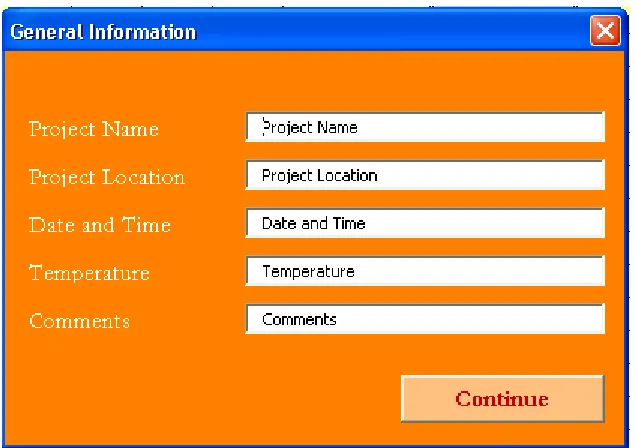
After selecting one of the pavement types from the main menu, a general information window appears. Its purpose is to get information that represents a project site at the beginning of each analysis (see Figure 6.). The user is required to fill in the information to continue with pavement analysis.
[image:20.612.148.466.188.412.2]General information inputs will be displayed with each graph at the end of the analysis to identify the project information.
Figure 6. General information window
At the next step, the user is expected to enter the FWD deflection data and other required inputs. These include pavement layer information (layer thicknesses), and FWD load (for variable FWD load analysis). Depending on the pavement type, the number of layers can be changed. The input requirements for conducting conventional flexible pavement analyses include FWD deflection data, asphalt concrete thickness, granular base thickness, and FWD load. The input requirements for conducting full depth asphalt pavement analyses are same as those for conventional flexible pavement analyses except that granular base thickness is not required. If any of the required parameter is missing, the program will display an error message which reads “No Data” in the results section.
The default units used in the program are US customary units. FWD deflection data (D0 till D60) should be entered in mils (10-3 inches), layer thickness in inches, and FWD load should be in kips. The program will not run correctly if the inputs are entered in different units or if they are out of range. The user is requested to refer to the report for the appropriate ranges of these parameters. Reported results are pavement layer modulus values, strains, and stresses. Modulus and stress values are reported in psi and strains are reported in micro-strains (x106).
7
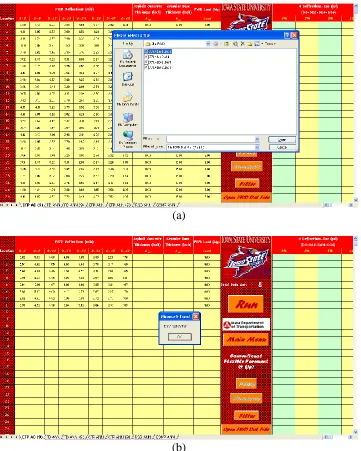
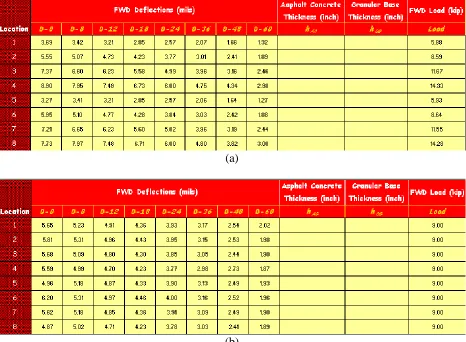
allows the user to load the FWD raw data files and extract the FWD deflections required as inputs to the automated analysis software as shown in Figure 7. The software allows two types of flexible pavement analysis based on FWD loading amplitude; 9-kip-constant FWD load analysis and variable FWD load analysis. As shown in Figure 8(a), the raw FWD deflection data corresponding to the raw FWD loads are extracted and inputted into the program under variable FWD load analysis. The 9-kip-constant FWD load analysis in Figure 8(b) uses the FWD
deflection data normalized to 9 kip-constant FWD load
(a)
[image:21.612.127.488.183.634.2](b)
8 (a)
[image:22.612.74.540.74.416.2](b)
Figure 8. Extracted FWD data: (a) variable FWD load analysis, (b) 9-kip-constant FWD load analysis
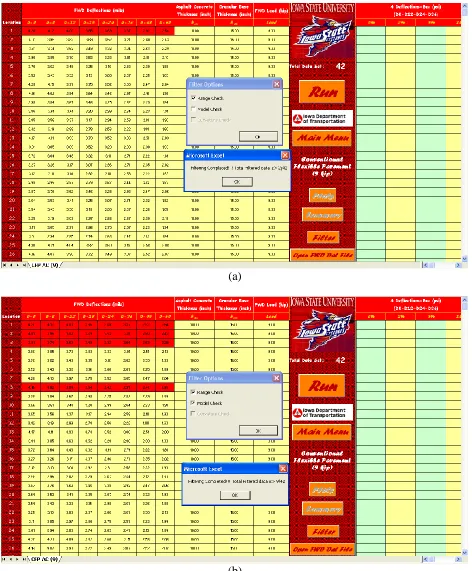
Once the FWD deflection data is entered, the user has the option to check the data for anomalies using the data preprocessing unit (Filter command button) for filtering the data. It is optional to use the filtering window. Figure 9. shows the available options for filtering. The two options are:
Range Check: Deflection basin should form a bowl shape and, therefore, deflections should be in decreasing order. Data that falls outside this range are red colored.
Model Check: ANN models are normalized according to the model ranges and, therefore, any input outside the range used in ANN training will form a poor quality input. As a result, the model check will determine the outliers and color them in red.
9
10 (a)
[image:24.612.71.543.69.640.2](b)
11
[image:25.612.127.484.98.306.2]
Figure 11. Sample pavement analysis results identifying analysis results from FWD data that falls outside filtering range
After preprocessing the data, clicking the “Run” button will activate a neural network-based analysis of pavements. The program will analyze model by model for the pavement properties. The ANN models employed for flexible pavement analysis are 4, 6, 7, and 8 deflection models with 0%, 2%, 5% and 10% noise. Each model has a different number of input parameters depending on the number of deflections. The purpose of introducing noisy patterns in the development of each model was to provide more robust networks that can tolerate the noisy or inaccurate deflection patterns collected from the FWD deflection basins. The detail descriptions of each model are provided in phase I project report (Ceylan et al, 2007).
For each model, the analysis results will be displayed on the right side of the screen. The user should scroll right to see all results. Also, disabled menu commands of plots and the summary will be activated. The conventional flexible pavement analysis results are EAC-modulus of AC, Kb-base modulus parameter, ERi-subgrade resilient modulus, εAC-tensile strain at the bottom of asphalt layer, εSG-compressive strain at the top of subgrade, and σD-subgrade deviator stress. The full depth flexible pavement analysis results are EAC-modulus of AC, ERi-subgrade resilient modulus, εAC-tensile strain at the bottom of asphalt layer, εSG-compressive strain at the top of subgrade, and σD-subgrade deviator stress.
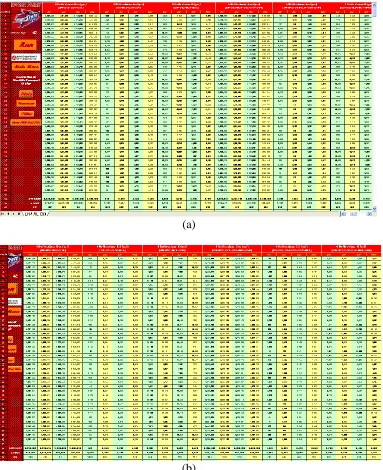
Figure 12 illustrates the sample analysis results of a conventional and a full depth flexible pavement. Failure to supply all the input parameters will be reflected in the results column of that model. The program will automatically write “No Data.” For example, if D48 is missing in the input data, then all six- and eight-deflection model columns will display the error message of “No Data.”
12 (a)
[image:26.612.117.500.71.541.2](b)
13
Figure 13. Sample Excel sheet output statistics of pavement analysis
The plot button will be enabled after the backcalculation analysis is complete. The plot option window appears after clicking on the plot button (see Figure 14). With this window, the user can select the models to display on charts. Selected models will be plotted in the form of
14
15
16
Figure 16. Sample Excel plots for full-depth asphalt pavement analysis results
The Summary button within the pavement analysis Excel spreadsheet is disabled until the “Run” button is clicked. It summarizes the statistical output information for each model. It opens up a new Excel sheet with tables of each output and summary statistics for every model (see Figure 17). The reported statistical information include:
Average (or mean value): The average value along the section.
Standard deviation: A common measure of the dispersion. It shows how widely the data is spread from the mean value.
17
compare the CV of populations that have different mean values. It is reported as a percentage.
(a)
[image:31.612.102.514.111.621.2](b)
18
Rigid Pavement Analysis, Plotting, and Summary Menus
Similar to flexible pavement analysis menu, the rigid pavement analysis menu consists of three main sections: inputs, analysis tool, and outputs as shown in Figure 18. Required input
parameters for rigid pavement analysis are deflection data, pavement layer information (layer thicknesses, degree of bonding, and estimated moduli ratio), and FWD load. To simplify the ANN-based backcalculation methodology, PCC layer and base layer thicknesses are combined into one thickness value (effective PCC thickness) through the concept of equivalent thickness (Ceylan et al, 2007). While conducting the analysis, the effective PCC thickness can be
automatically calculated from pavement layer information and used in the backcalculation analysis.
The analysis tool functionalities in the rigid pavement analysis menu are identical to those in flexible pavement analysis menu except two additional functions-“equation” and “show
normalization.” The “Equation” button, once clicked, is meant to provide the equations sheet as shown in Figure 19. This equation sheet summarizes the equations used for calculation of
[image:32.612.121.492.416.628.2]effective PCC thickness for fully bonded PCC layers, unbonded PCC layers and partially bonded PCC layers. The “show normalization” button is enabled only after the backcalculation analysis is complete. The raw FWD deflection data corresponding to the raw FWD loads are normalized to the 9-kip constant FWD load during backcalculation analysis. As shown in Figure 20, the normalized FWD data can be shown or hid in rigid pavement analysis menu by clicking “show normalization” or “hide normalization.” Preprocessing the data for rigid pavement analysis such as obtaining and filtering the FWD data is same as that for flexible pavement analysis.
Figure 18. Rigid pavement analysis menu
19
20 (a)
[image:34.612.119.498.69.603.2](b)
21
Similar to flexible pavement analysis, the program can analyze model by model by clicking the “Run” button after preprocessing the data. The ANN models employed for rigid pavement analysis are 4-, 6-, 7-, and 8-deflection models with 0%, 2%, 5% and 10% noise. Each model has a different number of input parameters depending on the number of deflections. The purpose of introducing noisy patterns in the development of each model was to provide more robust networks that can tolerate the noisy or inaccurate deflection patterns collected from the FWD deflection basins. Detailed descriptions of each model are provided in phase I project report (Ceylan et al, 2007).
[image:35.612.114.501.342.673.2]For each model, the analysis results will be displayed on the right side of the screen. The user should scroll right to see all results. Also, disabled menu commands of Plots and Summary will be activated after the analysis is complete. The rigid pavement analysis results are EPCC-modulus of PCC, ks-coefficient of subgrade reaction, σPCC-tensile stress at the bottom of the PCC layer, and radius of relative stiffness (RRS)
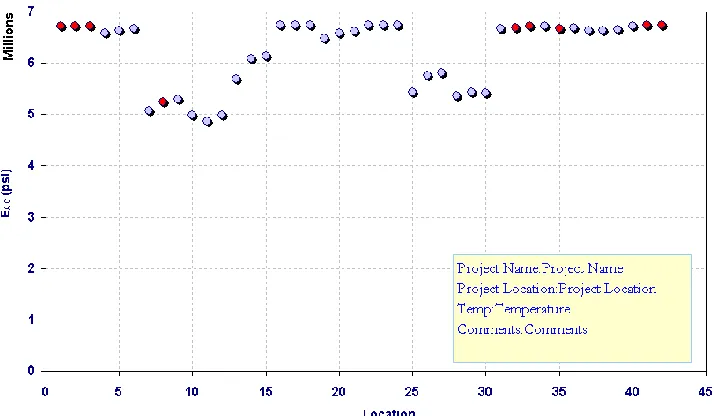
Figure 21 illustrates the sample analysis results from a rigid pavement run. Figure 22 illustrates color-coded rigid pavement analysis results of 4-deflection ANN model with 0 % noise which are generated from the plotting function. Figure 23 illustrates sample Excel sheet with the output tables and their statistics for every model generated by clicking “summary” button.
22
23
Figure 23. Output statistics summary sheet for rigid pavement analysis
Composite Pavement Analysis, Plotting, and Summary Menus
The AC overlaid PCC-type composite pavement analysis menu also consists of three main sections: inputs, analysis tool, and outputs as shown in Figure 24. Required input parameters for composite pavement analysis are deflection data, pavement layer information (layer thicknesses, PCC modulus predictions, and coefficient of subgrade reaction predictions), and FWD load. The analysis tool functionalities in composite analysis menu are identical to those in flexible
pavement analysis menu. This means preprocessing of the data for composite pavement analysis is same as that for flexible pavement analysis.
Similar to flexible and rigid pavement analysis, the program analyzes the data model by model by clicking the “Run” button after preprocessing the data. The ANN models employed for composite pavement analysis are 4-, 6-, 7-, and 8- deflection models with 0%, 2%, 5% and
10% noise. Each model has a different number of input parameters depending on the number of deflections and a different level of noise to provide more robust networks. Detailed descriptions of each model are provided in phase I project report (Ceylan et al, 2007).
24
[image:38.612.119.492.176.393.2]layer, and σPCC-tensile stress at the bottom of the PCC layer.
Figure 25 illustrates sample analysis results for a composite pavement section. Figure 26
illustrates color-coded composite pavement analysis results of 4-deflection model with 0 % noise which are generated from the plotting function. Figure 27 illustrates sample Excel sheet with tables of each output and their statistics for every generated model by clicking “summary” button.
Figure 24. Composite pavement analysis menu
Inputs
Analysis
Tool
Outputs
Inputs
Analysis
25
26
27
Figure 27. Output statistics summary sheet for composite pavement analysis
SUMMARY
In summary, the following are some of the significant features of the fully-automated ANN-based, user-friendly pavement structural analysis software system:
A comprehensive pavement structural analysis tool incorporating all three common pavement types (flexible, rigid, and composite)
Capability of automatically reading the FWD raw data collected by the JILS-20 type FWD machine that Iowa DOT owns
Integration of all the ANN models developed as part of Phase I research into a comprehensive unified framework
Rapid backcalculation of pavement layer moduli and prediction of critical pavement responses from FWD data (100,000 deflection basins analyzed in less than a second)
Useful for both project-level and network-level pavement structural evaluation
Visualization of results through automatic plotting capability
Commonly used Import/Export options for transporting data
28
REFERENCES