16
Data Transfer
In this chapter:• DataFlavor • Transferable
Interface • ClipboardOwner
Interface • Clipboard • StringSelection
• UnsupportedFlavorException • Reading and Writing
the Clipboard
One feature that was missing from Java 1.0 was the ability to access the system clip-board. It was impossible to cut and paste data from one program into another. Java
1.1 includes a package called java.awt.datatransfer that supports clipboard
operations. Using this package, you can cut an arbitrary object from one program and paste it into another. In theor y, you can cut and paste almost anything; in practice, you usually want to cut and paste text strings, so the package provides special support for string operations. The current version allows only one object to be on the clipboard at a time.
java.awt.datatransfer consists of three classes, two interfaces, and one
excep-tion. Objects that can be transferred implement theTransferableinter face. The
Transferable inter face defines methods for working with different flavors of an object. The concept of flavors is basic to Java’s clipboard model. Essentially, a
fla-vor is aMIMEcontent type. Any object can be represented in several different ways,
each corresponding to a differentMIMEtype. For example, a text string could be
represented by a JavaStringobject, an array of Unicode character data, or some
kind of rich text that contains font information. The object putting the string on the clipboard provides whatever flavors it is capable of; an object pasting the string from the clipboard takes whatever flavor it can handle. Flavors are represented by the DataFlavor class, and the UnsupportedFlavorException is used when an
object asks for aDataFlavorthat is not available.
Microsoft Word and some Java programs). Private clipboards are useful within a single application, though you could probably figure out some way to export a clipboard to another application using RMI.
To put data on the clipboard, you must implement theClipboardOwnerinter face,
which provides a means for you to be notified when the data you write is removed
from the clipboard. (There isn’t any ClipboardReader inter face; any object can
read from the clipboard.) The final component of thedatatransferpackage is a
special class calledStringSelectionthat facilitates cutting and pasting text strings.
Cutting and pasting isn’t the whole story; JavaSoft has also promised drag-and-drop capabilities, but this won’t be in the initial release of Java 1.1.
16.1 DataFlavor
ADataFlavorrepresents a format in which data can be transferred. The
DataFla-vorclass includes two common data flavors; you can create other flavors by
extend-ing this class. Flavors are essentiallyMIMEcontent types and are represented by the
standardMIMEtype strings. An additional content subtype has been added to
rep-resent Java classes; the content type of a Java object is:*
application/x-java-serialized-object <classname>
For example, the content type of aVectorobject would be:
application/x-java-serialized-object java.util.Vector
In addition to the content type, aDataFlavoralso contains apresentable name. The
presentable name is intended to be more comprehensible to humans than the
MIME type. For example, the presentable name of aVectorFlavor object might
just be “Vector”, rather than the complex and lengthyMIMEtype given previously.
Presentable names are useful when a program needs to ask the user which data fla-vor to use.
16.1.1 DataFlavor Methods
Variables
TheDataFlavorclass includes two public variables that hold “prebuilt” flavors rep-resenting different kinds of text objects. These flavors are used in conjunction with the StringSelection class. Although these flavors are variables for all practical purposes, they are used as constants.
public static DataFlavor stringFlavor★
ThestringFlavorvariable is the data flavor for textual data represented as a Java String object. Its MIME type is application/x-javaserializedobject String.
public static DataFlavor plainTextFlavor★
The plainTextFlavor variable is the data flavor for standard,
Unicode-encoded text. ItsMIMEtype istext/plain; charset=unicode.
Constructors
The DataFlavor class has two constructors. One creates a DataFlavor given a
MIMEcontent type; the other creates aDataFlavorgiven a Java class and builds the
MIMEtype from the class name.
public DataFlavor(String mimeType, String humanPresentableName)★
The first constructor creates an instance ofDataFlavorfor themimeTypeflavor
of data. ThehumanPresentableNameparameter should be a more user-friendly
name. It might be used in a menu to let the user select a flavor from several possibilities. It might also be used to generate an error message when the
UnsupportedFlavorExceptionoccurs. TheplainTextFlavoruses “Plain Text” as its presentable name.
To read data from the clipboard, a program calls the
Transferable.getTrans-ferData()method. If the data is represented by aDataFlavorthat doesn’t
cor-respond to a Java class (for example, plainTextFlavor),getTransferData()
returns anInputStreamfor you to read the data from.
public DataFlavor(Class representationClass, String humanPresentableName)★
The other constructor creates an instance ofDataFlavorfor the specific Java
class representationClass. Again, the humanPresentableName provides a
more user-friendly name for use in menus, error messages, or other
interac-tions with users. ThestringFlavor uses “Unicode String” as its presentable
name.
A program callsTransferable.getTransferData()to read data from the
clip-board. If the data is represented by a Java class,getTransferData()returns an
instance of the representation class itself. It does not return a Classobject.
For example, if the data flavor isstringFlavor,getTransferData()returns a
String.
Presentations
public String getHumanPresentableName()★
ThegetHumanPresentableName()method returns the data flavor’s presentable
name; for example, stringFlavor.getHumanPresentableName() returns the
string “Unicode String”.
public void setHumanPresentableName(String humanPresentableName)★
The setHumanPresentableName() method changes the data flavor’s
pre-sentable name to a newhumanPresentableName. It is hard to imagine why you
would want to change a flavor’s name.
public String getMimeType()★
ThegetMimeType()method gets theMIMEcontent type for theDataFlavoras aString.
public Class getRepresentationClass()★
ThegetRepresentationClass()method returns the Java type that is used to
represent data of this flavor (i.e., the type that would be returned by the
get-TransferData()method). It returns the type as aClassobject, not an instance of the class itself. Note that all data flavors have a representation class, not just those for which the class is specified explicitly in the constructor. For example, the plainTextFlavor.getRepresentationClass() method returns the class
java.io.StringReader.
public boolean isMimeTypeEqual(String mimeType)★
TheisMimeTypeEqual()method checks for string equality betweenmimeType
and the data flavor’sMIMEtype string. For some MIMEtypes, this comparison
may be too simplistic because character sets may not be present on types like
text/plain. Therefore, this method would tell you that the MIME type
text/plain; charset=unicodeis different fromtext/plain.
public final boolean isMimeTypeEqual(DataFlavor dataFlavor)★
The isMimeTypeEqual() method checks whether the MIME type of the
dataFlavorparameter equals the current data flavor’sMIME type. It calls the previous method, and therefore has the same weaknesses.
Protected methods
protected String normalizeMimeType(String mimeType)★
ThenormalizeMimeType()method is used to convert aMIMEtype string into a
standard form. Its argument is a MIME type, as aString; it returns the new
normalized MIME type. You would never call normalizeMimeType() directly,
but you might want to override this method if you are creating a subclass of
DataFlavor and want to change the default normalization process. For
example, one thing you might do with this is add the stringcharset=US-ASCII
protected String normalizeMimeTypeParameter(String parameterName, String parameter-Value)★
The normalizeMimeTypeParameter()method is used to convert any
parame-ters associated with MIME types into a standard form. Its arguments are a
parameter name (for example,charset) and the parameter’s value (for
exam-ple, unicode). It returns parameterValue normalized. You would never call
normalizeMimeTypeParameter()directly, but you might want to override this
method if you are creating a subclass ofDataFlavorand want to change the
default normalization process. For example, parameter values may be case
sen-sitive. You could write a method that would convert the valueUnicodeto the
more appropriate formunicode.
While it may be more trouble than it’s worth, carefully overriding these nor-malization methods might help you to get more predictable results from
meth-ods likeisMimeTypeEqual().
Miscellaneous methods
public boolean equals(DataFlavor dataFlavor)★
Theequals()method defines equality for flavors. TwoDataFlavorobjects are
equal if theirMIMEtype and representation class are equal.
16.2 Transferable Interface
Objects that can be placed on a clipboard must implement the Transferable
inter face. This interface defines a number of methods that let an object describe how it presents itself to clipboard readers. That sounds complex, but it isn’t really; these methods let a clipboard reader find out what data flavors are available and what Java types they represent.
The significance of theTransferableinter face is that it provides a way to get
infor-mation about the object on the clipboard without knowing what the object actually is. When you read the clipboard, you don’t necessarily know what kind of object is there. It might be some kind of text string, but it could just as likely be something
bizarre. However, you shouldn’t have to care. If you’re looking for aString, you
care only that the object exists in astringFlavorrepresentation. These methods
let you ask the object what flavors it supports.
For text strings, the data transfer package provides aStringSelectionclass that
implements Transferable. At this point, if you want to transfer other kinds of
objects, you’ll have to create a class that implements Transferable yourself. It
wouldn’t be unreasonable for JavaSoft to provide other “selection” classes (for
example,ImageSelection) in the future.
Methods
public abstract DataFlavor[] getTransferDataFlavors()★
The getTransferDataFlavors() method should return a sorted array of
DataFlavors that you support. The most descriptive flavor should be the first element in the array and the least descriptive, last. For example, a textual
object would placeDataFlavor.plainTextFlavorlast, because it has less
infor-mation than DataFlavor.stringFlavor(which includes information like the
length of the string) and much less information than a hypothetical flavor like
DataFlavor.richTextFlavor.
public abstract boolean isDataFlavorSupported(DataFlavor flavor)★
TheisDataFlavorSupported()method should returntrueif the object
sup-ports the givenflavorandfalseother wise.
public abstract Object getTransferData(DataFlavor flavor) throws UnsupportedFlavorException, IOException★
The getTransferData() method is the most complicated to implement. It
should return an instance of the class representing the data in the given
fla-vor. Ifflavoris not supported by this object,getTransferData()must throw the UnsupportedFlavorException. However, this method must be able to return a class for each flavor the object supports (i.e., each data flavor listed by
getTransferDataFlavors()). The method could throw anIOExceptionwhen
returning with aReaderas the representation class. For example, if some data
flavor required you to return a FileReader and the file doesn’t exist, this
method might throw anIOException.
16.3 ClipboardOwner Interface
Classes that need to place objects on a clipboard must implement the
Clipboard-Ownerinter face. An object becomes the clipboard owner by placing something on a Clipboardand remains owner as long as that object stays on the clipboard; it
loses ownership when someone else writes to the clipboard. TheClipboardOwner
inter face provides a way to receive notification when you lose ownership—that is, when the object you placed on the clipboard is replaced by something else.
Methods
public abstract void lostOwnership(Clipboard clipboard, Transferable contents)★
ThelostOwnership()method tells the owner ofcontentsthat it is no longer
on the given clipboard. It is usually implemented as an empty stub but is
16.4 Clipboard
TheClipboardclass is a repository for aTransferableobject and can be used for cut, copy, and paste operations. You can work with a private clipboard by creating
your own instance ofClipboard, or you can work with the system clipboard by
ask-ing theToolkitfor it:
Toolkit.getDefaultToolkit().getSystemClipboard()
When working with the system clipboard, native applications have access to infor-mation created within Java programs and vice versa. Access to the system clipboard
is controlled by theSecurityManagerand is restricted within applets.
16.4.1 Clipboard Methods
Variables
protected ClipboardOwner owner★
Theownerinstance variable represents the current owner ofcontents. When something new is placed on the clipboard, the previous owner is notified by a
call to thelostOwnership()method. The owner usually ignores this
notifica-tion. However, the clipboard’scontentsare passed back toownerin case some
special processing or comparison needs to be done.
protected Transferable contents★
Thecontentsinstance variable is the object currently on the clipboard; it was
placed on the clipboard byowner. To retrieve the current contents, use the
getContents()method.
Constructors
public Clipboard(String name)★
The constructor forClipboardallows you to create a private clipboard named
name. This clipboard is not accessible outside of your program and has no
security constraints placed upon it.
Miscellaneous methods
public String getName()★
ThegetName()method fetches the clipboard’s name. For private clipboards, this is the name given in the constructor. The name of the system clipboard is “System”.
public synchronized Transferable getContents(Object requester)★
ThegetContents()method allows you to retrieve the current contents of the clipboard. This is the method you would call when the user selects Paste from a menu.
Once you have theTransferabledata, you try to get the data in whatever
fla-vor you want by calling theTransferable.getTransferData()method,
possi-bly after calling Transferable.isDataFlavorSupported(). The requester
represents the object that is requesting the clipboard’s contents; it is usually
justthis, since the current object is making the request.
public synchronized void setContents(Transferable contents, ClipboardOwner owner)★ The setContents() method changes the contents of the clipboard to con-tents and changes the clipboard’s owner to owner. You would call this
method when the user selects Cut or Copy from a menu. Theownerparameter
represents the object that owns contents. This object must implement the
ClipboardOwner inter face; it will be notified by a call to lostOwnership()
when something else is placed on the clipboard.
16.5 StringSelection
StringSelectionis a convenience class that can be used for copy and paste
opera-tions on Unicode text strings (String). It implements both the ClipboardOwner
andTransferable inter faces, so it can be used both as the contents of the
clip-board and as its owner. For example, ifsis aStringSelection, you can call
Clip-board.setContents(s,s). StringSelection supports both stringFlavor and
plainTextFlavorand doesn’t do anything when it loses clipboard ownership.
16.5.1 StringSelection Methods
Constructors
public StringSelection(String data)★
The constructor creates an instance ofStringSelectioncontainingdata. You
can use this object to place the data on a clipboard.
Miscellaneous methods
public DataFlavor[] getTransferDataFlavors()★
The getTransferDataFlavors() method returns a two-element DataFlavor
array consisting ofDataFlavor.stringFlavorand
DataFlavor.plainTextFla-vor. This means that you can paste aStringSelectionas either a JavaString
public boolean isDataFlavorSupported(DataFlavor flavor)★
The isDataFlavorSupported() method is returns true if flavor is either
DataFlavor.stringFlavor or DataFlavor.plainTextFlavor; it returns false
for any other flavor.
public Object getTransferData(DataFlavor flavor) throws UnsupportedFlavorException, IOException★
ThegetTransferData()method returns an object from which you can get the
data on the clipboard; the object’s type is determined by theflavor
parame-ter. This method returns aStringcontaining the data on the clipboard if
fla-vorisDataFlavor.stringFlavor; it returns aStringBufferInputStreamfrom
which you can read the data on the clipboard if you ask for
DataFla-vor.plainTextFlavor. Other wise, getTransferData()throws an
Unsupport-edFlavorException.
public void lostOwnership(Clipboard clipboard, Transferable contents)★
The lostOwnership()method ofStringSelection is an empty stub; it does nothing when you lose ownership. If you want to know when you’ve lost
own-ership of string data placed on the clipboard, write a subclass of
StringSelec-tionand override this method.
16.6 UnsupportedFlavorException
The UnsupportedFlavorException exception is thrown when you ask Transfer-able.getTransferData() to give you data in a flavor that isn’t supported by the object on the clipboard. For example, if the clipboard currently holds an image
and you ask for the data in the stringFlavor, you will almost certainly get an
UnsupportedFlavorException because it is unlikely that an image object will be
able to give you its data as aString. You can either ignore the exception or display
an appropriate message to the user.
16.6.1 UnsupportedFlavorException Method
Constructor
public UnsupportedFlavorException (DataFlavor flavor)
The sole constructor creates an UnsupportedFlavorException with a detail
message containing the human presentable name offlavor. To retrieve this
message, callgetMessage(), which this exception inherits from theException
superclass (and which is required by theThrowableinter face).
16.7 Reading and Writing the Clipboard
Now that you know about the differentjava.awt.datatransferclasses required to
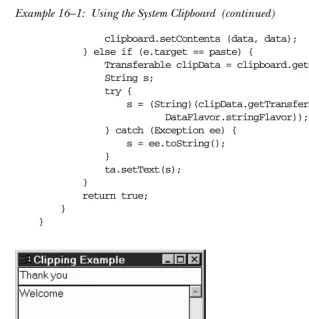
use the clipboard, let’s put them all together in an example. Example 16-1 creates aTextFieldfor input (copying), a read-onlyTextAreafor output (pasting), and a couple of buttons to control its operation. Figure 16-1 shows the program’s user inter face. When the user clicks on the Copy button or presses Return in the
TextField, the text in theTextFieldis copied to the Clipboard. When the user clicks on the Paste button, the contents of the clipboard are drawn in the
TextArea. Since the clipboard is not private, you can copy or paste from anywhere on your desktop, not just this program.
Example 16–1: Using the System Clipboard
// Java 1.1 only import java.io.*; import java.awt.*;
import java.awt.datatransfer.*;
public class ClipMe extends Frame { TextField tf;
TextArea ta; Button copy, paste;
Clipboard clipboard = null; ClipMe() {
super ("Clipping Example");
add (tf = new TextField("Welcome"), "North"); add (ta = new TextArea(), "Center");
ta.setEditable(false); Panel p = new Panel();
p.add (copy = new Button ("Copy")); p.add (paste = new Button ("Paste")); add (p, "South");
setSize (250, 250); }
public static void main (String args[]) { new ClipMe().show();
}
public boolean handleEvent (Event e) { if (e.id == Event.WINDOW_DESTROY) {
System.exit(0);
return true; // never gets here }
return super.handleEvent (e); }
public boolean action (Event e, Object o) { if (clipboard == null)
clipboard = getToolkit().getSystemClipboard(); if ((e.target == tf) || (e.target == copy)) {
StringSelection data;
Example 16–1: Using the System Clipboard (continued)
clipboard.setContents (data, data); } else if (e.target == paste) {
Transferable clipData = clipboard.getContents(this); String s;
try {
s = (String)(clipData.getTransferData( DataFlavor.stringFlavor)); } catch (Exception ee) {
s = ee.toString(); }
ta.setText(s); }
return true; }
[image:11.612.56.365.81.400.2]}
Figure 16–1: Using the system clipboard
We won’t say anything about how the display is set up; that should be familiar. All
the interesting stuff happens in theactionmethod, which is called in response to
a button click. We check which button the user clicked; if the user clicked the
Copy button, we read the text fieldtfand use it to create a newStringSelection
named data. If the user clicked the Paste button, we retrieve the data from the
clipboard by calling getContents(). This gives us an object about which (strictly
speaking) we know nothing, except that it implementsTransferable. In this case,
we’re pretty sure that we’re getting text from the clipboard, so we call
getTrans-ferData()and ask for the data in thestringFlavorform. We catch the exception
that might occur if we’re wrong about the data flavor. This program has no way of placing anything but text on the clipboard, but there’s no guarantee that the user didn’t cut some other kind of object from a native application.
Once we have ourString, we call thesetText()method of theTextAreato tell it