An Asynchronous Collaborative Search System for
Online Video Search
Martin Halvey, David Vallet, David Hannah, Yue Feng, Joemon M. Jose
University of Glasgow, Glasgow, G12 8QQ, Scotland, UKAbstract
There are a number of multimedia tasks and environments that can be collaborative in nature and involve contributions from more than one individual. Examples of such tasks include organising photographs or videos from multiple people from a large event, students working together to complete a class project, or artists and/or animators working on a production. Despite this, current state of the art applications that have been created to assist in multimedia search and organisation focus on a single user searching alone and do not take into consideration the collaborative nature of a large number of multimedia tasks. The limited work in collaborative search for multimedia applications has concentrated mostly on synchronous, and quite often co-located, collaboration between persons. However, these collaborative scenarios are not always practical or feasible. In order to overcome these shortcomings we have created an innovative system for online video search, which provides mechanisms for groups of users to collaborate both asynchronously and remotely on video search tasks. In order to evaluate our system a user evaluation was conducted. This evaluation simulated multiple conditions and scenarios for collaboration, varying on awareness, division of labour, sense making and persistence. The outcome of this evaluation demonstrates the benefit and usability of our system for asynchronous and remote collaboration between users. In addition the results of this evaluation provide a comparison between implicit and explicit collaboration in the same search system.
Keywords: Video, search, user interface, user studies, asynchronous, collaboration, retrieval, online, semantic gap.
1.
Introduction
In recent years the availability of low-cost hardware and high-speed broadband has led to a rapid growth in the volumes of multimedia that are being produced and then shared online and in other fashions. This has created numerous opportunities for users to collaborate and share information and multimedia content. As a result of this, there are a number of multimedia tasks and environments that can be collaborative in nature and require input and expertise from more than one person. One example of this might be artists, directors or animators working on a project to create a piece of work. Another example might be a family sharing and organising photographs and videos from a family event such as a wedding or a birthday party. These tasks may require material from multiple locations, or input from multiple people. Furthermore, due to numerous factors and restrictions these people may need to work on these materials at different times or might only have an interest in the materials at different stages of the search and organisation process. Despite the numerous multimedia interaction scenarios that require collaboration, many existing online multimedia search and sharing systems are developed to help multimedia search and organisation concentrating on one user searching alone and do not take into account the collaborative nature of many multimedia search tasks.
concurrency refers to the case where users do not work at the same time but users can benefit from the work of earlier users. Finally, users who are collaborating can be in different physical locations (distributed) or in the same location (co-located). These different dimensions of collaboration have resulted in a number of different systems. A limited number of these collaborative systems have been developed to assist with multimedia search, most of these systems concentrate on co-located users sharing a collaborative interface (Smeaton et al. 2006A) (Smeaton et al. 2006B) or on remote users participating in synchronous collaboration online (Villa et al. 2008A) (Villa et al. 2008B). Thus, the majority of these approaches do not support collaboration for users wishing to carry out collaborative tasks asynchronously and remotely. These problems are partly addressed by techniques like collaborative filtering (Goldberg et al. 1992); however such approaches rely on an implicit form of collaboration rather than explicit interaction between users which is required in many of these scenarios. In order to address these shortcomings we have developed a set of collaborative tools that are part of our ViGOR system. ViGOR is a grouping interface for video search; this grouping paradigm has been shown to help users for an array of video search tasks in a variety of different video collections (Halvey et al. 2009). The facilities available in ViGOR assist online asynchronous collaboration between users by facilitating awareness between users, persistence of search sessions for a team of users, division of labour between users in a group and by aiding sense making of other user’s results and interactions through grouping. The type of collaboration that is supported by ViGOR is explicit in that the intention of the users is to share search results with other users, is asynchronous in that users are working at different times and later users can benefit from the work of earlier users and the mediation is supported mainly by features in the interface. Although ViGOR can also support both co-located and distributed search, for the evaluations that we describe in this paper we concentrate on distributed collaboration amongst users.
It is our belief that the use of the ViGOR system can result in a number of advantageous outcomes for users and foster collaboration between users, while at the same time not impacting upon their search process in a negative manner but instead improving their search performance. In order to examine the use of the collaborative tools in ViGOR, an evaluative study was conducted; pairs of users conducted a number of search tasks in a number of collaborative scenarios. The user interaction and search performance in these scenarios was evaluated both qualitatively and quantitatively. The remainder of this paper is organised as follows: In the following section we provide a rationale for our work, describing both the problems associated with multimedia search and the state of the art in collaborative systems. Subsequently, in Section 3 we describe our ViGOR system that provides tools for online collaboration for users searching for video. In Section 4 we then describe our experimental methodology and also outline the collaboration scenarios that we investigate. This is followed by the results of our experiments. Finally, we provide a discussion of our work and some conclusions.
2.
Related Work
The work in this paper is concerned with asynchronous and remote explicit collaboration between users for multimedia search, i.e., the situation where users are remotely situated and cannot communicate at the same time; this work is multi-faceted and draws inspiration from various research areas. In this section we will discuss a number of these research areas and how they relate to our work. We begin by discussing video retrieval and in particular the problems related with interactive video retrieval and how some of these problems can be overcome by using collaborative systems. This will be followed by a discussion about collaboration in a more general sense and will provide an outline of a number of information systems which have allowed different types of collaboration in a number of different contexts.
2.1 Interactive Video Retrieval
clips. While this approach seems reasonable it also presents a number of problems. It requires a representation and extraction of all of the features required from all of the videos, which leads to issues of efficiency. Also, the difference between the low-level data representation of videos and the higher low-level concepts users associate with video, commonly known as the semantic gap (Jaimes et al. 2005), creates difficulties. Bridging the semantic gap is one of the most challenging research issues in multimedia information retrieval today. In an attempt to bridge this semantic gap, a great deal of interest in the multimedia search community has been invested in search by concept. The idea is that semantic concepts such as “vehicle” or “person” can be used to aid retrieval; an example of this is the Large Scale Ontology for Multimedia (LSCOM) (Naphade et al. 2006). However query by concept also has a number of issues that hinder its use; it requires a large number of concepts to be represented and to date has not been deployed on a large scale for general usage.
Query by text is the most popular method of searching for video. It is used in many large scale video retrieval systems such as YouTube1 and Blinkx2, and is also the most popular query method at TRECVID (Christel and Conescu 2006). Query
by text is simple and users are familiar with this paradigm from text based searches, in addition to this, query by text does not require a representation of concepts or features associated with a video. Query by text does however rely on the availability of sufficient textual descriptions of the video and its content. Textual descriptions in some cases may be extracted from closed captions or through automatic speech recognition; however a study of a number of state of the art video retrieval systems (Hopfgartner 2007) concludes that the availability of these additional resources varies for different systems. Where these resources are available, they may not always be reliable, due to limitations in automatic speech recognition or language differences for example. More recent state of the art online systems, such as YouTube and Blinkx, rely on using annotations provided by users to provide descriptions of videos. However, quite often users can have very different perceptions about the same video and annotate that video differently. This can result in synonyms, polysemy and homonymy, which makes it difficult for other users to retrieve the same video (Guy and Tonkin 2006). It has also been found that users are reluctant to provide an abundance of annotations unless there is some benefit to the user (Halvey and Keane 2007). While each of these methods outlined above have their limitations, they have been used in conjunction with each other in a number of systems, including Informedia (Christel and Conescu 2006) and MediaMill (Snoek et al. 2006). These systems have been amongst the most successful systems at recent TRECVID interactive search evaluations. However, these top results are for “expert” users, who establish the idealistic performance of users (Christel 2007). Also, a combination of these approaches requires a vast amount of metadata to be extracted and stored for each individual video clip.
As has been shown there are a number of different ways in which a user can query a video retrieval system; these include query by text, query by example and query by concept. Each of these approaches have had limited success, and to date none of these approaches has provided an adequate solution to providing the tools to facilitate video search (Christel and Conescu 2006). Given this, encouraging and facilitating collaboration between users is one way of trying to mitigate the current problems in multimedia retrieval. For example the use of collaborative interfaces could allow users with varying degrees of experience and expertise to work together to help bridge the gap between novice and expert users (Christel and Conescu 2006), (Christel 2007). Attempts have also been made to separate different parts of the video search process, in order to assist users in the difficult task of searching for video by allowing users to concentrate on one aspect of the search process (Adcock and Pickens 2007), (Pickens et al. 2008). Finally it should be remembered that interaction with multimedia is not a solo process, in some instances searching for and interacting with multimedia requires more than one user or can be a social process. With the goal of assisting collaboration between users is one way of trying to mitigate the current problems in multimedia retrieval in mind, we are proposing an approach that utilises previous users’ searches to provide partial solutions via collaboration to help other users to collaboratively satisfy a joint information need. The following section gives an overview of existing approaches for facilitating collaboration between users while searching for multimedia and also in other scenarios.
2.2 Collaborative Information Seeking
In the area of interactive video retrieval, a great deal of research has taken place on the subject of co-located synchronous search. Smeaton et al. (Smeaton et al. 2006B), (Smeaton et al. 2007) have developed the Fischlar DiamondTouch system. This system makes use of a large table top touch screen display surface, allowing users to interact with each other and with search results simultaneously. In their work, Smeaton et al. (2007) explored a number of user interface design elements targeted specifically at increasing awareness between pairs of users. Awareness is the ability of users to understand and interpret the activity of others engaged in a cooperative effort without causing interruptions through explicit communication, such as asking questions (Villa et al. 2008A). The interface elements were evaluated in a user evaluation that compared two user interfaces: the first interface was designed to maximise search efficiency at the expense of awareness, the second interface was designed to maximise awareness of the other user's actions at the expense of efficiency. The results of this evaluation show that the interface designed for awareness outperforms the interface designed for efficiency in relation to a number of measures. In a related approach, Adcock et al. (Adcock and Pickens 2008) have also designed a system for collocated, synchronous collaboration between searchers for video search. However, when using their system, users adopt a pre-defined role for the collaboration. This approach was compared with an individual user searching. The results of a user evaluation illustrate that in some situations, collaborative search can outperform individual search performance. Villa et al. (Villa et al. 2008A) (Villa et al. 2008B) have developed an interface that allow users to see each others search results and queries while performing the same video search task. Using this interface they investigated the role of awareness and its effect on search behaviour in collaborative multimedia retrieval. In particular they look at varying search behaviour in multiple awareness scenarios. The results suggest that balanced awareness scenarios provide the best retrieval results in comparison with scenarios where unbalanced awareness exists between users.
Collocated and synchronous collaboration have also been explored in relation to web search. Blackwell et al. (Blackwell et al. 2004) have developed tangible interfaces for web search. This interface allows multiple users to contribute to query construction, by users interacting with a shared query interface, and supports this activity as a secondary task rather than forcing users to focus on query construction. Amershi and Morris (Amershi and Morris 2008) have developed CoSearch; this system allows users to leverage extra available devices such as mobile phones and extra mice while searching on a single computer. A user evaluation found that CoSearch aids control and division of labour, helping communication and collaboration between users. Although not specifically for collaboration, the SearchBar system (Morris et al. 2008) was developed for storing query histories, browsing histories, and users' notes and ratings. This functionality provides support for multi-session investigations by assisting users with task resumption and information re-finding, by providing support for persistence, awareness and sense making, all of which are essential for affective collaboration amongst users.
In addition to these synchronous collaboration approaches, there also has been a great deal of research into implicit asynchronous collaborative techniques to aid search or browsing, most of these techniques exploit the actions of previous users to aid future users of a system and present some type of recommendation or re-ranking of results to current users. Since the early use of collaborative filtering techniques in the early 1990’s (Goldberg et al. 1992), (Resnick et al. 1994), (Shardanand and Maes 1995) collaborative or community based methods have evolved and been used to aid browsing (Wexelblat and Maes 1999), e-learning (Freyne et al. 2007), and in collaborative search engines (Smyth et al. 2004). White et al. (White et al. 2007) use the concept of “search trails”, meaning the search queries and document interactions sequences performed by the users during a search session, to enhance web search. Craswell and Szummer (Craswell and Szummer 2007) applied a random walk on a graph of user click data, to help retrieve relevant documents for user searches. Liu et al. (Liu et al. 2007) used a graph representation based on the textual features associated with a video to improve result list ranking. Hopfgartner et al. (Hopfgartner et al. 2008) have applied some of these collaborative concepts to video search. In this work Hopfgartner et al. (Hopfgartner et al. 2008) developed a graph based model of implicit actions, which is used to provide recommendations to users of the system. Results of a user evaluation show that this type of recommendation increases user performance and improves user satisfaction with the search process.
creating a shared summary etc.) of a search, Morris et al. (Morris and Horvitz 2007) described a collaborative retrieval system which aimed to provide all of the functionality that users need to effectively search the web together, e.g., a messaging system, the ability to recommend a page to the other user, awareness of the other user's queries, etc. The system was assessed on three aspects of collaboration: awareness of the other user, division of labour between the users and persistent storage of the generated results. Results of the evaluation indicate that awareness of other users was the most valuable and useful aspect of SearchTogether’s design, with this being the most highly rated and used feature by the users.
In this section, we have outlined a number of existing problems for video search and have also described a number of systems that encourage and support various types of collaboration between groups of users. In the following section we will present our system for online video search and describe how it can be used to support and aid collaboration amongst users.
3.
System Description
The system that we have developed for asynchronous explicit collaboration between users is based on the ViGOR system (Halvey et al. 2009). ViGOR is a unique system that allows users to search and organise their video search results into groups, so that they can conceptualise and visualise different aspects of their search task. The use of groups to assist multimedia search and interaction is already supported both explicitly and implicitly by a number of applications. For example, Flickr3 allows users to create groups, both private and public, for grouping photographs which other users can then
search. Also for many years’ people have created and used playlists for organising music; for example iTunes allows users to see the music and playlists belonging to other people on their network. However this application of grouping for video search is unique and prior evaluations of this search and interaction paradigm has been shown to be beneficial to the video search process for a number of scenarios and collections (Halvey et al. 2009).
3.1 ViGOR: A Video Grouping and Organisation Interface for Video Retrieval
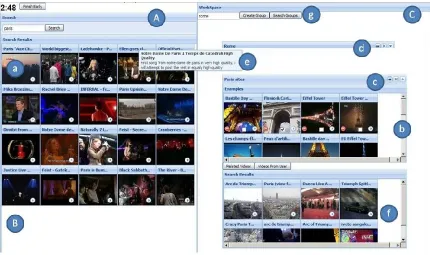
ViGOR (see Figure 1) comprises of a search panel (A), results display area (B) and workspace (C). These facilities enable the user to both search and organise results effectively. The users enter a text based query in the search panel to begin their search. The result panel is where users can view the search results (a). Additional information about each video shot can be easily retrieved by placing the mouse cursor over a video keyframe for longer than 1.5 seconds, which will result in any text associated with that video being displayed to the user (we will hence forth refer to this action as tooltip) (e).
Users can play, pause, stop and navigate through the video as they can on a normal media player. Videos are viewed through a pop up panel which appears when the user clicks the play icon that is on each video. Similar to the ImageGrouper (Nakazato et al. 2003), MediaGLOW (Girgensohn et al. 2009) and EGO (Urban and Jose 2006) systems, the main component of ViGOR is the provision of a workspace (C). Groups can be created by clicking on the create group button (g). Users must then select a textual label for the group and can potentially add any number of annotations to the group, but each group must have at least one annotation. Drag-and-drop techniques allow the user to drag videos into a group or reposition the group in the workspace (b). Groups can be deleted, minimised and moved around the workspace using a number of buttons (c, d). It should be noted that any video can belong to multiple groups simultaneously. The workspace is designed to accommodate a large number of groups. Each group can also be used as a starting point for further search queries. Users can select particular videos and can choose to view an expansion of the group that contains similar videos based on a number of different features (f). The interface offers two expansion options, related videos and videos from the same user; all of the videos returned by these expansion options are retrieved using the YouTube API. The description above describes the basic functionality of ViGOR. In the following section, we will discuss how the ViGOR system can be used to support collaboration between users.
Figure 1: The ViGOR Interface. Panel A is the search box, panel B is the results display area, panel C is a workspace where users can create groups (c) to organise their search results.
3.2 Support for Collaboration
In previous work, we have evaluated the usability and the benefit of the grouping paradigm for video search, provided by ViGOR (Halvey et al. 2009). Two user evaluations were carried out in order to determine the usefulness of this grouping paradigm for assisting users. The first evaluation involved users working on broad tasks on YouTube, and gave insights into the application of our interface to a vast online video collection. The second evaluation involved users carrying out focused tasks on the TRECVID 2007 video collection (Smeaton et al. 2006 A), allowing a comparison over a local collection, on which we could extract a number of content-based features. The results of those evaluations showed that the use of the ViGOR system results in an increase in user performance and user satisfaction, showing the benefit of a grouping paradigm for video search for various tasks in a variety of diverse video collections.
One of the benefits of using ViGOR is that the users leave trails of their actions behind, which other people can exploit; hence ViGOR is ideal in a collaborative work context. It is the use of ViGOR in these contexts and the exploitation of the interaction involved that we wish to examine in this paper.
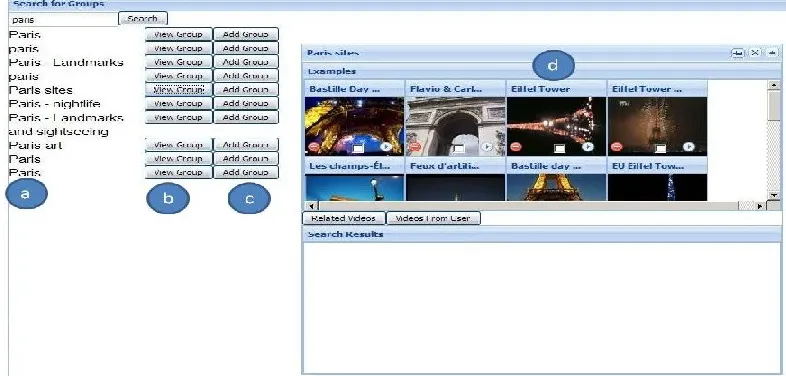
can search for these groups using a simple text based query (see Figure 1(g)). The results are displayed in a pop up panel which shows groups that potentially match the user query (see Figure 2). Each result consists of a group name (a), a view group button (b) and an add to workspace button (c). Pressing the view group button allows a user to see an outline view of the group (d). Clicking the add to workspace button results in the group being added to the workspace. The user can then interact with this group in the workspace as they would with any of the groups that they have created themselves. These facilities allow the users to collaborate in a variety of ways. The following subsection presents a scenario describing how a pair of users can potentially use the collaborative features of the ViGOR system to complete a video search task, with a discussion of the key advantages the system is intended to provide.
Figure 2: Screen Shot of Panel for Group Search, a is a list of potentially matching groups, b and c allow users to view groups and add them to the workspace respectively and d is a group being viewed currently.
3.3 Example Usage Scenario: “Review of Sports Stories for 2008”
The example scenario is based on the news domain, and involves a team of two users working together to complete a task. This example demonstrates how our system can support collaboration amongst groups of users:
“David and Jacqui work in the news department for the British Broadcasting Corporation (BBC) in London. Coming towards the end of 2008, the news department decided that they would broadcast a segment highlighting the major sports stories from 2008 and David and Jacqui are given the task of finding video clips that could be used in this segment. This task is very broad and ambiguous and can encompass a large number of events, so following a brief discussion they decide to divide the task up between them, with each of them focusing on different aspects. David is assigned to search for videos relating to the Olympics, Euro 2008, and football in general. Jacqui is assigned Formula 1 and tennis.
completed their task, during which they collaborated remotely and asynchronously but were able to help each other and leverage the tools available to complete their task quickly and efficiently”.
This scenario highlights a number of features that are implemented in ViGOR to aid asynchronous collaboration between users. A number of these aspects are outlined below.
3.3.1 Awareness and Sense Making
One of the most difficult aspects of collaboration is awareness. ViGOR supports awareness and sense making in collaborative scenarios through the organisational facilities available in its grouping paradigm. The visualisation of the groups which relate to some concept provides all users with an overview of the state of the task at any given time. The label on the group informs the user about the relationship between the videos in the group, the keyframes that represent each video give a brief visual overview of the content of the group and by utilising the tooltip functionality the users can obtain additional textual information about each video quickly and easily. Thus, by browsing the groups, users can obtain an understanding of the current state of the search and what has already been investigated at multiple levels of granularity. A user can quickly and easily gain a sense of what partial or whole solutions for their search task are available. This is true when a user is continuing a colleague’s search task, and can view the current search status or when the user is starting a search task, and can search for other users’ groups that have been created for similar tasks.
3.3.2 Persistence
The persistence of a search task in particular for a group of users is not supported in many other search systems where users see their own search results in isolation. Persistence of a search session in ViGOR is supported through the group functionality available. Users can store their current search session, which is available for themselves or other users to continue or complete in the future. This allows a user or different potential users to log into the system and continue, update or view the search session, making it easy for multiple or indeed a single user to work on the same search session in different locations and/or at different times. In addition, all groups created for all other search sessions are also maintained and available for retrieval by all other users. These can form partial solutions for other users’ search sessions, even if the overall goal of the users was different for the different sessions. In addition, if a user updates a group from another user at a later stage, it is possible to retrieve both groups, as they may be useful for different subsequent users in further search sessions.
3.3.3 Division of Labour
The collaborative tools available in the ViGOR system also offer advantages over single search scenarios by assisting the division of labour. Perhaps the most obvious method of dividing labour is the ability to store a search session so that other users can interact with that search session. By sharing the search session users are able to split the task in hand into subtasks for different individuals to complete. Also it is possible for users to utilise their expertise in different aspects of the task in this fashion. This helps users who may not be familiar with the search task in hand or who may not have considered all aspects of the task that the user is carrying out. In addition, as users are able to search for previously created groups it is possible for users to explicitly leverage the wisdom of the crowd in order to solve the task in hand, as providing functionality for users to search all groups that have been created previously allow users to find partial solutions for their current search task. In both of these scenarios, users are helped by seeing already retrieved documents, thus users do not have to repeat the effort involved in finding these documents, freeing users to carry out other tasks or explore other parts of their task.
4.
Experimental Design
4.1 Simulating Collaboration
For this evaluation, we have identified four different conditions for collaboration, these conditions are a user starting the task using ViGOR (Start scenario), a user continuing a task where they have previously saved the groups (Complete scenario), a user continuing a task that another user has started (Continue scenario) and a user starting a search task where they can search other groups created by all users for different tasks as well as the ability to search videos (Search scenario). However, for the evaluation we are going to evaluate just three of the scenarios, those being the start scenario, the search scenario and the continue scenario. There are a number of reasons for this. The start situation identifies normal search behaviour for the users carrying out one of these tasks and will serve as the baseline. The continue and search scenarios relate to situations that already take place in a number of multimedia search and interaction scenarios. One of the goals of this evaluation is to investigate whether the tools for collaboration available in ViGOR can help in the collaboration scenarios outlined above, as well as giving an insight into user behaviour in these multimedia search and collaboration scenarios. We omit the complete scenario, as it represents the ideal scenario, where a user is continuing his/her own search so they already are aware of what has happened, can make sense of the results and there is no real division of labour. In addition, there is no collaboration with others in this scenario, as a user is continuing their own search. We are of the opinion that although this represents the ideal scenario, the start scenario offers an adequate scenario for comparison with the collaborative scenarios and truly represents a single user searching alone. In addition, the omission of one scenario from our evaluation reduces the complexity of the evaluation and makes it easier to evaluate the collaborative scenarios in isolation.
Each of the start, continue and search scenarios varies on a number of different aspects of collaboration, those being awareness, persistence, division of labour and sense making. In the start scenario, the user is carrying out their own search and as such is aware of their own actions and intentions, this means that the user should understand their own groups and search results aiding sense making. The user does not have any previous results and as such persistence is not an issue. There is no division of labour the user is carrying out their own search.
In the continue scenario, the user is using groups from a previous user. As such the current user will not be aware of the intentions or actions of previous users, but is aware of the task that the user was carrying out. In addition, the current user is aware of the groups that were created and the videos that the users found relevant for the group. This means that, for sense making, the current user must try and understand the groups and results that the previous user has gathered and how they relate to the current task in order to continue the task. In terms of persistence, the user continues to use groups that other users have used to complete the same task. Thus, the groups, which each represent a semantic concept or aspect and contain the relevant videos for this concept, are maintained and any additions or changes that the current user makes are saved for any subsequent user for this search session. Finally, as the current user is continuing a task that a previous user has started, the labour to complete the task is divided between the users.
out broad, multi faceted and vague video search tasks, as the groups that can be retrieved in this scenario represent partial solutions to their search task.
4.2 Experimental Setup
The purpose of this evaluation was to simulate remote, asynchronous, and explicit collaboration amongst groups of users, we are predominantly interested in explicit collaboration, but implicit collaboration is also possible using the ViGOR interface. A within subjects design was adopted for this evaluation, with users searching for videos in all three collaboration scenarios that were outlined previously. The start scenario forms the baseline interaction for a user carrying out a video search task in isolation, with the other two collaborative scenarios being compared to this condition. In order to simulate the collaboration scenarios outlined above, users carried out this evaluation in pairs. Upon arriving to participate in the evaluation, and after an initial introduction the users were presented with print outs outlining all of the tasks that they would complete. The pairs of users were then allowed to discuss these tasks for 10 minutes, this was to simulate situations where users may have some brief communication or initial discussion regarding the task that they are carrying out, a full discussion of user collaboration and strategies at this stage can be found in Section 5.1. The users were then brought to separate offices and had no further communication through out the task, the purpose of this step was to simulate the users carrying out search sessions in remote locations and at different times so that we could simulate asynchronous collaboration. Due to the nature of the scenarios that we identified it was not possible to have a true rotation of the scenarios, as the start scenario must be completed by both users before carrying out the continue scenario.
Thus, each user began the evaluation by completing a task in the start scenario. This also serves as a baseline for all future user interactions, as it simulates a user carrying out a search in a non collaborative scenario. Following this, each user completed a task in the continue and the search scenario. In the complete scenario, each user continued the search task that had been started by their partner earlier, thus simulating a remote, asynchronous and explicit collaboration scenario. The search scenario was a separate task that was completed in isolation; this task simulated a remote, asynchronous and implicit collaboration scenario using ViGOR. The order of continue and search scenarios was rotated within a pair of users, and the order of topics was rotated between pairs of users.
4.3 Tasks and Collection
For the purposes of this evaluation we used the YouTube API to provide access to YouTube videos to provide a collection. Three simulated work task situations were created in order to provide broad, ambiguous, open ended tasks for the users (Borlund 2003). These tasks were related to different topics and multiple aspects. The groups for the search scenario were based on logs from a previous evaluation of ViGOR that also used YouTube (Halvey et al. 2009). The tasks from this previous evaluation are related in some aspects to the new evaluation tasks but are not identical. The four tasks from the previous evaluation were:
A task of finding videos of political figures of 2008
A task of finding video clips about Paris, Rome and other European locations
A task of finding videos that illustrate Scottish culture, in particular Scottish dancing and food
A task of finding the major sport news of 2008
The three evaluated simulated tasks that were used for this evaluation were:
A task of finding videos of political figures of the early 21st century. A task of finding video clips of European locations to plan a holiday.
Users were encouraged to explore as many different aspects of the task that they wished. After each task the participants were asked to write a short description of what they had found and how they had structured their results. In this way users were encouraged to carry out a deep exploration of the information addressed in the tasks and think thoroughly about a possible structure of the retrieved information. We thus attempt to avoid placing users in a scenario where numerous unrelated videos are found without any exploration of the videos first, as users were encouraged to store only those videos that were potentially relevant for each task’s goal.
4.4 Research Questions
In order to measure the effectiveness of the collaboration tools available in ViGOR in relation to the collaboration scenarios that have been identified above, a user-centred evaluation was conducted. There are a number of research questions that we wanted to address.
1. How is user performance affected by using the collaborative tools available in ViGOR?
2. Will the use of the collaborative tools available in ViGOR influence user interpretation of the tasks and search performance?
3. Do the collaborative tools available in ViGOR influence user behaviour, resulting in different patterns of interaction in different collaboration scenarios?
Research question 1 is difficult to quantify in this particular scenario, as it is difficult to say what increased performance is in this scenario. As ViGOR supports the creation of semantic groups, and essentially each group represents one aspect of the search carried out by the user, we measured the number of groups that are created. We then considered the number of groups to be a measure of how many different aspects of the tasks were investigated in each collaboration scenario. In addition, we analysed the number of videos marked as relevant, thus we can see how many relevant videos the users find in each different scenario. This will give us an insight into how deeply each aspect was investigated as well as a relative measure of success. Our hypothesis for research question 1 is:
Hypothesis 1: Despite the overhead involved in the using the tools for collaboration, that user’s performance will be equivalent or superior using the collaboration functionality in the ViGOR system in comparison with the start scenario. (Mark more videos as relevant, explore more aspects of the task)
For research question 2, we explore the user interactions with the system. We believe that the different collaboration scenarios, in terms of awareness, sense making, division of labour and persistence will involve slightly different search behaviour and that ViGOR will support these behaviours. Hypothesis for research question 2 is:
Hypothesis 2: ViGOR will support diverse strategies in the different collaboration scenarios (Different interactions, support different strategies)
Hypothesis 3: Despite the different types of collaboration involved, when using ViGOR user satisfaction will not be unduly affected. (Satisfaction, user questionnaires)
In the following sections, we investigate each of our research questions by analysing the log, observation, and questionnaire data from our study. We first discuss our user pool and then discuss more detailed usage patterns, user feedback, user interaction and user performance.
5.
Results
24 participants took part in our evaluation. The participants were mostly postgraduate students and researchers at our university. The participants consisted of 19 males and 4 females, with 1 user preferring not to state their sex. The average age of the participants was 28.69 years (median: 28) and all participants had an advanced proficiency with English. The participants indicated that they regularly interacted with and searched for multimedia. Many of the participants cited YouTube and Flickr as sites that they used to search for multimedia regularly. Participants were grouped in pairs. 11 of the participants described their partner as a friend, 6 described their partner as a colleague, 4 did not know their partner prior to the evaluation and 3 participants did not give feedback on their relationship to their partner. The participants were paid a sum of £12 for their participation in the experiment, which lasted for approximately 2 hours. The results of the user trials were analysed with respect to our research questions and hypotheses that were given in the previous section. The evidence for and against each of these benefits is laid out in the following sections.
5.1 User Collaboration and Strategy
As discussed in Section 4.2, participants were allocated a 10 minute period before starting the evaluation where they were encouraged to discuss the topics. In addition, participants were allowed to devise initial plans to solve the tasks. The strategies discussed were noted by the experimenter and captured via post task and exit questionnaires.
4 of the 12 pairs of users did not discuss the tasks before beginning the evaluation. For the other 8 pairs, there were a number of approaches that were adopted. One common tactic was for the participants to divide aspects of the task between the pair of participants before beginning the tasks. After searching for world figures in the continue scenario, user 18 wrote: “As my partner and I had agreed to split the tasks, I focused on three important personalities from the beginning of 21st century, namely S. Hussein, T. Blair, and B. Gates”. Tactics like this allowed users to divide the labour between them before beginning the task. This division of labour is supported in ViGOR via the grouping functionality. The retrieved results are added to a group that represents an aspect of the task. Subsequent users can interact with these groups or ignore them and concentrate on other aspects of the task; the labels on the groups and the content of the groups provide awareness to subsequent users of what has been explored by previous users, insuring that there is no duplication of labour.
Another common tactic was for users to exchange knowledge. Sometimes this lead to the division of labour with users investigating aspects with which they were familiar or in some circumstances participants would suggest aspects that the other user could search for. While this occurred quite often prior to carrying out the tasks, sometimes users with more background knowledge or time would edit the other users groups before starting their own search in the continue scenario. User 3 wrote: “I just add more detail that my search partner hasn't found. Most of them are from different aspects related to the given topic such as Euro cup 2008, earthquake in China, Austrian father, etc.”, and user 22 stated: “first check what the other user had done, do any changes and then create new groups”. Once again this behaviour is supported in ViGOR via the grouping functionality. Users could quite quickly investigate aspects that other users had explored by reviewing the groups that previous users had created. This allowed users to review videos previous users had retrieved, and update those groups by adding or removing videos where appropriate. Thus, allowing users to share knowledge and allowing users to help other users with less expertise.
of users followed different strategies with some common themes between some of the strategies. In the following sections we will explore the task performance for the users and this will provide an insight into the ability of ViGOR to support these different search strategies.
5.2 Task Performance
In a direct comparison between the three scenarios (start, continue and search) it was found that in the two collaboration scenarios (continue and search) participants added more videos to their groups and created more groups in general (see Table 1). The difference between the number of videos marked as relevant (F=8.87, p=0.0004 for One-Way ANOVA) and the number of groups created (F=8.69, p=0.0005 for One-Way ANOVA) are statistically significant between the scenarios. This indicates that the participants explored more aspects of the task and it appears that these aspects were examined in more depth. This is an indication that ViGOR is supporting the users in their collaborative search tasks. In a direct comparison between the two collaboration scenarios, it was found that in the continue scenario that on average the pair of users continuing each others tasks retrieved more videos and created more groups in comparison with the scenario where users could search all groups previously created.
Start Continue Search
No of groups 4.182 7.667 5.174
[image:13.612.146.465.275.324.2]No of relevant videos 24.727 54.833 44.391
Table 1: Performance of users or teams in different collaboration scenarios. Labels are outlined in Section 4.1.
While a direct comparison between the videos retrieved by users under the different collaboration scenarios demonstrates that more results are retrieved in the collaborative scenarios, this comparison does not offer a truly fair comparison. In order to provide a fairer comparison, we compare the results obtained from the continue scenario with a post hoc merging of the results of two randomly selected Start or Search scenarios. In this way we can compare the results of each retrieval scenario with the same number of users. In the continue scenario, the second user continues the search of the first user, whereas in the search and start scenario we simulate merging the results of two users carrying on the search in an independent way (start scenario) or two users carrying out the search independently, but with access to groups created by previous users (search scenario). In order to merge the group aspects created by the users on their search session, we manually labelled each created group to identify the covered aspect. We suppose that two groups relate to the same aspect if they contain similar content and have a similar title description. We take into account these manual labels when merging the created aspects from two users. In this way we can consider the number of aspects that have been covered by both users. A similar approach has been adopted in other evaluations of collaborative search scenarios for example by (Baeza-Yates and Pino 1997), (Pickens et al. 2008). The results of this comparison are shown in Table 2. On analysing the aspectual groups created by users, we were able to assert that every group aspect created by a single user covered different aspects of the retrieval process. It can be seen quite clearly from the results in Table 2 that even with this setup; the collaborative scenarios outperform two users working in isolation on different aspects of the same topic. This indicates that the tools available in ViGOR to assist awareness, sense making, division of labour and persistence are assisting users and enabling them to explore more aspects of their tasks and indeed find more relevant videos for their tasks, thus providing validation for our first hypothesis.
Start Continue Search
No of groups 6.182 7.667 6.80
No of relevant videos 51.42 54.83 54.10
[image:13.612.148.468.611.662.2]5.3 User Interaction
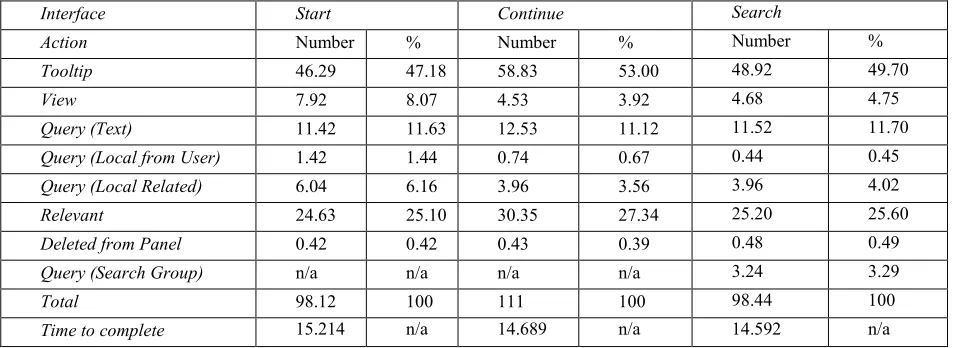
In order to gain a further insight into the difference in the performance between all of the scenarios, a further analysis of the logs was carried out to investigate the user interactions. The result of this analysis is shown in Table 3. On analysing this table, we can conclude that the user interactions with the system vary depending on the collaboration scenario.
Interface Start Continue Search
Action Number % Number % Number %
Tooltip 46.29 47.18 58.83 53.00 48.92 49.70
View 7.92 8.07 4.53 3.92 4.68 4.75
Query (Text) 11.42 11.63 12.53 11.12 11.52 11.70
Query (Local from User) 1.42 1.44 0.74 0.67 0.44 0.45
Query (Local Related) 6.04 6.16 3.96 3.56 3.96 4.02
Relevant 24.63 25.10 30.35 27.34 25.20 25.60
Deleted from Panel 0.42 0.42 0.43 0.39 0.48 0.49
Query (Search Group) n/a n/a n/a n/a 3.24 3.29
Total 98.12 100 111 100 98.44 100
[image:14.612.69.548.139.313.2]Time to complete 15.214 n/a 14.689 n/a 14.592 n/a
Table 3: Average number of actions per user for each collaboration scenario. Labels are outlined in Section 4.1.
It can be seen in Table 3 that while carrying out their searches in both collaborative scenarios that users retrieve more new videos (relevant), i.e., retrieved by the individual user during one session rather than by the team. As well as this increase in the number of videos retrieved, these videos are retrieved by users expending less effort. In both collaboration scenarios the participants carry out fewer queries (in total)4, play less video (view) and do this in less time than in the solo searcher
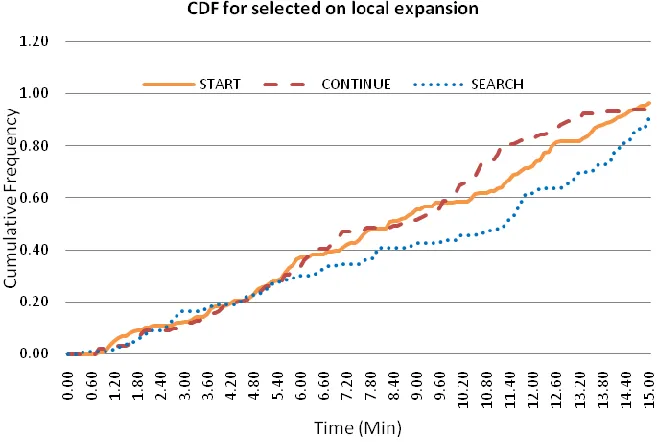
scenario, as represented by the start collaboration scenario. The only category where there is an increase in interactions is in the use of the tooltip. This results in an overall increase in the total number of interactions. This is particularly true in the continue scenario, where it appears that users are exploring the groups that other users have created using the tooltip functionality. This behaviour appears to be an indicator of an interesting interaction phenomenon. Users are more likely to update and interact with other users’ groups in the continue scenario. Another particularly interesting result is in relation to the use of the local expansions/search (the expansions that are illustrated in Figure 1(f)). There are different behaviours in relation to the use the local expansion in the three different collaboration scenarios. This can be seen most clearly in Figure 3 which plots the cumulative distribution frequency (CDF) for using a local expansion to search for videos. Users in the search scenario use the local expansions much less often than the other scenarios at the beginning of the evaluation. It appears that instead of using the local expansions that users are instead searching for other users’ groups during this period. In contrast, users in the continue scenario seem to prefer to use the local expansions much earlier in their interaction with the system, this might be because they are continuing a previous search where they already have existing groups from which they can launch local searches. An example of this is that on average, by minute 11.2, users in the start scenario have executed ~65% of their local queries, whereas users in the continue scenario have already executed 81% of their local expansions and the users of the search scenario have only executed an 48% of their local queries (see Figure 3).
4 The searching for groups functionality is not included as it was only available in one scenario, although when included
Figure 3: Cumulative Distribution Frequency for using a local expansion to search for videos.
Figure 4: Cumulative Distribution Frequency for marking videos as relevant.
[image:15.612.160.452.347.562.2]expansions and number of queries for scenario), with the continue and start scenario having significant difference in the number of queries and all local expansions. Thus it appears that the continue scenario (relating to explicit collaboration) is the most natural of the collaboration scenarios, with the users not having to alter their searching behaviour to a great extent in comparison with the scenario where they are searching alone.
Thus far, we have seen that the user performance improves with the use of the collaboration tools in ViGOR; this addresses the first of our hypothesis. This increase in user performance is brought about with a change in user interactions. The trend is that in the collaborative scenarios the majority of search related interactions decrease, with the exception of the lightweight tooltip function. Users are using the tooltip function to explore the videos in other users groups. While the number of interactions changes slightly, the distribution of interactions changes significantly. This addresses our second hypothesis in relation to user interaction that the user interactions change in different scenarios; this, coupled with the relative increase in performance, demonstrates the success of the collaborative tools in ViGOR for supporting collaboration amongst groups of users. In turn, this also leads us to our third hypothesis pertaining to user perceptions.
5.4 User Feedback
With the intention of providing further validation for our findings and to gauge user perceptions, we analysed the post task and post experiment questionnaires that our participants filled out.
5.4.1 User Perceptions of Task and System
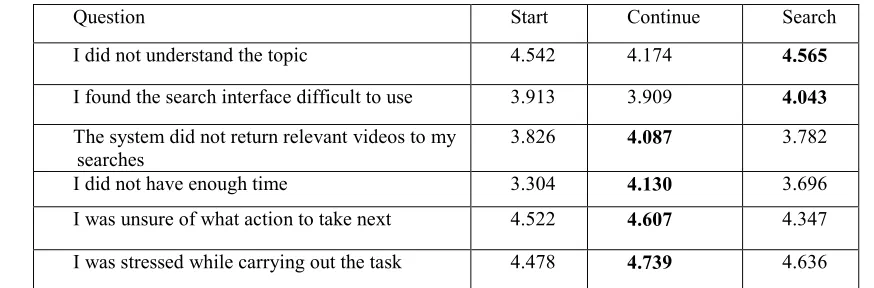
In post search task questionnaires we solicited subjects’ opinions on and reaction to the system, tasks and interactions in general. The first set of questions in the post search questionnaire related to difficulties that participants may have had while conducting their task. A number of 5-point Likert scales were used. Table 4 presents the average responses for each of these differentials. The most positive response across for each differential is shown in bold; in this case higher values are more positive. It can be seen clearly that the most positive responses in relation to all of the questions were given in the continue and collaboration scenarios. However, it should be noted that the responses in all of the scenarios were extremely positive with negligible difference between the user responses. In general, the participants indicated that they had very few problems with the system, topics or the scenarios.
Question Start Continue Search I did not understand the topic 4.542 4.174 4.565
I found the search interface difficult to use 3.913 3.909 4.043
The system did not return relevant videos to my searches
[image:16.612.83.520.447.591.2]3.826 4.087 3.782 I did not have enough time 3.304 4.130 3.696 I was unsure of what action to take next 4.522 4.607 4.347 I was stressed while carrying out the task 4.478 4.739 4.636
Table 4: User feedback in relation to the task and reasons that the user may not have succeeded (Higher = Better).
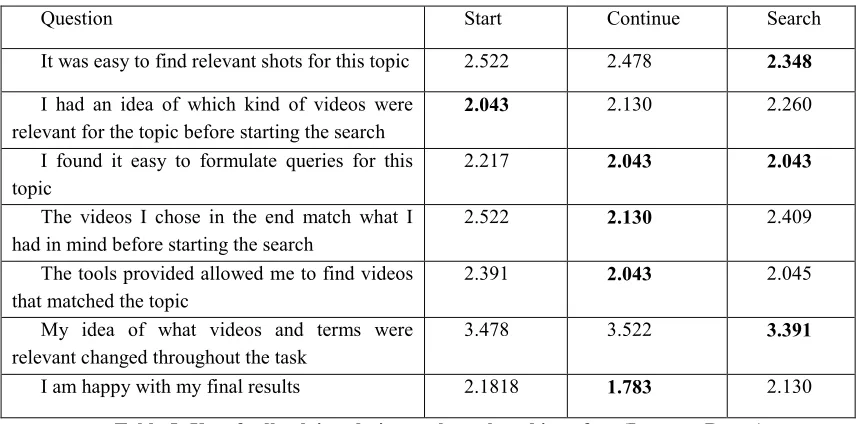
Question Start Continue Search It was easy to find relevant shots for this topic 2.522 2.478 2.348
I had an idea of which kind of videos were relevant for the topic before starting the search
2.043 2.130 2.260
I found it easy to formulate queries for this topic
2.217 2.043 2.043
The videos I chose in the end match what I had in mind before starting the search
2.522 2.130 2.409 The tools provided allowed me to find videos
that matched the topic
2.391 2.043 2.045 My idea of what videos and terms were
relevant changed throughout the task
3.478 3.522 3.391
[image:17.612.92.523.83.295.2]I am happy with my final results 2.1818 1.783 2.130
Table 5: User feedback in relation to the task and interface (Lower = Better).
5.4.2 User Perceptions of Other Users Groups
Finally, we asked the users about their interactions with the groups and the system in the different collaboration scenarios. In particular we were interested in the awareness and sense making involved in viewing other users’ groups and if it had a positive affect in the interaction. In this case we could not compare the collaboration scenarios with the start scenario. For the majority of the questions the most positive responses were for the continue scenario. This is not a surprising result as in this scenario users had previously discussed the task and thus it should be easier for the users to understand and utilise the other users groups.
Question Continue Search
I spent a lot of time trying to interpret other users groups 4.364 3.95 I did not understand other users groups 4.091 3.800 Other users results gave me ideas for new queries 2.863 3.35 Other users results gave me new relevant shots that I could use in my
own queries
2.905 2.850
I found the other users groups useful 2.333 2.800
Table 6: User feedback in relation to the collaboration process via the groups (Closer to 1 = agree, closer to 5 = disagree).
[image:17.612.68.543.436.575.2]6.
Discussion
In this paper we have introduced a set of collaborative tools for asynchronous, remote, explicit collaboration between groups of users as part of our ViGOR system. It was hoped that the collaboration tools available would promote collaboration between users while at the same time not inhibiting their normal solo search behaviour. This would enable users to benefit from the knowledge, time and effort of other users while at the same time allowing users to continue their search task or part of a search task. Although collaborative systems have been developed for video search previously, the focus of these systems has been on synchronous search tasks, both remote (Villa et al. 2008 A), (Villa et al. 2008 B) and co located (Smeaton et al. 2006 B), (Smeaton et al. 2006 B). There are a number of important contributions that are made by the work in this paper. First, to the best of our knowledge we have presented one of the first systems that allows both explicit and implicit collaboration, as well as asynchronous and remote collaboration for online video search. Secondly, we have demonstrated how this system can be used effectively by users to complete their video search tasks. The system allows users to either work effectively as a team or to use the work completed by other users to solve the search task in hand. In addition, the use of the ViGOR system to support awareness, sense making, division of labour and persistence of search results to aid collaboration and the search process in general has been highlighted.
One of our goals in this paper was to investigate three hypotheses relating to the use of ViGOR for collaborative search
tasks: 1) that user performance for the collaborative tasks would improve through the use of ViGOR, 2) that ViGOR can
support different types of collaborative search behaviour and 3) that the use of ViGOR for collaborative search tasks will not negatively affect user satisfaction with their search and their search results. To that end, we have conducted a user evaluation, involving in total 24 participants, working as a team to solve a variety of video search tasks. There are a number of interesting points that can be made about the results of these evaluations. Unsurprisingly, a pair of users or a user using results from other user’s searches outperformed a solo user carrying out the same search task. An even more encouraging result was that the use of ViGOR in collaborative scenarios resulted in users finding more videos and exploring more aspects of the task, in comparison with two users searching independently. In addition, this increase in the number of retrieved videos was also brought about with a slight increase in user interactions. This increase was mainly due to the use of the lightweight tooltip function. Users used this function to quickly examine and understand results that other users had found enhancing their awareness of the other user’s results and also aiding their sense making of the other users groups. Also there were decreases in the use of other system’s functions, mainly in the number of queries executed and the number of videos watched, which are heavyweight and time consuming functionalities for the user and this decrease allows them to focus on the task in hand.
Examining the user testimony and interactions reveal that teams of users and individuals adopt different search strategies in different collaboration scenarios. It appears that different types of user interactions take place in the explicit and implicit collaboration scenarios. It appears that explicit collaboration allows for a more natural search scenario, as users continuing the search session of a partner do not alter their interaction with the system to a great extent, where as in an implicit search
scenario users are altering their behaviour greatly. ViGOR appears to support these strategies and overall it can be seen that
the availability of the collaborative functionality improves individual user performance when searching digital video archives online. These results provide validation for our first two hypotheses. However, it appears that explicit collaboration is more beneficial as users are finding more relevant results, exploring more aspects of the task and doing so without have to alter their normal search interaction greatly. In terms of the user perceptions the users gave some more positive responses to most of the questions asked of them in the collaboration scenarios. However, this was just a trend and not statistically significant. The indication is that the use of the collaborative tools had little or a slightly positive effect on the user perceptions of the task, system and overall search process, thus validating our third hypothesis.
label gives an overview of the group, the keyframes that represent the videos give an immediate visual indication of the content of the group and the tooltip functionality allows a deeper investigation of the content associated to the group. The latter provides a great deal of evidence to new users about previous interaction and means that new users do not have to play the videos in the group to get a sense of that group’s semantics. This also saves time for the user to concentrate on searching for new results and organising new and existing results where appropriate. Future systems that attempt to foster explicit asynchronous collaboration for video search need to replicate this functionality in some way, in order to mirror the rapid awareness that is given to users, and the multiple levels of information available that aid sense making. In addition this type of functionality makes this and potential future systems more generalisable to other types of media, e.g., photographs or documents.
It was also observed during the course of the evaluation that pairs of users that communicated in advance of carrying out the tasks, often performed better than groups of users that did not. This conclusion was reached through general observation and a brief analysis of the results backed up this assertion, but it has not been investigated in depth. This gives an indication of the importance of communication between users, although not supported explicitly in the ViGOR system; it is supported in many other collaborative systems, e.g., SearchTogether (Morris and Horvitz 2007). Any future versions of ViGOR or indeed other systems that wish to support explicit collaboration between users would need to account for and provide facilities to allow greater communication between users, as we believe that this will result in a better system interaction for the users and perhaps a better performance and satisfaction for the users.
7.
Conclusion
Overall, it can be seen that the addition of collaborative functionality for video search tasks can lead to a number of favourable and highly desirable outcomes for end users. The tools that provide these functionalities have helped the users to complete their search tasks quickly and efficiently, without affecting their search process in a negative fashion. In terms of task performance, users retrieve more search results in less time with less search interactions. With respect to user perceptions, we found that users were not overly affected by the overhead involved in using the collaborative tools and find very little difference between the collaborative and solo search scenarios. Our overall goal of facilitating awareness, sense making, division of labour and persistence of the search session have been achieved in our ViGOR system. In conclusion, ViGOR is an important step to changing the way in which people search for video in collaborative scenarios and will hopefully lead to more useable and widespread use of asynchronous tools for video search.
8.
Acknowledgements
This research was supported by the European Commission, under contracts IST - FP6 - 027122 (SALERO) and IST - FP6 - 045032 (SEMEDIA).
9.
References
Adcock, J. and Pickens, J. FXPAL collaborative exploratory video search system. CIVR 2008: 551-552
Amershi, S. and Morris, M. 2008. CoSearch: a system for co-located collaborative web search. In Proceeding of the Twenty-Sixth Annual SIGCHI Conference on Human Factors in Computing Systems, CHI '08. ACM, New York, NY, 1647-1656.
Baeza-Yates, R. and Pino, J.A. A first step to formally evaluate collaborative work. In GROUP ’97: Proc. ACM SIGGROUP Conference on Supporting Group Work, pages 56–60, New York, NY, USA, 1997
Borlund, P. The IIR evaluation model: a framework for evaluation of interactive information retrieval systems. Inf. Res. 8(3). (2003).
Christel, M.G, and Conescu, R.M. Mining Novice User Activity in TRECVID Interactive Retrieval Tasks. In Proc CIVR 2006, 21-30.
Christel, M.G. Establishing the Utility of Non-Text Search for News Video Retrieval with Real World Users. In Proc ACM MM 2007, 707-716.
Craswell, N. and Szummer, M., Random walks on the click graph. In Proc. SIGIR 2007, ACM Press (2007), 239-246. Freyne, J., Farzan, R., Brusilovsky, P., Smyth, B. and Coyle, M. Collecting Community Wisdom: Integrating Social Search and Social Browsing. In Proc. IUI 2007, ACM Press (2007), 52-61.
Girgensohn, A., Shipman, F., Wilcox, L., Turner, T., and Cooper, M. 2009. MediaGLOW: organizing photos in a graph-based workspace. In Proceedings of the 13th international Conference on intelligent User interfaces, IUI '09.
Goldberg, D., Nichols, D., Oki, B.M., and Douglas, T. Using Collaborative Filtering to Weave an Information Tapestry. Communications of the ACM 35, 12 (1992), 61-70.
Golovchinsky, G., Pickens, J. and Back, M. A Taxonomy of Collaboration in Online Information Seeking. In Proceedings of 1st International Workshop on Collaborative Information Retrieval at JCDL 2008.
Guy, M. and Tonkin, E. Folksonomies Tidying Up Tags, D-Lib Magazine, 12(1), 2006.
Halvey, M. and Keane, M.T. Analysis of Online Video Search and Sharing. In Proc. ACM HT 2007, ACM Press (2007), 217-226.
Halvey, M., Vallet, D., Hannah, D. and Jose, J.M. 2009. ViGOR: A Grouping Oriented interface for Search and
Retrieval in Video Libraries. In Proceedings of the 9th ACM/IEEE-CS Joint Conference on Digital Libraries, JCDL 09. Hopfgartner, F. Understanding Video Retrieval. VDM Verlag (2007)
Hopfgartner, F., Vallet, D., Halvey, M., and Jose, J.M. 2008. Search trails using user feedback to improve video search. In Proceeding of the 16th ACM international Conference on Multimedia, MM '08. ACM, New York, NY, 339-348 Jaimes, A., Christel, M., Gilles, S., Ramesh, S., and Ma, W-Y. Multimedia Information Retrieval: What is it, and why isn’t anyone using it? In Proc MIR, ACM Press (2005), 3–8.
Liu, J., Lai, W., Hua, X-S., Huang, Y. and Li, S. Video Search Re-Ranking via Multi-Graph Propagation, In Proc ACM MM 2007, 208-217.
Morris, M. R. and Horvitz, E. 2007. SearchTogether: an interface for collaborative web search. In Proceedings of the 20th Annual ACM Symposium on User interface Software and Technology, UIST '07. ACM, New York, NY, 3-12. Morris, D., Ringel Morris, M., and Venolia, G. 2008. SearchBar: a search-centric web history for task resumption and information re-finding. In Proceeding of the Twenty-Sixth Annual SIGCHI Conference on Human Factors in Computing Systems, CHI '08. ACM, New York, NY, 1207-1216.
Nakazato, M., Manola, L. and Huang, T.S. ImageGrouper: A Group-Oriented User Interface for Content-Based Image Retrieval and Digital Image Arrangement. J. Vis. Lang. Comput. 14, 363-386, (2003).
Naphade, M., Smith, J.R., Tesic, J., Chang, J-S., Hsu, W., Kennedy, L., Hauptmann, A. and Curtis, J. Large-Scale Ontology for Multimedia. In IEEE MultiMedia 13(3), 2006, 86-91.
Pickens, J. and Golovchinsky, G. Collaborative Exploratory Search. In Proceedings of Human Computer Interaction and Information Retrieval (HCIR 2007)
Pickens, J., Golovchinsky, G., Shah, C., Qvarfordt, P., and Back, M. 2008. Algorithmic mediation for collaborative exploratory search. In Proceedings of the 31st Annual international ACM SIGIR Conference on Research and Development in information Retrieval (Singapore, Singapore, July 20 - 24, 2008). SIGIR '08. ACM, New York, NY, 315-322.
Resnick, P., Iacovou, N., Suchak, M., Bergstrom, P. and Riedl, J. (1994).GroupLens: An Open Architecture for Collaborative Filtering of Netnews. In Proc. CCSCW 1994, 165-173.
Shardanand, U. and Maes, P. Social Information Filtering: Algorithms for Automating “Word of Mouth”. In Proc. CHI 1995, ACM Press (1995), 210-217.
Smeaton, A.F., Foley, C., Gurrin, C., Lee, H. and McGivney, S. Collaborative Searching for Video Using the Físchlár System and a Diamond Touch Table. Tabletop 2006: 151-159
Smeaton, A.F., Lee, H., Foley, C. and McGivney, S. Collaborative video searching on a tabletop. Multimedia Syst. 12(4-5): 375-391 (2007)
Smyth, B., Balfe, E., Freyne, J., Briggs, P., Coyle, M. and Boydell, O. Exploiting Query Repetition and Regularity in an Adaptive Community-Based Web Search Engine. UMUAI 14, 5 (2004). 383-423.
Snoek, C., Worring, M., Koelma, D., and Smeulders, A. Learned Lexicon-Driven Interactive Video Retrieval. In Proc CIVR 2006, 11-20.
Urban, J and Jose J.M. EGO: A Personalised Multimedia Management and Retrieval Tool. In the International Journal of Intelligent Systems, Wiley, Vol 21, Issue 7, 725-745, (2006).
Villa, R., Gildea, N., and Jose, J. M. 2008. A study of awareness in multimedia search. In Proceedings of the 8th ACM/IEEE-CS Joint Conference on Digital Libraries, JCDL '08. ACM, New York, NY, 221-230.
Villa, R., Gildea, N., and Jose, J. M. 2008. Collaborative awareness in multimedia search. In Proceeding of the 16th ACM international Conference on Multimedia, MM '08. ACM, New York, NY, 877-880.
Wexelblat, A. and Maes, P. Footprints: History rich tools for information foraging. In Proc. CHI 1999, ACM Press (1999), 270-277.