w w w . s y n g r e s s . c o m
Syngress is committed to publishing high-quality books for IT Professionals and deliv-ering those books in media and formats that fit the demands of our customers. We are also committed to extending the utility of the book you purchase via additional mate-rials available from our Web site.
SOLUTIONS WEB SITE
To register your book, visit www.syngress.com/solutions. Once registered, you can access our [email protected] Web pages. There you may find an assortment of value-added features such as free e-books related to the topic of this book, URLs of related Web sites, FAQs from the book, corrections, and any updates from the author(s).
ULTIMATE CDs
Our Ultimate CD product line offers our readers budget-conscious compilations of some of our best-selling backlist titles in Adobe PDF form. These CDs are the perfect way to extend your reference library on key topics pertaining to your area of expertise, including Cisco Engineering, Microsoft Windows System Administration, CyberCrime Investigation, Open Source Security, and Firewall Configuration, to name a few.
DOWNLOADABLE E-BOOKS
For readers who can’t wait for hard copy, we offer most of our titles in downloadable Adobe PDF form. These e-books are often available weeks before hard copies, and are priced affordably.
SYNGRESS OUTLET
Our outlet store at syngress.com features overstocked, out-of-print, or slightly hurt books at significant savings.
SITE LICENSING
Syngress has a well-established program for site licensing our e-books onto servers in corporations, educational institutions, and large organizations. Contact us at [email protected] for more information.
CUSTOM PUBLISHING
Many organizations welcome the ability to combine parts of multiple Syngress books, as well as their own content, into a single volume for their own internal use. Contact us at [email protected] for more information.
Johnny Long
F O R P E N E T R A T I O N T E S T E R S
V O L U M E 2
Hacking
“Makers”) of this book (“the Work”) do not guarantee or warrant the results to be obtained from the Work.
There is no guarantee of any kind, expressed or implied, regarding the Work or its contents.The Work is sold AS IS and WITHOUT WARRANTY.You may have other legal rights, which vary from state to state.
In no event will Makers be liable to you for damages, including any loss of profits, lost savings, or other incidental or consequential damages arising out from the Work or its contents. Because some states do not allow the exclusion or limitation of liability for consequential or incidental damages, the above limitation may not apply to you.
You should always use reasonable care, including backup and other appropriate precautions, when working with computers, networks, data, and files.
Syngress Media®, Syngress®, “Career Advancement Through Skill Enhancement®,” “Ask the Author UPDATE®,” and “Hack Proofing®,” are registered trademarks of Elsevier, Inc. “Syngress:The Definition of a Serious Security Library”™, “Mission Critical™,” and “The Only Way to Stop a Hacker is to Think Like One™”are trademarks of Elsevier, Inc. Brands and product names mentioned in this book are trademarks or service marks of their respective companies.
KEY SERIAL NUMBER
001 HJIRTCV764 002 PO9873D5FG 003 829KM8NJH2 004 TYK428MML8 005 CVPLQ6WQ23 006 VBP965T5T5 007 HJJJ863WD3E 008 2987GVTWMK 009 629MP5SDJT 010 IMWQ295T6T PUBLISHED BY Syngress Publishing, Inc. Elsevier, Inc.
30 Corporate Drive Burlington, MA 01803
Google Hacking for Penetration Testers, Volume 2
Copyright © 2008 by Elsevier, Inc. All rights reserved. Printed in the United States of America. Except as permitted under the Copyright Act of 1976, no part of this publication may be reproduced or distributed in any form or by any means, or stored in a database or retrieval system, without the prior written permission of the publisher, with the exception that the program listings may be entered, stored, and executed in a computer system, but they may not be reproduced for publication.
Printed in the United States of America 1 2 3 4 5 6 7 8 9 0
ISBN 13: 978-1-59749-176-1
Publisher: Amorette Pedersen Page Layout and Art: Patricia Lupien Acquisitions Editor: Andrew Williams Copy Editor: Judy Eby
Cover Designer: Michael Kavish Indexer: J. Edmund Rush
Acknowledgments
v
There are many people to thank this time around, and I won’t get to them all. But I’ll give it my best shot. First and foremost, thanks to God for the many blessings in my life. Christ for the Living example, and the Spirit of God that encourages me to live each day with real purpose.Thanks to my wife and three wonderful children. Words can’t express how much you mean to me.Thanks for putting up with the “real” j0hnny.
Thanks to the book team: CP, Seth Fogie, Jeffball55, L0om, pdp, Roelof Temmingh, Rar, Zanthas.Thanks to my friends Nathan, Mike “Corn” Chaney, Seth Fogie, Arun, @tlas and Apu.Thanks to my many confidants and supporters in the Shmoo group, the ihackcharities volunteers and supporters, Malcolm Mead and Pat,The Predestined (David, Em, Isaac, Josh, Steve, Vanessa),The Tushabe family, Dennis and all of the AOET family.
I would also like to take this opportunity to thank the members of the Google Hacking Community.The following have made the book and the movement of
Google Hacking what it is.They are listed below, sorted by number of contributions to the GHDB.
Jimmy Neutron (107), rgod (104), murfie (74), golfo (54), Klouw (52), CP (48), L0om (32), stonersavant (32), cybercide (27), jeffball55 (23), Fr0zen (22), wolveso (22), yeseins (22), Rar (21),ThePsyko (20), MacUk (18), crash_monkey (17), MILKMAN (17), zoro25 (15), digital.revolution (15), Cesar (15), sfd (14), hermes (13), mlynch (13), Renegade334 (12), urban (12), deadlink (11), Butt-Pipe (11), FiZiX (10), webby_guy (10), jeffball55+CP (8), James (7), Z!nCh (7), xlockex (6), ShadowSpoof (6), noAcces (5), vipsta (5), injection33 (5), Fr0zen+MacUK (5), john (5), Peefy (4), sac (4), sylex (4), dtire (4), Deakster (4), jorokin (4), Fr0zen rgod (4), zurik6am (4), brasileiro (4),
miss.Handle (4), golfo42 (3), romosapien (3), klouw (3), MERLiiN (3), Darksun (3), Deeper (3), jeffball55+klouw (3), ComSec (3), Wasabi (3),THX (3), putsCTO (3)
/ CP, golfo and jeffball55, hevnsnt, PiG_DoG, GIGO,Tox1cFaith, strace, [email protected], murk, klouw & sylex, NRoberts, X-Ravin, ZyMoTiCo, dc0, Fr0zen jeffball55, Rar CP, rgod jeffball55, vs1400, pitt2k, John Farr, Kartik, QuadsteR, server1, rar klouw, Steve Campbell
The following made one addition to the GHDB: Richie Wolk, baxter_jb,
D3ADLiN3, accesspwd1, darkwalk, bungerScorpio, Liqdfire, pmedinua, WarriorClown, murfie & webbyguy, stonersavant, klouw, thereallinuxinit, arrested, Milkman & Vipsta, Jamuse and Wolveso, FiZiX and c0wz, spreafd, blaqueworm, HackerBlaster, FiZiX and klouw, Capboy118, Mac & CP, philY, CP and MacUK, rye, jeffball55 MacUK CP9, rgod + CP, maveric, rar, CP, rgod + jeffball55, norocosul_alex R00t, Solereaper, Daniel Bates, Kevin LAcroix,ThrowedOff, Apoc, mastakillah, juventini, plaztic, Abder,
hevensnt, yeseins & klouw, bsdman & klouw & mil, digital.ronin, harry-aac,
none90810, donjoe145, toxic-snipe, shadowsliv, golfo and klouw, MacUK / Klouw, Carnage, pulverized, Demogorgo, guardian, golfo, macuk, klouw,, Cylos, nihil2006, anonymous, murfie and rgod, D. Garcia, offset, average joe, sebastian, mikem, Andrew A. Vladimirov, bullmoose, effexca, kammo, burhansk, cybercide cybercide, Meohaw, ponds, blackasinc, mr.smoot, digital_revolution, freeeak, zawa, rolf, cykyc, golfo wolveso, sfd wolveso, shellcoder, Jether, jochem, MacUK / df, tikbalang, mysteryman0122, irn-bru, blue_matrix, dopefish, muts, filbert, adsl3000, FiNaLBeTa, draino, bARDO, Z!nCh & vs1400, abinidi, klouw & murfie, wwooww, stonersavant, jimmyn, linuxinit, url, dragg, pedro#, jon335, sfd cseven, russ, kg1, greenflame, vyom, EviL_Phreak, golfo, CP, klouw,, rar murfie, Golem, rgod +murfie, Madness!, de Mephisteau, gEnTi, murfie & wolveso, DxM, l0om wolveso, olviTar, digitus, stamhaney, serenh, NaAcces, Kai, good-virus, barabas, fasullo, ghooli, digitalanimal, Ophidian, MacUK / CP / Jeffb,
NightHacker, BinaryGenius, Mindframe,TechStep, rgod +jeffball55 +cp, Fusion, Phil Carmody, johnny, laughing_clown, joenorris, peefy & joenorris, bugged, xxC0BRAxx, Klouw & Renegade334, Front242, Klouw & digital.revo, yomero, Siress, wolves, DonnyC, toadflax, mojo.jojo, cseven, mamba n*p, mynewuser, Ringo, Mac / CP, MacUK / golfo, trinkett, jazzy786, paulfaz, Ronald MacDonald, .-DioXin-., jerry c, robertserr, norbert.schuler, zoro25 / golfo, cyber_, PhatKahr4u2c, hyp3r, offtopic, jJimmyNeutron, Counterhack, ziggy1621, Demonic_Angel, XTCA2S, m00d, marco-media, codehunter007, AnArmyOfNone, MegaHz, Maerim, xyberpix, D-jump Fizix, D-jump, Flight Lieutenant Co, windsor_rob, Mac,TPSMC, Navaho Gunleg, EviL Phreak, sfusion, paulfaz, Jeffball55, rgod + cp clean +, stokaz, Revan-th, Don, xewan, Blackdata, wifimuthafucka, chadom, ujen, bunker, Klouw & Jimmy Neutro,
vii
WarChylde, demonio, plazmo, golfo42 & deeper, jeffball55 with cle, MacUK / CP / Klou, Staplerkid, firefalconx, ffenix, hypetech, ARollingStone, kicktd, Solereaper Rar, rgod + webby_guy, googler.
Lastly, I would like to reiterate my thanks to everyone mentioned in the first edi-tion, all of which are still relevant to me:
Thanks to Mom and Dad for letting me stay up all hours as I fed my digital addic-tion.Thanks to the book team, Alrik “Murf ”van Eijkelenborg, James Foster, Steve, Matt, Pete and Roelof. Mr. Cooper, Mrs. Elliott, Athy C, Vince Ritts, Jim Chapple, Topher H, Mike Schiffman, Dominique Brezinski and rain.forest.puppy all stopped what they were doing to help shape my future. I couldn’t make it without the help of close friends to help me through life: Nathan B, Sujay S, Stephen S.Thanks to Mark Norman for keeping it real.The Google Masters from the Google Hacking forums made many contributions to the forums and the GHDB, and I’m honored to list them here in descending post total order:murfie, jimmyneutron, klouw, l0om,ThePsyko, MILKMAN, cybercide, stonersavant, Deadlink, crash_monkey, zoro25, Renegade334, wasabi, urban, mlynch, digital.revolution, Peefy, brasileiro, john, Z!nCh, ComSec, yeseins, sfd, sylex, wolveso, xlockex, injection33, Murk. A special thanks to Murf for keeping the site afloat while I wrote this book, and also to mod team:ThePsyko, l0om, wasabi, and jimmyneutron.
The StrikeForce was always hard to describe, but it encompassed a large part of my life, and I’m very thankful that I was able to play even a small part: Jason A, Brian A, Jim C, Roger C, Carter, Carey, Czup, Ross D, Fritz, Jeff G, Kevin H, Micha H,Troy H, Patrick J, Kristy, Dave Klug, Logan L, Laura, Don M, Chris Mclelland, Murray, Deb N, Paige, Roberta, Ron S, Matty T, Chuck T, Katie W,Tim W, Mike W.
Thanks to CSC and the many awesome bosses I’ve had.You rule: “FunkSoul”, Chris S, Matt B, Jason E, and Al E.Thanks to the ‘TIP crew for making life fun and interesting five days out of seven.You’re too many to list, but some I remember I’ve worked with more than others: Anthony, Brian, Chris, Christy, Don, Heidi, Joe, Kevan, The ‘Mikes’, “O”, Preston, Richard, Rob, Ron H, Ron D, Steve,Torpedo,Thane.
viii
honored to be a part of the group, although you all keep me humble! Thanks to Andrew and Jaime.You guys rule!
Thanks to Apple Computer, Inc for making an awesome laptop (and OS).
ix
Lead Author
“I’m Johnny. I Hack Stuff.”
Have you ever had a hobby that changed your life? This Google Hacking thing began as a hobby, but sometime in 2004 it transformed into an unexpected gift. In that year, the high point of my professional career was a speaking gig I landed at Defcon. I was on top of the world that year and I let it get to my head—I really was an egotis-tical little turd. I presented my Google Hacking talk, making sure to emulate the rock-star speakers I admired.The talk went well, securing rave reviews and hinting at a rock-star speaking career of my own.The outlook was very promising, but the weekend left me feeling empty.
In the span of two days a series of unfortunate events flung me from the moun-taintop of success and slammed me mercilessly onto the craggy rocks of the valley of despair. Overdone? A bit, but that’s how it felt for me—and I didn’t even get a Balroc carcass out of the deal. I’m not sure what caused me to do it, but I threw up my hands and gave up all my professional spoils—my career, my five hundred user website and my fledgling speaking career—to God.
At the time, I didn’t exactly understand what that meant, but I was serious about the need for drastic change and the inexplicable desire to live with a higher purpose. For the first time in my life, I saw the shallowness and self-centeredness of my life, and it horrified me. I wanted something more, and I asked for it in a real way.The funny thing is, I got so much more than I asked for.
Syngress approached and asked if I would write a book onGoogle Hacking,the first edition of the book you’re holding. Desperately hoping I could mask my inexperience and distaste for writing, I accepted what I would come to call the “original gift.”
Google Hackingis now a best seller.
x
and me on our mission’s trip to Uganda, Africa.That series of events changed my life and set the stage for ihackcharities.com, an organization aimed at connecting the skills of the hacking community with charities that need those skills. My “real” life is trans-formed as well—my relationship with my wife and kids is better than it ever has been.
So as you can see, this is so much more than just a book to me. This really was the original gift, and I took the task of updating it very seriously. I’ve personally scrutinized every single word and photo—especially the ones I’ve written—to make sure it’s done right. I’m proud of this second edition, and I’m grateful to you, the reader, for supporting the efforts of the many that have poured themselves into this project. Thank you.
Thank you for visiting us at http://johnny.ihackstuff.comand for getting the word out.Thank you for supporting and linking to the Google Hacking Database. Thank you for clicking through our Amazon links to fund charities. Thank you for giving us a platform to affect real change, not only in the security community but also in the world at large. I am truly humbled by your support.
—Johnny Long October 2007
Roelof Temmingh Born in South Africa, Roelof studied at the University of Pretoria and completed his Electronic Engineering degree in 1995. His passion for computer security had by then caught up with him and mani-fested itself in various forms. He worked as developer, and later as a system architect at an information security engineering firm from 1995 to 2000. In early 2000 he founded the security assessment and consulting firm
SensePost along with some of the leading thinkers in the field. During his time at SensePost he was the Technical Director in charge of the assessment team and later headed the Innovation Centre for the company. Roelof has spoken at various international conferences such as Blackhat, Defcon, Cansecwest, RSA, Ruxcon, and FIRST. He has contributed to books such as Stealing the Network: How to Own a Continent, Penetration Tester’s Open
xi
Source Toolkit,and was one of the lead trainers in the “Hacking by
Numbers” training course. Roelof has authored several well known security testing applications like Wikto, Crowbar, BiDiBLAH and Suru. At the start of 2007 he founded Paterva in order to pursue R&D in his own capacity. At Paterva Roelof developed an application called Evolution (now called Maltego) that has shown tremendous promise in the field of information collection and correlation.
Petko “pdp” D. Petkov is a senior IT security consultant based in London, United Kingdom. His day-to-day work involves identifying vul-nerabilities, building attack strategies and creating attack tools and penetra-tion testing infrastructures. Petko is known in the underground circles as pdp or architect but his name is well known in the IT security industry for his strong technical background and creative thinking. He has been working for some of the world’s top companies, providing consultancy on the latest security vulnerabilities and attack technologies.
His latest project, GNUCITIZEN (gnucitizen.org), is one of the leading web application security resources on-line where part of his work is dis-closed for the benefit of the public. Petko defines himself as a cool hunter in the security circles.
He lives with his lovely girlfriend Ivana, without whom his contribu-tion to this book would not have been possible.
CPis a moderator of the GHDB and forums at
http://johnny.ihackstuff.com, a Developer of many open source tools including Advanced Dork: and Google Site Indexer, Co-Founder of http://tankedgenius.com , a freelance security consultant, and an active member of DC949 http://dc949.org in which he takes part in developing and running an annual hacking contest Known as Amateur/Open Capture the Flag as well as various research projects.
xii
Jeff Stewart, Jeffball55, currently attends East Stroudsburg University where he’s majoring in Computer Science, Computer Security, and Applied Mathematics. He actively participates on johnny.ihackstuff.com forums, where he often writes programs and Firefox extensions that interact with Google’s services. All of his current projects can be found on
http://www.tankedgenius.com. More recently he has taken a job with FD Software Enterprise, to help produce an Incident Management System for several hospitals.
xiii
Contents
Chapter 1 Google Searching Basics . . . 1
Introduction . . . .2
Exploring Google’s Web-based Interface . . . .2
Google’s Web Search Page . . . .2
Google Web Results Page . . . .4
Google Groups . . . .6
Google Image Search . . . .7
Google Preferences . . . .8
Language Tools . . . .11
Building Google Queries . . . .13
The Golden Rules of Google Searching . . . .13
Basic Searching . . . .15
Using Boolean Operators and Special Characters . . . .16
Search Reduction . . . .18
Working With Google URLs . . . .22
URL Syntax . . . .23
Special Characters . . . .23
Putting the Pieces Together . . . .24
Summary . . . .44
Solutions Fast Track . . . .44
Links to Sites . . . .45
Frequently Asked Questions . . . .46
Chapter 2 Advanced Operators . . . 49
Introduction . . . .50
Operator Syntax . . . .51
Troubleshooting Your Syntax . . . .52
Introducing Google’s Advanced Operators . . . .53
Intitle and Allintitle: Search Within the Title of a Page . .54 Allintext: Locate a String Within the Text of a Page . . . .57
Inurl and Allinurl: Finding Text in a URL . . . .57
Site: Narrow Search to Specific Sites . . . .59
Filetype: Search for Files of a Specific Type . . . .61
Inanchor: Locate Text Within Link Text . . . .68
Cache: Show the Cached Version of a Page . . . .69
Numrange: Search for a Number . . . .69
Daterange: Search for Pages Published Within a Certain Date Range . . . .70
Info: Show Google’s Summary Information . . . .71
Related: Show Related Sites . . . .72
Author: Search Groups for an Author of a Newsgroup Post . . . .72
Group: Search Group Titles . . . .75
Insubject: Search Google Groups Subject Lines . . . .75
Msgid: Locate a Group Post by Message ID . . . .76
Stocks: Search for Stock Information . . . .77
Define: Show the Definition of a Term . . . .78
Phonebook: Search Phone Listings . . . .79
Colliding Operators and Bad Search-Fu . . . .81
Summary . . . .86
Solutions Fast Track . . . .86
Links to Sites . . . .90
Frequently Asked Questions . . . .91
Chapter 3 Google Hacking Basics . . . 93
Introduction . . . .94
Anonymity with Caches . . . .94
Directory Listings . . . .100
Locating Directory Listings . . . .101
Finding Specific Directories . . . .102
Finding Specific Files . . . .103
Server Versioning . . . .103
Going Out on a Limb:Traversal Techniques . . . .110
Directory Traversal . . . .110
Incremental Substitution . . . .112
Extension Walking . . . .112
Summary . . . .116
Solutions Fast Track . . . .116
Links to Sites . . . .118
Chapter 4 Document Grinding and Database Digging . 121
Introduction . . . .122
Configuration Files . . . .123
Log Files . . . .130
Office Documents . . . .133
Database Digging . . . .134
Login Portals . . . .135
Support Files . . . .137
Error Messages . . . .139
Database Dumps . . . .147
Actual Database Files . . . .149
Automated Grinding . . . .150
Google Desktop Search . . . .153
Summary . . . .156
Solutions Fast Track . . . .156
Links to Sites . . . .157
Frequently Asked Questions . . . .158
Chapter 5 Google’s Part in an Information Collection Framework . . . 161
Introduction . . . .162
The Principles of Automating Searches . . . .162
The Original Search Term . . . .165
Expanding Search Terms . . . .166
E-mail Addresses . . . .166
Telephone Numbers . . . .168
People . . . .169
Getting Lots of Results . . . .170
More Combinations . . . .171
Using “Special” Operators . . . .172
Getting the Data From the Source . . . .173
Scraping it Yourself—Requesting and Receiving Responses . . . .173
Scraping it Yourself – The Butcher Shop . . . .179
Dapper . . . .184
Aura/EvilAPI . . . .184
Using Other Search Engines . . . .185
Parsing E-mail Addresses . . . .186
Domains and Sub-domains . . . .190
Telephone Numbers . . . .191
Post Processing . . . .193
Sorting Results by Relevance . . . .193
Beyond Snippets . . . .195
Presenting Results . . . .196
Applications of Data Mining . . . .196
Mildly Amusing . . . .196
Most Interesting . . . .199
Taking It One Step Further . . . .209
Collecting Search Terms . . . .212
On the Web . . . .212
Spying on Your Own . . . .214
Search Terms . . . .214
Gmail . . . .217
Honey Words . . . .219
Referrals . . . .221
Summary . . . .222
Chapter 6 Locating Exploits and Finding Targets . . . 223
Introduction . . . .224
Locating Exploit Code . . . .224
Locating Public Exploit Sites . . . .224
Locating Exploits Via Common Code Strings . . . .226
Locating Code with Google Code Search . . . .227
Locating Malware and Executables . . . .230
Locating Vulnerable Targets . . . .234
Locating Targets Via Demonstration Pages . . . .235
Locating Targets Via Source Code . . . .238
Locating Targets Via CGI Scanning . . . .257
Summary . . . .260
Solutions Fast Track . . . .260
Links to Sites . . . .261
Frequently Asked Questions . . . .262
Chapter 7 Ten Simple Security Searches That Work . . . 263
site . . . .264
intitle:index.of . . . .265
error | warning . . . .265
login | logon . . . .267
username | userid | employee.ID | “your username is” . . .268
password | passcode | “your password is” . . . .268
admin | administrator . . . .269
–ext:html –ext:htm –ext:shtml –ext:asp –ext:php . . . .271
inurl:temp | inurl:tmp | inurl:backup | inurl:bak . . . .275
intranet | help.desk . . . .275
Summary . . . .277
Solutions Fast Track . . . .277
Frequently Asked Questions . . . .279
Chapter 8 Tracking Down Web Servers, Login Portals, and Network Hardware . . . 281
Introduction . . . .282
Locating and Profiling Web Servers . . . .282
Directory Listings . . . .283
Web Server Software Error Messages . . . .284
Microsoft IIS . . . .284
Apache Web Server . . . .288
Application Software Error Messages . . . .296
Default Pages . . . .299
Default Documentation . . . .304
Sample Programs . . . .307
Locating Login Portals . . . .309
Using and Locating Various Web Utilities . . . .321
Targeting Web-Enabled Network Devices . . . .326
Locating Various Network Reports . . . .327
Locating Network Hardware . . . .330
Summary . . . .340
Solutions Fast Track . . . .340
Chapter 9 Usernames, Passwords,
and Secret Stuff, Oh My! . . . 345
Introduction . . . .346
Searching for Usernames . . . .346
Searching for Passwords . . . .352
Searching for Credit Card Numbers, Social Security Numbers, and More . . . .361
Social Security Numbers . . . .363
Personal Financial Data . . . .363
Searching for Other Juicy Info . . . .365
Summary . . . .369
Solutions Fast Track . . . .369
Frequently Asked Questions . . . .370
Chapter 10 Hacking Google Services . . . 373
AJAX Search API . . . .374
Embedding Google AJAX Search API . . . .375
Deeper into the AJAX Search . . . .379
Hacking into the AJAX Search Engine . . . .384
Calendar . . . .389
Blogger and Google’s Blog Search . . . .392
Google Splogger . . . .393
Signaling Alerts . . . .402
Google Co-op . . . .404
Google AJAX Search API Integration . . . .409
Google Code . . . .410
Brief Introduction to SVN . . . .411
Getting the files online . . . .412
Searching the Code . . . .414
Chapter 11 Google Hacking Showcase . . . 419
Introduction . . . .420
Geek Stuff . . . .421
Utilities . . . .421
Open Network Devices . . . .424
Open Applications . . . .432
Cameras . . . .438
Telco Gear . . . .446
Sensitive Info . . . .455
Police Reports . . . .461
Social Security Numbers . . . .464
Credit Card Information . . . .469
Beyond Google . . . .472
Summary . . . .477
Chapter 12 Protecting Yourself from Google Hackers. . 479
Introduction . . . .480
A Good, Solid Security Policy . . . .480
Web Server Safeguards . . . .481
Directory Listings and Missing Index Files . . . .481
Robots.txt: Preventing Caching . . . .482
NOARCHIVE:The Cache “Killer” . . . .485
NOSNIPPET: Getting Rid of Snippets . . . .485
Password-Protection Mechanisms . . . .485
Software Default Settings and Programs . . . .487
Hacking Your Own Site . . . .488
Site Yourself . . . .489
Gooscan . . . .489
Installing Gooscan . . . .490
Gooscan’s Options . . . .490
Gooscan’s Data Files . . . .492
Using Gooscan . . . .494
Windows Tools and the .NET Framework . . . .499
Athena . . . .500
Using Athena’s Config Files . . . .502
Constructing Athena Config Files . . . .503
Wikto . . . .505
Google Rower . . . .508
Google Site Indexer . . . .510
Advanced Dork . . . .512
Getting Help from Google . . . .515
Summary . . . .517
Solutions Fast Track . . . .517
Links to Sites . . . .518
Frequently Asked Questions . . . .519
1
Searching Basics
Solutions in this chapter:
■ Exploring Google’s Web-based Interface
■ Building Google Queries
■ Working With Google URLs
Chapter 1
Summary
Solutions Fast Track
Introduction
Google’s Web interface is unmistakable. Its “look and feel” is copyright-protected, and for good reason. It is clean and simple. What most people fail to realize is that the interface is also extremely powerful.Throughout this book, we will see how you can use Google to uncover truly amazing things. However, as in most things in life, before you can run, you must learn to walk.
This chapter takes a look at the basics of Google searching. We begin by exploring the powerful Web-based interface that has made Google a household word. Even the most advanced Google users still rely on the Web-based interface for the majority of their day-to-day queries. Once we understand how to navigate and interpret the results from the various interfaces, we will explore basic search techniques.
Understanding basic search techniques will help us build a firm foundation on which to base more advanced queries.You will learn how to properly use the Boolean operators (AND,NOT, and OR) as well as exploring the power and flexibility of grouping searches. We will also learn Google’s unique implementation of several different wildcard characters.
Finally, you will learn the syntax of Google’s Uniform Resource Locator (URL) struc-ture. Learning the ins and outs of the Google URL will give you access to greater speed and flexibility when submitting a series of related Google searches. We will see that the Google URL structure provides an excellent “shorthand” for exchanging interesting searches with friends and colleagues.
Exploring Google’s Web-based Interface
Google’s Web Search Page
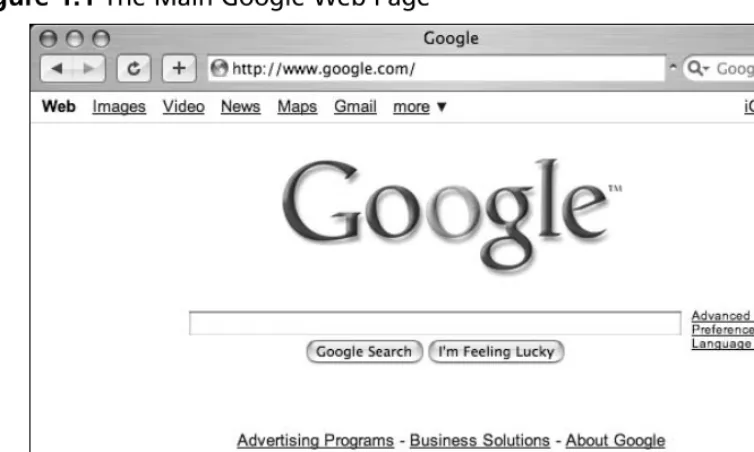
The main Google Web page, shown in Figure 1.1, can be found at www.google.com.The interface is known for its clean lines, pleasingly uncluttered feel, and friendly interface. Although the interface might seem relatively featureless at first glance, we will see that many different search functions can be performed right from this first page.
As shown in Figure 1.1, there’s only one place to type.This is the search field. In order to ask Google a question or query, you simply type what you’re looking for and either press
Figure 1.1The Main Google Web Page
[image:24.612.90.467.67.293.2]The links at the top of the screen (Web, Images, Video,and so on) open the other search areas shown in Table 1.1.The basic search functionality of each section is the same: each search area of the Google Web interface has different capabilities and accepts different search operators, as we will see in Chapter 2. For example, the authoroperator works well in Google Groups, but may fail in other search areas.Table 1.1 outlines the functionality of each distinct area of the main Google Web page.
Table 1.1 The Links and Functions of Google’s Main Page
Interface Section Description
The Google toolbar The browser I am using has a Google “toolbar”
installed and presented next to the address bar. We will take a look at various Google toolbars in the next sec-tion.
Web, Images, Video, These tabs allow you to search Web pages,
News, Maps, Gmail and photographs, message group postings, Google maps,
more tabs and Google Mail, respectively. If you are a first-time
Google user, understand that these tabs are not always a replacement for the Submit Search button. These tabs simply whisk you away to other Google search applica-tions.
iGoogle This link takes you to your personal Google home
page.
Table 1.1 The Links and Functions of Google’s Main Page
Interface Section Description
Sign in This link allows you to sign in to access additional
func-tionality by logging in to your Google Account. Search term input field Located directly below the alternate search tabs, this
text field allows you to enter a Google search term. We will discuss the syntax of Google searching throughout this book.
Google Searchbutton This button submits your search term. In many browsers, simply pressing the Enter/Return key after typing a search term will activate this button.
I’m Feeling Lucky Instead of presenting a list of search results, this button
button will forward you to the highest-ranked page for the
entered search term. Often this page is the most rele-vant page for the entered search term.
Advanced Search This link takes you to the Advanced Search page as
shown. We will look at these advanced search options in Chapter 2.
Preferences This link allows you to select several options (which are
stored in cookies on your machine for later retrieval). Available options include language selection, parental filters, number of results per page, and window options.
Language tools This link allows you to set many different language
options and translate text to and from various lan-guages.
Google Web Results Page
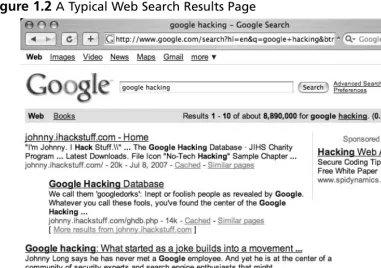
After it processes a search query, Google displays a results page.The results page, shown in Figure 1.2, lists the results of your search and provides links to the Web pages that contain your search text.
Figure 1.2A Typical Web Search Results Page
The results line shows which results are displayed (1–10, in this case), the approximate total number of matches (here, over eight million), the search query itself (including links to dictionary lookups of individual words), and the amount of time the query took to execute. The speed of the query is often overlooked, but it is quite impressive. Even large queries resulting in millions of hits are returned within a fraction of a second!
Figure 1.3Google Translation
Underground Googling…
Translation Proxies
It’s possible to use Google as a transparent proxy server via the translation service. When you click a Translate this pagelink, you are taken to a translated copy of that page hosted on Google’s servers. This serves as a sort of proxy server, fetching the page on your behalf. If the page you want to view requires no translation, you can still use the translation service as a proxy server by modifying the hl variable in the URL to match the native language of the page. Bear in mind that images are not proxied in this manner.
Google Groups
Due to the surge in popularity of Web-based discussion forums, blogs, mailing lists, and instant-messaging technologies, USENET newsgroups, the oldest of public discussion forums, have become an overlooked form of online public discussion.Thousands of users still post to USENET on a daily basis. A thorough discussion about what USENET encom-passes can be found at www.faqs.org/faqs/usenet/what-is/part1/. DejaNews
(www.deja.com) was once considered the authoritative collection point for all past and pre-sent newsgroup messages until Google acquired deja.com in February 2001 (see
www.google.com/press/pressrel/pressrelease48.html).This acquisition gave users the ability to search the entire archive of USENET messages posted since 1995 via the simple, straight-forward Google search interface. Google refers to USENET groups as Google Groups. Today, Internet users around the globe turn to Google Groups for general discussion and problem solving. It is very common for Information Technology (IT) practitioners to turn to Google’s Groups section for answers to all sorts of technology-related issues.The old
USENET community still thrives and flourishes behind the sleek interface of the Google Groups search engine.
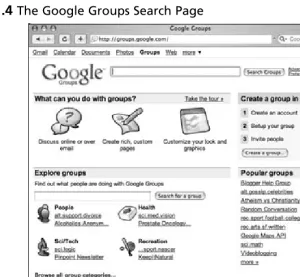
Figure 1.4) looks quite a bit different from other Google search pages, yet the search capabil-ities operate in much the same way.The major difference between the Groups search page and the Web search page lies in the newsgroup browsing links.
Figure 1.4 The Google Groups Search Page
Entering a search term into the entry field and clicking the Search button whisks you away to the Groups search results page, which is very similar to the Web search results page.
Google Image Search
Figure 1.5The Google Images Search Results Page
The page header looks familiar, but contains a few additions unique to the search results page.The Moderate SafeSearchlink below the search field allows you to enable or disable images that may be sexually explicit.The Showingdropdown box (located in the Results line) allows you to narrow image results by size. Below the header, each matching image is shown in a thumbnail view with the original resolution and size followed by the name of the site that hosts the image.
Google Preferences
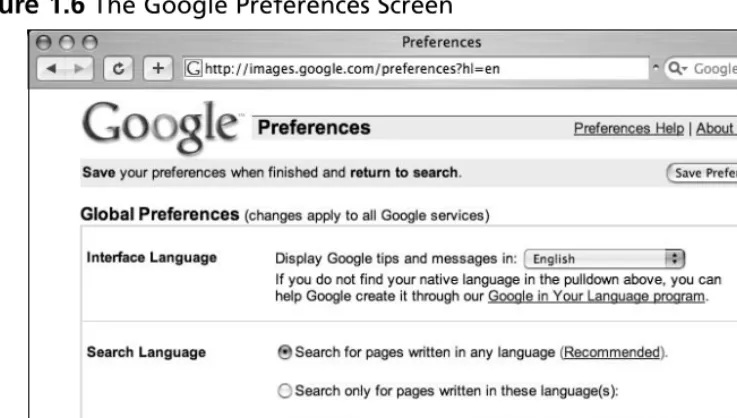
You can access the Preferences page by clicking the Preferenceslink from any Google search page or by browsing to www.google.com/preferences.These options primarily per-tain to language and locality settings, as shown in Figure 1.6.
Figure 1.6The Google Preferences Screen
To get an idea of how Google’s Web pages would be altered by a change in the interface language, take a look at Figure 1.7 to see Google’s main page rendered in “hacker speak.” In addition to changing this setting on the preferences screen, you can access all the language-specific Google interfaces directly from the Language Tools screen at www.google.com/ language_tools.
[image:30.612.91.464.382.589.2]Even though the main Google Web page is now rendered in “hacker speak,” Google is still searching for Web pages written in any language. If you are interested in locating Web pages that are written in a particular language, modify the Search Language setting on the Google preferences page. By default, Google will always try to locate Web pages written in any language.
Underground Googling…
Proxy Server Language Hijinks
As we will see in later chapters, proxy servers can be used to help hide your location and identity while you’re surfing the Web. Depending on the geographical location of a proxy server, the language settings of the main Google page may change to match the language of the country where the proxy server is located. If your language set-tings change inexplicably, be sure to check your proxy server setset-tings. Even experi-enced proxy users can lose track of when a proxy is enabled and when it’s not. As we will see later, language settings can be modified directly via the URL.
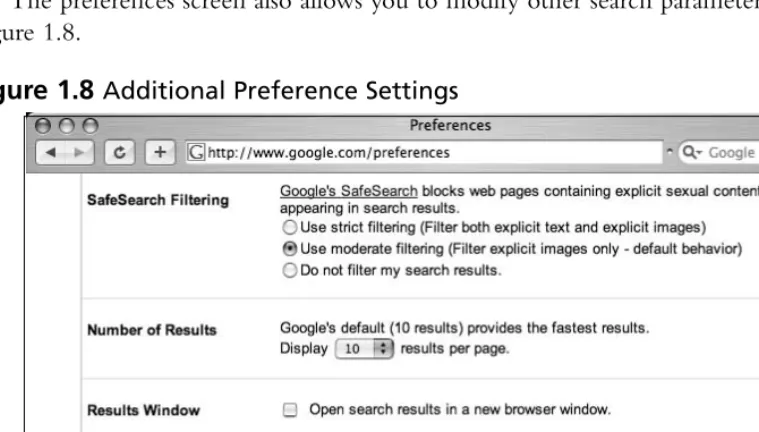
[image:31.612.71.451.375.591.2]The preferences screen also allows you to modify other search parameters, as shown in Figure 1.8.
SafeSearch Filtering blocks explicit sexual content from appearing in Web searches. Although this is a welcome option for day-to-day Web searching, this option should be dis-abled when you’re performing searches as part of a vulnerability assessment. If sexually explicit content exists on a Web site whose primary content is not sexual in nature, the exis-tence of this material may be of interest to the site owner.
The Number of Results setting describes how many results are displayed on each search result page.This option is highly subjective, based on your tastes and Internet connection speed. However, you may quickly discover that the default setting of 10 hits per page is simply not enough. If you’re on a relatively fast connection, you should consider setting this to 100, the maximum number of results per page.
When checked, the Results Window setting opens search results in a new browser window.This setting is subjective based on your personal tastes. Checking or unchecking this option should have no ill effects unless your browser (or other software) detects the new window as a pop-up advertisement and blocks it. If you notice that your Google results pages are not displaying after you click the Search button, you might want to uncheck this setting in your Google preferences.
As noted at the bottom of this page, these changes won’t stick unless you have enabled cookies in your browser.
Language Tools
The Language Tools screen, accessed from the main Google page, offers several different util-ities for locating and translating Web pages written in different languages. If you rarely search for Web pages written in other languages, it can become cumbersome to modify your pref-erences before performing this type of search.The first portion of the Language Tools screen (shown in Figure 1.9) allows you to perform a quick search for documents written in other languages as well as documents located in other countries.
The Language Tools screen also includes a utility that performs basic translation ser-vices.The translation form (shown in Figure 1.10) allows you to paste a block of text from the clipboard or supply a Web address to a page that Google will translate into a variety of languages.
Figure 1.10The Google Translation Tool
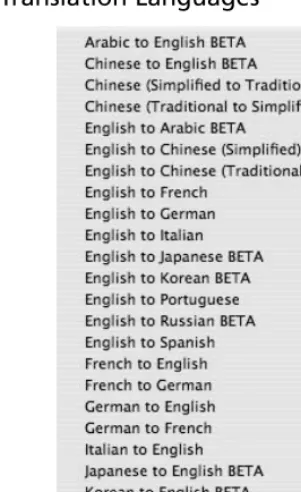
In addition to the translation options available from this screen, Google integrates trans-lation options into the search results page, as we will see in more detail.The transtrans-lation options available from the search results page are based on the language options that are set from the Preferences screen shown in Figure 1.6. In other words, if your interface language is set to English and a Web page listed in a search result is French, Google will give you the option to translate that page into your native language, English.The list of available language translations is shown in Figure 1.11.
Underground Googling…
Google Toolbars
Figure 1.11Google’s Translation Languages
Building Google Queries
Google query building is a process.There’s really no such thing as an incorrect search. It’s entirely possible to create an ineffective search, but with the explosive growth of the Internet and the size of Google’s cache, a query that’s inefficient today may just provide good results tomorrow—or next month or next year.The idea behind effective Google searching is to get a firm grasp on the basic syntax and then to get a good grasp of effective narrowing tech-niques. Learning the Google query syntax is the easy part. Learning to effectively narrow searches can take quite a bit of time and requires a bit of practice. Eventually, you’ll get a feel for it, and it will become second nature to find the needle in the haystack.
The Golden Rules of Google Searching
Before we discuss Google searching, we should understand some of the basic ground rules:
notable exception is the word or. When used as the Boolean operator,ormust be written in uppercase, as OR.
■ Google wildcards. Google’s concept of wildcards is not the same as a pro-grammer’s concept of wildcards. Most consider wildcardsto be either a symbolic representation of any single letter (UNIX fans may think of the question mark) or any series of letters represented by an asterisk.This type of technique is called stem-ming. Google’s wildcard, the asterisk (*), represents nothing more than a single word in a search phrase. Using an asterisk at the beginning or end of a word will not provide you any more hits than using the word by itself.
■ Google reserves the right to ignore you. Google ignores certain common words, characters, and single digits in a search.These are sometimes called stop words. According to Google’s basic search document (www.google.com/ help/basics.html), these words include whereand how, as shown in Figure 1.12. However, Google does seem to include those words in a search. For example, a search for WHERE 1=1 returns less results than a search for 1=1.This is an indica-tion that the WHERE is being included in the search. A search for where pig returns significantly less results than a simple search for pig, again an indication that Google does in fact include words like how and where. Sometimes Google will silently ignore these stop words. For example, a search for HOW 1 = WHERE 4 returns the same number of results as a query for 1 = WHERE 4.This seems to indicate that the word HOW is irrelevant to the search results, and that Google silently ignored the word.There are no obvious rules for word exclusion, but sometimes when Google ignores a search term, a notification will appear on the results page just below the query box.
One way to force Google into using common words is to include them in quotes. Doing so submits the search as a phrase, and results will include all the words in the term, regardless of how common they may be.You can also pre-cede the term with a + sign, as in the query +and. Submitted without the quotes, taking care not to put a space between the + and the word and, this search returns nearly five billion results!
Underground Googling…
Super-Size That Search!
One very interesting search is the search for of *. This search produces somewhere in the neighborhood of eighteen billion search results, making it one of the most pro-lific searches known! Can you top this search?
■ 32-word limit Google limits searches to 32 words, which is up from the previous limit of ten words.This includes search terms as well as advanced operators, which we’ll discuss in a moment. While this is sufficient for most users, there are ways to get beyond that limit. One way is to replace some terms with the wildcard char-acter (*). Google does not count the wildcard character as a search term, allowing you to extend your searches quite a bit. Consider a query for the wording of the beginning of the U.S. Constitution:
we the people of the united states in order to form a more perfect union establish justice
This search term is seventeen words long. If we replace some of the words with the asterisk (the wildcard character) and submit it as
"we * people * * united states * order * form * more perfect * establish *"
including the quotes, Google sees this as a nine-word query (with eight uncounted wildcard characters). We could extend our search even farther, by two more real words and just about any number of wildcards.
Basic Searching
along by placing the highest-ranking pages on the first results page.The details of this ranking system are complex and somewhat speculative, but suffice it to say that for our pur-poses Google rarely gives us exactlywhat we need following a single search.
The simplest Google query consists of a single word or a combination of individual words typed into the search interface. Some basic word searches could include:
■ hacker
■ FBI hacker Mitnick
■ mad hacker dpak
Slightly more complex than a word search is a phrase search. A phrase is a group of words enclosed in double-quote marks. When Google encounters a phrase, it searches for all words in the phrase, in the exact order you provide them. Google does not exclude common words found in a phrase. Phrase searches can include
■ “Google hacker”
■ “adult humor”
■ “Carolina gets pwnt”
Phrase and word searches can be combined and used with advanced operators, as we will see in the next chapter.
Using Boolean Operators and Special Characters
More advanced than basic word searches, phrase searches are still a basic form of a Google query.To perform advanced queries, it is necessary to understand the Boolean operators AND,OR,and NOT.To properly segment the various parts of an advanced Google query, we must also explore visual grouping techniques that use the parenthesis characters. Finally, we will combine these techniques with certain special characters that may serve as shorthand for certain operators, wildcard characters, or placeholders.If you have used any other Web search engines, you have probably been exposed to Boolean operators. Boolean operators help specify the results that are returned from a query. If you are already familiar with Boolean operators, take a moment to skim this section to help you understand Google’s particular implementation of these operators, since many search engines handle them in different ways. Improper use of these operators could drasti-cally alter the results that are returned.
term ANDis redundant to Google. By default, Google automatically searches for allthe terms you include in your query. In fact, Google will warn you when you have included terms that are obviously redundant, as shown in Figure 1.13.
Figure 1.13Google’s Warnings
N
OTEWhen first learning the ways of Google-fu, keep an eye on the area below the query box on the Web interface. You’ll pick up great pointers to help you improve your query syntax.
The plus symbol (+) forces the inclusion of the word that follows it.There should be no space following the plus symbol. For example, if you were to search for and,justice,for, and all as separate, distinct words, Google would warn that several of the words are too common and are excluded from the search.To force Google to search for those common words, preface them with the plus sign. It’s okay to go overboard with the plus sign. It has no ill effects if it is used excessively.To perform this search with the inclusion of all words, con-sider a query such as +and justice for +all. In addition, the words could be enclosed in double quotes.This generally will force Google to include all the common words in the phrase.This query presented as a phrase would beand justice for all.
allow you to get closer to the dastardly wood choppers you’re looking for. Or just try a Google Video search for lumberjack song.Talk about twisted.
A less common and sometimes more confusing Boolean operator is OR. The OR operator, represented by the pipe symbol ( | )or simply the word OR in uppercase letters, instructs Google to locate either one term oranother in a query. Although this seems fairly straightforward when considering a simple query such as hacker or “evil cybercriminal,” things can get terribly confusing when you string together a bunch of ANDs and ORs and NOTs. To help alleviate this confusion, don’t think of the query as anything more than a sentence read from left to right. Forget all that order of operations stuff you learned in high school algebra. For our purposes, an AND is weighed equally with an OR, which is weighed as equally as an advanced operator. These factors may affect the rank or order in which the search results appear on the page, but have no bearing on how Google han-dles the search query.
Let’s take a look at a very complex example, the exact mechanics of which we will dis-cuss in Chapter 2:
intext:password | passcode intext:username | userid | user filetype:csv
This example uses advanced operators combined with the ORBoolean to create a query that reads like a sentence written as a polite request.The request reads, “Locate all pages that have either passwordor passcode in the text of the document. From those pages, show me only the pages that contain either the words username,userid, or userin the text of the document. From those pages, only show me documents that are CSV files.” Google doesn’t get confused by the fact that technically those ORsymbols break up the query into all sorts of possible interpretations. Google isn’t bothered by the fact that from an algebraic standpoint, your query is syntactically wrong. For the purposes of learning how to create queries, all we need to remember is that Google reads our query from left to right.
Google’s cut-and-dried approach to combining Boolean operators is still very confusing to the reader. Fortunately, Google is not offended (or affected by) parenthesis.The previous query can also be submitted as
intext:(password | passcode) intext:(username | userid | user) filetype:csv
This query is infinitely more readable for us humans, and it produces exactly the same results as the more confusing query that lacked parentheses.
Search Reduction
As a simple example, we’ll take a look at GNU Zebra, free software that manages
Transmission Control Protocol (TCP)/Internet Protocol (IP)-based routing protocols. GNU Zebra uses a file called zebra.conf to store configuration settings, including interface informa-tion and passwords. After downloading the latest version of Zebra from the Web, we learn that the included zebra.conf.samplefile looks like this:
! zebra -*-!
! zebra sample configuration file !
! $Id: zebra.conf.sample,v 1.14 1999/02/19 17:26:38 developer Exp $ !
hostname Router password zebra
enable password zebra !
! Interface's description. !
!interface lo
! description test of desc. !
!interface sit0 ! multicast
!
! Static default route sample. !
!ip route 0.0.0.0/0 203.181.89.241 !
!log file zebra.log
To attempt to locate these files with Google, we might try a simple search such as:
"! Interface's description. "
configuration file itself uses, so this seems like a very good place to start. However, Google takes some liberties with this search query, making the results less than adequate, as shown in Figure 1.14.
Figure 1.14Dealing with a Base Search
These results aren’t bad at all, and the query is relatively simple, but we started out looking for zebra.conf files. So let’s add this to our search to help narrow the results.This makes our next query:
"! Interface's description. " zebra.conf
As Figure 1.15 shows, the results are slightly different, but not necessarily better.
For starters, the seattlewireless hit we had in our first search is missing.This was a valid hit, but because the configuration file was not named zebra.conf (it was named
Figure 1.15Search Reduction in Action
Notice that the third hit in Figure 1.15 references zebra.conf.sample.These sample files may clutter valid results, so we’ll add to our existing query, reducing hits that contain this phrase.This makes our new query
"! Interface's description. " –"zebra.conf.sample"
However, it helps to step into the shoes of the software’s users for just a moment. Software installations like this one often ship with a sample configuration file to help guide the process of setting up a custom configuration. Most users will simply edit this file, changing only the settings that need to be changed for their environments, saving the file not as a .sample file but as a .conffile. In this situation, the user could have a live configura-tion file with the term zebra.conf.sample still in place. Reduction based on this term may remove valid configuration files created in this manner.
There’s another reduction angle. Notice that our zebra.conf.sample file contained the term hostname Router.This is most likely one of the settings that a user will change, although we’re making an assumption that his machine is not named Router.This is less a gamble than reducing based on zebra.conf.sample, however. Adding the reduction term “hostname Router” to our query brings our results number down and reduces our hits on potential sample files, all without sacrificing potential live hits.
the perfect search reduction. Our final (that’s four qualifiers for just one word!) query becomes:
"! Interface's description. " -"hostname Router"
This is notthe best query for locating these files, but it’s good enough to give you an idea about how search reduction works. As we’ll see in Chapter 2, advanced operators will get us even closer to that perfect query!
Underground Googling…
Bad Form on Purpose
In some cases, there’s nothing wrong with using poor Google syntax in a search. If Google safely ignores part of a human-friendly query, leave it alone. The human readers will thank you!
Working With Google URLs
Advanced Google users begin testing advanced queries right from the Web interface’s search field, refining queries until they are just right. Every Google query can be represented with a URL that points to the results page. Google’s results pages are not static pages.They are dynamic and are created “on the fly” when you click the Search button or activate a URL that links to a results page. Submitting a search through the Web interface takes you to a results page that can be represented by a single URL. For example, consider the query ihack-stuff. Once you enter this query, you are whisked away to a URL similar to the following:
www.google.com/search?q=ihackstuff
Underground Googling…
Uncomplicating URL Construction
The only URL parameter that is required in most cases is a query (the q parameter), making the simplest Google URL www.google.com/search?q=google.
URL Syntax
To fully understand the power of the URL, we need to understand the syntax.The first part of the URL,www.google.com/search, is the location of Google’s search script. I refer to this URL, as well as the question mark that follows it, as the base, or starting URL. Browsing to this URL presents you with a nice, blank search page.The question mark after the word searchindicates that parameters are about to be passed into the search script. Parameters are options that instruct the search script to actually do something. Parameters are separated by the ampersand (&) and consist of a variablefollowed by the equal sign (=) followed by the valuethat the variable should be set to.The basic syntax will look something like this:
www.google.com/search?variable1=value&variable2=value
This URL contains very simple characters. More complex URL’s will contain special characters, which must be represented with hex code equivalents. Let’s take a second to talk about hex encoding.
Special Characters
Hex encoding is definitely geek stuff, but sooner or later you may need to include a special character in your search URL. When that time comes, it’s best to just let your browser help you out. Most modern browsers will adjust a typed URL, replacing special characters and spaces with hex-encoded equivalents. If your browser supports this behavior, your job of URL construction is that much easier.Try this simple test.Type the following URL in your browser’s address bar, making sure to use spaces between i,hack, and stuff:
www.google.com/search?q="i hack stuff"
that the next two digits are the hexadecimal value of the space character, 20. Some browsers will take the conversion one step further, changing the double-quotes to %22 as well.
If your browser refuses to convert those spaces, the query will not work as expected. There may be a setting in your browser to modify this behavior, but if not, do yourself a favor and use a modern browser. Internet Explorer, Firefox, Safari, and Opera are all excel-lent choices.
Underground Googling…
Quick Hex Conversions
To quickly determine hex codes for a character, you can run an American Standard Code for Information Interchange (ASCII) from a UNIX or Linux machine, or Google for the term “ascii table.”
Putting the Pieces Together
Figure 1.16 Using Google’s Advanced Search Page
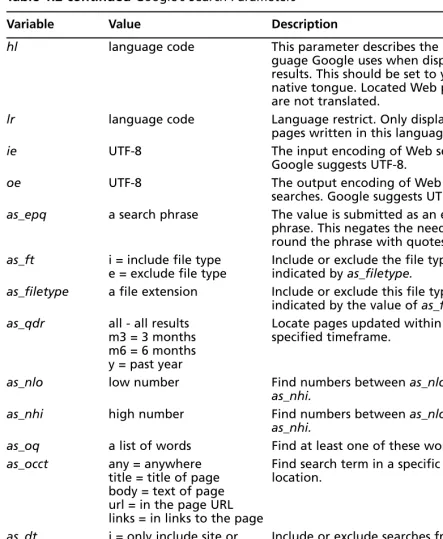
A Google search URL can contain many different parameters. Depending on the
options you selected and the search terms you provided, you will see some or all of the vari-ables listed in Table 1.2.These parameters can be added or modified as needed to change your search criteria.
Table 1.2 Google’s Search Parameters
Variable Value Description q or as_q The search query The search query.
as_eq A search term These terms will be excluded from the search.
start 0 to the max number Used to display pages of results.
of hits Result 0 is the first result on the first
page of results.
num maxResults 1 to 100 The number of results per page (max 100).
filter 0 or 1 If filter is set to 0, show potentially duplicate results.
restrict restrict code Restrict results to a specific country.
Table 1.2 continued Google’s Search Parameters
Variable Value Description
hl language code This parameter describes the
lan-guage Google uses when displaying results. This should be set to your native tongue. Located Web pages are not translated.
lr language code Language restrict. Only display
pages written in this language.
ie UTF-8 The input encoding of Web searches.
Google suggests UTF-8.
oe UTF-8 The output encoding of Web
searches. Google suggests UTF-8.
as_epq a search phrase The value is submitted as an exact phrase. This negates the need to sur-round the phrase with quotes.
as_ft i = include file type Include or exclude the file type e = exclude file type indicated by as_filetype.
as_filetype a file extension Include or exclude this file type as indicated by the value of as_ft. as_qdr all - all results Locate pages updated within the
m3 = 3 months specified timeframe.
m6 = 6 months y = past year
as_nlo low number Find numbers between as_nloand
as_nhi.
as_nhi high number Find numbers between as_nloand
as_nhi.
as_oq a list of words Find at least one of these words.
as_occt any = anywhere Find search term in a specific
title = title of page location.
body = text of page url = in the page URL links = in links to the page
as_dt i = only include site or Include or exclude searches from the
domain domain specified by as_sitesearch.
e = exclude site or domain
as_sitesearch domain or site Include or exclude this domain or site as specified by as_dt.
Table 1.2 continued Google’s Search Parameters
Variable Value Description
safe active = enable SafeSearch Enable or disable SafeSearch.
images = disable SafeSearch
as_rq URL Locate pages similar to this URL.
as_lq URL Locate pages that link to this URL.
rights cc_* Locate pages with specific usage rights (public, commercial, non-com-mercial, and so on)
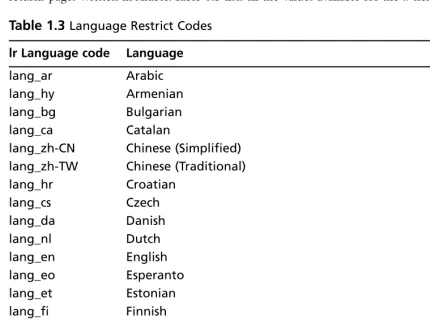
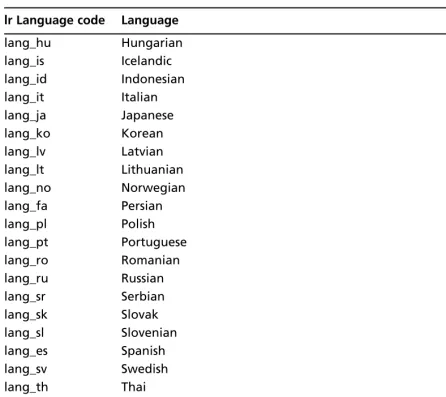
Some parameters accept a language restrict (lr) code as a value.The lrvalue instructs Google to only return pages written in a specific language. For example,lr=lang_aronly returns pages written in Arabic.Table 1.3 lists all the values available for the lrfield:
Table 1.3 Language Restrict Codes
lr Language code Language
lang_ar Arabic
lang_hy Armenian
lang_bg Bulgarian
lang_ca Catalan
lang_zh-CN Chinese (Simplified)
lang_zh-TW Chinese (Traditional)
lang_hr Croatian
lang_cs Czech
lang_da Danish
lang_nl Dutch
lang_en English
lang_eo Esperanto
lang_et Estonian
lang_fi Finnish
lang_fr French
lang_de German
lang_el Greek
lang_iw Hebrew
Table 1.3 continued Language Restrict Codes
lr Language code Language
lang_hu Hungarian
lang_is Icelandic
lang_id Indonesian
lang_it Italian
lang_ja Japanese
lang_ko Korean
lang_lv Latvian
lang_lt Lithuanian
lang_no Norwegian
lang_fa Persian
lang_pl Polish
lang_pt Portuguese
lang_ro Romanian
lang_ru Russian
lang_sr Serbian
lang_sk Slovak
lang_sl Slovenian
lang_es Spanish
lang_sv Swedish
lang_th Thai
lang_tr Turkish
lang_uk Ukrainian
lang_vi Vietnamese
The hl variable changes the language of Google’s messages and links. This is not the same as the lrvariable, which restricts our results to pages written in a specific language, nor is it like the translation service, which translates a page from one language to another.
Figure 1.17Using the hlVariable
To understand the contrast between hland lr, consider the foodsearch resubmitted as an lrsearch, as shown in Figure 1.18. Notice that our URL is different:There are now far fewer results, the search results are written in Danish, Google added a Search Danish pages button, and Google’s messages and links are written in English. Unlike the hl option (Table 1.4 lists the values for the hlfield), the lroption changes our search results. We have asked Google to return only pages written in Danish.
Table 1.4 h1Language Field Values
hl Language Code Language
af Afrikaans
sq Albanian
am Amharic
ar Arabic
hy Armenian
az Azerbaijani
eu Basque
be Belarusian
bn Bengali
bh Bihari
xx-bork Bork, bork, bork!
bs Bosnian
br Breton
bg Bulgarian
km Cambodian
ca Catalan
zh-CN Chinese (Simplified)
zh-TW Chinese (Traditional)
co Corsican
hr Croatian
cs Czech
da Danish
nl Dutch
xx-elmer Elmer Fudd
en selected English
eo Esperanto
et Estonian
fo Faroese
tl Filipino
fi Finnish
fr French
fy Frisian
Table 1.4 continued h1Language Field Values
hl Language Code Language
gl Galician
ka Georgian
de German
el Greek
gn Guarani
gu Gujarati
xx-hacker Hacker
iw Hebrew
hi Hindi
hu Hungarian
is Icelandic
id Indonesian
ia Interlingua
ga Irish
it Italian
ja Japanese
jw Javanese
kn Kannada
kk Kazakh
xx-klingon Klingon
ko Korean
ku Kurdish
ky Kyrgyz
lo Laothian
la Latin
lv Latvian
ln Lingala
lt Lithuanian
mk Macedonian
ms Malay
ml Malayalam
mt Maltese
Table 1.4 continued h1Language Field Values
hl Language Code Language
mr Marathi
mo Moldavian
mn Mongolian
ne Nepali
no Norwegian
nn Norwegian (Nynorsk)
oc Occitan
or Oriya
ps Pashto
fa Persian
xx-piglatin Pig Latin
pl Polish
pt-BR Portuguese (Brazil)
pt-PT Portuguese (Portugal)
pa Punjabi
qu Quechua
ro Romanian
rm Romansh
ru Russian
gd Scots Gaelic
sr Serbian
sh Serbo-Croatian
st Sesotho
sn Shona
sd Sindhi
si Sinhalese
sk Slovak
sl Slovenian
so Somali
es Spanish
su Sundanese
sw Swahili
Table 1.4 continued h1Language Field Values
hl Language Code Language
sv Swedish
tg Tajik
ta Tamil
tt Tatar
te Telugu
th Thai
ti Tigrinya
to Tonga
tr Turkish
tk Turkmen
tw Twi
ug Uighur
uk Ukrainian
ur Urdu
uz Uzbek
vi Vietnamese
cy Welsh
xh Xhosa
yi Yiddish
yo Yoruba
zu Zulu
Underground Googling…
Sticky Subject
The restrictvariable is easily confused with the lrvariable, since it restricts your search to a particular language. However,restricthas nothing to do with language.This variable gives you the ability to restrict your search results to one or more countries, determined by the top-level domain name (.us, for example) and/or by geographic location of the server’s IP address. If you think this smells somewhat inexact, you’re right. Although inexact, this vari-able works amazingly well. Consider a search for peoplein which we restrict our results to JP ( Japan), as shown in Figure 1.19. Our URL has changed to include the restrict value (shown in Table 1.5), but notice that the second hit is from www.unu.edu, the location of which is unknown. As our sidebar reveals, the host does in fact appear to be located in Japan.
Underground Googling…
How Google Owns the Continents
It’s easy to get a relative idea of where a host is located geographically. Here’s how host and whois can be used to figure out where www.unu.edu is located:
wh00p:~# host www.unu.edu
www.unu.edu has address 202.253.138.42
wh00p:~# whois 202.253.138.42
role: Japan Network Information Center
address: Kokusai-Kougyou-Kanda Bldg 6F, 2-3-4 Uchi-Kanda
address: Chiyoda-ku, Tokyo 101-0047, Japan country: JP
[image:56.612.67.491.376.610.2]phone: +81-3-5297-2311 fax-no: +81-3-5297-2312
Table 1.5restrictField Values
Country Restrict Code
Andorra countryAD
United Arab Emirates countryAE
Afghanistan countryAF
Antigua and Barbuda countryAG
Anguilla countryAI
Albania countryAL
Armenia countryAM
Netherlands Antilles countryAN
Angola countryAO
Antarctica countryAQ
Argentina countryAR
American Samoa countryAS
Austria countryAT
Table 1.5 continuedrestrictField Values
Country Restrict Code
Australia countryAU
Aruba countryAW
Azerbaijan countryAZ
Bosnia and Herzegowina countryBA
Barbados countryBB
Bangladesh countryBD
Belgium countryBE
Burkina Faso countryBF
Bulgaria countryBG
Bahrain countryBH
Burundi countryBI
Benin countryBJ
Bermuda countryBM
Brunei Darussalam countryBN
Bolivia countryBO
Brazil countryBR
Bahamas countryBS
Bhutan countryBT
Bouvet Island countryBV
Botswana countryBW
Belarus countryBY
Belize countryBZ
Canada countryCA
Cocos (Keeling) Islands countryCC
Congo, The Democratic Republic of the countryCD
Central African Republic countryCF
Congo countryCG
Burundi countryBI
Benin countryBJ
Bermuda countryBM
Brunei Darussalam countryBN
Bolivia countryBO