Article
An Engineering Evaluation on the Glimpse of
Satellite Image Pre-processing Utility Tools
Sunitha Abburu* and Suresh Babu Golla
Department of Computer Applications, Adhiyamaan College of Engineering, Tamilnadu, India *Email: [email protected] (Corresponding author)
Abstract. The advancement of technology in the area of satellite remote sensing has been generating voluminous amount of satellite images at regular intervals regularly. The satellite image analysis derive very useful, invaluable and essential inputs for various applications such as disaster management, civil aviation, meteorology, ocean observation systems, earth science studies and defense applications, etc. The satellite image analysis technique provides the necessary inputs for image preprocessing systems as a basic prerequisite and essential ingredient. Over the past several years many satellite image preprocessing tools have been developed with various features. The choice of satellite image preprocessing tools basically depend on the purpose of image analysis, the features of satellite image preprocessing tools and the specific need and application. Due to a large number of applications of satellite images, user has a wide ranging choice to select optimally the right preprocessing tool for the right application. Thus, the present study helps in aiding the proper understanding and selection of the various satellite image preprocessing tools and their features for any specific application. To facilitate this scheme, the current study has identified various satellite image preprocessing tools and prominent features of the desired tool. Briefly, the study presents a clear understanding with specific examples on the various available tools and features for the user specific application for the desired satellite images. The various features of the satellite image preprocessing tools have been presented in detail for ready reference, guidance and usage.
Keywords: Satellite image, preprocessing tools.
ENGINEERING JOURNAL Volume 19 Issue 2 Received 24 July 2014
Accepted 6 November 2014 Published 30 April 2015
1.
Introduction
Remote sensing technology is involved in study, monitor and management of diverse fields such as agriculture, forestry, geology, water, ocean etc. It is a major source for collecting information. Remote sensing technology reduces study time and complexity of field work [1]. Due to availability of very high spatial resolution satellites in the recent years, huge satellite data is available, which is useful for various applications. Satellite remote sensing technology plays a vital role in major applications such as environment monitoring, weather forecasting, information technology, communication, spatial data acquisition and management etc. [2, 3].
Satellite remote sensing technology is providing environmental data by observing, evaluating and measuring the conditions of various factors [4]. The technology provides quantitative and qualitative information that cannot be obtained by any other data gathering methods. Satellite remote sensing technology collects data/images timely and data volumes have been growing at an exponential rate [5]. Today satellite data and images are assisting in different applications like disaster management, airlines, earth analysis, defense, country planning, environment monitoring, weather forecasting, information technology, meteorology, oceanology and for several governmental non-governmental activities.
The factors like changes in scene illumination, atmospheric conditions, instrument response characteristics, temporal and spatial radiometric variations between scenes and earth rotation etc. shows impact on the satellite images, results in noise and errors in satellite images [6]. Preprocessing of satellite images prior to image classification and change detection is more important. Preprocessing of satellite image includes a series of sequential operations such as atmospheric correction or normalization, image registration, geometric correction, and masking [7]. A major challenge to scientists, engineers and business people is to extract valuable information from raw satellite image data. Due to size, resolution of satellite images there is a strong need of effective and efficient satellite image preprocessing tools.
The current research work provides a detailed study on various satellite image preprocessing tools. This paper also gives a comparative study of satellite image preprocessing tools with respect to their features.
The rest of the paper is organized as follows. Section 2 gives brief description on satellite image preprocessing, section 3 lists few benefits of satellite image preprocessing, section 4 describes important features of satellite image preprocessing tools, section 5 discusses few satellite image preprocessing tools, section 6 provides summary of satellite image preprocessing tool comparison and section 7 concludes.
2.
Satellite Image Preprocessing
Mather [8] defines the term preprocessing as the correction of geometric and radiometric deficiencies and the removal of data errors. Satellite image preprocessing includes a series of operations and it is essential for further processing and imagery analysis.
Satellite image preprocessing operations are referred to as image restoration and rectification [9]. Satellite image restoration and rectification are used to correct sensor, platform-specific radiometric and geometric distortions of data. Radiometric corrections are necessary due to variations in scene illumination and viewing geometry, atmospheric conditions, and sensor noise and response. Each of these will vary depending on the specific sensor and platform used to acquire the data and the conditions during data acquisition [10]. From [6] and [11], major activities of satellite image preprocessing are:
Geometric correction and orthocorrection
Correction for noise
Prior analysis
Shadow Compensation
Image Transformation
Image Filtering for Edge Enhancement
Resolution Increasing
Extract and analyze low-level features of satellite images.
Improve satellite image retrieval system
Detects and remove noise from satellite images
Conversion of image into information
Support valuable information extraction from raw image data
4.
Features of Satellite Image Preprocessing Tools
One of the important decisions to be taken in the satellite image preprocessing is to select a satellite image preprocessing tool. To select an appropriate tool, there is a strong need of compare satellite image preprocessing tools with respect to features. Following are few important features of satellite image preprocessing tools.
Platform: Provides information of supported platforms such as java, C++ and .net etc. OS: Operating system that runs satellite image preprocessing tool
Input formats: Satellite image preprocessing tool supported file formats such as jpeg, png and raster images etc.
Editing allows user to edit satellite image. Satellite image edit feature includes pixel editing, image adjustments like brightness, contrast and curve controls etc.
Extensibility enhances functionality of satellite image preprocessing tool using plugins
Feature extraction: It is a type of dimensionality reduction. This feature efficiently represents interesting parts of a satellite image as a compact feature vector. Feature extraction is useful to quickly complete operations such as image matching and retrieval.
Output formats are out comes from a satellite image preprocessing tool after feature extraction, color processing, segmentation and edit etc.
Color processing feature allows to modify the color values of pixels in satellite images
Geometric transformations changes positions of pixels in satellite image. Geometric transformations include warping, registration and morphing etc. This feature allows elimination of geometric falsehood occurs when an image is captured by satellite.
Segmentation divides a satellite image into multiple parts. This feature is used to identify objects or other relevant information in satellite images.
Classification groups satellite image pixels into meaningful classes
Image enhancement involves in noise removal and brighten satellite image. It makes easier to identify key features and improves further analysis.
Image analysis extracts meaningful information from satellite images. It include functions finding shapes, detecting edges, counting objects and measuring properties of an object.
Change detection assists to identify modification land cover within the same category. This feature can be used in various applications such as disaster management, urban monitoring and land cover change analysis etc.
5.
Satellite Image Preprocessing Tools
Satellite image preprocessing tools plays a vibrant role in many remote sensing activities. Different organizations, research communities and software companies have developed several tools for satellite image processing. This section describes few popular satellite image preprocessing tools: ImageJ, Orfeo Toolbox, Grass Gis, SAGA, ECognition, Erdas Imagine, ENVI, and ArcGIS.
a) ImageJ
Fig. 1. ImageJ architecture.
b) Orfeo Toolbox
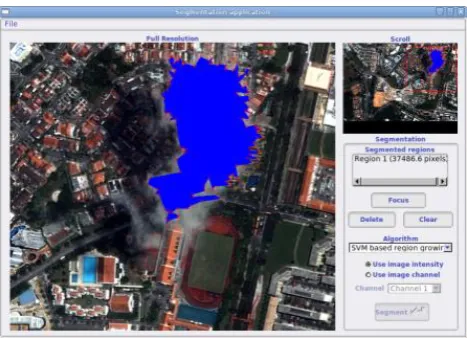
Orfeo Toolbox (OTB) [13–15] is developed by French Space Agency. OTB is developed based on the medical image processing library ITK [16]. OTB is a set of algorithmic components. It provides an open source library of image processing algorithms. OTB is adapted to large remote sensing images that allow methodological research. OTB provides more of image manipulation utilities and high-level processing chains like ortho-rectification, classification or segmentation. OTB major functionalities are image access, filtering features extraction, classification, change detection, image segmentation and information extraction. OTB is adopted for processing and improve use of images derived from Pleiades (PHR) and Cosmo-Skymed (CSK) satellites. Figure 2 Shows segmentation of satellite image using OTB [17].
Fig. 2. Satellite image segmentation using OTB.
c) GRASS GIS
[image:4.595.181.415.80.219.2] [image:4.595.181.415.377.546.2]Fig. 3. GRASS GIS Architecture
d) SAGA
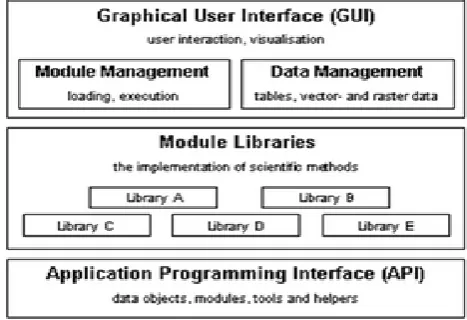
SAGA (System for Automated Geo-scientific Analyses) [19] has been developed by Dept. of Physical Geography, Gottingen. SAGA is a free and open source software developed using C++. SAGA has been developed for easy and effective implementation of Geo-scientific methods. SAGA provides user friendly interface and many visualization options. SAGA comes with a comprehensive and a set of free modules. Many modules perform simple data operations. Figure 4 shows architecture of SAGA.
Fig. 4. SAGA Architecture.
e) eCognition
[image:5.595.178.417.78.229.2] [image:5.595.179.413.353.513.2]Fig. 5. eCognition interface.
f) ENVI
ENVI [22] has been developed by Exelis Visual Information Solutions (EVIS). It combines advanced image processing and geospatial analysis technology. It provides user friendly interface to process and analyze satellite imagery that helps in effective decision making. ENVI can be used by GIS Professionals to image analysts, image scientists without prior experience with imagery. Figure 6 shows interface of ENVI.
Fig. 6. Graphical user interface of ENVI.
g) ERDAS Imagine
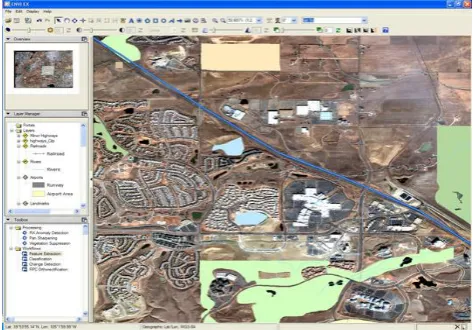
[image:6.595.182.417.77.244.2] [image:6.595.179.416.356.521.2]Fig. 7. ERDAS imagine interface.
h) ArcGIS
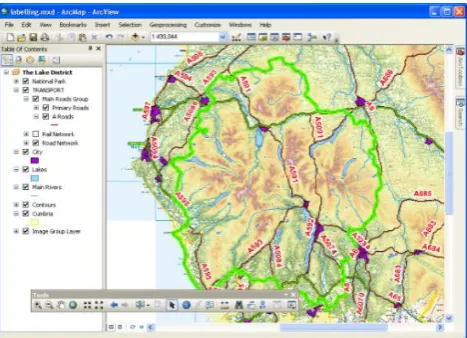
ArcGIS [24] has been developed by ESRI. It supports deep analysis on spatial information, greater understanding of spatial data and helps in decision making. ArcGIS has capability to create, organize, and share geographic information and tools with anyone by using intelligent online maps and useful applications. ArcGIS applications can run virtually anywhere on desktops, the web, smartphones and tablets. ArcGIS can combine information from independent layers by applying a rich set of spatial operations for effective special analysis. Figure 8 shows ArcGIS architecture.
Fig. 8. ArcGIS architecture.
6.
Comparison of Satellite Image Preprocessing Tools
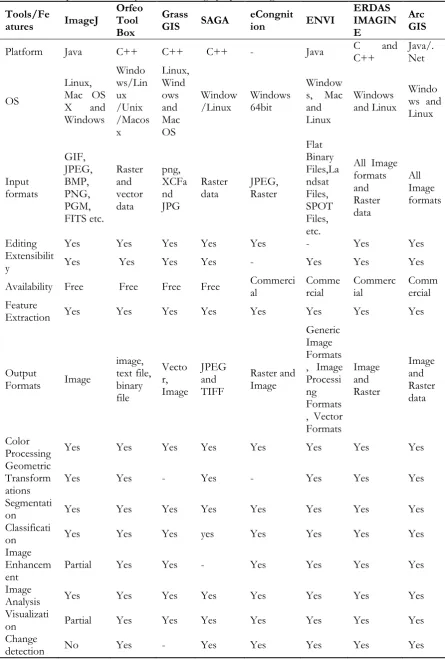
[image:7.595.181.415.78.247.2]Table 1. Comparison summary of satellite image preprocessing tools.
Tools/Fe
atures ImageJ
Orfeo Tool Box
Grass
GIS SAGA eCongnition ENVI
ERDAS IMAGIN E
Arc GIS
Platform Java C++ C++ C++ - Java C C++ and Java/.Net
OS
Linux, Mac OS X and Windows Windo ws/Lin ux /Unix /Macos x Linux, Wind ows and Mac OS Window
/Linux Windows 64bit
Window s, Mac and Linux
Windows and Linux
Windo ws and Linux Input formats GIF, JPEG, BMP, PNG, PGM, FITS etc. Raster and vector data png, XCFa nd JPG Raster
data JPEG, Raster
Flat Binary Files,La ndsat Files, SPOT Files, etc.
All Image formats and Raster data All Image formats
Editing Yes Yes Yes Yes Yes - Yes Yes
Extensibilit
y Yes Yes Yes Yes - Yes Yes Yes
Availability Free Free Free Free Commercial Commercial Commercial Commercial Feature
Extraction Yes Yes Yes Yes Yes Yes Yes Yes
Output
Formats Image
image, text file, binary file Vecto r, Image JPEG and TIFF Raster and Image Generic Image Formats , Image Processi ng Formats , Vector Formats Image and Raster Image and Raster data Color
Processing Yes Yes Yes Yes Yes Yes Yes Yes Geometric
Transform
ations Yes Yes - Yes - Yes Yes Yes
Segmentati
on Yes Yes Yes Yes Yes Yes Yes Yes
Classificati
on Yes Yes Yes yes Yes Yes Yes Yes
Image Enhancem
ent Partial Yes Yes - Yes Yes Yes Yes
Image
Analysis Yes Yes Yes Yes Yes Yes Yes Yes
Visualizati
on Partial Yes Yes Yes Yes Yes Yes Yes
7.
Conclusion
The motivation behind this research work is the necessity and lack of availability of satellite image preprocessing tools available in a scattered form in various literature. In this paper a detailed study on the various types of satellite preprocessing tools has been presented bringing into one literary platform for easy availability, access and usage. These tools are essential for more accurate applications for best practices in the area helping the users for identification of appropriate tools through their unique features. This has been achieved bringing out a matrix of various satellite preprocessing tools and their features presenting a summary of comparisons for better utilization. The detailed study and comparison of satellite image preprocessing tools concludes that all tools supports windows operating system and developed using object oriented programming languages such as C++ and Java. ImageJ, OTB, GRASS GIS and SAGA are free and open source software and the rest are commercial. ImageJ provides more plugins and provides better performance for small scale applications. Orfeo Tool Box, SAGA, eCongnition and ERDAS tools allow raster and vector data formats as inputs. ArcGIS, ERDAS, eCongnition and ENVI provides comprehensive features for deep analysis and preprocessing. These tools have commercial implications. This particular study helps the users to identify the various satellite preprocessing tools and exhibit their unique features for identification of best tools for optimum needs and requirements.
References
[1] V. Chaichoke, P. Supawee, V. Tanasak, and K. S. Andrew, “A Normalized Difference Vegetation Index (NDVI) Time-Series of Idle Agriculture Lands: A Preliminary Study,” Engineering Journal, vol. 15, no. 1, pp. 9–16, 2011.
[2] Remote Sensing Applications. [Online]. Available: http://www.isro.org/scripts/remotesensingapplications.aspx [Accessed: Feb. 13th, 2014].
[3] R. Chris and S. Chalermchon, “Contribution of GNSS CORS infrastructure to the mission of modern geodesy and status of GNSS CORS in Thailand,” Engineering Journal, vol. 15, no. 1, pp. 25–42, 2011. [4] A. O. Machael and T. K. Gerg, “Remote sensing (satellite) system technologies,” Environmental
Monitoring, Encyclopedia of Life Support Systems (EOLSS), vol. 1.
[5] X. Zheng, X. Sun, K. Fu, and Hongqi Wang, “Automatic annotation of satellite images via multifeature joint sparse coding with spatial relation constraint,” IEEE Geoscience and Remote Sensing Letters, vol. 10, no. 4, pp. 652–656, July 2013.
[6] M. B. Caroline and W. H. David, “Pre-processing methodology for application to Landsat Tm/Etm+imagery of the wet tropics,” Rainforest CRC, Research Report, July 2006.
[7] Image Preprocessing. [Online]. Available: http://cast.uark.edu/home/research/environmental-studies/lulc-change-in-carroll-county/methodology1/image-preprocessing.html [Accessed: Jan. 8th, 2014].
[8] E. J. Milton, “Review of ‘Mather, P.M., 1999: Computer processing of remotely-sensed images. An introduction. Chichester: Wiley’,” Progress in Physical Geography, vol. 25, no. 1, pp. 145–146, 2001. [9] Introduction to Image Processing in IDL, Image Processing. (June 2010). [Online]. pp. 9-16. Available
at : Available: http://www.exelisvis.com/docs/pdf/image.pdf [Accessed: Jan. 8th, 2014].
[10] Pre-processing. [Online]. Available: http://www.nrcan.gc.ca/earth-sciences/geomatics/ satellite-imagery-air-photos/satellite-imagery-products/educational-resources/9403 [Accessed: Jan. 6th, 2014]. [11] S. Valery and M. Aliaksei, “Multispectral image pre-processing for interactive satellite image
classification,” in Proc. Digital Earth Summit on Geoinformatics, 2008, pp. 369–374.
[12] ImageJ. [Online]. Available: http://rsbweb.nih.gov/ij/features.html [Accessed: Mar. 3rd, 2014]. [13] Orfeo Toolbox. [Online]. Available: http://www.orfeo-toolbox.org/otb/ [Accessed: Mar. 3rd, 2014]. [14] The ORFEO Tool Box Software Guide, Updated for OTB-4.0. (March 13, 2014) Available:
http://orfeo-toolbox.org/SoftwareGuide/index.html [Accessed: Apr. 8th, 2014]
[15] M. Grizonnet, J. Michel, J. Inglada, and M. Savinaud. (June 6th, 2013). Exploit Pleiades PHR data with
the ORFEO ToolBox. [Online]. Available at :
[17] C. Emmanuel, I. Jordi, and G. Alain, “Orfeo Toolbox: A complete solution for mapping from high resolution satellite images,” The International Archives of the Photogrammetry, Remote Sensing and Spatial Information Sciences, vol. 37, pp. 1263–1268, 2008.
[18] GRASS GIS. [Online]. Available: http://grass.osgeo.org/documentation/general -overview [Accessed: Apr. 8th, 2014]
[19] SAGA. [Online]. Available: http://www.saga-gis.org/en/index.html [Accessed: Mar. 14th, 2014]. [20] M. Belgiu and J. Thomas, “Ontology based interpretation of Very High Resolution imageries–
grounding ontologies on visual interpretation keys,” in AGILE 2013—Leuven, May 14–17, 2013. [21] G. Willhauck, J. J. Caliz, C. Hoffmann, I. Lingenfelder, and M. Heynen, “Object-oriented ship
detection from VHR satellite images,” in Semana Geomática, Barcelona, Spain, 2005.
[22] ENVI. [Online]. Available: http://www.exelisvis.com/ProductsServices/ENVI/ ENVI.aspx [Accessed: Mar. 14th, 2014].
[23] ERDAS IMAGINE. [Online]. Available: http://geospatial.intergraph.com/products/ ERDASIMAGINE/ERDASIMAGINE/ Details.aspx [Accessed: Feb. 15th, 2014].