Introduction!
4
NFC protocols
!
5
Physical and RF layer! 6
Initialization, Anti-Collision, and Protocol Activation layer! 7
Protocol layer! 7
Application layer! 8
Example data capture! 10
Fuzzing the NFC stack!
13
Fuzzing setup! 15
Fuzzing test cases! 16
Results - Nexus S! 18
Results - Nokia N9! 25
NFC higher level code!
26
Nexus S - Android 2.3.3! 26
Galaxy Nexus - Android 4.0.1! 28
Galaxy Nexus - Android 4.1.1! 32
Nokia N9 - MeeGo 1.2 Harmattan PR1.3! 33
Possible attacks
!
37
Android NFC Stack bug! 37
Android Browser! 38
N9 Bluetooth pairing! 38
N9 bugs! 39
Summary
!
41
Introduction
Near Field Communication (NFC) has been used in mobile devices in some countries for a while, and is now emerging on mobile devices in use in the United States. This technology allows NFC-enabled devices to communicate with each other within close range, typically a few centimeters. NFC is being deployed and adopted as a way to make payments, using a mobile device to communicate credit card information to an NFC enabled terminal. It is a new, cool, technology, but as with the introduction of any new technology, the question that must be asked is what kind of impact the inclusion of this new functionality will have on the attack surface of mobile devices.
In this paper we explore this question by introducing NFC and its associated protocols. Next, we describe how to fuzz the NFC protocol stack for two devices as well as provide the results of our testing. Then we see for these devices what software is built on top of the NFC stack. It turns out that through NFC, using technologies like Android Beam or NDEF content sharing, one can force some phones to parse images, videos, contacts, office documents, and even open up web pages in the browser, all without user
interaction.
NFC protocols
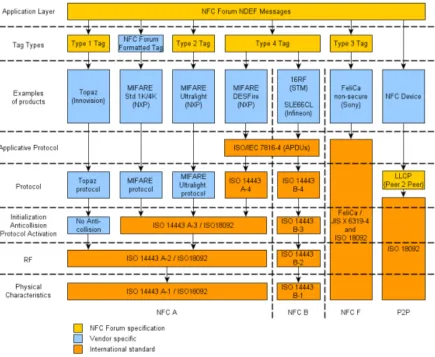
[image:5.612.88.523.155.512.2]Understanding the NFC attack surface first requires some understanding of NFC and the underlying protocols on which it is based. Figure 1, below, shows a diagram of most of the associated protocols used for NFC transactions.
Figure 1: Relevant specifications for NFC
At its most basic level, NFC is a set of communication protocols based on radio-frequency identification (RFID) standards, including ISO 14443. NFC uses the
frequency 13.56 MHz and its operating range is said to be between 3-10 centimeters, although in practice it is typically near the lower end of that range. We’ve observed the range of 2-3 centimeters in real world scenarios. NFC operates at low data rates, ranging from 106kbit/s to 424kbits/s.
There are two general ways NFC communication takes place: in the first, there is an initiator and a target. The initiator, for example a mobile device, actively generates a radio frequency (RF) field that can power the passive target, such as an NFC tag. The target tag answers by modulating the existing field provided by the initiator. This
this situation the initiator can read or sometimes write data to and from the tag. There are many types of tags and many protocols that can be used to interact with different types of tags, again, please see Figure 1.
The other mode of NFC communication is peer-to-peer (P2P). In order to do P2P, both devices need to be powered and generate their own RF fields.
Physical and RF layer
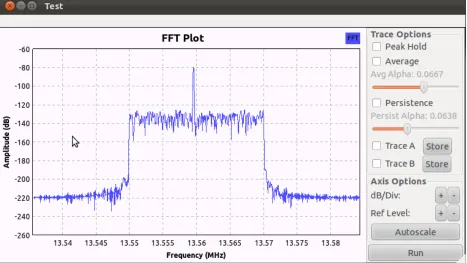
[image:6.612.74.541.261.524.2]At the lowest level, communication takes place according to ISO 14443 A-2. There are different codings to transfer data. At 106 kbits/s, a modified Miller coding with 100% modulation is used. In other cases, Manchester coding is used with a modulation ratio of 10%. Figure 2 shows an FFT plot of captured NFC traffic using GNU Radio.
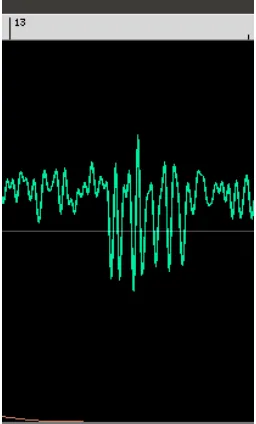
The next Figure shows the waveform of some low-level data.
Figure 3: A waveform of the value “26”
From looking at the signal in Figure 3, above, which was taken between a Nexus S Android device and an NFC tag, one can deduce that the Nexus S transmits data at a rate of 106kbps using 100% ASK with Manchester encoding. With some effort, you can find the signal in Figure 3 corresponds to the byte “0x26” which is a SENS_REQ
according to ISO 14443-3.
This layer is really too low for our purposes, for more information on this protocol layer, consult [1-3].
Initialization, Anti-Collision, and Protocol Activation layer
For some types of NFC communication, there is a phase whereas two NFC enabled devices become aware of each other and initialize their communications. There is very little data exchanged here, and for reasons discussed in the next section, we cannot easily fuzz this part of the protocol, so we skip any further details. For more information, please see [4].
Protocol layer
Lower levels are focused on physical aspects and starting communication. The protocol layer is the layer for actually transmitting the data intended to be sent or received with the communication. In general, the data can be anything, but a typical data payload will be described in the next section.
Type 1 (Topaz)
Type 1 tags use a format sometimes called the Topaz protocol, see [5]. It uses a simple memory model which is either static for tags with memory size less than 120 bytes or dynamic for tags with larger memory. Bytes are read/written to the tag using commands such as RALL, READ, WRITE-E, WRITE-NE, RSEG, READ8, WRITE-E8, WRITE-N8.
MIFARE Classic
MIFARE classic tags are storage devices with simple security mechanisms for access control. They use an NXP proprietary security protocol for authentication and ciphering. This encryption was reverse engineered and broken in 2007 [6].
Type 2 (MIFARE UltraLight)
Type 2 tags [7] are similar to Type 1 tags. They have a static memory layout when they have less than 64 bytes available and a dynamic layout otherwise. The first 16 bytes of memory contain metadata like a serial number, access rights, and capability container. The rest is for the actual data. Data is accessed using READ and WRITE commands, see the section “Example data capture” for an example of a Type 2 transaction.
Type 3
As far as I can tell, there aren’t any tags that use Type 3 transactions, but if you care, check out [8].
Type 4 (DESFire)
Type 4 tags contain a simple file system composed of at least 2 files, the Capability Container (CC) file and the NDEF file. The commands include Select, ReadBinary, and UpdateBinary. At the most basic level, the device must read the CC file, which tells it information about the NDEF file which it can then select and read. The CC file is typically 15 bytes in size. See [9] for more details.
LLCP (P2P)
The previous protocol layer protocols have all had initiators and targets and the
protocols are designed around the initiator being able to read/write to the target. Logical Link Control Protocol (LLCP) is different because it establishes communication between two peer devices. LLCP allow connections to be established and deactivated, data to be transferred at any time when the link is established, do multiplexing, and provide connectionless or connection-oriented transport. Each PDU contains a source and destination address, a type, a sequence field and the LLCP payload. The different types include things like SYMM to keep connections alive when there are no other PDU’s available, CONNECT to establish a connection-oriented connection, and I for the actual high level data payload. There are other types of PDU’s as well, see [10] for details.
Application layer
to encapsulate one or more application-defined payloads of arbitrary type and size into a single payload. NDEF data contains different type identifiers to describe the type of data to expect, such as URI’s, MIME types, or NFC-specific types. There are
specifications for NDEF [11] as well as for each of the well known types, see [12-13] for example. One example NDEF is given in the next section. For clarity, and because the NDEF format is so important for NFC, we provide another couple of examples here. We start with a “smart poster” which is basically a URL.
0000: D1 02 18 53 70 91 01 05 54 02 65 6E 68 69 51 01 Ñ..Sp<91>..T.enhiQ. 0010: 0B 55 01 67 6F 6F 67 6C 65 2E 63 6F 6D .U.google.com
d1 - MB, ME, SR, TNF=”NFC Forum well-known type”
! 02 Type length
! 18 Payload length
! 53 70 Type - “Sp”
! ! 91 - MB, SR
! ! ! 01 Type length
05 Payload length
54 Type - “T”
02 Status byte - Length of IANA lang code
65 6E language code = “en”
68 69 “hi” text
51 - ME, SR
01 Type length
0b Payload length
! ! ! 55 Type - “U”
01 identifier code “http://www.”
67 6F 6F 67 6C 65 2E 63 6F 6D = “google.com” - text
The previous NDEF example had a single byte devoted to the length of the payload. To support payloads longer than 255 bytes, a longer form of NDEF is used. (You can tell which variant to expect by whether the SR bit is set in the first byte of the NDEF record or not). Below is the beginning of a longer NDEF record.
0000: C1 01 00 00 01 2F 54 02 65 6E 61 61 61 61 61 61....
c1 - MB, ME, TNF=”NFC Forum well-known type”
! 01 Type length
! 00 00 01 2f Payload length
! 54 Type - “T”
! ! 02 - Status byte - Length of IANA lang code
! ! 65 63 - language code = “en”
Example data capture
[image:10.612.73.541.129.481.2]Data can be captured in various ways. Perhaps the simplest way (when it works) is to use a Proxmark3 device [14], see Figure 4, below.
Figure 4: Proxmark homemade antenna waiting for a Type 2 transaction from a SCL3711
Below, you can see a trace obtained from an SCL 3711 NFC card reader reading from a Mifare Ultralight tag. I added brackets to indicates bytes used for checksum purposes. I also indicate the specification used to interpret the bytes.
<Broken out from [15]>
SENS_REQ
26
SENS_RES (NFCID1 size: double (7 bytes), Bit frame SDD)
TAG 44 00
SDD_REQ CL1
93 20
SDD_RES (CT? 04-e3-ef BCC)
SEL_REQ CL1
93 70 88 04 e3 ef 80 <99 73>
SEL_RES - Not complete, type 2
TAG 04 <da 17>
SDD_REQ CL2
95 20
SDD_RES (a2-ef-20-80 BCC)
TAG a2 ef 20 80 <ed>
SEL_REQ CL2
95 70 a2 ef 20 80 ed <72 c8>
SEL_RES - complete, type 2
TAG 00 <fe 51>
<Broken out from [7]>
READ - 08
30 08 <4a 24>
READ Response
TAG 74 72 61 6c 69 67 68 74 3f fe 00 00 e4 f2 e3 01 <06 d5>
READ - 03
30 03 <99 9a>
READ Response
TAG e1 10 06 00 03 17 d1 01 13 54 02 65 6e 73 75 70 <b1 62>
READ - 04
30 04 <26 ee>
READ Response
TAG 03 17 d1 01 13 54 02 65 6e 73 75 70 2c 20 75 6c <2a 00>
READ - 05
30 05 <af ff>
READ - Response
TAG 13 54 02 65 6e 73 75 70 2c 20 75 6c 74 72 61 6c <16 f6>
READ - 06
30 06 <34 cd>
READ - Response
TAG 6e 73 75 70 2c 20 75 6c 74 72 61 6c 69 67 68 74 <65 db>
READ - 04
30 04 <26 ee>
READ - Response
TAG 03 17 d1 01 13 54 02 65 6e 73 75 70 2c 20 75 6c <2a 00>
READ - 05
30 05 <af ff>
READ - Response
TAG 13 54 02 65 6e 73 75 70 2c 20 75 6c 74 72 61 6c <16 f6>
READ - 06
30 06 <34 cd>
READ - Response
TAG 6e 73 75 70 2c 20 75 6c 74 72 61 6c 69 67 68 74 <65 db>
READ - 07
30 07 <bd dc>
READ - Response
TAG 2c 20 75 6c 74 72 61 6c 69 67 68 74 3f fe 00 00 <8b 9e>
30 08 <4a 24>
READ - Response
TAG 74 72 61 6c 69 67 68 74 3f fe 00 00 e4 f2 e3 01 <06 d5>
READ - 09
30 09 <c3 35>
READ - Response
TAG 69 67 68 74 3f fe 00 00 e4 f2 e3 01 e4 f2 e3 01 <15 ca>
READ - 0a
30 0a <58 07>
READ - Response
TAG 3f fe 00 00 e4 f2 e3 01 e4 f2 e3 01 30 00 00 00 <6a 52>
READ - 0b
30 0b <d1 16>
READ - Response
TAG e4 f2 e3 01 e4 f2 e3 01 30 00 00 00 45 34 20 46 <ef 07>
READ - 0c
30 0c <6e 62>
READ - Respnose
TAG e4 f2 e3 01 30 00 00 00 45 34 20 46 32 20 45 33 <17 e2>
READ - 0d
30 0d <e7 73>
READ - Response
TAG 30 00 00 00 45 34 20 46 32 20 45 33 04 e3 ef 80 <f1 77>
READ - 0e
30 0e <7c 41>
READ - Response
TAG 45 34 20 46 32 20 45 33 04 e3 ef 80 a2 ef 20 80 <01 7e>
READ - 0f
30 0f <f5 50>
READ - Response
TAG 32 20 45 33 04 e3 ef 80 a2 ef 20 80 ed 48 00 00 <1a 18>
SLP_REQ
50 00 <57 cd>
Pulling out the NDEF data read we find:
03 17 d1 01 13 54 02 65 6e 73 75 70 2c 20 75 6c 74 72 61 6c 69 67 68 74 3f fe 00 00 e4 f2 e3 01 30 00 00 00 45 34 20 46 32 20 45 33 04 e3 ef 80 a2 ef 20 80 ed 48 00 00
<Breaking out from [11]> 03 NDEF Message
17 length
! Record 1
! ! d1 - MB, ME, SR, TNF=”NFC Forum well-known type”
! ! 01 Type length
! ! 13 Payload length
<From [12]>
! ! ! 54 Type - “T”
<From [13]>
! ! ! ! 02 - Status byte - Length of IANA lang code
! ! ! ! 65 6e - language code = “en”
! ! ! ! 73 75 70 2c 20 75 6c 74 72 61 6c 69 67 68 74 3f = “sup, ultralight?” - text
! Record 2
! ! fe Terminator NDEF
Fuzzing the NFC stack
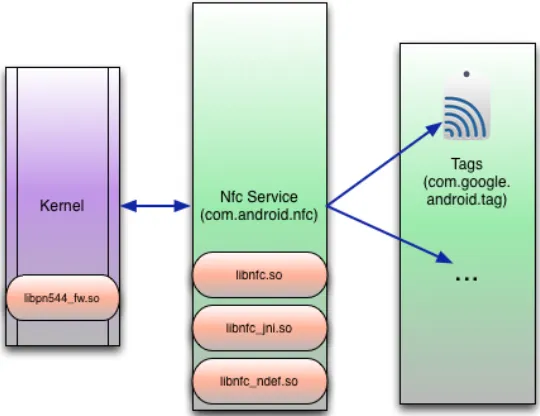
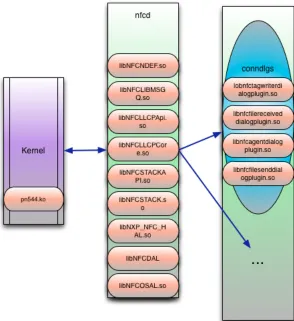
[image:13.612.82.352.454.662.2]When considering the attack surface that the introduction of NFC to a device adds, the most obvious place to start is the NFC software stack itself, the code responsible for parsing the NFC protocols mentioned in the last section. Typically, this code will consist of a driver for the NFC chip, a library used to communicate with the driver, and then the OS code to deal with incoming NFC payloads including dealing with different types of NDEF messages that might arrive. In Android, we see something like Figure 5, below.
In MeeGo it is similar, as in Figure 6, below.
Figure 6: NFC handling code in MeeGo
In such a complex stack, there certainly could be bugs lurking in any of this code that could allow remote compromise of NFC enabled devices. Please note that in Android, some of the components are Java apps and so memory corruption is not a possibility, but this will vary from platform to platform. There will always be some native code involved at the lowest levels, though.
There are various approaches to trying to find vulnerabilities in the NFC stack. A driver that is proprietary could still be reverse engineered and analyzed. The library for the chip on Android, libnfc.so, is open source, and so could be audited. However, one very effective way to get started is to set up a fuzzing environment and fuzz the NFC protocol stack.
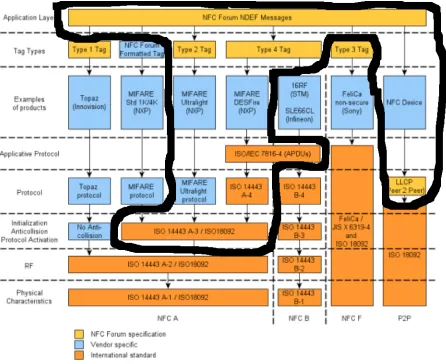
For the tag types which had working card emulation functionality, we could fuzz the protocol level and application level. We could potentially fuzz the Initialization, Anti-Collision, and Protocol Activation layer but there isn’t much data there so it was
determined not to be a good use of time. We could not fuzz the RF layer without a fully working software defined radio (SDR) NFC stack. Figure 7, below, shows which
[image:15.612.87.533.169.533.2]protocols could be tested with this approach.
Figure 7: Fuzzing using this setup can fuzz any of the areas indicated above
Fuzzing setup
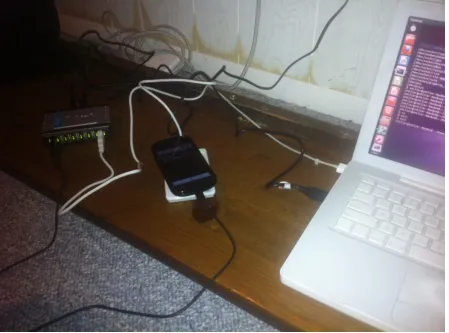
Sometimes the hardware devices would hang and need to be restarted. This cannot be accomplished in software and has to be done in hardware. In order to simulate
[image:16.612.73.522.157.490.2]unplugging and replugging the USB card reader into the computer, we use a USB hub that implements port power control. In particular, we used a DLink DUB-H7 7-Port USB Hub. Therefore, the hardware set-up looks something like that in Figure 8, below.
Figure 8: Fuzzing hardware setup
The final step in fuzzing is to simulate someone placing the device onto the emulated tag. In some cases, you cannot just emulate the tag with a device already in the RF field of an NFC initiator. In order to simulate a device entering the field, a couple of options are available. The first is to kill the NFC process and restart it when the tag is being emulated. A slightly nicer way is to issue the SIGSTOP and SIGCONT signals, respectively, to simulate removing/placing the Nexus S NFC reader. A final way was to enable and disable the NFC service,in the same way the Settings application does it in Android.
Fuzzing test cases
multiple fuzzers is often superior to using a single fuzzer. Therefore, we use an approach to try to use both mutation and generation based fuzzers as well as incorporate a couple of different types of mutations to add to the valid data.
Protocol layer fuzzing
On the protocol level, we used only a mutation-based approach since the fields being fuzzed were so simple. We are constrained by the hardware and software which can do device emulation. We only have the ability to emulate Type 2 and Type 4 tags as well as perform basic LLCP connections. For these three types, we can fuzz at a low level, just after the anti-collision. For other types of cards or transactions, we cannot fuzz at a low level. In particular we cannot fuzz Type 1 (Topaz) or Type 3 (FeliCa) protocols at this time.
For this low level fuzzing for tags, we used the forum-tag2 and nfc-emulate-forum-tag4 programs which come with libnfc, modified to present different data before a valid NDEF was presented. For fuzzing low level Type 2 tags, we fuzz the non-NDEF bytes in the MiFare Ultralight’s memory. Namely, this includes the first 16 bytes of the static memory structure (see section 2.1 in [7]).
For type 4 tags, we fuzz the Capability Container file, see section 5.1 of [9].
For LLCP, we use modified versions of the nfcpy software suite. In particular, we fuzz the CONNECT packet and the I (Information) packet (see 4.3.10 in [10]) of the
connection. For Android we used the nfcpy script npp-test-client and for for the Nokia N9, we used the snep-test-client. NPP is the NDEF Push Protocol which is used by Android [17]. SNEP is the Simple NDEF Exchange Protocol used by Nokia and other devices [18].
Application layer fuzzing
Application layer fuzzing involves creating fuzzed NDEF messages and getting them to the device using one of the available low level protocols. As in the low level protocols, we start with a mutation-based approach. We took many different types of NDEF messages and added mutations to them.
Additionally, we utilized a generation-based approach to create more specialized NDEF fuzzing test cases.
For this, we utilize the Sulley Fuzzing Framework. We created 11 different test case generation scripts (ndef_*.py) based on a modified version of Sulley. Each will generate many thousands of NDEF test cases to STDOUT. For example,
$ ./ndef_short_uri.py | grep -v "^\[" D1010B550036333633393934373931
D1010B550436333633393934373931 D1010B550536333633393934373931 D1010B550636333633393934373931 D1010B550736333633393934373931 D1010B550836333633393934373931 D1010B550936333633393934373931 ...
In the above output, the fifth byte is being mutated.
$ ./ndef_short_uri.py | grep "total cases" [10:08.08] fuzzed 0 of 1419 total cases
Sulley is designed to do everything from test case generation to sending and monitoring during fuzzing. Since we tend to fuzz esoteric devices, it is not well suited for this, and so my modifications to Sulley are mostly to allow it to print out test cases in a way which are easily read by another program which will be responsible for sending the test cases and monitoring the test device.
Results - Nexus S
We fuzzed the NFC stack on a Nexus S phone running Android 2.3.3 with the above approaches. This was the most current version when we started fuzzing and I believe is the most up to date version for an AT&T Nexus S using default methods of upgrade.
Protocol Layer
A total of 12,000 test cases were developed and tested against the low level NFC protocols, see below for details.
Device Type Test
cases
Results/notes
Nexus S Type 2 (UL) 4000 18 bytes of MiFare UL memory
MiFare 1k/4k Cannot emulate at this time
Type 4 (DESFire) 4000 15 bytes of Capacity Container
ISO 14443 A-4 (PDU) Nothing interesting to fuzz
Type 1 (Topaz) Cannot emulate at this time
Type 3 (FelCa) Cannot emulate at this time
Device Type Test cases
Results/notes
LLCP - I 2000 13 bytes of header information, some crashes
Application Layer
A total of 52362 test cases were performed against the Nexus S. See below for details.
Device Type Test
cases
Results/notes
Nexus S NDEF - bitflip 9000 Mutation-based
NDEF - short text 1626 Generation-based
NDEF - short URI 538 Generation-based
NDEF - short SMS 1265 Generation-based
NDEF - short SP 3675 Generation-based
NDEF - short BT 1246 Generation-based
NDEF - long text 2440 Generation-based
NDEF - long vcard 32572 Generation-based
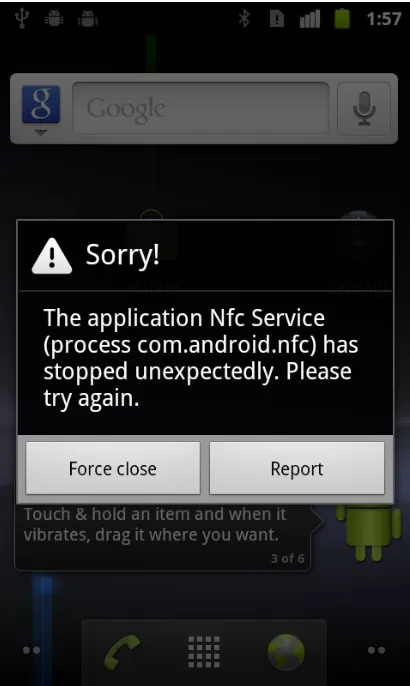
Android - Crashes
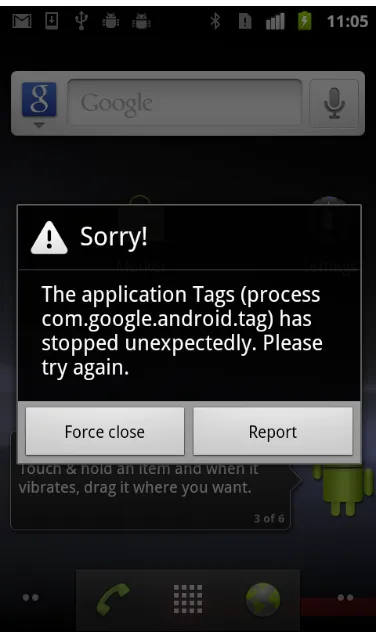
The most common crash found was of the Tags application, which is the default Android NFC tag reader application. This application is written in Java and so crashes
Figure 9: Tags application dying
The log reveals
E/NfcService(17875): failed to parse record
E/NfcService(17875): java.lang.ArrayIndexOutOfBoundsException
E/NfcService(17875): at com.android.nfc.NfcService
$NfcServiceHandler.parseWellKnownUriRecord(NfcService.java:2570) E/NfcService(17875): at com.android.nfc.NfcService
$NfcServiceHandler.setTypeOrDataFromNdef(NfcService.java:2616) E/NfcService(17875): at com.android.nfc.NfcService
$NfcServiceHandler.dispatchTagInternal(NfcService.java:2713)
Figure 10: The NFC service is prone to Java exceptions
The log corresponds to something like the series of exceptions below:
D/NdefPushServer( 3130): java.io.IOException D/NdefPushServer( 3130): at
com.android.internal.nfc.LlcpSocket.receive(LlcpSocket.java:193) D/NdefPushServer( 3130): at
com.android.nfc.ndefpush.NdefPushServer
$ConnectionThread.run(NdefPushServer.java:70) D/NdefPushServer( 3130): about to close
W/dalvikvm( 3130): threadid=8: thread exiting with uncaught exception (group=0x40015560)
E/AndroidRuntime( 3130): FATAL EXCEPTION: NdefPushServer
E/AndroidRuntime( 3130): java.lang.NegativeArraySizeException
E/AndroidRuntime( 3130): at
com.android.nfc.ndefpush.NdefPushProtocol.<init>(NdefPushProtoco l.java:97)
E/AndroidRuntime( 3130): at
com.android.nfc.ndefpush.NdefPushServer
Java exceptions are generally pretty boring from a security perspective. However, we did find a few native code crashes in the handling of LLCP packets. One appears to be a null pointer dereference caused by sending a CC (Connection Complete) packet before a CONNECT packet. Other crashes may be more interesting and occur in libc.
One frequent crash address found corresponds to a call to abort() in libc. Normally, this isn’t very interesting because programs may call abort when they see something has gone wrong, which in fuzzing, is all the time! However, there is a chance it is significant because the exception may indicate memory corruption.
One crash log from an interesting Java exception is:
D/NdefPushServer(13178): starting new server thread
D/NdefPushServer(13178): about create LLCP service socket D/NdefPushServer(13178): created LLCP service socket D/NdefPushServer(13178): about to accept
D/NFC JNI (13178): Discovered P2P Target D/NfcService(13178): LLCP Activation message
E/NFC JNI (13178): phLibNfc_Llcp_CheckLlcp() returned 0x00ff[NFCSTATUS_FAILED]
I/DEBUG ( 73): *** *** *** *** *** *** *** *** *** *** *** *** *** *** *** ***
I/DEBUG ( 73): Build fingerprint: 'google/sojua/crespo:2.3.3/ GRI54/105536:user/release-keys'
I/DEBUG ( 73): pid: 13178, tid: 13178 >>> com.android.nfc <<<
I/DEBUG ( 73): signal 11 (SIGSEGV), code 1 (SEGV_MAPERR), fault addr 0000000c
I/DEBUG ( 73): r0 afd46494 r1 00000004 r2 00000000 r3 afd46450 I/DEBUG ( 73): r4 00295530 r5 afd46450 r6 00000000 r7 40002410 I/DEBUG ( 73): r8 00000001 r9 0000008a 10 00000002 fp bed9725c
I/DEBUG ( 73): ip afd46474 sp bed97220 lr afd10e60 pc afd13d06 cpsr 00000030
I/DEBUG ( 73): d0 bed9734806293705 d1 0000000080542286 I/DEBUG ( 73): d2 000000060000008a d3 0000001500000075 I/DEBUG ( 73): d4 8040a46f0000001d d5 8040a48f00000013 I/DEBUG ( 73): d6 8040a4b600000014 d7 8040a4cc00000015 I/DEBUG ( 73): d8 0000000000000000 d9 0000000000000000 I/DEBUG ( 73): d10 0000000000000000 d11 0000000000000000 I/DEBUG ( 73): d12 0000000000000000 d13 0000000000000000 I/DEBUG ( 73): d14 0000000000000000 d15 0000000000000000 I/DEBUG ( 73): d16 0000000740af0af0 d17 3fe999999999999a I/DEBUG ( 73): d18 42eccefa43de3400 d19 3fbc71c71c71c71c I/DEBUG ( 73): d20 4008000000000000 d21 3fd99a27ad32ddf5 I/DEBUG ( 73): d22 3fd24998d6307188 d23 3fcc7288e957b53b I/DEBUG ( 73): d24 3fc74721cad6b0ed d25 3fc39a09d078c69f I/DEBUG ( 73): d26 0000000000000000 d27 0000000000000000 I/DEBUG ( 73): d28 0000000000000000 d29 0000000000000000 I/DEBUG ( 73): d30 0000000000000000 d31 0000000000000000 I/DEBUG ( 73): scr 60000012
I/DEBUG ( 73):
I/DEBUG ( 73): #04 pc 000433f4 /system/lib/libnfc.so
With some investigation you can see that the source code, found in com_android_nfc_NativeNfcManager.cpp, reveals a classic double-free.
2047 /* Llcp methods */
2048 2049
static jboolean com_android_nfc_NfcManager_doCheckLlcp(JNIEnv *e, jobject o)
2050 {
2051 NFCSTATUS ret;
2052 jboolean result = JNI_FALSE;
2053 struct nfc_jni_native_data *nat;
2054 struct nfc_jni_callback_data *cb_data;
2055 2056
2057 CONCURRENCY_LOCK();
2058
2059 /* Memory allocation for cb_data */
2060
cb_data = (struct nfc_jni_callback_data*) malloc (sizeof(nfc_jni_callback_dat a));
...
2081 if(ret != NFCSTATUS_PENDING && ret != NFCSTATUS_SUCCESS)
2082 {
2083 LOGE("phLibNfc_Llcp_CheckLlcp() returned 0x %04x[%s]", ret, nfc_jni_get_status_name(ret));
2084 free(cb_data);
2085 goto clean_and_return;
2086 } ...
2101 clean_and_return:
2102 nfc_cb_data_deinit(cb_data);
2103 CONCURRENCY_UNLOCK();
2104 return result;
2105 }
The problem is that nfc_cb_data_deinit also calls free() on the buffer cb_data. This vulnerability was fixed in ICS (4.0.1) by Google without my help. You can see by the logging statement bolded in the crash log, this crash really is from this double free.
The fix can be seen in the git here:
http://218.211.38.204/?p=android/platform/packages/apps/
Nfc.git;a=commitdiff;h=0ce29d75b2e19075f9f287a6bdfd92a7c7e91c13;hp=4467dca565 0a170af5020c10a8ccb25f86f1007f
Some other crashes were found during our testing as well which seem likely to be memory corruption vulnerabilities. Due to the fact that logging messages are different than those seen in the last crash we know they are different than the last crash but we could not reliably reproduce them enough to actually find the root cause of these bugs. Some of the backtraces are given below where we’ve added function names in braces to illustrate more clearly the nature of the crashes.
The first one is a call to abort() from dlmalloc. It is typical to call abort from dlmalloc if the heap is corrupted in some manner.
I/DEBUG ( 73): #00 pc 00015ca4 /system/lib/libc.so <libc_android_abort> I/DEBUG ( 73): #01 pc 00013e08 /system/lib/libc.so <dlmalloc>
I/DEBUG ( 73): #02 pc 0001423e /system/lib/libc.so <???> I/DEBUG ( 73): #03 pc 000142ac /system/lib/libc.so <dlrealloc> I/DEBUG ( 73): #04 pc 0001451a /system/lib/libc.so <realloc> I/DEBUG ( 73): #05 pc 0001abf0 /system/lib/libbinder.so <android::Parcel::continueWrite>
I/DEBUG ( 73): #06 pc 0001ad0c /system/lib/libbinder.so <android::Parcel::growData>
I/DEBUG ( 73): #07 pc 0001ae68 /system/lib/libbinder.so <android::Parcel::writeInplace>
DEBUG ( 73): #08 pc 0001aea8 /system/lib/libbinder.so <android::Parcel::writeString16>
DEBUG ( 73): #09 pc 0001aed4 /system/lib/libbinder.so <android::Parcel::writeString16>
DEBUG ( 73): #10 pc 0001aef8 /system/lib/libbinder.so <android::Parcel::writeInterfaceToken>
...
Another crash seen was from a call to abort from dlfree(). This usually occurs due to heap corruption.
D/NFC JNI (27180): phLibNfc_Mgt_UnConfigureDriver() returned 0x0000[NFCSTATUS_SUCCESS]^M^M
I/DEBUG ( 73): #00 pc 00015ca4 /system/lib/libc.so <libc_android_abort> I/DEBUG ( 73): #01 pc 00013614 /system/lib/libc.so <dlfree>
I/DEBUG ( 73): #02 pc 000144da /system/lib/libc.so <free>
I/DEBUG ( 73): #03 pc 0004996e /system/lib/libdvm.so <dvmDestroyJNI> I/DEBUG ( 73): #04 pc 00053fda /system/lib/libdvm.so
<dvmDetachCurrentThread>
I/DEBUG ( 73): #05 pc 000494da /system/lib/libdvm.so <???> I/DEBUG ( 73): #06 pc 00005310 /system/lib/libnfc_jni.so <nfc_jni_client_thread>
I/DEBUG ( 73): #07 pc 000118e4 /system/lib/libc.so <_thread_entry>
An almost identical backtrace was observed except instead of abort being called, it actually crashed in dlfree:
D/NFC JNI (27180): phLibNfc_Mgt_UnConfigureDriver() returned 0x0000[NFCSTATUS_SUCCESS]^M^M
I/DEBUG ( 73): #00 pc 00013256 /system/lib/libc.so <dlfree> I/DEBUG ( 73): #01 pc 000144da /system/lib/libc.so <free>
This crash occurs in unlink_large_chunk inside dlfree() when dereferencing p->bk.
A final call to abort from dlmalloc was seen during initialization,
I/DEBUG ( 73): #00 pc 00015ca4 /system/lib/libc.so <libc_android_abort> I/DEBUG ( 73): #01 pc 00013e08 /system/lib/libc.so <dlmalloc>
I/DEBUG ( 73): #02 pc 000144be /system/lib/libc.so <calloc> I/DEBUG ( 73): #03 pc 000509c8 /system/lib/libdvm.so <dvmInitReferenceTable>
I/DEBUG ( 73): #04 pc 000533f8 /system/lib/libdvm.so <???> I/DEBUG ( 73): #05 pc 00053454 /system/lib/libdvm.so <dvmAttachCurrentThread>
Since these crashes are not reliably reproducible, it is hard to say if they are all separate or a single bug, or even if they are fixed or not, without further testing and analysis.
Results - Nokia N9
We also fuzzed the NFC stack on a Nokia N9 running MeeGo 1.2 Harmattan PR1.2 with the same approaches described above.
Protocol Layer
A total of 12,000 test cases were developed and tested against the low level NFC protocols, as described below.
Device Type Test
cases
Results/notes
Nokia N9 Type 2 (UL) 4000 18 bytes of MiFare UL memory
MiFare 1k/4k Cannot emulate at this time
Type 4 (DESFire) 4000 15 bytes of Capacity Container
ISO 14443 A-4 (PDU) Nothing interesting to fuzz
Type 1 (Topaz) Cannot emulate at this time
Type 3 (FelCa) Cannot emulate at this time
LLCP - Connect 2000 19 bytes of information
LLCP - I 2000 13 bytes of header information
Application Layer
Device Type Test cases
Results/notes
Nokia N9 NDEF - bitflip 9000 Mutation-based
NDEF - short text 1626 Generation-based
NDEF - short URI 538 Generation-based
NDEF - short SMS 1265 Generation-based
NDEF - short SP 3675 Generation-based
NDEF - short BT 1246 Generation-based
NDEF - long text 2440 Generation-based
NDEF - long vcard 15062 Generation-based
Crashes
No crashes were detected. Nokia N9 stack FTW, or more likely, my method is flawed in some manner.
NFC higher level code
So far we have considered the NFC stack responsible for communicating and obtaining NDEF messages from the outside world. Clearly, this is an important part of the attack surface, but it is really just the first piece of the puzzle. What remains to be seen is what the mobile device does with the NDEF data when it receives it. This section answers that question and sees what other components of the device are related to NFC and can be activated and used without user interaction.
Nexus S - Android 2.3.3
NFC intents are handled by the Tags application, see Figure 11, below.
Figure 11: Tags processing an NFC Smart Poster
Figure 12: The user may choose which app to handle the NFC tag
The Tags application can display data from the following categories defined in src/com/ android/apps/tag/message/NdefMessageParser.java in the Android source code:
• Text • SMS
• Smart Poster • Phone call • Vtag • URL • Image
In general, outside of the NFC stack, there is not much on the attack surface of this Android phone. Large portions of the NFC code are written in Java, only a small amount of the codebase is actually native code.
Galaxy Nexus - Android 4.0.1
For some types of NDEF data, it is exactly the same as the the Nexus S running Gingerbread, using com.android.nfc to hand data off to com.google.android.tag to display to the user. These types of data include:
• Text • SMS • Phone • Image
However, some types of data that used to be handled by Tags are now handled by Android Beam.
Android Beam is a way for two NFC-enabled Android devices to quickly share data such as contacts, web pages, You Tube videos, directions, and apps, see [20]. One can determine which apps are enabled with Android Beam by searching the
AndroidManifest.xml files to see which apps handle NFC intents.
For example, looking at the Android Browser, we see:
<!-- Accept inbound NFC URLs at a low priority --> <intent-filter android:priority="-101">
<action android:name="android.nfc.action.NDEF_DISCOVERED" /> <category android:name="android.intent.category.DEFAULT" /> <data android:scheme="http" />
<data android:scheme="https" /> </intent-filter>
The only apps that register for these types of intents are Browser, Contacts, and Tags.
Figure 13: Android asking a user to share the app they’re using, in this case Crime City
If the user chooses to beam it, the devices establish an LLCP connection and a simple NDEF message is passed from the device beaming to the other device. The data is sent via Simple NDEF Exchange Protocol (SNEP) with a fallback to NDEF Push Protocol (NPP), see [17,18,21].
In the end, however, the device does not act any differently whether a particular NDEF message is received via LLCP/NPP or simply read from a tag. In other words, the magic of Android Beam has nothing to do with establishing NFC connections between devices but rather relies entirely on how the device is configured to handle different NDEF messages when they arrive. What this means is that now instead of vtags and smart posters being processed by the Tags application, this data is now directly passed to the Contacts or Browser applications.
Just to reiterate, this means that on ICS devices, if an attacker can get the device to process an NFC tag, they can get it to visit a web site of their choosing in the Browser with no user interaction. Obviously, the Browser represents an extremely large attack surface, and in ICS, that attack surface is now available through NFC!
The Android Browser will parse at least the following formats, if not more:
Type File format
Web related html
css
js
Type File format
Image bmp
gif
ico
jpg
wbmp
svg
png
Audio mp3
aac
amr
ogg
wav
Video mp4
3pg
Font ttf
eot
Figure 14: Actual NFC attack surface if NFC can communicate with the browser
Galaxy Nexus - Android 4.1.1
Figure 15: Android displays a prompt before establishing a Bluetooth Pairing via NFC
The other way Jelly Bean NFC differs is in regards to Android Beam. A few more applications are configured to accept NFC intents. The list is below.
• BrowserGoogle • Contacts
• Gmail
• GoogleEarth • Maps
• Phonesky • TagGoogle • YouTube
Otherwise, the Jelly Bean build performs identically as an ICS build with regards to NFC.
Nokia N9 - MeeGo 1.2 Harmattan PR1.3
Typically, when an NFC message is read, a process called conndlgs (Connectivity Dialogues) displays it to the screen, see Figure 16, below.
Figure 16: conndlgs and its simple interface
The conndlgs process will display options to “view” or “send” which will open up the appropriate corresponding application or cancel. For example, hitting view for text NDEFs opens up the notes application while hitting view for smart poster NDEFs opens up the web browser, called QTWebProcess.
Figure 17: If the “Confirm sharing and connecting option” is enabled, it forces a prompt before Bluetooth sharing is performed
Nokia N9’s also have a similar mechanism to Android’s Beam called Content Sharing. It is possible for one N9 to share data with another N9 over NFC (for small payloads) or over Bluetooth automatically set up via NFC. Using this mechanism one can force a Nokia N9 to display images in Gallery, contacts in Contacts, videos in Videos, and documents such as .txt, .doc, .xls, .pdf, and so forth in Documents. It does not seem to be possible to force it to open the browser but just about everything else is possible. It does not require user interaction, even if the setting “Confirm sharing and connecting” is set to on. The thought of forcing the device to parse arbitrary PDF and MS Office
formats is almost as frightening as having it open up web pages!
One interesting thing is it doesn’t seem to be possible by default to share audio files via the Music app. However, if you want to, you can share audio files by sharing them through the Videos app. Just set a breakpoint at open64 in the obex-client process, call print strcpy($r0, "/home/user/MyDocs/Movies/mv.mp3")
hit continue and the audio file will be shared.
App File type Library used (if known)
Contacts vCard
Gallery png libpng 1.2.42 - Jan 2010
jpg libjpg 6n - 1998
gif libgif 4.1.6 - 2007
bmp
tiff libtiff 3.9.4 - Jul 2010
Videos (video-suite) mp4
wmv
3gp
mp3
aac
flac
wma
amr
wav
ogg
Documents (office-suite) pdf poppler 16.6 - May 2011
txt
doc(x) docximport.so - KDE 4.74 - Dec 2011
xls(x) xlsximport.so - KDE 4.74
Figure 18: Actual Nokia N9 attack surface
Possible attacks
Looking at the above discussion, there are a few avenues of attack. We’ll discuss a few in detail. In each of them we assume an attacker can get close enough to an active phone to cause an NFC transaction to occur. We also assume that the screen is on and, when necessary, the device is not locked. This might be getting very close to someone using their phone, putting a device next to a legitimate NFC payment terminal, or using some kind of antenna setup to do it across the room, see [22].
From [23], active reads have been made of NFC from a distance of up to 1.5 meters.
Android NFC Stack bug
If one were to exploit one of the NFC stack bugs shown earlier in Android, you could imagine exploiting it and getting control of the NFC Service. This isn’t necessarily the best process for an attacker to control. If you look at the AndroidManfiest.xml file for com.android.nfc, you see it does not contain Internet permissions. It will be difficult for an attacker to exfiltrate data over the Internet without this permission, although it is possible, see [24]. However, the NFC Service does have BLUETOOTH and
with the attacker. As we’ll see for the N9 below, if an attacker can bluetooth pair with the device, it is possible to take complete control of the device.
Android Browser
Since an attacker can force an active device to display an arbitrary web page, armed with an Android browser exploit, an attacker can compromise an active device with an NFC tag. In this case, the attacker will be running code in the browser itself and not in the NFC service.
N9 Bluetooth pairing
If the N9 has NFC enabled and does not have “Confirm sharing and connecting” enabled (see Figure 17), if you present it a Bluetooth Pairing message, it will
automatically pair with the device in the message without user confirmation, even if Bluetooth is disabled.
An example of such an NDEF message is
[0000] d4 0c 27 6e 6f 6b 69 61 2e 63 6f 6d 3a 62 74 01 ..'nokia.com:bt. [0010] 00 1d 4f 92 90 e2 20 04 18 31 32 33 34 00 00 00 ..O... ..1234... [0020] 00 00 00 00 00 00 00 00 00 0c 54 65 73 74 20 6d ...Test m [0030] 61 63 62 6f 6f 6b acbook In this message, a PIN is given as “1234”, a Bluetooth address, and a name of the device are also provided. Once paired, it is possible to use tools such as obexfs, gsmsendsms, or xgnokii to perform actions with the device. Basically, if a user just enables NFC and makes no other changes to the device, it can be completely controlled by an attacker if the attacker can get it read an NFC tag.
Figure 19: The prompt raised if notification is required
A similar attack against a Nokia 6212 was outlined in [25] except the authors didn’t know how to make the device complete the pairing process and so tried additional ways to try to activate the Bluetooth. Also, due to the fact they never succeeded in pairing, they uploaded an app instead of trying to control the device. Finally, on the 6212, by default, the device prompted before pairing where by default the N9 does not.
N9 bugs
If the victim has the Confirm sharing and connecting feature enabled, then the attacker will have to resort to Content Sharing as an attack vector. Recall that without user interaction, it is possible to force the Nokia N9 to parse and display a variety of file formats, oftentimes in outdated libraries.
If one were to try to use PNG files, for example, the version of PNG shipped on the latest N9 firmwares is 1.2.42. There are at least two critical vulnerabilities that have been found and patched since that release, as shown in [26].
First a crash for PPT rendering,
==3572== Thread 2:
==3572== Invalid free() / delete / delete[] / realloc() ==3572== at 0x48347B4: free (vg_replace_malloc.c:366) ==3572== by 0x5DE780F: free_mem (in /lib/libc-2.10.1.so)
==3572== by 0x5DE71F7: __libc_freeres (in /lib/libc-2.10.1.so) ==3572== by 0x48285B7: _vgnU_freeres (vg_preloaded.c:61)
==3572== by 0x5DB5AC3: __libc_enable_asynccancel (libc-cancellation.c:66) ==3572== by 0x6826CAF: ??? (in /lib/libglib-2.0.so.0.2800.4)
==3572== Address 0x7491f30 is not stack'd, malloc'd or (recently) free'd
Here is one for PDF rendering.
==4002== Invalid write of size 1
==4002== at 0x7290FB4: SplashXPathScanner::clipAALine(SplashBitmap*, int*, int*, int) (in /usr/lib/libpoppler.so.13.0.0)
==4002== Address 0xf8dc5090 is not stack'd, malloc'd or (recently) free'd
Finally, here is one in DOC rendering. (Note, this is a 0-day not only for Nokia N9 via NFC, but also for Koffice, which utilizes the same libraries). The following excerpt comes from the file koffice-2.3.3/filters/kword/msword-odf/wv2/src/styles.cpp.
bool STD::read( U16 baseSize, U16 totalSize, OLEStreamReader* stream, bool preservePos )
...
grupxLen = totalSize - ( stream->tell() - startOffset ); grupx = new U8[ grupxLen ];
int offset = 0;
for ( U8 i = 0; i < cupx; ++i) {
U16 cbUPX = stream->readU16(); // size of the next UPX stream->seek( -2, G_SEEK_CUR ); // rewind the "lookahead" cbUPX += 2; // ...and correct the size
for ( U16 j = 0; j < cbUPX; ++j ) {
grupx[ offset + j ] = stream->readU8(); // read the whole UPX }
...
In this function, it allocates a buffer for the array grupx based on a parameter passed to this function. It then fills in this array based on an unsigned short read in directly from the file, stored in the variable cbUPX. In this case, the length of a copy and the data being copied is read directly from the supplied file, which leads to an ideal heap
overflow. Depending on the way memory is manipulated, it is possible to get control of the process using this vulnerability. Below demonstrates one such trial.
Program received signal SIGSEGV, Segmentation fault. 0x18ebffaa in ?? ()
(gdb) bt
#0 0x18ebffaa in ?? ()
#1 0x41f61f64 in wvWare::Parser::~Parser() () from /usr/lib/libkowv2.so.9 #2 0x41f6537c in ?? () from /usr/lib/libkowv2.so.9
0x41f61f5c <_ZN6wvWare6ParserD2Ev+232>: ldr r12, [r3, #4] 0x41f61f60 <_ZN6wvWare6ParserD2Ev+236>: blx r12
(gdb) print /x $r3 $3 = 0x41414141
In this case, a value read from the file is used as a pointer. This data where this pointer points is then read and used as a function pointer. With minimal work, this would lead to control of program flow and ultimately code execution.
Summary
Any time a new way for data to enter a device is added, it opens up the possibility of remote exploitation by an attacker. In the case of NFC, a user would typically think that the new data would be limited to just a few bytes embedded in an NFC tag. This
document shows that the new attack surface introduced by NFC is actually quite large. The code responsible for parsing NFC transmissions begins in kernel drivers, proceeds through services meant to handle NFC data, and eventually ends at applications which act on that data. We provide techniques and tools to carry out fuzzing of the low level protocol stacks associated with NFC.
At a higher level, for both the Android and MeeGo device we examined, it is possible through the NFC interface to make the device, without user interaction, parse web pages, image files, office documents, videos, etc which most users of NFC would probably be surprised to learn.
Acknowledgements
This was a long project, mostly out of my comfort zone. I’m sure I’m forgetting some people but here is a list of folks I’d like to thank for their help in no particular order.
Accuvant: Gave me a paycheck while letting me do this work Cyber Fast Track: Partially funded all this work
Josh Drake: Android exploitation help
Crowdstrike (especially Georg Wicherski) For sharing and walking me through their Android browser exploit
Michael Ossmann: GNU Radio help Travis Goodspeed: Help with N9 basics Kevin Finisterre: Bluetooth help
Corey Benninger and Max Sobell: GNU Radio and basic NFC stuffs
Collin Mulliner: For trying to help me do NFC memory injection, although I never used it Adam Laurie: For convincing me that you could do card emulation successfully
Jon Larimer: For pointing out one of my crashes corresponded to the double free they fixed in 4.0.1
References
[1] ISO 14443 Part 2: Radio frequency power and signal interface http://www.nfc-forum.org/specs/
[2] NFC and GNU Radio, part 1, Miller, https://www.openrce.org/repositories/users/ camill8/nfc-usrp.pdf
[3] NFC and GNU Radio, part 2, Miller, https://www.openrce.org/repositories/users/ camill8/nfc-usrp-2.pdf
[4] ISO 14443 Part 3: Initialization and anticollision http://www.waazaa.org/download/ fcd-14443-3.pdf
[5] Type 1 Tag Operation Specification http://www.nfc-forum.org/specs/
[6] Interview: Karsten Nohl http://www.thetechherald.com/articles/Interview-Karsten-Nohl-Mifare-Classic-researcher-speaks-up/6954/
[7] Type 2 Tag Operation Specification http://www.nfc-forum.org/specs/ [8] Type 3 Tag Operation Specification http://www.nfc-forum.org/specs/ [9] Type 4 Tag Operation Specification http://www.nfc-forum.org/specs/
[10] Logical Link Control Protocol NFCForum-TS-LLCP_1.1http://www.nfc-forum.org/ specs/
[11] NFC Data Exchange Format (NDEF) http://www.nfc-forum.org/specs/ [12] NFC Record Type Definition (RTD) http://www.nfc-forum.org/specs/ [13] Text Record Type Definition http://www.nfc-forum.org/specs/
[14] proxmark3 http://proxmark3.com/
[15] NFC Digital Protocol ftp://ftp.heanet.ie/disk1/sourceforge/n/project/nf/nfsresearch/ Open%20NFC/custom_layout12.pdf
[16] Fuzzing the Phone in your Phone http://www.blackhat.com/presentations/bh-usa-09/MILLER/BHUSA09-Miller-FuzzingPhone-PAPER.pdf
[17] Android NPP push protocol http://source.android.com/compatibility/ndef-push-protocol.pdf
[18] Simple NDEF Exchange Protocol Technical Specification
[19] Platform Versions http://developer.android.com/resources/dashboard/platform-versions.html
[20] Discover Android http://www.android.com/about/
[21] SNEP protocol and P2P response http://www.libnfc.org/community/topic/559/ android-nfc-snep-protocol-and-p2p-response/
[22] http://2012.hackitoergosum.org/blog/wp-content/uploads/2012/04/HES-2012-rlifchitz-contactless-payments-insecurity.pdf
[23] Long range NFC Detection, http://www.youtube.com/watch?v=Wwy8ButHbcU [24] Zero-Permission Android Applications http://leviathansecurity.com/blog/archives/17-Zero-Permission-Android-Applications.html
[25] Practical attacks on NFC enabled cell phones, Verdult and Kooman, http:// www.cs.ru.nl/~rverdult/Practical_attacks_on_NFC_enabled_cell_phones-NFC11.pdf [26] http://www.libpng.org/pub/png/libpng.html
Other useful references:
Securing Near Field Communications, Kortvedt, http://ntnu.diva-portal.org/smash/get/
ISO 14443 Library Reference Guide http://www.ti.com/rfid/docs/manuals/refmanuals/ RF-MGR-MNMN-14443-refGuide.pdf