DEVELOPMENT OF SMP APPLICATION FOR POCKET PC
MUHAMMAD AIZAT BIN MOHAMAD BASIRAN
This report is submitted in partial hlfillment of the requirements for the award of Bachelor of Electronic Engineering (Computer Engineering) With Honours
Faculty of Electronic and Computer Engineering Universiti Teknikal ~ a l a ~ s i ' a Melaka
UNIVERSITI TEKNIKAL MALAYSIA MELAKA
FAKULTI KEJURUTERAAN ELEKTRONIK DAN KEJURUTERAAN KOMPUTER
BORANG PENGESAHAN STATUS LAPORAN
PROJEK SARJANA MUDA I1
Development of SMP Application for Pocket PC
... Tajuk Projek :
Sesi 200712008
... Pengajian
MUHAMMAD AIZAT BIN MOHAMAD BASIRAN
Saya ...
(HURUF BESAR)
mengaku membenarkan Laporan Projek Sarjana Muda ini disimpan di Perpustakaan dengan syarat- syarat kegunaan seperti berikut:
1. Laporan adalah hakrnilik Universiti Teknikal Malaysia Melaka.
2. Perpustakaan dibenarkan membuat salinan untuk tujuan pengajian sahaja.
3. Perpustakaan dibenarkan membuat salinan laporan ini sebagai bahan pertukaran antara institusi
pengajian tiriggi.
4. Sila tandakan (
4
) :SULIT*
(Mengandungi maklumat yang berdarjah keselamatan atau kepentingan Malaysia seperti yang termaktub di dalam AKTA RAHSIA RASMI 1972)
TERHAD* (Mengandungi maklumat terhad yang telah ditentukan oleh organisasihadan di mana penyelidikan dijalankan)
TIDAKTERHAD
Disahkan oleh:
&
(TANDAT PENULIS) (COP D M K ~ D A T ~ ~ A N PENYELIA) Alamat Tetap: No.9, Jln Wau Enam 1 IIlF, ZAHARlAH BT MANAP
Seksyen 11 40100 Shah Alam, Pensyereh
Selangor. Fakulti Kej Elektronik dar Ki.1 Ko~+*auter (FKEKQ, Univeniti Tekvikal Maiaysta Melaka (UTeM),
Karung Berkunci 1200, Ayer Keroh, 75450 Melaka
s
/ F ; / L Q ~ Y
Tarikh: ... Tail&:
!d.d@.
..."I hereby declare that this report is the result of my own work except for quotes as cited in the references"
...
...
Signature :
.
.
Author
4 5 -
.
Muhammad Aizat bin Mohamad Basiran...
"I hereby declare that I have read this report and in my opinion this report is sufficient in terms of the scope and quality for the award of Bachelor of Electronic Engineering
(Computer Engineering) With Honours."
Signature
Zahariah biniti Manap
Supervisor's Name :
...
ACKNOWLEDGEMENT
ABSTRACT
ABSTRAK
CONTENTS
CHAPTER TOPIC
TITLE APPROVAL FORM DECLARATION SUPERVISOR'S APPROVAL ACKNOWLEDGEMENT ABSTRACT ABSTRAK CONTENTS
LIST OF TABLE
LIST OF FIGURE
LIST OF ABBREVIATION
INTRODUCTION
1.1 Introduction of the Project 1.2 Objectives of the Project 1.3 Problem Statement 1.4 Scopes of Work
1.5 Overview on Project Methodology 1.6 Report Structure
LITERARUTE REVIEW 6
2.1 Pocket PC
2.1.1 Windows CE Architecture 2.1.2 Windows Mobile
2.2 Client-Server Architecture 2.2.1 Client
2.2.2 Server
2.2.3 Two-Tier and Three-Tier Architecture 2.2.4 Example of Client-Server Architecture 2.3 Web Services Using XML
2.3.1 XML
2.3.2 .NET Architecture 2.4 Pocket PC Application
2.5 General Packet Radio Service, GPRS 2.5.1 GPRS Core Network
2.5.2 GPRS Tunneling Protocol, GTP 2.5.3 GPRS Data Transfer Rate
I11 PROJECT METHODOLOGY 34
3.1 Development of Web Services Application 3.1.1 SMP Web Services
3.1.2 ASP .NET for SMP Web Service 3.1.3 Database Server
3.2 Development of SMP Application 3.2.1 Login Page of SMP Application 3.2.2 Main Page of SMP Application
3.2.5 Logout Page of SMP Application 48 3.2.6 Visual Basic for SMP Application 49
N
RESULT AND DISCUSSION 5 14.1 SMP Web Services 5 1
4.2 SMP Application 54
4.2.1 Login Page of SMP Application 55 4.2.2 Main Page of SMP Application 56 4.2.3 Personal Info Page of SMP Application 57 4.2.4 Result Page of SMP Application 58 4.2.5 Logout Page of SMP Application 59 3.2.6 SMP Application Installation on Pocket PC 60
4.3 Database Server 61
4.4 Discussion about Project Findings 62
CONCLUSION
5.1 Conclusion of the Project
5.2 Future Development of the Project
REFERENCES
LIST OF TABLE
NO TITLE PAGE
2.1 Differential between Characteristics of Client and Server 12 2.2 Advantages and Disadvantages of Client-Server Architecture 14
xii
LIST OF FIGURE
NO TITLE PAGE
Pocket PC Models is Different According to Developer 7
Interface for Windows Mobile 5.0 10
Interface for Windows Mobile 6 Professional 11 Graphic User Interface (GUI) for m2urnobile Application 15 Client-Server Architecture of m2urnobile Application 16 An XML data file displayed in Internet Explorer 19
The Compact Framework Architecture 23
Settings for screen orientation 25
Portrait Screen of Windows Mobile 5.0 26
Landscape Screen of Windows Mobile 5.0 26
Form designing for Windows Mobile application 27 Data synchronization between Pocket PC and database server 28 Components created with help of graphic objects 28 Example of database interface on Pocket PC 29
The Core Network of GPRS 3 1
SMP Web Service as middleman 36
The Flowchart of the SMP Web Service Process 3 7
Program Flowchart of SMP Application 41
Flowchart of Result Page of SMP Application Flowchart of Logout Page of SMP Application The SMP Web Service
Login Page of SMP Application Main Page of SMP Application
Personal Info Page of SMP Application Result Page of SMP Application Logout Page of SMP Application
xiv
SMP
-
PPC - CGPA
-
GPRS - WAP-
GUI-
PDA-
0s
-
RAM -
GSM
-
XML-
LIST OF ABBREVIATION
Sistem Maklumat Pelajar Pocket Personal Computer Cumulative Grade Point Average General Packet Radio Service Wireless Application Protocol Graphic User Interface
Personal Digital Assistant Operating System
Random Access Memory
LIST OF
APPENDIX
NO TITLE
A Login Page Coding
B Windows Form Designer for Login Page
C Main Page Coding
D Windows Form Designer for Main Page
E Codingfor SMP Web Service
F Codingfor database server
CHAPTER I
INTRODUCTION
As the world revolves, the technologies of the world evolve in line with it. The technologies developed applied on various fields to make everyday life much easier. Pocket PC for example, is the technology developed so that people can work with a device with capability nearing a personal computer, PC but with a size far smaller than a PC. With this capability, more and much more application developed for this type of device as much more devices produced by companies. Thus, this project concerned about the development of application for Pocket PC that enables students to check their result without having to surf the SMP website.
1.1 Introduction of the Project
Project of Development of SMP Application for Pocket PC is a project of developing application software for Pocket PC that will allow students to check their Cumulative Grade Point Average, CGPA and personal information by using their Pocket PC through General Packet Radio Service, GPRS connection. The Pocket PC used in
Service that acts as the middleman between the application and the database server, and the database server that will act as the database server of all students' data. It interacts with the application through GPRS connection. The second part is the development of SMP application that will be installed on window-based mobile phone. The application will allow user to gather information fiom web service via their window-based mobile phone that have GPRS connection.
1.2 Objective
The objective of the project is to develop a web service application that consists of SMP Web Service that acts as the middleman between the application and the database server, and the database server that will act as the database server of all students' data. Web Services according to World Wide Web Consortium, W3C [I] is defined as a software system designed to support interoperable Machine to Machine interaction over a network. It can be accessed over a network, such as the Internet, and executed on a remote system hosting the requested services.
The second objective is to develop an application that will be installed and run on Pocket PC. The application will interact with the Web Services to gather data fiom the database and displayed it on the Pocket PC. The application is connected to the Web Services through the GPRS connection.
1.3 Problem Statement
Problem occurs when we want to access directly to the SMF portal through mobile phone because there is no WAP portal of our university yet. Although we can access our website through window-based mobile phone still its cost a lot because of high data transfer rate.
Accessing SMP portal in rural area could be hard because of internet connection is not available or limited. Thus, for those who live in rural area it will be hard for them to check their latest grade and view their updated personal information.
If we are on the move such as going on vacation or camping, it is almost impossible for us to access SMP portal because of no internet connection. Although most of laptops nowadays are wireless fidelity (Wi-Fi) enabled, not all places have wireless fidelity (Wi- Fi) hotspot area. Plus, majority of wireless fidelity (Wi-Fi) area is only for registered user.
1.4 Scope of Work
The Web Services application developed in this project acts as the middleman between the application and the database server, and the database server that will act as the database server that store of all students' data. Web services do not provide the user with a Graphlc User Interface (GUI). Web services instead share business logic, data and processes through a programmatic interface across a network.
The Pocket PC used in this project must support GPRS in order for the application to gather data from the database server. GPRS is a standard for wireless communications which runs at speeds up to 115 kilobits per second, compared with current Global System for Mobile Communications (GSM) systems' 9.6 lulobits. Data gathered from database server will be sent over to the application via GPRS connection.
1.5 Overview on Project Methodology
The development of this project is mainly divided into two parts. First part is the development of the Web Services application which consists of SMP Web Service that acts as the middleman between the application and the database server, and the database server that will act as the database server of all students' data. Web Services will communicate with both the application and the database server. It also control all of the data in addition determine the request from the client and choose which data will be sent to the client. Web services unlike Web server or web page system do not provide the user with a Graphic User Interface (GUI). Web services instead share business logic, data and processes through a programmatic interface across a network. Web services allow different applications from different sources to communicate with each other without time-consuming custom coding, and because all communication is in XML, Web services are not tied to any one operating system or programming language.
1.6 Report Structure
This report consists of five chapters. Chapter I focus on the introduction of project developed. It discusses the objectives of the project, problem statement, scope of work, review on the project methodology and the report structure.
In Chapter I1 we will the discuss background study of the project developed. This chapter will cover the theory and concepts being used in this project as well as the relationship of the project with the existing research and theory. The objectives and the problem statement of the project will also be discussed.
Chapter I11 focuses on the project methodology. It will discuss the procedures of the project and the methods used to develop the project. It will explain on how the application will behave and how it will interact with the database server.
Chapter
N
will discuss about the result of the project and the problems that occurred during the development of the project. It will also discuss about how to troubleshoot the problems and whether the objectives of the project is realized or not.CHAPTER I1
LITERATURE REVIEW
Literature review is the study of the application developed, the Web Services, the database server, the Pocket PC and other subjects that related and contributed to this project. This literature review will also give an example of the popular client-server architecture in Malaysia, the m2umobile application as well as the GPRS network provided by the telecommunication company in Malaysia.
2.1 Pocket PC
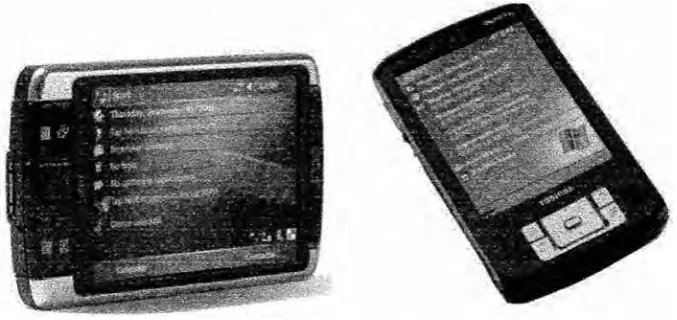
A Pocket PC, abbreviated P/PC or PPC, is a specification for a handheld-sized
Figure 2.1 Pocket PC Models is Different According to Developer
According to Microsoft [I], the Pocket PC is define as handheld device that enables users to store and retrieve e-mail, contacts, appointments, tasks, play multimedia files, games, exchange text messages with MSN Messenger, browse the Web, and more.. From a technical standpoint, Pocket PC is a Microsoft specification that sets various hardware and software requirements for mobile devices bearing the Pocket PC label. For instance, any device which is to be classified as a Pocket PC must:
Run Microsoft's Windows Mobile, Pocket PC edition Come bundled with a specific suite of applications in ROM Include a touch screen
Include a directional pad or touchpad
Include a set of hardware application buttons
Be based on an Advanced RISC Machine, ARM version 4 compatible CPU, Intel XScale CPU, MIPS CPU or SH3 CPU.
application was included in the operating system, OS and all personal information manager, PIM applications were updated to interface with it.
Windows Mobile 5.0 was also compatible with Microsoft's Smartphone operating system and was capable of running Smartphone applications. It store all user data in flash memory, leaving the RAM to be used only for running applications, as it would be on a desktop computer. It can also be used with many other add-ons like GPS receivers, barcode readers, RFID readers, and cameras.
2.1.1 Windows
CE
ArchitectureWindows CE according to Microsoft [4] is a variation of Microsoft's Windows operating system for minimalistic computers and embedded systems. Windows CE is a
distinctly different kernel, rather than a trimmed-down version of desktop Windows. Windows CE is optimized for devices that have minimal storage. Devices are often configured without disk storage, and may be configured as a closed system that does not allow for end-user extension.
Windows CE conforms to the definition of a real-time operating system, with
deterministic interrupt latency. It supports 256 priority levels and uses priority inheritance for dealing with priority inversion. The fundamental unit of execution is the thread and thus helps to simplify the interface and improve execution time.
2.1.2 Windows Mobile
Windows Mobile is best described as a subset of platforms based on a Windows CE underpinning 141. Currently, Pocket PC which is now called Windows Mobile for Pocket PC, Smartphone, and PocketPC Phone Edition are the three main platforms under the Windows Mobile umbrella. Each platform utilizes different components of Windows CE, as well as supplemental features and applications suited for their respective devices.
Windows Mobile for Pocket PC carries sorne standard features in most of its versions. One of it is Today Screen shows the current date, owner information, upcoming appointments, e-mail messages, and tasks. Users can customize the screen by selecting what information they wish to be displayed. It also includes the notification bar which includes icons to notify the status of Bluetooth, etc. Programs can be installed which adds extra items to the Today screen. One of these is Microsoft Money for Pocket PC. The background image can be customized directly through the Pocket PC, or themes can be created and synchronized onto the Pocket PC.
It also has the taskbar that shows the current time, the volume, and the connectivity status. When a program or message box is open the blank space after the clock is filled with an OK or close icon. The main feature of the taskbar is the Start Button, which is designed similarly to the Start Button which features on desktop versions of Windows. The Start Menu features recently opened programs at the top, nine customizable menu entries, and links to the program, settings, find, and help.
Besides that it also have Office Mobile which is a suite of Mobile versions of Microsoft Office applications is included in Windows Mobile. It includes Word Mobile, Excel Mobile and Powerpoint Mobile which are included since Windows Mobile 5.0. These versions include many of the features which are used in desktop versions, but some other features like inserting tables and images have not been included in pre 5.0