APPLICATION OF VIRTUAL INSTRUMENTATION IN POSITION CONTROL SYSTEM USING DIRECT DIGITAL CONTROL VIA PID AND FUZZY LOGIC
CONTROLLER
MARIAM BINTI MD GHAZALY
APPLICATION OF VIRTUAL INSTRUMENTATION IN POSITION CONTROL SYSTEM USING DIRECT DIGITAL CONTROL VIA PID AND FUZZY LOGIC
CONTROLLER
MARIAM BINTI MD GHAZALY
A project report submitted in partial fulfillment of the requirements for the award of the degree of Master of Engineering
(Electrical - Mechatronic & Automatic Control)
Faculty of Electrical Engineering Universiti Teknologi Malaysia
iii
iv
ACKNOWLEDGEMENT
In preparing this thesis, I was in contact with many people, researchers,
academicians, and practitioners. They have contributed towards my understanding and
thoughts. In particular, I wish to express my sincere appreciation to my main thesis
supervisor, Assoc. Prof. Dr. Mohd Fua’ad Haji Rahmat for encouragement, guidance,
critics and friendship. Without their continued support and interest, this thesis would not
have been the same as presented here.
My fellow postgraduate students should also be recognized for their support. My
sincere appreciation also extends to all my colleagues and others who have provided
assistance at various occasions. Their views and tips are useful indeed. Unfortunately, it
is not possible to list all of them in this limited space. I am grateful to my father and
v
ABSTRACT
The objective is to design and developed a GUI software using Microsoft Visual Basic 6.0 to ease students in performing position control system experiment, expose students on position control system theoretically and practically and to developed controller using software for position control system. The scope of the project is to apply direct digital control (DDC) in position control system. PID controller and a fuzzy logic controller will be use to control the output response. An interactive software will be developed to help the student to visualize and analyze the system. This project can be divided into two parts namely hardware and software. Hardware parts involve more in interfacing MS150 Modular servo System and Data Acquisition System with a personal computer. While the software part include programming real-time software using Microsoft Visual Basic 6.0. In the earlier stage, literature review and experiment are performed manually to understand the concept of the controller. An interactive software will be designed using Microsoft Visual Basic 6.0. The software will be equipped with a set of graphic instructions to ease any mistake when performing experiment. Finally, the software will be
vi
ABSTRAK
vii
TABLE OF CONTENTS
CHAPTER TITLE PAGE
DECLARATION ii
DEDICATION iii
ACKNOWLEDGMENT iv
ABSTRACT v
ABSTRAK vi
TABLE OF CONTENTS vii
LIST OF TABLES xi
LIST OF FIGURES xii
LIST OF SYMBOLS xiv
LIST OF APPENDICES xviii
1 INTRODUCTION 1
1.1 Virtual instrumentation 1
1.2 Virtual Instruments 3
1.3 Project Objectives 5
viii
2 LITERATURE REVIEW 8
2.1 Introduction. 8
2.2 Previous Research. 9
2.2.1 “Motor Drive Control System For 10
Education and Research”.
2.1.2 “Development of a Distant Laboratory 10
using Labview”.
2.1.3 “Real-Time Position Control of 11
Free-Electron Laser Beams: Theory
and Experiments”.
2.1.4 “Closed-loop Position Control 11
System using Labview”.
2.3 Virtual Instrumentation in Position 12
Control System.
3 RESEARCH METHODOLOGY 13
3.1 Project Overview 13
3.2 Position Control System 15
3.2.1 General Servomotor System Model 20
3.2.2 Direct Digital Control (DDC) 24
3.2.3 PID controller 25
3.2.3.1 Analog PID controller 27
3.2.3.2 Digital PID controller 30
3.2.4 Fuzzy Logic Controller 33
3.2.4.1 Fuzzification 36
3.2.4.2 Knowledge Base 38
3.2.4.3 Inferencing 40
ix
3.3 Software Review 42
3.3.1 Virtual Instrumentation - Graphical User 42
Interface (GUI)
3.3.1.1General GUI Design Considerations. 43
3.3.1.2 Visual Presentation 45
3.3.1.3 VI Diagram Considerations 46
3.3.1.4Additional GUI Object Considerations 46
3.3.2 Microsoft Visual Basic 47
3.4 Hardware Review 48
3.4.1 Data Acquisition System (DAS) 48
3.4.1.1DAQ Hardware 50
3.4.1.2 Analog Input system 53
3.4.1.3 Analog Output System 54
3.4.1.4D/A Converter 55
3.4.2 MS150 Modular Servo System 55
3.4.2.1 Pre-amplifier Unit – PA150C 56
3.4.2.2 Operational Amplifier Unit -OA150A 56
3.4.2.3Input Potentiometer – IP150H & 57
Output Potentiometer –OP150K
3.4.2.4 Attenuator Unit – AU150B 58
3.4.2.5DC Motor –DCM150F 58
3.4.2.6 Reduction Gear Tacho Unit – GT150X 59
3.4.2.6Servo Amplifier Unit – SA150D 59
3.4.2.7Power Supply Unit – PS150E 60
3.4.3 Hardware Connection 61
x
4 RESULTS & ANALYSIS 63
4.1 Direct Digital Control 64
4.1.1 PID controller GUI 65
4.1.2 Fuzzy Logic Controller GUI 67
4.2 Preliminary Result Analysis 69
4.2.1 Closed Loop Position Control System 70
4.2.2 Effect of Gain Changes on Deadband 73
4.2.3 Unit Step Response to Gain Changes 74
4.2.4 Velocity Feedback 77
4.3 Result Statement 82
4.3.1 PID Controller Result Analysis 83
4.3.2 Fuzzy Logic Controller Result Analysis 85
4.4 Comparison between PID and Fuzzy Logic 86
4.5 Discussion 87
5 CONCLUSION 89
5.1 Suggestion for future work 91
REFERENCES 92
xi
LIST OF TABLES
NO. TITLE PAGE
3.1 Effect of each PID Controller 30
4.1 Output result of the experiment unit step response to 75
gain changes.
4.2 Output result of the experiment velocity feedback 78
4.3 Output result of the PID controller 84
4.4 The comparison output between response using the 87
xii
LIST OF FIGURES
NO. TITLE PAGE
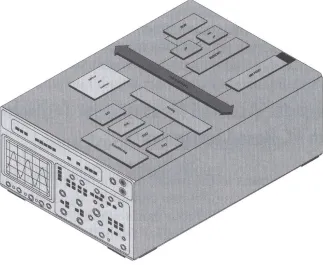
1.1 Structure of a measuring device. 2
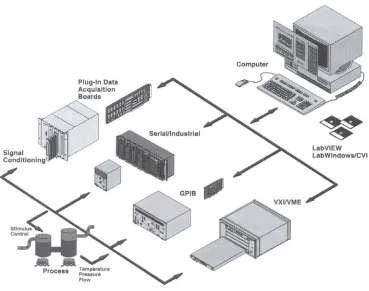
1.2 Hardware architecture of virtual instruments. 4
3.1 General form of the block diagram for closed loop position 15
control system.
3.2 Standard measurements on Step Response of a Control System 17
3.3 Single position loop diagram can be modified to include 17
velocity feedback.
3.4 Simple Error Channel 18
3.5 DC-Motor (a) Wiring Diagram (b) Sketch (c) Schematic 20
3.6 Direct Digital Control Schematic. 24
3.7 General Feedback Architecture 26
3.8 Block diagram for PID Controller 28
3.9 Flow chart for the PID controller system. 32
3.10 Flowchart of Simulator 34
3.11 FLC Design Methodology 35
3.12 The input and output variable. 36
3.13 The error input variable 37
3.14 The rate input variable 37
3.15 The motor output variable 38
xiii
3.17 The firing strength for the rule base using max-min inference. 41
3.18 Computerized data acquisition and control system. 49
3.19 A picture of AX5412H Data Acquisition Card 50
3.20 AX750 screw terminal panel 52
3.21 Many input signals come into the A/D system 53
3.22 General View of MS150 Modular Servo System. 55
3.23 PA150C- Pre-amplifier Unit 56
3.24 OA150A – Operational Amplifier Unit 57
3.25 Input Potentiometer and Output Potentiometer (IP150H, OP150K) 57
3.26 AU150B – Attenuator Unit 58
3.27 DCM150F – DC Motor with Tachogenarator 59
3.28 SA150D – Servo Amplifier Unit 60
3.29 PS150E – Power Supply Unit 60
3.30 Connection between PC and MS150 through AX750 Screw 61
Terminal Panel
4.1 Splash screen 64
4.2 Circuit diagram for direct digital control. 65
4.3 PID controller GUI 66
4.4 Fuzzy Logic Controller GUI 68
4.5 Fuzzy Logic Controller data capture form 68
4.6 The output result of closed loop position control system experiment. 72
4.7 The output result of gain changes on deadband 74
4.8 PID results which was capture within the GUI 83
xiv
LIST OF SYMBOLS
VI - Virtual Instrument
PC - Personal Computer
DAQ - Data Acquisition
DSP - Digital Signal Processing
GUI - Graphical User Interface
DDC - Direct Digital Control
ITL - Interactive Teaching and Learning
PID - Proportional Integral Derivative Controller
I&C - Instrumentation and Control
DC - Direct Current
ADC - Analogue to Digital Converter
DAC - Digital to Analogue Converter
FCE - Final Control Element
( )
t iθ - Input shaft angle
( )
t oθ - Output shaft angle
Ra - Armature resistance
La - Armature inductance
I(t) - Armature current
F - Magnetic field force
1 - Length of conductor
β - Magnetic field strength
( )
txv
( )
tvb - Back electromotive force
Kb - Motor dependant constant
( )
tτ - Torque
J - Total moment inertia
B - Total viscous friction
KT - Motor torque constant
e(t) - Error signal
Kg - Gain
ζ - Damping ratio
n
w - Natural frequency
T p - Peak time
T r - Rise time
%OS - Percent overshoot
Mp - Peak value of time response
fv - Final value
T s - Settling time
CV - Control variable
SP - Set point
( )
ty - Output position signal
( )
tr - Reference signal
( )
tV - Controller output
Kp - Proportional gain
Ki - Integral gain
Kd - Derivative gain
DMA - direct Memory Access
I/O - Input / output
RTDs - Resistance temperature detectors
IC - Integrated circuit
xvi
AO - Analogue output
DI - Digital input
DO - Digital output
Hz - Hertz
LSB - Least significant bit
TTL - Transistor-transistor logic
PA150C - Preamplifier unit
OA150A - Operational amplifier unit
IP150H - Input potentiometer
OP150K - Output potentiometer
AU150B - Attenuator unit
DCMl50F - DC motor
GT150X - Reduction gear tacho unit
PS150E - Power supply
Ω - Ohm
RAD - Rapid Application Development
HTML - Hypertext Markup Language
VB6 - Visual Basic Version 6.0
COM - Component Object Model
IIS - Internet Information Server
ASP - Active Server Pages
DLL - Dynamic. Link Libraries
API - Application Programming Interface
IDE - Integrated Development Environment
OLE DB - Object Link Embedded Database
MTS - Microsoft Transaction Server
Ne - negative error
Pe - positive error
Ze - zero error
Nde - negative de
xvii
Zde - zero de
No - negative output
Po - positive output
xviii
LIST OF APPENDICES
APPENDIX TITLE PAGE
A PID results 94
B Software snapshot 102
C Slide presentation 106
CHAPTER 1
INTRODUCTION
1.1 Virtual instrumentation
Virtual instrument have become the catchword in measurement technology.
Virtual instrumentation easily can be connected with the term “test engineer”. When
attempting to interpret the meaning of “test engineer”, almost everyone ties a different
idea or concept to this catchword. For many, it represents a control instrument based on
standard personal computers to store, evaluate, and represent test data. According to this
notion, data is acquired through special measuring devices attached to a personal
computer over a serial or parallel cable. Some thinks that it means a computer equipped
with application and driver software and a built in transmitter as sort of low-cost
alternative to relatively expensive standard alone measuring devices. Both ideas are
correct, but only up to a certain point. They cover only part of this concept. Before
discussing the exact definition, we will describe the principle types of computer-assisted
2
Test data can be acquired in a computer in a different ways. It is important to
understand the underlying architecture of a measuring device. A traditional measuring
device always consists of three components, shown in figure 1.1, which perform the
following tasks [13]:
Acquire the measurement parameters (data acquisition) Adapt and process the measured signal (analysis) Output the measured value (presentation)
Figure 1.1: Structure of a measuring device.
Such measuring devices generally have fixed functions defined by the
manufacturer, and they are characterized by a manufacturer-specific architecture and an
3
Both the operation and the documentation are entirely manual. To add long measuring
sequences that require constant changes of settings, a large amount of time is used to set
the measuring devices and to document the measured values.
1.2 Virtual Instruments
Based on this background information, we are now able to define the term
"virtual instrument" in a more accurate way. We speak about a virtual instrument when
we create measuring systems composed of a standard personal computer, suitable
software, and appropriate measuring hardware tailored to the measuring task, which is
normally available only in specifically designed stand-alone measuring devices. Virtual
instruments represent a visualization and centralization of complex measurement
systems on a standard personal computer in the form of a virtual user interface [13]. The
user sees a uniform, comprehensive single system, i.e., a complete application,
consisting of many individual measuring components. This fundamental concept is the
quantum leap from the conventional measuring device over computer-assisted
measurement technologies to adaptable virtual measuring systems. This represents a
shift from manufacturer-defined measuring devices to user-defined measuring systems.
The main benefits of this concept are:
A virtual instrument can contain any combination of industry standard hardware
to acquire or output data: IEEE-488.2, RS-232 devices, VXI/MXI systems, field
buses (CAN, Interbus-S, Profibus, Foundation Fieldbus, Axiom etc.),
multifunction plug-in cards, DAQ instruments, image processing components,
external black-box systems, or motion control. figure 1.2 illustrates the hardware
4
The capabilities to analyze and represent measured data reach far beyond the
boundaries of conventional measurement technology.
A powerful software development environment and a set of hardware
components allow creation of a number of virtual instruments to cover a wide
range of test functions and applications.
Figure 1.2: Hardware architecture of virtual instruments.
The spectrum of virtual instruments used in practice includes classical laboratory
automation, process visualization and control, automotive and aviation industries,
5
1.3 Project Objectives
The main objective of this project is to develop software with Graphical User
Interface (GUI) capabilities using Microsoft Visual Basic version 6.0 in performing their
position control system experiment. The GUI will be developed with the following
goals:
1) To developed controller using software for position control system.
2) To ease students in performing position control system experiment.
3) Expose students on position control system theoretically and practically.
4) Enable students to understand more on application that is based on
position control.
5) Teaching electrical engineering students real-world data acquisition and
analysis.
6) Allowing students manipulate the information with their graphics and
word processing packages to generate professional quality lab reports.
7) Empowering students to acquire experimental data in this laboratory
experiment directly from the software.
8) Permits students to meaningfully experiment with physical relationship in
a readily interpretable, graphics format.
Besides that, the objectives of each experiment that have to be performed by
student are basically divided into 4 classical control experiments listed as below:
(i) Experiment 1 – Closed-loop Position Control System.
Objective: To demonstrate a simple motor-driven closed-loop
6
(ii) Experiment 2 – Effect of Gain Changes On Deadband.
Objective: To study on the deadband of a position control system and
the effect of gain changes upon the Deadband.
(iii) Experiment 3 – Unit Step Response To Gain Changes.
Objective: Visual study of step response to gain changes upon
position control system.
(iv) Experiment 4 – Velocity Feedback.
Objective: Study on the effect of velocity feedback in a position
control system.
Besides these experiments, an additional experiment using Direct Digital Control
(DDC) techniques will be implementing in this software to allow student to observe
system response behaviour upon changes on the proportional gain, integral gain and
derivative gain. The objective of these experiments is to enable student to differentiate
between Direct Digital Control and Classical Control. Hence, this will allow student to
control the position of the control system in real-time with a PC-based system and aware
them of the important role, played by personal computers in engineering nowadays.
Based on the above experiment, it also allow student to differentiate between
Supervisory Control and Direct Digital Control where in Supervisory Control,
computers are used for monitoring purpose only but in Direct Digital Control, control
loop is replaced by computers to interface with process measurement and control some
7
1.4 Project Scope
The scope of the project is listed below:
i. To apply direct digital control (DDC) in position control system.
ii. To develop a PID and a fuzzy logic controller which will be use to
control the output response.
iii. To make comparison of the performance between PID controller and
fuzzy logic controller.
iv. To developed Graphical User Interface to help the student to visualize
and analyze the system. Besides, it also covers the method on enhancing
the original experiment for student so that they can finish their
experiment on time and in the mean time, they can grab more