Email Security System
Saurabh Gavankar#1, Sanjay Vidhani*2
#1
MTECH Information Technology
K.J. Somaiya College of Engineering, Vidyavihar, Mumbai-77 *2
Asst. Professor, Dept. Information Technology K.J. Somaiya College of Engineering, Vidyavihar, Mumbai-77
Abstract
—
Nowadays, email communication has become one of the most important and official form of communication. With the increase in the email communication, emails have become an attack vector for conducting various cyber crimes like email spoofing, email phishing. Email attachments are being used as mode for transferring malware into the victim’s system.This paper proposes an email security system which will help in detecting and preventing email spoofing, email phishing and any malware transmitted through email. The methods for detecting email spoofing and phishing are also discussed in the paper.
Keywords— Put your keywords here, keywords are separated by comma.
I. INTRODUCTION
Email is the most widely used form of business communication. According to a study by Mashable [10], “Email is considered to be more popular than social media”. The reason for this ever growing popularity is that email is a cheap, rapid and reliable form of communication. Today email is used by a large percentage of world population and hence email has also become the one of the most popular method for conducting cyber crimes like email spoofing, denial of service, phishing, replay attack etc. The attackers use the email attachments for transmitting malware into the victim’s system. In this paper, we will propose an email security system that will safeguard the user by early detection of email phishing, spoofing and malware attack. Email phishing is a kind of fraud where an attacker tries to steal sensitive information like username, password, bank account details etc., by masquerading as a reputable entity or person in email, IM or other communication channels. Typically a victim receives an email from a known entity containing some attachment or links of websites. These attachments or links in the message may install malware on the user’s device or direct them to a malicious website set up to trick them into divulging personal and financial information, such as passwords, account IDs or credit card details. Phishing has become very popular among cyber criminals as it very is to trick the user to click on malicious links or attachments, rather than trying to intrude into the computer by breaking through the computer’s defence. Phishing is often carried out using email spoofing. Spoofing is sending the email messages using the forged sender’s address. This makes the victim to trust that the email, as the email is from a person or organization that the victim knows. Using spoofing it becomes easier for the cyber criminal to trick the user into clicking a phishing link or
downloading a malicious attachment and thus allowing him to intrude into the user’s system or steal sensitive information.
There are many security softwares which help in detection of phishing and spoofing. But it is necessary that the attack is detected as soon as the email is received. Our proposed system will detect spoofing, phishing and malware attack in real time without user needing to open the mailbox. Our proposed system can be used with all the popular email service providers like Gmail, Yahoo, Outlook etc.
II. PROPOSED SYSTEM
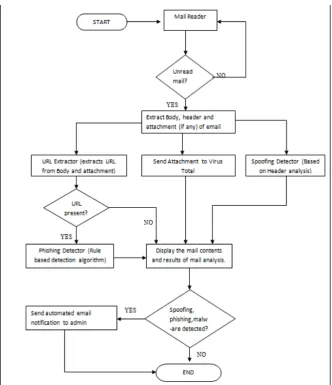
The proposed system will act as an interface to receive the email and help in early detection of spoofing, phishing and malware attacks carried out using email. This early detection will prevent users from being victim of such attacks and thus mitigating the risk of financial losses and loss of data.
Fig. 1 Flowchart for proposed system
A. Rule Based Phishing Detection:
Rule based phishing detection algorithm works by comparing the URL with a set of rules. These rules are derived from various features of the phishing website and are categorized based on their effect on the website. In [3] the author has stated a list of features found in the phishing websites. To measure the significance of the selected features in detecting phishing attack, we have prepared a dataset of 300 phishing websites from Phistank [2]. Following are the features on which the phishing detection algorithm works:
1. Length of URL: The length of URL plays a vital
role in hiding doubtful part in the address bar. In [1] the author proposes the length of a legitimate URL to be 75. Hence, if the length of the URL is greater than 75 then the website is considered to be phishing website, otherwise the URL is considered to be legitimate.
2. URL with the IP address: If the IP address
(decimal, hex based or octal) is used as an alternative to domain name part in the URL, then that can be considered as phishing URL, else can be considered to be legitimate.
3. HTTPS (Hyper Text Transfer Protocol with
SSL/TLS: Legitimate website always uses secure
domain- names while transferring sensitive information. The existence of HTTPS is one of the most important features while identifying a legitimate website. But this feature does not guarantee 100% detection because since in 2005, more than 450 phishing URLs used https were recognized by the Netcraft Toolbar Community [11]. Hence, we further check whether the certifying authority is among the top listed authorities like GeoTrust, GoDaddy, etc.
4. Search Engine result: If the URL is not present in
search engine results of popular search engines like Google, Yahoo!, Bing then webpage URL is considered as phishing URL. This feature proves to be an excellent indicator in phishing detection.
5. Number of sub domains in URL: Consider that
have a maximum of 3 sub-domains. If the URL contains more than 3 sub- domains then the URL is considered to be a phishing website.
6. Use of ‘@’ and ‘-‘ symbol in URL: Legitimate
website seldom include symbols like ‘@’ or ‘-‘ in their domain names. Hence presence of these symbols in the website domain name can be an indicator that the website may be a phishing website.
7. Page Rank of the website: Page rank helps in
determining the popularity of the website also helps in determining the number of visitors visiting the website. To determine the page rank of the website we have used Alexa Database [5]. As the phishing websites are short-lived, they may not be recognized by the Alexa Database. The [3] states that if the page rank of the website is greater than 100000 then it must be considered as suspicious. But on analyzing our data set we have found that this can cause increase the number of false positives. Therefore, if the website is not recognized by the Alexa Database then it is considered to be a phishing website in our system.
8. Absence of DNS records: DNS records for the
website are checked in WHOIS Database [6]. If the DNS records are absent in WHOIS Database then the website is regarded as a phishing website.
9. Age of Domain: As discussed earlier the phishing
websites are created for the sole purpose of tricking the users and for performing malicious activities, hence these websites are short-lived. Our system checks for the registration and expiration date of the domain from WHOIS Database [6] and calculates the age of the domain. From the analysis of our dataset, we have found that if the age is less than 180 days, then the website could be termed as a phishing website.
Now every feature will be assigned a particular weight according to the ratio of that feature in our data set. Feature 3, 4, 7 & 9 play a vital role in predicting phishing websites and thus improving the accuracy of detection. Hence these features will be assigned a higher weight as compared to other features. Finally the total weight of the website will be calculated which will be termed as risk rating and based upon the following condition the website could be termed as Legitimate, Suspicious and Phishing.
If Risk Rating <= 3 Legitimate Website Risk Rating > 3 and < 6 Suspicious Website
Risk Rating > 6 Phishing Website
B. Spoofing Detection using header analysis
Email spoofing is sending email messages to the victim using forged email addresses. Email spoofing is used to hide the identity of real attacker and make the mail look authentic by sending the mail using the email address of the person the victim knows and thereby increasing the chances of the victim being tricked. The criminals also use the
spoofing in order to send malicious attachments, ransomware, phishing links, etc. In our system we are using the method of analyzing the email header for detecting the spoofing. This method provides more accurate results in email spoofing detection. Email follows a uniform format defined by RFC822 [7].
Basic header fields [8], which have been defined in RFCs include:
• From: contains the email address of the sender. • To: contains email addresses of the recipient. • Subject: contains information about the topic of
the message.
• Date: contains time and date at which mail was sent.
• Reply-To: contains mail address that is used to reply back by the recipient.
• Message-ID: an automatically generated field, it uniquely identifies the message.
• Received: contains information about mail servers involved in mail transmission, which can be used to
trace the path of message transmission.
• Authentication –Results: This field contains details of the SPG, DKIM, DMARC- the three standards that work together and help establish the identity of the sender
Of these fields, the Message-ID, Received and Authentication-Results field are very important in detecting phishing in our system.
1. Message-ID: Message-ID is a globally unique
identifier and is generated automatically by the sender or the sender’s mail transfer agent. It is very difficult to alter the message-id and hence this field can prove very vital in detecting spoofing. Here we compare the domain name in the message-id field with the domain name given in the received field. If they are different then we can conclude that it might be a spoofed mail. Fig 2. Shows the domain name being checked for detecting spoofing for authentic mail and fig. 3 shows for spoofed mail.
Fig 3.Difference in domain name (Spoofed email header)
2. Authentication-Results: As discussed earlier, this field helps in establishing the identity of the sender. The 3 standards DKIM, SPF and DMARC help in this. DKIM (Domain Keys Identified Mail) helps the receiver in checking whether the email received from a specific domain was indeed authorized by the owner of the domain. SPF (Sender Policy Framework) allows the receiver whether the incoming mail from a domain comes from a host authorized by that domain’s administrators. Often the spoofed mails have forged From address and hence checking SPF record helps in detecting spoofing. DMARC (Domain-based Message Authentication, Reporting and Conformance) is built on top of the two existing mechanisms (SPF and DKIM). Our system will check the result these 3 standards in the email header. If the results of these standards are displayed as “pass” then the mail can be considered authentic. Fig.4 shows how these 3 standards indicate the mail is authentic and Fig.5 shows a spoofed email header.
Fig.4 Results for dkim, spf, dmarc (in case of authentic email)
Fig.5 Results for dkim, spf, dmarc (in case of spoofed email)
3. Date & Time: Email spoofing can also be
identified by analyzing the date and timestamps available inside the email header. First, we need to convert all the timestamps in to Universal Time Coordinated (UTC) before comparing all the timestamps. The time obtained from the calculation is compared with the usual range of time required for receiving a mail from the sending machine. The deviation from this range may denote spoofing. [9]
4. Received From: Our system will perform DNS
and reverse DNS lookup using the IP address and domain name in the Received from filed and check whether the results of DNS and reverse DNS lookup match or not. The difference in the result may be an indication of spoofing.
III. RESULTS
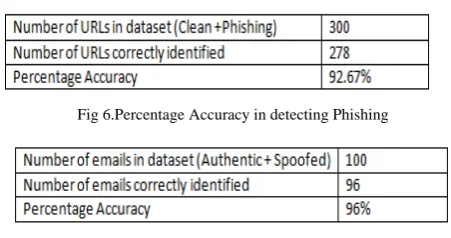
A data set of 300 URLs comprising of 56 clean sites and 244 phishing links was prepared for testing the effectiveness of the system in detecting phishing URLs. The phishing links were taken from Phishtank[2]. A similar data set of 100 emails was prepared for testing the effectiveness of the proposed system in detecting spoofing.
Fig 6.Percentage Accuracy in detecting Phishing
Fig 7.Accuracy in determining spoofed emails
IV.CONCLUSIONS
Our system uses a unique approach which would help the users which use the email communication for personal and for commercial use. The system provides real time detection of email phishing, spoofing and malware attacks (like ransomware, virus, trojan etc.) and thus help in safeguarding the users and improving the security of the email system. In case of any suspicious email the result of the analysis will be automatically sent to the proper authorities via email notification. As our system would detect the unread mails and perform the all tests automatically without user needing to give any input, the users will find it easy to use.
REFERENCES
[1] Horng, S.J., Fan, P., Khan, M.K., et al. “An efficient phishing webpage detector”, Expert Syst. Appl., Int. J., 2011, 38, (10), pp. 12018–12027.
[2] PhishTank. Available at: http://www.phishtank.com/, 2006. [3] Rami M. Mohammad, Fadi Thabtah, Lee McCluskey : “Intelligent
rule-based phishing websites classification”. IET Inf. Secur., 2014, Vol. 8, Iss. 3, pp. 153–160
[4] VirusTotal. Available at: https://www.virustotal.com/
[5] Alexa the Web Information Company. Available at: http://www.alexa.com/
[6] WhoIs. Available at http://www.who.is/
[7] Hong Guo, Bo Jin, and Wei Qian, “Analysis of Email Header for Forensics Purpose”, International Conference on Communication Systems and Network Technologies, 2013.
[8] Preeti Mishra, Emmanuel S. Pilli and R. C. Joshi “Forensic
Analysis of E-mail Date and Time Spoofing”, Third International
Conference on Computer and Communication Technology, 2012. [9] Aparna Jayan, Dija S “Detection of Spoofed Mails”, IEEE
International Conference on Computational Intelligence and Computing Research 2015.
[10] http://mashable.com2012/03/27/email-more-popular-social-media/#LISmIdaFeaq7
[11] More than 450 Phishing Attacks Used SSL in 2005. [Cited 2012 March8]. Available at : http: // www.news.netcraft.com/ archives/2005/