Issue 3
V-9964
Digital Feedback Eliminator/Message Stacker
General Design
The V-9964 is designed to eliminate acoustic feedback and act as a message stacker. When a page is made, the message is digitized and saved. Upon completion of the live page, the message is released for broadcast over the speakers. While a message is being broadcast, a second message may be recorded.
Additionally, up to four V-9964 units may be chained together to allow up to eight messages to be simultaneously processed.
Specifications
Features
• Automatic Gain Control (AGC) • Adjustable VOX sensitivity
• Compatible with Valcom Multi-Zone Control Units and Station Adaptors
• Two input channels: Switch selectable primary and priority, or two channels with equal priority; both inputs are switch selectable for Loop Start or VOX operation • Two audio outputs:
600 Ohms with loop supervision to a page control unit or 8 Ohms line level output to amplified speakers
• Background music input
• Total of three normally open relay contacts for PLAY, RECORD and BUSY modes (one contact each)
• LED status indicators for POWER, RECORD, PLAY and BUSY • Dip switch option programming • Message abort feature
Access
• Vacant Loop Start Trunk Port or C. O. Line Port
• Page Port
• Line Level Audio Feed
• An adaptor is required for C. O. Line or Station access (see V-9970 or V-9940)
Dimensions/Weight
• 11.76" H x 7.10" W x 1.72" D (29.87cm H x 18.03cm W x .37cmD) • 2.6 lbs. ( 1.18Kg )
Nominal Specifications
Power requirement: 24VDC 200mA filtered Input impedance: 600 Ohms Input level: -10dBm Loop Output impedance: 600 Ohms Line Output impedance: 8 Ohms Output level: -10dBm VOX sensitivity: -20dBm to -35dBm Message release time: 3 seconds after Last sensed audio Maximum recorded page time: 60
seconds
(30 seconds per page in call stacker Mode) Frequency response:
Page 80Hz to 7kHz Background Music 50Hz to 17kHz
Environment
Temperature: 0 to +40°C +32 to +104°F
FCC Information
This equipment has been tested and found to comply with the limits for a Class B digital device, pursuant to Part 15 of the FCC Rules. These limits are designed to provide
reasonable protection against harmful interference when the equipment is operated in a commercial environment. This
equipment generates, uses and can radiate radio frequency energy and if not installed and used in accordance with the instruction manual, may cause harmful interference to radio communications. Operation of this equipment in a residential area may cause harmful interference in which case the user will be required to correct the interference at his own expense.
Installation/Connection
Cabling
Category 3 or 5 twisted pair cable is recommended for all Valcom distributed amplified paging installations. Screw terminals are provided for the basic connections. RJ45 jacks are provided for chaining multiple V-9964 units together. Removing the narrow right side panel of the V-9964 provides access to controls, connections and option switches. To remove the panel, loosen the two screws holding the panel in place and lift the panel.
Mounting
The V-9964 may be wall mounted or rack mounted in a standard 19 inch equipment rack using the brackets included.
Connections
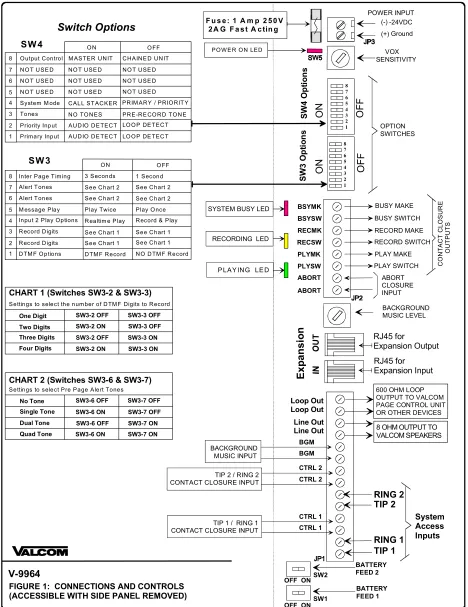
See Figure 1 for a connection diagram.
Tip 1, Ring 1
INPUT 1 is the normal Primary or Call Stacker system input. Connects to a Loop Start Trunk Port, 600 Ohm Page Port or some Valcom Page Controls. Do not connect to a C. O. Line.
Control Input 1
Provides contact closure activation when using a Page Port.
Tip 2, Ring 2
Control Input 2
Provides contact closure activation when using a Page Port.
Background Music Input
Connection for external line level music source (Example: V-2952, FM Tuner).
NOTE: If using multiple V-9964 units in a chained configuration, all speakers must connect to the output of the last unit in the
chain.
Line Out
Output connections to Valcom amplified speakers or 70 Volt amplifier Aux input.
Loop Out
Connects to Tip and Ring input on a Valcom multi-zone page control unit.
Expansion In
RJ45 connection from the previous V-9964 in a chained configuration.
Expansion Out
RJ45 connection to the next V-9964 in a chained configuration.
Abort
To abort a message during play, connect an external relay contact across the two abort terminals.
NOTE: To abort a message during the record sequence, press any DTMF button on the dial pad of the access telephone.
Relay Closure Outputs (PLAY) PLYSW and PLYMK
Normally open relay contact that closes while a message is being broadcast.
(RECORD) RECSW and RECMK
Normally open relay contact that closes while a message is being recorded.
(BUSY) BSYSW and BSYMK
Normally open relay contact that closes when the unit cannot accept any more messages.
SW1: Tip 1 Ring 1
No Battery Feed (Page Port) OFF Battery Feed supplied (Loop
Trunk Port) ON
SW2: Tip 2 Ring 2
No Battery Feed (Page Port) OFF Battery Feed supplied (Loop
Trunk Port) ON
SW5: VOX Sensitivity
Sets audio detection threshold for input ports. SW4-1 or SW4-2 must be in the "ON" position for this
adjustment to be effective.
SW5 Level SW5 Level
0 -20dBm 8 -28dBm
1 -21dBm 9 -29dBm
2 -22dBm A -30dBm
3 -23dBm B -31dBm
4 -24dBm C -32dBm
5 -25dBm D -33dBm
6 -26dBm E -34dBm
7 -27dBm F * -35dBm
* Typical Setting
Program DIP Switch Settings
NOTE: (ON-Left) (OFF-Right)
SW3-1: DTMF Signaling Options
No DTMF signaling (single zone) OFF
DTMF signaling (multi-zone) ON
SW3-2, SW3-3: Number of Digits to Receive Before Recording the Page.
1 Digit SW3-2 OFF SW3-3 OFF
2 Digits SW3-2 ON SW3-3 OFF
3 Digits SW3-2 OFF SW3-3 ON
4 Digits SW3-2 ON SW3-3 ON
SW3-4: Priority Port Options
Leave in "OFF" position when used as a Call Stacker (SW4-4 is "ON").
Records Primary and Priority pages;
Priority page broadcast first OFF
Priority page broadcast in real-time; Primary page in progress is recorded and broadcast after Priority page ON
SW3-5: Message Playback Control
Play message once OFF
Play message twice ON
SW3-6, SW3-7: Pre-page Alert Tones
No tones SW3-6 OFF SW3-7 OFF
Single tone SW3-6 ON SW3-7 OFF
Dual tone SW3-6 OFF SW3-7 ON
Quad tone SW3-6 ON SW3-7 ON
SW3-8: Inter-page Timing
1 Second between pages OFF
3 Seconds between pages ON
SW4-1: Primary or Line 1 Page Access
Loop detect OFF
Audio detect ON
SW4-2: Priority or Line 2 Page Access
Loop detect OFF
Audio detect ON
SW4-3: Pre-Record Ready Tone
Normal (3 seconds delay) with ready
to record tone OFF
No pre-record tone; allows
immediate recording activation ON
Note: This option is effective only when the inputs are set for LOOP start (SW4-1 OFF).
SW4-4: Normal or Call Stacker Mode
2 Inputs-Primary and Priority OFF
2 Inputs will function as Call Stacker ON
Note: Only one Priority port may be used on a Multi V-9964 system.
SW4-8 Output Control
Slave unit in a Chained system;
Multiple V-9964 OFF
Single unit or Master in a Chained
Technical Assistance
When trouble is reported, verify the unit is turned on and there are no broken connections leading to the unit.
Assistance in troubleshooting is available from the factory. When calling from the job site, you should have a Volt/Ohm Meter and a telephone test set available for testing. Call (540) 563-2000, press 1 for Technical
Support, or visit our Website at
http://www.valcom.com.
Valcom equipment is not field repairable. Valcom maintains service facilities in
Roanoke, VA. Should repairs be necessary, clearly tag the unit with your company name, address, telephone number, contact person and a description of the problem. Send the unit to:
Valcom Inc.
Repair and Return Department 5614 Hollins Road Roanoke, VA 24019-5056
VALCOM LIMITED WARRANTY
Valcom, Inc. warrants its products to be free from defects in materials and workmanship under conditions of normal use and service for a period of one year from the date of shipment. The obligation under this warranty shall be limited to the replacement, repair or refund of any such defective device within the warranty period, provided that:
1. inspection by Valcom, Inc. indicates the validity of the claim;
2. the defect is not the result of damage, misuse or negligence after the original shipment;
3. the product has not been altered in any way or repaired by others and that factory sealed units are unopened (a service
charge plus parts and labor will be applied to units defaced or physically damaged);
4. freight charges for the return of products to Valcom are prepaid;
5. all units ‘out of warranty’ are subject to a service charge. The service charge will cover minor repairs (major repairs will
be subject to additional charges for parts and labor).
This warranty is in lieu of and excludes all other warranties, expressed or implied, and in no event shall Valcom, Inc. be liable for any anticipated profits, consequential damages, loss of time or other losses incurred by the buyer in connection with the purchase, operation or use of the product.
This warranty specifically excludes damage incurred in shipment. In the event a product is received in damaged condition, the carrier should be notified immediately. Claims for such damage should be filed with the carrier involved in accordance with the F.O.B. point.
Headquarters: In Canada
Valcom, Inc. CMX Corporation
5614 Hollins Road 35 Van Kirk Drive #11 and 12
Roanoke, VA 24019-5056 Brampton, Ontario L7A 1A5
Phone: (540) 563-2000 Phone: (905) 456-1072
V-9964 Ground (-) (+) VOX SENSITIVITY OPTION SWITCHES BSYMK BSYSW RECMK RECSW PLYMK PLYSW ABORT ABORT BACKGROUND MUSIC LEVEL
FIGURE 1: CONNECTIONS AND CONTROLS (ACCESSIBLE WITH SIDE PANEL REMOVED)
SW2
SW1 OFF ON
BATTERY FEED 2
BATTERY FEED 1
PO W E R O N LED
SYSTEM BUSY LED
RECORDING LED
P LAY ING LE D
600 OHM LOOP OUTPUT TO VALCOM PAGE CONTROL UNIT OR OTHER DEVICES
SW 4
Primary Input Priority Input
LO O P DE TECT AUD IO DE TEC T
LO O P DE TECT AUD IO DE TEC T
O N O FF
8 7 6 5
Tones NO TO NES PR E-RE CO R D TO N E
CTRL 2 RING 2 TIP 2 RING 1 TIP 1 BACKGROUND MUSIC INPUT
TIP 2 / RING 2 CONTACT CLOSURE INPUT
8 OHM OUTPUT TO VALCOM SPEAKERS
TIP 1 / RING 1 CONTACT CLOSURE INPUT
CO N T ACT CL O S URE OU T P U T S BUSY MAKE BUSY SWITCH RECORD MAKE RECORD SWITCH PLAY MAKE PLAY SWITCH ABORT CLOSURE INPUT 8 7 6 5 4 3 2 1 8 7 6 5 4 3 2 1 4 3 2 1 O F F
PRIM ARY / PRIO R IT Y CALL STACKER
System M ode
NO T USE D NO T USE D NO T USE D NO T USE D NO T USE D NO T USE D
O utput Control M ASTER UNIT CHAINE D UNIT
N O T U SE D N O T U SE D N O T U SE D
Switch Options
RJ45 for Expansion Output RJ45 for Expansion Input
F u s e : 1 A m p 2 5 0 V 2 A G F a s t A c tin g POWER INPUT -24VDC S W 3 O p ti o n s S W 4 O p ti o n s O N O N O F F E xp an si o n Loop Out Loop Out Line Out Line Out System Access Inputs SW 3
D TM F O ptions D TM F R ecord N O D TM F R ecord
O N O FF
8 7 6 5
R ecord Digits See C hart 1 4
3 2 1
R ecord & Play R ealtim e Play
Input 2 Play Options
Play Tw ice Play O nce Inter Page T im ing
M essage Play
R ecord Digits See C hart 1
See C hart 1 See C hart 1 See C hart 2 See C hart 2 See C hart 2
See C hart 2 Alert Tones
Alert Tones
3 Seconds 1 Second
Settings to select Pre Page Alert Tones
CHART 2 (Switches SW3-6 & SW3-7)
Quad Tone No Tone Single Tone
Dual Tone SW3-6 OFF SW3-7 ON SW3-6 ON SW3-7 OFF SW3-6 OFF SW3-7 OFF
SW3-6 ON SW3-7 ON
Settings to select the num ber of D TM F Digits to R ecord
CHART 1 (Switches SW3-2 & SW3-3)
Four Digits One Digit Two Digits
Three Digits SW3-2 OFF SW3-3 ON SW3-2 ON SW3-3 OFF SW3-2 OFF SW3-3 OFF
SW3-2 ON SW3-3 ON
CTRL 2 BGM BGM