Broadcasting dynamic metadata content to
external web pages using AMI (ATLAS Metadata
Interface) embeddable components
Fabian Lambert1,1
, Jérôme Odier1
, Jérôme Fulachier1
, on the behalf of the ATLAS Collaboration
1Laboratoire de Physique Subatomique et de Cosmologie, Université Grenoble-Alpes, CNRS/IN2P3,
53 rue des Martyrs, 38026, Grenoble Cedex, FRANCE
Abstract. AMI (ATLAS Metadata Interface) is a generic ecosystem for metadata aggregation, transformation and cataloguing. Often, it is interesting to share up-to-date metadata with other content services such as wikis. Here, the cross-domain solution implemented in the AMI Web Framework is described: a system of embeddable controls, communicating with the central AMI service and based on the AJAX and CORS technologies. The main available controls and their basic usage are also described.
1 Introduction
This paper describes the AMI Web Framework (AWF),a JavaScriptWeb framework part of the ATLAS Metadata Interface (AMI) ecosystem,designed to develop custom,dynamic and embeddable Web application interfaces connected to the central AMI Web service. AMI [1,2] is an ecosystem designed for metadata bookkeeping and mainly used by the ATLAS experiment[3] atthe Large Hadron Collider (LHC).Thousands of physicists use severalAMI tools daily which are parts of the offline software of the ATLAS experiment, in order to display ormanage their data from SQL orNoSQL databases.As an example,the AMI dataset discovery tool is used to catalog the official ATLAS datasets available for analysis.Ithas been the officialdatasetbookkeeping toolof the experimentsince 2006.As another example,the AMI-Tags toolpermits setting up the configuration parameters used by data processing and analysis jobs.
AMI is a mature ecosystem,since its basic architecture has been maintained for over fifteen years.The ecosystem continuously scales both hardware and software infrastructure so thatthe quality of service remains high [4].Nevertheless,severalrequests made by the ATLAS physicistcommunity,concerning either data sharing on various supports like wikis or totally new Web applications,required a complete redesign of the ecosystem interface
subsystem.
1
The AWF provides mechanisms for building controls and applications within an object -oriented paradigm. In the following, the main components of the AMI ecosystem are recalled. Then, the AWF subsystems are described, especially the embeddable control mechanism.Finally the benefits of the technicalchoices are discussed in terms of flexibility and scalability.
2 The AMI ecosystem overview
The AMI architecture is described in detailin other publications [1,5,6].In this section, the main characteristics of the AMI ecosystem are recalled and the new controlparadigm for Web applications is described.
2.1 Overview of the ecosystem architecture
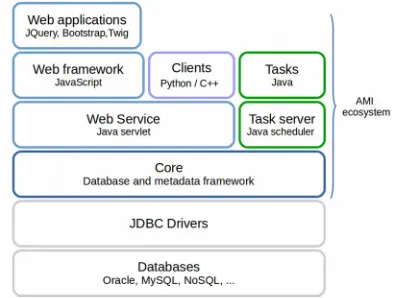
The firstAMI ecosystem architecture principles were designed between 2002 and 2003.In order to withstand the inevitable evolutions in technology and requirements, a n-tier architecture (Figure 1) was chosen.The layers of the n-tier architecture are welldecoupled, making AMI a scalable and flexible ecosystem for developing metadata-oriented applications.
Fig. 1. AMI multilayered architecture.
The Java AMI “Core” layer provides an API to interact with data sources.This layer provides a Metadata Querying Language (MQL) to easily query the registered database catalogues. It uses the JDBC driver reflexion properties to provide end-applications a simplified view of the databases, hiding their internal structures.
The AWF provides mechanisms for building controls and applications within an object -oriented paradigm. In the following, the main components of the AMI ecosystem are recalled. Then, the AWF subsystems are described, especially the embeddable control mechanism.Finally the benefits of the technicalchoices are discussed in terms of flexibility and scalability.
2 The AMI ecosystem overview
The AMI architecture is described in detailin other publications [1,5,6].In this section, the main characteristics of the AMI ecosystem are recalled and the new controlparadigm for Web applications is described.
2.1 Overview of the ecosystem architecture
The firstAMI ecosystem architecture principles were designed between 2002 and 2003.In order to withstand the inevitable evolutions in technology and requirements, a n-tier architecture (Figure 1) was chosen.The layers of the n-tier architecture are welldecoupled, making AMI a scalable and flexible ecosystem for developing metadata-oriented applications.
Fig. 1. AMI multilayered architecture.
The Java AMI “Core” layer provides an API to interact with data sources.This layer provides a Metadata Querying Language (MQL) to easily query the registered database catalogues. It uses the JDBC driver reflexion properties to provide end-applications a simplified view of the databases, hiding their internal structures.
Three categories of software use the AMI “Core” layer.The firstcategory consists of the AMI task subsystem.It runs Java tasks and,for the ATLAS collaboration,is used to collectproduction metadata and to populate AMI catalogs.Ithas to be deployed along with the Java Core on our task servers.The second category is a setof lightweightclients which can be deployed independently of the Java core on the user computers,justhaving to be configured to pointto an AMI Web Service endpoint.The lastcategory consists of Web applications based on the AMIWeb Framework.Itis described in the following sections.
2.2 Evolution of Web applications in AMI
The firstAMI Web application prototype (Tag Collector) was written in 2001 with the PHP [7] server-side scripting language.However,due to PHP design patterns,the code for the business logic and for the HTML user interfaces were mixed together,making the whole system difficultto maintain.To address this concern,a firstJava layered architecture was designed.Itwas composed of a Java “core” layer for the business logic and another one, using the XSL Transformation (XSLT) technology [8],for the HTML interface generation. Nevertheless,although the two layers were separated,making application evolution easier, they remained strongly coupled and were both processed server-side,affecting the whole system performance. To improve applications performance, from 2013, the XSLT layer was progressively replaced by modern Web 2.0 technologies.
2.3 AMI Web Framework
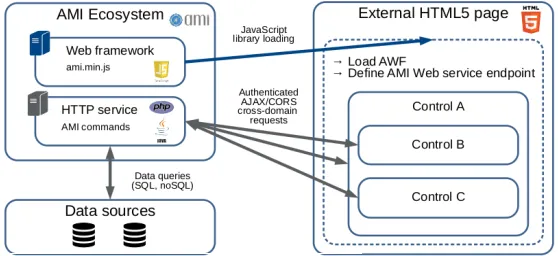
The AMI Web framework (AWF) layer is based on JavaScript,the Twitter Bootstrap [9] CSS framework,the JQuery library [10] and on a proprietary JavaScriptimplementation of the Twig template engine [11].AWF permits loading and releasing arbitrary resources (like CSS, JS, JSON, …), AMI graphical controls and applications. Both controls and applications follow a Model-View-Controller (MVC) pattern (described section 3.3) in order to simplify developments by decoupling data model, visualisation and application specific code.AWF uses Asynchronous JavaScriptAnd XML (AJAX) for interacting with the AMI server via an unique single Java servlet in a secured and authenticated session. This servlet is configured to permit requests using cross-origin resource sharing (CORS) mechanism.The idea is to shiftthe processing of the HTML Web interfaces to the client, keeping only the business logic on the server.Itgives AWF components the capability to access the AMI service from everywhere (external pages, personal pages, wikis,… see Figure 2).
Fig. 2. AWF controls embedded in external Web page.
3 AWF controls
3.1 Setting up AWF
To create a new Web application using AWF controls,a developer justhas to pullthe code from the officialAWF GIT repository and execute few commands to generate basic control or sub-application skeletons.
# Setuping AWF
curlhttps://rawgit.com/ami-team/AMIWebFramework/master/tools/build.xml> build.xml antsetup-prod
antmake-home-page
# Creating a new controlskeleton antmake-control
# Creating a new sub-application skeleton antmake-subapp
Fig. 3. AWF environment setup.
The commands,displayed in Figure 3,generate the following directories and files: • index.html,the home page starting controls and/orapplications
• controls,the directory containing the controls • subapps,the directory containing the sub-applications • js/jquery.min.js,the JQuery library
• js/ami.min.js,the AWF library
3.2 Embeddable control mechanism
There are two prerequisites to embed an AWF JavaScriptcontrolin an externalWeb page (for example a Wikipage).First,loading the JQuery library,the only dependency ofAWF, then loading AWF library itself (Figure 4).
<head>
<scripttype="text/javascript"src="https://ami.in2p3.fr/app/js/jquery.min.js"></script> <scripttype="text/javascript"src="https://ami.in2p3.fr/app/js/ami.min.js?embedded"></script> </head>
Fig. 4. Loading the AWF.
Also,in the generated skeleton,two handler methods of the amiWebApp namespace objectare overridden:
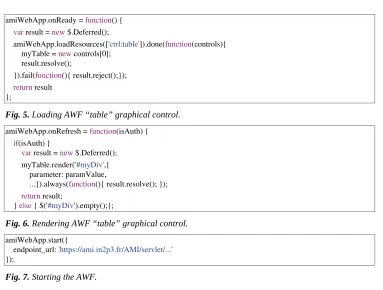
• amiWebApp.onReady is called as soon as AWF is initialized and ready to execute the user code. Within this method, miscellaneous resources (css, js, twig files, AMI controls, ...) needed by the main application are loaded using the AWF method
amiWebApp.loadResources(Figure 5).
• amiWebApp.onRefresh is called each time at sign-in / sign-out or when user authorization changes.This method has one argument,isAuth,a boolean variable inherited from AWF that indicates whether the user is authenticated or not. Then specific code, usually for rendering one or more graphical components in an HTML division, can be executed (Figure 6).
3.1 Setting up AWF
To create a new Web application using AWF controls,a developer justhas to pullthe code from the officialAWF GIT repository and execute few commands to generate basic control or sub-application skeletons.
# Setuping AWF
curlhttps://rawgit.com/ami-team/AMIWebFramework/master/tools/build.xml> build.xml antsetup-prod
antmake-home-page
# Creating a new controlskeleton antmake-control
# Creating a new sub-application skeleton antmake-subapp
Fig. 3. AWF environment setup.
The commands,displayed in Figure 3,generate the following directories and files: • index.html,the home page starting controls and/orapplications
• controls,the directory containing the controls • subapps,the directory containing the sub-applications • js/jquery.min.js,the JQuery library
• js/ami.min.js,the AWF library
3.2 Embeddable control mechanism
There are two prerequisites to embed an AWF JavaScriptcontrolin an externalWeb page (for example a Wikipage).First,loading the JQuery library,the only dependency ofAWF, then loading AWF library itself (Figure 4).
<head>
<scripttype="text/javascript"src="https://ami.in2p3.fr/app/js/jquery.min.js"></script> <scripttype="text/javascript"src="https://ami.in2p3.fr/app/js/ami.min.js?embedded"></script> </head>
Fig. 4. Loading the AWF.
Also,in the generated skeleton,two handler methods of the amiWebApp namespace objectare overridden:
• amiWebApp.onReady is called as soon as AWF is initialized and ready to execute the user code. Within this method, miscellaneous resources (css, js, twig files, AMI controls, ...) needed by the main application are loaded using the AWF method
amiWebApp.loadResources(Figure 5).
• amiWebApp.onRefresh is called each time at sign-in / sign-out or when user authorization changes.This method has one argument,isAuth,a boolean variable inherited from AWF that indicates whether the user is authenticated or not. Then specific code, usually for rendering one or more graphical components in an HTML division, can be executed (Figure 6).
Finally the method amiWebApp.start is called for starting the AWF (Figure 7) Web application.This function has an optional parameter to specify the endpoint URL of the AMI Web service.
amiWebApp.onReady = function() { varresult= new$.Deferred();
amiWebApp.loadResources(['ctrl:table']).done(function(controls){ myTable = newcontrols[0];
result.resolve();
}).fail(function(){ result.reject();}); returnresult
};
Fig. 5. Loading AWF “table” graphical control.
amiWebApp.onRefresh = function(isAuth) { if(isAuth) {
varresult= new$.Deferred(); myTable.render('#myDiv',{
parameter:paramValue,
...}).always(function(){ result.resolve();}); returnresult;
}else{ $('#myDiv').empty();};
Fig. 6. Rendering AWF “table” graphical control.
amiWebApp.start({
endpoint_url:'https://ami.in2p3.fr/AMI/servlet/...'
});
Fig. 7. Starting the AWF.
3.3 Control pattern structure
AWF makes itpossible to develop applications and controls with an MVC pattern.
3.3.1 Model
The Modelis based on the CORS cross-domain AMI Web Service.Itconsists of a setof
business objects called AMI commands, server-side. These commands permit
adding/removing/updating (and much more) records in databases and can be called either by Web applications or other clients like the officialAMI python clientpyAMI [12].The AMI Web Service returns the command results to the clientin a JSON message thatcan be then processed by the Controller.
3.3.2 View
The View is based on the AMI-Twig template engine and the Twitter Bootstrap 4 CSS framework.Itrenders data provided by the Controller and dynamically generates HTML 5 fragments using Twig templates (Figure.8).
{% forrow inlinkedElementRowset%} <tr><tdclass="text-center">
{{row |json_jspath('..field{.@name==="entity"}.$')[0] |e}} </td></tr>
{% endfor%}
3.3.3 Controller
The Controller,written in JavaScript,is the centralpartof an AWF control.Ituses standard technologies such as AJAX (forexecuting AMI commands)and externalJavaScriptlibraries such as JQuery, JSPath [13], … It communicates with the central AMI Web Service, sending on-demand “AMI command” requests, and getting corresponding responses as JSON messages.Itholds primitives to process these JSON data and transmits them to the
Viewin orderto update the applications.
3.4 Embedding controls in a web page
Benefiting from the CORS cross-domain AJAX technology,one can embed a JavaScript code in a Web page to interactwith the centralAMI servlet(Figure 8).AWF requires few HTML containers to be defined within the <body> (Figure 9):
• A <nav><ul> structure with the id ami_login_content where is loaded the AWF authentication control.
• A <div> with the id ami_alert_content to display error, warning or information messages issued from AWF.
• And atlast,additional<div>s are needed to display user controls. <head><script>
varmyTable;
myTable.render('#myDiv',… </script></head>
<body>
<navclass="navbar navbar-expand-lg navbar-lightbg-light"> <ulclass="navbar-nav ml-auto" id="ami_login_content"></ul> </nav>
<divid="ami_alert_content"></div> <divid="myDiv"></div>
</body>
Fig. 9. Embeding AWF “table” graphical control in a Web page.
4 AMI controls in action
4.1 The ATLAS PMG View for MC dataset
3.3.3 Controller
The Controller,written in JavaScript,is the centralpartof an AWF control.Ituses standard technologies such as AJAX (forexecuting AMI commands)and externalJavaScriptlibraries such as JQuery, JSPath [13], … It communicates with the central AMI Web Service, sending on-demand “AMI command” requests, and getting corresponding responses as JSON messages.Itholds primitives to process these JSON data and transmits them to the
Viewin orderto update the applications.
3.4 Embedding controls in a web page
Benefiting from the CORS cross-domain AJAX technology,one can embed a JavaScript code in a Web page to interactwith the centralAMI servlet(Figure 8).AWF requires few HTML containers to be defined within the <body> (Figure 9):
• A <nav><ul> structure with the id ami_login_content where is loaded the AWF authentication control.
• A <div> with the id ami_alert_content to display error, warning or information messages issued from AWF.
• And atlast,additional<div>s are needed to display user controls. <head><script>
varmyTable;
myTable.render('#myDiv',… </script></head>
<body>
<navclass="navbar navbar-expand-lg navbar-lightbg-light"> <ulclass="navbar-nav ml-auto" id="ami_login_content"></ul> </nav>
<divid="ami_alert_content"></div> <divid="myDiv"></div>
</body>
Fig. 9. Embeding AWF “table” graphical control in a Web page.
4 AMI controls in action
4.1 The ATLAS PMG View for MC dataset
“PMG View” control is currently used by ATLAS physicists,embedded in the ATLAS collaboration twiki pages.It provides physicists with a customized view of their Mont e-Carlo data,corresponding to their needs.It is a composite control made essentially with three other controls provided by AWF:“Accordion”,“Tab” and “Table” (Figure 10).
4.2 The ATLAS AMI-Tags selection tool
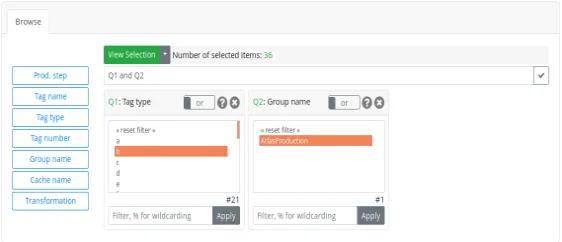
Every day the ATLAS collaboration submit a huge number of analysis tasks on the worldwide LCG grid.AMI-Tags are used for storing software configuration parameters of these analyses and are an essentialpartof the ATLAS production system.The AMI-Tags selection tool is based on a generic search by criteria control. As a control, it can be embedded everywhere and permits,in this specific case,selecting an AMI-Tag (i.e.a setof configuration parameters) using a combination of dedicated search criteria (Figure 11).
Fig. 11. The “AMI-Tags selection tool” for ATLAS.
4.3 The ATLAS dataset whiteboard
Metadata aboutofficialATLAS production datasets,Monte-Carlo or RealData,are stored in AMI catalogues.In 2017,physicists requested to be able to associate custom information to any dataset record, using a twitter-like hashtag system. The “ATLAS dataset whiteboard” is now integrated in the officialATLAS datasetselection tool,benefiting from the AWF controlembeddable capability (Figure 12).
Fig. 12. The “dataset whiteboard” control for ATLAS.
5 Outlook
used independently of the AMIcore system.Since 2017,the Rosetta/Philae experiment[15, 16],in the field of Astrophysics,has expressed interest in AWF,starting to develop their own controls with a minimum of support of the AMI Team.The team will still work on improving AWF and adding new generic controls,in order to provide a complete set of ready-to-use components to experiments.
Acknowledgements
Over the years we have been helped and supported by many people in the Rosetta/Philae collaboration,and atthe CC-IN2P3,in particular Osman Aidel,Philippe Cheynet,Benoît Delaunay,Pierre-Etienne Macchi,Mattieu Puel,Yves Rogez,Mélodie Roudaud and Jean-René Rouet.
References
1. J.Odier,J.Fulachier,F.Lambert,The AMI(AtlasMatadata Interface)2.0 metadata
ecosystem new design principlesand features,proceedings ofthe 23rd International Conference on Computing in High Energy and NuclearPhysics (CHEP 2018),9-13 July 2018,Sofia,Bulgaria,J.Phys.:Conf.Ser.(2018)
2. J.Odier,O.Aidel,S.Albrand,J.Fulachier,F.Lambert,Evolution ofthe architecture ofthe
ATLAS Metadata Interface (AMI),proceedings ofthe 21stInternationalConference on Computing in High Energy and Nuclear Physics (CHEP 2015),13-17 April2015,Okinawa, Japan,J.Phys.:Conf.Ser.64042040 doi:10.1088/1742-6596/898/9/092001 (2015)
3. ATLAS Collaboration,The ATLAS Experimentatthe CERN Large Hadron Collider,
JINST 3 S08003 doi:10.1088/1748-0221/3/08/S08003 (2008)
4. J.Odier,O.Aidel,S.Albrand,J.Fulachier,F.Lambert,Migration ofthe ATLAS Metadata
Interface (AMI)to Web 2.0 and cloud,proceedings ofthe 21stInternationalConference on Computing in High Energy and Nuclear Physics (CHEP 2015),13-17 April2015,Okinawa, Japan,J.Phys.:Conf.Ser.664062044 doi:10.1088/1742-6596/664/6/062044 (2015)
5. J.Fulachier,O.Aidel,S.Albrand,F.Lambert,Looking back on 10 yearsofthe ATLAS
Metadata Interface,proceedings ofthe 20th InternationalConference on Computing in High Energy and Nuclear Physics (CHEP 2013),14-18 October2013,Amsterdam, Netherlands,J.Phys.:Conf.Ser.513042019 doi:10.1088/1742-6596/513/4/042019 (2013)
6. S.Albrand,T.Doherty,J.Fulachier,F.Lambert,The ATLAS Metadata Interface,J.Phys.:
Conf.Ser.119072003 doi:10.1088/1742-6596/119/7/072003 (2013)
7. “PHP” [software],http://www.php.net(accessed 2019-03-13)
8. “XSLT” [software],https://www.w3.org/TR/xslt/all/(accessed 2019-03-13) 9. “Twitter Bootstrap” [software],http://getbootstrap.com/(accessed 2019-03-13) 10. “JQuery” [software],http://jquery.com/(accessed 2019-03-13)
11. “AMI-Twig.js” [software],http://ami.web.cern.ch/ami/twig/(accessed 2019-03-13) 12. “pyAMI” [software],https://pypi.python.org/pypi/pyAMI_core/(accessed 2019-03-13) 13. “JSPath” [software],https://github.com/dfilatov/jspath (accessed 2019-03-13)
14. “AWF” [software],https://ami.in2p3.fr/app/?subapp=document&userdata=api.html
(accessed 2019-03-13)