Lizhong Liu. IP Management System. A Master’s Paper for the M.S. in IS degree. April, 2005. 42 pages. Advisor: Dr. Gary Marchionini
This study involves systematic analysis of an existing IP Management System used by
the UNC School of Medicine and UNC hospital to manage their network devices. The
data structure and user interface in the current system were examined in this study. The
data structure was evaluated on a set of criteria such as database normalization, data
integrity, and indexing, and the user interface was studied through on-site interviews with
its users, designers and systems administrators. Based on these analyses, a new system
was designed and implemented. This process involved system design and
implementation, data cleanup and migration, testing, and application deployment in the
Web environment.
Headings:
System-Analysis-Design-Implementation
Data-Migration
by Lizhong Liu
A Master’s paper submitted to the faculty of the School of Information and Library Science of the University of North Carolina at Chapel Hill
in partial fulfillment of the requirements for the degree of Master of Science in
InformationScience.
Chapel Hill, North Carolina
April 2005
Approved by
_______________________________________
Part 1. Introduction and Background
A. Background
The UNC School of Medicine and UNC Hospital use their own Internet Protocol (IP)
Management System to manage IP address assignments for devices connected to the
school and hospital’s network. The existing IP Management System was developed
in-house and consists of a user interface application and a backend Ingress database.
Approximately twenty users have access to this system, and their responsibilities range
from entering new records and verifying information to generating reports for use by
DHCP and DNS servers. Currently, the Ingress database stores about 9,000 devices along
with their associated ownership, location, and technical contact information.
B. Problem Definition
The following problems were revealed after systematic analysis of the current system:
• Support for Ingress - the legacy database running the current IP Management
System, has expired due to insufficient funding to sustain it;
• The current database contains (and does not adequately avoid) data redundancy;
• The current user interface is not Web based, but a command driven Perl
application hosted on a Unix machine;
• The current user interface cannot check and report on either IP address or
hostname conflicts, therefore different applications have to be used to fulfill
• The user interface for the current IP Management System is not intuitive and has
generated many complaints from Client Services staffs;
• A single systems administrator controls the export of database records and the
import of bulk IP address updates;
• The method by which departmental support groups submit bulk IP updates is very
error-prone and thus time-consuming for the systems administrator who must fix
them.
C. Solutions
The current database management system was migrated to Oracle and an improved,
Web-based IP Management System interface was designed and implemented after intensive
information gathering and discussion with current users and departmental systems
administrators. The new system uses a new data model to help ensure data integrity and
scalability. In addition, the interface offers users several new features including available
IP address search, IP address and hostname validation, bulk IP address changes, and
report creation. The result of this study is a more user friendly and stable system that is
ready to take on additional load as the number of hosts on the network increases.
Because this study uses resources that are already available to the School of Medicine, no
Part 2. Description of the Current System
A. Structure of the current System and Its Weaknesses
The current use of the IP Management System is to assign IP addresses to new machines.
This is how a new device is allowed onto the school’s network. In addition to the IP
address, IP Management System also keeps track of other information about each
network device, including its user, location, and technical contact person.
The plan for investigating the current system is described in the following sections.
To gather data about the current IP Management System work model and any others
associated with it, interview and on-site observation were chosen to be the main
approach. One-on-one or two-on-one interviews with users who know the IP
Management System were scheduled at their workplace. The principles of context
inquiry were used to guide the interviews, which were conducted with people who
perform widely different roles and work in very different ways with the IP Management
System. This included the people who admin the IP Management System database and
those who use the IP Management System application. Extensive note was taken during
the interviews when possible. Interviews were focused on the preset topics, and time was
tracked during the interview. One good practice to keep the interview on track was to
The overall goal was to have a complete picture of the current IP Management System
database structure (how many tables are in it, what data is in each table, why they are
there, and how the administrator uses/maintains the database, such as any additional tool
used to maintain the database or generate reports from it); functionality of the current IP
Management System application along with how it interacts with the data in the database;
the physical location of the IP Management System database and its application; and how
the program fits into the department’s overall system structure. Most important,
understanding user needs, desires, and their approach to their work regarding IP
Management System was the key to recognize the overall work situation, identify
specific strengths and weaknesses, and envision an integrated solution.
The current system used by the School of Medicine has the following properties:
Database. The DBMS is Ingress running on a Solaris server. Ingress is a relatively old database management system that is no longer developed or supported. The structure of
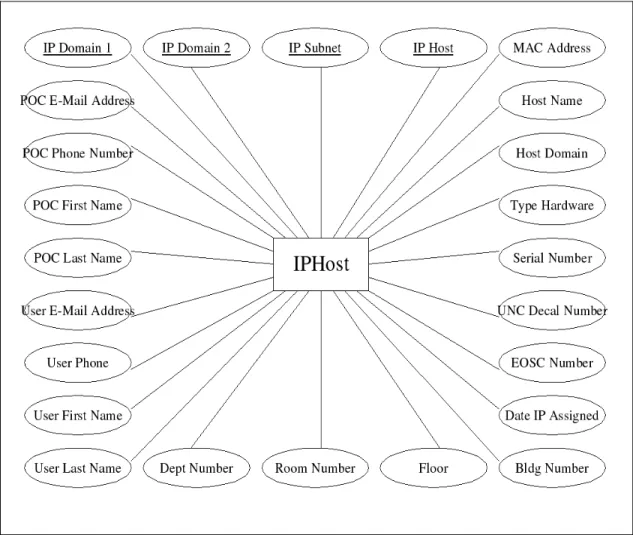
the data is such that each of the 24 attributes is stored in a single record in a single table
(as shown in Figure 4).
Interface. The user interface is exclusively an interactive text interface that is accessible only through a Secure Shell client. There is no Web application that is able to interact
with the database.
within the School of Medicine are responsible for submitting these updates in the form of
Excel spreadsheets. The administrator performs the updates by taking the preformatted
Excel spreadsheet, exporting the data, parsing the data into a format that can be ingested
by Ingress, and then finally importing the data into the DBMS.
Data Export. From IP address data stored in Ingress, the current system is able to generate DHCP configuration files and DNS records on demand. This functionality is
absolutely mission critical, because no new devices can be added to the network without
the proper generation of these items. One of the Unix systems administrators is the only
person who produces the DHCP and DNS reports.
There are a number of weaknesses in the current system, as outlined below:
Non-optimal User Interface. The current terminal interface is fine for power users, but is too complex and cumbersome for those individuals with specific tasks to perform. It
frequently generates errors that are hard to interpret for support staff; and, based on the
rate of user complaints, one in every ten attempts to use the application fails. Apart from
the hard-to-use interface, another problem is terminal emulation. The end user’s SSH
client itself will often result in differences in the behavior of the interface. For example,
certain function keys often don’t work when connecting from certain terminals.
Unfortunately, the current system does not support making the situation better. There is
really not an advanced enough toolkit to support migrating to a Web interface or any
This situation has given birth to quite a few workaround systems so that people can do
their jobs while minimizing their use of the current IP Management System and its
Ingress database. For example, a Perl-based system that runs on a Web server assists
support personnel by determining the next available IP address. Support staff must
therefore open this Web page in one window and the IP Management System interface in
another before they can assist a customer. Optimally, both of these functions should be
available within IP Management System.
Another interface weakness is the inability of the current IP Management System to
accept bulk IP address updates, which are commonly needed by departmental support
groups who make many system changes. As a workaround, users can submit a bulk IP
update spreadsheet to the Unix systems administrator.
Single System Expert. The developers of the current IP Management System have, over the years, left the School of Medicine. As a result, only one person remains who has
control over critical IP Management System functionality: the Unix systems
administrator. If this single expert is no longer able to perform his current database
responsibilities, then batch updates could not occur and DNS records and DHCP
configuration files will likely not be generated. Thus, this person has unwittingly become
a single point of failure.
Further complicating the problem is the time required to train a new staff member in
modern database constructs, and because several interface workarounds are in place, a
new IP Management System administrator would have to invest a large amount of time
learning the system.
No Database Support. An important consideration for the School of Medicine is support for its database software. The support contract for Ingress has run out, and no
future support will be available. If the school continues to use the current database, and a
major failure occurs, then vendor assistance will not be an option. This is a very
precarious situation for a production, mission critical system.
Current Database Not Scalable. An examination of the current IP Management System data model reveals that the database schema does not scale. At the time this system was
created, the concept of any individual having more than one computer was unheard of.
However, with the advent of desktop, notebook, PDAs, and other network-aware devices
requiring IP addresses, there has been an explosion in the number of addresses needed. It
is now common for single users to have three or more devices registered to them. In the
current data model, which has a single entity with 24 attributes, all personal data is
recorded for each device registered. For owners of multiple devices, then, this ownership
and contact information is needlessly repeated. Recently, this problem has become more
pressing as users bring notebook computers onto the network with multiple interfaces
Further reinforcing the need for scalability, IP and hostname configurations within the
school have become more complicated over time. Unlike in the past, it is now possible to
have IP addresses with multiple hostnames, or single hostnames having multiple IPs on
the network. These types of relationships simply can’t be modeled using the present
system.
As more devices are added to the network, including those with multiple interfaces, the
database will grow very quickly. With the current system’s poor data model, scalability is
becoming an important concern.
Data Integrity Issues. As discussed previously, data redundancy already exists in the current IP Management System database, and this will continue to worsen if no action is
taken. Redundancy creates its own type of data integrity problem, because it makes
updating and searching for records much more difficult. For example, if a user’s phone
number changes, and this user owns five network devices, then the information change
must be made in five records (one for each device). This type of data architecture is very
unwieldy, hard to handle in an interface, and can cause many data integrity problems.
Redundancy, though, is not the only problem. All of the fields in the current database are
stored as string values, so invalid data can easily be entered into the system. These errors
can cascade into malformed DHCP and DNS files, which are exported from the database
by the systems administrator. Such an event can render these two critical network
While not as critical as the previous problem, data formatting issues also compromise
data integrity. Because of the lack of validation, information entered through the current
IP Management System interface often contains misspellings or unneeded characters such
as spaces. Therefore, a search for machines by name or location can return far fewer
results than should be the case. The end result is that IP Management System users
cannot reliably access and update information because formatting varies throughout the
records.
B. Current System Models
Several models of the current system were generated to help understand the work and
data flow involved in updating and maintaining the IP Management System. Some of
these models, which begin on the next page, illustrate the problems highlighted in section
Sequence Model
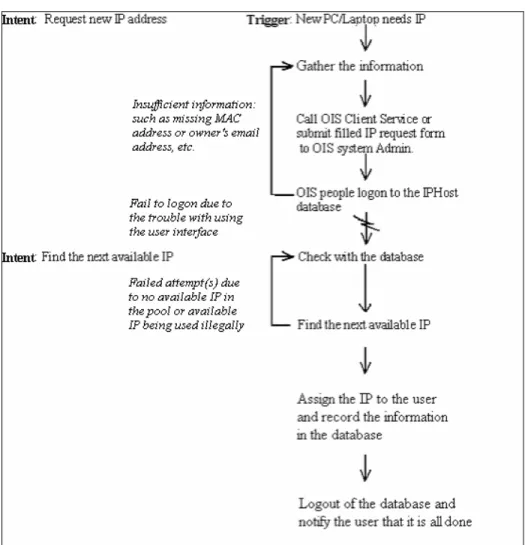
Figure 1:Sequence model.This sequence model traces the process of creating a new IP address entry in the IP Management System database from the perspective of a Client Services technician. The model highlights the accessibility and interface problems that support personnel may encounter.
Notes:
1. OIS stands for Office of Information Systems at UNC School of Medicine.
2. Client Service representatives have complained about the data entry troubles they have
Artifact Model
Flow Model
The flow model on this page illustrates problems with two components: the hard-to-use
telnet interface and the error-prone IP additions spreadsheet. The interface frequently
causes trouble for support technicians, who must use it to enter IP information manually.
The IP additions spreadsheet, which is used by departmental support groups to submit
bulk IP changes, commonly contains data entry and formatting errors that the Unix
systems administrator must resolve. Also, the Unix systems administrator is the only
Entity-Relationship Diagram
The following illustration shows the data model used by the current Ingress database:
Figure 4: Entity-relationship diagram for the current system. All attributes in the current system are stored as text fields related to just one entity. For each record in the database, all 24 attributes are stored.
Therefore, no cardinality is defined, and data redundancy is a major problem.
The models above highlight several of the problems in the current system, including:
• A troublesome interface that makes entering data difficult for the Client Services
support staff;
• Reliance on a single system administrator to handle bulk IP additions and report
creation;
• A poor data model that creates redundancy and will not be scalable or ensure data
integrity.
All of these problems were taken into consideration in designing the new system, which
Part 3. New System Design and Implementation
A. Summary of Changes Needed
The final solution addresses all of the problems raised in the problem definition. It is a
new system designed from scratch, which uses Web technologies and a back-end
database management system. The new DBMS is Oracle, as it is already licensed and
installed within the school. These technologies are presently available to the School of
Medicine and require no additional cost on the part of the school for hardware or
software. The total cost of resources for the new system is just the personnel time
required for development.
The School of Medicine and all of its departments use a wide range of different systems,
and in the years since the original IP Management System was created, the Web, and
HTML specifically, has matured into the standard for accessing data from a distributed
environment. Therefore, the School of Medicine should implement a Web-based system
as the IP Management System interface. The Web server must be equipped with a
programming environment that will support the communication between the HTML user
interface and the SQL commands passed to and from the DBMS. For this function, Java
Server Pages (JSP) is chosen because it leverages Oracle’s built-in Web technologies.
Development and deployment tools for JSP with Oracle database are part of the Oracle
JSP and the Oracle DBMS. Because all of these software tools are included with Oracle,
no additional licensing is required for this study.
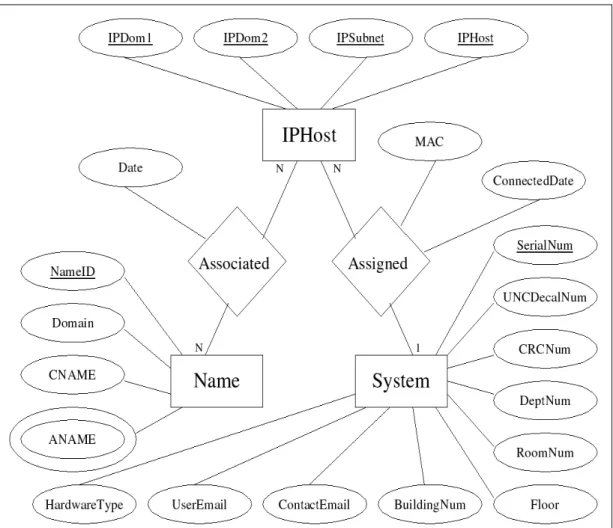
The new database implements the ER diagram shown below in section B to ensure that
all the required data are available and normalized in the most efficient way. The system
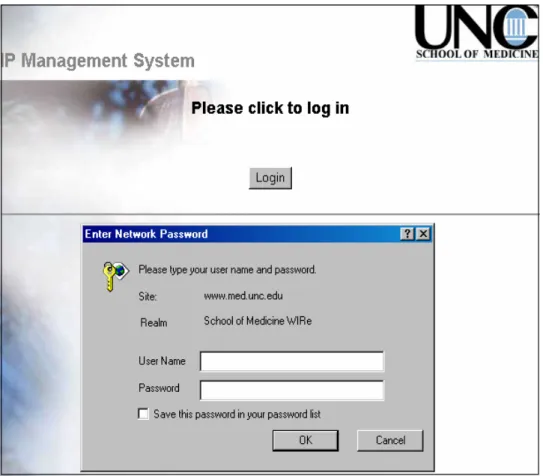
also implements strong user authentication through a user’s ONYEN.
Because it is Web-based, this new system provides much easier access to all users that
are authorized to view or edit data in the system. The design is scalable for future
network growth while having a simple and intuitive interface. And the system is able to
automatically produce an unlimited number of customized reports and configuration files
needed now and in the future for IP and hostname management.
Data validation and formatting in the new system are done through JavaScript. Data
integrity is also checked at the database level through defined constraints in the Oracle
tables.
B. Resources and Schedule
The following requirements and schedule plan was laid out at the beginning of the study.
Based on feedback from the School of Medicine, the current IP Management System
does not need immediate replacement – it is still functioning and will continue to be
Consequently, a very relaxed, approximate implementation schedule was proposed and
changes/adjustments can be made to it during the study process whenever needed.
Personnel and Resources Required
The new IP Management System requires both a database migration as well as a
completely new interface. Therefore, this study involves one developer who is competent
in both of these areas and continual contact with other stakeholders in the School of
Medicine, such as ongoing meetings with the Unix systems administrator, who can help
with database migration and server issues, as well as support staff, who can give
suggestions to improve application usability. In the final phases of development, the end
users’ roles will become very important, as they will need to spend some time testing and
giving feedback on the new IP Management System interface.
For development and testing, an Oracle database server and a Web server are required.
Fortunately, the School of Medicine already maintains development servers that are
suitable for this task. In addition, the school has production servers that can take on the
additional load of running Java Server Pages and handling the new Oracle database once
the system is ready to go live. No additional investment in equipment should be required
for this study.
Schedule
The implementation schedule was designed to balance the School of Medicine’s current,
application. Since the new IP Management System is not mission-critical, no more than
10 hours per week was spent on its implementation. Of course, this number can be easily
increased or decreased depending on the actual workload without jeopardizing the
study’s success. The following is the estimated time frame for developing the new
system:
Information Gathering and System Design. Given the estimate of 10 hours per week devoted to IP Management System development, this process takes about two months,
and it involves meetings with system administrators and technical support staffs, analysis
on data structure, dataflow and workflow in the current system. Then based on these
findings, a new system will be designed for implementation.
Data Migration. After the new data structure is created in Oracle, database migration will take place, and last for about 3 weeks. The goal of this process is to determine how
to transfer data to a new database with a minimum of data loss and errors. This will
require close work with the Unix systems administrator to clean up the data in the
existing Ingress database before importing them into a new, multi-table Oracle database.
Some testing should be done after the initial migration to determine if any data is missing
or if errors are introduced. The entire migration process should be documented so that a
final data migration can be performed when the new system is ready to be rolled out.
dynamic, database-linked Web interface. This portion of the implementation, which
might take up to 30 days to complete, will require many meetings with end users to gauge
their reactions and gather feedback.
Testing. Once a suitable interface is in place, the final testing phase can begin. During this process, the migration techniques determined earlier will be used to move data from
the Ingress database to Oracle. Then, a test version of the interface will be rolled out to
all support personnel for their evaluation and final comments. If all goes well (or only
minimal changes are needed), this process should not require more than 30 days.
The testing consists of functional testing, system testing and usability testing. Functional
testing mainly is carried out by developer through out, and after the development process.
Based on the functions identified in the new IP Management System, test cases will be
designed and created accordingly.
System testing includes verifying the new system with old request data. Then all support
personnel and administrators will test the new system during their daily work with the
real request data. The idea is to let the new system to work with the old system in
parallel, and it should go for at least three weeks before deploying the new system and
putting the old one out of service.
System end users, including administrators, support personnel, and networking staff. In
each session, an overview of the interface will be given and any questions or concerns
will be addressed. Because all of the end users have technical experience, training should
not take longer than one day.
Final Deployment. For the actual deployment phase, all documentation and feedback gathered up to this point will be used to perform the final data migration and roll out the
user interface. These tasks should be carried out during non-work hours (possibly over a
weekend) to minimize the effects on users. When the deployment is completed, the old
Ingress-based system can be taken offline, and users should be notified that they will now
be using the new system. By this time, the Oracle database and interface will be running
on production servers maintained by the School of Medicine’s Office of Information
Services. The new Web-based interface will be the primary means of entering and
viewing IP information, and the Oracle IP Management System database will be the
authoritative source for all new DNS entries and DHCP configurations.
Future planning. After final deployment is completed, one task remains: planning for IP Management System’s future. The most important consideration in this planning is
disaster recovery. All of IP Management System’s environmental needs (like certain Web
or database server configurations) must be recorded so that, in the case of a disaster, a
system supporting IP Management System can be quickly rebuilt and deployed. In
addition, the School of Medicine’s backup policy needs to be evaluated to make sure it is
C. New System Models and Implementation
Because the analysis of the current system revealed several areas that need improvement,
new system models of a more efficient, more user-friendly version of the IP Management
System database and application were generated. Each of these models was used as a
framework to implement an improved IP Management System.
Entity-Relationship Diagram
Data Dictionary
The following data dictionary describes the attributes outlined above in the new
entity-relationship diagram:
Figure 6: Data dictionary.
Data Migration
This process actually took about 45 days, which is more than twice the time that was
anticipated in the original schedule. Most of the time was spent on the data cleanup.
The old data structure in the Ingress database has no constraints defined, which results in
many incomplete and duplicate IP records in the table. These data must be corrected
been defined and enforced. This process had to be carried out with extreme care so as to
fix these existing problems without introducing new ones. An incorrect IP record results
in immediate inaccessibility of the associated network device to the network.
Multiple Perl scripts were developed to facilitate the data cleanup process:
• Run the script to get the data out of the Ingress database and save them into
Spreadsheet in the format recognizable to Oracle Import utility;
• Run the script to take out any obvious unused/unneeded records, such as records
with no IP field;
• Run the script to screen out any records with incomplete/missing fields, such as
MAC address, missing department number, etc. Then support personnel would
locate these devices and correct their records in the database;
• Run the script to actually “ping” IPs in the existing records. Any IP, which is
unpingable for continuous two weeks during normal semester time, will be
reclaimed back to the available IP pool;
• Run the script to get the data out of the Ingress database and import them into the
Oracle database.
After the data cleanup process was completed, Oracle Import/Export utility was used to
User Interface in the New System
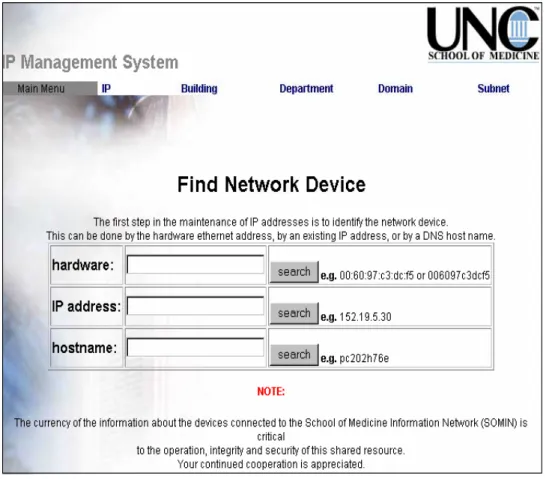
The following interface screen-shots represent an improved IP Management System
interface. The new interface is Web-based, which allows for easy access from any
browser as well as a familiar, straightforward working environment for support staff.
Figure 9: This screen shows the IP record after a successful search based on MAC address. Information about the device can be updated from this page.
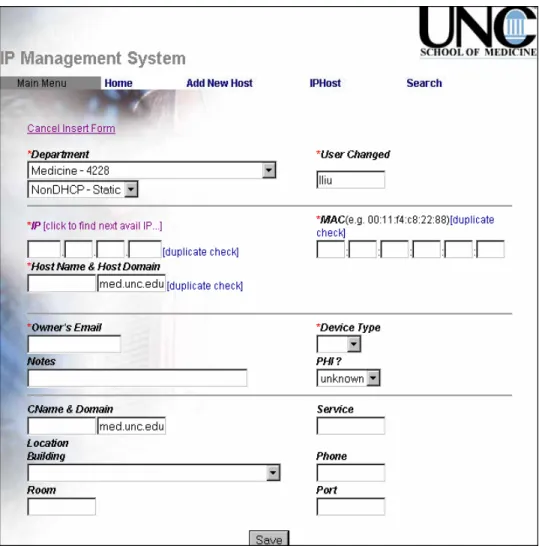
Figure 11: This screen allows IP record additions for non-DHCP type device and can check for IP and MAC address conflict as well.
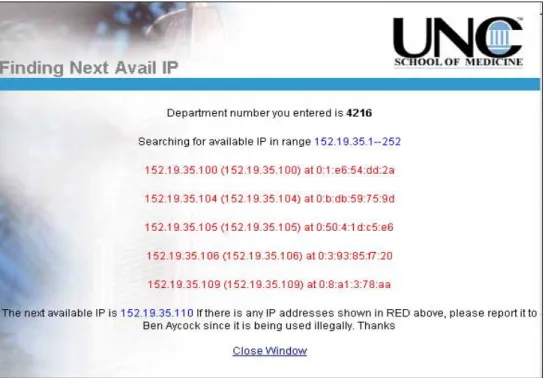
Figure 13: IP search result screen. This screen shows the next available IP address if found and flag any improperly used IP addresses (those that are being used on the network but aren’t registered with the system).
Figure 16: Lookup screen for buildings on campus.
Figure 18: Lookup screen for IP subnet ranges and associated departments.
Figure 20: Lookup screen for departments on campus.
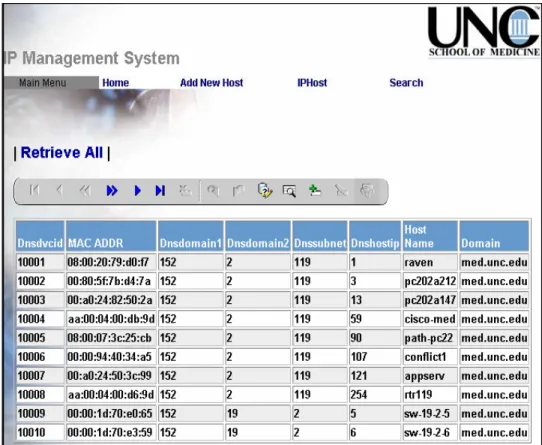
Figure 22: Lookup screen for UNC-CH hosts.
Part 4. Testing and Deployment
The system tests were performed according to the test cycles specified in the system test
plan. For each test case the output was compared to the expected results. All differences
were investigated thoroughly, if necessary, changes were made to the system and the
relative part or parts of it were regenerated and tested again. This process was repeated
until there were no discrepancies between actual system test output and expected output,
or until any remaining discrepancies were understood and approved by the users.
Additionally, usability testing was performed to make sure that the system meets the
usability criteria required by the users.
It turned out that the plan to let technical support personnel use both old and new systems
in parallel in the testing phase whenever a new IP request comes in was really effective
and successful. The number of problem identified and corrected accordingly during this
phase justified the extra work time, and it ensured a well-tested system, which is ready
for deployment as scheduled.
Deploying systems in an enterprise environment can be a time-consuming and
cumbersome task. Fortunately, Oracle provides tools to help in the deployment process
Oracle JDeveloper provides a comprehensive Java and Web service development and
deployment framework, which produces J2EE application optimized to run with the
Oracle Application Server and Oracle Database. The new IP Management System was
developed within the Oracle JDeveloper3.2.3 framework, and was deployed onto Oracle
8i database directly from the JDeveloper. The process to update the files on the Oracle
database server from JDeveloper is easy and quick as well. It could be done remotely in
a few seconds, even without any interruption to the normal database server operations.
The new system user interface was developed in JDeveloper3.2.3 on Window 2000, and
was deployed to the Oracle HTTP server on Unix (Sun Solaris). Oracle HTTP server is
part of the Oracle Database server package, and is optimized to run Java code against an
Oracle Database. A deployment profile was generated in JDeveloper after the user
Part 5. Conclusion and Summary
In the following sections, the issues that arose during the study and some of the lessons
learned from it will be discussed.
Potential Issues with the New System
It is fortunate that the users of the IP Management System all have technical knowledge.
They generally enjoy new computer-based tools, and, unlike some other non-technical
staff members, will not be threatened or afraid to learn a new system. The interviews
confirmed that the support staff was especially anxious to move to an improved system;
they are tired of struggling with the old text interface and dealing with workarounds.
However, reactions to a system change were not equally enthusiastic throughout the
organization. The Unix systems administrator, who is currently the most influential
stakeholder in the IP Management System, does not see a pressing need for a new
system. In his view, the current interface is perfectly usable, and the database has been
stable and should be adequate. He bases his opinion on two points: the current system
works, and it has been functioning reliably for many years.
This conflict of opinion between the client support personnel and the systems
administrator can best be described as a culture clash. The support staff – the “services”
user interface and are not interested in the inner workings of the system (i.e., the database
structure). The “systems” people, on the other hand, are very concerned with backend
details, and they value the power that a textual interface offers.
Though this type of culture clash could lead to complete project failure in other
situations, it turned out not a major problem for the School of Medicine. The Unix
systems administrator understands why a new system would be beneficial, and, according
to the interview with him, he will support development. However, as the developer, it is
important to certainly be aware of how the needs and opinions of the “systems” staff
differ from those of the client support staff. Awareness of this culture clash can help
make switchover to a new system smoother, as the developer can anticipate end user
reactions and be ready to address their concerns.
Lessons Learned
During this study, its scope was changed drastically from the beginning to the end. When
it was started, the School of Medicine just needed some database migration work and
interface streamlining. The initial information gathering indicated that there were indeed
problems with the database structure. And further research and interviews revealed that
the current data model was worse than expected, and necessitated a completely new
approach. Moreover, the only way to fix the interface was to do a total overhaul, because
the existing technology base would not support the development of a more advanced,
Web-accessible interface. During interviews, new user needs were identified, such as the
Therefore, this study moved from a relatively simple exercise in interface streamlining
and database migration to a much larger systems development plan. So it is very
important to anticipate that system scope can be much larger than the initial problem
definition might suggest. This is an important point to take into consideration when
approaching systems analysis and development, because it can considerably change the
Part 6. Bibliography
Alan Daughetee, Zain Kazim, Simplifying System Deployment, http://
http://www.dell.com/downloads/global/power/ps4q04-20040147-Daughetee.pdf.
Craig Larman, Applying UML and Patterns – An Introduction to Object-Oriented Analysis and Design, Prentice Hall, (1997).
David Flanagan, JavaScript – The Definition Guide, O’Reilly & Associates, Inc., (1998).
Duane Fields, Mark Kolb, Web Development with Java Server Pages – A Pratical Guide For Designing and Building Dynamic Web Services, Manning, (2000).
Julien Dubois, Master and Commander – Mastering J2EE Application Development Series, Oracle Technology Network,
http://www.oracle.com/technology/pub/articles/masterj2ee/j2ee_wk2.html.
Kevin Loney, George Koch, Oracle9i – The Complete Reference, Oracle Press, (2002).
Paul Albitz, Cricket Liu, DNS and BIND, O’Reilly & Associates, Inc., (1992).
Paul Dorsey, Peter Koletzke, Oracle JDeveloper 3 Handbook, Oracle Press, (2001).
Larry Constantine, Lucy Lockwood, Software for Use – A Practical Guide to the Models and Methods of Usage-Centered Design, Addison-Wesley, (1999).
Louis Rosenfeld, Peter Morville, Information Architecture for the World Wide Web, O’Reilly & Associates, Inc., (2002).
Martin Fowler, Kendall Scott, UML Distilled – A Brief Guide To The Standard Object Modeling Language, Addison-Wesley, (2000).
Seth White, Maydene Fisher, Rick Cattell, Graham Hamilton, Mark Hapner, JDBC API Tutorial and Reference – Universal Data Access For The Java 2 Platform, Addison-Wesley, (1999).
Raghu Ramakrishnan, Database Management Systems, WCB/McGraw-Hill, (1998).
Richard Monson-Haefel, Enterprise Java Beans, O’Reilly & Associates, Inc., (2000).