Microsoft ISA Server Deployment Guide
February 2010
Table of Contents
1 Introduction... 2 2 Prerequisites
... 3 3 Deployment scenarios
... 4 3.1 Variant 1: CYAN Secure Web is downstream proxy
... 4 3.2 Variant 2: CYAN Secure Web is upstream proxy
... 4 3.3 Variant 3: CYAN Secure Web is transparent
... 4 4 Setup
... 6 4.1 CYAN Secure ISA Web plugin
... 6 4.2 Variant 1: CYAN Secure Web is downstream proxy
... 7 4.3 Variant 2: CYAN Secure Web is upstream proxy
... 11 4.4 Variant 3: CYAN Secure Web is transparent
1 Introduction
CYAN Secure Web is an enterprise proxy server featuring content classifications in 26 different categories, protocol and application detection, caching functionality, seamless client
authentication and even more security features.
CYAN Secure Web perfectly integrates into your Microsoft ISA Server secured network, fully utilizing the security benefits of both Microsoft ISA Server and CYAN Secure Web.
To support profiles based on your Active Directory users, a plug-in for Microsoft ISA Server is necessary to forward user information from Microsoft ISA Server to CYAN Secure Web. This document describes the supported deployment scenarios and also contains a guide for installation of CYAN Secure Web ISA plug-in.
2 Prerequisites
– CYAN Secure Web– Stand-alone software installation of CYAN Secure Web version greater than 1.7.17. Please upgrade to the latest version if you are using an older version. Both Linux and Windows versions are supported to work with Microsoft ISA Server.
– CYAN Secure Web Appliance with CYAN Secure Web version greater than 1.7.17. Please use the CYAN Secure Web Appliance interface to upgrade to the latest version if you are using an older version.
– Microsoft ISA Server 2004 or higher – CYAN Secure Web ISA plug-in
– Information on how to obtain the plug-in can be found on our webpage at
http://www.cyan-networks.com/isa_plugin
– IsaConnectionCaching.exe
3 Deployment scenarios
CYAN Secure Web can be deployed into your existing Microsoft ISA Server network in various ways. Each of these scenarios has its benefits as well as some downsides.
3.1 Variant 1: CYAN Secure Web is downstream proxy
This scenario features a deployment as a downstream proxy, closer to the client than Microsoft ISA Server.
Authentication using NTLM can either be done on CYAN Secure Web proxy or Microsoft ISA Server, but not both. Basic authentication can be passed through the CYAN Secure Web proxy engine to an upstream proxy, but does not feature seamless authentication on the client. CYAN Secure Web features two mechanisms to forward information about the client to an upstream proxy. First, a custom HTTP header X-Forwarded-For can be enabled which contains the clients IP address. Then there is the X-Authenticated-User HTTP header which contains the user domain and user name. Both can be enabled in the CYAN Secure Web Administration Interface by enabling “Forward auth” in Server -> Cascade -> HTTP Cascade rules.
The CYAN Secure Web ISA plug-in must be installed on your Microsoft ISA Server to be able to pick up the user authentication from CYAN Secure Web correctly and set up the security context on Microsoft ISA Server.
3.2 Variant 2: CYAN Secure Web is upstream proxy
This scenario features a deployment as an upstream proxy located after Microsoft ISA Server. Authentication using NTLM is done on Microsoft ISA Server and authentication information passed to CYAN Secure Web through the use of CYAN Secure Web ISA plug-in, which packs the user information into two HTTP headers X-Authenticated-User and X-Forwarded-For. The CYAN Secure Web Proxy must be configured to pick up this information for user authentication by enabling “Trusted authentication” at Authentication -> Setup -> Methods in the CYAN Secure Web Administration Interface.
Please note that caching of HTTP objects must be disabled on Microsoft ISA Server and solely done on CYAN Secure Web, otherwise objects could be delivered to the client which are disallowed from CYAN Secure Web profiles.
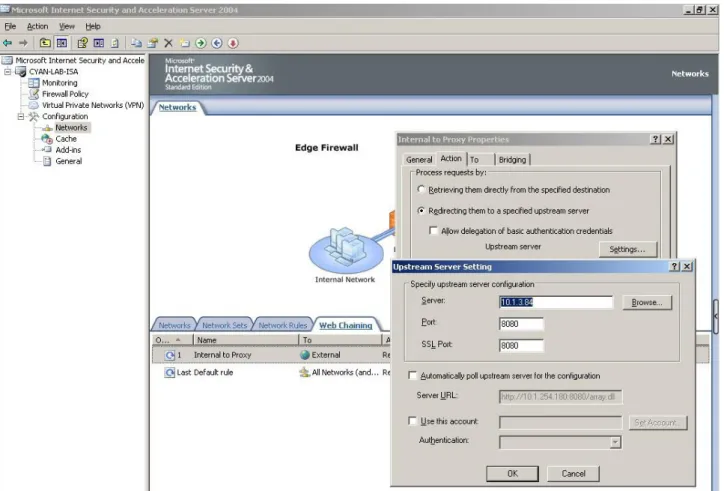
The CYAN Secure Web ISA plug-in must be installed on your Microsoft ISA Server to forward authentication information from your Microsoft ISA Server to CYAN Secure Web. Also, Web Chaining must be configured to forward HTTP and HTTPS requests to CYAN Secure Web. The file IsaConnectionCaching.exe must be executed on the ISA Server to configure the ISA Server's connection caching size.
3.3 Variant 3: CYAN Secure Web is transparent
This scenario features a deployment as a transparent proxy located either before or after Microsoft ISA Server.
User authentication is not supported in a transparent setup except IP based authentication schemes (IP Groups, Novell eDirectory). Please note that if CYAN Secure Web is located after
ISA server, the Secure Web Proxy will only see the ISA servers IP address and authentication based on IP addresses does not make much sense.
In this scenario, load balancing can only be done using WCCP in conjunction with a Cisco router or by using a third party load balancer.
4 Setup
4.1 CYAN Secure ISA Web plug-in
Place the two DLLs, CyanISA2SWEB.dll and CyanSWEB2ISA.dll, into your ISA server installation directory (for example C:\Program Files\Microsoft ISA Server).
Note: Visit our website http://www.cyan-networks.com/isa_plugin for information on how to obtain the ISA plug-in DLLs.
Then, open up a command prompt (Start -> Run -> cmd.exe), change to your ISA server
installation directory (cd C:\Program Files\Microsoft ISA Server\) and register the necessary DLL, depending on your deployment scenario, with the following commands:
C:\Program Files\Microsoft ISA Server\> regsvr32 CyanSWEB2ISA.dll C:\Program Files\Microsoft ISA Server\> regsvr32 CyanISA2SWEB.dll
Note: Only register the DLL for the deployment scenario you intend to use.
CyanSWEB2ISA.dll must be used if your Secure Web server is going to pass requests to your ISA server. This is variant 1 as described in “3.1 Variant 1: CYAN Secure Web is downstream proxy”.
CyanISA2SWEB.dll is necessary if your ISA server is going to cascade (Web Chaining) to your Secure Web server. This is variant 2 as described in “3.2 Variant 2: CYAN Secure Web is upstream proxy”.
Make sure that the ISA services are running, otherwise registering a DLL will fail.
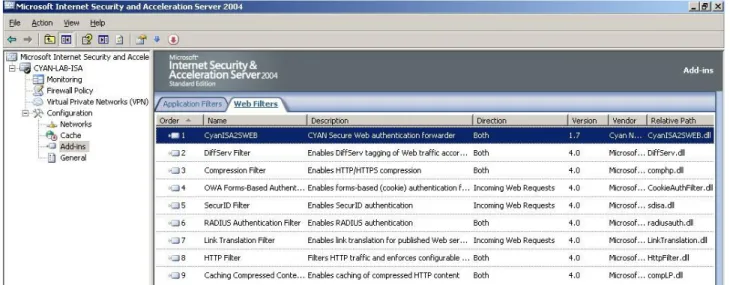
If registration succeeds, the plug-ins should be available on the Microsoft ISA server console now. You may need to restart the console to have the plug-ins show up for you.
After the CyanISA2SWEB.dll has been registered, you should be able to see the following:
After the CyanSWEB2ISA.dll has been registered, you should be able to see the following:
4.2 Variant 1: CYAN Secure Web is downstream proxy
CYAN Secure Web needs to be configured to pass HTTP requests to an upstream Microsoft ISA server and include authentication information (user, IP) into this request. To do this, open up the CYAN Secure Web administration interface and navigate to “Server” -> “Cascade” -> “HTTP Cascade”. Add a rule to direct the web traffic to your Microsoft ISA server as shown below:
The rule will make sure that all traffic originating from 0.0.0.0/0 (everything) to target URL * (everything) will be directed through an upstream proxy server 10.1.4.232 port 8080 (your Microsoft ISA server). Authentication information is forwarded to the upstream ISA server via means of the “X-Authenticated-User” header.
Illustration 2: Correctly enabled CyanSWEB2ISA plug-in
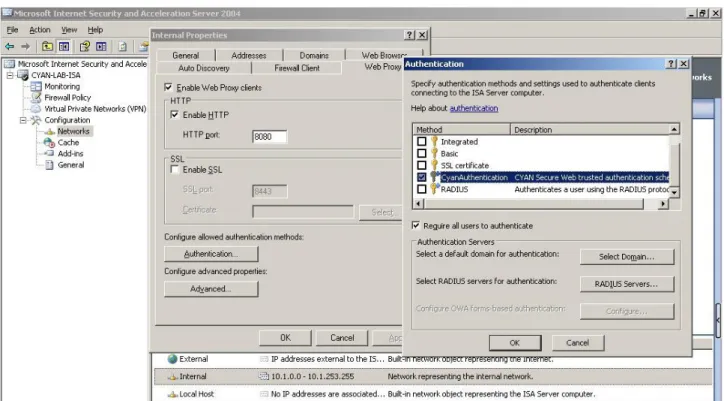
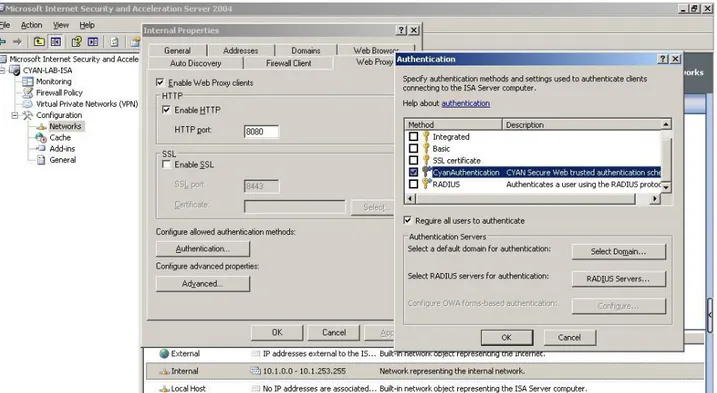
rules on this information. This needs the CyanAuthentication authentication scheme to be enabled on your client network.
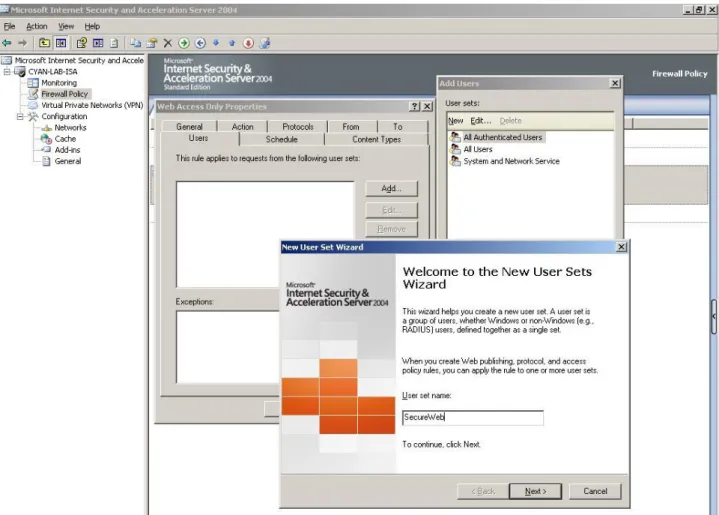
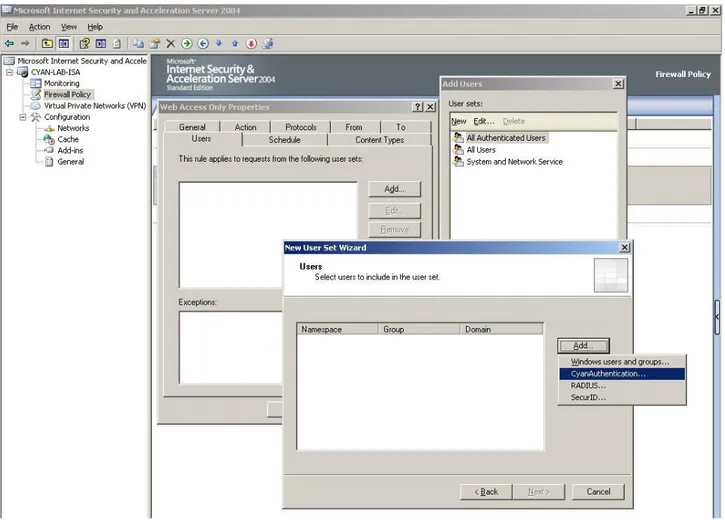
To base web-access firewall rules on the available user information, you will need to add the allowed users to these rules. Open up your web-access firewall rule, click on the “Users” tab and add a new User sets by clicking on “New” in the “Add Users” dialog.
This will create a group “SecureWeb” (the name is just an example and can be altered). Now you will need to add users to this group.
Please note that you need to choose the “CyanAuthentication” provider when adding new users, otherwise ISA server will not be able to connect the user information passed from CYAN Secure Web to the user list configured here.
The last step is to add your newly created user set to the web access firewall policy. Illustration 6: Adding an user to the user set
4.3 Variant 2: CYAN Secure Web is upstream proxy
Microsoft ISA server must be configured to pass web traffic to a CYAN Secure Web upstream proxy. To do this, you need to enable Web Chaining on the ISA server and prepare your CYAN Secure Web to pick up user authentication forwarded from the ISA server.
Please note that you need to have working authentication of your clients against Microsoft ISA server, otherwise no user information will be passed along by the CYAN Secure Web ISA plug-in. Setup of client authentication against ISA server is not part of this document.
While the ISA Server is running you have to execute the file IsaConnectionCaching.exe. This automatically configures the ISA Server's connection caching size. This must be done in order to establish a seamless authorization between ISA Server and CYAN Secure Web.
CYAN Secure Web needs to be configured to trust authentication information passed from ISA server and the CYAN Secure Web ISA plug-in. You will need to enable “Trusted Authentication” and fill in the IP(s) of your Microsoft ISA Server systems so CYAN Secure Web will trust
information from these sources.
Additionally, an authentication instance needs to be configured to get user- and group information from an authentication source. This source is preferably a Microsoft Active Directory connected with the CYAN Authentication Daemon. ISA server forwards the user information to Secure Web in the form of DOMAINNAME\Username. Therefore you must
configure your authentication instance to use the “Domain” and have the option “Use Domain prefix” enabled. Setup of this is covered in a separate document and not provided here.
4.4 Variant 3: CYAN Secure Web is transparent
Since CYAN Secure Web is placed transparently in the network before or after Microsoft ISA server, there is nothing to be set up in ISA server nor Secure Web to make them work together.