Network Security Analysis
Master’s Thesis in Network Engineering
Aamir Hassan and Fida MuhammadSchool of Information Science, Computer and Electrical
Engineering
Preface
First of all we would like to present our hearty gratitude to ALLAH ALMIGHTY, who always blesses us and makes our path easy during the journey of our lives. We are also very thankful to Professor Tony Larson, who patiently helped us to complete this work smoothly. Indeed, his efforts and talent makes it really easy to overcome the hurdles without any problem. Thank you for guiding us.
Also thanks to our parents and their prayers, who always take our work into their consideration and remembered us during their supplication.
Finally, we would to thank everyone for their nice support and feedback.
Aamir Hassan Fida Muhammad
Abstract
Security is the second step after that a successful network has been deployed. There are many types of attacks that could potentially harm the network and an administrator should carefully document and plan the weak areas, where the network could be compromised. Attackers use special tools and techniques to find out all the possible ways of defeating the network security.
This thesis addresses all the possible tools and techniques that attackers use to compromise the network. The purpose for exploring these tools will help an administrator to find the security holes before an attacker can. All of these tools in this thesis are only for the forensic purpose. Securing routers and switches in the best possible way is another goal. We in this part try to identify important ways of securing these devices, along with their limitations, and then determine the best possible way. The solution will be checked with network vulnerable tools to get the results. It is important to note that most of the attention in network security is given to the router, but far less attention is given to securing a switch. This thesis will also address some more ways of securing a switch, if there is no router in the network.
Contents
1 INTRODUCTION... 1
1.1 PROBLEM ADDRESSED IN THIS THESIS ... 1
1.2 GOAL OF THE THESIS ... 2
1.3 STRUCTURE OF THIS THESIS ... 2
2 RELATED WORK ... 4
2.1 NEXT GENERATION INTRUSION DETECTION SYSTEM ... 4
2.2 SECURITY IMPLICATION OF IPV6 ... 4
2.3 NETWORK SECURITY BASED ON SYSTEM DYNAMICS ... 4
2.4 APPLICATION OF GREY RELATION IN ANALYZING NETWORK SECURITY EVENTS ... 4
2.5 EVALUATION OF SECURITY RISKS ASSOCIATED WITH NETWORKED INFORMATION SYSTEMS F ... 4
2.6 A LAYERED APPROACH TO COMPUTER NETWORK SECURITY ... 5
3 CATEGORIES OF INTRUDERS AND ATTACKERS ... 6
3.1 TYPES OF ATTACKER ... 6
3.1.1 White hat hacker ... 6
3.1.2 Black hat hacker ... 6
3.1.3 Gray hat hacker ... 6
3.1.4 Phreaker ... 6
3.1.5 Script kiddy ... 7
3.1.6 Hactivist ... 7
3.1.7 Academic Hacker ... 7
3.2 CATEGORIES OF ATTACK ... 7
3.2.1 Passive attack ... 7
3.2.2 Active attacks ... 7
3.2.3 CLOSE-IN ... 7
3.2.4 Distributed attacks ... 7
3.3 SEVEN STEPS TO HACK A NETWORK ... 8
3.4 PASSIVE RECONNAISSANCE AND ACTIVE ACCESS ATTACKS... 8
3.4.1 Reconnaissance attack ... 8
3.4.2 Access Attacks... 8
4 SECURITY: ATTACK AND COUNTER ATTACK ...10
4.1 WIRELESS NETWORKS ...10
4.1.1 WEP (Wired Equivalent Privacy) ...10
Wi-Fi Protected Access (WPA and WPA2) ...12
4.2 MAN-IN-THE-MIDDLE ...13
4.2.2 Man-in-the-middle Counter Attack ...14
4.3 MAN-IN-THE-MIDDLE WITH SSLSTRIP ...14
4.3.1 Man-in-the-middle with SSL Strip Attack ...15
4.3.2 Man-in-the-middle with SSL Strip Counter Attack ...16
4.4 SESSION HIJACKING ...16
4.4.1 Session Hijacking Counter Attack ...17
4.5 COPYING IP TELEPHONY CONVERSATION ...17
4.5.1 IP telephony conversation – Attack ...17
4.5.2 IP telephony conversation – Counter Attack ...17
4.6 MAC ADDRESS SPOOFING ...17
4.6.1 MAC address spoofing – Attack...18
4.6.2 MAC address spoofing – Counter Attack...18
4.7 BY PASSING THE LOGIN PASSWORD ...18
4.7.1 Bypassing the login password – Attack ...19
4.7.2 By passing the login password – Counter Attack ...19
4.8 PORT REDIRECTION ...19
4.8.1 Port redirection – Attack ...19
4.8.2 Port redirection – Counter Attack ...20
4.9 DENIAL OF SERVICE (DOS) ...20
4.9.1 Denial of Service (DoS) – Attack ...20
4.9.2 Denial of Service (DoS) – Counter Attack ...20
4.10 LAYER 1SECURITY ISSUES ...21
4.11 LAYER 2SECURITY ISSUES ...21
4.11.1 CAM Overflow ...21
4.11.2 Root Guard ...22
4.11.3 BPDU Guard ...22
4.11.4 Trunk Auto-negotiation ...22
4.11.5 VLAN Hopping ...22
4.11.6 Wireless Bridge ...23
4.11.7 DHCP Spoofing ...23
4.12 LAYER 3SECURITY ISSUES ...24
4.12.1 TCP SYN Flooding ...24
4.12.2 Ping of Death Attack ...24
4.12.3 Packet Sniffing ...25
4.12.4 RIP Attack ...25
4.12.5 IP Spoofing ...25
4.12.6 Brute Force Attack ...25
5 CASE STUDY 1: IMPLEMENTING LAYER 2 SECURITY ...26
5.1 PLANNING THE NETWORK ...27
5.2 CISCOIBNS(IDENTITY BASED NETWORK SERVICE)/NAC(NETWORK ADMISSION CONTROL)/ 802.1X ...27
5.4 RESULTS OF IMPLEMENTING 802.1X ...30
5.5 SECURING DATA THROUGH VPN ...31
6 CASE STUDY 2: IMPLEMENTING LAYER 3 SECURITY ...32
6.1 CISCO STRATEGY FOR NETWORK DEFENCE ...32
6.2 IMPLEMENTING LAYER 3SECURITY ...33
6.3 BUILDING SITE TO SITE VIRTUAL PRIVATE NETWORK (VPN) ...33
6.4 IMPLEMENTING CLASSICAL FIREWALLS /CBACS ...35
6.4.1 Results...35
6.5 IMPLEMENTING NETWORK BASED ACCESS RECOGNITION (NBAR) ...36
6.5.1 Results...36
6.6 IMPLEMENTING CISCO EASY VPNSERVER ...38
6.7 CONCLUSION...39
7 CONCLUSION AND FUTURE WORK ...40
8 ABBREVIATIONS ...42
9 REFERENCES ...44
List of Figures
Figure 2 CAM Overflow ...21
Figure 3 : Wireless Bridge ...23
Figure 4: Root Guard / BPDU Guard / DHCP Snooping ...24
Figure 5: Case Study related to Layer 2 securities ...26
Figure 6: 802.1x authentication process ...29
Figure 1: Cisco Defense in Depth (DID) ...32
Figure 7: Layer 3 security scenario ...33
Figure 8: Sniffing data across the network using wireshark without security ...34
Figure 9 Sniffing data across the network using wireshark with security. ...35
Figure 10 Results from CBAC configuration ...36
Figure 11: Tunnel p2p traffic through port 80 before NBAR ...37
Figure 12: Tunnel p2p traffic through port 80 after NBAR. ...37
1
Introduction
Establishing and testing the security is the next step after building a network. Securing a network implies protecting it from unwanted attacks that could potentially bring down the whole network. There are a number of ways that an intruder could employ from inside of the network or from outside the network. Applying the skills and knowledge that an intruder has can enable him to infect the computers with data or programs, causing an immediate network outage or can enable him to steal sensitive data like bank transactions etc.
How an intruder is successful in attacking a network? The answer lies in either no network security, or poor performance of the network security methods deployed. An intruder and a network administrator positions and reasons quite the opposite to each other. The task of an intruder is to find his way into the network and carry out some malicious activity, whereas the task of the network administrator is to protect the network from such incidents. An administrator sometimes lags behind in this area because an administrator has only learnt about the ways to stopping such attacks, but never learnt about how these attacks are performed. A good network administrator must think from the hacker‟s perspective, i.e. break into his own network and, at the same time, find ways mitigating them.
The terms „hacker‟ and „attacker‟ are used interchangeably. The more sophisticated term used for these attackers are „hackers‟ and there are categories of hackers who perform their attack for a specific purpose. United States FBI/CSI now refers these attackers as criminal because they are involved in, small to big, attacks and can cause trust exploitation, information stealing or helping other source by some illegal mean which other criminals do without computer. According to CSI surveys, the following facts were obtained.
According to CSI “200 Computer Crime and Security Survey”, in 2000, a total loss of $266 billion was reported. These losses also included the stealing of proprietary information and financial fraud [23].
In 2003, a popular network attack DoS was introduced, which was then enhanced to a DDoS attack. Due to the DoS and DDoS attack in 2003, a total of $201,797,340 of financial loss was reported [28].
In 2007, virus attacks were radically increasing and constituted the second most dangerous attack after financial fraud.
The most successful and powerful attack is performed from inside the network. In many situations, a network administrator trusts all his internal users and never suspects any attack from their side. However, thinking from the other side, no one can be totally trusted.
1.1 Problem addressed in this thesis
It is always an investment to develop and maintaining a policy for securing the network. Depending on how the network has been built, an administrator has to monitor and check what areas could be infected. It could take some time to find loopholes in the network that may lead to it being compromised. However once found, a policy can be made and the network security implemented. On the contrary to secure a network, it is easy to just build a network and leave it unsecure. At the beginning, it is thus easy but when the network already has been compromised by internal or external threats, then the network administrator instead gets a very high work
overhead as compared to if choosing to deploying security up front. Before an administrator takes something into consideration, it is important for him to know the threat and their severity levels. This thesis will focus on giving an analysis of security threats and then suggests their mitigation.
1.2 Goal of the thesis
The main goal of network security is confidentiality, integrity and availability. To properly suggest and implement solutions required for achieving a good running network, the work in this thesis has been divided into two parts.
Exploring the tools and techniques that exploit the network security.
Debating on different ways of securing Layer2 and Layer3 devices, and finding the best possible solution by using the network vulnerable tools to explore the extent of network security.
1.3 Structure of this thesis
The work in this thesis is presented as follows. In chapter 2, related work in the field of network security will be discussed. In chapter 3, common categories of attacker, and the way these attacks are performed, will be discussed. Chapter 4 is dedicated to the methods and tools that are vulnerable and can be used to attack a network. In chapters 5 and 6, separate case studies on Layer 2 and Layer 3 will be conducted. Finally, the thesis will reach an end with its comprehensive conclusion and corresponding proposals of future work.
2
Related Work
2.1 Next Generation Intrusion Detection System
The McAfee network protection solution [59] promotes the next generation intrusion detection system (IDS). At the time when it was developed, there was a vital need to provide some real time network protection that could detect and report unwanted traffic immediately without the major concern of an administrator. Though they did address the major sections of the problem but with the time they seem insufficient keeping in mind the pace with which networks are changing. With IDS, the approach is to detect any security flaw rather than preventing it. Hence, the network always faced the threat of a possible attack. They wanted to improve an IDS approach towards the more advanced one, which has the ability to not only detect threats, but also to stop them.
2.2 Security implication of IPv6
With the development of IPv6 many weaknesses and problems that IPv4 had are addressed [4]. IPv4 explicitly uses ESP or AH protocol to encrypt the data but now, with the enormously large address field of IPv6, the security mechanism is built into the header of IPv6. In the explanation of IPv6 security features, the author states that an intruder will face difficulty that an intruder will face difficulty during the backdoor, or sniffing, attack with IPV6
2.3 Network security based on system dynamics
Four Chinese students performed a simulation based on the behaviour of worm attacks based on system dynamics [3]. The worms produced an arbitrary code inside the memory and, with the passage of time, it started to corrupt the local file system. In this project, these students simulated a worm attack on the basis of its system dynamics, and they also described the worm features. The approach of this project was to extend the network security from malicious software.
2.4 Application of grey relation in analyzing network security events
Network attacks can also be engineered on the basis of events. In this project, the author [29] sorted and labelled attacks on the basis of severity level and then generated reports on the basis of different severity levels. The author‟s approach was to design a system that could guide security management, prevent the threats, block and reduce risks. The author performed a series of case studies predominantly to analyze network security.
2.5 Evaluation of security risks associated with networked information systems f
The authors in this thesis performed a risk analysis associated with growing internet usage inside a company [36]. A literature review and a case study were conducted on B2B application implemented in a large Japanese electronics firm based in Australia. The authors gathered security threat information that seamlessly hits the host or network infrastructure due to the network administrator‟s update latest software patches. In the final part, the project concluded with the security evaluation framework that will help to get acceptable results in real applications without too much concern from a security expert.
2.6 A layered approach to computer network security
The project work was solely dedicated to addressing the problem found at different layer of OSI reference model [48]. The authors detailed the security aspects and threat related to link layer, and touched the surface of network and transport layer. The authors searched the insider details that rises from the internet usage and also addressed the problems found in internet protocol stack.
3
Categories of Intruders and Attackers
This section will briefly discuss different types of network attacks and intruders. Before getting into the details of attack types, it is important to know about the person behind the scene.
3.1 Types of Attacker
These are people who want to get into the system and compromise its security. They range from those who have little experience to those who are highly skilled. Here, experience refers to their technical abilities in the field of computers and network systems. Little or no knowledge refers to those who can, by the use of some tools; break into the system without requiring a high level of technical knowledge. This section will classify them in groups, based on their knowledge and their purpose, reason or motivation for making an attack to the network.
3.1.1
White hat hacker
White hat hackers generally termed as “ethical hackers”. They are the better half of this dark world of hacking [2]. They represent those who have the knowledge and technical ability to easily break into the system, but they never exercise this. On the contrary, they use this knowledge for the good and fill in jobs like network security engineers or administrators. White hat hackers are amongst the most highly paid individuals in the US [14]. They reflect the fact that the use of the internet is constantly increasing and so are the security threats. The EC-Council now offers a CEH (Certified Ethical Hackers) [30] course, where they train people on how to mitigate attacks like hacking.
3.1.2
Black hat hacker
Black hat hackers, as the name implies, is the evil side of hacking, and their main objective is to take over the network by hook or crook, and destroy or sabotage the network resources [39] . Black hat hackers hold conferences on how to improve their hacking capabilities. These people are very experienced and know almost all the ways of how to break into the network. There is no particular purpose of the black hat hackers as to why they want to hack, but their intentions may include revenge, or stealing money, or maybe just to check how far they have improved in this field. Black hat hackers possesses the same knowledge as that of white hat hackers with the only difference that white hat hackers work towards securing the network unlike their black hat counterparts.
3.1.3
Gray hat hacker
Gray hat hackers can be thought of as white hat hackers who occasionally stray away from their goal of protecting the network and, instead, act unethically. Grey hat hackers are not permanently employed at companies; rather, they are called in for security audits. Given opportunities, the gray hat hackers might, for their own personal gain, hack into the system and steal desired data.
3.1.4
Phreaker
Phreakers [50] can be thought of as hackers in the world of telecommunication rather than IP networks. These are people who can trick the telecom system to make distance calls for free. The numbers of Phreakers is on a decline, but still some strategy is needed to cater for this problem.
3.1.5
Script kiddy
Script kiddies [60] are not true hackers, and have almost no knowledge of hacking, but could download killer applications and use them with little research to attack the network. E.g. Nessus [61] is a free security auditing tool. These script kiddies will download this tool to perform an audit to, for example find out that someone is running IIS [40] web server on port 80, this because IIS is prone to security weaknesses. By using such tools, they could find out the security holes to attack the IIS network.
3.1.6
Hactivist
Hactivists [7] are those who are driven by political motivation to hack into any network. Often, it is terrorists or foreign agencies who hack into other countries‟ sites to steal sensitive information only to gain their political motives.
3.1.7
Academic Hacker
Academic hackers [15] hack for their academic careers. They are kids who want to break into the university firewalls to change their grades or steal a paper to get good scores in exams.
3.2 Categories of Attack
This section will discuss how a hacker can perform an attack on a network [52].
3.2.1
Passive attack
Passive attacks also know as reconnaissance attack is the first step the hacker takes in order to perform hacking. During this phase, the hacker tries to gather information with the aid of packet sniffing, scanning active ports or performing ping scans to see what IP addresses are active around the networks. This is the initial phase of hacking and usually it is very difficult to detect any such activity.
3.2.2
Active attacks
After a passive attack, an intruder has enough information about active ports, IP addresses around the network and also have queried enough to launch an active (access) attack. In this phase, the attacker usually performs “Man in the Middle” attack. Man in the Middle attack is one of the most dangerous attacks and resides in the midway communication between the gateway and the client. It is transparent in nature, hence eliminating the possibility of it being detected while it sniffs sensitive data. Trust exploitation and password attacks also fall in this category.
3.2.3
CLOSE-IN
These are people who are connected to the inside of the network. Most of the time, the network administrator is much concerned about securing his network from the outside while neglecting any possibility of attack from inside his own network. A “close-in” attack means that intruders are close to the network where they have direct connected links to the network.
3.2.4
Distributed attacks
These are people connected and thus with access to the inside of the network. Most of the time, the network administrator is much concerned about securing his network from the outside while
neglecting any possibility of attack from inside his own network. A “close-in” attack means that intruders are close to the network where they have direct connected links to the network.
3.3 Seven Steps to hack a network
If we think like a hacker, there are seven steps to hack into a system. The order does not matter in this process. The following is a brief description of how the whole process is carried out.
Perform reconnaissance
Identify active applications and type and version of operating system Gain system to the network
Log in with user credentials, escalate privileges Create and gather other usernames and passwords Create backdoor
Use system
3.4 Passive reconnaissance and active access attacks
This section will discuss, in details about two well known methods reconnaissance and access attacks. These two attacks fall one after the other.
3.4.1
Reconnaissance attack
Passive (reconnaissance) attack [41] is mostly the first step. In this step an attacker starts to gather information about the network. First, an attacker performs ping sweep and then a port scan. It will give the intruder some information about the active ports and hosts that are alive in the network. Other ways to gather such significant information can be from so called “dumpster diving”, where the hacker could meticulously study the so-called “garbage”, and arrive with some very useful information which is of little or no importance to people like us. Furthermore, the intruder can go all the way and start tapping the wire where the active conversations are going on in the LAN environment; the same could be done for wireless signal sniffing. All such attacks are broadly termed as “reconnaissance”.
3.4.2
Access Attacks
Once the intruder has gathered the preliminary information he/she needs, he/she then heads towards the access attack. The most common among these is the DoS and DDoS attack. During these, the attacker tries to overwhelm the router, or the switch‟s memory, by sending countless fake requests, hence exhausting the CAM (Content Addressable Memory) used for routing/forwaring tables. As a result of this, the router/switch becomes unreachable or exhausted and starts sending out replies as a broadcast which the hacker intercepts and pulls out the information he/she needs. We also have a plethora of ICMP attacks. Most of the time they are mistaken for valid ICMP requests but they end up being spoofed attacks. The most common ICMP messages include Destination Unreachable, Request Timed Out, Packet too big, Echo Requests, Echo Reply, ToS and Host Unknown. TCP SYN flood is the most dangerous of these attacks. In this attack, the intruder will try to establish as many half TCP sessions as possible. Half session implies that the attacking system would expect a reply from the router/switch for the 3-way handshake to be completed. Thus the router is so plagued by such unfinished work that it
4
Security: Attack and Counter Attack
This section explicitly deals with the different types of attacks and how to counter strike them. For sound network administration, it is good to study how an attacker thinks in order to be able to find a solution for the problem. This chapter will outline the important tools and the way that they are used, for example to escalate the privileges. Case studies discussed in this thesis also focus on wireless networks.
4.1 Wireless Networks
Wireless networks can be protected in many ways. Some important standards related to such methods are discussed below.
4.1.1
WEP (Wired Equivalent Privacy)
In 1997, WEP [17] (Wired Equivalent Privacy) was introduced as a first technique to secure wireless networks from an un-authorized access to the network. WEP uses two ways to authenticate clients.
Open key authentication: the client does not need to provide its credential to the access point. Anyone can authenticate without a key, and then associate with the access point. However to encrypt and forward data across a wireless network a client needs the right WEP key.
Shared key authentication: In this case, is required for authentication and hence requires four ways challenge to complete.
Client sends an authentication request.
A clear-text challenge is sent by an access point to the client.
Client encrypts the key and challenge together and sends it to the access point.
The data is encrypted by the access point and compares it with the clear-text it sent, and posts a positive or negative response to the client, based on comparison result.
Comparing open key and shared key authentication, Open key authentication is considered better then shared key authentication (Note: Both are weak) because anyone can catch the stream of communication in shared key authentication and can then decrypt the key.
Attacking WEP (Wired Equivalent Privacy)
aircrack [24] is a powerful tool that can be used to launch attacks against WEP and WPA [31] keys (discussed next). It can also be used under the Windows operating system but, due to limited support for wireless adapter, it is widely used in Linux.
To explain this demonstration, the Linux distribution called Ubuntu 9.04 [18] was installed as a standalone system, along with the aircrack utility and the attack was launched against the WEP open standard. We made sure that aircrack also was installed correctly and then confirmed that the wireless adapter was shown by issuing the following command.
Ifconfig wlan0
If the operating system reports the configuration of wlan0, then the next step is to check whether the aircrack utility supports the wireless adapter or not. Issue the following command.
airmon-ng
If the utility reports the attached wlan0, its chipset type along with the driver information, then the next step is to scan for the available networks around; this tool will also report the hidden networks. Issue the following command at command prompt.
airodump-ng wlan0
Wait for at least 30 seconds so that the utility confirms all the wireless networks and their associated channels. After 30 seconds, hit ctrl+z to break the current session and issue the following command to start scanning the target.
airodump –w <filename> --bssid <BSSID> -c <channel> wlan0
-w option specifies where to store possible combinations of keys scanned; BSSID and channel information is taken from the command issued above. Wait until #Data portion reaches beyond 20,000, and then press ctrl+z to break the current session. Now issue the following command and wait for at least one minute so that the key is decrypted.
aircrack-ng <filename>-01.cap
So the right key is decrypted and shown on the screen after issuing the command above. Wired Equivalent Privacy (WEP) Counter Attack
WEP encryption is very weak, as demonstrated above, and is very easy to break, even without brute force attack, but still it is very popular among SOHO users. The reason for using WEP in the SOHO environment is that it is faster than WPA, because of encryption and packet overhead. Another reason is that, with older clients, the driver card of the wireless adapter can not be updated to support WPA / WPA2 encryption.
To stop all attacks, the quick mitigation is to avoid the use of WEP. However if there is no option other than WEP, then stop the DHCP server on your access point so that even if the key is cracked, no one can get an IP address. Assign manual IP address on every client and change the subnet from commonly used 192.168.1.x/24 subnet to something different, like 23.191.81.x/27 or 131.229.56.x/29 subnet. Many intruders consider that clients will use a private IP addressing scheme, so an intruder could scan the whole private address space (10,172,192) networks to get all the clients around. So if the subnet is other than private IP addressing scheme then it can stop them from scanning the network for the available clients. However, this gives quite a weak protection for business solutions thus WEP is not recommended.
Wi-Fi Protected Access (WPA and WPA2)
WPA and WPA2 Wi-Fi protection is same. In order to address the weakness found in WEP, WPA came as a replacement for WEP. IEEE 802.11i [19] was an amendment to 802.11 standards, which stated the mechanism for protecting wireless networks. WPA uses two flavours of authenticating clients.
WPA Enterprise (RADIUS Server [35] is required)
WPA Personal (TKIP or AES)
WPA Enterprise is a solution for medium to large business by using 80.21 x [25] technologies to authenticate users based on certificates. In this way, a client with a proper certificate installed in their system can access the network.
WPA Personal is aimed for SOHO (Small Offices Home Offices) users, and uses the same method of pre-shared key authentication as WEP. It gives stronger authentication than WEP, and utilizes TKIP (Temporal Key Integration Protocol) or AES (Advance Encryption Standard) based system for encryption. WPA is based on the same technique used in WEP four way handshakes. But WEP uses clear key data passing, whereas WPA encrypts these packets. WPA TKIP and AES encrypts the packet with client communication, but the problem with WPA TKIP is that it uses static packet challenges and, using another tool called cowputty [10], the passwords could be easily cracked by using brute force attack. WPA AES uses different packets to send the challenge, so does that mean WPA AES is more secure? The answer is no. WPA AES uses a little bit more overhead to mark more encryption so, in this way, cowputty could not be used to achieve this task. Use aircrack instead.
Attacking WPA/WPA2 (Wi-Fi Protected Access)
The process of cracking WPA TKIP/AES is similar to that demonstrated in WEP but, as WPA uses four way handshake challenges to verify the client, so here aircrack utility uses forge packets to send fake identity to the access point so that it verifies itself. Without using this fake identity hand shake, the data could not be received for brute force attack. Start the same steps as explained in WEP. During the collection of data from access point, use another terminal and type the following command to complete fake four way handshake.
aireplay -0 1 –a <your-wlan-mac> -c <BSSID> wlan0
This command will de-authenticate the client and complete the four way hand shake. Go back to the first terminal and check the upper right corner, where WPA handshake <your mac> option appears. Now break the terminal by using ctrl+z and launch the brute force attack. There are dictionary files available with possible passwords to sniff the password. Remember that the size of those dictionaries is more than 30 GB and the chances are higher that it may include the common combinations of password. The dictionaries can be downloaded from [5].
For this demonstration, the password to protect the access point is <-pMxlionz c0nu3cti05ns->. Now type the following command to search the password.
aircrack-ng –w <dictionary file> -b <BSSID> <file-name>-01.cap. ¨
Wait for a minute and surprisingly the complex password was cracked. Wi-Fi Protected Appliance (WPA / WPA2) Counter Attack
WPA/WPA2 is a better method than WEP. As demonstrated above, WPA TKIP/AES is still vulnerable to attacks and, with a brute force attack, the password could easily be retrieved. For SOHO users, the WPA option does not include the WPA Enterprise option due to its cost factors. WPA enabled appliances mandate 8 – 63 characters combination for password protection. The mitigation is that if possible then use all the 63 combinations, or at least 25 characters or above, and use a password which is hard to guess and includes not only letters but also special characters, numeric etc. The brute force dictionaries are expanding day-by-day and, if the password is not in the dictionary, it might be available the day, another so often change your password and never stick to one for long time.
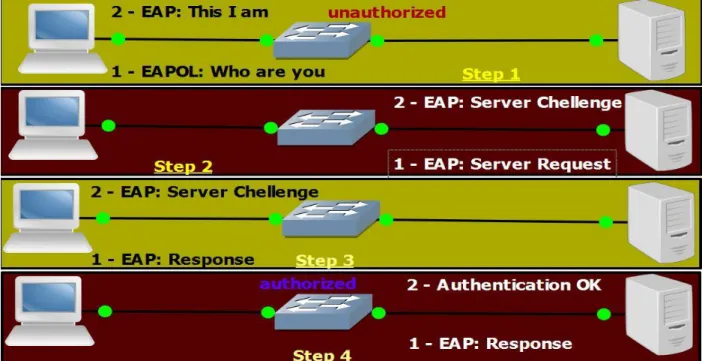
Enterprise users should migrate to the RADIUS option and implement 802.1x, commonly known as “EAPOL” (Enhanced Authentication Protocol over LAN – a method to use EAP over local area network).
4.2 Man-in-the-middle
A man-in-the-middle attack, as the name suggests, is an intruder whose role is to intercept the data flowing between the client and the gateway transparently. In this way, an intruder camouflages a client by pretending that he/she is the default gateway and representing default gateway that he/she is the client. A man-in-the-middle attack is a very powerful attack and it can give an intruder a full choice of controlling the PC, and ongoing communication can benefit an intruder to steal the usernames/passwords or even credit cards information.
4.2.1
Man-in-the-middle attack
In order to launch a man-in-the-middle attack, a combination of tools can be used to benefit from this attack. Note that these tools can only work on wired networks: it does not work for wireless networks. However an intruder can still make it happen even on wireless networks, with the help of a tool called VMWare [32]. An intruder can install virtual operating system in VMWare, and can then bridge it with a physical wireless network on real operating system to sniff everything from the wireless network. The demonstration below for the man-in-the-middle attack is for both wired and wireless networks. To perform it on wireless networks, use VMWare.
First of all, perform an ARP request to check out who is around by using the following command on Linux or Windows using command prompt or terminal window.
arp –a
A list of clients attached to the current subnet will be listed. Pick any client in the list and use nmap [33]. nmap is a tool used in Linux and Windows to scan the active ports on the target. In this case, a client picked from ARP request will be scanned for active services. While namp is running in background, use Cain & Abel [20] in Windows or ettercap [21] in Linux to perform a man-in-the-middle attack.
Open the tool; scan the whole subnet for available victims. Choose the default gateway and any victim to start poisoning. After poisoning is successful, all the victim data will be passed through the intruder‟s PC.
Now it is time to sniff the data. There are a lot of tools available for sniffing. The most popular used one is Wireshark [26]. The problem is that this tool could only be used to sniff wired network clients, so for wireless networks, use the same VMWare option with bridge connection.
4.2.2
Man-in-the-middle Counter Attack
It is not possible to completely out rule man-in-the-middle attacks. On LAN, or wireless networks, it can even be a client who launches such an attack. The best way is to use encryption. Using encryption for our data has, off course, its downside in the form of performance degradation but, on the plus side, the attacker is unable to comprehend what he/she has hacked. For SOHO, the fact that the user is using wireless access point without 802.1x technology does not guarantee protection. In former times, access points were sold separately for SOHO and enterprise users, but now they are sold with 802.1x enabled.
Enabling 802.1x on wireless and wired network is different. For wireless networks, there is built in 802.1x software installed with firmware so it can be enabled easily. With wired networks using switches, it requires a specialized server, known as NAC (Network Admission Control) server [9]. Network Admission Control will be discussed in detail with its configuration in the next chapter.
For an enterprise network with a LAN passing residential gateway through the router, use EASY VPN [27] server. EASY VPN server offers authentication, integrity, confidentiality and anti-replay mechanism for the packets. All the packets are hashed using complex mathematical algorithms using md5 or SHA. EASY VPN server will be discussed and configured in chapter 6.
4.3 Man-in-the-middle with SSL Strip
Just visit a secure website like www.paypal.com and notice the “s” along the http in the browser address bar. The “s” after http indicates the site‟s security and trustworthiness. It stands for secure http or http setup via secure socket layer (SSL). SSL uses an asymmetric cryptographic technique to pass the confidential data securely between a server and client using a public private keys combination. In this way, a server keeps one private key and every client connecting to that server is given a different public key. When a client enters their confidential data, like username and password, the public key will encrypt his data using a 1024 or 512 bit encryption mechanism, and this data can only be decrypted by the private key, which the server owns. No one can decrypt this data or reverse engineer the public key to get the private key.
When„s‟ is appended with http, the data is encrypted by asymmetric key encryption. Man-in-the-middle attack can be launched from here onwards. Any intruder performing a man-in-the-Man-in-the-middle attack can strip off that „s‟ before the server is reached. In this way, all of the data sent by client will be forwarded to the intruder using http and the intruder will forward the data to the server using https. Thus, both server and clients are escalated and the client‟s credentials will be
4.3.1
Man-in-the-middle with SSL Strip Attack
The illustration in this section is performed on Linux. The procedure is different than that followed in section [4.2]. Linux commands will be used to perform arp poisoning. First of all, use nmap to scan the active hosts around the network.
nmap –sC -0 192.168.1.0/24
This command will filter whole subnet for active hosts. Now check the status of IP tables. cat /proc/sys/net/ipv4/ip_forward
The output from this command will return 0. IP forwarding simply means to follow traffic from one interface to another interface. In this case, the Ethernet or wireless interface will act as both receiving and acting interface. If the value is zero, no forwarding will take place; therefore, change it to value 1 by issuing the following command.
echo “1” /proc/sys/net/ipv4/ip_forward
Issue the first command again to confirm that the value is 1.
Now, a little bit of game with IP tables. IP tables are like access lists in Linux world. Going back to CCNA world, certain traffic is denied, allowed or redirected, using access lists. In this case, IP tables are used to redirect the web traffic from the client on the standard port the local host i.e. the intruder‟s computer. Issue the following command to redirect web traffic to the intruder‟s computer.
iptables –t nat –A PREROUTING –p tcp --destination-port 80 –j REDIRECT --to-port 8080 Now the machine is ready for IP FORWARDING and PORT REDIRECTION. After the above procedures have been done correctly, launch a man-in-the-middle attack.
arpspoof –i eth0 –t <client-ip> <ip-address-of-gateway> For Wired networks or arpspoof –i wlan0 <client-ip> <ip-address-of-gateway> For Wireless networks
The tool SSLSTRIP is programmed in python. Just install this script and run it in another terminal while the arp spoofing is on its way.
./sslstrip.py –l 8080 Listen to traffic that was forwarded to local host.
Just go to www.paypal.com on the victim‟s PC and check that the browser window is showing http not https. To confirm it, just check a normal PC without man-in-the-middle attack, it will be discovered that the site has greeted with https. The reason why the victim‟s computer is not showing https, because an intruder is performing a man-in-the-middle attack and acting as default gateway for the victim, thus it is striping off the client‟s https request, just leaving normal http request, which is clear text. However, the server requires https, so the intruder is doing that job on behalf of a client and following the client‟s request through its computer to the server.
4.3.2
Man-in-the-middle with SSL Strip Counter Attack
As discussed in man-in-the-middle attack, use encryption. The encrypted packets can never be stripped by the intruder. Use VPN [16] or Easy VPN for layer 3 defence. It is recommended not to use wireless internet outside a popular WIFI spot.
4.4 Session Hijacking
When a client connects to the internet and browses a website or checks email, the client application service (web browser or email) assigns a temporary number to the client PC which is stored at the server. This session is associated with the client application service as long as the page is active; after the page is closed the number is washed out. Similarly, an email service offers the same job when a client moves back and forth inside the email box. Some services offer to store this session information to the client PC for future retrieval; this is mostly used in email system where a client does not wish to enter the email ID and password again and again. The permanent storage of sessions at a client PC is known as “cookies”.
It is very easy to use a Linux or Windows based system and steal those cookies on a WAN or LAN connection. Thus, by the time a client is checking their e-mail, an intruder can benefit from session hijacking and can move around his email box.
To illustrate session hijacking, a windows box is used in this demonstration. First, download a tool called Ferret and then Hamster [37]. There tools are command line and have no graphical user interface, so make sure that each command is typed correctly.
Open the command prompt, get inside the folder and type the following command: C:\sidejacking>ferret.exe –W
The command will list the current adapters and their numbers. Pick the correct adapter which is going to be used in session hijacking and note down its number at the beginning of the line and input the following command:
C:\sidejacking>ferret.exe –i <number>
Now the adapter is in listening mode and will search for all the active sessions going around the local area network. Open a new command prompt and run hamster.
C:\sidejacking>hamster.exe
While listening, open Mozilla firefox > Tools > options > Network > Settings. Select manual configuration and enter 127.0.0.1 in HTTP proxy and port 3128. Click OK. Type http://hamster in the address bar and, at this stage, all the clients on local area network will be shown in the list on the right. Click on any IP address and check the panel on the left of the browser windows, which will show all the sessions of the targeted client. Click on any link, and the client‟s session will be opened in the intruder‟s window.
4.4.1
Session Hijacking Counter Attack
Most of the services, like Yahoo!, Hotmail and Gmail, offer flexibility to users to save a session to a local computer for future retrieval without entering credentials again and again. This method is called “cookie”. Never store cookies, they are dangerous and can let an intruder to copy the cookies to his computer even if you are not using the particular session at the time of the hijacking It is always recommended to use encryption and, if you do, encrypt the whole session so that no one can sniff and understand the communication.
4.5 Copying IP telephony conversation
IP telephony mostly falls in line to the computer. That means that a cable connecting to the switch will first be plugged into IP telephone and then from phone to computer. The benefit of such deployment is that it reduces the number of cable connections for each port, and also saves one extra port for the switch. The downside of this deployment is that, if the network administrator forgets to configure them properly, the IP phone conversation could be easily copied to computer, and played in WAV format, because the IP phone falls in line to the computer.
4.5.1
IP telephony conversation – Attack
VOMIT [34] is used to launch an attack against an IP phone. This tools works only in Linux. Just download, install it and run the following command to copy the conversation.
vomit -r phone.dump | waveplay -S8000 -B16 -C1
IP telephony uses CODEC [42] to digitize the packets and send them across the network. VOMIT can only copy G.711 CODEC conversation. Also, note down that the IP phone should be in line to computer to run this tool and the successful conversation can only be copied when the victim ends the conversation.
4.5.2
IP telephony conversation – Counter Attack
VLANs logically divide local area network into multiple subnets. CISCO IP phone has a feature that it can tag VLAN information to a packet, whereas a computer has no ability to tag a packet for the switch. When an IP phone is placed in line to the computer, and they both fall on the same VLAN, an intruder could easily copy the IP phone conversation to his computer and convert it to wave file.
New Cisco switches support separate VLAN for voice phones. Switches protect from this attack by introducing special VLAN for IP phones, and this is called “VOICE VLAN”. Thus, the IP phone conversations cannot be copied because they fall on different VLANs.
4.6 MAC address spoofing
Network administrators commonly implement MAC address restrictions on the network. In this way, only those MAC addresses are allowed to access the network whose entries are found in the MAC address table. If an intruder connects a computer to local area network, he cannot access the network because his MAC address will not be found in the MAC address table. An intruder can easily overcome this restriction/limitation by spoofing his MAC address to an active MAC
address across the network. This process is also common in wireless network, where an administrator assigns static MAC leases. Thus, only those clients are allowed to connect whose MAC addresses are found in the MAC table. An intruder can overcome these hurdles by assigning static IP address to his computer, scanning the whole subnet using namp, finding the active hosts and spoofing the MAC address to use the network.
4.6.1
MAC address spoofing – Attack
MAC addresses spoofing can be performed in both Linux and Windows. In Linux, no special software is needed: it can done using command line. For Windows, change it through the registry or by using software known as Smac [45].
To spoof a MAC address in Linux, just open a command prompt and turn down the current network adapter. Then change the MAC address and finally turn up the network adapter.
Ifconfig eth0 | wlan0 | lo0 down
Ifconfig eth0 | wlan0 | lo0 hw ether <mac-address> Ifconfig eth0 | wlan0 | lo0 up
To change the MAC address in Windows, follow these steps.
Go to network connections and right click the adapter desired for MAC spoofing and click properties.
Hit the General tab > Advanced > Property Section > Network Address > Local Administrator Address.
Click on “Value”, type a new MAC address. Restart the system.
Remember that MAC address is 48 bit long mean 12 hexadecimal numbers. For Linux, place : after every two numbers and, – in Windows, after every two numbers.
4.6.2
MAC address spoofing – Counter Attack
MAC spoofing cannot be stopped completely, but it can be controlled. For wireless networks, if it is a standalone access point for SOHO users, first try to implement 802.1x. 802.1x will require authentication, so if even a MAC address is spoofed, the intruder has to authenticate.
If an access point is connected to a switch in local area environment, stop the DHCP server, stop the MAC address binding and redirect all the users to obey switch configuration. Again, MAC the address restriction or MAC address binding to DHCP is not an option; use a NAC server instead.
4.7 By Passing the Login Password
In Linux and Windows, it is possible to tweak and tune the kernel core so that it can reset the password of the current user. So the login prompt will just allow access to the operating system without entering the current password.
4.7.1
Bypassing the login password – Attack
This technique does not require any special knowledge or command line configuration. It can be done easily by downloading Kon-Boot [51] and burning it to a CD or USB. Put the USB or CD-Rom and make sure that the booting device priority in BIOS is set up to CD-Rom or USB. At start-up, before the Windows screen, Kon-Boot will load for a while and will change the entries in kernel to reset the current password. After Kon-Boot is done, Windows will resume its loading and check the start up. No password will be required.
4.7.2
By passing the login password – Counter Attack
Enter BIOS and change the boot device priority. In boot device priority, make sure that hard drive is placed at first place and disable other levels. Secondly, put a password on BIOS so that if someone wants to try this tool on a system, they cannot get inside the BIOS setting to change the boot device priority levels.
4.8 Port redirection
In port redirection, an intruder tries to redirect data from one port to another port. If an administrator has blocked certain ports inside the network, like Instant Messenger software, and has allowed some ports like Web browsing, Email etc, then an intruder can easily redirect Messenger data through the web or email port.
4.8.1
Port redirection – Attack
Port redirection works better in Linux, but it has Windows version too. Download rinetd [11]. Compile the file in Linux and before running it; it requires a configuration file where the port redirection rules are specified.
Every server in this world has its own IP address. For example, Yahoo! Messenger server has an IP address of 76.13.15.43, and it uses a TCP port 5050 to connect. If an administrator has blocked port 5050, and has only allowed standard ports like 80, 25 or 21, then using rinetd could tunnel Yahoo! port 5050 connection through port 80 or 25.
First create a file in /etc/ by using the following command. Vi /etc/rinetd.conf
Note down the default gateway address and then type the following line in rinetd.conf.: 192.168.1.1 80 76.13.15.43 5050
The above rule is simple. Take the data for port 5050, desired for address 76.13.15.43, and pass it through the default gateway through port 80. Save the file and exit to command prompt and next type the following command to run the port redirection service:
If there is still a connectivity issue, it could be due to wrong server IP address or wrong destination port.
4.8.2
Port redirection – Counter Attack
In order to stop intruders from port redirection, some counter measure analysis should be considered first. If an administrator has just implemented a dump firewall where data restriction is only related to ports, then there is no way to stop port redirection. In chapter 6, we will implement NBAR (network based access recognition). NBAR checks the inner contents of packet and permission or denial is based on the contents.
4.9 Denial of Service (DoS)
In a DoS attack, an intruder tries to send series of fake requests and makes the network so overwhelmed by the requests that it can hardly cater for any other requests and thus brings the whole network down. A DoS attack could easily be tracked and stopped, but intruders have now moved to another step of DoS attack, called “DDoS” (Distributed Denial of Service) , attack, in which intruder tries multiple DoS attacks and thus hits the network more severely.
4.9.1
Denial of Service (DoS) – Attack
Many scripts are available from the hackers‟ library that can aid the successful launching of DoS attacks. This demonstration uses Perl scripting to launch DoS attacks. Make sure that Perl is has been installed on the system before running the script. This script can work on Linux or Windows as long as Perl is installed.
Download a sample script from [22]. Head towards the file directory and type the following command:
Perl <filename>.pl
The terminal will prompt for host name. Enter the target and press “enter”. The terminal will again prompt for forum; just leave that blank. Wait a minute and check the target; it will not be accessed. To perform DDoS attacks, open many terminals and repeat the above on each terminal to complete DDoS attack.
4.9.2
Denial of Service (DoS) – Counter Attack
In smaller deployments, use CBAC with RFC 1718 filtering on the router. CBAC inspects traffic, creates a state table and allows return path only for those traffic which has been initiated from the internal network. Apply stick policy at the external side, thus any uninvited traffic will be immediately dropped. Use RFC filtering to block all the private IP addressing scheme to be dropped immediately, if accessed from external to internal network. Also, apply login security options on the router, which will stop intruders from launching brute force attack against passwords attacks.
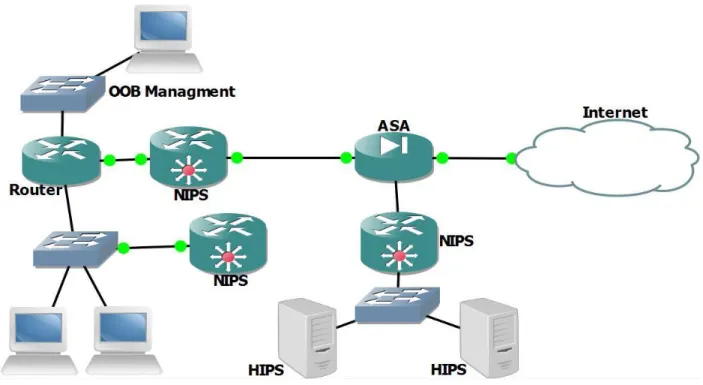
For larger deployment, use IPS. IPS checks the pattern of traffic and, if it finds some irregular/malicious patterns in the traffic flow, it will immediately drop the packet and send information to the management console.
4.10 Layer 1 Security Issues
Cisco documentation suggests placing all routers and switches, including workstations, in an isolated and locked room. The room should only be accessed by authorized users and no one else should be allowed to get inside the room. Provide UPS (universal power supply) to all the devices, so that there is never a single second of downtime. The network devices produce some heat and can operate between 0 to 40C [47], so make sure that the cooling unit is installed in NOC (Network Operation Centre) to control thermal temperature.
Isolate cables from the user‟s access if possible because cables can be wired-tapped [52].Bridges introduced between cables can record the whole communication. Good quality cables, like twisted shield copper wire or fibre, should be used in order to avoid crosstalk.
Try to keep data cables away from electricity runs as they can be disturbed by the magnetic effect produced by electricity
Use of the hub is strictly forbidden; use a switch instead. Do not use a hub. It is highly recommended to use switch inside a network and migrate from hubs to switches, if possible.
4.11 Layer 2 Security Issues
There are many other switch related issues which a network administrator should consider while securing a switch.
4.11.1
CAM Overflow
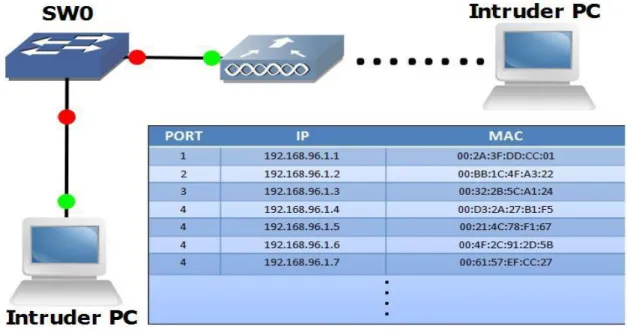
Every switch has a capacity to store a certain number of MAC addresses in the MAC address table. An intruder can send fake MAC addresses to a switch and fill the capacity of MAC entries to convert it to a hub. CAM overflow is performed by a tool known as dsniff [6]. It is important to properly configure a switch to overcome CAM overflow. See appendix C for configuration.
The figure shows that how an intruder can exhaust the switch CAM table through a direct, or through a wireless, access point.
4.11.2
Root Guard
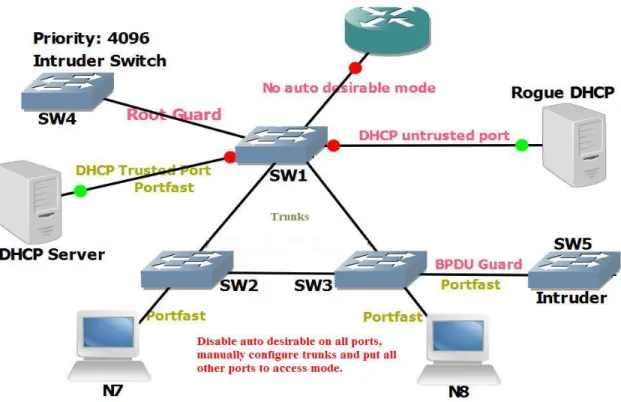
Some medium and large size Business installs multiple switches for redundancy. In multiple switches, one switch becomes a root switch whereas all other switches forward their data. If a switch is not configured for root guard, an intruder can plug in his own switch to make it a root and, thus, the intruder can redirect the client‟s data to the intruder‟s desired place. See appendix D for configuration.
4.11.3
BPDU Guard
In multiple switch environments, switches send BPDU (Bridge Protocol Data Unit) [53] to discover the root switch. The selection of root switch is very slow because all the ports participate in BPDU. To make this process more efficient, an administrator converts switch ports that are connected to the client's to portfast mode for fast convergence. In portfast mode, a port is automatically converted to forwarding mode while other ports are still in listening mode to get BPDU. While in forwarding mode, a port still participates in BPDU and, if a switch is connected to this port, it could take over the switch root role. It can be overcome through the BPDU guard. See appendix E for configuration.
4.11.4
Trunk Auto-negotiation
A trunk port in a switch is a port which can carry multiple VLAN information, and uses VTP (VLAN Trunking Protocol) to pass VLAN information between the switches. VTP reduces administrative overheads by automatically sending VLAN updates between the switches. VLAN configuration depends on a VLAN revision number; if a switch receives a VLAN revision number that is higher than the one it owns, it will automatically replace the old configuration with a new one. VTP can only work on trunk port and, by default, all the ports are in Auto state, which means that if a switch, is connected a port, it will turn to a trunk and, if a client is connected, it will convert itself to access mode. If an intruder attaches a switch to a port and the port is in auto mode, then the intruder can not only take over the root role, but can also wipe out the VTP information and inject its own information. See appendix F for configuration.
4.11.5
VLAN Hopping
VLAN hopping occurs where a switch port is configured for Dynamic Trucking Protocol (DTP). An attacker uses two modes to perform VLAN hopping. The first attack is switch spoofing, described in the section above. Another is double tagging. In double tagging, an attacker encapsulates double tag on a packet. One packet is for the switch to which the intruder is attached and using the second tag to forward the frame to the victim through the switch. This kind of technique intruders uses to jump the VLAN information means that he sends a data from one VLAN and show that this data is from other VLAN. VLAN hopping is very dangerous and could corrupt, delete or modify data at end computer. Another effect of VLAN hopping is to spread trojans, worms, viruses and other malicious software across the network. To prevent VLAN hopping, just disable auto negotiation and never use default VLANs on any port.
4.11.6
Wireless Bridge
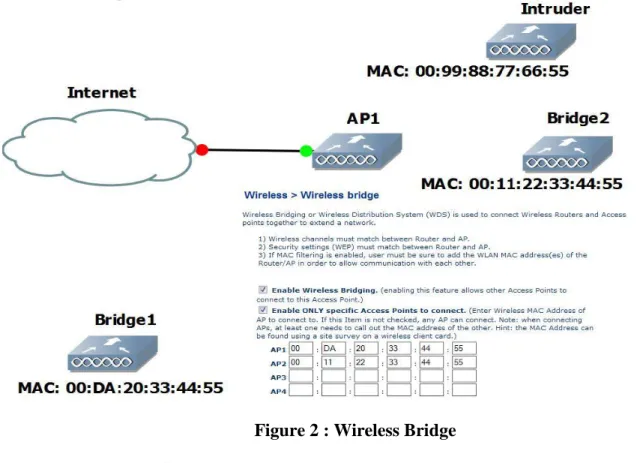
In wireless networks, if an administrator wants to install multiple access points at certain locations to improve signal quality, then he can achieve this by either connecting the access points through cables or through bridging. Bridges eliminate cable-to-cable extension and use the wireless signal to connect to each other. While implementing a wireless bridge, the administrator should make sure that the device only bridges between authorized devices and should disable connecting all options.
Figure 2 : Wireless Bridge
4.11.7
DHCP Spoofing
DHCP (Dynamic Host Control Protocol) is a protocol used to solve administrator over head by assigning automatic IPs to the client. The organization installs a specialized box like Windows 2003, 2008 server for automatic assignment of IPs to the client. If the switch has not been configured properly to protect against DHCP spoofing, an intruder can plug in his own DHCP server and start assigning IP‟s to the clients from his own server. It can benefit the intruder to perform man- in-the-middle attack, trust exploitation or cause network outage. Stopping an Intruder from performing this attack is called DHCP snooping. See appendix G for configuration.
Figure 3: Root Guard / BPDU Guard / DHCP Snooping
4.12 Layer 3 Security Issues
The router is the first device that is attacked from the external, as well as from the internal, network. This section will explore these attacks and their mitigation.
4.12.1
TCP SYN Flooding
TCP (Transmission Control Protocol) is a connection oriented protocol which utilizes three way handshakes to create a session for data flow. At first, the initiator sends SYN, the other side responds with ACK and, finally, the initiator sends SYN+ACK to establish a TCP session. In TCP SYN flooding, an intruder never sends final SYN+ACK and, thus, opens a half open TCP session. If too many TCP sessions are open, then the router cannot maintain new requests unless the old ones are satisfied. Since an intruder‟s goal is to attack the network, the old, half-opened session is never closed by him, resulting in network outage. Hping2 [46] is used to perform TCP flooding. See Appendix h for configuration.
4.12.2
Ping of Death Attack
The maximum packet size that a router can handle is 65535 bytes. When the packet goes larger than 65535 bytes the receiver starts fragmenting it and, thus, the victim is unable to reassemble it and so, as a result, the system crashes. There are certain scripts available that perform ping of death [12]. Run the script through C compiler and launch the attack to victim through the default gateway. Make sure that router does not allow packets-too-big across the interface.
4.12.3
Packet Sniffing
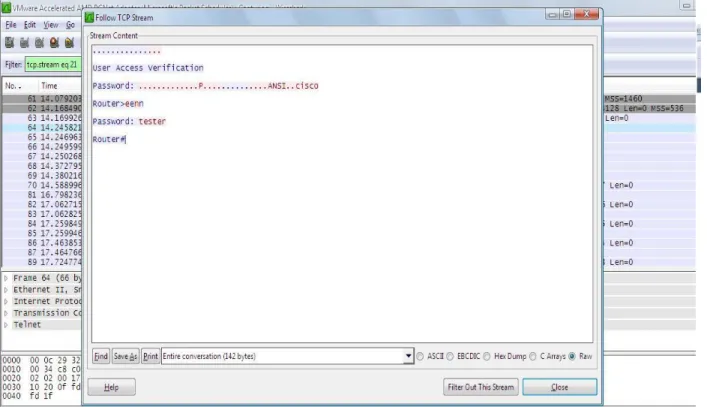
By applying security with loopholes, it is possible for an intruder to sniff the whole, ongoing communication and steal sensitive data. It may be that a user sitting inside the network, or even the external network, can gather data with little or no technical skills. Tools such as [21] [26] requires no expert knowledge for packet sniffing. To control packet sniffing on the network, it is recommended to encrypt whole data. With encryption, an intruder can get the data but can never read or temper the data.
4.12.4
RIP Attack
RIP (Routing Information Protocol) is a distance vector protocol developed in earlier 1960‟s to distribute routing information between routers. RIP has two versions. Version 1 has a big security issue and it sends the information in clear text and does not support authentication. With no authentication support, it is possible for an intruder to sabotage its peer about best hop information. RIP uses best hop to reach to the destination network and that is the lowest number of routers between the destination networks. Since no authentication is supported, an intruder can peer his router and change the best hop information from the real one to the fake one. In this way, the intruder will redirect the data to his desired destination. To mitigate this issue, use RIPv2. RIPv2 will force its peer to authenticate before the routing information is exchanged. Thus, an intruder would never authenticate due to the unavailability of credentials.
4.12.5
IP Spoofing
Private IP addresses are not allowed to be routed across the internet. Since the organizations uses private IP addresses schemes inside their network, an intruder can spoof an IP packet from outside the network to enter the network. Make sure that private IP addresses are blocked from outside the network.
4.12.6
Brute Force Attack
In a brute force attack, an intruder tries every combination of characters to get the actual password. The router should be properly configured for login methods so that it can detect and defend against the brute force attacks. See Appendix H for the configuration.
The table below summarizes the tools, the platforms on which they can be used and the type of attack and the corresponding defensive strategy.
5
Case Study 1: Implementing Layer 2 Security
It is the question of common consideration that how an organization can protect itself from security attacks. According to a study, threats originating from inside the network are ten times more lethal than those from outside. i.e the Internet.
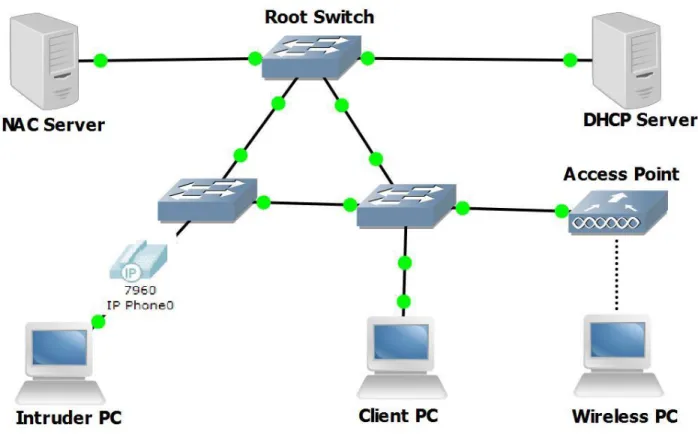
How to plan and consider issues related to layer 2 depends on how large we want to deploy our network. If a company wants 99% of up time, it needs to install redundant connections and devices to make sure if one device or link fails the other can continue smooth operation. For the demonstration of layer 2 security, a case study to achieve a good security practice is presented in the diagram below.
Figure 4: Case Study related to Layer 2 securities
The above diagram has 3 layer 2 switches. These switches are connected together for redundancy. Similarly, a wireless access point has been installed to demonstrate what best practices are available for this wireless device.
MAC address spoofing is common in internal networks. An administrator configures a switch to allow certain MAC addresses, thus automatically denying those MAC addresses which are not found in the switch MAC table. An administrator also binds static leases in the DHCP server in which allowed MAC addresses will get IP, while denying those which could not be found. Bypassing this security measurement is a two minute process. To mitigate such security threats, a NAC (Network Admission Control) has been implemented, which takes network security one