Pervasive PSQL v11
Advanced Operations Guide
Procedures and References for Advanced Users
Pervasive Software Inc. 12365 Riata Trace Parkway
Building B Austin, TX 78727 USA
DOCUMENTATION PRODUCT TO YOU OR YOUR COMPANY SOLELY ON AN “AS IS” BASIS AND SOLELY IN ACCORDANCE WITH THE TERMS AND CONDITIONS OF THE ACCOMPANYING LICENSE AGREEMENT. PERVASIVE SOFTWARE INC. MAKES NO OTHER WARRANTIES WHATSOEVER, EITHER EXPRESS OR IMPLIED, REGARDING THE SOFTWARE OR THE CONTENT OF THE DOCUMENTATION; PERVASIVE SOFTWARE INC. HEREBY EXPRESSLY STATES AND YOU OR YOUR COMPANY ACKNOWLEDGES THAT PERVASIVE SOFTWARE INC. DOES NOT MAKE ANY WARRANTIES, INCLUDING, FOR EXAMPLE, WITH RESPECT TO MERCHANTABILITY, TITLE, OR FITNESS FOR ANY PARTICULAR PURPOSE OR ARISING FROM COURSE OF DEALING OR USAGE OF TRADE, AMONG OTHERS. t r a d e m a r k s Btrieve, Client/Server in a Box, Pervasive, Pervasive Software, and the Pervasive Software
logo are registered trademarks of Pervasive Software Inc.
Built on Pervasive Software, DataExchange, MicroKernel Database Engine, MicroKernel Database Architecture, Pervasive.SQL, Pervasive PSQL, Solution Network, Ultralight, and ZDBA are trademarks of Pervasive Software Inc.
Microsoft, MS-DOS, Windows, Windows 95, Windows 98, Windows NT, Windows Millennium, Windows 2000, Windows 2003, Windows 2008, Windows 7, Windows 8, Windows Server 2003, Windows Server 2008, Windows Server 2012, Windows XP, Win32, Win32s, and Visual Basic are registered trademarks of Microsoft Corporation.
NetWare and Novell are registered trademarks of Novell, Inc.
NetWare Loadable Module, NLM, Novell DOS, Transaction Tracking System, and TTS are trademarks of Novell, Inc.
Sun, Sun Microsystems, Java, all trademarks and logos that contain Sun, Solaris, or Java, are trademarks or registered trademarks of Sun Microsystems.
All other company and product names are the trademarks or registered trademarks of their respective companies.
© Copyright 2013 Pervasive Software Inc. All rights reserved. Reproduction, photocopying, or transmittal of this publication, or portions of this publication, is prohibited without the express prior written consent of the publisher.
This product includes software developed by Powerdog Industries. © Copyright 1994 Powerdog Industries. All rights reserved.
This product includes software developed by KeyWorks Software. © Copyright 2002 KeyWorks Software. All rights reserved.
This product includes software developed by DUNDAS SOFTWARE. © Copyright 1997-2000 DUNDAS SOFTWARE LTD., all rights reserved.
This product includes software developed by the Apache Software Foundation (http://www.apache.org/).
Contents
About This Manual . . . xv
Who Should Read This Manual . . . . xvi
Manual Organization . . . . xvii
Conventions . . . . xix
1 Pervasive PSQL Databases . . . . 1
An Exploration of Object Names, Named Databases, and DSNs Pervasive PSQL Database Concepts . . . . 2
Named Database . . . . 2
Metadata . . . . 3
Identifiers and Object Names . . . . 3
The Default Database and the Current Database . . . . 6
File Structure . . . . 7
Access Methods . . . . 12
Client/Server Communications . . . . 12
Database Code Page . . . . 13
ODBC DSN Creation Options . . . . 14
Using the idshosts File . . . . 14
2 Concepts of Database Maintenance . . . . 17
An Introduction to Database Maintenance Configurations . . . . 18
Database Security . . . . 20
Data Archival and Restoration . . . . 21
Troubleshooting . . . . 22
4 Configuration Reference. . . . 35
Configuration Methods and Settings Available in Pervasive PSQL Configuration Overview . . . 36
Ensuring Configuration Changes Take Effect. . . 36
Connecting to Different Machines. . . 37
Configuration Through PCC . . . 38
Configuration Through CLI Utility. . . 39
Setting a Configuration . . . 40
Command Syntax . . . 43
Configuration Settings Parameters . . . 45
Services Configuration Parameters . . . 46
Server Configuration Parameters . . . 47
Access . . . 49
Communication Protocols . . . 57
Compatibility . . . 60
Data Integrity . . . 62
Debugging . . . 67
Directories . . . 70
Information . . . 72
Memory Usage. . . 72
Performance Tuning . . . 75
Windows Client Configuration Parameters . . . 84
Access . . . 85
Cache Engine . . . 88
Cache Engine Debugging . . . 91
Communication Protocols . . . 91
Performance Tuning . . . 93
Security. . . 94
Application Characteristics . . . 94
Linux Client Configuration Parameters . . . 97
Case of Configuration Values . . . 97
Client Performance Affected by “Local” Setting . . . 97
File Names with Embedded Spaces . . . 97
Contents
Tuning Performance . . . . 115
Spotting Performance Bottlenecks . . . . 115
Before You Modify Configuration Parameters . . . . 116
Minimizing Initial Connection Time. . . . 117
Maximizing Runtime Throughput . . . . 120
Large System Cache . . . . 128
Performance on Hypervisor Products. . . . 129
Xtreme I/O Driver . . . . 130
Considerations . . . . 131
System Requirements . . . . 131
XIO Memory Cache . . . . 132
Frequently Asked Questions. . . . 135
Utilities . . . . 136
Exclusions File . . . . 141
Pvsw.log Message. . . . 141
Event Log Messages . . . . 142
Troubleshooting XIO . . . . 143
6 Setting Up Referential Integrity . . . . 145
An Introduction to Referential Integrity Structures Concepts of Referential Integrity . . . . 146
Definitions . . . . 146
Understanding Keys and Rules . . . . 147
Setting up Primary Keys . . . . 151
Creating a Primary Key During Table Creation . . . . 151
Adding a Primary Key to an Existing Table . . . . 151
Setting up Foreign Keys . . . . 153
Creating a Foreign Key During Table Creation . . . . 153
Adding a Foreign Key to an Existing Table. . . . 154
Interactions Between Btrieve and Relational Constraints . . . . 155
Available Options . . . 173
Choosing Your Policy . . . 174
Preparing to Set Up Security . . . 175
Process Overview . . . 177
Transactional Interface Security Quick Start. . . 179
Security Tasks . . . 182
Data Encryption . . . 183
Configuration Parameters for Wire Encryption . . . 183
Encryption Notes . . . 183
Setting Up Encryption . . . 184
Effects of Encryption . . . 186
Owner Name Encryption . . . 186
8 Logging, Backup, and Restore . . . . 187
Understanding Logs, Backups, and Data Restoration Transaction Logging and Durability . . . 188
Using These Features . . . 188
Feature Comparison . . . 188
Which Feature Should I Use?. . . 189
How Logging Works . . . 190
See Also . . . 192
Understanding Archival Logging and Continuous Operations. . . 193
Difference Between Archival Logging and Transaction Logging . . . 194
What if a File Restore is Needed . . . 194
Using Archival Logging . . . 196
General Procedures . . . 196
Setting up Archival Logging . . . 197
Roll Forward Command . . . 200
Using Continuous Operations . . . 201
Starting and Ending Continuous Operations . . . 201
Backing Up a Database with BUTIL . . . 202
Restoring Data Files when Using Continuous Operations . . . 206
Data Backup with Backup Agent and VSS Writer . . . 207
Contents
Microsoft Failover Clustering for Windows Server 2008 and Later . . . . 217
Microsoft Cluster Service for Windows Server 2003 . . . . 221
Linux Heartbeat . . . . 226
Managing Pervasive PSQL in a Cluster Environment . . . . 230
Migration . . . . 233
Fault Tolerance . . . . 234
Disaster Recovery . . . . 235
10 Workgroup Engine in Depth . . . . 237
Technical Details and Advanced Procedures for the Workgroup Engine Networking . . . . 238
NetBIOS . . . . 238
MicroKernel Router Decision Algorithm . . . . 238
Technical Differences Between Server and Workgroup . . . . 240
Platforms . . . . 240
User Interface. . . . 240
Authentication and Btrieve Security Policies . . . . 240
Gateway Support . . . . 240
Asynchronous I/O . . . . 241
Default Configurations . . . . 241
Xtreme I/O (XIO) Support . . . . 241
License Model . . . . 241
Troubleshooting Workgroup Issues . . . . 242
Time delay on first connection . . . . 242
Status Code 116 . . . . 243
Re-directing Locator Files . . . . 244
Redirecting Locator File Requirements. . . . 245
Creating Redirecting Locator Files . . . . 245
Example . . . . 248
12 Testing Btrieve Operations . . . . 271
How to Perform Btrieve Operations with the Function Executor Utility Function Executor Concepts . . . 272
Overview . . . 272
What Function Executor Can Do . . . 272
Function Executor Features . . . 272
Automatic Mode in Function Executor . . . 277
Where to Learn More . . . 278
Function Executor Graphical User Interface. . . 279
Application Window . . . 279
Main Window . . . 282
Login and Logout . . . 284
Open File Dialog . . . 285
Create a Btrieve File . . . 287
Create a File Dialog GUI Reference (Advanced) . . . 288
Transactions . . . 289
File Statistics . . . 290
History . . . 291
Function Executor Tasks . . . 293
Starting Function Executor Tasks . . . 293
Performing Operations Tasks . . . 294
Opening a File Tasks . . . 295
Creating a Btrieve File Tasks . . . 296
History Tasks . . . 298
13 Manipulating Btrieve Data Files with Maintenance . . . . 301
Handling Btrieve Files with the Maintenance Utility Maintenance Utilities Overview. . . 302
Btrieve Interactive Maintenance Utility . . . 303
Extended File Support . . . 303
Long File Names and Embedded Spaces Support. . . 304
Record and Page Compression . . . 304
Contents
Importing and Exporting ASCII File Format . . . . 334
Data Tasks . . . . 335
Btrieve Command-Line Maintenance Utility (butil). . . . 339
Return Codes . . . . 339
Commands . . . . 340
Viewing Command Usage Syntax . . . . 341
Command Format . . . . 341
Command Files. . . . 341
Description Files . . . . 342
Extended File Support . . . . 342
Owner Names . . . . 343
Redirecting Error Messages . . . . 343
ASCII File Format . . . . 344
Rules for Specifying File Names on Different Platforms . . . . 344
Importing and Exporting Data. . . . 345
Copy. . . . 345
Load . . . . 347
Recover . . . . 348
Save . . . . 351
Creating and Modifying Data Files . . . . 354
Clone . . . . 354
Clrowner . . . . 356
Create . . . . 357
Drop. . . . 359
Index . . . . 361
Setowner . . . . 362
Sindex . . . . 364
Compacting Btrieve Data Files . . . . 365
Viewing Data File Statistics. . . . 366
Stat . . . . 366
Rebuild Utility GUI Reference . . . 390
File Options Screen . . . 390
Rebuild Options Screen. . . 390
Rebuild Progress Screen . . . 393
Rebuild Utility Tasks. . . 395
GUI Tasks . . . 395
CLI Tasks . . . 396
Command Line Parameters . . . 396
A Description Files . . . . 405
Using Description Files to Store Btrieve File Information Rules for Description Files. . . 406
Description File Examples . . . 408
Figures
Figures
1 Conceptual View of Database Engine Configuration. . . 18
2 Client/Server Relational Architecture . . . 31
3 Workgroup Relational Architecture . . . 32
4 Redirecting Locator File Example . . . 248
5 Active MicroKernel Files Dialog . . . 253
6 Active MicroKernel Sessions Dialog . . . 257
7 MicroKernel Resource Usage Dialog . . . 260
8 MicroKernel Communications Statistics Dialog . . . 263
9 SQL Active Sessions Dialog. . . 266
10 Automatic Mode and Manual Mode Controls . . . 277
11 Login Dialog . . . 285
12 Logout Dialog . . . 285
13 Function Executor Main Window . . . 293
14 Status Code Received . . . 294
15 Status Code Documentation . . . 295
16 Open Btrieve File Dialog Box. . . 295
17 Modify File Definition Dialog Box. . . 297
18 Undocking the History window . . . 299
19 Btrieve Maintenance Utility Main Window . . . 307
20 File Information Editor . . . 308
21 Comparison of Page Counts for Duplicate Key Methods . . . 317
35 Sample Description File for the CREATE Command . . . . 359
36 Sample Description File for INDEX Command . . . . 362
37 Roll Forward Dialog . . . . 374
38 Roll Forward Status Dialog Box . . . . 375
39 Roll Forward Continue on Error Dialog Box . . . . 376
40 Rebuild Utility File Selection . . . . 390
41 Rebuild Utility File Options . . . . 391
42 Rebuild Utility Progress Screen . . . . 394
43 Select Files Dialog Box . . . . 395
Tables
1 Identifier Restrictions by Identifier Type . . . 4
2 Unique Scope for Common Identifiers . . . 6
3 Files Associated With a Pervasive PSQL Database . . . 8
4 Comparisons of File Size and Page Sizes for File Versions 9.5 or Newer . . . 8
5 Comparisons of File Size and Page Sizes for File Versions 9.0 or Older . . . 9
6 Requirements for Running bcfg on Linux. . . 39
7 Troubleshooting Guide for Running bcfg on Linux . . . 40
8 Tabular Format for Configuration Settings Parameters . . . 45
9 Server Configuration Options and Settings . . . 47
10 Summary of Login Configuration Behavior. . . 51
11 Client/Server Results of Wire Encryption Combinations . . . 56
12 Meaning of Encryption Level Values . . . 57
13 Client Configuration Settings . . . 84
14 Linux Client Configuration Settings . . . 98
15 Counters for MicroKernel Btrieve Operations . . . 104
16 Counters for MicroKernel Cache . . . 105
17 Counters for MicroKernel Input/Output . . . 107
18 Counters for MicroKernel Locks and Waits. . . 108
19 Counters for MicroKernel Transactions. . . 110
20 Dynamically Managed Settings Displayed in Monitor . . . 116
21 Considerations for the Use of XIO. . . 131
35 Data Restore Limits After Crash. . . . 195
36 Commands to Start and Stop Continuous Operation . . . . 201
37 Adding Pervasive PSQL to Cluster Services on Windows Server 2008 and Later . . . . 219
38 Adding Pervasive PSQL to Cluster Service on Windows Server 2003 . . . . 222
39 Adding Pervasive PSQL to Linux Heartbeat . . . . 227
40 Gateway Discovery Priorities . . . . 238
41 Redirecting Locator File Path Descriptions. . . . 245
42 Bmon Refresh Rates and Keyboard Key Responses . . . . 270
43 Function Executor Controls . . . . 277
44 Function Executor Application Window . . . . 280
45 Function Executor Main Window for an Open File . . . . 282
46 Function Executor Login and Logout Dialogs . . . . 285
47 Function Executor Open File Dialog . . . . 286
48 Function Executor Create File Dialog. . . . 287
49 Function Executor Create File Dialog (Advanced) . . . . 288
50 Function Executor Transactions Dialog . . . . 289
51 Function Executor File Statistics Dialog . . . . 290
52 Function Executor History Dialog . . . . 292
53 Factors To Consider Pertaining to Data Compression . . . . 306
54 File Specification Controls . . . . 310
55 Key Controls . . . . 312
56 Key Segment Specification Controls . . . . 314
57 Create File Dialog Controls . . . . 320
58 ACS Information Controls . . . . 323
59 BUTIL Return Codes. . . . 339
60 Command-Line Maintenance Utility Commands . . . . 340
61 Commands to Import and Export Data . . . . 345
62 Commands to Create and Modify Data Files. . . . 354
63 Version 5.x and Earlier File Format Features. . . . 369
About This Manual
This manual describes advanced procedures and provides technical information of use to the advanced user.
Some of the information in this manual may not apply to you. For example, the chapter on Gateway engine configuration does not apply to Server engines. Such information is clearly marked throughout the manual.
Pervasive Software would appreciate your comments and
suggestions about this manual. As a user of our documentation, you are in a unique position to provide ideas that can have a direct impact on future releases of this and other manuals. If you have comments or suggestions for the product documentation, post your request at the Community Forum on the Pervasive Software Web site.
This manual is provided for advanced users. Advanced users are considered to have a strong understanding of the underlying operating systems on which you run your Pervasive PSQL-based applications. Advanced users should be comfortable configuring their operating system, and in many cases, must have administrative permissions to configure the database engine. Advanced users may include the following:
network administrators of networks where one or more Pervasive PSQL-based applications are installed
value-added resellers of Pervasive PSQL-based applications developers of Pervasive PSQL-based applications
Manual Organization
The following list briefly describes each chapter in the manual: Chapter 1—Pervasive PSQL Databases
This chapter explains conceptual information about databases, how to create a database, and how to set properties on one. Chapter 2—Concepts of Database Maintenance
This chapter provides a brief introduction to the basic concepts and procedures involved with the job of maintaining a database. Chapter 3—Understanding the Pervasive Component
Architecture
This chapter explains in some detail the major components that make up Pervasive PSQL and some of their unique features. Chapter 4—Configuration Reference
This chapter explains how to use access the configuration properties and provides detailed information about all of the available configuration options for engines and clients. Chapter 5—Performance
This chapter explains how to increase database performance through a variety of means such as tuning and the use of Xtreme I/O driver.
This chapter provides technical details and advanced procedures regarding the Workgroup engine.
Chapter 11—Monitoring Database Resources
This chapter explains how to use the graphical utility named Monitor to view users connected to a database, file usage information, and resource usage information.
Chapter 12—Testing Btrieve Operations
This chapter explains how to use the Function Executor utility to perform individual operations for the transactional interface. Chapter 13—Manipulating Btrieve Data Files with Maintenance
This chapter explains how to use the Maintenance utility. Chapter 14—Converting Data Files
This chapter explains how to use the Rebuild utility. Appendix A—Description Files
This appendix covers how to use description files to archive information about Btrieve data files you have created. This manual also includes an index.
Conventions
Unless otherwise noted, command syntax, code, and examples use the following conventions:
CASE Commands and reserved words typically appear in uppercase letters. Unless the manual states otherwise, you can enter these items using uppercase, lowercase, or both. For example, you can type MYPROG, myprog, or MYprog.
Bold Words appearing in bold include the following: menu names, dialog box names, commands, options, buttons, statements, and so forth.
Monospaced font
Monospaced font is reserved for words you enter, such as command syntax.
[ ] Square brackets enclose optional information, as in [log_name]. If information is not enclosed in square brackets, it is required. | A vertical bar indicates a choice of information to enter, as in
[file name | @file name].
< > Angle brackets enclose multiple choices for a required item, as in /D=<5|6|7>.
variable Words appearing in italics are variables that you must replace with appropriate values, as in file name.
... An ellipsis following information indicates you can repeat the information more than one time, as in [parameter...].
::= The symbol ::= means one item is defined in terms of another. For example, a::=b means the item a is defined in terms of b.
c h a p t e r
1
Pervasive PSQL Databases
An Exploration of Object Names, Named Databases, and DSNs
This chapter is divided into the following sections: Pervasive PSQL Database Concepts
Pervasive PSQL Database Concepts
Named Database Metadata
Identifiers and Object Names
The Default Database and the Current Database
File Structure
Access Methods
Client/Server Communications
Database Code Page
ODBC DSN Creation Options
Using the idshosts File
Named
Database
A named database (also referred to as a DBname) is a database that has a logical name that allows users to identify it without knowing its actual location. Pervasive PSQL requires that all databases be named. When you name a database, you associate that name with a
particular dictionary directory path and one or more data file paths. A named database is connected to through various access methods. For ODBC access, for example, you must set up a Data Source Name (DSN) to refer to the named database. Multiple DSNs may point to the same named database. See ODBC Database Access in SQL Engine
Reference. For other access methods, application developers can
connect to a named database using the API for that access method. Refer to the developer reference guides in the Pervasive PSQL documentation.
Pervasive PSQL Database Concepts
CREATE DATABASE for SQL, PvCreateDatabase() for DTI, and
Data Access Application Blocks for ADO.NET.
Metadata
The relational interface supports two versions of metadata, referredto as version 1 (V1) and version 2 (V2). V2 metadata allows for identifier names up to 128 bytes long for many identifiers, permissions on views and stored procedures, and data dictionary files (DDFs) specific for V2 metadata.
See Versions of Metadata in SQL Engine Reference.
Identifiers and
Object Names
An identifier is the name of a database or of a column, table, procedure, or other named object within the database. Identifiers are designated as either regular or delimited.
Regular Identifiers
A regular identifier is an identifier that is not surrounded by double quotes. Regular identifier must begin with a letter, either upper or lower case. The remainder of the identifier can consist of any combination of upper or lower case letters, digits, and valid characters.
You cannot use a reserved word as a regular identifier. Regular identifiers are case-insensitive.
Delimited Identifiers
A delimited identifier is an identifier surrounded by double quotes. Delimited identifier can consist of any string of valid characters
Identifier Restrictions
In addition to the general restrictions listed above, the following table lists restrictions specific to each type of identifier.
Table 1 Identifier Restrictions by Identifier Type
Identifier Length Limit (bytes) Invalid Characters1 Notes
V12 V23
Column 20 128 \ / : * ? " < > | Must begin with a letter Cannot be null Database 20 20 ` ~ ! @ # $ % ^ & * ( ) _ - + = }
] { [ | \ : ; " < , ' > . ? /
Must begin with a letter
Function (user-defined)
30 128 For regular identifiers: ` ~ ! @ # $ % ^ & * ( ) - + = } ] { [ | \ : ; " < , ' > . ? /
Valid characters are letters, digits, and the underscore (“_”)
Must begin with a letter For delimited identifiers:
none
Name must be enclosed in double quotes
Group 30 128 \ / : * ? " < > | (and space character)
Cannot be MASTER
Index 20 128 \ / : * ? " < > | (and space character)
Cannot start with UK_ if you create the index with Pervasive PSQL Control Center (PCC)
If you create an index outside of PCC that starts with UK_, you cannot edit the index with PCC Key (foreign or
primary)
20 128 \ / : * ? " < > | (and space character)
Must begin with a letter
A foreign key and an index cannot be named the same within the same table
Pervasive PSQL Database Concepts
Procedure (stored)
30 128 For regular identifiers: ` ~ ! @ # $ % ^ & * ( ) - + = } ] { [ | \ : ; " < , ' > . ? /
Valid characters are letters, digits, and the underscore (“_”)
Must begin with a letter For delimited identifiers:
none
Name must be enclosed in double quotes
Table 20 128 \ / : * ? " < > | (and space character)
# ##4
Invalid characters apply to both regular and delimited identifiers
Trigger 30 128 For regular identifiers: ` ~ ! @ # $ % ^ & * ( ) - + = } ] { [ | \ : ; " < , ' > . ? /
Valid characters are letters, digits, and the underscore (“_”)
Must begin with a letter For delimited identifiers:
none
Name must be enclosed in double quotes
User 30 128 \ / : * ? " < > | (and space character)
Cannot be MASTER or PUBLIC
View 20 128 For regular identifiers: ` ~ ! @ # $ % ^ & * ( ) - + = } ] { [ | \ : ; " < , ' > . ? /
Valid characters are letters, digits, and the underscore (“_”). Must begin with a letter For delimited identifiers:
none
Name must be enclosed in double quotes.
1Unless otherwise noted, invalid characters apply both to regular and to delimited identifiers. Table 1 Identifier Restrictions by Identifier Type continued
Identifier Length Limit (bytes) Invalid Characters1 Notes V12 V23
used within the same arena. Table 2 shows the arena, or the scope, within which a given object name must be unique.
Table 2 Unique Scope for Common Identifiers
A name for this type of object...
... must be unique within this scope: Database Table Stored
Procedure
Other
Database All databases
hosted by a given database engine
Table
Trigger, stored procedure, user-defined functions
User or group
View
Constraint
Column
Index
Cannot have the
same name as a foreign key
Key (foreign)
Cannot have the
same name as an index
Pervasive PSQL Database Concepts
in a Btrieve Login (78), Create (14), or Open (0) operation, the transactional engine assumes the operation is associated with the current database. For each client, the current database is the database to which the most recent Login (78) operation occurred (explicit login). If the client computer has requested no explicit login operations, the current database is the database to which the most recent Create (14) or Open (0) operation occurred (implicit login). If no explicit or implicit logins have occurred, then the current database is the default database, described in the preceding paragraph. Note that the current database may change at any time when the given client performs an implicit or explicit login, or closes the last file handle, making “DefaultDB” the current database. The current database for each client is independent of other clients’ activities.
The simplest way to configure the new security model for existing applications is to associate all Btrieve data directories with the default database, and set up rights for the group PUBLIC within this database. The group PUBLIC is automatically created along with the Master user when you enable security for a database. See
Transactional Interface Security Quick Start.
File Structure
All Pervasive PSQL databases use a common data format. Thiscommonality allows different access methods, such as transactional and relational, to access the same data. The database management system through which all access methods operate is called the MicroKernel Database Engine (MKDE).
Each Pervasive PSQL database table is a separate file with a default file extension of MKD. Developers, however, can specify any file name
The names and locations of Pervasive PSQL databases are contained in a binary file named dbnames.cfg. For default locations of Pervasive PSQL files, see Where are the Pervasive PSQL files installed? in Getting Started With Pervasive PSQL.
All of the files associated with a Pervasive PSQL database can be viewed from the operating system. Table 3 summarizes the associated files.
File Size
The size limit depends on the file version, the page size, and the number of records per page, as the following tables summarize.
File Versions 9.5 or Newer
The maximum size of a data file is 256 GB. You must use a file format of 9.5 or newer to have a single file size larger than 128 GB.
Note that the following table assumes no record compression on the file. If you use record compression, take into account that additional records are stored per page. See Choosing a Page Size and Estimating
Table 3 Files Associated With a Pervasive PSQL Database
Type Description
Database Names Configuration
The dbnames.cfg file. A binary file that contains the names and locations of the Pervasive PSQL databases.
Data (common data format)
Files named, by default, tablename.MKD for relational databases. Each database table has a corresponding MicroKernel file. For transactional data files, the name of each file is specified by the application.
Data Dictionary Files with an extension of DDF. See System Tables in SQL Engine Reference.
Pervasive PSQL Database Concepts
File Versions 9.0 or Older
The maximum size of a data file is 128 GB. You must use a file format of 9.0 or newer to have a single file size larger than 64 GB.
Note that the following table assumes no record compression on the file. If you use record compression, take into account that additional records are stored per page. See Choosing a Page Size and Estimating File Size, both in Pervasive PSQL Programmer's Guide.
32 - 63 64 64 GB 128 GB 256 GB 256 GB 256 GB
64 - 127 32 32 GB 64 GB 128 GB 256 GB 256 GB
128 - 255 16 16 GB 32 GB 64 GB 128 GB 256 GB
256 - 511 8 n/a1 16 GB 32 GB 64 GB 128 GB
512 - 1023 4 n/a1 n/a1 16 GB 32 GB 64 GB
1024 - 2047 2 n/a1 n/a1 n/a1 16 GB 32 GB
2048 - 4095 1 n/a1 n/a1 n/a1 n/a1 16 GB
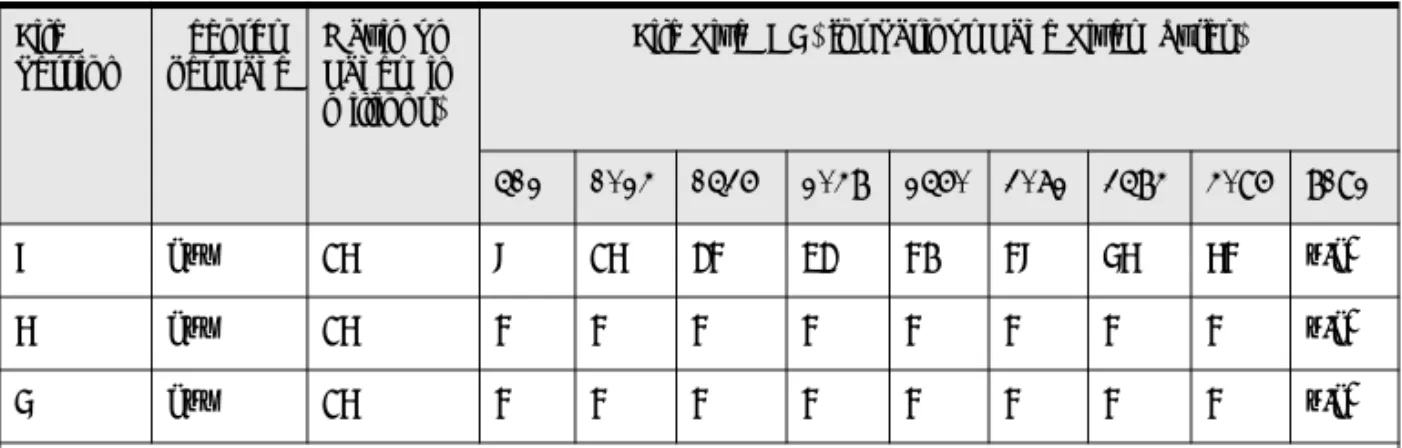
1”n/a” stands for “not applicable”
Table 4 Comparisons of File Size and Page Sizes for File Versions 9.5 or Newer continued
Records per Page Maximum Pages (in millions)
File Size (GB) for Various Page Sizes (bytes) 1,024 2,048 4,096 8,192 16,384
File Segmentation
By default, a data file is automatically broken into 2 GB operating system file segments as its size passes that boundary. The
configuration property, “Limit Segment Size to 2 GB,” allows you to specify whether you want files divided into 2 GB segments or unified in a single, segmented file. The advantage of using a larger non-segmented file is more efficient disk I/O. Therefore, you can expect increased performance.
The configuration option is part of the Performance Tuning properties for a database engine. See To access configuration settings in PCC for an engine, andLimit Segment Size to 2 GB.
The property is set to “on” by default, causing files to segment at 2 GB boundaries as with previous releases. If you set the property to “off,” files can increase past the 2 GB boundary. See also Automatic Upgrade of File Version for additional information relating to the configuration property.
Any non-segmented files are subject to the limit on file size specified
7 any 16 8 16 24 32 40 48 56 64 n/a1
6 any 16 4 4 4 4 4 4 4 4 n/a1
5 any 16 4 4 4 4 4 4 4 4 n/a1
1”n/a” stands for “not applicable”
Table 5 Comparisons of File Size and Page Sizes for File Versions 9.0 or Older continued
File Version
Records per Page
Maximum Pages (in millions)
File Size (GB) for Various Page Sizes (bytes)
Pervasive PSQL Database Concepts
files when they reach the file limits for version 8.x, which is 64 GB. The following table summarizes this behavior.
For example, a version 8.x file that is 5 GB in size has already passed the 2 GB segmentation boundary. Because the file is already segmented, the segmentation remains on the file. Such a file would continue to segment and grow in size until it reaches 64 GB, at which size the automatic upgrade would occur. This is true whether the configuration property is set to “yes” or “no” because the file is already segmented. As the file grows beyond 64 GB, it will continue to segment until it reaches the maximum size allowed for a version 9.0 file, 128 GB.
A version 8.x file that is 1.5 GB in size would continue to grow until it reaches 2 GB in size. At that point, the automatic upgrade occurs if the configuration property is set to “no.” The file can continue to grow as a non-segmented file up to the size limit for version 9.0 files, 128 GB. If the configuration setting is set to “yes,” the 2 GB file would continue to segment and grow until it reaches 64 GB in size. At that size, the maximum for a version 8.x file, the automatic upgrade to version 9.0 occurs. As the file grows beyond 64 GB, it will continue
Configuration Property Setting for “Create File Version”
Configuration Property Setting for “Limit Segment Size to 2 GB”
File Size At Which Automatic Upgrade of File Version Occurs
9 (default) Yes (default; option check marked)
64 GB (the maximum size of a version 8.x file) 9 (default) No (option not check
marked)
2 GB (size at which a version 8.x file segments)
Access
Methods
The two primary methods in which data is accessed from Pervasive PSQL databases are transactional and relational.
With transactional, an application program navigates up and down along either physical or logical pathways through data records. Using a transactional API, an application program provides direct control and allows a developer to optimize data access based on knowledge of the underlying structure of the data. Btrieve is an example of a transactional database engine.
Relational is an access method in which data is represented as collections of tables, rows, and columns. The relational model insulates the developer from the underlying data structure and presents the data in a simple table format. ODBC is an example of a relational access method.
A single application program may include both types of access. For example, an application may use transactional access for adding and changing data, and relational access for querying the data and report writing.
You need to know the access method(s) used by the application programs that rely on your installation of Pervasive PSQL. The access methods may have different configurations. You may need to customize the configuration to optimize a particular access method. Also, troubleshooting is easier when you are aware of the access method(s) used by a given application program. For example, if an application program uses relational access through ODBC, you may need to troubleshoot a problem at the ODBC level rather than at the database management system.
See Configuration Reference for the tasks and references pertaining to customizing configurations.
Pervasive PSQL Database Concepts
between the application program and the server MKDE using the network protocol supported by the operating system. File I/O functions are completely handled by the server MKDE in client/ server mode and the workstation has no operating system handles allocated to shared data files. Database manipulation is performed by the server-based MKDE on behalf of each workstation.
Note that the processing mode is determined by the configuration of the workstation and not the application program itself. This means that an application is capable of accessing both local and client/ server database engines. The application program does not have to be recompiled to switch the application to client/server mode from local mode.
Both Workgroup and Server engine can operate in either mode. When an application on the same computer as the database engine accesses the engine, it is operating in local mode. When an
application on a different machine access the engine, it is operating in client/server mode.
The client/server configurations may be customized for the Workgroup and Server versions of Pervasive PSQL. Configuration settings exists in the Pervasive PSQL Control Center (PCC) to facilitate the configuration of client/server configurations as well as stand-alone configurations.
See Configuration Reference for the tasks and references pertaining to configuring the client/server communications and database engine.
ODBC DSN
Creation
Options
Refer to DSNs and ODBC Administrator in SQL Engine Reference. That section also discusses ODBC connection strings.
Using the
idshosts File
Typically, an application provides its own file location information. As an alternative, you may provide file location mapping based on information in a text file, idshosts.
The idshosts file was one aspect of Pervasive PSQL (IDS). IDS has been removed from the core product but the idshosts file is still configurable.
If your applications do not use the mapping feature through idshosts, set the configuration setting Use IDS to “Off.” If your applications already use idshosts, or if you prefer to use this alternative method to map file locations, set Use IDS to “On.” See
Use IDS.
Note that performance is slower when the idshosts file is used because of the time required to access the file and read its contents. An idshosts file may be used only with a Windows or a Linux client requester. The client may communicate with a Pervasive PSQL server on Windows or Linux.
Pervasive PSQL Database Concepts
Note Pervasive PSQL 8.5 or later is required if you set Use IDS to “On.” The requester uses database URIs to represent the IDS information. Database URIs were added with Pervasive PSQL 8.5. See Database URIs in Pervasive PSQL Programmer's Guide in the Developer Reference.
If Use IDS is set to “On,” you must also set Use Remote MicroKernel Engine to “On.” Use Remote MicroKernel Engine is on by default.
See Use IDS and Use Remote MicroKernel Engine.
Format of idshosts Entries
Refer to the comments in the idshosts file itself for how to format entries in the file. The comments also provide example mappings. By default, for Windows platforms, the idshosts file is installed to the \bin directory under the database client installation directory. For Linux, idshosts is installed to the \etc directory under the database client installation directory (for example, /user/local/psql/etc).
c h a p t e r
2
Concepts of Database
Maintenance
An Introduction to Database Maintenance
Pervasive PSQL v11 SP3 is a comprehensive database management system built around Pervasive Software’s MicroKernel Database Engine. Pervasive PSQL offers easy installation, uncomplicated maintenance, and high levels of performance and reliability. While Pervasive PSQL can run for months or years with practically no maintenance, you can get the most out of it by understanding some of its unique features and learning how to perform useful tasks. This manual describes how to tune, configure, and manage your Pervasive PSQL engine and associated databases.
Configurations Database Security
Data Archival and Restoration Troubleshooting
Configurations
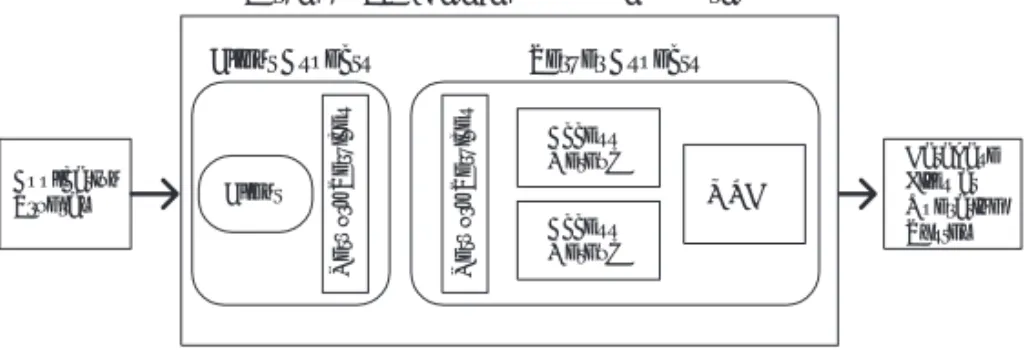
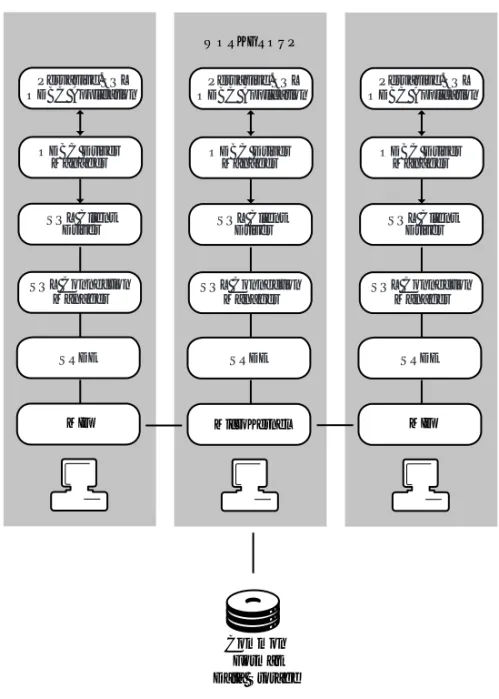
You can configure separate settings for the server and client aspects of the database engine. The settings allow you to optimize the performance of the engine based on your business requirements. The following figure illustrates the flow from an application program to the database files at the operating system. The database engine resides between the application program and the data files.
Figure 1 Conceptual View of Database Engine Configuration
The types of settings that you can configure for server include the following:
Access
Communication protocols
Compatibility (with previous versions of the MKDE) Data integrity
Debugging Directories
Application Program
Client Aspects Server Aspects
Client
Network Services
Network Services
Pervasive.SQL Database Engine Configuration
Access Method Access Method
MKDE
Database Files at Operating System
Configurations
The types of settings that you can configure for client include the following:
Access
Communication protocols Performance
Security
Application characteristics
You configure these settings within the PCC. See Configuration Reference for the tasks and references pertaining to configuration.
Database Security
The access to a Pervasive PSQL database can be protected in several ways. Administrative-level security is set through the operating system. You can control who can administer a Pervasive PSQL database with the security mechanisms native to the operating system.
Pervasive PSQL also provides relational security at the user and group levels. You can control who can access the data and at what capability. For example, for each table within a Pervasive PSQL database, you can specify whether a user or group can create, select, update, insert into, delete, or alter the table.
You establish security by setting a password for the entire database. At that point, the only user authorized to access the database is a default user named Master. You can then add additional users and groups.
Security can be set within the PCC. Also supported are two
Structured Query Language (SQL) statements pertaining to security: GRANT and REVOKE. GRANT and REVOKE also allow you to set security at the column level if you choose.
The GRANT syntax integrates with transactional Owner Names, allowing owner names to be enforced when using relational access. See Chapter 7 for information pertaining to security, Owner Names, users, and groups.
Data Archival and Restoration
Data Archival and Restoration
Backing up data is a routine part of protecting your databases and ensuring disaster recovery. You have several ways in which you can back up and restore your Pervasive PSQL databases.
If your business allows you to stop all applications that access a Pervasive PSQL database, you may use any of the operating system utilities, or third-party software, to backup or restore the database files.
Archival logging is another backup method that you can use to supplement operating system utilities. Archival logging allows you to keep a log of all database operations since your last backup. In case of a system failure, you can restore the data files from backup then roll forward the changes from the log file to return the database to the state it was in prior to the system failure.
Continuous operations allows you to backup database files while the database engine is running and users are connected. After starting Continuous Operations, the database engine closes the active data files and stores all changes in temporary data files (called delta files). When the backup is complete, you turn off Continuous Operations. The database engine then reads the delta file and applies all the changes to the original data files.
See Logging, Backup, and Restore for additional information about backing up and restoring databases.
Troubleshooting
The Pervasive PSQL User's Guide and Getting Started With Pervasive
PSQL manuals both contain troubleshooting information. Getting Started With Pervasive PSQL contains troubleshooting information
pertaining to installing the Pervasive PSQL products. The User’s
Guide contains general troubleshooting information as well as an
extensive list of frequently asked questions (FAQs).
Other resources at your disposal for troubleshooting include the Pervasive Software Knowledge Base, which contains information based on actual customer solutions and common problems, and the Support area of the Pervasive Software Web site.
Helpful Utilities
Helpful Utilities
Pervasive PSQL comes with a variety of utilities designed to help you control and manage your databases. For a list of the primary Pervasive PSQL utilities, see Pervasive PSQL User's Guide. Note that some utilities can be excluded if you perform a custom installation. See Getting Started With Pervasive PSQL.
c h a p t e r
3
Understanding the Pervasive
Component Architecture
A Discussion of Architecture Features
This chapter covers features designed to offer a trouble-free environment for installing and running critical applications. This chapter is divided into the following sections:
Pervasive PSQL Database Engine Relational Architectural Overview Error Codes
Pervasive PSQL Database Engine
The Pervasive PSQL engine consists of two database sub-engines: MicroKernel Database Engine (MKDE), which provides Btrieve/
MicroKernel API support for Pervasive PSQL applications. SQL Relational Database Engine (SRDE), which provides ODBC
support for Pervasive PSQL applications.
Common
Address Space
Pervasive PSQL uses an optimized memory architecture that provides high performance for both transactional and relational data access methods. Both the MKDE and the SRDE load and operate in the same process address space, minimizing the CPU time required to communicate between them.Row Level
Locking
Row level locking improves database engine performance in multi-user environments in which many updates and writes occur at the same time, or in which transactions remain open for an extended period of time.
A transaction locks only the rows that it affects directly, not the entire page. One client can update records on a given page at the same time as another client updates different records on the same page. Waiting is necessary only when a second application attempts to modify the exact same records currently locked by the first application. Thus, row level locking decreases overall wait time and improves performance in a multi-user environment.
This feature is completely transparent within the MicroKernel Database Engine. This feature is always on and is supported across Server and Workgroup products as well as all supported operating system platforms. This feature is supported for data file format v6.x
Pervasive PSQL Database Engine
MicroKernel
Database
Engine
The MicroKernel Database Engine (MKDE) provides Btrieve/ MicroKernel API support for Pervasive PSQL applications. Both Pervasive PSQL Server and Pervasive PSQL Workgroup support local applications running on the same computer as the engine. The Server MKDE supports both local applications and remote (client/ server) applications. The Workgroup MKDE supports applications running on remote machines as well and can service requests made by another peer Workgroup Engine on a remote machine.
There are two versions of the MicroKernel Engine. The Server Engine runs on Linux and Windows servers. The Workgroup Engine runs on Windows only and is designed for single-user or small workgroup configurations.
The Workgroup Engine is by default configured to start up when you log into Windows. A Workgroup engine can service requests made by another peer engine if the files have already been opened by the engine. It can also serve in a gateway mode by configuring a particular machine and database engine to act as a gateway, thus preventing another Workgroup engine from opening the files. The Server Engine for Windows is installed to run as a Windows Service. The Workgroup Engine can be installed to run as an application or as a service. If installed as an application, a “tray icon” is displayed to provide a graphical indication when a Workgroup MKDE is running. No tray icon is displayed when the Workgroup MKDE is not running. The tray icon does not display for the Server Engine or if the Workgroup Engine is installed as a service. See also
Technical Differences Between Server and Workgroup.
The following features are not supported: referential integrity (RI), bound databases, triggers, distributed transaction atomicity (requires two-phase commit).
The SRDE and the MicroKernel Database Engine must be running on the same computer to access DDFs.
Data files for tables that are involved in an RI relationship, or those that have any triggers defined for them, or are in a bound named database, cannot be opened by a remote MicroKernel Database Engine.
When opening a file, the SRDE does not verify the version of the MicroKernel Database Engine servicing the request. If an operation that requires v6.30 or higher MicroKernel Database Engine API support (for example, shared locking) is issued to a MicroKernel Database Engine less than v6.30, then an error code is returned. When opening DDFs or when attempting to bind a DDF or data file, the SRDE verifies that the local MicroKernel Database Engine is servicing the request.
Asynchronous I/O
The Server MicroKernel engine for Windows uses asynchronous I/O when writing pages to disk. This feature improves performance. The MicroKernel quickly writes pages to the Windows system cache or its own cache. In turn, Windows signals when the pages are on disk, helping the MicroKernel to perform write operations efficiently. Read performance is also enhanced when there are many concurrent operations being done in the MicroKernel at the same time, especially if you access your data set on a striped set of disk drives. Each read causes a worker thread to wait until the page is available. With asynchronous I/O, the operating system can pool the work of multiple readers to make the read operations more efficient.
Pervasive PSQL Database Engine
Atomic statements
Bidirectional cursors (using the ODBC Cursor Library) Outer join support
Updatable views
ODBC data type support
Multiple variable length columns in a table
The ODBC communications server performs the following functions:
supports network communication for ODBC Clients
routes ODBC calls to the server-side ODBC Driver Manager (which, in turn, routes ODBC calls to the SRDE)
For additional details on SQL and ODBC, see SQL Overview and
Relational Architectural Overview
The following diagram illustrates the architectural components of Pervasive PSQL’s relational ODBC interface for the server version. The SQL Connection Manager starts and runs in the same process address space as the MKDE and the SRDE.
Pervasive
PSQL
Relational
Architecture:
Server
The SQL Connection Manager supports up to 2000 simultaneous connections and uses the ODBC Driver Manager to make calls to the SQL Relational Database Engine (SRDE), which in turn rests on top of the MicroKernel.
Figure 2 illustrates the client/server relational architecture of Pervasive PSQL. The client talks to the SQL Connection Manager on the server through TCP/IP. This architecture applies to the server engine and to the Workgroup engine (in the case where a client DSN is used to connect from the local Workgroup engine to the remote Workgroup engine).
Relational Architectural Overview
Figure 2 Client/Server Relational Architecture
Figure 3 illustrates the Workgroup relational architecture when a DSN is used to connect from the local Workgroup engine to the remote database, assuming that a remote Workgroup engine is acting as a Gateway to the remote data.
SQL Connection Manager
SRDE
MicroKernel
SERVER
Pervasive.SQL Driver Manager
SQL Client Driver ODBC Driver
Manager
Figure 3 Workgroup Relational Architecture
Common Format Data Storage
MIF SRDE Pervasive.SQL ODBC Application
ODBC Driver Manager
SQL Client Driver
SQL Connection Manager
WORKGROUP
MicroKernel SRDE Pervasive.SQL ODBC Application
ODBC Driver Manager
SQL Client Driver
SQL Connection Manager
MIF SRDE Pervasive.SQL ODBC Application
ODBC Driver Manager
SQL Client Driver
SQL Connection Manager
Error Codes
Error Codes
Most Pervasive PSQL top-level components pass through error codes from underlying components so that the actual source of the error is clearly identified to the calling application or in the log file. In situations where an error code may apply to various situations, specific information in the Pervasive PSQL event log should identify the root cause of the error. See Pervasive PSQL Message Logging in
Pervasive Auto-Reconnect
Pervasive Auto-Reconnect (PARC) allows client-server or
workgroup applications to endure temporary network interruptions without canceling the current database operation. When Pervasive PSQL detects a network interruption, it automatically attempts to reconnect at specific intervals for a configurable amount of time. This feature also preserves the client context so that when communications are re-established, database access continues exactly where it left off when the network interruption occurred. This feature preserves the application context and attempts to reconnect regardless of whether the client or server was attempting to send data at the moment when the network communications were interrupted.
When a network interruption occurs, the reconnect attempts occur at specific intervals. For all connections, successive attempts are made at 0.5, 1, 2, 4, and 8 seconds, continuing every 8 seconds thereafter until the AutoReconnect Timeout value is reached. If no attempt is successful before the maximum wait time is reached, then the current operation fails and the client connection is reset. The maximum wait time is configurable between 45 seconds and 65,535 seconds.
This feature is disabled by default. For this feature to operate, you must select Enable Auto Reconnect (Windows only) for both client and server configurations. You can specify the time-out value using the server setting Auto Reconnect Timeout.
Remarks
c h a p t e r
4
Configuration Reference
Configuration Methods and Settings Available in Pervasive PSQL
This chapter discusses the following topics: Configuration Overview
Configuration Through PCC Configuration Through CLI Utility Configuration Settings Parameters Services Configuration Parameters Server Configuration Parameters
Windows Client Configuration Parameters Linux Client Configuration Parameters
Configuration Overview
Configuration is the process by which you provide settings for database engines and clients. You can specify configuration settings in Pervasive PSQL Control Center (PCC) or with a command line interface (CLI) utility.
In PCC, the configuration settings are properties of the engine or client. See To access configuration settings in PCC for an engine and
To access configuration settings in PCC for a local client.
Configuring any components is optional. If you do not configure them, each component loads with default configuration settings. For best results, you should use only the version of PCC that is the same version as your client and engine components.
You can use configuration for the following reasons:
Your system or your Pervasive PSQL application requires you to adjust the settings. Refer to your application documentation for recommended values. If you are running multiple applications concurrently, add the recommended values together. If you are running multiple applications sequentially, use the highest recommended value.
You want to optimize the settings so that Pervasive PSQL provides the services you need without using more memory than necessary. (The stated memory requirements provide guidelines for optimizing your computer’s resources.) The configuration settings themselves are discussed in
Configuration Reference.
Configuration Overview
To stop and start a server database engine from the command line, see the following topics in Pervasive PSQL User's Guide:
Starting and Stopping the Server Engine on a Windows Server Starting and Stopping the Database Engine on Linux
To stop and start a Workgroup engine, see Starting and Stopping the Workgroup Engine on Windows in Pervasive PSQL User's Guide. In addition, changing client parameters often requires the client to be restarted. To re-load the client, simply exit all applications that depend on Pervasive PSQL and restart them.
Connecting to
Different
Machines
You can configure both local and remote engines as well as local client components; however, each engine must be configured separately. See Configuration Through PCC and Configuration Through CLI Utility.
When you are connected to a remote machine with PCC, you can view and change only engine components. Client components (such as on workgroup and workstation engines and client machines) can only be configured locally on each machine.
Configuration Through PCC
In PCC, the configuration settings are properties of an engine or a client. All registered engines appear as nodes in Pervasive PSQL Explorer and allow you to configure settings through the properties. Only the local client appears in Pervasive PSQL Explorer.
You set configuration settings for clients at each client machine itself. By default, PCC is installed with the client components.
³
To access configuration settings in PCC for an engine1 In Pervasive PSQL Explorer, expand the Engines node in the tree (click the expand icon to the left of the node).
2 Right-click on the database engine for which you want to specify configuration settings.
3 Click Properties.
4 Click the desired option category in the tree to display the settings for that category of options.
5 Optionally, press shift+F1 to access help for the settings.
³
To access configuration settings in PCC for a localclient
1 In Pervasive PSQL Explorer, expand the Local Client node in the tree (click the expand icon to the left of the node).
2 Right-click on MicroKernel Router.
3 Click Properties.
Configuration Through CLI Utility
Configuration Through CLI Utility
The command line interface (CLI) version of configuration provides the same configuration functionality as the property dialogs in Pervasive PSQL Control Center. The CLI Configuration runs on the Windows and Linux platforms supported by Pervasive PSQL v11 SP3.
On Windows, the executable program is bcfg.bat and is installed, by default, in the Program Files directory.
On Linux, the executable program name is bcfg and is located, by default, in the /usr/local/psql/bin directory. The following requirements must be met to run bcfg on Linux.
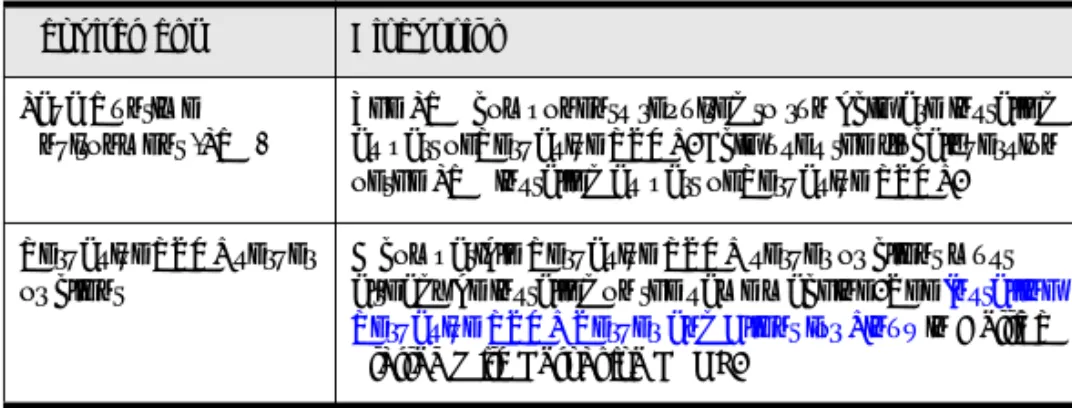
Table 6 Requirements for Running bcfg on Linux
Requirement Discussion
Java Runtime Environment (JRE)
The JRE components required to run bcfg are installed as part of Pervasive PSQL. Bcfg uses the “local” version of the JRE installed as part of Pervasive PSQL. Pervasive PSQL server
or client
A compatible Pervasive PSQL server or client must already be installed on the same machine. See Installing Pervasive PSQL Server and Client for Linux in Getting Started With Pervasive PSQL.
If you have met the requirements to run bcfg on Linux and still are having difficulty running the utility, refer to the following
troubleshooting guide.
Setting a
Configuration
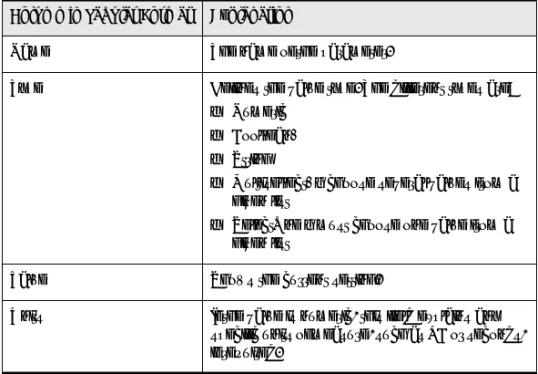
You can configure settings one at a time from the command line or by providing one or more settings in an input file.Tip A convenient way to create an input file is first to create an output file. You can then edit the output file and use the edited Table 7 Troubleshooting Guide for Running bcfg on Linux
Troubleshooting Condition Discussion
You receive the error
“java.lang.UnsatisfiedLinkError."
This error typically occurs if you try to start bcfg by double-clicking on the script file using a file browser application. Start bcfg from a command prompt.
This error can result if the LD_LIBRARY_PATH variable is not set. If you run bcfg as user “psql,” this variable is set in the profile for psql. You may also explicitly set the variable with the following command:
export
LD_LIBRARY_PATH=$LD_LIBRARY_PA TH:/usr/local/psql/lib
You receive the following error message:
"Unable to connect to database engine. Make sure the target machine is accessible and an engine is running on the target machine.”
The context of this error occurs if you attempt to administer the local server.
To administer the local server, you must be a member of the pvsw group or be the root user. See also Pervasive PSQL Account
Management on Linux in Getting Started With Pervasive PSQL.
Configuration Through CLI Utility
If you configure a setting from the command line, bcfg prompts you to restart the database engines only if the setting requires a restart. See Ensuring Configuration Changes Take Effect for how to restart the engines.
Example Scenario: Configuring a Single Setting from the Command Line
Suppose that you want to turn on a configuration setting having to do with reconnecting a client to the server in the event of a network outage. You are not certain about the name of the configuration setting. Complete the following steps.
1 At a command prompt, type bcfg -H reconnect then press Enter.
The utility reports all settings that contain the string “reconnect”:
ID Setting Name
---29 Enable Auto Reconnect
148 Enable Auto Reconnect
149 Auto Reconnect Timeout
Two of the settings, 29 and 148, look like what you want, but which is which?
2 Type bcfg 29 then press Enter.
The utility reports the following for setting ID 29: =====================
3 Type bcfg 29 on then press Enter.
The utility informs you that system setting 29 has been updated.
4 If you want to verify that the setting is now “on,” type bcfg 29 then press Enter.
The utility reports the following for setting ID 29: =====================
ENABLE AUTO RECONNECT ===================== ID: 29
Value: On
Options: On Off Default Value: Off
Description: <Client setting> Specifies if the Client will attempt to reconnect to the Server in the event of a network outage. The reconnected Client will continue processing as if no errors were encountered. Note that the value is now set to “on.”
Editing an Input File
An input file must contain at least one complete record for one setting. If you create an input file from an output file and want to remove configuration settings, ensure that the remaining settings are complete records.
At a minimum, a complete record encompasses and ID and Value pair. However, to ensure clarity, it is recommended that you include the top line of the setting header through the setting’s description. For example, here is a suggested minimal record for Enable Auto Reconnect:
Configuration Through CLI Utility
Description: <Client setting> Specifies if the Client will attempt to reconnect to the Server in the event of a network outage. The reconnected Client will continue processing as if no errors were encountered. Other than limiting which setting records are included in the input file, the only other change allowed is to the Value assignments. The assignment can be whatever is specified by Options or by Range.
Command
Syntax
bcfg -I inputfile [-S server] [-U username] [-P password] [-E]
or
bcfg -O outputfile [-S server] [-U username] [-P password] [-E]
or
bcfg ID [value] [-S server] [-U username] [-P password]
or
bcfg -H <keyword | ''keyword with spaces''> [-S server] [-U username] [-P password]
Options
-I Required parameter if you provide an input file to the utility. inputfile A text file that contains one or more configuration setting
records for a specified server and the value assigned to each setting.