Tivoli
®Workload
Scheduler
for
Applications
User’s
Guide
Version8.4(RevisedJune2008)
Tivoli
®Workload
Scheduler
for
Applications
User’s
Guide
Version8.4(RevisedJune2008)
Note
Beforeusingthisinformationandtheproductitsupports,readtheinformationin“Notices”onpage317.
Thiseditionappliestoversion8,release4,FixPack1ofIBMTivoliWorkloadSchedulerforApplications(program number5698-WSE)andtoallsubsequentreleasesandmodificationsuntilotherwiseindicatedinneweditions. ThiseditionreplacesSC32-1278-04.
©CopyrightInternationalBusinessMachinesCorporation2003,2008.Allrightsreserved.
Contents
Figures
.
.
.
.
.
.
.
.
.
.
.
.
.
. vii
Tables
.
.
.
.
.
.
.
.
.
.
.
.
.
.
. ix
About
this
publication
.
.
.
.
.
.
.
. xi
Whatisnewinthisrelease . . . xi
Whatisnewinthispublication. . . xi
Whoshouldreadthispublication. . . xiii
Whatthispublicationcontains. . . xiii
Publications . . . xv
Accessibility . . . xv
Tivolitechnicaltraining . . . xvi
Supportinformation . . . xvi
Howtoreadsyntaxdiagrams . . . xvi
Part
1.
Common
installation
and
configuration
tasks
.
.
.
.
.
.
.
.
. 1
Chapter
1.
Product
overview
.
.
.
.
.
. 3
Chapter
2.
Installing,
upgrading,
and
uninstalling
IBM
Tivoli
Workload
Scheduler
for
Applications
.
.
.
.
.
. 5
Planninginstallation. . . 5
Supportedoperatingsystems . . . 5
Softwareprerequisites . . . 6
Installationprerequisites . . . 6
TheinstallationCDs. . . 8
SupportforInternetProtocolversion6 . . . . 9
Beforeinstalling . . . 9
Installing . . . 10
InstallingTivoliWorkloadSchedulerfor Applicationsusingthelaunchpad . . . 10
InstallingTivoliWorkloadSchedulerfor ApplicationsusingtheISMPinstallationwizard . 11
InstallingthelanguagepackusingtheISMP installationwizard . . . 13
InstallingTivoliWorkloadSchedulerfor Applicationsusingthesilentinstallation. . . . 14
Installingthelanguagepackusingsilent installation . . . 17
InstallingIBMTivoliWorkloadSchedulerfor ApplicationsusingTivoliSoftwareDistribution, version4.1orTivoliConfigurationManager, version4.2orlater . . . 19
InstallingIBMTivoliWorkloadSchedulerfor Applicationsusingtwsappsinst. . . 26
Installingthelanguagepackusingtwsappsinst 28 Completingtheinstallationoftheaccessmethod forOracleE-BusinessSuite . . . 31
Upgrading. . . 33
UpgradingTivoliWorkloadSchedulerfor ApplicationsusingtheISMPinstallationwizard . 33 UpgradingTivoliWorkloadSchedulerfor Applicationsusingthesilentinstallation. . . . 34
UpgradingTivoliWorkloadSchedulerfor ApplicationsusingTivoliConfigurationManager. 34 UpgradingTivoliWorkloadSchedulerfor Applicationsusingtwsappsinst. . . 35
Uninstalling . . . 36
Beforeuninstalling . . . 37
UninstallingthelanguagepackusingISMP wizard . . . 38
UninstallingTivoliWorkloadSchedulerfor ApplicationsusingISMPwizard . . . 38
UninstallingTivoliWorkloadSchedulerfor ApplicationsoritslanguagepackusingTivoli ConfigurationManager . . . 39
Uninstallingthelanguagepackusingsilent uninstallation. . . 39
UninstallingTivoliWorkloadSchedulerfor Applicationsusingsilentuninstallation . . . . 40
UninstallingIBMTivoliWorkloadSchedulerfor Applicationsanditslanguagepackusing twsappsinst . . . 40
Completingtheremovaloftheaccessmethodfor OracleE-BusinessSuite . . . 41
Chapter
3.
Setting
options
with
the
Option
Editor
.
.
.
.
.
.
.
.
.
.
.
. 43
Optionvalueinheritance . . . 44
UsingtheOptionEditor . . . 44
Modifyinglocalorglobaloptionsfiles . . . . 46
Creatinglocaloptionsfiles . . . 46
Chapter
4.
Defining
extended
agent
workstations
.
.
.
.
.
.
.
.
.
.
.
. 47
CreatingaworkstationusingtheJobScheduling Console. . . 47
Creatingaworkstationusingthecommandline . . 50
Definingworkstationsforend-to-endscheduling . . 51
CreatingtheCPURECstatement . . . 51
DefiningtheworkstationwithISPF . . . 52
Chapter
5.
Defining
extended
agent
jobs
.
.
.
.
.
.
.
.
.
.
.
.
.
.
.
. 53
DefiningjobswiththeJobSchedulingConsole . . 53
Generalpage . . . 54
Taskpage . . . 56
DefiningjobsusingtheTivoliWorkloadScheduler commandline . . . 57
Definingjobsforend-to-endscheduling . . . 57
Submittingextendedagentjobs. . . 58
Part
2.
Oracle
E-Business
Suite
access
method
.
.
.
.
.
.
.
.
.
. 59
||
| ||
Chapter
6.
Introducing
Tivoli
Workload
Scheduler
for
Applications
for
Oracle
E-Business
Suite
.
.
.
.
.
.
.
.
.
. 61
Softwarerequirements. . . 61
Features . . . 61
Rolesandresponsibilities. . . 61
Interfacesoftware . . . 62
Chapter
7.
Configuring
the
Oracle
E-Business
Suite
access
method
.
.
. 63
Definingtheconfigurationoptions. . . 63
Examples . . . 65
EncryptingOracleE-BusinessSuiteuser passwords. . . 66
Chapter
8.
Defining
Oracle
E-Business
Suite
jobs
.
.
.
.
.
.
.
.
.
.
.
.
. 67
DefiningjobsinOracleE-BusinessSuite. . . 67
Runningasinglejobconcurrently . . . 67
DefiningOracleE-BusinessSuitejobsinTivoli WorkloadScheduler . . . 67
TaskstringparametersforOracleE-Business Suitejobs . . . 67
TivoliWorkloadSchedulerandOracleE-Business Suitejobstates . . . 69
Part
3.
PeopleSoft
access
method
71
Chapter
9.
Introducing
Tivoli
Workload
Scheduler
for
Applications
for
PeopleSoft
.
.
.
.
.
.
.
.
.
.
.
.
. 73
Softwarerequirements. . . 73
Features . . . 73
Rolesandresponsibilities. . . 73
SchedulingprocessforthePeopleSoftextended agent . . . 74
PeopleSoftjobtrackinginTivoliWorkload Scheduler . . . 74
Security . . . 74
Chapter
10.
Configuring
the
PeopleSoft
access
method
.
.
.
.
.
.
.
.
.
.
. 75
Definingtheconfigurationoptions. . . 75
PeopleSoftoptionsfileexample. . . 77
ConnectingtomorethanonePeopleSoft applicationserver . . . 77
CreatingabatchprocessingIDinPeopleSoft . . . 78
ConfiguringtheITWS_PSXAPeopleSoftproject . . 78
UploadingthePeopleSoftproject . . . 79
Chapter
11.
Defining
PeopleSoft
jobs
83
DefiningPeoplesoftjobsinTivoliWorkload Scheduler . . . 83TaskstringparametersforPeopleSoftjobs . . . 83
Configuringthejobstatusmappingpolicy . . . . 85
Part
4.
SAP
R/3
access
method
.
.
. 87
Chapter
12.
Introducing
Tivoli
Workload
Scheduler
for
Applications
for
SAP
.
.
.
.
.
.
.
.
.
.
.
.
.
. 89
Softwarerequirements. . . 89
Features . . . 90
SchedulingprocessfortheSAPextendedagent . . 91
Rolesandresponsibilities. . . 91
Unicodesupport. . . 93
WhatisUnicode. . . 93
Unicodesupportonr3batch . . . 93
Chapter
13.
Configuring
the
SAP
R/3
environment
.
.
.
.
.
.
.
.
.
.
.
. 95
Overview . . . 95
CreatingtheIBMTivoliWorkloadSchedulerRFC user . . . 95
CreatingtheauthorizationprofilefortheTivoli WorkloadScheduleruser . . . 95
UsingTransactionSU02andmanuallycreating theprofile . . . 96
UsingTransactionPFCG(ProfileGenerator) . . 96
Copyingthecorrectionandtransportfiles . . . . 98
ImportingABAP/4functionmodulesintoSAPR/3 98 ChangingtheTivoliWorkloadSchedulerRFCuser IDpassword . . . 101
Migratingfrompreviousversions . . . 101
Printparameterandjobclassissues. . . 102
Chapter
14.
Configuring
the
SAP
R/3
access
method
.
.
.
.
.
.
.
.
.
.
. 103
Definingtheconfigurationoptions . . . 103
Definingtheglobaloptions. . . 103
Definingthelocaloptions . . . 105
Definingthecommonoptions . . . 106
SAPR/3optionfileexample . . . 111
EncryptingSAPR/3userpasswords . . . . 111
Configurationoptionsusage . . . 111
ConnectingtotheSAPsystem. . . 112
Connectingtoaspecificapplicationserver . . 112
Connectingtoalogongroup . . . 113
Chapter
15.
Managing
the
running
of
SAP
jobs
.
.
.
.
.
.
.
.
.
.
.
.
. 115
DefiningajobthatrunsanSAPjob . . . 115
Generalpage . . . 116
Taskpage. . . 118
ManagingSAPvariantsusingtheJob SchedulingConsole . . . 126
EditingastandardSAPjob. . . 128
TaskstringtodefineSAPjobs. . . 129
RerunninganSAPjob . . . 137
RerunningastandardSAPjob. . . 137
Rerunningaprocesschainjob. . . 138
Chapter
16.
Managing
SAP
jobs
.
.
. 141
DisplayingdetailsaboutastandardSAPjob . . . 141
Displayingdetailsaboutaprocesschainjob . . . 142
VerifyingthestatusofastandardSAPjob. . . . 144
|| || 1 1 | | 1 1 1 1
DeletingastandardSAPjobfromtheSAP
database . . . 144
BalancingSAPworkloadusingservergroups . . 144
MappingbetweenTivoliWorkloadSchedulerand SAPjobstates . . . 145
RaisinganSAPevent. . . 145
KillinganSAPjobinstance. . . 147
Chapter
17.
Defining
SAP
jobs
dynamically
.
.
.
.
.
.
.
.
.
.
.
. 149
TaskstringtodefineSAPjobsdynamically . . . 150
DefiningattributesforABAPsteps . . . 156
Definingattributesforexternalprogramsand externalcommandssteps . . . 159
Specifyingjobparametersusingvariable substitution . . . 160
DynamicallydefiningandupdatingSAPjobs: someexamples. . . 160
Chapter
18.
Using
Business
Information
Warehouse
.
.
.
.
.
.
. 163
BusinessWarehousecomponents . . . 163
DefininguserauthorizationstomanageSAPR/3 BusinessWarehouseInfoPackagesandprocess chains . . . 164
ManagingSAPR/3BusinessWarehouse InfoPackagesandprocesschains . . . 164
CreatingaTivoliWorkloadSchedulerjobthat containsInfoPackagesorprocesschains . . . 164
DisplayingdetailsaboutBusinessWarehouse InfoPackages . . . 169
TaskstringtodefineBusinessWarehouse InfoPackagesandprocesschains . . . 169
Chapter
19.
Using
the
BDC
Wait
option
.
.
.
.
.
.
.
.
.
.
.
.
.
. 173
Chapter
20.
Job
interception
and
parent-child
features
.
.
.
.
.
.
.
. 175
Jobinterception . . . 175
Implementingjobinterception. . . 175
Theparent-childfeature. . . 180
Chapter
21.
Exporting
SAP
R/3
factory
calendars
.
.
.
.
.
.
.
.
.
.
.
.
. 181
Businessscenario . . . 181
Usingther3batchexportfunction . . . 181
Chapter
22.
Defining
internetwork
dependencies
and
event
rules
based
on
SAP
R/3
events
.
.
.
.
.
.
.
.
. 185
DefininginternetworkdependenciesbasedonSAP events. . . 185
CommittingSAPeventsbyanexternaltask . . 187
DefininginternetworkdependenciesbasedonSAP eventswiththeJobSchedulingConsole . . . . 188
DefiningeventrulesbasedonSAPevents. . . . 189
Prerequisitetodefiningeventrulesbasedon SAP . . . 190
MonitoringSAPevents . . . 190
SettingafilterforSAPeventsinthesecurityfile 192
Chapter
23.
Defining
event
rules
based
on
IDoc
records
.
.
.
.
.
.
. 195
Businessscenario . . . 195
CreatingeventrulesbasedonIDocs. . . 196
Eventsmatchingcriteria. . . 196
ExamplesofeventrulesbasedonIDocs . . . . 201
Chapter
24.
National
Language
support
.
.
.
.
.
.
.
.
.
.
.
.
.
. 203
SettingNationalLanguagesupportoptions . . . 203
SAPR/3supportedcodepages . . . 204
Supportedconfigurationsandlimitations . . . . 204
Part
5.
z/OS
access
method
.
.
.
. 205
Chapter
25.
Introducing
Tivoli
Workload
Scheduler
for
Applications
for
z/OS
.
.
.
.
.
.
.
.
.
.
.
.
.
. 207
Softwarerequirements . . . 207
Features . . . 207
Rolesandresponsibilities . . . 208
Installing,configuring,anduninstallingthez/OS gateway . . . 208
Installing. . . 208
Configuring . . . 210
Uninstalling . . . 211
Additionalinformation . . . 212
Gatewaysoftwarecomponents . . . 212
IEFU84Exit . . . 212
Security . . . 212
ConsoleSecurity . . . 213
Startup . . . 213
SYSTSINvariables. . . 213
z/OSgatewayversion . . . 217
Downloadingz/OSgatewayfixesfromFTP . . . 218
Locatingproductsupport . . . 220
Chapter
26.
Configuring
the
z/OS
access
method
.
.
.
.
.
.
.
.
.
.
. 221
Definingtheconfigurationoptions . . . 221
Definingjobsinz/OS . . . 222
Definingz/OSjobsinTivoliWorkloadScheduler 223 Taskdefinitionsyntaxforz/OSjobsscheduled withTivoliWorkloadScheduler . . . 223
Taskdefinitionsyntaxforotherz/OSjobs. . . 225
OperationalconsiderationsfortheEEWSERVE gatewaytask . . . 226
File(OPENS)dependenciessyntaxonz/OSfiles 227
Chapter
27.
Reference
information
229
Technicaloverview . . . 229ManagingJESjobs. . . 229
ManagingCA-7jobs . . . 231
|| 1 1 | || || || | | || | || || | || || | | | | | | | 1 1 1 1 1 1 1 1 1 1 1 | |
ManagingTivoliWorkloadSchedulerforz/OS
jobs . . . 232
Checkingforfilesonz/OS . . . 234
Timingconsiderations . . . 234
Diagnosticinformation . . . 235
Troubleshooting . . . 235
Part
6.
Common
serviceability
.
.
. 237
Chapter
28.
The
return
code
mapping
feature
.
.
.
.
.
.
.
.
.
.
.
.
.
. 239
Creatingareturncodemappingfile. . . 239
Syntax. . . 239
Examples. . . 240
Considerations . . . 240
Returncodemappingforpsagentand MCMAGENT . . . 241
Examples. . . 242
Returncodemappingforr3batch. . . 242
Returncodemappingfilenamesforr3batch . . 244
Mappingreturncodesforinterceptedjobs. . . 245
Chapter
29.
Configuring
the
tracing
utility
.
.
.
.
.
.
.
.
.
.
.
.
.
.
. 247
Customizingthe.propertiesfile . . . 247
ConfigurationfileexamplefortheSAPaccess method . . . 249
Chapter
30.
Troubleshooting
.
.
.
.
. 251
Knowninstallationproblems . . . 251
Otherknownproblems . . . 257
TroubleshootingtheSAPR/3connection . . . . 261
Chapter
31.
Messages
.
.
.
.
.
.
.
. 263
IBMTivolimessageformat . . . 263
Messagenumber . . . 263
Messagetext . . . 265
Messagehelp . . . 265
twsappsinstinstallationmessages-AI . . . 266
z/OSgatewaymessages-I. . . 270
PeopleSoftaccessmethodmessages-N . . . . 276
SAPR/3accessmethodmessages-O . . . 278
Oracleaccessmethodmessages-P . . . 313
PeopleSoftaccessmethodmessages-HTWGT . . 314
Notices
.
.
.
.
.
.
.
.
.
.
.
.
.
. 317
Noticesandinformation. . . 318
Libmsg . . . 319
ApacheJakartaORO . . . 319
ISMPInstaller(InstallShield10.50x) . . . 320
JXMLCODE. . . 320
InfoZipCODE . . . 321
HSQLCode . . . 322
HP-UXRuntimeEnvironment,fortheJava(tm) 2 Platform . . . 323
Trademarks . . . 327
Figures
1. Howextendedagentswork . . . 4
2. Welcomepage. . . 11
3. TheOptionEditor . . . 45
4. DefiningaworkstationusingtheJob SchedulingConsole . . . 48
5. DefininganExtendedAgentworkstation 52 6. TheGeneralPageoftheProperties-Job Definitionpanel . . . 54
7. TheTaskPageoftheProperties-Job Definitionpanel . . . 56
8. DefininganExtendedAgentjobforend-to-end scheduling . . . 58
9. TheGeneralpageoftheProperties-Job Definitionpanel. . . 116
10. TheTaskpageoftheProperties-Job Definitionpanel. . . 118
11. TheSAPJobDefinitionpanel . . . 121
12. TheStepspageoftheSAPJobDefinition panel . . . 123
13. ThePrintParameterFlagspanel . . . 125
14. TheVariantListpanel . . . 126
15. TheVariantInformationpageoftheVariant Listpanel. . . 127
16. TivoliDynamicWorkloadConsole-Tableof results . . . 142
17. TivoliDynamicWorkloadConsole-Detailsof aprocesschainjob. . . 143
18. TheRaiseEventpanel . . . 146
19. TheGeneralpageoftheProperties-Job Definitionpanel. . . 165
20. TheSAPPickListpanel . . . 167
21. TheSAPPickListpanel . . . 168
22. TheTableCriteriapanel . . . 177
23. TheTableCriteriapanel . . . 178
24. TheTableCriteriapanel . . . 179
25. ManaginghighpriorityIDocsoverview 195
|| 1 1 1 1 1 1 | | | | 1 1
Tables
1. Supportedoperatingsystems . . . 5
2. Diskspacerequirementsinmegabytes . . . . 7
3. ISMPtemporaryspacerequirementsin megabytes . . . 7
4. InstallationCDsforIBMTivoliWorkload SchedulerforApplications . . . 8
5. Optionsrequiredforsilentinstallation . . . 15
6. Optionsforthelanguagepacksilent installation. . . 18
7. ListofsoftwarepackageblockstoinstallIBM TivoliWorkloadSchedulerforApplications . . 19
8. SoftwarepackageblocktoinstallIBMTivoli WorkloadSchedulerforApplicationslanguage pack . . . 22
9. OptionstoinstallTivoliWorkloadScheduler forApplicationsusingSPBs . . . 22
10. Optionstoinstallthelanguagepacksusing SPBs . . . 23
11. twsappsinstparameterstoinstallIBMTivoli WorkloadSchedulerforApplications . . . . 27
12. twsappsinstparameterstoinstallIBMTivoli WorkloadSchedulerforApplicationslanguage pack . . . 29
13. Optionsrequiredforsilentupgrade . . . . 34
14. twsappsinstparameterstoupgradeIBMTivoli WorkloadSchedulerforApplications . . . . 35
15. twsappsinstparameterstouninstallIBMTivoli WorkloadSchedulerforApplications . . . . 41
16. HowtocompletethefieldsoftheProperties -WorkstationinDatabasepanel . . . 49
17. RolesandresponsibilitiesinTivoliWorkload SchedulerforApplicationsforOracle E-BusinessSuite . . . 61
18. MCMAGENTaccessmethodoptions . . . . 63
19. TaskstringparametersforOracleE-Business Suitejobs . . . 68
20. TivoliWorkloadSchedulerandOracle E-BusinessSuitejobstates . . . 69
21. RolesandresponsibilitiesinTivoliWorkload SchedulerforApplicationsforPeopleSoft . . 73
22. Psagentaccessmethodoptions . . . 75
23. TaskstringparametersforPeopleSoftjobs 84 24. Relationshipbetweentherunstatus,the distributionstatus,andtheTivoliWorkload Schedulerjobstatus. . . 85
25. Relationshipbetweentherunstatusandthe TivoliWorkloadSchedulerjobstatus . . . . 86
26. SAPR/3supportpackages . . . 89
27. SAPBusinessWarehousesupportpackages 90 28. TivoliWorkloadSchedulerforApplicationsfor SAPfeatures . . . 90
29. RolesandresponsibilitiesinTivoliWorkload SchedulerforApplicationsforSAP . . . . 91
30. ABAP/4modules . . . 100
31. r3batchglobalconfigurationoptions . . . . 103
33. r3batchcommonconfigurationoptions 106 34. Placeholdersandcountersforextended variants . . . 127
35. TaskstringparametersforSAPjobs . . . . 131
36. Actionsperformedwhenyourerunaprocess chainjob . . . 138
37. StatustransitionsinTivoliWorkload Scheduler(internalstatus)andthe correspondingSAPR/3status . . . 145
38. TaskstringparametersforSAPjobs(dynamic definition) . . . 152
39. SupportedattributesforABAPstepdefinition 156 40. Supportedattributesforexternalprograms andexternalcommandsstepdefinition . . . 159
41. TaskstringparametersforSAPR/3jobs 170 42. Placeholdersforjobinterceptiontemplate files. . . 179
43. ParameterstodefineanSAPinternetwork dependency . . . 186
44. Internetworkdependencydefinitionand possibleresolution. . . 187
45. HistorytableoftheSAPeventsraised 191 46. SAPeventmatchingwiththeeventrule defined . . . 191
47. HistorytableoftheSAPeventsraised 192 48. SAPeventsmatchingwiththeeventrule defined . . . 192
49. TivoliWorkloadSchedulerfieldsusedto defineeventrules . . . 196
50. TivoliWorkloadSchedulerfieldsusedto definecorrelationrules . . . 197
51. ParametersofIDOCEventGeneratedevent type. . . 198
52. StandardoutboundIDocstatuses . . . 199
53. StandardinboundIDocstatuses . . . 200
54. SAPR/3supportedcodepages . . . 204
55. Additionalz/OSsoftwarerequirements 207 56. RolesandresponsibilitiesinTivoliWorkload SchedulerforApplicationsforz/OS . . . . 208
57. SYSTSINvariables . . . 213
58. Filecharacteristicsforobtainingthegateway fixpackfilesbyFTP . . . 218
59. FilecharacteristicsfortheLOADLIBfileafter receivingit . . . 219
60. FilecharacteristicsfortheSAMPLIBfileafter receivingit . . . 220
61. TivoliWorkloadSchedulerforApplications forz/OSaccessmethodoptions . . . 222
62. JESjobstateswithrespecttoTivoliWorkload Scheduler. . . 229
63. CA-7jobstateswithrespecttoTivoli WorkloadScheduler . . . 231
64. TivoliWorkloadSchedulerforz/OS operationstateswithrespecttoTivoli WorkloadScheduler . . . 233 || | | || | || 1 1 1 1 1 | || 1 1 1 | | | | | | | | | | | | | | | | | | | 1 1 1 1 1 1 1 1 1 1 1 1 1 | | |
65. TivoliWorkloadSchedulerforz/OS
operationoccurrencestateswithrespectto TivoliWorkloadScheduler . . . 233
66. JobstatesandreturncodesfortheOracle
E-BusinessSuiteaccessmethod . . . 241
67. JobstatesandreturncodesforthePeopleSoft
accessmethod . . . 241
68. Knowninstallationproblems . . . 251
69. Miscellaneoustroubleshootingitems. . . . 257
70. TivoliWorkloadSchedulerforApplications
messages-componentcodes . . . 263
About
this
publication
TheIBM TivoliWorkloadScheduler forApplications:User’sGuideprovidesinformation abouthow toinstall,setup,andusetheIBM®Tivoli®Workload Scheduleraccess methodsthatrunand controljobs ofthefollowingapplications:
v OracleE-BusinessSuite v PeopleSoft
v SAPR/3 v z/OS
®
What
is
new
in
this
release
For informationaboutthenew andchangedfunctionsinthisrelease,seeTivoli WorkloadSchedulingSuite:Overview.
For informationabouttheAPARsthatthisrelease addresses,seetheIBM Tivoli Workload SchedulerforApplicationsDownloadDocumentat http://
www.ibm.com/support/docview.wss?rs=673&uid=swg24017449.
What
is
new
in
this
publication
Thissectiondescribes whathaschangedinthispublicationsince version8.3fix pack 1.
Note: Changedoraddedtextismarked intheleftmarginasfollows:
v By averticalbar, ifthetextwas changedoraddedwithrespecttothe previousversion.
v By thenumber ofafixpack,if thechanged oraddedtextappliesonly after aparticularfixpackisinstalled.Forexample,1torefertoFix Pack 1,and soon.
Part 1.Commoninstallationandconfigurationtasks
v The followingoperatingsystemsarenolongersupported: – CompaqTru64
– IBM SequentDynix – SGI IRIX
v InformationaboutsupportingInternetProtocolversion6 isprovidedin “Support forInternetProtocolversion6”onpage9.
v Informationabouthowtoinstall theproductusingthelaunchpadis provided in“InstallingTivoliWorkloadSchedulerforApplicationsusing thelaunchpad”onpage10.
v The proceduretocompletetheinstallation oftheOracle E-BusinessSuite accessmethodhasbeenmodified.For details,see“Completingthe installation oftheaccessmethodforOracle E-BusinessSuite”onpage 31.
Part 2.OracleE-BusinessSuiteaccessmethod
v Tohelp youidentifytheusers'rolesand tasks,atablethatlinksroles and responsibilitiesisprovidedinTable17onpage61.
Part 3.PeopleSoftaccessmethod
1 1 1 1 1 1 | | | | | | | | | | | | | | |
v Tohelp youidentifytheusers'rolesand tasks,atablethatlinksroles andresponsibilitiesisprovidedinTable21onpage73.
Part 4.SAPR/3accessmethod
v TivoliWorkloadSchedulerforApplications8.4iscertifiedbySAPfor thefollowingtwoSAPinterfaces:
BW-SCH3.0-SchedulingforSAPBW3.0
CertificationCategory:BusinessInformationWarehouse,Job Scheduling
Qualification:CertifiedforSAPNetWeaver
BW-XBP6.10-BackgroundProcessing,JobScheduling 6.10(Version 2.0)
CertificationCategory:BackgroundProcessing, JobScheduling, Scheduling,SystemManagement
Qualification:CertifiedforSAPNetWeaver
Note: Fordetailedinformation,seetheSAPonline productpartner directory.
v Tohelp youidentifytheusers'rolesand tasks,atablethatlinksroles andresponsibilitiesisprovidedinTable29onpage91.
v YoucancontrolhowTivoliWorkloadSchedulersetsthecompletion statusof ajobrunningBDCsessions,according toanyBDCprocessing failure.For details,seethebdc_job_status_failedoptiondescribed in “Definingthecommonoptions”onpage106.
v YoucandeterminetheactionperformedbyTivoliWorkloadScheduler whenyoureruna jobthatsubmitsa processchain.Fordetails,referto “Rerunningaprocess chainjob” onpage138.
v TodisplaydetailsaboutanSAPprocess chainthatyouranasaTivoli WorkloadSchedulerjob,see“Displayingdetailsaboutaprocess chain job”onpage142.
v YoucanassignaSAPR/3jobtoaservergroup,forbatchprocessing. Fordetails,see“BalancingSAPworkloadusingservergroups”onpage 144.
v YoucannowexportSAPR/3factorycalendars intoanoutputfile compatiblewiththeTivoliWorkloadSchedulercomposeranduseitto createorreplaceTivoliWorkloadSchedulercalendars.For details,see Chapter21,“ExportingSAPR/3factory calendars,”onpage181. v Todefineaninternetworkdependencyoreventrule basedonSAPR/3
events,andtomonitor andfilterSAPR/3events, refertoChapter22, “DefininginternetworkdependenciesandeventrulesbasedonSAPR/3 events,”onpage185.
v Youcanmonitor IDocrecordsandforwardeventstoTivoliWorkload Scheduler,toperform aspecificaction.For detailedinformation,referto Chapter23,“Definingevent rulesbased onIDocrecords,”onpage195. Part 3.z/OSaccessmethod
v Tohelp youidentifytheusers'rolesand tasks,atablethatlinksroles andresponsibilitiesisprovidedinTable56onpage208.
What
is
new
| | 1 1 1 1 1 1 1 1 1 1 1 1 1 | | 1 1 1 1 1 1 1 1 1 1 | | | | | | | | | | | 1 1 1 | |Who
should
read
this
publication
Thispublicationisintendedforjobschedulerswhointendtorunandcontroljobs of theapplicationswithIBM TivoliWorkloadScheduler.Usersofthispublication shouldhavesomeknowledgeof:
v IBMTivoliWorkloadScheduler v TivoliJobSchedulingConsole v Thespecificapplication environment
What
this
publication
contains
Thispublicationcontains thefollowingsections: Part 1.Commoninstallationandconfigurationtasks Part 1containsthefollowingchapters:
v Chapter1,“Productoverview,” onpage3
describesthebasicfunctionsofanextendedagent.
v Chapter2,“Installing,upgrading,anduninstallingIBMTivoliWorkload SchedulerforApplications,”onpage5
describesthevariouswaysofinstalling,upgrading,anduninstallingtheproduct anditslanguagepack, togetherwiththeoperatingsystemsit supportsand its prerequisites.
v Chapter3,“SettingoptionswiththeOptionEditor,”onpage43 describeshowtousetheOptionEditor.
v Chapter4,“Definingextendedagentworkstations,”onpage47
describeshowtodefineextendedagentworkstations foralltheaccessmethods. v Chapter5,“Definingextendedagentjobs,”onpage53
describeshowtodefineextendedagentjobs foralltheaccessmethods. Part 2.OracleE-BusinessSuiteaccessmethod
Part 2containsthefollowingchapters:
v Chapter6,“IntroducingTivoliWorkload SchedulerforApplicationsforOracle E-BusinessSuite,”onpage61
describessoftwarerequirements, features,users'rolesandtasks,andinterface softwarespecificallyfortheOracleE-BusinessSuite accessmethod.
v Chapter7,“ConfiguringtheOracleE-BusinessSuiteaccessmethod,”onpage63 describeshowtoconfiguretheoptionsusedbytheOracleE-BusinessSuite accessmethod.
v Chapter8,“DefiningOracleE-BusinessSuitejobs,”onpage67
describeshowtodefineTivoliWorkloadSchedulerjobsspecificallyforthe OracleE-BusinessSuite accessmethod.
Part 3.PeopleSoftaccessmethod Part 3containsthefollowingchapters:
v Chapter9,“IntroducingTivoliWorkload SchedulerforApplicationsfor PeopleSoft,”onpage73
describessoftwarerequirements, features,users'rolesandtasks,andother
v Chapter10,“ConfiguringthePeopleSoftaccessmethod,”onpage75
describeshowtoconfiguretheoptionsusedbythePeopleSoftaccessmethod. v Chapter11,“DefiningPeopleSoftjobs,”onpage83
describeshowtodefineTivoliWorkloadSchedulerjobsspecificallyforthe PeopleSoftaccessmethod.
Part 4.SAPR/3accessmethod Part 4contains thefollowingchapters:
v Chapter12,“IntroducingTivoliWorkloadSchedulerforApplicationsforSAP,” onpage89
describessoftwarerequirements, features,users'rolesandtasks,andUnicode supportfortheSAPR/3accessmethod.
v Chapter13,“ConfiguringtheSAPR/3environment,” onpage95 describeshowtoconfigurethis accessmethod forusewith SAPR/3. v Chapter14,“ConfiguringtheSAPR/3accessmethod,”onpage103
describeshowtoconfiguretheoptionsusedbythisaccessmethod. v Chapter15,“ManagingtherunningofSAPjobs,”onpage115
describeshowtodefineTivoliWorkloadSchedulerjobsspecificallyfortheSAP R/3accessmethod.
v Chapter16,“ManagingSAPjobs,”onpage141
describeshowyoucanworkwithSAPR/3jobs,forexampledisplayingdetails abouta joborbalancingtheworkloadamongservers.
v Chapter17,“DefiningSAPjobsdynamically,”onpage149
describeshowtocreateand submitSAPR/3jobsinstantlyintheend-to-end schedulingenvironment,withoutcreatingorreferencingpre-definedjob templates.
v Chapter18,“UsingBusinessInformationWarehouse,”onpage163 providesinformationonhowtousetheaccessmethodwith theBusiness InformationWarehouse.
v Chapter19,“UsingtheBDC Waitoption,”onpage173 providesdetailsonBDC waitoption.
v Chapter20,“Jobinterceptionand parent-childfeatures,”onpage175 describestheJobinterceptionandParent-childfeaturesofXBP2.0. v Chapter21,“ExportingSAPR/3factory calendars,”onpage181
describeshowtoexportSAPR/3factorycalendars sothattheycanbeprocessed byTivoliWorkloadScheduler,andhow toaddtheexportedcalendardefinitions totheTivoliWorkload Schedulerdatabase.
v Chapter22,“Defininginternetworkdependenciesandevent rulesbased onSAP R/3events,”onpage185
describeshowtodefineinternetworkdependenciesand eventrulesforTivoli WorkloadSchedulerbasedonSAPR/3events.
v Chapter23,“DefiningeventrulesbasedonIDocrecords,”onpage195
describeshowtodefineeventrulesforTivoliWorkloadSchedulerbased onIDoc records.
v Chapter24,“NationalLanguagesupport,”onpage203 describesnationallanguagesupportforthis accessmethod. Part 5.z/OSaccessmethod
What
this
publication
contains
1 1 1 | | | | | | | | 1 1 1
Part 5containsthefollowingchapters:
v Chapter25,“IntroducingTivoliWorkloadSchedulerforApplicationsfor z/OS,” onpage207
providessoftwarerequirements,features, users'rolesand tasksforthez/OS accessmethod.Italsodescribes howtoinstall thegateway componentonz/OS. v Chapter26,“Configuringthez/OS accessmethod,”onpage221
describeshowtoconfiguretheoptionsusedbythisaccessmethodandprovides method-specificinformationondefiningjobs.
v Chapter27,“Referenceinformation,”onpage229
providesreferenceinformationforoperatingwith thesupportedjobschedulers andlistsgatewaymessages.
Part 6.Commonserviceability
Part 6containsthefollowingchapters:
v Chapter28,“Thereturn codemappingfeature,”onpage239 describeshowtousethereturncodemappingutility. v Chapter29,“Configuringthetracing utility,”onpage247
describeshowtoconfigurethetracingutility. v Chapter30,“Troubleshooting,”onpage251
providessomegeneraltroubleshootinginformation. v Chapter31,“Messages,”onpage263
providesyouwith helponerrorandwarningmessagesissued by: – twsappsinst
– z/OSgateway
– PeopleSoftaccessmethod – SAPR/3accessmethod
– Oracle E-BusinessSuiteaccessmethod
Publications
FulldetailsofTivoliWorkloadSchedulerpublicationscanbefoundinTivoli WorkloadSchedulingSuite:Publications.Thisdocumentalsocontainsinformation abouttheconventionsusedinthepublications.
Aglossaryof termsusedintheproductcanbefoundinTivoliWorkloadScheduling Suite: Glossary.
Bothofthese areintheInformationCenter asseparatepublications.
Accessibility
Accessibilityfeatureshelpuserswitha physicaldisability,suchasrestricted mobilityorlimited vision,tousesoftwareproductssuccessfully.Withthisproduct, youcanuseassistivetechnologiestohearand navigatetheinterface.Youcanalso usethekeyboardinsteadofthemousetooperateallfeaturesofthegraphicaluser interface.
For fullinformationwith respecttotheJob SchedulingConsole,seethe
AccessibilityAppendixintheTivoliWorkloadScheduler:JobSchedulingConsoleUser’s Guide.
For fullinformationwith respecttotheTivoli DynamicWorkloadConsole,seethe AccessibilityAppendixintheTivoliWorkloadScheduler:User'sGuideand Reference.
Tivoli
technical
training
For Tivolitechnicaltraininginformation,refertothefollowingIBMTivoli EducationWebsite:
http://www.ibm.com/software/tivoli/education
Support
information
Ifyouhaveaproblemwithyour IBMsoftware,youwanttoresolveit quickly.IBM provides thefollowingwaysforyoutoobtainthesupportyouneed:
v Searchingknowledgebases:Youcansearchacrossalargecollection ofknown problemsandworkarounds,Technotes, andotherinformation.
v Obtainingfixes: Youcanlocatethelatestfixesthatarealreadyavailableforyour product.
v ContactingIBM SoftwareSupport:Ifyoustill cannotsolve yourproblem,and youneedtoworkwith someonefromIBM,youcanusea varietyofwaysto contactIBMSoftwareSupport.
For moreinformationaboutthesethreewaysofresolvingproblems,seethe AppendixaboutsupportinformationinTivoliWorkloadScheduler:Troubleshooting Guide.
How
to
read
syntax
diagrams
Throughoutthis publication,syntaxisdescribedindiagramsliketheoneshown here, whichdescribestheSRSTATcommand:
SRSTAT ' resource name '
OPCA
SUBSYS( subsystem name )
MSTR KEEP AVAIL( RESET ) NO YES KEEP DEVIATION( amount ) RESET KEEP QUANTITY( amount ) RESET YES CREATE( NO ) 0
TRACE( trace level )
The symbolshavethese meanings: ─────
Thestatementbeginshere.
Accessibility
──────
Thestatementiscontinuedonthenext line. ──────
Thestatementiscontinuedfromapreviousline. ─────
Thestatementendshere.
Readthesyntaxdiagrams fromlefttorightand fromtoptobottom,followingthe pathof theline.
Thesearetheconventionsusedinthediagrams:
v Requireditemsappearonthehorizontalline(mainpath):
STATEMENT required item
v Optionalitemsappearbelow themainpath:
STATEMENT
optional item
v Anarrowreturningtotheleftabovetheitemindicatesan itemthatyoucan repeat.Ifaseparatorisrequiredbetweenitems,itisshown ontherepeatarrow.
STATEMENT
,
repeatable item
v Ifyoucanchoosefromtwoormoreitems,theyappearverticallyinastack. – Ifyoumustchooseone oftheitems,oneitemofthestackappears onthe
mainpath:
STATEMENT required choice 1
required choice 2
– Ifchoosing oneoftheitemsisoptional,theentirestackappears belowthe mainpath:
STATEMENT
optional choice 1
optional choice 2
– Arepeatarrowaboveastackindicatesthatyoucanmakemorethanone choicefromthestackeditems:
STATEMENT , optional choice 1 optional choice 2 optional choice 3
Support
information
STATEMENT , required choice 1 required choice 2 required choice 3
v Parametersthatareabovethemainlinearedefaultparameters:
STATEMENT
default alternative
v Keywordsappearinuppercase(forexample,STATEMENT).
v Parenthesesand commasmustbe enteredaspartof thecommandsyntax,as shown.
v Forcomplexcommands,theitemattributesmight notfitononehorizontalline. Ifthatlinecannotbesplit,theattributesappearatthebottomof thesyntax diagram:
STATEMENT required choice 1
option 1 option 2 required choice 2 required choice 3 option 1 default
optional choice 1( alternative )
option 2
default
optional choice 2( alternative )
Chapter
1.
Product
overview
Extendedagents(XA)areusedtoextendthejobschedulingfunctionsofIBM TivoliWorkload Schedulertoothersystemsandapplications.An extendedagentis definedasaworkstationthathasahostandan accessmethod.
Thehost isa TivoliWorkloadSchedulerfault-tolerantagent(FTA)orstandard agent(SA).
Theaccessmethodisa programthatisrunbythehostingworkstationwhenever TivoliWorkload Schedulerneedstointeractwith theexternal systemeither through itscommandlineortheTivoliJob SchedulingConsole.TivoliWorkload SchedulerforApplicationsincludesthefollowingaccessmethods:
v OracleE-BusinessSuite (MCMAGENT) v PeopleSoft(psagent)
v SAPR/3(r3batch)
v z/OS(mvsca7,mvsjes,andmvsopc)
Tolaunchand monitorajobonanextended agent,thehostrunstheaccess method,passingitjobdetailsascommandlineoptions.Theaccessmethod communicateswith theexternal systemtolaunchthejobandreturnsthestatusof thejob.
An extendedagentworkstationisalogicalentityrelatedtoanaccessmethod hosted bythephysicalTivoliWorkload Schedulerworkstation(a fault-tolerant agentorstandardagent).Morethanoneextendedagentworkstationcanbe hosted bythesameTivoliWorkloadSchedulerworkstationandrely onthesameaccess method.Theextended agentisdefinedin astandardTivoliWorkloadScheduler workstationdefinition,whichgivestheextendedagentanameandidentifiesthe accessmethod.
Figure1onpage4 showshowtheseelementsfit togetherinthecaseofa typical extended agentconfiguration.
| | | | | | |
Tolauncha jobinanexternalenvironment,TivoliWorkloadSchedulerrunsthe extended agentaccessmethodprovidingitwith theextended agentworkstation nameandinformationaboutthejob.Themethodlooksat thecorresponding file namedWORKSTATIONNAME_methodname.optstodeterminewhichexternal
environment instanceitwillconnectto.Theaccessmethodcanthen launchjobs on thatinstance andmonitorthemthrough completion,writingjobprogressand statusinformationinthestandardlistfileofthejob.
Extended agentscanalso beusedtorunjobsin anend-to-endenvironment,where theirschedulingand monitoringisperformedfromanIBMTivoliWorkload Schedulerforz/OS controller.
Figure1.Howextendedagentswork
Chapter
2.
Installing,
upgrading,
and
uninstalling
IBM
Tivoli
Workload
Scheduler
for
Applications
Thischapterdescribeshowtoinstall, upgrade,and uninstallTivoliWorkload SchedulerforApplicationsanditslanguagepack.Itisdividedintothefollowing sections: v “Planninginstallation” v “Installing”onpage10 v “Upgrading”onpage33 v “Uninstalling”onpage36
Planning
installation
Refer tothefollowingsectionstoplanyour installationofTivoliWorkload SchedulerforApplications:
v “Supportedoperatingsystems” v “Softwareprerequisites”onpage6 v “Installationprerequisites”onpage6 v “TheinstallationCDs”onpage8
v “SupportforInternetProtocolversion 6”onpage9 v “Beforeinstalling” onpage9
Supported
operating
systems
Table1 liststheoperatingsystemssupportedbyTivoliWorkloadSchedulerfor Applications,version8.4:
Table1.Supportedoperatingsystems
OperatingSystem AccessMethod
z/OS(Gateway) z/OS (Transaction
Server)
SAPR/3 PeopleSoft Oracle E-BusinessSuite Microsoft®Windows MicrosoftWindows2000 U U U MicrosoftWindows2003 U U U MicrosoftWindowsXP Professional U U U MicrosoftVista U U U IBMAIX
IBMAIXversion5.2,5.3,5.4 U U U U
SunSolarisOperatingEnvironment
SunSolarisOperating Environmentversion9,10
U U U U
SunSolarisOperating EnvironmentforOpteron, version10 U U HP-UX || || || | | ||| | | |||||| |||||| | | ||||| |||||| | |||||| | | | ||||| | | | ||||| |
Table1.Supportedoperatingsystems (continued)
OperatingSystem AccessMethod
z/OS(Gateway) z/OS (Transaction
Server)
SAPR/3 PeopleSoft Oracle E-BusinessSuite
HP-UXversion11iv2,11iv3 forPA-RISC
U U U U
HP-UXversion11iv2,11iv3 forIntegrity
U U U U
IBMOS/390®
IBMOS/390V2R10 U IBMz/OS
IBMz/OSversion1.8 U Linux®onxSeries®
RedHatEnterpriseLinux AdvancedServerversion4.0, 5.0
U U U U
SuSELinuxEnterpriseServer version9
U U U U
SuSELinuxEnterpriseServer version10
U U U
LinuxonzSeries
RedHatEnterpriseLinux AdvancedServerversion4.0, 5.0
U U
SuSELinuxEnterpriseServer version9.0,10.0
U U
Software
prerequisites
TivoliWorkload SchedulerforApplicationsversion8.4prerequisitesTivoli Workload Schedulerversion8.2,orlater.
Note: Todefineevent rulesbased onSAPR/3eventswith TivoliWorkload SchedulerforApplications8.4FixPack 1,themasterdomainmanagermust haveTivoliWorkloadScheduler8.4FixPack1, orlater,installed.
TivoliWorkload SchedulerforApplications8.4interactswiththefollowing products:
v OracleE-BusinessSuite v PeopleSoft
v SAPR/3 v z/OS
Installation
prerequisites
Before youinstall theproduct, ensurethatthefollowingprerequisites aremet: v Youhavea workinginstallationofTivoliWorkloadSchedulerversion8.2, or
later,installedonyourworkstation.
v YouhaverootpermissionsonUNIXandadministratorpermissionsonWindows toruntheinstallation.
Supported
operating
systems
| || || | | ||| | | | ||||| | | ||||| | |||||| | |||||| | | | | ||||| | | ||||| | | ||||| | | | | ||||| | | ||||| | 1 1 1
v Thereare noschedulingactivitiescurrentlyrunningfortheapplication youwant toinstall.
v Thereare nomonitoringactivitiesonSAPR/3eventscurrentlyrunning.
v Fortheaccessmethod forPeopleSoft,thecorrespondingPeopleSoftenvironment isalreadyinstalledandfullyaccessiblefromtheworkstationwhereyouare installing.
v Fortheaccessmethod forOracleE-BusinessSuite,theOracle E-BusinessSuite serverisalreadyinstalledonthesamephysical nodewheretheaccessmethod andtheTivoliWorkloadSchedulerhostresides.
v Theinstallationprocessisnotalreadyrunningontheworkstation.Youcan verifythisbyrunningoneofthefollowingcommands:
Ifyouareinstallingusing ISMP
ps -ef | grep setup.bin
Ifyouareinstallingusing twsappsinst
ps -ef | grep twsappsinst
v TheOptionEditorisnotrunning.
v IfyouareinstallingusingtheISMPbothinteractiveandsilent: – TheXServer isinstalledona workstationinyour environment.
– TheX-windowsDisplayisappropriatelyexportedifyouarelaunchingthe installationprocess usinga telnetsession.
v Ifyouareinstallingthelanguagepack,youhaveat least10MBoftemporary spaceavailable onyourworkstation.
v IfyouareinstallingtheproductonHP-UXversion 11.0usingtheISMP InstallationWizard,yousetthemaxdsizkernelparameterto0x06000000 hexadecimal(100663296).
v Ifyouareinstallingtheproduct,youhavethediskspaceindicatedinTable2 andthetemporaryspaceindicatedinTable3.
Table2.Diskspacerequirementsinmegabytes
Operatingsystem DiskSpace(MB)
z/OS SAPR/3 PeopleSoft Oracle
E-Business Suite
MicrosoftWindows 3MB 22MB 150MB
IBMAIX 3MB 22MB 150MB 1MB
SunSolarisOperating Environment
3MB 23MB 1MB
HP-UXforPA-RISC 3MB 22MB 200MB 1MB HP-UXforIntegrity 3MB 22MB 200MB 1MB LinuxonxSeries 1MB 21MB 150MB 1MB LinuxonzSeries 4MB 11MB
Table3 liststhetemporaryspacerequiredtoinstall IBMTivoliWorkload SchedulerforApplicationsusingtheISMPinstallationmethod.Theother installationmethodsdo nothaveanytemporaryspacerequirements. Table3.ISMPtemporaryspacerequirementsinmegabytes
Operatingsystem ISMPtemporaryspace(MB)
MicrosoftWindows 200MB
Installation
prerequisites
Table3.ISMPtemporaryspacerequirementsinmegabytes (continued)
Operatingsystem ISMPtemporaryspace(MB)
IBMAIX 45MB
SunSolarisOperatingEnvironment 30MB HP-UXforIntegrity 300MB HP-UXforPA-RISC 300MB IBMz/OS
LinuxonxSeries 45MB LinuxonzSeries 45MB
The
installation
CDs
Table4 showstheCDscontainedinIBM TivoliWorkloadSchedulerfor Applicationsand theoperatingsystemstowhichtheyapply.
Table4.InstallationCDsforIBMTivoliWorkloadSchedulerforApplications
CDlabel Operatingsystems
IBMTivoliWorkloadSchedulerfor ApplicationsInstallationCD1
AIXandMicrosoftWindows.Italsoincludes thefollowingdirectories:
v
LICENSE v RESPONSE_FILE v
z/OSlibrariesforthespecificoperating
systems
IBMTivoliWorkloadSchedulerfor ApplicationsInstallationCD2
LinuxandLinuxS390.Italsoincludesthe followingdirectories:
v
LICENSE v RESPONSE_FILE v
z/OSlibrariesforthespecificoperating
systems
IBMTivoliWorkloadSchedulerfor ApplicationsInstallationCD3
HP-UXforPA-RISC.Italsoincludesthe followingdirectories:
v LICENSE v
RESPONSE_FILE
v z/OSlibrariesforthespecificoperating
systems
IBMTivoliWorkloadSchedulerfor ApplicationsInstallationCD4
SunSolaris.Italsoincludesthefollowing directories:
v LICENSE v
RESPONSE_FILE
v z/OSlibrariesforthespecificoperating
systems
IBMTivoliWorkloadSchedulerfor ApplicationsInstallationCD5
SunSolarisforOpteron.Italsoincludesthe followingdirectories:
v
LICENSE v RESPONSE_FILE v
z/OSlibrariesforthespecificoperating
systems
IBMTivoliWorkloadSchedulerfor ApplicationsInstallationCD6
HP-UXforIntegrity.Italsoincludesthe followingdirectories:
v
LICENSE v RESPONSE_FILE v
z/OSlibrariesforthespecificoperating
systems
Installation
prerequisites
| | | | | | | | | | | | | | | | | | | | | | | |Support
for
Internet
Protocol
version
6
IBM TivoliWorkloadSchedulerforApplications,version8.4, supportsInternet Protocolversion 6(IPv6)inadditiontolegacy IPv4.SupporttoIPv6isprovided onlyonthez/OSextendedagentwith thefollowingsoftware requirements: v IBMTivoliWorkloadSchedulerversion8.4, orlater
v TCP/IPforthez/OSsystem onIBM 3.1,orlater
Before
installing
Depending ontheinstallationmethod youuse,during theinstallation ofTivoli Workload SchedulerforApplicationsyouare askedtoprovidethefollowing information:
Regardlessoftheinstallationmethodyouuse
Thenameoftheoperatingsystemuser IDusedtolaunchtheaccessmethod youareinstalling.Forexample,user1 forr3batchanduser2 forpsagent. IfyouareinstallingusingtheISMPsilentinstallation,orusing twsappsinstand youwantto specifyaninstallationdirectorydifferentfromtheIBMTivoli WorkloadScheduleruser homedirectory,ortheISMPwizard discoveryprocess doesnotdetectanyexistinginstallation
ThepathoftheIBMTivoliWorkloadSchedulerinstallationwhereyouwantto installTivoliWorkloadSchedulerforApplications.For example,
/home/tws84/tws
IfyouareinstallingusingtheISMPsilentinstallationor iftheISMPwizard discoveryprocessdoesnot detectanyexistinginstallation
AnamefortheinstallationofTivoliWorkloadSchedulerforApplications.For version8.2orlater, itisthesameastheTWSuser name.Forexample,TWS. Ifyouareinstallingusingtwsappsinst
TheTWSusername.For example,TWS. IfyouareinstallingPeopleSoft
Thefullpathtothepsjoa.jarfilecorrespondingtotherelease ofPeopleSoftyou areworkingwith.For example,usethepsjoa.jarfileofPeopleSoftversion8.45 ifyouare workingwithversion8.45.Tomake thepsjoa.jarfileavailable onthe workstationwhereyouareinstallingTivoliWorkloadSchedulerfor
Applications,do thefollowing:
1. On theworkstationwherethePeopleSoftapplicationisinstalled,locatethe ps_home\class\ psjoa.jar file.
2. Eithercopy thefiletotheworkstationwhereyouare installingTivoli WorkloadSchedulerforApplicationsormakeitaccessiblebymappingthe pathtotheworkstationwherethePeopleSoftapplicationisinstalled. Note: Thepsjoa.jarpathcannotcontainspecialcharacters.
Support
for
IPv6
| | | | | |
Installing
By installingTivoliWorkloadSchedulerforApplications,youinstall: v Oneormore accessmethodstointeractwiththefollowingproducts:
– Oracle E-BusinessSuite
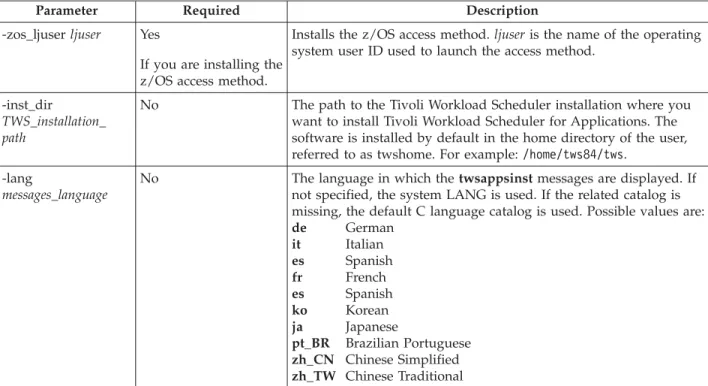
For thisaccessmethod,regardlessoftheinstallationprocedureyouchoose, youmustcompletetheinstallationasdescribedin“Completingthe
installationof theaccessmethodforOracle E-BusinessSuite”onpage31. – PeopleSoft
– SAPR/3 – z/OS
v TheOptionEditor,agraphicaltooltohelpyouconfigureyourenvironmentafter installation.
v Optionally,oneormoreTivoliWorkload SchedulerforApplicationslanguage packs.
Toinstall TivoliWorkloadSchedulerforApplicationsand itslanguagepack,you canuseanyofthefollowingprocedures.Youmust installalltheaccessmethods usingthesameinstallationprocedure:
v Thelaunchpad
v TheInstallShieldMultiPlatform(ISMP)wizard v TheISMPsilentinstallation
v TheTivoliSoftwareDistribution,version4.1productortheSoftware
DistributioncomponentofTivoliConfigurationManager,version4.2orlater v OnAIX,UNIX,HP-UX,Solaris,andLinuxoperatingsystems,thetwsappsinst
command.
Installing
Tivoli
Workload
Scheduler
for
Applications
using
the
launchpad
Use thelaunchpadifyouwanttobe guidedthrougha setofpanelsthathelp you becomefamiliarwith theproductdocumentation.Fromthis userinterfaceyoucan accessthefollowingsourcesofinformation:
v TivoliWorkloadSchedulerforApplicationshomepage
v TivoliWorkloadSchedulerforApplicationsDownloadDocument v TivoliWorkloadSchedulerforApplicationsinformationcenter v TivoliWorkloadSchedulerforApplicationssupport Website
Youcanusethelaunchpadonlywith oneofthefollowingWebbrowsers: v Mozilla
v Firefox
v InternetExplorer(forWindows operatingsystems,only)
The generalprocedureforstartingthelaunchpadinstallationprogramisas follows:
1. InserttheCDcontainingtheinstallationimageforyouroperatingsysteminto theCDdrive.
2. Dependingontheoperatingsystem,startthelaunchpad:
OnWindows Thelaunchpadshouldstart automatically.Ifnot,fromtheroot directoryoftheCD,runthelaunchpad.exefile.
OnUNIX FromtherootdirectoryoftheCD,runthelaunchpad.shfile.
Installing
| | | | | | | | | | | | | | | | | | | | | | | | | | | | | | | | || | ||Thelaunchpadopens:
3. Navigatethedocumentationand,whenyouarereadytostarttheinstallation process,clickInstallIBMTivoliWorkloadSchedulerforApplicationsinthe leftframeofthepage.
For detailsabouthowtocontinuetheinstallation,referto “InstallingTivoli WorkloadSchedulerforApplicationsusingtheISMPinstallationwizard.”
Installing
Tivoli
Workload
Scheduler
for
Applications
using
the
ISMP
installation
wizard
Thissectionexplainshow toperformthefollowingtasksusingtheISMP installationwizard:
v InstallIBMTivoliWorkloadSchedulerforApplications.
v Addanaccessmethod toanalreadyexistinginstallationofTivoliWorkload SchedulerforApplications.
Using theISMPinstallationwizardyoualso automaticallyinstall theOption Editor. TheOptionEditorisaJava-basedfileeditorthatyouuseto defineoptions fortheaccessmethodsyouinstalled.
Toinstall oneormoreaccessmethodsof TivoliWorkloadSchedulerfor Applications,performthefollowingsteps:
1. From theproductCDfortheoperatingsystemonwhichyouare installingthe product, orfromanimage,runthesetup installationcommandlocatedinthe INSTALLER directory.Theinstallationstarts.
Note: Ifyoudecidetoperformtheinstallationfromanimage, ensurethatthe pathwhereyoucopytheimagesdoesnotcontainsblanks andthatyou maintaintheCDdirectorystructure.
Figure2.Welcomepage
Installing
using
the
launchpad
| | | | | | | | | | |
2. Select thelanguageinwhichyouwantthewizardtobe displayed,andclick OK.TheWelcome panelisdisplayed.
3. Readthewelcomeinformationandclick Next.TheSoftwareLicense Agreementpanelisdisplayed.
4. ReadtheSoftwareLicenseAgreementinformationand selecttheradiobutton to acceptthelicenseagreement.Click Next.TheSelecttheTypeofInstallation panelisdisplayed.
5. Select oneofthefollowing:
Install Toinstall TivoliWorkloadSchedulerforApplications.Ifyou selectthisoption,clickNext andproceedwithstep 6.
Add Toaddanaccessmethodtoanalreadyexistinginstallationof TivoliWorkloadSchedulerforApplications.Ifyouselectthis option,click Nextandproceedwith step7.Using thisoption youcanalsorepaira corruptedinstallation.
Upgrade ToupgradeanalreadyexistinginstallationofTivoliWorkload SchedulerforApplicationsversion8.2,8.2.1,or8.3toversion 8.4. See“Upgrading”onpage33for adetaileddescription abouthowtoupgradefromversion 8.2or8.2.1toversion8.3.
6. IfyouselectInstall,theinstallationprogramdetectsandlists allthe installations ofTivoliWorkloadSchedulerversion8.2.x,8.3, or8.4onyour workstation.
a. SelecttheIBMTivoliWorkloadSchedulerinstallation whereyouwantto install IBMTivoliWorkloadSchedulerforApplicationsversion8.4.Ifthe productdoesnotdetectanyexistinginstallationa panelisdisplayed whereyouhavetospecifythenameandthedirectoryofanotherexisting installation.Theinstallationnamemustbe unique.Forexample,forthe nameoftheinstallationyoucanusetheuser nameassociatedtotheIBM TivoliWorkloadSchedulerinstallation.
b. ClickNext.Theinstallationprogramdetects andlistsallthefeaturesof TivoliWorkloadSchedulerforApplicationsthatyoucaninstallonyour workstation.
Proceedwith step8.
7. IfyouselectAddontheSelectthetypeofinstallationpanel, theinstallation programdetectsand listsalltheTivoliWorkloadSchedulerforApplications installations thatalreadyexist onyourworkstation.
Select theTivoliWorkloadSchedulerforApplicationsinstallationwhereyou wanttoinstall thefeaturesandclick Next.Iftheinstallation processdoesnot detectanyinstallations,thefollowingmessageisdisplayed:
The installation program did not find any
Tivoli Workload Scheduler for Applications installations.
Install Tivoli Workload Scheduler for Applications
before adding an access method.
Return to the previous panel and select Install.
Inthiscasereturntostep 5and selectInstall.
8. Select theaccessmethodsthatyouwantto installonyourworkstationand click Next.Dependingonhowmanyandwhichaccessmethodsyouselect, one ormoreadditionalpanelsrequestspecific accessmethodinformation: v Forallaccessmethods:theLJuser,thatisthenameastheoperatingsystem
userIDusedtolaunchtheselectedmethod.Thiscanbe thesamenameof
theowner oftheTivoliWorkloadSchedulerinstallation,thatistheuserthat wasdefinedwhenTivoliWorkloadSchedulerwasinstalled.
v ForthePeopleSoftaccessmethod,thefullpathtothepsjoa.jar file.See “Beforeinstalling” onpage9fordetailedinformation.
9. EntertherequestedinformationandclickNext.
10. Asummaryinformationpanelisdisplayed.ClickNext.Theinstallation process beginstoinstalltheselectedaccessmethodsonyour workstation.The installation progresspanelisdisplayedshowingthestatusoftheinstallation.
11. Whentheinstallationhascompleted, apanelisdisplayedaskingif youwant toopentheOptionEditor.TheOptionEditorisa Java-basedfileeditorthat youusetodefineoptionsfortheaccessmethodsyouinstalled.Ifyoudecide nottoruntheOptionEditornow,youcandoitlater. Ifyouclick Yes,the OptionEditorisdisplayed andyoucanset youroptionsforthemethodsyou installed.SeeChapter3,“SettingoptionswiththeOptionEditor,”onpage43 tolearnhowtousetheOptionEditor.
IfyouclickNo,orwhenyouhavefinishedwiththeOptionEditor,the installationexit windowisdisplayed.
12. Click Finishtoexittheinstallationwizardand completetheinstallation. Ifyoureceivederrormessages, analyzethe/tmp/tws4apps_ismp.logandthe /tmp/TWS4APPS_installationname_accessmethod^8.4.loginstallationlogfiles. Note: OnUNIXoperatingsystems, ifyouwanttoinstall thelanguagepack
afterthis installation,youneedtologoutandloginfromtheUNIX shellbeforeinstallingthelanguagepack.
Installing
the
language
pack
using
the
ISMP
installation
wizard
Thissectiondescribes howtoperformthefollowingtasksusingtheISMPinstallationwizard:
v InstalltheIBMTivoliWorkloadSchedulerforApplicationslanguagepack. v AddalanguagetoanexistingIBMTivoliWorkloadSchedulerforApplications
languagepack.
Toinstall theIBMTivoliWorkloadSchedulerforApplicationslanguagepack or adda languageto anexistinglanguagepack, performthefollowingsteps:
1. Install TivoliWorkloadSchedulerforApplicationsasdescribedin“Installing TivoliWorkload SchedulerforApplicationsusingtheISMPinstallation wizard”onpage11.
2. VerifythattheTWS4APPS_JDKHOMEenvironment variableissettothe followingpath:
twsinstallationdir/methods/_tools
3. From theproductCDfortheoperatingsystemonwhichyouare installingthe product, orfromanimage,runthesetup installationcommandlocatedinthe LANG_PACKdirectory. Theinstallationstarts.
Note: Ifyoudecidetoperformtheinstallationfromanimageensurethatthe pathwhereyoucopytheimagesdoesnotcontainsblanks andto maintaintheCDdirectorystructure.
4. Select thelanguageinwhichyouwantthewizardtobe displayed,andclick OK.TheWelcome panelisdisplayed.
5. Readthewelcomeinformationandclick Next.TheSoftwareLicense Agreementpanelisdisplayed.
6. ReadtheSoftwareLicenseAgreementinformationand selecttheradiobutton to acceptthelicenseagreement.Click Next.ApanellistingthediscoveredIBM Tivoli WorkloadSchedulerforApplicationsinstallationsisdisplayed.
7. From thelistof discoveredIBMTivoliWorkloadSchedulerforApplications installations, selecttheinstallationwhereyouwanttoinstall thelanguage pack.
Note: IfyouhavenotinstalledIBMTivoliWorkloadSchedulerfor Applications,anerrormessageappears.Canceltheinstallationand proceedwiththeinstallationofIBM TivoliWorkloadSchedulerfor Applications.See“InstallingTivoliWorkloadSchedulerforApplications usingtheISMPinstallationwizard”onpage11fora detailed
descriptionabouthow toinstallIBM TivoliWorkloadSchedulerfor Applications.
Click Next.Apanelisdisplayedwhereyoucanchoosewhichlanguages you wanttoinstall.
8. By default,allthelanguagesareinstalled.Clearthelanguagesyoudonot wanttoinstall andclickNext.
9. Asummaryinformationpanelisdisplayed.ClickNext.
The installationprograminstallstheselectedlanguagesforalltheinstalled accessmethods.Theinstallation progresspanelisdisplayedshowingthe statusof theinstallation.
10. Whentheinstallationhascompleted, apanelshowingtheresultsofthe installation isdisplayed.Click Finishtocompletetheinstallation. Ifyoureceiveerrormessages,analyzethe/tmp/tws4appslangs.logandthe /tmp/TWS4APPS_installationname_LANGS^8.4.loginstallationlogfiles.
Installing
Tivoli
Workload
Scheduler
for
Applications
using
the
silent
installation
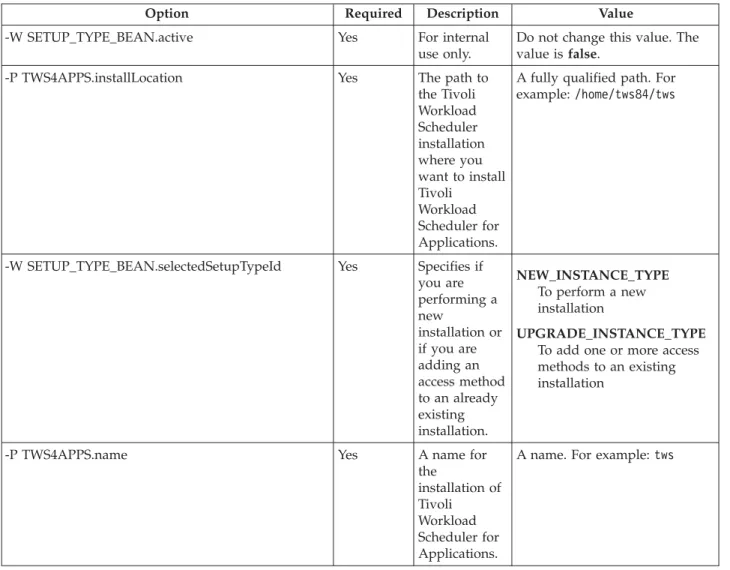
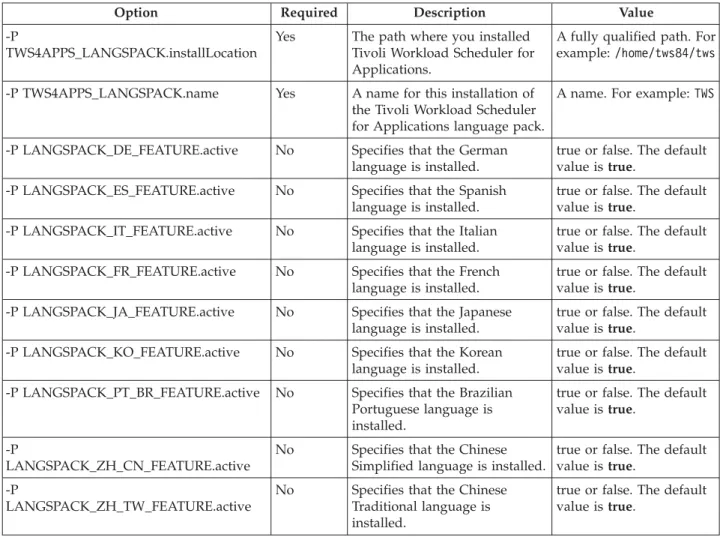
Toinstall TivoliWorkloadSchedulerforApplications,oroneoftheaccess methods, usingsilentinstallation,youusea responsefiletoruntheinstallation withoutuserintervention. TivoliWorkloadSchedulerforApplicationsprovides youwiththeTWS4APPSSilent.txtresponsefilelocatedonanyproductCDunder theRESPONSE_FILESdirectory.Thisisatemplateresponsefilethatyoucan customize toreflectthetype ofinstallationyouwanttoperform.
Using thesilentinstallationmethod youcaninstallone ormoreaccessmethods simultaneously.Using theISMPsilentinstallationyoualsoautomaticallyinstallthe OptionEditor. TheOptionEditorisaJava-basedfileeditorthatyouusetodefine optionsfortheaccessmethodsyouinstalled.
Whenrunningtheinstallationinsilentmodenomessagesaredisplayed. Messages are writteninthe/tmp/tws4apps_ismp.logandinthe/tmp/
TWS4APPS_installationname_accessmethod^8.4.loginstallationlogfiles.Toruna silentinstallation,performthefollowingsteps:
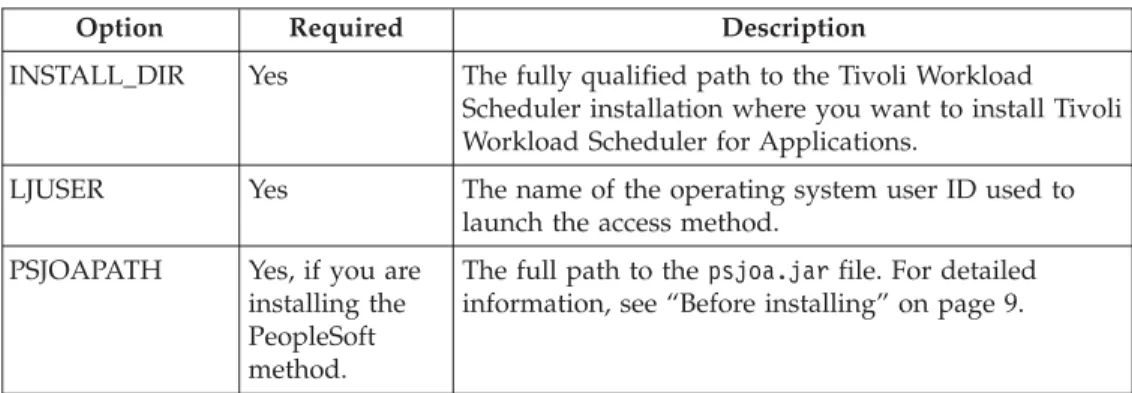
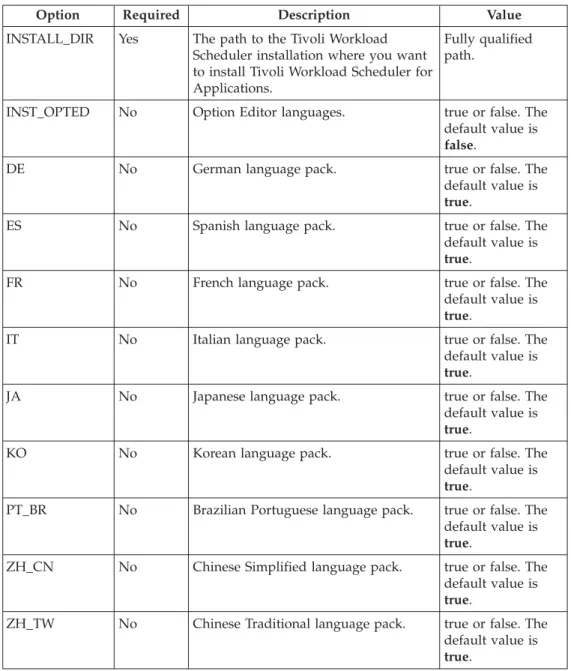
1. Createyour responsefileorcustomizetheTWS4APPSSilent.txtresponsefileto include theoptionsrequiredtocompletetheinstallation.SeeTable5onpage15 fora listoftheavailable options.Theresponsefilemustbe accessiblefromthe workstationwhereyouwanttoperformtheinstallation.Entriesin theresponse fileareintheformatoption=value.Eachentrymust bewrittenona separate line.