Berkeley Unified School District Page 1
Education Technology Plan
Berkeley Unified School District
July 1, 2012 - June 30, 2015
William Huyett
Superintendent
Berkeley Unified School District Page 2
Appendix J -‐ Technology Plan Contact Information (Required)
Education Technology Plan Review System (ETPRS) Contact Information
County & District Code: 01 -‐ 61143
LEA Name: Berkeley Unified
*Education Technology Plan Contact: Mr. Jay Nitschke
*Job Title: Technology Director
*Address: 2134 Martin Luther King Jr. Way
*City: Berkeley *Zip Code: 94704-‐1109 *Telephone: 510-‐644-‐8890 Fax: 510-‐644-‐8933 *E-‐mail: [email protected]
Backup contact information:
1st Backup Name: Wally Gutierrez
E-‐mail: [email protected]
2nd Backup Name: Christina Faulkner
E-‐mail: [email protected]
* Required information in the ETPRS
Berkeley Unified School District Page 3 Table of Contents
1. District Profile and Plan Duration………..4 2. Stakeholders………8 3. Curriculum………9 4. Professional Development………..48 5. Infrastructure………60
6. Funding and Budget………..67
7. Monitoring and Evaluation………..71
8. Adult Literacy……….73
9. Effective, Research-‐Based Methods………74
Appendices
Berkeley Unified School District Page 4 District Profile
Berkeley Unified is responsible for educating more than 9,400 individual students in 11 public elementary schools, 3 middle schools, one comprehensive high school, and a continuation high school. In addition, the district has 3 preschool facilities and an Adult School serving several thousand students each year. Our students are diverse, both ethnically and in social-‐economic status:
Student Enrollment by Ethnicity Percent
Asian 8%
Latino 22%
African American 22%
White 33%
Other or Multi-‐Ethnic 15%
District Demographics Percent
Free or Reduced Lunch Program 42%
English Learners 14%
Students with Special Needs 12%
Berkeley Unified is characterized by the talent and dedication of its approximately 700 certificated teachers. All are state credentialed, and the vast majority have clear
professional credentials. Over 40% of the teaching staff boasts a Master’s or a Doctoral degree and the average Berkeley teacher has over 14 years of experience, both of which are significantly above the average for teachers statewide. Ten of our teachers are National Board Certified, including one of the few teachers in special education to achieve this certification.
Community Support
Over the past 25 years, the Berkeley Unified School District’s ability to provide well-‐ rounded educational resources and opportunities to all students has been significantly boosted by the generous financial support of local taxes that augment the General Fund for specific purposes. Berkeley voters have overwhelmingly supported the Berkeley Schools
Berkeley Unified School District Page 5
Excellence Program (BSEP), a special local tax first adopted in 1986 and renewed
consistently since then, most recently as Measure H. In 2010, Berkeley taxpayers renewed Measure H, a $5 million special tax dedicated solely to building maintenance. Although these monies do not impact technology directly, they provide funds to ensure that district schools are clean, safe, and warm, and have the electrical and network infrastructure that form the basis of technology. In the November 2010 election, 17 school districts in
California had parcel taxes on the ballot -‐-‐ Measure H was one of only 2 to pass and received almost 81% of the vote.
Also in 2010, the district received voter approval to float $210 million in Prop. 39 General Obligation Bonds. The measure passed with 77% voter approval. One of the specific purposes of the bonds is to improve technology in the schools.
Berkeley Unified School District Mission
The Mission of the Berkeley Unified School District is to enable and inspire our diverse student body to achieve academic excellence and make positive contributions to our world.
Berkeley Unified School District Vision
Our Students are curious and creative learners who succeed through personal initiative and sustained effort to reach high academic goals. They are critical thinkers who seek knowledge and possess technological competence and collaborative skills. Our students embrace diversity, act responsibly, and contribute to our community.
Our Educators believe that all students can meet or exceed rigorous academic standards. Teachers, staff, and administrators together form a rich professional learning community where all are supported to hone our professional craft and improve our effectiveness. Through the examination of our instructional practices and data, we adjust our teaching and operational systems in order to continuously improve. We are responsible in the stewardship of our fiscal resources and fair and equitable in their distribution.
Our Families and Community are integral to the success of our students and schools. Families are active, engaged and welcomed partners in their child’s education, who give valued input and participate in making important decisions about our academic and enrichment programs. Our diverse community is passionate about equitable educational outcomes for all students. Our civic and community organizations partner with us to promote family engagement and the well-‐being and success of our students.
Our Schools are vital centers of community life enriched by the diversity of our city and welcoming to all families. Each classroom offers engaging and culturally relevant
curriculum that builds on students’ interests and abilities. Student needs, as identified by regular assessment, inform our teaching and guide appropriate and effective intervention services. We offer an enriched learning environment and a comprehensive system of supports to address the needs of the whole child.
Berkeley Unified School District Page 6
Values and Beliefs of Berkeley Unified School District • Students are our priority.
• We take pride in our diversity.
• We hold high expectations for ourselves and our students. • We treat each other with respect and act with integrity.
The Mission, Vision, Values, and Goals of Berkeley Unified, are supported by Technology through:
Excellence in Learning, in Teaching, and in Service to our Students, Staff and Community Equity in Access, in Resource Allocation, and Educational Outcomes
Engagement of Students During Instruction Enrichment of the Core Curriculum
Berkeley Unified School District Page 7
District Technology Plan Goals 2012-‐2015
Curriculum Goals
Goal 3d.1 All teachers will increase the academic achievement of all students by effectively incorporating appropriate technological tools and programs throughout the curriculum, instruction, and assessment.
Goal 3d.2 Prepare all students for continued success in English Language Arts and Mathematics by providing high quality instruction geared to student needs including engaging technology, and appropriate modifications and accommodations.
Goal 3d.3 Technology will be used to support instruction in English Language
Development to ensure that every English Learner gains at least one English language proficiency level each year.
Goal 3e: Students will develop grade-‐level appropriate technology and information literacy skills as outlined in the National Education Technology Standards to succeed in the
classroom and beyond.
Goal 3f: Improve the implementation of a Cyber Ethics Program in order to increase student and teacher awareness of ethical use of information technology.
Goal 3g: All students will understand issues surrounding Internet safety, cyber-‐bullying, online privacy, and online predators.
Goal 3h: All students will have equitable access to appropriate technology throughout the district.
Goal 3i: Use data-‐driven decision making to monitor student progress, guide and differentiate instruction, evaluate the effectiveness of our programs, and share this information with the staff, the Board and the community.
Goal 3j: Teachers and administrators will make use of technology tools to improve two-‐ way communication between home and school: including PowerSchool, Google Apps such as Gmail, Calendar, Sites; School Messenger; voicemail.
Berkeley Unified School District Page 8 1. Technology Plan Duration
The Berkeley Unified School District Technology Plan will be in effect from July 1, 2012 to June 30, 2015 for a total of 3 years.
2. Stakeholders
Under the leadership of Jay Nitschke, the Director of Technology, the District Technology Committee was created by the Superintendent with three short-‐term goals:
1. Implementing next-‐generation email and communication tools 2. Set priorities for technology improvements in our schools 3. Revise and update the educational technology plan.
This committee included:
• Margaret Agbowo, Longfellow Middle School Technology Teacher • Matt Albinson, Berkeley High Technology Coordinator
• Audrey Amos, Principal of John Muir Elementary School • Debbi D'Angelo, Director of Evaluation and Assessment • Susan Deutsch, Occupational Therapist
• Christina Faulkner, Director of Curriculum and Instruction • Jeff Fillinghim-‐Selk, King Middle School Humanities Teacher • Wally Gutierrez, TSA for Instructional Technology K-‐8 • Bradley Hilton, Student Systems Specialist
• Kristin Lono, Berkeley Arts Magnet 3rd Grade Teacher • Jay Nitschke, Technology Director
• Ben Sanoff, Berkeley High Teacher and former BHS Technology Coordinator • Becca Todd, District Library Coordinator
The committee conducted research, prepared draft documents, and analyzed the California School Technology Survey information and results from the district teacher and student technology surveys. As this plan was developed, there was an effort made to include as many of the parent (a few of the members of the District Tech Committee are parents of current and former students of BUSD) and community stakeholders as possible in the planning and writing process. Their ongoing input, feedback and suggestions were incorporated into the plan.
The groups that will primarily carry out professional development and support of the BUSD technology plan is organized into three functional groups, Technology, Berkeley Evaluation & Assessment (BEA), and Curriculum & Instruction, with each group managed by its own
Berkeley Unified School District Page 9
Director. Technology includes the Network Engineer, the Student Information Systems Specialist, 5 computer technicians, and 3 computer zone techs that provide technical support for all the schools in the district. BEA includes an Administrator Coordinator, Assessment Technician, and 3 Teachers on Special Assignment (TSA) that support administrators and teachers in reporting, evaluating, and managing assessment data. Curriculum & Instruction oversees the Library and Professional Development Staff. The Library staff consists of the Coordinator, 5 Teacher Librarians at the middle and high schools, 11 Library Media Technicians at the elementary schools, one Central Library Media Technician, and TSA for Instructional Technology K-‐8. The Professional
Development Staff consists of the Coordinator, TSA for Literacy, TSA for Math, TSA for English Language Development, TSA for Response to Instruction and Intervention.
The role of Instructional Technology as mentioned in the plan is a team whose members are primarily the TSA for Instructional Technology K-‐8, District Library Coordinator, Berkeley High School Technology Coordinator, and the Director of Technology, and depending on the activity or responsibility, collaborates with BEA, Library Staff, Technology Staff, and Professional Development.
3. Curriculum
3a. Description of teachers’ and students’ current access to technology tools
There are approximately 9,410 students are enrolled in grades K-‐12 in the Berkeley Unified School District:
● 3,430 high school students ● 1,940 middle school students ● 4,040 elementary students
Currently, there are 2,578 instructional computers ● The student to computer ratio is about 3:1 ● 47% computers in classrooms
● 7 % in school libraries ● 13% in labs
● 32% in carts
Table 1: Quantity and Location of Berkeley Unified School District Computers
Location Classroom Lab Library Other Total
Berkeley Unified 48% (1221) 13% (146) 7% (192) 32% (833) 100% (2578)
Berkeley Unified School District Page 10
Middle Schools 300 146 59 136 (on carts) 641
High Schools 503 186 55 450 (on carts) 1194
Table 2: Age of Computers
< 1 Year 1 -‐ 2 Years 2 -‐ 3 Years 3 -‐ 4 Years 4+ Years
Berkeley Unified 29.62% 16.20% 8.80% 24.58% 36.31%
Technology is currently available in the classrooms, library media centers, and computer labs to all teachers and students at the elementary, middle, and high schools. All schools have teacher and student desktops, laptop carts, TV/DVD monitors, LCD projectors, document cameras, and printers. Many sites have digital cameras with video capability available for check out. Scientific Probes/Sensors are available at sites or checked-‐out from Central Media Library. There are also pilot programs with wireless tablets and personal response systems (clickers) at some school sites.
Students have access to computers in the library media centers throughout the school day including lunch and after school. Partnerships with Berkeley City Public Libraries and the City of Berkeley Parks and Recreation Centers have made available computers that
students can use after school and weekends.
Elementary Schools
Berkeley is still following the grade K-‐3 class size guidelines of 20 students in one classroom, and grade 4-‐5 classrooms average less than 26 students per classroom. All elementary schools have classroom and library computers for student use. In addition, all schools have at least one mobile laptop cart with a minimum 10 computers (many have 20) that can be checked out by the classroom teacher during school hours and can also be used by students in the afterschool programs. Our local special tax, BSEP, provides about 0.2 FTE of tech support in the school, as well as a small budget ($15/student) allocation to
purchase technology identified as a need. A few schools have ordered additional laptop carts for student use.
● At all sites, there are computers available at the school's library: two have 4, seven have 6, and two have 12.
● All classrooms have a computer for teacher use. Sites also have computers in staff rooms or office areas available for teacher use before, during, and after school. ● A concerted effort was made in the 2011-‐12 school year to provide LCD projector
and document cameras in each elementary classroom. Five sites (Emerson, MX, JM, Jefferson, BAM) have carts with an LCD projector and document camera in all or almost all of their classrooms.
● Pilot program started at LeConte Elementary for teacher and student use of clickers in 4th and 5th grade classrooms.
Berkeley Unified School District Page 11
● Wireless is available in all school offices and libraries. The goal is to have the
elementary schools 90% wireless by the end of 2012-‐13. This work is funded by the facilities bond.
Middle Schools
The three middle schools have used a variety of categorical funds, including BSEP technology funds to support the use of instructional technology to increase student engagement and academic achievement.
● All classrooms have teacher workstations.
● Most classrooms have at least one student workstation and King Middle School has 4 student work stations in almost every classroom.
● Libraries contain enough student work stations to accommodate at least half a class and as many as 30 at King.
● Students have access to computers in the library media centers throughout the day for class assignments including lunch recess, before and after school.
● Longfellow and Willard have a computer lab that can be accessed by any teacher as they utilize technology to support classroom learning.
● All classrooms at King have an LCD projector and most classrooms have a document camera.
● Classrooms are transitioning away from TVs with a VCR or DVD player.
High Schools
There are computers available to all students and teachers. Regardless of Small Learning Community, there is access to computing resources. While some communities may have greater competition for computing resources depending on relative scarcity or higher demand, there are no “technology deserts” at Berkeley High School. While some of the technology resources are out of date, the school district is nevertheless adequately
supplied with sufficient technology such that no group could accurately claim that they do not have access. The library computer lab remains open after school hours. There are also public computers available at the Berkeley Public Library. In addition, many teachers offer tutoring hours after school where computers are often available.
Berkeley Unified School District Page 12
3b. Description of the district’s current use of technology to support teaching and learning
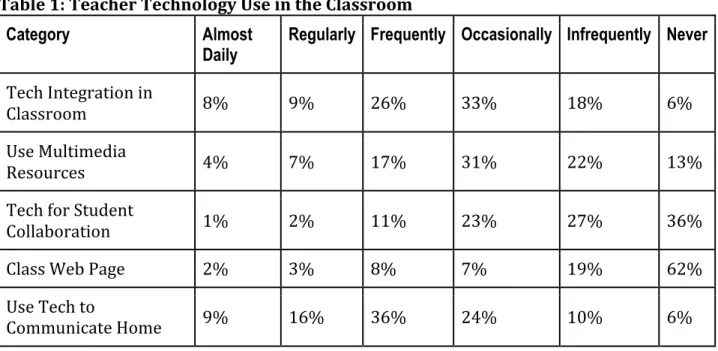
Based on results from the Edtech Profile teacher survey, 51% of the teachers use
technology occasionally (at least once a month) and 28% use technology frequently (once a week) in their classroom instruction overall. The results by category are displayed in the table and chart below:
Table 1: Teacher Technology Use in the Classroom
Category Almost
Daily Regularly Frequently Occasionally Infrequently Never Tech Integration in
Classroom 8% 9% 26% 33% 18% 6%
Use Multimedia
Resources 4% 7% 17% 31% 22% 13%
Tech for Student
Collaboration 1% 2% 11% 23% 27% 36%
Class Web Page 2% 3% 8% 7% 19% 62%
Use Tech to
Communicate Home 9% 16% 36% 24% 10% 6%
Berkeley Unified School District Page 13
Chart 1: Teacher Technology Use in the Classroom (1/2012 survey)
● The results for Tech Integration in the Classroom, indicate that about 60% of the teachers integrate technology tools occasionally (33%) or frequently (26%) when they deliver classroom instruction.
● Approximately 43% use multimedia resources such as simulations, mind mapping, digital images, video, and multimedia occasionally (31%) or infrequently (22%). ● Over half have either infrequently (27%) or never (36%) used technology tools such
as blogs, wikis, shared documents, and other online resources to encourage student collaboration and peer evaluation
● 62% have never used a classroom web page to publicize current class news, assignments, links to resources, etc.
● 50% have frequently (36%) and occasionally (24%) used email and other two-‐way communication tools such as surveys to invite communication/feedback from parents and/or students.
As for having students use technology to support their learning, a majority are at the Beginning/Intermediate level: 31% infrequently and 39% occasionally. Results according to category are displayed in the table and chart below:
Berkeley Unified School District Page 14 Table 2: Student Technology Use
Category Almost
Daily Regularly (at least once a week) Frequently (at least every other week) Occasionally (a few times a quarter) Infrequently (once or twice a quarter) Never Tech Integrated in Student Activities 9% 10% 20% 27% 24% 10%
Use Tech to Achieve Instructional Goals
4% 5% 11% 20% 36% 23%
Use Tech to
Collaborate 1% 1% 4% 12% 27% 54%
Chart 2: Student Technology Use
● The category “Technology integrated into Student Activities” refers to this question, “How frequently are technology tools integrated into student learning activities?” The majority of the teachers responses ranged between frequently to infrequently (71%).
● “Use Tech to Achieve Instructional Goals” refers to how often students use Web 2.0 tools, simulations, mind mapping, digital imaging, video, and other multimedia for assignments. A majority (79%) of the teachers answered occasionally, infrequently, and never.
● How frequently do students use technology resources such as blogs, wikis, shared documents, online resources, etc. to collaborate and/or give each other feedback? 54% of the teachers have never tried this with their students.
Berkeley Unified School District Page 15 Elementary Schools
● Teachers use PowerSchool for daily attendance.
● Professional development for all Science Resource Teachers (SRTs) as well as criticial hardware and software support, is being continued by the TSA for Instructional Technology K-‐8. The SRTs work with the TSA for Instructional Technology to infuse technology into the adopted FOSS science curriculum.
Instructional materials are shared in the PBScience Wiki. Each teacher uses a laptop, document camera, and LCD projector in their instruction. Students use laptops from the mobile laptop carts to do activities in science related websites, conduct research, create multimedia presentations for Science Fairs, collect data from Vernier probes and sensors. Flipcams are used to document experiments and science fairs. Video clips, photos, podcasts, and links are incorporated into the SRT’s blog, which communicates the activities in class. In 2011, the Berkeley Public Education
Foundation (BPEF) granted the group 3 additional Vernier Probeware devices that allow teachers and stduents to collect data while conducting experiments
investigating CO2 gases, light waves/photosynthesis, and force.
● BPEF is increasingly granting classroom teachers a projector and document camera set. Five elementary schools now have a set in most of their classrooms. The TSA for Instructional Technology has begun initial training on how to use these tools and will follow-‐up with effective strategies for instruction.
● Library Staff and Literacy Coaches at school sites use digital video cameras to share best practices among staff.
● Students use laptops from the mobile laptop carts to conduct research on the Internet, create PowerPoint presentations, write stories, and produce reports in English Language Arts, Social Studies, and Science.
● Students at Emerson are using an iPad in the library to film and produce video book talks.
● Students in the after school program at a few school sites like Malcolm X and LeConte, also use the laptop carts for Compass Learning, an adaptive software program where a student takes an initial assessment in an English Language Arts and Math standard and activities are adjusted according to the student’s learning level.
● Special Ed teachers at sites like Berkeley Arts Magnet and Rosa Parks use software programs such as Fast Math and Compass Learning as an intervention program (Tier 2 of RTI) for struggling students. Fast Math helps students develop
automaticity in answering number equations in addition, subtraction, multiplication, and division.
● Everyday Math Online is being used to provide additional support in the classroom and at home.
● Cragmont uses Accelerated Math software program for their 4th and 5th grade classrooms to differentiate math instruction and to support struggling students. ● LeConte uses interactive voting devices or clickers in their 4th and 5th grade
Berkeley Unified School District Page 16
● Students in Emerson Library use Skype and Googlevideochat to have virtual author visits and to share poetry between classes with students in other states.
● LeConte Library has incorporated audiobooks in an mp3-‐like device (Playaways) to provide targeted support for struggling 4th/5th grade readers.
Middle Schools
● Teachers use PowerSchool for student attendance and entering grades in a Gradebook. Students and families access the assignments and scores through the internet.
● Many teachers use a document camera and projector in their instruction to display student work, model activities like evaluating and editing writing, using graphic organizers, performing science experiments, solving math problems, etc.
● General use of desktops and laptops by students: internet research, essays, reports, presentations, doing activities in educational websites, etc.
● All 3 middle schools provide technology courses for their students:
○ At Longfellow, the E.A.S.T. class combines a semester of computers with a semester of art. Applications covered include Microsoft Office (Word, Excel, and PowerPoint), iMovie and Garageband, and Scratch. Technology and Media class covers a range of creative projects including slide show presentations, posters, animations, web pages (HTML), 3-‐D architectural models, and original videos. Students get an introduction to programming using Scratch and Python to create video games and other projects. They use digital devices including cameras, camcorders, and scanner to gather media for projects. The Digital Art class produces the monthly school newsletter. ○ At King, Digital Arts covers Photoshop, Photography, Google Apps,
CyberSense, Styx and Flash. In the King CompMedia class, students also learn to use Scratch and do some basic programming.
○ At Willard, the computer classes cover Keyboarding, Internet Safety, Blogging, Online Research and Citing Resources, Computer Programming, and Web Design.
● Yearbook Publishing students design and create the yearbook while learning skills in digital photography, file management, scanning, image adjustment, data
management and organizational skills. Students learn principles of layout and design and learn the yearbook software to create their pages.
● Scholastic’s Read180/System44 program is used as a Tier 3 Intervention in RTI at all middle schools. Four main components-‐ whole group instruction, small group instruction, independent reading, and computer software-‐ are combined into a program that improves student reading levels.
● Teachers use EssayScorer, a software program that scores student writing, to have students practice writing in different genres and to prepare students for the district writing assessments. Students are motivated to edit and revise their essays to score at the proficient or advanced levels.
Berkeley Unified School District Page 17
● A few teachers use the assessment feature of SuccessNet, Pearson’s online resource for their English Language Arts textbooks in 6th, 7th, and 8th grade. Students test their comprehension of stories that they have read.
● King and Longfellow use Accelerated Reader to keep track of student reading levels, progress, and assessments. The program encourages the student to read at the appropriate reading level to increase comprehension and enjoyment, which leads to reading more books.
● All middle schools are using a combination of software programs, Fast Math, Fraction Nation, and Compass Learning, as a Tier 2 Intervention for students in math. Fraction Nation helps the student to understand fraction, decimal, and percent concepts to solve problems. In addition, King uses IXL software as a supplemental curriculum for math.
● Teachers and students use Google Docs. Teachers share lesson plans and other resources with each other. Students write, save, and share documents such as essays, reports, or other assignments in Google Docs.
● A few teachers have created classroom web pages in Google Sites as a way to
communicate with students, parents, and the school community about what is going on in their classrooms. Homework, classroom assignments, projects, important dates and deadlines are just some of the things posted on their class web page.
High Schools
Computers are currently used in some respect in all classrooms across all discipline areas at Berkeley High School. Some examples:
● English classrooms use computers as tools for writing papers
● Social Studies classrooms use SMART Boards for presentation of information ● Math classrooms use document cameras and projectors as presentation tools ● Science classrooms use laptop computers for students to record lab observations
The computer lab is used for CyberHigh daily allowing students who have failed courses in the past to recover credit and graduate on time. The Special Ed department has invested extensively in technology and has a much higher student to computer ratio then the rest of Berkeley High. The labs are reserved at capacity daily. Teachers use these computers to have students work on various projects such as paper research and writing, science projects, creating presentations and other technology based curriculum.
Technology is used extensively by teachers and administrators at Berkeley High School. Teachers use PowerSchool, the Student Information System, to record student attendance daily. Teachers also input student grades into PowerSchool so that students and parents can follow student progress in their coursework. Administrators use technology to report on various student groups and to detect patterns in attendance and academic achievement across large groups of students. Administrators use Google Apps extensively for its
Berkeley Unified School District Page 18
document sharing and calendaring functionality. Support staff use PowerSchool extensively to enter and access all pertinent student data.
3c. Summary of the district’s curricular goals that are supported by this plan.
BUSD Theory of Action for Closing the Achievement Gap while Improving Academic Performance for All Students
We believe that IF the District provides:
● A coherent curriculum that is aligned with assessments, addresses needs of our diverse student population and guides intervention for students
● Opportunities for professional learning communities to examine evidence-‐based effective pedagogy at the district and the sites
● Instructional leadership that sets high expectations and maintains accountability And IF the District in collaboration with its partners provides:
● A framework for families, the City, and higher education to engage in our students’ education, and
● Equitable resources for programs that enable students to succeed THEN
the performance of all students will improve, and the achievement gap will close.
Instructional Technology is an integral component of the District’s 2020 Vision for Closing the Achievement Gap. As educators, BUSD staff recognizes the ability of technology to meet the individual needs of students and increase academic achievement for all students
regardless of race, socio-‐economic status, language ability, or unique educational needs. The Berkeley Unified School District Technology Plan is guided by the principle that technology will help drive student achievement and must support the overall District Goals as outlined in the BUSD Local Education Agency (LEA) Plan:
District Goals
I. Curriculum & Instruction: Increase the academic achievement of all students through effective instruction, a challenging and engaging curriculum, and aligned assessments.
● ELA and Math Instruction: Prepare all students for continued success in English Language Arts and Mathematics by providing high quality instruction geared to student needs including appropriate modifications and accommodations. ● English Language Development: Provide direct instruction in English Language
Development to ensure that every English Learner gains at least one English language proficiency level each year.
● Evaluation and Assessment: Use data from multiple measures to monitor student progress, guide instruction and evaluate the effectiveness of our programs, and share this information with the staff, the Board and the community.
Berkeley Unified School District Page 19
3d. List of clear goals, measurable objectives, annual benchmarks, and an implementation plan for using technology to improve teaching and learning by supporting the district curricular goals.
Teachers will be trained to discern appropriate technology use and tools, which support students’ understanding and demonstration of content standards. As teachers recognize effective uses of electronic resources and tools, classroom lessons will be designed to reinforce both technology skill development and targeted content standards for students. Teachers will develop model lessons for using technology to improve teaching and learning in the core curriculum areas of language arts, mathematics, social science, and science which will be made available across the district via Google Docs in the berkeley.net domain.
Technology outreach at the school site level will increase beginning in 2012-‐13 with the further development of Site Technology Leaders for technical and curricular coaching. Site Technology Leaders are classroom or library teachers and other site educators who exhibit exemplary skills and abilities for technology-‐integrated curricular implementation. Site Technology Leaders will conduct technology professional development at their school sites. Site Technology Leaders will be trained and begin coaching teachers in the use of Google Apps and document cameras and LCD projectors. Site Technology Leaders will also provide training and support for Illuminate and PowerSchool Student Information Systems as part of the district commitment to provide easy access to data reports in the area of English Language Arts and Mathematics and development of classroom benchmarks.
Our library media centers embody the integration of old and new technologies-‐-‐print and digital resources. Every library’s catalog is online and embedded in a school library web page that provides seamless access to additional online resources that are useful for students. Students are able to submit online book reviews directly into the library catalog. The library teaching and paraprofessional staff guide students to identify, evaluate and use information to support their class assignments in all curricular areas and reading interests. The library collection offers materials with a wide range of reading levels to support
students’ ability to make meaning of the content, thereby increasing their academic achievement be it in ELA, Math, EL, Science or History/Social Science, Visual and
Performing Arts and even PE. The collection also reflects the multicultural community in which we live, both locally and internationally, and provides online access to books written in many languages through the International Children’s Digital Library and the Advanced World Book subscription. Our Cyber Savvy/Digital Citizenship lessons are hosted on the library web pages.
Berkeley Unified School District Page 20
Teachers will use data driven decision making to design, implement and evaluate the effectiveness of lessons via student performance indicators. Illuminate, the Data and Assessment Management System, will be used to examine results from curriculum/grade level common assessments, district benchmark exams, and the CST. By analyzing the data, teachers are better able to identify specific needs of students, especially students in Title I, Special Ed, and EL programs. Data-‐driven decision making in conjunction with good quality instruction and as part of the Response to Intervention process will help students pass the California High School Exit Examination, improve CST scores, and close the achievement gap in state and federal standardized tests.
Goal 3d.1: All teachers will increase the academic achievement of all students by effectively incorporating appropriate technological tools and programs throughout the core curriculum, instruction, and assessment.
Objective 1: By June 2015, 90% of all classroom teachers will incorporate appropriate technological tools and programs throughout the core curriculum, instruction, and assessment.
Year 1 Benchmarks: By June 2013, 60% of all classroom teachers will incorporate
appropriate technological tools and programs throughout the core curriculum, instruction, and assessment.
Year 2 Benchmarks: By June 2014, 75% of all classroom teachers will incorporate
appropriate technological tools and programs throughout the core curriculum, instruction, and assessment.
Year 3 Benchmarks: By June 2015, 90% of all classroom teachers will incorporate
appropriate technological tools and programs throughout the core curriculum, instruction, and assessment.
Activities, Monitoring Tools and Evaluation Timeline All Technology and BEA staff assigned to Illuminate and
PowerSchool support will be proficient in data management Prior to August 2012 Site Tech Leaders, Instructional Technology and BEA staff will be
trained in Illuminate and PowerSchool in the Summer of 2012. (See 4b for topics for training.)
August 2012
A comprehensive training will be provided at the annual Fall Staff Professional Development Day which will include how to create assessments, custom reporting, grading and using the data to drive instruction and monitor student progress.
Oct 10, 2012;
2013-‐2015 Dates to be determined
Berkeley Unified School District Page 21
Instructional Technology will develop and offer a summer technology institute to Site Tech Leaders that focuses on technology integration into the core curricula using document cameras and Google Apps.
Planning: Summer 2012 Training: August 14-‐18 2012
Site Tech Leaders and Teachers will have time to collaborate on data driven decision making: analyze district and standardized assessment data, identify student strengths and needs, and plan next steps, including differentiation and intervention strategies using technology tools and resources.
2 Collaboration Days per year
Instructional Technology and Site Tech Leaders will provide technology demonstrations, training, and strategies for integration into core curriculum in at least one school site staff meeting per quarter.
At least 4 times per year at each site
Technology Staff, Instructional Technology, and Site Tech Leaders will continue to train administrators, teachers, students, and district/school staff in using Google Apps.
Monthly
Instructional Technology and Site Tech Leaders will collaborate around educational use of technology and best practices of teaching and use Google Apps as tools for collaboration and sharing
information.
Monthly
At grade level meetings, Site Tech Leaders will plan units/lessons with Teachers that incorporate use of technology tools and resources into their instruction of the core curriculum.
Monthly
Students will take surveys based on NETS for Students; Teachers will update their EdTech Profile Technology Assessment Survey about technology integration in our schools.
May Annually
Teachers, Library Staff, Site Tech Leaders, and Site Administrators
will communicate training needs to District Tech Committee. Annually The District Tech Committee will create and share Google Docs
outlining levels of technology proficiency per grade level based on the NETS for Students.
Fall 2012
The District Tech Committee will review results from assessment tools measuring students' levels of proficiency and adjust goals, activities and implementation steps accordingly.
Berkeley Unified School District Page 22
The District Tech Committee will review new electronic learning resources that facilitate differentiated instruction of the core curriculum.
Annually
Instructional Technology will provide in-‐class, after-‐school and release time support on an as-‐needed basis for Site Tech Leaders and Teachers
As needed
District Tech Committee will continue to leverage funding to
increase access to technology resources, hardware, and peripherals
Annually
Teachers will have students utilize Google Apps such as Docs,
Forms and Sites for assignments and projects. Beginning 2012 Annually
Goal 3d.2: Prepare ALL students for continued success in English Language Arts and Mathematics by providing high quality instruction geared to student needs including engaging technology, and appropriate modifications and accommodations.
Objective 1: By June 2015, 80% of all students in Grades 3-‐12 will score proficient or above on the English-‐ Language Arts and Math portions of the STAR: CST / CAHSEE test supported by state and district approved instructional resources, technology-‐based supplemental resources, professional development, student achievement data analysis, and collaboration time.
Year 1 Benchmarks: By June 2013, 70% of all students in Grades 3-‐12 will score proficient or above on the English-‐ Language Arts and Math portions of the STAR: CST / CAHSEE test supported by state and district approved instructional resources, technology-‐based
supplemental resources, professional development, student achievement data analysis, and collaboration time.
Year 2 Benchmarks: By June 2014, 75% of all students in Grades 3-‐12 will score proficient or above on the English-‐ Language Arts and Math portions of the STAR: CST / CAHSEE test supported by state and district approved instructional resources, technology-‐based
supplemental resources, professional development, student achievement data analysis, and collaboration time.
Year 3 Benchmarks: By June 2015, 80% of all students in Grades 3-‐12 will score proficient or above on the English-‐ Language Arts and Math portions of the STAR: CST / CAHSEE test supported by state and district approved instructional resources, technology-‐based
supplemental resources, professional development, student achievement data analysis, and collaboration time.
Activities, Monitoring Tools and Evaluation Timeline
Berkeley Unified School District Page 23
Development staff will allocate time for systematic professional development and collaboration for site administration and teachers to align standards-‐based instruction and quarterly assessments horizontally and vertically through grade levels in the district, review data, learn and share best practices including the use of technology.
2012 and every year thereafter
Curriculum Director and Instructional Technology will continue to identify software programs and online resources that will support the pedagogy, pacing, instructional strategies, and interventions according to the Common Core Curriculum and RTI Manual.
Annually
Instructional Technology and Curriculum Coaches will create videos and documents of best instructional practices and strategies to share with Teachers via Google Apps.
Annually
Instructional Technology will develop and continuously update a web page of recommended technology resources that will support the pedagogy, pacing, instructional strategies, and interventions as detailed in the Common Core Standards and RTI Manual.
Monthly
District Tech Committee will track usage and evaluate effectiveness of district adopted academic software by analyzing status and student progress reports.
Annually
Instructional Technology, RTI Coach, and Program Supervisor will incorporate technology to support instruction, assessment, and intervention strategies of ELA and Math curriculum in extended day and summer programs.
May -‐ June Annually
Instructional Technology will support teachers in use of
supplemental curriculum based technology resources provided with ELA and Math standards-‐aligned textbooks at middle schools.
Fall Quarter Annually
Director of Curriculum will continue to purchase and verify teacher use of appropriate state-‐adopted instructional materials, standards-‐ aligned textbooks and supplemental curriculum-‐based technology resources.
Annually
Instructional Technology will provide training for Literacy and Math coaches on technology integration strategies, web-‐based and
electronic resources that support their content area and adopted textbook materials.
Fall quarter Annually
Instructional Technology and Response to Intervention Coach will support Teachers in incorporating technology in differentiation and
Beginning Fall Quarter 2012
Berkeley Unified School District Page 24 intervention strategies of RTI.
The District Library Coordinator will continue to update links on BUSD library websites of identified technology applications and resources such as web-‐based lesson plans, assessment tools, and primary source materials that will support the pedagogy, pacing, instructional strategies, and interventions detailed in the Common Core Standards.
Quarterly
Instructional Technology, Teacher Librarians and Library Media Technicians will support teachers in implementing technology intervention programs such as Read 180 and Accelerated Reader at the Middle Schools.
Throughout each year
Instructional Technology will support Science Resource Teachers to continue to integrate technology strategies and tools into the FOSS curriculum and experiments.
As needed each year
Elementary School Students will write and increase their reading comprehension skills through desktop publishing programs, multi-‐ media projects and presentation opportunities.
At least once a year
Secondary School Students will write and increase their reading comprehension skills through multi-‐media projects, design, develop, publish, present using word processing, presentation, and other software/hardware in their core classes.
At least once a year
Goal 3d.3: Technology will be used to support instruction in English Language
Development to ensure that every English Learner gains at least one English language proficiency level each year.
Objective 1: By June 2015, all English Learners will gain at least one English language proficiency level as measured by their CELDT scores the previous year.
Year 1 Benchmarks: By June 2013, 50% of the English Learners will gain at least one English language proficiency level as measured by their CELDT scores the previous year. Year 2 Benchmarks: By June 2014, 75% of the English Learners will gain at least one English language proficiency level as measured by their CELDT scores the previous year. Year 3 Benchmarks: By June 2015, 100% of the English Learners will gain at least one English language proficiency level as measured by their CELDT scores the previous year.
Berkeley Unified School District Page 25
Activities, Monitoring Tools and Evaluation Timeline EL Coach will collaborate with Instructional Technology to identify
strategies where technology supports EL instruction. Annually Instructional Technology will collaborate with EL Coach in integrating
technology during professional development trainings. Annually Instructional Technology will support EL Coach in sharing instructional
strategies with Teachers using Google Docs. Annually PLC Community of EL Coach, Teachers, Staff, will collaborate using
Google Apps. Year 1, Year 2, Year 3
Site Tech Leaders will support Teachers who attended EL trainings in
using technology for instruction and with students. Year 1, Year 2, Year 3 Instructional Technology will support EL Coach in developing a web page
of resources for EL instruction. Year 1
Teachers will have students use online resources on EL web page to help
improve language proficiency. Year 1, Year 2, Year 3
Evaluation Instrument(s) and Data for 3d.1,2,3 to be Collected:
● CST and District Benchmark Exam Scores in English Language Arts & Math ● California English Language Development Test (CELDT) -‐ Language Proficiency
Level Scores
● EdTech Profile Technology Survey for Teachers ● District Student Technology Survey
● Usage data from Google Apps; PowerSchool
● Professional development registration, agenda, and evaluations ● Classroom observations
● Shared Google Docs ● Student Work Samples
Schedule for Evaluation: See Timeline for implementation of activities above and objective analysis and modification process below
Objective Analysis and Modification Process:
● BEA Staff/Technology Department will upload CST, District Benchmark Exams, CELDT data into Illuminate and PowerSchool annually
● Literacy Coaches and Math Teacher Leaders will share CST data annually and District Benchmark Scores quarterly
Berkeley Unified School District Page 26
● EL Coach will analyze CELDT data and share results annually
● Instructional Technology will analyze and share data from spring technology surveys annually
● Instructional Technology, Site Tech Leaders will review classroom observations (Semi-‐Annually)
● Technology Department will analyze Google Apps usage data
● Curricular Coaches and Instructional Technology will monitor activity of online PLC group in Google Apps semi-‐annually
● District Tech Committee with input from Instructional Technology, Curriculum
Coaches, Site Tech Leaders, Principals will examine and modify implementation based on results annually
3e. List of clear goals, measurable objectives, annual benchmarks, and an
implementation plan detailing how and when students will acquire the technology skills and information literacy skills needed to succeed in the classroom and the workplace.
The technology plan uses the ISTE NETS for Students as a guideline for technology skills and information literacy skills. The ISTE NETS for Students are categorized into 6
strategies:
1. Creativity and Innovation
2. Communication and Collaboration 3. Research and Information Fluency
4. Critical Thinking, Problem Solving, and Decision Making 5. Digital Citizenship
6. Technology Operations and Concepts
This technology plan also takes into consideration the Common Core Standards,
specifically the expectation that students use technology and digital media strategically and capably:
“Students employ technology thoughtfully to enhance their reading, writing, speaking, listening, and language use. They tailor their searches online to acquire useful information efficiently, and they integrate what they learn using technology with what they learn offline. They are familiar with the strengths and limitations of various technological tools and mediums and can select and use those best suited to their communication goals.”
Student use of technology is incorporated in the Anchor Standards in English Language Arts for grades K-‐5 and for grades 6-‐12: