White Paper
Email Encryption Made Simple
For organizations large or small
Table of Contents
Who Is Reading Your Email? 3
The Three Options Explained 3
Organization-to-organization encryption 3
Secure portal or organization-to-user “pull-based” 4 encrypted email delivery
Secure attachment or organization-to-user “push-based” 6 encrypted email delivery
Policies rule 7
3
Email Encryption Made Simple
Does encryption evoke images of complex encryption key exchanges between users
and organizations, expensive systems, and a team of IT staff to manage it all? You
can forget these nightmarish thoughts. Advances in email encryption make it simple
to use, easier to implement, and affordable for businesses of any size. As a result,
email encryption has become a popular technology, enabling businesses to exchange
information securely with customers and business partners.
Who Is Reading Your Email?
Sending an email without encryption is akin to sending a letter through the mail without an envelope. Anyone able to intercept the message in transit can easily read the content. However, encrypting a message ensures that only the intended recipients are able to view the message content. This step is vitally important for organizations subject to privacy regulations or those that simply cannot risk exposing their email content.
Reliable, private exchanges of content enable businesses to streamline their sensitive communications and reduce costs. For example, healthcare organizations can exchange patient records electronically with insurance providers and doctors without violating privacy regulations. Financial institutions can send secure electronic communications to their customers, realizing significant production, postage, and environmental savings over sending physical mail. Business partners can transmit sensitive content without risk of interception. Simply put, implementing easy-to-use email encryption can reap tremendous business benefits for organizations of any size.
This paper discusses three common approaches to email encryption:
• Organization-to-organization encryption, also known as “gateway-to-gateway”
• Secure portal-based encryption, commonly referred to as organization-to-user “pull-based” encryption • Secure attachment, referred to as organization-to-user “push-based” encryption
All of these options are easy to implement and available using on-premises solutions or through Software-as-a-Service (SaaS). This paper provides an overview of these methods and explains their distinct advantages to help you determine which approach best fits the needs of your organization. The Three Options Explained
Organization-to-organization encryption
This method encrypts all email traffic between two organizations by establishing a secure connection. Instead of encrypting the individual email message, the connection between the organizations uses the equivalent of a private line, a standards-based technology called transport layer security (TLS). This is the same type of technology often used to secure web browsing sessions. If you bank online, you have probably used TLS (perhaps without even knowing it) when logging onto your bank’s website. Most standard email servers support TLS connections. However, TLS is usually implemented on an ad hoc basis: the email server will attempt a TLS connection, but will default to an insecure non-TLS connection if a TLS connection cannot be made. Since this behavior only secures some of the email some of the time, organizations that must encrypt email cannot rely upon it.
Fifty-nine percent of enter-prises agree that the use of email by employees is a main source of data leakage in their organization.1
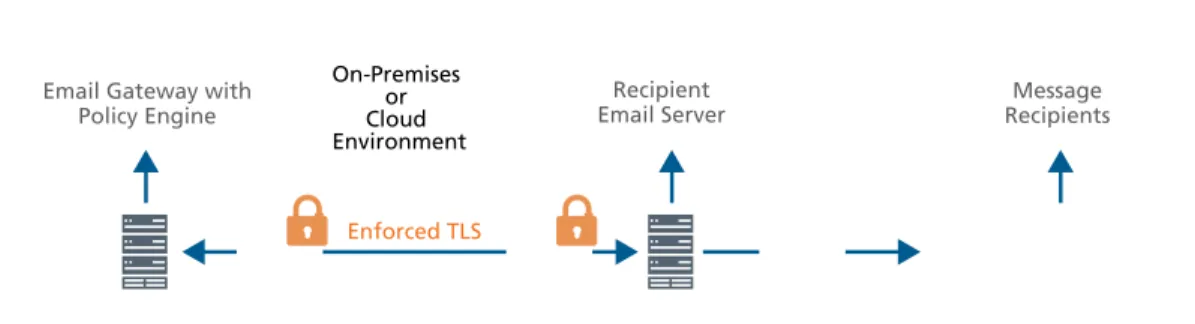
For rigorous encryption, these organizations should use email gateway security solutions, either in the cloud (SaaS) or on premises. These systems can enforce policies to ensure that a TLS connection is in place before email is sent or received, typically with “per domain” policies. For example, ABC Bank can have a policy that enforces a rule that all incoming and outgoing email to XYZ Bank must use TLS. If the TLS connection cannot be made, the email will not be sent or received. In essence, the policy says: “Use TLS between abc.com and xyz.com.” The encryption initiates and terminates at the email gateway for each organization. A major advantage of this approach: the encryption is completely transparent to the individual senders and recipients.
Figure 1. Automated gateway-to-gateway encryption protects data in motion without relying on the end user.
Typically used between business partners, TLS encryption is the most common email encryption. Using policy-enforced TLS email encryption enables organizations to satisfy privacy requirements and reduce liability, so it is a best practice for healthcare organizations, financial institutions, and service industries (such as law firms). In addition to TLS, S/MIME and PGP also provide organization-to-organization encryption capabilities.
Secure portal or organization-to-user “pull-based” encrypted email delivery
Unlike TLS encryption, which terminates at the email gateway, pull-based encrypted email delivers encrypted email directly to the recipient. Email recipients do not require any additional software to decrypt messages, just a browser.
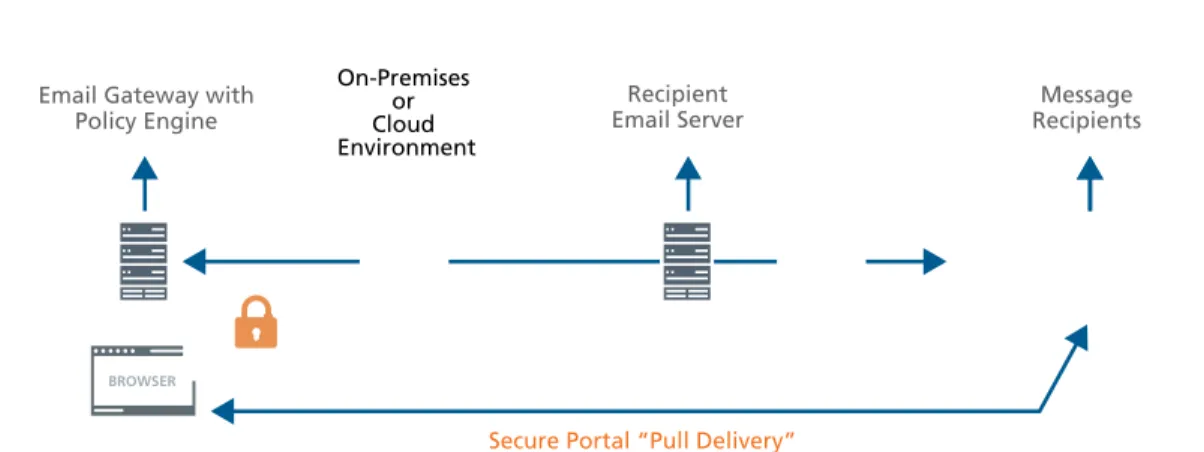
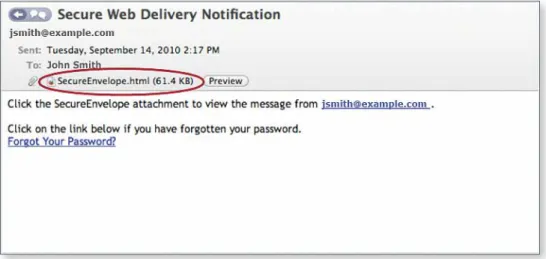
Here’s how it works. Instead of a message being encrypted and sent to the user, the sender’s email gateway encrypts the message and makes it accessible to the intended recipient via a secure portal (website). The recipients receive a notification that a secure message has been sent to them, with a link to the secure portal (using a secure TLS web browser session). The recipient logs into the portal and can read and reply to the email using this webmail-like portal. A portal password can be pre-established for the recipient or, more commonly, the recipient will establish their credentials upon receiving their first encrypted message when the portal asks them to create a password.
Email Gateway with
Policy Engine Email ServerRecipient
Enforced TLS
Message Recipients
On-Premises or Cloud Environment
5
Email Encryption Made Simple Figure 2. Example of a secure portal used for pull-based encrypted email delivery.
This encryption method is ideal for sending secure messages to customers, occasional business partners, or business partners that are not able to implement TLS. It is especially friendly to mobile devices, since recipients can view the message, then decide whether they want to download the attachments for viewing on the device, or wait for a time that is more convenient.
Common uses include financial institutions sending documents to customers and healthcare organiza-tions exchanging private records with small medical clinics or patients. The recipient simply needs a browser with an active Internet connection to view and reply to the messages. Since the pull messages are stored on the email gateway, some organizations also like the idea that the sensitive messages are stored there as well.
Figure 3. Pull delivery allows customers and clients to download encrypted email using any web browser.
Email Gateway with
Policy Engine RecipientsMessage
On-Premises or Cloud Environment
Recipient Email Server
URL URL
BROWSER
Pull delivery may be advantageous where bandwidth is at a premium, since the encrypted message traverses the network only when the recipient reads (that is, pulls) the message. The benefit over push delivery becomes more pronounced as the average encrypted message size increases.
With pull delivery, the messages are stored on the sender’s system, which means the sender is responsible for the storage of those messages. Cloud-based solutions can alleviate this burden, since the messages will then be stored at the vendor’s data center rather than on premises. Push-based delivery portals are not meant to be permanent message stores and, as a result, messages are typically purged after a defined time limit.
Organizations may also prefer pull-based delivery because they dictate where the sensitive data is stored while it waits for recipients to pull the messages.
Secure attachment or organization-to-user “push-based” encrypted email delivery
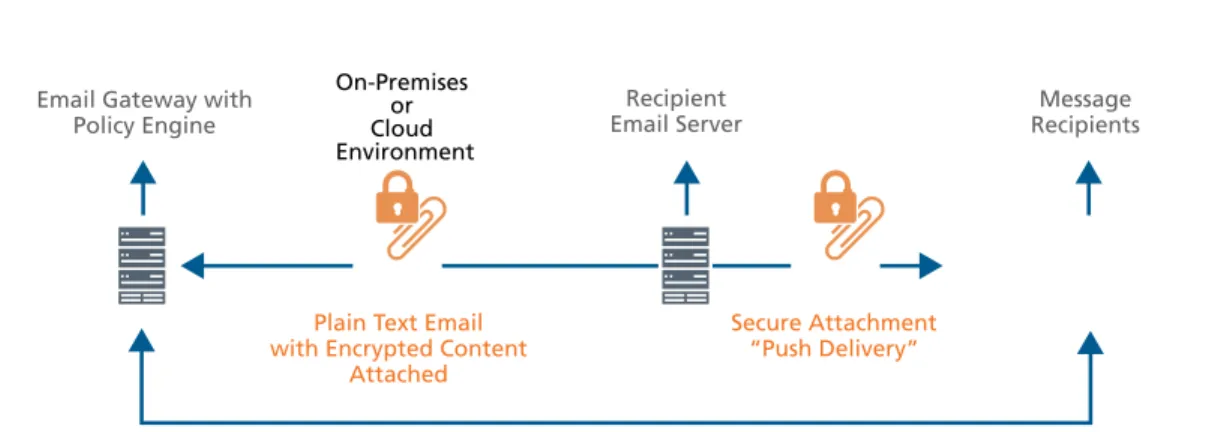
Push delivery, like pull, requires no special investment by the recipient beyond a standard web browser. Unlike pull delivery, with push delivery, the user receives the secure message as an encrypted attachment. After the recipient enters a password, the attachment is decrypted and the recipient can read and securely reply to the message. Attachments are instantly available and can be saved locally, while the original email and attachment remain encrypted in the recipient’s inbox.
Figure 4. Example of a push-based encrypted email delivery. The message includes an encrypted HTML attachment that can be opened with a browser.
Although push and pull delivery both encrypt messages to individual users, many organizations with an on-premises solution prefer push delivery. It alleviates the need for email sender organizations to store messages on their own servers and enables recipients to keep messages in their inboxes indefinitely. Leveraging a cloud-based encryption solution is also a good alternative to alleviating storage concerns, since the encrypted messages become temporarily housed at the vendor’s site.
7
Email Encryption Made Simple
Email Gateway with
Policy Engine RecipientsMessage
On-Premises or Cloud Environment Secure Attachment “Push Delivery” Plain Text Email
with Encrypted Content Attached
Recipient Email Server
Validated Credentials to View Encrypted Content
Figure 5. Push encryption uses encrypted attachments to allow recipients to store and view content at their convenience.
Policies rule
Policies drive all three approaches to encryption. Policy configuration for organization-to-organization encryption is straightforward. The administrator simply determines which business partner domains— such as ourbank.com and ourlawyer.com—require encryption and creates a policy to enforce the encryption.
Unlike organization-to-organization policies, pull and push policies should not be defined at a domain level because this model would force recipients to decrypt each and every message—a good way to make your email recipients grumpy.
Instead, push and pull encryption should be enforced only for policy-controlled content, such as sensitive business information, personally identifiable information, or regulated content. A policy can state that any content of this kind will be encrypted automatically, at the gateway, without user intervention. In addition to policy-automated encryption, the email senders within your domain should have the ability to initiate an encrypted message voluntarily. Many organizations use key words to trigger automatic encryption. For example, a policy can be created to encrypt all messages that include the phrase “Secure” in the subject. Alternatively, encryption might trigger if a message is labeled “Confidential” using the message sensitivity button built into many standard email clients.
McAfee Email Encryption Solutions
The three approaches discussed above—organization-to-organization, pull delivery, and push delivery— offer a range of options to satisfy most organizations’ requirements for encrypted email. All three options are nicely integrated into email security solutions from McAfee and require minimal administrative overhead to implement. Offered either as an on-premises email gateway (hardware or virtual appliance) or a cloud-based service, each has native data loss prevention technologies, including a robust policy engine and extensive compliance templates, to simplify compliance and policy enforcement. Using and implementing encrypted email has never been easier.
About McAfee
McAfee, a wholly owned subsidiary of Intel Corporation (NASDAQ:INTC), is the world’s largest dedicated security technology company. Backed by global threat intelligence, our solutions empower home users and organizations by enabling them to safely connect to and use the Internet, prove compliance, protect data, prevent disruptions, identify vulnerabilities, and monitor and improve their security. McAfee is relentlessly focused on constantly finding new ways to keep our customers safe.