Cisco Desktop Virtualization Solution for EMC
VSPEX with Citrix XenDesktop 7.5 for 1000
Seats
July 2014
About Cisco Validated Design (CVD) Program
The CVD program consists of systems and solutions designed, tested, and documented to
facilitate faster, more reliable, and more predictable customer deployments. For more information visit www.cisco.com/go/designzone.
ALL DESIGNS, SPECIFICATIONS, STATEMENTS, INFORMATION, AND RECOMMENDATIONS (COLLECTIVELY, "DESIGNS") IN THIS MANUAL ARE PRESENTED "AS IS," WITH ALL FAULTS. CISCO AND ITS SUPPLIERS DISCLAIM ALL WARRANTIES, INCLUDING, WITHOUT LIMITATION, THE WARRANTY OF MERCHANTABILITY, FITNESS FOR A PARTICULAR PURPOSE AND
NONINFRINGEMENT OR ARISING FROM A COURSE OF DEALING, USAGE, OR TRADE PRACTICE. IN NO EVENT SHALL CISCO OR ITS SUPPLIERS BE LIABLE FOR ANY INDIRECT, SPECIAL,
CONSEQUENTIAL, OR INCIDENTAL DAMAGES, INCLUDING, WITHOUT LIMITATION, LOST
PROFITS OR LOSS OR DAMAGE TO DATA ARISING OUT OF THE USE OR INABILITY TO USE THE DESIGNS, EVEN IF CISCO OR ITS SUPPLIERS HAVE BEEN ADVISED OF THE POSSIBILITY OF SUCH DAMAGES.
THE DESIGNS ARE SUBJECT TO CHANGE WITHOUT NOTICE. USERS ARE SOLELY RESPONSIBLE FOR THEIR APPLICATION OF THE DESIGNS. THE DESIGNS DO NOT
CONSTITUTE THE TECHNICAL OR OTHER PROFESSIONAL ADVICE OF CISCO, ITS SUPPLIERS OR PARTNERS. USERS SHOULD CONSULT THEIR OWN TECHNICAL ADVISORS BEFORE IMPLEMENTING THE DESIGNS. RESULTS MAY VARY DEPENDING ON FACTORS NOT TESTED BY CISCO.
CCDE, CCENT, Cisco Eos, Cisco Lumin, Cisco Nexus, Cisco StadiumVision, Cisco TelePresence, Cisco WebEx, the Cisco logo, DCE, and Welcome to the Human Network are trademarks; Changing the Way We Work, Live, Play, and Learn and Cisco Store are service marks; and Access Registrar, Aironet, AsyncOS, Bringing the Meeting To You, Catalyst, CCDA, CCDP, CCIE, CCIP, CCNA, CCNP, CCSP, CCVP, Ci sco, the Cisco Certified Internetwork Expert logo, Cisco IOS, Cisco Press, Cisco Systems, Cisco Systems Capital, the Cisco Systems logo, Cisco Unity, Collaboration Without Limitation, EtherFast, EtherSwitch, Event Center, Fast Step, Follow Me Browsing, FormShare , GigaDrive, HomeLink, Internet Quotient, IOS, iPhone, iQuick Study, IronPort, the IronPort logo, LightStream, Linksys, MediaTone, MeetingPlace, MeetingPlace Chime Sound, MGX, Networkers, Networking Academy, Network Registrar, PCNow, PIX, PowerPanels, ProConnect, ScriptShare, SenderBase, SMARTnet, Spectrum Expert, StackWise, The Fastest Way to Increase Your Internet Quotient, TransPath, WebEx, and the WebEx logo are registered trademarks of Cisco Systems, Inc. and/or its affiliates in the United States and certain ot her countries. All other trademarks mentioned in this document or website are the property of their respective owners. The use of the word pa rtner does not imply a partnership relationship between Cisco and any other company. (0809R)
Contents
About the Authors ... 9
Acknowledgements ... 9
Overview ... 10
Solution Component Benefits ... 10
Benefits of Cisco Unified Computing System ... 10
Benefits of Cisco Nexus Physical Switching ... 11
Cisco Nexus 5548UP Unified Port Layer 2 Switches ... 11
Cisco Nexus 1000V Distributed Virtual Switch ... 11
Cisco Virtual Machine Fabric Extender (VM-FEX) ... 12
Benefits of EMC VSPEX Proven Infrastructure ... 12
EMC VSPEX End User Computing with the Next-Generation VNX Series ... 13
Flash-Optimized Hybrid Array ... 13
VNX Intel MCx Code Path Optimization ... 13
Benefits of VMware vSphere ESXi 5.5 ... 15
Benefits of Citrix XenDesktop 7.5 ... 15
Audience ... 16
Summary of Main Findings ... 16
Architecture ... 17 Hardware Deployed... 17 Logical Architecture ... 20 Software Revisions ... 21 Configuration Guidelines ... 21 VMware Clusters ... 22 Infrastructure Components ... 23
Cisco Unified Computing System (UCS) ... 23
Cisco Unified Computing System Components ... 23
Citrix XenDesktop 7.5 ... 27
Enhancements in XenDesktop 7.5 ... 27
High-Definition User Experience (HDX) Technology ... 29
Citrix XenDesktop 7.5 Desktop and Application Services ... 29
Citrix Provisioning Services 7.1 ... 30
EMC VNX Series ... 31
EMC VNX5400 Used in Testing ... 31
Modular Virtual Desktop Infrastructure Technical Overview ... 33
Modular Architecture ... 33
Simplified ... 35
Secure ... 35
Scalable ... 35
Savings and Success ... 35
Cisco Services ... 36
Cisco Networking Infrastructure ... 36
Features and Benefits ... 37
Architecture and Design of XenDesktop 7.5 on Cisco Unified Computing System and EMC VNX Storage Design Fundamentals ... 37
Understanding Applications and Data ... 38
Project Planning and Solution Sizing Sample Questions ... 38
Hypervisor Selection ... 39
Desktop Virtualization Design Fundamentals ... 39
Citrix Design Fundamentals ... 39
Citrix Provisioning Services ... 40
Example XenDesktop Deployments ... 42
Designing a XenDesktop Environment for a Mixed Workload ... 44
Citrix Unified Design Fundamentals ... 45
Storage Architecture Design ... 46
Solution Validation ... 46
Configuration Topology for a Scalable XenDesktop 7.5 Mixed Workload Desktop Virtualization Solution ... 47
Cisco Unified Computing System Configuration ... 48
Base Cisco UCS System Configuration ... 48
QoS and CoS in Cisco Unified Computing System ... 80
System Class Configuration ... 80
Cisco UCS System Class Configuration ... 81
The Steps to Enable QOS on the Cisco Unified Computing System ... 81
LAN Configuration ... 82
Cisco UCS and EMC VNX Ethernet Connectivity ... 82
Cisco Nexus 1000V Configuration in L3 Mode ... 83
Configuring Cisco UCS VM-FEX ... 98
SAN Configuration ... 109
Boot from SAN Benefits ... 109
Configuring Boot from SAN Overview ... 110
SAN Configuration on Cisco Nexus 5548UP ... 110
Configuring Boot from iSCSI SAN on EMC VNX5400 ... 113
iSCSI SAN Configuration on Cisco UCS Manager ... 117
Example EMC Volume Configuration for PVS Write Cache ... 118
EMC Storage Configuration for PVS vDisks ... 119
EMC Storage Configuration for VMWare ESXi 5.5 Infrastructure and VDA Clusters ... 119
Example EMC Boot LUN Configuration ... 119
EMC FAST Cache in Practice ... 120
EMC Additional Configuration Information ... 122
NFS active threads per Data Mover ... 122
Installing and Configuring ESXi 5.5 ... 123
Log in to Cisco UCS 6200 Fabric Interconnect ... 123
Set Up VMware ESXi Installation ... 124
Install ESXi ... 124
Set Up Management Networking for ESXi Hosts ... 124
Download VMware vSphere Client and vSphere Remote CLI ... 125
Log in to VMware ESXi Hosts by Using VMware vSphere Client ... 125
Download Updated Cisco VIC enic and fnic Drivers ... 125
Download EMC PowerPath/VE Driver and VAAI plug-in for File ... 126
Load Updated Cisco VIC enic and fnic Drivers and EMC Bundles ... 126
Set Up VMkernel Ports and Virtual Switch ... 127
Mount Required Datastores ... 131
Configure NTP on ESXi Hosts ... 132
Move VM Swap File Location ... 132
Install and Configure vCenter and Clusters ... 132
Build Microsoft SQL Server VM... 133
Install Microsoft SQL Server 2012 for vCenter ... 134
Build and Set Up VMware vCenter VM ... 140
Install VMware vCenter Server ... 143
Set Up ESXi 5.5 Cluster Configuration ... 147
Installing and Configuring Citrix Licensing and Provisioning Components ... 149
Installing Citrix License Server ... 149
Installing Provisioning Services ... 153
Installation of Additional PVS Servers ... 171
Installing and Configuring XenDesktop 7.5 Components ... 177
Installing the XenDesktop Delivery Controllers ... 177
XenDesktop Controller Configuration ... 182
Additional XenDesktop Controller Configuration ... 187
Adding Host Connections and Resources with Citrix Studio ... 190
Installing and Configuring StoreFront ... 192
Overview of Desktop Delivery ... 201
Overview of PVS vDisk Image Management ... 202
Overview – Golden Image Creation ... 202
Write-cache drive sizing and placement ... 203
Preparing the Master Targets ... 203
Installing the PVS Target Device Software ... 204
Installing XenDesktop Virtual Desktop Agents ... 208
Installing Applications on the Master Targets ... 212
Creating vDisks ... 214
Creating Desktops with the PVS XenDesktop Setup Wizard ... 219
Creating Delivery Groups ... 227
Citrix XenDesktop Policies and Profile Management ... 230
Configuring Citrix XenDesktop Policies ... 230
Configuring User Profile Management ... 231
Test Setup and Configurations ... 232
Cisco UCS Test Configuration for Single Blade Scalability ... 233
Cisco UCS Configuration for Two Chassis – Eight Mixed Workload Blade Test 1000 Users ... 235
Testing Methodology and Success Criteria ... 236
Load Generation ... 236
User Workload Simulation – LoginVSI From Login VSI Inc. ... 236
Testing Procedure ... 238
Success Criteria ... 239
Citrix XenDesktop 7.5 Hosted Virtual Desktop and RDS Hosted Shared Desktop Mixed Workload on Cisco UCS B200 M3 Blades, EMC VNX5400 Storage and VMware ESXi 5.5 Test Results ... 243
Single-Server Recommended Maximum Workload ... 244
XenDesktop 7.5 Hosted Virtual Desktop Single Server Maximum Recommended Workload ... 244
XenDesktop 7.5 RDS Hosted Shared Desktop Single Server Maximum Recommended Workload ... 247
Full Scale Mixed Workload XenDesktop 7.5 Hosted Virtual and RDS Hosted Shared Desktops ... 249
Key EMC VNX5400 Performance Metrics During Scale Testing ... 253
Performance Result ... 254
Citrix PVS Workload Characteristics ... 254
Key Infrastructure Server Performance Metrics During Scale Testing ... 255
Scalability Considerations and Guidelines ... 268
Cisco UCS System Scalability ... 268
Scalability of Citrix XenDesktop 7.5 Configuration ... 268
EMC VNX5400 storage guidelines for Mixed Desktops Virtualization workload ... 269
References ... 269
Citrix Reference Documents ... 269
EMC References ... 270
VMware References ... 270
Login VSI ... 270
Appendix A–Cisco Nexus 5548UP Configurations ... 271
Appendix B–Cisco Nexus 1000V VSM Configuration ... 281
About the Authors
Frank Anderson, Senior Solutions Architect, Cisco Systems, Inc.
Frank is Senior Solutions Architect, focusing on building and testing desktop virtualization solutions with partners. Frank has been involved with creating VDI-based Cisco Validated Designs since 2010 with over 17 years of experience working with Citrix and Microsoft products holding various roles as an Administrator, Consultant, Sales Engineer, Testing Engineer, TME, and Solutions Architect.
Mike Brennan, Cisco Unified Computing System Architect, Cisco Systems, Inc.
Mike is a Cisco Unified Computing System architect, focusing on Virtual Desktop Infrastructure solutions with extensive experience with EMC VNX, VMware ESX/ESXi, XenDesktop and Provisioning Services. He has expert product knowledge in application and desktop virtualization across all three major hypervisor platforms, both major desktop brokers, Microsoft Windows Active Directory, User Profile Management, DNS, DHCP and Cisco networking technologies.
Ka-kit Wong, Solutions Engineer, Strategic Solutions Engineering, EMC
Ka-Kit Wong is a solutions engineer for desktop virtualization in EMC’s Strategic Solutions Engineering group, where he focuses on developing End User Computing (EUC) validated solutions. He has been at EMC for more than 13 years, and his roles have included systems, performance and solutions testing in various positions. He holds a Master of Science degree in computer science from Vanderbilt University.
Acknowledgements
Cisco Desktop Virtualization Solution for EMC
VSPEX with Citrix XenDesktop 7.5 for 1000
Seats
Overview
This document provides a Reference Architecture for a 1000-Seat Virtual Desktop Infrastructure using Citrix XenDesktop 7.5 built on Cisco UCS B200-M3 blades with an EMC VNX5400 and the VMware vSphere ESXi 5.5 hypervisor platform.
The landscape of desktop virtualization is changing constantly. New, high performance Cisco UCS Blade Servers and Cisco UCS unified fabric combined as part of the EMC VSPEX Proven Infrastructure with the latest generation EMC VNX arrays result in a more compact, more powerful, more reliable and more efficient platform.
In addition, the advances in the Citrix XenDesktop 7.5 system, which now incorporates both traditional hosted virtual Windows 7 or Windows 8 desktops, hosted applications and hosted shared Server 2008 R2 or Server 2012 R2 server desktops (formerly delivered by Citrix XenApp,) provide unparalleled scale and management simplicity while extending the Citrix HDX FlexCast models to additional mobile devices
This document provides the architecture and design of a virtual desktop infrastructure for 1000 mixed use-case users. The infrastructure is 100% virtualized on VMware ESXi 5.5 with third-generation Cisco UCS B-Services B200 M3 blade servers booting via iSCSI from an EMC VNX5400 storage array. The virtual desktops are powered using Citrix Provisioning Server 7.1 and Citrix XenDesktop 7.5, with a mix of hosted shared desktops (70%) and pooled hosted virtual Windows 7 desktops (30%) to support the user population. Where applicable, the document provides best practice recommendations and sizing guidelines for customer deployments of XenDesktop 7.5 on the Cisco Unified Computing System.
Solution Component Benefits
Each of the components of the overall solution materially contributes to the value of functional design contained in this document.
Benefits of Cisco Unified Computing System
Cisco Unified Computing System™ is the first converged data center platform that combines industry-standard, x86-architecture servers with networking and storage access into a single converged system. The system is entirely programmable using unified, model-based management to simplify and speed deployment of enterprise-class applications and services running in bare-metal, virtualized, and cloud computing environments.
Benefits of the Cisco Unified Computing System include: Architectural flexibility
Cisco B-Series blade servers for infrastructure and virtual workload hosting
Cisco C-Series rack-mount servers for infrastructure and virtual workload Hosting
Cisco 6200 Series second generation fabric interconnects provide unified blade, network and storage connectivity
Cisco 5108 Blade Chassis provide the perfect environment for multi-server type, multi-purpose workloads in a single containment
Infrastructure Simplicity
Cisco UCS management results in flexible, agile, high performance, self-integrating information technology with faster ROI
Fabric Extender technology reduces the number of system components to purchase, configure and maintain
Standards-based, high bandwidth, low latency virtualization-aware unified fabric delivers high density, excellent virtual desktop user-experience
Business Agility
Model-based management means faster deployment of new capacity for rapid and accurate scalability
Scale up to 20 Chassis and up to 160 blades in a single Cisco UCS management domain
Scale to multiple Cisco UCS Domains with Cisco UCS Central within and across data centers globally
Leverage Cisco UCS Management Packs for VMware vCenter 5.1 for integrated management
Benefits of Cisco Nexus Physical Switching
The Cisco Nexus product family includes lines of physical unified port layer 2, 10 GB switches, fabric extenders, and virtual distributed switching technologies. In our study, we utilized Cisco Nexus 5548UP physical switches, Cisco Nexus 1000V distributed virtual switches and Cisco VM-FEX technology to deliver amazing end user experience.
Cisco Nexus 5548UP Unified Port Layer 2 Switches
The Cisco Nexus 5548UP Switch delivers innovative architectural flexibility, infrastructure simplicity, and business agility, with support for networking standards. For traditional, virtualized, unified, and high-performance computing (HPC) environments, it offers a long list of IT and business advantages, including:
Architectural Flexibility
Unified ports that support traditional Ethernet, Fiber Channel (FC), and Fiber Channel over Ethernet (ISCSI)
Synchronizes system clocks with accuracy of less than one microsecond, based on IEEE 1588
Offers converged Fabric extensibility, based on emerging standard IEEE 802.1BR, with Fabric Extender (FEX) Technology portfolio, including the Nexus 1000V Virtual Distributed Switch
Infrastructure Simplicity
Common high-density, high-performance, data-center-class, fixed-form-factor platform
Consolidates LAN and storage
Supports any transport over an Ethernet-based fabric, including Layer 2 and Layer 3 traffic
Supports storage traffic, including iSCSI, NAS, FC, RoE, and IBoE
Reduces management points with FEX Technology Business Agility
Meets diverse data center deployments on one platform
Provides rapid migration and transition for traditional and evolving technologies
Offers performance and scalability to meet growing business needs Specifications At-a -Glance
A 1 -rack-unit, 1/10 Gigabit Ethernet switch
32 fixed Unified Ports on base chassis and one expansion slot totaling 48 ports
The slot can support any of the three modules: Unified Ports, 1/2/4/8 native Fiber Channel, and Ethernet or ISCSI
Throughput of up to 960 Gbps.
Cisco Nexus 1000V Distributed Virtual Switch
Get highly secure, multitenant services by adding virtualization intelligence to your data center network with the Cisco Nexus 1000V Switch for VMware vSphere. This switch:
Extends the network edge to the hypervisor and virtual machines
Is built to scale for cloud networks
Forms the foundation of virtual network overlays for the Cisco Open Network Environment and Software Defined Networking (SDN)
Important differentiators for the Cisco Nexus 1000V for VMware vSphere include:
Extensive virtual network services built on Cisco advanced service insertion and routing technology
Support for vCloud Director and vSphere hypervisor
Feature and management consistency for easy integration with the physical infrastructure
Exceptional policy and control features for comprehensive networking functionality
Policy management and control by the networking team instead of the server virtualization team (separation of duties)
Use Virtual Networking Services
The Cisco Nexus 1000V Switch optimizes the use of Layer 4 - 7 virtual networking services in virtual machine and cloud environments through Cisco vPath architecture services.
Cisco vPath 2.0 supports service chaining so you can use multiple virtual network services as part of a single traffic flow. For example, you can simply specify the network policy, and vPath 2.0 can direct traffic:
First, through the Cisco ASA1000V Cloud Firewall for tenant edge security
Then, through the Cisco Virtual Security Gateway for Nexus 1000V Switch for a zoning firewall
In addition, Cisco vPath works on VXLAN to support movement between servers in different Layer 2 domains. Together, these features promote highly secure policy, application, and service delivery in the cloud.
Cisco Virtual Machine Fabric Extender (VM-FEX)
Cisco Virtual Machine Fabric Extender (VM-FEX) collapses virtual and physical networking into a single infrastructure. Data center administrators can now provision, configure, manage, monitor, and diagnose virtual machine network traffic and bare metal network traffic within a unified infrastructure.
The VM-FEX software extends Cisco fabric extender technology to the virtual machine with the following capabilities:
Each virtual machine includes a dedicated interface on the parent switch
All virtual machine traffic is sent directly to the dedicated interface on the switch
The software-based switch in the hypervisor is eliminated
Benefits of EMC VSPEX Proven Infrastructure
VSPEX Proven Infrasture accelerates deployment of provate cloud. Built with best-of-breed virtualization, server, network, storage and backup, VSPEX enables faster deployment, more simplicity, greater choice, higher efficiency, and lower risk. Validation by EMC ensures predictable performance and enables customers to select product that leverages their existing IT infrastructure while eliminating planning, sizing, and configuration burdens. VSPEX provides a virtual infrastructure for customers looking to gain simplicity that is characteristic of truly converged infrastructures while at the same time gaining more choice in individual stack components.
As part of the EMC VSPEX End User Computing solution, the EMC VNX flash-optimized unified storage platform delivers innovation and enterprise capabilities for file, block, and object storage in a single, scalable, and easy-to-use solution. Ideal for mixed workloads in physical or virtual environments, VNX combines powerful and flexible hardware with advanced efficiency, management, and protection software to meet the demanding needs of today’s virtualized application environments.
VNX storage includes the following components:
Host adapter ports (for block)—Provide host connectivity through fabric into the array.
Data Movers (for file)—Front-end appliances that provide file services to hosts (optional if providing CIFS/SMB or NFS services).
Storage processors (SPs)—The compute component of the storage array. SPs handle all aspects of data moving into, out of, and between arrays.
Disk drives—Disk spindles and solid state drives (SSDs) that contain the host/application data and their enclosures.
The term Data Mover refers to a VNX hardware component, which has a CPU, memory, and input/output (I/O) ports. It enables the CIFS (SMB) and NFS protocols on the VNX array.
EMC VSPEX End User Computing with the Next-Generation
VNX Series
Next-generation VNX includes many features and enhancements designed and built upon the first generation’s success. These features and enhancements include:
More capacity with multicore optimization with multicore cache, multicore RAID, and multicore FAST Cache (MCx™)
Greater efficiency with a flash-optimized hybrid array
Better protection by increasing application availability with active/active
Easier administration and deployment with the new Unisphere® Management Suite
VSPEX is built with next-generation VNX to deliver even greater efficiency, performance, and scale than ever before.
Flash-Optimized Hybrid Array
VNX is a flash-optimized hybrid array that provides automated tiering to deliver the best performance to your critical data, while intelligently moving less frequently accessed data to lower-cost disks.
In this hybrid approach, a small percentage of flash drives in the overall system can provide a high percentage of the overall IOPS. Flash-optimized VNX takes full advantage of the low latency of flash to deliver cost-saving optimization and high performance scalability. EMC Fully Automated Storage Tiering Suite (FAST Cache and FAST VP) tiers both block and file data across heterogeneous drives and boosts the most active data to the flash drives, ensuring that customers never have to make concessions for cost or performance.
Data generally is accessed most frequently at the time it is created; therefore, new data is first stored on flash drives to provide the best performance. As the data ages and becomes less active over time, FAST VP tiers the data from high-performance to high-capacity drives automatically, based on customer-defined policies. This functionality has been enhanced with four times better granularity and with new FAST VP solid-state disks (SSDs) based on enterprise multilevel cell (eMLC) technology to lower the cost per gigabyte.
FAST Cache uses flash drives as an expanded cache layer for the array to dynamically absorb unpredicted spikes in system workloads. Frequently accessed data is copied to the FAST Cache in 64 KB increments. Subsequent reads and/or writes to the data chunk are serviced by FAST Cache. This enables immediate promotion of very active data to flash drives. This dramatically improves the response times for the active data and reduces data hot spots that can occur within the LUN.
All VSPEX use cases benefit from the increased efficiency provided by the FAST Suite. Furthermore, VNX provides out-of-band, block-based deduplication that can dramatically lower the costs of the flash tier.
VNX Intel MCx Code Path Optimization
The advent of flash technology has been a catalyst in making significant changes in the requirements of midrange storage systems. EMC redesigned the midrange storage platform to efficiently optimize multicore CPUs to provide the highest performing storage system at the lowest cost in the market.
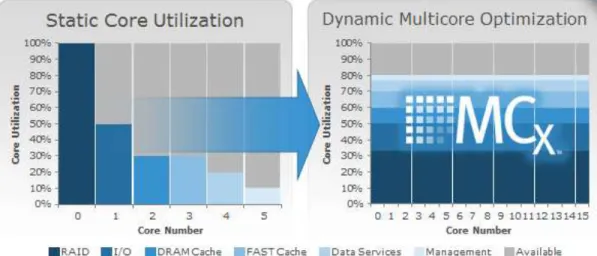
MCx distributes all VNX data services across all cores (up to 32), as shown in Figure 1. Figure 1: The VNX series with MCx has dramatically improved the file performance for transactional applications like databases or virtual machines over network-attached storage (NAS).
Figure 1: Next-generation VNX with multicore optimization
Multicore Cache
The cache is the most valuable asset in the storage subsystem; its efficient use is the key to the overall efficiency of the platform in handling variable and changing workloads. The cache engine has been modularized to take advantage of all the cores available in the system.
Multicore RAID
Another important improvement to the MCx design is how it handles I/O to the permanent back-end storage—hard disk drives (HDDs) and SSDs. The modularization of the back-end data management processing, which enables MCx to seamlessly scale across all processors, greatly increases the performance of the VNX system.
Performance Enhancements
VNX storage, enabled with the MCx architecture, is optimized for FLASH 1st and provides unprecedented overall performance; it optimizes transaction performance (cost per IOPS), bandwidth performance (cost per GB/s) with low latency, and capacity efficiency (cost per GB).
VNX provides the following performance improvements:
Up to four times more file transactions when compared with dual controller arrays
Increased file performance for transactional applications (for example, Microsoft Exchange on VMware over NFS) by up to three times, with a 60 percent better response time
Up to four times more Oracle and Microsoft SQL Server OLTP transactions
Up to six times more virtual machines Active/Active Array Storage Processors
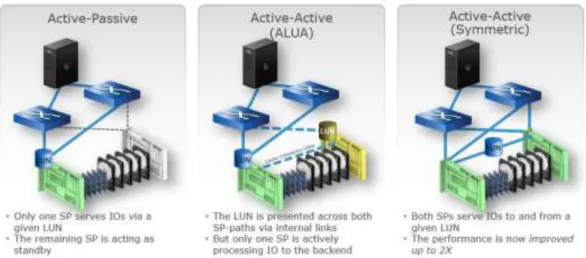
The new VNX architecture provides active/active array storage processors, as shown in Figure 2: , which eliminate application timeouts during path failover because both paths are actively serving I/O.
Figure 2: Active/active processors increase performance, resiliency, and efficiency
Load balancing is also improved, providing up to double the performance for applications. Active/active for block is ideal for applications that require the highest levels of availability and performance, but do not require tiering or efficiency services like compression, deduplication, or snapshot.
Note: The active/active processors are available only for RAID LUNs, not for pool LUNs.
Benefits of VMware vSphere ESXi 5.5
VMware vSphere® 5.5 is the latest release of the flagship virtualization platform from VMware. VMware vSphere, known in many circles as "ESXi", for the name of the underlying hypervisor architecture, is a bare-metal hypervisor that installs directly on top of your physical server and partitions it into multiple virtual machines. Each virtual machine shares the same physical resources as the other virtual machines and they can all run at the same time. Unlike other hypervisors, all management functionality of vSphere is possible through remote management tools. There is no underlying operating system, reducing the install footprint to less than 150MB.
Here are some key features included with vSphere 5.5:
Improved Security
Extensive Logging and Auditing
Enhanced vMotion
New Virtual Hardware
Active Directory Integration
Centralized Management
Stateless Firewall
Centralized Management of Host Image and Configuration via Auto Deploy. For more information on the vSphere ESXi hypervisor, go to:
http://www.vmware.com/products/esxi-and-esx/overview.html
Benefits of Citrix XenDesktop 7.5
Enterprise IT organizations are tasked with the challenge of provisioning Microsoft Windows apps and desktops while managing cost, centralizing control, and enforcing corporate security policy. Deploying Windows apps to users in any location, regardless of the device type and available network bandwidth, enables a mobile workforce that can improve productivity. With Citrix XenDesktop™ 7.5, IT can effectively control app and desktop provisioning while securing data assets and lowering capital and operating expenses.
The XenDesktop™ 7.5 release offers these benefits:
Comprehensive virtual desktop delivery for any use case. The XenDesktop 7.5 release incorporates the full power of XenApp, delivering full desktops or just applications to users. Administrators can deploy both
XenApp published applications and desktops (to maximize IT control at low cost) or personalized VDI desktops (with simplified image management) from the same management console. Citrix XenDesktop 7.5 leverages common policies and cohesive tools to govern both infrastructure resources and user access.
Simplified support and choice of BYO (Bring Your Own) devices. XenDesktop 7.5 brings thousands of corporate Microsoft Windows-based applications to mobile devices with a native-touch experience and optimized performance. HDX technologies create a “high definition” user experience, even for graphics-intensive design and engineering applications.
Lower cost and complexity of application and desktop management. XenDesktop 7.5 helps IT organizations take advantage of agile and cost-effective cloud offerings, allowing the virtualized infrastructure to flex and meet seasonal demands or the need for sudden capacity changes. IT organizations can deploy XenDesktop application and desktop workloads to private or public clouds, including Amazon AWS, Citrix Cloud Platform, and (in the near future) Microsoft Azure.
Protection of sensitive information through centralization. XenDesktop decreases the risk of corporate data loss, enabling access while securing intellectual property and centralizing applications since assets reside in the datacenter.
Audience
This document describes the architecture and deployment procedures of an infrastructure comprised of Cisco, EMC, and VMware hypervisor and Citrix desktop virtualization products. The intended audience of this document includes, but is not limited to, sales engineers, field consultants, professional services, IT managers, partner engineering, and customers who want to deploy the solution described in this document.
Summary of Main Findings
The combination of technologies from Cisco Systems, Inc., Citrix Systems, Inc., EMC, and VMware Inc. produced a highly efficient, robust and affordable desktop virtualization solution for a hosted virtual desktop and hosted shared desktop mixed deployment supporting different use cases. Key components of the solution included:
This solution is Cisco’s Desktop Virtualization Converged Design with VSPEX providing our customers with a turnkey physical and virtual infrastructure specifically designed to support 1000 desktop users in a highly available proven design. This architecture is well suited for large departmental and enterprise deployments of virtual desktop infrastructure.
More power, same size. Cisco UCS B200 M3 half-width blade with dual 10-core 2.8 GHz Intel Xeon Ivy Bridge (E5-2680v2) processors and 384GB of memory for XenDesktop hosted virtual desktop hosts and 256GB of memory for XenDesktop hosted shared desktop hosts supports ~25% more virtual desktop workloads than the previously released Sandy Bridge processors on the same hardware. The Intel Xeon E5-2680 v2 10-core processors used in this study provided a balance between increased per-blade capacity and cost.
Fault-tolerance with high availability built into the design. The 1000-user design is based on using two Unified Computing System chassis with eight B200 M3 blades for virtualized desktop workloads and two B200 M3 blades for virtualized infrastructure workloads. The design provides N+1 Server fault tolerance for hosted virtual desktops, hosted shared desktops and infrastructure services.
Stress-tested to the limits during aggressive boot scenario. The 1000-user mixed hosted virtual desktop and hosted shared desktop environment booted and registered with the XenDesktop 7.5 Delivery Controllers in under 15 minutes, providing our customers with an extremely fast, reliable cold-start desktop virtualization system.
Stress-tested to the limits during simulated login storms. All 1000 simulated users logged in and started running workloads up to steady state in 30-minutes without overwhelming the processors, exhausting memory or exhausting the storage subsystems, providing customers with a desktop virtualization system that can easily handle the most demanding login and startup storms.
Ultra-condensed computing for the datacenter. The rack space required to support the 1000-user system is less than a single rack, 34 rack units, conserving valuable data center floor space.
Pure Virtualization: This CVD presents a validated design that is 100% virtualized on VMware ESXi 5.5. All of the virtual desktops, user data, profiles, and supporting infrastructure components, including Active Directory, Provisioning Servers, SQL Servers, XenDesktop Delivery Controllers, and XenDesktop RDS (XenApp) servers were hosted as virtual machines. This provides customers with complete flexibility for maintenance and capacity additions because the entire system runs on the VSPEX converged infrastructure with stateless Cisco UCS Blade servers, and EMC unified storage.
Cisco maintains industry leadership with the new Cisco UCS Manager 2.2(1d) software that simplifies scaling, guarantees consistency, and eases maintenance. Cisco’s ongoing development efforts with Cisco UCS Manager, Cisco UCS Central, and Cisco UCS Director insure that customer environments are consistent locally, across UCS Domains and across the globe, our software suite offers increasingly simplified operational and deployment management and it continues to widen the span of control for customer organizations’ subject matter experts in compute, storage and network.
Our 10G unified fabric story gets additional validation on second generation 6200 Series Fabric Interconnects as Cisco runs more challenging workload testing, while maintaining unsurpassed user response times.
EMC VNX and the FAST suite provide industry-leading storage solutions that efficiently handle the most demanding IO bursts (e.g. login storms), profile management, and user data management, provide VM backup and restores, deliver simple and flexible business continuance, and help reduce storage cost per desktop.
EMC VNX provides comprehensive storage architecture for hosting all user data components (VMs, profiles, user data, vDisks and PXE boot images) on the same storage array.
EMC VNX system enables seamlessly add, upgrade or remove storage infrastructure to meet the needs of the virtual desktops.
EMC Virtual Storage Integrator (VSI) plugin for VMware has deep integration with VMware vSphere provides easy button automation for key storage tasks like datastore provisioning, storage resize, data deduplication, etc. directly from within vCenter server.
EMC PowerPath/VE combines multiple path I/O capabilities, automatic load balancing, and path failover functions into one integrated package
Latest and greatest virtual desktop and application product. Citrix XenDesktop™ 7.5 follows a new unified product architecture that supports both hosted-shared desktops and applications (RDS) and complete virtual desktops (VDI). This new XenDesktop release simplifies tasks associated with large-scale VDI management. This modular solution supports seamless delivery of Windows apps and desktops as the number of users increase. In addition, HDX enhancements help to optimize performance and improve the user experience across a variety of endpoint device types, from workstations to mobile devices including laptops, tablets, and smartphones.
Optimized to achieve the best possible performance and scale. For hosted shared desktop sessions, the best performance was achieved when the number of vCPUs assigned to the XenDesktop 7.5 RDS virtual machines did not exceed the number of hyper-threaded cores available on the server. In other words, maximum performance is obtained when not overcommitting the CPU resources for the virtual machines running RDS.
Provisioning desktop machines made easy. Citrix Provisioning Services 7.1 created hosted virtual desktops as well as hosted shared desktops for this solution using a single method for both, the “PVS XenDesktop Setup Wizard”.
Architecture
Hardware Deployed
The architecture deployed is highly modular. While each customer’s environment might vary in its exact configuration, once the reference architecture contained in this document is built, it can easily be scaled as requirements and demands change. This includes scaling both up (adding additional resources within a Cisco UCS Domain) and out (adding additional Cisco UCS Domains and EMC VNX Storage arrays).
The 1000-user XenDesktop 7.5 solution includes Cisco networking, Cisco UCS and EMC VNX storage, which fits into a single data center rack, including the access layer network switches.
This validated design document details the deployment of the 1000-user configuration for a mixed XenDesktop workload featuring the following software:
Citrix XenDesktop 7.5 Pooled Hosted Virtual Desktops with PVS write cache on NFS storage
Citrix XenDesktop 7.5 Shared Hosted Virtual Desktops with PVS write cache on NFS storage
Citrix Provisioning Server 7.1
Citrix User Profile Manager
Citrix StoreFront 2.1
Cisco Nexus 1000V Distributed Virtual Switch
Cisco Virtual Machine Fabric Extender (VM-FEX)
VMware vSphere ESXi 5.5 Hypervisor
Microsoft Windows Server 2012 R2 and Windows 7 32-bit virtual machine Operating Systems
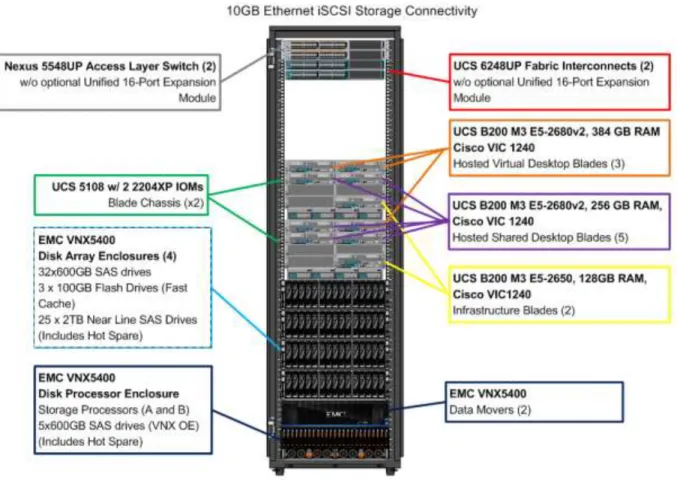
Figure 3: Workload Architecture
The workload contains the following hardware as shown in Figure 3:
Two Cisco Nexus 5548UP Layer 2 Access Switches
Two Cisco UCS 6248UP Series Fabric Interconnects
Two Cisco UCS 5108 Blade Server Chassis with two 2204XP IO Modules per chassis
Three Cisco UCS B200 M3 Blade servers with Intel E5-2680v2 processors, 384GB RAM, and VIC1240 mezzanine cards for the 300 hosted Windows 7 virtual desktop workloads with N+1 server fault tolerance.
Five Cisco UCS B200 M3 Blade servers with Intel E5-2680v2 processors, 256 GB RAM, and VIC1240 mezzanine cards for the 700 hosted shared Windows Server 2012 server desktop workloads with N+1 server fault tolerance.
Two Cisco UCS B200 M3 Blade servers with Intel E5-2650 processors, 128 GB RAM, and VIC1240 mezzanine cards for the infrastructure virtualized workloads
EMC VNX5400 dual controller storage system, 4 disk shelves, 10GE ports for iSCSI and NFS/CIFS connectivity respectively.
(Not Shown) One Cisco UCS 5108 Blade Server Chassis with 3 UCS B200 M3 Blade servers with Intel E5-2650 processors, 128 GB RAM, and VIC1240 mezzanine cards for the Login VSI launcher infrastructure
Logical Architecture
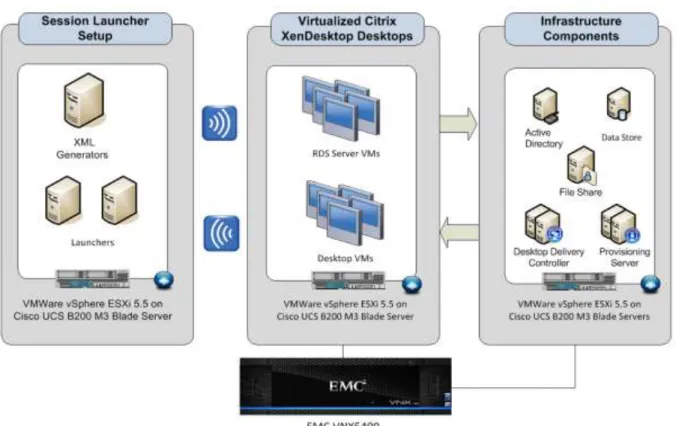
The logical architecture of the validated is designed to support 1000 users within two chassis and fourteen blades, which provides physical redundancy for the chassis and blade servers for each workload.
Figure 4: outlines the logical architecture of the test environment. Figure 4: Logical Architecture Overview
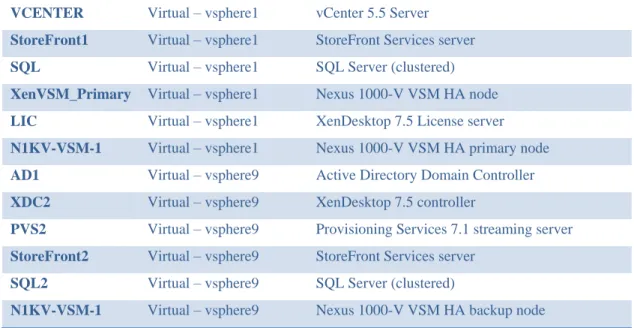
Table 1. outlines all the servers in the configurations. Table 1. Infrastructure Architecture
Server Name Location Purpose
vSphere1 Physical – Chassis 1 Windows 2012 Datacenter VMs ESXi 5.5 host (Infrastructure Guests)
vSphere4,5 Physical – Chassis 1 XenDesktop 7.5 RDS ESXi 5.5 Hosts
vSphere 2,3 Physical – Chassis 1 XenDesktop 7.5 HVD ESXi 5.5 Host
vSphere 9 Physical – Chassis 2 Windows 2012 Datacenter VMs ESXi 5.1 host (Infrastructure Guests)
vSphere 11,12,13 Physical – Chassis 2 XenDesktop 7.5 RDS ESXi 5.5 Hosts
vSphere 10 Physical – Chassis 2 XenDesktop 7.5 HVD ESXi 5.5 Hosts
AD Virtual – vsphere1 Active Directory Domain Controller
XDC1 Virtual – vsphere1 XenDesktop 7.5 controller
VCENTER Virtual – vsphere1 vCenter 5.5 Server
StoreFront1 Virtual – vsphere1 StoreFront Services server
SQL Virtual – vsphere1 SQL Server (clustered)
XenVSM_Primary Virtual – vsphere1 Nexus 1000-V VSM HA node
LIC Virtual – vsphere1 XenDesktop 7.5 License server
N1KV-VSM-1 Virtual – vsphere1 Nexus 1000-V VSM HA primary node
AD1 Virtual – vsphere9 Active Directory Domain Controller
XDC2 Virtual – vsphere9 XenDesktop 7.5 controller
PVS2 Virtual – vsphere9 Provisioning Services 7.1 streaming server
StoreFront2 Virtual – vsphere9 StoreFront Services server
SQL2 Virtual – vsphere9 SQL Server (clustered)
N1KV-VSM-1 Virtual – vsphere9 Nexus 1000-V VSM HA backup node
Software Revisions
This section includes the software versions of the primary products installed in the environment. Table 2. Software Revisions
Vendor Product Version Cisco UCS Component Firmware 2.2(1d)
Cisco UCS Manager 2.2(1d)
Cisco Nexus 1000V for vSphere 4.2.1SV2.2.
Citrix XenDesktop 7.5.0.4531
Citrix Provisioning Services 7.1.0.4022
Citrix StoreFront Services 2.5.0.29
VMware vCenter 5.5.0 Build 1476327
VMware vSphere ESXi 5.5 5.5.0 Build 1331820
EMC VAAI Plugin 1.0-11
EMC Power Path for VMware 5.9 SP1 Build 011
EMC VNX Block Operating System 05.33.000.5.051
EMC VNX File Operating System 8.1.2-51
Configuration Guidelines
The 1000 User Citrix XenDesktop 7.5 solution described in this document provides details for configuring a fully redundant, highly-available configuration. Configuration guidelines are provided that refer to which redundant component is being configured with each step, whether that be A or B. For example Nexus A and Nexus B identify the pair of Cisco Nexus switches that are configured. The Cisco UCS Fabric Interconnects are configured similarly.
This document is intended to allow the reader to configure the Citrix XenDesktop 7.5 customer environment as stand-alone solution.
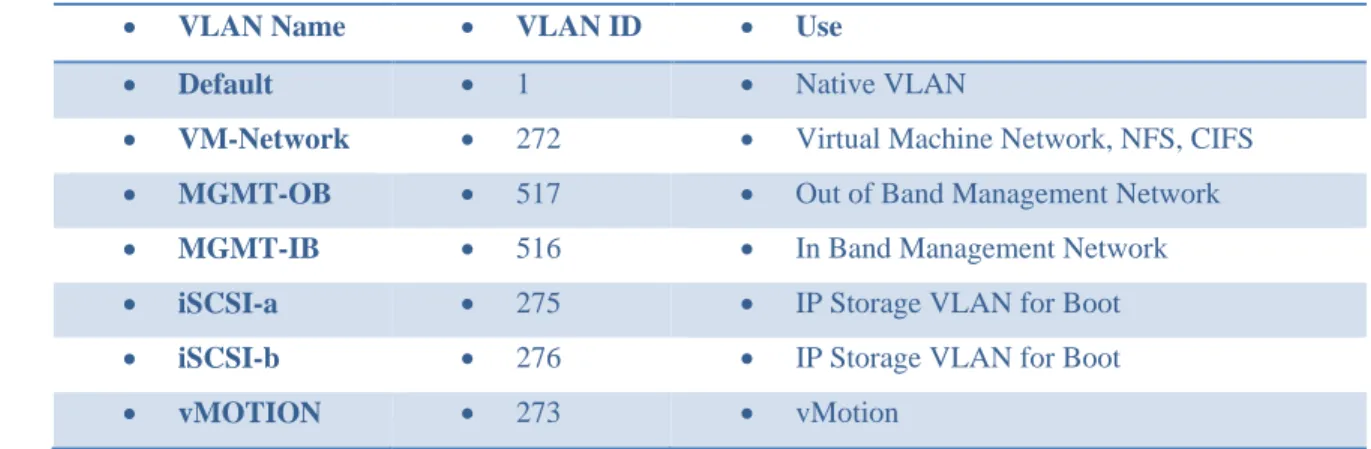
VLAN
The VLAN configuration recommended for the environment includes a total of seven VLANs as outlined in the table below.
Table 3. VLAN Configuration
VLAN Name VLAN ID Use
Default 1 Native VLAN
VM-Network 272 Virtual Machine Network, NFS, CIFS
MGMT-OB 517 Out of Band Management Network
MGMT-IB 516 In Band Management Network
iSCSI-a 275 IP Storage VLAN for Boot
iSCSI-b 276 IP Storage VLAN for Boot
vMOTION 273 vMotion
VMware Clusters
We utilized four VMware Clusters in two data centers to support the solution and testing environment: CVSPEX-DT Citrix VSPEX Desktop Data Center
XenDesktop RDS Clusters (Windows Server 2012 R2 hosted shared desktops)
XenDesktop Hosted Virtual Desktop Cluster (Windows 7 SP1 32-bit pooled virtual desktops) CVSPEX-INF Citrix VSPEX Infrastructure and Launcher Data Center
Infrastructure Cluster (vCenter, Active Directory, DNS, DHCP, SQL Clusters, XenDesktop Controllers, Provisioning Servers, and Nexus 1000V Virtual Switch Manager appliances, etc.)
Launcher Cluster (The Login Consultants Login VSI launcher infrastructure was hosted on the same Cisco UCS Domain sharing switching, but running on separate storage.)
Infrastructure Components
This section describes the infrastructure components used in the solution outlined in this study.
Cisco Unified Computing System (UCS)
Cisco Unified Computing System is a set of pre-integrated data center components that comprises blade servers, adapters, fabric interconnects, and extenders that are integrated under a common embedded management system. This approach results in far fewer system components and much better manageability, operational efficiencies, and flexibility than comparable data center platforms.
Cisco Unified Computing System Components
Cisco UCS components are shown in Figure 6: .Figure 6: Cisco Unified Computing System Components
The Cisco UCS is designed from the ground up to be programmable and self integrating. A server’s entire hardware stack, ranging from server firmware and settings to network profiles, is configured through model-based management. With Cisco virtual interface cards, even the number and type of I/O interfaces is programmed dynamically, making every server ready to power any workload at any time.
With model-based management, administrators manipulate a model of a desired system configuration, associate a model’s service profile with hardware resources and the system configures itself to match the model. This automation speeds provisioning and workload migration with accurate and rapid scalability. The result is increased IT staff productivity, improved compliance, and reduced risk of failures due to inconsistent configurations.
Cisco Fabric Extender technology reduces the number of system components to purchase, configure, manage, and maintain by condensing three network layers into one. It eliminates both blade server and hypervisor-based switches by connecting fabric interconnect ports directly to individual blade servers and virtual machines. Virtual networks are now managed exactly as physical networks are, but with massive scalability. This represents a radical simplification over traditional systems, reducing capital and operating costs while increasing business agility, simplifying and speeding deployment, and improving performance.
Fabric Interconnect
Cisco UCS Fabric Interconnects create a unified network fabric throughout the Cisco UCS. They provide uniform access to both networks and storage, eliminating the barriers to deploying a fully virtualized environment based on a flexible, programmable pool of resources.
Cisco Fabric Interconnects comprise a family of line-rate, low-latency, lossless 10-GE, Cisco Data Center Ethernet, and FCoE interconnect switches. Based on the same switching technology as the Cisco Nexus 5000 Series, Cisco UCS 6000 Series Fabric Interconnects provide the additional features and management capabilities that make them the central nervous system of Cisco UCS.
The Cisco UCS Manager software runs inside the Cisco UCS Fabric Interconnects. The Cisco UCS 6000 Series Fabric Interconnects expand the UCS networking portfolio and offer higher capacity, higher port density, and lower power consumption. These interconnects provide the management and communication backbone for the Cisco UCS B-Series Blades and Cisco UCS Blade Server Chassis.
All chassis and all blades that are attached to the Fabric Interconnects are part of a single, highly available management domain. By supporting unified fabric, the Cisco UCS 6200 Series provides the flexibility to support LAN and SAN connectivity for all blades within its domain right at configuration time. Typically deployed in redundant pairs, the Cisco UCS Fabric Interconnect provides uniform access to both networks and storage, facilitating a fully virtualized environment.
The Cisco UCS Fabric Interconnect family is currently comprised of the Cisco 6100 Series and Cisco 6200 Series of Fabric Interconnects.
Cisco UCS 6248UP 48-Port Fabric Interconnect
The Cisco UCS 6248UP 48-Port Fabric Interconnect is a 1 RU, 10-GE, Cisco Data Center Ethernet, FCoE interconnect providing more than 1Tbps throughput with low latency. It has 32 fixed ports of Fibre Channel, 10-GE, Cisco Data Center Ethernet, and FCoE SFP+ ports.
One expansion module slot can be up to sixteen additional ports of Fibre Channel, 10-GE, Cisco Data Center Ethernet, and FCoE SFP+.
Note: Cisco UCS 6248UP 48-Port Fabric Interconnects were used in this study. Cisco UCS 2200 Series IO Module
The Cisco UCS 2100/2200 Series FEX multiplexes and forwards all traffic from blade servers in a chassis to a parent Cisco UCS Fabric Interconnect over from 10-Gbps unified fabric links. All traffic, even traffic between blades on the same chassis, or VMs on the same blade, is forwarded to the parent interconnect, where network profiles are managed efficiently and effectively by the Fabric Interconnect. At the core of the Cisco UCS Fabric Extender are ASIC processors developed by Cisco that multiplex all traffic.
Note: Up to two fabric extenders can be placed in a blade chassis.
Cisco UCS 2104 has eight 10GBASE-KR connections to the blade chassis mid-plane, with one connection per fabric extender for each of the chassis’ eight half slots. This gives each half-slot blade server access to each of two 10-Gbps unified fabric-based networks via SFP+ sockets for both throughput and redundancy. It has 4 ports connecting up the fabric interconnect.
Cisco UCS 2208 has thirty-two 10GBASE-KR connections to the blade chassis midplane, with one connection per fabric extender for each of the chassis’ eight half slots. This gives each half-slot blade server access to each of two 4x10-Gbps unified fabric-based networks via SFP+ sockets for both throughput and redundancy. It has 8 ports connecting up the fabric interconnect.
Note: Cisco UCS 2208 fabric extenders were utilized in this study. Cisco UCS Chassis
The Cisco UCS 5108 Series Blade Server Chassis is a 6 RU blade chassis that will accept up to eight half-width Cisco UCS B-Series Blade Servers or up to four full-width Cisco UCS B-Series Blade Servers, or a combination of the two. The Cisco UCS 5108 Series Blade Server Chassis can accept four redundant power supplies with automatic load-sharing and failover and two Cisco UCS (either 2100 or 2200 series ) Fabric Extenders. The chassis is managed by Cisco UCS Chassis Management Controllers, which are mounted in the Cisco UCS Fabric Extenders and work in conjunction with the Cisco UCS Manager to control the chassis and its components.
A single Cisco UCS managed domain can theoretically scale to up to 40 individual chassis and 320 blade servers. At this time Cisco supports up to 20 individual chassis and 160 blade servers.
Basing the I/O infrastructure on a 10-Gbps unified network fabric allows the Cisco UCS to have a streamlined chassis with a simple yet comprehensive set of I/O options. The result is a chassis that has only five basic components:
The physical chassis with passive midplane and active environmental monitoring circuitry
Four power supply bays with power entry in the rear, and hot-swappable power supply units accessible from the front panel
Eight hot-swappable fan trays, each with two fans
Two fabric extender slots accessible from the back panel
Eight blade server slots accessible from the front panel Cisco UCS B200 M3 Blade Server
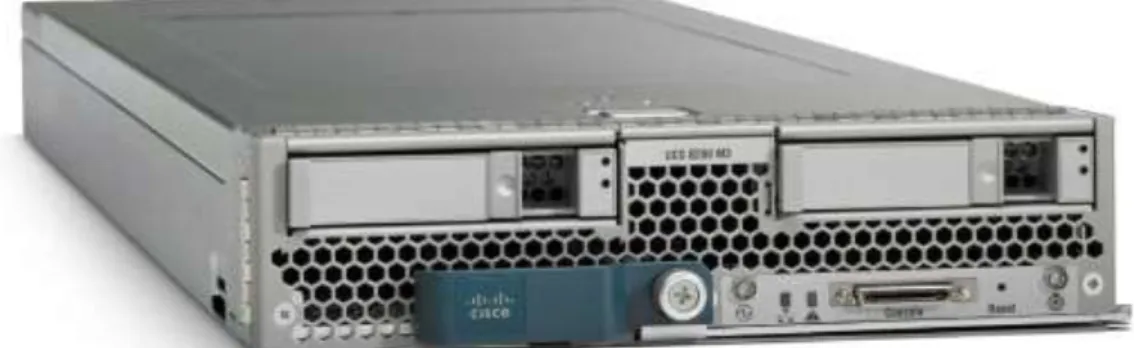
Cisco UCS B200 M3 is a third generation half-slot, two-socket Blade Server. The Cisco UCS B200 M3 harnesses the power of the latest Intel® Xeon® processor E5-2600 v2 product family, with up to 768 GB of RAM (using 32GB DIMMs), two optional SAS/SATA/SSD disk drives, and up to dual 4x 10 Gigabit Ethernet throughput, utilizing our VIC 1240 LAN on motherboard (LOM) design. The Cisco UCS B200 M3 further extends the capabilities of Cisco UCS by delivering new levels of manageability, performance, energy efficiency, reliability, security, and I/O bandwidth for enterprise-class virtualization and other mainstream data center workloads.
In addition, customers who initially purchased Cisco UCS B200 M3 blade servers with Intel E5-2600 series processors, can field upgrade their blades to the second generation E5-2600 processors, providing increased processor capacity and providing investment protection
Figure 7: Cisco UCS B200 M3 Server
Cisco UCS VIC1240 Converged Network Adapter
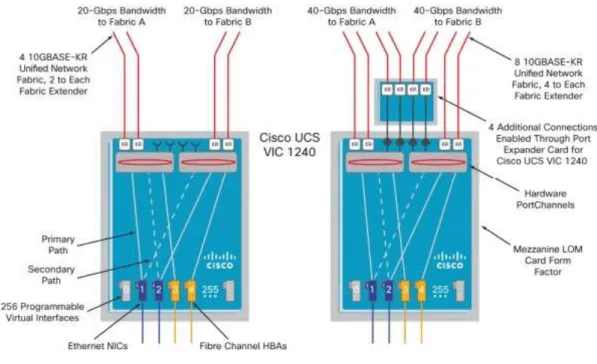
A Cisco® innovation, the Cisco UCS Virtual Interface Card (VIC) 1240 (Figure 1) is a 4-port 10 Gigabit Ethernet, Fibre Channel over Ethernet (FCoE)-capable modular LAN on motherboard (mLOM) designed exclusively for the M3 generation of Cisco UCS B-Series Blade Servers. When used in combination with an optional Port Expander, the Cisco UCS VIC 1240 capabilities can be expanded to eight ports of 10 Gigabit Ethernet.
The Cisco UCS VIC 1240 enables a policy-based, stateless, agile server infrastructure that can present up to 256 PCIe standards-compliant interfaces to the host that can be dynamically configured as either network interface cards (NICs) or host bus adapters (HBAs). In addition, the Cisco UCS VIC 1240 supports Cisco Data Center Virtual Machine Fabric Extender (VM-FEX) technology, which extends the Cisco UCS fabric interconnect ports to virtual machines, simplifying server virtualization deployment.
Figure 9: The Cisco UCS VIC1240 virtual interface cards deployed in the Cisco UCS B-Series B200 M3 blade servers
Citrix XenDesktop 7.5
Enhancements in XenDesktop 7.5
Citrix XenDesktop 7.5 includes significant enhancements to help customers deliver Windows apps and desktops as mobile services while addressing management complexity and associated costs. Enhancements in this release include:
Unified product architecture for XenApp and XenDesktop—the FlexCast Management Architecture (FMA). This release supplies a single set of administrative interfaces to deliver both hosted-shared applications (RDS) and complete virtual desktops (VDI). Unlike earlier releases that separately provisioned Citrix XenApp and XenDesktop farms, the XenDesktop 7.5 release allows administrators to deploy a single infrastructure and use a consistent set of tools to manage mixed application and desktop workloads.
Support for extending deployments to the cloud. This release provides the ability for hybrid cloud provisioning from Amazon Web Services (AWS) or any Cloud Platform-powered public or private cloud. Cloud deployments are configured, managed, and monitored through the same administrative consoles as deployments on traditional on-premises infrastructure.
Enhanced HDX technologies. Since mobile technologies and devices are increasingly prevalent, Citrix has engineered new and improved HDX technologies to improve the user experience for hosted Windows apps and desktops.
A new version of StoreFront. The StoreFront 2.5 release provides a single, simple, and consistent aggregation point for all user services. Administrators can publish apps, desktops, and data services to StoreFront, from which users can search and subscribe to services.
Remote power control for physical PCs. Remote PC access supports “Wake on LAN” that adds the ability to power on physical PCs remotely. This allows users to keep PCs powered off when not in use to conserve energy and reduce costs.
Full AppDNA support. AppDNA provides automated analysis of applications for Windows platforms and suitability for application virtualization through App-V, XenApp, or XenDesktop. Full AppDNA functionality is available in some editions.
Additional virtualization resource support. As in this Cisco Validated Design, administrators can configure connections to VMware vSphere 5.5 hypervisors.
FlexCast Management Architecture
In Citrix XenDesktop 7.5, FlexCast Management Architecture (FMA) technology is responsible for delivering and managing hosted-shared RDS apps and complete VDI desktops. By using Citrix Receiver with XenDesktop 7.5, users have access to a device-native experience on a variety of endpoints, including Windows, Mac, Linux, iOS, Android, ChromeOS, and Blackberry devices.
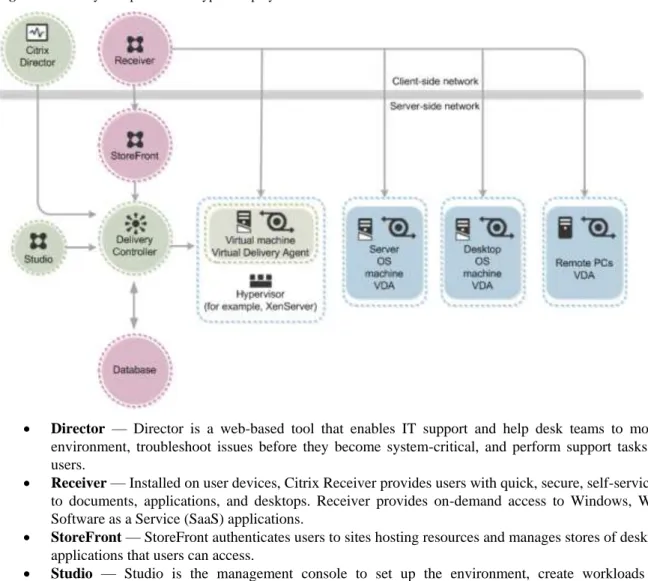
Figure 10: Key Components in a typical deployment
Director — Director is a web-based tool that enables IT support and help desk teams to monitor an environment, troubleshoot issues before they become system-critical, and perform support tasks for end users.
Receiver — Installed on user devices, Citrix Receiver provides users with quick, secure, self-service access to documents, applications, and desktops. Receiver provides on-demand access to Windows, Web, and Software as a Service (SaaS) applications.
StoreFront — StoreFront authenticates users to sites hosting resources and manages stores of desktops and applications that users can access.
Studio — Studio is the management console to set up the environment, create workloads to host applications and desktops, and assign applications and desktops to users.
License server —At least one license server is needed to store and manage license files.
Delivery Controller — Installed on servers in the data center, the Delivery Controller consists of services that communicate with the hypervisor to distribute applications and desktops, authenticate and manage user access, and broker connections between users and their virtual desktops and applications. The Controller manages the desktop state, starting and stopping them based on demand and administrative configuration. Each XenDesktop site has one or more Delivery Controllers.
Hypervisor —Hypervisor technology is used to provide an enterprise-class virtual machine infrastructure that is the foundation for delivering virtual applications and desktops. Citrix XenDesktop is hypervisor-agnostic and can be deployed with Citrix XenServer, Microsoft Hyper-V, or VMware vSphere. For this CVD, the hypervisor used was VMware ESXi 5.5.
Virtual Delivery Agent (VDA) — Installed on server or workstation operating systems, the VDA enables connections for desktops and apps. For Remote PC Access, install the VDA on the office PC.
Machine Creation Services (MCS) — A collection of services that work together to create virtual servers and desktops from a master image on demand, optimizing storage utilization and providing a pristine virtual machine to users every time they log on. Machine Creation Services is fully integrated and administrated in Citrix Studio.
Windows Server OS machines — These are VMs or physical machines based on Windows Server operating system used for delivering applications or hosted shared desktops to users.
Desktop OS machines — These are VMs or physical machines based on Windows Desktop operating system used for delivering personalized desktops to users, or applications from desktop operating systems.
Remote PC Access — User devices that are included on a whitelist, enabling users to access resources on their office PCs remotely, from any device running Citrix Receiver.
In addition, Citrix Provisioning Services (PVS) technology is responsible for streaming a shared virtual disk (vDisk) image to the configured Server OS or Desktop OS machines. This streaming capability allows VMs to be provisioned and re-provisioned in real-time from a single image, eliminating the need to patch individual systems and conserving storage. All patching is done in one place and then streamed at boot-up. PVS supports image management for both RDS and VDI-based machines, including support for image snapshots and rollbacks.
High-Definition User Experience (HDX) Technology
High-Definition User Experience (HDX) technology in this release is optimized to improve the user experience for hosted Windows apps on mobile devices. Specific enhancements include:
HDX Mobile™ technology, designed to cope with the variability and packet loss inherent in today’s mobile networks. HDX technology supports deep compression and redirection, taking advantage of advanced codec acceleration and an industry-leading H.264-based compression algorithm. The technology enables dramatic improvements in frame rates while requiring significantly less bandwidth. Real-time multimedia transcoding improves the delivery of Windows Media content (even in extreme network conditions). HDX technology offers a rich multimedia experience and optimized performance for voice and video collaborations.
HDX Touch technology enables mobile navigation capabilities similar to native apps, without rewrites or porting of existing Windows applications. Optimizations support native menu controls, multi-touch gestures, and intelligent sensing of text-entry fields, providing a native application look and feel.
HDX 3D Pro uses advanced server-side GPU resources for compression and rendering of the latest OpenGL and DirectX professional graphics apps. GPU support includes both dedicated user and shared user workloads. In this release, HDX 3D Pro has been upgraded to support Windows 8.
Citrix XenDesktop 7.5 Desktop and Application Services
IT departments strive to deliver application services to a broad range of enterprise users that have varying performance, personalization, and mobility requirements. Citrix XenDesktop 7.5 allows IT to configure and deliver any type of virtual desktop or app, hosted or local, and optimize delivery to meet individual user requirements, while simplifying operations, securing data, and reducing costs.
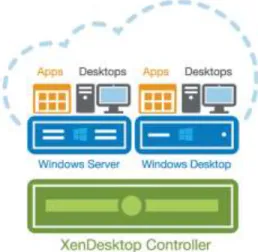
Figure 11: XenDesktop Single Infrastructure
As illustrated in Figure 11: , the XenDesktop 7.5 release allows administrators to create a single infrastructure that supports multiple modes of service delivery, including:
Application Virtualization and Hosting (through XenApp). Applications are installed on or streamed to Windows servers in the data center and remotely displayed to users’ desktops and devices.
Hosted Shared Desktops (RDS). Multiple user sessions share a single, locked-down Windows Server environment running in the datacenter and accessing a core set of apps. This model of service delivery is ideal for task workers using low intensity applications, and enables more desktops per host compared to VDI.
Pooled VDI Desktops. This approach leverages a single desktop OS image to create multiple thinly provisioned or streamed desktops. Optionally, desktops can be configured with a Personal vDisk to maintain user application, profile and data differences that are not part of the base image. This approach replaces the need for dedicated desktops, and is generally deployed to address the desktop needs of knowledge workers that run more intensive application workloads.
VM Hosted Apps (16 bit, 32 bit, or 64 bit Windows apps). Applications are hosted on virtual desktops running Windows 7, XP, or Vista and then remotely displayed to users’ physical or virtual desktops and devices.
This CVD focuses on delivering a mixed workload consisting of hosted shared desktops (HSD based on RDS) and hosted virtual desktops (VDI).
Citrix Provisioning Services 7.1
A significant advantage to service delivery through RDS and VDI is how these technologies simplify desktop administration and management. Citrix Provisioning Services (PVS) takes the approach of streaming a single shared virtual disk (vDisk) image rather than provisioning and distributing multiple OS image copies across multiple virtual machines. One advantage of this approach is that it constrains the number of disk images that must be managed, even as the number of desktops grows, ensuring image consistency. At the same time, using a single shared image (rather than hundreds or thousands of desktop images) significantly reduces the required storage footprint and dramatically simplifies image management.
Since there is a single master image, patch management is simple and reliable. All patching is done on the master image, which is then streamed as needed. When an updated image is ready for production, the administrator simply reboots to deploy the new image. Rolling back to a previous image is done in the same manner. Local hard disk drives in user systems can be used for runtime data caching or, in some scenarios, removed entirely, lowering power usage, system failure rates, and security risks.
After installing and configuring PVS components, a vDisk is created from a device’s hard drive by taking a snapshot of the OS and application image, and then storing that image as a vDisk file on the network. vDisks can exist on a
Provisioning Server, file share, or in larger deployments (as in this CVD), on a storage system with which the Provisioning Server can communicate (via iSCSI, SAN, NAS, and CIFS). vDisks can be assigned to a single target device in Private Image Mode, or to multiple target devices in Standard Image Mode.
When a user device boots, the appropriate vDisk is located based on the boot configuration and mounted on the Provisioning Server. The software on that vDisk is then streamed to the target device and appears like a regular hard drive to the system. Instead of pulling all the vDisk contents down to the target device (as is done with some imaging deployment solutions), the data is brought across the network in real time, as needed. This greatly improves the overall user experience since it minimizes desktop startup time.
This release of PVS extends built-in administrator roles to support delegated administration based on groups that already exist within the network (Windows or Active Directory Groups). All group members share the same administrative privileges within a XenDesktop site. An administrator may have multiple roles if they belong to more than one group.
EMC VNX Series
The desktop solutions described in this document are based on the EMC VNX5400 storage array. The EMC VNX series supports a wide range of business-class features that ideal for the end-user computing environment, including:
EMC Fully Automated Storage Tiering for Virtual Pools (FAST VP™)
EMC FAST™ Cache
File-level data deduplication and compression
Block deduplication
Thin provisioning
Replication
Snapshots and checkpoints
File-level retention
Quota management
EMC VNX5400 Used in Testing
The EMC VNX family delivers industry-leading innovation and enterprise capabilities for file, block, and object storage in a scalable, easy-to-use solution. This next-generation storage platform combines powerful and flexible hardware with advanced efficiency, management, and protection software to meet the demanding needs of today’s enterprises.
This solution was validated using a VNX5400 that is versatile in its storage protocol support. It provides iSCSI storage for hypervisor SAN boot, NFS storage to be used as VMware datastores, CIFS shares for user profiles, home directories, and vDisk store, and TFTP services to allow PVS-based desktops to PXE boot.
Unisphere Management Suite
EMC Unisphere Management Suite extends Unisphere’s easy-to-use, interface to include VNX Monitoring and Reporting for validating performance and anticipating capacity requirements. As shown in figure below, the suite also includes Unisphere Remote for centrally managing up to thousands of VNX and VNXe systems with new support for XtremSW Cache.