ISSN Online: 1945-3124 ISSN Print: 1945-3116
DOI: 10.4236/jsea.2019.1210027 Oct. 31, 2019 432 Journal of Software Engineering and Applications
APEXeditor: A Spreadsheet-Based Tool for
Editing APEX Model Input and Output Files
Javier M. Osorio Leyton
Texas A&M AgriLife Research, Blackland Research and Extension Center, Temple, TX, USA
Abstract
The APEXeditor, an Excel-based tool has been developed using the Visual Basic for Applications (VBA) to provide a graphical user interface (GUI) to the Agricultural Policy Environmental eXtender (APEX) model. APEX, in its native form, requires users to edit text files for modifying input files; there-fore a GUI interface can aid users in modification of these files and reduce errors. Microsoft Excel is a popular spreadsheet program that has the largest user base among scientists and researchers, thus providing a relatively com-mon platform in which stages the tool. The APEXeditor requires minimal additional learning to operate the tool for those who already have basic level of knowledge in Excel. The user can load APEX input files into the spread-sheet tool and the GUI offers meta information and provides functions to edit, write, and run the APEX model. Ultimately, the APEXeditor substitutes existing GUI programs such as WinAPEX or ArcAPEX that require installa-tion or addiinstalla-tional licensing. A series of scripts were developed as a back-end engine that automates data formatting and editing of linked APEX input ASCII files including database libraries. The simple architecture of the tool helps users maintain the quality of the data and allows error-free editing of APEX model inputs to characterize the system under study. This tool is suita-ble for all kinds of applications and has been successfully used for the creation of APEX model runs in numerous studies.
Keywords
Simulation Models, APEX, Excel, Visual Basic, Graphical User Interface
1. Overview
Simulation models have long been used in agriculture with varying levels of suc-cess. These models are often designed to capture the most important features of a given agricultural system that adequately represent a complex system. Howev-How to cite this paper: Osorio Leyton, J.M.
(2019) APEXeditor: A Spreadsheet-Based Tool for Editing APEX Model Input and Output Files. Journal of Software Engi-neering and Applications, 12, 432-446. https://doi.org/10.4236/jsea.2019.1210027
Received: September 3, 2019 Accepted: October 28, 2019 Published: October 31, 2019
Copyright © 2019 by author(s) and Scientific Research Publishing Inc. This work is licensed under the Creative Commons Attribution International License (CC BY 4.0).
DOI: 10.4236/jsea.2019.1210027 433 Journal of Software Engineering and Applications er, the complexity of the system often leads to a greater complexity in the model structure, with a large input of data required to simulate such systems. Models that represent agricultural systems have become indispensable tools for design-ing management practices, evaluatdesign-ing sustainable production, and minimizdesign-ing environmental stresses.
The Environmental Policy Integrated Climate Model (EPIC) [1] and the Agricultural Policy Environmental eXtender—APEX [2] are versatile and useful tools for evaluating complex landscape and management scenarios. EPIC is a field-scale model designed to simulate homogeneous areas in terms of weather, soil, topography, plant cover and management [3]. APEX is a multi-field land-scape model that essentially simulates multiple spatially explicit distributed fields with EPIC [4] with interactions among the fields. APEX and EPIC are designed to estimate how climate and management practices influence soil-plant-water-nutrients relations. The models account for major physical and biological processes of agricultural systems, including hydrology, crop growth, and yield, water balance, nutrients transformations, storage, and transport (ni-trogen, phosphorus and carbon), soil loss fate and transport, etc. [3]. Both mod-els have been used under numerous conditions to assess agricultural systems across a broad range of landscapes at different spatial scales, design sustainable land management interventions, environmental impact studies, etc. [4] [5]. Be-cause of APEX’s solid background and capabilities, it is used to support model-ing needs in projects funded by the U.S. Department of Agriculture (USDA) and the U.S. Department of the Interior (USDI) among others. For instance, APEX has been used since 2002 by the USDA’s Natural Resources Conservation Service (NRCS) in the Conservation Effects Assessment Project (CEAP) for estimating the environmental benefits and effects of conservation practices on agricultural landscapes and developing the science base for managing the agricultural land-scape for environmental quality across the United States [6]. Likewise, APEX is also used for regional quantification of land management in 54 million acres of public lands by the USDI’s Bureau of Land Management (BLM) Colorado River Basins Salinity Control Program and to maintain and reduce salt in the Colora-do River based to meet Salinity Act requirements [7].
DOI: 10.4236/jsea.2019.1210027 434 Journal of Software Engineering and Applications APEX.
Currently available Windows-based GUIs for APEX are ArcAPEX, WinAPEX, and i_APEX. ArcAPEX was developed as an ArcGIS extension that integrates GIS capabilities and algorithms with APEX databases [9]. The most current ver-sion of ArcAPEX conducts automatic delineation of stream network and sub-watersheds for large watersheds using ArcObjects and the Microsoft Visual Basic .NET. ArcAPEX must run within ESRI’s ArcGIS 10.3.1 that requires li-censing of main program and extensions. WinAPEX is a Windows-based desk-top application developed by Texas A&M AgriLife Research to manipulate mod-el’s inputs files for small watershed model applications [10]. Currently, WinA-PEX is a deprecated version written in Visual Basic 6; however, developers are working to create a redesigned version of this interface using Microsoft Visual Basic .NET. Lastly, the interactive APEX (i_APEX) is another interface for the APEX model programmed in C++ [11]. The greatest advantage of i_APEX is its ability to perform multiple model runs. These GUI programs offer a “guided” workflow to create a watershed model and related input files for APEX simula-tion. These applications use Microsoft Access to store data in tables. With a model Run action button, the interfaces overwrite existing text files with a for-mat that the models recognize when executed. While these interface programs are capable of writing input files, neither of them offers capacity to edit existing APEX watershed datasets in ASCII format.
The objective of this short note is to describe a simple, yet powerful user in-terface for the management of the APEX input data (read and write), execution of individual APEX runs, and loading output files into the spreadsheet for fur-ther processing and visualization. The tool provides a well-organized interface with definitions and help assistance for most variables. This tool is suitable for all kinds of applications and has been successfully used for the creation of APEX model runs in numerous studies.
2. Design, Features and Tool Capabilities
The overall purpose of the APEXeditor is to use Microsoft Excel’s grid capabili-ties as a front end to allow the user to manage both the input and output data required for APEX simulations. This tool facilitates the creation and modifica-tion of the APEX model’s text files (inputs and outputs).
Softwareenvironment
auto-DOI: 10.4236/jsea.2019.1210027 435 Journal of Software Engineering and Applications mated capabilities to write properly formatted input files aims to guarantee the reproducibility and reliability of the APEX projects created with the tool. The APEXeditor is constructed in a workbook with 29 worksheets. Each worksheet is designated to handle a corresponding APEX input or output file type with VBA scripts (Figure 1). All actions are executed within the corresponding worksheet. The user can read and write APEX files, similar to the Microsoft Windows file management menu options for “Open” and “Save”. The user can also execute the model from within the tool to test the modifications made. The tool is cur-rently compatible with APEX1501, which is the open source version of the APEX made available to the scientific community.
Figure 1. Organization of the VBA modules represented by APEXeditor.
APEXeditorarchitecture
DOI: 10.4236/jsea.2019.1210027 436 Journal of Software Engineering and Applications is open to obtain all the information related to physical and chemical properties of the soil assigned to that specific part of the study area, etc.
Figure 2. Architecture of the APEX file system (Modified from [8]).
The APEXeditor is structured in one independent Excel Workbook. The edit-ing interface for each model input file is set in different worksheets within the Excel Workbook. The code reads and writes APEX text files that are written with different formatting characteristics. The following input files are written with a Fixed Width Format: APEXFILE, APEXPRNT, APEXPARM, SITEFILE, SOILFILE, MNGTFILE, WINDFILE, WPMOFILE, TILLTAB, PLANTAB, PESTTAB, and FERTTAB. On the other hand, files written as space-delimited (also called free format) are: APEXDIM, APEXRUN, APEXCONT, SUBAFILE, SOILLIST, MNGTLIST, WPMOLIST, WWINDLIST, SITELIST, SUBALIST, and WDLYLIST. Regardless of the formatting, both types of files have a data structure that is highly suited for Microsoft Excel. The tool takes advantage of the spreadsheet’s grid to display the values in an organized manner.
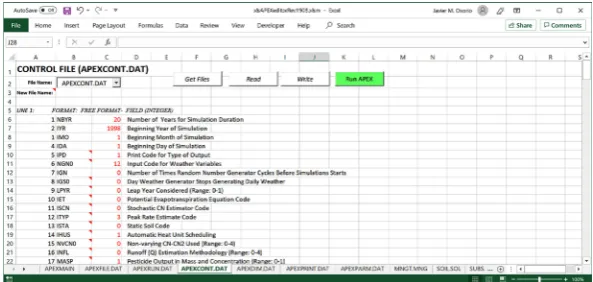
A “Get Files” button within the editing interface uses the extension portion of the APEX file name to identify all similar files that will populate the drop-down menu and are available for editing. For example, in the case of the files with a “.DAT” extension, the algorithm searches for a common pattern in the name of the file, for instance, if “*RUN*” were entered, the code will search for all the files that have the keyword “run” in the file name (i.e. APEXRUN.DAT) and displays these for the user in a drop-down menu. The user can then select which file to edit (i.e. read and write).
DOI: 10.4236/jsea.2019.1210027 437 Journal of Software Engineering and Applications Likewise, in the case of space-delimited files, the tool uses a double for-loop to read each line and then parse the line searching for non-white spaces. The algo-rithm for reading the fixed-width format files disregards one or more spaces in-between values, and because of that, the user should enter zeros instead of leaving the cells empty. The writing algorithm of the tool is common for all files, and it prints formatted input files in concordance with the specification of each file.
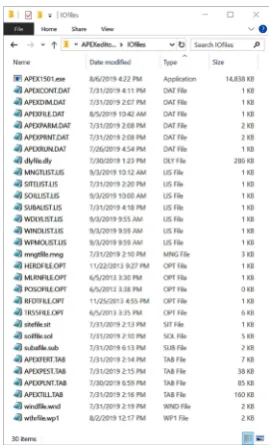
[image:6.595.305.440.273.496.2]The software includes a quality tested reference data set (Figure 3), that fully match the file naming conventions used in this publication (Figure 4). The files can be used as a template to create a new APEX project or individual files. The user can opt not to use the provided set of files as reference data or define an al-ternative data set, which can be partly or entirely independent of the above da-taset.
Figure 3. Example of files included in a simple APEX project.
Figure 4. Main window that allows users to set the path to the APEX project, set the
[image:6.595.214.535.521.695.2]DOI: 10.4236/jsea.2019.1210027 438 Journal of Software Engineering and Applications
Detailsofthemainfeatures
The main window (APEXMAIN) presents a list of all files that can be accessed with this interface. In this window, the user has the option to define the path to the APEX project folder (the folder in which the input files and the APEX ex-ecutable are located) and the name of the model’s exex-ecutable file (default is APEX.exe). Each worksheet can be edited independently, as long as the APEX file and the four tables required as a minimum by the model are loaded (plant, fertilizers, management, and pesticides). This is because some file’s names that the tool needs are obtained from the APEXFILE worksheet and also, the man-agement worksheet uses the tables as a cross-reference for identification of management actions and to display specifics about them. For a fast load of a project, there is an action button named “Open Project” that will open all the control files, tables, and lists within the APEX project folder. Finally, the user can navigate to each of the worksheets by selecting the name of the worksheet and the hotkey combination CTRL + G (control + go to). Likewise, the user can return to the main worksheet from any worksheet by the key combination CTRL + B (control + back).
DOI: 10.4236/jsea.2019.1210027 439 Journal of Software Engineering and Applications the drop-down object within the worksheet. Two actions will occur: 1) a new file will be created with the name as entered in the cell and 2) the new file’s name will be added to the drop-down menu.
Figure 5. Representation of the most common objects and interface features of
the APEXeditor.
[image:8.595.234.514.570.706.2]In addition to the editing capabilities, the APEXeditor keeps the functionality of Excel for plotting and data manipulation, such as sort, conditional formatting, copy/paste/insert, filtering, etc. Filtering can be useful in the case of working with APEX’s tables (Figure 6). For instance, the tables can be filtered, to narrow down the options of equipment for harvesting, or selecting only annual crops, etc. Figure 6 shows the features and table like disposition that are common to all four of APEX’s main tables (APEXTILL.TAB, APEXPLANT.TAB, APEXFERT.TAB and APEXPEST.TAB). The operations table (APEXTILL.TAB) provides parameters that detail field management activities and related equip-ment commonly used in agricultural operations (28 parameters per line). The APEXPLANT.TAB table stores parameters that characterize the plant growth for different plant species (Figure 6). Each line in this table represents a plant spe-cies characterized by 56 plant growth parameters. Likewise, nine parameters that characterize the most common fertilizers used in agricultural management (in-organic and (in-organic) are listed in the APEXFERT.TAB. Finally, the pesticide ta-ble, APEXPEST.TAB, includes the most common pesticides used in agricultural management, with each pesticide having six parameters per line.
DOI: 10.4236/jsea.2019.1210027 440 Journal of Software Engineering and Applications Without using the APEXeditor, one of the most problematic files to work with is the daily weather file (Figure 7). The APEX model requires dates (year, month and day) and weather data such as solar radiation (MJ/m2), maximum and minimum temperature (˚C), precipitation (mm), relative humidity (fraction), and wind speed (m/s). The daily weather file has restrictions due to the fixed-width format of the file with the columns related to weather parameters being six characters wide. This means than only four or five characters are available for the numeric portion of the data because one space is taken by the decimal point and one space can be taken for the negative symbol (e.g., negative temperatures). Whenever this formatting condition is not met, the model crash-es with an error mcrash-essage that points to the daily weather file. In addition, APEX identifies missing values in two different ways depending on the weather para-meter. Missing values for temperature and precipitation are denoted by a 999 se-ries, while missing values for solar radiation, relative humidity, and wind veloci-ty must be set to blank. This means that if 999 is erroneously set in the solar radiation column, the model will use 999 MJ/m2 in that given day.
Figure 7. Worksheet that allows users to add or modify historical daily weather data.
DOI: 10.4236/jsea.2019.1210027 441 Journal of Software Engineering and Applications the ranges set in this worksheet.
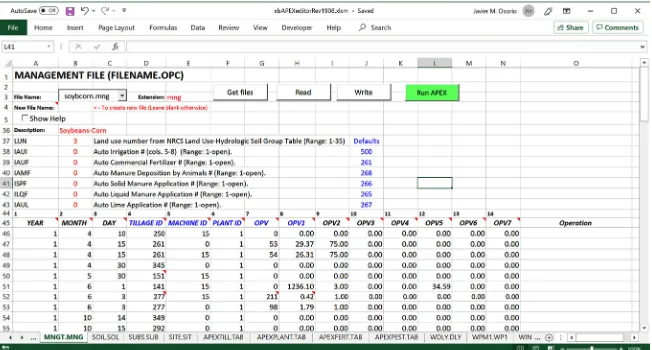
[image:10.595.211.537.306.481.2]The calendar sequence of field activities in each subarea or field are described with the management operation schedule file (Figure 8). The model can per-form a total of 29 different management actions (i.e. plowing, sowing, planting, harvesting, grazing, etc.). For each action, where each line represents an action that happens on a given date, the APEX model uses a series of indexes and poin-ters to associate the information provided from the different tables. Also, each action can be further described using the context specific operation parameters (OPV0 to OPV7); therefore, each action uses the parameters differently. For in-stance, a fertilizer application will need the fertilizer to be used from the fertiliz-ers table (OPV0) and the application rate (expressed in kilograms per hectare) will be set using OPV1. Whereas, for grazing a start or stop grazing date need to be entered, in this case OPV0 is the herd identification code in the list of availa-ble herds, and OPV1 is the stocking rate expressed in area per animal head (ha/head).
Figure 8. Interface that allows users to edit/modify the APEX management file.
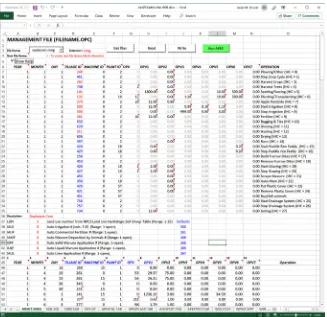
parame-DOI: 10.4236/jsea.2019.1210027 442 Journal of Software Engineering and Applications ters that are not in use are grayed out. In addition, each OPV-parameter in use also has a triangular red flag which denoting Excel’s note boxes that will display a short pop-up message that describes the role that the OPV plays in that given action. The user can copy the entire line and paste it into the schedule. The user can then proceed to modify the dates and values for the required parameters.
Figure 9. Management file worksheet depicting the help feature enabled. The “Show
Help” feature allows users to view the different field operations that APEX is able to simulate and copy these to their management operations schedule.
DOI: 10.4236/jsea.2019.1210027 443 Journal of Software Engineering and Applications An important APEX input file is the subarea file (“subafile.sub”). In APEX, each subarea or Hydrologic Landuse Unit (HLU) is homogenous with regard to climate, soil, land cover, and topography. The information related to each HLU can be characterized in the file subafile.sub using the APEXeditor. From this file, the user can point to the soils data, daily weather data, and the operation sche-dule to be used in each HLU. A subarea may be linked with several other sub-areas according to the water routing direction in the watershed, starting from the most distant subarea and moving towards the watershed outlet. The user can also edit existing monthly weather stations that describe weather-related statis-tics for the subareas.
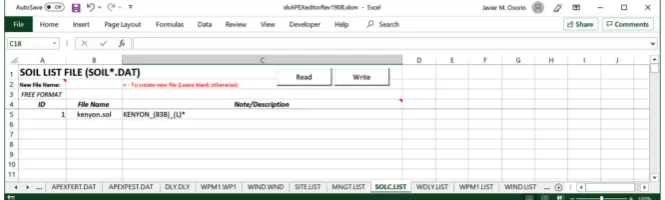
[image:12.595.207.540.426.526.2]The APEXPARM.DAT file contains many coefficients of equations used in APEX. The APEXPARM.DAT file is available to be edited in the APEXeditor. However, users should use caution when editing this particular file due because APEX is sensitive to slight changes in the parameters contained in this file. In-formation about the parameters is available in the form of Excel’s note boxes and includes the equation used in the APEX code in which the parameter is used. The ability to examine the equation used assists in defining and explaining the magnitude of change that would result from modifying the coefficient parame-ters. The list files, such as the SUBALIST.LIS and SOILLIST.LIS are repositories or listings of specific files which can be referenced by an index number and as-sociated file name (name and extension, e.g. soilsfile.sol). Figure 10 shows the template used to edit the following repositories with this tool: subareas, soils, management, sites, and weather (daily and monthly).
Figure 10. Example of a worksheet to edit list files.
DOI: 10.4236/jsea.2019.1210027 444 Journal of Software Engineering and Applications
Figure 11. Representation of the annual crop yield output.
3. Discussion and Conclusions
The use of the application developed in Excel and written in VBA has been de-scribed and illustrated. The APEXeditor tool facilitates the work and creation of otherwise cumbersome APEX input files. Microsoft Excel is one of the most common and widely used spreadsheet applications. Scientists and researcher are familiar with Excel, so using the APEXeditor will not require additional learning to operate the tool. Simplification of writing input files for the APEX model al-lows the users to focus on the quality of the data to characterize the system un-der study, as well as, the analysis, evaluation and interpretation of the model re-sults. Additionally, the flexibility of the tool reduces the steepness of the learning curve, which is expected to promote the use of a powerful simulation model, such as APEX. The software is built upon Microsoft Excel; therefore, its realiza-tion depends on the Microsoft Office platform. Since the tool’s initial develop-ment in 2014, it has been used extensively for research work and in APEX train-ing workshops throughout the world, which has resulted in numerous directly associated scientific publications [12]-[23].
Availability and Feedback
APEXeditor is available free of charge for non-commercial uses. The application and associated model executables can be downloaded from
http://epicapex.tamu.edu/model-executables/. The program is distributed along
with a Getting Started manual and a reference dataset that can be used as a tem-plate to build new projects. Comments and suggestions about APEXeditor may be sent to [email protected].
Acknowledgements
DOI: 10.4236/jsea.2019.1210027 445 Journal of Software Engineering and Applications in the public, commercial, or not-for-profit sectors. Funding for preparation of this manuscript was provided by Dr. Jay Angerer under USDA National Insti-tute of Food and Agriculture, Hatch/Evans-Allen/McIntire Stennis project 1009337.
Conflicts of Interest
The author declares no conflicts of interest regarding the publication of this pa-per.
References
[1] Williams, J.R. (1990) The Erosion Productivity Impact Calculator (EPIC) Model: A Case History. Philosophical Transactions of the Royal Society of London B, 329, 421-428.https://doi.org/10.1098/rstb.1990.0184
[2] Williams, J.R. and Izaurralde, R.C. (2005) The APEX Model. BRC Rep. 2005-02. Blackland Res. Center, Texas A&M Univ., Temple.
https://doi.org/10.1201/9781420037432.ch18
[3] Wang, X., Williams, J.R., Gassman, P.W., Baffaut, C., Izaurralde, R.C., Jeong, J. and Kiniry, J.R. (2012) EPIC and APEX: Model Use, Calibration, and Validation. Transactions of the American Society of Agricultural and Biological Engineers, 55, 1447-1462.https://doi.org/10.13031/2013.42253
[4] Taylor, R.A.J., Jeong, J., White, M. and Arnold, J.G. (2015) Code Modernization and Modularization of APEX and SWAT Watershed Simulation Models. Interna-tional Journal of Agricultural and Biological Engineering,8, 81-94.
[5] Gassman, P.W., Williams, J.R., Wang, X., Saleh, A., Osei, E. and Hauck, L.M. (2010) Invited Review Article: The Agricultural Policy/Environmental eXtender (APEX) Model: An Emerging Tool for Landscape and Watershed Environmental Analyses. Transactions of the American Society of Agricultural and Biological Engineers, 53, 711-740.https://doi.org/10.13031/2013.30078
[6] U.S. Department of Agriculture, Natural Resources Conservation Service (2017) Ef-fects of Conservation Practices on Water Erosion and Loss of Sediment at the Edge of the Field: A National Assessment Based on the 2003-06 CEAP Survey and APEX Modeling Databases. 74 p.
[7] Boyd, R. and Green, C. (2018) A Framework for Improving the Effectiveness of the Colorado River Basin Salinity Control Program 2018-2023. Bureau of Land Man-agement National Operations Center, Denver, 20 p.
[8] Steglich, E.M., Osorio, J., Doro, L., Jeong, J. and Williams, J.W. (2018) Agricultural Policy/Environmental eXtender Model User Manual Version 1501. Blackland Re-search and Extension Center, Temple.
https://epicapex.tamu.edu/manuals-and-publications/7
[9] Tuppad, P., Winchell, M.F., Wang, X., Srinivasan, R. and Williams, J.R. (2009) ArcAPEX: ArcGIS Interface for Agricultural Policy Environmental Extender (Apex) Hydrology/Water Quality Model. International Agricultural Engineering Journal, 18, 59-71.
[10] Magre, M., Williams, J.R., Harman, W.L., Gerik, T., Greiner, J., Francis, L., Steglich, E. and Meinardus, A. (2006) WinAPEX Users Guide Version 1.0. Blackland Re-search and Extension Center, Texas A& M System, Temple.
http://agrilife.org/epicapex/files/2014/09/winapexv0604_nov2006.pdf
Us-DOI: 10.4236/jsea.2019.1210027 446 Journal of Software Engineering and Applications er’s Guide Using APEX2110 and APEX0806. CARD Technical Reports, 40.
[12] Clarke, N., Bizimana, J.C., Dile, Y., Worqlul, A., Osorio, J., Herbst, B., Richardson, J.W., Srinivasan, R., Gerik, T.J., Williams, J., Jones, C.A. and Jeong, J. (2016) Evalu-ation of New Farming Technologies in Ethiopia Using the Integrated Decision Support System (IDSS). Agricultural Water Management, 180, 267-279.
https://doi.org/10.1016/j.agwat.2016.07.023
[13] Doro, L., Jones, C., Williams, J.R., Norfleet, M.L., Izaurralde, R.C., Wang, X. and Jeong, J. (2017) The Variable Saturation Hydraulic Conductivity Method for Im-proving Soil Water Content Simulation in EPIC and APEX Models. Vadose Zone Journal, 16, 1-14.https://doi.org/10.2136/vzj2017.06.0125
[14] Zilverberg, C.J., Williams, J.W., Jones, C., Harmoney, K., Angerer, J., Metz, L.J. and Fox, W. (2017) Ecological Modelling. Process-Based Simulation of Prairie Growth. Ecological Modelling, 351, 24-35.https://doi.org/10.1016/j.ecolmodel.2017.02.004
[15] Zilverberg, C.J., Angerer, J., Williams, J.W., Metz, L.J. and Harmoneye, K. (2018) Sensitivity of Diet Choices and Environmental Outcomes to a Selective Grazing Al-gorithm. Ecological Modelling, 390, 10-22.
https://doi.org/10.1016/j.ecolmodel.2018.10.007
[16] Chavez, C.J., Enciso, J., Meki, M.N., Jeong, J. and Singh, V.P. (2018) Simulation of Energy Sorghum under Limited Irrigation Levels Using the EPIC Model. Transac-tions of the American Society of Agricultural and Biological Engineers, 61, 121-131. https://doi.org/10.13031/trans.12470
[17] Le, K.N., Jha, M.K., Reyes, M.R., Jeong, J., Doro, L., Gassman, P.W., Hok, L., de Moraes Sá, J.C. and Boulakia, S. (2018) Evaluating Carbon Sequestration for Con-servation Agriculture and Tillage Systems in Cambodia Using the EPIC Model. Agriculture, Ecosystems & Environment, 251, 37-47.
https://doi.org/10.1016/j.agee.2017.09.009
[18] Worqlul, A.W., Dile, Y.T., Bizimana, J.C., Jeong, J., Gerik, T.J., Srinivasan, R., Rich-ardson, J.W. and Clarke, N. (2018) Multi-Dimensional Evaluation of Simulated Small-Scale Irrigation Intervention: A Case Study in Dimbasinia Watershed, Ghana. Sustainability, 10, 1531.https://doi.org/10.3390/su10051531
[19] Zhang, L., Juenger, T.E., Osorio, J.M. and Behrman, K.D. (2018) Sensitivity Analysis of the APEX Model for Assessing Sustainability of Switchgrass Grown for Biofuel Production in Central Texas. BioEnergy Research, 11, 69-85.
https://doi.org/10.1007/s12155-017-9878-8
[20] Meki, M.N., Kiniry, J.R., Worqlul, A., Kim, S., Williams, A.S., Reilley, J. and Osorio, J.M. (2019) A Field and Simulation-Based Assessment of Vetivergrass Bioenergy Feedstock Production Potential in Texas. (Manuscript Submitted for Publication) [21] Sharifi, A., Lee, S., McCarty, G.W., Lang, M.W., Jeong, J., Sadeghi, A.M. and
Ra-benhorst, M.C. (2019) Enhancement of Agricultural Policy/Environment eXtender Model (APEX) Model to Assess Effectiveness of Wetland Water Quality Functions. Water, 3, 606-618.https://doi.org/10.3390/w11030606
[22] Zhao, J., Chu, Q., Shang, M., Meki, M.N., Norelli, N., Jiang, Y., Yang, Y., Zang, H., Zeng, Z. and Jeong, J. (2019) APEX Simulation of Spring Peanut Management in the North China Plain. Agronomy, 9, 443.
https://doi.org/10.3390/agronomy9080443
[23] Goehring, N. (2017) Modeling Salt Movement and Halophytic Crop Growth on Marginal Lands with the APEX Model (Master’s Thesis). University of Nevada, Re-no, NV.

![Figure 2. Architecture of the APEX file system (Modified from [8]).](https://thumb-us.123doks.com/thumbv2/123dok_us/8924714.391051/5.595.212.538.117.326/figure-architecture-apex-file-modified.webp)