$3.00
Dec - Jan 1986
The Fast
&
Cheap Issue
Build a PC Clone For Less Than $800! ... 52
In under an hour you can assemble a PC, XT, or AT and really save!
Home Care For the Invalid Computer (Part One) ... 49
Tired of paying big bucks every time a 20-Cent part dies?
The New NEC Microprocessors -_ 8080, 8088, Or 8086? .... 4
NEC has used 80286 technology to make 8088 and 8086 compatible chips that run
8086 and 8080 code (and do it faster).
Intel's Speed Trip -
Or Why The New Processors? ... 58
If you were wondering about the hoopla over the new processors, this will help.
Plus
Private Domain, An Alternative To Public Domain ... 16
Freeware isn't the only way for programmers to get compensation.
Inside The Small C Compiler . . . .. . .. 23
Ever wonder what makes a compiler work?
Speech Generation With Radio Shack's SPO 256 ... . .. 33
Now your computer can reply to all those nasty things you say about it.
NSWEEP And The 32032/MS-DOS Interface. . . .. . .. 65
Dave Rand expounds.
'
High Resolution Graphics Using The NEC 7220 ... 70
How Borland's Three New Holiday
Packs
Will Fill
Your
Stocking Without
Emp
Your
Piggybank.
Three special packs with dazzling discounts that will help get you into a Holiday mood You can get some of Turbo, most of Turbo, or all of Turbo-including the two newest members of the Turbo family, Turbo GameWorksTi
' and
Turbo Editor Toolbox~" You also get our unmatched
60-day money-back guarantee, quality products that aren't copy-p1'?tected.
TURBO NEW PACK $95.00.
You get the two exciting new members of the Turbo Pascal family,
• TIJRBO GAMEWORKS, Chess, Bridge, and Go-Moku, complete with source code and a 200-page manual.
• TIJRBO EDITOR TOOLBOX, all the building blocks to make your own editors and word processors, complete with source code and a ZOO-page manual.
TURBO HOLIDAY PACK $125.00.
You get all three of the Turbo family classics for only $125.00 (about a 30% discount). Turbo Pascal 3.0 and Turbo Tutor and Turbo Data-Base Toolbox-all for just $125.00.
• WRBO PASCAL combines the fastest pascal compiler with an integrated develop-: ment environment
• WRBO nrrOR teaches you step-by-step how to use Turbo Pascal with commented source code for all program examples on diskette. • TIJRBO DATABASE T()()I.BOXoffers three problem~
solving modules for your Turbo Pascal. programs:nubo
Access, Turbo
Sort.
andGINST, which generates aready~to-run installation lets<rouforget about terminals.
TURBO GAMEWORKS $69.95.
Our new Turbo GameWorks offers games you can play and replay without Turbo Pascal or revise and rewrite with Turbo pascal 3.0. We 'give you the source code, the manual, the diskettes and the competi~
tiVe edge. Chess, Bridge and Go-Moku. State-of-the-art games that let you be play-er,referee, and rules committee all at once because you have the Turbo Pascal source code. Learn exactly how the games are made-so you can go off and make your own. And Turbo GameWorks is the only quality game you Can buy that is not copy-protected. Sold separately, only $69.95. (Just $47.50 if you
buy the Turbo Ne:w Pack.)
TURBO EDITOR TOOLBOX $69.95.
Build your own word processor-for only $69.95!
You get ready-to-compile source code, a full-featuredword processor that looks and actsIike WordStarT~< and a ZOO-page manual that tellsyou how to integrate the editor procedures and functio,n,s into your programs, With Turbo Editor Toolbox you canbave the bestof allword processors. You can make WordStar behave like Multi-Mate. supponwin~oViS justlikeMicrosoft's Word, And do it as fast as
WordPerfect
does
ii. [ncorporate your new "hybrids" into your programs to achieve incredible control and power. Sold separately, only $69:95, (If you buy the Turbo New Pack, the price dropstojllst$47.5O.)
I , : . ... ~~~ To order by :..; dealer nearest you. QuantilY ,~~~~~~~~~~~ 2283 tor the 133
~ . . e Call (800) 556- CA (800) 742-1 ' ck $245.00
-tter dealers ~at,on~'~il (800) 255-8008, 'TurbO HolidaY JumbO Pa
$125.00-Available at be credIt car 'TurbO HolidaY pack $95.00 -'TurbO NeW pack $69.95
-. cks include an ~J'8~~CD The holidaY ~th options sols (regularlY coup()n for pport for $39. and BOB7 su
$55.00). . ur computer System! carefully deSCribe yo .
. -bit _ 16-bIt Mine IS: - BOOS _ MS-DOS I use: _ pC- CPIM-B6
_ CPI~-BO e-;nd model is: My computer s nam
ny~V"T - - - - ; ; ; : 0 B'
----=-:.
0 3'''' 0 !l'/'The disk size I use IS.
Name:
~
CilY:~
State:
-====----=
Telephone: GameWorks Editor ToolbOX ~~ ~ompatibieS
NOTW~ for t~ ':~ b~L Y.
~~~g TUrbO Pas .
pascal $109.90 -pascalWIBOB7 $109.90 -pascalwlBCD. BCD $124.95 -pascal wlBOB7 and $54.95 -TurbO Da~se $54.95 -TurbO Graphlx $34.95 -TurbO Tutor $69.95 -TurbO Editor orks $69.95 -TurbO GameW . . to all U.S.
These prices in~~~:~I~d' 10 per
pro-cities. All torelg
duct ordered.
----=
t (CA add 6% taX) sank Draft Amoun VISA MC Check
payment . I
-.c~
:.~
ccepted bY ~ and make H orders will not beO~tside USA: on a U.S. b8flk. COO's an~:srte~;~d_~~~~~
lfs.
dOllars drawn Califomi8 bY b8flk draft. 1-""-.MICRO CORNUCOPIA
P.O. Box 223 Bend, Oregon 97709 503-382-5060 Orders Only 503-382-8048 Tech. 9 - Noon
Editor & Publisher David
J.
Thompson Operations & AdvertisingDavid Pogue Associate Editors
Rebecca Ozrelic Gary Entsminger Accounting
Sandra Thompson Graphic Design
Craig Lannes Graphic Production
Tracey Anthony Technical Department Bruce Berryhill Larry Fogg
Staff Assistants
Dorcas Dsenis Cary Gatton Laura Pendley Renee Katter
MICRO CORNUCOPIA supports systems programming languages and builders of single board and S-100 systems.
Application to mail at second class postage rates is pending at Bend, OR 97701 and additional entries. Published bimonthly by Micro Cornucopia Inc., 155 NW Haw-thorne, Bend, OR 97701. POSTMASTER: Send address changes to Micro Cornucopia, PO Box 223, Bend, OR 97709.
. SUBSCRIPTION RATES:
1 yr. (2nd Class) $16.00 1 yr. (Canada & Mexico) $22.00 1 yr. (Other foreign) $30.00 Make all orders payable in U.S. funds on a U.S. bank, please.
ADVERTISING RATES: Available on re-quest (call Alice Holbrow).
CHANGE OF ADDRESS: Please send your old label and new address.
SOFTWARE, HARDWARE, AND BOOK VENDORS: We would very much like to review your software, Single Board. and S-100 products. Send materials to the Review Department. Micro Cornucopia.
Copyright 1985 by Micro Cornucopia Inc. All rights reserved
ISSN 0747·587X
•••
IICla call1lca.1I
Dec-Jan 1986
The Micro Technical Journal
No. 27
We're Crazy
(But
It Helps)
Gary had just hung up the phone when he looked over at me and chuckled. The caller had asked about the DSI-32 board.
"How did we like it?" Gary told him that we loved it, that it's very easy to use, very fast, really neat.
"What are we most excited about?" the caller asked. Gary replied that right now we're really up on our new XT clones. I mean clones: 4.77MHz, 8088, two 360K drives, IBM look-alike cabinet, color and B&W graphics, sound, the works.
There was a pause at the other end (I'd pause, too). Then Gary added that last month we were just as excited about the DSI board.
Before you conclude that we've gone totally off. the deep end (it's really not such a bad place) let me explain. Really Cheap V s. Sorta Cheap
I've been doing some nosing around after hearing rumors that the cheap IBM look-alike systems advertised in Byte and Computer Shopper, etc. are being put together out of very inex-pensive Taiwanese boards. I found a
number of small outfits (one or two-person garage operations) that were assembling these systems and then selling them for $800 to $900 to com-puter stores. These systems are cur-rently being sold retail for $1200 to $1300.
Searching For A Source
I asked these garage operators how I could contact the importers or distribu-tors. The silence was deafening. It was obvious that if they could limit access to this information, they could keep their market. Locate the sources, or at least someone willing to live with a reasonable markUp, and I could put together a complete PC for $500 to $700.
I knew that the assembly was a simple matter of bolting down the compatible motherboard in the patible cabinet, plugging in the com-patible power supply connector and the compatible 1/0 and graphics cards, connecting up the compatible drives, and I'd be done. It should take less than an hour (it did). The most diffi-cult part was figuring out which boards I needed (there are zillions to choose from).
I spent a number of hours on the phone poking around, trying to con-nect up to this inner circle. A number of builders I talked to were paying too much, $1000 to build a system. Not cheap enough.
(continued on page 86)
Regular Features
Columns
On Your Own ... 79
The 5-100 Bus ... 10
Technical Tips ... 84
In the Public Domain ... 13
Culture Corner ... 93
C'ing Clearly ... 18
Xerox 820 Column ... 29
Future Tense
86 World ... 39
Tidbits ... 95
Kaypro Column ... 45
Cube Root Function ... 99
Last Computer
Your editorial in Issue 26 was some-thing I could readily identify with. I, too, feel the need to grow beyond my humble Z80 beginnings. For months I have been scanning the magazines, preparing to buy "my last computer." I also share your apathy toward MS-DOS, the IBM PC, and its clone legions. No warm fuzzies whatsoever.
I'm unhappy about the dearth of information about other processors, operating systems, and languages. Where are the reviews and bench-marks of systems running UNIX, p. systems, or OS-9? PC clones are cer-tainly cheap, but would a little more money buy a much more useful, pow-erful, longterm investment? There's loads of literature floating around, but where are the hard facts?
I'd like to share my opinions con-cerning various processors and operat-ing systems touched on in your edito-rial.
I like the Definicon 32032 board, but I'm not keen about the fact that soft-ware development retains the essential personality of MS-DOS. The board provides a lot of raw power, but its fatal flaw is the lack of a real operating system on the 32032 side of the inter-face. As other 32032 boards are devel-oped (as I am sure there are and will be) there will not be any clear way for software to be shared between a new board and the DSI-32. I think it unlike-ly that anyone besides Green Hills will provide significant software in Defini-con/MS-DOS/32032 format. Software distribution for non-Intel processors is bad enough without introducing an-other kludge format.
Turning to the 68000, I find that operating systems and languages do exist, but they don't seem to pop up much in reviews or literature. In the search for My Last Computer, I have dismissed CP /M68K, since it offers me virtually no features that aren't present in CP/M 80.
I am intrigued by the Amiga. I especially like the multitasking nature of its software, but I am annoyed that they came out with their own non-standard DOS.
I want many of the features of
2
LBTTBRS
UNIX: the multitasking, the pipes, the shell, and the directory structure, to name a few. I've had some experience with Coherent, a UNIX look-alike, and I liked it a lot for software develop-ment.
68000 UNIX is only available on very expensive S-100 systems and the AT&T Unix PC; even with a university discount the AT&T tops $4000. The literature that I've read on the AT&T also suggests that it is almost worth-less unworth-less you substitute the 20 mega-byte hard disk for the standard 10 meg.
UNIX is not easy to update or cus'tomize: if you have the source you are generally expected to maintain it yourself, and if you don't have the source you can't change it.
I am seriously considering OS-9/68K. I like everything about it. It is UNIX-like, meaning that it has multitasking and hierarchical directories, as well as all the other essential Unix characteris-tics. It is modular (you can tinker with it).
It has better real-time capabilities than UNIX. OS-9 has well-defined disk formats across different hardware systems, and is compact enough to be run on systems with only floppy disks. It appears to be supported by a fair number of software vendors, and many of these have already had suc-cess supporting the 8-bit version of OS-9.
What are the drawbacks of OS-9/ 68K? It is a relatively new product, and while it is popular in VME bus systems, not too many low-cost 68000 systems exist to take advantage of it. It
also lacks some of the more esoteric UNIX utilities: lex, yacc, etc.
I don't share your emphasis on sound and graphics. I think that the necessary graphics software standards exist, and that new computers and software should be adhering to the standards.
Kurt Liebezeit
505 W. Springfield Ave. Champaign IL 61820
Editor's note:
If you're really serious about buying a last computer, then I'm not sure what to
suggest except that you make sure it's expandable.
Trevor is madly working on UNIX for the 32032 - should be ready any time now. The Amiga will be fairly cheap (if it ever shows up) but probably won't be super cheap because the custom operating system and custom ICs will make it difficult to copy.
As for 05-9 68000, I agree that it's one of the more interesting UNIX type operat-ing systems. However, it needs a very popular system to carry it to glory, and that system will have to have excellent graphics to be successful (just as MS-DOS rode the PC to fame and fortune).
Graphics and sound have become vital, in my opinion. Once users have them they don't want to be without them (especially if there is lots of software support). As for graphics standards, no generic style graph-ics standard has become popular.
Gem looked interesting because it defined the graphics environment and because it worked very much like the MAC. Unfor-tunately, it worked too much like the MAC, and Apple sued. DR is now rewrit-ing Gem.
I still think that the Amiga' s combina-tion of power, graphics, sound, and speed make it the heir apparent to the
Pc.
(Go ahead, Commodore, prove me wrong!)Issue 25 Input
In Technical Tips, Turner Caldwell shows that he really believes in doing things the hard way. Maybe I'm off base, but it seems that removing the 6 or 8 screws to change jumper settings would be a whole lot easier than building or modifying a circuit. Since we configured our 8 keyboards, they give an absolutely beautiful upper case/lower case with 8 bit output. (Our keyboards require -12V.)
E I E 2 E3 Enables both upper and
o
()o-() lower caseE4 E5 E6
o
0--0Space bar is encoded 20H
E 7 E 8 E 9 Use domestic code on
Q--.<) 0 some keys
(disables German codes) Merely unscrew the board (they're sturdy), use a small screwdriver to rE'move jumpers (they're not
dered), and relocate to this configura-tion.
The 113 key keyboard by Micro-Switch is available from Cascade Elec-tronics.
Steve Wells 3211 NE 55th
Kansas City MO 64119 (816) 455-2598
Patching WordStar
I updated my Kaypro II (pre-83) to a Kaypro 4 and installed your Pro-8 monitor ROM. I also installed two Mitsubishi 4851 DDDS floppies. WOW, what a difference! Your in-structions were great and everything works as advertised. The Mitsi flop-pies plugged right in. No modifica-tions were necessary - even the screw holes fit. The screen print function on the Pro-8 is great. Now I can print the menus of my programs to study at a later time and it works great with WordStar.
I had one little problem. That was with WordStar 3.0. When WS was booted, a cursor would appear that was different than the CP 1M cursor. It came up as a flashing "[", no matter what the cursor was set in CPIM using Config83.COM.
The solution I found was to patch WordStar 3.0 at location 0292 (Trmini) with 011A 00 00 00 00 00 00 00. Now I can change my WS cursor at will by using Config83.COM.
One more thing. I was worried about transferring my files from SSDD floppies to DSDD. I was very pleasant-ly surprised to find that the Pro-8 monitor chip will automatically read or write either SSDD or DSDD, depend-ing on which disk is booted. I love it! Bob Cabler
610 S. 6th Ave. Yuma AZ 85364
Editor's note:
You wouldn't have an extra set of compatible screw holes, would you, Bob? We've got a couple of systems here we're going to have to drill, otherwise.
LBTTBRS
This 'n That
I've just finished the 5MHz, Pro-8 and Plus 4 upgrades, and I have a few comments that may help others. Buy-ing drives from Payload Computer Services in Texas removed the anxiety from what I often call "the mail ordeal." Payload had Mitsubishi quads (4853) in stock, and had them to me in four days with minimal shipping charges. The price per quad of $140 is competitive, and Payload gives great service and phone support. They ad-vertise in Computer Shopper.
I really appreciated the drilling dia-gram in Issue 21. Apparently the threads in the drive cases are softer than those on the 3 mm bolts included with mine, as trying to thread the bolt at a slight angle when the holes were a touch out of alignment resulted in stripping. The solution, of course, is to mount the drives with the bottom of the casing loose so there's some slop to let you get the holes aligned just right.
Another Computer Shopper discov-ery: The Arnold Co., also in Texas, sells Y -adapter kits for drive power chaining for $3.75 each. It's nice to have some wiring work that can be done in advance, leaving only a plug-in when you're fplug-inishplug-ing the plug- installa-tion. You need.one per added drive.
Last but not least. I'm still amazed about this one. If any of your readers have trouble with the MOVCPM-63K process or normal sysgening, I recom-mend answering the source drive prompt in sysgen with a drive desig-nation rather than carriage return. My version of Sysgen (from the updates that Kaypro released in mid-1983 with Perfect Writer 1.20) also includes the "Source drive name (or return to skip)" prompt, but I had never skipped before. Just as well, because this version apparently creates a track that sends the system south on a cold boot - and leaves it there - unless you answer the question with a drive letter. If a dealer hadn't mentioned it, I'd still be wondering whether the drives or my soldering were acting up. Loren Marshall
1705 Bartlett Dr. Anchorage AK 99507
Editor's note:
You always answer the "source drive name" question with a drive (usually A) when SYSGENing unless you have pur-posely placed the system in memory using MOVCPM or DDT immediately before running SYSGEN. (Otherwise, SYSGEN is putting whatever garbage is in memory onto the system tracks.)
Quiet Drive Access
Many thanks for sending me "Notes On 3 ms Step Rate." Before I made your suggested modifications, the stepper motors in my Shugart 465 quad density drives in my Kaypro 8-84 were rasping and squawking loudly as they accessed the disk, apparently at the speed of 6 ms. Lubricating the rail did nothing.
Piggybacking a 74LS157 to the U60 and following the rest of your instruc-tions to the letter changed the stepper motor speed, quieted the drives to a whisper, and kept the drives - at least to this point - working perfectly. Jim Ballard
10614 32nd Dr. SE Everett WA 98204
Bulletin Board Notice
The Cleveland County bulletin board, located in Shelby, NC, is a general BBS on line 24 hours per day 7 days per week, and is free to callers. The 45 different sections serve 5-100,
CP/M, UNIX/ZENIX, etc., and users can chat with Willard (artificial intelli-gence). Call (704) 482-8012.
The
NelV
NEe
Microprocessors -8080, 8086, Or 8088?
By Randy Davis
Suppose you're a microcomputer chip design engineer working on a new family of microprocessors which need to be pin compatible with, but faster than, the 8086 family of micro-processors. And let's say that near the end of the design process you discover you still have quite a bit of space left in your microcode area. What do you do with the extra space?
First, you include the 186 extensions to the 8086 instruction set. But you still have room, so you add a few bit and BCD oriented instructions (since the absence of these was a complaint with the 8086' s original instruction set). Unfortunately, you still have room, a little microcode space. So (as a joke maybe) you add the entire in-struction set of another microproces-sor! (Nothing fancy, just the 8080.)
Clever you and clever NEC (Nippon Electric Corporation) to solve the space problem just this way when they designed the first two members of their new line of microprocessors, the V-Series. (NEC intends to release the V 40 and V50, 16/32 bit processors, and the V60, a super 32-bitter, in the future).
The V20 and V30, are pin compatible replacements for the 8088 and 8086, respectively, with the following improvements
-1. Fewer clock cycles for many instruc-tions.
2. Inclusion of the 186 instruction extensions.
3. Addition of bit and BCD oriented instructions.
4. Addition of a new repeat prefix. 5. Support for NEC's 8087 repl~cement
to be introduced later.
6. Inclusion of an 8080 mode, under which the chip executes the entire 8080 instruction set.
The Entire 8080 Instruction Set? Yes, the entire 8080 instruction set, and here's how it works. Modem microprocessors are designed as micro-coded machines. That means that their hardware understands a very tiny set of instructions. Microcode translates the standard object code instructions in a .COM or .EXE file into the simpler instructions that the hardware
4
understands. Thus a simple hardware design plus some fancy microcode can understand any set of instructions.
Each microcode instruction executes in some base cycle (time). For instruc-tions, the base unit is the CPU clock cycle. For memory fetches the base unit is the bus cycle, which is four cycles of the CPU clock.
Simple instructions such as move register to register and simple opera-tions between registers execute in a scant two to four clock cycles. Instruc-tions which involve external memory take a much larger number of clock cycles.
For example, moving register data to memory requires 12 to 23 clock cycles depending on addressing mode used and whether the processor is a 16-bit bussed 8086 or an 8-bit bussed 8088. The longest instructions, the multiply and divide, may take more than 100 cycles in both the 8086 and 8088.
Because of improvements in the art of chip manufacture the designers of the V-Series processors are able to include extra hardware which the 8086 family of processors doesn't have, such as an effective address generator circuit, extra internal registers, and a second internal data bus.
These internal architectural improve-ments make the microcoding of many of the instructions more efficient -most notably the multiply and divide. Thus, at the same clock speed, the V20 operates between 5 and 30 percent faster than the 8088 and the V30 is between 10 and 40 percent faster than the 8086. The increase depends on the instruction mix.
So how do you add a whole new instruction set without getting con-fused?
The V-Series processor uses two status register bits that were unused in the 8088/86. When one of these bits, the emulation flag, is set, the chip is in native mode and executes its "nor-mal" 8086-like instructions. (In the original 8086, this flag bit is perma-nently set to 1.) But when the flag is cleared, a different set of microcode which processes 8080 instructions is given control and the chip enters "emulation mode."
Why 80807
Rt 5 Box 107K Greenville TX 75401 214-454-2426
The 8086 processor family was de-signed as a replacement for the 80801
85 family. In order to ease the transi-tion for programmers of the 8080/85, many of its structural details were made similar. Also, the 8080's instruc-tion set is fairly simple, mostly owing to the hardware limitations of the day when the chip was designed. So it was easy for the NEC chip designers to add the 8080 instruction set to hardware originally designed for the 8086s.
Unfortunately, the V-Series micro-processors do not include the Z80 extensions. The Z80 was not designed by the same company as the 8080 and 8086 families and, therefore, the 8086 does not reflect the Z80 improvements to the basic 8080 instruction set. This probably increased the difficulty of implementing these additions on the V-Series hardware beyond the amount of free microcode space available.
(Editor's note: It turns out that the Z80 was designed at Intel, but the Z80 design team left when the company decided not to market the chip. Thus Zilog was formed. The Z80 has a much larger instruction set than the 8080 which is probably why the emu-lators don't support it yet.)
CP/M Under MS-DOS
Since the V-Series processors are pin compatible replacements, they can be inserted into any machine which uses one of the 8086 family processors, most notably the ffiM PC and its many clones. Use of this chip adds the already noted modest advantages of speed and instruction set to the PC.
But to the owner of a CPIM comput-er who has resisted purchasing a PC clone (because it wouldn't run his large library of CPIM programs) and to the owner of a PC who would like access to this large base of CPIM
programs, adding a V-Series proces-sor, with its 8080 mode, opens the PC family of machines to the CP 1M family
of software.
Of . course, even with the V20 or V30, MS-DOS machines need a little software help to run CP/M programs. Two such help packages are GFI's
EMULATOR and MicroSolutions' UN-IOOS. These two products take very different approaches and bear closer examination; however, both CP/M em-ulators have the following properties in common.
Both emulators must present a sys-tem interface which looks like CP/M to the 8080 program. In practice this means the emulator must initialize a program's PSP area properly and properly handle BDOS and BIOS calls. Code which doesn't use system calls (i.e., talks directly to ROMs or ports) won't run.
BDOS Calls
The handling of the BDOS calls is straightforward. MS-DOS 1.0 was modeled directly after CP/M to mini-mize the difficulty software houses would have in translating their pro-grams from CP/M over to the new environment. Although MS-DOS 2.x
introduced a new set of Unix-like system calls which were easier to use, the originals were retained for compat-ibility. Thus, almost all CP/M BDOS calls can be executed by setting up the registers properly and calling the cor-responding MS-DOS system calls. BIOS Calls
Handling the BIOS calls is slightly more complicated, since IBM didn't feel obliged to pattern its BIOS calls after those of CP/M. However, the CP/ M calls aren't difficult and can general-ly be mimicked by one or more of the ROM BIOS entry points.
One problem arises because of the slightly different philosophies of the two operating systems. For example, CP/M doesn't keep date and time stamps, while MS-DOS doesn't load a disk with Control-C. These functions can almost always be handled at the BDOS level by either ignoring the call and/or returning some default value (such as Jan 1, 1980 for the time/date stamp and logging all drives in perma-nently).
At the BIOS call level, it isn't, quite as easy since these are more hardware oriented. Calls which cannot be emu-lated are trapped by the BIOS and BOOS handlers and generate a
mes-sage and an immediate exit from the program.
Other differences cause no problems at all. Even though CP/M doesn't support path names, for example, cPt M programs can be run out of subdi-rectories since MS-DOS assumes the current path for filenames if none is provided. Most of the improvements of MS-OOS are available to the CP/M program when run under emulation. One exception is redirection: the origi-nal MS-DOS system calls do not sup-port redirection and it is, therefore, not available to CP/M programs. May We Interrupt?
No matter what mode the V20/V30 is in, it always reverts to native ('8086') mode to service a hardware interrupt. Since disk accessories, spoolers, and the like run off the interrupts, these work properly with CP/M programs running under emulation.
For example, in the middle of run-ning MicroPro's CP/M WordStar from a RAM disk, you're free to bring up a SideKick window. Neither SideKick nor the RAM disk does anything to diminish your 63K TP A. You should be able to do all this as a task under a multi-tasker such as MicroSoft's Win-dows with 8086 programs running concurrently in the other grounds. GFI Emulation
EMULATOR from GFI Electronics, 1800 Avalon, Olathe, KS 66062, 913-829-0157, retails for $49.95 and isn't copy protected. Besides several sup-port programs for the V-Series proces-sor, the EMULATOR disk contains a menu driven installation program.
You are left to your own devices for getting CPM . COM files onto an MS-DOS format disk. Once the programs are transferred to the MS-DOS format-ted media, you run the installation program, which installs a header onto the beginning of each CP/M program. This process generates new .COM files which are executable on a V-Series equipped machine.
An MS-DOS loader loads both the CP /M program and the prefix code into memory. It then passes control to the prefix program. This preliminary
code first checks to make sure the host processor is indeed a V-Series model; if not, an error message is generated and execution stops.
The code then calculates the begin-ning of the CP/M program area, sets up the BIOS jump table at the very top of the 64K CP/M area and a PSP in the first 100 bytes. Then it sets up jumps to the BDOS and BIOS code handlers at address 0 and 5. All of the BOOS and BIOS handlers point back to the prefix code, which handles the system calls in native mode. This allows for a TPA (transient program area) of 63K
+ .
UNIDOS Emulation
The CP/M package UNIDOS from MicroSolutions (125 S. Fourth St., De-Kalb, IL 60115, 815-756-3411) has a somewhat different approach.
If you have Uniform, it lets you reconfigure one of your floppy drives to almost any CP/M format. (limited by the floppy controller).
For example, if I install drive B as an Osborne SSDD, then it looks like an MS-DOS drive when I call drive B, but it pretends to be an Osborne drive when I ask for drive D.
The $69.95 UNIDOS package (Uni-form sells for another $69.95) is in-stalled by invoking it from the com-mand line or from the AUTOEXEC.BAT file before you in-tend to run the CP/M program. UNI-DOS can work with or without Uni-form, but without it it's like EMULATOR - you must figure out some way to get the .COM file onto an MS-DOS disk.
Once you've converted the file to MS-DOS format (via Uniform, Media Master, or a serial connection between your CP/M machine and the PC) you need to change the extension from .COM to .CPM before UNIDOS will run the program.
Then you can execute the program by entering its name, just as if it were a .COM file. After MS-DOS looks and doesn't find a .COM or .EXE file of the specified name, UNIDOS takes over and looks for the .CPM file, executing it as a CP/M program.
THE NEW NEC MICROPROCESSORS _ _ _ _ _ _ _ _ _ _ _ _ _ _ _ _ _ _ _ _ _ _
(continued from page 5)
A Nice Mesh
UNIDOS meshes nicely with Uni-form, if you install Uniform before installing UNIDOS. Together they form a powerful, albeit somewhat pri-cey, combination.
Using the previous Osborne exam-ple, if I access drive D, Uniform handles the format conversions so my MS-DOS operating system thinks the disk is one of its own.
Now, if I execute a .COM file off that Osborne disk, UNIDOS, seeing that drive D is an Osborne format disk, assumes that the .COM file is a CP/M executable file and executes it under emulation. Therefore, with both products installed I can run MS-DOS programs off an MS-DOS format disk in drive A and CP/M programs off a CP/M formatted disk in drive B (D) on the same machine.
Also, UNIDOS has the added capa-bility of running Z80 programs. When told that the .CPM file contains Z80 instructions, it executes the CP/M pro-gram by running a software emulator program (it also runs all CP/M pro-grams this way when executed on a non-V20/30 processor). Although this may sound like an advantage, the resulting execution is so slow it's almost worthless.
UNIDOS Terminal Emulation
UDRIVER converts screen output from that intended for a CP/M termin-al to either the PC's monochrome or color graphics screen. The number of screens that UDRIVER can emulate is much smaller than the number of disk formats Uniform can handle, but the list includes many of the standards (such as VT100, Televideo, etc.). Fast?
How fast do the V20 and V30 pro-cessors run in emulation mode?
First, note that since the 8080 is an 8-bit CPU, CP/M code is 8-bit oriented and the V30 doesn't have much of an advantage over the 8-bit bussed V20 (at least in emulation mode).
I compared the IBM PC running at a standard 4.77MHz to an Osborne 1 with a Z80 microprocessor running at 4MHz. Both were equipped with
dou-6
ble density drives, although the Os-borne's were single sided. I tried sev-eral programs typical of the ones I assumed an average user would run, using both GFI's EMULATOR and MicroSolutions' UNIDOS.
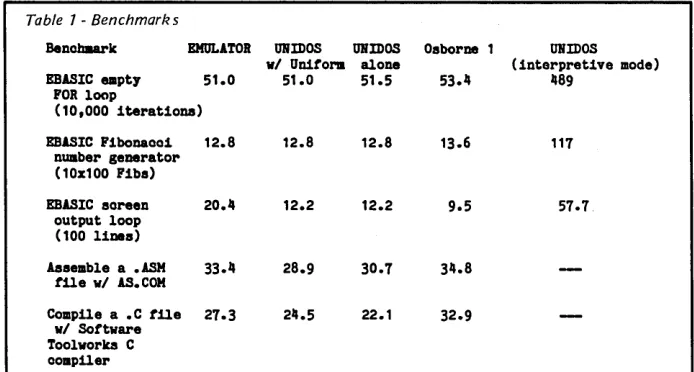
UNIDOS was run both by itself from MS-DOS formatted disks and with Uniform from Osborne formatted disks. To compare V20 performance with software CP/M emulators, I also ran UNIDOS in interpretive mode, where it doesn't make use of the V20's 8080 capabilities. The results of these benchmarks appear in Table 1.
Notice that in the empty loop and the Fibonnaci benchmark, where only CPU speed is important, all three emulation modes ran at the same speed and slightly faster than the Osborne. In the screen output bench-mark, the Osborne outperformed UNI-DOS slightly, with EMULATOR far behind. In the assemble and compile benchmark, where disk speed is im-portant, UNIDOS came in first again, with EMULATOR only slightly behind,
and the Osborne slightly behind it. After running the benchmarks, I feel safe in drawing the following conclu-sions: the 4.77MHz V20 is very slightly faster than a 4MHz Z80 in CPU per-formance. The IBM's screen output seemed slower than the Osborne's. Since both are memory mapped, both should beat remote terminals handily. UNIDOS emulated CP/M system calls faster than EMULATOR could. And
Table 1 -Benchmark s
the PC's disk access was much faster than the Osborne's.
The above times do not include the time to load the application from disk; including that time the Osborne fares worse. And after each benchmark was run, CP/M had to reload from the boot disk, whereas MS-DOS did not (this time was also not included).
As far as a comparison between the two emulator packages, I preferred UNIDOS, but only when it was com-bined with Uniform. Being able to feed my PC the same disk I just pulled out of my CP/M machine was a great advantage. However, the combined package carries a much larger price tag than EMULATOR, which I would rate roughly equal with UNIDOS when Uniform wasn't present.
In Conclusion
Where can you get a V20 (replaces 8088) or V30 (replaces 8086) of your own?
Both GFI and MicroSolutions sell the V-Series processors (though MicroSol-utions sells them only with their soft-ware). I've also seen several sources in the backs of microcomputer magazines (normally these ads stress the perform-ance improvements and are often called "speed-up kits").
The price depends on make and speed and runs about $20-$25 for a 5MHz V20 and $30-$35 for an 8MHz V30.
Note that the speed improvements
Bencbllark EMULATOR OlUDOS OJUDOS Osborne 1 ORIDOS
(interpretive mode)
1189
vI Unitorm alone
EBASIC empty 51.0 51.0 51.5
FOR loop
(10,000 iterationa)
EBASIC Fibonaooi 12.8 12.8 12.8 13.6 117
number generator (10x100 Fibs)
EBASIC soreen 20.11 12.2 12.2 9.5 57.7
output loop (100 11nes)
Assemble a • ASH 33.11 28.9 30.7 311.8
tile vI AS. COM
Compile a • C tile 27.3 211.5 22.1 32.9
vI Sottvare Toolvorka C compiler
(all units are in seoonds and are acourate to roughly .3 seo.s)
[image:8.612.217.564.548.734.2]of the V20 cause problems in two MS-DOS machines (neither of which is an IBM clone). The TI Professional incor-rectly times out its Programmable In-terval Timer chip during power on diagnostics and then stubbornly refus-es to boot up. The fix here is a simple patch to the boot up ROM (contact
GFI).
The Victor 9000 will not format a disk properly with a V20 installed; there is no fix for this, although it should be no problem for an assembly programmer.
One goal of NEC' s V-Series is to open up both the CP/M and the MS-DOS worlds without the expense of owning and maintaining two comput-ers. Now if NEC would just add 68000 capability so we PC owners could also run Mac and Amiga programs (when they get here), they'd really have something.
•••
HARDWARE SPOOLER and INTERFACE CONVERTER
• 128 K PRINT BUFFER
• CENTRONICS OR SERIAL
INPUT/ OUTPUT
• MULTIPLE PROTOCOLS
• 5
3/4X
7V2
INCH BOARD
• +
5
Volts at .
75
Amp
±
12 Volts at .1 Amp
The L-BAND SYSTEMS hardware spooler is a Z80 based unit that provides a 128 K byte buffer and interface c~nversion between ~en
tronics and serial. Input and output may be either parallel or senal at various baud rates and with several protocols. Multiple copy and single sheet feed are supported.
BARE BOARD with EPROM (2732) and program listings ... $ 39.95 DISK with program source, 8-inch SSSD . . . .. 10.95 MINI KIT board, EPROM, headers, crystals (less disk) ... 59.95 "'PARTIAL KIT all parts EXCEPT RAMS ... 109.95 "'ASSEMBLED and TESTED BOARD (128 K) ... 259.95 WALL MOUNT POWER SUPPLY ... 39.95
California Orders Add 6.5% Sales Tax Shipped via UPS - Check or Money Orders to:
"Not available for export .
L-BAND SYSTEMS
1037 E. Lemon Ave. Monrovia, CA 91016
(818) 357-0566
L. ....
E;llnCl~EJlf'()fl,.4
... ,...-:: ... :::::: ... :
.. :.::.: .. : ... :.:.: ... ,:.:.:.::
""l'fI:;Ml'f:)I5.~~:.:.·
.•.• ::.: .. :
...•.... :
.. :.·,.::: .. : .... :.'
.~.«l.I.C).,?:.~J~:
.. '-'.I .. , •.• :
•..•.
~:A~i:.··
••••• ··:\:::
{ii·.i',i .. :.:·"
IVICl~:rQ.:.····:.:J\
..
!t!l:~.IlI::~I.~:r.:.:
.•..
~:~:·.Jt
"::.
~:~:Q:·.··.§YIll.I:a.q.~'f;:.·:···.:.::P«l:I):U g:~.
- Only $49.95 plus shipping. - Phase/dephase.
- 8080 to Z80 Source Code Converter. - Cross-reference generation. _ Generates Microsoft compatible - Full Zilog mnemonics.
REL files or INTEL compatible hex - INCLUDE and MACUS FILES.
files. _ Separate data, program, common,
- Compatible with Digital Research and absolute program spaces. macro assemblers MAC & RMAC. _ Supports Hitachi HD64180.
- Generates Digital Research compat- _ Z80 Linker and Library Manager for
ible SYM files. Microsoft compatible REL files
avail-- Conditional assembly. able as an add-on to Assembler.
ATTENTION Turbo Pascal Users:
FULL 90 DAY PARTS & LABOR WARRANTY
Dimensions 131/2"W x 53/a"H x 17" D
MODEL IIA -
2/380K DSDD DRIVES$ 895.00
MODEL lIB -
2/780K DSOD DRIVES$ 995.00
MODEL lIe
-10 Meg H/Disk w/380K Floppy$1895.00
MODEL lID -
10 Meg H/Disk w/780K Floppy$1995.00
of( SBSO-II (Board Only) Wired and Tested
SBSO-II SYSTEM OPTIONS All Models:
Additional 2 Serial Ports (installed) Additional 64K Memory (installed) CP/M 2.2 Operating System w/Manual CP/M 3.0 Operating System w/Manual Models IIA and liB only
SASI Interface Option (installed) XEBEC Hard Disk Controller
Colonial Data
Cabinet Kits
(Build Your Own Systems!)MODELCKPI
Metal Cabinet will accept Single Boards up to 12"x16" complete with fan, RFI filter with power switch, front panel and mounting for two 5%" half-height floppies. Pre-punched for 4 DB25 and 1-50 pin. In-
$
cludes 60 watt power supply
225 00
with ±12V,
+
5V. •MODELCKP2
Same as Model CKP1, but in-cludes 90 Watt Power Supply to
power half-height Winchester
$
00
5%" hard disk and single 5%"325
half-height floppy. •
MODELCKX
$275.00
PRICE
$60.00 $50.00 $75.00 $250.00
$35.00 $250.00
E-J
Colonial Data
S8-80-II
PICK YOUR SYSTEM!
CHOOSE YOUR
OPTIONS!
The Original "Better Board" 8B80 from Colonial Data has just gotten BETTER YET! More on-board features like SASI interface circuitry,4 Channel CounterTimer, Memory Expansion to 128K and MORE! All made to run the most popular programs under the CP/M Operating System.
Z80'· - ZI LOG
CP/M'· - DIGITAL RESEARCH (Calif.)
Shugart
5%" Disk Drives
MODEL 455
DSDD Floppy $195.00 Over 380K Capacity 2 For $370.00
MODEL 465 DSOD Floppy Over 780K Capacity
$225.00 2 For $430.00
Cabinet o.nly with fan, RFI filter,
$139
00
power sWitch, prepunchedcon-nector holes; No Power Supply. •
.---1 ••
HOW TO ORDER:
II
Colonial Data Services Corp.
Call or Write Colonial Data-Orders paid with bank _
80 Pickett District Road,
card or cashier's check are shipped within 3 working _
New Milford, Conn. 06776
days. Allow 3 weeks for Personal Checks. l!III!II!
Shipping: Add2%(uptoamaximumof$20.00)forUPS ~i
Telephone
(203) 355-3178
1_:1
Colonial Data
S8-80-
I I
The "Better Board" Gets BETTER!
For the past 4 years, Colonial Data has been supplying thousands of its original SB80 "Better Board" computers to the O.E.M. market. Now, the "Better Board" is even BETTER with the introduction of the SBSO-II. More Standard Features at a NEW LOWER PRICE!
• 4MHz ZSOA CPU WITH NO WAIT STATES Enhanced BIOS uses mode 2 interrupts.
• 64K MEMORY STANDARD (EXPAND TO 128K) Parity checked RAM utilizes 4164
Up to 8K of EPROM (4K is standard)
Accepts Pin-compatible EPROMS from 2716 thru 2764 • NUMEROUS FLOPPY DISK STORAGE OPTIONS
Uses the advanced NEC765A controller chip Supports 8" and 5%" drives simultaneously Automatic Density Selection (Single/Double/Quad)
B 4 SERIAL I/O PORTS (2 STANDARD) Software selectable baud rates to 19,200
Uses Z80 SIO/O and SMC 8116 baud rate generator.
SBSO-II SYSTEM OPTIONS:
PRICE
ADDITIONAL 2 SERIAL PORT (INSTALLED) $60.00
ADDITIONAL 64K MEMORY (INSTALLED) $50.00
SASI INTERFACE OPTION (INSTALLED) $35.00
XEBEC HARD DISK CONTROLLER $250.00
CP/M 2.2 OPERATING SYS W/MANUAL $75.00
Standard Features Include: • 4MHz Z80A Processor
• 64K Memory (Expands to 128K)
• Supports 8" and 5%" drives simultaneously • Auto Density Selection (single/double/quad) • 2 Serial Ports/1 Centronics Parallel Port
SIZE: 1 2" x 1 3"
POWER: + 12V, -12V, +5V
WARRANTY: 90 days Parts and Labor
• ZSOA PIO PARALLEL PRINTER INTERFACE Centronics compatible printer interface is Standard! • SASI HARD DISK INTERFACE CIRCUITRY
ON-BOARD!
SASI interface provides access to hard disk. Compatible with XEBEC and other controllers. Just populate with TTL and add connector.
• 4 CHANNEL COUNTER TIMER-STANDARD! Allows custom software applications.
User accessible 125Hz interrupt. Provides system date/time clock
4th Channel used for the NEC 765 interrupt. • CP/M 2.2 BIOS ENHANCEMENTS
Allows flexible device assignments, baud rate selection,auto-matic density detection, a system date and time clock and hard disk support.
• OPTIONAL CP/M 3.0 (CP/M PLUS)
Extensive disk buffering speeds system throughout.
Z80'· - ZILOG CP/M'· - DIGITAL RESEARCH (Calif.)
CP/M 3.0 OPERATING SYS W/MANUAL $250.00
II
, . . . . - - - II Colonial. Data Services Corp.
HOW TO ORDER:
Call or Write Colonial Data-Orders paid with bank card or cashier's check are shipped within 3 working days. Allow 3 weeks for Personal Checks.
Shipping: Add $5.00 for UPS Shipping (Brown) Within the United States.
The 5-100 Bus
By Dave Hardy
In this column Dave describes a 32-character type-ahead buffer for 5-100 systems. It's the perfect addition for touch-typists with slow drives. (A Christmas present for the nimble fin-gered!)
Over the past few years I've re-ceived hundreds of novel S-100 add-on circuits for everything from infrared front panels to 16K core memory boards. Many of the circuits I see are of little use to the general population of S-100 users (like the adapter for running an S-100 machine in a car, or the humidity-controlled hardware breakpoint trap), but occasionally I see one that merits more than just a trip to the circular file.
S-100 Type-Ahead
The S-100 FIFO adapter shown in Figure 1 is one of the best add-on circuits I've ever seen. I'd like to give credit to the author of this work, but, unfortunately, the envelope that brought it and the letter describing it had no signature, name, or address!
NOTE: Figure 1 was not available at press time. Please write to Dave at the address above to get a copy.
What makes this circuit so handy is its ability to be added to just about any 8251-based serial 110 board to provide a 32-character (AM2812-based) type-ahead buffer. Although installing it is not a simple task, it is well worth the trouble if your machine suffers from slow keyboard response or miss-es characters typed in during disk accesses, or whatever.
ZZZZZzzzz
I have such a machine (SYSOP CBBS) that uses a pseudo-DMA disk controller without interrupts so it
I I goes to sleep" during disk accesses.
Of course, while it was sleeping it dropped characters (particularly while using WordStar or background spool-ers). In fact, the disk delays were so long that even remote users com-plained about lost keyboard input.
Unable to solve this problem using software modifications (they won't let me run my chain saw anymore), I
10
decided to give this circuit a try. So I wire-wrapped it onto a daughter board attached to my S-100's serial 110 card (it used an 8251, of course), and the results were impressive.
Evaluation
Even during the longest delays, I couldn't fill the buffer. Data coming into the machine from remote callers (even at 2400 BPS) was never lost. In fact, the 32-byte FIFO used in the add-on circuit never filled more than about half way. (I suspect that the 32-byte FIFO was chosen because it is com-monly available, not because 32 bytes are necessary.)
Because the circuit is rather complex, it is not shown here in its entirety. If
you are an engineer, E.T. (that's Elec-tronic Technician, not Extra-Terrestrial, although some of the techs here at the lab may qualify for both), or a reasona-bly skilled hobbyist, you should have no trouble working from this figure (famous last words).
However, if you don't like to waste your time second-guessing the un-known, drop me a note, call me (313-846-1055), or leave me some EMAIL on Compuserve (72435,222 or 70150,102). I'll mail you a computer-generated schematic of a working (and already debugged) serial 110 card that uses this buffer.
How It Works
Here's a brief description of how the FIFO circuit in Figure 1 works: (Of course, the 8251 SIO Ul and S-100 data bus buffers U2 and U3 must already exist on the the old 110 board, but are shown here to avoid confu-sion.)
The FIFO circuit uses the 8251' s RxRDY output to tell when the 8251 has received a character.
Then it uses the RXRDY signal to generate the RDSER* and LDFIFO signals which cause the 8251 to output its data onto the LOCAL data bus for the FIFO. Notice that this circuit uses the board's own data bus to transfer the incoming data from the UART to the FIFO, and does not ever send data out into the S-100 bus data lines (the key feature of this add-on) because the
736 Notre Dame Grosse Pointe MI 48203
Data Output driver (U2) is not enabled by this action.
All characters received into the UART are, therefore, sent directly into the FIFO buffer through this modifica-tion. When the computer asks for the Received Data Available (RDA) status of the UART, multiplexer IC U4 sends the DATA AVAILABLE status of the FIFO rather than the UART's RDA line. (It switches only the RDA bit, of course - the rest of the UART status word is unchanged.)
Mainstreaming The Data
The remaining problem is to be sure the computer reads characters from the FIFO buffer instead of from the UART (when the computer asks for data).
IC U5 handles this by sending a READ request to the FIFO which then puts a character on the local data bus. The character is then passed through the data output buffer, U2, into the S-100 bus.
The UART's Read Request line (RD*) is now triggered when the FIFO wants data. The bus signal which used to control the UART now drives U5. This is a very clever circuit, although a bit difficult to understand ...
Some things I've noticed about this circuit: If the FIFO overflows, then the first data received is lost. This shouldn't be a problem unless you type 30 cps.
If you are running CP 1M version 1 or 2, avoid filling the FIFO with ctrl-C characters, since each ctrl-C will cause a warm boot, and 32 warm boots could take a while. Perhaps a good add-on for this add-on would be a circuit that would dump the FIFO when certain characters came in. Feedback, Letters, & Requests
I've received a request for assistance from a small university in Texas. Spe-cifically, they would like to get an S-100 frame running as an instructional tool for a course that includes install-ing ZCPR2 or ZCPR3, and probably for teaching some of the basics about small computer systems. (I wish there had been courses like that when I went to college.) If you know of an
IEEE-696 machine without a home, contact me, and 1 will put you in touch with the right people.
About half of the readers who send me mail (I only open the packages that don't tick; the ones that do get re-turned) say that they would like to see more TurboDOS-related items in this column. 1 would like to dedicate a few issues to them, but don't want to leave other readers stranded.
But, as the pro-TO readers argue, TurboDOS can be used with several different processors, and requires some pretty sophisticated S-100 hard-ware, whose discussion here would benefit almost all S-100 users. So, unless 1 hear howls from the reader-ship, 1 am going to yield to the more vocal pro-TO forces and delve into the peculiar methods of TurboDOS hard-ware.
Next Time
Some of the latest offerings for TurboDObased multi-processor S-100 machines, including some new slave processors and mixed CPUs.
•••
OKIDATA PRINTER MICROLINE 80
7 X 9 IMPACT OOT MATRIX, NEW RIBBON 80 CPS 10 CPI 6 OR 8 LINES PER INCH 3 TO 12 INCH FORM FEED TRACIDR & FRICTION BUILT IN SELF TEST REM)VED FROM SERVICE PARALLEL INTERFACE (CENTRONICS COMP) SERIAL INTERFACE
$ 99.00 $119.00
Z-125 (ZENITH) 10, 12, 13.2, 16.5 CPI RS-232 150+ CPS WITH BLOCK GRAPHICS
95 ASCII CHARACTERS STORE DEMJ $400.00
KEYBOARD (MICROSWI'lOi) 113 KEYS 8 BIT ASCII PARALLEL OUTPUT WITH CASE
AND COMPLETE DOCUMENTATION $40.00
SA800-2 DISK DRIVE CLEAN - USED $59.00
SA850 DISK DRIVE CLEAN - USED $99.00
STANDARD mUNTIN; - GUARANTEED 60 DAYS
CABINRr FOR ABOVE Horns 'IWO DRIVES POWER WIRIN; COMPLETED (AC AND DC) FAN AND INPUT AC WIRING DONE
20
X
9 1/2X
17 DEEPPOWER SUPPLY FOR 'IWO DRIVES (SWI'OCHIN:; ) WILL POWER DRIVES AND SOC 6 X 8 X 2 1/2 5VDC
@
8 AMPS, +12VDC, -12VDC, -5VDC@
.5 AMPS FA AND 24VDC @ 2 AMPS CABlNEr AND POWER SUPPLY TOORrHER
SHUGART DISK DRIVE PARTS SA800 HEAD
SA800 STEPPER
SA800-2 LOGIC BRD NON-IDRKING SA800-2 LOGIC BRD IDRKING
SA850 HEAD AND STEPPER ASSY (BI OR TRI) SA850 LOGIC BRD NON-IDRKING (BI OR TRI) SA800 OR SA850 SPINDLE BEARIN;S (SEl') SA800 OR SA850 INDEX LED (SEl')
arHER PARTS ON ~UEST
SA800 ALIGNMENT AND CLEANIN; SA850 ALIGNMENT AND CLEANING
Z80A PARTS CPU, C'OC, SIO/l, 1771, 2716 --6845 CRT CONTROLLER
DIABLO PRINT WHEEIS FITS 630 AND HYTYPE
$60.00
$60.00 $100.00
$15.00 $10.00 $10.00 $35.00 $50.00 $20.00 $ 3.00 $ 3.00
$20.00 $30.00
$ 2.00 $ 2.00
COURIER 10, ELITE 12, COURIER 72 $ 3.00
CASCADE ELECTRONICS ROUTE 1 BOX 8 RANDOLPH MN 55065 507-645-7997
6 FOR $15.00
FREE SHIPPING ON OVER $40.00
EARTH
LAUNCHES NEW STARS
EARTH COMPUTERS launches two of the
"Hottest" new stars in the S-100 Universe.
Both the TURBOMASTER SlM and
TURBOSLAVE ITM are Star performers,
featur-ing high speed Z-80H CPUs.
I
TURBOMASTER 8
This outstanding new 8-Bit Single
Board Computer offers featu res that
are out of this world:
• On-board ST -506 Winchester Controller
• TurboDOS, CP/M, MP/M compatible
• 5-1/4" and 8" Floppy Controller
• Up to 256KB of memory
• 8 MHz, Z-80H CPU
• 2 Serial ports
• 1 Parallel port
I
TURBOSLAVE I
The perfect companion to the
TURBOMASTER 8 or other
8/16-Bit Master processor. This
high speed slave utilizes an
8 MHz Z-80H CPU and offers
extensive on-board diagnostics ...
an industry exclusive.
• No paddle boards
• S-100, IEEE 696 compatible
• 128KB of RAM
• 2 RS-232 ports, 50-38.4K Baud
• FIFO communications
• Data transfers to 1 M B
@ --
.. " '=\ - - ---" •
---= - - - -- -- -
~RTH
COMPUTERS-- -- -- -- "Building Blocks For The Super Micro"
EARTH's new stars are fully compatible
with the Multi-user TurboDOS operating
system, and will operate in most S-100
systems, including pre-IEEE 696 systems.
EARTH COMPUTERS also
manufac-turers a growing line of PC
com-patible stellar performers such as:
• TURBOSLAVE PCTM-an 8 MHz
Z-80 single board slave processor
that runs CP/M applications on
a PC and is compatible with the
TurboDOS multi-user operating
system.
• TURBOACCEL 2S6™-a high
performance 80286 accelerator
that boosts PC performance up
to five times.
• EARTHNET PCTM and EARTHNET
S-100, the low cost,
ARCNET-compatible way to tie PC and
S-100 systems together.
To put these stars to work for you,
call or write EARTH COMPUTERS.
BE SURE TO ASK ABOUT HOW
YOU CAN WIN A FREE Z-SO
CO-PROCESSOR BOARD.
In The Public Dotnain
By
Stephen
M.
Leon
Steve covers some of the history of public domain software in this col-umn, featuring the more unusual programs. He also details the latest releases from the SIG/M and PC/Blue libraries.
Our teaser last issue was that next time we would cover the exotic aspects of public domain software. Not exotic in terms of X-Rated, but rather in terms of "why in heaven's name would anyone write such a program, much less release it!" Therefore, the topic this issue might be " software trivia" or, better yet, "trivia soft-ware."
Historically, as the early hackers solved problems with software, they used the medium of public domain as a way to provide others with their solutions. The first few volumes of the CP/M Users Group library had such practical programs as CASDSK.ASM, a cassette to disk transfer, ICO-PY.ASM, to copy a file from an Isis diskette, TREAD .ASM, a tape reader to disk transfer, Laurence Livermore BASIC, Tiny BASIC, and lots of games in EBASIC.
The first volume of the SIG/M li-brary was the infamous, original 350 Point Adventure in 8080 code. While this version was later superseded by SIG/M Volume 11 - Super ture, an expanded 550 point Adven-ture for either 8080 or Z80 code, the original Adventure was released again in June 1982 as Volume 13 of the PC/ Blue library. To run it on the PC you need a Baby Blue type CP/M card. The Adventure programs are still active sellers in the SIG/M library as is the Dungeon game (SIG/M Volumes 45 to 47). I suspect that if the PC version of Adventure runs on the new NEC V-20 chip, we may see more copies in use by the non-appliance mM set.
Eight Disks Of Stars?
Universality has never been a re-quirement for inclusion in a public domain library. The SIG/M library is, in fact, a kind of Smithsonian deposi-tory for obscure material. It amazes me every time I look at the distribution data, but we keep getting orders for SIG/M Volumes 31 to 38 - the Yale
Catalog of Bright Stars. PC/Blue put out a two volume set of Census Data (100 and 101) and people ask for it! The point is rather simple: because the public domain libraries are not com-mercial ventures they can make avail-able even the most limited use soft-ware.
Numbers, Policies, & Submits Are you a random numbers freak? Mark Weiss, a graduate student at Syracuse, recently donated a whole series of Turbo Pascal random number generation programs to SIG/M. We showed them to one of our professori-al friends who said they were the best thing he had ever seen. So we re-leased them as SIG/M Volume 243.
But if neither random numbers nor bright stars are your cup of tea, how about music. The Musicraft Software System in on SIG/M Volumes 56 to 58. CPMUG Volume 39 is another music volume, as is PC/Blue Volume 60. On SIG/M Volume 120 we have a music composer for the H-89 or any GI A Y38910 sound chip board.
Want to run SUBMIT multiple times? There is a 1K program and a 1K doc file on SIG/M 72 to tell you how. The program is called REPEAT. COM, and you include it in your submit file as REPEAT n. It then goes through the submit file n times. Simple and ob-vious, but handy!
How about an Econometric Model to test alternate money supply policies. Isn't that the height of obscurity? Not at all, if you understand economic theory. If you do, take a look at THE FED on SIG/M Volume 87. There are a number of statistical programs in the libraries. PC/Blue has the EPISTAT statistical package on Volume 59. SIG/ M has them scattered through the library in too many places to list here, so check the catalog.
Typing, Raihoads, & Energy Design The library contains everything from learning to touch type (SIG/M 83) to calculating Canadian mortgage pay-ments (115). There is a two volume Building Energy Design Analysis Pro-gram (SIG/M 137-138). WOOF. COM will check the frequency response of loudspeaker enclosures. While
check-200 Winston Drive
Cliffside Park NJ 07010 ing your loudspeaker you can also test your drives if you have a 1793 control-ler, or do gain and phase analysis of a ladder network (all three on SIG/M 152).
You can even attach your Atari to a CP/M machine (SIG/M 157 and 171). If
not that, we have a Model Railroad Traffic System on SIG/M 182 and a way to install Atari joysticks on an Osborne on SIG/M 193. More! For those looking for curve fitting pro-grams, we have the fluff minimax algorithm and the simplex algorithm on Volume 195, or multidisk formats for the Kaypro 2, 4, and 10 on 212. Even biochemical engineering games - on SIG/M 225!
Special Software For Special Needs I still use my TRS-80 with Omikron Mapper and 8" drives to copy disks. Back on SIG/M Volume 86 we released a full volume of software just for that system. We have a Versafloppy II double density BIOS on Volume 26, CDOS support on Volume 41, SD Sales Hard Disk Support on 42, CP/M To Helios and vice versa on 44, DTC Hard Disk Bios Support on Volume 50, Big Board Utilities on 136 and 141, a Disk 10 driver in CP/M+ for the Versafloppy 2, and a CP/M + Disk 10
module for the XCOMP Hard Disk on SIG/M Volume 172.
I hope I've made two points with this trivia. Lots of people solve rather specialized problems in software and allow the libraries to make these pro-grams available to all. You stand a good chance of finding a solution by a detailed browse through either the printed or disk catalogs. On the other hand, if you've done such a job in software, how about putting it in the library? Why not help someone else avoid reinventing the wheel.
Still Rolling Along
Last time I looked, PC/Blue was getting near a 150 volume size and growing rapidly. A lot of it is from the dreaded freeware beggars with their hands out and their source code omit-ted. At a diner the other day, we were having coffee and battling over the
14
Z
SEISYOU
FREE!
Free to create computer environments right for you ... free to automate repetitive tasks ... free to increase your productivity. Z.System, the high-performance a-bit operating system that flies! Optimized assembly language code - full software development system with linkable libraries of often needed subroutines -relocating (ROM and RAM) macro assembler, linker, librarian, cross-reference table generator, debuggers, translators, disassembler - ready to free you!
New generation communications package provides levels of-flexibility, func-TERM III tionality, performance not available until now. Replaces BYE and XMODEM ...
master/server local area network capability ... public or private bulletin board and electronic message handling are integral features ... auto-dial/answer, menu install .. . XMODEM (CRC/Checksum), MODEM7 Batch, Kermit, CIS, and XON/XOFF protocols .. . 100-page manual . ~ ... $99.00 Rolls Royce of message handling systems ... mates with TERM III or BYE for Z·MSG most advanced overall electronic mail/file transfer capabilities . . . menu installed ... extreme configurability ... many levels of access and security ... word, phrase editor, field search . . . complete message manipulation and database maintenance ... $99.95
Elegant, menu and command-line driven file and disk catalog manager. DISCAT Generates and controls multiple master catalogs, working catalog used for update quickness. Nine flexible modules easily altered by user for custom requirements. Works with Z shells (VMENU, VFILER, MENU), aliases, and multiple commands per line ... $39.99
ZCPR3: The Manual Bound, 350 pages, typeset book describes features of ZCPR3 command processor, how it works, how to install, and detailed command usage. Bible to understand Z-System ... $19.95
ZCPR3 and I/OPS Loose-leaf book, 50 pages, 8-1/2" by 11", describes ins-and-outs of input/output processing using Z-System. Shows how to modify your BIOS to include I/O redirection ... complements The Manual ... $9.95
More missing links found - Z Application Progams! Fly with eagles! Our programs promote high performance through flexibility! Productivity results from dynamically changeable work environments, matching operator to tasks and machines.
Above programs require 48K-byte memory, ZCPR3, Z-Com, or Z-System, and Z80/NSCBOOIHD64180-based computer. Shipping from stock. State desired disk format, plus two acceptable alternatives. As payment, we accept Visa, Mastercard, personal checks, money orders, and purchase orders from established companies. We also ship UPS COD.
Call or write to place order or to obtain literature.
Echelon, Inc.
101 Fir.st Street. Suite427 • Los Altos, CA 94022 • 415/948-3820IN THE PUBLIC DOMAIN _ _ _ _ _ _ _ _ _ _ _ _ _ _ _ _ _ _ _ _ _ _ _ _ _
(continued from page 13)
freeware issue. The basic argument is that freeware is necessary so the little guys can market software. Their con-tention is that it costs too much to put a product on the market; therefore, to promote software development, we should encourage freeware.
Sure, it takes big bucks to market a Lotus or a dBASE, or to bring a major new commercial package to market. That kind of package doesn't get to the public as freeware. Most freeware is cottage industry. I just wrote a 300
+
K Clipper compiled program to run a friend's video store. A couple of outfits have asked me about marketing it, because it probably is the most comprehensive package around. They could sell it for about $250. But before you read the next paragraph, I suggest you sit down.I may put VIDEO MANAGER out as freeware! The big difference is this -if freeware is designed to help cottage industry, then why not handle it like ASCAP. Why not put out the disks with a single request for payment to a centralized point, the not-for-profit public domain library. It would then distribute the payments to all the authors in the library according to an ASCAP type formula. It would also serve as a confidential repository for the source code. Let me know if you think it's an idea whose time has come.
Editor's note: The word I'm getting is that some of the original freeware people have started dropping out of that market. At first it looked good, but now it appears that few are getting more than occasional token payments and many are spending hours upon hours supporting (nonpaying) users.
Also, you face some special support requirements when you release a business oriented package.
Any video store which uses your pro-gram to handle its business is going to be on the phone to you the instant the program so much as twitches (be it hard-ware, softhard-ware, or operator). A store is a livelihood for a number of people, and even if they've paid