© 2016, IRJET | Impact Factor value: 4.45 | ISO 9001:2008 Certified Journal | Page 717
Abstract - Text extraction is difficult process due to noise present in image, also various size, complex background and font. Text extraction and recognition is important process due to extracted text should preserve data formatting, Extracted text using system should be easily posted in another application and it should maintain quality of text.
Digital English Comic Image is very complicated image so text extraction from it is very vital work. In existing work, Manga Comic image is used for text extraction. From Manga comic image text is extracted and recognized vertically using Blob extraction function. This paper contain method of extraction and recognition from comic image using median filter for preprocessing , CCL algorithm for balloon detection and OCR with image centroid zone concept for text extraction and recognition.
Key Words : Median filter, Connected Component Labeling (CCL), Optical Character Recognition (OCR), Image Centroid Zone, Morphological Filter, Comic Image, Pre – processing
1. INTRODUCTION
Proposed system is about text extraction and it is done by region based technique. In comic images text is situated into the balloon. Comic images are same as funny images. It contains number of object of different size. Also noise level is very high in comic images so here pre-processing is done by Median Filter which having best result. Number of comic images is taken from newspaper or any article. These images contain maximum noise. Comic images contains very sharp edges due to this for pre-processing Median filter used due to its edge preserving property.
Basically two basic methods are used for text extraction, text based extraction and region based extraction. This paper is depending upon region based method. So the first aim is to detect different balloons i.e. regions from images and for that Connected Component Labeling (CCL) algorithm is used. After detection of balloons from image, next step is to identify text balloons and non-text balloons
i.e. which balloons contains text and which balloons does not contain text. For best result identification text balloons and non-text balloons is very important. It is avoid by calculating balloons size. If balloon size is less than 10% of whole image then it is non-text balloon.
Sometimes failure may occur during the Text Blob Detection, but that is not a serious problem due to Optical Character Recognition. All the text should be extracted from balloon. After extraction of text from balloon it is recognized by optical character recognition method. In OCR, first line segmentation is done, then each line is divided into separate words by vertically scanning. Separated each word then cropped in individual character. Most important step in OCR is feature extraction. In this system image centroid zone concept is used for feature extorted. In classification it recognize text if extracted values are matches with standard dataset. Finally recognised text is stored for user so they can easily post it another application.
[image:1.612.395.490.496.668.2]2.
IMPLEMENTATION
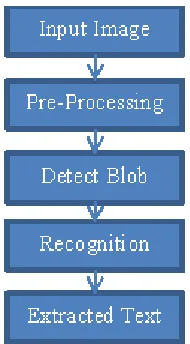
Fig. 1 shows system overview diagram for text extraction form digital comic images.
Fig-1: System Overview
Text Extraction and Recognition Using Median Filter
Manoj R. Gaikwad
1, Prof. N. G. Pardeshi
2,
1
Student, Computer Engineering, SRESCOE Kopargaon, Maharashtra, India
2
Student, Computer Engineering, SRESCOE Kopargaon, Maharashtra, India
---***---
© 2016, IRJET | Impact Factor value: 4.45 | ISO 9001:2008 Certified Journal | Page 718 2.1 Input Image
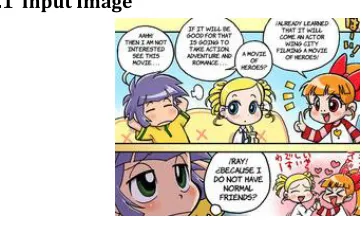
Fig-2: Sample Comic Image
Figure 2 shows the sample input comic image in which text is situated into balloons. Each comic image contains different scenes, balloons with different shape, size and style. Sample input image is color image. For band selection, RGB values are applied on Input Image.
Figure 2 is sample input image which having more noise because of that pre-processing is necessary. Pre-processing is done medina filter which improves efficiency of text extraction and recognition. In median filter average of neighboring is taken and applied to all pixel.
2.2 Pre-Processing
To extract quality text from any image is depend upon a type of pre-processing i.e. noise removal from image. In pre-processing noise must be removed from your image but it should not be disturb the other parameter of image. In existing system morphological filter is used for pre-processing. In this system, pre-processing is done by Morphological filter which give less performance. One of the best feature of median filter is its edge preserving property and it is very important in text extraction and recognition due to comic image contain number of shapes, design.
The main concept behind median filter is, it scan each pixel of input image. It replace the value of pixel with average of its neighboring pixel. Window i.e. pattern of neighbors slides entry by entry over the entire signal. Median is simple to define if entries of window has an odd number. In this case just sort the all values, middle number is a median value. But in even number case there is more than one possible median. I simple term pre- processing is done by median filter to achieve image smoothing and to reduce or removal noise.
The maximum efforts are done on calculating of median of each window because filter must process every entry in signal. So it is difficult to determine that how fast the algorithm can run on large signals such as image. In this case to calculate efficiency is very critical factor. Sorting of all entries required so it is described in Vanilla implementation. In this algorithm first all entries must be sorted, then select middle entry so selection sort is efficient for this. Histogram median can be efficient if signals use whole number representation. It is simple to
update the histogram from window to window, and finding the median of a histogram is not particularly onerous. Median filter is nonlinear filter which is one kind of smoothing technique, such as linear Gaussian filtering. All the filtering techniques are effective at removing noise in smooth patches or smooth areas of a signal, but it affect a lot its edges. Often though, in text extraction and recognition, noise should be removed from image and it is important to preserve the edges. Edges are of critical importance to the visual appearance of images. Because of this, median filtering is very widely used in digital image processing.
Fig-3: Working of Median Filter
Like the mean filter, the median filter considers each pixel in the image in turn and looks at its nearby neighbors to decide whether or not it is representative of its surroundings. Instead of simply replacing the pixel value with the mean of neighboring pixel values, it replaces it with the median of those values. The median is calculated by first sorting all the pixel values from the surrounding neighborhood into numerical order and then replacing the pixel being considered with the middle pixel value. (If the neighborhood under consideration contains an even number of pixels, the average of the two middle pixel values is used.) Figure 3 illustrates an example calculation.
Figure 3, calculating the median value of a pixel
neighborhood. As can be seen, the central pixel value of 150 is rather unrepresentative of the surrounding pixels and is replaced with the median value: 124. A 3×3 square neighborhood is used here larger neighborhoods will produce more severe smoothing.
2.3 Detect Blob
[image:2.612.54.235.93.207.2] [image:2.612.327.551.230.362.2]© 2016, IRJET | Impact Factor value: 4.45 | ISO 9001:2008 Certified Journal | Page 719 First step of connected component labeling algorithm is
to detect boundaries of different regions. It is useful to extract regions which are not isolated by boundary. Connected components is known as set of pixel which are not separated by a boundary. Each maximal region of connected pixels is called a connected component. In balloon detection phase it produces two types of balloon i.e. text balloon and non-text balloons. The balloon which contain any single character is called as text balloons and other are non-text balloons.
Connected-component labeling is used in computer vision to detect connected regions in binary digital images, although color images and data with higher-dimensionality can also be processed. When integrated into an image recognition system or human-computer interaction interface, connected component labeling can operate on a variety of information. Blob extraction is generally performed on the resulting binary image from a thresholding step. Blobs may be counted, filtered, and tracked. Blob extraction is related to but distinct from blob detection.
Fig-4: First Pass (Assigning Labels)
Figure 4 shows first pass of Connected Component Labeling Algorithm in which each pixel assigned with a label and figure 5 shows the second pass which is useful for aggregation.
Fig-5: Second Pass (Aggregation)
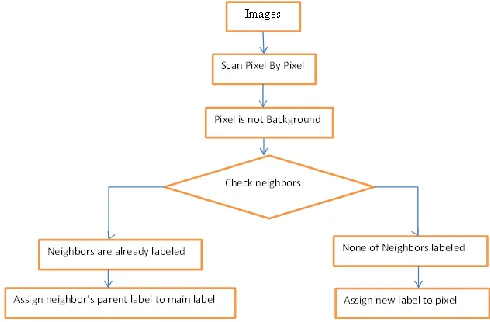
Working of Connected Component Labeling algorithm is very simple. Initially label is set with new label for e.g. current_label_count=1. Next step is find non background pixel. Select the first non-background pixel and its find neighboring pixel. If not single neighbor is labeled yet, then set value of current pixel to the current_label_count and increment current_label_count. If its neighbors are already labeled then assign its parent’s label to it. Problem occurs when its neighbors have different labels in that case assign lower label count. Continue it for remaining all non-background pixels. It comes under the first pass, in second pass getting the root of each pixel (if labeled) and stores it in patterns list.
CCL algorithm detect the balloons available in input image, but it necessary to identify text balloons and non-text balloons. To avoid the false detection and to reduce the complexity the text blobs are to be identified exactly. The identification is done, based on image size and blob size. For that the Area of the blobs are calculated using the following equation.
A.TB[i] =TB[i].Width*TB[i].Height
After calculation of area of balloon, if area or size of balloon is less than 10% of whole image then it is classified into text blobs and other remaining balloons are classified into non-text balloons.
2.4 Recognition
In detection of text balloons, there is a possibility of the false detection. But false detection is not serious issue if text is recognized by Optical Character Recognition. After detection of text balloons OCR is applied on that balloons, matches each character with pre-defined dataset. The process of OCR is simple i.e. segmentation, correlation and classification. After recognition, the extracted text is stored in text file for user convenience. In OCR proposed system used Line segmentation, Word Segmentation and Character Segmentation and Image centroid zone concept.
2.4.1 Line Segmentation
[image:3.612.55.300.347.508.2] [image:3.612.53.295.608.715.2]© 2016, IRJET | Impact Factor value: 4.45 | ISO 9001:2008 Certified Journal | Page 720 2.4.2 Word Segmentation
After segmentation of lines from the text image, next task is to segment words from the line. This can be accomplished using the concept of vertical scanning. If we scan vertical pixel column for each line, then words can be separated by looking for the vertical pixel column with no black pixels.
2.4.3 Character Segmentation
To segment characters from the image, we need to use words separated in the previous step and then find position of header line (Shirorekha). Once the header line is separated from the word, we can separate characters individually. To locate the position of header line, we need to scan horizontal pixel row from the word image box. The row that contains maximum black pixels corresponds to the position of header line in the word. The header line needs to be ignored for segmenting character from word image. Characters can then be identified
separately in the absence of header
line. After Identification of header line we scan vertical pixel column of the word box below the header line. The column that have no black pixels is treated as the boundary for separating characters from the word. After the segmentation process is complete, we obtain separate character boxes which can then be brought down to a standard size.
2.4.4 Feature Extraction
For feature extraction we will use zone or zone based approach which is the combination of image centroid zone and zone centroid zone of individual character image. In this technique individual character image is divided into n equal size zones, then average distance of all pixels with respect to image centroid or zone centroid is computed. In combination of image centroid and zone centroid approach
it computes
average distance of all pixels present in each zone with respect to image centroid as well as zone centroid which gives feature vector of size 2xn features. Three variances of this approach can be implemented as:
Image Centroid Zone:
Compute the centroid of image (character). Individual Character image (256 X 256) is divided into 16 equal size zones where size of each zone is ( 64 X 64 ). Then compute the average distance from image centroid to each pixel present in the zones. Thus we can get 16 feature values for each character.
Algorithm1: Image Centroid Zone (ICZ) based feature extraction.
Input: Preprocessed individual character image. Output: Extract features for Training and Recognition.
Algorithm:
Step 1: Divide input image into zones. Step 2: Compute centroid of image.
Step 3: Compute the distance between the image centroid and each pixel present in the zone.
Step 4: Repeat step 3 for the entire pixels present in the zone.
Step 5: Compute average distance between these pixels present in each zone.
Step 6: Repeat this procedure for all zones. Step 7: Obtaining n such features for training and recognition.
Ends.
2.5 Extracted Text
Finally extracted text is easily pasted into another application for e.g. word; notepad etc. extracted text preserves the high quality.
2.6 Mathematical model
Proposed system is “Extraction of text from comic images” is of p class because problem can be solved in polynomial time and median filter always produces noise free image.
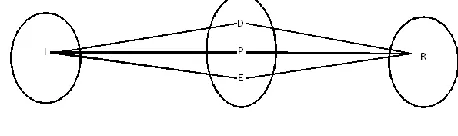
Fig-6: Venn diagram
Figure 6 shows Venn diagram for this system. I represents image which is input to system, p represent pre-processed image generated as output of median filter, D represents detected balloon as output of CCL algorithm, E represent extracted balloon image and R be the extracted text as output of OCR algorithm.
3.RESULTS
[image:4.612.335.564.366.434.2]© 2016, IRJET | Impact Factor value: 4.45 | ISO 9001:2008 Certified Journal | Page 721 Table-1: Result Set
S
N Image Total Char
acter
Recognized
Character Missed Charact
er
Recognitio n
Percentage
1 Image 1 66 63 3 95.45455
2 Image 2 38 36 2 94.73684
3 Image 3 66 64 2 96.9697
4 Image 4 28 28 0 100
5 Image 5 32 31 1 96.875
6 Image 6 81 81 0 100
7 Image 7 74 73 1 98.64865
8 Image 8 83 81 2 97.59036
9 Image 9 60 60 0 100
4.CONCLUSION
A proposed system contains region based text extraction technique from digital English comic images. In existing system pre-processing is done by Morphological filter and in proposed system it is done by Median filter which gives better result as compared to the Morphological filter. Text extraction ratio is better in proposed system as compared to existing system due to the CCL algorithm and OCR. Text Extraction ration is 98.20%
REFERENCES
[1] Sundaresan.M, Ranjini.S. “Text extraction from digital
English comic image using the two blobs extraction
method” Proceedings on the international conference
on Pattern Recognition, Informatics and Medical
Engineering (PRIME-2012), pp 467-471,
978-1-4673-1039-0/12/$31.00 ©2012 IEEE, Mar 2012.
[2] Siddhartha Brahma, “Text Extraction Using Shape
Context Matching”. COS429: Computer Vision. Vol.1,
Jan 12, 2006.
[3] Ruini Cao, Chew Lim Tan, “Separation of overlapping
text from graphics,” vol.29, no.1, pp.20-31, Jan/Feb 2009.
[4] [4] Q. Yuan, C. L. Tan, “Text Extraction from Gray Scale
Document Images Using Edge Information,”
proceedings of sixth international conference on
document analysis and recognition, pp.302-306, 2001.
[5] Kohei Arai and Herman Tolle, “Automatic E-Comic
Content Adaptation,” International Journal of
Ubiquitous Computing (IJUC) vol.1, Issue (1), pp1-11, 2010.
[6] Kohei Arai and Herman Tolle, “Method of real time
text extraction from digital manga comic image,”
International Journal of Image Processing (IJIP), vol.4, Issue (6), pp 669-676, 2010.
[7] C. A. Bouman, ”Connected Component Analysis,”
Digital Image Processing, pp 1-19, Jan 10, 2011.