International Journal of Emerging Technology and Advanced Engineering
Website: www.ijetae.com (ISSN 2250-2459,ISO 9001:2008 Certified Journal, Volume 4, Issue 11, November 2014)
226
Processing: A Venture in Android Application Development
Mihir Patankar
1, Vignesh Srinivasan
2, Dhanesh Pradhan
3, Asawari Dudwadkar
41,2,3,4VES Institute of Technology, Chembur, Mumbai-74, India
Abstract— Android operating system based on Linux kernel is the most vividly used operating system. Initially it was developed keeping digital cameras in mind but as soon as Google acquired Android, it started being used as mobile operating system. Today, android play store is growing at lightning speed. Various Android development tools are available to develop newer and user friendly applications. In this paper we will explain the software Processing and its user friendly nature in Android applications development using a simple ‘Tic Tac Toe’ Android application.
Keywords— android, android application development, android applications and processing, easy application development using processing, tic tac toe android application.
I. INTRODUCTION
Creativity seems to be prerequisite in this age of technology. But there has to be medium to express and showcase the talent. For artists, it is like making sketches on a canvas or making a statue. Processing is open source software developed for coders to portray their creativity. Processing being a high level language, the ease of writing programs using Processing, drawing various shapes makes it handy for even a novice. However, the scope doesn‟t end only in making shapes and scripts; Processing can also be used to interface sound and widens the scope for various other graphic user interfaces. But the point of interest is not making graphics alone. Another area in which processing can help beginners is the field of developing android applications. The project aims at going through the steps involved in developing an Android based Application using a simpler & programmer friendly language like Processing.
II. ORIGINALITY OF THE IDEA
Programming isn‟t everyone‟s forte and thus using Eclipse to develop Android Applications is difficult. The IDE seems complex to a student having less or no knowledge of Computer Science and engineering. Thus, the primary idea was to use a simpler development tool for Android application development to help people having no prior experience with computer languages to develop applications for the Android platform.
Every tech-savvy individual has the curiosity to understand how android applications are created and uploaded on the Google Play. But as we didn't have enough programming experience as that of a Computer Engineer we thought of this alternative, that is to use Processing, which is a relatively simpler programming language for Android App development. The conversion of a .pde (Processing file) to .apk (Android application file) can be done using Android PDE which is an open source application.
III. BACKGROUND
As google CEO Larry Page declared that more than 1.5 million Android devices [1] are being activated each day, it‟s certainly been “The Age of Androids”. Processing initially developed by Ben Fry and Casey Reas is today being propelled by many people who contribute various libraries to processing. Processing along with its graphics development functions and libraries can be used to develop android applications. The android applications developed can accesses various android mobile functions like the in-built camera in mobile, playing music, accessing accelerometer or camera flash to name a few.
IV. IMPLEMENTATION
The procedure to make an application using processing can be explained using the steps listed below. The things required are: Android Phone, Processing IDE on PC (One can also write the program on his/her android phone. However debugging the program is easier on PC). The steps are explained using example of a simple “Tic-Tac-Toe” application which can be extended to any application.
Step 1: Download processing software (it is open source) from www.processing.org. Extract the zip folder at a suitable location.
International Journal of Emerging Technology and Advanced Engineering
Website: www.ijetae.com (ISSN 2250-2459,ISO 9001:2008 Certified Journal, Volume 4, Issue 11, November 2014)
227 Step 3: Start writing the code for your android application. Debug the code and make necessary changes.
Step 4: After testing your code in Processing use APDE mobile app (Open source) available on play store to export signed application of your project. If you don‟t want to upload the app on google play and just use it on your own android phone then press the play button (right top corner) in the app.
V. TIC-TAC-TOE APP DESCRIPTION
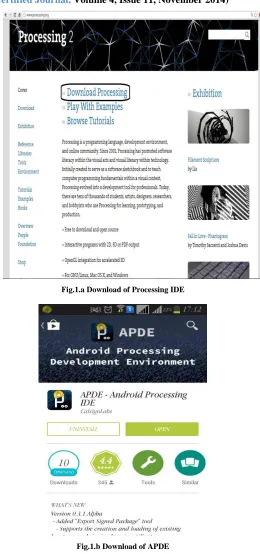
Step 1: Download Processing
Fig 1.a and 1.b illustrates the download of Processing IDE (in PCs) & APDE(in Android phones) respectively.
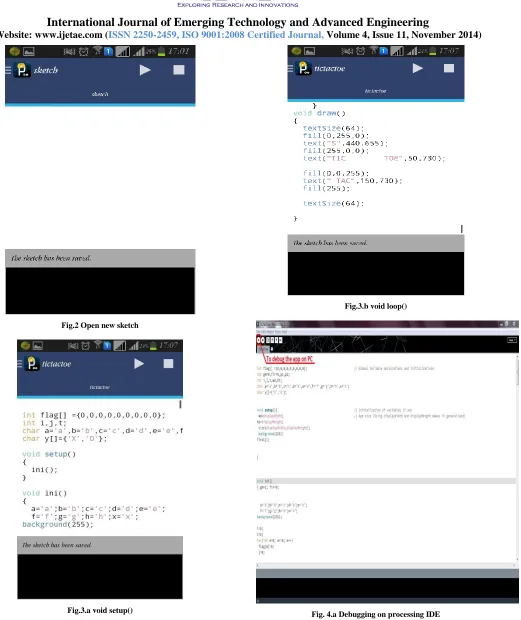
Step 2: Now open new sketch in APDE. (See Fig.2)
No libraries are required in mobile app Tic Tac Toe
Step 3: Code for mobile app
Tic tac toe is an age old game of cross and zero developed for entertainment.
There are two main functions in any processing code i.e., void setup ( see Fig.3.a) and void draw ( see Fig.3.b).
Step 4:Run Tic Tac Toe in APDE
After debugging code in processing IDE (fig. 4.a) run same code in APDE to install app in mobile phone (fig 4.b and fig 4.c).
Step 5: If you want to publish app in google play store then use export signed application option in apde.
[image:2.612.321.581.125.679.2]Fig.1.a Download of Processing IDE
International Journal of Emerging Technology and Advanced Engineering
Website: www.ijetae.com (ISSN 2250-2459,ISO 9001:2008 Certified Journal, Volume 4, Issue 11, November 2014)
228 Fig.2 Open new sketch
[image:3.612.68.589.90.710.2]Fig.3.a void setup()
Fig.3.b void loop()
[image:3.612.311.580.100.697.2]International Journal of Emerging Technology and Advanced Engineering
Website: www.ijetae.com (ISSN 2250-2459,ISO 9001:2008 Certified Journal, Volume 4, Issue 11, November 2014)
229 Fig.4.b – Compiling in APDE
Fig.4. Dexing in APDE
Fig.5 – Installing an Android app using APDE
VI. TECHNICAL CHALLENGES
One of the challenges is that it is difficult to write the processing codes on phone and debug them. Especially when the code size increases it becomes cumbersome for the user to find and rectify errors in the application. Thus a PC is required to write the code and then transfer the .pde file to the “Sketchbook” folder in the Android Phone, which is automatically created when APDE is installed on
phone. Furthermore, some libraries are available
exclusively for the PC version.
VII. CONCLUSIONS
“Processing changed dramatically the way we teach programmingand it’s one of the major factors of the
success of Arduino.”
— Massimo Banzi, Cofounder of Arduino
International Journal of Emerging Technology and Advanced Engineering
Website: www.ijetae.com (ISSN 2250-2459,ISO 9001:2008 Certified Journal, Volume 4, Issue 11, November 2014)
230 Acknowledgement
We are grateful to Ben Fry & Casey Reas for developing a language called “Processing” and making it open source. We would like to extend our sincere thanks to Calsign Labs for making an open source Android application namely „APDE‟.
Special thanks to our mentor Mrs. Asawari Dudwadkar for her guidance and inspiration to pursue this project. All authors have equal stake in the project.
REFERENCES