Compressed Chatting Over Internet
Swapnil Sonawane
Student, University of MumbaiM.E.Information Technology VIT, Mumbai, India
Dilip Motwani
Associate ProfessorDepartment of Computer Engineering VIT, Mumbai, India
ABSTRACT
In all smart phones there are various applications (apps) which can be used for chatting, sharing images, audios, videos and communicate with each other. But the main disadvantage of these applications is they cannot be used to send and receive text file. Also we cannot able to send compressed images while chatting over the internet to save the bandwidth. Using “Compressed chatting over internet” it is possible to send text files rather compressed text files as well as compressed images while chatting over the internet to save the bandwidth.
General Terms
Huffman Encoding, LZW Encoding
Keywords
ISP, LZW encoding, Huffman encoding, WhatsApp, WeChat, Lossless Compression
1.
INTRODUCTION
The Android is a growing technology which has started to fulfil various needs with lots of application to make things easier and convenient to end users. Many android phone can support various chatting applications like WhatsApp, WeChat etc. WhatsApp is supported on most Android, BlackBerry, iPhone, Windows, and Nokia smartphones. WhatsApp has already over 450 million monthly active users and around 27 billion messages transferred in a single day. Using the chatting applications like WhatsApp we can transfer images, audios and videos and we can send and receive text [6]. In this paper we create a text and image chat application with text and image compression using Huffman and LZW coding in the android smartphones. Though wireless communication is more expensive in nature, we create a chat application with cost efficient communication over the wireless network. By using the compression technique we reduce the data size of the message and images to transfer over the internet using the IP address.
2.
PROBLEM DEFINITION
In May 2011, a security problem was reported which left WhatsApp user accounts open for session hijacking and packet analysis. WhatsApp messages were neither encrypted nor compressed and data was sent and received in plaintext, which means messages could easily be read if packet traces were available. When using WhatsApp in a public WiFi network, anybody was able to sniff incoming and outgoing messages (including file transfers) [9].
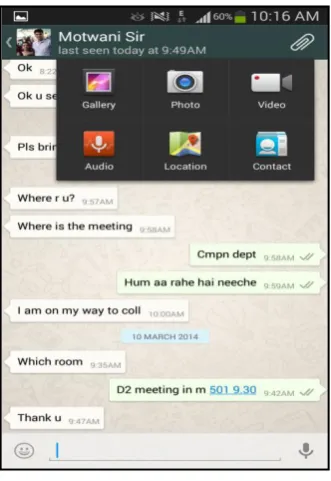
[image:1.595.352.518.176.417.2]The company claims that the latest version of the software will encrypt messages without giving any details about cryptographic methods they are using. So we can say the encryption and security problem has been handled by the company, but still they did not handle compression issue [8]. Using WhatsApp we can share images, photos, videos, audios, location and phonebook contacts with other WhatsApp users or in a WhatsApp users group.
Fig 1: Different operations on WhatsApp
It is observed that we cannot share or transfer text file ie text, word or pdf file using WhatsApp, also the image file we transfer, it will get transferred in its original size, which may consume lots of network bandwidth if the image is of high definition. A normal active user daily spend around 20MB on WhatsApp for sharing text, audio files, video files, contact sharing, and location sharing [5]. Sometimes this data usage find very high, especially if a user is having a limited data usage plan from a particular ISP. One more problem is, if the internet speed is not appropriately fast, it takes lots of time to download the high definition images and videos. So the main demand among different WhatsApp and other chatting application users is for the availability of text file sharing and compressed image sharing.
3.
COMPRESSION TECHNIQUES
Compression is mainly used because it helps to reduce the consumption of expensive resources, like bandwidth of transmission. On other side, compressed data should be decompressed and this extra processing may disturb other applications running in parallel. The design of data compression schemes hence involves trade-offs between different factors, including the compression degree, amount of distortion, in case of lossy compression, and the computational resources which are used to compress and decompress the data [2].
2
3.1
Huffman Encoding
Huffman coding is an entropy encoding algorithm used for lossless data compression in information theory. The term refers to the use of a variable-length code table for encoding a source symbol, where the variable-length code table has been derived in a particular way based on the estimated probability of occurrence or frequency for each possible value of the source symbol [4].
In Huffman coding the characters in a data file are converted to a binary code, where the most common characters in the file have the shortest binary codes, and the least common characters have the longest binary codes.
Huffman encoding uses a strictly binary tree where each non leaf node has two children. The Huffman algorithm works as follows [4]
3.1.1
Creating the tree
1. Start with as many leaves as there are symbols.
2. Enqueue all leaf nodes into the first queue (by probability in increasing order so that the least likely item is in the head of the queue).
3. While there is more than one node in the queues: 3.1. Dequeue the two nodes with the lowest weight. 3.2. Create a new internal node, with the two just removed nodes as children (either node can be either child) and the sum of their weights as the new weight.
3.3. Enqueue the new node into the rear of the second queue.
4. The remaining node is the root node; the tree has now been generated.
3.1.2
Code generation of each symbol
1. Start from the root node. For each down left traversal, add a '0' to the code and a '1' for each down right, add a '1'. 2. When you reach a leaf node, the current code is the code for that character.
3. When travelling to the parent of a node, delete the last added bit from the code.[1]
Let’s consider an example
Message to be encoded:
“dad ade fade bead ace dead cab bad fad cafe face”
Fig 2: Huffman code tree
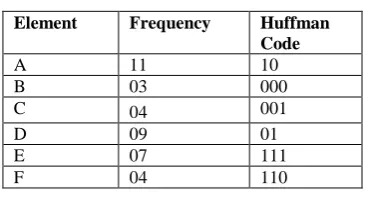
[image:2.595.337.520.126.225.2]From the above figure 3-1 we can generate the following Huffman codes:
Table 1: Huffman code generation
Element Frequency Huffman
Code
A 11 10
B 03 000
C 04 001
D 09 01
E 07 111
F 04 110
Encoded Message:
01 10 01 10 01 111 110 10 01 111 000 111 10 01 10 001 111 01 111 10 01 001 10 000 000 10 01 110 10 01 001 10 110 111 110 10 001 111
The Huffman encoding of the message is 94 bits long. The Huffman encoding saves 20 bits. The compression ratio is 1.21 to 1. The compression rate is 17.5% [7].
3.2
LZW Encoding
LZW performs the compression by constructing a word “Dictionary” from a message and then using that dictionary compress a string of symbols. The LZW algorithm stores strings in a "dictionary" with entries for 4,096 variable length strings. The first 255 entries are used to contain the values for individual bytes, so the actual first string index is 256. As the string is compressed, the dictionary is built up to contain every possible string combination that can be obtained from the message, starting with two characters, then three characters, and so on [2].
The LZW algorithm works as follows:
1. Extract the smallest substring that cannot be found in the remaining uncompressed string
2. Save the substring in the dictionary as a new entry and assign it an index value
3. Substring is replaced with the index found in the dictionary 4. Insert the index and the last character of the substring into the compressed string.
Let’s consider an example
Message to be encoded: “The_rain_in_spain_”
We scan through the message to build up dictionary entries as follows:
Table 2: Dictionary generation for LZW
Index Dictionary Entry
256 Th
257 he
258 e_
259 _r
260 ra
261 ai
263 n_
264 _i
265 in_
266 _s
267 sp
268 pa
269 ain
The LZW coder simply uses it as a tool to generate a compressed output. It does not output the dictionary to the compressed output file. The decoder does not require it. While the coder is building up the dictionary, it sends characters to the compressed data output until it hits a string that's in the dictionary. It outputs an index into the dictionary for that string, and then continues output of characters until it hits another string in the dictionary, causing it to output another index, and so on. That means that the compressed output for our example message looks like this:
The_rain_<262>_sp<261><263>
The decoder simply constructs the dictionary as it reads and uncompressed the compressed data, building up the dictionary entries from the uncompressed characters and dictionary entries it has already established. One thing about LZW is why the first 255 entries are initialized to single character strings. There would be no point in setting index to single characters, as the index would be longer than the characters, and in practice that's not done [2].
So we selected these two lossless compression algorithms to compress both text as well as images, as the aim of our system is to improve best case compressions without affecting the quality of the original message and image [2][3].
In our proposed method we create a chat application with data compression over the network connection. We implement the Huffman and LZW coding for the data compression and send the text chat message over the internet. We use the IP address of the mobile to establish the connection between the two mobile devices and transferred the compressed message using the internet. Following are the various activities used in Compressed chatting over internet:
1. User enters a text message
In this, the user of the system enters a simple text message on his/her mobile phone, which he/she wants to compress and send it to the receiver.
2. Text passes through compression algorithm
In this, the entered text message will go under the compression algorithm and the encoded code will get generated by the algorithm
3. Text sent after compression to receiver
After compression of the text, the generated encoded code will get sent to the recipient of the message
4. Text passes through decompression
At recipient end, the encoded text will undergo decompression process to produce the original plain text message
5. Text displayed at receiver end
[image:3.595.105.277.72.167.2]After decompression the original plain text will get displayed at the recipient mobile terminal.
Fig 3: Process diagram of application
Following are the different modules which can be used while creating this application:
1. Application Design
This module is used to provide the design of the application, User interface is the major factor for an application to get an successful attention among all possible application .It should be user friendly to cover the attention.
2. Pairing Device
In this module we pair the two android devices connected over the internet using the specific IP address and create a communication link over the internet. Once the mobile device is connected then the text message is transferred over the connection.
3. Data Compression
In this module we use the Huffman and LZW coding to compress the text message. Huffman and LZW coding is used for lossless data compression. The technique works by creating a binary tree of nodes or building a dictionary. 4. Data Streaming
In this module we stream the compressed data to the receiver which is already paired with sender using the IP address over the internet. The receiver device on receiving the compressed data decompresses the data to its original message and shows it to the user.
4.
RESULTS
ACHIEVED
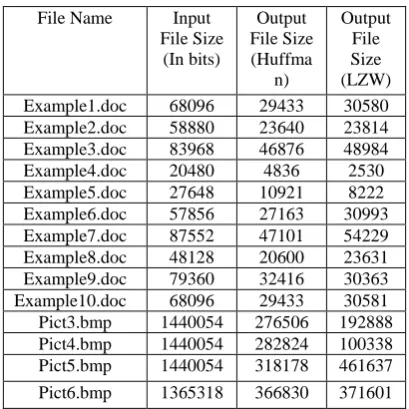
To prepare the encoded file, we studied over different text messages, text files, images, researches and technical papers. Using these statistics, we observed that Huffman and LZW coding are two best coding techniques to compress text files and images to send compressed text files and images over internet to save bandwidth of a network.
[image:3.595.326.531.556.761.2]It is observed that using Huffman and LZW, we will get around 50-60 precent compression ratio on text files and around 80 precent compression ratio on images [2].
Table 3: Comparison between Huffman-LZW
4
5.
PROOF
OF
CONCEPT
Our fully functional demo application has been developed in android under the development tool Eclipse Juno. We tested the application for different text files and images and we get the desired compression result.
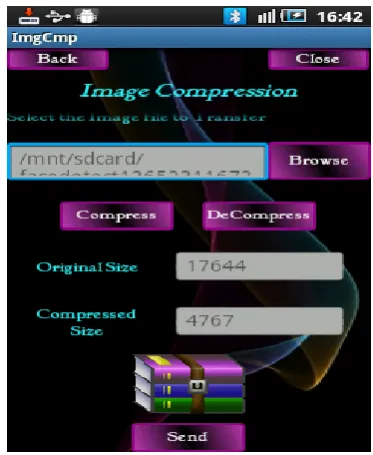
[image:4.595.334.521.69.297.2]The unique part of this application is that we not only send the text files which may be in the form of word or PDF, but also we can compress them, then send them in compressed form and on recipient side we can decompress them to bring them in original form
Fig 4: Selection window
Fig 5: Text file compression
Fig 6: Image file compression
6.
APPLICATIONS
The most useful and common application of our research extends to the field of mobile computing. An android application can easily be developed which will prove immensely popular to the end user since it saves network bandwidth as well as time, because compressed text and images can get transferred faster than the original text and image respectively.
7.
CONCLUSIONS
In today's world, many projects and applications are being developed to overcome boundaries in text messages and instant messaging. While incredible progress has been made in the field of mobile communication, support for increasing various end user demands remains a concern. Various advanced techniques are necessary in order to meet the challenges of business. “Compressed chatting over internet” comes up with a new model which can revolutionize the way chatting has been done between individuals as well as in a group. It can help chatting become faster and economical and thus can made a good boost in mobile industry.
8.
ACKNOWLEDGEMENT
We are indebted to Professor Varsha Bhosale and Professor Rinku Shah, of Vidyalankar Institute of Technology for their guidance and encouragement to write this technical paper. Their invaluable guidance and unconditional support motivated us to work hard towards achieving our desired goals.
9.
REFERENCES
[1] D.R. Kalbande, Dr.G.T. Thampi, Manish P. Mathai and Sumiran Shah “Zip it up SMS- A path breaking model in the field of mobile messaging” in IEEE 978-1-4244-5540-9/10 in 2010
[image:4.595.101.289.191.723.2][3] S.R. Kodituwakku and U. S. Amarasinghe “Comparison of lossless data compression algorithms for text data” in Indian Journal of Computer Science and Engineering, Vol 1 No 4 416-425 ISSN : 0976-5166
[4] Mamta Sharma “Compression Using Huffman Coding” in International Journal of Computer Science and Network Security, VOL.10 No.5, May 2010
[5] http://mybroadband.co.za/vb/showthread.php/445031-Whats-your-Whatsapp-Usage-stats/ Mybroadband
[6] http://www.tweetganic.com/a/36687
[7] http://fileperms.org/whatsapp-is-broken-really-broken [8] http://en.wikipedia.org/wiki/WhatsApp