DASHER D3 DISPLAY TERMINAL
PROGRAMMER'S REFERENCE
*
preliminary
055-203-00
Data General Corporation eDGC) has prepared this manual for use by
customers, lice~sees, and DGC personnel. The information contained
herein is the prooerty of OGC and shall not be reproduced in whole or in part without orior written approval.
DGC reserves the right to make changes in specifications and materials
contained herein without prior notice. DGC shall not be responsible for
any damages, including consequential damages, caused by reliance on the
information prese~ted, or resulting from errors, including but not
limited to tyoographical, arithmetic, or listinq errors.
NOVA and ECLIPSE are registered trademarks of Data General Corporation. DASHER and microNOVA are trademarks of Data General Corporation.
Printed in U.S.A.
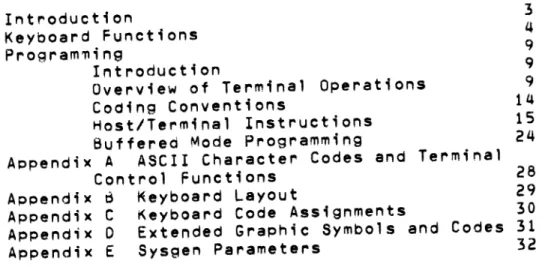
TABLE OF CONTENTS
Introduction 3
Keyboard Functions 4
Program~;ng 9
Introduction 9
Overview of Terminal Operations 9
Coding Conventions 14
Host/Terminal Instructions 15
Buffered Mode Programming 24
Appendix A ASCII Character Codes and Terminal
Control Functions 28
Appendix d ~eyboard Layout 29
Appendix C Keyboard Code Assignments 30 Appendix 0 Extended Graphic Symbols and Codes 31
A Dasher D3 (6093) Display Terminal in ope~ation
The Dasher D3 (6093) Display Terminal preserves the basic layout of previous Dasher terminals with its tilting, swivelling screen, and separate Keyboard.
The D3 keyboard incorporates significant improvements. Its keys are
seulptured for better operator "feel". There are more user-defined function keys (18 keys for 72 functions). Dedicated keys for ENTER, NEGATIVE ENTER and minus sign have been added next to the numeric pad. Legends for typical word-processing editing functions have been screened on the Key fronts. These editing functions are implemented witnin the terminal in buffered mode.
Yet the keyboard is still completely compatible with all Dasher D2 (6053)
functions. Every keyboard function has Oeen preserved on the newer D3,
INTRODUCTION
The Dasher 03 is a microprocessor-based, stored-program control, cathode
ray display ter~inal. It has been designed as a functional superset of the Oasher 02 Terminal. The results of these additional functions mean simpl ified operating procedures, improved data entry characteristics, and
greater text ed;t;n~ capability than previously available with the Dasher
D2.
The Dasher 03 allows a broad range of operating parameters to be
controlled by the terminal. Moreover th~se operating parameters, which
are under pro~ram control, can easily be altered, providing the
flexibility needed for demandin~, on-line applications.
Th~ 18 user defined function keys provide an enormous degree of flexib11ty (up to 72 functions) in application programming.
Architectually, the Dasher D3 was designed for ease of use and operator convenience. A detached, sculptured, typewriter-style keyboard helps operators or data entry personnel to easily locate often used keys. The keyboard has been organized for minimum movement in locating keys and variation of key characteristics (color, size, shape, and height) make
searching simple. The extended numeric keyboard parallels a standard
calculator layout, further simplifying use.
Screen ~anagement with the Dasher 03 is easily accomplished with a number
of powerful features. For improved form des1~n, layout, and text
manipulation, these features include orogrammahle character blink, underscore, dual-intensity, olock fill, reverse video, and
character/screen protection.
The Dasher D3's "character paCing" assures control over processor interrupts keeping the host processor overhead to a minimum.
The Dasher 03's "pass-through" feature provides the ability of
controlling a serial pri~ter from the host computer without interfering
with the Uashers' screen contents. The buffered ~ode provides great
flexibility and im~roved system performance for the system builder who
utilizes its functions. Several keys are already laceled with typical
KEYBOARD FUNCTIONS
The Dasher 03 (6093) Display Terminal provides the same key entry functions for interactive mode as the Dasher D2 (6053) model and in
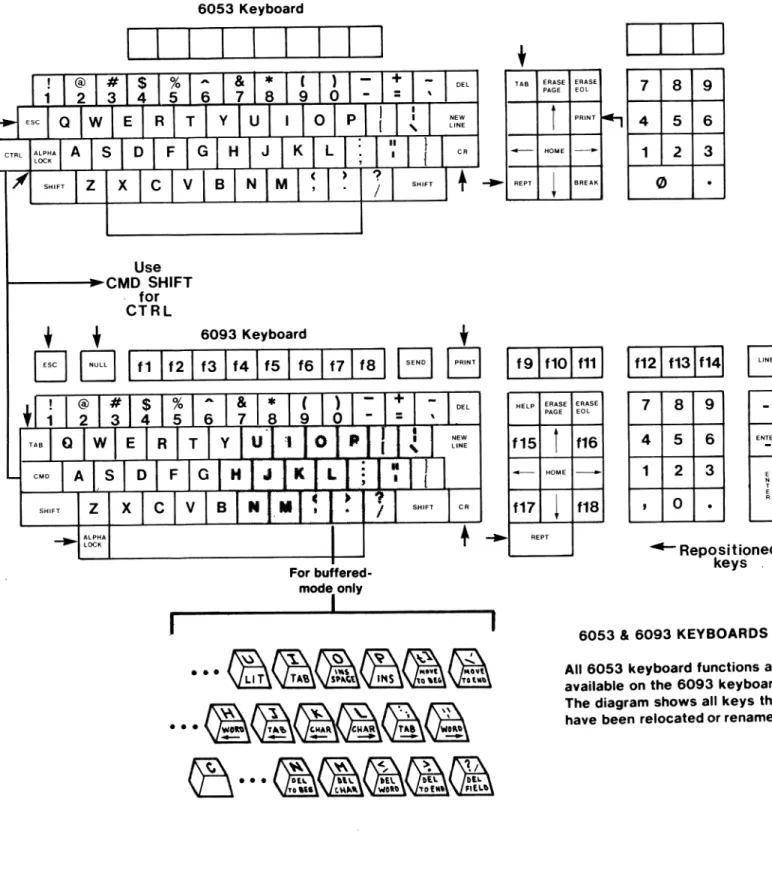
addition has powerful buffered ~ode features. Figure 1 shows the basic
eompatability between the two models. Note that some of the keys have
been repositioned on the 03 model for improved operator conveniencee
The buffered mode is designed for the entry and editing of data Oy fields. These fields can be of two types: protected and unprotected.
A protected field is a portion of screen area that has all its data protected against operator entry (see discussion of Protected Data
attribute under heading: Character Attributes).
An unprotected field can be either a full screen line of unprotected data or a portion of a line between a protected field and another protected
field. The beginning or ending of a line can also eonstitute field
boundaries.
The buffered mode has a set of powerful screen editinq functions such as delete and insert. These functions are accessed using the CMD key
in conjunction with central'y-loeated data keys (see Figure 1). These functions are deserioed below.
MOVE CURSOR RIGHT ONE CHARACTEH
Key1n~ - CHAR --> (CMD L)
Funetion - Moves the eursor right one po~ition; if already at
end of line or unprotected field, I.;len the bell sounas. Cursor eannot enter beyond first loeation of unfilleo area.
MOVE CURSOR RIGHT TO NEXT TAB STOP
Keying - TAd --> (CMD;)
Function -Moves the cursor to next tab stop or end of entered
data whichever comes first. If cursor is at end of
entered data in the field, then the bell sounds and no action occurs.
MOVE CURSOR RIGHT TO NEXT ~ORD
Keyinq - ~ORD --> (CMD')
Function - ~oves cursor to beginninq of next word or to the end
of entered data in tne field. If at end of entered data, field, or line, the bell sounds and no action occurs.
MOVE CURSOR TO EwD OF FIELD
Keying - MOVE TO END (CMD \)
Function - ~oves cursor to last position in the field or to
Use
I---I~CMD SHIFT for CTRL
6053 Keyboard
• • 6093 Keyboard
EJ
8
I
f1I
f21 f31 f41 f51 f61 f71 f81B
I
~
...
For buffered-mode only
I
DEL
NEW LINE
CR
t
B
f
TAB ERASE ERASE
7 8 9
PAGE EOL
t
PRINT~ 4 5 6
. . - HOME
--
1 2 3REPT
~
BREAK 0.
I
f91 f10 1 f111I
f121 f131f141G
HElP ERASE ERASE
PAGE EOL 7 8 9
f15 f16 4 5 6 ENTER
HOME 1 2 3
f17 f18
,
0.
REPT
~ Repositioned
keys .
6053 & 6093 KEYBOARDS
All 6053 keyboard functions are available on the 6093 keyboard. The diagram shows all keys that have been relocated or renamed.
MOVE CURSOR LEFT ONE CHARACTER Keying - CHAR <-- (CMD K)
Function - Moves cursor one position to the left. If cursor is at beginning of the field, the bell sounds and cursor position remains unchanged.
MOVE CURSOR TO P~EVIOUS TAB STOP Keying - TAB <-- (CMD J)
Function - Moves cursor to previous tab stop or to beginning of the field. If cursor ;s at beginning of a field, the bell sounds.
MOVE CURSOR TO BEGINNING OF PREVIOUS WORD
Keying - NORD <-- (eMU H)
Function - If The cursor is in the middle of a word or between words, it moves to beginning of the current word. If the cursor is a the beginning of a word, it moves to the
beginning of the previous word or field. If curssor ;s at the beginning of a field, the bell sounds.
MOVE CURSOR TO BEGINNING OF FIELD Key i n9 - MOVE TO 8EG (CMD ()
Function - Moves cursor to beginning of the current field.
MOVE CURSOR TO NEXT FIELD
Keying -
--->
Con Cursor Control Pad) or CMO XFunction - Moves cursor to first location in next unprotected field. If there are no protected fields, the cursor moves to beginning of the next line. If in last field of
screen, cursor moves to the first unprotected field at top of screen.
MOVE CURSOR TO PREVIOUS FIELD
Keying - <-- Con Cursor Control Pad) or CMD Y
Function - Moves cursor to first character location of previous unprotecteo field.
COMPLEMENT INSERT MODE
Keying - INS (CMD P)
Function- Alternate action, either enables or disables Insert mode with each keying. Insert mode is oisabled at entry to buffered mode or whenever a new field is entered. When in Insert mode, as each key is struck (except for
INSERT TAB
Keying - TAB (CMD I) or normal TAB key
Function- Characters at and to right of the cursor are shifted right to the next tab sto~ and the resulting space is filled with space codes. These spaces are flagged and are replaced by a single tab character before the data is transmitted to the host. However, if a Replace Tab instruction (from host) is stored in the rab Read Mode Register, then the space codes are retained and
transmitted when the Read Screen instruction occurs. The bell also sounds whenever a full field condition exists
and additional Insert Tab functions are keyed. The
cursor stays at end of tab field.
INSERT SPACE
Keying - INS SPACE (CMD 0)
Function - Characters to the right of the cursor are shifted rieht one position and a spece is inserted. If the field is full, the bell sounds and no action occurs.
DELETE CURRENT CHARACTER
Keying - DEL CHAR (CMD M)
Function - Deletes the character at cursor location and shifts subsequent characters left one ~osition. The last
~osition in the field is filled with the fill character.
If the cursor is at end of the field, the last character is deleted and subsequent deletions will sound tne bell
and no other action occurs.
DELETE PREVIOUS CHARACTER
Keyinq - DEL
Function - The eharacter previous to the cursor location is replaced with a space code. If at end of entered data, the current fill character is the replacement character. If the cursor is at last character in a full field, then the character at the cursor location is replaced with
DELETE NEXT WORD
a fill character. If the cursor ;s at the beginning of
the field, the bell sounds and no aetion occurs.
Keying - DEL WORD (CMD,)
Function - Deletes characters from cursor location to beginning
of next word. Subsequent characters in tne field shift
left to closeup space and fill characters are inserted at the end to complete the field. If cursor ;s at end of the field, the bell sounds and no action occurs.
DELETE TO BEGINNING OF FIELD
Keying - DEL TO BEG (CMD N)
Function - Deletes characters between cursor and beginnin9 of field. Subsequent characters in field and cursor are
shifted left to beginning of field. Fill characters are ;nserted at end to complete field. If cursor ;s at
DELETE TO END OF FIELD
Keying - DEL TO END (CMD .)
Function - Inserts f;ll characters from cursor location to end of field. If cursor is at end of field or at end of entered data, the ~ell sounds and no action occurs.
DELETE ENTIRE FIELD
Keying - DEL FIELD (CMO I)
Function - Entire field is filled with fill
characters and cursor is repositioned to beqinning of field.
DELETE PREVIOUS wORD
Keying - WORD (CMO DEL)
Function- If cursor is pointing to a word separator (space code or any punctuation code) or to the first character of a
word, the previous word is deleted; otherwise the same word is deleted. Subsequent data along with cursor are
shifted left to close UP space. Fill characters are
PROGRAMMING
INTRODUCTION
This section provides the system programmer with reference information to be used in preparing an interface program for the Dasher 03 Display Terminal, The section starts out with basic information, covering
functional aspects of the terminal which are of concern to the
programmer. Subse~uent section areas describe the instructions that the
host can use to control terminal operations.
For condensed code and instruction listings, refer to the Appendices in
the rear.
OVERVIEW OF TERMINAL OPERATIONS
The terminal functions as a combined data entry and display device for an
associated host computer system. In this, it receives control and conditioning from the host system and responds to keyboard entry by generating appropriate ASCII code. How this code is displayed is
dependent on which of two basic operating modes is being used. The two
modes are: interactive mode and buffered mode.'
In interactive mode, the codes are individually transferred to the host
as each key is oressed. In turn, the host system echoes each data code
back to the terminal for display.
In buffered mode, as each code is generated it is stored in the terminal and immediately displayed by the terminal for operator viewing. No host
action ;s re~uired. After the data has been corrected and edited, the
operator can transfer control to the host. Generally, the host will read the accumulated data.
From the viewpoint of the host system, certain internal functions of the
terminal are of concern to the programmer. Basically, these concerns relate to control of the terminal itself and also of the display of data
on the screen. The following paragraphs discuss some of these concerns.
Control Registers and Flags
---_.
Several registers interna' to the terminal are associated with functions controllable by the host. Among these registers are six status registers
which can be written to or read out of by the host. The status registers
are: Terminal ~ode, Keyboard Lock, Tab Read Mode, Tab Interval, Fill
Character, and Terminal Number.
Three other registers also available to the host are: the Delimiter
Table, tne Current Attribute Register, and the Cursor Address Register.
In addition, three status flags enable character blinking, Roll Mode
*Te~minal Mode Reqister - Identifies the ooerating mode of the terminal. The codes are: 000 for Interactive Mode; 177 for buffered mode.
*Keyboard LoCk Register - Identifies whethe~ keyboard entry is
pe~mitted. The code 000
=
keyboard unlocked; 177=
keyboard locked.
*Tab Read Mode Reqister - Indicates whether tab codes will be sent to host on a screen read operation or if the codes will be replaced with an appropriate number of space codes. The codes are: 001 for replace tab codes; 177 for send tab codes.
*Tab Interval Register - Stores the octal value (number of character positions) between tab stops.
*Fill Character Register - Stores the ASCII code for the fill character.
* Terminal Number Register - Stores the assigned number (octal) of the terminal.
*Delimiter Table - Defines UP to 128 delimiters which CAn be used
by the operator in buffered mode operation to transfer eontrol to the host.
*Current Attribute Registe~ • Stores seven bits which define the screen attributes for current data entry. Function of the individual attributes ;s described under the heading: Character Attributes.
*Cu~sor Address Register - Stores the current screen address of
the cursor. Any change in cursor location is obtained by writing a new address into the register.
*Blink Enable Flag - When set, enables any character with the blink attribute bit set to blink. Conversely, when cleared, all blinking (except for cursor) is disabled.
*Rol1 Enable Flag - When set, enables the screen to roll (scroll) a line each time the cursor is moved beyond the 2ath
line.When the flag is cleared, roll mode is disabled and page mode is enabled. In the page mode, when the last sereen location is exceeded, the cursor moves to the top of the screen.
Display Concept
Cursor Addressing
---
..
_---As each data code is received, it ;s displayed at the current cursor address and then the cursor ;s advanced to the next screen location. The cursor address is stored in the two byte Cursor Address Register.
In interactive mode, the cursor can be relocated to any addressable
screen location by a command from the host. The screen address is
defined by a three byte sequence; the first byte, 037, identifies that a
cursor address follows. The second byte defines the column address
(horizontal character position) on the screen and can consist of any
number from 0 to 79 (octal 000 to 117). The third byte defines the row
address (vertical line position) on the screen and can consist of any
number from 0 to 23 (octal 000 to 027). If desired, the host can read the
cursor address and from that calculate the reposition1nq.
In buffered mode, the cursor location is controlled directly from the keyboard.
Character Attributes
---The individual characters on the display can have various attributes, such as blink, dim, underscore, etc. As each character is received its attributes are defined according to the contents of the Current Attribute
Register. To accomodate this, the display data is stored in the terminal
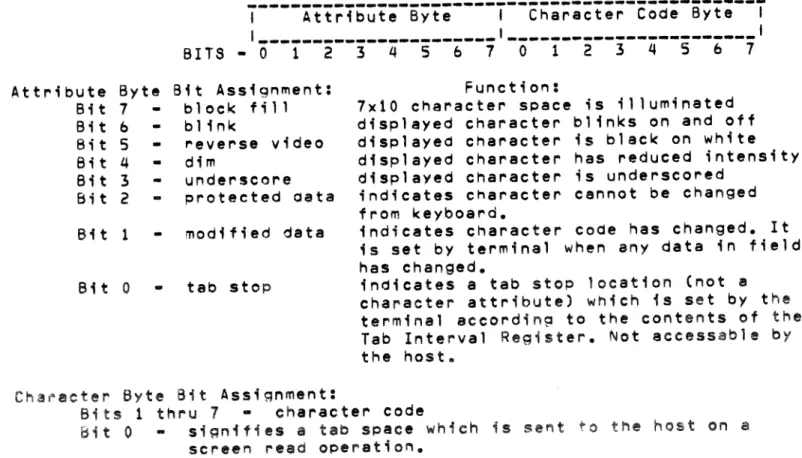
in a two-byte format, with one byte containing the character code and the other byte containing the attribute information. The bit arrangement as it appears at the terminal interface is as follows:
Attribute Byte Bit 7
Bit b
Bit 5
-Bit 4
Bit 3
Bit 2
Bit 1
Bit 0
---~---~~----~----~--~---~---I Attribute Byte I Character Code Byte I I ______ --~----~----~---,--~---~---______ I
BITS - 0 1 2 3 4 5 b 7 0 1 2 3 4 5 b 7
Bit Assignment: block fill blink
reverse video dim
underscore protected oata
modified data
tab stop
Function:
7x10 character space ;s illuminated displayed character blinks on and off displayed character is black on white displayed character has reduced intensity displayed character is underscored
indicates character cannot be changed from keyboard.
indicates character code has changed. It is set by terminal when any data in field has changed.
indicates a tab stop location (not a character attribute) which is set by the terminal according to the contents of the
Tab Interval Register. Not aceessable by
the host.
Character Byte Bit Assi~nment:
Bits 1 thru 7 - character code
Bit 0 si~n;fies a tab space which ;s se~t to he host on a
Attribute bits 1 thru 7 are controllable from the host. Bit 0 of both the attribute byte and the character byte are controlled from within the
terminal. In ooeration, a current attribute register in the terminal
stores the current host-defined attributes. These are imparted to the new data as it is entered from the keyboard. In addition, the modified data attribute is set by the terminal (see description below). Also see the Field Control instructions for additional information on attribute application.
In the set attribute commands, a combination of masking and XOR functions are used to achieve the desired bit configurations. Each bit of the
current attributes is ANOed with the corresponding bit of the mask byte and then exclusive ORed with the XOR byte to produce the new current
attributes. The results can be predicted as follows:
~ask Bit
_.---o
o
1
1
XOR Bit
---o
1
o
1
Resulting Attribute 6it
---
o
(cleared)1 (set on) no change complement
In addition to the capability of defining all the attributes at once with a direct write to the Current Attribute Register, they can be
individually defined by specific commands from the host. Also, a Set Attribute String command can redefine the attributes of a specified
screen area. Other commands provide for reading either current attributes or those of a specified area on the screen.
The various attributes are individually described in the following paragraphs.
Character Blinking • Blinking of displayed characters ;s defined on an individual character basis by bit b of the character's attribute byte. Whether the characters actually blink is determined by the Blink Enable Flag. Blinking is enabled when the flag is setJ conversely, with the flag cleared, blinking is prohibited.
In addition to the appropriate blink commands, each time an ERASE PAGE command ;s generated the Blink Enable Flag is set and the display is blink enabled.
Character Dimming/Underscoring • Bits 3 and 4 of the individual character's attribute byte control underscoring and dimming,
respectively. Thus, each character whose underscore bit is set will be
underscored on the display, Similarly, if the dim bit is set, the character will be display with reduced intensity.
An ERASE PAGE ;nstruction clears both the dim and underscore bits in the Current Attribute Register.
Reverse Video - Tne Reverse Video attribute is controlled by bit 5 of tne character's attribute byte. Wnen the bit is set, the character image is outlined in black on a Sx7 dot illu~inated backgrou"d.
Protected Data - The Protected Data attribute is controlled by bit 2 of the character's attribute byte. When the bit is set, the character is protected from being overwritten or moved from its existing screen
location. Several characters in sequence with the Protected Data
attribute set constitute a protected field. In contrast, data locations
between protected fields are called unprotected fields.
Modified Data - The Modified Data attribute (bit 1 of the Character's attribute byte) is set for all characters in tne field whenever any
chan~e ;s made to existing data in the field. This is essentially a flag
to enable selective reading of screen data by the nost. The MOdified Data attribute is set by the terminal and can only be cleared oy an instruction fro~ tne host.
Tab Stop/Read Functions
---.---Tabs are treated in one of two ways, depending upon tne host-set value of tne Tab Read Mode Register. If the register is set to 001, space codes that fill from the end of data to the next tab stop are identified within the terminal by bit 0 of the character code byte. O~ a read screen
oDeration they are replaced as a group by a single tab code.
If the register is s.et to 177, tabbing results in the storage of ASCII space codes. On a read screen, these space codes are transmitted rather than the single tab code.
Tab Stop locations on the screen are flagged inside the terminal by the setting of bit 0 on the individual character attribute bytes. The
interval between stops is defined by the Tab Interval Register. The register is initialized with the Sysgen value, but can be changed by an instruction from the host.
Roll Mode (Scrolling)
---._---A Roll Enable flag in the terminal defines whether the screen will be in
Roll Mode (Dermits scrolling) or Pa~e Mode (scrolling prohibited).This
flag is set or cleared by host-supplied instructions. When the display is roll enabled, the screen rolls up one line each time the cursor overflows the bottom line or a New Line code is received when the cursor is on the bottom line. when the display is not roll enabled, the cursor moves to
the first character position on the top line each time the cursor
overflows the bottom line or a New Line code is received when the cursor is on the bottom line.
Field Control
---In some data entry applications, a prepared form is sent to the screen by
the host system. Those areas of the form where the operator is expected
to enter data are called unprotected fields. These fields. can be
identifed to the operator by fill characters which are overwritten as new data ;s entered.
Fixed areas of the form which the operator cannot change are called protected fields and are identified within the terminal by the protect
attribute bit. Other bits flag the block fill, blink, reverse video,
dim, underscore, and modified data attributes.
The modified data attribute can be used to select for transfer to the
host system only that data which has undergone change. After such a
reading by the host, the host would most likely want to reset the
modified at~I'ibute bits on data which was read so that new or modified
data can be discriminated.
Since, in buffered mode, data entry is processed internally in the terminal, the host must be informed when data is ready for transfer to
the host. For this purpose, the host system can establish delimiters
codes which when generated at the terminal will inform tne host that data should be read. In this manner, the host can be informed when a field has been completed, or perhaps a particular grouping of fields, or of the full screen.
The commands that the host can use to define and control fields within the screen are described under the heading: Screen Control. Also refer to the information under headings: Character Attributes, Attribute Control.
CODING CONVENTIONS
Instruction format to terminal: 036 <instruction code> plus any required
data or positioning bytes. Mayor may not have a
terminator.
Terminal response format: 036 176 <function> plus any required data or
cursor coordinates and terminator.
Data entry format, keyboard to host: 8-bit ASCII code consisting of 7
data bits and 1 parity bit. Refer to the ASCII code listing in the Appendix.
Function code format, keyboard to host: 036 <function code> The various
user function codes available to the programmer are listed in Appendix C.
Cursor position format: 037 <x> <V> where: X
-
-
column positionY
-
-
row positionMinimums: X
-
-
0Y
-
-
0Maximums: X
=
79 (117 octal)The following instructions can be used by the host to control terminal operations. For a conceptual understanding of the various functions,
refer to the description given under heading: OVERVI~W OF TERMINAL
OPERATIONS. Note that instructions which are compatible with the Data General 6053 Model Terminal are so indicated.
Refer to the Apoendices for ASCII code listings, key layout and code assignments (including user function keys), extended graphic character symbols and codes, and Sysgen information.
Terminal Manage~ent
---MASTER RESET
Code to terminal - 036 025 (terminal reset from host)
Keying - CMO LINE (terminal reset from keyboard)
Function ~ Reinitia11zes registers and flags in the terminal and
loads Sysgen parameters. Unlocks keybOard.
IO REQUEST
Code to terminal - 036 012
Function - Requests terminal for following identification data: terminal type (040=model 6093), revision level of
terminal, and assigned terminal number.
Terminal Response - 036 176 043 040 <Rev.#><term.#> 036 176 057
UNLOCK KEYBOARD
Code to terminal - 036 031
Function - Releases keyboard from locked condition. The keyboard
is locked while the terminal is responding to host supplied instructions, but unlocks itself after
completion of the instruction. During buffered
operation, the keyboard is locked whenever a delimiter key is pressed and must be unlocked Oy an instruction from the host. When the keyboard is locked, data entry from the keyboard is prohibiteo and the oell sounds with each keystroke.
Terminal Response - 036 176 057
SET INTERACTIVE MODE
Code to terminal - 036 000
Function - Removes terminal from buffered mode and places it in
interactive mode. Upon power-up or master reset,
terminal automatically goes into interactive mode, roll
enabled. If page mode, non-scrolling function, is
SET BUFFERED MUDE
Code to terminal - 036 001
Function - Puts terminal into buffered pape mode. While in buffered mode, keyboard entry is blocked from the host except .for the programmed delimiter codes which flag the host to service the terminal. The Roll Mode (screen
scrolling) cannot be used in the buffered mode.
READ STATUS
BELL
Code to terminal - 036 024
Function - Reads contents of the six status registers in the terminal oack to the host in the following order:
- terminal mode - keyboard lock - tab mode
- replace tab mode • tab interval - fill character
Terminal Response - 036 176 045 <byte l> •••• <byte 6> 036 176 057
Code to terminal - 007 (6053 compatible)
Function - A short audible tone ;s produced on the speaker located in tne terminal.
Screen Control
---ROLL ENABLE
Code to terminal - 022 (6053 compatible)
Function - The display is roll enabled; that is, the screen rolls
UP one line each time either the cursor overflows the
bottom line or a New Line character ;s decoded when the cursor is on the bottom line. When this occurs, the cursor moves to the first character position on the bottom line, the bottom line becomes blank, and the
information previously displayed on the top line is lost.
ROLL DISABLE
Code to terminal - 023 (6053 compatible)
Function - The roll enable mode is terminated. When the display is not roll enabled, the cursor moves to the home
pOSition each time either the cursor overflows the bottom line or a New Line code is decoded when the cursor is on
the bottom line. While the cursor position changes, the
information displayed on the screen remains unchanged.
READ SCREEN
Code to terminal - 036 014 <mask> <word> <XE> <YE>
Function - Causes the selected screen data to be read back to the
host. The reading starts at the current cursor pOSition
For a character to be read, the attribute byte when ANDed
with the "mask" byte must match the "word" byte. To read
al' data irrespective of attributes, set both the mask
byte and word byte to zero. Then al' the data on the
screen from cursor location to ending coordinates will be sent.
If the ending coordinates are less than the cursor
location, the terminal response will define the current
cursor location but will not contain any data. If the
the ending coordinates exceed the screen ending, then the
terminal response will show data only UP to the screen
ending.
When the read screen operation skips locations due to improper attributes, the starting address of the new location will oe read oefore the subsequent data string. Terminal response - 037 176 040 <037 X Y><oata string><037 X Y>
<data string> ••••••••••• 036 176 057
SET DELIMITER TABLE
Code to terminal: 036 020 <byte l><byte 2> ••••• ete. 036 176 057 Function· Clears the Delimiter 1able in the terminal and writes
in the new delimiters. These remain in effect until
changed by a new command from the host, or a master reset
is received, or a new power-up cycle occurs. In the case
of the last two, the default delimiters are NEW LINE ana CR. Up to 256 delimiter codes can be defined.
Terminal response - 036 176 051
READ DELIMITER TA8LE
Code to terminal - 036 023
Function - Causes the delimiter codes as defined by tne Delimiter Table to be read back to the host.
Terminal response - 036 176 044 <byte l><byte 2> ••••• 036 176 057
SET FILL CHARACTER
Code to terminal - 036 022 <byte>
Function - Loads the character code into the Fill Character
Register in the terminal. This code ;s retained until
changed by a new command from the host, a master reset,
or a new power-up cycle. In the case of the last two,
the register is set to the Sysgen defined character.
Terminal response - 036 17b 057
FILL UNPROTECTED FIELDS
Code to terminal - 036 003
Function - Causes all unprotected fields to be filled with the
fill character. If there are no protected fields, then
FILL CHARACTER STRING
Code to terminal - 036 013 <no. of locations> <insert character> Function - Causes the specified number of locations starting at
cursor to be replaced with the insert character. If the specified number of locations exceed the line, then the fill operation ter~inates at line end. Cursor position
remains unc~anged. Attributes of the inserted characters
are set to the current attributes.
INSERT CHARACTER
Code to terminal • 036 010 <no. of characters> <insert Character> Function - Causes the specified number of characters to shift
right o~e location and the insert character be inserted at cursor location. The last character of the string is
deleted. If the number of characters specified exceeds
the line, the operation terminates at line end. Attributes of the inserted character are set to the
current attributes. Cursor remains at starting position.
BLOCK MOVE/FILL
Code to terminal - 036 006 <XD><YD><XE><YE>
where: <XD><YD>
=
<COL><ROW> for destination of move <XE><YE>=
<COL><ROW> for end location minus one of string to be moved.Function - Causes blOCk of data comprising the characters from cursor location to detined end location minus one to be moved to detined destination. If the destination is after the cursor position, the block moves to the right and downward on the screen. Conversely, if the
destination is before the cursor location, the block moves lett and upward on the screen. In either ease, the vacated spaces are loaded with the fill character and the cursor is positioned at the first fill character
location.
Terminal response - 036 176 057
DELETE CHARACTER
Code to terminal - 036 011 <no. of characters>
Function - Causes the specified number of characters starting at cursor location to shift left one position. In this operaton the character at cursor location is deleted and a fill character is inserted in the vacated location at
end of string. If number of specified characters exceed
the line end, the operation terminates at line end.
ERASE TO END OF LINE
Code to terminal - 013
Function - Clears the screen from cursor location to end of line.
ERASE PAGE
Code to terminal - 014
Function - Clears the screen and moves the cursor to the home
position. Additionally, this command sets the Blink
Enable flag, and clears the Blink, Dim, and Underscore
Attribute Control
_.---SET CURRENT ATTRIBUTE REGISTER
Code to terminal - 03b 017 <mask byte> <XOP byte>
Function - Sets tne Current Attribute Register in tne terminal to desired attribute conffguration. See the maskin9/XOR
description above. Note that the blink attribute is not functional unless tne Blink Enable flag is set in the terminal. Also, an Erase Page command from the host will clear tne register, therefore reconfiguration will be required. This instruction can be used instead of tne individual set and clear instructions (Olb, 017, 024, 025, 034, 035).
Terminal response • 03b 17b 057
READ CURRENT ATTRIBUTE REGISTER Code to terminal - 03b 01b
Function • Reads contents of tne Current Attribute Register in the terminal and transfers the information back to the nost.
Terminal response - 03b 17b 042 <register byte> 03b 17b 057
READ ATTRIBUTE STRING
Code to terminal - 03b 015 <XE> <YE>
Function - Reads tne attributes of a strinR of characters
startinR at cursor location and ending at tne specified XE (column) and YE (row) coordinates of the screen. The cursor stop position is at the XE and YE ending
coordinates.
Terminal response - 03b 17b 041 <byte><byte> •••••• 03b 17b 057
SET ATTRIBUTE STRING
Code to terminal - 03b 002 <# chars.> <mask byte> <XOR byte>
03b 170 057
Function - Redefines tne attributes of a specified number of
display characters starting at cursor location. If the
number of characters specified is 0, tnen the wnole screen will be affected. See description of masking/XOR functions under heading: Character Attributes.
Terminal resoonse - 030 170 OS7 ENABLE BLINK
Code to terminal - 003 (b053 compatible)
Funetion - Each eharacter whose blink attribute bit is set is blinked on the screen.
DISABLE BLINK
Code to terminal - 004 (b053 compatible)
START BLINK
Code to terminal - 016 (6053 compatible)
Function - Sets the Blink Attribute bit in the Current Attribute Register. This sets the blink attribute bit Of each succeeding character as it is received. These characters blink if the screen is blink enaoled (Blink Enable flag set).
END BLINK
Code to terminal - 017 (6053 compatible)
Function • Clears the Blink Attrioute bit in the Current
Attribute Register. This clears the blink attribute bit
on each succeeding character as it is received. START DIM
END DIM
Code to terminal - 034 (6053 compatible)
Function - Sets the Dim attribute bit in the Current Attribute Register. This sets the Dim attribute bit of each
succeeding character as it is received. These characters
are displayed at reduced intensity (dimmed).
Code to terminal - 035 (6053 compatible)
Function - Clears the Dim attribute bit in the Current Attribute Register. This clears the Dim attribute bit of each succeeding character as it is received.
START UNDERSCORE
Code to terminal - 024 (6053 compatible)
Function - Sets the Underscore attribute bit in the Current
Attribute Register. This sets the Underscore attribute
bit on each succeeding character as it is received. These characters are displayed with an underscore.
END UNDERSCORE
Code to terminal - 025 (6053 compatible)
Function - Clears the Underscore attribute bit in the Current
Attribute Register. This clears the Underscore attribute
bit on each succeeding character as it is received.
Cursor Positioning .---~ HOME
NEW LINE
Code to terminal - 010 (6053 compatible)
Funetion - The cursor moves to the first (leftmost) character pOSition on the top line of the screen, which is the cursor home position.
Code to terminal - 012 (6053 compatible)
CARRIAGE RETURN
Code to terminal - 015 (6053 compatible)
Function - The cursor moves to the first character position on the line on which the cursor resides.
WRITE CURSOR ADDRESS
Code to terminal - o~o <x> <V> (6053 compatible)
Function - The display ;s forced to use the next two codes
received as the cursor's new colu~n and row (line)
addresses. both the columns and rowa are numbered
beginning with column 0, line O. The columns are numbered
from left to right across the screen; the rows are
numbered from top to bottom. After the second character is received, the cursor moves to the location on the screen specified by the new coordinates.
READ CURSOR ADDRESS
Code to terminal - 005 (6053 compatible)
Function - A sequence of three codes is sent from the display to
the host computer. The first code is the ASCII control
character, Unit Separator (037); the second is the
cursor's current 7-bit column address; and the third is
the cursor's current 5-bit-line address.
Terminal Response - 037 <col.> <row>
CURSOR UP
Code to terminal - 027 (6053 compatible)
Function ~ The cursor moves up one line while remaining in the
same column position. If the cursor is on tne top line,
it moves to the bottom line of the screen.
CURSOR RIGHT
Code to terminal - 030 (6053 compatible)
Function - The cursor moves one character (column) position to
the r;~ht. If the cursor ;s at the end of the line, a
New Line operation is performed.
CURSOR LEFT
Code to terminal - 031 (6053 compatible)
Function - The cursor moves one Character pOSition to the left.
CURSOR DOWN
If the cyrsor is in the leftmost position on the line, it moves to the rightmost position and then up one line.
Code to terminal ~ 032 (0053 compatible)
Function - The cursor moves down one line while rema,n,ng in the
same colymn position. If the cursor is on the bottom
Tab Control
---SET TA~ INTERVAL
Coding to terminal - 036 021 <byte>
Function - Set tab interval in terminal to value of <byte>. Terminal response - 036 176 057
TAB TO NEXT TAB STOP
Code to terminal - 011
Function - Moves cursor to ~ext tab stop. To actually store a tab
code, use the Insert Character instruction to insert the 011 code.
Terminal response - 036 176 057
TAB TO NEXT UNPROTECTED FIELD
Co~~ to terminal - 036 004
Function - Moves cursor to first location in next unprotected field. If used in last field of screen in roll mode, will result in continuous scrolling. If in page mode, the
same starting location will result in a cursor move to the first unprotected field at top of screen.
Terminal response - 036 176 057
TAB TO PREVIUUS UNPROTECTED FIELD Code to terminal - 036 005
Function - Moves cursor to first character location ot previous
unprotected field.
Terminal response - 036 176 057 SEND TAB CHARACTERS
Code to terminal - 036 030
Function - Used when tabbed data is to be read back to the host; causes space characters to be flagged (bit 0 of character byte set) and a tab character substituted in their place. Terminal response - 036 176 057
REPLACE TAB CHARACTERS
Code to terminal - 036 027
Function - The opposite effect of the SEND TAB ChARACTERS
instruction. Causes the individual space codes to be
sent back to the host instead ot the substitute tab character.
Terminal response - 036 176 057
Printer Control ---~.-PRINT
Code to terminal - 021 (6053 compatible)
Keying - PRINT key (generates 036 021 code to host)
Function - Data displayed on the screen, beginning with the
leftmost character on the cursor line and ending with the rightmost character on the bottom line, is printed.
PRINT FORM
Code to terminal - 001 (6053 compatible)
Keying - SHIFT PRINT (generates 036 001 to host)
Functio~ - If terminal Sysgen is configured for 6053
PRINT LINE
compatibility, then this command will execute a print-out
of screen data as described for the PRINT command except
only the full intensity characters will be printed. All
dim characters will be treated as spaces. If Sysgen is
not configured for 6053 compatibility, the unprotected characters are sent to the printer.
Coding to terminal - 036 007 <data string><terminator>
Function - The data string is sent to the terminal for transfer
to the printer. Each data string can contain UP to 132
characters including the terminator. Character strings in excess of 132 will be truncated. The terminator can be anyone of the following:
terminator
---_._--015
Of2
014
000
codes to printer
---
015015 012 015 014 000
(carr. ret.)
(carr. ret. t new line)
(carr. ret. t form feed
-selects new page)
(null - stops printing at current location)
Note that this instruction does not affect data on the screen, but does lock the keyboard while the data is being transferred.
Terminal response - 036 006
Extended Graphic Character Set
---~----Individual characters of the 32-character Extended Graphic Character Set can be accessed by host instructions with the following two byte format:
033 <character code>
Refer to Appendix D for character codes and associated display symbols.
Since the code for these characters include octal numbers 0-37, some care is required in using the Read Screen instruction when they are in use.
To avoid confusion with the cursor position, use zero for both the XOR
byte and word byte of the Read Screen instruction. Then the only cursor pOSition that will be received ;s the first one of the terminal response.
BUFFERED MODE PROGRAMMING
Basically, programming for buffered mode operation has two concerns:
1. Preparation of tne terminal for buffered operation 2. Host response to delimiter codes from the terminal.
In the first of these, preparing the terminal for buffered operation, the following operations are essential:
*~rite any required screen format
*Define protected and unprotected fields
*Condition other character attributes as required *Oefine delimiters
*Oefine Fill character, if required *Define Tab interval, if required' *Position cursor at starting location *Set buffered mode
The host response to deli~iter codes has the following concerns:
*Set interactive mode (to enable communicat~on to terminal
*Read screen data
*Erase screen, either completely or by unprotected field
*~rite new screen format, if required
*Unlock keyboard *Set buffered mode
Note that the response to different delimiter codes can be programmed for functions other than a Read Screen operation.
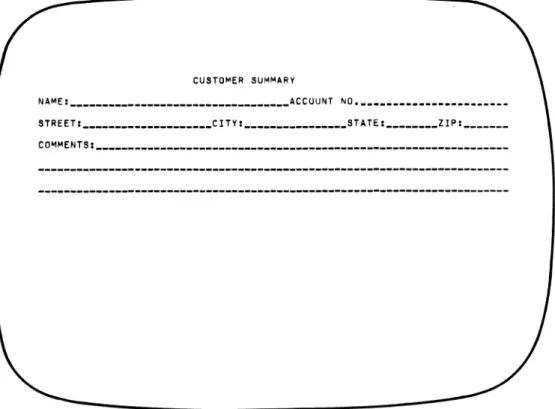
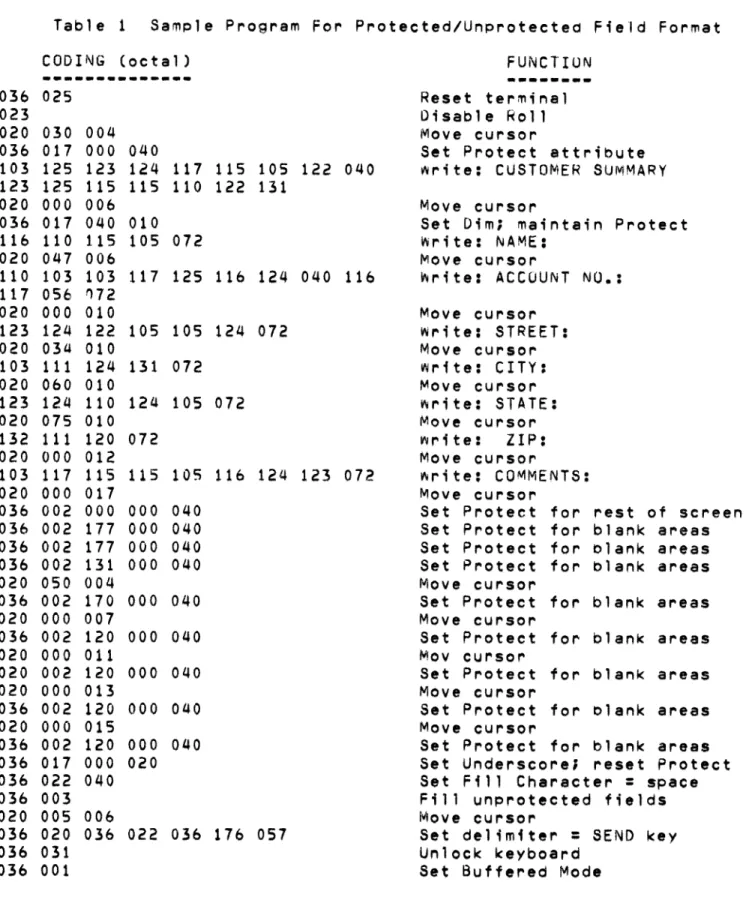
Tne following programming examples show how the terminal can be prepared for two types of buffered mOde operations. In the first example (see Figure 2 and Table 1), a sample format is written to the screen with
protected and unprotected fields. Protected form areas are programmed
for dimmed display thereby giving contrast to unprotected fieldS and the data entered by the operator, The areas where the operator is expected to enter data is also identified by underscoring. The fill character is defined as a space code.
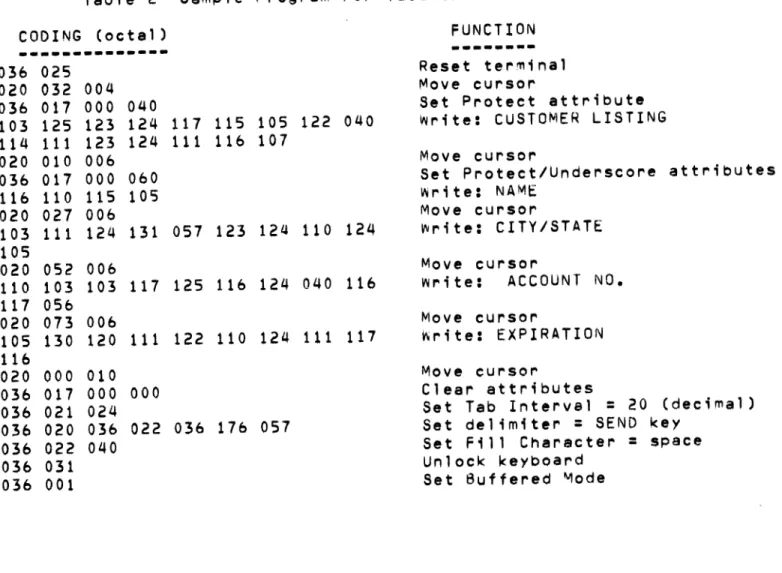
The second programming example (see Figure 3 and Table 2) shows how a
tabular application could be implemented. In this, a simple heading
CUSTOMER SUMMARY
NAMEI __________________________________ ACCUUNT NO. ______________________ _ STREETI ____________________ CITYI ________________ STATEI ________ ZIPI ______ _
CO~MENTSI _______________________________________________________________ _
Figure 2 Sample Screen For Protected/Unprotected Field Format
CUSTOMER LISTING
NAME CITY/STATE ACCOUNT NO. EXPIRATION
Table 1 Sample Program For Protected/Unprotected Field Format
CODING (octal) FUNCTIUN
---
..
---036 025 Reset terminal
023 Disable Roll
020 030 004 Move cursor
036 017 000 040 Set Protect attribute
103 125 123 124 117 115 105 122 040 ~rite: CUSTOMER SUMMARY 123 125 115 115 110 122 131
020 000 006 Move cursor
036 017 040 010 Set Dim; maintain Protect
116 110 115 105 072 Write: NAME:
020 047 006 foIlove cursor
110 103 103 117 125 116 124 040 116 ~rite: ACCOUNT NO.: 117 056 'l72
020 000 010 Move cursor
123 124 122 105 105 124 072 write: STREET:
020 03a 010 Move cursor
103 111 124 131 072 write: CITY:
020 060 010 Move cursor
123 124 110 124 105 072 r.rite: STATE:
020 075 010 Move cursor
132 111 120 072 r.rite: ZIP:
020 000 012 Move cursor
103 117 115 115 105 116 124 123 072 r.rite: COMMENTS:
020 000 017 Move cursor
036 002 000 000 040 Set Protect for rest of screen
036 002 177 000 040 Set Protect for blank areas
036 002 177 000 040 Set Protect for clank areas
036 002 131 000 040 Set Protect for blank areas
020 050 004 Move cursor
036 002 170 000 040 Set Protect for blank areas
020 000 007 Move cursor
036 002 120 000 040 Set Protect for blank areas
020 000 011 Mov cursor
020 002 120 000 040 Set Protect for blank areas
020 000 013 Move cursor
036 002 120 000 040 Set Protect for clank areas
020 000 015 Move cursor
036 002 120 000 040 Set Protect for blank areas
036 017 000 020 Set Underscore; reset Protect
036 022 040 Set Fill Character
=
space036 003 Fill unprotected fieldS
020 005 006 Move cursor
036 020 036 022 036 176 057 Set delimiter
=
SEND key036 031 Unlock keyboard
Table 2 Sample Program For Tabular Field Format
CODING (octal) FUNCTION
---.---
---036 025 Reset terminal
020 032 004 Move cursor
036 017 000 040 Set Protect attribute
103 125 123 124 117 115 105 122 040 Write: CUSTOMER LISTING
114 111 123 124 111 116 107
020 010 006 Move cursor
036 017 000 060 Set Protect/Underscore attributes
116 110 115 lOS write: NAME
020 027 006 Move eursor
103 111 124 131 057 123 124 110 124 write: CITY/STATE
105
020 052 006 Move eursor
110 103 103 117 125 116 124 040 116 Write: ACCOUNT NO.
117 056
020 073 006 Move eursor
105 130 120 111 122 110 124 111 117 Wlirite: EXPIRATION
116
020 000 010 Move cursor
036 017 000 000 Clear attributes
036 021 024 Set Tab Interval
=
20 (decimal)036 020 036 022 036 176 057 Set delimiter
=
SEND key036 022 040 Set Fill Character
=
space036 031 Unlock keyboard
~PPENDIX A
ASCII CHARACTER CODES AND TERMINAL CONTROL FUNCTIONS
LEGEND:
10
CHARACTER CODE IN DECIMAL EBCDIC EQUIVALENT HEXADECIMAL CODE
1 means CONTROL
DC T"L 00 CONTROL 01 CONTROL
02 CONTROL 03 CONTROL 04 05
- FUNCTION - FUNCTION FUNCTION FUNCTION
-0 8 BS III OLE WRITE 24 CAN CURSOR 32 40
(
0 - NUL NULL r - - (BACK- HOME I-- CURSOR - "-- SPACE
-00 III SPACE) 10 1P HEADER I. 1X RIGHT 40 40
1 SOH 9 HT
HORIZONTAL 17 DCl 25 EM CURSOR 33 41
1 - PRINT FDRM I-- I-- PRINT PAGE
-
-
! r- )01 lA OS (TAB) TAB 11 10 19 1V LEFT SA 50
2 STX START 1O Nl 18 DC2 26 SUB 34
" 42 *
2 - I-- NEWLINE I-- ROLL ON
-
CURSOR-
r-iB OF TEXT (NEW lR 1Z
02 15 LINE) 12 3F DOWN 7F (QUOrE) 5C
3 ETX 11 VT 19 DC3 27
ESC 35 43
3
-
ENABLE BLINK I-- ERASE LINE-
ROLL OFF-
ESCAPE - # r- +1C (VERT.
1S
03 DB rAB) 13 27 (ESCAPE) 78 4E
4 EOT 12 fF 20 DC4 28 FS 36
$ 44
4 - INHIBIT BLINK I-- ERASE PAGE - UNDERSCORE r-- DIMON I-- r- ,
10 (FORM iT 1\
37 06 FEED) 3C ON IC 5B 6B (COMMA)
5 ENO CURSOR 13
RT 21 NAK 29 CS 37 45
5
-
ADDRESS I-- RETURN - UNDERSCORE I-- DIM OFF r-- % r--20 lE READ 00 (RErURN) 3D 1U OFF 10 11 6C 60
6 ACK 14 SO 22 SYN SYNCHRONOUS 30 RS
FUNCTION KEY 3' 4e
6 - PRINT DONE I-- BLINK ON
-
I-- ' - - &r-K 1F OE 1N 32 1V IDLE Ill: i t HEADER 50 4B (PERIOD)
1 BEL 15 51 23 ETB 31 OS READ 39 47
7
-lG BELL I-- 10 BLINK OFF
-
CURSOR UP I-- 1- CURSOR "-- I-- I2F OF 26 1W 1,< HEADER 10 (APOS) 61
DC TAL 06 07 10 11 12 13 14 15 16 17
48
0 1$ 64 12 80 88 96 104 112 120
0
-
- 8 - @ I-- H - P-
X f-- f-- h f-- P f-- XFO Fe 7C CB 01 E7 79 (GRAVE) 88 97 A7
4t n 6$ 73 81 89 97 105 113 121
1
-
1 - 9 - A I-- I - 0 ~ V I-- a I - - i I-- q I-- YFl F9 Cl C9 DB Ea 81 89 9 ' A.
$0 58 66 74 8:l 90 9. 106 114 122
2
-
2 I-- : f-- B f-- J - R - Z f-- br;;--
j I-- r I-- zF2 7A C2 01 Oll U 82 99 A9
$\
3 59 61 75 83 91 [ 99 t07 115 123 {
3 - - ;
-
C f-- K i - - S-
f-- c f-- k - s-F3 SE C3 02 £2 80 8. U A2 CO
U
4 GO < 68 76 84 T 92 \ 100 10' I 116 124 I 4
-
F4-
4C-
C4 0 I»" L ~ru-
t-;; d 93 - t-A3 4F I
53
5 61 69 77 t5 93 I 101 109 117 125
5 -
-
= I-- E-
M I-- U I-- f--'-.. e - m - u-
}F5 7£ 65 04 £4 90 85 94 A4 00
54
6 62 70 18 86 94 t or 102 110 l1a 126
6 -
-
> r-- F-
N I-- V I-- - f - n - v - ~1\
F6 Ie C& os £5 SF 86 9$ AS AI (rILDE)
ss G3 71 711 87 t5
-
103 111 119 127DEl
7
-
7-
? I-- G-
0 f-- W f-- - 9 ---.: 0 - W-F7 IF C1 06 E6 60 or - 87 96 AI 07 (RUBOUT)
CHARACTER CODE IN OCTAL AT TOP AND LEFT OF CHARTS.
1 ~ # $ X A li.
* (
1 2 3 4 S 6 7 8 9
TAB Q w E R T Y U I a
CMO A S D ** G H ** K
F J
SHIFT Z x C V ti I\J M <
,
*
ALPHA
lOCK
*
LI GHTED KEY)
-
+..
DEL0
-
=
,p ] I NEvv
[ \ LINE
l • •
"
}; , {
> ? SNIFT CR
.
IHLP EOP EOl
fl~ flo
A
< HOM >
f17 f18
V
REPEAT
7 8
•
4 5
1 2
,
0 qb
3
.
E
N
T E
KEYBOARD CODE ASSIGNMENTS
241 242 243 244 245 246 247 250 210 211 212 251 252 253 261 262 263 264 265 266 267 270 230 231 232 271 272 273
341 342 343 344 345 346 347 350 310 311 312 351 352 353 361 362 363 364 365 366 367 370 330 331 332 371 372 373
_1-~2--3--4-_5-~6--7-,...8-,...,9-1"""0- -
,...=-,... ..
_--041 100 043 044 04S 136 046 052 050 051 137 053 176 377 061 062 063 064 065 066 067 070 071 060 055 075 140 377 041 100 043 044 045 136 046 052 050 051 137 053 176 177 061 062 063 064 06S 066 067 070 071 060 055 075 140 177213 233 313 333
014 013 014 013 014 013 014 013 tA-... Q-... w-... E-P"'~R-... T-... Y-I'" U-I" I-P"' 0-,. P-P"' [ -... \ - " ' - - 1
011 021 027 005 022 024 031 025 011 017 020 035 034 012 011 021 027 005 022 024 031 025 011 017 020 324 325 012 011 121 127 105 122 124 131 125 111 117 120 135 174 012 011 161 167 145 162 164 171 165 151 157 160 133 134 012 ... ---OopoA -S L.,...D ..-F _G r-H r-J r-K r-L _; ..-" L...-{ L.
001 023 004 006 007 010 012 013 014 305 306 175
CMD 001 023 004 006 007 301 302 303 304 305 306 173 101 123 104 106 107 110 112 113 114 072 042 175
214 234 314 334 204 204 031
203 215
203 235 ENT
027 315 027 335
010 223 012
010 223 012
010 030 012
141 163 144 146 147 150 152 153 154 073 047 173
I--..a..-Z ..- X ,... C r-I/ r-8 ,... N r-:Yl _ , ,... • ,.../ ... -"--f---..t
031 010 030
,
• 012 E N032 030 003 '026 002 016 015 321 322 323 032 030 003 026 002 01b 320 321 322 323 SHIFT 132 130 103 126 102 116 115 074 076 077 172 170 143 166 142 ISo ISS 054 056 057
015 015 SHIFT 015 015
216 224 236 224 316 032 336 032
217 054 056 T
237 054 056 E
317 054 056 R
337 054 OSt)
~~~ __ *~ __ ~~~~ ______ ~ __ ~ __ ~ __ ~ __ ~ ____ - 6 __ ~
ALPHA
LOCK
CODE LEGEND
~
••• LEDS+C C
S
KEY
\,lLlO
ALL 1\10DES
REPEAT
APPENDIX 0
EXTENDED GRAPHIC SYMBOLS AND CODES
[dB5J[g~~
11 32 15 7 34 35@DJrnEB[]OO
36 31 3 13 4 12rnrnBB[;JE]
6 -5 16 10 23 27[]~rnEJ~~
2 24 25 33 14 22[B][Q]L1J~[][[]
17 20 21 37 30 26
~D
1 0Note - When coding for the extended graphic
INTRODUCTION
APPENDIX E
SYSGEN PARAMETERS
Basic initialization parameters wnicn configure tne terminal to specific operational requirements of tne system are stored in tne Sysgen memory area of tne terminal. In general, it is expecteo tnat these parameters would be defined at tne initial setup of the system and would only be cnanged if reconfiguration of system operation is desired. Conceivably, the responsibility for programming the Sysgen memory would be restricted to system supervisory personnel.
TO CHANGE PARAMETERS
*Select local mode (press CMD and LINE keys simultaneously)
*Press C~D SHIFT LINE keys simultaneously
Tnis action causes the Sysgen parameters to be displayed on the screen as snown in Figure 4. Note tnat tne current parameter values are displayed in the CURRENT column and the cursor is initially in the top field of tne NEW column. A new value for a parameter may be inserted at tne
current cursor ~osition. Only tne symbols listed are accepted. A NE~
LINE keystroke must terminate eacn entry. If the entry is not
acceptable, the cusor advances to the next field. If NEW LINE is pressed without any entry being made, tne current parameter value ;s retained.
SYSGEN PARAMETERS CURRENT NEW
AUDIBLE TONE VOLUME (LOUD, MEDIUM, SOFT): L,M,S L CURSOR PRESENTATION (UNDERSCORE OR REVERSE VIDEO)IU,R U AC LINE FREQUENCY (50HZ OR bOHZ)1 SO,bO bO KEYBOARD REPEAT RATE (HZ)I 10,lS,30,bO 10 RECEIVE BAUD RATEI 110,1S0,300,bOO,1200,t800,?400,4800,9600,19200 TRANSMIT BAUD RATEI 75,150,300,SAME SAME TRANSMIT CHARACTER PACING RATE (CPS)I NONE,60,120,240,480 NONE
PARITYI MARK,ODD,EVEN MARK
PRINTER BAUD RATEI 110,150,300,600,1200,1800 600
MODEM OPTION? (YES OR NO) NO
FULLY 6053 COMPATIBLE? (YES OR NO) NO ENTER TAB INTERVAL (IN OECIMAL) 4 ENTER FILL CHARACTER (1 CHAR ONLY) 40 ENTER TERMINAL NUMBER (IN DECIMAL) 0
If the NEW LINE key is presseo while the cursor is in the last field or
any time the ESC key is presseo, the screen is erased and the Sysgen memory is closed against new entry. The terminal will now re-initia11ze
itself with the new parameters and will stay in the local mode (press
LINE key to get back on-line to nost).
In the event a STARTUP ERROR message is displayed on initialization, the number following the error message indicates to service personnel the
type of malfunction. The terminal can usual,y be operated, even if an error is indicated' however, such operation requires that any
CHANGE;.S:
Paoe 4, after
---'Nh~" oDerF!tin:~ in t,,~ ':llJfffpI"'e'j "1'10"'''', tai<~ C:.?lrf' not tl') or!?!'>" the NULL key as tn1s will lock u~ tne ter~in31. To rE"cover from sUCh a situation, tlJrn OO\-I€-r off antj tnen O~ aOi;,n.
Par'le 13, reolace the "Protected n.3tA" rlescrintion ,,,,itt'! the fol10''''in~J:
---~---.---~----.---.---
---P r" tee ted !) '" t a - T ~ e Pro t ~ c t p d ;",:, a t a AI t t r i r tJ t f' ., S co 1"'1 t r 0 1 1 p. ('j ") y nit 2 " f
the ch~racter's Attrinutp hyte.
Tn buffpreri merie, tMP o~erator 1~ not ~11n~e~ to ~o~ify any C~Br~cter
which has it'S ProtE>ctpri ');::,ta attri("ute (.it set. rni~ is accolT101isneci pri'l1arily by not allo!";!"I'J t.,e curs,.,r t" ,')e Dositior'lf'd in dny orotecterl a~~a of the screen.
r.,
;ntE'ractiv~ 1100-:', the cursor ~an he n("lsit;nnf'ri any "lace reasrdless of thE" pre t e c ted s tat IJ S 0 f a c h A r act e r. T., ; 5 ;til 1 0 \.) S t to: e !'> ere e n to hefor mat ted ; n o r e ::':l a rAt i " n t (1 r en t "! r ; n ~ r. I) f t ere d tp 0 de.
The eorrec1' Oroce-lure for 11,)ri; fil"'l::l
Protecte~ DatA ~ttr,cutp ~it to n, Protecte~ 0ata attri"'lute ~it to 1,
a ~rnt~cteo ch~ract~r is
~()~ity the ~hatA~tpr and
; f ,I ~ r"; 1 r ~ ri •
to reset the t·""Ien set t;,p
Any software ma.,;PlJlatinq screen Mate in inter~ctive ~O"e s~ould ~lso
keep track of t~e cursor Dositicn relative to ~rnterte~ ~~ta, as output
coulrl be lost i., these ~rpas. Also, ~0~P cr'l~racter ~eauenc~s coulj ~ooity
unwante~ Areas of tne screen.
---
..
---Some comolex co~~an~~ re~uil"'p t~at t~p te~~inal'9 intprnal processor
e l( e cut e ext en rt e d r 0 uti n IS' c:; (~. q. t ~1 P f:'; ~ ,') E :) Ii::: t: C () "i'\ r,1 e n ~ ). :\ t h i q h t": N U (1
rates, the execution time of th~s~ cn~mdn~~ wi1 1 ~xcPpri th~ mini~u~
t r" n s rn iss; 0 n ('l e r ; 0 Ii 5 fro 'r. t" e h ~!'; t. :! 1 1 C i" 8 r ~ C t e r 5 r e CEO; V e j f r C' T thE"
It is possible, however, to deli~erately cause t"e loss of 1~ta hy
reoeatinQ complex commanns at nion nau~ r~tes. Two examoles are:
At 19.2 Knaud, ,f more tnAn si~ F~~S~ PA~E commands ~ere
transmitted successively followed ~y a lana natA stream, some of
the data COUld be lost.
A t t 9 • 2 K 0 a u rJ , ; n I' 0 1 1 'l'IO de, ; f a S ~ Cl I) '" n C ". 0 f r" E.. L r "J t f 0 'I low €' d
by one or two dat~ chAracters were reoeatpri sever~l hun~rerl
timf'lS, data could eventuallY ~'e lost (in
this exa,l1Ple, t~e screen
woul rJ be scroll ina at about i:),)!,l1 ines
Pf?" SeCorHj).
I f f 0 r so'-n e IJ nus u a 1 rea son, s l,J C:j a seq u e nee " f