The Cloud and the Changing Shape of Education - Eaas
(Education as a Service)
N. Deepa,
Assistant Professor, Dept of CSE, Arunai Engineering College, Tiruvannamalai,
TamilNadu, India.
R. Sathiyaseelan,
Assistant Professor, Dept of CSE, Arunai Engineering College, Tiruvannamalai,
TamilNadu, India.
ABSTRACT
Cloud computing in education gives better choice and flexibility. The software and platform in education can be on-premises, off-on-premises, or a combination of both, depending on the educational institution’s needs. EaaS are used to deliver advanced software, computer lab resources as services to students, researchers, faculties at schools, colleges and universities This paper explains how EaaS can provide affordable and high end educational services which leads to the transformation from traditional education to cloud service. From a user’s point of view, a cloud can provide services available in such a way that the user does not have to be concerned with where the services originate or even where the services are running. Eaas (Education as a service) delivers a virtualization education environment as a service. Rather than purchasing softwares, software licenses, education providers buy those resources as a fully outsourced service on demand and minimize cost by pay per usage. Generally EaaS can be obtained as public or private cloud or a combination of the two. Public clouds may offer low-cost services, but in return they may not provide needed assurances of security for those services. Private clouds, sometimes also referred to as community clouds, seek secure collaboration with external providers.
Keywords
Cloud Computing, Education as a Service, private cloud, public cloud
1.
INTRODUCTION
A cloud is defined as flexible hosted resource pools delivered on the internet. Cloud defined by NIST (National institute of standards and technology) is a model for enabling convenient, on-demand network access to a shared pool of configurable computing resources that can be rapidly provisioned and released with minimal management effort or cloud provider interaction. Cloud provides on demand self service - ready to use services with minimal intervention from provider [1].
1.1.
Types of cloud
Public cloud computing is one in which the infrastructure and other computational resources that it comprises are made available to the general public over the Internet. It is owned by a cloud provider selling cloud services and is external to an organization. At the other end of the spectrum are private clouds. A private cloud is one in which the computing environment is operated exclusively for an organization. It may be managed either by the organization or a third party, and may be hosted within the organization’s data center or outside of it. A private
cloud gives the organization greater control over the infrastructure and computational resources than does a public cloud. Example: eBay, two other deployment models that fall between public and private clouds are community clouds and hybrid clouds. A community cloud is somewhat similar to a private cloud, but the infrastructure and computational resources are shared by several organizations that have common privacy, security, and regulatory considerations, rather than for the exclusive use of a single organization. A hybrid cloud is a composition of two or more clouds (private, community, or public) that remain unique entities but are bound together by standardized or proprietary technology that enables interoperability.
2.
CLOUD ARCHITECTURE
The biggest challenge in cloud computing may be the fact that there's no standard or single architectural method. When talking about cloud architecture, it is divided into two sections: the front end and the back end. They connect to each other through a network, usually the Internet. The front end is the side the computer user, or client, sees. The back end is the "cloud" section of the system.
The front end includes the client's computer (or computer network) and the application required to access the cloud computing system. Some systems have unique applications that provide network access to clients. On the back end of the system are the various computers, servers and data storage systems that create the "cloud" of computing services. In theory, a cloud computing system could include practically any computer program you can imagine, from data processing to video games. Usually, each application will have its own dedicated server.
A central server administers the system, monitoring traffic and client demands to ensure everything runs smoothly. It follows a set of rules called protocols and uses a special kind of software called middleware. Middleware allows networked computers to communicate with each other. Most of the time, servers don't run at full capacity. That means there's unused processing power going to waste. It's possible to fool a physical server into thinking it's actually multiple servers, each running with its own independent operating system. The technique is called server virtualization. By maximizing the output of individual servers, server virtualization reduces the need for more physical machines.
3.
ENVIRONMENT ROLES
imperative to have a clear definition of the types of roles involved in order to ensure common understanding.
(Cloud) Providers offer clouds to the customer – either via dedicated APIs (PaaS), virtual machines and / or direct access to the resources (IaaS).
(Cloud) Resellers or Aggregators aggregate cloud platforms from cloud providers to either provide a larger resource infrastructure to their customers or to provide enhanced features. This relates to community clouds in so far as the cloud aggregators may expose a single interface to a merged cloud infrastructure.
(Cloud) Adopters or (Software / Services) Vendors enhance their own services and capabilities by exploiting cloud platforms from cloud providers or cloud resellers. The cloud enhanced services thus effectively become software as a service.
(Cloud) Consumers or Users make direct use of the cloud capabilities as opposed to cloud resellers and cloud adopters, however, not to improve the services and capabilities they offer, but to make use of the direct results, i.e. either to execute complex computations or to host a flexible data set.
4.
WHY DO WE NEED TO MOVE
EDUCATION TO CLOUD?
Cloud computing is basically a way of running Educational institution without doing all the hard work. Here are reasons why educational institutions around the world are shifting to the cloud [4].
4.1.
Cloud software is easy to use
Having grown up with intuitive cloud software, users expect cloud programs to be simple. Most vendors, therefore, ensure their software can be used with very little training. This means customers don’t have to spend time learning new software tricks (or teaching them to their students) and can concentrate on using the software pedagogically instead.
4.2.
Fast to get started
Institution wide cloud based applications can be set-up in just a couple of days. For accessing such applications, customer need to sign up to get an account and can work with it in a matter of minutes.
4.3.
Better student collaboration
Many cloud programs facilitate file sharing and multiple authors. This means that students can easily exchange files with each other and invite their peers to work on the same document.
4.4.
Extending the curriculum to
anywhere and anytime
Academic files and software are hosted on the internet, which means they are always available to you at any time of day or night. This gives students far more choice as to when and how they study – and teachers can work as efficiently at home as they can at school.
4.5.
Minimal investment for the resources
There’s no hardware to buy and educational institutions don’t have to install software on local computers. As a result, an educational institution can vastly reduce the time and money it spends.
4.6.
Scalability
Adding more users is fast and simple.
4.7.
Lower maintenance costs
As the software is maintained by the supplier, the customer have to do very little to keep it running smoothly. And because
the supplier takes care of any updates, customer knows they are always working with the latest version. This keeps maintenance costs down and eliminates the frustration of incompatible and outdated software.
4.8.
Cheaper Data storage costs.
Data storage is notoriously expensive. Cloud computing lets educational institutions avoid that cost as the supplier hosts the data on their servers.
4.9.
Security and Reliability
Educational systems seek solutions that provide security for files uploaded and managed through the cloud.
• Data should be kept private, with the options of making it publicly accessible by third parties.
• Files should be backed up nightly.
• Educational systems should be able to retrieve all files in the event of a change in providers or to bring data in-house.
• The level of security should be greater than that which is implemented locally.
• Cryptographic methods to authenticate users, and should be able to add encryption to data before storing it in the cloud.
• Provider should redundantly store your files on multiple devices across multiple facilities.
• The infrastructure should be designed to sustain concurrent device failures.
4.10 Collaboration Tools
Cloud computing also enable collaboration between users to enhance and extend the learning process. Students exercise and develop collaboration techniques within the safety and security of an online communication system integrated into the desktop. Chat is available on nearly any device, allowing users to connect in real-time. Administrators can allow student-to-student chat, teacher-to-teacher chat, student-to-teacher chat, or group chats. Video chat allows one-to-one or one-to-many broadcasts, with screen sharing, an interactive white board, and a freehand writing tool for online tutoring support or problem solving.
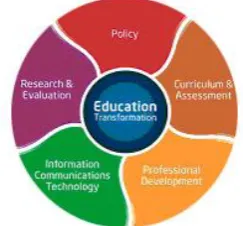
[image:2.595.346.468.565.678.2]The five interrelated elements shown in Figure 1 have consistently proven essential to support successful education transformation worldwide [3] These five elements help to create sustainable improvements in education — improvements that give students the best possible opportunity to thrive in the global economy.
5.
EDUCATION AS A SERVICE (EAAS)
ARCHITECTURE
The Cloud service for Education is a set of cloud services and offerings designed to help education systems leverage predictive analytics to get real-time insights on student and institutional performance, enhance researcher effectiveness, and alleviate constrained lab resources for learning.
5.1.
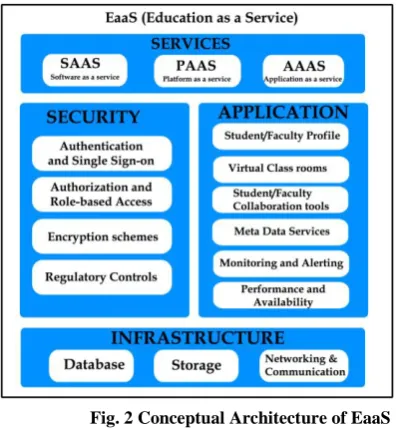
Services
Student E-Study service: The cloud service that can be delivered to the members of an educational institution. A student E-study is a valuable record of a student’s academic life. The record may include items such as assessments, evaluations, and assignments. These services are critical for managing each student’s academic progress, and when student E-studies are collectively reviewed by the Head of the Educational Institution, they can also play an important role in managing the performance and progress of an entire education system.
E-study service present significant advantages over paper-based alternatives. One reason is their accessibility. End users which may include students, teachers, parents, administrators can access services at any time, from computers, cell phones or other devices. These services can be accessed by teachers to issue assignments, and by students to access assignments. A school principal can use this service to monitor the performance of the school, and parents can access their own child’s performance in order to become more involved in their child’s education.
Using cloud computing, the E-study service can be designed in several ways. For instance, the service can run as a standalone service on a laptop, without connectivity. The service can also run from local school/college servers, from a data center or from a third-party services provider that is accessed via the Internet.
EaaS provide enhanced services and tools to enable a cloud computing environment as an on-campus private cloud as private clouds offer an ideal way to solve some of educational institution’s biggest challenges. A private cloud can deliver Education-as-a-Service, which helps reduce costs, reach new levels of efficiency, and introduce innovative new educational models.
EaaS, a cloud computing solution designed specifically for education. It help teachers build lesson plans and allow students to share a single host computer with multiple keyboards and screens. It allows educators and students to access their files and applications from any computer via a virtual desktop. It combines infrastructure, software and professional development tools designed specifically for education to help educators teach with the tools.
EaaS store lesson plans for various subjects as a data storage in a private cloud and allow teachers and students to access anywhere, anytime. The various Xaas services provided by EaaS are:
Infrastructure as a Service(IaaS) is the ability to rent servers and storage in a pay-as-you-go way, is not only real but also saving Educational institutions millions of dollars. Infrastructure as a Service is a provision model in which an Educational institution outsources the equipment used to support learning, including storage, hardware, servers and networking components. The service provider owns the equipment and is responsible for housing, running and maintaining it. The client typically pays on a per-use basis.
Software as a Service (SaaS) is a new model of how software is delivered. SaaS refers to software needed for computer laboratories and also teaching materials that is accessed via a web browser and is paid on a subscription basis
(monthly or yearly). Different from the traditional model where the Educational Institutions buy a license to software and assumes ownership for its maintenance and installation, SaaS presents significant advantages to the Educational Institutions
which obtain service.
SaaS is faster and a cost effective way to get implemented. There are no hardware, implementation or acquisition costs involved to run the application from the client’s side. It's the responsibility of the SaaS vendor to manage and run the application with utmost security and reliability. Since customers pay a subscription, they have immediate access to the new features and functionality. Unlike traditional softwares where upgrades would happen once a year or once in 6 months (with the vendor coming to your institution with a CD), the SaaS vendor continuously pushes new updates, fixes to the application, which is immediately accessible by the customer.
Platform as a Service (Paas), another SaaS variation, this form of cloud computing delivers development environments as a service. Students/Teachers can build their own applications that run on the provider's infrastructure and are delivered to them via the Internet from the provider's servers.
Application as a Service (AaaS), another SaaS, this form of cloud computing can be used in evaluating student’s performance by conducting examinations. Now using traditional way of conducting examinations, question papers are sent through email. Using cloud, question papers are stored in Private university cloud and affiliated colleges can be authorized to access the question paper only on that particular date anywhere, anytime. Online entrance examinations can also be conducted without the need of installing the required application/software. The software for conducting examinations are stored in the provider’s server and the students access the question paper from client system, answer the questions, answers stored to provider’s server. The valuation can also be done by accessing provider’s server directly without the need to store it in their local computer. This facility allows us to minimize the malpractice in conduction of examinations.
[image:3.595.305.504.458.673.2]
Fig. 2 Conceptual Architecture of EaaS
5.2.
Security
Security is one of the most important categories of EaaS capabilities, given customer’s data and accounts are typically hosted by the EaaS provider. We considered the following capabilities:
• Authorization and role-based access control. After an identity has been confirmed, authorization is the process of giving individuals access to system objects based on their identities. Identities are usually assigned to roles for ease of managing access.
• Encryption. Data may need to be encrypted in transit (between applications) and at rest.
• Regulatory controls. Tracking and reporting who accessed what, when, and why. It includes tracking access to application features and data. It also includes identifying whether individuals are located in controlled countries.
5.3.
Application
These represent the middle tier of a EaaS architecture: • Student/Faculty profile. The attributes and information that describe a Student/Faculty, such as name, e-mail address etc.,
• Virtual Classrooms. Teachers are able to create virtual classrooms in which teachers and students may be miles apart.
• Collaboration Tools. Faculty and students can interact with each other using various collaborative tools such as messaging etc.,
• Metadata services. Information about which data is contained and exposed within an application and about how content is organized.
• Monitoring and alerting. Application components, services, and infrastructure to detect failures. On detection, an alert is sent to the appropriate support group.
• Performance and availability. Performance describes how the application performs under load, both in terms of the number of users and the transaction volume. Availability is a measure of how much of the time the application is available to users and is represented as a percentage.
5.4.
Infrastructure
The underlying technical capabilities required for storing data and moving it around the network.
6.
HOW EDUCATION MIGRATE TO
CLOUDS?
Staff – Using a cloud server based distributed management system staff workloads can be balanced across entire Educational systems.
Teachers – Setting up virtual classrooms to handle smaller class loads or expand when teachers are at a premium.
Students – Use cloud based learning for homework that would allow students to collaborate with a large range of fellow learners. The students can work on the cloud, cooperate with team members and share knowledge, and be sure that they won’t leave behind their homework assignments when they go to school. Since they are on the cloud, they can access them anywhere, be it home or school.
Applications – In colleges and universities, allow students to have access to complex technical applications previously only available to high end Universities through a shared system of cloud servers.
Classrooms – The problem of tiny classrooms can be surmounted through virtual classrooms, with students attending class in their own homes on their own computers, with the teacher being present hundreds, even thousands of miles away. This can also help address the issue of inadequate number of teachers. With computers getting cheaper by the day, this does not seem unfeasible [5].
7.
CHALLENGES
Even though the cloud continues to grow in popularity and respectability, complications with data privacy and data protection still plague the market. In the case of private clouds, the hardware, software and data all remain in-house, so ownership is clear. When moving outside of the private cloud, however, there are complex issues to consider. Almost every cloud provider tracks the number of customers, the type of customer, the amount of storage and the amount of processor time for billing and marketing reasons. Customers should make sure to find out if that information ends up anywhere else. Even though customer may own the data, some vendors might use it to tailor advertising. When it comes to Security, cloud really suffers a lot. The vendor for Cloud must make sure that the customer does not face any problem such as loss of data or data theft. There is also a possibility where a malicious user can penetrate the cloud by impersonating a legitimate user, there by infecting the entire cloud thus affecting many customers who are sharing the infected cloud.
8.
RELATED WORK
The Kentucky Department of Education announced that it has implemented Microsoft Live@edu to provide its cloud-based communications and collaboration tools to students, staff, and faculty statewide [8]. The service is available to more than 700,000 people, and the state predicts it will save $6.3 million in costs over the next four years by using the Live@edu service.Live@edu offers educational institutions free hosted, co-branded tools, including 10 GB of email storage, 25 GB of file storage, and access to calendars, document sharing, and instant-messaging. Kentucky and Microsoft boast that the migration from the stage's old onsite Exchange service to the cloud-based one has been one of the quickest deployments - done over the course of one weekend, with over half a million people already accessing Live@Edu in the state. According to Microsoft, Live@edu is now available in more than 10,000 schools in over 130 countries and serves 11 million people worldwide.
9.
CONCLUSION
The cloud can be described as on-demand computing, for anyone with a network connection. Access to applications and data anywhere, any time, from any device is the potential outcome. Thus Educational Institutions (School, college or university) can benefit in variety of ways when transformed to cloud. Eaas provides custom domain email ids with the institute name as suffix. The email service, collaboration tools and storage services are better than any of the available paid on-premise services. Students/Teachers can have quick and effective communication with anytime anywhere access. Collaboration tools leads to collective intelligence and creativity as students may work on their project document at the same time. Eaas help teachers/students in organizing their classroom presentations and schedules. The final conclusion is the institutes can save on notebooks, papers, printing materials etc.,
10.
REFERENCES
[1] Guidelines on Security and Privacy in Public Cloud Computing, National Institute of Standards and Technology, US department of commerce, Wayne Jansen, Timothy Grance, December 2011
[3] The Education Cloud: Delivering Education as a Service, WHITE PAPER, Intel® World Ahead Cloud Computing, 2010
[4] http://us.gmocloud.com/company/thinkcloud/2011/12/15/ moving-cloud-servers-into-education/ Article published in December 15, 2011
[5] http://www.itslearning.eu/8-reasons-education-is-moving-to-the-cloud Article published in 31st May 2011
[6] http://www.cloudtweaks.com/2011/02/how-can-cloud-computing-help-in-education/
[7] Above the clouds: A Berkeley view of Cloud Computing, Michael Armbrust, Armando, Electrical Engineering and Computer Sciences University of California at Berkeley, Feb 10th 2009
[8] http://www.microsoft.com/presspass/press/2010/jun10/06-03mskdepr.mspx published June 2010
[9] Market watch: Virtual computers, real money, by Stephen Cass, MIT/Technology Review, July/August 2009
[10] [10] Michael Armbrust et al., A View of Cloud Computing, Communications of the ACM, Association for Computing Machinery, Vol. 53, No. 4, April 2010
[11] Simon Bradshaw, Christopher Millard, Ian Walden, Contracts for Clouds:Comparison and Analysis of the Terms and Conditions of Cloud Computing Services,
Queen Mary School of Law Legal Studies, Research Paper No. 63/2010, September 2,2010
[12] Richard Chow et al., Controlling Data in the Cloud: Outsourcing Computation without Outsourcing Control, ACM Workshop on Cloud Computing Security, Chicago, Illinois, November 2009
[13] Brian Krebs, Amazon: Hey Spammers, Get Off My Cloud!
The Washington Post, July 1,
2008,URL:htttp://voices.washingtonpost.com/securityfix/2 008/07/amazon_hey_spammers_get_off_my.html
[14] Sushil Kumar, Oracle Database Backup in the Cloud, White Paper, Oracle Corporation, September 2008.
[15] Neal Leavitt. Is Cloud Computing Really Ready for Prime Time?, IEEE Computer, January 2009
[16] James Maguire, How Cloud Computing Security Resembles the Financial Meltdown, Datamation,
internet.com, April 27,
2010,URL:http://itmanagement.earthweb.com/netsys/ article.php / 3878811/ How-Cloud-Computing-Security-Resembles-the-Financial-Meltdown.htm