A framework for developing effective e
learning
Dowdle, DL
Title A framework for developing effective elearning
Authors Dowdle, DL
Type Conference or Workshop Item
URL This version is available at: http://usir.salford.ac.uk/516/
Published Date 2006
USIR is a digital collection of the research output of the University of Salford. Where copyright permits, full text material held in the repository is made freely available online and can be read, downloaded and copied for noncommercial private study or research purposes. Please check the manuscript for any further copyright restrictions.
A FRAMEWORK FOR DEVELOPING
EFFECTIVE E-LEARNING
David L Dowdle
School of Construction and Property Management, University of Salford, UK M5 4WT
There has been a great deal of hype surrounding the introduction of e-Learning tools and applications within higher education both in the UK and internationally. Although e-Learning has come a long way in recent years it has yet to gain a firm foothold in many areas of education and its use within Higher Education in the UK is fragmented to say the least. The pros and cons of e-Learning are not argued here, rather, it is assumed that the argument for has been won and academics and technologists are looking for guidance on the design of effective e-Learning applications.
Resulting from an extensive literature review, academics are provided with a 'framework' to facilitate the design and development of effective e-Learning. It is hoped that academics who develop e-Learning using this framework will create exciting, media-enriched and fully interactive e-Learning exemplars that will enhance learner perceptions of the benefits of e-Learning within their individual and group learning environments. Further, it is envisaged that positive learner feedback will encourage further faculty investment in such applications.
Keywords: ADDIE, Effective learning, e-Learning, framework, Instructional Design.
INTRODUCTION
Learning, in all its guises, is here to stay. Several recent research projects suggest that e-Learning is equal to or better at delivering knowledge and understanding to learners than other more traditional methods such as classroom based face-to-face (f2f) delivery (Favretto
et al 1999; Ladyshewsky 2004). Ladyshewsky comments “When a high degree of
pedagogical thought goes into the design and delivery of e-Learning, and is supported by adequate resources, positive educational outcomes can be achieved by students."
(Ladyshewsky 2004). There are some dissenters however as highlighted for example by the 'No Significant Difference Phenomenon' web-site (Russell 2005). However, even Russell has had to acknowledge that many reports conclude that 'technology' delivered learning does often demonstrate a clear improvement in assessed results of particular groups of learners.
However, he also highlights many reports which state that there is "improvement in outcomes when curriculum is delivered face to face" (Russell 2005). Perhaps a conclusion that can be drawn is that there are many forms of delivery mechanism for transferring / creating
knowledge and understanding to, or within, learners and that well designed, high quality provision will result in effective learning no matter what delivery format is employed. If this is the case then the question that needs to be answered is – ‘what are the required conditions for the creation of an effective learning environment’?
1. have clear learning goals (outcomes);
2. have a wide repertoire of learning strategies and know when to use them; 3. use available resources effectively;
4. know about their own strengths and weaknesses; 5. understand the learning process;
6. deal appropriately with their feelings;
7. take responsibility for their own learning; and
8. plan, monitor, evaluate and adapt their learning process.
Dowdle et al (2003) suggest that students need to be encouraged to 'take more responsibility' for their own learning. Student Centred Learning (SCL) is one possible direction a school or faculty might take to facilitate students taking more responsibility. SCL is very much
‘learning by doing’, learning by practising, making mistakes, reflecting on why those
mistakes were made, proposing remedial actions and trying them out. In SCL a requirement is placed on learners to take on a high level of responsibility in their learning. They must
actively manage their learning and should not rely on instructors 'spoon feeding' them by telling them what, how, when and where to think. Hogan (1996) cites a need for teachers to hand over more responsibility to their students:
"I was struck by the irony that I did an enormous amount of reading and thinking about education in order to prepare my lectures, plan effective workshops and select readings and texts for my students, while the students did relatively little. I was the most active learner in my class - because I had total responsibility for what was learned and how it was presented for consumption" (Hogan 1996).
De La Harpe et al's (1999) eight criteria were adapted by Dowdle et al (2003) when
presenting their ‘Learning Wheel’ model. It is suggested that full recognition and integration of all eight factors when developing a learning environment can help create effective learners. It is further suggested that the lack of one or more of these criteria will inhibit the chances of students becoming effective learners - analogous to removing the spokes of the wheel or deflating the tyre - making the learning journey prone to delays and frustration.
E-LEARNING
Face-to-face delivery of curriculum content is the predominant mechanism for taught programmes in universities and colleges. It may have its problems in terms of student
attendance, engagement rates, large class sizes and constraining delivery facilities but there is still a strong argument to keep lectures. Research suggests that students benefit from the support, reassurance and motivation that a tutor can offer; indeed this may be the difference between success and failure for many individuals (Biggs 2003; McKeachie 2002). Good instructors tend to be capable of engaging and enthusing students, pointing them in the right direction, making them more aware and better equipped to develop their own learning styles and strategies. The good lecture is the one where students interact with each other and the lecturer; where they discuss, debate, criticise and listen in turn and not where they dutifully copy notes from the OHP or listen to the lecturer without pause for reflection and debate. Good quality lectures prepare the student for the next stage - where they take responsibility for their own learning.
The core message of this paper is that instructors should consider changing the way they impart knowledge and understanding to learners. If the support infrastructure is available, then the key to creating students who can become effective learners is to employ SCL
The development of e-Learning
Good quality e-Learning opens up a whole new world of opportunities for learners. Not only does it provide new avenues to take in the design and delivery of learning, but also the 'learning experience' created for (and by) the learner can be significant. e-Learning should ideally be more than just taking old course content and delivering it in another way, but more a case of developing new content based on the needs of the learner and taking advantage of the multimedia capabilities of information and communication technologies (ICT). The multimedia capabilities of e-Learning applications are viewed by many as a significant advantage over traditional delivery methods. Najjar (1996) states that specific situations in which multimedia information may help people to learn include:
(a) when the media encourage dual coding of information, (b) when the media support one another, and
(c) when the media are presented to learners with low prior knowledge or aptitude in the domain being learned. (Najjar 1996).
The ability of multimedia to allow the human mind to process information via both 'visual' and 'auditory' processing channels has been demonstrated as more effective than via one channel alone and ‘overloading’ a channel can occur if for example both text and graphics are presented simultaneously (Mayer 2001). Najjar’s conclusions suggests that new, level one, university students would benefit from multimedia rich e-Learning applications. Furthermore, Najjar (1996) found that "learning was higher when information was presented via computer-based multimedia systems than traditional classroom lectures".
Generally accepted benefits when employing multimedia rich e-Learning include:
• Presents learning content in more than one media type - Text, graphics, audio, animation and video.
• Provides opportunity for students to take responsibility for their learning
• Capability to be highly interactive - exploratory learning, simulations, quizzes, etc. • Engaging - Can be fun! Exciting and challenging. Enhances student motivation • Flexible access to content. 24/7 availability at home, university, work.
• Non-linear learning sequence - learners pick any route through the content they desire • Supports self-paced learning - the 'Martini' effect: anytime, any place, anywhere
• Repeatable and non-threatening - if at first you don't succeed you can try again and again without embarrassment or ridicule
• Practical - Real life simulations, learning by doing.
• Timeliness - 'Just in time' facility, learners’ access content when they really need it. • Consistent - all learners cover the same principles and skills. ICT tends to 'force'
developers to better organise learning materials.
Effective e-Learning
High quality e-Learning applications often involve high up front costs, a dedicated
development team and an agreed approach to design in terms of visual interface, navigation rules, media content and pedagogy/learning model. Learning design, be it face to face or e-Learning, is often based on pedagogic models such as Gagne et al's (1992) 'Nine Events of Instruction':
(1) gaining attention (reception)
(6) eliciting performance (responding) (7) providing feedback (reinforcement) (8) assessing performance (retrieval)
(9) enhancing retention and transfer (generalisation). (Gagne et al 1992) If such a model of instruction is to be adopted then gaining attention is a key concern.
[image:5.595.105.511.237.331.2]Learners need to be motivated from the outset of the learning activity to ensure effective learning occurs. If the activity is to be effective in gaining learners' attention, then it's important that the best method of activity/learner communication is employed. Research by Taylor (1992 cited in Alber 1996) suggests that whilst text can communicate information fairly well it is not the most effective way to learn. Table 2 lists attention getting/holding devices from least to most effective:
Table 2 - Attention getting/holding devices from least to most effective
1 Text only
2 Static visual/graphic (varying by colour and size) 3 Animated visual/graphic (silent)
4 Sound alone
5 Sound and movement
(Taylor 1992 cited in Alber 1996)
Applying a model to learning design forms one part of a larger approach to learning activity development known as 'Instructional Systems Design (ISD). ISD is the terminology applied to the distinct systematic process through which evolves an instructional project. ISD isa
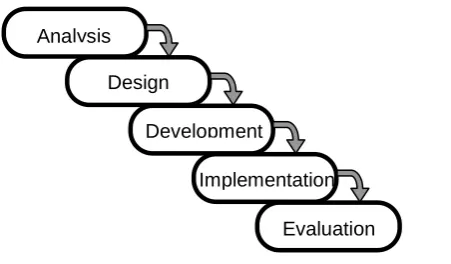
sequential design methodology in which each step or phase is completed before moving on to the next - the waterfall methodology (Allen 2003). One approach to e-Learning development is via the classic ISD methodology often referred to as the 'ADDIE' method. ADDIE is so described because of its five phases of Analysis, Design, Development, Implementation and Evaluation (Figure 1).
During analysis, a clear understanding of the needs of the learners is sought. Their desired behaviours or outcomes are considered and the 'gaps' between these and the learners existing knowledge and skills are defined. In the design phase, key aims and objectives (learning outcomes) are specified together with content, exercises/activities and methods of assessment. Learning materials are then adapted or created within the development phase and then
delivered to (or used by) learners in the implementation stage. After implementation is complete, the learners (and the e-Learning application) are evaluated to determine the effectiveness of the overall project. Each following phase builds upon the deliverables
achieved by the preceding one, without going back to redevelop previous phases based on the findings and feedback obtained in the succeeding phases. This has led to ISD being criticised in many quarters as being too linear in its approach, too inflexible and too constraining in its
Analysis
Design
Development
Implementation
Evaluation
[image:5.595.175.401.459.591.2]use. Additionally because each phase must be completed and 'signed off' by the client before moving on to the next one, it can be very time consuming.
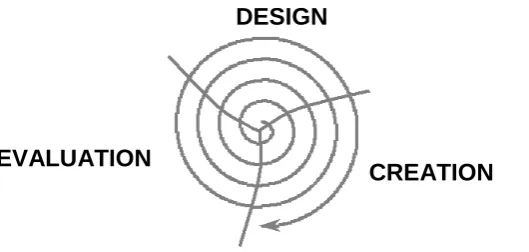
An alternative ISD model (Allen 2003) that has found favour in recent years suggests that rather than developing the instructional project in phases, design teams should take a holistic view whilst developing the project iteratively. Using this mandate, the design team can work together throughout the project and quickly build exemplar modules (rapid prototyping), which are then piloted with a learner group and re-designed based on their feedback. The ADDIE model then becomes a cyclical, repetitive process in which designs grow from an initial 'seed' idea into a final product through a spiralling evolutionary process. Allen (2003) suggests that this iterative approach to ISD (termed successive approximation) significantly reduces development time, whilst also ensuring that all contributors, including learners, have been part of the development process (Figure 2).
Although the ADDIE procedures described above give e-Learning developers a useful model or 'framework' for the design, development and evaluation of any particular e-Learning software tool they do not provide the more in depth, explanatory details that many developers might prefer, especially those new to e-Learning. Therefore, a more detailed framework has been developed which, it is hoped, will guide the developer into producing e-Learning tools that are well designed and of sufficient quality that they surpass the 'no significant difference' level and enter the 'clear improvement in assessed results' arena.
THE FRAMEWORK
The proposed framework breaks down the whole process of analysing, designing, developing, implementing and evaluating e-Learning into a total of ten discrete activities. These activities do not have to be carried in the sequence given. For example, it may be more sensible if activity three was undertaken first or concurrently with activities one and two as the findings from activity three may result in an e-Learning development being rejected. Similarly, activity five might take place much earlier in the project life-cycle to ensure that full support is
available from the outset thus avoiding a waste of resources in the analysis phase only to find out that the 'plug' is pulled later due to unconvinced senior school members.
1 - Carry out a Needs Analysis.
Define the problem this project is attempting to address. Who are your learners? What is their level of existing knowledge on the subject? Have their learning styles and strategies been determined and developed? How is the learning delivered at the moment? Why isn't it
working? What needs to be done? How would learners expect to use the existing/new content in future employment? What knowledge/information is used 'on the job'? How does the existing achievement of learners fail to meet the ideal? What resources & barriers exist in the
EVALUATION
DESIGN
[image:6.595.149.414.253.379.2]CREATION
current learning environment? Is e-Learning the most appropriate means of delivering the content to learners? What are your alternatives to e-Learning? Taking time to find out about your learners, their educational and employment background, their preferred learning styles and strategies is still a good idea regardless of whether or not e-Learning is introduced.
2 - Determine your aims & objectives (Learning Outcomes).
Using your findings from the needs analysis, develop learning outcomes that address the perceived gaps between current and ideal learner performance. There are many guides to writing effective learning outcomes on the internet and in educational texts and in-depth coverage is not necessary here but it is now generally accepted that learning outcomes should be articulated through the use of active verbs which spell out what students will be able to do. Therefore, consider Bloom's Taxonomy of Educational Objectives as a guide (Bloom et al
1956):
Level 1 objectives would be 'Knowledge and 'Comprehension' and action words might include: define, describe, outline, list, recall, name, justify, give examples of, etc.;
Level 2 objectives would be 'Application' and 'Analysis' and action words might include: apply, solve, verify, construct, interpret, predict, demonstrate, illustrate, analyse, appraise, calculate, distinguish between, criticise, question and diagnose, etc.;
Level 3 objectives would be 'Synthesis' and 'Evaluation' and action words might include: compose, evaluate, rate, design, create, modify, synthesise, propose, argue, formulate, reconstruct, judge, appraise, assess, discriminate, justify, defend and criticise.
3 - Determine existing and required resources and those of learners.
With technology driven learning environments a multi-discipline approach is the norm. Set up your team early and meet on a regular basis. Depending on the size of the project and the available budget a typical project team might comprise all or most of the following: Client/Sponsor, Project Manager (PM), Subject Matter Expert(s) (SME’s), Instructional Designer, Writer, Graphic Artist, Programmer, Audio/Video Producer, Quality
Control/Review and Administrators. Working closely with team members investigate the available resources and constraints within your local network, the number and types of connected personal computers (PC's), the availability of digital equipment such as cameras, document scanners, editing software, etc. Investigate what Learning Management Systems and Virtual Learning Environments' (VLE's) are available within your institution. An excellent resource for those who wish to investigate VLE's further is available on line at the Joint Information Systems Committee (JISC) website (JISC 2005). Finally, don't forget to investigate the technical resources and requirements of your learners. What hardware and software do they regularly have access to? Do they have broadband Internet access or dial-up? Do they have access from home, work or both? Have they taken part in an online or campus based e-Learning course before?
4 - Investigate Existing e-Learning applications and use these where they meet your needs.
A recent informal survey by the author received very little feedback on what e-Learning is available for use within the built environment disciplines. However, there are e-Learning tools/applications available that may be wholly or partly suitable for your needs in that they meet all or some of your learning outcomes. An example of such applications is the
been evaluated in terms of navigation, usability multi-media content, accessibility and other defined factors (see later).
5 - Create your project team and Secure Commitment from all including key personnel outside the team.
Full support from all team members is crucial to the success of the project as it is for those supporting the team such as heads of school and administrators. The project manager needs to be proactive in getting the team together before design and development commences to discuss the project, discuss any resistance and barriers to progress, allay fears and concerns and identify and implement staff development and incentives where necessary. A project plan complete with activity breakdowns, key milestone dates and full costing must be prepared at an early stage and regularly updated. Initial development is always resource intensive and e-Learning project costs and resource needs are seriously 'front-loaded'. The 'rapid prototype' approach advocated earlier does help reduce costs and development time by ensuring abortive work is kept to a minimum.
6 - Plan your project thoroughly.
Plan your e-Learning project in detail and keep all members of your team regularly updated. As mentioned above, e-Learning projects require a large up-front investment both in time and resources. Although maintenance will be needed this will be less resource intensive and spread out over several years, dependent on the overall 'shelf life' of the application. With this in mind, rather than develop one large, monolithic, project that perhaps replicates a whole module worth of lectures (typically equivalent to 24 hours in the UK), aim to develop
numerous, short, 'bite' sized applications. Restricting duration to approximately 15 minutes of user engagement per application (equating to approximately 15 to 20 ‘screens’) allows for quick initial development, user piloting, evaluation and refinement along the lines of Allen's (2003) 'successive approximation' approach. Early positive user feedback adds weight to the project and hopefully provides justification to any initial dissenters.
7 - Develop the content of the e-Learning application at the same time as the design of the application interface progresses.
Develop your content taking full account of the facilities available to you via the PC and Internet. Avoid simply transferring existing text based lecture notes into your application via a 'cut and paste' approach but instead re draft the content to account for the facilities and tools available via ICT. The most effective e-Learning applications utilise ‘just enough’ text based content and integrate that content with the power and flexibility afforded by ICT to enhance the learning environment. Good quality e-Learning capitalises on the unique capabilities of ICT by effectively, yet judiciously, employing multimedia, navigation/usability and
communication/collaboration functionality within a ‘seamless’, instructionally sound, user interface design (Cook et al 2004).
Multimedia - The multimedia capabilities offered by the ‘World Wide Web’ and stand alone PC’s allow content to be communicated to the learner using graphics, animation, audio and video as well as the base text. The benefits of audio based content were alluded to earlier in this paper. Do not get carried away, however, multimedia is no substitute for a sound
pedagogical model and good instructional design. Do not forget copyright law or bandwidth considerations.
returning to the original location. Internal and external links can make for a far richer learning experience but navigation with the application must be well designed or users will become very frustrated. Closely associated with navigational needs is ‘usability’. Nielsen (2003) suggests that “usability is a ‘quality attribute’ that assesses how easy user interfaces are to use”. He defines usability using five quality components:
• Learnability: How easy is it for users to accomplish basic tasks the first time they encounter the design?
• Efficiency: Once users have learned the design, how quickly can they perform tasks? • Memorability: When users return to the design after a period of not using it, how
easily can they re-establish proficiency?
• Errors: How many errors do users make, how severe are these errors, and how easily can they recover from the errors?
• Satisfaction: How pleasant is it to use the design? (Nielsen 2003) Communication/Collaboration - The provision of communication and collaboration tools is highly recommended. There is a lot of evidence that 'student to student' interaction can enrich learning outcomes (Biggs 2003). Current trends in educational practice promulgate the idea that effective learning results from active learning in which collaboration provides learners with an opportunity to discuss, debate, argue, negotiate and reflect. The learner becomes involved in the construction of knowledge through a process of discussion and interaction with fellow students. Such collaboration activities commonly take place asynchronously via email although most VLE's also provide discussion boards and chat rooms.
User interface/pedagogy/instructional design - The application may look good and be easy to find your way around but if the pedagogic approach is not right the user will not learn. Of course a really motivated learner who has the time to repeatedly review an application and try activities several times will circumnavigate bad design to some extent and gain some benefit but research suggests the majority will learn very little and frequently give up on the
application before they complete it even once (Mayer 2001). Gagne's et al’s (1992) 'Nine Events of Instruction' mentioned previously is a useful starting point.
Accessibility - In the UK the Disability Discrimination Act (DDA), passed in 1995, aims to end the discrimination that many disabled people face. For education providers, new duties came into effect in September 2002 under Part IV of the DDA. These require schools, colleges, universities, and providers of adult education and youth services to ensure that they do not discriminate against disabled people. There is therefore a clear requirement to ensure that access to e-Learning and new technologies has been reasonably provided for (see http://www.jisclegal.ac.uk/pdfs/accesslawelearn.pdf for initial guidance)
8 - Design applications with the learner in mind.
Applications need to engage the learner to ensure motivation is maintained and that effective learning is achieved. In order to create an 'active learning' environment applications should provide learners with frequent opportunities for reflection and self-assessment. e-Learning that employs an instructivist approach might be appropriate for new level one students with little knowledge of the topic area. e-Learning formats would therefore involve written text and graphics in perhaps a 'slide show' arrangement similar to a PowerPoint presentation. This content could then be enhanced via appropriate usage of audio, animation, video, hyperlinks and 'hotspots' to highlight important points, provide expansions of difficult concepts or provide links to other applications and websites for deeper coverage of the topic.
understood. Because the learner controls the pace of learning, e-Learning provides a great opportunity for this. Self-assessment questions backed up by informative feedback allow the learner to decide upon their next course of action. Do they forge ahead into the next topic or return to the previous one to check out links to further activities? Feedback needs to be more than simple generic 'Yes - well done' comments. It needs to be specific to the question asked and where necessary expand upon an answer, relating it back to topic content or suggesting further reading. Learners should be subjected to self-assessment opportunities on a regular basis, say every three topic screens/pages, to allow them to continually check on their progress. The provision of further support via an email link to a tutor should also be
considered. More complex assessment procedures such as case studies and simulations/role play can encourage the development of judgement and reasoning in learners and force them to think hard before making a particular response to a question. Designing with the learner in mind requires not only the introduction of learner interaction as a stimulus for active learning but also as a response to the learner’s desire for social interaction. The introduction of small group work can be difficult with e-Learning, where learners are allowed and encouraged to work at their own pace, but can be very rewarding if successfully incorporated. At the very least, the creation of discussion boards and chat facilities mentioned earlier should be considered. .
9 - Encourage use of the new e-Learning application.
Today's learners seem to have a 'what's in it for me?' attitude to their learning. This is perhaps not surprising considering many full-time students need to take on part-time employment to supplement education grants and bursaries. A learner's time is precious, and an oft spoken comment when directed by tutors to some new teaching and learning innovation is "Is it going to be assessed?" A negative reply from the tutor will most likely consign the e-Learning application to history as far as the learner is concerned - if it’s not part of the module assessment it’s not very high on the learner's list of priorities. Having said this, it would be surprising if a new e-Learning application did not cover part of the module syllabus and hence was not part of the module assessment in some shape or form. However, how the application is integrated within the existing/new module will affect its level of acceptance by learners. The application needs to be quickly and easily accessed by students. A straightforward link from the module page on the school VLE is better than a link buried deep within multiple menu levels and password protected access screens. Consideration needs to be given as to when learners will use the application. If it has been developed to compliment rather than replace lectures then students might resent the fact that they need to access it in their 'own time'. Perhaps one or two tutorial sessions can be freed up to allow students’ time to access the application. If it has been carefully and thoughtfully designed the application will soon demonstrate its worth and cause learners to revisit it in their time because they see its value. If the application actually replaces some lectures then remove these lectures from the module schedule and do not replace them with other activities - have confidence in the quality of the application, it has been frequently evaluated by users already.
A useful encouragement strategy is for the module tutor to demonstrate accessing and interacting with the application early in the semester/term. The multimedia provision, self assessment questions and detailed feedback can all be sold to the learner with the overriding driver that the aim of the application is to improve their final module grade(s). As a final incentive, many e-Learning authoring tools allow the results of assessment questions to be recorded and transferred to the user records section of the host VLE. Software that complies with the 'Sharable Courseware Object Reference Model (SCORM)' (ADL 2005) enables web-based learning systems to find, import, share, reuse, and export learning content in a
formative assessment, with immediate feedback as the learner works their way through it, and summative assessment at the end of the topic with the results passed through to the VLE grade book.
10 - Evaluate the application and the learners.
It was explained earlier that evaluation should be a continuous process throughout the life of the e-Learning project. However, it is important that the final product is evaluated after it has been delivered to learners and that the learners themselves are evaluated. Hence, the final step in the ADDIE model is a summative evaluation which measures how effectively the
application accomplished its stated goals. Unfortunately, this last step is often neglected. Despite spending significant resources on the project itself, often very little is done to actually determine if the resulting product actually achieved its overall objectives. Frequently, no attempt is made to measure if student grades have increased for example or if teaching load has reduced, if student drop-out rates have fallen, if module popularity has improved and so on. Even if, some formal or informal evaluation of what students thought of the application is sought it is quite unusual to evaluate whether the students actually learned something and if they learned more or less than previous student cohorts. Of course this last point is very hard to determine as an increase in grades from one cohort to another can be explained by a multitude of reasons that have nothing whatsoever to do with new subject delivery mechanisms.
One very popular system of evaluation is that developed by Kirkpatrick (1994) which uses four levels of evaluation:
• Level 1 – Reaction. A measure of how learners feel during and immediately after the e-Learning activity. Reaction is usually determined by survey or questionnaire and strives to find out if the overall activity was enjoyable, interesting, stimulating, etc. However, learners should also be asked about individual aspects of the application. Questions such as - 'were the topics covered relevant?', 'was the style of presentation to your liking?', 'were the multimedia elements of value?', etc., will provide useful
feedback for the application development team,
• Level 2 – Learning. A measure of how much learners have learned in terms of knowledge, skills and attitudes. Level two evaluations refer back to the original learning outcomes for the e-Learning applications and ascertain where they have been achieved or not. The evaluation should take place immediately after the e-Learning activity to determine if the desired enhancement or change in knowledge, skills and attitudes has occurred. A level two evaluation should ideally also take place at some period after the e-Learning activity i.e. three, six or 12 months, in an attempt to determine if the learning achieved was 'surface' or 'deep'.
• Level 3 – Behaviour. A measure of the amount of material learned that participants actually use in everyday work, i.e. what are the learners now doing differently as a result of the learning experience? Usually assessed using observations and interviews with co-workers and supervisors; and,
• Level 4 – Organisational Results. A measure of the financial or other benefits achieved by the learners' company as a result of the learning activities undertaken. A level four evaluation is rarely undertaken because of the difficulty of gathering the business data and the complexity of isolating the learning activity as a unique variable.
Finally, to supplement the above framework, a 'tool' for ensuring high quality e-Learning design in built environment disciplines is currently being developed. The development is part of the remit of a special Interest Group (SIG) sponsored by the UK Centre for Education in the Built Environment (CEBE); a subject centre within the UK Higher Education Academy. The tool, in the guise of an audit form, provides guidance on those aspects that contribute to high quality, effective e-Learning. The audit is broken up into the following sections:
General Details, Application Introduction, Learning Outcomes, Navigation, Usability, System/User Feedback, Multimedia Content, Interactivity, Assessment, Pedagogy / Instructional Systems Design (ISD) and Accessibilty
Each section provides guidance notes as well as a complementary check off list and 'Likert' style rating tool. As an example of content, the following text is contained within the 'Guide notes for Pedagogy / Instructional Systems Design (ISD)' section of the audit form:
• Generally, words and pictures are better than words alone.
• Corresponding words and pictures should be placed near each other on a page or screen.
• Corresponding animation and narration should be presented simultaneously.
• To avoid overloading the visual channel present words as concurrent narration rather than on-screen text.
• Do not present more verbal material that is relevant.
• Do not present more realistic or detailed visual material than is relevant.
• Do not present the same verbal material both as narration and as on-screen text.
• Use concrete, every day, examples to help learners understand abstract concepts and principles.
• Forms of multimedia representations should be appropriate for the instructional situation. For example, use animation for representing dynamic principles.
• Signal the main points to help guide the learner’s attention.
• Learners' work harder when the presented material is understandable, fits their goals, and provides an adequate level of challenge.
• Multimedia instruction has been found more beneficial for learners with low prior knowledge than high prior knowledge'. ( Mayer 2001 and Clark & Mayer 2003) The guidance notes/audit form will be available from CEBE soon.
CONCLUSIONS
Research undertaken by the author has led to the recommendation that all learning
environments should strive to provide effective learning and that, if an appropriate support infrastructure is available, the key to creating students who can become effective learners is to give students responsibility for their own learning i.e. student centred learning (SCL). This paper recommends that a very effective method of SCL is through e-Learning. Good quality e-Learning opens up a whole new world of opportunities for lecturers, learning
technologists and most importantly, students. The many benefits of e-Learning were shown to include:
~ Flexible access to content - 24/7 availability at home, university and work, ~ Supports self-paced learning - the 'Martini' effect: anytime, any place, anywhere, ~ Engages multi sensory learning modes, and
Good quality e-Learning should follow sound ISD models and good practice guidance in order to achieve acceptance from the learners it is targeted towards. The research highlighted in this paper has identified and illustrated sound ISD models based on a ‘rapid prototyping’ approach to the traditional ADDIE ISD model. These models, when coupled with good practice guidance, will help academics and technologists create effective e-Learning
applications. To that end, a ten point framework has been developed that expands upon each of the ADDIE stages and provides guidance and explanations on how to develop effective e-Learning applications for delivery over the Internet or via stand-alone PC. It is hoped that if many of the recommendations made within the framework are adopted by e-Learning development teams then effective e-Learning applications will result and both lecturers and learners will reap the benefits. To supplement the framework, an e-Learning ‘audit’ tool has been developed and will be available to download from the CEBE website very soon.
Finally, it should be noted that the framework is a 'work in progress' and as such feedback on ‘errors and omissions’ and any other aspects are most appreciated.
REFERENCES
ADL (2005) Advanced Distributed Learning - SCORM [Online] Available at: http://www.adlnet.org/scorm/index.cfm [Accessed 27th September 2005].
Alber, A F (1996) Multimedia - a Management Perspective. Belmont (US): Wadsworth publishing company.
Allen, M (2003) Michael Allen's guide to e-Learning - Building Interactive, Fun and Effective Learning Programs for Any Company. New Jersey: John Wiley & Sons.
Biggs, J (2003) Teaching for Quality Learning at University. 2nd ed. Buckingham: SHRE and OU Press.
Bloom, B S et al (1956) Taxonomy of Educational Objectives, Cognitive Domain. McKay: New York.
Clark, D (2003) Instructional System Development - Evaluation Phase - Chapter VI [Online] Available at: http://www.nwlink.com/~donclark/hrd/sat6.html [Accessed 27th September 2005]
Clark, R C & Mayer, R E (2003) e-Learning and the Science of Instruction : Proven Guidelines for Consumers and Designers of Multimedia Learning. San Francisco: Pfeiffer
COMPACT (2003) COMPuter Aided Concrete Teaching - A TLTP Phase 3 Project [Online] Available at: http://143.167.57.155/index.html [Accessed 27th September 2005]
Cook, D A and Dupras, D M. (2004) 'A Practical Guide To Developing Effective Web-based Learning' [Online] Journal of General Internal Medicine June 2004;19(6):698-707. Available at: http://www.blackwellpublishing.com/issue.asp?iid=6&ref=0884-8734&vid=19 [Accessed 15th June 2005].
W89: International Conference on Building Education and Research BEAR 2003 (Salford: University of Salford, 2003), pp. 542-555
Favretto, G, Caramia, G and Guardini, M (1999) E-learning measurement of the learning differences between traditional lessons and online lessons. European Journal of Open, Distance and E-Learning [Online] Available at:
http://www.eurodl.org/materials/contrib/2005/Giuseppe_Favretto.htm#eCollege.%201999 [Accessed 12th August 2005]
Gagne, R M, Briggs, L J and Wager, W W (1992) Principles of instructional design. (4th ed.). Fort Worth, TX: Harcourt Brace Javonovich.
Green, G (2002) Training and Development. Oxford: Capstone Publishing.
Hogan, Carol (1996) Getting students to do their reading, think about it and share their ideas and responses. In Abbott, J. and Willcoxson, L. (Eds), Teaching and Learning Within and Across Disciplines, p79-81. Proceedings of the 5th Annual Teaching Learning Forum, Murdoch University, February 1996. [Online] Perth: Murdoch University. Available at: http://lsn.curtin.edu.au/tlf/tlf1996/hoganca.html [Accessed 15th October 2004]
JISC (2005) JISC Infokit: Effective use of VLE's [Online] Avaialble at:
http://www.jiscinfonet.ac.uk/InfoKits/effective-use-of-VLEs/index_html [Accessed 18th september 2005]
Kirkpatrick, D L (1994) Evaluating Training Programs: The four levels. San Francisco: Berrett-Koehler.
Ladyshewsky, R K (2004) E-learning compared with face to face: Differences in the
academic achievement of postgraduate business students. Australasian Journal of Educational Technology 2004, 20(3), 316-336. [Online] Available at:
http://www.ascilite.org.au/ajet/ajet20/ladyshewsky.html [Accessed 25th September 2005]
Mayer, R E (2001) Multi-Media Learning. Cambridge: Cambridge University Press.
McKeachie, W J (2002) McKeachie's Teaching Tips - Strategies, Research and Theory for College and University Teachers. Boston (US): Houghton Mifflin Company
Nielsen, J (2003) Usability 101 - Introduction to Usability [Online] Available at: http://www.useit.com/alertbox/20030825.html [Accessed 22 September 2005]
Russell, T L (2005) The "No Significant Difference Phenomenon" Web Site [Online] International Distance Education Certification Center. Available at: