University of Huddersfield Repository
Arif, Shahab and Holmes, Violeta
Electronic Braille Document Reader
Original Citation
Arif, Shahab and Holmes, Violeta (2013) Electronic Braille Document Reader. In: Proceedings First
International Conference on Technology for Helping People with Special Needs. ICHTP 2013 . Al
Imam Mohammad Ibn Saud Islamic University,, Riyadh, Kingdom of Saudi Arabia, pp. 1621.
This version is available at http://eprints.hud.ac.uk/id/eprint/16889/
The University Repository is a digital collection of the research output of the
University, available on Open Access. Copyright and Moral Rights for the items
on this site are retained by the individual author and/or other copyright owners.
Users may access full items free of charge; copies of full text items generally
can be reproduced, displayed or performed and given to third parties in any
format or medium for personal research or study, educational or notforprofit
purposes without prior permission or charge, provided:
•
The authors, title and full bibliographic details is credited in any copy;
•
A hyperlink and/or URL is included for the original metadata page; and
•
The content is not changed in any way.
For more information, including our policy and submission procedure, please
contact the Repository Team at: [email protected].
Electronic Braille Document Reader
Shahab Arif
School of Computing and Engineering University of Huddersfield Huddersfield, United Kingdom
Dr Violeta Holmes
School of Computing and Engineering University of Huddersfield Huddersfield, United Kingdom
Abstract— This paper presents an investigation into developing a
portable Braille device which would allow visually impaired individuals to read electronic documents by actuating Braille text on a finger. Braille books tend to be bulky in size due to the minimum size requirements for each Braille cell. E-books can be read in Braille using refreshable Braille displays connected to a computer. However, the refreshable Braille displays are expensive, bulky and are not portable. These factors restrict blind and visually impaired individuals from accessing much of the literature which is not available in Braille.
The proposed device overcomes the problem of carrying bulky Braille books by allowing multiple E-books to be saved in a portable memory device. Translating text to Braille pattern gives the blind access to non-Braille literature. The single Braille cell design reduces the bulk of the device allowing it to be portable and reducing the cost.
A prototype was developed to prove Braille could be read by actuating Braille characters on a finger. The device read text from an SD card, translated it into Braille characters and actuated the Braille pattern which blind volunteers were able to read.
The investigation confirmed the feasibility of the Electronic Braille document reader. It also proved the theory that Braille could be read from a single Braille cell by the patterns actuating on a finger instead of the finger sliding across an already formed Braille pattern.
Keywords—blind, visually impaired, braille, e-book, assitive technologies
I. INTRODUCTION
Blind and visually impaired individuals use a tactile reading system called Braille which consists of matrix of dots raised in different combination to represent characters. Braille gives the blind the crucial skills of reading and writing which enable them to be more independent. Currently, only a limited number of books are available in Braille which get translated by a trained sighted human, typing the entire book in Braille. Software translation into grade II Braille, which shortens words to save space and increase reading speed, is not accurate as the rules for it depend on context and are too complex for current software to understand. The books which are translated are bulky due to the minimum size requirement of a Braille cell and are also hard to read without a stable place to rest the book. The challenge blind people face is having to source the desired books in Braille, and then not being able to carry more than a few because of the large size of the books.
Advancements in technology have helped the blind to adapt to the world. Speech synthesizers [1] are often used to read out text which is displayed on a computer screen. But speech synthesizers use artificially produced human speech to read
text, usually in monotone, and lack human touch. The monotonous and artificial nature of the voice makes it hard to understand at times and often not very pleasing to the ear, though advances in speech synthesizers are eliminating those issues. Many popular books these days are available in audio format which is a recording of a human reading the book. But audio formats are only available for a fraction of books published annually.
The latest technologies supporting reading Braille text are Refreshable Braille Displays [3]. A refreshable Braille display substitutes a computer screen with a device containing usually one line of refreshable Braille cells which actuate to form the text outputted from the computer. Piezo actuators are used to actuate the Braille dots in most displays available today. They also include some navigation keys and many have a Braille keyboard included. These allow the blind to be able to use computers and access the vast catalogue of literature online. The drawbacks of these are the high costs (£1,995 [4]) and their size.
There is a clear need for a device which can overcome these obstacles for the blind. This project looks into the feasibility of designing a device which would allow a blind user to access any digital text document by converting it to Braille and displaying it in a manner suitable for them to read, however in a device with a compact form allowing for greater portability.
The paper outlining our work is organized as follows: Section II introduces the motives behind the project; Section III describes the design process; Section IV evaluates the results of the prototype test; Section V summarises the results; Section VI outlines further work for the future.
II. MOTIVATION
The sense of sight is a major sense which enables us to function as we do with ease. The ability to see the world around us and record our thoughts in writing to read later allows us to accomplish many feats. The blind are not as fortunate, and lack this vital sense and have to utilise the other senses to make up for the loss. Their sense of hearing gets more fine tuned to notice people around them and their sense of touch gets more sensitive so they are able to feel the detail they can not see [5].
blind as it gives them privacy and independence e.g. they do not need anyone else to read aloud their payslip.
Literature to be published in Braille gets translated by sighted Braille experts who transcribe the text in Braille format which is then embossed onto Braille grade paper. Minimum size requirements for Braille text and the special grade paper suitable for embossing mean that the Braille books tend to be much larger and heavier.
Current technologies for the blind include refreshable Braille displays. They have a line of up to 40 refreshable Braille cells which actuate to display text from a computer. These allow the blind to use computers and access much more literature than available as Braille documents, and in a more user-friendly way. The displays provide a great advantage compared to Braille books, but due to the type of actuators used can only display a single line of text at a time. Refreshable Braille displays are also very expensive costing more than a top-end personal computer and are also expensive to repair when one of the cells breaks. The cost and size of refreshable Braille displays is a major factor in preventing their widespread adoption. Refreshable Braille displays are mainly used at work, where funding is available through employers and governmental access to work schemes[6].
Blind individuals can use other technologies like Dictaphones to take notes and speech synthesisers to read text out for them. Dictaphones are great for quick note taking such as a shopping list, and can be listened to speedily. They are also flexible since it is easy to record over an existing recording to amend it. However, it cannot replace writing in situations like public meetings where talking in to a Dictaphone is not appropriate or private. Speech synthesizers have similar drawbacks as it is very hard, if not impossible, to listen to a speech synthesizer or a recording, and at the same time listen to a speech and concentrate on both. Listening to an audio book in a public environment using earphones leaves the blind without the ability to hear the environment around them such as a sound of a person or a vehicle approaching them.
The problems blind people face, outlined above, clearly indicate there is a need for a product which would attempt to solve some of the problems. In this paper we propose a device which could give the blind access to literature in digital form, thus eliminating the need to carry around big and bulky books. Using a single Braille cell to actuate the Braille pattern on a finger would cut the cost, size and power consumption of the device thus allowing it to be affordable and portable. The device would allow for books to be read “on the go” and would leave the ears free to sense the surrounding environment e.g. when walking down a busy road. The ease of use and low cost of this device would facilitate widespread adoption and would encourage blind youngsters to read and increase literacy rate among them. A consumer survey conducted at the society for the blind Dewsbury UK, confirmed that there is a need for an Electronic Braille Document Reader (EBDR) and that it would considerably benefit the users.
III. SYSTEM DESIGN
The Electronic Braille Document Reader has two main parts which need to be evaluated: the software and hardware components. The software we designed, reads the text and converts it to the Braille format, whilst the hardware part actuates the Braille pattern onto an array of dots.
A. Software design
[image:3.595.335.545.139.187.2]The EBDR requires text written using Latin character in ASCII format to be read from the memory card, such as SD card, and translate it into Braille format by the microcontroller. The Braille pattern then needs to be actuated on a refreshable Braille cell as seen in Fig 1. The processing of the text requires a programmable microcontroller.
Figure 1. EBDR Block diagram
An Arduino, which is an open-source electronic prototyping platform, was chosen microcontroller because of its flexibility and ease of use. The Arduino board can be expanded using shields e.g. SD shield for the use of SD cards and uses the Arduino Programming Language which is based on C/C++ but is simpler to code. An Arduino Mega 2560, which uses the Atmel’s ATmega2560 microcontroller, was chosen because it provides the required I/O and ability to extend with extra shields/breakout boards. For the SD interfacing an Adafruit microSD breakout board was used.
[image:3.595.370.510.387.469.2]To actuate the Braille pattern a text has to be read from the SD card and then each character has to be cross-referenced with its equivalent Braille pattern from a table. The resulting pattern is then sent to the output and the process repeated over again for the next characters. Fig 2 shows the flow diagram of the code.
Figure 2. Software flowcode diagram
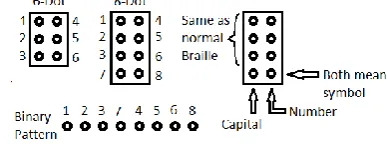
An eight dot Braille system was chosen for the design as it encompasses all the character details in a single cell and is more suited to the application. The extra dots would indicate if the character is an uppercase or lowercase letter, number or a symbol. Fig 3 explains how the extra dots encompass the extra details.
Figure 3. Braille Pattern
[image:3.595.332.526.556.628.2]including alphabets, numbers and symbols were stored in a list called “alphabet”. The SD was configured according to the Adafruit’s specification for connecting with mega2560, found on their website along with the SD libraries [7]. The code was developed to read a .txt file from the microSD card and store the text in a variable “input”.
The actual translation is performed in the main loop which can be seen in Fig 4. The following are the steps taken by the code to translate the text:
for loop - select the first dot
while loop - if “alphabet” is not equal to “input” at position “letter” then increment “x” to change the position in alphabet list. The while loop continues until the statement is true. It uses indexing to match characters to Braille pattern
digitalWrite – write the value from the pattern at position “x” to dot
if - if the value of “letter” is equal to length of input string then reset “letter” to 0
else - increment value of “letter”
[image:4.595.41.291.166.436.2] delay – wait for 2 seconds. Then repeat the process for the rest of the dots
Figure 4. Main code
Arduino has a serial monitor feature which allows for feedback from the code to be displayed in a serial monitor on the computer when the Arduino is running the code, while connected to the USB, to help with debugging. This feature was enabled and set to give feedback on the progress of initializing the SD card and reading of the data.
B. Hardware Design
The EBDR requires text in Braille format to be actuated on a finger. The Braille pattern received from the Arduino is in the form of eight pins at a state high or low, each pin representing a dot. Each actuator was connected to the output pins on the Arduino.
Many actuators which are capable of actuating the Braille dots were reviewed [8-14]. Unfortunately most of the actuators ideal for the device are currently still in development and require refinements until they are available to be deployed. Other actuators are too large to be arranged in a Braille formation or are too expensive to acquire to experiment.
To test the feasibility of the EBDR a Braille module is required which can actuate the pattern to be felt by a finger. For this test the overall compact form factor of the Braille module is not required except that the Braille dots fit within the standard cell dimensions.
Nitinol wire, an alloy of nickel and titanium, is a popular form of shape memory alloy which contracts when current is passed through but requires an opposing force to pull it back when cooled. In different configurations it can be used as an actuator. As the Nitinol wire is inexpensive and is readily available, it was chosen to build the actuator. The Nitinol wire is available in different lengths and thicknesses. The difference in thickness affects the speed and strength of the actuation. The thicker the wire, the more force it can exert but at a slower rate. However, the thinner the wire the faster the actuation, but with a loss of force. Nitinol wire with a diameter of 0.5mm was chosen to design the actuator due to its fast switching ability.
[image:4.595.331.531.252.349.2]The most basic configuration with the wire in series with a spring gives about 3% movement of the wire [10]. A more complex configuration as shown in Fig 5 can yield movement of up to 14% of the wire’s length was chosen for the actuator design.
Figure 5. Nitinol actuation configuration
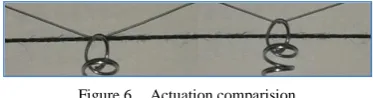
This configuration gives sufficient movement required for the Braille pins. The following Fig 6 shows the amount of movement as a comparison between the relaxed and activated Nitinol wire.
Figure 6. Actuation comparision
The configuration was used to design the actuator to push a pin up. Extra attention was given to minimise the size of the actuator as it would be multiplied eight times for the Braille cell. The spring was moved up inside the triangle created by the wire to minimise the size and as the springs are compression springs taken from pens, the springs gave a better performance of keeping the nitinol wire under tension by pushing instead of pulling. The following Fig 7 shows an actuator fully assembled.
Figure 7. Final actuator design
[image:4.595.339.526.421.470.2] [image:4.595.314.552.584.674.2]seconds. To reset the actuator, the power is switched off at which point the wire starts to cool and the spring pushes it back into shape. The cooling period is considerably longer and can be in excess of 1 second. To reduce the reset time a stronger opposing force can be applied but that requires more power to actuate and overcome the force. It also increases the likelihood of the Nitinol wire breaking due to excess stress. Another way is to help the wire dissipate heat quicker by using a fan to create airflow around the Nitinol wire. A small fan scavenged from a computer was used to cool the Nitinol wire, which reduced the reset time to less than a second.
The finalized design of the actuator was then replicated another seven times, and was built on Plexiglas plates. In the chosen design the actuator spans horizontally so the four pins in the Braille cells can easily be stacked on top of each other. But the two columns are forced apart due to the size of the actuator which spans about 9cm from one end of the Nitinol wire to the other. To overcome this the actuators were divided into two columns and each column was built on a different level, with the pins of the bottom column being longer so they extend through to the same height as the tip of the top level. The actuators on the top level were offset at 45 degrees so that the pins coming through from the bottom level don’t make contact with the Nitinol wire. There is a gap of 4cm between the top and bottom plates for the actuators.
[image:5.595.342.520.192.310.2]The Nitinol wire was anchored to the plates by feeding it through pre-drilled holes and then inserting screws in to the hole. Electrical connection with the Nitinol wire was made by attaching a wire to the screw securing each end of the Nitinol wire. One end of the Nitinol wire for all the actuators was connected together and grounded. Power was applied to the other side to activate each actuator. The following Fig 8 shows the bottom and side view of both plates with the assembled actuators.
Figure 8. Actuators assembled together
The Nitinol wire requires a considerable amount of current to actuate the required amount. Approximately 500mA is required to actuate each actuator at the desired speed. To prevent the pins on the Arduino from being damaged, transistors were used to power the actuators. The transistors were used as a switch to direct power from the battery to the Nitinol wire. NPN Darlington pair transistors TIP122 were used, as they are able to handle the large current flow. Push-to-make switches were also connected to the end of the Nitinol to bypass the transistor for manual control as seen in Fig 9.
Figure 9. Transistor Connections
IV. EVALUATION OF RESULTS
The individual modules of the EBDR, and the fully assembled EBDR prototype were tested using multiple inputs. The output results were recorded for further comparison and analysis.
A. Arduino
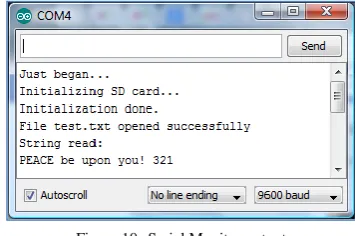
To test the Arduino’s code firstly a .txt file was saved in the microSD card with the text “PEACE be upon you! 321” and the microSD card inserted into the device. When the Arduino ran the serial monitor confirmed the successful initialization of the SD card and displayed the text. The following Fig 10 shows the serial monitor output.
Figure 10. Serial Monitor output
An LED module was built with eight LEDs arranged in Braille formation to test the output from the EBDR. Each LED was connected to one of the output pins instead of the actuators. The LEDs successfully displayed the text in Braille patterns. The following Fig 11 shows the Braille pattern displayed on the LEDs in sequence.
Figure 11. Output to LED’s
B. Actuators
The actuators were tested by actuating each one manually using the push-to-make switches. Individually they all worked fine so then they were actuated in combination as in a Braille pattern. They actuated satisfactorily although the time to actuate fully increased as the number of dots increased. This was because the actuators had to share the power supplied between them.
The actuators also varied slightly in the amount of actuation so the heights of all the dots were slightly different. This was due to the differences in the Nitinol wire and the tension on the spring.
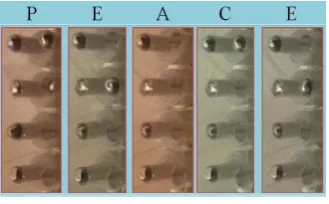
[image:5.595.328.518.400.476.2] [image:5.595.53.277.427.535.2]Figure 12. PEACE actuated by Braille pins
C. System Testing
Our system was tested using volunteers who were partially sighted or blind. The volunteers chosen to test the EBDR read the text by touch alone. They were not able to read at first but after a few attempts they got used to the system and were able to read the text although at a very slow rate. After about 15 to 20 minutes of practice their reading speed increased although still considerably lower their usual reading speeds.
Random patterns were actuated using manual switches. The volunteers were asked to indicate active dots positions to ensure they were not inferring the text from the context. The volunteers managed to read correctly 50% of randomly generated patterns.
There were number of issues related to the condition of the Nitinol wires. On some of the actuators wires were tight and the tips of the pins were slightly protruding at the resting position. In case of wires being slack, the pins were hanging below the resting position and would only protrude a little when actuated.
When actuated the pins protruded at different lengths generating an uneven pattern. This caused a great deal of difficulty to the volunteers when determining which dots were active. The actuators generating larger displacement were preferred in laboratory tests. However, when user tested the volunteers commented that large protrusion of pins irritates finger tips. After some time of use, one of the actuator could not be retracted and would always protrude slightly which the user sometime mistook for a dot. The actuators did not perform as expected due to the properties of Nitinol wires.
The Nitinol actuators were assembled ensuring that the wires were tight and pushing against the springs. When power was initially applied to a wire, it was stretched slightly and in some cases the wire became too loose and required tightening. The loosening of the wires was a problem encountered again after prolonged use of the actuators. If the actuators were actuated for some time, the wires would overheat and the opposing tension on the springs would stretch it. The cooling fan minimized this problem. After repeated use, the wires stretched and were too loose against the springs, hence they could not generate required displacement of the pins (dots) consistently. Repeated stretching reduced wire thickness and caused it to break when actuated. The actuators were not performing consistently and required readjustments or replacement of Nitinol wires. All above limiting factors of the Nitinol wire restricted the use of Nitinol for Braille cell actuators.
V. CONCLUSION
A prototype of an Electronic Braille Document Reader was developed. It is capable of reading text in Latin alphabet from
SD memory card and actuating the text in Braille form which could be read by blind person by placing a finger on a Braille cell.
The EBDR proved the concept that Braille could be read from a single Braille cell. It converted ASCII characters from the text stored onto SD card into Braille patterns. These patterns were actuated on a single finger instead of the finger sliding across an already formed Braille pattern. The EBDR is small, portable, single cell device. It will give blind the ability to take away large selection of electronic texts stored on a SD card and read on the move. The single cell design of the EBDR also means that the overall cost of the device would be considerably less than refreshable Braille displays which require many cells to display a line of text. It could give blind access to unlimited literature at a reasonable price of a few hundred pounds. The benefits gained would transform reading for blind and encourage it amongst the young.
Further development would be required before the device would be ready for common use, such as improving User Interface, and selecting more suitable actuators.
VI. FURTHER WORK
The work done thus far has been sufficient to prove the concept of a single cell Braille Electronic Document Reader. To develop it to a usable device, further work is required.
The code needs further development to incorporate extra functionality, such as being able to scroll through a list of books and select one to open and read. A book marking feature, to save the position in a book, would also be required. Other features such as being able to skip words, lines or paragraphs and adjusting the speed of reading would also be essential to improve the usability of the device. Further research and testing would need to be carried out with blind users, to determine what would be the best and most intuitive method of navigating through the devices menus.
The software could be further developed to include Braille in different languages, including languages with non-Latin script such as Arabic and Chinese.
The actuators require a great deal of work as the actuators used in the prototype, are not appropriate for use in a Braille cell. Better actuators either need to be developed or acquired from researchers working on new actuating materials and devices.
The EBDR also needs to be more ergonomic and comfortable for users to use for long term reading.
[image:6.595.81.246.53.155.2]Figure 13. Braille on a conveyor
The conveyor design would overcome some of the deficiencies of a single cell design while still providing the same benefits to the user. It would give blind access to limitless literature and freedom to carry it around with them. The additional cells and apparatus for the conveyor design would increase the cost, but the additional cells would also mean the user can easily pause the text and slide a finger back and forth to re-read a word if required, making it easy to go back to start of the word. This new development in the EBDR design would require extensive testing and evaluation to determine a model best suited to the needs of blind users.
ACKNOWLEDGMENT
The first author would like to thank the volunteers from the Society for Blind in Dewsbury, and the Imam at the University of Huddersfield Faith Centre, for their time and expertise in testing the EBDR device.
REFERENCES
[1] R. E. Donovan, “A new distance measure for costing spectral discontinuities in concatenative speech synthesizers,” in 4th ISCA Tutorial and Research Workshop (ITRW) on Speech Synthesis, 2001.
[2] “Technology gets disabled-friendly,” BBC, 30-Jun-2010.
[3] “New Focus 40 Blue Wireless Braille Display for the Visually Impaired by Freedom Scientific.” [Online]. Available: http://www.freedomscientific.com/products/fs/focus-40-blue-new-product-page.asp.
[4] “Focus 40 Blue Braille Display - Sight and Sound Technology.”
[Online]. Available:
http://www.sightandsound.co.uk/shop/products.php?product=Focus-40-Blue-Braille-Display.
[5] W. Michael, V. Gnanakumaran, and D. Goldreich, “Tactile Spatial Acuity Enhancement in Blindness: Evidence for Experience-Dependent Mechanisms,” The Journal of Neuroscience, p. 10, May 2011.
[6] RNIB, “2011_06_use_of_braille_displays.doc.” [Online]. Available: www.rnib.org.uk/aboutus/.../2011_06_use_of_braille_displays.doc. [7] “Micro SD card Tutorial - using SD cards with an Arduino!” [Online].
Available: http://www.ladyada.net/products/microsd/.
[8] New Scale Technologies, “SQUIGGLE micro motors for OEMs - SQL-1.8,” http://www.newscaletech.com/doc_downloads/Design-World-Mechatronics-Article-10-2010.pdf. [Online]. Available: http://www.newscaletech.com/motorsforoem.html.
[9] J. T. Leinvuo, S. A. Wilson, and R. N. Whatmore, “Flextensional ultrasonic motor using the contour mode of a square piezoelectric plate,” Ultrasonics, Ferroelectrics and Frequency Control, IEEE Transactions on, vol. 51, no. 8, pp. 929–936, 2004.
[10] “core.form-ula Shape Memory Alloy.” [Online]. Available: http://www.core.form-ula.com/page/23/?s=rem.
[11] Y. Kato, T. Sekitani, M. Takamiya, M. Doi, K. Asaka, T. Sakurai, and T. Someya, “Sheet-Type Braille Displays by Integrating Organic Field-Effect Transistors and Polymeric Actuators,” IEEE Transactions on Electron Devices, vol. 54, no. 2, pp. 202 –209, Feb. 2007.
[12] T. Sugino and K. Asaka, “Fully plastic actuators based on ionic-liquid-based bucky-gels and their applications to Braille display,” in SICE Annual Conference (SICE), 2011 Proceedings of, 2011, pp. 1696–1697. [13] Cedrat, “Bi-stable Linear Moving Magnet BLMM.” [Online]. Available:
http://www.cedrat.com/fileadmin/user_upload/cedrat_groupe/Technolog ies/Actuators/Magnetic%20actuators%20%26%20motors/fiche_BLMM/ Bi-stableLinear_Moving_Magnet_BLMM_01.pdf.
[image:7.595.116.210.54.167.2]