Int. J. Advanced Networking and Applications
Volume: 05 Issue: 01 Pages:1853-1857 (2013) ISSN : 0975-0290
1853
Remote Access using Remote Frame Buffer
Protocol based on Virtual Network Computing
Architecture in Mobile Cloud
Maddali M. V. M. KumarAssistant Professor, Department of MCA, St. Ann’s College of Engineering & Technology, Chirala, India. Email ID: [email protected]
---ABSTRACT------ ---Mobile Cloud Computing is the emerging area with the usage of Cloud Computing in mixture with mobile devices. The principle of mobile cloud computing physically splits the user interface from the application logic. Although they suffer from intrinsic resource limitations, mobile devices have become very prevalent. Mobile cloud computing provides a elucidation to come across the intensifying functionality demands of end-users, as all application logic is proficient on reserved servers and only user interface functionalities reside on the mobile device. The mobile device turns as a remote display, taking user input and translation the display updates acknowledged from the reserved server. The key challenge for mobile cloud computing is the boundaries inherent to the mobile devices like processing power, memory, network bandwidth and storage capacity as compared to a fixed device like PC, and short battery lifetime and interaction latency present additional major challenges for the remote display on mobile devices of cloud applications. In this paper a number of adequate solutions that have been suggested to tackle the main issues accompanying with the remote display on mobile devices of cloud facilities.
Keywords - Mobile Cloud, Proxy, RFB Protocol, Smart VNC, WNIC
‐‐‐‐‐‐‐‐‐‐‐‐‐‐‐‐‐‐‐‐‐‐‐‐‐‐‐‐‐‐‐‐‐‐‐‐‐‐‐‐‐‐‐‐‐‐‐‐‐‐‐‐‐‐‐‐‐‐‐‐‐‐‐‐‐‐‐‐‐‐‐‐‐‐‐‐‐‐‐‐‐‐‐‐‐‐‐‐‐‐‐‐‐‐‐‐‐‐‐‐‐‐‐‐‐‐‐‐‐‐‐‐‐‐‐‐‐‐‐‐‐‐‐‐‐‐‐‐‐‐‐‐‐‐‐‐‐‐‐‐‐‐ Date of Submission: June 08, 2013 Date of Acceptance: August 13, 2013 ‐‐‐‐‐‐‐‐‐‐‐‐‐‐‐‐‐‐‐‐‐‐‐‐‐‐‐‐‐‐‐‐‐‐‐‐‐‐‐‐‐‐‐‐‐‐‐‐‐‐‐‐‐‐‐‐‐‐‐‐‐‐‐‐‐‐‐‐‐‐‐‐‐‐‐‐‐‐‐‐‐‐‐‐‐‐‐‐‐‐‐‐‐‐‐‐‐‐‐‐‐‐‐‐‐‐‐‐‐‐‐‐‐‐‐‐‐‐‐‐‐‐‐‐‐‐‐‐‐‐‐‐‐‐‐‐‐‐‐‐‐‐
I.INTRODUCTION
M
obile Cloud Computing (MCC) is a combination between mobile network and cloud computing, thereby providing optimal services for mobile users. In mobile cloud computing, powerful configuration is not needed in mobile devices since all the data and difficult computing modules can be dealt with in the clouds. Mobile Devices like Smartphone, Tablet PCs are progressively increasing a vital part of human life as the most effective and proper communication tools which do not have constrain of time and place. Mobile users accumulate rich knowledge of various services from mobile applications such as iPhone Apps, Google Apps, etc., which run on the devices and/or on remote servers via wireless networks. The rapid improvement of Mobile Cloud Computing grow into a dominant development in the IT technology as well as commerce and industry fields.However, the mobile devices are facing many challenges in their resources (e.g., battery life, storage, and bandwidth) and communications (e.g., mobility and security) [2]. The limited resources ominously impede the heightening of service qualities. Mobile Cloud at its humblest states to an infrastructure where both the data storage and the data processing occur outside of the mobile device. Mobile cloud applications transmit the computing power and data storage left from mobile phones and into
the cloud, receiving applications and mobile computing to not just smartphone users but a much broader range of mobile subscribers. Mobile Cloud as a new paradigm for mobile applications whereby the data processing and storage are relocated from the mobile device to strong and federal computing platforms located in clouds. These integrated applications are then retrieved over the wireless connection based on web browser or a thin native client on the mobile devices.
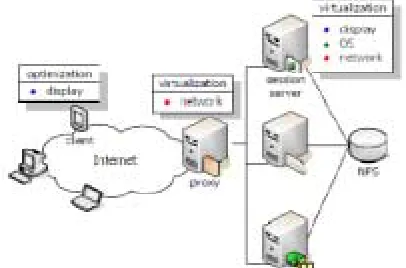
Figure 1: Mobile Desktop Architecture
II. STRUCTURE OF VNC
Int. J. Advanced Networking and Applications
Volume: 05 Issue: 01 Pages:1853-1857 (2013) ISSN : 0975-0290
1854
consecutively on one or more remote computers, a Smart VNC (SVNC) proxy, and a Smart VNC onlooker on a cellular phone. A VNC server directs remote desktop shows as bitmap images in RFB protocol. A SVNC proxy converts (crops, shrinks and resample) the display image and then transmits the renewed image to a SVNC viewer in response to a user request that was received from that SVNC viewer. The transfer is performed in this Compact RFB (CRFB), streamlined RFB protocol. Then, the SVNC viewer displays the transferred images. Key events received by the SVNC viewer are transmitted to a SVNC proxy that coverts them and sends them to the server. When the user first tries to connect to a remote computer, he must specify his user name and password for confirmation as well as the host name of the computer that is running a VNC server. If confirmation succeeds, the SVNC proxy creates a session with the VNC server and the SVNC viewer starts user services. To suppress network traffic, encoding is amended depending on contexts.
Figure 2: Smart VNC Proxy
However, while the user is handling the remote desktop access such as scrolling and touching the showing device, the display images are grey-scaled to decrease the number of bytes essential to encode the image. Only an onlooker component is implemented on the mobile device, operating as a remote display for the applications running on reserved servers in the cloud. Any remote display framework is composed of three components: a server side element that intercepts encodes and transmits the application graphics to the client, a viewer element on the client and a remote display protocol that transfers display updates and user events between both end points.
III.APPLICATIONS OF VNC
VNC has a widespread range of applications together with system administration, IT support and help desks. It can also be used to provision the mobile user both for hot desking within the enterprise and also to provide remote access. The system permits several connections to the same desktop, in case a priceless tool for joint or shared working in the place of work or classroom.
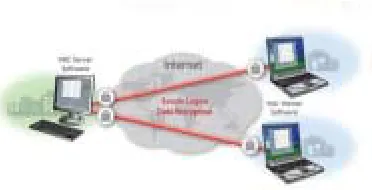
Figure 3: VNC Application Model
Higher version of industry-standard VNC is Enterprise Edition developed for use in business atmosphere and across the Internet. Premeditated and built from the ground up by the innovative inventors of VNC, Enterprise Edition provides robust and straightforwardly administered security with a slightest of fuss.
IV. PROBLEM STATEMENT
Int. J. Advanced Networking and Applications
Volume: 05 Issue: 01 Pages:1853-1857 (2013) ISSN : 0975-0290
1855
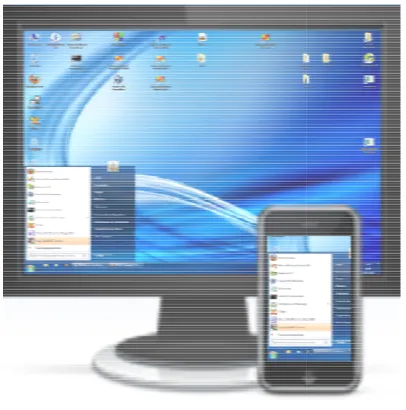
Figure 4: Mobile Access thru VNC Architecture 4.1 RFB Protocol
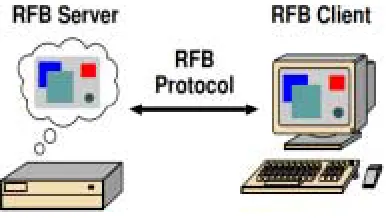
Remote Frame Buffer (RFB) is a humble protocol for remote access to GUI because it works at the frame buffer level. It is appropriate to all Windows applications. RFB is the protocol used in VNC the remote end point where the user sits (i.e. the display plus keyboard or pointer) is called the RFB client or viewer. The frame buffer originates like windowing system and applications from the end point where alterations are known as the RFB server.
Figure 5: Remote Frame Buffer (RFB)
Although RFB started as a moderately simple protocol, it has been enriched with added features (such as file transfers) and more refined firmness and security techniques as it has established seamless cross-compatibility maintaining between the various altered VNC client and server enactments. The best RFB version is used the clients and servers to exchange a connection and the most suitable firmness and safety possibilities that they can both support.
4.2 Display Protocol
The display side of the protocol is based all over the place a single graphics primitive: “put a rectangle of pixel data at a given x & y position”. A classification of these rectangles makes a frame buffer update (or si mpl y update). An update signifies a modification from one valid frame buffer state to another. The rectangles in an update are usually disjoint but this is not necessarily the case. The protocol update is demanded by the client that is server sent an update is only to the client in reply to an obvious entreaty from the client. This gives the adaptive quality protocol. The slower the client and the network are, the lower the rate of updates develops. With typical applications, changes to the same area of the frame buffer tend to happen soon after one another.
4.3 Input Protocol
The input side of the protocol is built on a multi-button pointing device and standard model of a keyboard. Input events are humbly sent to the server by the client every time the pointing device is moved or every time the user presses a pointer button or a key. These input events can also be fused from other non-standard I/O devices. For example, a pen-based handwriting recognition engine might make keyboard events.
4.4 Pixel Data Representation
Preliminary communication between the RFB client and server implicates a conciliation of the layout and encoding with which pixel data will be sent. This conciliation has been deliberated to make the job of the client as easy as possible. The lower most stroke is that the server must at all times be able to supply pixel data in the form the client wishes. However, if the client is able to cope equally with several different layouts or encodings, it may elect one which is easier for the server to produce. The furthermost shared pixel layouts are 16-bit or 24-bit ‘true color’, where bit fields within the pixel value interpret directly to Red, Green and Blue intensities and 8-bit color map where an indiscriminate mapping can be used to interpret from pixel values to the RGB intensities. Encoding refers to how a rectangle of pixel data will be sent on the wire. The encoding types defined at present are Raw, RRE, CopyRect, ZRLE and Hextile. In exercise we generally use only the ZRLE, Hextile and CopyRect encodings from the time when they provide the finest firmness for typical desktops.
Int. J. Advanced Networking and Applicatio Volume: 05 Issue: 01 Pages:1853-1857 (
released as open source, the RFB descripti the web. Subsequently, RFB has been a free everyone can use. In 2002, Olivetti Resea was closed due to some of the crucial peop VNC and RFB established RealVNC L improvement of VNC and to conserve the R
V. USER INTERFACES ON MOBILE
The following steps give a description methodology and the Figure. 6 shows snapsh viewer as the user is accessing the deskto Windows system. Currently displayed area called the viewport.
Figure 6: VNC Viewer 5.1 Process Methodology
5.1.1 The VNC server PC is run, whic to the Internet.
5.1.2 The mobile having GPRS is acti used for viewing other PCs, which is con Server. In this case the PC will act mobile act as client. Connection happen Area Network.
5.1.3 Using J2ME Wireless Tool-Ki checks PC, which is to be viewed, and i IP address and password for authenticatio 5.1.4 After authentication if the IP a PC is valid, it will connected to the ser view the PC using the mobile and if it connection will not happen.
5.1.5 After connecting the PC to the operations of the PC can be perform mobile. For example opening a file, dele paste
ons
2013) ISSN : 0975-0290
on available on protocol which arch Laboratory ple at the rear of Ltd to endure RFB protocol.
of the process hot of the VNC op of a remote of the desktop
ch is connected
ivated which is nnected to VNC
as Server and s through Wide
it, the mobile it will check its on.
address of the rver and we can
is not valid the
server, all the med using the eting, cut, copy,
5.2 VNC Servers
Inscription a VNC server is sli inscription a client for a number of c is envisioned to make the client as hu it is habitually up to the server indispensable conversions. For exampl provide pixel data in the layout the cli machine can run a sum of XVNC se users, each of which signifies a dis Each VNC desktop is identical a virtu root window on which numerous be displayed. The Windows Server (i slight more problematic to create, fewer places to insert hooked on the display updates, and a less clearly we multi-user procedure. The current se the real display to a remote client, wh server is not 'multi-user'. It does, h foremost user of a PC with remote acc Also create humble servers, which pro than desktops using a simple toolkit. A for example, makes a CD player user protocol straightly without any refer system or frame buffer. Such serve humble hardware, and can be retriev normal viewers.
5.3 VNC Clients
Inscription a VNC viewer is a simpl for any thin-client machine. It ne trustworthy transport (generally TCP/ displaying pixels (either directly insc buffer, or going through a window includes the original RFB client (Vid client (which runs on Linux, Digita workstations), a Win32 client, whi Family, a Macintosh client, and a Jav on any Java – enabled web browser. 5.4 Panning & Zooming
The user can move the viewport horiz The viewport can be widened (zoom out) and narrowed (zoom in) to see the display VI. CONCLUSION &FUTURE WOR
By physically separating the user application logic, the principle of mob allows to access even the most deman the cloud f r o m intrinsically resource devices. In this paper, surveyed co display optimization techniques unam to the short mobile device battery lifeti imperfect bandwidth accessibility on the interaction latency. Although each adequately addresses specific challeng
1856
ightly tougher than causes. The protocol umble as possible, so r to execute any le, the server need to ient wants. A UNIX ervers for dissimilar tinct VNC desktop. ual X display, with a
X applications can i. e. Win VNC) is a because there are e system to monitor ell-defined model of erver humbly mirrors hich means that the however, provide the cess to their desktop.
oduce displays other A "VNC CD player", r interface using the ence to a windows rs can run on very ed from any of the
le job, as it should be ecessitates only a /IP), and a way of cription to the frame wing system). This deotile), an X-based al Unix and Solaris ich runs on Win va client, which runs
zontally and vertically. to browse its contents y in greater detail.
RK
interface from the bile cloud computing
nding applications in e-constrained mobile ontemporary remote mbiguously tailored
Int. J. Advanced Networking and Applicatio Volume: 05 Issue: 01 Pages:1853-1857 (
computing, an overall approach is currently Future work should therefore be enth design of a global framework, incorpo accessible solutions and inspiring the m solutions reliant on the current device, netw server status. Implementation extending to frame rate, to incorporate more smart tr provide integrated panning and zooming of to shorten basic operations, apply sp instinctive zooming to provision increment t h e VNC viewer image. The same RFB p used for the datatransfer. The VNC architect for execution of the system. This system mobility for users for governing their compute internet. More conveniences and features applications running on remote desktop handheld devices will be provided. Thus the of this system will prove to be helpful in pro and accessing the remote desktop over the inte REFERENCES
[1.] Guan, Le; Ke, Xu; Song, M Junde,”IEEE A Survey of Resear Cloud Computing” pp : 387 – 392, M [2.] Pieter Simoens, Filip De Turck
Dhoedt member, Piet Deme “IEEE Remote Display Solution for Computing” Vol: 44 ,pp : 46 - 53 ,Au [3.] D. Kovachev, D. Renzel, R.
Y . Cao, "Mobile community clou emerges and evolves," Proc. 1st Intl Mobile Cloud Computing (in conjunc Intl. Conf. on Mobile D a t a M ( MDM’ 10), K a n s a s , MO, 2010, pp [4.] Mahadev Satyanarayanan, “Mobile C next decade” Proc. 11th Intl. Conf. o Management (MDM’10), Kansas, MO [5.] G. Huerta-Canepa a n d D . Lee, cloud computing provider for mobi Proceedings of the 1st ACM Works Cloud Computing & Services: Social Beyond (MCS), no. 6, 2010. [6.] Y. Sun and T. T. Tay, “Analysis an
data spikes in thin client computin Parallel and Distributed Computing, pp. 1463–1472, NOV 2008.
[7.] P. Simoens, F. A. Ali, B. Van Deboosere, F. De Turck, B. Dhoedt and R. Torrea- Duran, “Cross-Laye of Radio Sleep Intervals to Increas Energy Efficiency,” IEEE Communic vol. 14, no. 12, pp. 1095–1097,DEC [8.] H. Kawashima, K. Koshiba, K
K. Futamura, M. Enomoto, and “Virtual PC - type thin client Technical Journal, vol. 2, no. 3, p 2007.
ons
2013) ISSN : 0975-0290
lacking. husiastic to the
orating all the ost appropriate work and cloud o speed up the iangulation, to f the view port, peed-dependent tal apprising of protocol will be ture will be used m will provide
er desktops over s for accessing p from mobile extended scope oviding mobility
ernet.
Meina; Song, rch on Mobile May 2011.
member,, Bart eester Fellow,
r Mobile Cloud ug 2011.
Klamma, and ud computing: l. Workshop on ction with) 11th M a n a g e m e n t
p. 393-395. Computing: The
on Mobile Data O, 2010.
, “A virtual le devices,” in shop on Mobile l Networks and nd reduction of ng,” Journal of
vol. 68, no. 11, nkeirsbilck, L. , P. Demeester, er Optimization se Thin Client cations Letters,
2010.
K. Tuchimochi, M. Watanabe, system,” NEC pp. 42–47, SEP
[9.] A. Rudenko, P. Reiher, G. Kuenning “Saving portable com through remote process execu Mobile Computer Commun.” Re 26.
Authors Biography
Maddali M. V. M. K Master of Technol Science & Engineeri Nehru Technolog Kakinada. Present h Assistant Professor MCA, St. Ann’s Col & Technology, Andhra Pradesh and Industrial and 8.5 Years Teaching Exp Member in CSI & ISTE. He has pub National, International Conferences research focuses on the Mobile and Network Security.
1857
J. Popek, G. H. mputer battery power
ution SIGMOBILE ev., 2 (1998), pp. 19–
Kumar received his logy in Computer ing from Jawaharlal gical University he is working as an
in Department of llege of Engineering d having 1.8 Years
erience, He is a Life blished 05 papers in and Journals. His