Air Force Institute of Technology
AFIT Scholar
Theses and Dissertations Student Graduate Works
3-22-2019
Evaluating Machine Learning Techniques for Smart
Home Device Classification
Angelito E. Aragon Jr.
Follow this and additional works at:https://scholar.afit.edu/etd
Part of theDatabases and Information Systems Commons, and theInformation Security Commons
This Thesis is brought to you for free and open access by the Student Graduate Works at AFIT Scholar. It has been accepted for inclusion in Theses and Dissertations by an authorized administrator of AFIT Scholar. For more information, please [email protected].
Recommended Citation
Aragon, Angelito E. Jr., "Evaluating Machine Learning Techniques for Smart Home Device Classification" (2019).Theses and Dissertations. 2242.
EVALUATING MACHINE LEARNING TECHNIQUES FOR SMART HOME DEVICE CLASSIFICATION
THESIS
Angelito E. Aragon Jr., Captain, USAF
AFIT-ENG-MS-19-M-006
DEPARTMENT OF THE AIR FORCE AIR UNIVERSITY
AIR FORCE INSTITUTE OF TECHNOLOGY
Wright-Patterson Air Force Base, OhioThe views expressed in this document are those of the author and do not reflect the official policy or position of the United States Air Force, the United States Department of Defense or the United States Government. This material is declared a work of the U.S. Government and is not subject to copyright protection in the United States.
AFIT-ENG-MS-19-M-006
EVALUATING MACHINE LEARNING TECHNIQUES FOR SMART HOME DEVICE CLASSIFICATION
THESIS
Presented to the Faculty
Department of Electrical and Computer Engineering
Graduate School of Engineering and Management
Air Force Institute of Technology
Air University
Air Education and Training Command
In Partial Fulfillment of the Requirements for the
Degree of Master of Science in Cyber Operations
Angelito E. Aragon Jr., B.S.C.E.
Capt, USAF
March 2019
DISTRIBUTION STATEMENT A.
AFIT-ENG-MS-19-M-006
EVALUATING MACHINE LEARNING TECHNIQUES
FOR SMART HOME DEVICE CLASSIFICATION
Angelito E. Aragon Jr., B.S.C.E. Capt, USAF
Committee Membership:
Barry E. Mullins, Ph.D., P.E. Chair
Brett J. Borghetti, Ph.D. Member
Timothy H. Lacey, Ph.D., CISSP Member
AFIT-ENG-MS-19-M-006
Abstract
Smart devices in the Internet of Things (IoT) have transformed the management of
personal and industrial spaces. Leveraging inexpensive computing, smart devices enable
remote sensing and automated control over a diverse range of processes. Even as IoT
devices provide numerous benefits, it is vital that their emerging security implications are
studied. IoT device design typically focuses on cost efficiency and time to market, leading
to limited built-in encryption, questionable supply chains, and poor data security. In a 2017
report, the United States Government Accountability Office recommended that the
Department of Defense investigate the risks IoT devices pose to operations security,
information leakage, and endangerment of senior leaders [1].
Recent research has shown that it is possible to model a subject’s pattern-of-life
through data leakage from Bluetooth Low Energy (BLE) and Wi-Fi smart home devices
[2]. A key step in establishing pattern-of-life is the identification of the device types within
the smart home. Device type is defined as the functional purpose of the IoT device, e.g.,
camera, lock, and plug. This research hypothesizes that machine learning algorithms can
be used to accurately perform classification of smart home devices.
To test this hypothesis, a Smart Home Environment (SHE) is built using a variety
bulbs, cameras, and smart plugs using Wi-Fi. In addition, a device classification pipeline
(DCP) is designed to collect and preprocess the wireless traffic, extract features, and
produce tuned models for testing. K-nearest neighbors (KNN), linear discriminant analysis
(LDA), and random forests (RF) classifiers are built and tuned for experimental testing.
During this experiment, the classifiers are tested on their ability to distinguish
device types in a multiclass classification scheme. Classifier performance is evaluated
using the Matthews correlation coefficient (MCC), mean recall, and mean precision
metrics. Using all available features, the classifier with the best overall performance is the
KNN classifier. The KNN classifier was able to identify BLE device types with an MCC
of 0.55, a mean precision of 54%, and a mean recall of 64%, and Wi-Fi device types with
an MCC of 0.71, a mean precision of 81%, and a mean recall of 81%. Experimental results
provide support towards the hypothesis that machine learning can classify IoT device types
Acknowledgements
To my family and friends: thank you for your unfailing support and encouragement
throughout this journey. I would not be where I am today without you.
To my advisor, Dr. Mullins: thank you for your mentorship throughout my time
here in AFIT. Your door was always open whenever I needed guidance.
To Dr. Borghetti, Dr. Lacey, and all AFIT faculty: thank you for sharing your time
and knowledge with me. I am grateful that I had the opportunity to learn so much from
your expertise and experience.
Table of Contents
Page
Abstract ... i
Acknowledgements ... iii
List of Figures ... vii
List of Tables ...x
I. Introduction ...1
1.1 Background ...1
1.2 Problem Statement ...1
1.3 Hypothesis and Research Goals ...2
1.4 Approach ...3
1.5 Assumptions/Limitations ...3
1.6 Contributions ...3
1.7 Thesis Overview ...4
II. Background and Related Research ...5
2.1 Overview ...5
2.2 Wi-Fi ...5
2.3 Bluetooth Low Energy ...6
2.3.1 BLE Link-Layer States ... 10
2.3.2 BLE Packet Structure ... 12
2.3.3 Creating Connections ... 15 2.3.4 Sending Data ... 17 2.3.5 Attributes ... 19 2.3.6 Security ... 23 2.4 Machine Learning ...24 2.4.1 Classification Algorithms ... 26 2.5 Related Work ...27 2.6 Terminology ...31 2.7 Background Summary ...32
III. System Design ...33
3.1 Overview ...33
3.2 Smart Home Environment (SHE) ...33
3.2.1 Controller ... 33
3.2.2 Wi-Fi Devices ... 34
3.2.3 BLE Devices ... 35
3.2.4 Device Actions ... 36
3.2.5 Device Location and Setup ... 37
3.3 Device Classification Pipeline (DCP) ...42
3.3.2 Data Collection ... 44
3.3.3 Data Preprocessing ... 49
3.3.4 Model Tuning ... 57
3.4 Data Exploration ...60
3.4.1 BLE Data Exploration ... 61
3.4.2 Wi-Fi Data Exploration ... 65
3.5 Design Summary ...68
IV. Methodology ...69
4.1 Problem/Objective ...69
4.2 System under Test ...69
4.2.1 Assumptions ... 70
4.3 Response Variables ...70
4.4 Performance Metrics ...73
4.4.1 Matthews Correlation Coefficient (MCC) ... 73
4.4.2 Mean Precision ... 74 4.4.3 Mean Recall ... 74 4.4.4 High Performance ... 75 4.5 Control Variables ...76 4.6 Uncontrolled Variables ...76 4.7 Parameters ...77 4.8 Factors ...79 4.9 Experimental Design ...80 4.10 Methodology Summary ...81
V. Results and Analysis ...82
5.1 Overview ...82
5.2 BLE Classifier Performance ...82
5.2.1 BLE Full-featured Classification ... 82
5.2.2 BLE Best-Features Classification ... 87
5.2.3 BLE Classification Analysis ... 88
5.3 Wi-Fi Classifier Performance ...91
5.3.1 Wi-Fi Full-featured Classification ... 91
5.3.2 Wi-Fi Best-features Classification ... 94
5.3.3 Wi-Fi Classification Analysis ... 95
5.4 Results Summary ...101 VI. Conclusion ...103 6.1 Overview ...103 6.2 Research Conclusions ...103 6.3 Research Significance ...105 6.4 Future Work ...105
Appendix C. Experimental Procedure ...116
Appendix D. Multiclass BLE Classification ...117
Appendix E. Multiclass Wi-Fi Classification ...123
Appendix F. Classification Analysis Graphs ...130
List of Figures
Figure Page
1. Wi-Fi Frame Fields [5] ... 6
2. BLE Architecture [6] ... 9
3. BLE Channel Map [6] ... 10
4. BLE States [6] ... 10
5. BLE Link-Layer Packet Structure [6] ... 12
6. BLE Data Packet ... 15
7. BLE Connection and Data Sending Diagram ... 16
8. Data Transmission [6] ... 19
9. GATT Client-Server Interaction [8] ... 20
10. GATT Structure [8]... 23
11. Netgear Nighthawk X4S R7800 router used as AP ... 34
12. Wi-Fi Access Point Settings ... 34
13. SHE Device Locations (not to scale) ... 38
14. Door Sensor Setup ... 39
15. Light Bulb Setup ... 40
16. Lock Setup ... 40
17. Plug Setup ... 41
18. Temperature Sensor Setup ... 41
20. Scanning and Sniffing Equipment. Plugable Bluetooth adapter (left), Alfa
AWUS036ACH Wi-Fi adapter (center), and Ubertooth One BLE sniffer (right) [29]–
[31] ... 43
21. Sniffer Layout ... 45
22. Commands to prepare Alfa card for data collection ... 46
23. Commands used to scan for Wi-Fi AP ... 47
24. Command used to scan for Wi-Fi devices associated to the AP... 48
25. Commands used to scan for BLE devices... 49
26. One-Hot Encoding ... 52
27. BLE Packet Length ... 61
28. BLE Link Layer Header Length ... 62
29. BLE Associated Packet Count ... 63
30. BLE RF Channels ... 63
31. BLE PDU Types ... 64
32. Wi-Fi Packet Length ... 66
33. Wi-Fi Vendors ... 66
34. Wi-Fi Associated Packet Count ... 67
35. Wi-Fi Packet Subtype ... 68
36. System under test diagram ... 70
37. A 𝒌𝒌𝒙𝒙𝒌𝒌 Confusion Matrix (𝒌𝒌= 𝟑𝟑) ... 72
38. Motion Source Appearance (left) and Location in SHE (right) ... 78
40. Confusion Matrices from BLE Door Sensors vs Temperature Sensors ... 90
41. Confusion Matrices from Wi-Fi Full-Featured Classification ... 92
42. Confusion Matrices from Wi-Fi Cameras vs Plugs ... 100
43. Confusion Matrices from Wi-Fi Classification (No Vendor Features) ... 100
44. BLE Door Sensors vs. Temperature Sensors Features ... 130
List of Tables
Table Page
1. Advertising PDU Types ... 14
2. Wi-Fi Devices ... 35
3. BLE Devices ... 36
4. Device Actions ... 37
5. Wi-Fi Vendor List ... 51
6. Wi-Fi Dataframe Columns ... 53
7. Wi-Fi Device Set Assignment ... 54
8. BLE Device Set Assignments ... 56
9. BLE Dataframe Columns ... 57
10. Hyperparameters used in Grid Search ... 59
11. Best-Performing Hyperparameters ... 60
12. Response Variables ... 73
13. Performance Metrics ... 76
14. Classifier Performance in BLE Full-Featured Classification ... 83
15. Device Type Precision in BLE Full-Featured Classification ... 85
16. Classifier Recall in BLE Full-Featured Classification... 85
17. Feature Importance in BLE Full-Featured Classification ... 87
18. Classifier Performance in BLE Best-3 Feature Classification ... 88
19. Classifier Performance in BLE Door Sensors vs Temperature Sensors ... 89
21. Device Type Precision in Wi-Fi Full-Featured Classification ... 93
22. Device Type Recall in Wi-Fi Full-Featured Classification ... 93
23. Feature Importance in Wi-Fi Full-Featured Classification ... 94
24. Classifier Performance in Wi-Fi Best-3 Feature Classification ... 95
25. Classifier Performance in Wi-Fi Cameras vs Plugs (Full-Featured Classification) . 97 26. Feature Importance in Wi-Fi Cameras vs Plugs (Full-Featured Classification) ... 97
27. Classifier Performance in Wi-Fi Cameras vs Plugs (Best Features Classification) . 98 28. Classifier Performance in Wi-Fi Classification (No Vendor Features) ... 99
29. Feature Importance in Wi-Fi Classification (No Vendor Features) ... 99
30. High and Low Performance BLE Classifiers ... 101
EVALUATING MACHINE LEARNING TECHNIQUES
FOR SMART HOME DEVICE CLASSIFICATION
I.
Introduction
1.1 Background
Smart devices are increasingly being used in consumer and industrial applications.
Once connected to the Internet, these smart devices allow for remote sensing and control
of a wide variety of processes. The Internet of Things (IoT) is expected to have a network
of over 31 billion devices by 2020 [3]. IoT devices have the potential to affect personal
and commercial spaces, and therefore need to be studied for cybersecurity implications.
IoT device design often focuses on minimizing power and cost [4]. Such design decisions
can result in deficient security that cause information leakage. IoT devices regularly
perform automatic functions upon a subject’s arrival or departure. Traffic from these
devices can be analyzed to figure out a subject’s pattern-of-life [2]. By learning which
type of devices are activating upon a subject’s presence, a malicious actor can gain
exploitable information. Therefore, it is important to study whether such IoT device
classification is possible.
1.2 Problem Statement
Recent research has shown that it is possible to model a subject’s pattern-of-life
through data leakage from Bluetooth Low Energy (BLE) and Wi-Fi smart home devices
information wirelessly, available for malicious attackers to collect and analyze without user
awareness. A critical step in establishing pattern-of-life is the identification of the device
types within the smart home. Device type is defined as the functional purpose of the IoT
device, and extends across a broad spectrum including cameras, electrical plugs, light
bulbs, door locks, temperature sensors, and motion sensors. Previous techniques in IoT
device classification have been limited to manual packet analysis, a deliberate process that
requires specific knowledge of target devices. This research seeks to leverage machine
learning algorithms to produce a generalized and scalable method of IoT device
classification. The problem statement this work answers is whether machine learning can
be applied to successfully classify devices into their respective device types using collected
wireless traffic.
1.3 Hypothesis and Research Goals
This work hypothesizes that if machine learning classifiers are trained using
wireless traffic from a realistic smart home environment, then the classifiers can
successfully identify the device type of IoT devices to a high degree of accuracy.
The goals that guide this research are:
1. Design and build a source of realistic smart home device traffic.
2. Develop procedures to collect and prepare the wireless traffic for machine
learning classification.
3. Evaluate the performance of the linear discriminant analysis (LDA), k
4. Determine which features are most useful for classification purposes.
5. Assess the suitability of machine learning in IoT device type classification.
1.4 Approach
A smart home environment composed of commercially-available BLE and Wi-Fi
devices is assembled to produce authentic wireless traffic. The wireless traffic is collected
and preprocessed into a dataset suitable for machine learning. Classifiers are tuned and
trained. The models are tested on a number of classification tasks to evaluate their
performance. Results are synthesized to consider algorithm performance and device
security implications. The machine learning approach uses a multiclass classification
scheme, with three device types per wireless protocol used as response classes. K-nearest
neighbors, random forests, and linear discriminant analysis are the classification algorithms
used.
1.5 Assumptions/Limitations
The following assumptions and limitations are recognized throughout this
experiment:
• The devices selected in the smart home environment are representative of an authentic smart home.
• All devices are compatible with an Apple iPhone.
• All algorithms are accurately implemented by third-party libraries.
1.6 Contributions
This research adds to the fields of IoT security and machine learning classification
1. Smart Home Environment (SHE): A smart home architecture using BLE and Wi-Fi smart devices is designed to provide realistic wireless traffic that
can be used for analysis and classification.
2. Device Classification Pipeline (DCP): A system of machine learning techniques is applied to collect, process, and analyze the wireless traffic
produced by the smart home devices.
1.7 Thesis Overview
This thesis is organized into six chapters. Chapter 2 presents an overview of
relevant wireless protocols, machine learning techniques, classification algorithms, and
other related research. Chapter 3 provides the design details of the SHE and DCP systems
used to create, capture, prepare, and analyze the wireless traffic used in the experiment.
Chapter 4 discusses the experiment methodology, while Chapter 5 presents the analysis of
results. Lastly, Chapter 6 provides a summary of the work and considers possible avenues
II.
Background and Related Research
2.1 OverviewThis chapter presents a technical review of the wireless protocols Wi-Fi and BLE
in Sections 2.2 and 2.3 respectively to describe what features of their architecture and
packet structure are applied in machine learning classification. Section 2.4 follows with a
brief description of machine learning, and Section 2.5 provides a summary of traffic
analysis research, the current state of IoT device classification, and a discussion of related
research. Lastly, Section 2.6 offers a list of common terminology used throughout this
research.
2.2 Wi-Fi
By far, the most commonly used technology for wireless local area networks
(WLANs) is defined by the IEEE 802.11 standard, also known as Wi-Fi [1]. IEEE 802.11,
hereafter referred to as 802.11, defines the medium access control (MAC) and Physical
Layers (PHY). In wireless networks, a station (STA) is the addressable unit, and the basic
service set (BSS) is the fundamental building block of a WLAN. The BSS is the effective
area within which member STAs of the BSS can continue communication. In
infrastructure mode, WLAN topology is centered on an access point (AP) that connects
STAs from the WLAN to the wired network. A service set identifier (SSID) serves as the
primary name associated with a WLAN and is typically used by STAs to find WLANs.
Association is the process through which a STA connects to an AP. 802.11 expects
the AP to periodically send out beacon frames, containing the AP’s SSID and media access
the wireless channels defined in 802.11. Once an AP has been selected, the STA sends an
association request frame to the AP, and the AP responds with an association response
frame. After this process, the AP typically assigns an IP address to the STA through a
Dynamic Host Configuration Protocol (DHCP) exchange. Once completed, the STA has
joined the AP’s subnet and is viewed as simply another device in that subnet.
The general frame used to transmit data in 802.11 is illustrated in Figure 1. The
frame consists of various fields: frame control, duration/identification, address fields,
sequence control, frame body, and frame check sequence (FCS). The frame control field
contains the protocol version, frame type and subtype, and other control information. The
duration/identification field specifies the transmission time required for the frame. The
four address fields include the destination address, source address, receiver address, and,
occasionally, the transmitter address. The sequence control field helps identify duplicate
frames. The frame body, also known as the Data field, moves the higher-layer payload
between stations. The FCS is a checksum appended to the frame to detect corruption. If
the receiver calculates a different FCS than the FCS included in the frame, the frame is
deemed corrupted and is discarded.
Figure 1. Wi-Fi Frame Fields [5]
introduced in 2010 by the Bluetooth Core Specification 4.0 [7]. While classic Bluetooth
focuses on high data rates, BLE has been optimized for ultra-low power applications.
Bluetooth Low Energy is not trying to improve on Bluetooth classic; instead, it targets new
applications that have not previously used open wireless standards. These applications are
those that require devices to send minimal octets of data from once a second to once every
few days. By design, BLE is intended to minimize not only overall activity, but even the
time required to do anything useful. If a device is operating, even if it is nothing more than
checking whether it needs to send or receive something, it is using energy.
Certain key elements support low cost, including its industrial, scientific, and
medical (ISM) band, intellectual property license and low power. The 2.4 GHz ISM band
may have poor propagation, but is available worldwide with no license requirements. The
Bluetooth Special Interest Group (SIG) only requires a very low cost intellectual property
license. Finally, the best way to design a low-cost device is to reduce required materials
such as batteries. BLE was designed to work with the smallest, cheapest, and most readily
available battery option – button-cell batteries.
The BLE architecture is split into three parts: controller, host, and applications, as
shown in Figure 2. The controller is a physical device that transmits and receives radio
signals, and can convert these signals into packets with information. Within the controller
are the physical and link layers, as well as the lower half of the Host Controller Interface.
The controller can be identified as the Bluetooth chip or radio. The controller
communicates to other devices using an antenna, and to the host using the Host Controller
The host is a software stack that directs how multiple devices communicate with
one another, typically managing several services at the same time. The host controls the
Logical Link Control and Adaptation Protocol (L2CAP), the Security Manager Protocol,
Attribute Protocol, Generic Attribute Profile (GATT), and Generic Access Profile (GAP).
The L2CAP handles the passing of data between host and the controller through channels.
BLE uses three fixed channels: one each for connection management data, the Security
Manager, and the Attribute Protocol. The Security Manager Protocol handles device
pairing and key distribution. The Attribute Protocol defines the rules for accessing data by
another device through the use of attributes. The GATT resides above the Attributes
Protocol and defines the types of attributes and how they can be used. More detail on how
attributes work is included in Section 2.3.5. Lastly, the GAP controls how devices
discover, connect, and provide information to users in the application layer. It also outlines
the procedures needed to discover, connect, and pair with other devices by controlling the
link layer states. Finally, applications use the BLE architecture to provide various
Figure 2. BLE Architecture [6]
The physical layer of the controller transmits and receives bits using the 2.4 GHz
band. The frequency of the radio waves use a modulation scheme called Gaussian
Frequency Shift Keying (GFSK) that shifts the frequency slight up and down over a
Gaussian filter. Compared to classic Bluetooth’s 79 1-MHz channels, BLE is split into 40
separate channels, with a 2 MHz separation between one another, as shown in Figure 3.
Figure 3 also shows the advertising channels, indicated by the darkened channels. When
transmitting data, BLE transmits at the rate of 1 million bits per second (Mbps), with a
Figure 3. BLE Channel Map [6]
2.3.1 BLE Link-Layer States
The link layer describes packet details, advertising, and data channels. It also
describes how device discovery, data broadcasting, and connections operate. As shown in
Figure 4, the link layer defines five states: Standby, Advertising, Scanning, Initiating, and
Upon powering on, devices start in the standby state and remain there until the host
layers instruct them otherwise. Devices in the standby state can move into all other states.
Once fully powered, the advertising state can be initiated by the application through the
GAP. In the advertising state, the link layer can transmit advertising packets or respond to
scan requests. Devices that want to be discoverable or connectable must be in the
advertising state. Devices in the advertising state can only move to the connected or
standby state.
The scanning state allows a device to receive advertising channel packets from
other devices in the local area. There are two types of scanning: passive scanning and
active scanning. Passive scanning only receives advertising packets; the device never
transmits anything. In active scanning, the device additionally sends scan requests to all
advertising devices. The advertising device then replies with a scan response. Both the
scan requests and response packets are sent on the advertising channel.
To initiate a connection between devices, the link layer must go through the
initiating state. In this state, the initiating device listens for advertising packets from the
device with which it is trying to connect. Once an advertising packet is received, the link
layer sends a connect request to the advertising device and moves into the connected state.
The last state of the link layer is the connected state. The connected state can only
be entered through the advertising or initiating states. It is only in the connected state that
data channel packets are sent and received. There are two substates: master or slave. Only
the device that initiates the connection can become the master. A master device must
advertising state. The device that becomes the slave must have been advertising to another
device. A slave device can only transmit in response to the master device. Devices cannot
be both master and slave simultaneously, nor can a device be a slave of two masters at the
same time.
2.3.2 BLE Packet Structure
The packet is the standard data block of the link layer. There are two types of
packets: advertising and data packets. Advertising packets are used to find and connect to
other devices, while data packets are used once a connection is established. The packet
type is determined by the channel on which the packet is transmitted. If a packet is
transmitted on one of the three advertising channels, then it is an advertising packet; if it is
transmitted on any of the 37 data channels, it is a data packet.
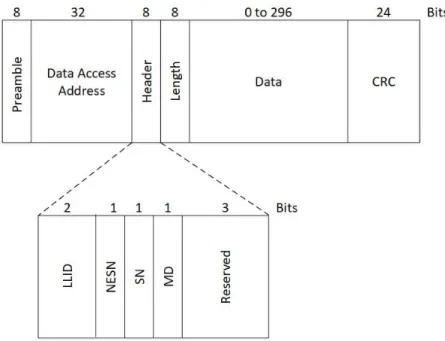
Link-layer packets follow the structure as displayed in Figure 5. These are divided
into the preamble, access address, header, length, data and cyclic redundancy check (CRC)
fields.
gain and determine the frequencies used for zero and one bits. The access address is the
next 32 bits and can be one of two types based on packet type: advertising access address
or data access address. Advertising access addresses are set at a fixed value
(0x8E89BED6) to help standardize the advertising process. Data channels use a different
random access address on each and every connection, which is used when data must be
reliably delivered to another device.
The header field varies based on the packet type. For advertising packets, the
header contains the advertising protocol data unit (PDU) type. Table 1 provides a summary
for each PDU type. ADV_IND indicates that the device is advertising as connectable
(available to create a connection) and undirected (not looking to connect to a specific
device); this is the advertising packet type most commonly used. ADV_DIRECT_IND
indicates that the device is connected and directed (looking for a specific device with which
to connect). ADV_NONCONN_IND indicates that the device is nonconnectable (refuses
to connect) and undirected; this is used by devices seeking to only broadcast data.
ADV_SCAN_IND, SCAN_REQ, and SCAN_RSP are used during active scanning.
ADV_SCAN_IND indicates that the advertising device is open to active scanning,
SCAN_REQ is a request made by the initiating device to receive a scan response, and
SCAN_RSP is the scan response itself. Lastly, the CONNECT_REQ header type is sent
by an initiating device to an advertising device when the initiating device wants to create a
connection. CONNECT_REQ packets contain information needed to establish a
Table 1. Advertising PDU Types
PDU Type Purpose
1 ADV_IND General advertising indication 2 ADV_DIRECT_IND Direct connection indication
3 ADV_NONCONN_IND Nonconnectable advertising indication 4 ADV_SCAN_IND Scannable indication
5 SCAN_REQ Active scanning request 6 SCAN_RSP Active scanning response 7 CONNECT_REQ Connection request
Data packets have headers containing the logical link identifier (LLID), sequence
number (SN), next expected sequence number (NESN), and more data, as shown in Figure
6. The LLID is used by the link layer to manage the channel for this connection. The
one-bit sequence number for each new data packet toggles from the previous data packet’s
sequence number, with the first data packet in a connection having a sequence number of
zero. The SN allows the receiving device to determine whether the received packet is a
retransmission of a previous packet or a new packet. The NESN allows for
acknowledgement of data packets. The last bit in the data packet header is the more data
bit, where 1 signals that there is more data to transmit, and 0 signals the end of the data
Figure 6. BLE Data Packet
The length field reports the size of the packet, with a range of valid values from 6
to 37 bytes for advertising packets, and 0 to 31 bytes for data packets. The payload is the
actual data that is being transmitted for use by the application. The final part of the packet
is a 3-byte CRC. The CRC is calcuated using the header, length and payload fields, and
serves to detect accidental changes to raw data.
2.3.3 Creating Connections
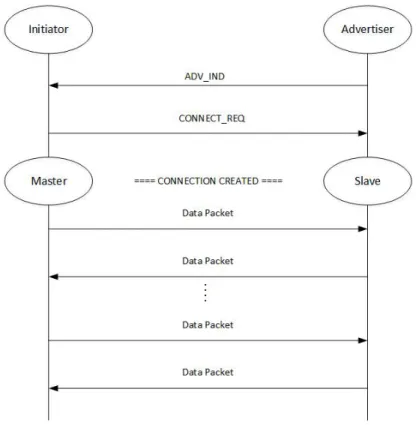
A connection is required to reliably allow for two-way data transfer. Figure 7
shows how a connection is typically created. The first step is for one device to advertise
using an advertising packet (commonly with ADV_IND) and for another device to initiate
a connection to the advertising device with a CONNECT_REQ packet. Using the
devices, with the initiating device now the master device and the advertising device as the
slave device.
Figure 7. BLE Connection and Data Sending Diagram
All necessary information is contained within this CONNECT_REQ packet,
including access address, connection interval, and channel map. The access address is
randomly determined by the master. If a master has multiple slaves, it chooses a different
access address for each slave. When in a connection, the master must transmit a packet to
the slave once every connection event. The connection interval determines how frequently
this happens; the connection interval can be any period between 7.5 milliseconds to 4
for data traffic, and if the bit is set to zero, the channel is deemed a bad channel, and is
never used for data traffic.
The Generic Access Profile (GAP) defines the discovery and connection process
between devices. The GAP provides two types of discoverability: limited and general.
Limited-discoverable mode is used by devices that have just been made discoverable, and
are meant to stand out from general-discoverable devices. As such, devices are not allowed
to remain in the limited-discoverable mode for more than 30 seconds. The
general-discoverable mode is used by devices that are general-discoverable but have been inactive for a
period of time. This becomes the default mode for devices once they exceed the 30 seconds
allowed for limited-discoverable mode.
2.3.4 Sending Data
Once in a connection, devices can send data to each other using data packets. Data
packets have four fields in their header: logical link identifier, sequence number, next
expected sequence number and more data. The logical link identifer (LLID) determines
what kind of data the packet contains. The LLID can indicate that the packet is a link layer
control packet, which is used by the link layer to manage connections. Otherwise, it is a
data packet intended for the host, and can either be a start packet or continuation packet.
Start packets signal the beginning of a series of data packets, and continuation packets
make up the rest of the transmission. Interestingly, because the link layer does not need to
know the entire length of the data, continuation packets can be continuously sent. Data
packets have a single bit for the sequence number, beginning with zero for the first data
a data packet, the next expected sequence number (NESN) is used. If the data packet
received by a device has a sequence number of one, then the NESN is zero; otherwise, the
data packet would be retransmitted. Lastly, the MD bit indicates that the transmitting
device has more data ready to send. If one, then the receiving device maintains the
connection. If zero, then the two devices can close the connection to save power.
Figure 8 provides an example of how connection events occur between two
connected devices. A connection event is the start of a set of data packets sent from the
master to the slave and back again. Connection events are always initiated by the master
device. The master device initiates the transmission by sending a data packet with SN
zero, NESN zero, and MD one. The slave device receives this packet and attempts to send
its own packet, with SN zero, NESN one (acknowledging that the previous packet) and
MD one. However this packet was not properly received by the master device. Without an
acknowledgment from the slave device, the master device retransmits its first packet. The
slave device detects that retransmission of the previous packet is required, and does so.
This time, the packet is properly received. The master device no longer needs more data
from the slave device and sends a packet with the MD bit zero. The slave device
acknowledges this by sending its own packet with MD zero, and the connection event
between the two devices end. A second connection event is initiated by the master, but the
MD bit is set to zero. This type of connection event is typically performed to check on the
slave’s status, serving as a “ping”. The slave receives the packet, and seeing that MD is
Figure 8. Data Transmission [6]
2.3.5 Attributes
The Attribute Protocol, shown in Figure 2, is central to understanding Bluetooth
Low Energy. BLE is designed as a client-server architecture, where a server is a device
that has data, and a client is any device that is using data from another device. Figure 9
shows how the client-server architecture works. In practice, the master device acts as the
Figure 9. GATT Client-Server Interaction [8]
Attributes are the fundamental structure through which BLE achieves the
client-server architecture. The Generic Attribute Profile (GAP) is a set of rules that define how
to present, group, and transfer data using BLE. The GAP defines attributes as a piece of
labeled, addressable data, and each attribute has three parts: a handle, a type, and a value.
The attribute handle is the attribute’s 16-bit address. The attribute type is comparable to a
data type in programming languages, and is used to identify the nature of the attribute’s
information (e.g., temperature, pressure, time, etc.). Lastly, the attribute value is the actual
value and has a size between 0 to 512 bytes. Attributes are stored in an attribute database,
which is in turn contained within an attribute server. Clients communicate with the
attribute server to obtain desired information. There can only be one attribute server per
device, and every device must have both an attribute server and an attribute database.
Permissions must be set for every attribute in an attribute database, and these
permissions come in three categories: access, authentication, and authorization. Access
permissions must be set to readable, writable, or readable-writable. Authentication and
authorization permissions are not required and can be left open. The difference between
attribute value; any device has permission to view the attribute handles and types on a given
device.
The Attribute Protocol is the protocol through which clients find and access
attributes on an attribute server. It is a simple protocol with only six basic operations:
Request, Response, Command, Indication, Confirmation, and Notification.
A Request is sent by the client when the client wants the server to do an action and
send back a Response. A client can only send one Request at a time, and must wait for a
Response before sending another Request. A Command is similar to a Request, except no
Response is needed. Indications are used by the server to inform a client about an update
on a given attribute’s value, and require a Confirmation from the client. Notifications are
similar to Indications, except they need no Confirmation. Since Commands and
Notifications do not require Responses nor Confirmations, they can be sent without any
restrictions. If the receiving device cannot handle all the messages, the messages may be
dropped. Therefore, Commands and Notifications are unreliable, while Requests and
Indications are considered reliable.
Protocol messages are combinations of these basic operations used to perform
common tasks using the Attribute protocol. Their role is comparable to library functions
in programming languages. Most messages consist of both a Request and a Response
operation. For example, the Read Request message uses a Request operation that has a
handle of a desired attribute, and the Response returns the attribute value. Protocol
messages have a wide range of functionality that enable efficient reading, writing, error
For connected devices, the Generic Attribute profile (GATT) defines two basic
forms of grouping: characteristics and services. Figure 10 shows how the GATT structure
organizes characteristics and services. Characteristics are defined attribute types that can
only contain certain logical values. The BLE Specification provides over 200 predefined
characteristics such as Alert Status, Language, Battery Level, and Time Zone that can only
take on specific values based on their characteristic definition. A service is a collection of
characteristics and relationships with other services to perform a given function [9].
Sometimes refered to as profiles, services expose certain device information and
functionality in a standardized manner.
Predefined services include the Battery, Environmental Sensing, and Heart Rate
services [7]. For example, consider a personal fitness monitoring device that uses the
Battery, Environmental Sensing, and Heart Rate services. A user may connect the fitness
monitor to a smartphone through BLE. Through the Battery service, the user can monitor
the battery life of the device, ensuring that the device does not run out of power during
workout sessions. Through the Environmental Sensing service, the user can monitor
measurement data from the device’s various sensors, such as air temperature, humidity and
elevation. Finally, through the Heart Rate service, the user can track one’s heart rate
throughout the workout session. While predefined services accommodate common needs,
Figure 10. GATT Structure [8]
2.3.6 Security
The Security Manager (SM), shown in Figure 2, serves two fundamental functions:
device pairing and message authentication. These two functions enable the rest of BLE’s
security features. Pairing allows two unfamiliar devices to authenticate each other’s
identity in preparation for activity that requires security. During pairing, each device first
determines each other’s input and output capabilities (e.g., no input-no output, display only,
display yes/no, keyboard only, keyboard display) to determine what level of authentication
is possible. For example, if two devices are both display only, they would not be able to
authenticate via passkey entry, and the SM would default to simply letting the devices pair
automatically without authentication. After determining input and outputs, the SM then
proceeds to authenticate each other using a randomly-generated key, if possible. This is
often implemented by the user typing in a six-digit key. Lastly, keys are distributed
Authentication Code) algorithm, with the keys distributed using pairing. An additional
SignCounter value is used to prevent replay attacks.
2.4 Machine Learning
Coined by Arthur Samuel, the term machine learning (ML) refers to a field of
computer science that applies statistical techniques to give computers the capability to learn
from data without explicit programming [10]. ML plays a significant role in the fields of
statistics, data mining, and artificial intelligence. Machine learning is increasingly being
applied today to tasks too complex for traditional approaches or have no known algorithm
[11].
To illustrate, consider the task of distinguishing between different types of fruit.
Traditional approaches would need to first study the problem (for example, what is the
difference between an apple and an avocado) then write rules to solve the problem (apples
are red, avocados are green). However, this problem is more complex (some apples are
also green). Therefore, additional rules must be included to further refine the solution to
the program (apples have smooth skin, avocados have pebbled skin). But as more test
cases and situations are added, this set of rules grows significantly (watermelons are green
but have smooth skin), making the maintenance of these rules very difficult for a human
programmer.
A typical ML scenario seeks to predict an outcome measurement, usually
categorical (e.g., type of fruit) or quantitative (e.g., future house prices), using a set of
used to observe the outcome and feature measurements. With this data, a prediction model
is built to predict the outcome for new cases, or observations.
Given a sufficiently large dataset, machine learning excels in the type of problem
presented earlier. ML applies statistical techniques to reveal patterns within data. By
analyzing the data, an ML approach can develop a model using the patterns in the data, and
then produce a solution. Furthermore, the solution can reveal certain insights about the
data that may have been missed.
There are two broad types of machine learning: supervised learning and
unsupervised learning. Supervised learning requires the presence of the outcome
measurement, or labels, to direct the learning process. A typical supervised learning task
is classification, the task of assigning to which set of categories a given observation
belongs. In the fruit classification problem, the fruit type would be an example of a label,
and the task is assigning a fruit type to a given fruit.
As mentioned, classification is considered supervised learning because it requires
the presence of labels. Another supervised learning task is regression. Regression is the
task of predicting a numerical value for a given observation. An example is predicting
future house prices, given the features of house location and age. Because of the use of
labels, supervised learning methods can be evaluated on their performance. Chapter 3
provides the details on performance evaluation.
Unsupervised learning uses unlabeled data. Unsupervised learning aims to infer
the structure of data. A common task for unsupervised learning is clustering. The goal of
have not been clearly evident, and the detected groups may be used in applications such as
pattern recognition, compression, and graphics. An example of a clustering problem would
be when a website like Amazon or Netflix provides recommendations based on users’
browsing history [13]. By clustering items that are similar to those users have previously
looked at, online retailers or streaming services can suggest certain products or movies.
2.4.1 Classification Algorithms
The algorithms used in this experiment are among the most commonly used
machine learning classification algorithms. All three algorithms are identified as
supervised learning algorithms. Supervised learning requires the outcome measurement
to direct the learning process. In classification, the objective is to assign a given
observation to a particular class or label using a set of inputs or predictors. Because of
their use of outcome measurements, supervised learning algorithms may be evaluated on
their performance.
2.4.1.1K-Nearest Neighbors
K-Nearest Neighbors (KNN) classifies an observation by finding the observation’s
k nearest neighbors, where k is an integer, and classifying the observation to the class with
the highest estimated probability [14]. A commonly used distance metric is Euclidean
distance, however other distance metrics can be used, such as Manhattan distance or
Chebyshev distance. The hyperparameter k determines the number of neighbors KNN
considers in its classification of an observation. Supposing 𝑘𝑘= 3, KNN considers the three closest neighbors of 𝑥𝑥0. The observation is assigned the majority class of these 𝑘𝑘
While this approach works well for data with unknown distributions, it leads to a higher
susceptibility to local anomalies within the data. Additionally, if there are many
dimensions in the data, several inputs may be “nearest” to the observation, leading to
reduced effectiveness.
2.4.1.2Linear Discriminant Analysis
Linear Discriminant Analysis (LDA) is a linear transformation technique first
proposed by Ronald Fisher in 1936. LDA models the distribution of the predictors
independently in each of the response classes, then applies Bayes’ theorem to find an
estimate of the posterior probability. A Gaussian or normal distribution is typically used
to model the distribution of the predictors. LDA assigns the observation to the response
class with the highest probability. When the assumption about the predictors’ distribution
does not hold, performance is reduced.
2.4.1.3Random Forests
A random forest is an ensemble of decision tree-based algorithms [14]. Decision
trees divide the feature space into different regions that can then be used to classify
observations. By using a multitude (or ensemble) of decision trees, random forests assign
an observation to the most commonly occurring class in the region to which it belongs. As
with a decision tree, there is a danger of overfitting when applying random forests.
2.5 Related Work
Wired network traffic analysis has been extensively studied. Preliminary methods
targeted port number and payload content analysis; these resulted in considerable success
Port number analysis is accurate only if networks adhere to port standards, and payload
analysis cannot cope with encrypted transmissions.
Transport-layer analysis has been applied to address the limitations of the previous
methods [17]. In peer-to-peer (P2P) networks where arbitrary ports are most commonly
used, transport-layer analysis allows the profiling of IP connection patterns. The
observation of source-destination IP pairs and IP address-port pairs offered a method of
studying P2P traffic without any examination of user payload. However, direct
transport-layer analysis can be time-consuming, and analytical scripts are restricted by programmer
knowledge.
Machine learning has emerged as a promising technique for traffic analysis [18].
Studies can be broadly categorized into unsupervised and supervised approaches. One of
the earliest studies using unsupervised learning, McGregor et al. applied clustering
techniques to group wired traffic flow between six common network protocols and found
that the data rate was a key feature in this effort [19]. Bernaille et al. used a variation of
the k-Means algorithm to classify Transmission Control Protocol (TCP) traffic to the
application type (e.g., file transfer protocol (FTP), hypertext transfer protocol (HTTP),
secure shell (SSH), etc.) using the packets at the start of traffic flow [20]. This approach
focused on the packets used during the TCP handshake and was able to classify traffic flow
with over 80% accuracy. However, this work assumed that the handshake can always be
captured at the onset of traffic flow, which is not always achievable. It was with Erman et
bi-and client-to-server. Their results showed that server-to-client datasets produced the
highest accuracy (95%), and that flow duration, number of bytes and number of packets
were the features that provided the most value in classifying packets.
Supervised learning introduced algorithms such as the k-Nearest Neighbors (kNN),
linear discriminant analysis (LDA), and quadratic discriminant analysis (QDA) to traffic
analysis. A study by Roughan et al. used these techniques to classify different network
applications to specific traffic classes [22]. The considered features were analyzed at the
packet level, flow level, and connection level. Packet level features were derived from
individual packets such as the size of the packet and the time the packet was sent. Flow
level features were derived from sequences of packets that shared common field values,
such as source IP address, destination IP address, and protocol type. Connection level
features were derived from transport-layer protocol information such as those found in TCP
connections. Of these features, average packet length and flow duration were found to be
the most valuable. Moore and Zuev were able to further improve on traffic classification
accuracy by using Naïve Bayes [23]. The dataset was manually classified beforehand, and
over 240 features were used to train the classifier. Using Naïve Bayes alone, the study
achieved approximately 65% accuracy. The classifier was then refined to reduce the
number of features, and accuracy was improved to over 95%. Auld et al. extended this
work by applying a Bayesian neural network (NN), further improving classification
accuracy [24]. The training NN achieved a classification accuracy up to 99% for data
trained and tested on the same day, and 95% for data trained and tested with an eight-month
of TCP PUSH packets, total number of bytes in the initial window (TCP handshake) from
client to server, and total number of bytes in the initial window (TCP handshake) from
server to client.
Wireless traffic adds a layer of complexity in traffic analysis. The most ubiquitous
wireless network standard, IEEE 802.11 (commonly known as Wi-Fi), uses encryption in
its wireless transmissions to protect against external eavesdropping. Nevertheless,
Atkinson showed that Wi-Fi can still leak private user information using only side-channel
information similar to those exploited in wired networks [25]. A Random Forests classifier
was trained on a dataset of Skype activity with around 60,000 observations and 600
features, and achieved around 97% accuracy. Furthermore, it was shown that a
classification accuracy of greater than 95% could be accomplished using only 200 variables
and 20 trees. The most valuable features were discovered to be the amount of time between
Sent frames, and the amount of time between a Received frame and the previous Sent
frame.
As for Internet of Things (IoT) devices, there is a shortage of wireless traffic
analysis in the current literature. This is likely due to the relative novelty of the IoT. A
study by Copos et al. analyzed two IoT devices, the Nest thermostat and Nest Protect smoke
detector, and succeeded in determining the devices’ Home and Away modes with 88% and
67% accuracy respectively [26]. Beyer expanded on the use of wireless traffic analysis by
showing that pattern-of-life profiling is possible using sniffed BLE and Wi-Fi traffic [2].
used frame size, measured in bytes, as a primary feature. Meidan et al. is the first study
found that applied machine learning to IoT device identification [27]. The goal of the study
was to determine whether a network device was a personal computer, a smartphone or an
IoT device. A dataset was produced using 802.11 wireless traffic from two PCs, two
smartphones, and ten IoT devices, with device types including baby monitors, refrigerators,
security cameras, thermostats, and smart outlets. A classifier was then trained using a
combination of gradient boosting and Random Forests techniques, and was able to classify
an IoT device with greater than 99% accuracy. A robust analysis on feature importance
was not performed. Wang et al. is the latest study to apply machine learning techniques to
traffic analysis of IoT devices [28]. A software-defined network (SDN) framework was
developed capable of efficient network quality-of-service management. This was achieved
through the use of deep-learning-based traffic analysis able to classify encrypted data
traffic to various applications (e.g., email, Skype video calls, Spotify music streaming,
etc.). Three deep-learning techniques were evaluated: multilayer perceptron, stacked
autoencoder, and convolutional neural networks.
2.6 Terminology
The following terms are frequently used throughout this thesis, and are defined here
for the purpose of clarity:
• Classification Algorithm/Classifier: a classification technique used to distinguish between response classes. The classification algorithms used in
this thesis are limited to k-nearest neighbors (KNN), linear discriminant
• Device Type: the broad functional purpose of an IoT device, e.g., cameras, smart plugs, locks. The device type is the response class the classifiers in
this thesis are attempting to identify.
• Response Class: the output of supervised classification classifiers. The response class referred to in this thesis is the device type.
• Test dataset: a subset of the dataset reserved to evaluate the classifier’s performance. The test dataset is never used to train the classifier.
• Training dataset: a subset of the dataset used to train the classifier.
2.7 Background Summary
This chapter provides a concise summary on the BLE and Wi-Fi protocols that IoT
devices use. It explains the underlying architecture of these protocols and how their
internal structure apply to machine learning classification. It offers a brief overview of
machine learning. It gives a brief survey into the background research on wired traffic
analysis and how machine learning has been applied in those efforts. While extensive
research has been done in traditional wired traffic, there is a current shortage on IoT traffic
analysis. This thesis contributes to the areas of IoT security and machine learning by
showing how classification techniques may successfully identify IoT devices using
III.
System Design
3.1 OverviewThis research offers two contributions in analyzing the classification of IoT devices
using wireless traffic analysis: a Smart Home Environment (SHE) and a Device
Classification Pipeline (DCP). SHE is a system of actual IoT devices that produces
authentic smart home traffic by integrating various BLE and Wi-Fi commercial devices in
one physical space. To study the wireless traffic produced by SHE, DCP is used to collect
and preprocess the wireless traffic into workable data, extract features from the data, and
produce tuned classifier models ready for testing. Lastly, data exploration is done to gain
an initial understanding of the original dataset before any classification is performed. This
chapter presents a detailed explanation of SHE, each component of DCP, and the products
of data exploration on the datasets.
3.2 Smart Home Environment (SHE)
SHE is designed to produce actual wireless IoT traffic for analysis. SHE consists
of a controller device, and a variety of BLE and Wi-Fi devices. Wireless traffic produced
by SHE is collected using sniffing equipment.
3.2.1 Controller
An iPhone 6S, using iOS version 12.1, serves as the central controller for all devices
in SHE. The iPhone controls a given device using the manufacturer-developed application.
All applications can be obtained via the App Store. When the user is within range of SHE,
the iPhone connects to the Internet via the Wi-Fi router and gains access to the devices in
connected through Bluetooth, the user can control the BLE devices using the device’s
application.
3.2.2 Wi-Fi Devices
To provide connectivity to Wi-Fi devices, a 2.4 GHz AP is set up with an SSID of
“yosemite" and Wi-Fi Protected Access II (WPA2) security. The AP used is a Netgear
Nighthawk X4S R7800 router, as shown in Figure 11. Figure 12 provides the list of AP
settings.
Figure 11. Netgear Nighthawk X4S R7800 router used as AP
All Wi-Fi devices, identified as 𝑤𝑤2 - 𝑤𝑤16, are connected to the AP. SHE contains five cameras, seven smart plugs, and three light bulbs across four different manufacturers.
Table 2 shows the list of Wi-Fi devices used in SHE, including details such as device type,
device manufacturer, device name, and MAC address. Device MAC addresses are found
by checking the labels on the physical device. Appendix A provides complete device
details, including a device’s model number and serial number.
Table 2. Wi-Fi Devices
ID Manufacturer Device Type Device Name MAC Address
𝑤𝑤1 Netgear Router Yosemite 78:D2:94:4D:AB:3E
𝑤𝑤2 Belkin Camera Netcam1 EC:1A:59:E4:FD:41
𝑤𝑤3 Belkin Camera Netcam2 EC:1A:59:E4:FA:09
𝑤𝑤4 Belkin Camera Netcam3 EC:1A:59:E5:02:0D
𝑤𝑤5 Dropcam Camera Dropcam 30:8C:FB:3A:1A:AD
𝑤𝑤6 TPLink Camera Kasa AC:84:C6:97:7C:CC
𝑤𝑤7 Belkin Plug Insight 14:91:82:24:DD:34
𝑤𝑤8 Belkin Plug Mini 60:38:E0:EE:7C:E5
𝑤𝑤9 Belkin Plug Switch1 14:91:82:CD:DF:3D
𝑤𝑤10 Belkin Plug Switch2 B4:75:0E:0D:94:65
𝑤𝑤11 Belkin Plug Switch3 B4:75:0E:0D:33:D5
𝑤𝑤12 Belkin Plug Switch4 94:10:3E:2B:7A:55
𝑤𝑤13 TPLink Plug TpPlug 70:4F:57:F9:E1:B8
𝑤𝑤14 Lifx Light Bulb Lifx1 D0:73:D5:26:B8:4C
𝑤𝑤15 Lifx Light Bulb Lifx2 D0:73:D5:26:C9:27
𝑤𝑤16 TPLink Light Bulb TpBulb B0:4E:26:C5:2A:41 3.2.3 BLE Devices
To control BLE devices 𝑏𝑏1 - 𝑏𝑏11 , the iPhone is used as a Bluetooth master device. SHE contains three locks, four door sensors, and four temperature sensors across five
environment, including details such as device type, device manufacturer, and device name.
Appendix A provides complete device details, including a device’s model number and
serial number.
Table 3. BLE Devices
ID Manufacturer Device Type Device Name
𝑏𝑏1 August Lock August1
𝑏𝑏2 August Lock August2
𝑏𝑏3 Kwikset Lock Kevo
𝑏𝑏4 BLE Home Door Sensor Home1
𝑏𝑏5 BLE Home Door Sensor Home2
𝑏𝑏6 Eve Door Sensor Door1
𝑏𝑏7 Eve Door Sensor Door2
𝑏𝑏8 Eve Temperature Sensor Room1
𝑏𝑏9 Eve Temperature Sensor Room2
𝑏𝑏10 Eve Temperature Sensor Weather
𝑏𝑏11 SensorPush Temperature Sensor Push 3.2.4 Device Actions
To produce sufficient traffic volume for machine learning, devices are set to
perform actions expected in a smart home environment. Actions can be programmed or
triggered. Programmed actions are set up by the user to occur on a scheduled time and
interval, while triggered actions are performed by devices upon an event. Events can occur
at any time during the experimentation. To reduce variability, devices of the same device
type are programmed to perform similar actions at identical times or events. Table 4 lists
Table 4. Device Actions
Device Name Device Type Actions Schedule/Event
1 Dropcam Camera Send email notification Motion detected 2 Kasa Camera Send email notification Motion detected 3 Netcam1 Camera Send email notification Motion detected 4 Netcam2 Camera Send email notification Motion detected 5 Netcam3 Camera Send email notification Motion detected 6 Lifx1 Light Bulb Turn on, Turn off Hourly, on the hour 7 Lifx2 Light Bulb Turn on, Turn off Hourly, on the hour 8 TpBulb Light Bulb Turn on, Turn off Hourly, on the hour 9 TpPlug Plug Turn on, Turn off Hourly, on the hour 10 Insight Plug Turn on, Turn off Hourly, on the hour 11 Mini Plug Turn on, Turn off Hourly, on the hour 12 Switch1 Plug Turn on, Turn off Hourly, on the hour 13 Switch2 Plug Turn on, Turn off Hourly, on the hour 14 Switch3 Plug Turn on, Turn off Hourly, on the hour 15 Switch4 Plug Turn on, Turn off Hourly, on the hour 16 Door1 Door Sensor Report door state Continuous 17 Door2 Door Sensor Report door state Continuous 18 Home1 Door Sensor Report door state Continuous 19 Home2 Door Sensor Report door state Continuous 20 August1 Lock Report lock state Continuous 21 August2 Lock Report lock state Continuous 22 Kevo Lock Report lock state Continuous 23 Room1 Temp Sensor Report temperature Continuous 24 Room2 Temp Sensor Report temperature Continuous 25 Weather Temp Sensor Report temperature Continuous 26 Push Temp Sensor Report temperature Continuous
3.2.5 Device Location and Setup
All device locations are kept constant in SHE, except for the iPhone controller
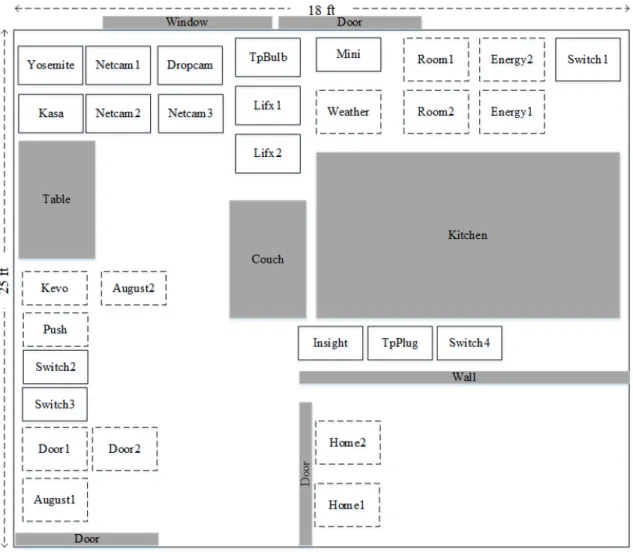
which typically is on the user and is therefore not at a fixed location. Figure 13 shows the
location of each device in SHE. Wi-Fi devices are indicated by boxes with solid outlines,
a one-bedroom apartment with three doors, one set of large windows, a large table, and a
couch; these items are indicated by grey boxes. Devices locations are placed near power
outlets to reduce the need for additional power cords.
Figure 13. SHE Device Locations (not to scale)
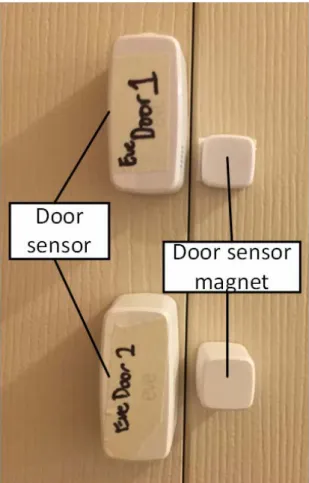
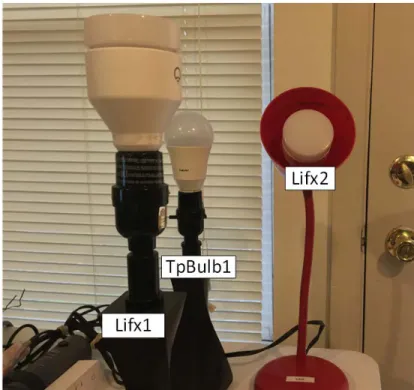
Figures 13 to 17 show how various devices are set up. Not all devices are shown
in the figures, but the overall configuration is similar across device types. Door sensors
door lock holders with actual door lock parts included. Plugs are installed into either power
strips or outlets, with no plugged-in device. Temperature sensors are placed in a flat
surface with open space around them. Cameras are placed around a motion source to
provide motion for their sensing capabilities. Figure 38 provides a photograph of the
camera device setup.
Figure 17. Plug Setup
3.3 Device Classification Pipeline (DCP)
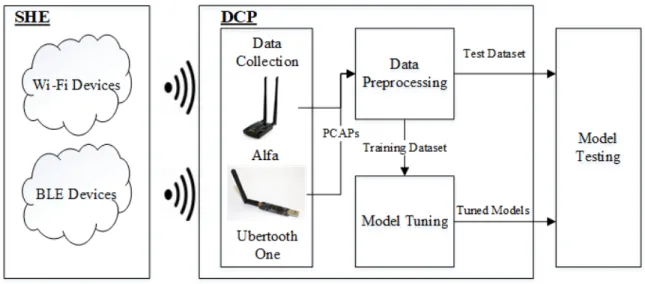
DCP is designed to collect and preprocess the wireless traffic into workable data,
extract features from the data, and produce tuned classifier models ready for testing. Figure
19 shows the DCP system diagram and its three components: (i) data collection, (ii) data
preprocessing, and (iii) model tuning. The outputs of DCP are tuned linear discriminant
analysis (LDA), k-nearest neighbors (KNN), and random forests (RF) classifiers for model
testing, as well as the test dataset. The following sections describe each component and
their functions.
Data collection is accomplished using user-inputted commands and scripts, as
described in Section 3.3.2, while data preprocessing and model tuning are accomplished
using the MulticlassDCP class written in Python. The MulticlassDCP class contains two sub-classes, BLEMulticlassDCP and WifiMulticlassDCP, one for each protocol.
3.3.1 Data Collection Hardware
A workstation is used to run all components of DCP. The workstation is an Acer
Aspire E15 with a 64-bit Intel Core i5-6200U 2.3 GHz processor, 8 GB DD4 RAM, 256
GB solid-state hard drive, and runs Kali Linux 2018.4 as the operating system. The
scanning and sniffing equipment consists of the Plugable Bluetooth adapter, three BLE
sniffers (Ubertooth One with firmware 2018-08-R1), and a long-range dual-band Wi-Fi
adapter (Alfa AWUS036ACH); all equipment is connected to the workstation using
Universal Serial Bus (USB). Each Ubertooth One sniffer uses a 2.4 GHz 2.2 dBi antenna,
while the Alfa card uses a 2.4 GHz and 5 GHz dual-band dipole antenna. Figure 20
provides images for these equipment.
Figure 20. Scanning and Sniffing Equipment. Plugable Bluetooth adapter (left), Alfa AWUS036ACH Wi-Fi adapter (center), and Ubertooth One BLE sniffer (right)
3.3.1.1Sniffer Distance Separation
All sniffers, Wi-Fi and BLE, operate in the 2.4 GHz band and must be horizontally
isolated to prevent interference. The required distance between antennae, 𝑑𝑑, to ensure horizontal isolation is given by the Fraunhofer distance equation
𝒅𝒅 ≥ 𝟐𝟐
𝑫𝑫𝝀𝝀𝟐𝟐(1) where 𝐷𝐷 is the antenna length in meters and 𝜆𝜆 is the wavelength of the device frequency band in Hz [32]. The Ubertooth One sniffers have 3.5 inch long antennae and operate at
an average wavelength of 2441 MHz, and the Alfa card has 6.5 inch long antennae and
operate at an average wavelength of 2412 MHz. Applying these values to (1) yields a
separation distance of about 5 inches for the Ubertooth One sniffers and 17 inches for the
Alfa card antenna. Separation distances are maintained by affixing the Ubertooth One
sniffers on a wooden board and ensuring that the Alfa card is located at an appropriate
distance, as shown in Figure 21.
3.3.2 Data Collection
Data collection supplies the raw data needed for data preprocessing. Data
collection occurs in two steps: scanning and sniffing. Scanning collects necessary
information required for sniffing and analysis, and sniffing gathers BLE and Wi-Fi wireless
traffic and stores them into packet capture files (pcap). The scanning and sniffing
![Figure 2. BLE Architecture [6]](https://thumb-us.123doks.com/thumbv2/123dok_us/9918078.2484834/25.918.325.646.129.428/figure-ble-architecture.webp)
![Figure 5. BLE Link-Layer Packet Structure [6]](https://thumb-us.123doks.com/thumbv2/123dok_us/9918078.2484834/28.918.189.771.707.889/figure-ble-link-layer-packet-structure.webp)
![Figure 8. Data Transmission [6]](https://thumb-us.123doks.com/thumbv2/123dok_us/9918078.2484834/35.918.172.746.119.703/figure-data-transmission.webp)