Security Module: SQL Injection
Description
SQL injection is a security issue that involves inserting malicious code into requests made to a database. The security vulnerability occurs when user provided data is not correctly validated or filtered. Failure to account for SQL injection can result in sensitive data being be stolen or in unauthorized access.
Objective
The objectives of this security module are to illustrate and explain security issues associated with SQL injection and the consequences that not protecting against SQL injection can have on your system.
Activities
There are three activities for this module. The first is a discussion assignment on SQL injection and the practice of sanitizing user input to protect your database from attackers. Second, students are given a Java program that simulates a bank account. This program will use a database to store account information. The program uses a command line interface that displays the account available. The user has two options in the menu: view account and exit. The view account option will ask for the name of an account to view. The student is asked to add another account using SQL injection. Third, students are given the code for the simulation above. They are asked to modify the program to fix the security flaw caused by SQL injection.
Module Contents
Assignment 1: SQL Injection Discussion Assignment 2: Break the Program
Assignment 3: Fix the Program w/source code Source code for SQLInjection class
Assignment 1: SQL Injection Discussion
SQL Injection
SQL injection is an attack techenique often used against data driven applications. This type of attack attempts to take advantage of poor programming practices to gain unauthorized access to databases. At-tackers that gain access can alter or remove data from the database, affecting application operation. To protect against SQL injection attacks, developers must use best practices. The first practice for avoiding SQL injection is toassume all input is evil. This means donottrust input from users, files, or other pro-grams. The second practice is to never use dynamic SQL, SQL that is constructed by concatenating SQL using user-provided values. The third practice is to never connect to the database with administrative level privileges that is, do not connect with root accounts. The fourth practice is do not store secrets in plain text. This means do not store user’s passwords in plain text, encrypt the password before storing in the database. The fifth practice is that exceptions should display minimal information. Exceptions can display connection inforomation such as the database’s username and password.
The following questions should be answered using the narrative above and using research conducted on the internet.
1. What are the five practices listed above?
2. What techniques could you use to implement the first practice?
3. What is dynamic SQL? Give an example using Java.
4. Explain the process of encrypting a user’s password with a salt. Note: this password is stored in the database.
Assignment 2: Break the Program
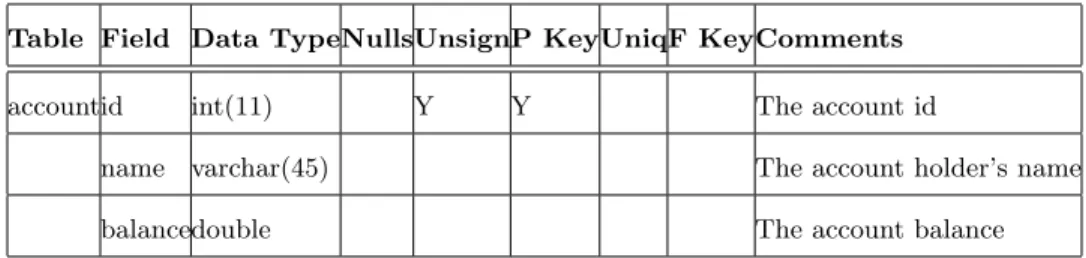
In this assignment, you are given a Java program for a simple bank account. This program uses a database to store account information. You can load accounts and display account information using the command line interface. To load account information, use option 1. The prompt will display all acounts in the system. To load an account, you must input the account number. Once the account has been displayed, you will be returned to the main menu. The purpose of this assingment is to show how SQL injection can be used to alter a system’s data. The database structure is given below for the account table.
Table Field Data TypeNullsUnsignP KeyUniqF KeyComments
accountid int(11) Y Y The account id
name varchar(45) The account holder’s name
balancedouble The account balance
Your assignment will be to use SQL injection to modifty the database. Using SQL injection add an additional account with your name and an inital balance of $10,000 dollars. Verify that your account has been added to the system, then update your account to have$1,000,000 dollars.
1. At what point in the interface, can SQL injection be used?
2. What did you input to have the system insert your account?
Assignment 3: Fix the Program
In this assignment, you will fix the source code from the previous assignment to protect the system against SQL injection. There may be serveral approaches to protect the system. Consider the first practice discussed in assignement 1: assume all input is evil. The only way to protect against all SQL injection is to use parameterized queries. Parameterized queires are prepared SQL statements that are built using parameters, not the user’s input data. This technique should always be used when using user inputed data to retrieve data from a database.
Using Java’s documentation on paramaterized query, alter the getAccount method to protect against SQL injection. http://docs.oracle.com/javase/6/docs/api/java/sql/PreparedStatement.html
1. Test your solution to ensure that it works.
2. Turn in a screen shot of the program with you trying to use SQL injection to add another account.
3. Turn in a screen shot of the program account list after your attempt to add another account. This should s
SQL Injection Source Code
importjava.util.*; importjava.sql.*; classSQLInjection{
public static voidmain(String[]args){ Scanner in=newScanner(System.in); Menu menu=newMenu(”Main Menu”); menu.addOption(1,”View Account”); menu.addOption(9,”Exit”);
while(true) {
System.out.print(”\n ”); switch(menu.getOption()) {
case1: {
System.out.printf(”\n\n\t%−10s : %s”, ”Account Id”,”Account Holder”); System.out.println(”\n
−−−−−−−−−−−−−−−−−−−−−−−−−−−−−−−−−−−−”); for(Account account:getAccountList()){
System.out.printf(”\t%10s : %s\n”,account.id,account.name); }
System.out.print(”\n\nSelect id for acount to be viewed: ”); String accountId=in.nextLine();
Account account=getAccount(accountId); if(account!=null){
System.out.printf(”\n\t%15s : %s”,”Account Id”,account.id); System.out.printf(”\n\t%15s : %s”,”Account Holder”,account.name); System.out.printf(”\n\t%15s : %s”,”Balance”,account.balance);
} else{
System.out.print(”\nAccount with ”+accountId+” does not exist”); }
System.out.print(”\n\n\nPress ENTER to continue”); in.nextLine();
break; }
case9: {
System.out.println(”Exiting”); System.exit(0);
break; }
} } }
private staticArrayList<Account>getAccountList(){
ArrayList<Account>accounts=newArrayList<Account>(); try{
Connection conn=getConnection(); Statement stmt=conn.createStatement();
ResultSet rs=stmt.executeQuery(”select id, name from account”); while(rs.next()){
accounts.add(newAccount(rs.getInt(”id”),rs.getString(”name”))); }
}catch (Exception e){
System.out.println(”Error getting account list: ”+e.getMessage()); }
returnaccounts; }
private staticAccount getAccount(String id){ Account account=null;
try{
Connection conn=getConnection(); Statement stmt=conn.createStatement();
String strStmt=”select id, name, balance from account where id = ”+id; stmt.execute(strStmt);
ResultSet rs=stmt.getResultSet(); if(rs.next() ) {
account=newAccount(rs.getInt(”id”),rs.getString(”name”),rs.getInt(”balance”)) ;
}
}catch (Exception e){
System.out.println(”Error getting the account: ”+e.getMessage()); }
returnaccount; }
private staticConnection getConnection(){ Connection conn=null;
try{
Class.forName(”com.mysql.jdbc.Driver”);
conn=DriverManager.getConnection(”jdbc:mysql://localhost/injection?”
+”user=root&password=password&allowMultiQueries=true”); }catch (Exception e){
System.out.println(”Error getting the connection: ” +e.getMessage()); } returnconn; } } classAccount{
public intbalance= 0; public intid;
publicString name;
publicAccount(inti,String n,intb){ this.id=i;
this.name=n; this.balance=b; }
publicAccount(inti,String n){ this.id=i;
this.name=n; }
Menu Class Source Code
classMenu { classOption { private intid; privateString desc;publicOption(intid,String desc) {
this.id=id; this.desc=desc; }
public intgetId() {
return this.id; }
publicString getDesc() {
return this.desc; }
}
privateArrayList<Option>_options; privateString _title;
publicMenu(String title) {
this._options=newArrayList<Option>(); this._title=title;
}
public voidaddOption(intid,String desc) {
this._options.add(newOption(id,desc)); }
public voidclearOptions() {
this._options.clear(); }
public intgetOption() {
Scanner in=newScanner(System.in); while(true)
{
System.out.println(” ”+this._title+”\n”); for(Option option: this._options){
System.out.println(” ”+option.getId() +” −” +option.getDesc()); }
System.out.println(”−−−−−−−−−−−−−−−−−−−−−−−−−−−−−−−−−−−−”); System.out.print(”Select option: ”);
intoptionInt;
String optionStr=in.nextLine();
//−−−Attempt to convert the inputed string to an integer try{
optionInt=Integer.parseInt(optionStr); }catch (NumberFormatException ex){
System.out.println(”Error: It appears you did not input a option number”); continue;
}
//−−−Check if the option exists in our menu for(Option option: this._options){
if(option.getId() ==optionInt){ returnoptionInt;
} }
System.out.println(”Error: Invalid option selected”); }
} }