Intelligence Solutions
Comparison of Features by Version for the
SAP BusinessObjects BI Platform
AP affiliat e c omp an y. All right s r es er ved.
3
Empower Your Organization with Self-Service Access
to Key Business Data
Find Out More
The components in the SAP® BusinessObjects™
Business Intelligence (BI) platform have evolved
and continue to evolve rapidly. This document
is a reference to help you understand when key
features were introduced in the BI platform.
This information should help you plan
how to
evolve your infrastructure,
plan your upgrades,
and deploy the right component to the right
audience. This document covers the SAP
BusinessObjects BI suite and the Edge edition
of SAP BusinessObjects BI software.
SAP BusinessObjects BI solutions are designed to empower
your organization to achieve remarkable results by enabling
self-service access to relevant information. The solutions
help you to transform decisions by providing fact-based
information, regardless of where your data resides. Using
SAP BusinessObjects BI solutions, your organization gains
increased visibility of key performance indicators (KPIs)
across lines of business, improves relationships with customers
and suppliers, saves time and money, and can respond faster
when exceptions occur.
The SAP BusinessObjects BI platform is a comprehensive BI
solution that includes many components. Designed to work
together, the components address major BI use cases, such
as enterprise reporting, dashboards, data discovery, online
analytical processing (OLAP) analysis, and predictive analysis.
You can use these components over the Web or on your mobile
device.
In addition to addressing specific functional needs, the BI
platform is also designed to address the needs of different
audiences such as business users, business analysts, data
scientists, administrators, and developers.
FInD Out MOrE
Although this document is not an exhaustive reference of every
feature in the BI platform, we attempted to identify features
that are important to most implementations. There may be
features not described in this document that are important to
your specific deployment.
This document does not replace the product availability
matrix, which details the specific supported platforms for
each release and support pack. These are available at
www.sdn.sap.com/irj/boc/support?rid=/webcontent/uuid
/e01d4e05-6ea5-2c10-1bb6-a8904ca76411
.
For more information, visit us on the Web at
www.sap.com
.
Empower Your Organization with Self-Service Access
to Key Business Data
SAP BusinessObjects business intelligence solutions help
you to
achieve remarkable results
by enabling self-service
SAP® BusinessObjects™
BI platform 4.1 SAP BusinessObjects BI platform 4.0, feature pack 3 (FP3) or later SAP BusinessObjects BI platform 4.0, support package 2 (SP2) or earlier SAP BusinessObjects
XI software 3.1 SAP BusinessObjects XI software release 2 (r2)
Release date May 2013 November 26, 2010 September 30, 2008 November 24, 2005
End of mainstream
support December 31, 2016 According to the new support model used with the December 31, 2015 4.X line, each point release (4.1, 4.2, and so on) will be supported for a minimum of two years, and there will be a minimum of one year support overlap with each subsequent point release.
December 31, 2015 June 30, 2010
User interface
language support Arabic, Chinese (Traditional), Chinese (Simplified), Czech, Danish, Dutch, English, Finnish, French, German, Hungarian, Italian, Japanese, Korean, Norwegian, Polish, Portuguese (Brazil), Russian, Slovene, Slovakian, Spanish, Swedish, Thai, Turkish,
Romanian
Chinese (Traditional), Chinese (Simplified), Czech, Danish, Dutch, English, Finnish, French, German, Hungarian, Italian, Japanese, Korean, Norwegian, Polish, Portuguese (Brazil), Russian, Slovakian, Spanish, Swedish, Thai, Turkish,
Romanian
Chinese (Traditional), Chinese (Simplified), Czech, Danish, Dutch, English, Finnish, French, German, Hungarian, Italian, Japanese, Korean, Norwegian, Polish, Portuguese (Brazil), Russian, Slovakian, Spanish, Swedish, Thai, Turkish
Chinese (Traditional), Chinese (Simplified), Czech, Danish, Dutch, English, Finnish, French, German, Hungarian, Italian, Japanese, Korean, Norwegian, Polish, Portuguese (Brazil), Russian, Slovakian, Spanish, Swedish, Thai
Dutch, English, French, German, Italian, Japanese, Korean, Polish, Portuguese (Brazil), Russian, Spanish, Swedish Platform Web-based management console
Security for groups, users, folders, and
content
Batch publishing
of content to the
repository
Page-level caching for
scalability
Single-sign-on security integration with Light
-weight Directory Access Protocol (LDAP), Kerberos, eTrust SiteMinder, and Windows Active Directory
Bulk actions on multiple
selected items
Repository diagnostic
tool
Auditing of user activity
and system events
Federation for
Business Intelligence Archive Resource (BIAR) engine for promoting
content
BIAR engine command
line tool
Lifecycle management
to promote content
between development, test, and production
systems
Integrated into the central management
console
Integrated into the central management
console
Separate application from the central
management console
Separate installation
starting with SP2 • Granular security
rights for promoting
objects
• Recurring promotion
jobs
• Version support for
lifecycle management
job and content
Translation manager
Internet Protocol version
6 (IPV6) support
64-bit operating system
(OS) required
System diagnosis and
monitoring
• Graphical view of business intelligence (BI) deployment
Monitoring dashboard
Version control
Support for the Federal Information Processing Standards (FIPS) 140 cryptography standard
SAP® Solution Manager application manage
-ment solution support
Hot backup and restore
Custom user attributes
Support the SAPHANA® platform as BI
system repository and audit database
Simplified parallel install for clustered
environments
System configuration
Support for storing
SAP BusinessObjects
Desktop Intelligence™ software documents when used with
SAP BusinessObjects
Desktop Intelligence in
SAP BusinessObjects
Enterprise XI 3.1 SP6
Support for right-to-left
languages
BI platform for
developers
Core services software development kit (SDK) – Java, Microsoft .NET, and Web services • Session management
• User authentication (Enterprise, LDAP, Active Directory, SAP)
• Browse enterprise folders
• Schedule SAP Crystal Reports® software for
offline viewing
• Schedule SAP BusinessObjects Web Intelligence® software document without parameters for offline viewing
• Set SAP Crystal
Reports software runtime report parameters
• OpenDocument – Viewing content
• Single-sign-on security integration with Microsoft Active Directory or trusted authentication when using Web services application program-ming interface (API)
• JavaScript Object Notation (JSON) format support with Web services API
Content management SDK – Java, .NET • Add, edit, remove
content from
repository
• Burst and publish (sending documents to external users, groups)
• Manage instances – find instances, schedule refresh, and so on
• Create and modify
schedule calendars
• Manage user permissions
• Multilingual content support
Search SDK for searching repository for report and document content – Java
Platform administration SDK – Java
• Object security
• Events and alerting
• Server administration
• Federation
• Monitoring – Create probes, alerts, watch
lists, metrics
• Auditing
• Cryptographic key
management
End-user portal BI launch pad BI launch pad BI launch pad InfoView InfoView
Discussions
Tab-based user
interface
SAP StreamWork®
application integration
Support for changing the look and feel of the
Microsoft SharePoint
portal integration kit SharePoint 2010, SharePoint 2007 x64 SharePoint 2010, SharePoint 2007 x64 SharePoint 2010, SharePoint 2007 x64 SharePoint 2007 Java portal integration
kit for Oracle WebLogic
and IBM WebSphere
SAP Enterprise Portal
component portal
integration kit
SAP Jam social
software platform
application integration
Third-party document overwrite supportwithin the BI launch pad
Semantic layer* and data access
Data-level security
Universe designer for
creating .UNV files
Business views semantic layer and
business view manager
Information design tool
for creating .UNX files
Data federation
administration tool
Query as a Web service
on universes
Support for BEGIN_SQL
Universe (UNV) support for stored
procedures
Multilingual universes
(UNV and UNX)
Online analytical
processing (OLAP) universe (UNV) with flattened access to OLAP cubes
Multidimensional universe (UNX) with
hierarchical access to
OLAP cubes
Multiple data sources in
a single universe (UNX)
Access to Hadoop Hive in single and multisource
universes (UNX)
Multidimensional
access to Oracle
Essbase 11 (UNX)
Access to Oracle
E-Business Suite (UNX)
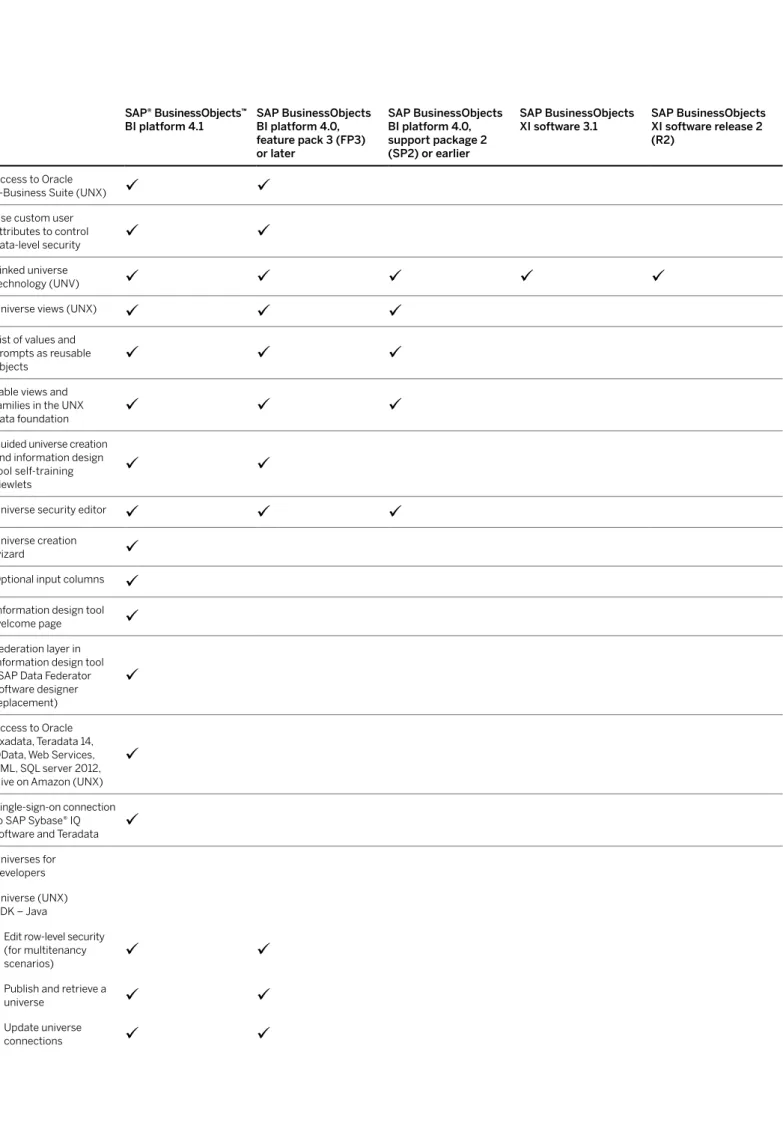
Use custom user
attributes to control
data-level security
Linked universe
technology (UNV)
Universe views (UNX)
List of values and
prompts as reusable
objects
Table views and families in the UNX
data foundation
Guided universe creation and information design tool self-training viewlets
Universe security editor
Universe creation
wizard
Optional input columns
Information design tool
welcome page
Federation layer in information design tool (SAP Data Federator software designer replacement)
Access to Oracle
Exadata, Teradata 14, OData, Web Services, XML, SQL server 2012, Hive on Amazon (UNX)
Single-sign-on connection
to SAP Sybase® IQ
software and Teradata
Universes fordevelopers Universe (UNX) SDK – Java
• Edit row-level security (for multitenancy
scenarios)
• Publish and retrieve a
universe
• Update universe
• Read and modify universe content
SP5 • Convert universes (UNV to UNX)
SP5 • Create resources from scratch (connection, data foundation, business layer)
• Create and edit a secured connection – both relational and OLAP
• Get and edit some data foundation parameters – name, description, list of
tables
• Get and edit some data foundation
tables
• Get and edit business layer parameters – name, description, root folder
• Get and edit business item lists (relational
business layer)
• Get and edit business
item parameters
(name, select, where, status, object access level)
Universe (UNV) SDK – component object model (COM) • Create data foundation (universe structure of tables and joins)
• Create business layer
(mapped to tables and columns in the data foundation)
• Publish and retrieve a
universe
• Update and manage
Universe connections
• Create, edit, row-level
security
• Create, activate, import, export
• Add and delete classes, objects, preconditions, tables, columns, joins, contexts, custom
hierarchies
• Edit, delete, refresh
list of values
Features for OEM customers
Repackage the BI platform to minimize the redistributed components
Custom branding
• Installer
• BI launch pad
• OpenDocument
• BI workspace
• SAP Crystal Reports
Multitenant support
• Support for delegated
administration
• Tool to automate tenant provisioning
• Record tenant ID in auditing data
• Restrict concurrentlogon sessions per
tenant
Scheduling and distribution for SAP crystal reports and SAP BusinessObjects Web Intelligence software
Scheduling to a pre
-defined distribution list
Event-based scheduling
Schedule to e-mail, file
share, and paper
View-time security for scheduled SAP Crystal Reports using business views
Publications (report bursting)
• Data-driven publishing
• Personalized publications
SAP crystal reports software
Supported desktop
report design software Both SAP Crystal Reports 2011 and
SAP Crystal Reports for enterprise
Both SAP Crystal Reports 2011 and SAP Crystal
Reports for enterprise SAP Crystal Reports 2008 SAP Crystal Reports XI R2
Data
• Direct access to online database connectivity (ODBC), Java database connectivity (JDBC), IBM DB2, Microsoft SQL Server, Oracle, Teradata, and other data sources
2011
• Verify database
function to ensure report query matches
underlying data
source
2011
2011
• Support for business
views semantic layer
2011
2011
2011
• Support for universe
(UNV)
2011
2011
2011
• Support for Structured Query Language (SQL) commands
2011
2011
• Support for universe
(UNX)
enterprise
enterprise
enterprise• XML and Web services
driver
2011
2011
2011
• Access OLAP data without using an
OLAP grid
enterprise
enterprise
enterprise• Access relational
data in a hierarchical
format
enterprise
enterprise
enterprise• Common query panel
for accessing UNX
universes
enterprise
enterprise
enterprise• Level-based member
selector
enterprise
enterprise• Create subreports
based on any data source with no
restrictions to the
main report’s data
source
enterprise Charts• Tree map
enterprise
enterprise• Tag cloud
enterprise
enterprise• Box plot
enterprise
enterprise• Line
• Pie
• Numeric axis
• Area
• Doughnut
• 3-D riser
• 3-D surface
• XY scatter
• Radar
• Bubble
• Stock
• Gauge
• Gantt
• Funnel
• Histogram
Support for translation
manager
enterprise
enterprise
enterpriseEmbed Adobe Flash objects and SAP
BusinessObjects Dashboards software integration
Prompting • On-report parameter panels
• On-report filter and
sort controls
• Level-based member
selector
enterprise
enterpriseCustom calculated rows and columns in
cross-tabs
Support for read-only
RPT files (RPTR)
2011
2011
2011Export to Microsoft
Excel (XLSX)
Smart guidelines to move and resize
columns
enterprise
enterprise
enterprisePlatform alerting
SAP Crystal Reports for developers Viewer SDK ‒ JavaScript • Refresh
• Report viewing
• Prompts ‒ for parameter values (not dynamic cascading prompts)
• Page navigation
• Client-side printing
• Event listeners for mouse clicks and
mouse-over events
• Action listeners
for printing and
exporting events
• Methods to customize
color and font
RESTful Web services
API • Export a report to PDF, Microsoft Excel, Microsoft Word, RTF, Text, XML, TTX, and comma-separated variables (CSV) formats
enterprise
enterprise • Retrieve reportmetadata
enterprise
enterprise• Get rows of data and
calculations
enterprise
enterprise• Open data protocol (Odata) support to push data into the
report
enterprise
enterprise• Get and set report
parameters
enterprise
enterprise• Retrieve data in XML
or JSON format
enterprise
enterprise Report applicationserver (RAS) SDK • Viewer SDK ‒ Java
and .NET
• Report viewing
2011
2011
2011
• Prompts ‒ for parameter values (not dynamic cascading prompts)
2011
2011
2011
Report modification and exporting ‒ Java and .NET SDK • Create, edit, removetables, table joins, and data sources in
the report
2011
2011
2011
• Create, edit, remove the data structures in
the report
2011
2011
2011
• Modify the layout and format of the areas, sections, and report
objects in the report
2011
2011
2011
• Modify and import
subreports
2011
2011
2011
• Modify custom
functions
2011
2011
2011
• Get unformatted data directly from the
report
2011
2011
2011
• Export reports to a specific format and
modify the page size
2011
2011
2011
OpenDocument URL
format
• Support long Open
-Document parameter strings in custom
applications
enterpriseSAP BusinessObjects Web Intelligence software
Data
• Support for universe
(UNV)
• Synchronized multiple data providers
• OLAP universes
• Personal data providers (Microsoft Excel, TXT, CSV)
• Query on query
with SP2• Query stripping for
OLAP sources
with SP3• Query stripping for
• Query stripping for
SAP HANA
• Support for universe
(UNX)
• Support for
hierar-chical and OLAP data sources via UNX universes
• Support for Hadoop Hive via UNX
universes
• Access to ABAP®
programming language functions, SAP queries, and info sets via universe (UNX)
Rank
Custom sort
Formula language
Conditional formatting and alerters
Desktop intelligencereport conversion tool
Support for translation
manager
Export to Microsoft Excel (XLS)
Export to Microsoft Excel (XLSX)
Export document to PDF
Document autosave
Track data changes
Fold and unfold
with SP2Merge and unmerge
data provider
Merge and unmerge hierarchical dimension
Freeze headers
Custom color palettes
Measure delegation
Prompting
• Optional prompts
Input controls
with SP2Level-based member
selector
Input control support
for hierarchies
OpenDocument
Elements linking
Table • Vertical and horizontal
• Cross-table
• Drill up, drill down in
table
• Table with hierarchi
-cal dimensions
Charts • 3-D
• Bar
• Line
• Combined column and line
• Pie
• Area
• XY scatter
• Polar
• Radar
• Tree map
• Heat map
• Tag cloud
• Box plot
• Doughnut
• Bubble
• Waterfall
• Drill up, drill down on
charts
• Charts with hierarchical
dimensions
Customizations • Personalized SAP BusinessObjects Web Intelligence clients (WRC, WRIA, HTML)
• Customization per user group in centralmanagement console
• Customization of user interface elements
• Customization of user interface features
SAP BusinessObjects Web Intelligence software for developers ReBean Java SDK ‒ Viewing and refreshing• Open and close report
• Document instance get
and set properties
• Get HTML, CSV, and
XML view
• Page navigation
• Set multilingual
options
• Get report data and metadata (list of val
-ues, prompts, drill info, images)
• Export to PDF,
Web services API • Browse central
management service to locate documents
• Get document details
• Open, close, refresh,purge, save document
• Manage prompts andlist of values
• Access and export documents, individual reports, and report
elements
• Export to Microsoft Excel (XLS, CSV, PDF,
XML, HTML)
• Get a page of a report
• Get a list of dataproviders
• Get details of a data
provider
• Rename, sort, or delete a data provider
from a document
• Change data provider
source workflows
• Get and set schedule details, including destinations, recur
-rences, prompts, all formats, and options
• Get and update query specification associ
-ated with a data provider
• Create a blank
document
• Add, delete, and set report specification
in a document
• Get, create, delete, update, and track data change, alerters, styles, skins, variable
• Manage drill and
create drill snapshots
• Manage documentstate through storage
token (snapshot)
• Get from server
SAP BusinessObjects
Dashboards software SAP BusinessObjects Dashboards 4.0 SP4 or
later SAP BusinessObjects Dashboards 4.0 SP4 or later SAP BusinessObjects Dashboards 4.0 SP2 or earlier Xcelsius® software 2008 Xcelsius 4.5 Charts • Candlestick and open-high-low-close (OHLC) charts
• Tree maps
• Geographical mapsfor North America
• Geographical maps
for Europe and Asia
• Panel container
• Tab set
• Trend analyzer
• Dual axis charts
• Bullet charts
with SP3• Canvas container
with SP3• Sparkline charts
with SP3• Chart range slider
with SP3• Chart sorting
with SP3• Waterfall charts
with SP4Components
• List view
• Panel set
• Hierarchical tree view
• Hierarchical scorecard
Data
• SAP BusinessObjects
Live Office software
connector
• Embedded
spreadsheet
• Data manager
• SAP Crystal Reports
integration
• Common query panel
for accessing UNX
universes
• Support for hierarchical
and OLAP data via UNX
• Support for Hadoop Hive via UNX
universes
• Level-based member
selector
• Access to ABAP
functions, SAP queries, and info sets via universe (UNX)
• Dedicated cache and
processing servers
with SP3Adobe Flex design-time SDK
• Version supported Flex 4 Flex 4 Flex 2 Flex 2
• Create new Adobe Flex visual components, such
as charts and gauges
• Create custom Adobe
Flex connections
• Add support for additional Microsoft Excel functions using Adobe Flex
Mobile HTML5-based design-time SDK • Create new visual
components, such as
charts and gauges
• Create custom
connections
• Add support for additional Microsoft
Excel functions
SAP BusinessObjects Explorer® software
Data
• Support for universes
(UNX)
• Support for XLS and
XLSX files
• Create and manage
information spaces
• Personalize information spaces for data-level
security
• Support for SAP
NetWeaver® Business Warehouse Accelerator (SAP NetWeaver BW Accelerator) application
• Support for Hadoop
Support for simple
calculations
Chart types
• Bar (vertical and
horizontal)
• Radar
• Surface
• Tag cloud
• Pie
• Stacked bar
• Tree maps
• Scatter
• Bubble
• Line
• Geo maps
• Table
Support for two levels
of nested dimensions
Users can create their own compositions
of multiple SAP BusinessObjects
Explorer visualizations (exploration views)
Geographic maps with
city-level resolution
Geographical dimension
support
Date and time
dimension support
Search auto-correct
and "did you mean?"
feature
Supported features through OpenDocument (viewing via URL) • Parameters,
information space ID
• Sorted list of facets, facet values, and
measures to display
• Chart type, ordering, analysis dimensions
to display
• Control user interface
End users can edit visualization titles in
exploration views
Undo and redo
Administrators can
map objects from one information space to
another data source
Exploration views now available from BI
workspaces
SAP BusinessObjects Analysis software, edition for OLAP
Data • Microsoft SQL Server Analysis Services support
• Oracle Essbase
• Oracle OLAP
Direct multidimensionalaccess to SAP solutions
for EPM. Supports SAP Business Planning and Consolidation versions 7.5 and 10 and SAP Profitability and Cost Management versions 7.5 and 10.
Focused analysis – Display a subset of data
in a subanalysis
Pivot with ‒ move an
item of interest to a
background filter and bring a new hierarchy
into the cross-tab
Level-based member
selection
Expand to level
Display attributes with SAP NetWeaver BW
application data sources
Compact the display of nested hierarchies with SAP NetWeaver BW data sources
Supported features through OpenDocument (viewing via URL) • Support for setting
SAP NetWeaver BW and SAP HANA prompts via OpenDocument
Prompting
• SAP BW variables (key date, characteristic, hierarchy, hierarchy node, characteristic interval, complex characteristic, formula, currency)
• Enhanced prompt dialog to handle largenumber of prompts
• Support for SAP
NetWeaver BW variants
• Prompt merging
• Manual entry of
prompt values
with SP5• Support SAP HANA
hierarchies and prompts
with SP4Support for the report-to-report
interface as a sender
Visualize conditional formatting definedin the SAP Business
Explorer (SAP BEx) tool query (exceptions)
SAP Landscape Integration
Check marks apply to SAP Crystal Reports for enterprise, SAP BusinessObjects Web Intelligence, SAP BusinessObjects Dashboards, and SAP BusinessObjects Explorer unless otherwise noted.
SAP integration kit Built into the base
product Built into the base product Built into the base product
SAP Solution Manager
integration
BI Platform
BI Platform
BI PlatformAccess to SAP
NetWeaver BW queries using OLAP universe
SAP BusinessObjects Web Intelligence
SAP BusinessObjects Web Intelligence
SAP BusinessObjects Web Intelligence
SAP BusinessObjects Web Intelligence Multidimensional accessto SAP BEx query via BI consumer services (BICS)
SAP BusinessObjects
Dashboards must be deployed to the SAP NetWeaver Portal
component Relational access to SAP
NetWeaver BW 7.x and
later via universe (UNX)
Access SAP ERP via universe (UNX) (classic info sets, ABAP functions, SAP queries)
Direct access to SAP ERP tables, ABAP functions, SAP queries, and info sets
SAP Crystal Reports 2011
SAP Crystal Reports 2011
SAP Crystal Reports 2011
SAP Crystal Reports 2008
SAP Crystal Reports XI R2Support for report- to-report interface as
sender
SAP Crystal Reports for enterprise; SAP BusinessObjects
Dashboards; SAP BusinessObjects Analysis, edition for OLAP; SAP BusinessObjects Analysis, edition for Microsoft Office 1.3+
SAP Crystal Reports for enterprise; SAP BusinessObjects
Dashboards; SAP BusinessObjects Analysis, edition for Microsoft Office 1.3+
Lifecycle management integration with SAP change and transport system (ABAP transports)
Hierarchical access to
SAP solutions for EPM via universe (UNX). Supports SAP Business Planning and Consolidation version 10, SAP Profitability and Cost Management version 10, and SAP Financial Consolidation version 10.
Support for SAP
solutions for EPM, SAP Business Planning and Consolidation versions 7.5 and 10, and SAP Profitability and Cost Management versions 7.5 and 10.
SAP BusinessObjects
Analysis, edition for OLAP
SAP BusinessObjects
Analysis, edition for OLAP
Support for SAP NetWeaver Identity Management component integration
Prompting• Support for variable
variants
SAP BusinessObjectsAnalysis, edition for OLAP;
SAP BusinessObjects
Analysis, edition for Microsoft Office
SAP BusinessObjects
Analysis, edition for Microsoft Office
SAP BusinessObjects
Analysis, edition for Microsoft Office
• Support for merging
variables
SAP BusinessObjectsAnalysis, edition for OLAP;
SAP BusinessObjects
Analysis, edition for Microsoft Office; SAP BusinessObjects Design Studio
SAP BusinessObjects
Analysis, edition for Microsoft Office
SAP BusinessObjects
Analysis, edition for Microsoft Office
• Support for optional input columns in the
information design tool when used with SAP ERP
SAP HAnA Integration
Applies to the BI4 SP5 versions of SAP BusinessObjects Web Intelligence; SAP Crystal Reports 2011; SAP Crystal Reports for enterprise; SAP BusinessObjects
Dashboards; SAP BusinessObjects Explorer; SAP BusinessObjects Analysis, edition for OLAP; the 1.3 version of SAP BusinessObjects Analysis, edition for Micro
-soft Office; and the 1.0 version of SAP BusinessObjects Design Studio. • Support for SAP HANA
tables, analytic views and calculation views in single and multisource
universes (UNX)
SAP BusinessObjects
Web Intelligence, SAP BusinessObjects Dash
-boards, SAP Crystal
Reports for enterprise
SAP BusinessObjects
Web Intelligence, SAP BusinessObjects Dash
-boards, SAP Crystal
Reports for enterprise
• Support for SAP
HANA analytic view and calculation views with a direct access
SAP BusinessObjects
Analysis, edition for Microsoft Office;
SAP BusinessObjects
Analysis, edition for OLAP; SAP
BusinessObjects
Design Studio; SAP Visual Intelligence software
SAP BusinessObjects
Analysis, edition for Microsoft Office;
SAP BusinessObjects
Analysis, edition for OLAP; SAP
BusinessObjects
Design Studio; SAP Visual Intelligence • Support for SAP
HANA tables, analytic
views and calculation views with a freehand SQL access
SAP Crystal Reports 2011; SAP Crystal Reports for enterprise
SAP Crystal Reports 2011; SAP Crystal Reports for enterprise
• Support for SAP
HANA variables and
input parameters
SAP BusinessObjects
Analysis, edition for Microsoft Office; SAP BusinessObjects Analysis, edition for OLAP;
SAP BusinessObjects
Design Studio; SAP BusinessObjects Web Intelligence; SAP Crystal
Reports for enterprise; SAP Crystal Reports 2011; SAP BusinessObjects
Dashboards
SAP BusinessObjects
Analysis, edition for Microsoft Office; SAP BusinessObjects Analysis, edition for OLAP;
SAP BusinessObjects
Design Studio; SAP BusinessObjects Web Intelligence; SAP Crystal
Reports for enterprise; SAP Crystal Reports 2011; SAP BusinessObjects
Dashboards • Support for SAP
HANA hierarchies SAP BusinessObjects Analysis, edition for Microsoft Office;
SAP BusinessObjects
Analysis, edition for OLAP; SAP
BusinessObjects
Design Studio
SAP BusinessObjects
Analysis, edition for Microsoft Office;
SAP BusinessObjects
Analysis, edition for OLAP; SAP
BusinessObjects
Design Studio • Support for SAP
HANA single sign-on SAP BusinessObjects Web Intelligence;
SAP BusinessObjects
Dashboards; SAP
Crystal Reports for
enterprise (via universe)
SAP BusinessObjects
Web Intelligence;
SAP BusinessObjects
Dashboards; SAP
Crystal Reports for
enterprise (via universe) • Support for SAP
HANA multilingual settings
SAP BusinessObjects
Explorer; SAP
BusinessObjects
Analysis, edition for Microsoft Office
SAP BusinessObjects
Explorer; SAP
BusinessObjects
Analysis, edition for Microsoft Office
Automatic relational
universe generation on SAP HANA views
Information design tool
Automatic generation of a universe on multiple unjoined SAP HANA views. The system chooses the best view to answer the query at runtime.
SAP BusinessObjects
Web Intelligence;
SAP BusinessObjects
Dashboards; SAP
Crystal Reports for
enterprise (via universe) Dimensional connection
to SAP HANA analytic
and calculation views
SAP Crystal Reports for enterprise
Data •Support for SAP HANA
•Support for SAP NetWeaver BW
•Save analysis as an analysis view to share it with otherapplications such as SAP Crystal Reports or SAP BusinessObjects Analysis, edition for OLAP
•Support for SAP
NetWeaver BW
workspaces
•Support for conditions defined with SAP BEx
query designer
Prompting
•Support for merging
variables
•Save prompt values
as variants
Enter planning data automatically using planning functions of SAP NetWeaver BW integrated planning
Visualize conditional formatting defined in the SAP BEx query (exceptions)
Lock and unlock
selected cross-tab cells
Save workbooks to the SAP NetWeaver BW
application
Launch directly from SAP NetWeaver BW in
the SAP user interface
Support for converting simple SAP BEx
analyzer workbooks
Integration with
SAP BusinessObjects
Design Studio software to create mobile and Web applications
Schedule (broadcast) workbooks using the
SAP BusinessObjects BI platform
•Support for SAP
HANA
•Support for SAP
NetWeaver BW
Design
•Prompting screen and variable support
•HTML5-based charts
•Customizable cascading style
sheets (CSS)
•Input variables for
Support for Android
devices
Support for SAP BusinessObjects
Dashboards software
Support for SAP BusinessObjects
Design Studio
Support for SAP BusinessObjects
Explorer, including exploration views
Support for Linux-based
Web application server
Support for IBM AIX–based Web
cMP22717 (13/06)
© 2013 SAP AG or an SAP affiliate company. All rights reserved. No part of this publication may be reproduced or transmitted in any form or for any purpose without the express permission of SAP AG. The information contained herein may be changed without prior notice. Some software products marketed by SAP AG and its distributors contain proprietary software components of other software vendors. National product specifications may vary.
These materials are provided by SAP AG and its affiliated companies (“SAP Group”) for informational purposes only, without representation or warranty of any kind, and SAP Group shall not be liable for errors or omissions with respect to the materials. The only warranties for SAP Group products and services are those that are set forth in the express warranty statements accompanying such products and services, if any.