Technical Information
LX03-200-120
Release 120
August 2015, Version 1.1
Experion LX
Server Specification
Revision
Date
Description
1.0 February 2015 Release Publication
Table of Contents
1.
Product Introduction...4
1.1. Experion LX ... 4
1.2. Architecture Overview ... 4
1.3. Experion LX Server Overview ... 4
1.4. Database Sizing ... 5
1.5. Enterprise Model Sizing ... 8
1.6. History Sizing ... 9
1.7. Server Data Acquisition Performance ... 12
1.8. Notification Performance... 13
1.9. Supervisory Control and Data Acquisition (SCADA) ... 14
1.10. Server Scripting ... 16
2.
Option Specifications ... 17
2.1. Server Redundancy ... 17
2.2. Distributed Systems Architecture (DSA) ... 17
2.3. CDA Integration with Safety Manager ... 18
2.4. OPC ... 20
2.5. Interfaces ... 27
2.6. Microsoft Excel Data Exchange ... 27
2.7. Application Development Toolkit ... 27
2.8. Application Enablers ... 28
3.
Hardware and Software Requirements ... 31
3.1. Experion LX Server Computer Requirements ... 31
4.
Model Numbers ... 34
4.1. Server Database ... 34
4.2. Server Redundancy ... 34
4.3. Media Kits, Stations and CALs ... 34
4.4. Distributed System Architecture ... 35
4.5. OPC ... 35
4.6. Experion LX Software Options ... 35
4.7. Engineering Tools ... 35
4.8. Batch Manager ... 36
4.9. Field Device Usage ... 36
4.10. Qualification and Version Control System... 36
4.11. Electronic Signature ... 36
1.1. Experion LX
As a member of Honeywell’s Experion family, Experion LX is specifically designed to meet the customer needs in mid-tier markets (Chemicals, Industrial Power, F&B, Bio-fuels, …), through integrating state-of-the-art technology from the award-winning Experion Process Knowledge System (PKS) with innovative design of Series 8 I/O modules and cabinets, validated wider range of COTS options, easier engineering and maintenance capabilities, and integrator-friendly programs and tools. Experion LX is the perfect platform for process, asset and business management, and enables customers to increase their profitability and productivity and accessibility to local support without sacrificing quality and reliability in an increasingly competitive environment.
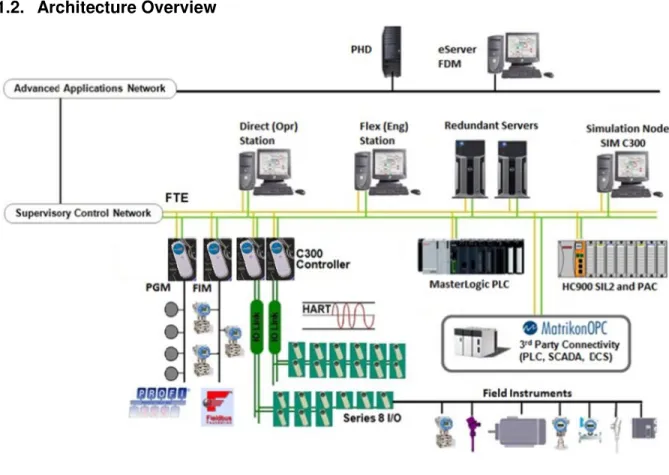
1.2. Architecture Overview
Figure 1 - Sample Experion LX architecture
The Experion LX platform comprises many different integrated hardware and software solutions depending upon the needs of the application. This pictured architecture is a representation of many of the possible nodes that can be used in the Experion LX architecture. Note that the architecture is highly scalable and not all nodes are necessary or required.
1.3. Experion LX Server Overview
The Experion LX Server or redundant LX Server combination functions as a system-wide historian and global database. The Experion LX Server also supports communication to SCADA point sources, DSA point sources, OPC clients and LX Servers and holds the system event journal, system configuration files, custom applications and server scripts. The LX Server is the source for data, alarms, events, etc. for the client-connected applications. One or more Experion Servers are required for an Experion LX system.
1.4. Database Sizing
1.4.1. System Capacity
Functional Area Capacity Description R120 Entry level system R120 High Capacity Description System Size Max ServerClusters per System
1 1 The maximum number of Experion LX Servers that can be defined in one system supported by the System Status Display, and connected via DSA
DSA Max DSA
connections per Server
5 5 Maximum number of other Servers that can be connected via DSA, local to this system and/or to remote system Servers
DSA Data Publish
1,500 PPS 1,500 PPS Maximum number of parameters/sec to all remote servers
Server Point Counts
Max Total Server Points 13,000 (4K SCADA+ 8K Process +1K Equipment) 167,000(50K SCADA + 10 K Process + 2k Equipment + 5 K Non-CEE + 100000) Max SCADA Points
4,000 50,000 Total number of SCADA Points configured per Experion LX Server Cluster
Note: Container Points count against this limit
Max Process Points
8,000 10,000 Any device that uses the Control Data Access (CDA) interface consumes process points (C300 Controllers).
Max DSA Points 0 100,000 Total Points collected from other Experion LX Servers via DSA
Max CDA Points 5,000 15,000 Total CDA/CEE “Process” points configured in a single ERDB
Max Non – CEE Points
- 5,000 Total Non-CEE Points Published from SM to C300 Controller
PSA (Point Server) Points
No overall limit
The PSA point count is an aggregation of points from point server interfaces such as SPS/Adv OPC /BMA/TPS/etc. Each interface may have its own limits but the overall PSA count will count against the total point count limit for a server
Equipment points
1,000 2,000
Other points and hardware items built as part of the equipment still contribute to their own relevant capacity constraints.
Equipment points system wide
5,000 10,000 If a server is subscribing to other servers via DSA, the total of all remote equipment and local equipment points cannot exceed this number.
2,000 2,000 Used to collect and export custody transfer data. An EFM meter uses one SCADA point license.
SCADA Point
Algorithms 50,000 50,000 Algorithm blocks can be linked to SCADA points
System Point Counts
Total of all point types per DSA connected system
13,000 167, 000 The maximum number of points in a system (a system consists of multiple servers)
SCADA RTU/Controller configuration range
50 999 Supported range that RTU’s can be assigned to. (Note: Performance of large numbers of RTU’s will be based other system, channel, and controller limitations). SCADA channels SCADA channels 20 99 Direct station Max Direct Stations per Cluster 10 15
Flex Stations Max Direct Stations per Cluster
0 10
1.4.2. Alarm, Event, Alert and Message Lists
Items Specifications Comments
Maximum number of active
alarms and alerts 4,000
Alarms and alerts occupy the same storage space so there can be a maximum of 4,000 active alarms and alerts in the Alarm and Alert summaries.
Maximum number of active
messages 1,000 Number of messages that appear in the Message summary.
Maximum number of SOE
messages 32,767 Number of SOE messages that can appear in the SOE summary.
Maximum number of events in
online event file 1.2 million
• All alarms, login actions, operator actions, and configuration changes are logged in the online event file.
• Up to two events are generated for every alarm, including
one event for entering the alarm condition and one for return to normal.
1.4.3. Other Database Sizing Specifications
Items Specifications Comments
Printer connections 20 This is the total number of printers that can be configured as either report or alarm devices.
Trend sets 3,000
Trend pens per set 32
Trend periods 1, 5, 20 minutes 1, 2, 4, 8, 12 hours 1, 2, 5 days 1, 2, 4 weeks 3, 6 months 1 year Operating groups 16,000
Points per group 8
Reports 1,000
Operators 1,000 This is the default limit. The quantity can be increased to 32,000, if
required.
Number of recipes 500
Number of messages 1000
Number of point control
1.5. Enterprise Model Sizing
1.5.1. Assets
1.5.2. Alarm Groups
Description Standard Capacity System High Capacity System Comments Alarm groups 500 1000Alarm Groups present alarm state/status for a disparate group of points and assets that are not represented by a single asset in the asset model.
Children per alarm group 500 500 Nesting depth for alarm
group hierarchies 5 5 Description Standard Capacity System High Capacity System Comments Assets 1000 1000
The asset model represents the organization of items in the enterprise, for example, process units, individual pieces of equipment or facilities, etc. The relationship or hierarchy between assets and entities forms the asset model. The primary relationship in the asset model is that of asset containment, where one asset contains another.
Assignable assets 500 1000
Assignable assets provide a way to assign assets to an operator's scope of responsibility. An assigned asset includes all asset children of the assigned asset including any points associated with those assets or any alarm groups that have been designated by that asset for scope of responsibility purposes. The number of assignable assets is a subset of the total number of assets.
Nesting depth for asset
hierarchies 10 10
1.6. History Sizing
1.6.1. Collection Rates
Items Specifications Comments
Standard history
• Predefined collection rates of 1, 2, 5, 10 and 30 minutes
• 3 additional user defined
collection rates can be defined.
• When you configure a point parameter for standard history
collection, Experion LX also collects 4 different standard history averages, based on the standard history snapshot rate that you choose for standard history collection.
• The default standard history snapshot rate is 1 minute and the collection rates for averages are 6-minute, 1-hour, 8-hour and 24-hour averages.
• The averages are calculated using the 1-minute base interval. That is, 6-minute averages are calculated on six 1-minute values. If you change the 1-1-minute base interval the averages are still calculated from the base interval. For example, if you change the base interval to 30 seconds, 6-minute averages are calculated on twelve 30-second values.
Fast history
• Predefined collection rates of 5, 10, 15, 20 and 30 seconds.
• 3 additional user defined collection rates can be defined.
• A maximum of 8 collection rates can be defined choosing from the default intervals on the left
• Additional rates can be defined; however they must be in multiples of the base rates.
• The 5 second base rate can be configured to 1 second.
Extended history
• 1-hour snapshot • 8-hour snapshot
• 24-hour snapshot
• When a point is configured for extended history collection, all of these intervals are stored.
Exception history • 5, 10, 15, 30, and 60 seconds • 5, 10, 15, 30, and 60 minutes • 2, 4, 6, 8, 12, and 24 hours
• Whereas standard, fast, and extended history collect and
store point parameter values periodically, exception history collects values at the rate configured for that point parameter but only stores them if the value or quality of that point parameter has changed since it was last stored.
• Note that exception history only collects and stores string values.
1.6.2. Default History Files Sizes
Items Specifications Comments
Time Samples
Standard history
1-minute snapshot 24 hours 1,442
6-minute average 7 days 1,682
The averages are calculated using the 1-minute base interval. That is, 6-1-minute averages are calculated on six 1-minute values.
1-hour average 7 days 170 The averages are calculated using the
1-minute base interval.
8-hour average 3 months 281 The averages are calculated using the
1-minute base interval.
24-hour average 1 year 368 The averages are calculated using the
1-minute base interval. Fast history 1-second or 5-seconds 2 hours or 12
hours 8,652
Extended history
1-hour snapshot 7 days 170
8-hour snapshot 3 months 281
24-hour snapshot 1 year 368
The number of samples in each history file can theoretically be increased to 100,000 samples. If the size of the history file is increased beyond the default qualified size, care should be taken not to exceed the maximum history file size constraints. (See section 2.3.4). History archiving is available to store the history files for later retrieval. Experion LX history data is seamlessly available for use across every Experion LX Station for trend displays, reports, custom displays, applications, spreadsheets and ODBC compliant databases.
1.6.3. Maximum Parameters Assigned to History
Items Specifications Comments
Standard history 2,000
This is the default limit that Experion LX is shipped with. It can be
changed by a database initialization up to a maximum of 50,000. Double, Float, Integer and Time data can be stored.
Fast history 500
This is the default limit that Experion LX is shipped with. It can be changed by a database initialization up to the following maximums. Fast History Collection Rate Maximum Parameters 1 second 1000
5 seconds 2000
Double, Float, Integer and Time data can be stored.
Extended history 2,000
This is the default limit that Experion LX is shipped with. It can be
changed by a database initialization up to a maximum of 10,000. Double, Float, Integer and Time data can be stored.
Exception history 500
This is the default limit that Experion LX is shipped with. It can be
changed by a database initialization up to a maximum of 1000.
String maximum of 255 characters can be stored. A maximum of 100 exception history parameters can be stored per second.
The ability to collect history at the configured rate depends upon throughput of underlying process control network, see table 2.4, LX Server Data Access Acquisition Performance.
1.6.4. Calculating History Space Requirements
Items Specifications Comments
Maximum history file size 500 MB
• Each type of history sample is stored in a separate history file. For example, there are five history files for standard history, one each for: 1-minute snapshot, 6-1-minute average, and so on.
• An individual history file should not exceed this size.
Formula for calculating number of samples for a given history file size
If collecting P parameters for a particular history rate with a history file size of S bytes then:
Number of samples = (S/2)/(((P*6)+8)-1)
Example:
Standard history one minute (history 1) file size is 432623072 bytes
Number of parameters assigned to standard history is 50000
Number of samples = (432623072)/(((50000*6)+8)-1)=721 records
For efficiency reasons the history file size should be configured to be as close to 500M as possible. The sysbld utility is used to modify the number of parameters assigned and the number of samples collected for each type of history.
1.7. Server Data Acquisition Performance
Items Standard Capacity System High capacity system Comments Experion LX ControllersMaximum CDA throughput from all Controllers – C300 (PPS – Parameters Per Second)
3,700 4,700
Maximum number of CDA subscribed parameters from all controllers on FTE
8,000 25,000
This is the number of parameters that can be actively subscribed by an Experion LX Server at any one time. The Server adds and removes items from the subscription list based on demand.
DSA
Maximum pps from each configured DSA subscribing LX Server
0 1,000 This information is duplicated in section 3.2, DSA.
SCADA
Maximum pps from all
configured SCADA devices Limited by device
OPC
Maximum OPC pps from all
1.8. Notification Performance
Items Specifications Comments
Alarm and Event Notifications
Maximum number of events
(burst condition)1 1,500 events
The Experion LX Server alarm system will handle an event burst of up to 1,500 events, with a minimum time between consecutive bursts. An “event burst” is defined as a group of events greater than 40/sec, received from all connected event servers in a period of less than 3 seconds.
Formula to calculate the time period required between consecutive bursts, to allow for event processing ∆T = BS/(60-ER) Where: ∆T = # of seconds required between bursts BS = Burst Size (number of events in the burst) ER = Event Rate between bursts Examples:
• 1,500 event burst and no events between bursts: ∆T = 1,500/60 = 25 seconds
• 500 event burst with 30 events/sec between: ∆T = 500/30 =
17 seconds
Maximum number of sustained events/second1
10,000/hour, with peaks of up to 40/sec Maximum number of sustained
alarms/second1 30/sec
Maximum duration of events in
online events file 12 weeks
Maximum number of events in
online events files 1.2 million
Event archiving can be used to access older events. Approximately 60 MB of hard disk space is required for every 100,000 events archived
Alerts and Notifications
Maximum number of
alerts/second 1
Maximum burst of alerts 100
These totals are still subject to the overall maximum number of events per second and maximum burst of events limit that the Experion LX Servers can support.
Note 1 – The Experion LX Server includes the option to support OPC alarms and events in addition to native Experion LX notifications. When the Experion LX Server is configured to receive alarms and events from an OPC alarm and event server, the notification limits noted in this table are applicable to the combined set of events received from all connected event sources.
1.9. Supervisory Control and Data Acquisition (SCADA)
1.9.1. Communication
Items Specifications Comments
SCADA Channels 99
Channels typically represent a physical connection to a device, such as a device connected to one port of a terminal server. A channel can support more than one Remote Terminal Unit (RTU).
SCADA RTUs (Controllers)
999
This is the maximum number of RTUs for a given server. It is spread across all channels and includes OPC RTUs to support the OPC client interface as described in section 3.3.1. (This information is duplicated in 3.3.1 “OPC Client Interface (SCADA Client)”.
1.9.2. Real Time Database SCADA Point Structures
Point Structure Standard ParameterCommon Parameters (Analog, Status and Accumulator)
Point Name Point Description Item Name
Parent Asset Associated Display Point & Group Displays
Scan Enable & Status PV Last Processed Date/Time2 Data Quality PV Algo & Action Algo3 Alarm Enable & Status Message Index Scan Address (PV SP MD
Au)
Scan Period (PV SP MD Au) Manual PV User Defined Parameters4 Non-scanned Parameters5 Point Script6 Analog
(Used for continuous analog values)
Process Variable (PV) Output (OP) Setpoint (SP)
Mode (MD) Up to 4 Auxiliary inputs (Au)7 Engineering Units (EU)
0% & 100% EU Range Drift Deadband PV Clamp
PV Bias & Scale Normal Mode OP Low & High Limits
SP Low & High Limits Reverse Output Operator Control Level
Control Inhibit Control Confirmation Control Deadband
PV Fail Alarm PV Control Timeout PV Control Fail Alarm
External Change Alarms Unreasonable PV Alarm Up to 8 PV Alarm types8 Alarm Deadband
Status (Used for digital values. PV can range from 1 bit to 3 bits, allowing up to 8 states.)
Process Variable Output Mode
Normal Mode Number of Input States Number of Output States
State Descriptor 0 to 7 InState Flags Target PV for OP States
Reverse Output Output Pulse Width Operator Control Level
Control Inhibit Control Confirmation PV Control Timeout
PV Control Fail Alarm Alarm States (0 to 7) Re-Alarm between states
External Change Alarms Accumulator
(Used to totalize a pulsed input)
Process Variable Engineering Units (EU) 100% EU Range
Meter Factor Scale Factor Roll Over Value
Raw PV Up to 4 PV Alarm types9
OPC Advanced (to link complex OPC data structures)
Point Name Point Description Item Name
Parent Asset Associated Display Point & Group Displays
User Defined Parameters4 OPC Parameters10 Point Script6
Container (Collates many related points into 1)
Point Name Point Description Item Name
Parent Asset Associated Display Template Type
Point Structure Standard Parameter
Note 1 – Each of the configured alarms can be assigned a priority ranging from Journal, Low, High to Urgent. An alarm sub-priority (0 to 15) can also be assigned to further differentiate alarms.
Note 2 – Each time the PV is polled from the RTU, Experion will track the time/date of when the value was last processed. If the Analog point in Experion has a drift deadband of 1%, then the last processed time is not updated until the PV moves by >1%. Similarly, if the drift deadband is 0%, then the last processed time is not updated until the PV moves slightly. Note 3 Experion supports additional data processing through the use of standard algorithms that may be attached to analog,
status or accumulator points. Functions provided by these algorithms include:
Arithmetic calculation; Boolean calculation; Maximum/minimum value; Integration; Run hours totalization; Group alarm inhibit; Report request; Application program request;
Note 4 – For each of the point types it is possible to add user-defined parameters to the existing pre-built parameters. This enables points to be extended to contain free format values, constant values, or values used by applications and scripts to store calculated or derived plant information. User-defined parameters can be assigned to history collection.
Note 5 – Only relevant for OPC Client type controllers: Non-scanned parameters are similar to user defined parameters except they link to a controller OPC item. These parameters are only requested on demand, (not scanned). Usefull to access related information stored in the controller.
Note 6 – Point Script: Custom VBscript executed based on triggers. Available triggers: OnAlarm; OnNormal; OnAcknowledge; OnTimer; OnChange (by parameter); OnOperChange (by parameter). See server Scripting section below.
Note 7 – Auxiliary Inputs are typically used for PID tuning constants but may have other uses.
Note 8 – Supported alarms include: PV Hi, PV Lo, PV HiHi, PV LoLo, Deviation Hi, Deviation Lo, Transmitter Hi, Transmitter Lo, Rate of Change.
Note 9 – Supported alarms include: PV Hi, PV HiHi, Rate of Change.
Note 10 – OPC Parameters: Each OPC parameter has a parameter name and associated OPC item definition.
Note 11 – Each contained, (or child), point of a Container point has an alias that becomes the first part of the Container point parameter. E.g., <Container>.<Alias>.PV
1.9.3. Algorithm Blocks
Experion supports additional data processing through the use of standard algorithms that may be attached
to analog, status or accumulator SCADA points. Functions provided by these algorithms include:
Arithmetic calculation; Boolean calculation; Maximum/minimum value; Integration; Run hours totalization;
Group alarm inhibit; Report request; Application program request; Some of these require the use of
Algorithm Blocks.
Items Specifications Comments
SCADA Point Algorithm Blocks 50,000 This is the maximum number of algorithm blocks for a given server. Algorithms are optionally attached to SCADA points. Some algorithm types require the use of an algorithm block.
1.9.4. Equipment Templates
Equipment is a licensed point type that provides simplified engineering and enhanced Station visualization of
similar pieces of physical equipment, (such as Gas Wellheads). Equipment is created in Quick Builder and
automatically builds underlying SCADA points, Controllers and Station visualizations based on a configured
template. Equipment point limits are detailed in section 1.4.1,
Error! Reference source not found.
.
Item Specification
Maximum Equipment Templates 200 (20 types with 10 variants each)
Maximum Equipment Template inheritance1 depth 4
Note 1 – Inheritance is about a variation or specialization of a piece of equipment. For example: 1) Pumping Well and Flowing Well both inherit from Well – this is an inheritance level of 1 2) Turbo Pumping Well inherits from Pumping Well which inherits from Well – inheritance level of 2
1.10. Server Scripting
1.10.1. General Server Scripting Specification
Items Specifications Comments
Description
Server scripting extends the behavior of the server-resident subsystems and its run time objects. Examples of server objects are points and parameters, reports, assets and tasks (application programs). Scripts can run by the server either periodically or when a specified event occurs. Standard displays support the monitoring of the status of running scripts.
General Specifications
Maximum script size
Short scripts only (typically less than 50 lines)
• Server scripting has been optimized for relatively short scripts
and is not designed for implementing control strategies. If a task is computationally intensive, or requires extensive file handling, custom applications can be used instead of scripts – see section 3.6 “Application Development Toolkit”. Some tasks qualify for both categories, and the rules are flexible when deciding what tasks can and cannot be performed by server scripts, see the following section.
• Where possible, existing server functionality should be used in preference to writing server scripts. Standard server functionality optimizes the task implementation.
1.10.2. Server Scripting versus Custom Applications
Tasks Server Scripting Custom Application
Extend server functionality via information transfer Yes Yes
Relatively short processing (< 50 lines of code) Yes Yes
Used to provide linkage to other applications via
automation servers Yes Yes
Code is interpreted at run-time. Yes No
Code is compiled and optimized at build time. No Yes
Computationally intensive No Yes
Optimized for supervisory control No Yes
Iterative code No Yes
Relatively complex user interface requirements No Yes
Extensive file handling No Yes
Script (program) state preserved on failover No No
2.
Option Specifications
2.1. Server Redundancy
Items Specifications Comments
Description
Server redundancy provides a high availability platform by enabling a pair of similarly configured Servers to support each other in a primary/backup fashion.
Details
Redundancy fail-over conditions
Should the primary Server fail, a fully functioning backup assumes the primary role.
Primary refers to the specific Server that is actively acquiring data from the controllers/RTUs and serving data to the clients. The primary Server propagates all database transactions to the backup to enable both databases to remain synchronized.
2.2. Distributed Systems Architecture (DSA)
2.2.1. General DSA Specifications and Performance
Items Standard Capacity System High capacity system Comments Description
Distributed System Architecture (DSA) is an option that enables multiple Experion LX Servers to share data, alarms, alerts, messages and history without the need for duplicate configuration on any Server.
Maximum number of DSA connected servers
5 5 This is the total number of Experion LX Servers on the network. They do not all need to be connected to each other via DSA or be in the same Enterprise Model system.
Note the increased limit for Central Control Room topologies below
DSA Data Publish Maximum number of parameters/s to all remote servers1
1500 1500
Maximum number of remote servers for publishing to
5 5
DSA Data Subscription Maximum number of parameters/s from each remote server1
0 1000
Maximum number of remote servers that this server can subscribe to
0 5
Total number of parameters/s from all remote servers
DSA Request Response (Device read) Maximum number of list reads from DSA Server per second
1 1
(Device read) Maximum number of items/list supported1,2
1000 1000
(Device read) Sustained read rate (items/second) 1,2
250 250
Note 1 – Ability to deliver published data rate depends upon throughput of underlying process control network.. Refer to the documentation associated with the process control network for more information.
Note 2 – Device reads should be used with caution. It is possible to overload the underlying process control network if too many device reads are done.
Note 3 – These values are based upon the standard history configuration settings
2.2.2. DSA Central Control Room
DSA Central Control Room Topology1
Standard Capacity System
High capacity system
Maximum number of remote servers that this server can subscribe to 0 5
Note 1 – The DSA Central Control Room (CCR) topology is a topology where an Experion LX Server is a subscriber to a large number of remote DSA servers. The key features of this topology are:
• The CCR server is not process connected
• The CCR server can be redundant
• The CCR server has its own EMDB. All remote servers are external servers in CCR server EMDB.
• The remote servers must obey the standard DSA limits (including the maximum number of remote servers that this server can subscribe/publish to)
• The CCR server must obey the standard DSA limits (except for the maximum number of remote servers that this server can subscribe to)
2.2.3. DSA Interoperability
Experion LX can publish data to Experion PKS system, and cannot subscribe data to Experion PKS system.
Experion LX can subscribe and publish data to Experion HS system; and Experion HS can also subscribe
and publish data to Experion LX system.
2.3. CDA Integration with Safety Manager
Safety Manager CDA Integration Specifications
High Capacity
Definitions:
PPS = Average Parameters Per Second PPM = Average Parameters Per Minute
Safety Manager CDA Integration Specifications
High Capacity
Maximum CDA points published from Safety Builder per Experion Server Cluster (includes all Safety Managers associated with the cluster)
2500 Points
Overall Data Access Performance Per Safety Manager
Maximum Total Parameter Access Response Rate
(Includes all Server Data Requests, Console Station Data Requests, and peer communications including other ACEs, C200s, C300s, SIM-C200s, SIM-C300s, SIM-ACEs, and FIMs)
600 PPS
Display Data Access Capacity
Maximum Total Subscribed Parameters per SM (Includes all Server Data Requests + Console Station Data Requests)
1200 Maximum time for CDA to reform display connections after redundant SM failover 6 sec Request/Response Data Access Performance
Max Request/Response Parameter Access Rate
(Includes all Slow Server Data Requests, e.g. Greater than 10 sec OPC data, Slow History, Data Writes, etc.)
2000 PPM Read 500 PPM Write Peer-to-Peer Performance
Maximum Initiator Pull/Get Subscribe Rate to all target nodes. (incoming data) NA1 Maximum Target Publish Rate to Pull/Get Subscriptions from all initiator nodes.
(outgoing data)2 100 PPS
Maximum time for CDA to reform peer connections after redundant SM failover 3 sec Peer-to-Peer Subscription Capacity / Update Rate
Maximum SM peer capacity per update rate (Pulling data from SM) 20 @ 200 ms 50 @ 500 ms 100 @ 1 sec Push/Store Request Performance
Maximum Push/Store Request Rate to all target nodes1 NA
Maximum Response Rate to Push/Store Requests from all initiator nodes 20 PPS Maximum Number of parameters that can be Written to Safety Manager from
C300 (single writes exclusively)
64 per cycle 4 Peer-to-Peer Capacity
Peer Connection Units (PCUs)
(Number of CDA Controllers that this SM can respond to)1,3
20
(Includes total of other ACEs, SIM-ACEs, C200Es, C300s, SIM-C200Es,
SIM-C300s) Notes:
1 – Safety Manager is only a CDA Data Responder Node. SM does not initiate any Peer-Peer connections. 2 – Outgoing peer data capacity is defined/measured before the RBE (Report by Exception) comparisons are done,
so all parameters requested as peer data contribute to the outgoing PPS load, whether they are changing or not and sent over the network or not.
3 – Each CDA Peer-Peer connection to the redundant Safety Manager consumes 2 CDA connections (PCUs) on the C200E, C300, or ACE Node. (I connection to the Primary SM plus 1 connection to the Secondary SM)
2.4. OPC
2.4.1. OPC Client Interface (SCADA Client)
Items Specifications Comments
Description
The OPC Client Interface is designed primarily for robust integration of low complexity subsystems such as Programmable Logic Controllers (PLCs) and Remote Terminal Units (RTUs). It provides an open method for connecting a wide range of devices for supervisory monitoring, alarming and control.
General OPC Client Interface Specifications
Maximum number of third-party OPC DA servers supported by the Experion LX OPC DA Client
5
OPC DA versions supported 1.0a and 2.05a
Supports redundant OPC DA
Servers Yes
The OPC Client Interface natively supports the concept of preferred and secondary servers. However, it only supports passive redundancy, requiring the interface to rebuild the items and groups on the
secondary in the event of a primary failure. This will give acceptable performance for a moderate number of items.
Time-stamping Within the Experion
LX Server
Time-stamping of the data occurs within the Experion LX Server once the data has been successfully read into the SCADA database
Alarming Yes Alarms are generated based on limits defined within the Experion LX
Server.
Scannable parameters per point
8 – Analog 3 – Digital 1 – Accumulator
• A scannable parameter is a parameter that is able to source data from an OPC Item versus an internal register.
• These are the standard quantities of scannable parameters
found on all SCADA analog, digital and accumulator points.
OPC Groups and Items
Maximum number of OPC
controllers 50
This is the maximum number of SCADA controllers/RTUs that can be built across all channels on an Experion LX Server.
Maximum number of items per
OPC controller 960
This is the total number of OPC Items that can be built against a given controller. There will be a varying number of items consumed with each point, up to 8 for an analog point.
Maximum number of OPC
groups supported 500
An OPC client controller manages groups as follows:
• A group is created for each scan period used by the point
parameters (items) defined on the controller. All point parameters that have the same scan period are placed in the same group. Note that if a scan period of 0 is used, the item is placed in a group with an update rate equal to the slowest scan rate of the system.
• All points defined on the controller have the same OPC
deadband. Note that the OPC deadband is not the same as the alarm and control deadbands that can be specified for analog points.
Maximum number of items per
scan period per controller 960 As above.
Rate at which items can be
added to groups 1,000/second
The rate at which items can be added to groups depends upon the design of the OPC Server and the throughput of the process control network with which it connects.
Items Specifications Comments
supported supported.
OPC Client Callback Support
Sustained callback rate from all OPC servers (values per second)
1,000
OPC client write support
Number of item writes by OPC client interface per second (per channel)
1
Maximum no. of items per list
supported (write) 10
Sustained write rate
(items/second) 1
2.4.2. OPC Advanced Data Client
Items Specifications Comments
Description
The Experion OPC Advanced Data Client is designed to facilitate the efficient reading of data between Experion and OPC Data Access servers that have very complex point structures. These point structures typically would have a large number of parameters per point and many different point types. The Experion OPC Advanced Data Client is bundled with the OPC Client Interface option.
General OPC Advanced Data Client Specifications
Maximum number of third-party OPC servers supported
5 OPC DA versions supported 2.05a
Redundancy supported Yes The OPC Advanced Data Client has no native redundancy like the OPC Client Interface; however, Redirection Manager can be used to provide redundancy support. With support for active redundancy schemes, Redirection Manager is able to build items and groups simultaneously on the OPC DA servers. This allows for extremely fast switching in the event of an OPC DA failure
Maximum OPC item name length
120 char Maximum total length of an OPC item name that can be used with the OPC Advanced Data Client
Alarming No Unlike the OPC Client Interface, the OPC Advanced Data Client relies
on the OPC Advanced Alarm and Event client for alarming capabilities. It has no native ability to alarm without the presence of an OPC Alarm and Event (A&E) server.
In order for the OPC Advanced Alarm and Event client to provide alarming capabilities, condition-based OPC alarms are required from the OPC A&E server. Because of the many different interpretations of the OPC A&E standard by third-party vendors, integration issues with OPC condition events in areas such as alarm acknowledgement and duplicate alarm identification may exist. Contact Honeywell for planning assistance when integrating a third-party OPC A&E server that utilizes OPC condition events with Experion.
Scanned parameters per point
400
Items Specifications Comments
Maximum number of OPC groups supported
See note The OPC Advanced Data Client manages groups as follows: a group is created for each subscription rate used by local and remote clients. That is, all point parameters that have the same subscription rate are placed in the same group.
When an item is no longer being subscribed to, it will be removed from its current group.
Maximum number of items per group supported
2,000 Maximum number of items
across all groups
10,000 Group update rates
supported 1 second and
1 second and above 1, 2
OPC Client Callback Support
Sustained callback rate from all OPC servers (values per second)
1,0002
OPC Client Write Support
Number of item writes by OPC client interface per second
4
Maximum no. of items per list supported (write)
2,0001 Sustained write rate
(items/second)
5001
Note 1 – This value depends upon the design of the third-party OPC server and the throughput of the process control network with which it connects.
Note 2 – The group rates supported match the Experion subscription rates supported up to the maximum subscription rate (default: 10 seconds). Beyond the maximum subscription rate synchronous reads are used to collect the data.
2.4.3. OPC Display Data Client
Items
Specifications
Comments
Description
Primarily targeted as a convenient method of getting OPC Data into displays. Designed for situations where you need to bring data into the Experion LX displays via OPC and no additional processing needs to be done on the server e.g. no need for alarming, historization, point detail, group, etc. The Experion LX OPC Display Data Client is bundled with the Experion LX base software.
General OPC Display Data Client Specifications
Maximum number of third-party
OPC servers supported 5
OPC versions supported 2.05a
OPC Performance and Throughput
Maximum number of OPC
groups supported See Comment
The OPC Display Data Client manages groups as follows: a group is created for each subscription rate used by local and remote clients. That is, all point parameters that have the same subscription rate are placed in the same group. When an item is no longer being subscribed to, it will be removed from its current group.
Maximum number of data
values per display 40
The performance of third-party OPC Servers can vary significantly. For very slow OPC Servers it is possible that the maximum number of OPC display data client values per display may be less than this. Maximum number of data
values per OPC server 1,000
the throughput of the process control network with which it connects.
OPC client callback support
Sustained callback rate from all OPC servers (values per second)
100
The performance of third-party OPC servers can vary significantly. For very slow OPC servers it is possible that the maximum number of OPC display data client values per display may be less than this.
2.4.4. OPC Data Access Server
Items Specifications Comments
Description
The Experion LX OPC Data Access Server provides OPC Data Access Clients with the capability to view Experion LX point data for the purposes of control and plant-wide historization.
General OPC Data Access Server Specifications
Maximum number of OPC Data Access Client Application Instances (CAIs)
20
Each OPC Client Application running on a physical node connecting into the server consumes one Client Application Instance (CAI) for each application. The applications can open multiple physical connections and this still only counts as one CAI for each application. If the same application is running on multiple nodes, one CAI is consumed for each node.
Maximum number of concurrent OPC DA connections across all OPC clients
50
OPC DA versions supported 1.0 and 2.05a
Redundancy supported Yes
Redirection Manager should be used for connecting clients that do not support redundancy to the redundant Experion LX Servers. For clients that do support redundancy, use of Redirection Manager is still advised as it has been designed with Experion LX’s redundancy scheme in mind.
OPC Groups and Items
Maximum number of OPC
groups supported 300
Maximum number of items per
group supported 7,000
Rate at which items can be
added to groups 1,000/second
Assumes the parameters are already primed. The rate at which items can be added to groups depends upon the throughput of underlying process control network.
Total number of items supported
across all groups 50,000
1
Group update rates supported 1 second and above
OPC Client Callback Support
Sustained callback rate from OPC server (items per second) to all OPC clients
2,0001
OPC Client Read Support
(Cache read) Maximum number of list reads from OPC server per second
1 (Cache read) Maximum number of items/list supported 2,000
1 Assumes that the data is already subscribed to and is therefore in the Experion LX cache.
(Device read) Maximum number of list reads from OPC server per second
1 (Device read) Maximum number of items/list supported 2,000
(Device read) Sustained read
rate (items/second) 500
1, 2
OPC Client Write Support
Number of list writes to OPC
server per second 1
Maximum no. of items per list
supported (write) 2,000
3
Sustained write rate
(items/second) 500
3
Note 1 – Ability to deliver published data rate depends upon throughput of underlying process control network. . Refer to the documentation associated with the process control network for more information.
Note 2 – Device reads should be used with caution. It is possible to overload the underlying process control network if too many device reads are performed.
Note 3 – The ability to deliver write data rate depends upon the throughput of underlying process control network.
2.4.5. OPC Alarm and Event Server
Items Specifications Comments
Description
The OPC Alarm and Event Server is a simple and convenient mechanism for publishing Experion LX alarms and events to client applications. It provides a rich range of different Experion LX alarm and event data in an efficient manner, using the latest version of OPC specification.
General OPC Alarm and Event Server Specifications
Maximum number of Alarm & Event Client Application Instances
15
Each OPC Client Application running on a physical node connecting into the Server consumes one Client Application Instance (CAI) for each application. The applications can open multiple physical connections and this still only counts as one CAI for each application. If the same application is running on multiple nodes, one CAI is consumed for each node.
OPC A&E versions supported 1.1
Redundancy supported Yes
Redirection Manager should be used for connecting clients that do not support redundancy to the redundant Experion LX Servers. For clients that do support redundancy, use of Redirection Manager is still advised as it has been designed with Experion LX’s redundancy scheme in mind.
Event types supported1 Condition, tracking and simple
Condition-related events are associated with OPC conditions (e.g. Acked, UnAcked, Disabled etc.). An example is the tag FIC101 transitioning into the LevelAlarm condition and HighAlarm sub-condition.
Tracking-related events are not associated with conditions, but represent occurrences which involve the interaction of an OPC Client with a “target” object within the OPC Event Server. An example of such an event is a control change in which the operator, (the OPC Client), changes the set point of tag FIC101 (the “target”).
Simple events are all events other than the above. An example of a simple event is a component failure within the system/device represented by the OPC Event Server.
Experion LX alarm and event types published
Alarms, alerts, messages, events, SOE, operator
changes
OPC Performance and Throughput
Maximum notification rate to
one OPC A&E client 15,000/hour
The maximum notification rate is the total number of notifications received by the server from all sources. The maximum A&E notification rate is dependent on the total number of notifications being received by the server from all sources.
Maximum notification rate to all
OPC A&E clients 10,000/hour As above.
Note 1– Because of the many different interpretations of the OPC A&E standard by third-party vendors, integration issues with OPC condition events in areas such as alarm acknowledgement and duplicate alarm identification may exist. Contact Honeywell for planning assistance when integrating a third-party OPC A&E Client that utilizes OPC condition events with Experion LX.
The risks with OPC simple and tracking events are lower than for OPC condition events. However, because of different interpretations of the OPC AE standard, integration issues may still be found. Thorough testing should be performed between the Experion LX OPC A&E Server and third party client to ensure correct operation.
2.4.6. OPC Historical Data Access Server
Items Specifications Comments
Description
The OPC History Data Access Server presents Experion LX history data in an open manner to client applications. Whether archived or online, the Experion LX OPC history data is able to retrieve and publish data timely and efficiently. A range of aggregate functions are provided to reduce the processing load on the client.
General OPC Historical Data Access Server Specifications
Maximum number of History Data Access Client Application Instances
20
Each OPC Client Application running on a physical node connecting into the server consumes one Client Application Instance (CAI) for each application. The applications can open multiple physical connections and this still only counts as one CAI for each application. If the same application is running on multiple nodes, one CAI is consumed for each node.
Maximum number of concurrent OPC HDA connections across all OPC clients
40
OPC HDA version supported 1.2
Redundancy supported Yes
Redirection Manager should be used for connecting clients that do not support redundancy to the redundant Experion LX Servers. For clients that do support redundancy, use of Redirection Manager is still advised as it has been designed with Experion LX’s redundancy scheme in mind.
Supported aggregates
Interpolated, average, minimum and maximum
Performance and Throughput
ReadRaw (average values per
second) 3500
1, 2
AdviseRaw (average values per
second) 1200
1, 2
ReadProcessed (average
values per second) 500
1, 2, 3
Items Specifications Comments
Note 2 – The specification for value/second is across all clients. Note 3 – ReadProcessed performance is for interpolation aggregate.
2.4.7. OPC Integrator
Items Specifications Comments
Description
OPC Integrator allows bi-directional data transfer between two or more OPC Data Access Servers for the purposes of supervisory monitoring, alarming and control. As a fully integrated part of Experion LX, it provides integrated diagnostic, configuration and operational experiences that are consistent with other Experion LX operations. Additionally OPC Integrator leverages Experion LX’s advanced redundancy features for improved reliability.
General OPC Integrator Specifications
OPC DA versions supported 2.05a Maximum number of OPC
Integrator transfer groups supported
Unlimited A typical large system consists of approximately 40 groups.
Maximum number of items per
group Unlimited Typical large systems will contain approximately 1000 items per group.
Transfer rates supported 500ms and above
• Typically set between 1 and 10 seconds.
• Ability of OPC Integrator to support a given transfer rate depends on the underlying OPC Data Access Server that it is connected to.
• Setting this number too low can impact performance.
Rate at which items can be
added to groups 1,000/second
Assumes the parameters are already primed. The rate at which items can be added to groups depends upon the design of the third-party OPC server and the throughput of the process control network it connects to.
2.4.8. Redirection Manager
Items Specifications Comments
Description
Redirection Manager (RDM) provides OPC server redundancy to OPC Data Access, Alarm and Event, and History Data Access Clients that may not support this capability by transparently redirecting client requests to a secondary OPC server when the primary OPC server is unavailable.
Version Support
OPC versions supported
• OPC DA versions 1.0 and 2.05a • OPC A&E version 1.1 • OPC HDA version 1.2
2.5. Interfaces
Interface Software1 Connection Type
DNP3 Protocol Interface1, 4 Open Standard Serial and Ethernet (TCP/IP & UDP/IP)
Modbus (RTU, Plus, ASCII, & TCP) Interface1 Serial, Modbus+, ASCII and Ethernet
Honeywell Universal Modbus Interface1 Serial and Ethernet
MLDP MasterLogic Interface Ethernet
Enron Modbus Interface 2 Serial through Terminal Server (RTU or ASCII) and Ethernet
OPC Client Interface 3 Dependent on OPC server used
IEC 61850 protocol Interface Ethernet
Note 1 – These interfaces together with the Honeywell Safety Manager and MasterLogic PLC Serial and Ethernet Integration are standard included with the Experion LX base software
Note 2 – Comes with an EFM custody transfer data option. Requires the use of EFM meter points
Note 3 – Numerous third party devices are supported using the OPC Client Interface in combination with MatrikonOPC drivers
Note 4 – Requires separate license for a history backfill option
2.6. Microsoft Excel Data Exchange
Item Specification
Description
Enables capture of real-time point parameter and history information, and displays the data in a Microsoft Excel spreadsheet, using cell formulas or the Microsoft Excel Data Exchange Wizard.
Details
Access to real-time point.parameter values Read or Read/write access (configurable) Access to historical point.parameter values Read only
Access to database files (user tables) Read or Read/write access (configurable)
2.7.
Application Development Toolkit
2.7.1. ODBC Driver
Item Specification
Description
Primarily intended for reporting, the ODBC driver enables an ODBC-compliant application to access data in the Experion database, such as history, event, and point parameter values. With the ODBC Driver, the Experion Server acts as a server application (contrast this with ODBC Data Exchange, where the Experion Server acts a client application). The ODBC Driver allows the server database to be queried using SQL commands from ODBC client applications. Additionally, custom applications written in Visual Basic or C++ can also access the server database via the ODBC driver.
Access to historical point.parameter values Read only
Access to events Read only
Configuration Optimized for Microsoft Access and other ODBC ad hoc
query/report applications.
2.7.2. ODBC Data Exchange
Item Specification
Description
Enables two-way exchange of data between the Experion Server database and an ODBC-compliant local or network third-party database. It uses standard Structured Query Language (SQL) commands. The Experion Server acts as a client application in this configuration, in contrast with the ODBC Driver option where the Experion Server acts a server application. Data from an Experion Server database can be transferred to a third-party database, and data from a third-party database can be transferred into the Experion Server database.
Details
Access to real-time point.parameter values Read/write access Access to historical point.parameter values Read only Access to database files (user tables) Read/write access
Databases that include ODBC drivers examples Microsoft SQL server, Oracle 7, Microsoft Access, and Sybase 10.
Configuration options Can be configured to periodically exchange data or exchange on
request.
2.7.3. Network API
Item Specification
Description
Support custom applications — In Visual C/C++ or Visual Basic — that exchange data with the Experion database.
Details
Access to real-time point.parameter values Read/write access Access to historical point.parameter values Read only Access to database files (user tables) Read/write access
2.8. Application Enablers
2.8.1. Point Control Scheduler
Item Specification
Description
The Scheduler option allows point supervisory control to be automatically scheduled to occur at a specified time. This may occur on a “one-shot” basis, daily, workday, weekend, holiday, or a day of the week.
Details
2.8.2. Recipe Management
Items Specifications Comments
Description
Recipe Management provides facilities to create recipes and download them to nominated process units. Each recipe may have up to 30 items and recipes can be chained together to form larger recipes, if required. Recipe items may be used to set ingredient targets, set alarm limits, set timers and place equipment into correct operating state. Items may be individually enabled for scaling.
Details
Maximum number of recipes 500 This is the default limit. This number can be increased to 32,000 if required.
2.8.3. Batch Reporting
Items Specifications Comments
Description
Batch reporting enables integrated reporting of batches or lots of a production process run, to be compiled and archived automatically by the Experion LX Server. This feature is standard included in the Experion LX base software.
Details
Maximum number of history
samples per batch report 65,000
A batch report can collect one type of history sample (such as 5-second samples or 1-hour averages) for up to 50 points.
2.8.4. Alarm Pager
Items Specifications Comments
Protocols
• Paging Entry Terminal (PET) • Telocator Alphanumeric Protocol
(TAP)
• UCP protocols • UCP 01 • UCP 30 • UCP 51
Service providers in North America generally use the PET or TAP protocols where as the UCP protocols are mainly used in Europe. The two-digit suffixes refer to the EMI command numbers used by the provider.
Sizing
Number of pagers 100 Each pager and email address can be configured with
an individual schedule of operation so that users are only paged when they are on call.
Number of email addresses 100 Delays Configurable notification delays 0 - 60 minutes
2.8.5. Server Peer Responder
Items Specifications Comments Description
Server peer responder provides the capability for CEE based controllers to form direct Peer-Peer data references to Experion Server resident points and parameters such as SCADA, OPC, OPC Advanced Points, Point server, and DSA (remote) point types. No Peer-Peer transactions can be initiated from the Experion Server.
Details
Maximum number reads points 1,200/second Maximum number of read parameters by CEE’s per server of point type SCADA, OPC, point server and DSA
Maximum number writes points
400/second Maximum number of write parameters by CEE’s per server of point type SCADA, OPC, point server and DSA
Redundant server Failover in minutes
1 minute Maximum Time for CDA on the server to re-establish Peer-Peer connections to controllers after a backup server becomes primary server following failover
2.8.6. Dynamic Alarm Suppression
Items Specifications Comments
Description
Dynamic alarm suppression enables a user to reduce alarm floods or the number of standing alarms by removing an alarm or group of alarms from the summary when an initiating alarm has occurred.
Details
Maximum number of triggers across all groups per server
700 triggers Maximum number of
suppressible alarms across all groups per server
3000 alarms Suppression groups are configured at a system level and downloaded to all servers. Each server and console station applies the suppression to their alarms independently.
3.
Hardware and Software Requirements
3.1. Experion LX Server Computer Requirements
A computer must meet the following specifications to be used as a Experion LX Server. These guidelines are intended to provide a minimum baseline. Honeywell computer platforms will meet these specifications and carry full support as a qualified offering. For installation information on computer platforms, including physical, electrical, corrosion, and other environmental requirements, please consult Honeywell installation guides or Dell documents.
Server System Performance Sizing Chart
System Configuration System “Type”
Systems with up to:
• 4000 SCADA points • 8000 Process Points • 10 Direct Stations • Redundancy
Standard Capacity
Systems with up to:
• 8000 SCADA points • 10000 Process Points • 5 DSA Connected Servers
• 15 Direct Stations • 10 Flex Stations • Redundancy
High Capacity-T110 II Server PC
Systems with up to:
• 50000 SCADA points • 10000 Process Points • 5 DSA Connected Servers • 15 Direct Stations
• 10 Flex Stations
Redundancy
High Capacity-T320 Server PC
Systems with maximums specified in the Server Spec High Capacity-R710 Server PC
3.1.1. Server Hardware Requirements
System Configuration Standard Capacity High Capacity – T110 II High Capacity – R710
Processor 3 GHz or Faster Intel Xeon X3440 Xeon
CPU, 2.53GHz, 8M Cache
Xeon X5560 Processor 2.8GHz Turbo HT (or better) Quad Core.
RAM 3 GB 3 GB 4 GB
Networking 100 Mbps Ethernet or FTE 100 Mbps Ethernet 100 Mbps Ethernet Video Resolution 1024 x 768 65K colors 1024 x 768 65K colors 1024 x 768 65K colors
Video RAM 8 MB 8 MB 16 MB
Operating System Windows 7 64 bit Windows 2008 R2 64-bit
Browser type Microsoft Internet Explorer 7
Hard Drive 500 GB 1TB 160 GB
Example Hardware for LX Server DELL OptiPlex 3020 HP ProDesk 600 G1 Tower PC Dell PowerEdge T110 II Dell PowerEdge T320 Dell PowerEdge R710
Display Card ASUS Display Card HD6670-2GD3
3.1.2. Server Hardware Requirements
Network Comments
Fault Tolerant Ethernet1
Honeywell’s patented Fault Tolerant Ethernet (FTE) network uses off-the-shelf networking hardware to allow Ethernet to provide “DCS network” functionality. FTE provides a robust and high availability network infrastructure for communicating to Experion LX Direct Stations, C300 controllers, etc.
Network Interface Cards Broadcom 5720 (PCIe) (Dual Port) and Broadcom 5722 (PCIe) (Single Port)
Switches Huawei LS-S2326TP-EI-AC, Dlink DES-3528
Note 1 - The FTE solution employs a single logical network over redundant media. By providing more communication paths between nodes, FTE also tolerates more faults, including all single faults and many multiple faults. In addition, FTE is transparent to higher-level applications, which benefit from the high network availability that FTE provides, without requiring any additional software configuration. Normal Ethernet nodes (non-FTE) can also connect to an FTE network and benefit from a more available communications environment than conventional Ethernet redundancy schemes offer.
4.
Model Numbers
4.1. Server Database
Model Number Description
LX-DBASE11 Experion LX Base Software LX-DPR100 LX-DPR01K LX-DPR02K LX-DPR05K LX-DPR10K 100 PROCESS PTS, Non-Redundant 1,000 PROCESS PTS, Non-Redundant 2,000 PROCESS PTS, Non-Redundant 5,000 PROCESS PTS, Non-Redundant 10,000 PROCESS PTS, Non-Redundant LX-DSC100 LX-DSC01K LX-DSC02K LX-DSC05K LX-DSC08K LX-DSC10K LX-DSC25K LX-DSC50K LX-DEQ100 100 SCADA PTS, Non-Redundant 1,000 SCADA PTS, Non-Redundant 2,000 SCADA PTS, Non-Redundant 5,000 SCADA PTS, Non-Redundant 8,000 SCADA PTS, Non-Redundant 10,000 SCADA PTS, Non-Redundant 25,000 SCADA PTS, Non-Redundant 50,000 SCADA PTS, Non-Redundant
100 Equipment Point Adders to Database Size
Note 1 – Every Experion LX Server requires base software at a minimum. The base software includes the following items: 1 Experion LX Direct Station, 2 Experion LX Flex Station, 1 Display Builder Client, 100 SCADA points, 100 Process points, 1 Quick Builder License, Redirection Manager, OPC Display Data Client, Honeywell Safety Manager Integration, Batch Reporting, 1 Display Builder License, 1 Control Builder Client License (enables the configuration of control strategies for CDA devices such as the C300), Control Builder Template Support, CDA Subsystems Interface, Enterprise Model Builder, Honeywell Universal Modbus Interface and Backfill, Experion LX Recipe Manager, 1 Microsoft Excel Data Exchange Licenses, DSA Publish, Multiple Display Support, 127 PCDI, History Collection/Archiving, Events Collection/Archiving, Chart Monitoring, Reporting, Alarm Event Report, Alarm Duration Report, Alarm Metrics, Alarm Group, Excel Report, C300 Control Solver -50ms, DNP3 Interface and OPC Client Interface Licenses. The base license also includes other options and interfaces as listed in the Experion LX Server License Specification.
4.2. Server Redundancy
Model Number Description
LX-RBASE1 Redundancy Base Adder LX-RPR100
LX-RPR01K LX-RPR02K LX-RPR05K LX-RPR10K
100 PROCESS PTS, Redundancy Adder 1,000 PROCESS PTS, Redundancy Adder 2,000 PROCESS PTS, Redundancy Adder 5,000 PROCESS PTS, Redundancy Adder 10,000 PROCESS PTS, Redundancy Adder LX-RSC100 LX-RSC01K LX-RSC02K LX-RSC05K LX-RSC08K LX-RSC10K LX-RSC25K LX-RSC50K
100 SCADA PTS, Redundancy Adder 1,000 SCADA PTS, Redundancy Adder 2,000 SCADA PTS, Redundancy Adder 5,000 SCADA PTS, Redundancy Adder 8,000 SCADA PTS, Redundancy Adder 10,000 SCADA PTS, Redundancy Adder 25,000 SCADA PTS, Redundancy Adder 50,000 SCADA PTS, Redundancy Adder
4.3. Media Kits, Stations and CALs
Model Number Description
LX-NME120 Experion LX R120 Media Kit, Standard LX-RME120 Experion LX R120 Media Kit, Redundant LX-MME120 Experion LX R120 Media Kit, Migration/Demo
LX-STAD01 Experion LX Direct Station
LX-HSTA01 Experion LX Flex Station
LX-SMWIN1 Multi-window Support for Flex Station
LX-PZE000 Station Pan and Zoom
MZ-SQLCL4 Microsoft SQL Runtime CAL
EP-T08CAL Windows Server 2008 Terminal Services CAL
Note – The Experion LX Media Kit includes all of the associated media for the Experion LX software and additional software options.
.
4.4. Distributed System Architecture
Model Number Description
LX-XRESR1 DSA Subscribe (DSA Server Enabler)
Note 1 – Each Experion LX Server is enabled to publish data in a DSA design. CV-XRESR1 is required once for an Server or redundant Server pair that needs to subscribe to data. One DSA Subscribe license is required to subscribe to up to the maximum number of 14 Servers.
4.5. OPC
Model Number Description
LX-OPCINT OPC Integrator
LX-OPCDA1 OPC Data Access Server
LX-OPCHDA Experion LX OPC Historical Data Access Server LX-OPCSAE OPC Alarm & Event Server
LX-OPCADV OPC Advanced Client
4.6. Experion LX Software Options
Model Number Description
LX-SMCS30 C300 Simulation Environment LX-XLDE01 Microsoft Excel Data Exchange LX-AESHED Experion LX Point Control Scheduler LX-SVALGP ALARM Shelving
LX-SVALDS Alarm DSA Report LX-SVPWFB Power Function Blocks LX-IDNPHB DNP3 History Backfill LX-I61850 IEC61850 Interface LX-AEPAGE Alarm Pager
LX-DASENB Dynamic Alarm Suppression LX-ALMTND Alarm Tracker
LX-ADSP01 Advanced HMIWeb Solution Pack LX-IHWMLS Experion LX Masterlogic Integration LX-IADDVM Experion LX DVM Integration LX-IEMB00 Enron Modbus Interface LX-IEMBOE Enron Modbus EFM Functionality
4.7. Engineering Tools
Model Number Description
LX-COBLDR Control Builder
LX-QKBLDR Quick Builder – SCADA database builder
LX-DSBLDR Display Builder 1
LX-CADL02 CAB Developer
Note 1 – Includes HMIWeb Display Builder and Display Builder.
Control Builder, Quick Builder and Display Builder - one copy of each is included with the base software
4.8. Batch Manager
Model Number Description
LX-CBR010 Class Based Recipe Running 10 Instances LX-CBR025 Class Based Recipe Running 25 Instances LX-CBR100 Class Based Recipe Running 100 Instances LX-CBR300 Class Based Recipe Running 300 Instances
4.9. Field Device Usage
Model Number Description
LX-FFLX01 Fieldbus Usage License, 1 FIM
LX-FFLX05 Fieldbus Usage License, 5 FIM
LX-EPLX01 Ethernet/IP License
4.10. Qualification and Version Control System
Model Number Description
LX-QVC0BS Qualification and Version Control System Base Software
LX-QVC100 100 Point QVCS
LX-QVC01K 1000 Point QVCS
LX-QVC02K 2000 Point QVCS
LX-QVC05K 5000 Point QVCS
LX-QVC10K 10000 Point QVCS
QVCS support licensing is directly related to the Server Process Point count. The user must choose a base option first, and then the appropriate option identical to the Process Point count.
4.11. Electronic Signature
Model Number Description
LX-ESIG01 Electronic Signature Option
Provides the necessary functions, such as Electronic Signature support, for regulated industries. The Experion Server provides enhanced capabilities to support the Pharmaceutical industry and other FDA regulated industries and their unique requirements related to regulations such as 21 CFR Part 11. These features may be employed in any industry but are specifically designed to meet the guidelines of 21 CFR Part 11
5.
Glossary
Term or Acronym Description
C300 A specific type of Honeywell Process Controller based on the series C form factor
CDA Control Data Access is the Experion LX system communication infrastructure and data access interface schema that provides application integration with Experion LX system objects.
DCS Distributed Control System
DSA Distributed System Architecture
Experion LX Server The node (optionally redundant) at the heart of Experion LX. The Server encompasses a wide range of subsystems including history collection, SCADA interfaces, alarm/event, etc.
FTE Fault Tolerant Ethernet, the Experion LX control network
HMI Human machine interface
HMIWeb Human machine interface based on Web Technology
HTML Hypertext Markup Language
MasterLogic Honeywell PLC for fast logic applications supporting IEC programming languages
OPC Series of standard specification for open connectivity in industrial automation originally based on Microsoft’s OLE COM and DCOM technologies.
pps Parameters per second
RTU Remote Terminal Unit
SCADA Supervisory Control and Data Acquisition Safety Manager (SM) Honeywell’s SIL3 Safety System
Un