Major Qualifying Projects (All Years)
Major Qualifying Projects
April 2017
EyeSite: A Framework for Browser-Based Eye
Tracking Studies
Clark William Jacobsohn
Worcester Polytechnic Institute
William August Hartman
Worcester Polytechnic Institute
Follow this and additional works at:
https://digitalcommons.wpi.edu/mqp-all
This Unrestricted is brought to you for free and open access by the Major Qualifying Projects at Digital WPI. It has been accepted for inclusion in Major Qualifying Projects (All Years) by an authorized administrator of Digital WPI. For more information, please [email protected].
Repository Citation
Jacobsohn, C. W., & Hartman, W. A. (2017).EyeSite: A Framework for Browser-Based Eye Tracking Studies. Retrieved from
EyeSite: A Framework for Browser-Based
Eye Tracking Studies
Major Qualifying Project
Advisor:
LANE HARRISON
Written By:
WILLIAMHARTMAN
CLARK JACOBSOHN
A Major Qualifying Project
WORCESTERPOLYTECHNIC INSTITUTE
Submitted to the Faculty of the Worcester Polytechnic Institute in partial fulfillment of the requirements for the
Degree of Bachelor of Science in Computer Science.
A
BSTRACTThe growing use of the web browser in HCI and data visualization presents an opportunity for advancement in eye tracking experiment software. Interactive experiments with features such as dynamic areas of interest and scrolling are difficult and time consuming to analyze with existing tools. EyeSite builds on open-source eye tracking software by communicating in real time with the web browser. This communication is used to transform screen-space gaze coordinates into coordinates on the web page. Point-to-element mapping is performed using DOM elements. EyeSite supports a wide variety of eye tracking hardware and software, remote experimental trials, and easy integration with common research workflows.
Page
List of Tables iv
List of Figures v
1 Introduction 1
2 Background 3
2.1 Introduction to Eye Tracking . . . 3
2.1.1 Fixations, Saccades, and Scan Paths . . . 3
2.1.2 Areas of Interest (AOIs) . . . 4
2.2 Eye Tracking in Human-Computer Interaction and Data Visualization . . . 5
2.2.1 Eye Tracking for Evaluation . . . 5
2.2.2 Eye Tracking as an Input Method . . . 7
2.3 Eye Tracking and Web Browsers . . . 8
2.3.1 Eye Tracking for Web Usability Evaluation . . . 8
2.3.2 Eye Tracking Integration with Web Browsers . . . 9
2.4 Existing Eye Tracking Frameworks . . . 9
2.4.1 Open-Source Hardware . . . 10
2.4.2 Eye Tracking Software for Off-the-Shelf Hardware . . . 10
2.4.3 Eye Tracking Frameworks with Hardware Abstractions . . . 11
2.4.4 Eye Tracking Analysis Packages . . . 11
2.4.5 Areas for Improvement . . . 11
3 Methodology 12 3.1 Requirements . . . 12 3.2 System Organization . . . 14 3.2.1 Browser Client . . . 14 3.2.2 Tracker Host . . . 15 3.2.3 EyeSite Server . . . 16
TABLE OF CONTENTS
3.3.1 Providers . . . 17
3.3.2 Eye Trackers Supported in EyeSite . . . 18
3.4 Managing Experiments . . . 19
3.5 Timing . . . 19
3.5.1 Latency . . . 20
3.5.2 Sampling . . . 20
3.5.3 EyeSite Time . . . 20
3.6 Gaze Coordinate Transformation . . . 21
3.7 Areas of Interest . . . 22
3.8 Fixation Detection . . . 22
3.8.1 Fixations and Areas of Interest . . . 23
3.9 Usability and Extensibility . . . 23
3.9.1 Integration into Experiments . . . 24
3.9.2 Exporting Data . . . 24
4 Evaluation 26 4.1 Eye Tracking Data . . . 26
4.2 Latency . . . 27
4.3 Sampling . . . 28
4.4 Scalability . . . 29
4.5 Usability . . . 30
4.6 Extensibility . . . 31
5 Conclusions and Future Work 32
TABLE Page
3.1 Actions taken in tracker host provider. The mouse and WebGazer providers both
subvert the standard flow – corrections occur immediately after the sample is taken in browser client, avoiding redundant messaging. . . 19 4.1 Disk space used in the database for a single eye tracker at a variety of sample rates
and trial lengths. For examples with custom data, 100 bytes of JSON was included in each sample. . . 30
L
IST OFF
IGURESFIGURE Page
2.1 Eye tracking samples grouped into a fixation. . . 3 2.2 A scan path. Saccades are indicated by arrows. Fixations are indicated by circles, with
the duration corresponding to radius. . . 4 2.3 Time must be considered when dealing with a dynamic AOI. On the left, the gaze
position does not yet intersect the moving AOI. On the right, at a different time, they do intersect. . . 5 3.1 Three experiment configurations made possible with EyeSite . . . 13 3.2 A UML sequence diagram showing the flow of data through EyeSite. . . 15 3.3 A comparison of the structures of the PyGaze provider (only contains code in the
tracker host) and the WebGazer provider (contains code in both the tracker host and the browser, subverts the standard data flow). . . 18 3.4 An example of the conversion between screen and document coordinates. . . 21 3.5 Pseudocode for the dispersion threshold algorithm as described in Salvucci and
Gold-berg [34] . . . 23
4.1 A heatmap of eye tracking data collected from EyeSite on a scrolling web page
(www.wpi.edu). The only modification of the website’s code was the inclusion of the EyeSite browser client script. Without taking special actions to avoid scrolling, this kind of visualization would be nearly impossible to make in other eye tracking frameworks. . . 27 4.2 The cumulative distribution function of sample correction round trip times. RTTs
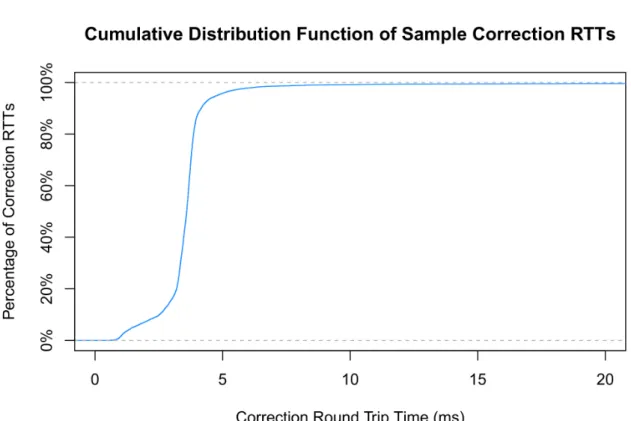
easily meet the acceptance criteria. . . 28 4.3 The distribution of distances from the target sample time. The vast majority of samples
C
H A P T E R1
I
NTRODUCTIONEye tracking is a valuable tool for researchers looking to gain insight into users’ attention and cognitive processes [17, 31]. In the fields of human-computer interaction and data visualization, eye tracking is frequently used as an evaluation tool for user interfaces and visualizations [9– 11, 15, 29] and as an alternative or supplement to traditional input methods [16, 19, 38, 49, 50]. The ubiquity of the web browser in these fields presents an opportunity for advancement in eye tracking software.
With current tools, running browser-based eye tracking studies can be time-consuming and restrictive. To analyze web pages with scrolling, researchers must translate screen-space coordinates to document coordinates on the web page. Interactive experiments can involve areas of interest that move, change, appear, or disappear, and to determine whether a user gazed on one of these areas, researchers have to manually annotate video recordings of the experiment. Vendor supplied tools for running eye tracking studies are costly, result in hardware lock-in, and do not support scrolling or dynamic visual elements. Open-source tools [5, 46] address hardware lock-in by supporting various eye trackers, but these tools are either ill-suited for interactivity, or assume that stimuli will be programmed in their environment.
EyeSite is an open-source framework for running browser-based eye tracking studies that improves on existing tools by communicating with the browser in real-time. Every sample of gaze position collected by the eye tracker is sent to the web browser over a WebSocket, where a client script corrects for scrolling and browser window position, determines intersections with DOM elements, and facilitates custom behavior through Javascipt callbacks. This process allows researchers to build dynamic and/or interactive experiments without the time-consuming manual annotation typically required. Furthermore, the callback system enables eye tracking as an input method in the browser and allows for custom experiment data to be appended to each sample, producing time-synchronization of eye tracking and experiment data with minimal effort.
EyeSite was designed to be compatible with a wide variety of research scenarios. To provide support for different types of eye tracking, EyeSite utilizes PyGaze [5], an open-source toolkit that interfaces with commercial hardware eye trackers, and WebGazer [27], an open-source, webcam-based eye tracking library that runs in the browser. To enable flexible administration of experimental trials, EyeSite can stream collected data to a local or remote server. This allows researchers to perform remote, distributed experiments over the internet, as well as more traditional experiments where researchers are running trials in a lab.
EyeSite was also designed to be easy to incorporate into existing experiments. EyeSite’s browser script can be dropped into any existing web page and requires minimal setup. The script makes no assumptions about the content of the web page and can calculate gaze intersections on any DOM element labeled with a specified CSS class name. EyeSite also performs fixation detection on the collected data, using a dispersion threshold algorithm [34] to determine when a user’s gaze lingers on a point. EyeSite’s compatibility with different eye tracking methods means that researchers can build their experiments independently of what eye tracker they choose.
As an open-source project, EyeSite aims to be a flexible platform for web-based eye tracking research. The extensible architecture of EyeSite encourages improvements such as improved eye tracking hardware support or additional analysis methods. The goal of this project was to lay the foundation for EyeSite so that it can be used for experiments today, and so that it can be improved and extended over time.
C
H A P T E R2
B
ACKGROUND2.1
Introduction to Eye Tracking
Eye tracking is a useful technique for gaining insight into subjects’ visual and cognitive pro-cesses [17, 31]. There are a variety of methods for obtaining eye tracking measurements, but today, the most common method is video-based. Image processing techniques are applied to video recordings of the subject’s eyes to determine their gaze point, and with modern technology, this process can be done in real time at high sample rates exceeding 120Hz.
2.1.1 Fixations, Saccades, and Scan Paths
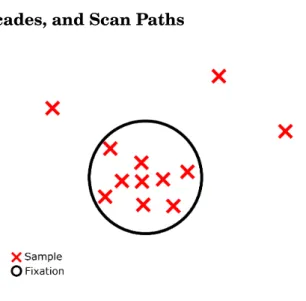
Figure 2.1:Eye tracking samples grouped into a fixation.
Recorded eye tracking samples can be grouped into sequences ofsaccades, which are quick movements from gaze point to gaze point, andfixations, which are periods of gaze stability.
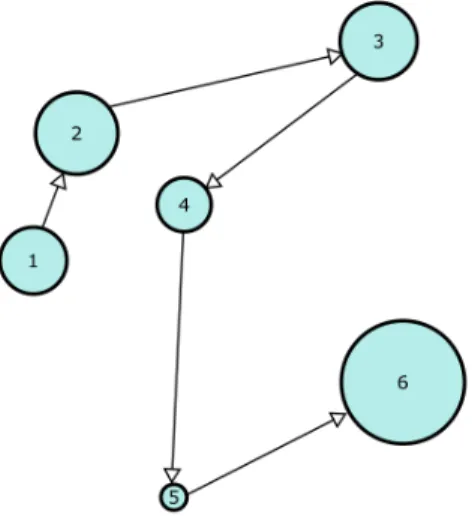
Saccades and fixations are determined using specialized clustering algorithms that take human eye movement characteristics into account [34]. A temporal sequence of fixations and saccades is called ascan path. Analysis methods for eye tracking data utilize sample, fixation, and scan path-based strategies.
Figure 2.2:A scan path. Saccades are indicated by arrows. Fixations are indicated by circles, with the duration corresponding to radius.
2.1.2 Areas of Interest (AOIs)
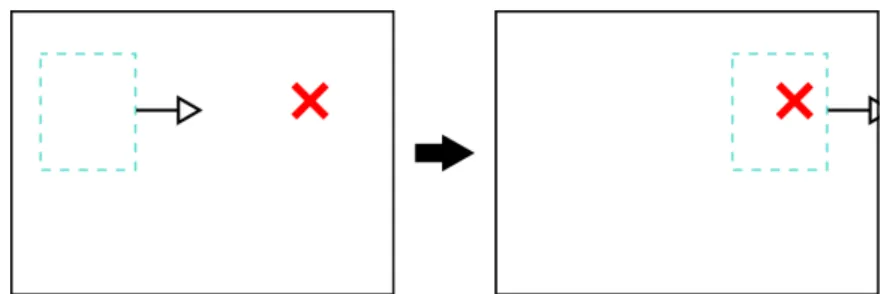
A common analysis technique for eye tracking data is to define spatial regions calledareas of interest(AOIs) in the stimulus and count the number of samples or fixations within each region [2]. For static stimuli, AOIs can be manually constructed without much effort from the researcher, but dynamic stimuli present challenges for AOI-based analysis methods. One challenge is that if a stimulus is moving, the same gaze point may have different AOI intersections at different times. Another challenge is that if the stimulus changes for each trial, possibly through interactivity or randomization, AOIs must be adapted for every change. Approaches for dealing with dynamic AOIs can be grouped into two categories: supervised and unsupervised.
The supervised approach involves the researcher manually defining the temporal behavior of AOIs. This approach is well suited for stimuli that are identical across multiple viewings, like videos or animations. The open-source tool DynAOI [26] performs this type of analysis by utilizing animated three-dimensional models that represent the AOIs in the stimulus. The supervised approach is also used by Tobii, a commercial eye tracking hardware and software vendor, in their Tobii Pro Studio product which allows researchers to superimpose two-dimensional, animated AOIs over a video stimulus [44].
2.2. EYE TRACKING IN HUMAN-COMPUTER INTERACTION AND DATA VISUALIZATION
Figure 2.3:Time must be considered when dealing with a dynamic AOI. On the left, the gaze position does not yet intersect the moving AOI. On the right, at a different time, they do intersect.
In contrast, the unsupervised approach uses clustering to group eye tracking data into AOIs without input from the researcher. This approach is favored since it requires less work from the researcher and accommodates complex dynamic stimuli. Existing research has explored different aspects of this approach, such as comparing different clustering algorithms for AOIs [30], building domain-specific algorithms that robustly cluster fixations both spatially and temporally [37], and creating visual analytics methods that incorporate clustering techniques [20].
2.2
Eye Tracking in Human-Computer Interaction and Data
Visualization
Eye tracking techniques are particularly suited to the fields of human-computer interaction (HCI) and data visualization (data vis), where objective measures of users’ attention and cognitive processes are extremely valuable.
2.2.1 Eye Tracking for Evaluation
The most common application of eye tracking in HCI and data vis is for the evaluation of user interfaces and visualizations.
In HCI, much research has been done investigating the use of eye tracking for evaluation. Goldberg and Kotval [11] demonstrated the validity of eye movement as an interface evaluation method through a series of experiments comparing typical usability ratings against eye tracking measurements. Interfaces were deliberately designed with a range of usabilities from good to bad and evaluated by typical users and interface experts to determine a baseline usability assessment. Eye tracking experiments were run on these interfaces, evaluating usability through measures designed to quantify spatial and temporal characteristics of the subject’s scan path. The results of scan path measures corresponded well with traditional usability ratings, suggesting that eye tracking is a valid tool for interface evaluation.
Goldberg [9] further explored the use of eye tracking for interface evaluation by reviewing and synthesizing the effectiveness of eye tracking data for common interface evaluation criteria. Goldberg found that evaluations of consistency, cognitive resources, visual clarity, and flexibility
are well suited to eye tracking measures, while criteria such as compatibility, locus of control, feedback, and error handling are difficult to assess.
Jacob and Karn [15] reviewed prior research exploring the use of eye tracking in HCI. Prior to the publication of the review, progress was slow in integrating eye tracking into HCI research, but the authors suggested that improvements and cost reduction of eye tracking hardware could boost its use, which was indeed the case. Applications of eye tracking were split into two categories: eye tracking for usability evaluation and eye tracking as HCI input, which will be discussed in the subsequent section 2.2.2. Jacob and Karn also suggested future directions for research, exploring a variety of topics such as differences between novice and experienced users, visual search strategies for interface elements, and the constraints of eye tracking hardware and analysis.
A similar review performed by Poole and Ball [29] identified eye tracking as an important, objective technique for interface usability evaluation. The authors suggested the following areas of future research for eye tracking in HCI: standardization of eye movement metrics, streamlined tools for data collection and analysis, and improvements to hardware accuracy, robustness, cost, and non-invasiveness.
In the field of data vis, Goldberg and Helfman [10] ran an illustrative eye tracking study comparing the impact of different visual graph formats on the ability of users to perform relative comparisons. Bar graphs, line graphs, and spider graphs were evaluated using AOI and scan path-based analysis methods. Easy comparison tasks showed a disadvantage for bar graphs, with users spending more time finding the correct portions of the graph and more time comparing their quantities. For hard tasks, this disadvantage disappeared. Qualitative scan path differences for spider graphs were observed in hard tasks, showing more back and forth comparison between matched dimensions on two charts. In their conclusion, the authors suggested that eye tracking methods are a good tool for investigating "micro-level design issues such as element visibility, clarity, and navigation" [10, p. 78].
Zagermann et al. [48] identified cognitive load as a metric that can be measured through eye tracking. Cognitive load describes the amount of mental effort exerted from a user’s working memory. Cognitive load has impacts on fixation and saccade patterns, pupil dilation, and how often a user blinks, all of which can be measured with eye tracking equipment. The authors proposed further research in this area building tools that can measure cognitive load in real time and possibly adapt the interface to current levels of cognitive load.
Eye tracking can also illuminate individual user characteristics that could allow for interfaces to be tailored to each specific user. Research has been done connecting user characteristics like perceptual speed or expertise to gaze behavior, in an effort to build a foundation for personalized systems of adaptive intervention [41, 42, 45].
2.2. EYE TRACKING IN HUMAN-COMPUTER INTERACTION AND DATA VISUALIZATION
2.2.2 Eye Tracking as an Input Method
Eye tracking has also been explored as an input method, offering hands-free input for those with disabilities and the possibility for fast, intuitive input in general. Sibert and Jacob [38] ran a controlled experiment comparing selection speeds for eye tracking and mouse movement. The eye gaze selection technique used in the experiment was based on "dwell time", meaning that if the user gazed on an object for 150 ms, that object would be selected. Results showed that eye gaze was significantly faster for selection tasks, with one user reporting that the eye gaze input was "so quick and effortless that ... it almost felt like watching a moving target, rather than actively selecting it" [38, p. 287].
Another evaluation of eye tracking as a primary input method was performed by Zhang and MacKenzie [50], conforming to the ISO 9241-9 standard for evaluating pointing devices. The three eye tracking selection techniques chosen for this experiment were two dwell time methods with 750 ms and 500 ms thresholds, as well as a technique where the participants pointed using eye gaze but selected with the space bar on their keyboard. Among these eye tracking methods, the gaze and keyboard combination was the most effective, but all three fell short of the speed and error rate of the mouse. The authors suggested that eye jitter and eye tracking inaccuracy contributed to worse performance than the mouse and proposed tweaking parameters of the selection technique and target objects. Despite issues with speed and accuracy, participants rated the eye tracking techniques favorably in a device assessment questionnaire. Similar experiments have been done with low-cost, webcam-based eye trackers, and the low-cost trackers compared favorably to commercial ones San Agustin et al. [35, 36].
Eye gaze as a primary input method presents challenges such as eye jitter, eye tracker accuracy, and the "midas touch" problem, where users look at interface elements with exploratory intent but accidentally make a selection [16]. One response to such challenges is to synthesize eye gaze with other methods in order to combine the strengths of each. Zhai et al. [49] explored the combination of eye gaze and mouse with their system called Manual And Gaze Input Cascaded (MAGIC) pointing. The MAGIC system supplements standard mouse pointing by warping the cursor to the user’s gaze point. Two versions of the MAGIC system were tested: a "liberal" version where the cursor would always warp to every new object the user gazed upon, and a "conservative" version where the cursor would wait to warp until the manual input device is actuated. Both systems were tested against standard mouse input for speed and user satisfaction. Results showed that the liberal MAGIC system was slightly faster than standard pointing but the conservative version was slightly slower. Despite only small changes to selection speed, user satisfaction ratings were positive for both methods, especially for the liberal version. Detailed responses indicated that there was a trade-off between the two versions of MAGIC, where the liberal version was more responsive, but the conservative version was less distracting. In both cases, users reported that the system resulted in less fatigue from the physical act of mouse pointing.
Another approach to synthesized input is EyePoint, a system combining gaze and keyboard developed and evaluated by Kumar et al. [19]. EyePoint implements a "look-press-look-release" system where users point using eye gaze, press down a key on their keyboard to initiate an action (like left click), and then the area around the gaze point is magnified to refine the selection before releasing the key to complete the action. Results showed that EyePoint’s speed was similar to the mouse, but EyePoint was more error-prone. However, subjects strongly preferred using EyePoint versus the mouse.
2.3
Eye Tracking and Web Browsers
The web browser is a common target for eye tracking research. The ubiquity of the browser for interface design allows for easier generalization of research. Usability studies targeting common web design patterns can be applied to many websites, and the standard platform of the web presents opportunities for integration with a wide variety of interfaces.
2.3.1 Eye Tracking for Web Usability Evaluation
As section 2.2.1 explored eye tracking for interface evaluation in general, this section explores eye tracking for evaluation specifically on the web.
A common task performed on the web is search. Many studies have explored the use of eye tracking for evaluating search pages. One study performed by Goldberg et al. [12] evaluated a prototype web portal application by Oracle. Eye tracking data was recorded while subjects were asked to perform a series of search tasks. Scan path and AOI-based assessments were used to identify usability problems and to develop design recommendations. Granka et al. [13] performed a small study exploring users’ gaze patterns on web search pages. Eye tracking measures showed that total fixation times for the first two search results were similar, with a sharp drop-off for subsequent results. Search results that occurred after a page break were much less likely to be fixated on or clicked. A more thorough study of web search pages was performed by Cutrell and Guan [4], using eye tracking data to characterize user behavior during both navigational and informational search tasks. Navigational tasks entail finding a specific web page, while informational tasks entail finding a piece of information from any source. Fixation-based measures were used to characterize how users process lists of search results and to determine how the length of a result’s summary affects task completion times. Results indicated that longer summaries improved performance on informational tasks but degraded performance on navigational tasks. Eye tracking data suggested that this difference was due to the fact that with longer summaries, users would fixate on the summary instead of the URL of the result. The authors suggest experimenting with the presentation of the URL for future work.
A general scheme of correlations between usability problems and eye tracking patterns would allow researchers to perform automated usability analysis using just eye tracking data. Ehmke
2.4. EXISTING EYE TRACKING FRAMEWORKS
and Wilson [7] ran an exploratory study searching for such correlations. Subjects were given information retrieval tasks across two websites and asked to provide subjective responses. These responses were used to identify usability problems, which were tested against eye tracking patterns to discover relationships. Results from their experiment produced an extensive list of correlations for further study.
2.3.2 Eye Tracking Integration with Web Browsers
The web browser is also used as a common platform for integration of eye tracking data. One aspect of eye tracking research that benefits from browser integration is point-to-element mapping. Since the browser offers methods of querying the position and size of HTML elements, automated mapping of eye tracking coordinates to areas of interest is achievable. This concept was first explored at Xerox PARC with a system called WebEyeMapper [33], developed in 2001. At the time, it was too computationally expensive to perform point-to-element mapping on a web page in real time, so instead, mapping had to occur at analysis-time rather than experiment-time. To accomplish this, a system called WebLogger [32] was developed that "instruments" Microsoft Internet Explorer (IE), meaning that it launches an instance of IE and records all significant user and browser events, allowing for an accurate replay of the browsing session. WebLogger also recorded eye tracking data in such a way that browser and eye tracking events were time-synchronized. WebEyeMapper would then analyze the eye tracking data to determine fixations, simulate the browsing session with logs from WebLogger, and perform point-to-element mapping. WebGazeAnalyzer [1] is another system for integrating eye tracking data into the web browser, focused specifically on reading behavior. Similar to WebLogger, WebGazeAnalyzer also uses an instrumented browser, but WebGazeAnalyzer records the DOM (Document Object Model) of every website visited in addition to browser and user events. With this data, WebGazeAnalyzer matches fixations to specific text lines and words in the DOM which can be used to characterize users’ reading behavior on the web.
In another effort to utilize the browser for eye tracking integration, Nguyen et al. [25] developed a Mozilla Firefox plugin called WebTracking Plugin (WTP) that performs automatic AOI annotations on web pages in real-time. WTP processes HTML pages to determine visible AOI elements and records this data along with browser and user events. While WTP does not operate on eye tracking data directly, WTP produces a record of web pages, events, and AOIs to enable researchers to do point-to-element mapping on unconstrained web browsing sessions.
2.4
Existing Eye Tracking Frameworks
For researchers looking to run eye tracking experiments, there is a wide variety of software available for use. Some software focuses on doing the image processing necessary to generate eye tracking samples from off-the-shelf webcams or open-source hardware configurations. Other
software focuses on providing a hardware abstraction for different dedicated, commercial eye trackers, which enables a standard experiment workflow regardless of what eye tracker is used.
2.4.1 Open-Source Hardware
Open-source hardware frameworks offer eye tracking through standard configurations that can be constructed at low cost, providing the software necessary to produce eye tracking samples from such hardware.
OpenEyes [22] is an open-source hardware and software toolkit that enables eye tracking for two designs of mobile eye tracking headsets that utilize off-the-shelf cameras. OpenEyes utilizes an algorithm called Starburst [21] for determining the user’s point of gaze based on video data recorded from the eye tracking headsets.
Lukander et al. [23] developed an open-source mobile gaze tracker that uses off-the-shelf components, a custom circuit board with standard components, and a 3D-printed frame, totalling a cost of only 350 C.
Pupil [18] is an open-source hardware and software platform enabling eye tracking through a purchasable headset, a virtual reality add-on, or a do-it-yourself hardware kit. The Pupil software suite includes tools for calibration, data capture, and playback.
2.4.2 Eye Tracking Software for Off-the-Shelf Hardware
In addition to open-source hardware projects described above, efforts have been made to enable eye tracking for unmodified consumer webcams. Furthermore, research has found that mouse movements are a good approximation for users’ gaze, enabling mouse movement tracking as a zero-cost alternative to eye tracking.
Among webcam eye tracking software, there are two categories: software that runs natively and software that runs in the web browser. Opengazer [24] and GazeParser [39] are two examples of native eye tracking software. WebGazer [27] and Turkergaze [47] are examples of eye tracking software that runs as a web browser script. SearchGazer [28] is an extension of WebGazer specialized for web search tasks.
2.4.2.1 Mouse Movement as a Gaze Approximation
Chen et al. [3] ran a study demonstrating the strong relationship between gaze position and cursor position, suggesting the use of mouse movement analysis as an alternative to eye tracking for interface evaluation. Huang et al. [14] explored this concept further by replicating an experiment testing the gaze-cursor relationship and running a new large-scale experiment using cursor data to examine search engine results pages. Results from their experiments demonstrated that cursor data can effectively be used to evaluate aspects of a search page, including the relevance of search results.
2.4. EXISTING EYE TRACKING FRAMEWORKS
2.4.3 Eye Tracking Frameworks with Hardware Abstractions
Another category of eye tracking software focuses on providing hardware abstractions for specific eye trackers so that researchers can develop eye tracking experiments independently of their choice of eye tracker. Open Gaze And Mouse Analyzer (OGAMA) [46] is a framework providing hardware abstraction and analysis tools, supporting a wide variety of commercial and open-source eye trackers. OGAMA is designed for slideshow study designs where the stimuli are static. PyGaze [5] is an open-source toolbox that offers hardware abstraction and tools for dynamic stimulus presentation and online fixation detection, but supports a smaller subset of eye trackers. Since PyGaze is a Python library with an easy-to-use programming interface, it allows many different styles of experiments to be built with minimal effort.
2.4.4 Eye Tracking Analysis Packages
There are also packages for analyzing already-recorded eye tracking data. ILAB [8] is a series of open-source MATLAB functions for the analysis of eye tracking data, including fixation and AOI-based techniques. EyetrackingR [6] is an R package that analyzes and visualizes raw eye tracking data.
2.4.5 Areas for Improvement
Combined, existing eye tracking frameworks cover many different use cases. The goal of our software, EyeSite, is to cater to the specific use case of web-based, eye tracking HCI and data visualization research. With this focus, EyeSite combines many benefits of existing eye tracking software, such as hardware abstraction, integration with the browser, basic analysis techniques, and support for webcam eye tracking. EyeSite provides a set of tools that reduces the work needed to run a web eye tracking study while maintaining the flexibility needed to support different types of experiments. EyeSite is cross-platform, cross-browser, and will be released as free open-source software, allowing improvements and additions to be made by the eye tracking research community.
C
H A P3
M
ETHODOLOGY3.1
Requirements
After evaluation of existing eye tracking software solutions, clear gaps are evident when con-sidering browser-based studies. Most available eye tracking software options are designed with psychology research in mind. Many of these options only have strong support for images and video as stimuli. The interactive experiments required by HCI and vis research can be performed, but dynamic elements are not accounted for. This significantly complicates analysis.
Since the requirements of data collection for HCI and vis experiments vary significantly, the design of the framework cannot be especially opinionated. Researchers must be able to easily associate arbitrary data with eye tracking samples. Similarly, real time access to sample data in experiment code is also needed.
Nearly all eye trackers (whether hardware or software) supply sample coordinates in screen-space. For browser-based experiments, coordinates relative to the browser document would be far more useful. Experiments running in the browser should also take advantage of the structure of web pages. DOM elements map cleanly to eye tracking AOIs. Given this connection, AOI definitions should be built from the structure of an experiment, rather than declared in an entirely separate step.
A key benefit of browser-based studies is the lack of coupling to a specific hardware or software environment. If these studies assume a certain degree of flexibility in this area, an inflexible eye tracking framework would not be especially well-suited. A framework with support for all relevant varieties of eye tracking hardware is necessary. Given the potential offered by webcam eye trackers[27], support for low-cost software solutions is also important.
3.1. REQUIREMENTS
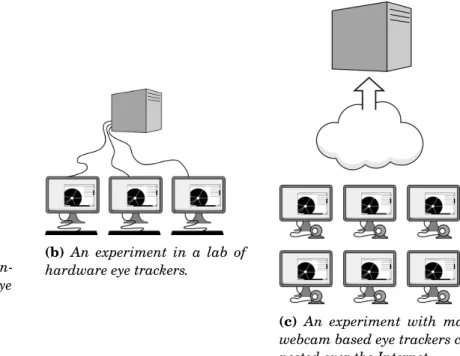
(a) An experiment with a sin-gle machine and a hardware eye tracker.
(b) An experiment in a lab of hardware eye trackers.
(c) An experiment with many webcam based eye trackers con-nected over the Internet.
Figure 3.1:Three experiment configurations made possible with EyeSite
experimental trial data is collected on a single server for analysis. This allows for experiments to reach further than the traditional lab setting. With webcam eye trackers removing the hardware barrier, an eye tracking framework for web-based studies should support these kinds of distributed configurations. There is, of course, still significant value in high quality specialized eye tracking hardware. Therefore, traditional experimental setups with dedicated trackers must be supported as well.
Basic requirements need to be fulfilled as well. Integration with existing web-based exper-iments should not be difficult. Data needs to be easily available in a useful form. Common features like fixation detection and AOI tracking must be present. Finally, performing additional processing cannot introduce significant latency or reduce the quality of collected data in any way. Based on the specifications of commonly available eye tracking hardware, 120 Hz was chosen as a target sample rate.
To summarize, EyeSite requires:
• Tight integration with the web browser, converting screen coordinates to more useful document coordinates and leveraging web page structure.
• Support for a wide variety of eye trackers, including specialized hardware and low cost webcam based solutions.
• Integration into existing experiments should be straightforward and not require significant code modification.
• Allow experiment code running in the browser to access sample data, potentially attaching custom fields.
• Implement common analysis techniques, or at least provide sufficient data for researchers to do it themselves.
• The addition of these features cannot reduce data quality or introduce any latency greater than one sample at 120 Hz.
3.2
System Organization
The need for two distinct components is apparent; browser code must be written in Javascript, while code that accesses eye tracking hardware must be written in a language with a C foreign function interface. Both of these components must be run on the machine the eye tracker is connected to. Since a central data repository was desired, a third layer is needed. This layer, run on a separate server machine, is responsible for validating and storing data.
The Javascript code running in the browser will be referred to as thebrowser client. The program that connects to the eye tracker to collect samples will be referred to as thetracker host. The server program that stores experiment data will be referred to as theEyeSite server.
A WebSocket connection is used for communication between the browser client and the tracker host. HTTP POST requests are used for communication between the tracker host and the EyeSite server. There is never any direct communication between the browser client and the EyeSite server
3.2.1 Browser Client
The browser client (a Javascript library) is responsible for applying correction factors to eye tracking samples, tying into custom experiment code, and managing the state of experimental trials. This library must be included in an experiment web page’s code.
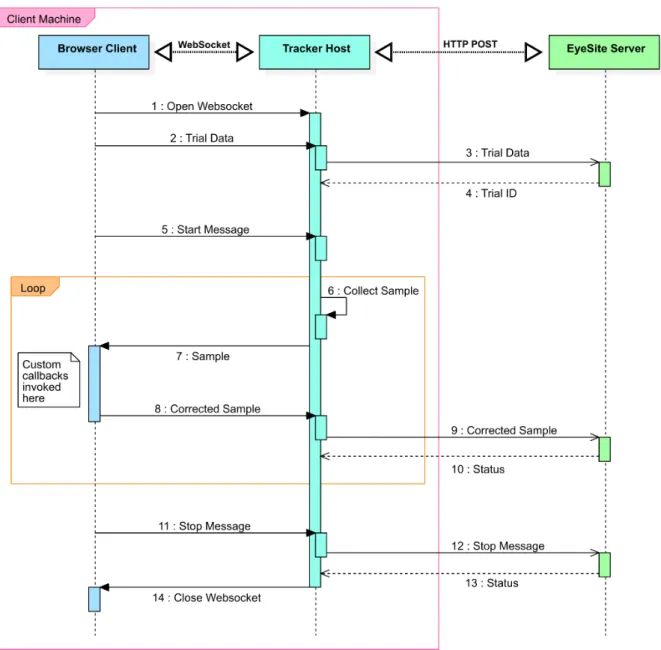
Data collection is initiated from the browser client by sending a series of WebSocket messages to the tracker host. After a calibration step (if it is needed at all), the browser client will start receiving raw sample data over its WebSocket connection with the tracker host.
When a sample is received from the tracker host, its position on the browser document is determined based on information from browser APIs. This corrected data is appended to the sample. At this point, any custom callbacks registered in the experiment code will be invoked. These callbacks may add custom data onto the sample. When all callbacks are finished executing, the sample is send back to the tracker host.
3.2. SYSTEM ORGANIZATION
Figure 3.2:A UML sequence diagram showing the flow of data through EyeSite.
3.2.2 Tracker Host
The tracker host (a Python application) contains code that interfaces with the eye tracker (whether hardware or software). The main sample collection loop runs in the tracker host. This loop is started and stopped by messages sent from the browser client.
On each iteration of the collection loop, a gaze point sample is pulled from an eye tracker provider. This sample is sent to the browser client over the WebSocket connection. After the browser client has corrected the sample, it is sent back over the same connection. Corrected samples are buffered in the tracker host. Every 3 seconds, all buffered samples are asynchronously sent to the EyeSite server via HTTP POST request.
The connection speed between the tracker host and the browser client is an important factor in the accuracy of sample correction. If bottlenecked by a slow connection, the correction factors applied in the browser may have changed significantly from when the sample data was collected. Running the tracker host application on the same machine as the browser client guarantees low latency. The use of a WebSocket also helps to reduce latency, as there is less overhead than HTTP requests.
The separation of tracker host and EyeSite server also allows multiple experiments with hardware eye trackers to simultaneously store data in a centralized location. This suits the operation of a lab with a large number of eye trackers, enabling larger scale experiments and simplifying the aggregation of data.
The use of this layer does however, increase the overall complexity of EyeSite. When running an experiment – even one that uses a browser based software eye tracker like WebGazer – another application outside the browser must be running. Even so, the positives of this structure largely outweigh the negatives. Meeting latency targets and accurately polling at precise sample rates is simpler with this architecture. Furthermore, adding support for additional hardware eye trackers is more straightforward when the sample loop is running in python. Although web-based eye tracking software is promising, the quality of data from dedicated hardware eye trackers is far superior and is likely more useful for researchers. Considering this, it makes sense to prioritize the support of hardware eye trackers in EyeSite.
3.2.3 EyeSite Server
The EyeSite server (a Python webserver) is responsible for validating and storing sample data. Data is accepted through HTTP POST requests. The sample data is parsed, validated, and inserted into a SQLite database.
SQLite was selected for its high performance and ease of set up. Since the database is embedded in the application, running the EyeSite server program is far simpler than it would be with an external database, requiring fewer dependencies and no manual database setup. Datasets for eye tracking samples could get very large for experiments with many participants and high sample rate eye tracking hardware. While its competitors offer better support for very large datasets, researchers are unlikely to run into any limitations using SQLite for data storage. Hardware and filesystem limitations will be approached long before SQLite ones, as it supports databases up to 140 TB in size [40]. For a typical hour long experiment with a 120 Hz eye tracker, about 10.9 megabytes of data will be added to the database. Even for very large scale experiments, we expect that datasets will not exceed a dozen gigabytes in size.
The EyeSite server uses the Tornado web framework. Tornado was chosen for its proven scalability and straightforward API.
3.3. SUPPORTING DIVERSE EYE TRACKERS
3.3
Supporting Diverse Eye Trackers
To maximize utility and flexibility, EyeSite must support a wide variety of eye trackers. These trackers should be abstracted, allowing researchers to design their experiments independently of the hardware or software they use to obtain gaze position.
Hardware abstraction for a wide variety of eye trackers is achieved through a compatibility layer over sample collection. Significant design efforts were made to support both hardware eye trackers and web-based eye tracking software. In addition to providing this layer, it is necessary for EyeSite to allow new eye tracker interfaces to add or remove behavior in both browser client and the tracker host.
3.3.1 Providers
An EyeSiteprovideris an module that interfaces with a specific tracker type. A providermust
have an implementation in the tracker host andmayhave an implementation in the browser client. This structure allows the developer to build eye tracker connections that remove unneeded message passing, potentially reducing correcting latency.
Providers can insert custom, tracker specific data (pupil diameter, blink detection, etc.) into the eye tracking sample they produce. A JSON field is present in the sample structure for this purpose. This extra data is available in custom browser callbacks and is preserved for analysis when exported.
3.3.1.1 Providers on the Tracker Host
A tracker host provider is responsible for connecting to the eye tracker, calibrating the tracker, pulling a sample from the eye tracking hardware, correcting a sample, and stopping the eye tracker.
For many eye trackers, some steps may not be needed. For example, APIs for some hardware eye trackers may free resources automatically, making implementation of the "stop" step un-needed. For web-based eye tracking software, it may be possible to pull the sample at the same time as correction. In this case, the "correct sample" step would be unneeded in the tracker host’s provider.
3.3.1.2 Providers on the Browser Client
Providers in the browser client are less structured, as the requirements are less consistent. Generally, a browser client provider will attach a listener to the main WebSocket message handler. Special messages types will be sent from the tracker host provider. The browser client provider will respond to these messages, often directly calling the browser client’s sample correction methods.
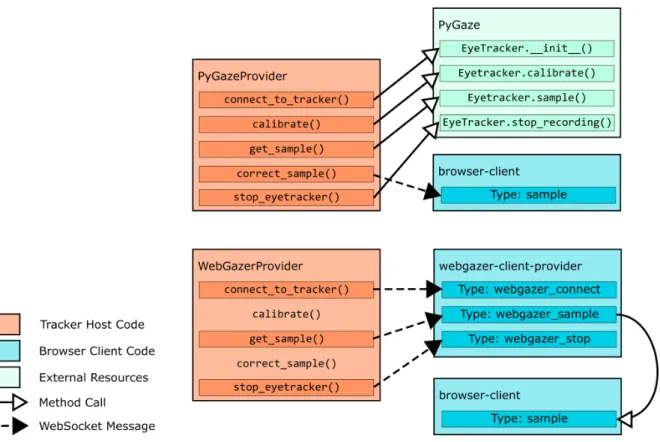
Figure 3.3: A comparison of the structures of the PyGaze provider (only contains code in the tracker host) and the WebGazer provider (contains code in both the tracker host and the browser, subverts the standard data flow).
Browser client providers allow the programmer to subvert the normal flow of data through EyeSite. In some cases, for certain eye tracker types, using the standard flow would result in redundant messages. In these cases, modifying the flow of data could allow for reduced latency and more accurate sample correction.
3.3.2 Eye Trackers Supported in EyeSite
EyeSite currently has three implemented providers:
• PyGaze - A provider built with the PyGaze library [5]. PyGaze supports hardware eye trackers from Tobii, SMI, Eyelink, and EyeTribe.
• WebGazer - A provider for WebGazer [27], an open-source webcam eyetracker that runs in the browser.
• Mouse - A provider that uses the mouse cursor position rather than eye tracking data. While mouse movement is not true gaze data, there is a strong correlation between mouse positions and gaze points [3]. For some experimental designs, mouse data may be more useful than WebGazer’s noisier output.
3.4. MANAGING EXPERIMENTS
The PyGazer provider is entirely contained in the tracker host. The WebGazer and mouse providers include portions both in the tracker host and in the browser client.
Connect to tracker Calibration Pull Sample Correct Sample Stop Tracker
PyGaze PyGaze API PyGaze API PyGaze API send message PyGaze API
Mouse send message N/A send message N/A send message
WebGazer send message N/A send message N/A send message
Table 3.1:Actions taken in tracker host provider. The mouse and WebGazer providers both subvert the standard flow – corrections occur immediately after the sample is taken in browser client, avoiding redundant messaging.
The process for adding a new provider is straightforward and well-documented. The existing providers offer clear examples of implementation, including both straightforward ones and complex implementations with code in both the front-end and back-end.
3.4
Managing Experiments
EyeSite allows researchers to easily manage multiple trials for an experiment. Each experimental trial has its own tracker host and browser client instance. Trials can share a single EyeSite Server instance for centralized data storage. Experimental trials can run simultaneously, enabling larger scale experiments.
In alternative experiment frameworks, data is usually only stored locally, requiring a number of manual exports for experiments with a large sample size. In EyeSite, data from each trial is stored in a single database on the server machine. This simplifies the data export process for larger experiments that may involve multiple trackers.
Experiment code in EyeSite can attach custom data to a trial when it is initialized, allowing researchers to associate whatever metadata their experiment requires with each experimental trial.
3.5
Timing
Offering support for a wide variety of eye trackers requires the support of many sample rates. Webcam based eye trackers generate samples based on the frame rate of the webcam hardware, generally 30 or 60 Hz. Dedicated eye tracking hardware usually runs at a sample rate between 60 and 300 Hz. Some high end eye trackers for psychological research can generate samples at 2000 Hz.
Given the target audience for EyeSite (HCI and vis researchers), 120 Hz was chosen as a minimum sample rate to support without degradation. The target sample rate established a minimum acceptable latency for the browser client’s sample correction. Since sample correction must occur before the next sample is collected, the correction’s round trip time (RTT) must be
under one sample at 120 Hz, or 8.3 milliseconds. Support for 240 Hz eye trackers was desired, but was not considered to be necessary.
3.5.1 Latency
Latency targets were easily met with the three-tier structure of the EyeSite software. Correction over the local WebSocket connection gave favorable results without any special tuning.
Measurements indicated that latency over this connection would not be a limiting factor for experiments using 120 Hz eye tracking hardware. 240 Hz eye trackers would likely be usable as well, but sample correction may suffer some occasional degradation.
3.5.2 Sampling
Consistently meeting sample rates proved less trivial. The tracker host program (where the sample collection loop resides) runs across multiple threads for non-blocking network calls. Originally, thread sleeping was used to wait in between each sample. This proved problematic on the Windows platform, where sleeps shorter than about 30 milliseconds proved inconsistent. On Linux, thread sleeping was effective for sample rates at high as 120 Hz, but anything higher was unreliable.
To remedy this issue, a busy-waiting timer was implemented. Using this timer implemen-tation, accurate timing at rates up to 240 Hz were consistent across all platforms. This timer however, may impact browser performance on resource constrained systems. For this reason, use of the busy-waiting timer was made optional, allowing researchers to fall back on the sleep based timer in situations were performance is more important than accurately meeting sample rates.
3.5.3 EyeSite Time
The association between eye tracking timestamps and browser event timestamps is a potential problem for experiments using EyeSite. Eye tracking sample timestamps are generated in the
tracker host using Python’s time.time() function. Timestamps could be generated in the
browser client in a variety of ways, but no method is guaranteed to use the same clock as the Python function across all platforms. Associating all timing events in the browser client with EyeSite sample timestamps could solve this problem for many experiments.
Since EyeSite’s browser callbacks allow the user to append experiment data to samples, time-synchronization of eye tracking and experiment data within one sample is possible. This approach is imprecise, only allowing a timer resolution equal to the sample rate and introducing a delay equivalent to the latency between the tracker host and browser client. For many experiments however, this approach may give useful data, as it offers an accurate representation of timing from the perspective of the incoming samples.
3.6. GAZE COORDINATE TRANSFORMATION
3.6
Gaze Coordinate Transformation
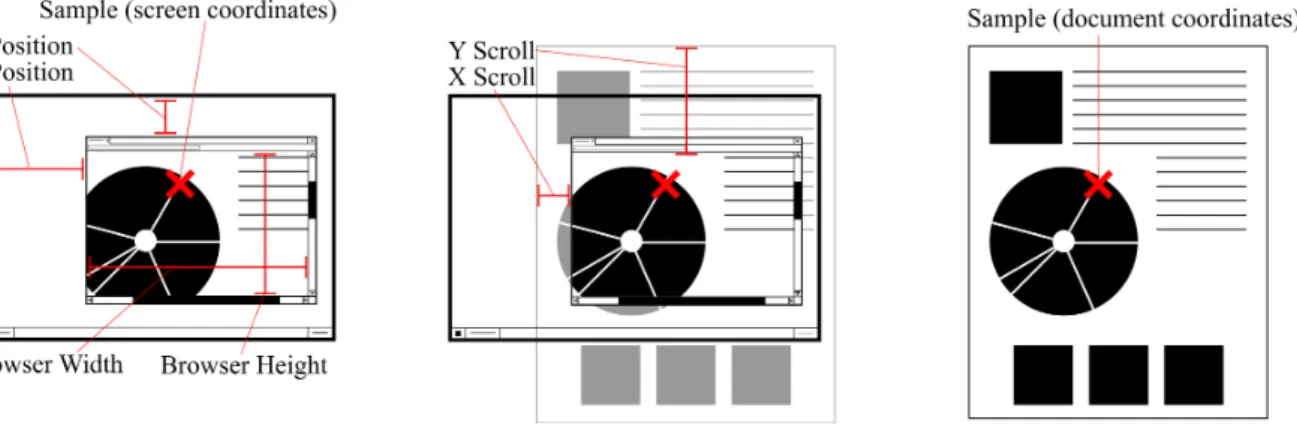
Possibly the largest issue facing researchers attempting to use existing eye tracking tools with web-based experiments is the disconnect in coordinate systems. Most eye tracking hardware returns screen coordinates, with the origin point at the top left corner of the monitor. When considering an experiment in a web browser, screen coordinates are nearly useless for post-experiment analysis. The browser window could be placed anywhere on the screen, sized at any width or height, and any amount of scrolling could have occurred. All of these values could affect the screen location of a given web page element. Without correcting for these factors, a researcher has no way to know what area of the web page an eye tracking sample corresponds to. Some existing software remedies this by recording video of the experimental trial. This video is played back in real time with a dynamic gaze plot indicating recent fixations[43]. This approach makes analysis of dynamic experiments possible, but extremely time consuming. For large scale experiments with lengthy trials, analyzing data in this fashion becomes impossible.
EyeSite translates gaze coordinates in real time by communicating with the web browser. This allows a researcher to consider gaze points as points on the web page, rather than as points on the screen. This simplifies and speeds up analysis, allowing researchers to use standard techniques and visualizations on dynamic experiments.
Figure 3.4:An example of the conversion between screen and document coordinates.
Correction is done per-sample, applying scroll and browser position information to convert between screen and document positions. All of these values are stored unchanged in the sample data. All data is pulled from standard JavaScript APIs, but behavioral inconsistencies require slightly different implementations for each browser.
After converting to document coordinates, the width and height of the browser window must be taken into account. This, along with the scroll position, is used to determine whether the user is looking at the web browser or is looking outside the boundaries of the browser’s content area. This data is also attached to the sample.
3.7
Areas of Interest
Any eye tracking AOI in a web-based experiment maps to one or more DOM element. EyeSite takes advantage of this by associating eye tracking sample data with tagged DOM elements. This allows researchers to avoid the tedious step of defining AOIs, simply reusing information that already exists in their experiment.
Since DOM elements can be created, moved, or removed at any point, this information must
be tracked per sample. Only DOM elements with theeyesite-aoiclass name are tracked.
After receiving and correcting a sample, the browser client iterates through all tagged DOM elements, checking for intersections between the sample point and the bounding box around the current element. All intersections are stored in the sample.
Automatic association between samples and untagged DOM elements was considered, but abandoned. Most web pages have a large number of DOM elements, many of which are con-tainers. For most sample intersections, non-useful elements (like containers) would be returned, complicating analysis for researchers. Furthermore, adding a specific class tag does not introduce much complexity. No matter how the association between DOM elements and AOIs is created, for intersections between samples and AOIs to be of use to researchers, all DOM elements must have IDs. If researchers must already add IDs, adding a class is a minimal additional effort. We consider slightly more code modification in exchange for more useful AOI data to be a worthwhile trade-off.
3.8
Fixation Detection
EyeSite implements fixation detection to aid in the analysis of eye tracking data. Contrary to many of EyeSite’s other features, fixation detection does not run in real time. Some eye tracking frameworks, such as PyGaze, prioritize real time fixation detection, but the quality of these implementations inherently suffer in comparison to offline algorithms. If attempting to detect a fixation in real time, a sufficiently large cluster of samples must have been built up in order to classify it. By the time this has happened, the fixation has already been ongoing for some time. This means that fixations are either detected late, or are based on few samples, resulting in low quality. For interaction, fixations detected in real time may be acceptable. For research, however, they are not. Since EyeSite is designed primarily for research applications, this trade-off was not worth making.
The dispersion threshold algorithm by Salvucci and Goldberg [34] was implemented for EyeSite. This algorithm was selected for its robustness and accuracy. Fixation parameters, such as minimum fixation size and duration, are configurable, allowing researchers to tune the algorithm to fit the conditions of the trial.
3.9. USABILITY AND EXTENSIBILITY
FindFixations(samples, dispersionThreshold, durationThreshold) Sort samples by timestamp
While samples is not empty
Build a window of samples as long as the durationThreshold calculate the dispersion of the samples within the window
If the window’s dispersion <= dispersionThreshold
Add samples to the window until the dispersionThreshold is exceeded Mark a fixation at the centroid of samples in the window
remove all elements in the window from samples Else
remove first element from samples
Return all marked fixations
Figure 3.5:Pseudocode for the dispersion threshold algorithm as described in Salvucci and Goldberg [34]
3.8.1 Fixations and Areas of Interest
In eye tracking research, fixations are often combined with AOI data. In EyeSite, these two types of data cannot be directly integrated. EyeSite prioritizes support for dynamic AOIs, which complicates the implementation of AOI/fixation intersection. Defining a fixation on dynamic AOIs is a difficult task. The center point of a fixation is time-averaged. This cannot accurately be compared to a moving AOI, where the size and center point cannot be averaged. Furthermore, a dynamic AOI could be removed at any time, including during a fixation, making the AOI/fixation intersection no longer accurate. An entirely accurate method of associating AOIs and fixations would require attaching a full snapshot of the DOM tree to every sample. This would not be feasible for many web pages.
A simpler solution that allows for flexibility in interpretation is to relate AOIs and individual samples. This allows the researcher to define an AOI in a number of ways. An intersection could occur when all of the samples in a fixation intersect the AOI, or a majority of the samples, or some other statistical test. This way, the researcher can use his or her knowledge of the experiment and its AOIs to determine the best analysis technique.
Frameworks exist for analyzing eye tracking AOIs. EyetrackingR [6] is an R package that performs analysis on eye tracking data. This package expects AOI/sample intersections and is compatible with data collected from EyeSite experiments.
3.9
Usability and Extensibility
For EyeSite, easy integration into existing experiments and workflows is crucial. Front end scripts must be easy to include, without complex dependencies, and integration into web pages must be simple. Data formats cannot be too opinionated and must allow researchers to use
common analysis frameworks and libraries.
3.9.1 Integration into Experiments
Assuming an experiment is already browser based, EyeSite can be added with four lines of code: one to include the library, two to connect to the tracker host and start the trial, and one to stop the trial. EyeSite makes no assumptions about the structure of the experiment code and does not depend on any framework or build process. EyeSite is persistent across pages that include the browser client, allowing a trial to span multiple page loads.
Custom data can be supplied when starting a trial. This information is stored along with built-in trial metadata, like the start time and the type of eye tracker used. This could allow researchers to include custom metadata required for their experiments, like form data for consent and identification information.
AOI tracking can be integrated into an experiment web page by adding theeyesite-aoi
class to any DOM element. For simple web pages where no DOM elements are created in JavaScript code, adding these classes could be accomplished with simple edits to the experiment’s HTML files. For more complex web pages where DOM elements are added on fly, implementations will vary.
Integrating EyeSite data with experiment code is similarly straightforward and flexible. Real time data can be accessed by registering a callback function to run after sample data is received and corrected. This callback function can access any field of the sample data to use in experiment code. This data could be used to support eye tracker based interaction, or could be used for custom real time data processing. Any object value returned from a callback will be appended to the sample’s custom data field for later analysis, allowing researchers to associate the state of their experiment with sample data.
3.9.2 Exporting Data
EyeSite exports experiment data as .csv files to maximize compatibility with research tools. Trial data files exported by EyeSite are easily readable in nearly all data analysis tools, including R, Python, and MATLAB. The straightforward format simplifies the use of existing eye tracking data visualization code with data from EyeSite experiments.
On exporting a trial, three .csv files are created: one with raw sample data, one with fixation data, and one with intersections between samples and areas of interest. This structure makes many common analyses simple. For example, seeing how many times a given AOI was looked at is a simple count operation on the data from the sample/AOI intersection .csv file.
If a researcher requires differently organized data, it is trivial to bypass the EyeSite export scripts. This researcher could simply manually pull data from the SQLite database file in whatever organizational scheme he or she desires. Assuming the analysis language has SQLite bindings, it would also be possible to pull data directly from the database file in analysis code.
3.9. USABILITY AND EXTENSIBILITY
EyeSite prioritizes the availability of data over minimizing storage space used. All data from all points in the sample collection and correction process are stored in their original states. This allows researchers access to as much information as possible when analyzing data. Custom data is allowed and no limits are placed on contents, length, or structure of this data. Considering the high sample rates of some eye trackers, this per-sample data could lead to significant data usage. It was determined however, that it was better to leave this decision in the hands of the researcher, as different experiments and experimental setups may have different requirements. Even with high sample rates, significant quantities of custom data, and a large number of trials we expect that the size of any EyeSite dataset will not exceed the size of commonly available consumer hard drives.
C
H A P4
E
VALUATION4.1
Eye Tracking Data
Data collected using EyeSite compares favorably to alternative options. Fixtions generated by EyeSite are comparable to fixations generated by the Tobii Studio software.
Fixations are generated based on the document coordinates of each sample, rather than the screen coordinates. This introduces some complex behavior if the user is adjusting the web page (either via scrolling or window movement) while continuing to focus on an AOI. EyeSite’s fixation detection implementation will report this as a fixation, when their actual gaze is closely following the moving AOI in what is calledsmooth pursuit. This difference may be significant in psychology experiments, but is not expected to be important for HCI or vis research.
As a result of current eye tracking hardware, collected data is often noisy. While the amount of noise depends on the eye tracker being used, fairly significant jumps in gaze position often occur. Considering fixations rather than samples helps to alleviate this issue, but the disconnect between fixations and AOIs can make analysis more complicated. It would be possible to perform light smoothing on sample positions through experiment code, but this approach has not been tested and side effects are likely. A better approach may be to associate fixations with AOIs in analysis code instead of samples. This is better left to the researcher as the characteristics of AOIs in an experiment would inform the best way to perform this association.
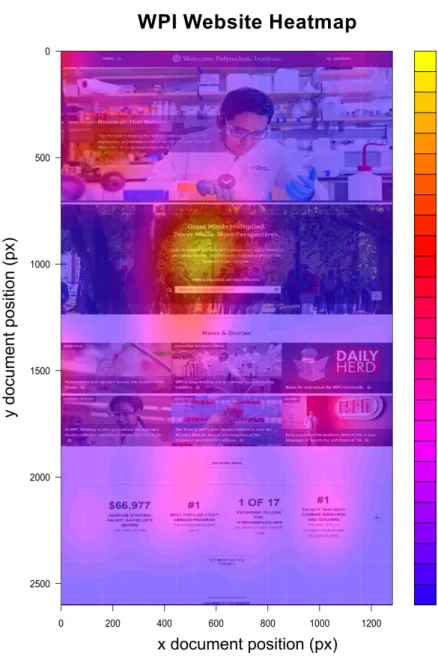
Browser correction works properly, greatly simplifying the interpretation of collected data. The heatmap in Figure 4.1 would be nearly impossible to create with existing eye tracking software. This heatmap was generated using existing R code. Only minor data filtering (the removal of off-screen samples) was needed to accomplish this result.
4.2. LATENCY
Figure 4.1: A heatmap of eye tracking data collected from EyeSite on a scrolling web page
(www.wpi.edu). The only modification of the website’s code was the inclusion of the EyeSite
browser client script. Without taking special actions to avoid scrolling, this kind of visualization would be nearly impossible to make in other eye tracking frameworks.
4.2
Latency
Latency targets over the local WebSocket connection were met. In a test of 10,000 samples, 98.9% of sample RTTs were below the 8.3 ms target for a 120 HZ eye tracker. 90.2% of sample RTTs fell below 4.17 ms, the minimum acceptable RTT for a 240 Hz eye tracker.
While these measurements indicate acceptable baseline performance, variation in hardware and software could have a significant effect. A computationally expensive experiment web page could impact the rate at which WebSocket messages are processed. While we can establish that
Figure 4.2:The cumulative distribution function of sample correction round trip times. RTTs easily meet the acceptance criteria.
EyeSite performs at an appropriate level on simple web pages, we recommend that researchers verify acceptable performance before running an experiment.
4.3
Sampling
Early in implementation, consistently meeting sample rates was an issue – especially on Microsoft Windows. With a thread sleeping timer, EyeSite was consistently late even for 30 Hz sample rates.
The shift to a busy-waiting timer helped considerably. After the implementation of this timer, sample rates up to 240 Hz were consistent on Windows. Higher sample rates are likely feasible, but were not rigorously tested. In a trial run with the busy waiting timer at 240 Hz on a Window 10 PC, 98.74% of samples were less than 0.1 milliseconds late.
Since busy waiting may impact performance on a resource constrained system, it was made optional. On platforms where thread sleeping is more precise, it may be sufficient for sample rates below 120 Hz.
4.4. SCALABILITY
Figure 4.3:The distribution of distances from the target sample time. The vast majority of samples were .0003 milliseconds after the target time.
4.4
Scalability
Early scalability tests suggest that a single EyeSite server instance could support 50-100 concur-rent trials running at 60 Hz without performance degradation. This number varies significantly depending on server hardware, the amount of per-sample custom data, and the sample rate of individual trials.
The performance of the EyeSite server is limited by the speed of database writes. On servers with solid state drives, more concurrent supported trials will be possible.
Scalability could be improved by tuning various parameters in EyeSite. Using an in-memory SQLite database may improve throughput on server machines with enough RAM. Increasing the SQLitecache_sizevalue may lead to similar performance gains. Disabling SQLite journaling is also a potential option, albeit risky. By default, the tracker host buffers three seconds worth of sample before sending them to database. Increasing this buffer length may help to improve performance by reducing the number of transactions in SQLite.
For multi-hour experiments running at a high sample rate with many trials, the SQLite database file can get large. Exported .csv files will require additional space. We recommend
ensuring that the machine running the EyeSite server application has ample free disk space.
1 Minute 10 Minutes 1 Hour
30 Hz 43 KB 435 KB 2,708 KB 60 Hz 86 KB 890 KB 5,435 KB 120 Hz 174 KB 1,799 KB 10,890 KB 240 Hz 346 KB 3,617 KB 21,801 KB 30 Hz, w/ custom data 227 KB 2,270 KB 13,636 KB 60 Hz, w/ custom data 454 KB 4,543 KB 27,273 KB 120 Hz, w/ custom data 908 KB 9,089 KB 54,549 KB 240 Hz, w/ custom data 1,816 KB 18,181 KB 109,100 KB
Table 4.1:Disk space used in the database for a single eye tracker at a variety of sample rates and trial lengths. For examples with custom data, 100 bytes of JSON was included in each sample.
4.5
Usability
EyeSite’s browser integration and support of distributed experiments could simplify the adminis-tration of many varieties of eye tracking experiments.
The goal of easy integration into experiments was largely met. Integrating the browser client portion of EyeSite into a web-based experiment is extremely straightforward, only requiring the inclusion of a single script. Basic functionality (sample collection and correction) can be achieved with the addition of three lines of JavaScript code. Adding AOI tracking is also simple, only requiring the inclusion of a class name on DOM elements for which tracking is desired. More complex behavior can be achieved by attaching callbacks to EyeSite events. Due to the callback system, the synchronization of EyeSite events and experiment events is uncomplicated. Storing general experiment events however, is not. This data must either be duplicated on every sample, wasting disk space on the EyeSite sever or be attached to only some samples, complicating analysis. The experiment designer is, of course, free to store these events on some alternate system, but it would simplify experiment code if EyeSite could be used.
The administration of the EyeSite server is very simple. Only a single python dependency is required, and no complex database administration is needed. After initial setup, researchers only need to access the server to export sample .csv files. This can be done without stopping the server process.
For researchers with experience using statical computing packages, analyzing data from EyeSite is simple. For researchers without this prior experience, EyeSite’s analysis tools may be found lacking. Data generated by EyeSite is complete and well organized, but analysis is left almost entirely to the researcher. Some commercial eye tracking systems, like Tobii Studio, integrate tools to generate common visualizations. Considering EyeSite’s target users, this is not a large problem and could be remedied with a library of example analysis code.
4.6. EXTENSIBILITY
The need to run a command-line Python application alongside the browser in any experi-mental trial – even with a Javascript-based eye tracker – is somewhat cumbersome. This could complicate trials run over the Internet, as the researcher would need to distribute a software package for each participant to run. For some participants, running a command-line application may be unfamiliar and difficult.
4.6
Extensibility
EyeSite’s structure simplifies adding and restructuring code. Each layer of framework is entirely separate and uncoupled. The provider structure in the tracker host offers a straightforward model for the implementation of new eye tracker connections.
Some limitations however, may be impossible to work around. As long as samples are corrected in real time, web browser performance makes the use of especially high sample rates very difficult. While correcting samples at up to 240 Hz is feasible on most hardware, correcting samples at 2000 Hz is not. Support for these eye trackers may be impossible given EyeSite’s current structure. However, these very high sample rates are probably not needed for the vast majority of HCI or vis experiments.
C
H
A
P
5
C
ONCLUSIONS ANDF
UTUREW
ORKBased on our initial evaluations, EyeSite is ready to facilitate browser-based eye tracking experiments. In its current form, EyeSite meets the design and performance goals necessary for HCI and data vis research, with a feature set sufficient for many use cases. As an open-source library, we hope that researchers use our project and suggest changes so that EyeSite can evolve and improve in service of the research community. By building on existing open-source projects such as PyGaze and WebGazer, we hope to encourage further collaboration in eye tracking software.
There are many avenues for future work on EyeSite. First and foremost, running a large scale pilot study with EyeSite would test the library’s ability to manage a real-world experiment and potentially reveal areas for improvement. Another obvious next step would be to add support for more eye trackers. There are many open-source eye tracking projects that could be integrated into EyeSite. Compatibility is also a concern for browsers. Currently, Google Chrome on Windows does not properly report the browser window’s position on the screen, making it impossible to perform gaze coordinate translation. This issue can only be resolved by fixing the bug in Chrome. Another area for improvement is the calibration procedure for hardware eye trackers. In the current system based on PyGaze, when a trial is started, a calibration window jarringly takes fullscreen control of the computer until the procedure is complete. Improving calibration, possibly by incorporating it into the browser, could enhance the user experience for subjects participating in trials. For researchers, there are many ways to improve the convenience of EyeSite. One way would be to add a graphical user interface for starting and configuring the tracker host application. Having a nicely packaged application with a GUI could be preferable compared to a command line Python script. Going further, for browser-based eye tracking software, future work could make i