0
MLWorks
™
Version 2.0
Release Notes
Copyright and Trademarks MLWorks™ Version 2.0 Release Notes August 1998
Part number: MLW-2.0.0-RN
Copyright © 1997-1998 by Harlequin Group plc.
Companies, names and data used in examples herein are fictitious unless otherwise noted.
All Rights Reserved. No part of this publication may be reproduced, stored in a retrieval system, or transmit-ted, in any form or by any means, electronic, mechanical, photocopying, recording, or otherwise, without the prior written permission of Harlequin Group plc.
The information in this publication is provided for information only, is subject to change without notice, and should not be construed as a commitment by Harlequin Limited, Harlequin Incorporated, Harlequin Austra-lia Pty. Limited, or Harlequin Group plc. Harlequin Group plc assumes no responsibility or Austra-liability for any errors or inaccuracies that may appear in this publication. The software described in this book is furnished under license and may only be used or copied in accordance with the terms of that license.
MLWorks is a trademark of Harlequin Group plc.
Other brand or product names are the registered trademarks or trademarks of their respective holders. US Government Use
The MLWorks Software is a computer software program developed at private expense and is subject to the following Restricted Rights Legend: “Use, duplication, or disclosure by the United States Government is sub-ject to restrictions as set forth in (i) FAR 52.227-14 Alt III or (ii) FAR 52.227-19, as applicable. Use by agencies of the Department of Defense (DOD) is subject to Harlequin’s customary commercial license as contained in the accompanying license agreement, in accordance with DFAR 227.7202-1(a). For purposes of the FAR, the Software shall be deemed to be `unpublished’ and licensed with disclosure prohibitions, rights reserved under the copyright laws of the United States. Harlequin Incorporated, One Cambridge Center, Cambridge, Massachusetts 02142.”
North America:
Harlequin Incorporated One Cambridge Center Cambridge, MA 02142 U.S.A. telephone +1 617 374 2400 fax +1 617 252 6505 Europe: Harlequin Limited Barrington Hall Barrington Cambridge CB2 5RG U.K. telephone +44 1223 873 800 fax +44 1223 872 519 Electronic Access: http://www.harlequin.co.uk http://www.harlequin.com
Contents
1
Platforms
1
2
How to reach Harlequin Support
2
3
Known problems
2
Windows object files need updating 2
The X keysym database in the MLWorks Linux runtime 2 Foreign interface library update at next MLWorks release 3
4
Features
3
The MLWorks implementation of Standard ML 3 The Standard ML Basis library 4
5
Windows platforms
4
Suggested minimum system configurations for MLWorks on Windows 4 The MLWorks.Deliver.deliver function 7
New Start menu shortcuts require HTML browser 7
6
Linux and UNIX platforms
7
Suggested minimum system configurations for MLWorks on Linux and UNIX 7
Window-system support 8
Window manager window-closing operations 8
MLWorks Version 2.0
Release Notes
1 Platforms
This section contains information that applies to both the UNIX and the Win-dows versions of MLWorks.
MLWorks 2.0 is supported on the following configurations of hardware and software. Please contact Harlequin if in any doubt about support for your platform.
• Intel x86 running Windows 95 or Windows NT 3.51 or 4.0
• Intel x86 running Linux version 2.0.30 or later, for example, Red Hat 4.x or 5.0.
• SGI MIPS R3000 running Irix 5.3
• SGI MIPS R4000 (revision 3.0 and higher) running Irix 5.3 or 6.2 • Sun SPARC running Solaris 2.4, 2.5, 2.5.1, or 2.6.
Sun Ultra machines must be running Solaris 2.5.1 or higher. If you are running Solaris 2.5.1, you also need kernel patch 103640-08 or a later revision, available from Sun to all service contract customers. This patch applies to all SPARC-based machines and has been integrated into future releases of Solaris.
MLWorks Version 2.0 Release Notes
If you use an earlier version of any of the above operating systems, please upgrade.
See also “Suggested minimum system configurations for MLWorks on Win-dows” on page 4 and “Suggested minimum system configurations for MLWorks on Linux and UNIX” on page 7 and “Suggested minimum system configurations for MLWorks on Linux and UNIX” on page 7.
2 How to reach Harlequin Support
The MLWorks 2.0 Installation Guide shows you how you can contact Harle-quin Support.
3 Known problems
3.1 Windows object files need updating
Some object files created with the Windows version of MLWorks 1.0r2 do not work with MLWorks 2.0. You should delete your old object files and compile new ones.
3.2 The X keysym database in the MLWorks Linux runtime
You may have problems with the X keysym database if you are using the Linux version of MLWorks. It is possible that if your system’sXKeysymDB file is
in an unusual place, you will see error messages such as the following:
Warning: translation table syntax error: Unknown keysym name: osfActivate
Warning: ... found while parsing
’<Key>osfActivate:ManagerParentActivate()’
You can eliminate these problems by editing thebin/mlworks file and, before
theexec statement, adding an entry for theXKEYSYMDB environment variable.
For example:
XKEYSYMDB=/usr/lib/X11/XKeysymDB export XKEYSYMDB
4 Features
There may be an entry like this forXKEYSYMDB already, in which case you must
edit that, or place your new entry after it. Substitute the correct path for your system’sXKeysymDB file in the first ilne above. If you do not know where the
file is located on your system, your systems administrator should be able to help. The following UNIX command may also locate the file for you:
find /usr -name XKeysymDB -print
3.3 Foreign interface library update at next MLWorks release
The next release of MLWorks will significantly rework the foreign interface library (FI). The new FI supports a wider range of datatypes, is more efficient, and is easier to use.
After the next version of MLWorks is released, Harlequin will offer support if you need to upgrade existing FI code to work with the new FI.
4 Features
4.1 The MLWorks implementation of Standard ML
The Definition of Standard ML (Milner, R.; Tofte, M.; Harper, R.; 1990; The MIT
Press) was revised and simplified in 1996 by the original authors, and pub-lished in 1997. All major implementations of Standard ML are adapting to the revised definition, and MLWorks is no exception. By default, MLWorks uses the revised version of the language. Most existing code will compile
unchanged. If the revisions to the Definition do cause you problems, MLWorks provides the option of using the previous definition. Select
Preferences > Options > SML '90.
The full text of the revised Definition is now publicly available. We have per-mission from the authors to distribute selected pages that describe the changes to the language. See the filesml_97.ps in the distribution directory.
This file is an excerpt from The Definition of Standard ML (Revised), MIT Press, 1997, and is provided solely for use by the MLWorks license holder: it should not be distributed further.
MLWorks Version 2.0 Release Notes
4.2 The Standard ML Basis library
MLWorks also supports the Standard ML Basis Library. This library was developed by Harlequin in conjunction with the developers of Standard ML of New Jersey and the developers of Moscow ML. It provides a greatly expanded standard set of functions that are available in all up-to-date imple-mentations of Standard ML. See the following URL for documentation:
http://www.harlequin.com/devtools/ml/basis.htm
MLWorks includes all the Basis library’s required structures:
Array, BinIO, BinPrimIO, Bool, Byte, Char, CharArray, CharVector, Date, General, IEEE_Real, Int, IO, LargeInt, LargeReal,
LargeWord, List, ListPair, Math, Old, OS, OS.FileSys, OS.IO, OS.Path, OS.Process, Position, Real, String, StringCvt,
SubString, TextIO, TextPrimIO, Time, Timer, Vector, Word, Word8, Word8Array, Word8Vector
In addition, it includes the following optional structures:
Array2, CommandLine, Int8, Int16, Int32, Pack8Big, Pack8Little, Pack16Big, Pack16Little, Pack32Big, Pack32Little, RealArray, RealVector, RealArray2, SysWord, Windows, Word16, Word16Array, Word16Vector, Word32, Word32Array, Word32Vector
It also provides the optionalPrimIO andStreamIO functors.
5 Windows platforms
This section discusses configuration and installation issues for the Windows 95 and Windows NT operating systems.
5.1 Suggested minimum system configurations for MLWorks on Windows
We recommend that you use an SGVA monitor with a resolution of 800x600 pixels or greater.
To run the Windows 95 version of MLWorks 2.0 we recommend at least 20 MB RAM. For running on Windows NT, we recommend at least 24 MB RAM. The distribution directory for Windows 95 and Windows NT is 9 MB; the installed system takes up around 23 MB. Therefore, during installation you will need around 32 MB of free disk space.
5 Windows platforms
The following notes present suitable system settings for running MLWorks on Windows. They should help you optimize the performance of MLWorks on your Windows system.
Ensure a reasonable amount of disk space. 64MB would be plenty for most applications.
You can control the memory usage by the-limitn option to the MLWorks
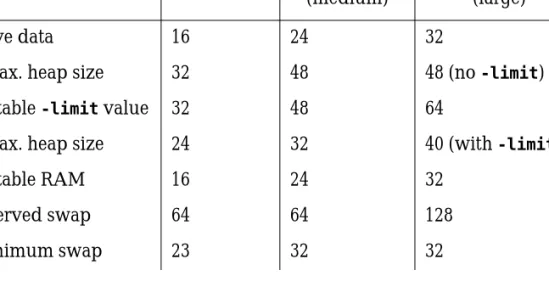
runtime itself, and also by setting the swap characteristics of Windows. The settings depend on the sort of work you are doing, for example student work, running a medium-sized application, or large-scale software development (all figures in MB):
The-limit in Table 1 refers to the-limitn option to the MLWorks runtime,
which specifies an advisory arena extent size in MB. The default is 100. If you have problems with memory usage, try this setting first, using the suggested n from the table above. To change it, edit themlworks shortcut by choosing
Start > Settings > Taskbar, then in the Taskbar properties dialog, chooseStart Menu Programs and click on theAdvanced ... button. This explores the start menu programs. Find and select themlworks shortcut and chooseFile >
Prop-Table 1 Recommended Windows memory settings (in Megabytes)
Personal Professional (medium)
Professional (large) ~live data 16 24 32
~max. heap size 32 48 48 (no-limit)
suitable-limit value 32 48 64
~max. heap size 24 32 40 (with-limit)
suitable RAM 16 24 32 reserved swap 64 64 128 minimum swap 23 32 32
MLWorks Version 2.0 Release Notes
erties. Then chooseShortcut. The shortcut is presented in the Target text box, and can be edited there.
Reserved swap is how much disk space you should have available to your vir-tual memory system. This is what determines whether MLWorks will die from lack of memory.
Minimum swap is the smallest size you should allow your swap file to become. You can set this in the Control Panel underSystem. The operations necessary differ between Windows 95 and Windows NT.
On Windows 95, select the Performance page, then click on theVirtual
Memory... button in the Advanced Settings pane. Then select theLet me specify
radio button and fill out the fields appropriately.
On Windows NT, select the Performance page, then click onChange...in the Virtual Memory pane. Then fill out the fields appropriately.
If you still have trouble, we suggest using the Windows 95 System Monitor or Windows NT Performance Monitor.
In the Windows 95 System Monitor (Start > Programs > Accessories > System Tools > System Monitor), selectEdit > Add Item. In the Category list, select Memory Manager, then from Items choose “Swapfile in use” and “Swapfile size”. ClickOK.
In the Windows NT Performance Monitor (Start > Programs > Administrative Tools [ Common ] > Performance Monitor), selectEdit > Add to Chart. Choose “Paging File” from the Object drop-down list and “%Usage” from the Counter drop-down list. ClickAdd.
The next thing to do is to monitor the chart while you are performing typical tasks in MLWorks. There is a danger that readings will disappear from the chart too quickly for you to interpret them. To avoid this, slow down the dis-play by selectingOptions > Chart and changing the “Update interval” slider setting (Windows 95) or Update Time interval setting (Windows NT).
Diagnosis again differs between Windows 95 and Windows NT. On Windows 95, if the swapfile size goes up and down a lot, the minimum swapfile size should be increased. If the swapfile size does not go up and down at all, the minimum swapfile size could be reduced. A suggested number in either case is 4/3 of the peak value of “Swapfile in use”.
6 Linux and UNIX platforms
On Windows NT, if the paging file usage stays very low, your PC is not paging very much and you need not make changes. If the usage gets very high, you need to reduce the value of-limit used by the MLWorks runtime, or reduce
the maximum paging file size, or do fewer tasks at once.
Also of interest for monitoring on Windows NT is the “Memory” object and its “Page Faults/sec” counter. If this remains high (over 100, say; though the exact number depends on your PC) for a prolonged period, you are thrashing and need to reduce your-limit, get more physical memory, or do fewer tasks
at once. Note that the Performance Monitor graphs are scaled independently of each other.
5.2 The MLWorks.Deliver.deliver function
When usingMLWorks.Deliver.deliver on Windows, MLWorks exits after
delivering the application executable.
5.3 New Start menu shortcuts require HTML browser
MLWorks 2.0 includesStart-menu shortcuts that invoke an HTML browser on HTML versions of the MLWorks User Guide and the MLWorks Reference Manual. MLWorks does not include an HTML browser. If you do not have a browser installed, these shortcuts will have no effect.
6 Linux and UNIX platforms
This section contains information that applies only to the Linux and UNIX versions of MLWorks.
6.1 Suggested minimum system configurations for MLWorks on Linux and
UNIX
To run the Irix version of MLWorks 2.0, we recommend at least 32 MB RAM. The distribution directory for Irix is around 13 MB; the installed system takes up around 18 MB. Therefore, during installation you will need around 31 MB of free disk space.
MLWorks Version 2.0 Release Notes
For running on Solaris, we recommend at least 32 MB RAM. The distribution directory for Solaris is around 11 MB; the installed system takes up around 18 MB. Therefore, during installation you will need around 29 MB of free disk space.
For running on Linux, we recommend at least 32 MB RAM, and Red Hat Linux version 4.0 or later. Although we do not support other versions of Linux, users have reported no problems. The installed system takes up around 15 MB without documentation, and 22 MB including documentation.
6.2 Window-system support
MLWorks 2.0 runs under the X Window System with Motif, and under Sun’s OpenWindows for Solaris. MLWorks also supports the Common Desktop Environment (CDE).
MLWorks 2.0 for Linux runs under the X Window System with Motif. The Motif libraries are statically linked into the MLWorks runtime. You do not need to own Motif in order to run MLWorks.
6.3 Window manager window-closing operations
MLWorks ignores the UNIX window manager’s window-closing operation. This operation has different names in different window managers; in TWM it is calledf.delete, and in MWM, it is calledf.kill.
The MLWorks debugger tool uses an event-handling sub loop, and exiting a parent tool while MLWorks is in such a loop can cause problems. Therefore, MLWorks ignores all attempts to exit tools by using the window-manager’s window-closing operation.
6.4 Motif-based applications must run with MLWorks resources
You must run Motif applications in an environment in which the value of the
XUSERFILESEARCHPATH environment variable includes the
app-defaults/MLWorks-mono
6 Linux and UNIX platforms
The following commands work in the bash shell. Replace<MLWorks> with the
directory in which you installed MLWorks:
XUSERFILESEARCHPATH=<MLWorks >/lib/X11/app-defaults/%N%C:$XUSERFILESEARCHPATH
export XUSERFILESEARCHPATH
6.5 The MLWorks runtime
The UNIX MLWorks runtime uses X Window System libraries and Motif libraries. On Solaris both statically and dynamically linked versions of the runtime are available. On Irix, only a dynamically linked runtime is available. On Linux, only a statically linked runtime is available.
This section lists shared library requirements for the dynamic version of the runtime on all platforms, and, for Solaris, how to install the static or dynamic runtime according to your preference. It also explains how to recover from problems with the X keysym database that you may have on Solaris if you use the static runtime (which is installed by default on those platforms).
6.5.1 Solaris
On Solaris 2.4 and Solaris 2.5, MLWorks expects to find the OpenWindows versions of X11 and Xt, as distributed with Solaris by Sun. To ensure this, the scripts that run MLWorks add/usr/openwin/lib to yourLD_LIBRARY_PATH
environment variable.
Dynamically linked runtimes for MLWorks are shipped in the MLWorks 2.0 distributions for Solaris. If you would prefer the dynamic runtime to be installed by default, you can edit the installation script to make that happen. The following shared libraries must be available on your system for the dynamically linked runtime to work:
Solaris libm.so.1, libw.so.1, libXt.so.4, libX11.so.4,
libXm.so.2.12, libsocket.so.1, libnsl.so.1, libintl.so.1, libelf.so.1, libdl.so.1, libc.so.1
To install the dynamically linked version ofmlrun instead of the statically
linked one, edit theinstall-mlworks script in the MLWorks distribution, and
MLWorks Version 2.0 Release Notes
RUNTIME=main-static
Change the line to read:
RUNTIME=main
Now follow the installation procedure normally.
6.5.2 Irix
The default installation procedure for Irix installs a version of the MLWorks runtime,mlrun, that is dynamically linked to X Window System libraries and
Motif libraries. The following shared libraries must be available on your Irix system for the runtime to work:
Irix libX11.so.1, libXext.so, libXm.so.1, libXmu.so, libXt.so, libc.so.1, libm.so
If you do not have access to these libraries on your system, please contact Har-lequin MLWorks Support.