University of Arkansas, Fayetteville
ScholarWorks@UARK
Theses and Dissertations5-2019
Teaching Introductory Programming Concepts
through a Gesture-Based Interface
Lora Streeter
University of Arkansas, Fayetteville
Follow this and additional works at:https://scholarworks.uark.edu/etd
Part of theGraphics and Human Computer Interfaces Commons,Programming Languages and Compilers Commons, and theTheory and Algorithms Commons
This Dissertation is brought to you for free and open access by ScholarWorks@UARK. It has been accepted for inclusion in Theses and Dissertations by an authorized administrator of ScholarWorks@UARK. For more information, please [email protected].
Recommended Citation
Streeter, Lora, "Teaching Introductory Programming Concepts through a Gesture-Based Interface" (2019).Theses and Dissertations. 3240.
Teaching Introductory Programming Concepts through a Gesture-Based Interface
A dissertation submitted in partial fulfillment of the requirements for the degree of Doctor of Philosophy in Computer Science
by
Lora Streeter University of Arkansas
Bachelor of Science in Computer Science, 2010 University of Arkansas
Master of Science in Computer Science, 2018
May 2019 University of Arkansas
This dissertation is approved for recommendation to the Graduate Council.
_______________________________ John Gauch, Ph.D. Dissertation Director _______________________________ David Andrews, Ph.D. Committee Member _______________________________ Susan Gauch, Ph.D. Committee Member _______________________________ Jackson Cothren, Ph.D. Committee Member
Abstract
Computer programming is an integral part of a technology driven society, so there is a tremendous need to teach programming to a wider audience. One of the challenges in meeting this demand for programmers is that most traditional computer programming classes are targeted to university/college students with strong math backgrounds. To expand the computer
programming workforce, we need to encourage a wider range of students to learn about programming.
The goal of this research is to design and implement a gesture-driven interface to teach computer programming to young and non-traditional students. We designed our user interface based on the feedback from students attending the College of Engineering summer camps at the University of Arkansas. Our system uses the Microsoft Xbox Kinect to capture the movements of new programmers as they use our system. Our software then tracks and interprets student hand movements in order to recognize specific gestures which correspond to different programming constructs, and uses this information to create and execute programs using the Google Blockly visual programming framework.
We focus on various gesture recognition algorithms to interpret user data as specific gestures, including template matching, sector quantization, and supervised machine learning clustering algorithms.
Acknowledgments
First, I would like to thank my advisor, Dr. John Gauch, for his continuous support of my Ph.D. study and related research. Without his guidance, patience, and mentoring, this dissertation would not have been possible.
Besides my advisor, I would also like to express my deepest appreciation to Dr. Susan Gauch, Dr. David Andrews, and Dr. Jackson Cothren for agreeing to serve on my committee and for their valuable feedback throughout this process.
Thanks to all of my family and friends for your support and guidance through my academic career.
A very special thanks to all of the faculty and staff at the University of Arkansas for all that they do to help the students succeed. Thanks also to the faculty and staff at Northwest Technical Institute for all your support and for always believing in me.
I am also very grateful to Dr. Russell Deaton, who encouraged me to go to graduate school and got me started on this journey.
Dedication
To my awesome husband, Alden Streeter, and my loving and supportive parents, Jim and Rozetta Strother.
Table ofContents
1 Introduction ... 1
1.1 Motivation ... 1
1.2 Driving Problem ... 4
1.3 Dissertation Organization ... 5
2 Review of the Literature ... 6
2.1 Visual Programming ... 6 2.1.1 Google Blockly ... 6 2.1.2 Scratch ... 8 2.1.3 Snap! ... 8 2.1.4 Alice... 9 2.1.5 Summary ... 10
2.2 Kinect-Based User Interfaces ... 10
2.2.1 Medical Applications ... 11
2.2.2 In Arts and Entertainment ... 15
2.2.3 Motion Tracking Applications... 17
2.3 Gestural Programming Languages ... 19
3 User Interface and System Design ... 20
3.1 Student Input ... 20
3.1.2 Student Gesture Capture ... 22
3.1.3 Common Gestures among Students ... 25
3.1.4 Other Observations ... 26
3.2 Programming Goals... 27
3.3 User Interface Design ... 28
3.4 Software/Hardware System Design ... 29
3.4.1 Processing ... 30
3.4.2 Blockly... 33
3.5 Gestures ... 34
3.5.1 Gesture Variations ... 35
4 Gesture Matching Algorithms... 36
4.1 Static Poses ... 36
4.2 Fluid Motion of Joints ... 39
4.3 Gesture Matching Algorithms ... 40
4.4 Gesture Normalization ... 42
4.5 Template Matching for Loop Gesture ... 43
4.5.1 Minimum/Maximum Scaling Algorithm ... 44
4.5.2 Standard Deviation Scaling Algorithm... 46
4.6 Sector Quantization ... 53
4.7.1 Nearest Centroid Classification ... 57
4.7.2 Nearest Medoid Classification with Aligned Gestures ... 58
4.7.3 Nearest Medoid Classification with Point-Set Distances ... 61
4.8 Gesture Editing ... 65
5 Conclusion and Future Work ... 67
5.1 Summary ... 67
5.2 Future Work ... 69
6 References ... 73
7 Appendix ... 78
7.1 Institutional Review Board Initial Approval ... 78
List of Figures
Figure 1. APL keyboard 2
Figure 2. Blockly IDE 7
Figure 3. Scratch IDE 8
Figure 4. Snap! IDE 9
Figure 5. Alice IDE 10
Figure 6. Tiger puppet joint mapping (from Zhang 2012) 16
Figure 7. CaptureGesture interface with joints labeled; the user is drawing a loop with their right
hand 23
Figure 8. CaptureGesture interface where the user jumped up and down, then moved left to right
to show full skeletal tracking 24
Figure 9. System design 30
Figure 10. Example code in Processing 31
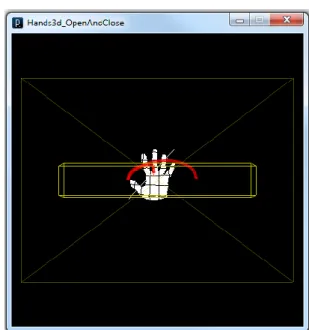
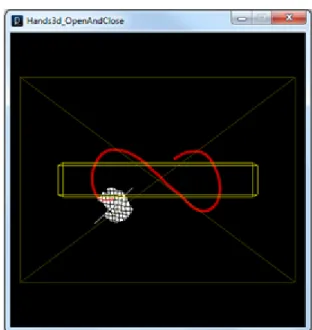
Figure 11. Kinect hand tracking example; the user is making a wave gesture 32 Figure 12. Kinect hand tracking; the user is in the process of drawing an infinity symbol 33 Figure 13. JavaScript code display after finishing a puzzle in Blockly 34
Figure 14. Ideal loop A and user gestures B, C, and D 41
Figure 15. Minimum/maximum scaling for gestures B-D 45
Figure 16. Minimum/maximum scaling for pared gestures B-D 45
Figure 17. Standard deviation distributions 47
Figure 18. Standard deviation scaling for gesture B (all data) 49
Figure 19. Gesture B point representation 50
Figure 21. Quantized grid of sectors 54 Figure 22. Quantized gestures with a sector grid underlay; A. an ideal circle, and B-D. three user
gestures 54
Figure 23. Gesture centroids, pared to 50 coordinates 58
Figure 24. Two loop gestures compared by starting point to starting point 59 Figure 25. Two loop gestures compared by attempting to align their coordinates 60 Figure 26. Two loop gestures compared with point-set differences 62 Figure 27. A spiral pared to 50 coordinates, plotted as points 63 Figure 28. An infinity symbol pared to 50 coordinates, plotted as points 63 Figure 29. An infinity symbol incorrectly mapped to a spiral medoid 64
Figure 30. Cross-finder on a loop gesture 65
List of Tables
Table 1. Pose table for all 15 joints for a simple right hand wave gesture ... 38
Table 2. Possible undo gesture... 39
Table 3. Number of files per types of gesture ... 41
Table 4. Accuracy of the minimum/maximum scaling algorithm when using original data versus pared data ... 43
Table 5. Minimum/maximum scaling results for figures B-D ... 46
Table 6. Gesture B standard deviation scaling match percentages ... 49
Table 7. Count of "best" standard deviations values ... 51
Table 8. Template matching percentages for standard deviation bounding boxes (7 values) ... 51
Table 9. Template matching percentages for standard deviation bounding boxes (151 values) .. 52
Table 10. Percentages of template matching for standard deviation bounding boxes (16 values) 53 Table 11. Sector quantization matching results ... 55
Table 12. How the files were split for training versus testing ... 56
Table 13. Aligned gesture best figure matching results ... 60
Table 14. Medoid gesture type sums for five gestures using the align gestures matching algorithm ... 61
Table 15. Medoid gesture type sums for all five figures using the point-set difference matching algorithm ... 64
Table 16. Medoid gesture type sums for three figures using the point-set difference matching algorithm ... 65
1
1 Introduction 1.1 Motivation
Computer programming is an important field given the rapid advance of technology in recent years, but traditional programming classes are not necessarily directed to the masses. They are typically more tailored to people who are either already interested in programming or are old enough (or have enough self-discipline) to sit in a class, take notes, and then go home and
experiment with what they have learned in front of a screen. Could there be a better way to teach them? What if, instead of having them sit down and type on a keyboard, they could have a more interactive experience? These are the two questions that motivate our current research.
Programming is an integral part of the technologically driven society, so there is a need to provide a better way to teach programming to a broader audience. Programming is an important career skill that teaches problem solving skills that are broadly useful, and well rewarded. For example, in 2015 computer science was projected to be the second highest paying career option for students graduating with a bachelor degree, with the starting annual salary over sixty
thousand dollars (Rawes 2015).
As science, technology, engineering, and math (STEM) jobs are becoming more
pervasive in society, there is a growing need to grab the attention of younger and non-traditional programmers, draw them into the world of computing, and hold their interest. Programming with a language meant solely for computation can easily discourage some people since learning syntax and rules is typically not as enjoyable as manipulating images and completing fun tasks. When people become immersed in learning and having fun, they are more likely to continue onto more challenging topics. It was discovered during some very controlled trials for first-time
2 University level programmers that using a visual language like Alice increased retention by 41%, and the average grade in the class rose an entire letter grade (Moskal 2004).
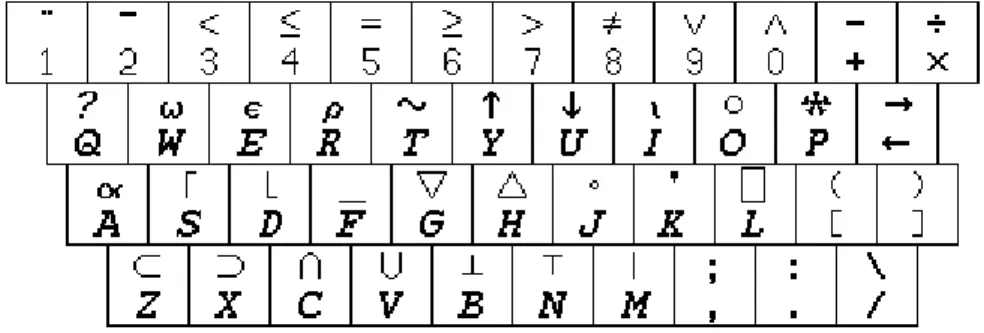
Computer programming has evolved over the years as computer languages have evolved. One significant barrier to the masses being able to learn is arcane syntax. A prime example is the 1960’s language, APL, which required a special keyboard (see Figure 1) with the APL character set that was typed by pressing shift and the letter where that symbol was located. Fortunately, many commonly taught languages now use full words instead of language specific symbols.
Figure 1. APL keyboard1
Taxonomy of Programming Languages
For the purposes of this research, programming languages are classified into four
categories: textual, visual, gesture-based, or hybrids combining two or more approaches. Textual
programming languages include any programming language that can be typed, such as Java,
C++, or APL, among others. Visual programming languages incorporate icons, have a drag-and-drop interface, or are mouse or graphics based – such as Google’s Blockly or MIT’s Scratch. There are also hybrid languages that combine textual and visual programming aspects of the previously mentioned languages such as Visual Basic, where the user can create a GUI by dragging buttons, textboxes and other form options onto the screen, then coding those buttons to
1 Savard, John J. G. "Picture of an APL Keyboard." Remembering APL. 2012. Web.
3 perform certain tasks. Finally, there are gesture-based languages. These can involve multi-touch gestures on a tablet device (Lü 2012), using an image or video as input (Kato 2013, Kato 2014), determining finger locations using a data glove (Kavakli 2007), or manual selection of symbolic markers to control a robot (Dudek 2007).
Gesture Interfaces
A wide variety of devices have been developed to capture and process gestures. For this research, we are focusing our attention on the Microsoft Kinect because it is inexpensive, widely available, and provides at three-dimensional depth map and skeletal tracking. The Kinect made its first appearance in the market in November of 2010, where eight million units were sold in the first sixty days, and over twenty-four million units have been shipped since February 2013. When the Kinect was first released, Microsoft had intended for it to only be used in conjunction with their Xbox gaming platform, and did not provide any packages to enable unlicensed developers to create their own programs. Their professional software development kit (SDK) was only licensed to game development companies so they could create software for the Xbox and Kinect. However, even with Microsoft’s reluctance to enable unlicensed development and threats that the warranty would be voided if the Kinect was used in any way other than with the Xbox, hackers managed to gain control of the Kinect’s motors within a week of the release. This spurred the development of the OpenKinect and libfreenect projects. Shortly thereafter, software developers were able to reverse engineer the Kinect’s program, and release it as public domain. About seven months later, in June 2011, Microsoft released their Kinect SDK for general public use. This research project will build on the OpenNI SDK for the Kinect to investigate gesture-based programming languages.
4
1.2 Driving Problem
Since the Kinect made its first appearance in the market in November 2010, it has been embraced as an inexpensive off-the-shelf three-dimensional camera for more than just gaming (Andersen 2012). It has been used in the medical field to assist clean-room surgery, patient rehabilitation, and vocational training, to name a few examples. Various other applications have been created such as virtual dressing rooms, interactive whiteboards, handwriting recognition tools, and pottery simulations that explore the endless possibilities the Kinect has unlocked for user interaction.
The goal in this project is to create and evaluate a visual and gesture-driven interface to teach programming to non-traditional programmers. Hence our interface will be strongly inspired by Google’s Blockly and MIT’s Scratch format with drag-and-drop puzzle pieces, along with pre-defined gestures that will correspond to functions and available actions. Our long term goal is to answer questions such as:
What is the vocabulary of gestures that is necessary to create a programming interface?
How can we use the three-dimensional nature of gestures effectively in our interface?
By introducing a gesture-based interface, will we have better engagement and performance by atypical programmers?
By making the concept of programming easier to understand, will we help foster an interest in programming?
To judge the effectiveness of changing the programming medium, the results will need to be evaluated from observing and testing the users. The programming interface will have two different options – using the traditional mouse-and-keyboard, or using a Kinect. One issue that may arise is the users’ endurance while using their arms to control the program. This may affect
5 some age groups more than others; therefore the impact will be judged across several different age groups.
1.3 Dissertation Organization
In Chapter 2 we will explore some related background work to the Kinect, visual
programming languages, and gestural interfaces. In Chapter 3, we discuss how data was gathered from young students attending engineering summer camps at the University of Arkansas, and how we used our observations from these camps to design a gesture based user interface for programming. This chapter also describes the hardware/software design of the system we developed. In Chapter 4 we describe our work on designing, implementing and comparing different techniques for gesture recognition using user joint location information obtained from the Kinect device. Finally in Chapter 5, we provide a summary of our research and describe possible directions for this research in the future.
6
2 Review of the Literature
In this section we review two categories of research that are relevant to our project. First we review visual and gesture-based programming languages. Then we review human-computer interaction (HCI) systems that make use of the Kinect and/or gesture recognition as input. We will be incorporating elements of both in the design and implementation of our own system.
2.1 Visual Programming
A visual programming language is designed so that the user manipulates program elements graphically instead of using traditional text oriented systems. Many visual languages are designed to appeal to non-traditional programmers by giving goal oriented tasks (e.g. “Make your character skate and create a snowflake”) or by encouraging storytelling instead of text-driven computations that are seen in many introductory programming classes. In this section we review four visual programming languages that have been very successful.
2.1.1 Google Blockly
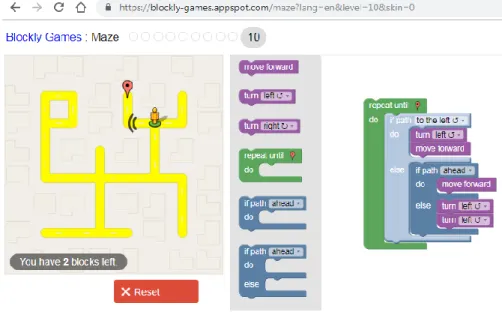
Google has created a web-based visual editor that enables users to create programs by using a mouse to drag-and-drop connecting puzzle piece blocks together to accomplish a set of goals. An example of the Google Blockly programming interface is shown in Figure 2. After the user has completed a goal, Blockly shows them how many lines their program would have taken in JavaScript (or any other language that is built in). There are eight different games listed on Google’s site2 to help teach programming. These games are written in such a way to enable
self-teaching. Each task the user is given can be solved with the information they have been provided, and each puzzle builds on the previous in each game. The first is simply a general puzzle to get the feel of how the blocks fit together, while the second enables the player to control a person on
7 a map trying to get to a destination (or an astronaut on a space station, or a panda in a bamboo jungle). The maze emphasizes looping – continue walking forward until the character runs into a wall, for instance. The next two are a bird and the traditional visual programming turtle graphics. The bird’s goal is to teach about escape conditions from a loop and angles (fly upwards until the bird gets the worm, then fly at a 45 degree angle to get to the nest), while the turtle teaches about loops, logic, angles, functions, color, and variables (the goal is to write code, or connect the puzzle pieces together, to draw the shape(s) shown on the screen). The last two examples are learning how to control and then actually controlling a duck battleship in a pond where the player is trying to sink rival battle ducks, teaching about logic, loops, and motion. This section allows the user to create code using the drag-and-drop puzzle pieces on one level, then to do the same thing in JavaScript code on the next. Everything that is needed to solve the presented problem is given to the user.
8
2.1.2 Scratch
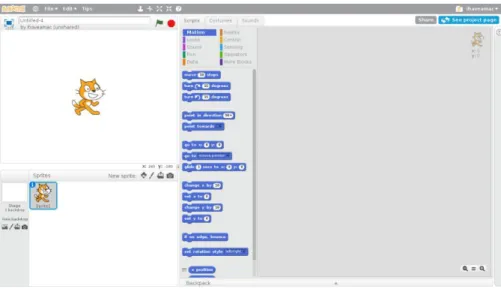
Created by the Lifelong Kindergarten Group at the MIT Media Lab and released to the public in 2007, Scratch3 is a web-based visual language specifically designed to easily create stories, games and animations. Although the software was targeted to young children through mid-teenagers, people of all ages use it. Scratch is built to encourage young people to think creatively, learn reasoning skills, and work together with others. Scratch features color-coded drag-and-drop puzzle pieces that click together with pull-down menus and fill-in-the-blanks on form options. An example of the Scratch programming interface is shown in Figure 3.
Figure 3. Scratch IDE 2.1.3 Snap!
Scratch also influenced Berkeley’s Snap! language4, formerly Build Your Own Blocks,
another drag-and-drop web-based visual interface integrated with first class objects from Scheme, a Lisp dialect. Snap! is heralded as a fun and exciting programming language for both kids and adults that also has meaningful applications for the study of computer science. This
3 https://en.scratch-wiki.info/wiki/Scratch 4 https://snap.berkeley.edu/
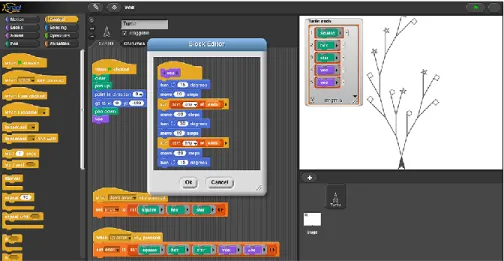
9 language also offers procedures, recursion, and an introduction to functional programming. An example Snap! program and output are shown in Figure 4.
Figure 4. Snap! IDE 2.1.4 Alice
The programming language Alice5 was developed by researchers at Carnegie Mellon University as a tool to teach computer programming in a three-dimensional environment. This visual programming language was developed starting in 1995 to enable students to learn fundamental programming concepts while creating animated movies and simple video games. Alice also features drag-and-drop tiles to create programs to animate the objects on the screen. This is illustrated in Figure 5.
10
Figure 5. Alice IDE 2.1.5 Summary
All of the programming languages we have described (Google Blockly, Scratch, Snap!, and Alice) have programming constructs that allow the user to make decisions (conditionals) and perform repetitive tasks (iteration). They differ significantly in how data/variables are
represented and manipulated, and this effects the complexity of programs that can be created using these languages. Since our goal is to engage younger students in programming and to show how the puzzle pieces translate to a text-based programming language, we have chosen Blockly as the language we will be using in our system.
2.2 Kinect-Based User Interfaces
The Kinect is a popular, inexpensive, three-dimensional camera that has revolutionized human-computer interaction by having depth and RGB cameras in the same easy-to-use unit. Although the Kinect was originally developed for video game input, it has been used as an input device for a wide range of applications, both because it provides a hands-free interface and
11 because it provides physical engagement for users. In this section, we review Kinect based applications in medicine, entertainment, art, and other motion tracking application.
2.2.1 Medical Applications
Manipulating Images and Clean-Room Surgery
When examining medical images, it is crucial to be able to rotate, zoom, and manipulate them with ease to make a correct diagnosis. Working with a three-dimensional image on a two-dimensional computer monitor, and using a mouse which moves in two dimensions makes this interaction cumbersome and counter-intuitive. However, replacing mouse control with a glove-driven interface enables better manipulation of visual data (Tani 2007).
Making use of a hand and finger motion sensor (a Leap Motion), users were able to browse and search for medical images through a web-based interface that found similar images to what the user was already viewing (Wachs 2008). Although it also required a keyboard to start a text-based search, this system was shown to be useful for gesture-based image search,
especially in a sterile environment.
When a surgeon goes into an operating room, it is imperative that they keep everything sterile, including all of the instruments they use. Being able to manipulate images in a three-dimensional space is helpful, however the issue of maintaining a sterile environment is still present. Because the computer keyboard is not sterile, the surgeon must either tell an assistant where to zoom in or when to change images, or they must leave the sterile room, interact with the data glove, rescrub, and then continue the operation, potentially adding hours to the
procedure. Employing the use of a Kinect (Gallo 2011, O’Hara 2014) or a webcam (Kipshagen 2009, Widmer 2014) in the room enables the surgeon to examine and scroll forwards and backwards through a collection of medical data images with a hands-free interface.
12 Physical Rehabilitation
After an injury or a stroke, picking up the pieces and continuing on with life can be difficult for a patient, especially if physical rehabilitation is needed. Even living with
developmental disabilities can be difficult, and can negatively impact a person’s social activities and job opportunities. Depending on the severity of their condition, the patient may need to rely on friends and family members to give them rides to doctor’s appointments, specialists, and rehabilitation sessions. Being able to participate in a physical rehabilitation program from the comfort of their home can be instrumental in recovery.
There are systems available for at-home rehabilitation services, but often they require extra equipment, such as data gloves, which can be cost-prohibitive or difficult to wear. However, even when a data glove is required (Jack 2000), there is substantial improvement in the user’s motivation to do the exercises and a reduction in recovery time. Several different types of data gloves can also provide tactile feedback which will assist the user to know that the
exercises they are doing are producing results.
However, the activities need to be effective in motivating the participants to follow through with the therapy (Chang, Y. 2011). The Kinect can provide a virtual reality game-based rehabilitation option (Chang, C. 2012, Lange 2011) that challenges the user both physically and mentally, keeping them engaged and interested in continuing their rehab every day. A Kinect sensor can provide an interactive system that can track the user’s joints and confirm the patient is doing the exercise correctly, and provide audio or visual cues to issue any corrections (Huang, J. 2011).
13 Watchdog System
As the general population ages, more people are entering assisted care living
environments, and/or combating debilitating illnesses such as Alzheimer’s disease. The Kinect can provide a system to detect falls and fainting spells by identifying a person’s position and irregular movementsin nursing homes and alert the appropriate people who can help the resident (Garrido 2013). A Kinect watchdog system can track the motions of patients within the system’s field of view and detect abnormal behavior in the everyday activities of people suffering from Alzheimer’s (Coronato 2012). The detection of some abnormal behavior such as falling down on the floor are relatively straightforward with the depth map and skeleton tracker, but other
situations such as tracking the motions of other objects in the room and recognizing when they are being misplaced by the person are much more challenging.
Persons with Disabilities
Communication: Assistive technology for those people who are blind or deaf is not a new concept. In the past, in order to use a telephone, a person who is deaf would need to have a friend or assistant make and receive calls for them. In the early 1960’s, the teletypewriter (TTY) was invented which enabled a person to make “calls” to another person who also had a TTY and they would type out their conversation (Berke 2014). However, the cost and incompatibility of
differing models prevented them from becoming widespread until many years later. With the advent of smart phones, webcams, and internet calling services, it has become much easier for a person who is deaf to use sign language. For those who are blind, being able to read and send emails can present problems. A text-to-speech program can help by translating anything written into spoken words.
14 With the Kinect being an inexpensive three-dimensional camera that is readily available and requires no additional equipment to use, breaking down the communication barrier between persons with disabilities should be easier than ever. Sign language can be translated into audio by tracking one user’s hands in a three-dimensional trajectory, and sending the audio to the second user’s computer. The second user’s Kinect’s microphone can pick up audio, and an avatar can sign the message back to the first user (Chai 2013, Kane 2012, Sharma 2012). Because of individual variations in hand motion speed and differing gesture sizes, various image processing techniques are used to match the user-given gesture to the predefined symbols in the program’s gallery.
Movement: To improve quality of life and self-reliance, advanced wheelchairs have been developed to enable users to control movement through hand gestures, or a simple head turn or nod captured by a webcam (Jia 2007). A system such as this has a limited vocabulary of gestures since there are only so many different ways of moving one’s head, and the wheelchair only needs to handle two-dimensional movement.
For those with vision problems, participating in exercise programs can be very difficult. However, a system using a Kinect camera and skeletal tracking can audibly help correct a person’s posture and enable them to do a yoga workout (Rector 2013).
The chance to live a somewhat normal life and support oneself is a choice often denied to those with cognitive disabilities. However, various sensing devices can help give those
individuals a feeling of independence and improve their quality of life. For instance, a restaurant can install a Kinect sensor in the food prep area that will watch an individual’s movements and prompt them with the next step whenever they lose track of what they are doing (Chang, Y.
15 2011). This enables the individuals to maintain a degree of freedom and also have a sense of accomplishment.
2.2.2 In Arts and Entertainment
Being able to animate characters and tell stories interests people of all ages, but
especially can get children interested in computing. Whether the character is a three-dimensional representation of their favorite toy, or two-dimensional character they drew on a sheet of paper, bringing those characters to life is usually a challenging task, but can be made easier by recent advances using a Kinect.
Puppetry (two-dimensional characters)
Imagine drawing a character on a sheet of paper and being able to animate a story using your own characters! By using markers and paper, a cast of characters can be drawn, cut out, and moved around on a flat surface so that a story can be told (Barnes 2008). For a simple concept, a webcam is sufficient to handle this use case. The cutout characters are tracked in real-time and depicted on a new background while also removing the animator’s hands.
It is possible to extend puppetry animation to non-rigid characters by tracking the user’s skeletal joints and mapping them to characters. This was demonstrated by (Zhang 2012) who used Chinese shadow pupped to animate a famous Chinese drama – Wusong Fights the Tiger. Two people can act out this play with one person’s skeleton mapped directly onto Wusong, while the tiger puppet is modified for a standing human to control (see Figure 6).
16
Figure 6. Tiger puppet joint mapping (from Zhang 2012)
Plush animals (three-dimensional characters)
There has also been research conducted using a three-dimensional object to create an animation sequence. From using a plush toy to control a virtual character (Johnson 1999), to a character widget such as a kangaroo to simulate hopping (Dontcheva 2003), interacting with physical props and toys to tell a story has become easier with the advent of the Kinect sensor (Held 2012). In each of these systems, the display mimics the three dimensional motions of the input subject.
Art (three-dimensional sculpting)
A ceramic artist can bring an idea for a piece of pottery to life without flinging clay across the room. By using the Kinect to track the hand motions of an artist, it is possible to sculpt
17 virtual clay, or their chosen medium, in mid-air without the mess of pottery wheels (Murugappan 2012). This enables a designer to explore different design concepts quickly and easily.
2.2.3 Motion Tracking Applications
Computer security – mid-air passwords
Instead of employing the use of text-based passwords that only test the user’s knowledge of the password instead of the identity of the person attempting to access the system, a Kinect can be used to track the user’s hands as they write their passwords in mid-air (Tian 2011). Although competent forgers can mimic another person’s handwriting in two dimensions, adding the third dimension and the speed at which they sign makes it virtually impossible to replicate. Handwriting recognition, virtual keyboards
The Kinect has also been used to recognize mid-air handwritten digits (Huang, F. 2013), and by following the trajectory of the user’s hands has improved the recognition accuracy over only comparing the finished gesture path shape.
The Kinect can also be used as a virtual keyboard, enabling the user to “type” directly onto a table (Roith 2013), or to recognize mid-air handwriting by tracking the user’s hand’s trajectory with multiple cameras (Schick 2012) or by using a Leap Motion controller - a three-dimensional motion and gesture control for computers (Vikram 2013).
Retail – virtual dressing room
Instead of requiring patrons to physically come to a store and try on new outfits, a virtual dressing room can be created so that the shopper can virtually try on clothing from their desk using a Kinect as an interactive mirror and order online (Giovanni 2012). This helps save the shopper time since they no longer need to drive to a retail store. A virtual dressing room also benefits the store since a shopper would be able to see how virtual clothes fit them by
18 superimposing the clothes on an avatar before ordering which should reduce the number of returns, saving on shipping fees and restock time. It also helps expand the store’s reach; an independent store can attract new customers from out-of-state to whom they would not have previously had access.
Teaching – interactive whiteboard
An interactive whiteboard is an instructional tool used in teaching or giving a lecture. It displays computer images onto a board, but instead of a mouse, the instructor uses his hand to manipulate the displayed elements. Even though they are quite useful, they are also expensive and usually non-mobile. By utilizing a Kinect, any standard classroom wall can be transformed into an interactive whiteboard as long as there are power outlets, a computer, and a projection system available (Avancini 2012). Interactive whiteboards increase interactivity and
collaboration in the classroom, and can save handwritten notes into text. Military – training
Training soldiers in virtual environments is not a new concept (Witmer 1995), but most virtual systems have a high cost associated with them. Creating a virtual environment that is non-obtrusive and inexpensive is ideal (Lim 2013). A single Kinect does not enable a natural
interface since the user must always be facing forward. However, having multiple Kinects at different angles around a large area alleviates this issue, and enables the multiple users to be tracked, regardless of which direction they are facing (Williamson 2012). When the Kinects are used in conjunction with a head mounted display, this has been shown to be a viable solution for training multiple soldiers in complex virtual environments.
19
2.3 Gestural Programming Languages
A gestural programming language is one that takes input as a movement of the hands, face or other parts of the body instead of keyboard or mouse input (Hoste 2014). Consumer devices, like mobile phones, tablets, and controller-free sensors such as the Kinect and Leap Motion, equipped with many sensors, like cameras and multi-touch screens, have driven the need to develop gestural programming languages to better interact with these commercially available items.
There have been several advances made to gestural programming languages, although the Kinect has not been seriously considered as a gestural language input device since it is still a relatively new sensor. Gestural languages have generally involved taking input other than from a typical mouse-and-keyboard setup. Some take input from multiple fingers making movements on a screen (Lü 2012), while others take an image or video and analyze the components on the screen to determine the operation being specified (Kato 2013, Kato 2014). Another way to read and interpret gestures is to use a data glove (Kavakli 2007), although only certain pre-defined gestures are recognized.
Communicating audibly or through keyboard commands is not always a practical solution for programmers. For instance, to control an underwater robot, it makes more sense to send instructions through a visual interface instead (Dudek 2007). The human operator can select a card with symbolic tokens that the robot will interpret as various pre-programmed commands. These communication cards could be considered as special cased of static gestures where different poses are used to represent different concepts or actions.
20
3 User Interface and System Design
The goal of our research is to develop a programming interface that is engaging and effective for teaching programming concepts to young students with no prior programming experience. Our first steps were to gather feedback from students in our target audience, determine what gestures they associated with different programming concepts, and to gather sample gesture data to assist in the design and implementation of our gesture recognition system. Based on student feedback, we designed a gesture-based user interface that uses the Microsoft Kinect as an input device, and a combination of gestures and virtual mouse movements to create and execute Google Blockly programs. This chapter describes our preliminary research with students and our system architecture in more detail.
3.1 Student Input
The University of Arkansas runs a variety of engineering summer camps for 6-12th graders in three different sessions. There are two half day camps for grades 6-7 and 8-9 that get to explore a different engineering discipline for each session, including computing. There is also one week long, sleep-away camp for grades 10-12 where the students spend the whole time learning about a particular discipline. For this study we worked with 124 students taking part in the computer science and computer engineering camps over three consecutive summers. Some of these students came in with absolutely no programming experience, while others had used one or more programming languages already. Very few, if any, of the students had used Blockly before, although around half of the students had utilized Scratch in the past.
3.1.1 Student Surveys
The students taking part in our study were instructed for several hours on how to program with Blockly and had the opportunity to work with either Scratch. After completing a number of
21 activities, the students then filled out a survey at the end of the session about the platforms used and the concepts learned. Not all students filled out the surveys, and for those who did, not everyone answered every question.
First, students were asked their favorite and least favorite features of each programming platform, and how well they understood the following concepts after using each platform:
Sequences of Actions/Steps For Loops While Loops If Statements If/Else Statements Functions
In order to focus our user interface design efforts, we demonstrated the Microsoft Kinect to the students, and then asked them to imagine themselves creating programs using gestures instead of the mouse and keyboard. We then asked students what type of gestures they would prefer for programming – standing and using full body motions, or sitting and using only hand gestures – and why. Students who completed the survey were then asked to devise gestures that they thought represented the following six programming concepts:
If statement
If/else statement
For loop
While loop
Run program
22 The questions were left relatively open-ended to allow the students to either describe in words the gestures/movements they would make, or to draw the path of the gesture, or a combination of both.
3.1.2 Student Gesture Capture
After filling out paper surveys, students had an opportunity to capture and record their gestures into the computer using the Kinect. In order to do this, we implemented a gesture capture program written in Processing that interfaces with the Kinect to capture the (x, y, z) coordinates of all fifteen user joints at 30 frames/sec as users make gestures. This program tracks full body motions, so users are able to draw gestures with either hand, or other parts of their body if desired. Our program saves the (x, y, z) coordinates of each joint into a text file for subsequent analysis. At the same time, our program displays the path each joint takes on the screen as the user makes their gesture. Finally, a screen shot of this path is saved as a jpg image.
The joints are color-coded as seen in Figure 7 and Figure 8 below for easier tracking with the human eye. There is also a set of checkboxes in the corner that allow the computer operator to choose which of the user’s joints they are viewing. All joints are still being tracked and the coordinates are being saved, but it allows the user to only view the relevant joints on the screen.
23
Figure 7. CaptureGesture interface with joints labeled; the user is drawing a loop with their right hand
24
Figure 8. CaptureGesture interface where the user jumped up and down, then moved left to right to show full skeletal tracking
In our student gesture capture experiments, the student would indicate that they were ready to start, and the operator would press a key to record their gesture. When the student completed their gesture, they told the operator, who stopped recording. The program recorded the (x, y, z) coordinates of each of the user’s fifteen joints, even though all of our data was drawn one-handed, and made note of which joints were intended to comprise the gesture path (typically just the right or left hand).
The only processing that the program does to the coordinates before saving is to make sure that the exact same coordinate is not saved twice in a row. Instead of checking to make sure that coordinates differed for at least one of fifteen joints, the assumption was made (using collected student data) that the user would be moving at least one of their hands at least a little bit at any given time. Therefore, the program compares the previous coordinate of the left hand to the current left hand coordinate, and compares the previous coordinate of the right hand to the
25 current right hand coordinate, and as long as one of the x, y, or z coordinates is different than the previous of one of the hands, the new coordinate is recorded. This mainly prevents the initial searching for the skeletal tracking from recording multiple identical sets of coordinates, or the instances when the user gets too close to the Kinect and the tracking is lost, so the last set of coordinates is continually recorded until the skeleton is rediscovered. No other processing of the coordinates took place at the time of data gathering, and no other user data was recorded.
3.1.3 Common Gestures among Students
While the students were given relatively open-ended prompts to generate gesture shape information, there were six distinct gestures that appeared consistently throughout the student surveys: circle, spiral, thumbs up, wave, figure-eight, and infinity symbol. The rest of the gestures described or drawn were less common or unique.
The most popular gesture was a circle or loop gesture, with 162 gestures being drawn or described under the “for loop” or “while loop” options, either while standing or sitting. Twenty-seven students chose a spiral gesture, with almost half of them choosing this gesture for one of the loop options while standing. Twenty-two students chose thumbs up gesture, with fifteen of them choosing it to run the program while they were seated at the computer. Eighteen students chose the wave gesture. Finally, twenty-nine students chose either the figure-eight or infinity symbol to represent programming concepts.
Therefore, we decided to limit the gesture vocabulary for our user interface to the circle, infinity symbol, figure-eight, and wave. The spiral is very similar to a circle, so for the sake of simplicity and distinct gestures, we decided not to focus on it. The Microsoft Kinect software we are currently using for skeletal tracking does not track individual fingers, and we are looking
26 more towards dynamic gestures instead of static poses, so the thumbs up gesture was also
discarded.
In order to obtain more gesture data for testing purposes, we performed a smaller scale experiment with around twenty-five young adults interesting in computing. In this case, we asked each of these students to draw each of our final four gestures (circle, infinity symbol, figure-eight, and wave). Students were not told where to start the shape, which direction to go, or which hand to use. The (x, y, z) coordinates for all fifteen joints were saved for each of these gestures in text files, and screen shots of the gesture paths were saved as images for future review.
3.1.4 Other Observations
Although our instructions to students were intentionally open-ended, we found that the gestures that students invented were surprisingly consistent in many ways. First of all, the majority of gestures were drawn with one hand, regardless of if the student was sitting or standing. We had expected more two handed gestures with hands coming towards each other from different angles or moving together to represent different operations. We also expected a variety of gestures with feet or legs, but only a few students proposed kicking gestures.
Secondly, most of the student gestures involved two-dimensional motions, with one hand or the other tracing a path on an imaginary plane half way between the user and the computer screen. Again, we had expected the students to create more three-dimensional gestures with their hands/feet moving forwards and backwards relative to the computer screen. For example, the student using their hand push an on/off button in mid-air in front of them.
Another common concept for gestures was to use the letter of the command or construct as the gesture, for instance tracing an ‘R’ in mid-air for ‘Run’. Upon further consideration, we
27 decided that this approach would cause more frustration because of the variances in handwriting styles, and some letters require multiple brush strokes to complete which is challenging when drawing in mid-air.
In hindsight, we did not capture enough sample gestures from the students participating in the summer camps. We should have asked every student to repeat their gesture two or more times so we could see how consistent the gestures are over time and to better understand gesture variations. However, when we gathered our test data from a few small groups of young adults, each user provided four to seven gestures for each type so we would have a large test base and to see how differently users would draw the same shape multiple times in a row.
3.2 Programming Goals
There are several major concepts covered in an introduction to programming class, but we have selected a subset that maps out a framework for our target audience. After careful consideration, we believe the following four items are the most beneficial for a new programmer to learn:
Sequences of actions/steps
Conditions (if and if/else statements
Loops (for and while loops)
Abstraction or functions (reusable code)
There are other topics that are also important, but not imperative to learn initially when working with a visual-based or gesture-driven interface. These include:
Variables and data types
28 Although this is a relatively small list of programming concepts, implementing a system to represent and execute programs using these programming features would require almost as much work as creating a general purpose programming language. Since this is infeasible for our
research, we have chosen to build our gesture-based programming environment on top of an existing visual programming language.
3.3 User Interface Design
One question that we have examined in detail is how to manage working with gestures. While traditional programming typically involves using a mouse-and-keyboard, we have been careful not to create a user interface that merely replaces the mouse with the user’s hand
motions. However, since technology is very pervasive in present-day society, many people have already had computer experience and are familiar with using a mouse. That familiarity may assist in increasing the interest levels of participants, and may increase the user’s attention span, especially for younger children. Another advantage to having the user’s hand control the pointer instead of using a mouse is being able to use three-dimensional movement that a traditional mouse does not accommodate.
We also had to decide whether to create a brand new gestural language, or modify the concept of using one’s hand as the mouse, and adding new gestures that naturally go with the code. For instance, if a person wants to program a loop that runs three times, they could draw a circle in mid-air, and trace over it two additional times (three total revolutions) to indicate this. One challenge here is that making users do repetitive motions to enter numbers is only effective for small numbers, because the user either would get tired or lose count for larger values.
Our design for the look and feel of the interface was in part decided by answers to the above question. If we choose to use the user’s hand as the mouse, a drag-and-drop interface
29 would work fine. We could represent different parts of the code as building blocks that can be stacked on top of each other, or as puzzle pieces fitting together. We have several options to display the actions themselves. For example, we could create a virtual world or game interface with a character or robot that navigates and completes tasks. We will need to display the action in some manner, but we need to be mindful of the tradeoff between making it enjoyable and functional.
3.4 Software/Hardware System Design
Our system design consists of hardware and software components that work together to enable programmers to create and execute programs using hand gestures to control mouse movement. For user input, we are using the Microsoft Kinect since it is capable of capturing the locations of the user’s hands and other joints in real-time. To make our system visually engaging, we are writing our code to interact with Google Blockly to show the game, intended tasks, and finished animation, and a smaller window to the side for the Processing application to show the joints that are being tracked and give visual cues when a gesture has been recognized. The Processing application captures user motions from the Kinect and processes this information to track hand motions and recognize user gestures. The output of this Processing application is a sequence of mouse motions and actions that are used to communicate with the visual
programming framework, Blockly. We chose this framework for students to create and execute programs after seeing its success during the summer camps. The high level design of our hardware and software is illustrated in Figure 9 below. The remainder of this section describes all of these components in more detail.
30
Figure 9. System design 3.4.1 Processing
Processing is a relatively new language created specifically to make programming with graphics easier and more fun for new programmers to use. The language is designed so that with a single statement, a shape (an ellipse for example), can be drawn to the screen. It is a derivative of Java and can run any imported Java packages and utilities. A small sample of Processing code is shown in Figure 10 below. We use Processing and its built-in libraries to communicate with the Kinect to obtain the user’s joint locations in real-time, to process this data and recognize hand motions and gestures, and also to communicate with our Blockly programming framework.
31
Figure 10. Example code in Processing
Kinect
When users are creating programs using our system, they can stand or sit in from of the Microsoft Kinect device. The Kinect captures RGBD images of the user in real-time, where the RGB component is a traditional color image, and the D component corresponds to the depth of each point in the scene. Depth is calculated using an infrared laser CMOS sensor and stereo triangulation. The Kinect SDK provides tools to access the image and depth map. There is also an interface that allows programmers to obtain the (x, y, z) locations of the user’s joints as the move in front of the sensor. The device has two big advantages compared to other human motion tracking solutions. First, the user does not need to wear any special clothing, hold any other devices, or attach markers at their joints in order for the system to work. Second, the Kinect is inexpensive and widely available.
32 Joint Trajectory by Skeletal Tracking
Skeletal tracking is controlled by the SimpleOpenNI package, which is the Processing subset of OpenNI (Open Natural Interaction). OpenNI is a multiple language, cross-platform framework that provides an interface to interact with the Kinect and track a user’s skeleton and joint positions. The skeletal tracking module passes joint (x, y, z) positions back to Processing. For full skeletal tracking, we will predominately be focusing on upper body joints, with the assumption people will not be programming with their feet. We will also develop an interface that allows the user to sit at the computer and use hand gestures in mid-air to interact with the system. An example of a user making a wave gesture with hand joint tracking (instead of full skeletal tracking) is shown in Figure 11.
Figure 11. Kinect hand tracking example; the user is making a wave gesture
Extrapolate Gesture Based on Matching Score
The Kinect device and skeletal tracking software provide our software with a continuous stream of the user’s joint positions. The purpose of this software module is to filter this stream of data to determine what movements from the user are gestures related to their programming task,
33 and which are either just idle movements (e.g. standing around) or irrelevant movements (e.g. scratching their head). The techniques we devised for this purpose are described in Chapter 4 Gesture Matching.
Figure 12. Kinect hand tracking; the user is in the process of drawing an infinity symbol
Create a Programming Construct
Once a gesture is recognized, the action that the user intended with their gesture needs to occur. For example, if the user draws a loop gesture which for this example is mapped to a while loop, a while loop should appear in the sandbox area of Google Blockly.
3.4.2 Blockly
Once the gesture has been recognized and the action intended has been executed, the rest of the user experience will lie in their interaction with Blockly, until another gesture is
recognized.
Display and Execute Code
After the user has completed the tasks given and clicked the “Run Program” button (or executed a gesture that is mapped to the “Run Program” button), the code that they have written
34 will be executed through Blockly so they can see what their program does. The output of the program is displayed as a simple graphics animation on the screen, and after successfully
completing the task given, their puzzle piece code is translated into JavaScript so the user can see what the code looks like in a text-based language (Figure 13).
Figure 13. JavaScript code display after finishing a puzzle in Blockly 3.5 Gestures
We also need to consider how to define, train, recognize and adapt gestures. The simplest and most straightforward way of recognizing gestures would be to have predefined gestures in the system and train the user how to do those gestures. For instance, left hand moving towards the left side of the screen means turn left, and right hand moving towards the right side of the screen means turn right. This version of the system would only accept gestures that match what is previously defined. Or, on the other hand, we could enable the user to create their own gesture for each action – two hops means turn left, while stomping the right foot means turn right. This would be more difficult to program, and more challenging to compare since no two people would have the exact same experience. However, it would enable more personalization of the program, which in turn may increase the user’s interest if they feel like they are more in control of what is happening. Our final thought on gesture recognition would be a combination of the previous two concepts – show the user what gesture is expected and enable them to ‘practice’ it while the
35 system learns how the user will interpret each gesture. Instead of using the predefined left hand towards the left side of the screen to turn left, the user may move their right hand towards the left side of the screen – the system would learn from what the user repeats back to it and set that as the accepted gesture. This would give them some level of control, while giving them a starting point for what gesture would naturally make sense to them.
There are several ways we could define gestures. One way is to have a set of static poses, which, when performed in a certain order, comprise the gesture. Another would be to have a fluid set of coordinates which comprise the gesture and compare them to predefined gesture paths in the system. The gesture paths would need to be normalized in some way, then using the Euclidean distance between the given gesture path and the predefined gesture paths, the most likely one could be extrapolated. A third option would be to combine static poses and gesture paths so that they work together. That will be discussed in Chapter 4 Gesture Matching Algorithms.
3.5.1 Gesture Variations
Another possible issue will be gesture variations. Will the user’s gestures change over time, and what will be done about it? If this tool were intended to be used to aid in teaching a semester long class, then the user’s complacency would most likely play a part in degrading gesture precision. However, with a half-day summer camp, this issue will probably not be evident.
We will also be more closely exploring how much accuracy is lost when using gestures instead of a point-and-click mouse-and-keyboard setup. We would like there to be a fair trade-off between fun, the precision of gestures, and ease-of-use.
36
4 Gesture Matching Algorithms
We have built a gesture-driven interface to teach programming to the broader masses of non-traditional programmers. As part of this work, we have developed and compared several gesture matching algorithms. We explored two very different approaches. The first detects static poses while the second method focuses on the motions of joints.
4.1 Static Poses
To detect static poses, there are a number of different approaches we could take starting by looking at the relationships between the user’s joints. One of the least elegant and not easily extensible ways would be a long sequence of “if” statements that trigger when the user’s joints are lined up in a particular configuration, such as if both hands are above the user’s head. This does not lend itself to being easily expanded, and the code gets very sloppy with as few as three poses detected. To make more object oriented code, those “if” statements could be moved to separate functions, but it would still not be a good choice overall.
Another option would be to use a data driven method of possible gestures. A table, or database, would be created that would have as many columns as recognized joints. As mentioned earlier, the OpenNI package can track the following fifteen joints:
Head (H)
Neck (N)
Left/Right shoulders (LS and RS)
Left/Right elbows (LE and RE)
Left/Right hands (LH and RH)
Torso (T)
37
Left/Right knees (LK and RK)
Left/Right feet (LF and RF)
The table or database must also contain information in each column that described the desired joint relationships in order to recognize a static pose. If the pose can be done either left-handed or right-handed, there would be two separate entries in the table. Let us examine a wave gesture using the right hand. For this example, we would only be looking at the right hand, right elbow, torso, and maybe neck or right shoulder. Table 1 describes the sequence of poses for a hand wave gesture in relation to the right shoulder. The gesture will start out with pose 1 with the right hand near the torso to the left of the right shoulder and right elbow. Pose 2 would consist of the right hand being to the right of the torso, right shoulder, and right elbow. A wave would consist of a sequence of pose 1 – pose 2 pairs. With only four joints as part of the two poses that would comprise of the gesture, only eight of the possible thirty boxes in the table are holding data. If the user were doing a more complex full-body movement for a gesture, this table would hold
significantly more data. However, for most gestures we are examining, this method would leave many empty boxes in the table which is not particularly efficient.
38
Table 1. Pose table for all 15 joints for a simple right hand wave gesture
Joint Right hand wave pose 1 Right hand wave pose 2
Head - - Neck - - Left Shoulder - - Right Shoulder RS.x > RH.x RS.y ≈ RH.y RS.x < RH.x RS.y ≈ RH.y Left Elbow - -
Right Elbow RE.x & y > RH.x & y RE.x & y > RS.x & y
RE.x & y < RH.x & y RE.x & y < RS.x & y
Left Hand - -
Right Hand RH.x & y ≈ T.x & y RH.x > T.x RH.y ≈ T.x Torso T.x & y ≈ RH.x & y T.x < RH.x T.y ≈ RH.y Left Hip - - Right Hip - - Left Knee - - Right Knee - - Left Foot - - Right Foot - -
A more compact representation would to be to store all poses in a table with one row per pose. The first column would hold all of the conditions, connected together, the second column would have the previously expected pose, and final column would have the action taken when the gesture is matched.
For instance, if we were to create an undo gesture that has the user make a “slash” motion in front of their body (using either their left hand or right hand, starting above their opposite shoulder), we could track their start pose (Table 2 Label A or C) and their end pose (Label B or D) and detect the action they have executed.
39
Table 2. Possible undo gesture
Pose Label
Conditions
(Psuedocode) Conditions (English)
Previous Expected Pose Action A RE.x ≈Torso.x RH.x <Torso.x RH.y <LShoulder.y
Right elbow aligned with torso, right hand to the left of torso and above left shoulder
(none) Look for following pose
B
RE.x > Torso.x RH.y > RE.y RH.y >RHips.y
Right elbow on right side of torso, right hand below right elbow and right hip
A Undo previous action (right handed) C LE.x ≈ Torso.x LH.x > Torso.x LH.y < RShoulder.y
Left elbow aligned with torso, left hand to the right of torso and above right shoulder
(none) Look for following pose
D
LE.x < Torso.x LH.y > LE.y LH.y > LHips.y
Left elbow on left side of torso, left hand below left elbow and left hip
C
Undo previous action (left handed)
4.2 Fluid Motion of Joints
Instead of choosing a series of static poses to represent a gesture, it could be defined in terms of fluid motions of the user’s joints. The user’s gesture could be saved as a set of joint coordinates, normalized in some way, and then compared to predefined gesture paths in the system. There are many ways we could compare gesture paths to identify the user’s gesture.
One way to compare gestures would be to use the sum of the Euclidean distances between the given gesture path and the predefined gesture paths. This approach has the
advantage of being simple to execute, but it may be sensitive to small changes in orientation. For example, if the user stands at a 45° angle relative to the Kinect and makes a gesture, the (x, y, z) coordinates along the path will not align well with the (x, y, z) coordinates from a straight on gesture.
Another matching approach would be to take the first and second derivatives of the gesture and use the Frenet-Serret Formula, a coordinate independent method. This would enable the user to stand anywhere and have the gesture recognized regardless whether it was drawn on
40 the left or the right. There is more computation needed for this approach, but it may be necessary for robust gesture matching.
Finally, we could combine static pose detection and gesture path recognition so that the start and end poses would indicate where the gesture was drawn. This way, a circle drawn on the left side of the body would be recognized as a different gesture than when it is drawn on the right side of the body.
4.3 Gesture Matching Algorithms
An important part of controlling the computer with gestures is the ability to recognize when a gesture has been drawn. By far, the most popular gesture created by students was a circle motion for a loop gesture. So to refine the gesture matching algorithms, it was decided to
concentrate on matching the loop gesture first.
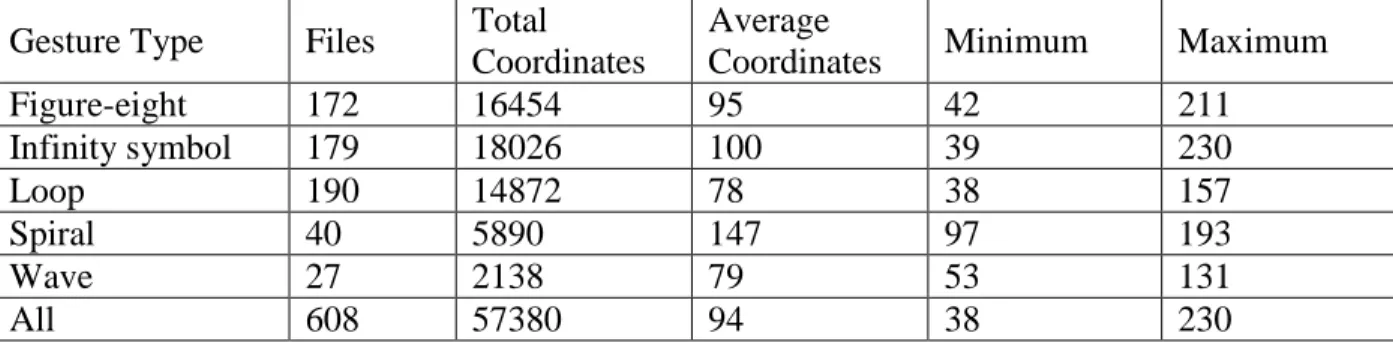
Using the data collected in 608 gesture files, we did a statistical analysis of the lengths of these five gestures shown in Table 3. The minimum length and maximum length for each gesture covered a large range, with the shortest gesture at 38 coordinates and the longest gesture at 230 coordinates. There was also a wide range in average gesture length for the five gestures, with loops averaging 78 coordinates and spirals averaging almost twice as many coordinates with 147. The overall average length of all gestures was around 94 coordinates. When this system is
implemented with live data (instead of saved gesture files), we should be able to look at a
window of around 150 coordinates at a time to decide whether the person’s movement contains a recognizable loop gesture.
41
Table 3. Number of files per types of gesture
Gesture Type Files Total Coordinates
Average
Coordinates Minimum Maximum
Figure-eight 172 16454 95 42 211 Infinity symbol 179 18026 100 39 230 Loop 190 14872 78 38 157 Spiral 40 5890 147 97 193 Wave 27 2138 79 53 131 All 608 57380 94 38 230
For the following analysis, we have decided to focus on three loop gestures generated by students in our research studies. The first example (Figure 14-B) is a very obvious loop that has very little overlap at the beginning and end of the gesture. Our second example (Figure 14-C) is very circular, but there is a significant overlap between the two ends. Our third example (Figure 14-D) is roughly loop shaped, but it has significant indentations along the loop path. Figure 14-D represents how the Kinect can occasionally lose a person’s joints while tracking (due to loose clothing or bad lighting for example). Figure 14-A represents an ideal loop, at the size to which the other gestures will be scaled.
42 Although we collected the (x, y, z) coordinates of all fifteen user joints, we focused only on the (x, y) coordinates of the user’s left and right hands. This was determined from the student feedback we received from the summer camps. We also focused on a number of different gesture matching algorithms specifically for loops, discussed later in this chapter including two forms of template matching, sector quantization, centroid matching, and two forms of medoid matching.
4.4 Gesture Normalization
One issues that arises when trying to compare two gestures is the number of coordinates in each gesture varies from user to user. From the data above, we see that our figures could have between 38 and 230 unique coordinates. It is very difficult to compare the similarity of two figures when one has more than five times the number of coordinates as the other. For this reason, we perform extrapolation and interpolation to normalize each figure so they have the same number of coordinates.
We tested a few different numbers to which to subsample our data, and discovered that 50 coordinates produced the best results. We tested 190 loop gestures files consisting of 38 – 157 coordinates each, and brought each eligible file down to 25, 50, 75, and 100 coordinates for analysis. Because our average loop only has 78 coordinates, paring to 100 coordinates was ineffective, and that option was removed from consideration.
While there were a few figures with fewer than ‘x’ coordinates, it was not necessary to add coordinates to bring those up to ‘x’ coordinates. When running this program in real-time, the code will be looking for the average number of coordinates (closer to 150) and trying to find a gesture within those. The program will not be looking for a gesture in a 40 coordinate range since the average loop takes 78 coordinates. Because we would never be looking at such a small range in real-time, it was not necessary to do anything to our test data. To test the accuracy of the