Visual attentive interfaces
T Selker
Context-aware human-computer interfaces that rely on a person’s attention as the primary input can be called attentive interfaces. Attention is epitomised by eye contact — eyes are not only scanning devices, they are constantly making social commentary by how people gaze as well. Concentrating on the autonomic and social responses that eyes communicate allows eye tracking to drive attentive interfaces. Eye-based attentive interfaces can be improved by noting the way people scan objects and take advantage of the lingering stare, roving gaze, and nervous blink in a language of ocular attention. Even simple sensors are able to deduce many of these social cues.
1.
Introduction
People communicate their intention with actions and words. Work in context-aware computing broadly focuses on the recognition of intention in computer interfaces [1]. These interfaces respond to what should be done in a situation to further people’s intentions [1, 2]. The action of attention is often an excellent clue to intention. Attention itself can be sensed in many ways. Where we are, what we do, how we move and what we say are all clues to our focus of intentions. Attentive interfaces are a subset of context-aware computing which explicitly focus on human attention as the crucial input [3] to computers. People demonstrate attention through actions, such as noises and where a person focuses their eyes. Scenarios that attention can drive are equally varied, ranging from the tunnel of focus created in conversational attention to editing or sorting information.
The creation of attentive interfaces is getting broad acceptance and interest [2, 4]. For example, inadvertent sounds a camera person makes while filming have been able to note important edit points [5]. Even the way a person moves a cursor on a computer interface shows what a user is attending to [6]. While attention can be noticed in everything we do, it is commonly attributed to what and how we look at things.
Many of the eyes’ movements are actually attentive social cues. Concentrating on autonomic and social responses that eyes communicate has given the eye-tracking field great progress. Focusing on such common sense social acts is pushing the eye-based attentive interface world forward. The eyes are a versatile communicator of attention. This paper will show how they exemplify the attentive interface approach.
2.
Eye tracking
Eye tracking has long seemed to hold promise as the ultimate human computer interface. Eye position can be measured in many ways. In the early days, eye tracking was done with mechanical/optical instruments that tracked mirrored contact lens reflections, or even instruments that measured eye muscle tension [7]. Newer approaches mostly consist of illuminating the eye with infra-red light and watching reflections with a camera. A camera with optics can now be purchased for well under $10 and computers to process the images are getting cheaper as well. As the basic parts to make an eye tracker become ubiquitous, the efforts to use eye tracking have proliferated. One indirect way of telling where an eye is focusing is to note that the EEG signal is dominated by ocular stimulus. Four or five video strobe rates on different parts of a display can be distinguished in an EEG. When a person attends to one of them, their EEG pulses at the video strobe rate. Codings of attention on a screen can be identified with an EEG frequency counter.
The classic approach to using eye tracking to move a cursor does not take into account the many things that the eyes do. Although gaze interfaces have been attempted since the
attentive interfaces focus on
human attention as the
crucial input to computers
1970s, they have focused on people stabilising their skittish eyes to control things. Eye-tracking products have historically started with the assumption that people only look at what they are attending to. They do not. Many researchers and
companies have made eye-tracking products without significant profit.
The eye is a guard dog, roving over scenery for interesting visual stimuli. Our eyes track slow-moving objects, dart with ballistic movements to look at fast-moving objects, playing over the things that fascinate us. As well as smooth tracking, the eye has constant tremors and jerks around with saccades and dead-reckoning ballistic movements. These characteristic movements can be modelled and are easy to interpret.
Unfortunately, whereas a large part of the input to our brain comes from our eyes, they are not reciprocal I/O devices. Eyes get frustrated being told to only look at what the conscious mind wants to select. The eye’s job includes orienting and protecting the animal [8]. Focusing on a spot does not take the entire eye. Within the 3° of gaze of the area centralis, the mind is using 1.5 million sensors to gather information with high resolution and colour. For almost 180°, the eye’s peripheral vision uses as many sensors as the area centralis to identify objects and motions of interest. The eye tracker therefore requires a cursor on the screen to tell you where it thinks you are looking. The mind strains to ignore the world and not look away from the cursor. It causes the jiggle that allows the eye to see and tries not to blink. This becomes uncomfortable. One experiment that Miller, Rutledge and Selker set up in 1990 included having a button to allow a user to tell the system when they were focusing on the cursor. This allows the user to gaze at other things than the cursor as they work. The mind can remember endless scenes and imagery presented to it for only a second [9]. The eye looks to get information very quickly, but gives social attention in a lingering way. People stare at each other to demonstrate attentiveness more than to resolve detail. People blink twice as often when nervous than when not [10]. Actors and sales people know these things and learn to fake natural eye cues for effect. The way the eye moves is based on a small set of principles concerning knowing where things are, gathering information and expressing interest.
As our systems recognise and classify what the mind does with eye gaze, attentive interface opportunities are finally
emerging. Attentive interfaces then might do well to focus on the social communication that the eyes do in the course of interacting with the world.
3.
Attention can be noticed
While the advertising and psychology fields have long used eye movement to understand what a person is looking at, the human computer interface field has struggled to use the eye
as a controller [11]. The attentive eye interface breakthrough is in observing what the eye does, not giving it a tracking task [12]. Interest Tracker is a system that uses time-gazing over a title area instead of dwell-time on a specific character for selection [13]. A banner title is presented at the bottom of a screen. A user might glance down to read the title; if they play over it for more than 0.3 sec a window opens on the computer screen with the full article. This 0.3 sec of dwell is still shorter than the typical one second it takes to select anything with a pointing device. People immediately like and use it. Interest Tracker notices whether the person is paying attention to news feeds, stock prices, and help information. Interest Tracker’s user model learns what titles to audition at the bottom of the screen.
Interest Tracker spawned two directions of work — eye-motion analysis interfaces and eye-gesture interfaces. Eye-motion interfaces will be described below with Magic Pointing and Invision. Gesture interfaces will be described with Eye Bed and EyeaRe. Magic Pointing lets the mouse further manipulate the subject of visual attention [10]. An eye tracker enables where a person is looking to roughly position the cursor, which the mouse can then manipulate accurately. If a person wants to change the application window they are working with, they stare at the application window they want to work in; this ‘warps’ the cursor to that application window. Magic Pointing speeds up context changes on the screen.
4.
The path of attention can demonstrate
intention
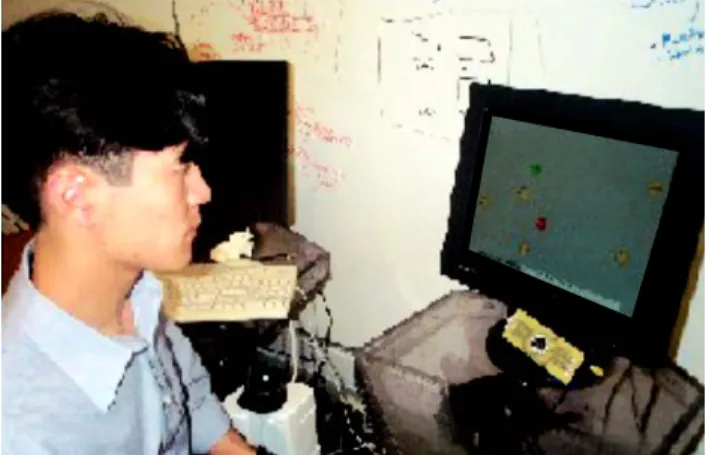
In the late 1960s, Yarbus showed that the way that a person’s eyes move while scanning a picture describes aspects of what they are thinking [11]. When seven different questions were asked of viewers of a painting called ‘The Unexpected Visitor’, different characteristic eyescan patterns were associated with the questions. When asked the ages of the people in the room, the eye moved from person to person, when asked what the material aspects for the family was, the eye viewed things but moved back to the matriarch of the family. The gaze paths with which a person looks at things is a key to what a person is thinking. The Invision work used this observation in a user interface to prioritise activities [3] (Fig 1).
the eye is a guard dog,
roving over scenery for
interesting visual stimuli
Fig 1 Invision groups sponsors by Mike Li’s eye-movement- demonstrated interest.
Two end results that came out of the Invision attentive system were improving eye tracking, and using gaze to group things of interest. Taking the fact that an eye moves between staring fixations can help find those fixations. By analysing the patterns in eye-travel vectors between the fixation vertices, Invision can get a much more accurate idea of what the person is trying to look at than by looking at the dwell on a particular item (Fig 2). The Invision eye tracker experiment uses pattern-based trajectory analysis to increase the accuracy of selection by up to five times (Fig 3).
Attending to the order that people look at things is a powerful interface tool. Invision demonstrates that an attentive interface can be driven from Yarbus’s insights of where people look. Scenarios were created in which the attentive pattern of the eye gaze can be ‘understood’ by a computer. By watching the vertices of a person’s eye moving through a visual field of company names, the system notices which ones interest the user. The company names aggregate themselves into clusters on the screen based on the user’s scanning patterns.
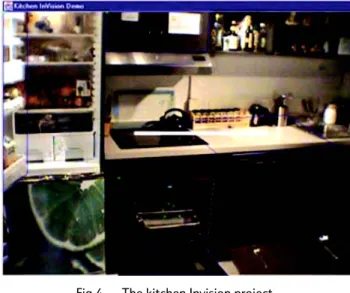
An equivalent example of the Invision interface approach uses an ecological interface that looks like a kitchen with many
precipitous problems (Fig 4). On the counter is a dish with some food in it, the oven door is slightly ajar, as are the dishwasher and refrigerator doors. How a person’s eyes move around the image allows the system to understand whether the user is hungry, thinking of taking care of problems, or thinking about something else. The interface uses the order in which things are viewed in the picture to bring up a menu, etc.
This particular approach aggregates eye motions into a story of what the user wants to do. The attention model drives the interface. The vertices of change in direction of eye
movements easily give focus locations that have eluded most eye-tracking research. The next example shows that ocular attentive interfaces do not require eye tracking.
5.
Ocular attention without eye tracking
Eye-aRe is a system based on the realisation that many of the social cues that are made by an eye do not depend on where it is looking (Fig 5) [14]. An eye darting around, staring for a long time, or blinking nervously, are gestures, not eye positions at all. In fact, Eye-aRe has no eye tracking system in it. It simply measures reflected infra-red (IR) from the sclera and pupil (the dark part of the eyeball) to a photo diode. Without any camera, this single sensor can recognise many aspects of attention. Changes in reflection are used by the system to determine whether the eye is open, closed, blinking, winking or staring. Eye-aRe consists of a microchip PIC microprocessor which records and runs the system, an LED and photo diode looking at the eye, another LED/photo diode-pair measuring whether it is in front of other Eye-aRe devices and which also communicates information. This IR channel communicates to the base-station or another pair of glasses.
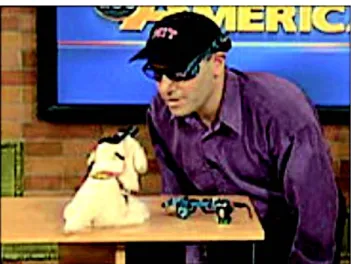
If an Eye-aRe user is staring, the IR reflection off their eye does not change. Staring at a video base-station starts the video, glancing away stops it. The video image can notice whether a person is paying attention to it, and if the person does not like it because they blink their eyes in frustration. The attentive system attempts to put up a more pleasing image. If an Eye-aRe user is staring at Ernesto Arroyo’s special dog, the dog will bark. If the person looks around or blinks their eyes, it will stop
Fig 2 Selection time versus target object size for fixation (blue) and pattern-based (red).
30 25 20 15 10 5 0 5 25 45 65 85 105 125 145
object size, pixels
selection time, sec
fixation-based pattern-based
Fig 3 Per-cent selection accuracy versus target object size for fixation (blue) and pattern-based (red) approaches. 100 90 80 70 30 10 0 5 25 45 65 85 105 125 145
object size, pixels
select io n accuracy, % fixation-based pattern-based 20 40 50 60
barking. When two people are staring at each other, Eye-aRe will use the IR communication channel to exchange
information. When one person is staring at another person, the person being stared at will get the contact information of the person that is staring. One of the things that worked out well has to do with the way people look. People tend to move their eyes until they have to look 15° to the side; Eye-aRe’s IR communication has an 18° horizontal field of view [3]. In this way, the gaze and blink detection happens when the person looks at the Eye-aRe base station or glasses. Eye-aRe shows that a machine that does not even track the eye can under-stand the intentions of attention.
6.
A simple attentive eye gesture language
To take the eye communication one step further, a number of experiments were performed in which an eye gesture language was used to drive an attentive interface for perfoming tasks that would be helpful to a person lying in a bed (Fig 6). The Eye Bed interface research project demonstrates that computers can be attentive and useful to peoples’ needs for the horizontal 8 hours of the day. The Eye Bed uses eye tracking housed in a converted lamp hanging over the head of the person in bed [3]. This system easily distinguishes between staring at an object on the ceiling versus glancing around indifferently. A language of attentional eye gestures drives the scenario. Glancing around shows lack of attention while staring demonstrates attention. A long wink-like blink means selection. Blinking rapidly means dislike. In the bed, the eyes being closed could mean the user is going to sleep and so a sunset and a night-time scenario begin. The eyes opening will make a morning wake-up scenario begin. Intelligent systems analyse a person’s reactions to media on the music and video jukeboxes. The media offerings are auditioned to notice the attention shown them. Blinking when one does not like the media makes the system know that it should choose other music or video to show the person. Winking or going to sleep turns it off completely. The reading of eye gestures becomes an attentive user interface. Simple eye gestures were analysed by Jessica Scott’s program to make a very demonstrable and high-quality bed environment.
7.
Discussion
Attentive interfaces can be epitomised by the way an eye attends. Understanding attention requires a model of what eye movement means.
This paper has highlighted the complexity of interfaces that can be made from some simple observations of eye behaviour. The demonstrations show that as an output device the eye is a simpler user-interface tool than is normally described. The eye can easily be used with a language of closing, opening, blinking, winking, nervous movements, glancing around, and staring. This language can be sensed with eye-tracking cameras or with a simple reflected LED, such as the EyeaRe system demonstrates.
The gratifying point is that we are now in a position to implement and extend eye-based interface ideas. The hardware to create and test attentive interfaces is now available and inexpensive.
8.
Conclusions
Eye-based attentive interfaces have great promise. The eye is a powerful demonstrator of attention. The draw to use it as an interface tool has been strong for some time. With the simple use of it as a secondary indicator of intention, interfaces can be made to use eyes that are robust and computationally simple.
Fig 5 Ted Selker stares at a dog with the Eye-aRe system to make it bark.
Fig 6 The Eye Bed uses eye gestures to interact with an ecological interface.
attentive interfaces allow
our interests to make things
happen
Models of human intention and attention are becoming part of all computer-human interfaces. The context of where we are and what we are doing is doing more than automatically opening the grocery store door when a patron walks over a sensor mat. Many interfaces can be driven completely by noticing a person’s attention.
Sensors in a context can tell many things about human attention [3, 15]. A sensor pad in front of an office door can tell if a person is trying to visit. Many biometrics such as EEG changes, sweat responses, and heart rate variability are possible additions to the attentive interface arsenal. We have demonstrated that models of attention are crucial to using the eye as an attentive interface input.
The need for attentive interfaces comes from valuing our concentration on things. We want to focus on what we are doing and the people we are with. Attentive interfaces might notice our intentions without taking our attention — even encouraging our ocular focus to be on what we want to do. Attentive interfaces allow our interests to make things happen.
Acknowledgments
I am deeply thankful to the many students who have contributed to the context aware laboratory. I am especially indebted to Ellen Shay and Sarah Dionne for their editing help.
References
1 Selker T and Burleson W: ‘Context-aware design and interaction in computer systems’, IBM Systems Journal, 39, Nos 3 and 4, pp 880—891 (2000).
2 Lieberman H and Selker T: ‘Out of context: computer systems that adapt to, and learn from, context’, IBM Systems Journal, 39, Nos 3 and 4 (2000).
3 Selker T, Burleson W, Scott J and Li M: ‘Eye-Bed’, Workshop on Multimodal Resources and Evaluation in conjunction with the Third International Conference on Language Resources and Evaluation (LREC) (June 2002).
4 Bolt R A: ‘Conversing with computers’, Technology Review, 88, No 2, pp 34—43 (1985).
5 Lockerd A and Mueller F: ‘LAFCam: leveraging affective feedback camcorder’, CHI2002 (April 2002).
6 Lockerd A and Muller F: ‘Cheese tracking mouse movement activity on websites, a tool for user modeling’, CHI2001 Conference on Human Factors in Computing Systems, ACM (April 2001).
7 University of Washington, Human Interface Technology Laboratory — www.hitl.washington.edu/scivw/scivw-ftp/publications/IDA-ps/ TRACK.PS
8 Gregory R L: ‘Eye and Brain: The Psychology of Seeing’, Oxford Univ Press, 5th edition (July 1997).
9 Shepard R N: ‘Recognition memory for words, sentences and pictures’, Journal of Verbal Learning and Verbal Behavior, 6, pp 156—163 (1967).
10 Zhai S, Morimoto C and Ihde S: ‘Manual and gaze input cascaded (MAGIC) pointing’, CHI 1999, pp 246—253 (1999).
11 Li M and Selker T: ‘Eye pattern analysis ocular computer input’, IVA (September 2001).
12 Morimoto D and Flickner M: ‘Pupil detection using multiple light sources’, Image and Vision Computing, 18, pp 331—335 (2000). 13 Maglio P P, Barrett R, Campbell C S and Selker T: ‘SUITOR: an
attentive information system’, IUI2000, ACM Press, New York, NY, pp169 — 176 (2000).
14 Selker T, Lockerd A, Martinez J and Burleson W: ‘Eye-aRe: a glasses-mounted eye motion detection interface’, CHI2002 Conference on Human Factors in Computing Systems, Minneapolis, MN (2002).
15 Selker T and Snell J: ‘The use of human attention to drive attentive interfaces’, Invited Paper CACM (March 2003).
Ted Selker is the MIT director of the Caltech/MIT voting project, which evaluates the impact of technology on the election process. A large part of his work in voting is concerned with inventing and testing new technologies for voting. Examples include new approaches to user interface and ballot design, and secure electronic architectures and approaches for improving registration. His Context-Aware Computing group at the Media Lab strives to create a world in which people’s desires and intentions guide computers to help them. This work creates environ-ments that use sensors and artificial intelligence to create keyboard-less computer scenarios. Prior to MIT, he was an IBM Fellow and directed the User Systems Ergonomics Research lab at IBM. He has served as a consulting professor at Stanford University, taught at Hampshire College and Brown University, and has worked at Xerox PARC and Atari Research.